

10 løsninger for programvare for arbeidsstyring i Storbritannia for 2026

Programvare for arbeidsstyring i Storbritannia – kortliste


Programvare for arbeidsstyring i Storbritannia viser til digitale verktøy som er utviklet for å hjelpe britiske virksomheter med å håndtere bemanningsplanlegging, oppmøte, lønn og overholdelse av regelverk på ett sted. Hvis du leter etter den rette plattformen, balanserer du sannsynligvis komplekse skiftmønstre, regelverk i stadig utvikling og behovet for å støtte både ansatte på stedet og fjernarbeidende team.
Ved å velge riktig programvare kan du redusere manuelt administrativt arbeid, overholde regelverket og holde arbeidsstyrken engasjert. I denne listen finner du en tydelig sammenligning av ledende britiske løsninger for arbeidsstyring i 2026, slik at du trygt kan velge den løsningen som passer best til organisasjonens behov.
Why Trust Our Software Recommendations
Our team has been testing and reviewing software since 2012. As HR experts ourselves, we know how difficult—and important—it is to choose the right software.
For this guide, we evaluated tools using hands-on testing and independent research, scoring tools using our selection criteria. We also draw on insights from industry thought leaders and practicing HR experts.
Our reviews reflect our human editorial judgment, not a sales pitch.
Expert reviewers:
Sammenligningstabell for programvare for arbeidsstyring i Storbritannia
Denne sammenligningstabellen oppsummerer prisopplysningene for mine beste utvalg av programvare for arbeidsstyring i Storbritannia:
| Tool | Best For | Trial Info | Price | ||
|---|---|---|---|---|---|
| 1 | Best for hiring in 150+ countries | Free demo available | From $5/user/month | Website | |
| 2 | Best as AI for business | Free demo available | From $8/user/month | Website | |
| 3 | Best for rota management in hospitality | 14-day free trial + free demo available | From $5/user/month | Website | |
| 4 | Best for employee absence tracking automation | Free demo available | Pricing upon request | Website | |
| 5 | Best for unified HR and finance insights | Free demo available | Pricing upon request | Website | |
| 6 | Best for payroll and workforce data integration | Free demo available | Pricing upon request | Website | |
| 7 | Best for event staff scheduling | 14-day free trial + free demo available | From $100/user/month | Website | |
| 8 | Best for compliance in complex organisations | Free demo available | Pricing upon request | Website | |
| 9 | Best for contact centre workforce planning | Free demo available | Pricing upon request | Website | |
| 10 | Best for facilities and security service providers | Free demo available | Pricing upon request | Website |
Anmeldelser av programvare for arbeidsstyring i Storbritannia
Nedenfor finner du mine detaljerte sammendrag av programvare for arbeidsstyring i Storbritannia som kom med på kortlisten. Anmeldelsene mine gir en detaljert gjennomgang av funksjonene, de beste bruksområdene og integrasjonene til hver plattform, slik at du kan finne den som passer best for deg.

Deel HR
Best for hiring in 150+ countries
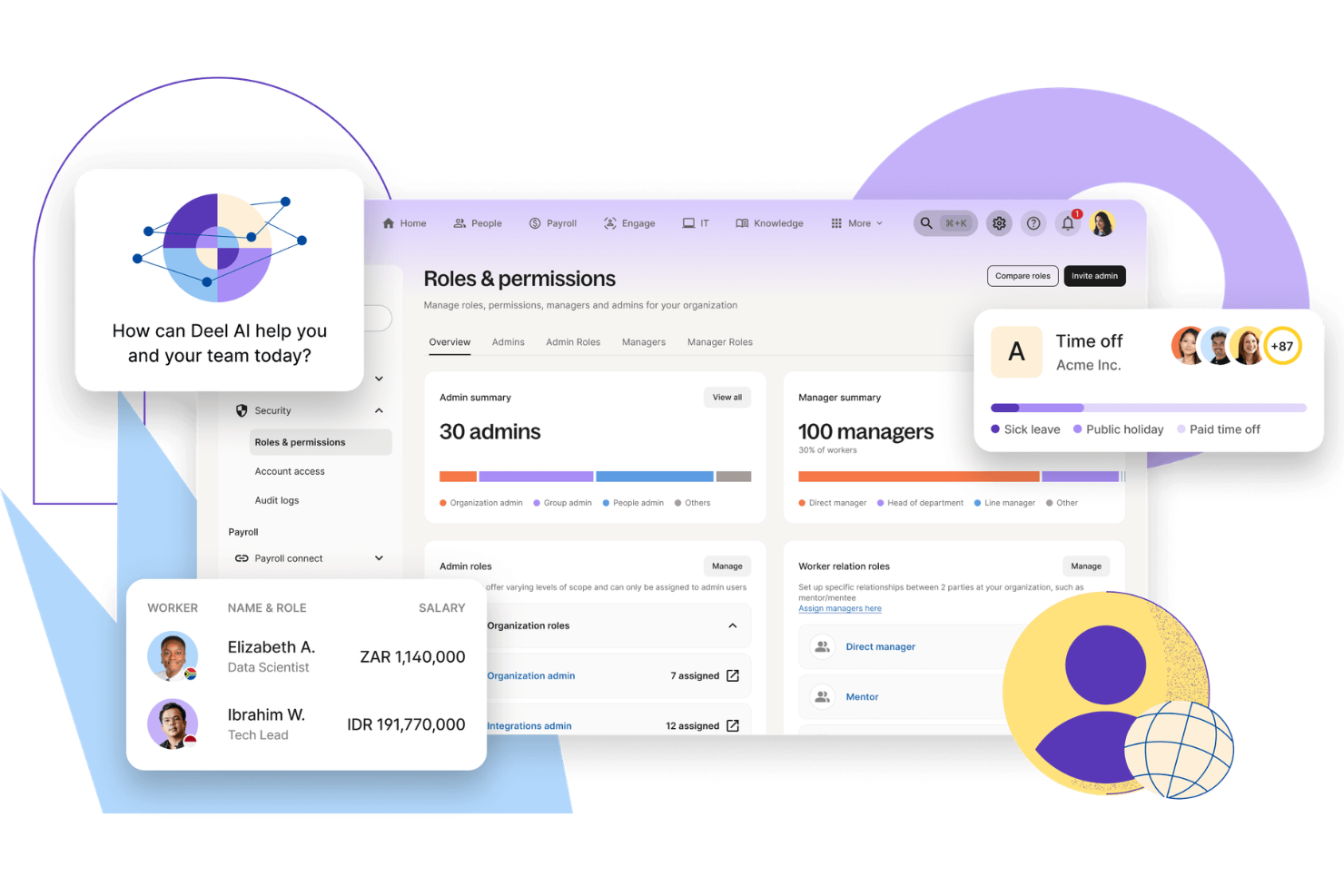
Deel HR is a workforce management platform for UK businesses that brings together global hiring, HRIS, compliance, payroll, and contractor management in one system.
Who Is Deel HR Best For?
HR teams at UK companies hiring or managing employees and contractors across multiple countries and regions.
Why I Picked Deel HR
I picked Deel HR as one of the best because I can hire employees or contractors in over 150 countries almost instantly. My team uses Deel’s automated contract generation and localized onboarding workflows to get new hires started right away. I also rely on Deel’s in-platform document management to handle country-specific compliance requirements during the hiring process.
Deel HR Key Features
- Global payroll processing: Run payroll for employees and contractors in multiple countries from a single dashboard.
- Time off management: Track and approve employee leave requests with customizable policies for each location.
- HRIS data management: Store and organize employee records, contracts, and documents in one secure platform.
- Expense management: Submit, review, and reimburse employee expenses directly within the system.
Deel HR Integrations
Native integrations are not clearly documented. Deel HR provides an API for custom integrations.
Pros and Cons
Pros:
- Payroll processing in multiple currencies
- Built-in performance tracking and review cycles
- Centralized HRIS for global workforce data
Cons:
- Some features require higher-tier plans
- Limited native integrations with HR platforms
New Product Updates from Deel HR

Deel Expands Stablecoin Wallet to 80+ Countries
Deel expands its Stablecoin Wallet to 80+ countries with dollar-backed balances and optional rewards. This gives eligible contractors more ways to hold and manage earnings inside Deel. For more information, visit Deel’s official site.
 .
.
Best as AI for business
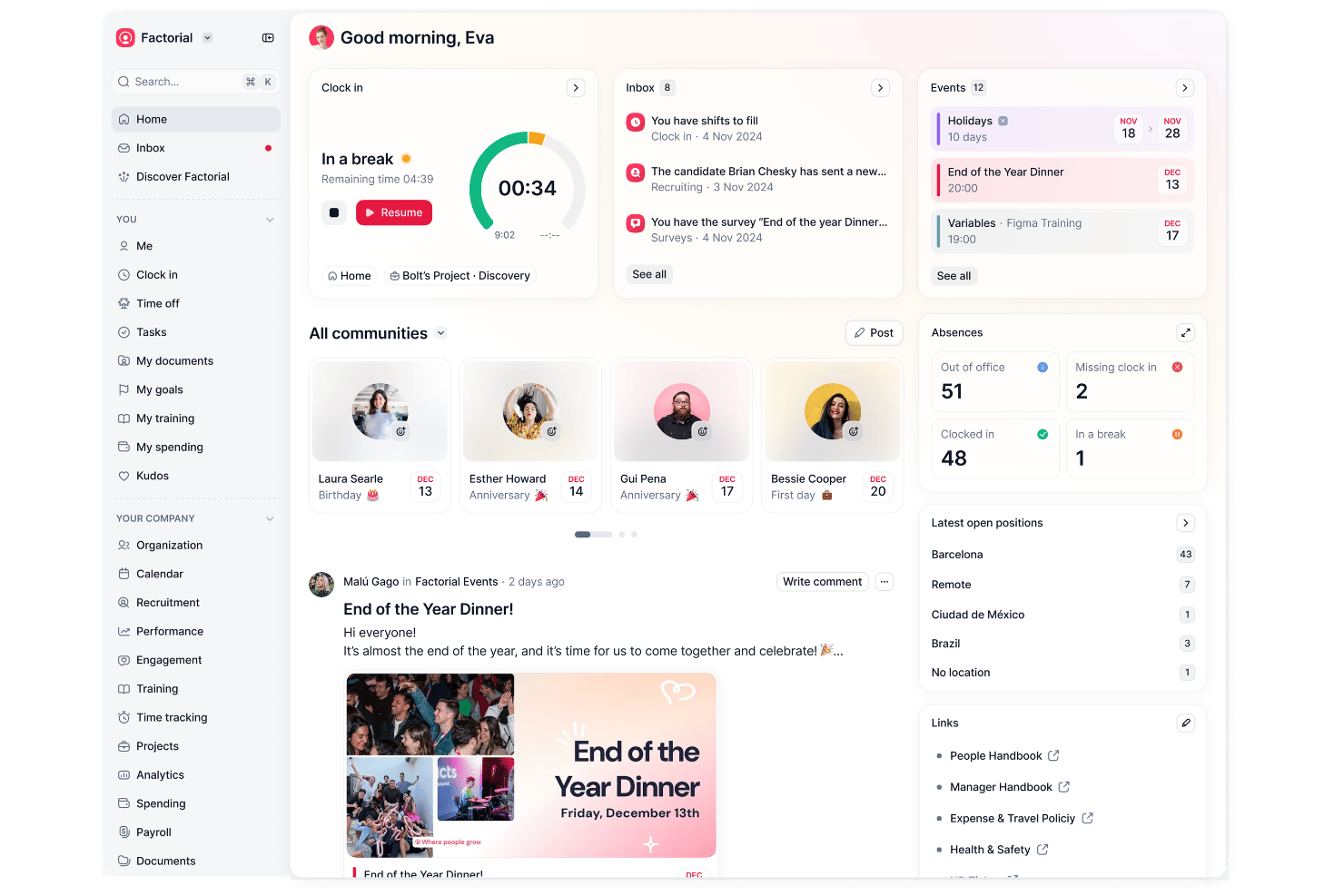
Factorial is an all-in-one HR and workforce management platform that covers shift scheduling, time and attendance tracking, time-off management, and payroll workflows, with AI tools built across each module to support planning, reporting, and employee queries.
Who Is Factorial Best For?
Factorial suits HR teams at growing SMBs that want a single platform to manage people operations—from scheduling and time tracking to reporting—with AI built in across each area.
Why I Picked Factorial
I picked Factorial as one of the best because its AI layer actively assists with workforce management tasks rather than just reporting on them. The AI agent analyzes absence and time-tracking trends to surface capacity gaps, while auto-scheduling tools handle rota creation automatically. Employees can also query the AI directly about leave policies, which cuts down the routine questions that tend to pile up in HR inboxes.
Factorial Key Features
- Drag-and-drop shift scheduling: Managers can build and publish rotas using a visual drag-and-drop interface, with support for bulk and rotating shift patterns.
- Mobile time tracking with geolocation: Employees clock in and out from the mobile app, with coordinates recorded at each clock event for location verification.
- Team absence calendar: A shared calendar displays approved time off and team availability, giving managers a clear view of coverage at any point.
- Employee self-service portal: Employees can check their schedules, submit time-off requests, and request shift swaps directly from the app without contacting HR.
Factorial Integrations
Factorial has marketplace integrations with Microsoft Business Central, Microsoft Power BI, Microsoft Outlook Calendar, Slack, Sage 200, and SAP Business One. Its public API supports OAuth 2.0, webhooks, and SDKs for custom integrations, and Zapier is also available.
Pros and Cons
Pros:
- Employees can request shifts and leave
- Auto-scheduling can create shift rotas
- AI helps analyze absence trends for capacity
Cons:
- Demand forecasts aren't shown driving schedules
- No documented UK working-time rule enforcement

Deputy
Best for rota management in hospitality
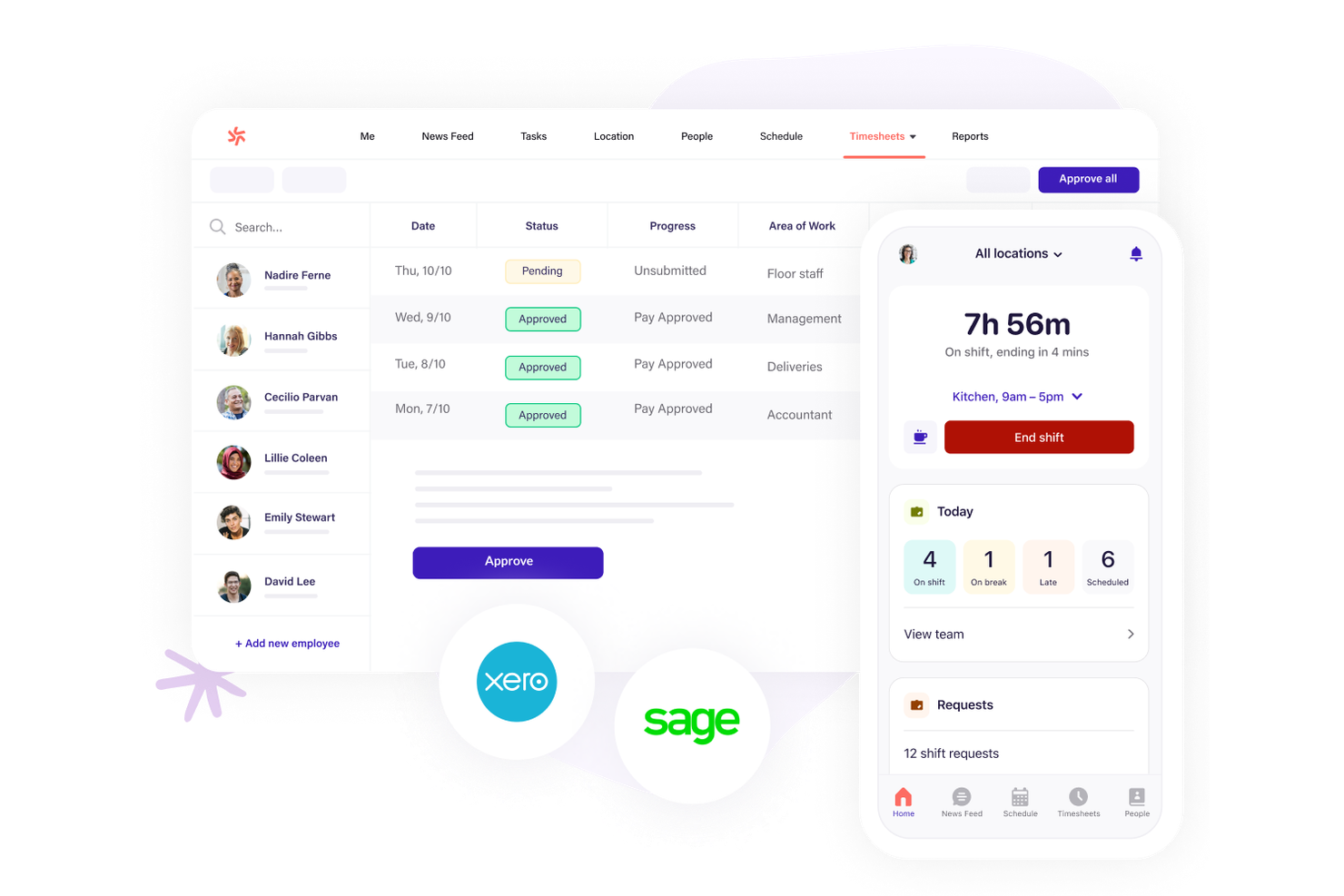
Hospitality businesses looking for precise rota management often turn to Deputy for its shift scheduling strengths. The platform is built for managers and team leads who need to coordinate hourly staff, handle last-minute changes, and ensure compliance with working time rules. Deputy helps you manage complex shift patterns, track attendance, and communicate updates instantly across locations.
Why I Picked Deputy
When it comes to rota management in hospitality, Deputy offers features that directly address the fast-paced, shift-driven nature of the industry. I picked Deputy because its drag-and-drop scheduling tool lets you quickly build and adjust rotas, even for large teams with varying availability.
The platform also includes automated shift notifications and real-time attendance tracking, which help managers stay on top of last-minute changes and no-shows. These features make Deputy a strong fit for hospitality businesses in the UK that need to keep operations running smoothly across multiple locations.
Deputy Key Features
In addition to its rota management strengths, Deputy offers several other useful features:
- Customizable Timesheets: Managers can review, edit, and approve digital timesheets before exporting to payroll.
- Leave Management: Employees can request leave, and managers can track balances and approve requests within the platform.
- Task Assignment: Assign specific tasks to team members and track completion alongside shift schedules.
- Reporting Tools: Generate reports on attendance, wage costs, and labor compliance for better workforce insights.
Deputy Integrations
Integrations include BambooHR, Box, Clover, Dropbox, Epos Now, HiBob, Lightspeed, QuickBooks, Sage, and more.
Pros and Cons
Pros:
- GPS clock-in helps prevent time fraud
- UK holiday pay calculations are built-in
- Shift swapping is automated for hourly staff
Cons:
- No built-in recruitment or applicant tracking
- Overtime rules setup can be confusing

edays
Best for employee absence tracking automation
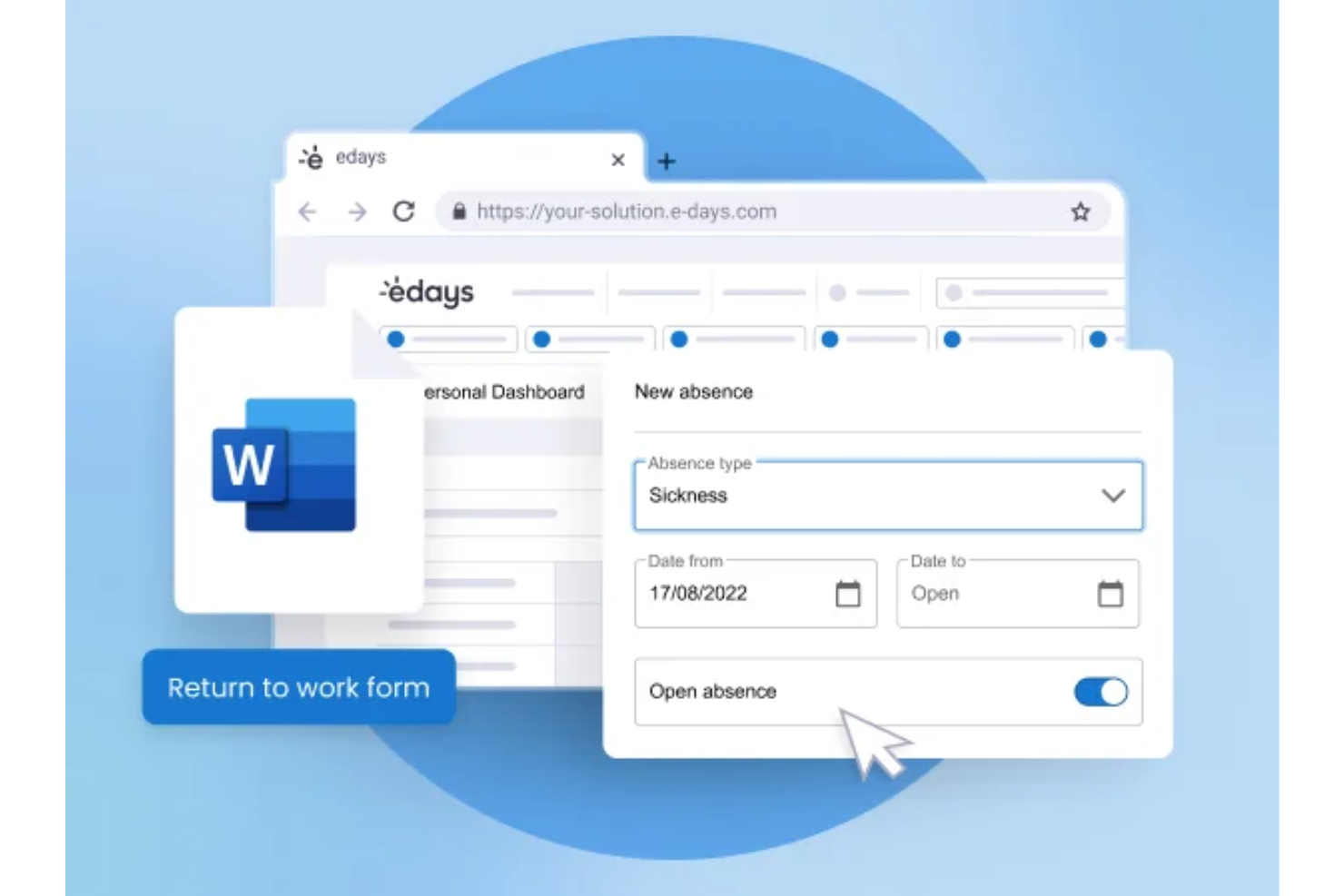
edays is a UK-based absence and workforce management platform that covers leave and holiday management, sickness tracking, time and attendance, employee scheduling, and core HR in one configurable system.
Who Is edays Best For?
edays is a good fit for mid-size to large UK and global organizations with complex leave policies, multiple locations, or high volumes of absence to manage.
Why I Picked edays
I've included edays in my top picks because its absence automation goes well beyond a simple request-and-approve workflow. What I find most useful is the configurable absence trigger system: you set the conditions, and edays automatically alerts the right managers the moment those thresholds are crossed, so nothing slips through. I also like that carryover and accruals are fully automated, which means no manual recalculations at year-end across different rota types. The Bradford Factor score updates in real time on each employee profile, giving managers a live view of absence patterns without any manual tracking.
edays Key Features
- Drag-and-drop rota builder: Create and manage employee schedules visually, with filters for skills, roles, and shift requirements.
- Online timesheets: Employees log hours, overtime, and TOIL directly in the platform for manager review and approval.
- Return-to-work forms: Automatically trigger customizable forms when an employee returns from a sickness absence.
- Custom report builder: Build tailored absence and workforce reports with scheduled delivery and data export options.
edays Integrations
edays offers out-of-the-box integrations with Cornerstone OnDemand, Cegid, IntelliHR, and ELMO, along with calendar syncing through Outlook, Gmail, and iCal. An API is available for custom integrations with HRIS, payroll, and physical clock-in devices.
Pros and Cons
Pros:
- Tracks sickness in days or hours
- Automated absence triggers alert managers early
- Handles multi-country leave rules in one system
Cons:
- Multi-country setup takes significant admin time
- Reporting visuals need manual tweaking

Workday
Best for unified HR and finance insights
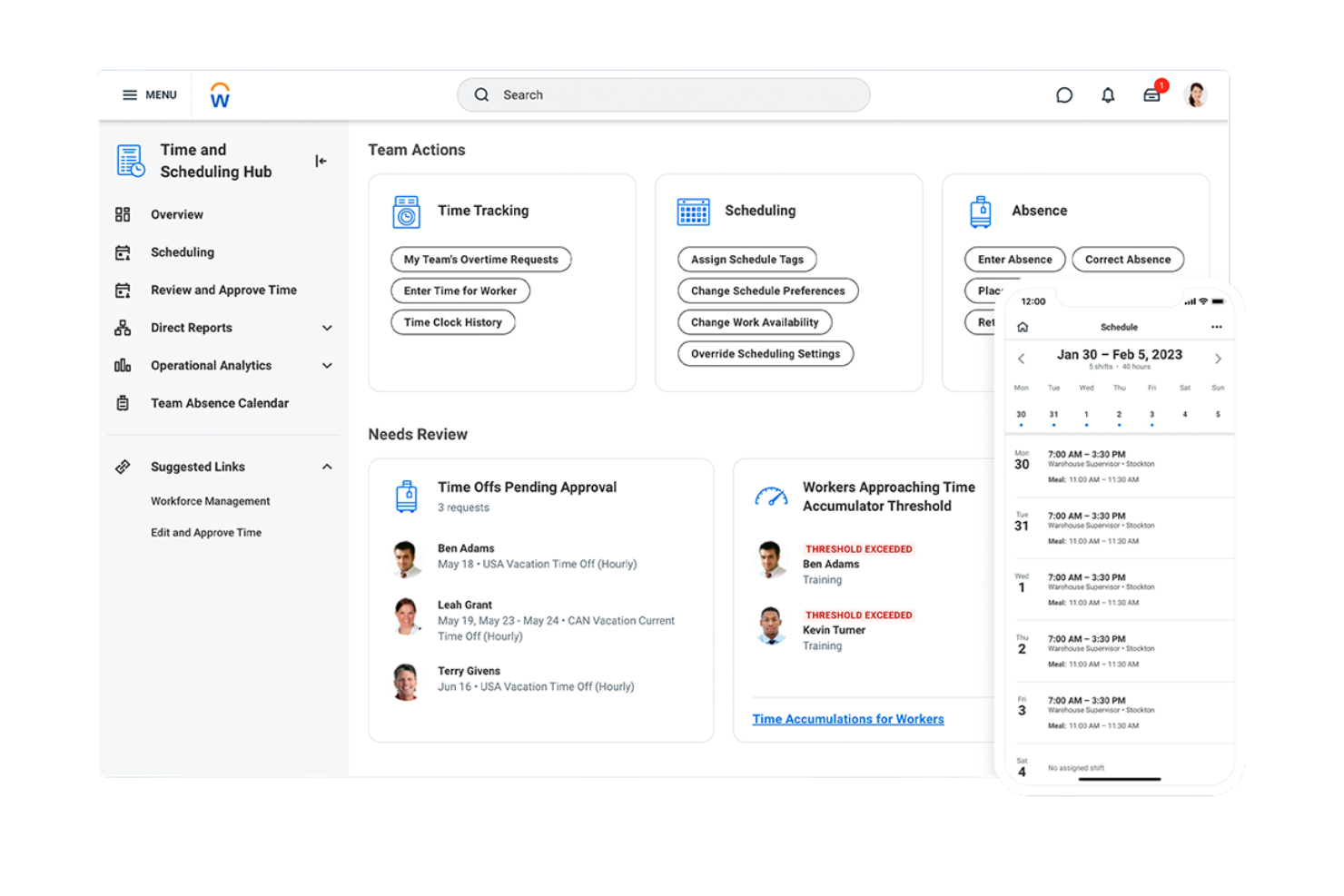
Workday brings HR and finance data together in one platform, making it a strong choice for UK organizations that want unified insights across people and budgets. It’s especially useful for larger businesses or those with complex reporting needs who want to connect workforce planning with financial forecasting. With Workday, HR and finance teams can collaborate on headcount, costs, and compliance from a single source of truth.
Why I Picked Workday
What sets Workday apart from workforce management software in the UK is its ability to unify HR and finance data in real time. I picked Workday because it lets you connect workforce planning, payroll, and financial forecasting in one platform, so HR and finance teams can make decisions based on the same data.
The platform’s analytics tools help you track headcount, labor costs, and budget variances without switching between systems. This unified approach is especially valuable for organisations that need to align people strategy with financial goals.
Workday Key Features
Some other features that make Workday useful for workforce management include:
- Automated Time Tracking: Employees can clock in and out, and managers can review hours directly in the platform.
- Talent Management Suite: Tools for recruiting, onboarding, performance reviews, and succession planning are all built in.
- Mobile Access: Staff and managers can access schedules, approve requests, and view reports from their phones.
- Compliance Monitoring: The system tracks regulatory changes and helps ensure HR processes meet UK employment standards.
Workday Integrations
Native integrations are not currently listed.
Pros and Cons
Pros:
- Customizable dashboards for workforce analytics
- Built-in talent management and succession tools
- Real-time HR and finance data integration
Cons:
- Implementation can take months with high cost overruns
- Lacks native CRM and full supply chain capabilities
ADP
Best for payroll and workforce data integration
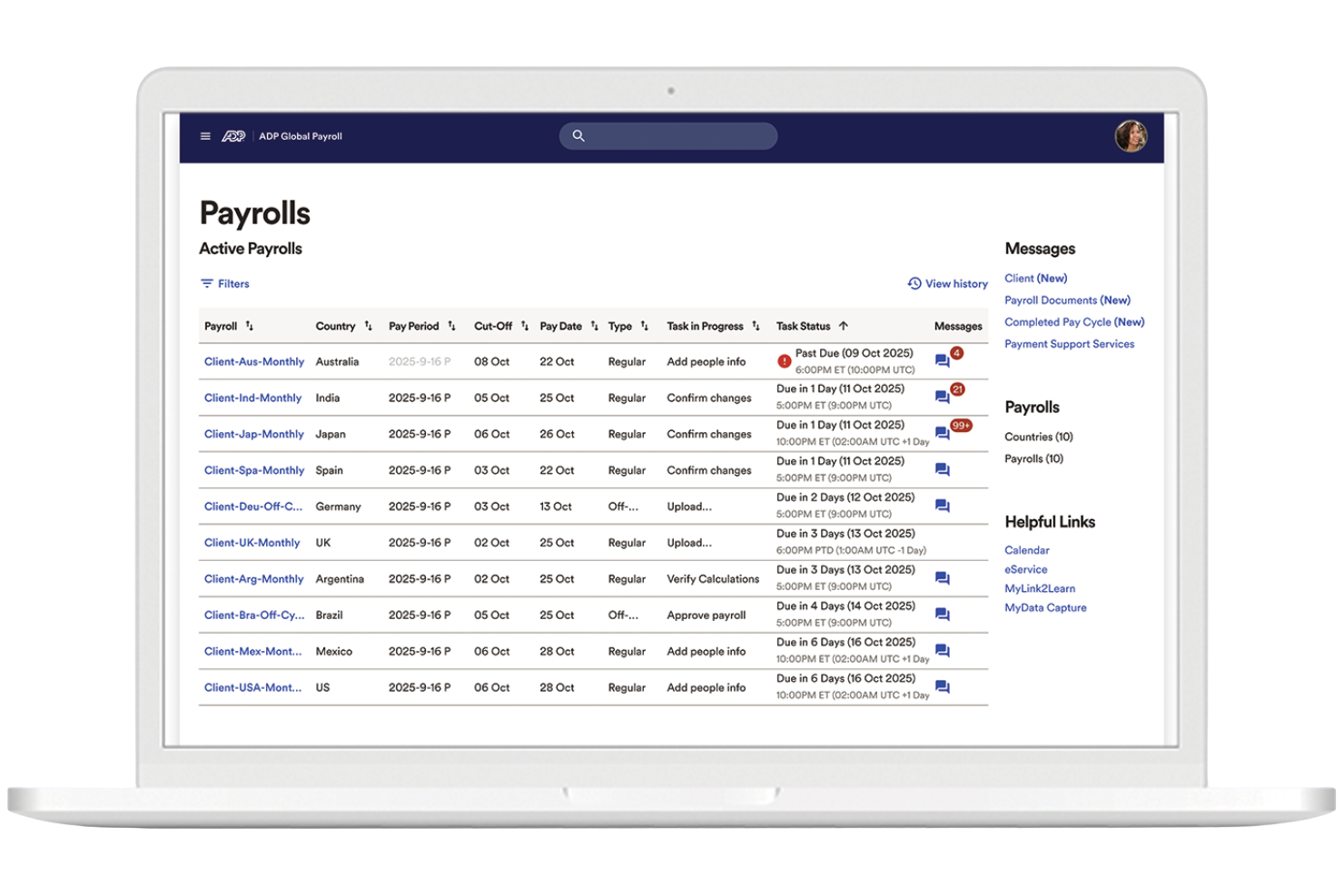
ADP is a workforce management solution that connects payroll and HR data in one system. It suits UK organizations that want to bring payroll, time tracking, and workforce analytics together in one place. ADP reduces manual data entry and keeps employee records aligned across systems.
Why I Picked ADP
For UK organizations that need payroll and workforce data to work together, ADP stands out for its integrated approach. I picked ADP because it connects payroll processing with time and attendance tracking, so HR teams can manage pay, hours, and compliance from a single platform.
The system also offers workforce analytics tools that help you monitor trends in labor costs and employee attendance. This makes ADP a strong choice for businesses that want to reduce manual data entry and keep workforce records accurate across HR and payroll.
ADP Key Features
Some other features that make ADP useful for workforce management include:
- Employee Self-Service Portal: Staff can view payslips, update personal details, and access tax documents online.
- Automated Leave Management: Track, approve, and record employee leave requests within the platform.
- Document Management: Store and organize HR documents securely for easy access and compliance.
- Mobile App: Employees and managers can access schedules, request time off, and review payroll information from their phones.
ADP Integrations
Native integrations are not currently listed.
Pros and Cons
Pros:
- Scalable for multi-site and large organizations
- Workforce analytics dashboard for labor insights
- Employee self-service for payslips and leave
Cons:
- Limited native integrations for UK-specific tools
- Custom report building requires technical knowledge
Best for event staff scheduling
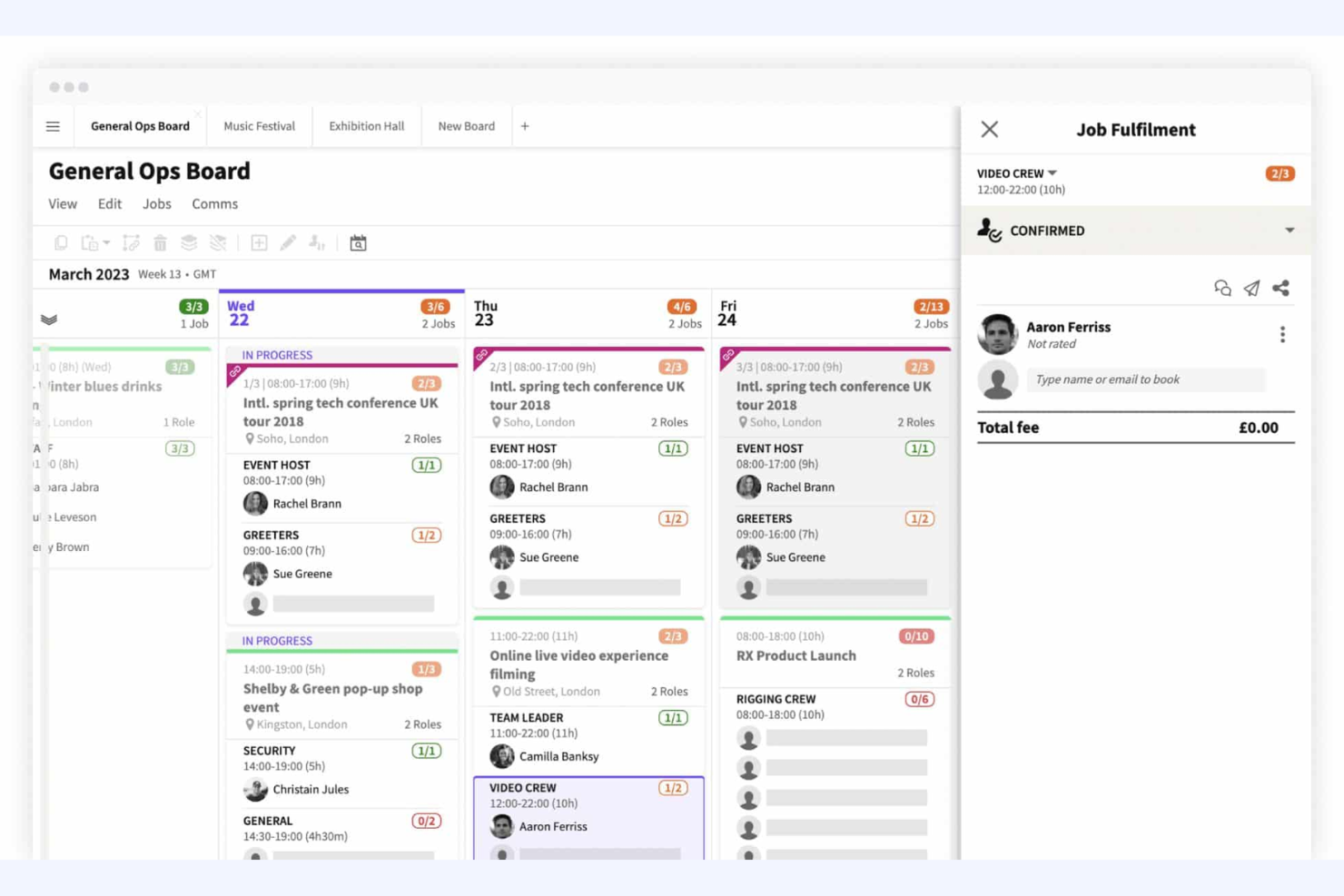
Liveforce is designed for agencies and organizations that need to schedule and manage event staff across multiple locations. It’s a strong fit for event planners, staffing agencies, and production companies looking to handle last-minute changes, shift assignments, and staff communications in one place. With Liveforce, you can quickly build rosters, track staff availability, and keep everyone updated in real time.
Why I Picked Liveforce
For organisations that need to coordinate event staff quickly and reliably, Liveforce stands out for its event-focused scheduling tools. I picked Liveforce because it lets you create and publish shifts, manage staff bookings, and handle last-minute changes from a single dashboard.
The platform’s availability tracking and instant messaging features help you fill roles and communicate updates without delays. This makes Liveforce a strong choice for UK teams managing temporary or freelance staff at events, festivals, or pop-up activations.
Liveforce Key Features
Some other features that make Liveforce useful for workforce management include:
- Customizable Staff Profiles: Store documents, certifications, and work history for each staff member.
- Automated Timesheets: Staff can submit hours worked, and managers can approve timesheets directly in the platform.
- Branded Staff Portal: Give staff access to a portal with your company’s branding for job offers and updates.
- Bulk Messaging: Send announcements or shift offers to selected groups of staff at once.
Liveforce Integrations
Native integrations are not currently listed.
Pros and Cons
Pros:
- Branded staff portal supports agency identity
- Bulk messaging reaches staff groups instantly
- Staff can upload documents and certifications
Cons:
- No public API for custom integrations
- Limited reporting options for shift analytics

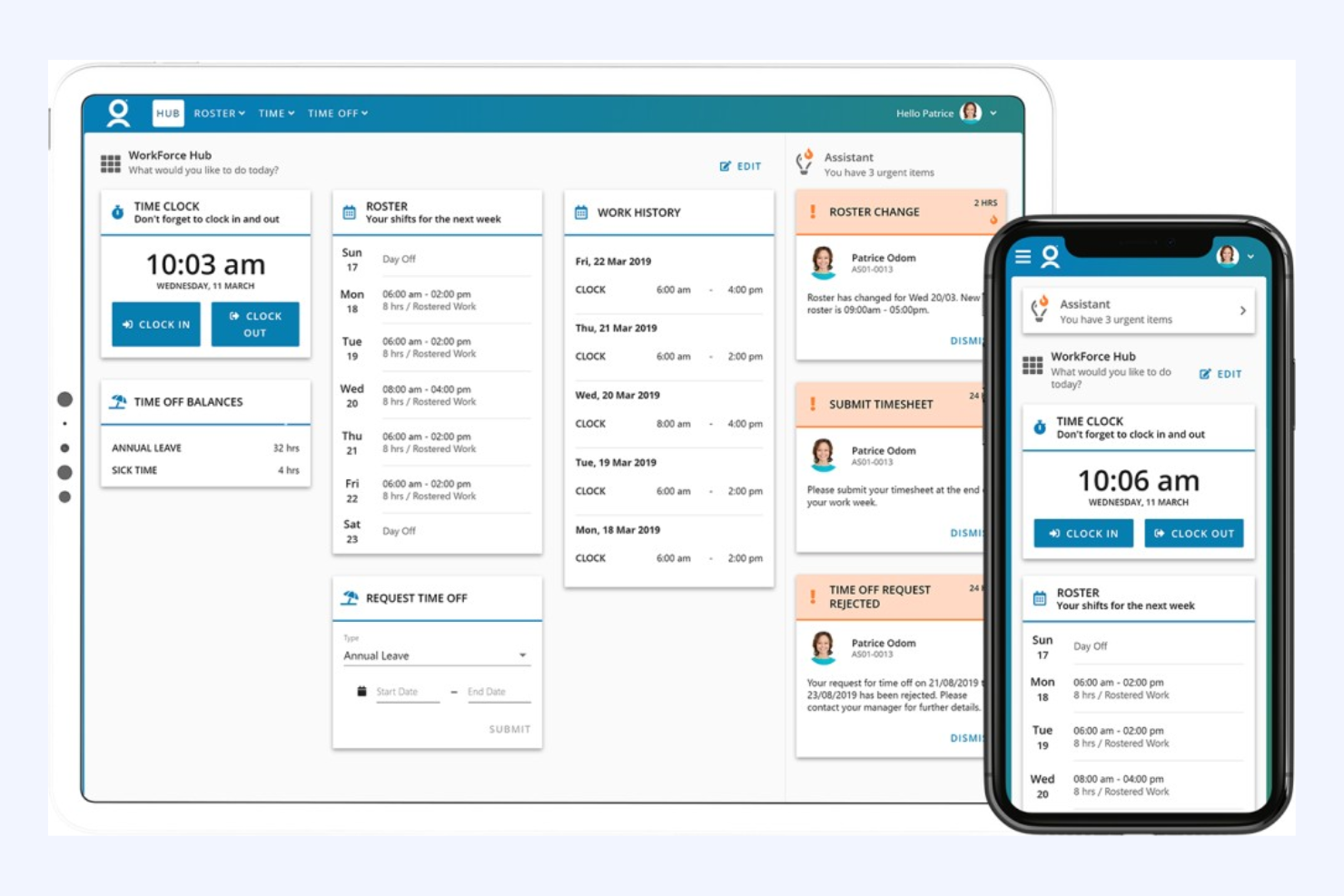
WorkForce Software is designed for large UK organisations that need to manage compliance and workforce complexity across multiple regions or business units. It’s a strong fit for HR leaders and operations teams in highly regulated industries like healthcare, manufacturing, and the public sector. The platform helps you automate compliance with UK labour laws, manage union agreements, and handle intricate scheduling rules at scale.
Why I Picked WorkForce Software
For organisations facing strict compliance requirements and complex workforce structures, WorkForce Software stands out as a purpose-built solution. I picked it because it offers advanced compliance automation, including real-time monitoring of UK labour law adherence and union agreement management.
The platform also supports configurable scheduling rules, so you can tailor shift patterns and overtime policies to meet both legal and operational needs. These features make it a strong choice for HR teams that need to reduce compliance risk while managing large, distributed workforces.
WorkForce Software Key Features
Some other features that make WorkForce Software valuable for UK organisations include:
- Mobile Self-Service Portal: Employees can request time off, swap shifts, and view schedules from their phones.
- Absence Management: Track and manage all types of leave, including statutory sick pay and holiday entitlements.
- Real-Time Analytics Dashboard: Access up-to-date workforce data and compliance metrics in a single view.
- Automated Notifications: Send alerts for schedule changes, compliance breaches, or required approvals.
WorkForce Software Integrations
Integrations include ADP, SAP SuccessFactors, Oracle HCM Cloud, UKG, Microsoft Azure Active Directory, ServiceNow, Kronos, Workday, and more.
Pros and Cons
Pros:
- Multi-language support for diverse teams
- Real-time analytics for workforce compliance
- Configurable union and local agreement rules
Cons:
- Occasional delays in customer support response
- Limited flexibility for small business needs

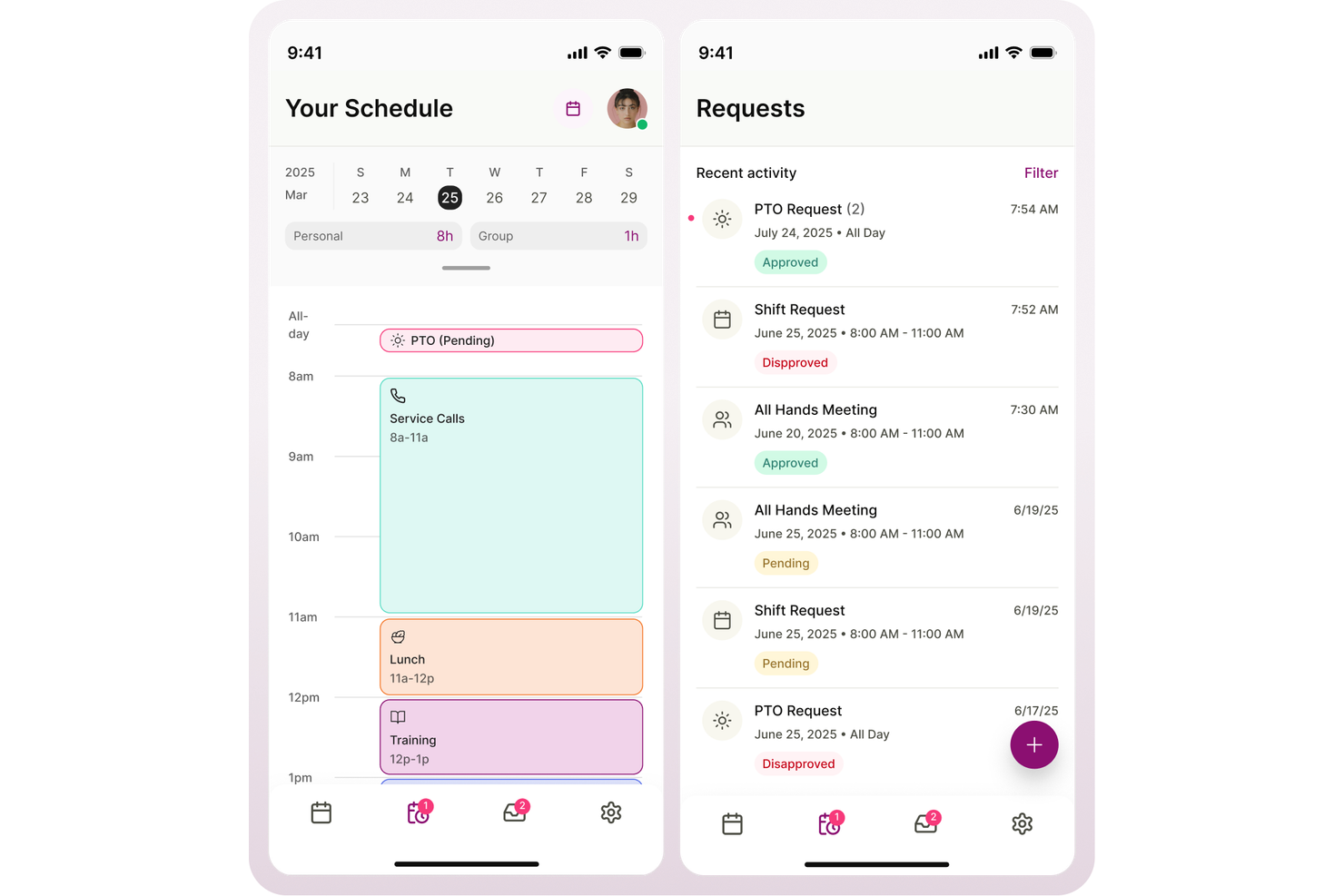
Aspect is purpose-built for contact centres in the UK that need to optimise workforce planning and scheduling. It’s especially useful for operations managers and workforce analysts handling high call volumes and fluctuating demand. The platform helps you forecast staffing needs, manage agent schedules, and maintain service levels in fast-paced environments.
Why I Picked Aspect
When it comes to contact centre workforce planning, Aspect offers specialised tools that address the unique challenges of this environment. I picked Aspect because it provides advanced forecasting and scheduling capabilities, allowing you to predict call volumes and align staffing accordingly.
The platform also includes real-time adherence monitoring, so you can track agent performance and make adjustments on the fly. These features help contact centre leaders maintain service levels and respond quickly to changing demand.
Aspect Key Features
Some other features that make Aspect useful for contact centre teams include:
- Automated Shift Bidding: Agents can bid for preferred shifts based on availability and business rules.
- Mobile Agent Access: Staff can view schedules, request time off, and receive notifications from their mobile devices.
- Intraday Management Tools: Managers can adjust staffing and break times in real time as call volumes fluctuate.
- Historical Reporting: Access detailed reports on past performance, schedule adherence, and staffing trends.
Aspect Integrations
Integrations include Amazon Connect, and native API options are available for custom integrations.
Pros and Cons
Pros:
- Real-time adherence monitoring for supervisors
- Automated shift bidding for agent flexibility
- Advanced forecasting for multi-channel contact centres
Cons:
- Complex configuration for multi-site operations
- Reporting exports can be slow at peak times
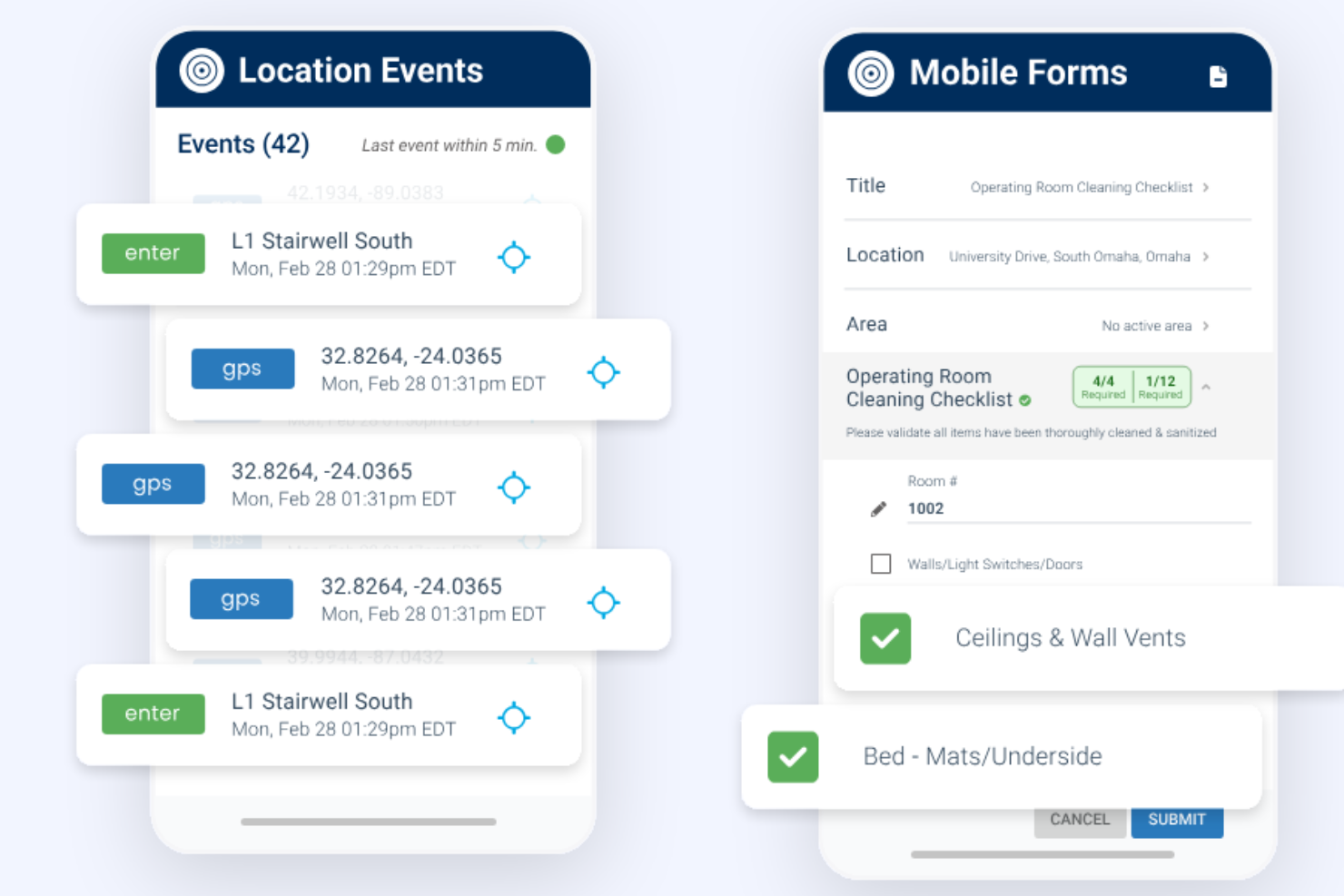
TEAM Software’s Lighthouse platform is designed for facilities management and security service providers who need to coordinate large, distributed teams. It’s a strong fit for operations managers and supervisors handling mobile workforces across multiple sites. The tool helps you manage scheduling, site compliance, and real-time workforce visibility in industries where accountability and coverage are essential.
Why I Picked TEAM Software
For facilities and security service providers, TEAM Software’s Lighthouse stands out because it’s built to handle the unique demands of managing dispersed, mobile teams. I picked this tool since it offers live location tracking and site attendance verification, which are essential for ensuring staff are present and compliant at every site.
The platform also supports incident reporting and automated shift scheduling, helping supervisors respond quickly to issues and maintain coverage. These features make it a strong choice for businesses that need to balance accountability, safety, and operational efficiency across multiple locations.
TEAM Software Features
In addition to its focus on mobile workforce management, I also found these features valuable:
- Automated Compliance Alerts: The system notifies managers when compliance requirements are at risk.
- Customizable Site Checklists: Supervisors can create and assign site-specific checklists for staff to complete.
- Mobile Incident Logging: Staff can report incidents directly from their mobile devices with photos and notes.
- Real-Time Messaging: Teams can communicate instantly through the platform’s built-in messaging tool.
TEAM Software Integrations
Native integrations are not currently listed.
Pros and Cons
Pros:
- GPS tracking verifies staff attendance at sites
- Automated compliance alerts reduce manual oversight
- Site-specific checklists improve task accountability
Cons:
- Limited support for non-security industry workflows
- Reporting features lack advanced data visualization
Annen programvare for arbeidsstyring i Storbritannia
Her er noen flere alternativer for programvare for arbeidsstyring i Storbritannia som ikke kom med på kortlisten min, men som likevel er verdt å se nærmere på:
- BigChange
For mobile workforce job tracking
- Rippling
For automated onboarding workflows
- Workforce.com
For real-time scheduling in large teams
- UKG
For global workforce integration
- Parim
For shift management in multi-site operations
- MHR
For advanced payroll automation
- Zelt
For all-in-one HR and IT management


How I Evaluate Workforce Management Software
I look at workforce management tools through two lenses: the baseline capabilities a platform must have—scheduling, time tracking, forecasting—and the differentiators that make one stand out.
Core Functionality (Table Stakes For This List)
When I'm selecting tools for my list, I rank each one on a scale from 0 (does not offer the functionality) to 5 (excels in this area) for each core functionality listed below. Then, I calculate the tool's total score into a percentage. Each tool needs to achieve a minimum total score of 75% to be considered for inclusion.
- Employee Scheduling: I evaluate how each platform handles shift creation, template-based rostering, and multi-location assignments—like coordinating rotating schedules across retail stores or hospital units.
- Time & Attendance Tracking: Each tool's clock-in methods matter, whether that's geofenced mobile punches for field teams, kiosk mode for warehouses, or web-based timesheets for office staff.
- Labor Forecasting & Demand Planning: I look for tools that use historical data and business inputs to project headcount needs, such as anticipating seasonal staffing surges in hospitality or logistics.
- Absence & Leave Management: This covers how well a tool tracks PTO balances, handles overlapping leave requests, and supports approval workflows—especially for managers overseeing large hourly teams.
- Labor Compliance Management: I check whether the platform enforces overtime thresholds, mandatory rest periods, and break rules across different jurisdictions, which is essential for multi-region employers.
- Workforce Analytics & Reporting: Strong reporting means dashboards that surface labor cost trends, overtime patterns, and attendance outliers so HR teams can act on real data rather than gut instinct.
Once I have a list of tools that meet the criteria, I consider what sets each platform apart.
Differentiating Factors (What Sets Vendors Apart)
Here's how I compare and contrast different vendors:
Standout Features
AI-powered shift optimization is a major differentiator—I look for tools that auto-generate schedules based on employee skills, availability, and projected demand rather than just offering drag-and-drop templates. Mobile self-service also matters, especially for frontline teams who need to swap shifts or submit time-off requests without calling a manager. Built-in communication tools like in-app messaging and shift notifications reduce the need for separate chat apps, keeping workforce updates in one place.
Beyond Features
Integration depth is one of the first things I check—workforce management tools need to sync with your existing payroll and HRIS platforms so time data flows directly into pay runs without manual exports. Industry-specific fit also carries weight. A healthcare organization with rotating 12-hour shifts has very different needs than a retail chain managing part-time coverage. I also evaluate scalability, particularly whether a platform supports multi-location hierarchies and role-based access as your headcount grows from dozens to thousands.
Slik velger du programvare for arbeidsstyring i Storbritannia
Det er lett å gå seg vill i lange funksjonslister og komplekse prismodeller. For å hjelpe deg med å holde fokus mens du går gjennom den unike prosessen med å velge programvare, får du her en sjekkliste over faktorer du bør ha i bakhodet:
| Faktor | Hva bør du vurdere? |
|---|---|
| Skalerbarhet | Vil programvaren støtte vekst i antall ansatte, nye lokasjoner eller endrede teamstrukturer over tid? |
| Integrasjoner | Kan verktøyet kobles direkte til HR-, lønns-, IT- og kommunikasjonssystemene dere allerede bruker? |
| Tilpasningsmuligheter | Kan du tilpasse arbeidsflyter, tillatelser og rapportering slik at de samsvarer med organisasjonens unike prosesser? |
| Brukervennlighet | Vil HR-teamet og lederne kunne navigere i og bruke systemet med minimal opplæring? |
| Implementering og oppstart | Hvor lang tid vil det ta å komme i gang, og hvilke ressurser eller hvilken støtte trenger du under utrullingen? |
| Kostnad | Er alle kostnader tydelige – inkludert oppsett, støtte og tillegg – og passer de med budsjettet og vekstplanene dine? |
| Sikkerhetstiltak | Oppfyller leverandøren standardene dine for databeskyttelse, inkludert GDPR-samsvar og sikre tilgangskontroller? |
| Krav til regelverksetterlevelse | Kan programvaren hjelpe deg med å holde deg oppdatert på britisk arbeidsrett, dokumentasjonskrav og behov for revisjon? |
Hva er programvare for arbeidsstyring i Storbritannia?
Programvare for arbeidsstyring i Storbritannia viser til WFM-programvare og programvare for optimalisering av arbeidsstyrken, utviklet for å hjelpe organisasjoner med å håndtere bemanningsplanlegging, oppmøte, lønn og overholdelse av lokale regler. Disse programvareløsningene brukes ofte i miljøer som kontaktsentre, sentraliserer data om arbeidsstyrken og støtter hele medarbeiderens livssyklus.
Med AI-drevne funksjoner gir de sanntidsdata og sanntidsinnsikt for å følge med på KPI-er, administrere bemanningsnivåer og forbedre teamets resultater og de ansattes samlede prestasjoner. Disse verktøyene støtter resultatstyring, kvalitetsstyring og bredere HR-funksjoner.
Ved å hjelpe team med å optimalisere driften, effektivisere arbeidsflyter og ta informerte beslutninger kan plattformer for arbeidsstyring øke produktiviteten, forbedre medarbeiderengasjementet, styrke oppbevaringen av ansatte og bidra til en bedre balanse mellom arbeid og fritid, samtidig som de fremmer produktiviteten i arbeidsstyrken og forbedrer den samlede kundeopplevelsen.
Funksjoner
Her er de viktigste funksjonene all god programvare for arbeidsstyring i Storbritannia bør ha:
- Registrering av arbeidstid og oppmøte: Overvåker de ansattes arbeidstid, fravær og overtid, ofte med digitale timelister eller systemer for inn- og utstempling, for å sikre korrekt lønnsutbetaling og overholdelse av regler.
- Bemanningsplanlegging: Lar ledere opprette, justere og dele vaktplaner, noe som bidrar til å forhindre konflikter og sikre tilstrekkelig bemanning på tvers av team.
- Lønnsbehandling: Automatiserer beregning av lønn, trekk og utbetalinger, samtidig som systemet holdes oppdatert med britiske skatte- og pensjonsregler.
- Håndtering av permisjoner og fravær: Lar ansatte be om fri og følger opp godkjenninger, saldoer og lovfestede permisjonsrettigheter i tråd med britisk lov.
- Dokumenthåndtering: Lagrer kontrakter, retningslinjer og HR-dokumenter på en sikker måte, slik at det blir enkelt å åpne, oppdatere og dele filer etter behov.
- Regelverksetterlevelse: Hjelper organisasjoner med å følge britisk arbeidslivslovgivning ved å spore regelendringer, opprette revisjonsspor og varsle om mulige problemer.
- Rapportering og analyse: Gir tilpassbare rapporter om trender i arbeidsstyrken, oppmøte, kostnader og andre HR-måltall for å støtte datadrevne beslutninger.
- Selvbetjeningsportal for ansatte: Gir medarbeidere tilgang til arbeidsplaner, lønnsslipper og personopplysninger, noe som reduserer HR-administrasjonen og gir de ansatte større innflytelse.
- Integrasjonsmuligheter: Kobler seg til andre forretningssystemer, som HR-, lønns- og IT-verktøy, for å samle data og redusere manuell registrering.
Fordeler
Implementering av programvare for arbeidsstyring i Storbritannia gir flere fordeler for teamet og virksomheten din. Her er noen av fordelene du kan se frem til:
- Bedre regelverksetterlevelse: Automatisert sporing og varsler hjelper deg med å følge britisk arbeidslivslovgivning og reduserer risikoen for kostbare feil.
- Samlede data om arbeidsstyrken: Alle ansattopplysninger, arbeidsplaner og lønnsdata lagres på én sikker plattform, noe som gjør tilgang og oppdateringer enklere.
- Redusert administrativ arbeidsmengde: Automatisert planlegging, lønnsbehandling og permisjonshåndtering minimerer manuell dataregistrering og gjentakende HR-oppgaver.
- Større nøyaktighet: Digital tidsregistrering og lønnsbehandling reduserer feil i lønnsberegninger og oppmøteregistre.
- Bedre medarbeideropplevelse: Selvbetjeningsportaler gir de ansatte mulighet til å administrere egne opplysninger, se arbeidsplaner og be om fri.
- Bedre beslutningsgrunnlag: Innebygd rapportering og analyse gir innsikt i trender i arbeidsstyrken, kostnader og produktivitet, slik at planleggingen blir mer informert.
- Skalerbarhet for vekst: Fleksible verktøy og integrasjonsmuligheter støtter organisasjonen når den vokser eller tilpasser seg nye behov i arbeidsstyrken.
Kostnader og priser
Ved valg av programvare for arbeidsstyring i Storbritannia er det nødvendig å forstå de ulike prismodellene og abonnementene som er tilgjengelige. Kostnadene varierer ut fra funksjoner, teamstørrelse, tillegg og mer. Tabellen nedenfor oppsummerer vanlige abonnementer, gjennomsnittsprisene deres og typiske funksjoner som er inkludert i løsninger for programvare for arbeidsstyring i Storbritannia:
Sammenligningstabell for abonnementer på programvare for arbeidsstyring i Storbritannia
| Abonnementstype | Gjennomsnittspris | Vanlige funksjoner |
|---|---|---|
| Gratisabonnement | £0 | Grunnleggende tidsregistrering, begrenset planlegging og enkle ansattopplysninger. |
| Personlig abonnement | £4–£10/bruker/måned | Registrering av arbeidstid og oppmøte, permisjonshåndtering og grunnleggende rapportering. |
| Bedriftsabonnement | £10–£25/bruker/måned | Avansert planlegging, lønnsbehandling, verktøy for regelverksetterlevelse, integrasjoner og selvbetjening for ansatte. |
| Virksomhetsabonnement | £25–£40/bruker/måned | Tilpassede arbeidsflyter, avansert analyse, dedikert kundestøtte, forbedret sikkerhet og administrasjon av flere lokasjoner. |