

De 10 beste HR-programvarene for produksjonsindustrien i 2026

10 Kortliste over HR-programvare for produksjon


HR-programvare for produksjon viser til digitale verktøy som hjelper fabrikker og produksjonsanlegg med å håndtere oppgaver knyttet til arbeidsstyrken, for eksempel planlegging, samsvar, lønn og ansattopplysninger. Hvis du leter etter den beste HR-programvaren for produksjon, står du sannsynligvis overfor utfordringer med skiftstyring, fagforeningsregler eller registrering av arbeidstid på tvers av flere lokasjoner.
Den rette plattformen kan hjelpe teamet ditt med å håndtere komplekse arbeidskraftbehov, overholde regelverket og støtte ansatte på produksjonsgulvet. I denne veiledningen finner du en kuratert kortliste over HR-programvare som er utviklet spesielt for produksjon, slik at du kan sammenligne alternativer og velge den løsningen som passer best for virksomheten din.
Why Trust Our Software Recommendations
Our team has been testing and reviewing software since 2012. As HR experts ourselves, we know how difficult—and important—it is to choose the right software.
For this guide, we evaluated tools using hands-on testing and independent research, scoring tools using our selection criteria. We also draw on insights from industry thought leaders and practicing HR experts.
Our reviews reflect our human editorial judgment, not a sales pitch.
Expert reviewers:
Sammenligningstabell for HR-programvare for produksjon
Denne sammenligningstabellen oppsummerer prisdetaljer for mine beste utvalg av HR-programvare for produksjon:
| Tool | Best For | Trial Info | Price | ||
|---|---|---|---|---|---|
| 1 | Best with a single database for automated HR tasks | Not available | Pricing upon request | Website | |
| 2 | Best for union workforce management | Free demo available | Pricing upon request | Website | |
| 3 | Best for small manufacturer HR automation | Free demo available | Pricing upon request | Website | |
| 4 | Best as AI for business | Free demo available | From $8/user/month | Website | |
| 5 | Best for customizable employee review templates | 30-day free trial + free demo available | From $2.50/user/month (billed annually) | Website | |
| 6 | Best for biometric attendance integration | Free trial available | From $125/month (billed annually) | Website | |
| 7 | Best for employee self-service portals | Free demo available | Pricing upon request | Website | |
| 8 | Best for European workforce administration | Free demo available | Pricing upon request | Website | |
| 9 | Best for UK-based manufacturing teams | Free demo available | From £7/user/month | Website | |
| 10 | Best for onboarding hourly employees | Free trial + free demo available | Pricing upon request | Website |

Anmeldelser av HR-programvare for produksjon
Nedenfor finner du mine detaljerte sammendrag av HR-programvaren for produksjon som kom med på kortlisten min. Anmeldelsene mine gir en grundig gjennomgang av funksjonene, de beste bruksområdene og integrasjonene til hver plattform, slik at du kan finne den beste løsningen for deg.

Paycom
Best with a single database for automated HR tasks
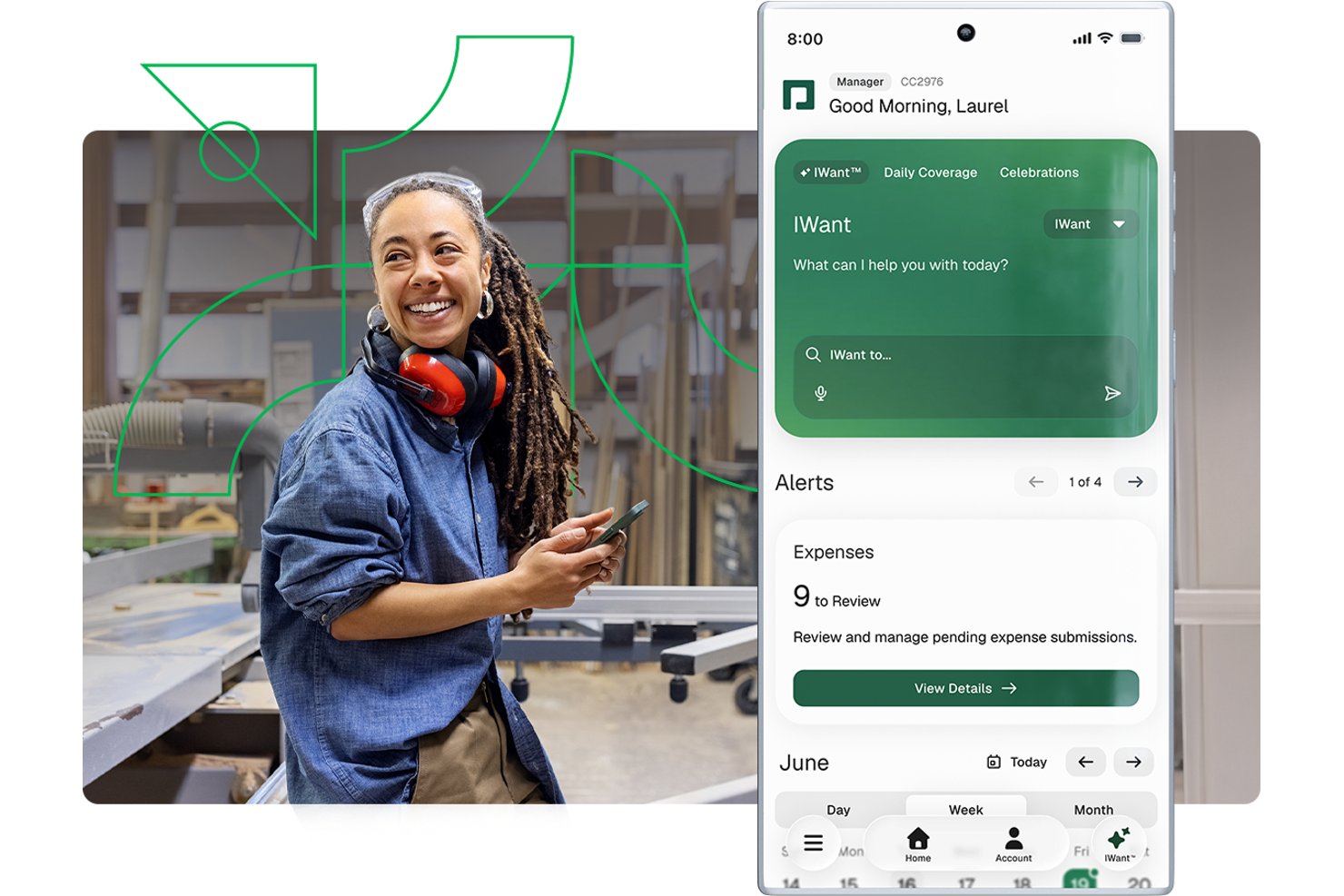
Paycom is a single-database HCM platform that brings payroll, time and labor tracking, compliance, certification management, recruiting, and employee records into one system for manufacturing teams.
Who Is Paycom Best For?
Paycom is a strong fit for mid-size US manufacturers with 50–5,000 employees that want payroll, HR, and compliance managed in one system.
Why I Picked Paycom
I picked Paycom as one of the best because its single-database design means payroll, time tracking, and certification records share the same data layer, with no syncing or duplicate entries. I particularly like Beti®, which prompts floor workers to review and approve their own paycheck data before processing, catching errors at the source. Certification management also flags expiring licenses 30 days out, so a machine operator's qualification never quietly lapses.
Paycom Key Features
- Manager on-the-Go mobile app: Lets plant and line supervisors approve timecards, punch edits, and requests from the shop floor.
- Proximity-based time clocks: Prevents buddy punching with physical or mobile clocks that confirm in-person employee presence.
- Certification expiration alerts: Automatically notifies managers 30 days before a worker’s license, permit, or training credential expires.
- OSHA safety training library: Offers a built-in learning system with courses on OSHA, HAZWOPER, and HAZCOM for manufacturing staff compliance.
Paycom Integrations
Paycom offers native integrations with NetSuite, PayBridge, Kronos Workforce Central, Indeed, and Google Calendar. An API is available for custom integrations.
Pros and Cons
Pros:
- Employees review and approve paychecks pre-processing
- OSHA and safety training included for compliance
- All HR and payroll in one database
Cons:
- Limited manufacturing ERP and MES connectivity
- No full EHS or accident reporting module

Best for union workforce management
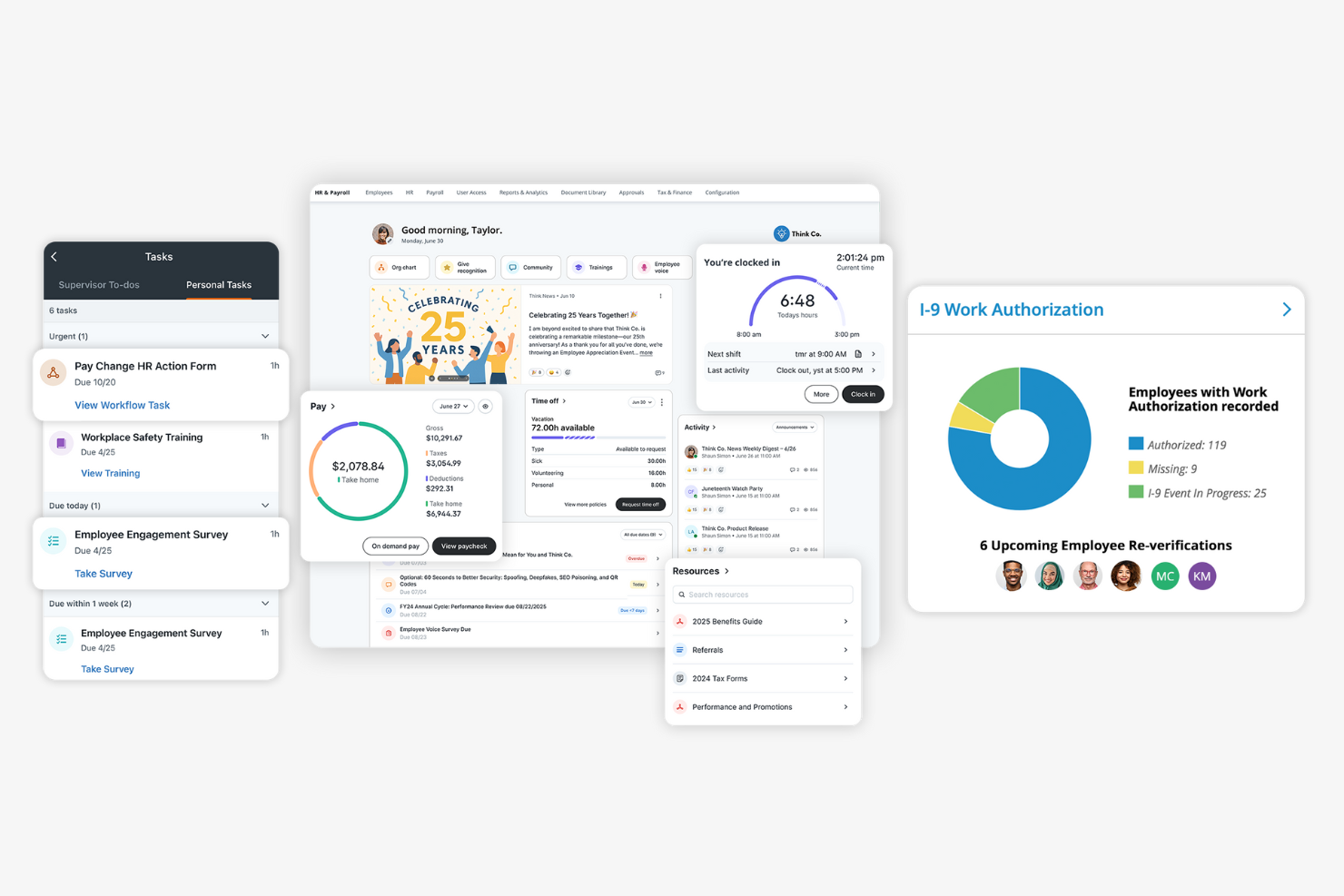
Paylocity offers HR software tailored for manufacturers managing unionized workforces and complex labor agreements. This platform helps HR teams automate union rule compliance, track seniority, and manage shift bidding. If you need to coordinate union contracts and simplify workforce management, Paylocity brings specialized tools for these challenges.
Why I Picked Paylocity
Union workforce management in manufacturing brings unique challenges, which is why I picked Paylocity for this shortlist. The platform offers automated tracking of union rules, seniority, and contract terms, helping HR teams stay compliant with complex agreements. I appreciate that Paylocity supports shift bidding and grievance tracking, which are essential for manufacturers with unionized teams. These features make it a strong choice for organizations that need to manage union contracts and workforce logistics in one place.
Paylocity Key Features
Some other features in Paylocity that support manufacturing HR teams include:
- Time and Attendance Tracking: Capture employee hours and attendance data in real time for accurate payroll processing.
- Mobile App Access: Employees and managers can review schedules, request time off, and approve changes from any device.
- Onboarding Workflows: Automate new hire paperwork, training assignments, and document collection for faster onboarding.
- Performance Management Tools: Set goals, conduct reviews, and track employee progress within a centralized platform.
Paylocity Integrations
Integrations include AbsencePro, Checkr, Indeed, Toast, 15Five, Asana, Atlassian, SAP Concur, Greenhouse, Dropbox, and more.
Pros and Cons
Pros:
- Grievance tracking centralizes dispute documentation
- Shift bidding tools help manage seniority rules
- Union contract tracking supports complex agreements
Cons:
- Time-off approval workflows are not highly configurable
- No built-in equipment certification tracking
New Product Updates from Paylocity

Paylocity Expands Expense and Purchase Request Tools
Paylocity adds connected personal cards, smarter expense categorization, and a streamlined purchase request experience. This reduces manual entry and helps finance teams manage expenses and approvals more efficiently. For more information, visit Paylocity’s official site.
 .
.
HiBob
Best for small manufacturer HR automation
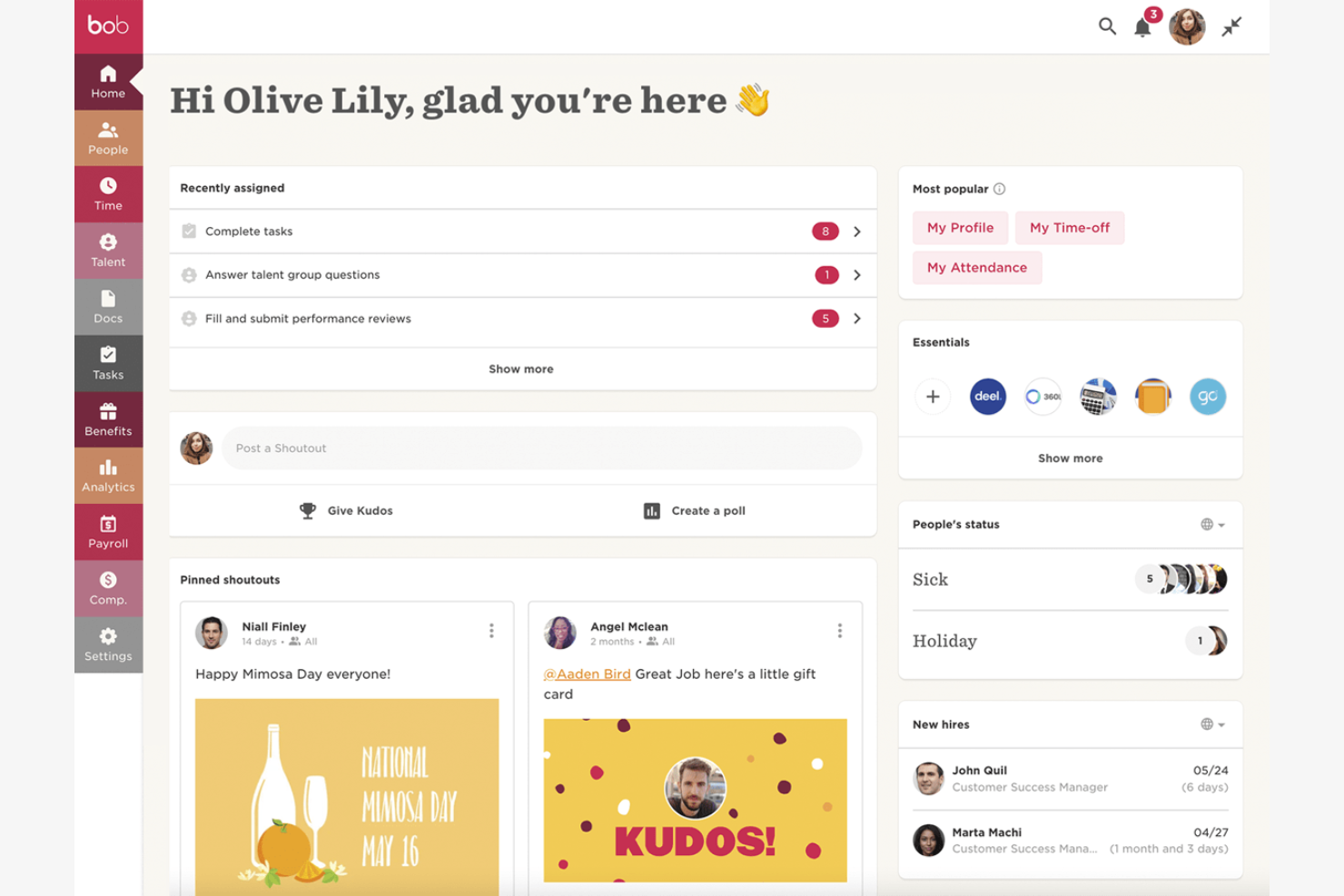
HiBob is designed for small manufacturers that want to automate HR tasks without adding complexity. The platform helps HR managers handle onboarding, time-off, and document management in one place, which is especially useful for teams with limited admin support. If you’re looking to reduce manual work and keep processes organized as your shop floor grows, HiBob is built for these needs.
Why I Picked HiBob
For small manufacturers, automating HR processes can free up valuable time and reduce errors. HiBob stands out for its workflow automation tools that let you set up custom onboarding checklists, automate document collection, and trigger reminders for compliance tasks. I like that you can tailor these workflows to fit the unique needs of a small factory, from managing certifications to tracking probation periods. This focus on automation makes HiBob a practical choice for manufacturers looking to streamline HR without a large HR team.
HiBob Key Features
Some other features that make HiBob useful for small manufacturers include:
- Time-Off Management: Track vacation, sick leave, and other absences with customizable policies.
- Org Chart Visualization: View and update your factory’s reporting structure in a visual format.
- Employee Directory: Access searchable profiles with contact details, roles, and shift assignments.
- Performance Reviews: Run structured review cycles and gather feedback from supervisors and peers.
HiBob Integrations
Integrations include ADP, Zendesk, Zapier, Deel, Jira, JobAdder, Entra ID, Paylocity, Remote, Slack, Xero, Zoom, and more.
Pros and Cons
Pros:
- Visual org charts for multi-site factories
- Custom workflows for safety and compliance tasks
- Automated onboarding for hourly and shift workers
Cons:
- No native support for union contract tracking
- No built-in time clock for shop floor

Best as AI for business
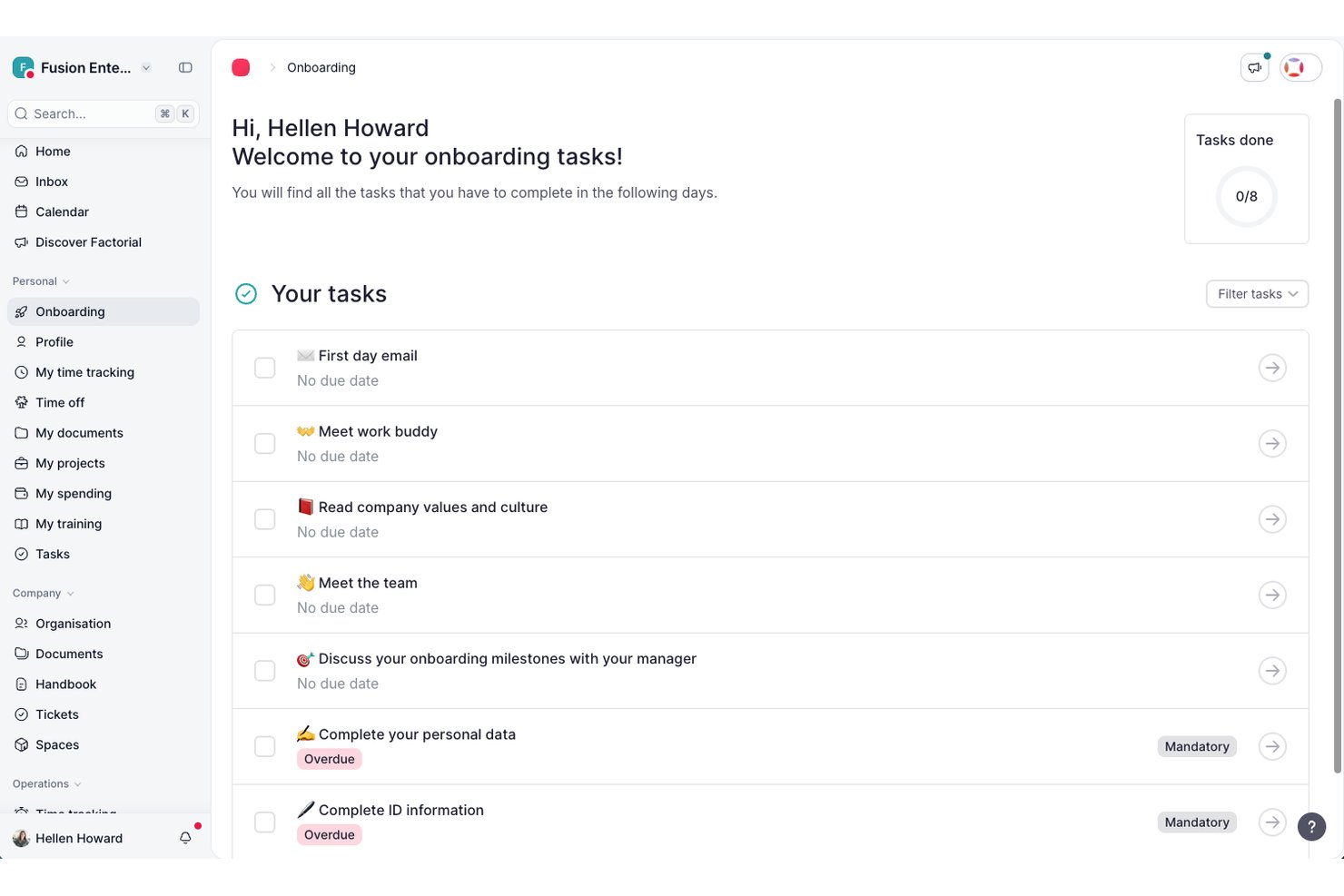
Factorial is an AI-driven HR platform for manufacturing teams that covers time tracking, shift scheduling, employee recordkeeping, recruitment, and document management across distributed sites.
Who Is Factorial Best For?
Factorial suits HR generalists and administrators at small to mid-sized businesses who want a single AI-powered platform to handle everyday people operations across multiple locations.
Why I Picked Factorial
I've included Factorial in my top picks because its AI for business positioning translates into genuinely practical tools for manufacturing HR teams, particularly around scheduling and reporting. I like that its AI can turn plain-language questions into real-time reports, so you're not wrestling with manual exports when you need a quick read on hours worked across sites. It also handles automated shift planning and AI-powered CV parsing, which takes real pressure off HR generalists managing hourly workers and rotating schedules.
Factorial Key Features
- Multi-method clock-in: Employees can clock in using geolocation, geofencing, QR codes, or two-factor authentication directly from the mobile app.
- Document expiry flagging: Factorial centralizes legal documents and sends automated notifications when documents are approaching their expiry date.
- AI CV parsing: The recruitment module automatically screens and filters candidate CVs based on skills and qualifications you define.
- Time-off policy configuration: HR teams can create unlimited custom absence types and time-off policies tied to specific locations or contract types.
Factorial Integrations
Factorial lists marketplace integrations with ZKTeco, a3innuva Nómina, DATEV LODAS, Sage 200, Sage Despachos, Microsoft Power BI, and Okta. It offers a public API, webhooks, SDKs, API keys, and OAuth 2.0, plus Zapier connectivity to hundreds of tools.
Pros and Cons
Pros:
- AI turns questions into real-time workforce reports
- Mobile offline clock-ins support distributed shop-floor teams
- Reviewers praise centralized employee and document records
Cons:
- Complex overtime and pay differentials need manual checks
- Reviewers report limited rotating-shift schedule configuration

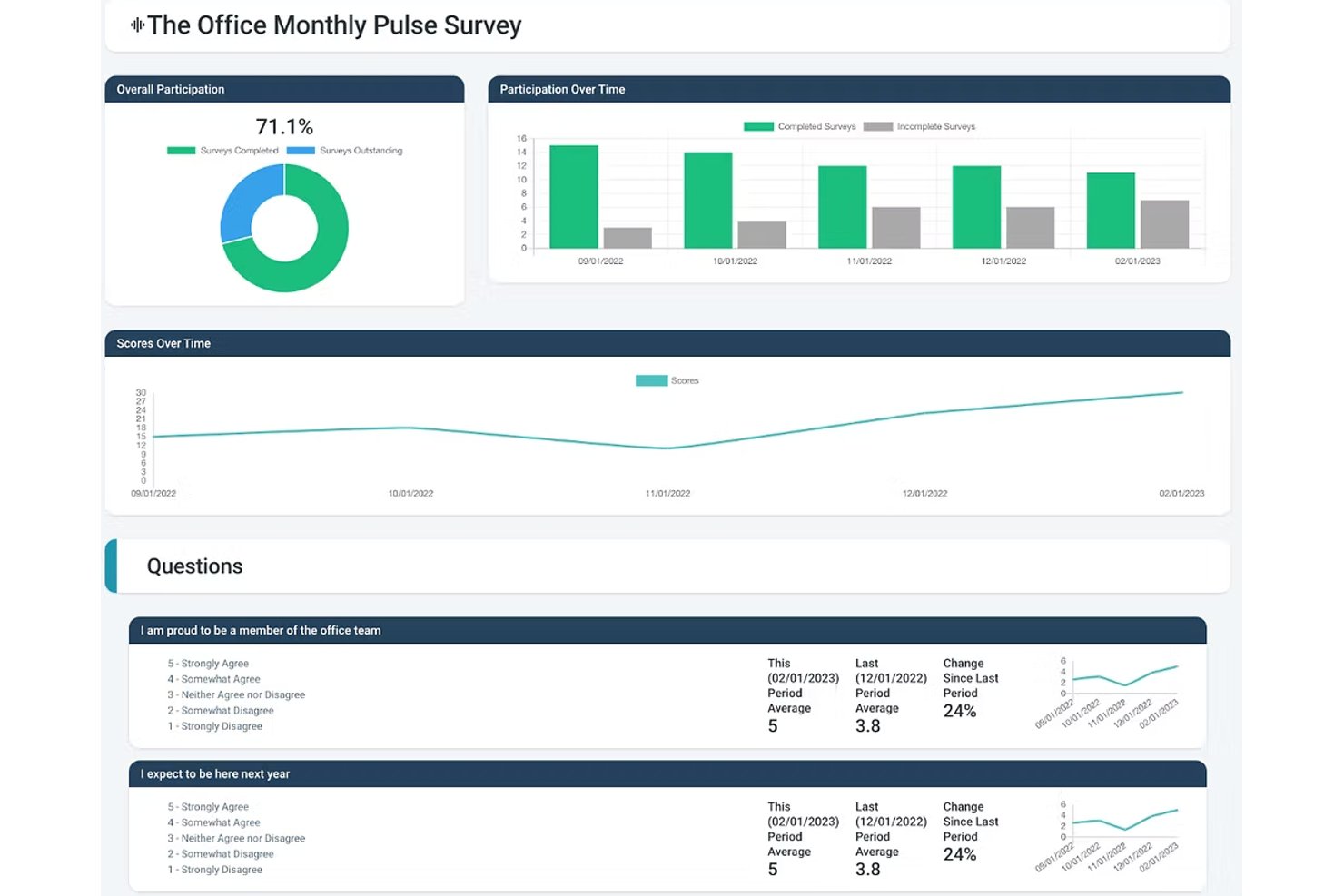
Express Evaluations is a performance management platform that lets HR teams build custom employee review templates, run 360-degree feedback cycles, track goals, and manage performance improvement plans.
Who Is Express Evaluations Best For?
It's a strong fit for HR teams at small to midsize organizations looking to replace paper-based or spreadsheet-driven performance reviews with a structured digital process.
Why I Picked Express Evaluations
I picked Express Evaluations because its custom template builder lets me create role-specific review forms for positions across the floor, from machine operators to shift supervisors. I can assign different rating scales and competency criteria per role, so a quality inspector isn't evaluated against the same criteria as a warehouse lead. Hire-date and anniversary-date scheduling also means I can automatically trigger reviews at the right point in each hourly worker's tenure, not just at year-end.
Express Evaluations Key Features
- Peer and 360-degree evaluations: Collect feedback from colleagues, direct reports, and managers for a well-rounded performance review.
- Automated notifications and reminders: Ensure timely completion of evaluations with built-in scheduling and automatic email reminders.
- Employee document vault: Securely store performance records, signed reviews, and supporting documents for compliance and auditing.
- Org chart and employee profiles: Visualize team structures and maintain profile information for every employee in one place.
Express Evaluations Integrations
Native integrations are not clearly documented. An API is available for custom integrations.
Pros and Cons
Pros:
- Quick setup with minimal HR configuration
- Review scheduling tied to hire anniversary dates
- Role-specific templates for varied job positions
Cons:
- Missing safety compliance and OSHA tools
- No shift scheduling or time tracking

factoHR
Best for biometric attendance integration
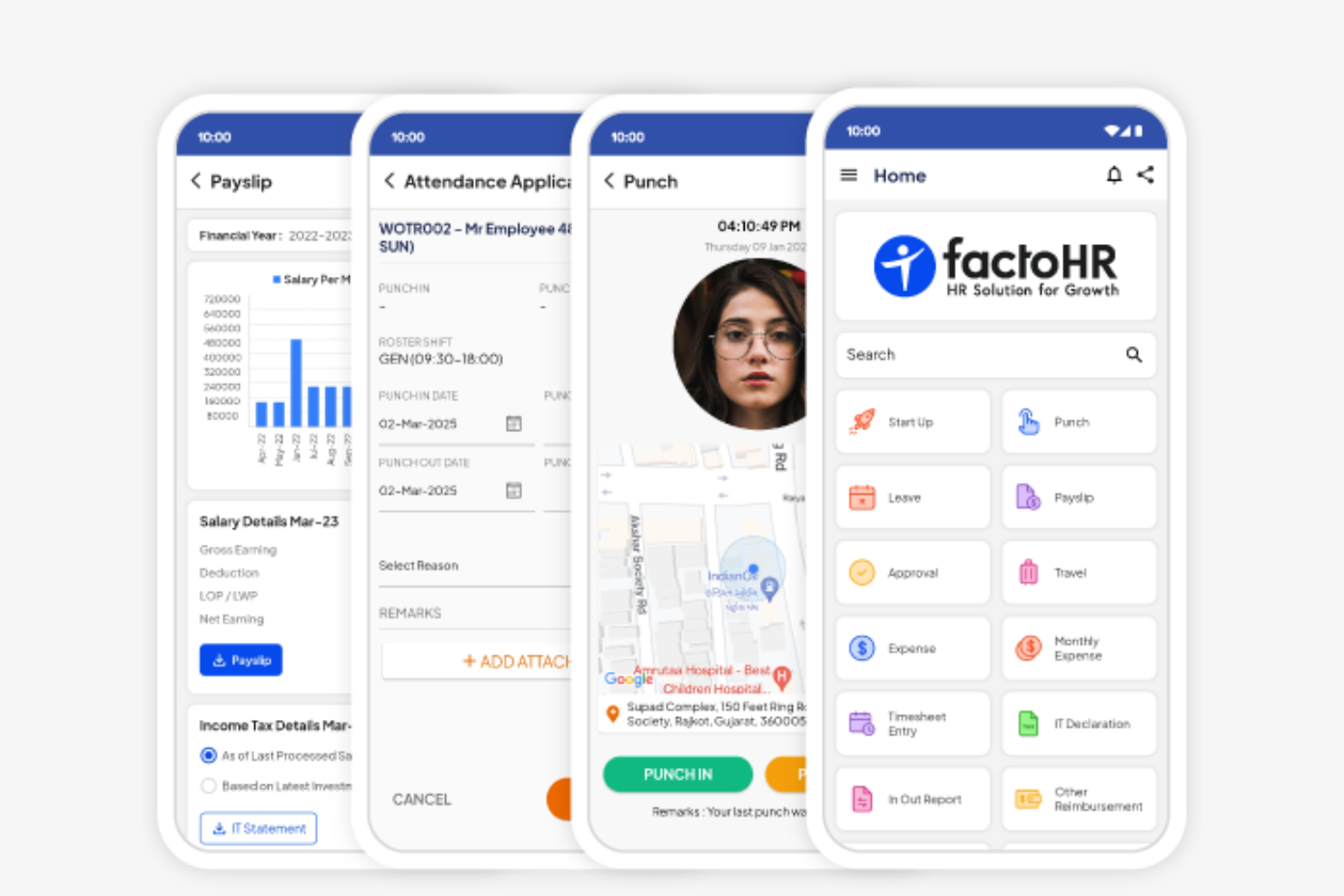
factoHR stands out for manufacturers looking to connect HR processes with biometric attendance systems on the shop floor. This platform is a strong fit for businesses that need accurate, real-time tracking of employee shifts, overtime, and presence across multiple locations. If your team manages large workforces with complex attendance needs, factoHR brings together biometric hardware integration and HR management in one place.
Why I Picked factoHR
For manufacturers who need precise attendance tracking, factoHR’s biometric attendance integration addresses a common challenge on the factory floor. The platform connects directly with fingerprint and facial recognition devices, ensuring accurate, tamper-proof records of employee time and presence. I picked factoHR because it also supports shift scheduling and overtime calculation based on real attendance data, which is essential for managing large, shift-based teams. This focus on hardware integration and real-time attendance management makes it a practical choice for manufacturing environments.
factoHR Key Features
Some other features that make factoHR useful for manufacturing HR teams include:
- Payroll Processing: Calculates salaries, deductions, and statutory compliance based on attendance and shift data.
- Performance Management: Tracks employee goals, appraisals, and feedback cycles within the platform.
- Expense Management: Lets employees submit and track reimbursement claims digitally.
- Mobile App: Provides employees and managers with access to attendance, leave, and payroll information on the go.
factoHR Integrations
Native integrations are not currently listed.
Pros and Cons
Pros:
- Offers shift and overtime calculation tools
- Supports multi-location workforce management
- Connects directly with biometric attendance devices
Cons:
- Biometric device setup may require vendor assistance
- No built-in safety incident tracking
HR Cloud
Best for employee self-service portals
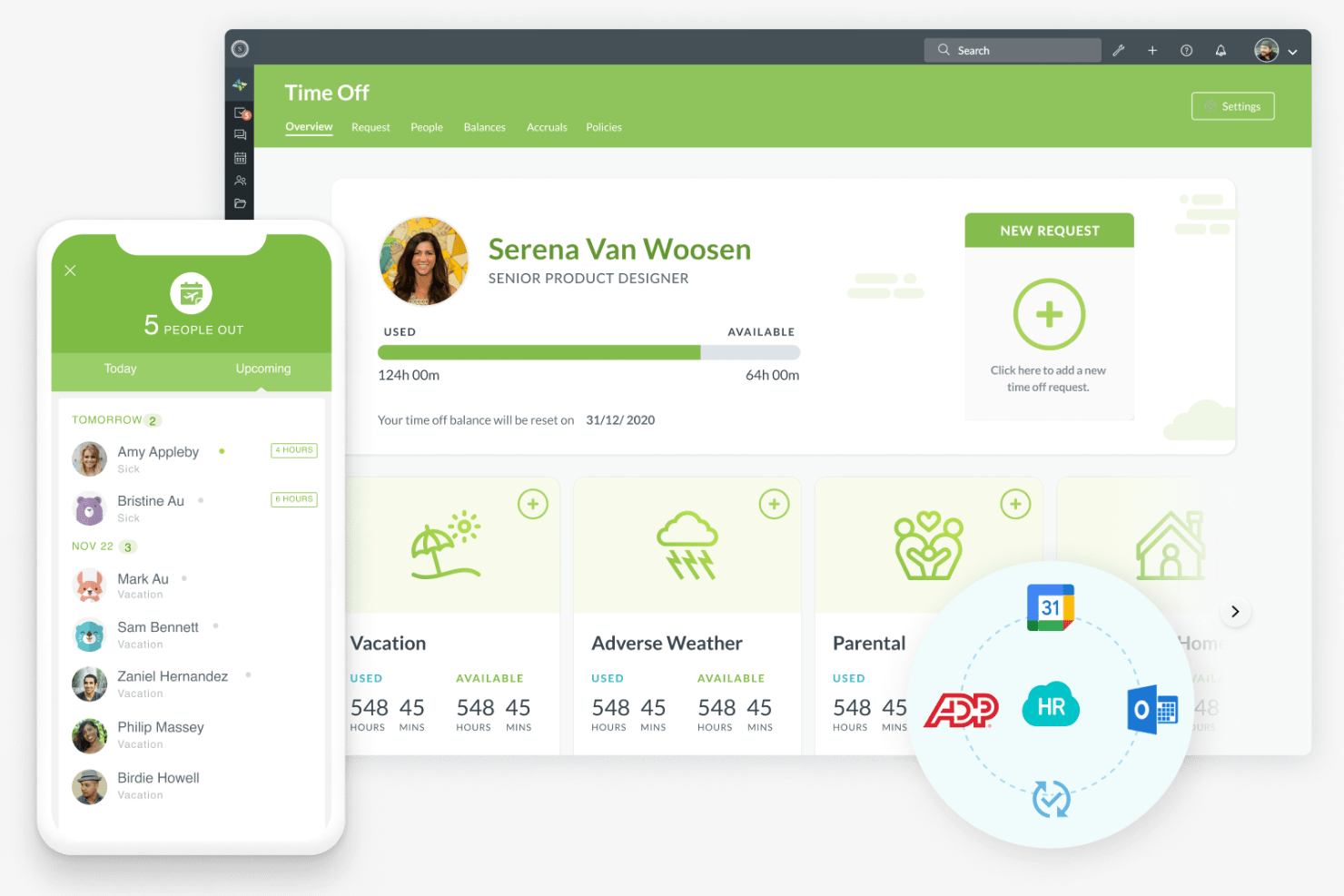
HR Cloud offers manufacturing teams a way to centralize HR tasks and empower employees with self-service access to their own information. This platform is especially useful for organizations with distributed or shift-based workforces that need to manage onboarding, time off, and document access without bottlenecks. If you’re looking to reduce HR admin workload and give employees more control over their data, HR Cloud’s self-service portals are designed for that need.
Why I Picked HR Cloud
Manufacturing organizations often need to give employees quick, secure access to their own HR information, and HR Cloud’s self-service portals address this directly. Employees can update personal details, request time off, and access important documents without waiting for HR intervention. I picked HR Cloud because it also lets teams manage onboarding tasks and track compliance documents through the same portal, which is especially helpful for high-turnover or shift-based environments. This focus on employee empowerment and process transparency makes it a strong fit for manufacturing HR needs.
HR Cloud Key Features
Some other features that manufacturing HR teams may find useful include:
- Asset Management: Tracks company equipment and assets assigned to employees.
- HR Document Storage: Centralizes storage and retrieval of HR policies, forms, and compliance documents.
- Employee Recognition Tools: Enable peer-to-peer recognition and digital badges for achievements.
- Custom Workflows: Lets you automate HR processes like approvals and notifications.
HR Cloud Integrations
Integrations include ADP, QuickBooks, UKG, Workday, SAP, Paycor, Paylocity, Dayforce, Slack, Microsoft Teams, and more.
Pros and Cons
Pros:
- Custom workflows automate HR approval processes
- Peer recognition tools boost workforce morale
- Asset management tracks equipment assignments
Cons:
- Limited safety training tracking features
- No built-in biometric attendance integration
Personio
Best for European workforce administration
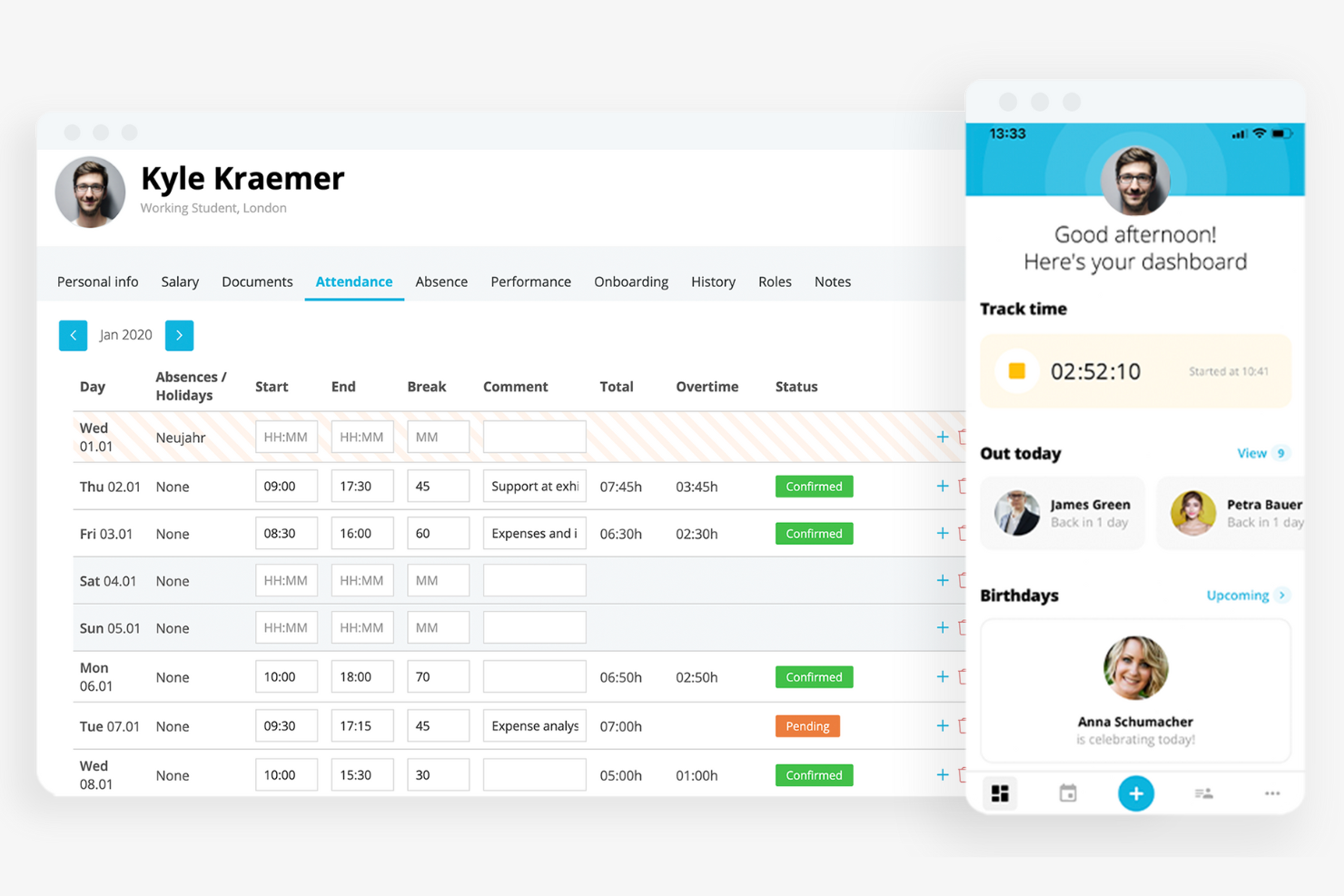
Personio is designed for manufacturers with operations across Europe who need HR software that supports multi-country compliance and workforce administration. It’s especially useful for HR teams managing diverse employment laws, time tracking, and payroll in different European countries. If your business needs a centralized platform for handling cross-border HR processes and documentation, Personio brings these capabilities together with a focus on European requirements.
Why I Picked Personio
Managing HR across multiple European countries brings unique challenges, especially for manufacturers with distributed teams. Personio is built to handle European workforce administration, offering features like localized payroll processing and compliance management for different countries. I picked Personio because it helps HR teams track time, absences, and employment contracts in line with local regulations. Its focus on supporting multi-country HR processes makes it a strong fit for manufacturers operating across Europe.
Personio Key Features
Some other features that make Personio useful for manufacturing HR teams include:
- Document Management: Centralizes storage and access for contracts, certificates, and HR documents.
- Automated Workflows: Lets you set up custom approval processes for hiring, onboarding, and leave requests.
- Employee Self-Service: Allows staff to update personal information, submit absences, and access payslips online.
- Recruiting Module: Manages job postings, candidate pipelines, and interview scheduling within the platform.
Personio Integrations
Integrations include Flip, 360Learning, Yoffix, eloomi, Jira, DocuSign, Power BI, Asana, and more.
Pros and Cons
Pros:
- Handles shift planning for distributed teams
- Offers automated document and contract management
- Supports multi-country payroll and compliance
Cons:
- Payroll features focus on European regulations only
- Limited manufacturing-specific analytics dashboards

Ciphr
Best for UK-based manufacturing teams
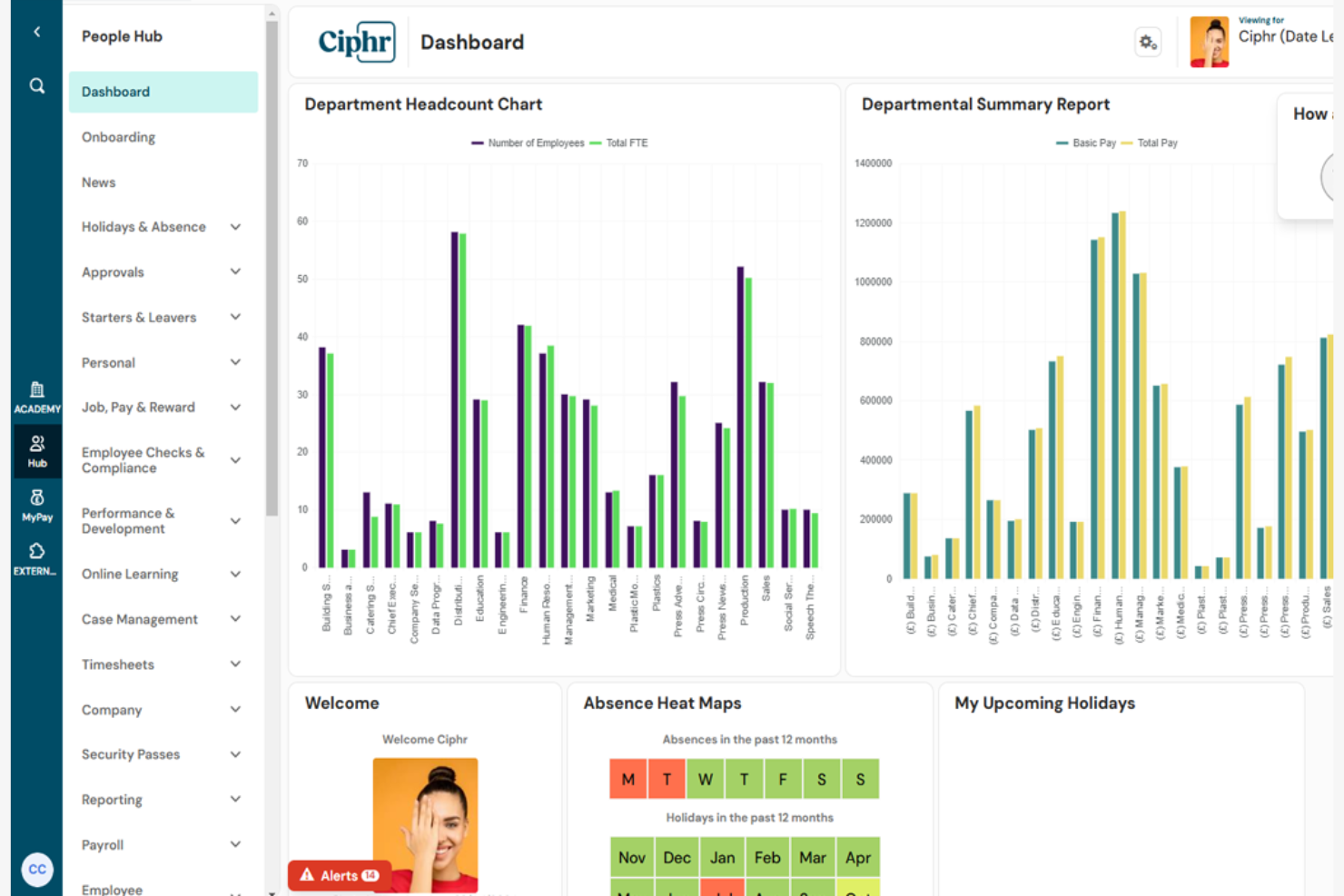
Ciphr is tailored for UK-based manufacturers who need HR software that aligns with local regulations and workforce needs. It’s a strong fit for HR teams managing complex shift patterns, compliance, and employee data across multiple sites. If you’re looking for a solution that supports UK payroll, right-to-work checks, and manufacturing-specific HR processes, Ciphr brings these capabilities together in one platform.
Why I Picked Ciphr
For manufacturers operating in the UK, local compliance and workforce management requirements can be especially demanding. Ciphr stands out because it’s built to handle UK-specific HR needs, including right-to-work checks and GDPR compliance. I picked Ciphr for its ability to manage complex shift scheduling and payroll processes that are common in manufacturing environments. Its focus on UK legislation and manufacturing workflows makes it a practical choice for HR teams that need to stay compliant and organized.
Ciphr Key Features
Some other features that make Ciphr useful for manufacturing HR teams include:
- Employee Self-Service Portal: Allows staff to update personal details, view payslips, and manage leave requests online.
- Absence Management: Tracks employee absences and automates approval workflows for leave requests.
- Performance Management Tools: Supports goal setting, appraisals, and ongoing performance tracking.
- Recruitment and Onboarding Module: Manages job postings, candidate tracking, and digital onboarding processes.
Ciphr Integrations
Native integrations are not currently listed.
Pros and Cons
Pros:
- Includes performance management and appraisal tools
- Offers digital onboarding for manufacturing hires
- Handles complex shift and absence management
Cons:
- Limited analytics for shop floor productivity
- No built-in time clock hardware integration

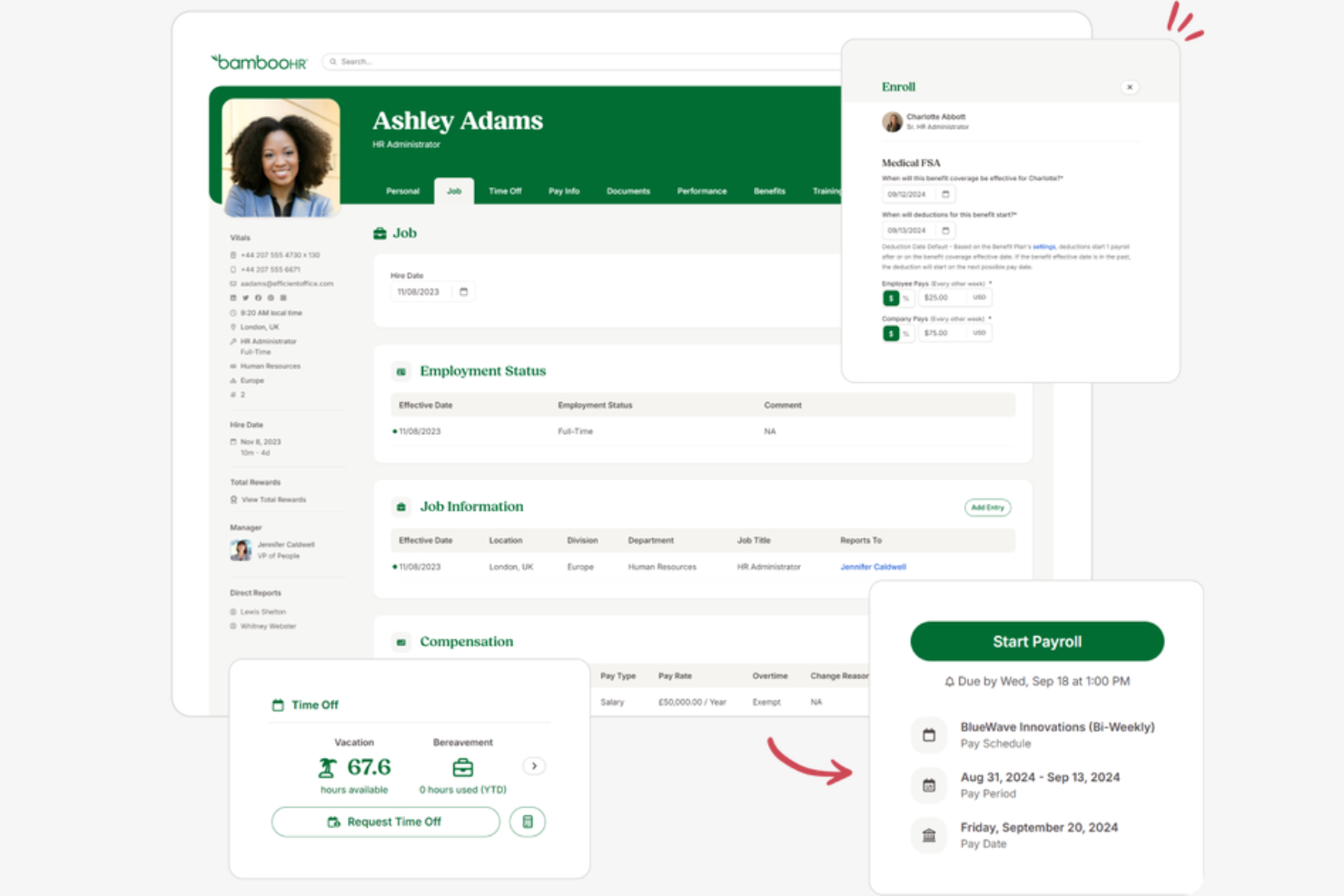
BambooHR is designed for manufacturers that need to onboard large numbers of hourly employees quickly and consistently. The platform helps HR teams automate paperwork, training assignments, and compliance steps for new hires. If you’re looking to reduce manual onboarding tasks and improve the hourly employee experience, BambooHR offers tools built for these needs.
Why I Picked BambooHR
For manufacturers hiring and onboarding hourly employees at scale, BambooHR stands out for its focus on automating and standardizing the onboarding process. The platform lets HR teams create custom onboarding checklists, assign training modules, and collect digital signatures on required documents. I like that BambooHR also tracks onboarding progress for each new hire, so nothing falls through the cracks. These features help manufacturing HR teams bring new hourly workers up to speed quickly and consistently.
BambooHR Key Features
Some other features in BambooHR that support manufacturing HR teams include:
- Time-Off Management: Track, approve, and report on employee leave requests in one place.
- Employee Self-Service Portal: Allow employees to update personal information and access documents without HR intervention.
- Document Storage: Store and organize employee records, certifications, and compliance documents securely.
- Custom Reporting: Build and export reports on workforce data, such as turnover and attendance, for better decision-making.
BambooHR Integrations
Integrations include Checkr, Greenhouse, Culture Amp, Cronofy, Remote, TalentLMS, Hireflix, Leapsome, Evolia, Human Interest, and more.
Pros and Cons
Pros:
- Employee self-service portal supports shift workers
- Digital document signing reduces paper-based processes
- Onboarding checklists automate hourly hiring steps
Cons:
- No native OSHA compliance tracking
- No built-in union contract management tools
Annen HR-programvare for produksjon
- EPAY Systems
For labor cost tracking
- GNSA
For payroll in multi-site operations
- Deel HR
For cross-border workforce management
- TalentHR
For compliance document management
- OneDirectory
For centralized plant team directories
- Paycor
For shift scheduling in large plants
- Zoho People
For customizable workflow automation
- ADP
For scalable workforce analytics
- Deltek Core HR
For integrated project-based HR


How I Evaluate HR Software for Manufacturing
I split my evaluation into baseline criteria—like shift scheduling and OSHA compliance—and differentiators that separate the best options for plant managers and HR teams.
Core Functionality (Table Stakes For This List)
When I'm selecting tools for my list, I rank each one on a scale from 0 (does not offer the functionality) to 5 (excels in this area) for each core functionality listed below. Then, I calculate the tool's total score into a percentage. Each tool needs to achieve a minimum total score of 65% to be considered for inclusion.
- Shift Scheduling & Time Tracking: I look for rotating shift support, overtime logic, and time clock options like kiosk or biometric punch-in that work across multiple plant locations.
- Hourly Payroll Processing: Manufacturing payroll gets complicated fast with shift differentials and union pay rules, so I check how each tool handles those calculations.
- Safety & Compliance Management: I evaluate whether a platform tracks OSHA logs, incident reports, and corrective actions rather than just storing safety documents in a file folder.
- Certification & Training Tracking: Expired forklift certifications or lapsed safety training can shut down a line, so I look for expiration alerts and renewal workflows.
- High-Volume Recruiting & Onboarding: Hiring surges are common in manufacturing, and I check whether a tool supports bulk applicant workflows, mobile apply, and paperless onboarding.
- Core HRIS & Employee Records: The platform should maintain centralized records across production, warehouse, and office staff with self-service access for benefits and PTO.
Once I have a list of tools that meet the criteria, I consider what sets each platform apart.
Differentiating Factors (What Sets Vendors Apart)
Here's how I compare and contrast different vendors:
Standout Features
I check whether platforms offer multilingual self-service portals, since many plant floors employ workers who speak different languages and need to access pay stubs or request time off independently. Offline functionality matters too—shop floors often have poor connectivity, so time clocks and mobile apps that sync when a connection returns are a real advantage. I also look for labor cost forecasting that lets operations managers model headcount against upcoming production schedules.
Beyond Features
ERP integration is one of the first things I evaluate. A platform that connects with systems like SAP or Epicor means labor costs flow directly into production reporting without manual exports. Multi-site scalability also matters—I look for tools that let you configure different labor rules per location while keeping everything under one roof. Finally, I consider implementation support, especially whether the vendor has experience onboarding non-desk workers across shifts who may never sit down at a computer.
Slik velger du HR-programvare for produksjon
Det er lett å gå seg vill i lange funksjonslister og kompliserte prismodeller. For å holde fokus mens du arbeider deg gjennom den unike prosessen med å velge programvare, får du her en sjekkliste over faktorer du bør ta hensyn til:
| Faktor | Hva du bør vurdere |
| Skalerbarhet | Vil programvaren håndtere sesongbaserte endringer i arbeidsstyrken, flere lokasjoner eller fremtidig vekst uten større oppgraderinger? |
| Integrasjoner | Kan den kobles direkte til lønns-, ERP- eller stemplingssystemene dine for å unngå manuell dataregistrering? |
| Tilpasningsmuligheter | Kan du tilpasse arbeidsflyter, skjemaer og tillatelser slik at de samsvarer med produksjonsprosessene og retningslinjene dine? |
| Brukervennlighet | Vil arbeidsledere og ansatte på produksjonsgulvet oppleve grensesnittet som tydelig og tilgjengelig, med behov for minimal opplæring? |
| Implementering og innføring | Hvor lang tid vil det ta å komme i gang, og hvilke ressurser eller hvilken støtte tilbyr leverandøren under utrullingen? |
| Kostnad | Er alle kostnader – oppsett, lisenser, støtte og oppgraderinger – tydelige og innenfor budsjettet ditt for antallet brukere du trenger? |
| Sikkerhetstiltak | Tilbyr systemet rollebasert tilgang, revisjonsspor og datakryptering for å beskytte sensitive ansattopplysninger? |
| Etterlevelseskrav | Kan programvaren hjelpe deg med å holde oversikt over sertifiseringer, sikkerhetsopplæring og overholdelse av arbeidsrettslige regler som gjelder spesielt for produksjon? |
Hva er HR-programvare for produksjon?
HR-programvare for produksjon er en skybasert plattform som hjelper produksjonsbedrifter med å håndtere menneskelige ressurser, blant annet ansattopplysninger, tidsregistrering, samsvar og HR-drift. Disse HR-systemene er utviklet for produksjonsindustrien og støtter arbeidsstyrken i produksjonen med verktøy for søkerhåndtering, bakgrunnssjekker og administrasjon av hele medarbeiderreisen. Mange løsninger fungerer som komplette HR-løsninger med lønnsprogramvare og lønnsløsninger, inkludert lønnskjøring for produksjonsbedrifter, samtidig som de reduserer avhengigheten av manuelle verktøy som regneark. De støtter også medarbeiderengasjement og -bevaring, og bidrar til å tiltrekke seg de beste talentene for både små bedrifter og store virksomheter.
Funksjoner i HR-programvare for produksjonsvirksomheter
Når du velger HR-programvare for produksjonsvirksomheter, bør du se etter følgende viktige funksjoner:
- Registrering av arbeidstid og oppmøte: Overvåker arbeidstimer, skiftmønstre og overtid, og integreres ofte med fysiske stemplingsur eller adgangskortsystemer for å sikre korrekt lønnsberegning og etterlevelse av regelverket.
- Selvbetjeningsportal for ansatte: Gjør det mulig for ansatte å oppdatere personopplysninger, be om fri (PTO) og få tilgang til lønnsslipper eller arbeidsplaner uten å måtte kontakte HR direkte.
- Håndtering av introduksjon og avslutning: Veileder nyansatte gjennom nødvendig dokumentasjon, sikkerhetsopplæring og introduksjonsoppgaver, samtidig som avslutningsprosesser for ansatte som slutter, håndteres.
- Dokumenthåndtering: Lagrer og organiserer HR-dokumenter som kontrakter, sertifiseringer og sikkerhetsregistre i et sikkert, søkbart digitalt arkiv.
- Oppfølging av etterlevelse: Hjelper HR-team med å overvåke og dokumentere regulatoriske krav, inkludert arbeidsrett, sikkerhetssertifiseringer og fornyelse av opplæring som gjelder spesifikt for produksjonsvirksomheter.
- Lønnsintegrasjon: Kobler seg til lønnssystemer for å automatisere lønnsberegninger, trekk og direkte innbetalinger basert på registrerte arbeidstimer og oppmøte.
- Registrering av eiendeler og utstyr: Tildeler og overvåker bedriftsutstyr eller uniformer som er utlevert til ansatte, noe som bidrar til å redusere tap og opprettholde ansvarliggjøring.
- Automatisering av tilpassede arbeidsflyter: Gjør det mulig for HR-team å utforme og automatisere godkjenningsprosesser, varsler og oppgavetildelinger tilpasset produksjonsvirksomheten.
- Håndtering av prestasjoner og opplæring: Følger opp medarbeidersamtaler, kompetanseutvikling og løpende opplæringsbehov, og integreres ofte med et læringsadministrasjonssystem.
- Håndtering av flere lokasjoner: Støtter HR-drift på tvers av flere fabrikker eller lokasjoner, og gir sentralisert oversikt og rapportering for geografisk spredte team.
Fordeler med HR-programvare for produksjonsvirksomheter
Implementering av HR-programvare for produksjonsvirksomheter gir flere fordeler for teamet og virksomheten din. Her er noen av fordelene du kan se frem til:
- Bedre etterlevelse: Automatisert oppfølging av sertifiseringer, sikkerhetsopplæring og arbeidsrettslige regler bidrar til å redusere risikoen for manglende etterlevelse og utfordringer i forbindelse med revisjoner.
- Nøyaktig registrering av arbeidstid og oppmøte: Integrerte verktøy for registrering minimerer lønnsfeil og sikrer rettferdig kompensasjon for skiftbaserte arbeidsstyrker.
- Forenklet introduksjon: Digitale arbeidsflyter for introduksjon fremskynder behandlingen av nyansatte og sikrer at all nødvendig dokumentasjon og opplæring blir gjennomført.
- Sentralisert dokumenthåndtering: Sikker digital lagring gjør det enkelt å organisere, finne frem til og oppdatere personalopplysninger og HR-dokumenter.
- Bedre oversikt over arbeidsstyrken: Sanntidsdashbord og rapportering gir innsikt i oppmøte, prestasjoner og trender i arbeidsstyrken på tvers av flere lokasjoner.
- Redusert administrativ arbeidsmengde: Selvbetjeningsportaler og automatisering av arbeidsflyter frigjør HR-team fra repetitive oppgaver, slik at de kan fokusere mer på strategiske initiativer.
- Bedre kontroll over eiendeler: Funksjoner for registrering av utstyr og eiendeler gjør det enklere å følge opp tildelinger og redusere tap eller feilplassering av virksomhetens eiendeler.
Kostnader og priser for HR-programvare for produksjonsvirksomheter
Valg av HR-programvare for produksjonsvirksomheter krever en forståelse av de ulike prismodellene og abonnementene som er tilgjengelige. Kostnadene varierer basert på funksjoner, teamstørrelse, tillegg og mer. Tabellen nedenfor oppsummerer vanlige abonnementer, gjennomsnittsprisene deres og typiske funksjoner som inngår i HR-programvareløsninger for produksjonsvirksomheter:
Sammenligningstabell for abonnementer for HR-programvare for produksjonsvirksomheter
| Abonnementstype | Gjennomsnittspris | Vanlige funksjoner |
| Gratisabonnement | $0 | Grunnleggende personalopplysninger, begrenset tidsregistrering og enkel dokumentlagring. |
| Personlig abonnement | $5-$10/bruker/måned | Selvbetjening for ansatte, grunnleggende verktøy for introduksjon og standard oppfølging av etterlevelse. |
| Forretningsabonnement | $15-$25/bruker/måned | Avansert registrering av arbeidstid og oppmøte, lønnsintegrasjon, automatisering av arbeidsflyter og håndtering av flere lokasjoner. |
| Virksomhetsabonnement | $30-$50/bruker/måned | Tilpassede arbeidsflyter, registrering av eiendeler, avansert analyse, dedikert brukerstøtte og forbedrede sikkerhetstiltak. |
Vanlige spørsmål om HR-programvare for produksjonsbedrifter
Her er noen svar på vanlige spørsmål om HR-programvare for produksjonsbedrifter:
Hvordan støtter HR-programvare for produksjonsbedrifter overholdelse av arbeidslovgivningen?
HR-programvare for produksjonsbedrifter hjelper deg med å holde oversikt over sertifiseringer, sikkerhetsopplæring og arbeidstimer for å sikre at teamet ditt oppfyller kravene i arbeidslovgivningen. Mange systemer tilbyr automatiske varsler om dokumenter som snart utløper, og genererer rapporter for revisjoner, noe som gjør det enklere å overholde regelverket i et regulert miljø.
Kan HR-programvare for produksjonsbedrifter håndtere flere skift og lokasjoner?
Ja, det meste av HR-programvaren for produksjonsbedrifter er utviklet for å håndtere komplekse skiftplaner og støtte flere anlegg. Du kan tildele ansatte til ulike skift, følge oppmøte på tvers av lokasjoner og generere konsoliderte rapporter for bedre oversikt over arbeidsstyrken.
Hvilke integrasjoner bør jeg se etter i HR-programvare for produksjonsbedrifter?
Se etter integrasjoner med lønnssystemer, ERP-plattformer, stemplingsur og planleggingsverktøy. Disse forbindelsene reduserer manuell dataregistrering, bidrar til å opprettholde nøyaktige registre og sørger for at HR-prosessene dine fungerer problemfritt sammen med de eksisterende produksjonssystemene dine.
Hvor lang tid tar det å implementere HR-programvare for produksjonsbedrifter?
Tidsrammen for implementeringen varierer, men de fleste team kan forvente en prosess som varer fra noen uker til flere måneder. Faktorer som spiller inn, er behovet for datamigrering, opplæringskrav og hvor komplekse arbeidsflytene dine er. Leverandører tilbyr ofte støtte ved oppstart for å hjelpe deg i gang.
Passer HR-programvare for produksjonsbedrifter for små produsenter?
Ja, mange HR-programvareløsninger for produksjonsbedrifter tilbyr skalerbare abonnementer som passer for små produsenter. Du kan starte med grunnleggende funksjoner og oppgradere etter hvert som virksomheten vokser, slik at du bare betaler for det du trenger.