

De 10 beste programvareløsningene for fraværshåndtering i 2026

Beste programvare for fraværshåndtering


Programvare for fraværshåndtering hjelper teamet ditt med å spore, administrere og rapportere ansattes permisjoner, betalt fri og oppmøte på ett sted. Hvis du leter etter den beste programvaren for fraværshåndtering, balanserer du sannsynligvis hensyn til etterlevelse, komplekse retningslinjer og behovet for tydelig oversikt over hele arbeidsstyrken.
Det riktige verktøyet kan hjelpe deg med å redusere manuell sporing, unngå feil og ivareta både virksomhetens og de ansattes behov. I denne listen finner du en rekke løsninger for organisasjoner av ulik størrelse, bransjer og permisjonsregler, slik at du kan sammenligne funksjoner og velge det som passer best for HR-målene dine.
Why Trust Our Software Recommendations
Our team has been testing and reviewing software since 2012. As HR experts ourselves, we know how difficult—and important—it is to choose the right software.
For this guide, we evaluated tools using hands-on testing and independent research, scoring tools using our selection criteria. We also draw on insights from industry thought leaders and practicing HR experts.
Our reviews reflect our human editorial judgment, not a sales pitch.
Expert reviewers:
Sammenligningstabell for programvare for fraværshåndtering
Denne sammenligningstabellen oppsummerer prisdetaljene for mine beste utvalgte programmer for fraværshåndtering.
| Tool | Best For | Trial Info | Price | ||
|---|---|---|---|---|---|
| 1 | Best as AI for business | Free demo available | From $8/user/month | Website | |
| 2 | Best with enterprise HR system integration | Free demo available | Pricing upon request | Website | |
| 3 | Best for small business PTO tracking | Free trial available | From €2.99/user/month | Website | |
| 4 | Best for simple team calendar views | 30-day free trial available | From $1.50/user/month | Website | |
| 5 | Best with real-time payroll synchronization | Free demo available | Pricing upon request | Website | |
| 6 | Best for K-12 substitute management | Free demo available | Pricing upon request | Website | |
| 7 | Best for hourly workforce scheduling | Free demo available | From $1,800/month (billed annually) | Website | |
| 8 | Best for open-source customization | 30-day free trial available | From $1/user/month | Website | |
| 9 | Best for managing complex leave policies | Free demo available | Pricing upon request | Website | |
| 10 | Best for insurance and claims compliance | Free demo available | Pricing upon request | Website |
Anmeldelser av den beste programvaren for fraværshåndtering
Nedenfor finner du mine detaljerte oppsummeringer av programmene for fraværshåndtering som kom med på listen min. Anmeldelsene mine gir en detaljert oversikt over funksjonene, de beste bruksområdene og integrasjonene til hver programvare, slik at du kan finne den beste løsningen for organisasjonen din.

Best as AI for business
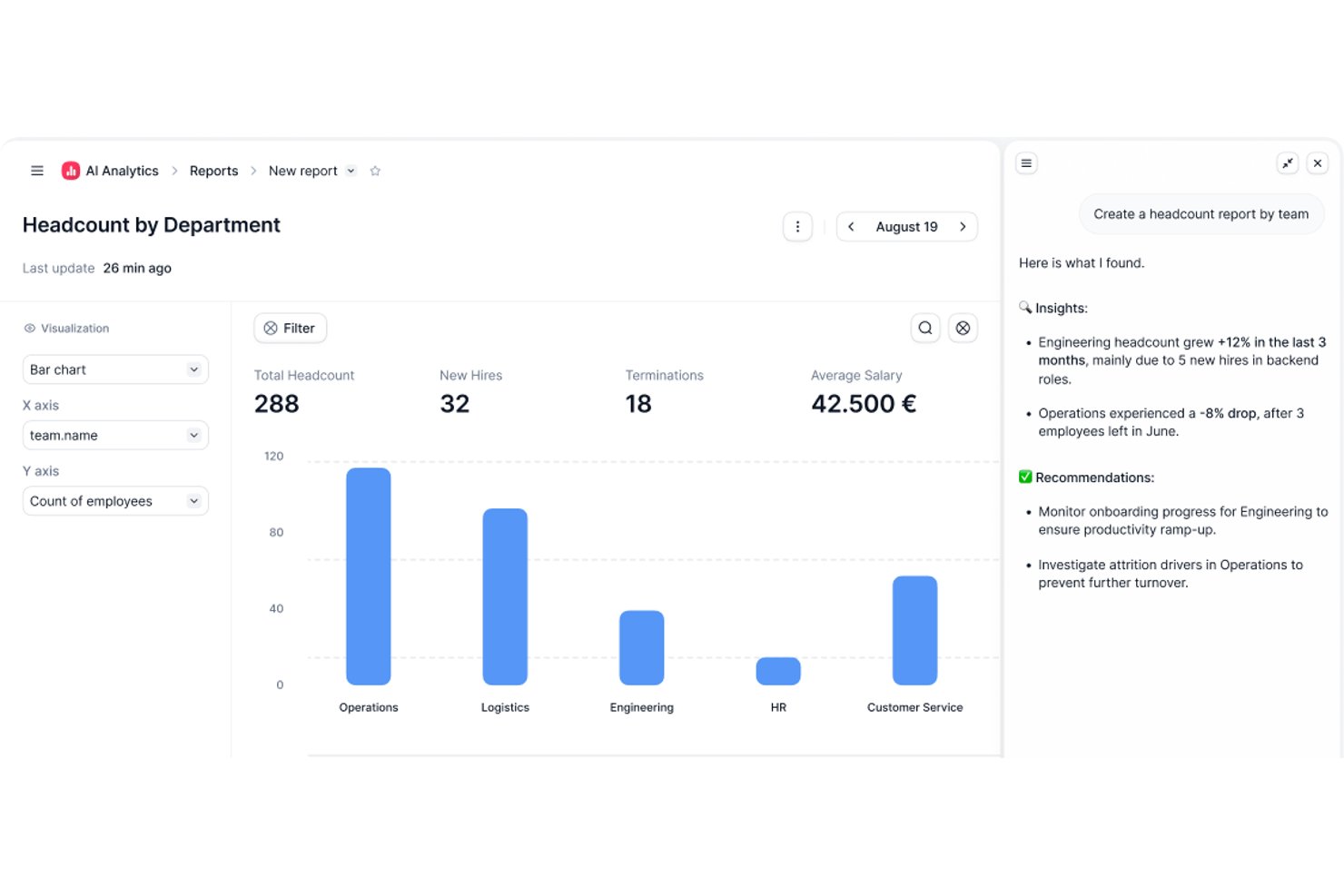
Factorial is an AI-driven HR platform that handles absence management alongside time tracking, shift scheduling, and leave policy configuration across web and mobile.
Who Is Factorial Best For?
Factorial suits HR teams that want AI-assisted day-to-day operations—from absence approvals and timetable planning to answering employee policy questions—all within a single platform.
Why I Picked Factorial
I've included Factorial in my top picks because its AI for business positioning goes beyond a catchy label—the platform actively assists with day-to-day absence management tasks like planning timetables, generating reports, and answering employee questions about leave policies. I especially like how employees can submit requests and check balances from a mobile device, while managers get a shared calendar view to spot overlaps and plan coverage before gaps become problems. Custom absence policies with accrual rules, carryover limits, and blackout dates can be configured by location or contract type, which keeps things organized without a lot of manual admin work.
Factorial Key Features
- Mobile time-off requests: Employees can submit leave requests, attach files, and view remaining balances directly from the Factorial iOS or Android app.
- Configurable approval workflows: Administrators can assign specific approvers for each team and set up customized approval systems for time-off requests.
- Multi-allowance policy support: A single time-off policy can include multiple allowances—such as a standard holiday allowance alongside an overtime-accrued leave allowance.
- Time-off report export: Managers can export time-off reports filtered by team or legal entity, showing both taken and outstanding leave.
Factorial Integrations
Marketplace integrations include a3innuva Nómina, DATEV LODAS, Sage 200, Silae, Microsoft Power BI, Slack, and Zapier. Factorial also offers a REST API, webhooks, and SDKs for custom integrations.
Pros and Cons
Pros:
- Shared absence calendar helps plan coverage
- Mobile requests and visible leave balances
- AI assists with policies, reports, and timetables
Cons:
- Limited absence analytics and report customization
- No documented statutory leave tracking or alerts

Workday
Best with enterprise HR system integration

Workday’s absence management module is designed for large organizations that need to connect time off tracking with broader HR and payroll processes. It’s a strong fit for enterprises looking to manage complex leave policies, compliance, and reporting within a single HR system. The platform helps HR teams automate absence workflows and maintain visibility across global workforces.
Why I Picked Workday
When you need absence management that fitsseamlessly into a larger HR ecosystem, Workday is a clear choice. Its absence module connects directly with payroll, benefits, and time tracking, so you can manage leave policies and compliance without juggling multiple systems. I like that you can automate complex approval workflows and set up region-specific rules for global teams. Workday’s reporting tools also help HR teams monitor trends and ensure policy alignment across the organization.
Workday Key Features
Some other features in Workday help organizations manage absence more efficiently:
- Mobile Self-Service: Employees and managers can request and approve leave directly from the Workday mobile app.
- Calendar Integration: Sync absence data with shared calendars to keep teams informed about who is out.
- Delegation Management: Assign backup approvers or delegates for absence requests during manager absences.
- Audit Trail: Maintain a detailed record of all absence transactions for compliance and review purposes.
Workday Integrations
Integrations include Slack, Microsoft Teams, Salesforce, ServiceNow, ADP, SAP, Oracle, Okta, and Cornerstone OnDemand.
Pros and Cons
Pros:
- Allows delegation of approval authority easily
- Supports global compliance for leave policies
- Syncs absence data with payroll automatically
Cons:
- Custom report building is time-consuming
- Requires IT support for initial configuration

Best for small business PTO tracking
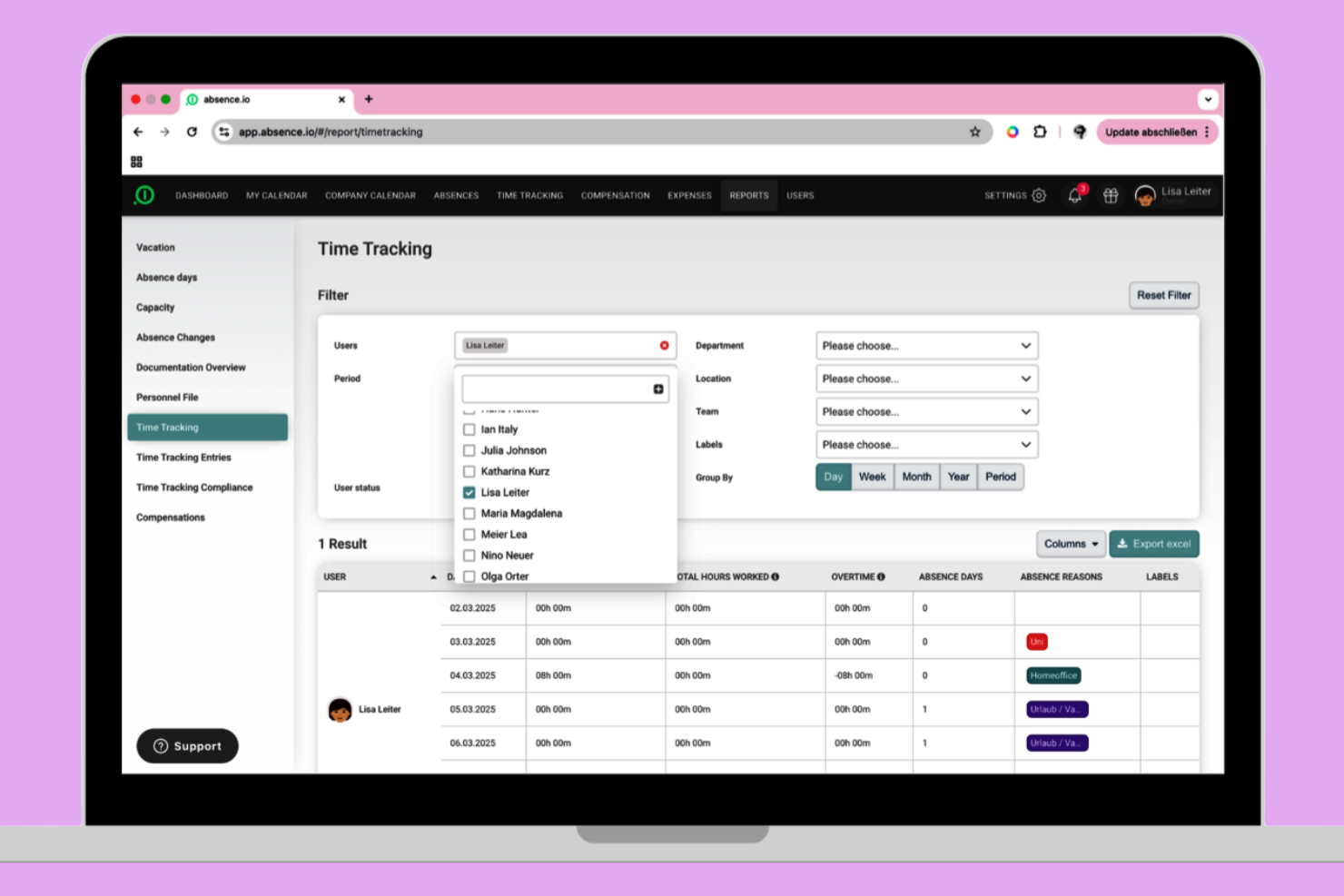
absence.io offers a straightforward PTO tracking solution built with small businesses in mind. It’s especially useful for teams that want to automate leave requests, approvals, and balances without extra complexity. The platform helps you reduce manual tracking and gives employees a clear view of their time off.
Why I Picked absence.io
For small businesses that need a simple way to track PTO, absence.io stands out for its focused approach. The platform lets you automate leave requests and approvals, so you don’t have to rely on spreadsheets or manual processes. I appreciate how employees can view their balances and submit requests directly from the system, which cuts down on back-and-forth emails. Its calendar view also helps managers quickly see who’s out and plan coverage.
absence.io Key Features
Some other features in absence.io help small businesses manage time off more easily:
- Custom Leave Types: Create and manage different categories of leave, such as sick days, parental leave, or unpaid time off.
- Document Uploads: Employees can attach medical certificates or other documents directly to their leave requests.
- Team Calendar Sharing: Share team calendars so everyone can see planned absences and avoid scheduling conflicts.
- HR Dashboard: Access a centralized dashboard for tracking leave statistics and monitoring overall absence trends.
absence.io Integrations
Integrations include Google Workspace, Microsoft Excel, Microsoft Azure, Outlook, and Slack. An open API is also available for custom integrations.
Pros and Cons
Pros:
- Includes document upload for leave requests
- Supports multiple custom leave types
- Offers automated PTO accrual calculations
Cons:
- Approval workflows have limited conditional logic
- Lacks built-in payroll processing features
Best for simple team calendar views
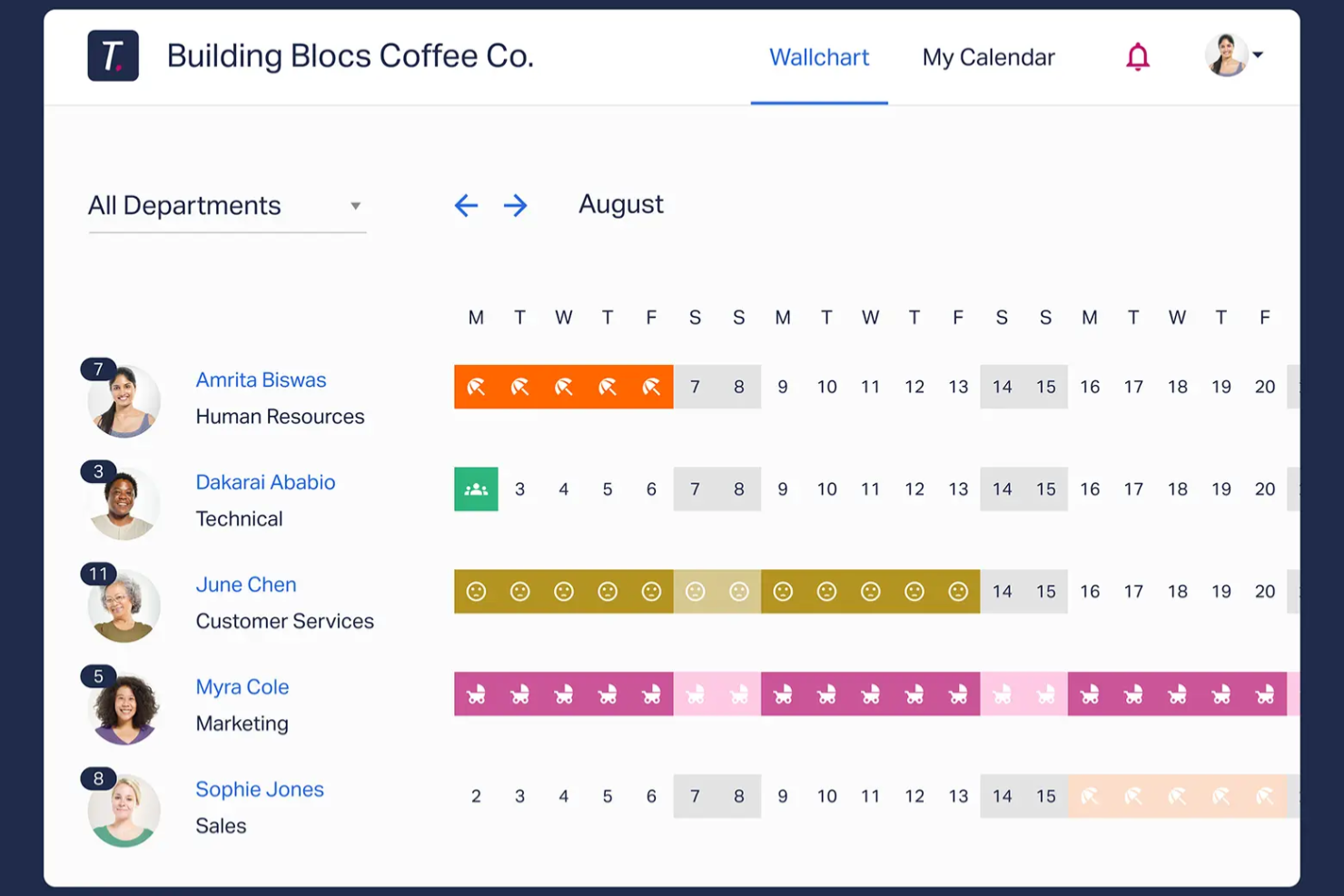
If your team needs a clear, visual way to manage time off, Timetastic offers a straightforward solution. It’s a good fit for small businesses and managers who want a simple shared calendar to track absences without extra complexity. The platform helps you avoid scheduling conflicts and keeps everyone’s leave status visible at a glance.
Why I Picked Timetastic
For teams that want a clear overview of everyone’s time off, Timetastic delivers a simple, visual calendar that’s easy to share. The color-coded team calendar lets you instantly see who’s off and when, which helps prevent overlapping absences. I like that you can filter views by department or location, making it practical for managers with distributed teams. If your main goal is to keep absence tracking transparent and accessible, Timetastic’s calendar-focused approach is a strong fit.
Timetastic Key Features
Some other features that make Timetastic practical for absence management include:
- Mobile App: Submit and approve leave requests directly from your phone.
- Custom Leave Types: Set up different categories for holidays, sick days, and other absences.
- Automated Allowance Tracking: The system automatically updates and tracks each employee’s remaining leave balance.
- Calendar Integrations: Sync Timetastic with Google Calendar, Outlook, or iCal for unified scheduling.
Timetastic Integrations
Integrations include Outlook Calendar, Apple Calendar, Slack, and Google Workspace.
Pros and Cons
Pros:
- Slack integration for instant absence notifications
- Automated leave balance calculations for staff
- Color-coded calendar for quick absence visibility
Cons:
- Cannot attach documents to leave requests
- Lacks support for FMLA or ADA compliance
Dayforce
Best with real-time payroll synchronization
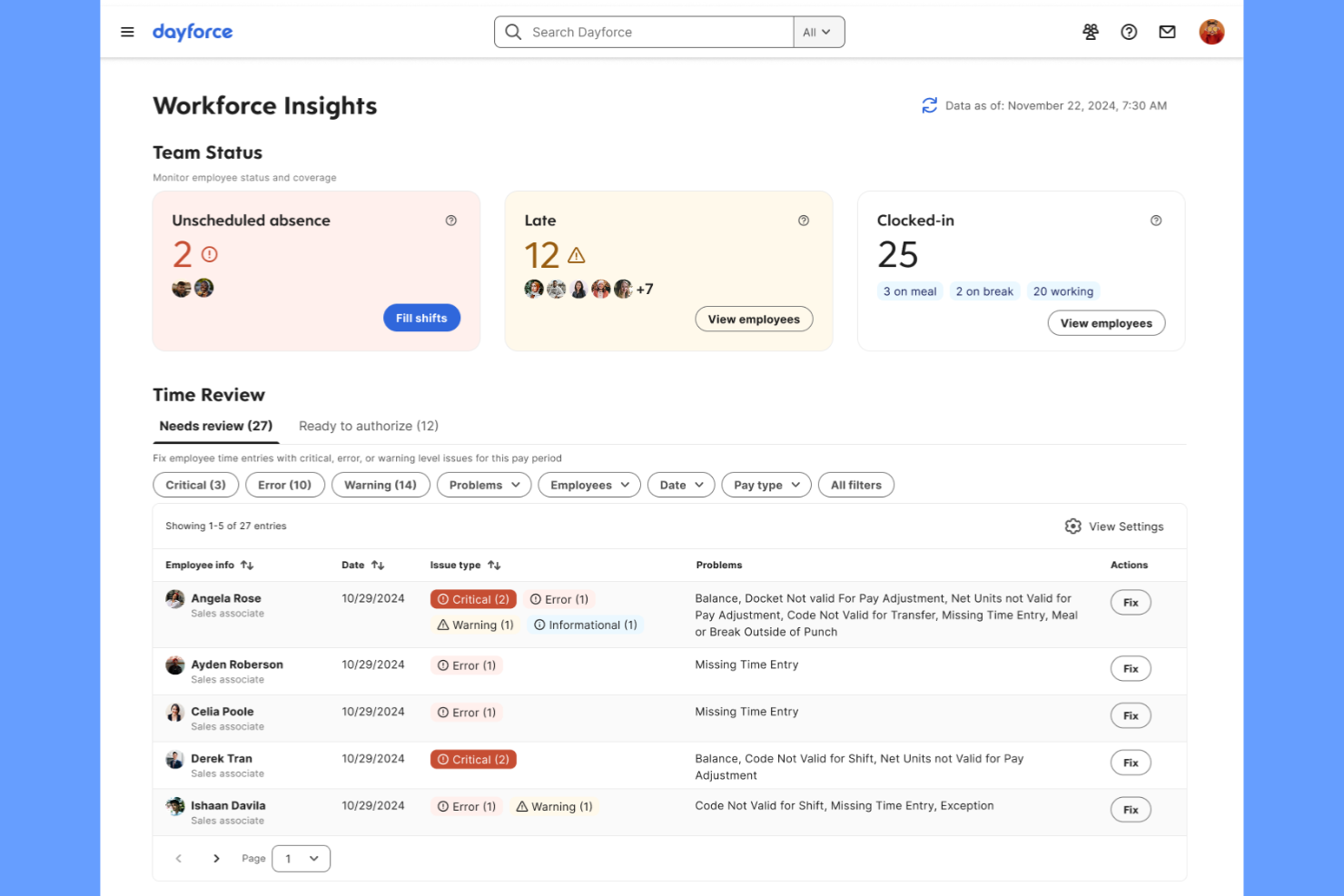
Dayforce is designed for organizations that need absence management tightly connected to payroll and time tracking. It’s especially useful for HR and payroll teams in industries where real-time pay calculations and compliance are critical. The platform helps reduce payroll errors by instantly syncing leave data with payroll processing.
Why I Picked Dayforce
What sets Dayforce apart for absence management is its real-time payroll synchronization, which is essential for organizations where leave directly impacts pay. The platform automatically updates payroll calculations as soon as absences are recorded, reducing the risk of errors and compliance issues. I appreciate how Dayforce connects time off requests, accruals, and pay in a single system, so HR and payroll teams always have up-to-date information. This makes it a strong choice for businesses that need accurate, immediate payroll adjustments tied to employee leave.
Dayforce Key Features
Some other features that make Dayforce useful for absence management include:
- Mobile App Access: Employees and managers can request and approve absences from their mobile devices.
- Automated Accrual Calculations: The system tracks and updates leave balances based on company policies.
- Compliance Rule Engine: Built-in rules help ensure leave policies align with local, state, and federal regulations.
- Customizable Absence Types: HR teams can define and manage multiple leave categories to fit organizational needs.
Dayforce Integrations
Native integrations are not currently listed.
Pros and Cons
Pros:
- Custom absence types for different policies
- Built-in compliance rules for multiple regions
- Automated accruals update after each request
Cons:
- Pricing is not transparent online
- Reporting tools require advanced setup

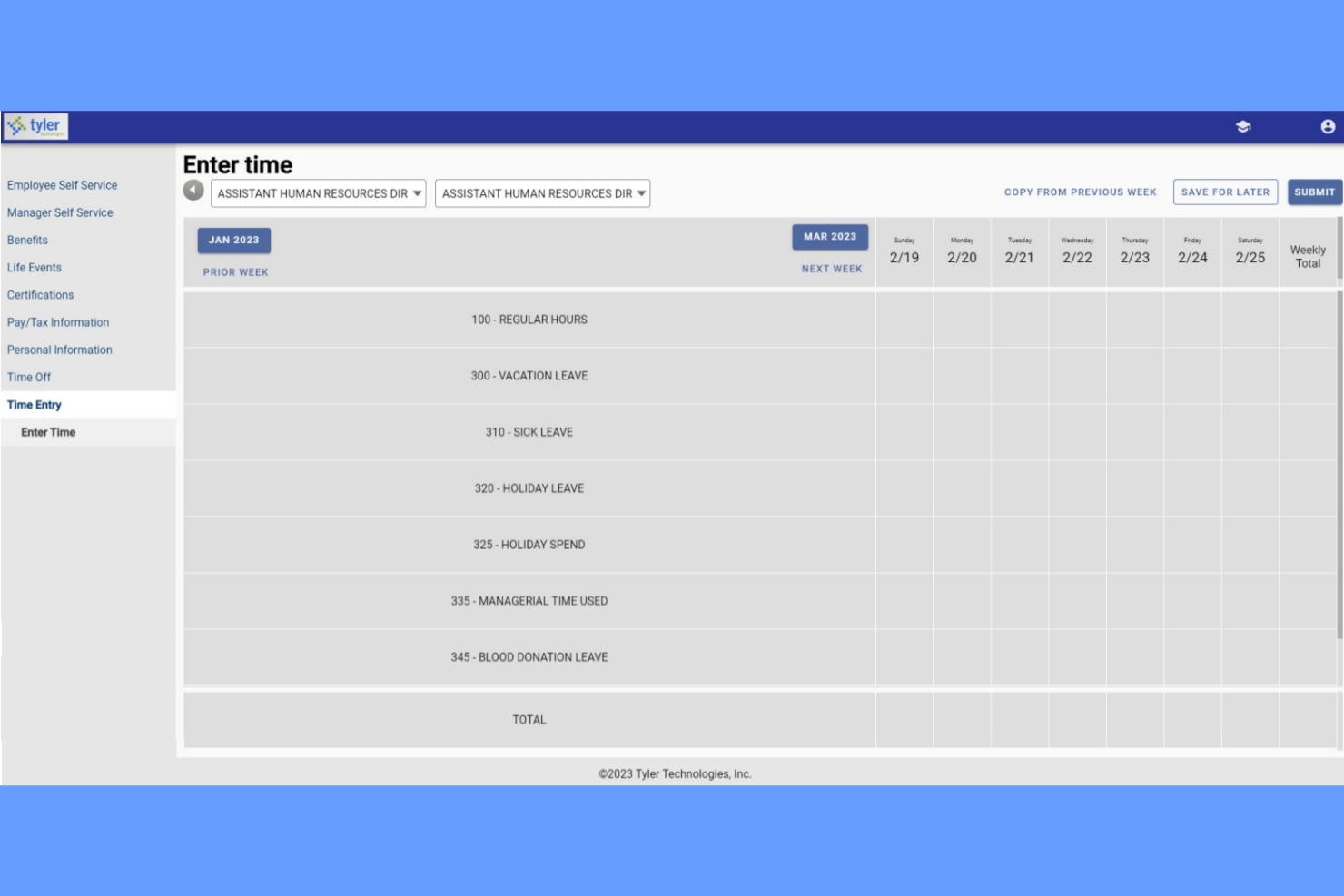
Tyler Technologies offers a specialized absence and substitute management solution built for K-12 school districts. It’s designed for administrators who need to coordinate teacher absences and quickly find qualified substitutes. The platform helps schools automate absence requests, match substitutes based on credentials, and keep classrooms covered without manual calls or spreadsheets.
Why I Picked Tyler Technologies
For K-12 schools that need to manage both teacher absences and substitute assignments, Tyler Technologies offers a focused solution. The platform lets administrators automate absence requests and instantly notify qualified substitutes, which is essential for keeping classrooms staffed. I appreciate how it matches substitutes based on credentials and availability, reducing the risk of last-minute gaps. Tyler Technologies also tracks absence trends, helping school leaders plan for recurring coverage needs.
Tyler Technologies Key Features
Some other features in Tyler Technologies help schools manage absences more smoothly:
- Automated Call-Outs: The system can automatically call substitutes to fill open positions.
- Real-Time Absence Dashboard: Administrators can view current and upcoming absences at a glance.
- Customizable Absence Codes: Schools can set up specific codes for different types of absences.
- Integration With Payroll Systems: Absence data can be sent directly to payroll for accurate compensation.
Tyler Technologies Integrations
Integrations include Tyler Time and Attendance and Tyler School ERP.
Pros and Cons
Pros:
- Tracks substitute credentials for compliance checks
- Custom absence codes fit school district policies
- Shows real-time daily absence coverage
Cons:
- Mobile access features are not fully developed
- Limited reporting options for absence analytics

Best for hourly workforce scheduling

Teambridge stands out for businesses managing large hourly or shift-based teams. It’s built for operations managers and HR teams who need to coordinate time off, PTO, and scheduling in one place. The platform helps reduce absenteeism, shift gaps, and last-minute scheduling issues by connecting absence management directly to workforce scheduling tools.
Why I Picked Teambridge
For organizations with hourly workers, Teambridge offers solution that’s tightly connected to workforce management and schedule. The platform lets managers see time-off requests alongside shift assignments, making it easier to fill gaps and avoid understaffing. I like that Teambridge automatically updates schedules when PTO is approved, so you can quickly identify coverage issues. This approach is especially useful for retail, hospitality, and other industries where shift coverage is critical.
Teambridge Key Features
Some other features that make Teambridge useful for absence management include:
- Self-Service Employee Portal: Staff can submit PTO requests and view balances directly from their own accounts.
- Automated PTO Accruals: The system calculates and updates time-off balances based on company policies.
- Manager Notifications: Managers receive instant alerts for new time-off requests and approvals.
- Customizable Leave Types: Human resources teams can define different categories of leave to match organizational policies.
Teambridge Integrations
Integrations include ADP, Paychex, Rippling, Greenshades, QuickBooks, Bullhorn, SmartRecruiters, Job Robotix, and Salesforce.
Pros and Cons
Pros:
- Manager alerts for pending time-off requests
- Employee portal shows real-time PTO balances
- Automatic shift scheduling updates with PTOs
Cons:
- No built-in compliance tracking for all regions
- Limited analytics for absence trends
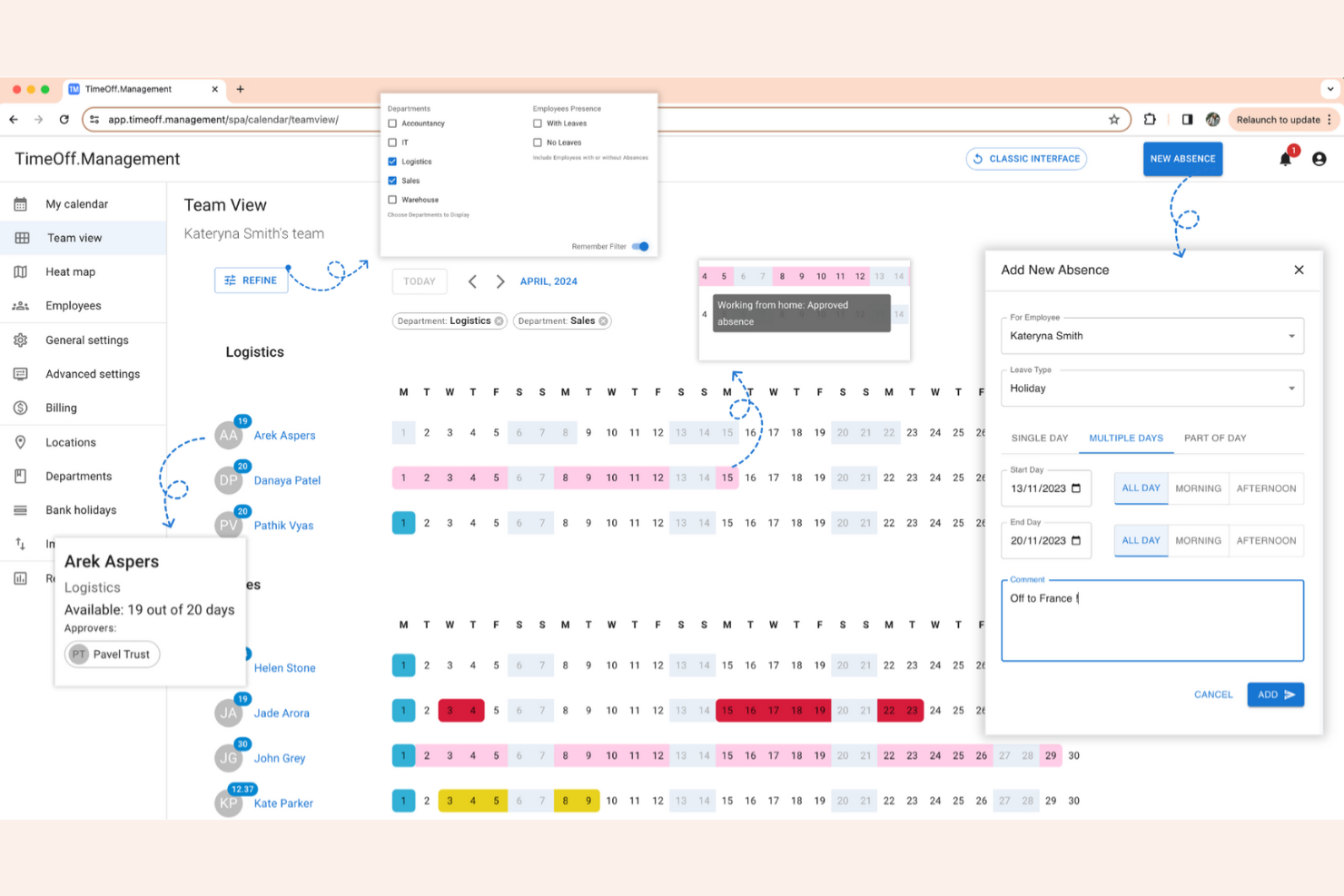
TimeOff stands out for teams that want full control over their absence management system. As an open-source platform, it’s especially appealing to IT teams, startups, and organizations with unique policies or integration needs. You can customize workflows, leave types, and even the interface to fit your exact requirements.
Why I Picked TimeOff
If you want a solution you can truly make your own, TimeOff gives you that flexibility through open-source customization. You can modify the codebase to match your company’s unique leave policies, approval workflows, or even branding. I appreciate that you can add custom leave types and automate rules that fit your organization’s specific needs. For teams with technical resources, this level of control is hard to find in most absence management software.
TimeOff Key Features
Some other features that make TimeOff useful for absence tracking include:
- Multi-Language Support: Users can switch the interface to several different languages.
- Email Notifications: The system sends automated emails for leave requests and approvals.
- Calendar Export: Export leave data to external calendars for broader visibility.
- Role-Based Access: Assign different permissions to managers, employees, and administrators.
TimeOff Integrations
Integrations include Slack, Google Workspace, Microsoft Outlook, Google Calendar, and a REST API for custom integrations.
Pros and Cons
Pros:
- Multi-language interface for global teams
- Self-hosting option for data privacy control
- Open-source code allows full system modification
Cons:
- Manual updates required for self-hosted version
- Lacks built-in payroll system connections
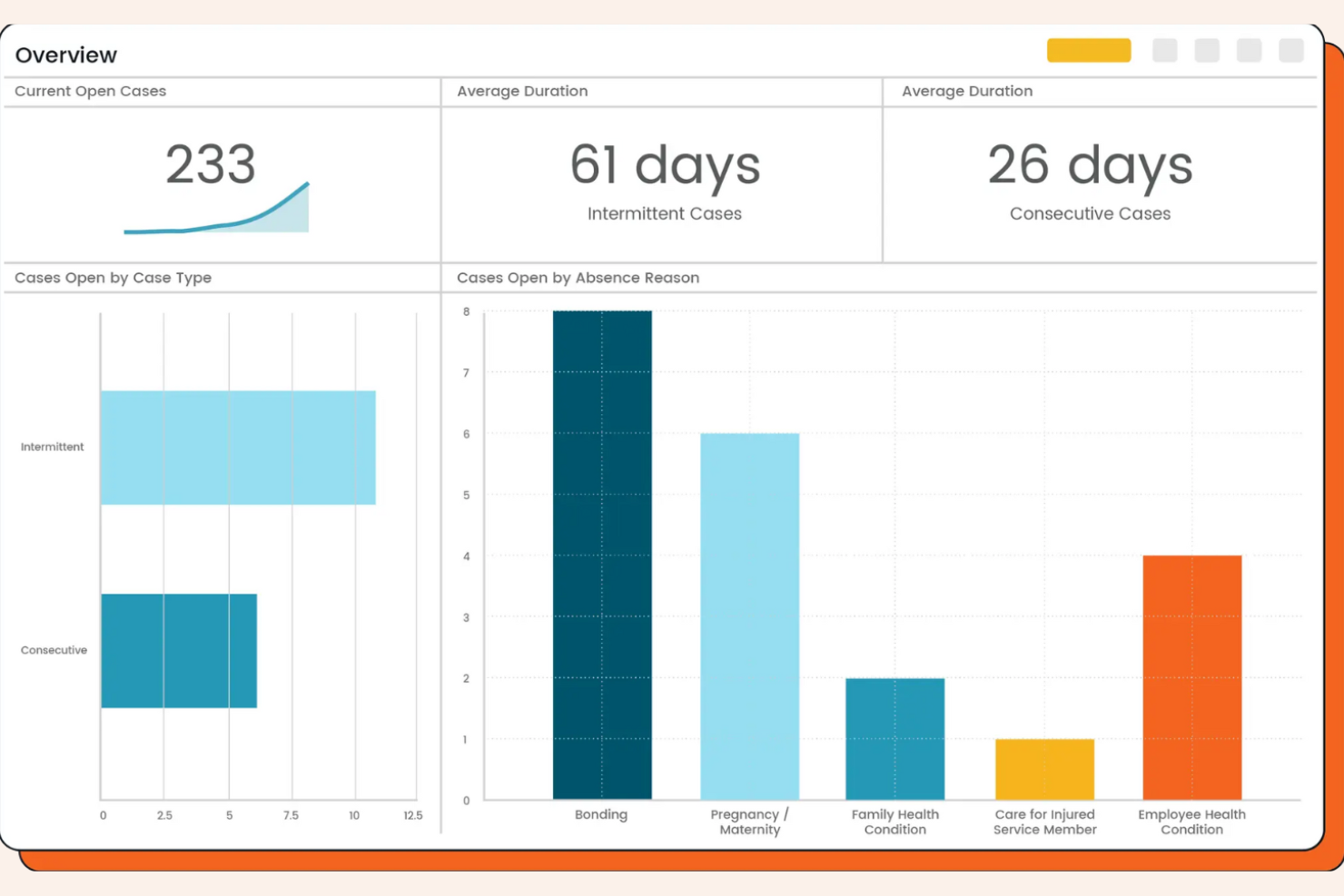
AbsenceSoft is designed for HR teams that need to manage complex leave policies and compliance requirements. It’s a strong fit for organizations with intricate FMLA, ADA, or state-specific leave needs. The platform helps you automate leave tracking, documentation, and communication, reducing manual work and risk.
Why I Picked AbsenceSoft
I chose AbsenceSoft because it addresses the challenges of managing complex leave policies that many HR teams face. The platform offers configurable rules engines, allowing you to automate eligibility and accrual calculations for FMLA, ADA, and other overlapping leave types. I like that it centralizes documentation and communication, making it easier to stay compliant with changing regulations. Its built-in workflows also help ensure every step of the leave process is tracked and auditable.
AbsenceSoft Key Features
Some other features in AbsenceSoft help HR teams manage leave more efficiently:
- Self-Service Employee Portal: Employees can submit leave requests, upload documentation, and check leave balances directly.
- Automated Notifications: The system sends alerts to managers and employees about leave status changes and required actions.
- Customizable Reporting: Generate detailed reports on leave trends, usage, and compliance for audits or leadership reviews.
- Mobile Access: Users can access leave management tools and information from any device with the mobile-friendly interface.
AbsenceSoft Integrations
Integrations include Workday, UKG, ADP, SAP SuccessFactors, Oracle, Paycom, Ceridian Dayforce, Paylocity, BambooHR, and Okta.
Pros and Cons
Pros:
- Centralizes leave documentation and audit trails
- Offers configurable workflows for complex cases
- Handles FMLA, ADA, and state leave rules
Cons:
- No built-in time tracking for hourly staff
- Limited self-service options for smaller teams

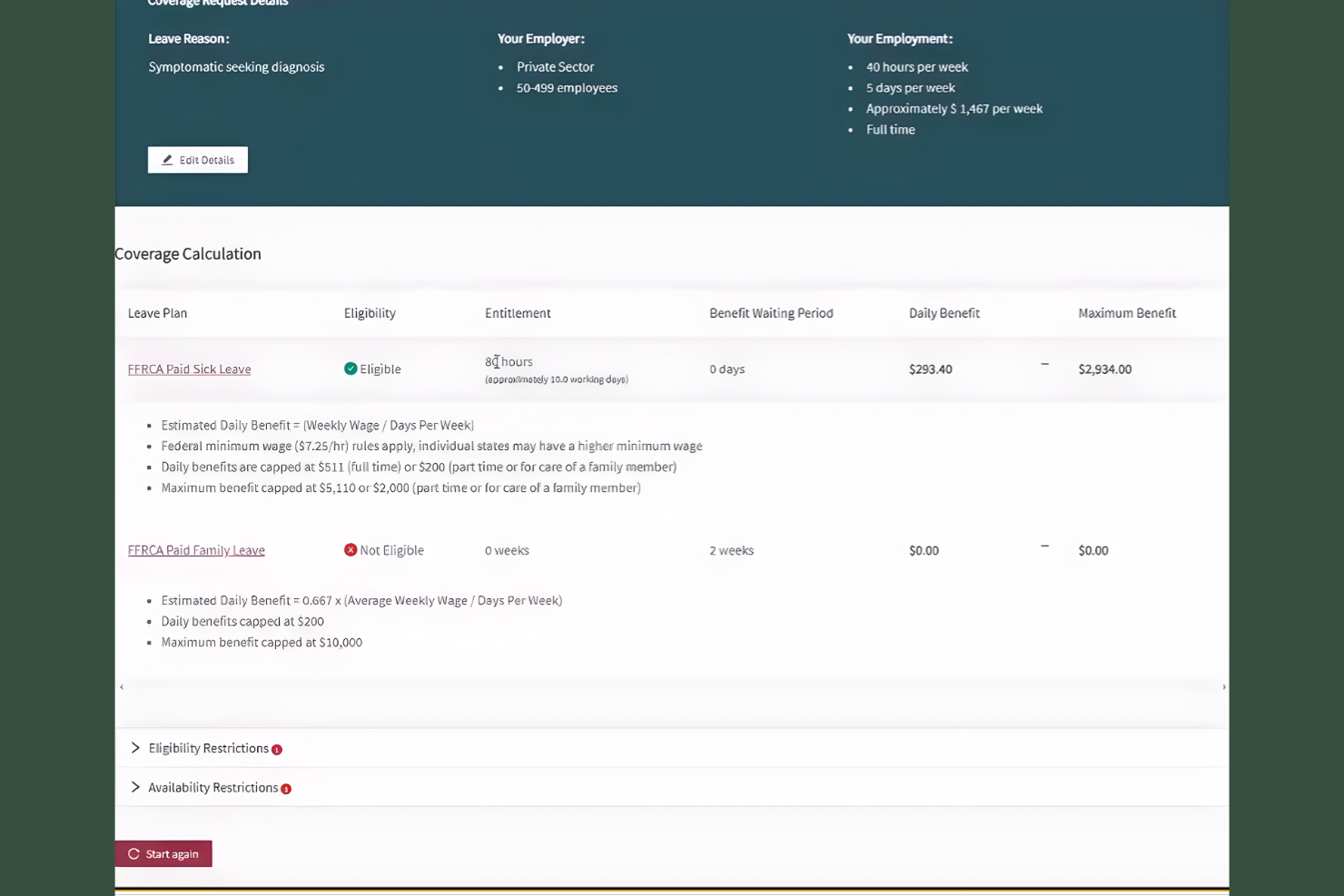
FINEOS Absence delivers absence management software tailored for insurance carriers and organizations handling complex claims compliance. It’s built for HR teams, claims administrators, and insurers who need to navigate federal, state, and company-specific leave regulations. The platform helps automate eligibility checks, manage documentation, and ensure compliance with changing leave laws.
Why I Picked FINEOS Absence
FINEOS Absence stands out for organizations that need to manage absence in strict compliance with insurance and claims regulations. The platform automates eligibility determination and documentation collection, which is essential for HR and claims teams working with complex leave laws. I picked FINEOS because it keeps up with changing federal, state, and company-specific requirements, reducing compliance risks. Its built-in rules engine and audit trails help ensure every leave case is handled according to the latest legal standards.
FINEOS Absence Key Features
In addition to its compliance-focused tools, FINEOS offers several other features for managing absences:
- Self-Service Employee Portal: Employees can submit leave requests and check claim statuses online.
- Automated Notifications: The system sends alerts for key dates, missing documents, and status changes.
- Case Management Dashboard: HR and claims teams can track all open and closed absence cases in one place.
- Customizable Reporting Tools: Users can generate detailed reports on absence trends and claims activity.
FINEOS Absence Integrations
Integrations include FINEOS Claims, FINEOS Billing, FINEOS Payments, FINEOS Policy, FINEOS Provider, FINEOS Rate, FINEOS Underwrite, FINEOS AdminSuite, and FINEOS IDAM.
Pros and Cons
Pros:
- Supports self-service leave requests
- Automated eligibility checks for complex claims
- Built-in compliance for federal and state leave
Cons:
- FINEOS suite User interface can feel outdated
- Limited integrations outside
Annen programvare for fraværshåndtering
Her er noen flere alternativer for programvare for fraværshåndtering som ikke kom med på listen min, men som likevel er verdt å se nærmere på:
- J. J. Keller Leave Manager
For FMLA and ADA regulatory tracking
- Stiira
For multi-location staff coordination
- Deel HR
For centralized global workforce records
- TalentHR
With intuitive AI-powered HR automation
- GoCo
For integrated onboarding workflows
- Connecteam
For deskless workforce tracking
- actiPLANS
For visual leave planning
- BambooHR
With mobile PTO approvals
- Replicon
For global policy configuration


How I Evaluate Absence Management Software
My evaluation runs in two layers: the non-negotiables—like digital leave requests, accrual tracking, and team absence calendars—and the differentiators that separate one tool from another.
Core Functionality (Table Stakes For This List)
When I'm selecting tools for my list, I rank each one on a scale from 0 (does not offer the functionality) to 5 (excels in this area) for each core functionality listed below. Then, I calculate the tool's total score into a percentage. Each tool needs to achieve a minimum total score of 65% to be considered for inclusion.
- Leave Request Workflows: I check whether employees can submit requests digitally and whether approvals route through configurable chains—like a regional manager approving first, then HR reviewing.
- PTO Accrual Tracking: Each tool should handle automatic accruals across multiple leave types, including vacation, sick, and parental leave, with support for rules like tenure-based tiers and carryover caps.
- Absence Calendar & Visibility: I look for shared team calendars that surface who's out and when, so managers can spot overlapping absences before approving a request that leaves a shift uncovered.
- Policy & Compliance Configuration: The platform should let you build region-specific leave policies—like FMLA rules or statutory annual leave minimums—without needing workarounds or manual overrides.
- Reporting & Analytics: I evaluate whether the tool goes beyond basic balance exports to offer trend reports and absence pattern metrics that help HR flag recurring short-term absences early.
- HRIS & Payroll Integrations: Approved leave data should sync to your payroll and HRIS systems so you're not manually reconciling hours at the end of each pay cycle.
Once I have a list of tools that meet the criteria, I consider what sets each platform apart.
Differentiating Factors (What Sets Vendors Apart)
Here's how I compare and contrast different vendors:
Standout Features
Multi-country leave templates matter for distributed teams. I look for prebuilt statutory rules that save you from manually researching leave entitlements in each new country. Bradford Factor scoring is another differentiator—it helps HR spot patterns in frequent short-term absences before they become a bigger issue. I also evaluate Slack or Teams integration, since in-chat requests and daily "who's out" digests keep leave management where your team already communicates.
Beyond Features
Pricing transparency matters—I check whether vendors publish clear per-employee rates and offer a free trial so you can evaluate the tool before committing. Implementation speed is another factor I weigh, since a platform that takes months to configure leave policies delays the value your team gets from it. I also consider how each vendor handles data security, especially role-based access to sensitive leave records like medical or parental documentation.
Slik velger du programvare for fraværshåndtering
Det er lett å gå seg vill i lange funksjonslister og kompliserte prisstrukturer. For å hjelpe deg med å holde fokus mens du går gjennom den unike prosessen for valg av programvare, får du her en sjekkliste over faktorer du bør ha i tankene:
| Faktor | Hva du bør vurdere |
|---|---|
| Skalerbarhet | Vil programvaren håndtere dagens og fremtidig antall ansatte, lokasjoner og organisatoriske endringer? |
| Integrasjoner | Kobles den direkte til lønns-, HRIS-, HCM- eller vaktplanleggingssystemene dine, eller trenger du alternative løsninger? |
| Tilpasningsmuligheter | Kan du tilpasse permisjonstyper, godkjenningsflyter og retningslinjer etter organisasjonens behov? |
| Brukervennlighet | Vil ledere og ansatte ta løsningen raskt i bruk, eller må du investere mye i opplæring? |
| Implementering og innføring | Hvor lang tid tar det å komme i gang, og hvilke ressurser eller hvilken støtte trenger du under utrullingen? |
| Kostnad | Er alle gebyrer tydelig oppgitt på forhånd, og passer prismodellen med bruksmønstrene og budsjettsyklusene dine? |
| Sikkerhetstiltak | Tilbyr leverandøren datakryptering, tilgangskontroller og samsvar med relevante personvernlover? |
| Tilgjengelig kundestøtte | Kan du få tak i kundestøtten når du trenger det, og finnes det tjenestenivåavtaler eller dedikerte kontaktpersoner for hastesaker? |
Hva er programvare for fraværshåndtering?
Programvare for fraværshåndtering er et digitalt verktøy som hjelper organisasjoner med å spore, administrere og rapportere ansattes fravær, for eksempel sykefravær, ferie og annen fri. Den samler permisjonssøknader på ett sted, automatiserer godkjenningsflyter og opprettholder nøyaktige registre for etterlevelse og planlegging. HR-team bruker den til å sikre bemanning, håndheve retningslinjer og få oversikt over trender i arbeidsstyrkens oppmøte.
Funksjoner i programvare for fraværshåndtering
Ved valg av programvare for fraværshåndtering bør du se etter følgende viktige funksjoner:
- Portal for permisjonssøknader: Gjør det mulig for ansatte å sende inn forespørsler om fri på nett, noe som gjør prosessen raskere og mer oversiktlig for både ansatte og ledere.
- Automatiserte godkjenningsprosesser: Sender permisjonssøknader til riktige godkjennere og varsler alle berørte om statusendringer, slik at behovet for manuell oppfølging reduseres.
- Tilpassede permisjonstyper: Lar deg definere og administrere ulike kategorier av permisjon, for eksempel sykedager, ferie, foreldrepermisjon eller ulønnet fri.
- Kalender for fravær: Gir en visuell kalenderoversikt over alle planlagte og avviklede fravær, slik at teamene kan planlegge bemanning og unngå konflikter.
- Beregning av saldo i sanntid: Oppdaterer og viser automatisk hver ansatts tilgjengelige permisjonssaldo basert på opptjening og bruk.
- Rapportering og analyse: Genererer detaljerte rapporter om fraværstrender, bruksmønstre og overholdelse av retningslinjer for å støtte datadrevne HR-beslutninger.
- Verktøy for håndheving av retningslinjer: Bruker virksomhetsspesifikke regler for kvalifisering, overføring, sperrede datoer og krav til dokumentasjon for å sikre enhetlig praksis.
- Varsler og påminnelser: Sender automatiske varsler til ansatte og ledere om kommende fravær, ventende godkjenninger eller nødvendige handlinger.
- Revisjonsspor: Opprettholder en sikker, tidsstemplet oversikt over alle handlinger knyttet til permisjon for å sikre etterlevelse og løse tvister.
- Mobiltilgang: Gjør det mulig for ansatte og ledere å sende inn, godkjenne eller gjennomgå fravær fra smarttelefoner eller nettbrett, noe som støtter fleksible arbeidsmiljøer.
Fordeler med programvare for fraværshåndtering
Implementering av programvare for fraværshåndtering gir flere fordeler for teamet og virksomheten din. Her er noen av fordelene du kan se frem til:
- Bedre etterlevelse: Automatisert håndheving av retningslinjer og revisjonsspor hjelper organisasjonen med å overholde arbeidslovgivning og interne regler.
- Større oversikt: Kalendere og rapporteringsverktøy i sanntid gir HR og ledere et tydelig bilde av fravær og manglende bemanning.
- Raskere godkjenninger: Automatiserte arbeidsflyter og varsler gjør prosessen for forespørsler om permisjon og godkjenning raskere for alle involverte.
- Nøyaktige permisjonssaldoer: Beregninger i sanntid sikrer at ansatte og ledere alltid ser oppdaterte permisjonsrettigheter.
- Mindre manuelt arbeid: Sentraliserte digitale registre og selvbetjeningsportaler reduserer papirarbeid og gjentatt dataregistrering.
- Bedre planlegging: Visuelle planleggingsverktøy og analyser støtter proaktiv bemanningsplanlegging og reduserer forstyrrelser i siste liten.
- Bedre medarbeideropplevelse: Enkel tilgang til permisjonsinformasjon og mobiltilpassede verktøy forbedrer medarbeideropplevelsen og gjør det enklere å administrere og søke om fri på en trygg måte.
Kostnader og priser for programvare for fraværshåndtering
Ved valg av programvare for fraværshåndtering er det nødvendig å forstå de ulike prismodellene og tilgjengelige abonnementene. Kostnadene varierer basert på funksjoner, teamstørrelse, tillegg og mer. Tabellen nedenfor oppsummerer vanlige abonnementer, gjennomsnittsprisene deres og typiske funksjoner som er inkludert i løsninger for fraværshåndtering:
Sammenligningstabell for abonnementer på programvare for fraværshåndtering
| Abonnementstype | Gjennomsnittspris | Vanlige funksjoner |
|---|---|---|
| Gratisabonnement | $0 | Grunnleggende fraværssporing, begrenset antall brukerplasser, enkel rapportering og e-postvarsler. |
| Personlig abonnement | $5–$10/bruker/måned | Permisjonssøknader, godkjenningsprosesser, kalendervisninger, timelistesporing og grunnleggende tilpasning av retningslinjer. |
| Forretningsabonnement | $10–$25/bruker/måned | Avansert rapportering, integrasjoner med HRIS eller lønnssystemer, tilpassede permisjonstyper og mobiltilgang. |
| Virksomhetsabonnement | $25–$50/bruker/måned | Støtte for flere lokasjoner, revisjonsspor, avanserte verktøy for etterlevelse, dedikert kundestøtte og tilpasset innføring. |
Vanlige spørsmål om programvare for fraværshåndtering
Her er noen svar på vanlige spørsmål om programvare for fraværshåndtering:
Hvordan bidrar programvare for fraværshåndtering til etterlevelse?
Programvare for fraværshåndtering bidrar til etterlevelse ved å håndheve virksomhetens retningslinjer for permisjon, spore dokumentasjon og opprettholde revisjonsspor. Den støtter også overholdelse av arbeidslovgivningen ved å automatisere opptjening, overføring av saldo og regler for kvalifisering, noe som reduserer risikoen for manuelle feil eller manglende regulatoriske krav.
Kan programvare for fraværshåndtering integreres med lønns- og HR-systemer?
Ja, de fleste programvarer for fraværshåndtering kan integreres med lønns- og HR-systemer. Disse integrasjonene gjør det mulig å oppdatere fraværssaldoer automatisk, beregne lønn nøyaktig og forenkle datadeling mellom plattformene, noe som reduserer behovet for manuell registrering og risikoen for avvik.
Hva bør jeg vurdere når jeg går fra manuell registrering til programvare?
Når du går fra manuell registrering av oppmøte til programvare, bør du vurdere datanøyaktighet, import av historiske oppføringer, opplæring av brukere og oppsett av retningslinjer. Planlegg en overgangsperiode der begge systemene kan være i drift parallelt, og sørg for at teamet forstår de nye arbeidsflytene og hvor de finner støtte og ressurser.
Passer programvare for fraværshåndtering for eksterne eller distribuerte team?
Ja, programvare for fraværshåndtering egner seg godt for eksterne eller distribuerte team. Skybasert tilgang, mobilapper og automatiserte varsler gjør det enkelt for ansatte og ledere på ulike steder å be om, godkjenne og følge opp fravær i sanntid.
Hvor sikre er ansattdata i programvare for fraværshåndtering?
Ansattdata i programvare for fraværshåndtering beskyttes vanligvis med kryptering, tilgangskontroller og overholdelse av personvernregelverk. Gå alltid gjennom leverandørens sikkerhetssertifiseringer og praksis for datahåndtering for å sikre at de oppfyller virksomhetens standarder.