

Com tantos sistemas de acompanhamento de candidatos diferentes, adaptados às necessidades das pequenas empresas, pode ser difícil encontrar o sistema certo para si. Procura um software económico que o ajude a analisar rapidamente as candidaturas dos candidatos, mas precisa de descobrir qual é o melhor software.
Neste artigo, vou ajudá-lo a simplificar esta escolha, partilhando as minhas perspetivas sobre os melhores sistemas de acompanhamento de candidatos para pequenas empresas, com base na minha experiência pessoal de recrutamento numa pequena empresa que registou um crescimento rápido.
Porque pode confiar nas nossas recomendações de software
6,700+
Reviews
20
Industry experts
16+
Evaluation factors
14
Years reviewing software
A nossa equipa testa e analisa software desde 2012. Como especialistas em RH, sabemos o quão difícil — e importante — é escolher o software certo.
Para este guia, avaliámos as ferramentas através de testes práticos e pesquisa independente, pontuando-as de acordo com os nossos critérios de seleção. Recorremos também a contributos de líderes de opinião do setor e de especialistas em RH no ativo.
As nossas análises refletem o juízo da nossa equipa editorial, e não um discurso de vendas.
Revisores especialistas:
- Phil GrayCOO
 Kim BehnkeHR Tech Editor & Analyst
 Josh BarkerPeople Ops Manager

Tabela comparativa: sistema de acompanhamento de candidatos para pequenas empresas
Esta tabela comparativa resume os detalhes de preços das minhas principais escolhas de sistemas de acompanhamento de candidatos para pequenas empresas:
Sorted by: Default
| Tool | Starting Price | Website | |
|---|---|---|---|
Best for built-in recruiting analytics | 4.4 out of 5 | $400/month Free demo available | Website |
Best for in-house talent acquisition teams | 4.7 out of 5 | Pricing upon request Free demo available | Book Demo |
Best for structured hiring | 4.4 out of 5 | Pricing upon request Free demo available | Website |
Best for automated offers | 4.5 out of 5 | $10/employee/month Free trial + free demo available | Website |
Best for AI-assisted hiring workflows | 4.4 out of 5 | $8/user/month Up to 15-day free trial + demo available | Website |
Best with built-in immigration support | 4.8 out of 5 | $5/user/month Free demo available | Website |
Best for AI recruitment and candidate sourcing | 4.8 out of 5 | $15/user/month 14-day free trial + free demo available | Website |
Best for combined ATS and CRM | 4.7 out of 5 | $99/user/month Free demo available | Book Demo |
Best for simplified hiring automation | 4.5 out of 5 | Pricing upon request Free demo available | Website |
Best for automated job postings & sourcing | 4.6 out of 5 | $6/employee/month Free demo available | Book Demo |


Análise dos melhores sistemas de acompanhamento de candidatos para pequenas empresas
Apresentamos abaixo os meus resumos detalhados dos melhores sistemas de acompanhamento de candidatos para pequenas empresas que entraram na minha lista restrita. As minhas análises oferecem uma visão detalhada das principais funcionalidades, vantagens e desvantagens, integrações e casos de utilização ideais de cada ferramenta, para o ajudar a encontrar a melhor opção para si.
 Best for rediscovering past candidates
- Free demo available
- From $400/month
Visit WebsiteCustomer Rating:4.4/5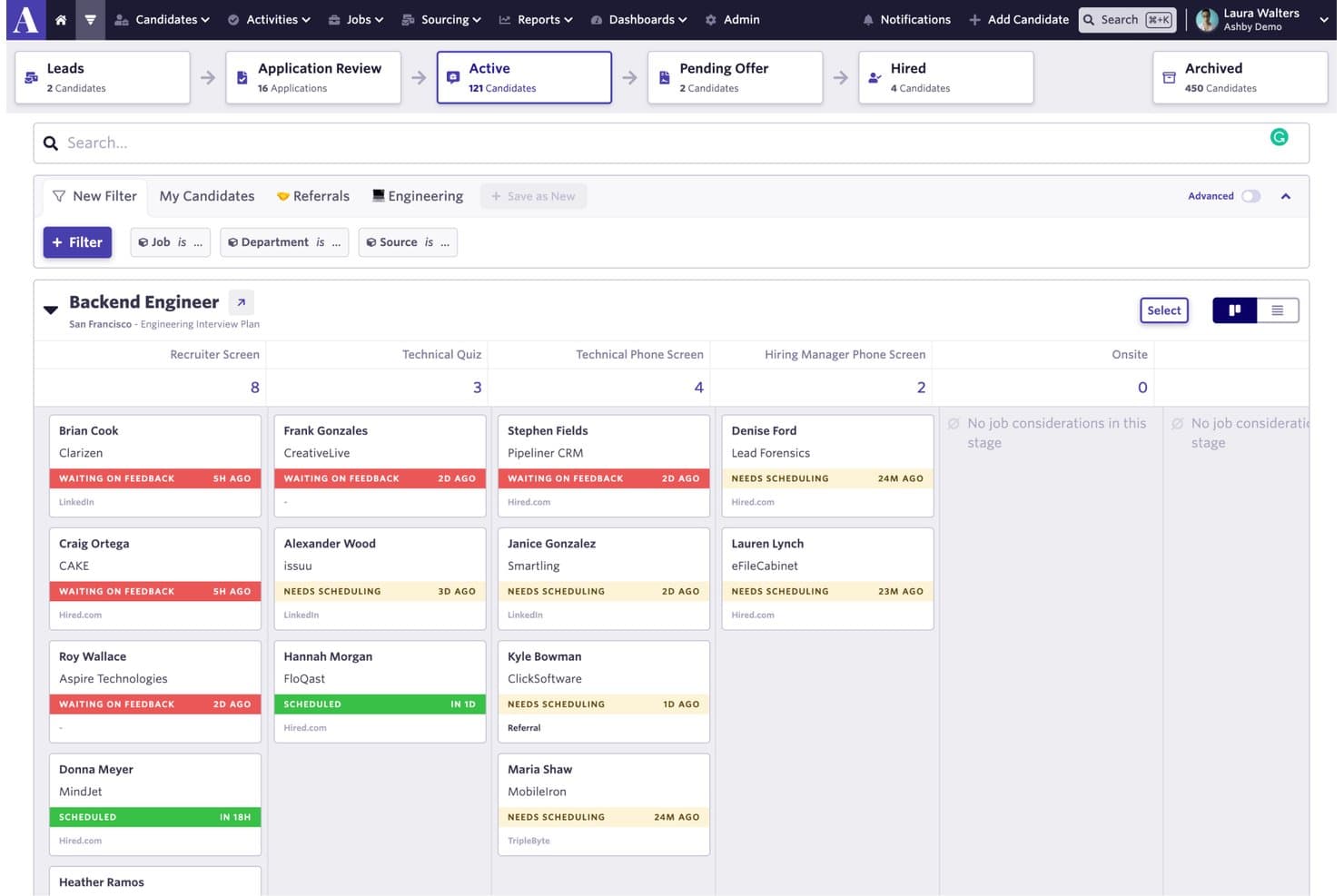
Ashby organizes candidates by pipeline stage for streamlined hiring. Ashby is an all-in-one recruiting platform that combines applicant tracking, candidate CRM, interview scheduling, and analytics into a single system built for structured, full-cycle hiring.
Who Is Ashby Best For?
Ashby is a strong fit for dedicated talent acquisition teams that want sourcing, pipeline management, scheduling, and analytics in one place.
Why I Picked Ashby
I've included Ashby in my top picks because its AI Talent Rediscovery feature is genuinely useful for teams that have been hiring for a while and built up a candidate database worth revisiting. When a new role opens, Ashby surfaces past candidates who already fit, grouped by signal type, so I'm not starting from scratch. Pair that with Boolean-powered candidate search and automated outreach sequences, and re-engaging a warm pipeline becomes a structured process rather than a manual dig through old files.
Ashby Key Features
- Structured candidate pipeline: Organizes candidates into defined stages—Leads, Application Review, Active, Pending Offer, Hired, and Archived—with bulk actions available across all stages.
- Automated interview scheduling: Sends direct-booking links showing live panel availability, with stage-triggered reminders and questionnaires sent automatically as candidates progress.
- Customizable scorecards and feedback forms: Assigns stage-specific feedback forms to interviewers, with candidate reviews tracking individual scores and team averages in one place.
- Full-funnel diversity reporting: Collects anonymous EEOC and diversity survey responses and breaks down pipeline pass-through rates by demographic group across every hiring stage.
Ashby Integrations
Ashby offers 250+ marketplace integrations, including Google Workspace, Microsoft Office 365, Slack, Workday, BambooHR, Checkr, HireRight, and Justifacts. It also provides a public API and lists Zapier.
Pros and Cons
Pros:
- Connects scorecards with recruiting analytics
- Automates interview booking and candidate reminders
- Finds qualified candidates in past pipelines
Cons:
- Hiring-manager access can complicate seat planning
- Initial workflow configuration takes recruiter attention
Learn more about Ashby: Intuitive applicant tracking system with AI-driven recommendations and social media recruitment tools
- 14-day free trial + free demo available
- From $15/user/month (billed annually)
Visit WebsiteCustomer Rating:4.8/5
Manatal’s platform creates a talent pipeline page for each vacant position, making it easy to track where candidates are in the hiring process. Manatal’s applicant tracking system simplifies the hiring process, helping hiring teams of any size manage their talent pools and strengthen their team collaboration. Their system creates individual talent pipelines for each vacant position, making it easy to track and share progress with other hiring managers. To boost the number of candidate applications, Manatal feeds job postings to thousands of free and premium job posting boards following the parameters of your job ad campaigns.
Recruiters dealing with high-volume hiring will appreciate Manatal’s built-in artificial intelligence, which includes AI-driven recommendations for which candidates are the best fit based on extensive candidate scorecards and comparisons of their direct skills against your detailed job descriptions. Rich candidate profiles also capture a candidate’s entire digital presence including their LinkedIn, Twitter, Instagram and Facebook accounts, all within their profile, making social media recruitment simple.
Manatal’s cloud-based SaaS software is fully accessible from their mobile app as well, making it easy to stay on top of activity when you’re away from your desk too. The system also includes integrations with LinkedIn, Gmail, Outlook, Mailchimp and other platforms. Access to their API and Zapier integration are available for customized system configurations too.
Pricing for Manatal starts at $15 USD/user/month. A free demo and a 14-day free trial can also be requested via their website.
 Efficient ATS with auto-populated offer letters and insightful applicant analytics
- Free trial + free demo available
- From $10/employee/month
Visit WebsiteCustomer Rating:4.5/5
Offer letter templates are built right into BambooHR’s applicant tracking system, making it fast and easy to get offers into candidates hands. Efficiency and speed are two core elements of BambooHR’s applicant tracking system, which includes time-saving features like sending multiple email template responses at once, and branded digital offer letters that auto-populate candidate and job details. To improve the candidate experience, electronic signatures also make it fast and easy to accept a new position. Automated reminders also ensure hiring managers communicate with applicants in a timely fashion, ensuring they feel acknowledged and informed throughout the hiring process.
To help with your overall recruitment process, BambooHR also includes useful birds-eye-view applicant information. Their Applicant Sources Report parses out your candidate data to show you where the majority of your applicants are coming from, helping you to either focus your resources on what’s working the best, or address any shortcomings directly. As well, their Applicant Funnel Report digs deeper into your recruitment timeline to pinpoint the slower portions of your process so you can look at ways to speed up those steps.
BambooHR integrates directly with 60+ common HR software solutions including job posting boards like Indeed, Glassdoor, and ZipRecruiter, as well as social media sites like LinkedIn, Twitter and Facebook. They also have a full-feature mobile app so you can stay in touch with candidates from anywhere.
Pricing details for BambooHR are available upon request. A free trial and free demo can also be requested via their website.
 Best as AI for business
- Up to 15-day free trial + demo available
- From $8/user/month
Visit WebsiteCustomer Rating:4.4/5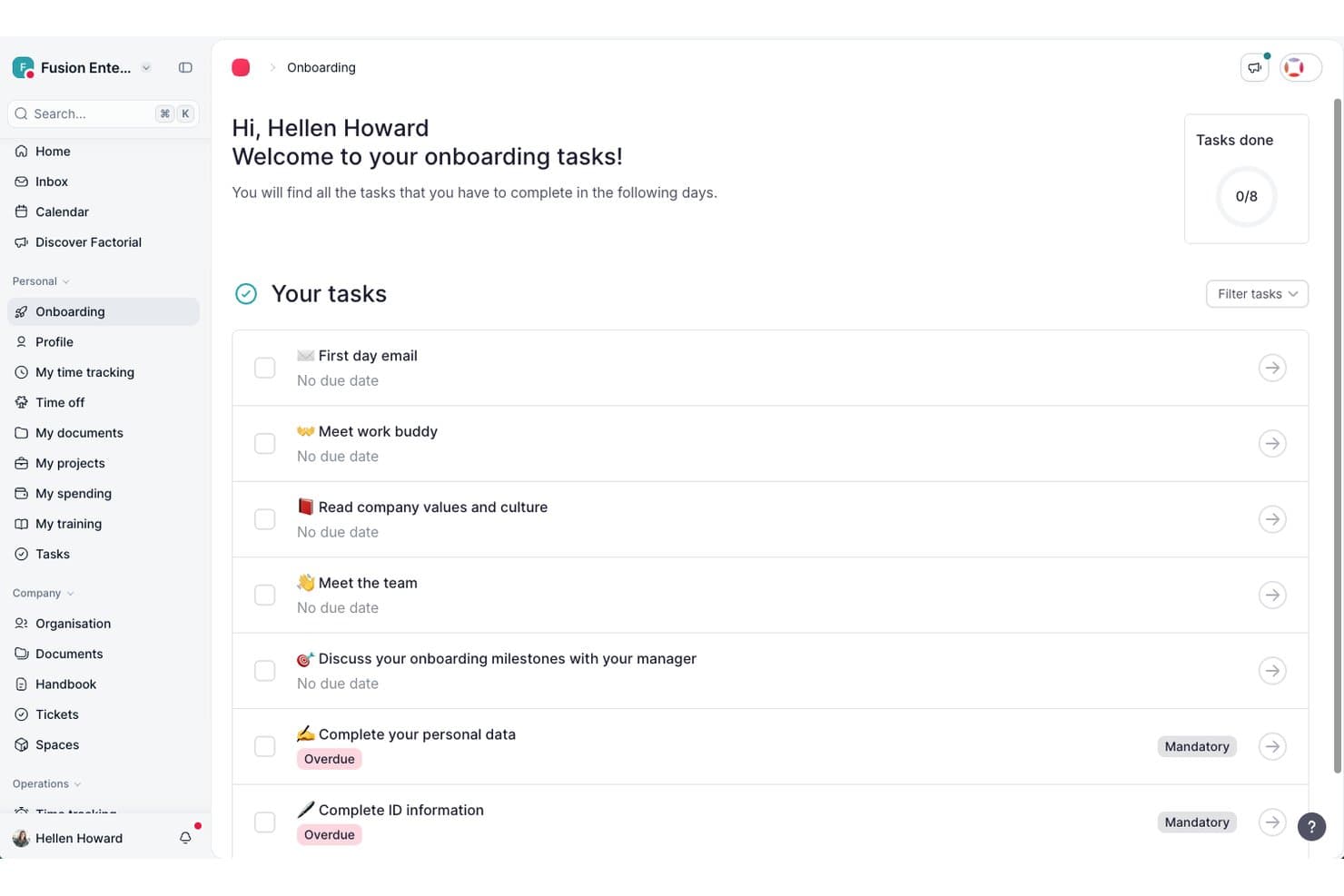
Factorial guides new hires through onboarding tasks in one place. Factorial is an AI-powered HR platform that brings recruiting, time management, performance, and employee data into one place, with AI assistance built into day-to-day tasks like writing job descriptions, summarizing resumes, and managing hiring pipelines.
Who Is Factorial Best For?
Factorial suits HR managers and recruiters at growing companies who want AI woven into daily HR tasks—from drafting job descriptions to generating performance summaries—without juggling separate tools.
Why I Picked Factorial
I picked Factorial as one of the best because its AI runs through the daily work of hiring, not just as a bolt-on. When I'm building out a role, the AI drafts the job description, suggests relevant competencies, and generates resume summaries so I'm not reading every CV cold. I also like how candidate pipeline stages are fully customizable, with automatic emails triggered when applicants move between phases, keeping communication consistent without any manual follow-up.
Factorial Key Features
- Evaluation forms: Rate candidates from 1 to 5 on individual competencies and add a written overall summary for each applicant.
- Automated stage-based emails: Trigger candidate emails automatically when applicants move to a specified hiring phase.
- Role-based hiring team access: Assign recruiter, hiring manager, or reviewer roles with different levels of pipeline visibility and editing permissions.
- Calendar-linked interview scheduling: Connect your calendar to Factorial to schedule candidate interviews directly within the platform.
Factorial Integrations
Factorial offers marketplace integrations with Google Workspace, Slack, LinkedIn, Recruitee, and Microsoft Power BI, plus Zapier. It also provides a public API, webhooks, SDKs, API keys, and OAuth 2.0 for custom integrations.
Pros and Cons
Pros:
- AI resume summaries speed initial review
- Evaluation forms capture competency ratings and notes
- Customizable stages trigger candidate emails
Cons:
- Microbusiness fit can feel oversized
- Resume search and filtering aren't documented
 Best for AI-driven candidate matching
- Free demo available
- Modular pricing, from $6/employee/month (module-dependent)
Customer Rating:4.6/5
This job requisition form in Folks HR allows users to create a new job posting by entering applicant details, job location, opening date, and position title. Folks HR's ATS is an all-in-one applicant tracking system designed to help small and medium-sized businesses manage their recruitment processes more efficiently. You can use it to centralize applications, post to job boards, and simplify how you source, screen, and hire candidates.
I included Folks HR's ATS in this list because it offers an intuitive ATS designed specifically for smaller businesses that may not have a dedicated recruitment team. You can manage applications through a centralized CV library, automate interview communications, and customize your hiring workflows—all from one platform. It also helps you create branded career pages quickly, making it easier to present a polished image to prospective candidates without relying on extra marketing resources.
Other standout features include AI-powered resume parsing to help identify the most qualified applicants faster, detailed recruitment analytics to track time-to-hire and other key metrics, and direct sourcing through LinkedIn to expand your reach. Folks HR's ATS also makes it simple to connect with candidates through automated updates and organized communication tools, keeping your hiring process on track without extra effort.
Integrations are available with platforms like Integrations include ADP, Agendrix, Applauz, Employeur D, Emprez, Evolia, Merinio, Nethris, and Payworks. These integrations support payroll, time tracking, and other ATS processes, helping you manage more of your ATS ecosystem in one place.
Learn more about Folks HR: Best for compliant global hiring and payroll management
- Free demo available
- From $14/worker/month
Visit WebsiteCustomer Rating:4.9/5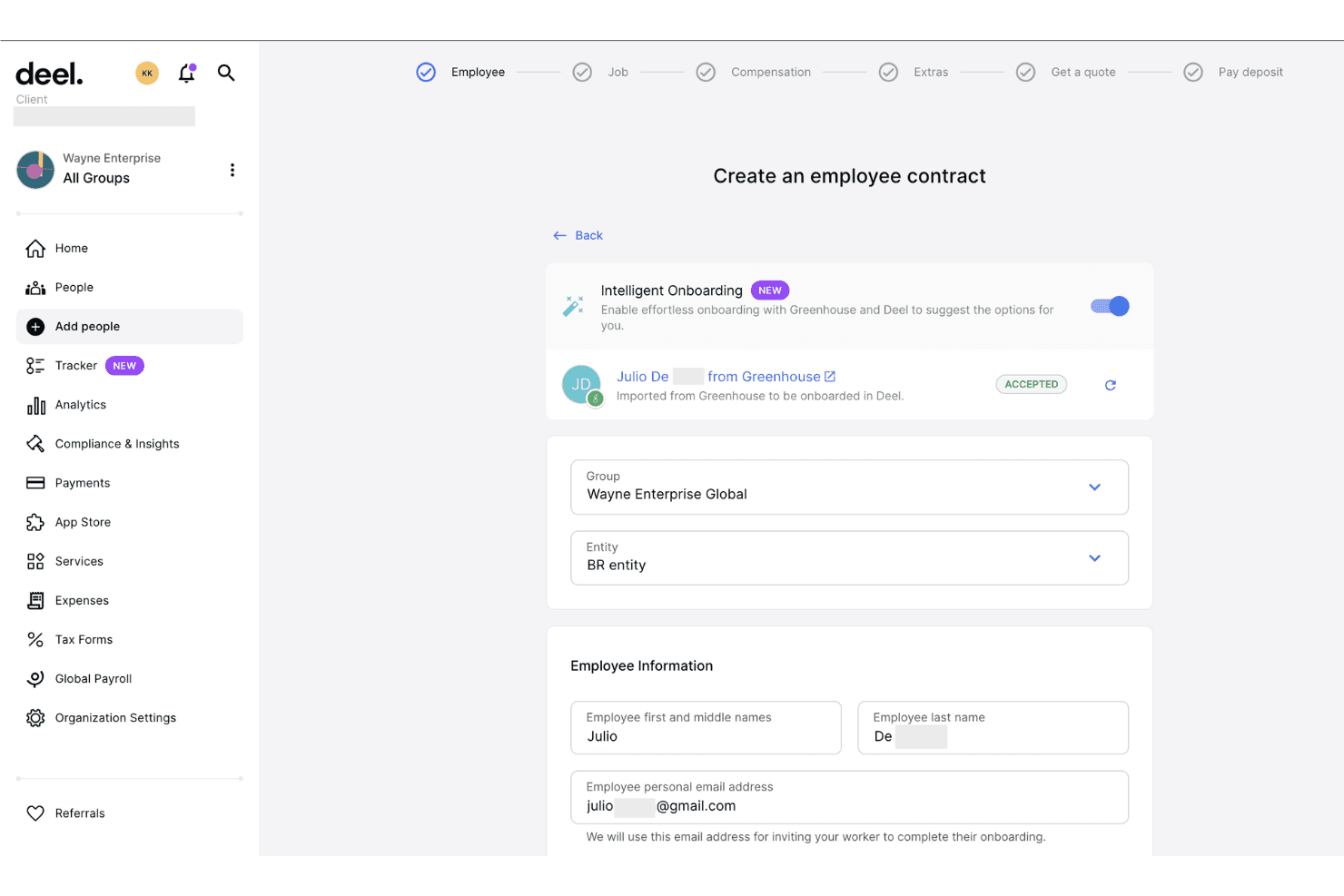
Deel Hire imports candidates from Greenhouse to streamline employee onboarding. Deel Hire is an AI-powered applicant tracking system that combines job board distribution, automated candidate screening, interview scheduling, and built-in compliance tools within Deel's broader HR and payroll platform.
Who Is Deel Hire Best For?
Deel Hire is a strong fit for startups and small businesses hiring across multiple countries who need compliance built directly into their recruiting process.
Why I Picked Deel Hire
Deel Hire earns its spot on my shortlist because compliance is woven into every step of the recruiting workflow, not bolted on afterward. When I use Deel, candidate data flows automatically from the ATS into onboarding and payroll. That matters most when hiring across countries with different legal requirements. The AI screening tools handle first-round candidate reviews based on role criteria, so my team can focus entirely on final-stage decisions.
Deel Hire Key Features
- AI-assisted job posting: Create and post job listings to over 1,000 boards with automated role and compensation suggestions.
- Google Workspace and Microsoft Teams integration: Schedule interviews and sync candidate activities within your existing workflow tools.
- Analytics dashboard: Track hiring metrics such as time-to-hire and pipeline conversion rates in real time.
- Global compliance controls: Manage applicant permissions, data privacy, and hiring documentation tailored to local laws in over 150 countries.
Deel Hire Integrations
Deel Hire offers native integrations with Google Workspace and Microsoft Teams. An API is available for custom integrations.
Pros and Cons
Pros:
- AI screening reduces manual candidate review time
- ATS and payroll housed in one platform
- Built-in compliance across 150+ countries
Cons:
- Reporting less developed than dedicated ATSs
- Overkill for domestic-only small business hiring
Learn more about Deel Hire: Best for flexible workflow visualization
- Free plan + 14-day trial available
- From $9/user/month
Customer Rating:4.6/5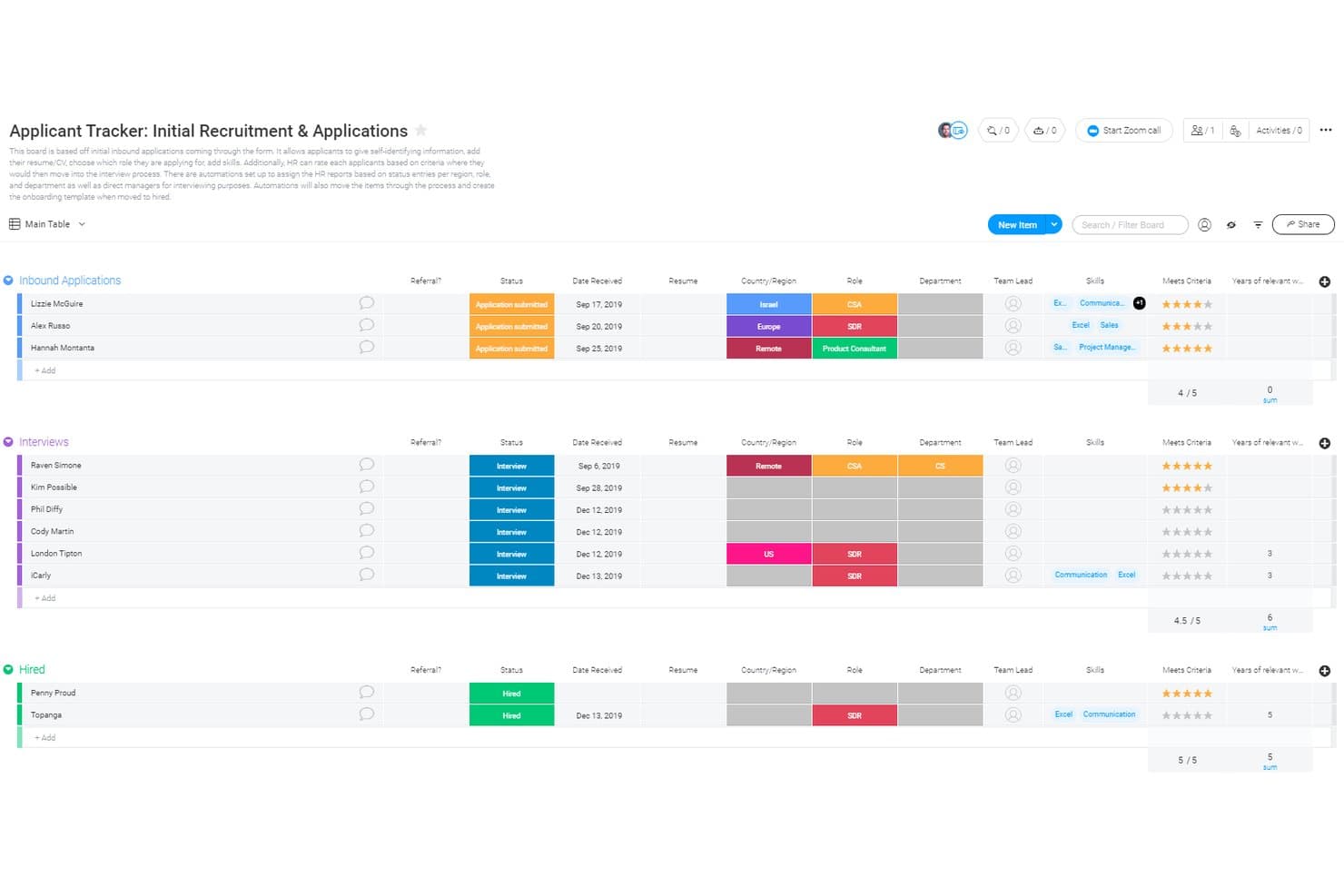
monday AI Workspace offers a structured applicant tracking board with grouped stages—Inbound Applications, Interviews, and Hired—displaying candidate details like status, date, role, department, skills, and rating criteria. monday AI Workspace is a general-purpose work management platform that small businesses can configure as an ATS using customizable boards, WorkForms, automations, and AI-powered workflow tools.
Who Is monday AI Workspace Best For?
It's a strong fit for small business owners and office managers who want to build a custom hiring workflow inside a platform they're already using for broader operations.
Why I Picked monday AI Workspace
I picked monday AI Workspace because no other tool on my shortlist lets you build and visualize a hiring pipeline in as many ways. I can switch between Kanban, Timeline, and Calendar views on the same candidate board, and set automation triggers that move candidates and fire status emails when a stage changes. The Vibe app builder even lets me spin up a custom AI agent to handle initial screening questions.
monday AI Workspace Key Features
- WorkForms: Collect candidate details and applications through customized forms shared via public links.
- AI-powered columns: Use AI columns to extract and summarize information from candidate resumes or application notes.
- Role-based permissions: Control access to boards, automations, and candidate pipelines for different hiring stakeholders.
- Automated email triggers: Send emails automatically to candidates when their pipeline status changes.
monday AI Workspace Integrations
monday AI Workspace offers hundreds of native integrations through its built-in integrations and marketplace, including Slack, Google Workspace, Microsoft 365, Jira, Dropbox, Zoom, HubSpot, Salesforce, GitHub, and Outlook. It also supports Zapier and provides an API for custom integrations.
Pros and Cons
Pros:
- AI tools speed up application review
- Automations reduce repetitive candidate communication tasks
- Highly visual pipeline with multiple board views
Cons:
- Recruiting setup requires significant manual configuration
- No native resume parsing or job posting
Learn more about monday AI Workspace: Best with integrated payroll and time tracking
- Free plan + 14-day free trial + free demo available
- From $24/location/month (billed annually)
Visit WebsiteCustomer Rating:4.2/5
Homebase applicant tracking and hiring dashboard for managing job postings, candidates, and team scheduling in one platform. Homebase is an applicant tracking system for small businesses that combines hiring tools, employee scheduling, time tracking, payroll, and team communication in one platform.
Who Is Homebase Best For?
Homebase is a good fit for small businesses with hourly teams that need to manage hiring, scheduling, and payroll in one place.
Why I Picked Homebase
I picked Homebase as one of the best because I can manage applicant tracking, payroll, and time tracking all in one place. My team uses the built-in time clock to track hours and syncs that data directly with payroll, which saves us from manual entry. I also like that I can onboard new hires and run payroll without switching between different systems.
Homebase Key Features
- Job posting distribution: Post open positions to multiple job boards directly from the platform.
- Applicant messaging: Communicate with candidates through built-in messaging tools.
- Interview scheduling: Set up and manage interview times with candidates inside the system.
- Document storage: Store and organize candidate documents and onboarding paperwork securely.
Homebase Integrations
Homebase offers native integrations with Square, Clover, Toast, Shopify, PayAnywhere, Talech, Lightspeed, Revel, ADP RUN, Gusto, QuickBooks Online Plus, Paychex, Rippling, Wells Fargo, Bank of America, Heartland, Millennium, SurePayroll, TipHaus, and GoDaddy. It also posts jobs directly to Indeed, Google Jobs, ZipRecruiter, Glassdoor, and Craigslist. An API is available for custom integrations.
Pros and Cons
Pros:
- Shift scheduling links directly to hiring
- Built-in time tracking for hourly roles
- Direct job posting to major job boards
Cons:
- Reporting features are basic for hiring analytics
- No built-in video interview functionality
 Best for reaching a broader range of candidates
- Free demo available
- Pricing upon request
Visit WebsiteCustomer Rating:4.4/5
Post job listings across over 1000 job boards and find the best candidates for the role with the software's smart recommendations. Greenhouse is a recruiting software that offers an 'essential' plan that's well-suited to the needs of small businesses. The platform helps you reach, classify, and nurture talent, and build a robust candidate pipeline and find the best candidates for each available position.
When you're ready to advertise a job opening, you can post on over 1,000 job boards through the software. This includes both niche sites and major job marketplaces, and the software makes recommendations of where you should post based on historical and industry performance. By casting a wider net, you're more likely to find the best people for the role.
A contact database is included in the system, making it easier to keep track of applicant contact information and send personalized follow ups and communications. You can also automate your messaging to reduce your manual workload.
The software allows you to screen candidates anonymously using scorecards you can set up. This helps you both mitigate unconscious bias and ensure you're evaluating people fairly and consistently.
You can connect the platform to other tools including Broadbean, Canditech, Cord, Docusign, Dropbox, FlexJobs, Google Meet, Indeed, Microsoft Teams, Paradox, and Seek. A free demo is available, and pricing information is available upon request.
 Best for teams looking for an end-to-end solution
- Free demo available
- Pricing upon request
Visit WebsiteCustomer Rating:4.3/5
The dashboard displays information on your pending tasks, special reports, and highlights around your hiring process. As a small business, hiring is a labor-intensive activity that sometimes takes too much time. Mitratech Hire has an Applicant Tracking System (ATS) that can help you with the heavy lifting so you can focus on creating impactful tasks for your company.
Mitratech Hire’s ATS enables recruiting teams to receive résumés through customizable application forms, and use bulk upload to import multiple résumés simultaneously. Once the résumés are imported and stored in the system, the software’s résumé parser automatically extracts all the pertinent details from the candidate résumés to create accurate applicant profiles.
In addition to applicant tracking and candidate sourcing, Mitratech Hire allows you to schedule candidate interviews on the same platform. It features shared calendars, automated responses and reminders, email templates, as well as Outlook and Google calendar integrations. Career site management and offer management are also available, making it an end-to-end ATS and hiring solution.
Integrations include other Mitratech Perform products and several third-party solutions, such as Checkr, Slack, Namely, and BambooHR, as well as Google and Outlook calendar applications.
Learn more about Mitratech Perform:
Outros sistemas de acompanhamento de candidatos para pequenas empresas
Eis algumas opções adicionais de sistemas de acompanhamento de candidatos para pequenas empresas que não entraram na minha lista restrita, mas que vale a pena conhecer:
- 11AvaHRBest for small businesses with fewer than 100 employees
- 12WizehireBest for human-powered hiring support
- 13EddyCollaborative candidate tracking tools within a core HR framework
- 14RecruiteeStraightforward recruiting platform with smart campaigns and custom landing pages
- 15JazzHRFull-feature applicant tracking system with enhanced candidate experience functions
- 16Mitratech TalentReefBest applicant tracking system for hiring hourly workers
- 17Unnanu HireBest for AI/ML powered resume scoring feature
- 18GoHireATS system with industry-specific customizations to help businesses scale
- 19PluralBest for integrated performance tools
- 20Haystack ProBest ATS for video-forward recruitment strategies
How I Evaluate Applicant Tracking Systems for Small Business
I split my evaluation into baseline must-haves—like multi-board job posting and candidate pipeline tracking—and the differentiators that separate a good ATS from the right one for a small team.
Core Functionality (Table Stakes For This List)
When I'm selecting tools for my list, I rank each one on a scale from 0 (does not offer the functionality) to 5 (excels in this area) for each core functionality listed below. Then, I calculate the tool's total score into a percentage. Each tool needs to achieve a minimum total score of 65% to be considered for inclusion.
- Job Posting Distribution: I check how many job boards a tool pushes to in a single click—think Indeed, LinkedIn, ZipRecruiter—and whether it supports both free and sponsored listings.
- Candidate Pipeline Management: A clear, visual pipeline where you can drag candidates between stages like "Phone Screen" and "Offer" makes a real difference when you're juggling multiple open roles.
- Resume Parsing & Storage: I evaluate whether the tool reliably extracts candidate details from uploaded resumes and lets you search your talent pool later using filters or keywords.
- Careers Page Builder: I look for a branded, embeddable careers page your team can launch without a developer—something that matches your site and works well on mobile devices.
- Hiring Team Collaboration: Tools like scorecards, @mentions, and role-based permissions matter here, especially when a store manager and an HR lead both need input on the same hire.
- Small Business Pricing & Scalability: I evaluate whether transparent, published pricing exists for teams under 200 employees, including free tiers or per-job plans that fit seasonal hiring patterns.
Once I have a list of tools that meet the criteria, I consider what sets each platform apart.
Differentiating Factors (What Sets Vendors Apart)
Here's how I compare and contrast different vendors:
Standout Features
Interview scheduling automation saves hours when you're coordinating between candidates and busy hiring managers—I look for tools with two-way calendar sync and self-scheduling links. Built-in SMS outreach is another feature I evaluate closely, since texting tends to get faster responses from candidates in hourly or retail roles. I also check whether a platform includes native offer letters with e-signature, which lets small teams close candidates without paying for a separate signing tool.
Beyond Features
Integrations with payroll and HRIS tools like Gusto, BambooHR, or Rippling matter a lot—I evaluate whether candidate data flows into your existing stack without manual re-entry. Time-to-value is another factor I weigh, since most small businesses need to post their first job within a day, not after a weeks-long implementation. Mobile experience counts too. Hiring managers reviewing candidates between meetings need a native app with push notifications, not a clunky mobile browser workaround.
Como escolher um sistema de acompanhamento de candidatos para pequenas empresas
É fácil perder-se em listas extensas de funcionalidades e estruturas de preços complexas. Para o ajudar a manter o foco enquanto analisa o seu processo específico de seleção de software, eis uma lista de verificação dos fatores a ter em conta:
| Fator | O que deve considerar |
|---|---|
| FatorEscalabilidade | O que deve considerarO sistema acompanhará o crescimento da sua empresa? Certifique-se de que consegue suportar mais utilizadores ou ofertas de emprego à medida que a sua equipa cresce, sem custos significativos ou limitações técnicas. |
| FatorIntegrações | O que deve considerarFunciona com as ferramentas que já utiliza? Verifique a compatibilidade com software de RH, e-mail e calendários para manter tudo ligado e reduzir a introdução manual de dados. |
| FatorPersonalização | O que deve considerarPode adaptar o sistema aos seus fluxos de trabalho? Procure opções que permitam ajustar campos, processos e painéis de controlo às necessidades específicas da sua equipa. |
| FatorFacilidade de utilização | O que deve considerarO sistema é intuitivo para todos os utilizadores? Certifique-se de que dispõe de uma interface simples, que minimize o tempo de formação e permita uma adoção rápida por parte de toda a equipa. |
| FatorImplementação e integração inicial | O que deve considerarCom que rapidez pode começar? Avalie o processo de configuração, o apoio disponível e recursos como tutoriais ou guias, para facilitar uma integração inicial sem problemas. |
| FatorCusto | O que deve considerarQual é o custo total de propriedade? Vá além do preço inicial; considere as taxas de manutenção, os complementos e quaisquer custos ocultos que possam afetar o seu orçamento. |
| FatorMedidas de segurança | O que deve considerarOs seus dados e as informações dos candidatos estão protegidos? Verifique a encriptação de dados, a conformidade com as leis de proteção de dados e os controlos de acesso dos utilizadores. |
| FatorDisponibilidade do apoio | O que deve considerarQual é a acessibilidade do apoio ao cliente? Precisará de ajuda fiável através de vários canais, especialmente durante períodos críticos de recrutamento ou quando se deparar com problemas técnicos. |
O que é um sistema de acompanhamento de candidatos para pequenas empresas?
Um sistema de acompanhamento de candidatos para pequenas empresas é um software concebido para ajudar a gerir e organizar o processo de recrutamento. Os profissionais de RH e os recrutadores utilizam normalmente estas ferramentas para simplificar o acompanhamento de candidaturas, o agendamento de entrevistas e o armazenamento de dados dos candidatos. Funcionalidades como a gestão de anúncios de emprego, o acompanhamento de candidatos e o agendamento de entrevistas ajudam a melhorar a eficiência e a organização. Em última análise, estas ferramentas poupam tempo e reduzem a complexidade do recrutamento para as pequenas empresas.
Funcionalidades
Eis as principais funcionalidades que qualquer bom sistema de acompanhamento de candidatos para pequenas empresas deve ter:
- Gestão de anúncios de emprego: Permite criar e gerir anúncios de emprego em várias plataformas, poupando tempo e alcançando um público mais vasto.
- Acompanhamento de candidatos: Ajuda a monitorizar o progresso dos candidatos ao longo do processo de recrutamento, garantindo que nenhuma etapa é esquecida.
- Agendamento de entrevistas: Facilita a marcação de entrevistas com candidatos e membros da equipa, reduzindo a comunicação necessária entre as partes.
- Fluxos de trabalho personalizáveis: Permite adaptar os processos de recrutamento às necessidades específicas da sua equipa, melhorando a eficiência e a organização.
- Capacidades de integração: Liga-se a ferramentas existentes, como o e-mail e os calendários, para simplificar a comunicação e a introdução de dados.
- Segurança dos dados: Garante que as informações dos candidatos são protegidas através de encriptação e do cumprimento das leis de proteção de dados.
- Relatórios e análise: Fornece informações sobre métricas e tendências de recrutamento, ajudando-o a tomar decisões fundamentadas.
- Acesso móvel: Permite gerir tarefas de recrutamento em qualquer lugar, aumentando a flexibilidade dos profissionais de RH com agendas preenchidas.
- Interface intuitiva: Apresenta um design intuitivo que minimiza o tempo de formação e incentiva a adoção por parte de toda a equipa.
- Recursos de formação: Inclui tutoriais e guias para ajudar os novos utilizadores a aprender rapidamente e a utilizar o sistema de forma eficaz.
Benefícios
A implementação de um sistema de acompanhamento de candidatos para pequenas empresas proporciona vários benefícios à sua equipa e à sua empresa. Eis alguns dos benefícios que pode esperar:
- Poupança de tempo: Automatiza tarefas repetitivas, como a publicação de ofertas de emprego e o acompanhamento de candidatos, libertando tempo para atividades mais estratégicas.
- Melhor organização: Mantém todas as informações dos candidatos e os dados de recrutamento num único local, reduzindo o risco de perder detalhes importantes.
- Colaboração reforçada: Permite que os membros da equipa acedam e atualizem facilmente as informações dos candidatos, melhorando a comunicação e a tomada de decisões.
- Melhor experiência dos candidatos: Fornece atualizações e comunicações atempadas aos candidatos, melhorando a sua experiência geral com a empresa.
- Informações baseadas em dados: Disponibiliza relatórios e análises sobre os processos de recrutamento, ajudando-o a tomar decisões fundamentadas e a melhorar as futuras estratégias de recrutamento.
- Escalabilidade: Acompanha o crescimento da sua empresa, suportando mais utilizadores e anúncios de emprego à medida que aumentam as suas necessidades de recrutamento.
- Eficiência de custos: Reduz a necessidade de processos manuais e de serviços de recrutamento externos, permitindo poupar dinheiro a longo prazo.
Custos e preços
A escolha de um sistema de acompanhamento de candidatos para pequenas empresas exige uma compreensão dos vários modelos de preços e planos disponíveis. Os custos variam consoante as funcionalidades, a dimensão da equipa, os complementos, entre outros fatores. As equipas com orçamentos limitados também podem comparar opções gratuitas de ATS antes de decidirem se precisam de um plano pago.
A tabela abaixo resume os planos comuns, os seus preços médios e as funcionalidades normalmente incluídas nas soluções de sistemas de acompanhamento de candidatos para pequenas empresas:
Tabela de comparação de planos para sistemas de acompanhamento de candidatos para pequenas empresas
| Tipo de plano | Preço médio | Funcionalidades comuns |
|---|---|---|
| Tipo de planoPlano gratuito | Preço médio$0 | Funcionalidades comunsPublicação básica de ofertas de emprego, acompanhamento de candidatos e relatórios limitados. |
| Tipo de planoPlano pessoal | Preço médio$5-$25/por utilizador/mês | Funcionalidades comunsPublicação de ofertas de emprego, análise de currículos, integração de e-mail e análise básica. |
| Tipo de planoPlano empresarial | Preço médio$30-$75/por utilizador/mês | Funcionalidades comunsAnálise avançada, fluxos de trabalho personalizáveis, integrações com ferramentas de RH e acesso móvel. |
| Tipo de planoPlano empresarial de grande dimensão | Preço médio$80-$150/por utilizador/mês | Funcionalidades comunsPersonalização completa, suporte dedicado, suporte para vários idiomas e segurança reforçada. |
Perguntas frequentes
Eis algumas respostas a perguntas comuns sobre sistemas de acompanhamento de candidaturas para pequenas empresas:
Qual é o tempo de implementação de um sistema de acompanhamento de candidaturas?
O tempo de implementação varia, mas a maioria dos sistemas de acompanhamento de candidaturas pode ser configurada num período entre alguns dias e algumas semanas. A duração depende da complexidade dos seus processos atuais e do nível de personalização de que necessita. Para acelerar o processo, reúna antecipadamente todas as informações e recursos necessários, como descrições de funções, funções da equipa e fluxos de trabalho atuais. Alguns fornecedores oferecem apoio para o orientar durante a configuração, assegurando uma transição simples para a sua equipa.
Os sistemas de acompanhamento de candidaturas podem integrar-se com outras ferramentas de RH?
Sim, a maioria dos sistemas de acompanhamento de candidaturas oferece capacidades de integração com outras ferramentas de RH, como plataformas de processamento salarial, gestão do desempenho e envolvimento dos colaboradores. Ao integrar estas ferramentas, pode criar um ecossistema de RH mais coeso, que reduz a introdução manual de dados e melhora a comunicação entre diferentes funções. Antes de comprar, verifique se o sistema é compatível com as ferramentas específicas que a sua equipa já utiliza.
É possível migrar dados ao mudar de sistema de acompanhamento de candidaturas?
Sim, a migração de dados é normalmente possível ao mudar de sistema, mas requer um planeamento cuidadoso. Deve garantir que todos os dados dos candidatos, anúncios de emprego e registos históricos são transferidos sem perdas. Muitos fornecedores disponibilizam assistência ou ferramentas de migração para ajudar neste processo. É aconselhável fazer uma cópia de segurança dos seus dados antes de iniciar a migração, para se proteger contra potenciais problemas.
Quão seguros são os sistemas de acompanhamento de candidaturas?
Os sistemas de acompanhamento de candidaturas oferecem geralmente medidas de segurança robustas, incluindo encriptação de dados, acesso seguro dos utilizadores e conformidade com as leis de proteção de dados. Ao avaliar um sistema, pergunte pelos respetivos protocolos de segurança e por quaisquer certificações que possua. É importante garantir que as informações dos seus candidatos são tratadas de forma segura e que o sistema cumpre os regulamentos relevantes na sua região.