

Os melhores sistemas de acompanhamento de candidatos (ATS) gerem o recrutamento de ponta a ponta, desde a publicação de ofertas de emprego e a análise de currículos até ao agendamento de entrevistas e às propostas. No entanto, duas mudanças alteraram o significado de «melhor». A análise de candidatos por IA é agora regulamentada em muitos estados dos EUA, em partes do Canadá e na UE, pelo que precisa de saber como uma ferramenta classifica os candidatos e se uma pessoa analisa as rejeições. Além disso, os candidatos falsos gerados por IA são agora suficientemente comuns para que a deteção de fraude se esteja a tornar uma capacidade importante, e não apenas um extra. Abaixo, comparo funcionalidades, preços e capacidades diferenciadoras para ajudar a encontrar a opção certa.
Porque pode confiar nas nossas recomendações de software
6,700+
Reviews
20
Industry experts
16+
Evaluation factors
14
Years
A nossa equipa testa e analisa software desde 2012. Como especialistas em RH, sabemos o quão difícil — e importante — é escolher o software certo.
Para este guia, avaliámos as ferramentas através de testes práticos e pesquisa independente, pontuando-as de acordo com os nossos critérios de seleção. Recorremos também a contributos de líderes de opinião do setor e de especialistas em RH no ativo.
As nossas análises refletem o juízo da nossa equipa editorial, e não um discurso de vendas.
Revisores especialistas:
- Phil GrayCOO
 Kim BehnkeHR Tech Editor & Analyst
 Josh BarkerPeople Ops Manager

Tabela de comparação de sistemas de acompanhamento de candidatos
Compare lado a lado os preços e os detalhes dos meus principais sistemas de acompanhamento de candidatos.
Score legend (out of 5)
- Excellent4.5–5
- Good4–4.4
- Average3–3.9
- Below average2–2.9
- Poor1–1.9
Sorted by: Default
| Tool | Starting Price | Website | |||||||
|---|---|---|---|---|---|---|---|---|---|
Best for built-in recruiting analytics | 4.2 out of 5 | 4 | 4 | 4 | 5 | 4 | 4 | $400/month Free demo available | Website |
Best for AI-assisted hiring workflows | 3.0 out of 5 | 3 | 3 | 3 | 3 | 3 | 3 | $8/user/month Up to 15-day free trial + demo available | Website |
Best for in-house talent acquisition teams | 3.8 out of 5 | 3 | 4 | 4 | 4 | 4 | 4 | Pricing upon request Free demo available | Book Demo |
Best for structured hiring | 3.7 out of 5 | 4 | 4 | 3 | 4 | 3 | 4 | Pricing upon request Free demo available | Website |
Best for automated offers | 3.2 out of 5 | 2 | 3 | 4 | 3 | 3 | 4 | $10/employee/month Free trial + free demo available | Website |
Best with built-in immigration support | 3.2 out of 5 | 2 | 3 | 4 | 3 | 3 | 4 | $5/user/month Free demo available | Website |
Best for AI recruitment and candidate sourcing | 3.5 out of 5 | 4 | 4 | 4 | 4 | 3 | 2 | $15/user/month 14-day free trial + free demo available | Website |
Best for combined ATS and CRM | 3.8 out of 5 | 4 | 3 | 5 | 4 | 4 | 3 | $99/user/month Free demo available | Book Demo |
Best for simplified hiring automation | 3.7 out of 5 | 3 | 4 | 4 | 4 | 3 | 4 | Pricing upon request Free demo available | Website |
Best for automated job postings & sourcing | 3.3 out of 5 | 4 | 2 | 4 | 4 | 3 | 3 | $6/employee/month Free demo available | Book Demo |
Best for hiring hourly workers | 2.5 out of 5 | 2 | 1 | 4 | 2 | 3 | 3 | $24/location/month Free plan + 14-day free trial + free demo available | Website |
Best for ease of use | 3.7 out of 5 | 3 | 4 | 4 | 4 | 3 | 4 | $299/month Free trial available | Book Demo |
Best for hiring within an all-in-one HR system | Not rated | 2 | 3 | 3 | 4 | Not rated | Not rated | $2/user/month Free plan + free demo available | Website |
Best for high-volume hiring | 3.5 out of 5 | 2 | 4 | 5 | 4 | 3 | 3 | Pricing upon request Free demo available | Website |
Best AI-native platform for recruitment agencies | 3.3 out of 5 | 5 | 2 | 2 | 4 | 4 | 3 | £105/user/month 14-day free trial available | Book Demo |


Análises dos melhores sistemas de acompanhamento de candidatos
Seguem-se as minhas análises detalhadas de cada sistema de acompanhamento de candidatos que entrou na minha lista, incluindo notas sobre os motivos por que os escolhi. Cada análise apresenta uma visão detalhada das principais funcionalidades, vantagens e desvantagens, integrações e casos de utilização ideais de cada sistema ATS, para ajudar a encontrar a melhor opção para si.
 Best for built-in recruiting analytics
- Free demo available
- From $400/month
Visit WebsiteCustomer Rating:4.4/5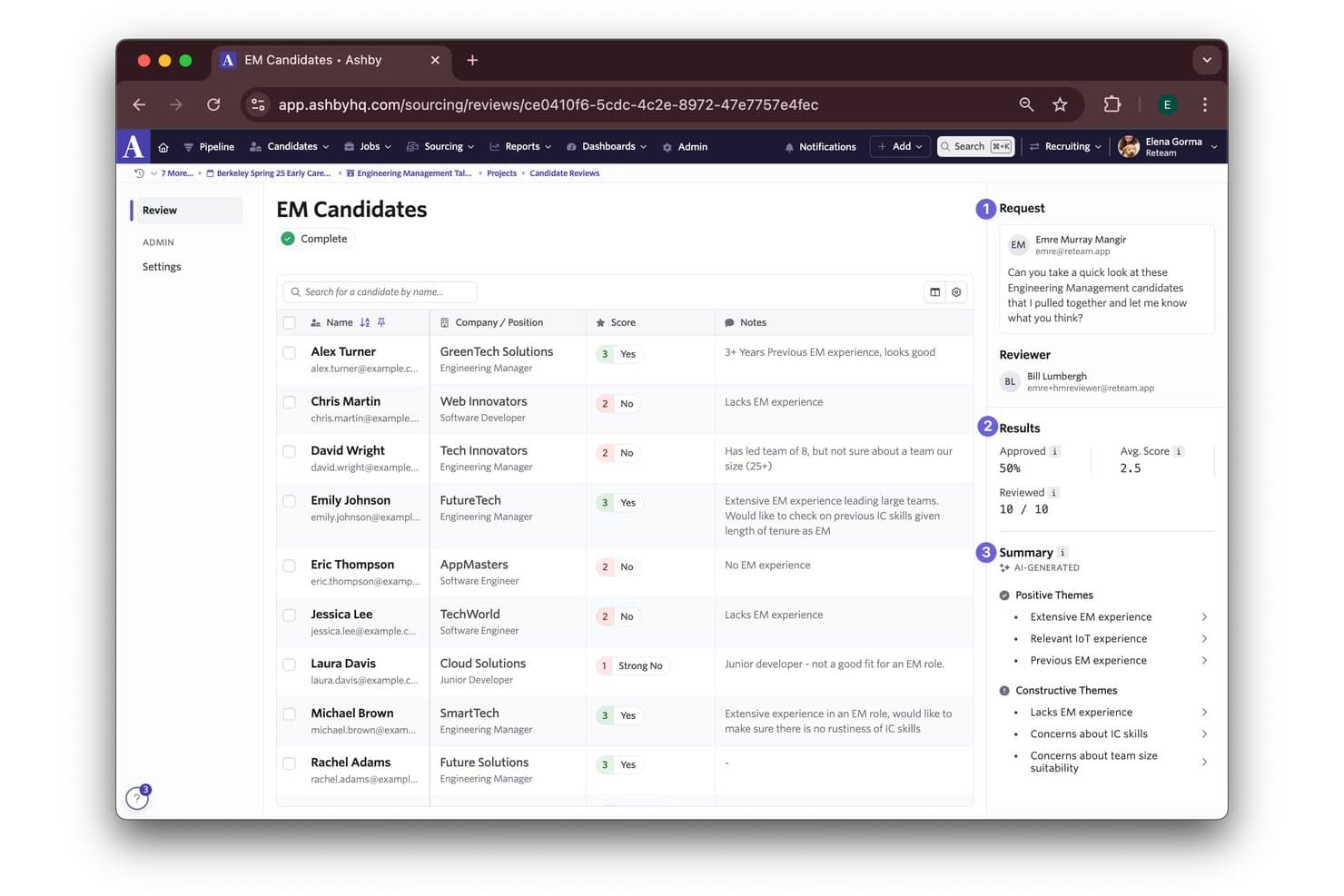
Ashby lets recruiters review and score candidates with AI summaries. Ashby is an all-in-one recruiting platform that combines an ATS, candidate CRM, interview scheduling, and analytics in a single system.
Who Is Ashby Best For?
Ashby suits talent acquisition teams at high-growth tech companies that need deep recruiting analytics alongside their ATS, CRM, and scheduling tools in one place.
Why I Picked Ashby
Ashby earns its spot on my shortlist because its built-in analytics go deeper than what most ATS platforms tack on as an afterthought. I particularly like the recruiting planner, which lets you track hiring-plan progress and forecast the activity needed to hit targets, and the custom dashboards that you can schedule for automatic delivery to stakeholders via email or Slack. AI-generated report interpretations also surface plain-language insights on top of your data, so you're not just staring at charts.
Ashby Key Features
- AI talent rediscovery: Scans your existing candidate database to surface past applicants who match a currently open role, grouped by relevant signals.
- Candidate texting: Sends and receives two-way SMS messages with candidates from a shared company number, with templates and consent handling built in.
- Automated sequences: Runs multi-stage outreach campaigns via email and LinkedIn, with scheduled follow-ups, open and click tracking, and bulk enrollment.
- Approval workflows: Routes job offers, job postings, and headcount openings through configurable multi-step approval chains with conditional steps and assigned approvers.
Ashby Integrations
Ashby offers 250+ integrations, including native Google Workspace, Microsoft 365, and Workday integrations, plus marketplace integrations with LinkedIn, Indeed, Google Jobs, Slack, and Zapier. It also provides an open API for custom integrations.
Pros and Cons
Pros:
- Pipeline automation reduces manual stage updates
- Candidate rediscovery supports targeted sourcing
- Recruiting dashboards expose hiring bottlenecks
Cons:
- AI screening needs manual verification
- Complex reports take time to configure
Learn more about Ashby: Best for AI-assisted hiring workflows
- Up to 15-day free trial + demo available
- From $8/user/month
Visit WebsiteCustomer Rating:4.4/5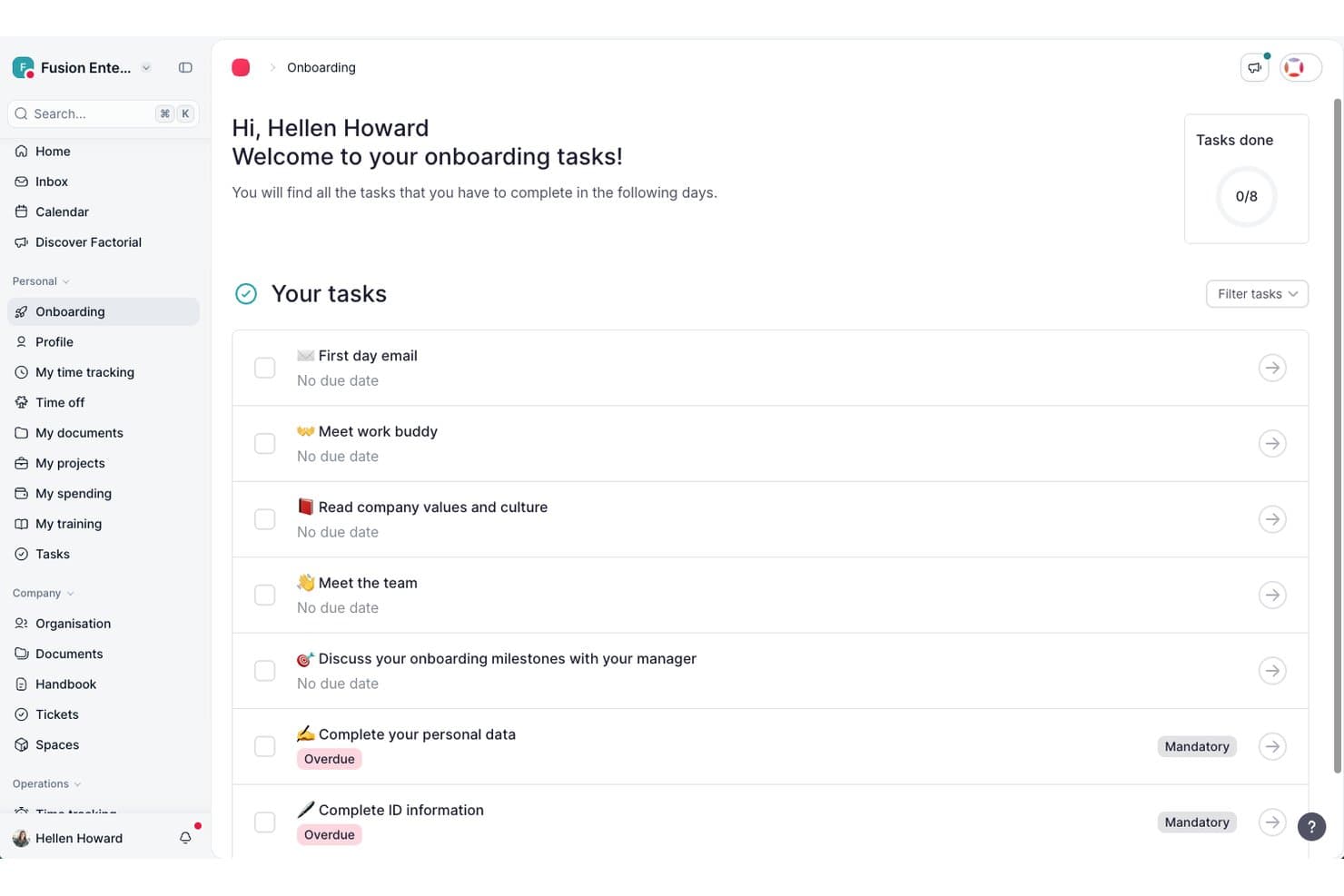
Factorial guides new hires through onboarding tasks in one place. Factorial is an AI-powered HR platform that combines an applicant tracking system with broader people operations tools, including candidate pipeline management, resume parsing, interview scheduling, and hiring team collaboration.
Who Is Factorial Best For?
Factorial suits small and mid-sized businesses that want a single AI-powered platform to handle recruiting alongside everyday operations like scheduling, reporting, and HR policy questions.
Why I Picked Factorial
I've included Factorial in my top picks because it approaches recruiting as part of a broader AI-driven operation, not a standalone function. Its AI can generate job descriptions, parse and summarize CVs, and recommend candidates based on application answers, so your team spends less time on manual review. I also like that the same AI layer handles things like scheduling and reporting across HR, meaning recruiting data doesn't sit in a silo.
Factorial Key Features
- Evaluation forms with ratings: Hiring team members can rate candidates from 1 to 5, add notes, and filter the candidate list by rating.
- Candidate self-scheduling: Candidates choose their own interview slot from times that reflect all interviewers' real-time availability.
- Customizable career page builder: You can build and host a branded careers page directly in Factorial or embed job listings into your existing company site via API.
- Phase-based hiring team access: You can restrict each hiring team member's view to only the recruitment phases they're assigned to work on.
Factorial Integrations
Factorial offers marketplace integrations with LinkedIn, Recruitee, Google Workspace, Slack, and Microsoft Azure. It also provides a public API and connects with hundreds of tools through Zapier.
Pros and Cons
Pros:
- Candidate tracking connects with broader HR workflows
- Structured candidate ratings support shared feedback
- AI CV summaries reduce manual screening
Cons:
- Advanced recruiting reports lack documented depth
- Calendar setup depends on administrator invitations
 Best for in-house talent acquisition teams
- Free demo available
- Pricing upon request
Visit WebsiteCustomer Rating:4.7/5
Pinpoint dashboard showing requisition approvals, interview scheduling, candidate metrics, and hiring workflow insights in a centralized ATS interface. Pinpoint is an applicant tracking system built for internal recruitment teams who want to manage hiring, automate workflows, and improve candidate experience with customizable tools and collaborative features.
Who Is Pinpoint Best For?
Pinpoint is a strong fit for mid-sized companies with dedicated in-house recruiting teams who want more control over their hiring process.
Why I Picked Pinpoint
Pinpoint earns its spot on my shortlist because it's purpose-built for in-house talent acquisition teams managing multiple hiring processes at once. I particularly like the hiring workflow management feature, which lets my team run different processes side-by-side—think executive searches running alongside high-volume hourly hiring—without forcing everything into a single rigid pipeline. The AI candidate match score and blind recruitment tools also stand out to me, since they bring structured, bias-aware decision-making directly into the selection process rather than relying on separate tools.
Pinpoint Key Features
- Branded careers website: Build a custom, branded careers site that reflects your employer brand and converts visitors into applicants.
- Candidate experience surveys: Collect structured feedback from candidates at key stages and view results in a built-in report.
- Interview scheduling software: Schedule and manage interviews directly within the platform, without switching between tools.
- Employee onboarding: Manage new hire onboarding tasks and paperwork from within the same platform used for hiring.
Pinpoint Integrations
Pinpoint offers over 100 native integrations, including BambooHR, ADP Workforce Now, UKG, BreatheHR, Oracle, Paycor, Sage People, LinkedIn, Microsoft Teams, and Slack. An open API is also available for custom integrations.
Pros and Cons
Pros:
- Customizable workflows for any department or role type
- Unlimited users—ideal for large in-house recruiting teams
- Exceptional customer success and support
Cons:
- Reporting setup can take time to customize
- Some features only available in the Enterprise tier
Learn more about Pinpoint:
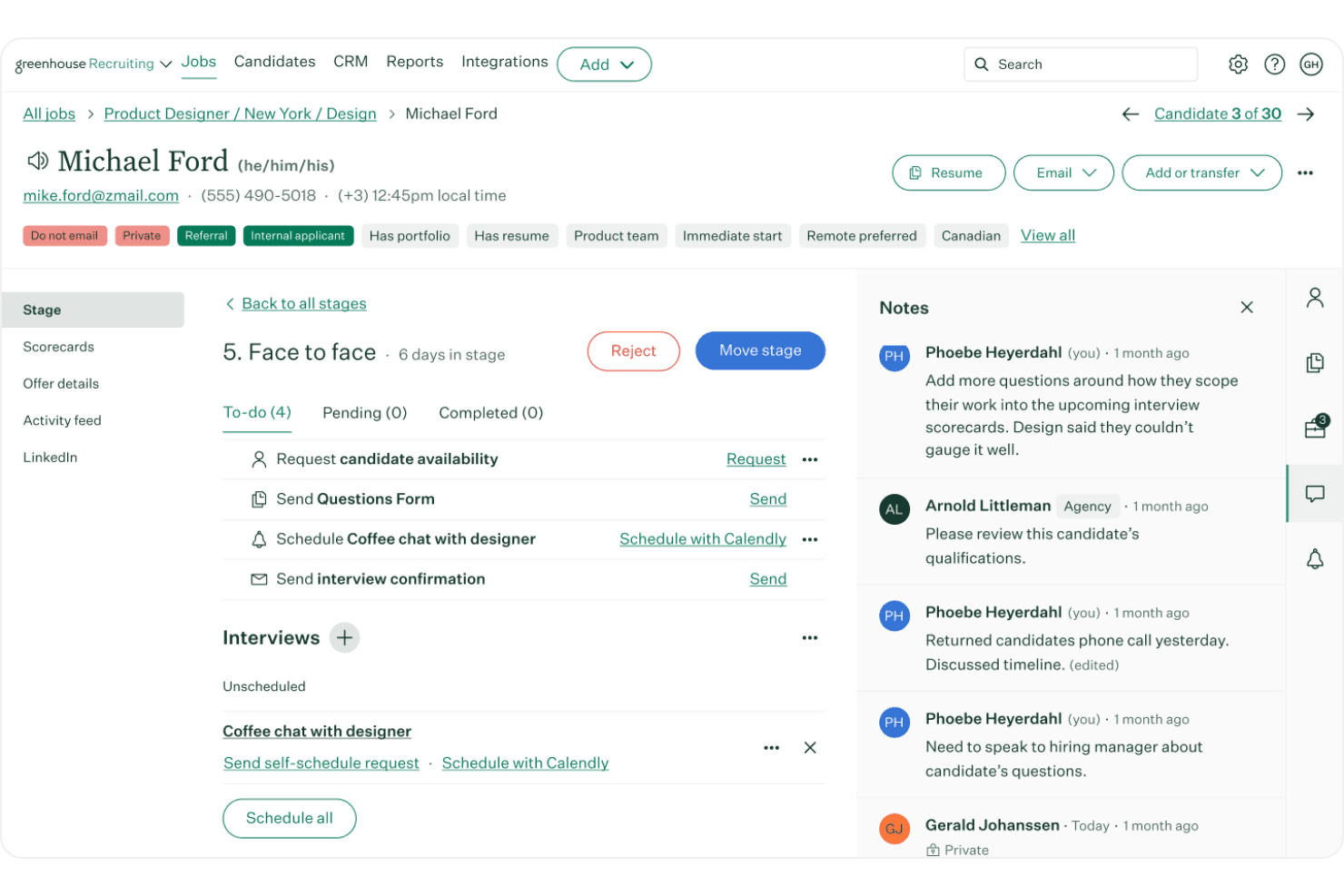
Greenhouse centralizes candidate tracking, notes, and interview scheduling. Greenhouse is an applicant tracking system that covers sourcing, structured interviewing, candidate pipeline management, and onboarding handoffs—with AI-assisted candidate matching and built-in scorecards designed to bring consistency to every stage of hiring.
Who Is Greenhouse Best For?
Greenhouse is a strong fit for recruiting teams and talent acquisition specialists at growth-stage and enterprise companies that want structured, consistent hiring processes across every role.
Why I Picked Greenhouse
Greenhouse earns its spot on my shortlist because structured hiring is genuinely baked into how the product works, not bolted on as an afterthought. Every role gets its own interview kit with scorecards tied to shared criteria, so every interviewer on my team is evaluating candidates against the same benchmarks. I also rely on Talent Matching, which analyzes resume data against job criteria and surfaces matched and missing skills so I can prioritize my review queue before I've opened a single profile.
Greenhouse Key Features
- Candidate self-scheduling: Candidates select their own interview time from available slots based on interviewer calendar availability, automatically confirming the interview for all parties.
- Resume anonymization: Strips identifying details—including names, photos, and contact information—from resumes during Application Review and Hiring Manager Review to reduce bias.
- Visual Candidate Pipeline: Displays active candidates by interview stage in a drag-and-drop kanban view, with filters for priority, time in stage, and last activity.
- Bulk candidate email: Sends personalized email communications to up to 10,000 candidates at once directly from the platform via Greenhouse's built-in Mailgun provider.
Greenhouse Integrations
Greenhouse lists over 400 pre-built integrations, including Zoom, Google Meet, Microsoft Teams, and Spark Hire. It also offers REST, GraphQL, webhooks, and APIs for custom integrations.
Pros and Cons
Pros:
- Self-scheduling cuts interview coordination back-and-forth
- Pipeline stages keep candidate progress visible
- Scorecards keep interviewer feedback comparable
Cons:
- Workflow setup can take dedicated admin time
- Custom reports can require manual work
 Best for automated offers
- Free trial + free demo available
- From $10/employee/month
Visit WebsiteCustomer Rating:4.5/5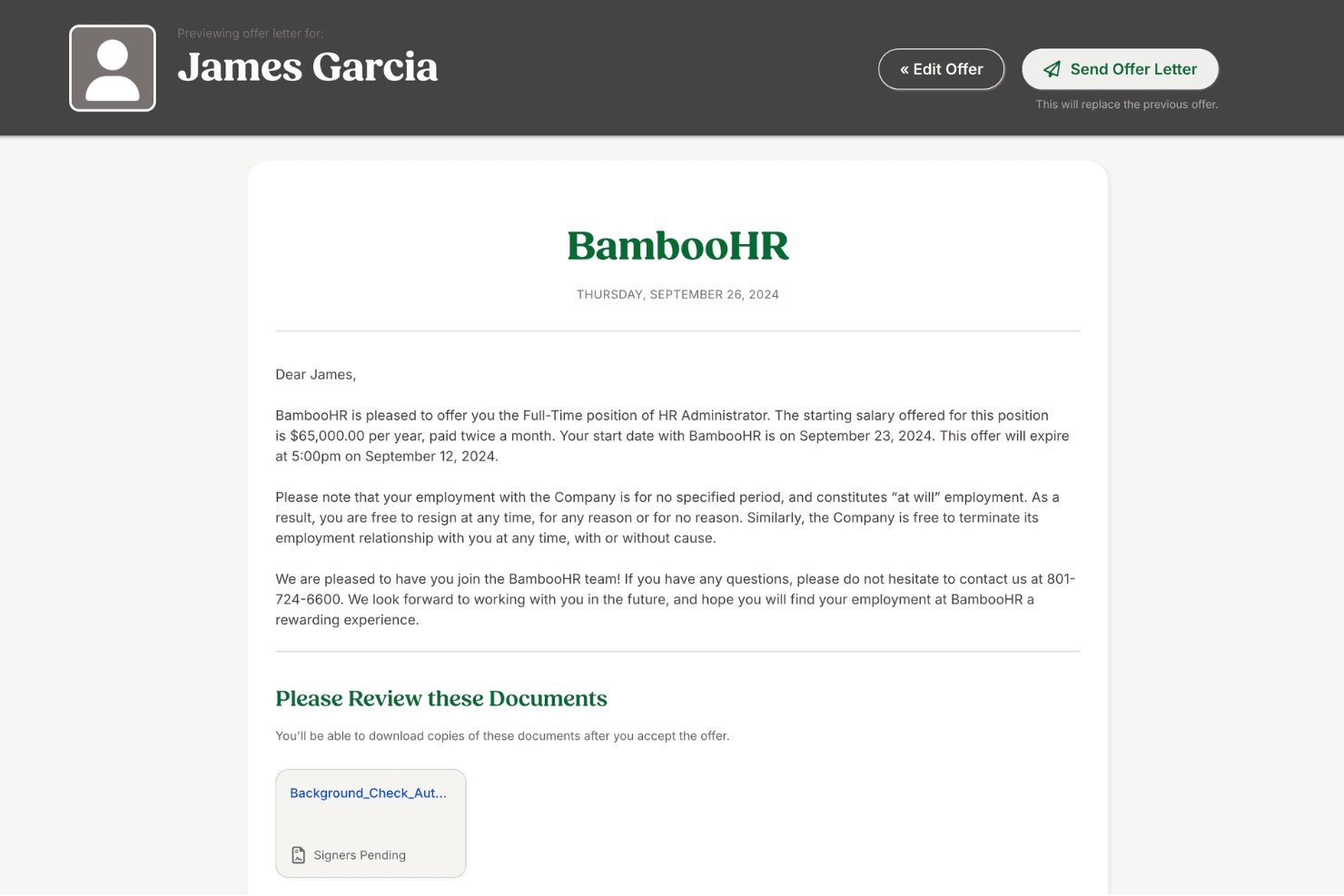
BambooHR lets HR teams preview and send job offer letters to candidates. BambooHR is an HR platform with a built-in applicant tracking system for small and midsize businesses that want to simplify hiring, manage candidates in one place, and improve collaboration between recruiters and hiring managers.
Who Is BambooHR Best For?
BambooHR is a strong fit for small to midsize businesses that need a people-first HR platform with hiring tools built in from the start.
Why I Picked BambooHR
BambooHR is one of the best on my shortlist because it handles the offer stage of hiring well. I like that you can generate offer letters automatically using pre-built templates, then send them for e-signature without leaving the platform. My team also gets significant value from the hiring analytics, which track things like time-to-hire and source effectiveness so we can see exactly where candidates are dropping off in the pipeline.
BambooHR Key Features
- Candidate sources report: Tracks where applicants are coming from across job boards and social channels so you can focus sourcing spend on the best-performing channels.
- Interview self-scheduling: Lets candidates pick from preset time slots you define, with automated confirmations sent to both the candidate and interviewer.
- Collaborative candidate review: Gives hiring team members custom permissions and in-system messaging to share feedback and coordinate decisions without leaving the platform.
- Automatic data transfer to employee records: Moves accepted candidate data directly into employee records at hire, removing the need for manual re-entry.
BambooHR Integrations
BambooHR offers 150+ pre-built integrations including Deel, Papaya Global, Oyster, Lattice, 15Five, Engagedly, BreezyHR, JazzHR, and more.
Pros and Cons
Pros:
- Clear analytics on candidate sources and hiring funnel
- Automated offer letters with built-in e-signature tools
- ATS is connected to onboarding tools for hired candidates
Cons:
- Some analytics features require higher pricing tier
- Reporting dashboards could use more export options
 Best with built-in immigration support
- Free demo available
- From $5/user/month
Visit WebsiteCustomer Rating:4.8/5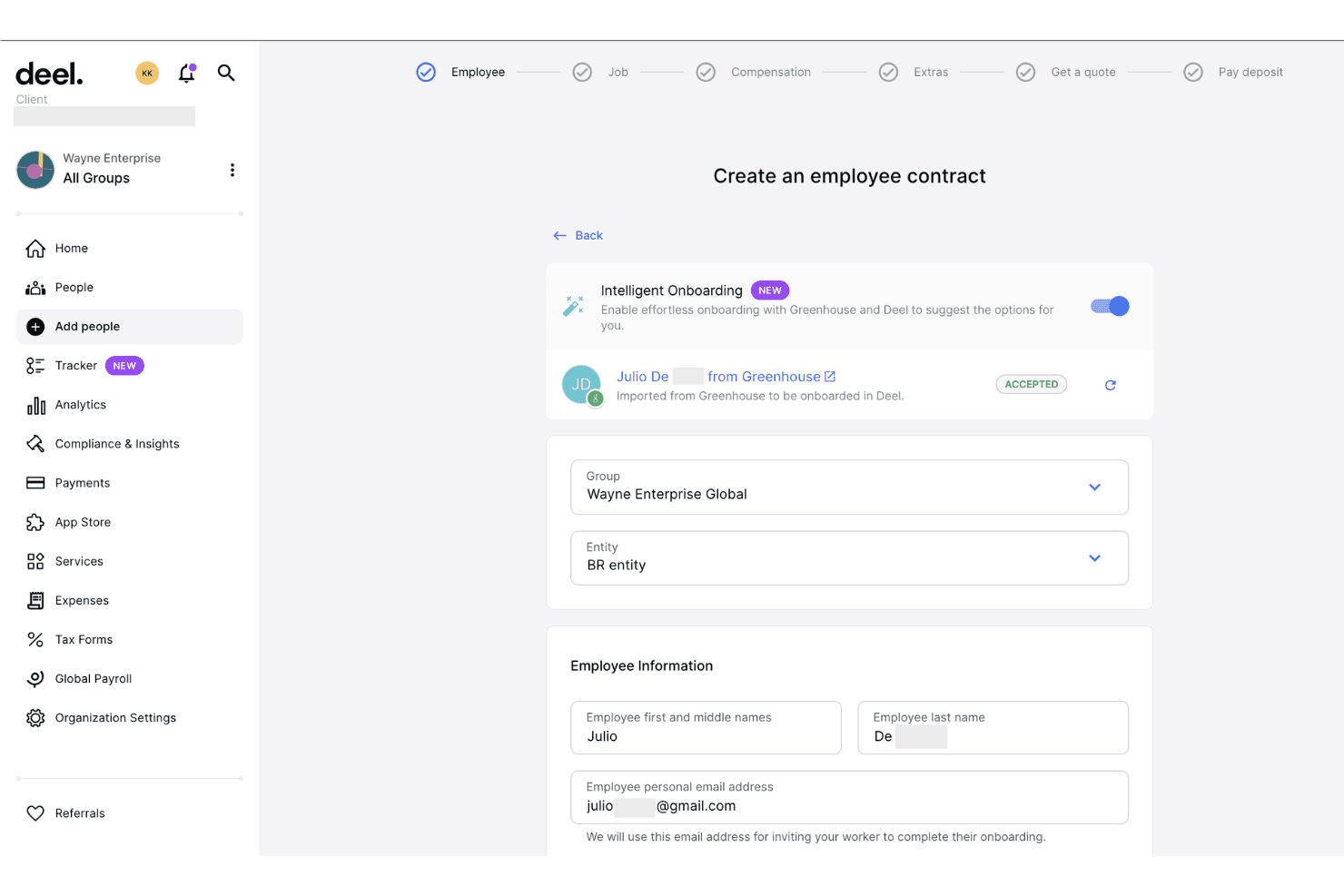
Deel's contract management interface lets users create compliant employee contracts for smoother onboarding. Deel HR supports global businesses and talent teams that need an applicant tracking system capable of handling international hiring, onboarding, and compliance challenges in a single platform.
Who Is Deel HR Best For?
Deel HR is a strong fit for mid-size to enterprise companies hiring across multiple countries who need to manage global recruitment and compliance in one place.
Why I Picked Deel HR
I picked Deel HR as one of the best because it's the only ATS I've come across that has immigration support built directly into the hiring flow. When my team is evaluating a candidate who needs a work visa, I can trigger a free visa eligibility assessment right from within the platform and get results within 48 hours, including a cost breakdown and required documents. From there, Deel's immigration experts handle the visa sponsorship and application process across 70+ countries, so I'm not coordinating between an external law firm and my HR tools. I also like that one-click visa renewals and automated compliance alerts keep things from falling through the cracks once a hire is in place.
Deel HR Key Features
- AI-powered candidate sourcing: Deel HR's ATS uses AI to automatically source candidates and surface relevant applicants for open roles.
- Background checks and identity verification: Run background checks and confirm candidate identity through Remote Worker Verification directly within the hiring flow.
- Localized contract generation: Automatically generate employment contracts that meet local labor laws for the country you're hiring in.
- Workforce planning with live hiring data: Forecast headcount, roles, and costs using real-time workforce and hiring data instead of static spreadsheets.
Deel HR Integrations
Integrations include FaceUp, Snowflake, DefensX, Microsoft Finance, Kintsugi, ReFresh OS, Revo.ai, Keeper, Human Interest, and Everyminute.
Pros and Cons
Pros:
- Integrates onboarding with applicant tracking workflows
- Visualizes candidate pipelines for multiple regions
- Offers automated document collection and reminders
Cons:
- Reporting features are less granular than peers
- Fewer native job board integrations than peers
 Best for AI recruitment and candidate sourcing
- 14-day free trial + free demo available
- From $15/user/month (billed annually)
Visit WebsiteCustomer Rating:4.8/5
Manatal lets users publish job postings to multiple integrated job boards. Manatal is an applicant tracking system designed for recruiters and HR teams who want to streamline hiring, automate candidate management, and improve collaboration throughout the recruitment process.
Who Is Manatal Best For?
Manatal is a good fit for small to mid-sized businesses and staffing agencies looking for an accessible ATS with built-in AI tools to speed up hiring.
Why I Picked Manatal
Manatal earns its spot as one of the best on my shortlist because of how well its AI-powered features hold up in a real recruiting workflow. I particularly like the AI candidate scoring, which automatically ranks applicants against job requirements, so my team doesn't have to sift through hundreds of resumes to find the strongest matches. The social media enrichment feature also pulls publicly available candidate data from LinkedIn and other platforms directly into candidate profiles, which reduces back-and-forth research. The sourcing tools let my team post to 2,500+ job boards with one click, keeping the top of the funnel full with minimal additional work.
Manatal Key Features
- Customizable recruitment pipeline: Build and adjust hiring stages to match your team's specific recruitment process.
- Candidate portal: Give applicants a branded portal to track their application status and submit documents.
- Hiring team collaboration tools: Leave notes, tag teammates, and share feedback directly on candidate profiles.
- Analytics and reporting dashboard: Track key recruitment metrics like time-to-hire and pipeline activity across all open roles.
Manatal Integrations
Manatal offers native integrations with Indeed, Codility, Mailchimp, Google Suite, Microsoft 365, LinkedIn Premium, ZipRecruiter, Monster, Talent.com, and more.
Pros and Cons
Pros:
- Drag-and-drop pipelines simplify tracking candidate progress
- Custom career page builder enhances employer branding
- AI-based recommendation of candidates and social media recruitment
Cons:
- Reporting customization options are somewhat limited
- No mobile app for hiring managers
 Best for combined ATS and CRM
- Free demo available
- From $99/user/month
Visit WebsiteCustomer Rating:4.7/5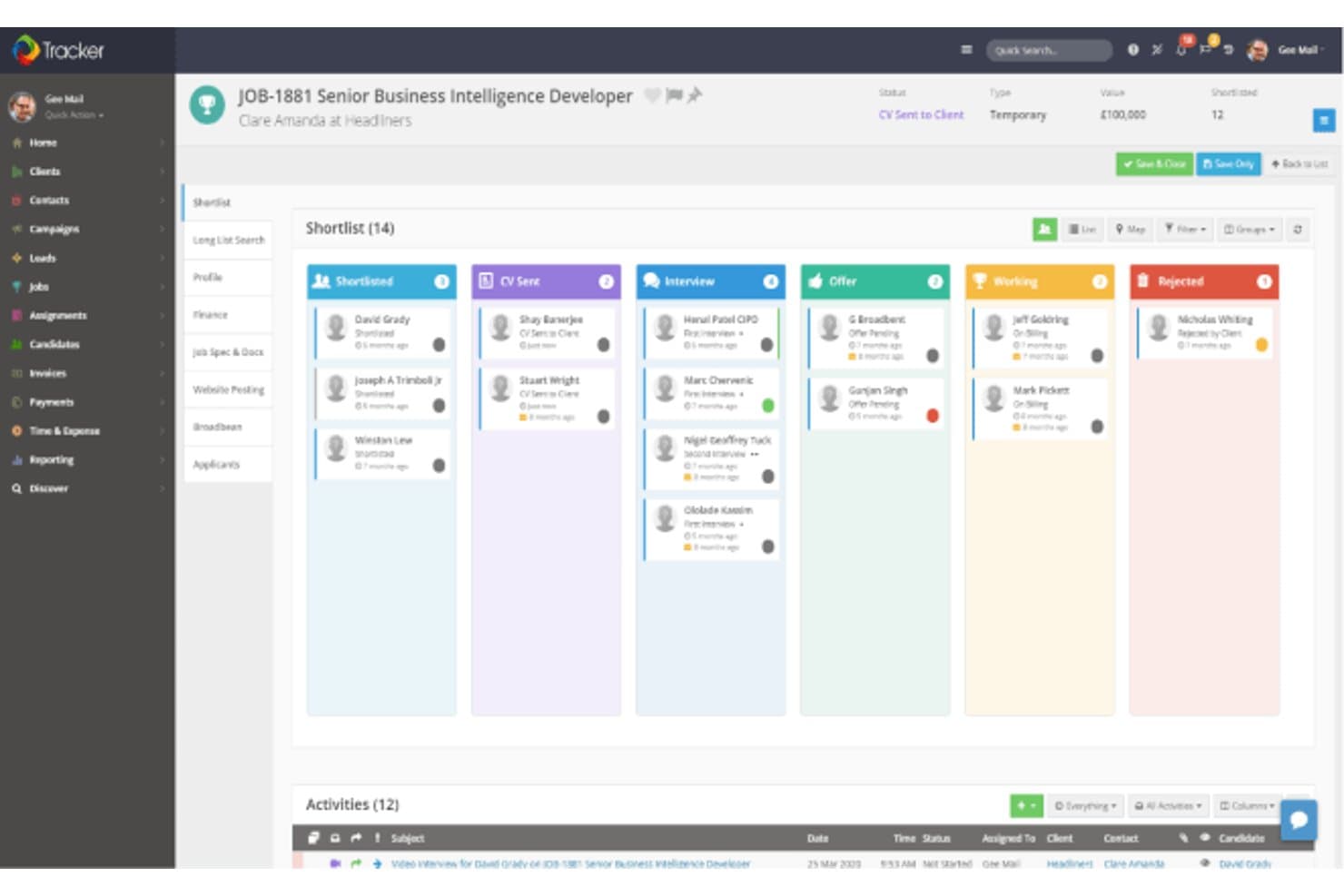
Tracker's ATS platform helps teams visualize recruiting and hiring pipelines on intuitive Kanban boards. Tracker is a recruitment platform designed for staffing agencies and talent acquisition teams who want to manage candidates, clients, and job orders in one place, helping simplify hiring workflows and improve collaboration across the recruitment process.
Who Is Tracker Best For?
Tracker is a strong fit for staffing agencies and recruiting firms that need to manage both candidate pipelines and client relationships without switching between separate tools.
Why I Picked Tracker
I've included Tracker in my top picks because it's one of the few ATS platforms that builds CRM functionality directly into the same system rather than bolting it on as an afterthought. In practice, that means my team can move a qualified lead through the sales pipeline and convert it into an active job order with a single click, without ever leaving the platform. I also like the MANDACT lead qualification methodology built into the CRM, which gives recruiters a structured way to evaluate client opportunities using criteria like budget, authority, and timing. The activity management tools let my team log calls, emails, and meetings in one place, so there's a complete relationship history for every client alongside the candidate pipeline.
Tracker Key Features
- Resume parsing: Automatically extracts candidate details, employment history, skills, and qualifications from any document format to build complete candidate profiles.
- Job board posting and searching: Post to 1,000+ job boards and search multiple boards simultaneously, with de-duplicated, ranked results pulled into a single list.
- Candidate auto-matching: Automatically matches newly added candidates to open jobs based on configurable criteria, so relevant candidates surface without manual searching.
- Onboarding and compliance tools: Build custom onboarding workflows with online forms, eSignature collection, and GDPR/CCPA compliance tools directly within the platform.
Tracker Integrations
Integrations include Broadbean, LogicMelon, Indeed, Monster, Facebook, LinkedIn, Twitter, Office365, Gmail, and Textkernel.
Pros and Cons
Pros:
- Candidate database search handles “millions” of records
- Suitable for both recruiting and sales/client workflows
- Flexible workflows and customization for staffing agencies
Cons:
- Suited to agencies more than in-house teams
- No background check integration
Learn more about Tracker: Best for simplified hiring automation
- Free demo available
- Pricing upon request
Visit WebsiteCustomer Rating:4.5/5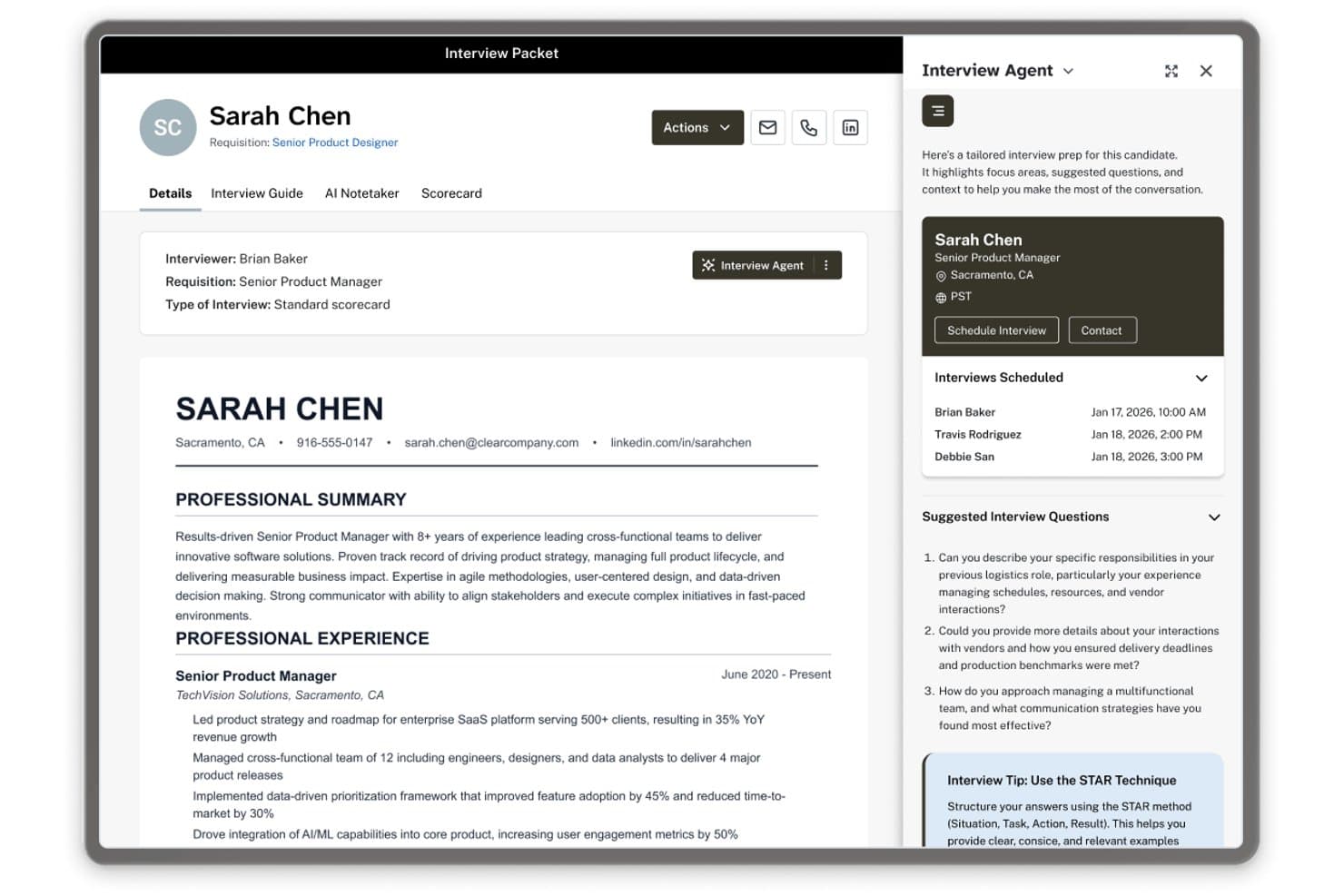
ClearCo offers an AI-powered Interview Agent panel that provides interviewers with tailored prep, suggested questions, and candidate context directly within the interview packet. ClearCo (formerly ClearCompany) is an applicant tracking system designed to help you manage candidate sourcing, automate hiring workflows, and improve collaboration across your recruiting process.
Who Is ClearCo Best For?
ClearCompany is a good fit for mid-sized to enterprise HR teams that need a structured, scalable recruiting process across multiple roles and departments.
Why I Picked ClearCo
I picked ClearCo because it helps reduce delays in hiring by structuring workflows and automating key steps between recruiters and hiring managers. The platform tracks candidates across stages, assigns ownership for each step, and supports approval processes to keep hiring moving. It also includes built-in tools for creating and sending offers with e-signatures, which helps streamline the final stages of hiring. Structured interview guides and scorecards support more consistent candidate evaluations across your team.
ClearCo Key Features
- Structured evaluation: Use interview guides and scorecards to assess candidates consistently across roles.
- Workflow automation: Move candidates through stages with assigned owners and approval steps.
- Reporting and analytics: Access recruiting metrics across roles, pipelines, and hiring activity.
- Offer management: Create, send, and manage offers with built-in e-signature functionality.
ClearCo Integrations
ClearCo offers native integrations with ADP, LinkedIn, onboarding/document management platforms, and more.
Pros and Cons
Pros:
- Provides real-time dashboards you can query using natural language
- Reaches candidates by mobile texting and QR-enabled applications
- Automates candidate sourcing from a large global pool
Cons:
- Some users report slower support responses and account setup complexity
- Advanced report customisation is somewhat limited
Learn more about ClearCo: 10Best for automated job postings & sourcing
Folks HR
- Free demo available
- Modular pricing, from $6/employee/month (module-dependent)
Visit WebsiteCustomer Rating:4.6/5
Folks HR lets users submit job requests with applicant and position details. Folks ATS by Folks HR is a Canadian applicant tracking system designed for small and midsize businesses that want to simplify recruiting, centralize candidate management, and automate repetitive hiring tasks.
Who Is Folks ATS Best For?
Folks ATS is a good fit for small and midsize businesses that need an accessible, all-in-one HR platform with built-in recruiting tools.
Why I Picked Folks ATS
I picked Folks ATS as one of the best because of how well its automated job posting and LinkedIn sourcing features work together to cut down sourcing time. With Folks ATS, you can post a role to over 2,000 job boards—including Indeed, LinkedIn, Jobillico, and Isarta—directly from the platform, using pre-built job templates to speed up the process. The LinkedIn sourcing plugin lets my team pull candidate profiles from LinkedIn without ever leaving the ATS. The AI-powered resume matchmaker surfaces the most qualified candidates based on required and preferred skills, so I'm not manually sifting through every application.
Folks ATS Key Features
- Candidate interview scheduling: Attach documents, assign interviewers, automate confirmations, and check candidate availability directly within the platform.
- Custom career page builder: Generate a branded career page in minutes, with all incoming applications automatically organized in the ATS.
- Recruitment analytics and reports: Track time-to-hire, recruitment costs, and new hire retention rates across 20+ pre-built reports updated in real time.
- Centralized applicant management: Store and search all candidate profiles in one database, with keyword search and saved candidate history for future roles.
Folks ATS Integrations
Folks ATS offers native integrations with LinkedIn, Indeed, Jobillico, and Isarta; an API supports custom connections.
Pros and Cons
Pros:
- Built for SMBs seeking time-saving automation over manual tracking
- Converts hires to Folks HR profiles without duplicate data
- AI resume parsing highlights top matches for faster sourcing.
Cons:
- Career page customization options can feel limited
- Some integrations require separate accounts (e.g., LinkedIn Recruiter)
Learn more about Folks HR: 11Best for hiring hourly workers
Homebase
- Free plan + 14-day free trial + free demo available
- From $24/location/month (billed annually)
Visit WebsiteCustomer Rating:4.2/5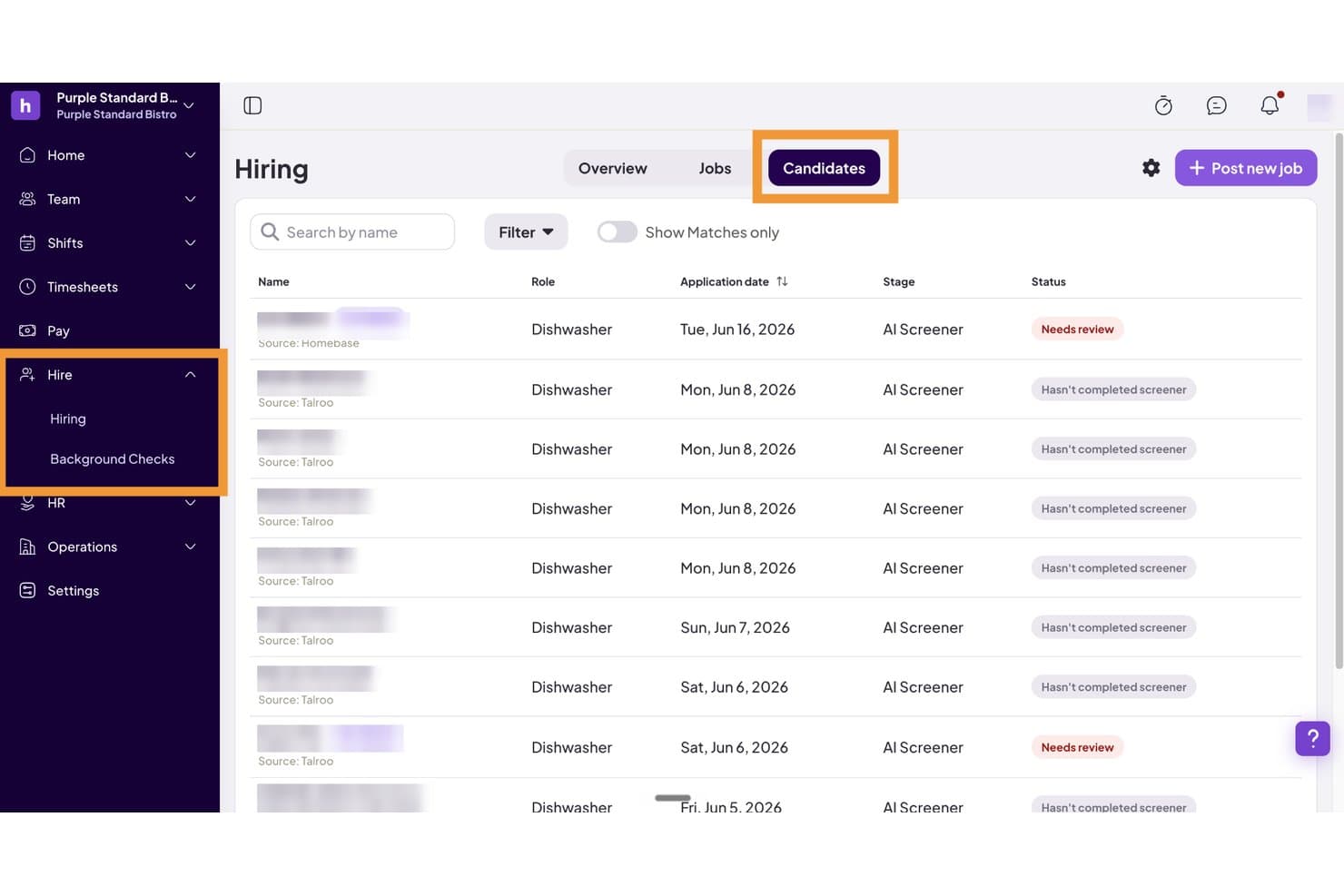
Homebase lets users track all job candidates and their screener statuses. Homebase is an AI-enabled hiring and applicant tracking tool for small businesses that covers job posting to multiple boards, applicant screening, interview scheduling, and new-hire onboarding handoff.
Who Is Homebase Best For?
Homebase is a natural fit for small business owners hiring hourly workers in service-oriented industries like retail, hospitality, and food service.
Why I Picked Homebase
Homebase earns its spot on my shortlist because it's built specifically for the kind of hiring that retail, food service, and hospitality businesses actually do: filling hourly roles fast. I love that its AI Hiring Assistant handles applicant screening with custom questions and smart follow-ups, then automatically surfaces Top Match candidates and books interviews around a manager's availability. That hire-to-roster handoff, where a new hire's details flow directly into Homebase's scheduling and onboarding tools, is something I haven't seen handled this cleanly elsewhere.
Homebase Key Features
- One-click job distribution: Post open roles to Indeed, ZipRecruiter, Google, Facebook, Glassdoor, and JobGet from a single submission.
- Branded careers page: Build a customizable careers page with your company avatar, banner, description, and location, shareable via link or QR code.
- Google Calendar sync: Connect your calendar to automatically hide booked time slots and add confirmed interviews to your schedule.
- Hire-to-roster handoff: Mark a candidate as hired and their application details automatically populate a new team-member profile for onboarding and scheduling.
Homebase Integrations
Homebase connects with Indeed, ZipRecruiter, Google, Facebook, Craigslist, Glassdoor, JobGet, and Google Calendar. It also offers a read-only API for custom integrations on the All-in-One plan.
Pros and Cons
Pros:
- Reviewers value connected scheduling and team communication
- Moves hires into team onboarding and scheduling
- Posts hourly roles across several job boards
Cons:
- No scorecards or structured candidate feedback
- Candidate tracking lacks customizable pipeline stages
 12Best for ease of use
Workable
- Free trial available
- From $299/month (billed annually)
Visit WebsiteCustomer Rating:4.5/5
Workable allows users to post jobs across hundreds of channels to reach the right candidates. Workable is an applicant tracking system designed for HR teams and recruiters who want to simplify hiring, automate repetitive tasks, and manage candidate pipelines in one place.
Who Is Workable Best For?
Workable is a good fit for small to mid-sized businesses that need a straightforward ATS their hiring teams can be up and running within hours.
Why I Picked Workable
Workable earns its spot on my shortlist because it's genuinely one of the fastest ATS platforms to set up and start using. I've seen teams go from sign-up to posting live jobs in a matter of hours, not days. The no-code careers page builder is a good example of this—you can create a branded, mobile-friendly careers page without touching a line of code. I also like the candidate self-scheduling feature, which lets candidates book their own interview slots with automatic calendar syncing and time zone detection, cutting out the back-and-forth that slows down so many hiring processes.
Workable Key Features
- AI-powered candidate screening: Get AI-generated match scores and requirement checklists that summarize how well each applicant fits the role.
- One-way video interviews: Screen candidates at scale by sending video interview requests they complete on their own time, replacing early-stage phone screens.
- Anonymized screening: Hide candidate identifying details during resume review to support fair, bias-reduced evaluation.
- Custom hiring pipelines: Build role-specific hiring workflows with tailored stages to match how different teams recruit.
Workable Integrations
Integrations include LinkedIn, Indeed, ADP Workforce Now, Xero, Slack, Google Workspace, Microsoft 365, Zoom, DocuSign, and AssessFirst.
Pros and Cons
Pros:
- Offer-letter templates + e-signatures means fewer manual docs
- Candidates can schedule interviews themselves
- Built-in AI screening cuts time spent reviewing unqualified resumes
Cons:
- Some users report limited customisation on deep search filters
- Premium features (e.g., texting, advanced assessments) cost extra
 13Best for hiring within an all-in-one HR system
TalentHR
- Free plan + free demo available
- From $2/user/month (billed annually)
Visit WebsiteCustomer Rating:4.8/5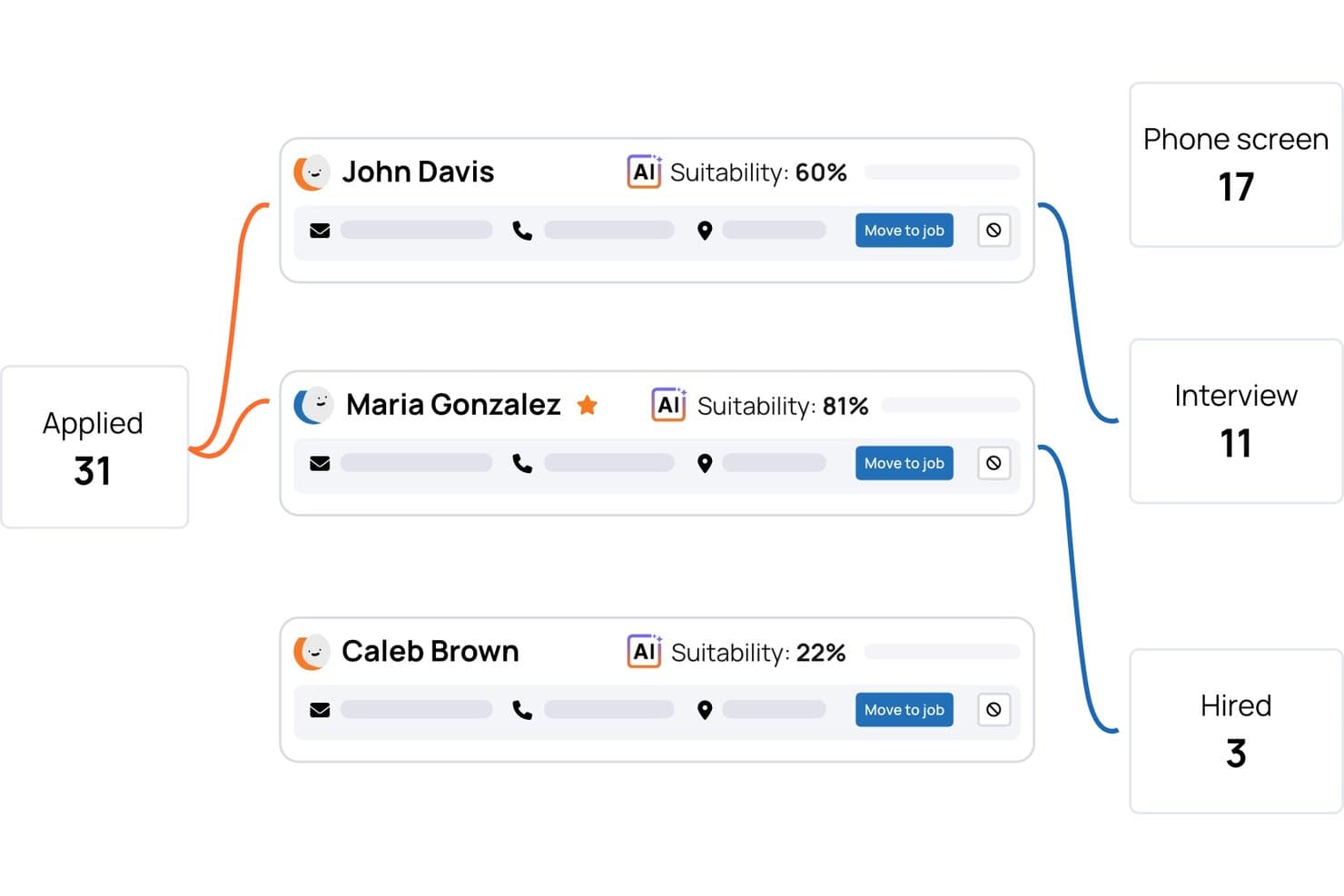
TalentHR tracks applicants through hiring stages with AI suitability scores. TalentHR is an all-in-one HR platform for small and medium businesses that includes an ATS module with candidate pipeline management, AI-assisted resume screening, custom screening questions, and a branded careers page alongside core HR, onboarding, and performance tools.
Who Is TalentHR Best For?
TalentHR is a strong fit for small and mid-sized businesses that want hiring and core HR managed in a single system, without juggling separate tools.
Why I Picked TalentHR
I've included TalentHR in my top picks because it's one of the few ATS options that sits inside a full HR system, so hiring and people management live in the same place. I like that AI suitability scoring breaks down each candidate's CV by individual skill, giving you a transparent read before you move anyone forward. Custom pipeline stages per job let you match your actual hiring process, whether that's a phone screen, a take-home task, or a panel review.
TalentHR Key Features
- Branded careers page: A customizable careers page where candidates apply directly, with editable title, description, and header image.
- Talent pool: Star any candidate to save them to a searchable pool that persists even after a job is archived or filled.
- Custom screening questions: Build reusable application questions in multiple formats—text, multiple choice, date, or link—and mark any as required.
- Excel candidate export: Download each job's applicant list as an .xlsx file, split into active and disqualified tabs, with resume download links included.
TalentHR Integrations
TalentHR offers native integrations with WordPress, Google Calendar, Outlook Calendar, Google Workspace, and TalentLMS. It also provides a public API and Zapier.
Pros and Cons
Pros:
- Custom stages fit different hiring processes
- AI scoring shows individual candidate skills
- Hiring connects directly with core HR
Cons:
- Lacks interview scheduling and scorecards
- No external job board syndication
Learn more about TalentHR: Best for high-volume hiring
- Free demo available
- Pricing upon request
Visit WebsiteCustomer Rating:4.6/5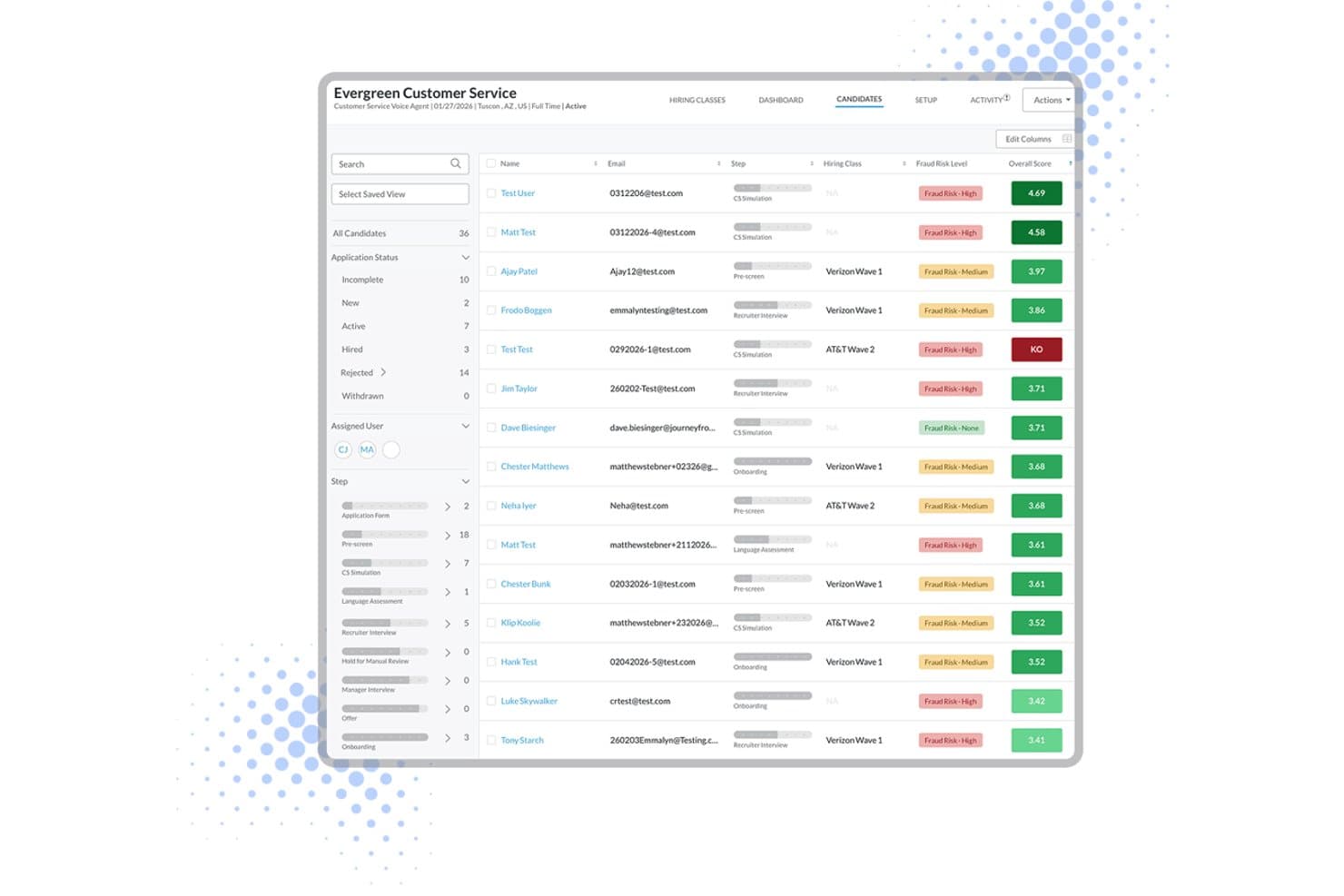
Journeyfront ranks candidates by AI scores and fraud risk levels. Journeyfront is an applicant tracking system that combines job board broadcasting, automated candidate ranking, structured interview tools, and hiring workflow automation built for high-volume recruiting pipelines.
Who Is Journeyfront Best For?
Journeyfront is a strong fit for recruiting teams managing large, continuous applicant volumes—especially those in BPO environments or organizations that hire in cohorts.
Why I Picked Journeyfront
I picked Journeyfront as one of the best because it's purpose-built for recruiting teams that never stop hiring. Its job board broadcasting pushes openings to 200+ boards simultaneously, and class-based hiring lets you run cohort pipelines from a single evergreen requisition, so you're not rebuilding the same workflow every cycle. Automated candidate ranking scores applicants the moment they complete an application, which means your team isn't manually triaging hundreds of submissions before deciding who moves forward.
Journeyfront Key Features
- Omni-channel candidate messaging: Send one-off, bulk, and automated messages to candidates via email, SMS, and WhatsApp from within the platform.
- Structured interview guides: Provide interviewers with standardized questions, scoring rubrics, and instructions for each interview stage.
- Source attribution tracking: Trace every application back to its originating channel to evaluate which job boards and campaigns deliver the best candidates.
- Offer letter management: Create, customize, and send offer letters using templates, with e-signature collection built into the platform.
Journeyfront Integrations
Journeyfront claims 400+ integrations, with documented native integrations for Facebook, Instagram, and TikTok. It also offers an API for custom integrations and mentions connections with Lever, iCIMS, Greenhouse, Workday, and SmartRecruiters.
Pros and Cons
Pros:
- Keeps interview feedback and scorecards centralized
- Broadcasts openings across 200+ job boards
- Handles high-volume cohort hiring pipelines
Cons:
- Scheduling lacks round-robin booking controls
- Resume skill filtering receives user criticism
Learn more about Journeyfront: 15Best AI-native platform for recruitment agencies
Atlas
- 14-day free trial available
- From £105/user/month
Visit WebsiteCustomer Rating:4.2/5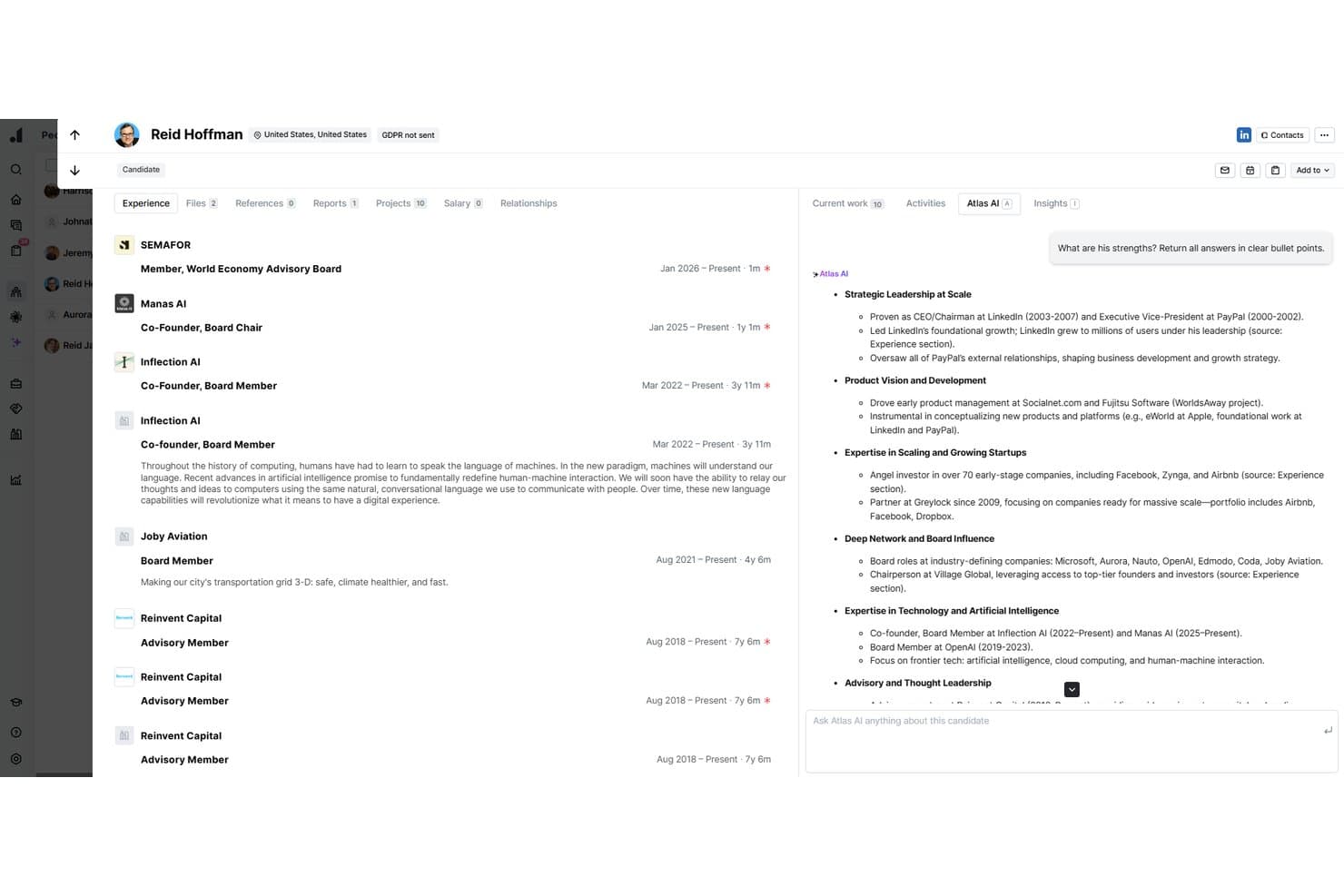
Atlas surfaces AI-generated candidate strengths directly on the profile. Atlas is an AI-native ATS and CRM platform built specifically for recruitment agencies, combining candidate sourcing, pipeline management, communication tracking, and outreach automation in one system.
Who Is Atlas Best For?
Atlas is built for recruitment agencies that want AI to handle candidate search, communication tracking, and outreach automation rather than bolt it on as an afterthought.
Why I Picked Atlas
I picked Atlas as one of the best because it's built AI-first rather than AI-added, which makes a genuine difference in agency recruitment workflows. Magic Search lets me query across resumes, call recordings, emails, and notes in plain language, with ranked results and written reasoning for each match. On top of that, the CRMx captures every candidate touchpoint automatically, so LinkedIn threads, WhatsApp messages, and Outlook emails all surface in one searchable record without manual logging.
Atlas Key Features
- AI applicant grading: Automatically scores incoming applicants against required, preferred, and nice-to-have job criteria, with written reasoning for each grade.
- Multi-step outreach campaigns: Build sequenced outreach flows across email, phone, social, and to-do lists, with AI-drafted, personalized messages you can schedule in advance.
- CandidateGPT: Ask plain-language questions about any candidate record—salary, availability, notice period, or reasons for moving—and get answers drawn from stored data.
- Recruitment analytics dashboards: Track pipeline stages, placements, hires, revenue, and time-to-fill across teams or regions using configurable real-time dashboards.
Atlas Integrations
Atlas offers integrations with idibu, Broadbean, Microsoft Outlook, Zoom, Microsoft Teams, Google Meet, and WhatsApp. It also provides an open API for custom recruitment workflows.
Pros and Cons
Pros:
- Kanban pipelines and campaigns cut admin work
- Candidate conversations become searchable profile history
- AI search ranks candidates with match reasoning
Cons:
- Users report difficulty removing candidates or projects
- Job-board coverage depends on third parties
Learn more about Atlas:
Outros sistemas de acompanhamento de candidatos
Eis mais algumas ferramentas ATS de recrutamento que não entraram na lista dos melhores sistemas de acompanhamento de candidatos:
- 16LeverBest for integrated recruitment CRM capabilities
- 17RecruiterflowBest for executive search firms
- 18Teamtailor Best for advanced candidate search
- 19AvaHRBest for small businesses
- 20GemBest for unified recruitment pipeline views
Análises relacionadas de software de RH
Se ainda não encontrou aqui o que procura, consulte estas outras ferramentas relacionadas com sistemas de acompanhamento de candidatos, que testámos e avaliámos.
- Software de RH
- Software de processamento salarial
- Serviços de empregador registado
- Software de gestão da força de trabalho
- Sistemas de gestão da aprendizagem
How I Evaluate Applicant Tracking Systems
I split my evaluation into three parts, giving the most weight to core tasks: move candidates through stages and post jobs across channels. Next, I consider differentiators like AI candidate matching. Finally, I weigh beyond-feature factors such as onboarding support and pricing that fits hiring volume.
Core Functionality (Table Stakes For This List)
When I'm selecting tools for my list, I score each one on a scale from 0 (does not offer the functionality) to 5 (excels in this area) for each core functionality listed below. I then convert the total into a percentage to help assess each tool's overall fit, with extra weight on any functionalities I’ve deemed essential.
- Candidate Pipeline (Essential): I look for customizable stages and clear status views, so recruiters can move applicants from review to interview across several open roles.
- Job Posting (Essential): I assess whether teams can create a requisition once, distribute it across job boards and a career site, and track applicant sources.
- Resume Parsing & Search: I check whether parsed details and practical filters help recruiters find candidates with relevant skills or experience in the existing database.
- Interview Scheduling: I look for calendar coordination and candidate-facing scheduling options that can handle panel interviews without lengthy availability exchanges.
- Hiring Team Collaboration: I assess whether interviewers can add stage-specific scorecards, ratings, and notes to a shared candidate record.
- Candidate Communication: I check whether emails, templates, and candidate replies are logged together, so coordinators can follow up without searching separate inboxes.
Once I have a list of tools that meet the criteria, I consider what sets each platform apart.
Differentiating Factors (What Sets Vendors Apart)
Here's how I compare and contrast different vendors:
Standout Features
I evaluate whether a platform offers AI candidate matching that actually ranks applicants against job requirements—not just keyword filters. When a role pulls in hundreds of applications, that distinction saves hours of manual screening. I also look at CRM and talent pool tools, since nurturing passive candidates between openings is how teams avoid starting from scratch every requisition. Career site builders matter too; I check whether hiring teams can launch branded pages without waiting on a developer.
Beyond Features
I check whether a platform's integration ecosystem covers HRIS, payroll, and background-check vendors my team already uses—migrating candidate data into a disconnected system creates more work than it solves. Compliance tooling matters just as much, especially built-in reporting for regulated hiring and role-based access controls that keep sensitive candidate records locked down. I also evaluate total cost of ownership, since per-seat pricing that looks affordable at five users can balloon when you scale a recruiting team across regions.
Como escolher um sistema de acompanhamento de candidatos
O sistema certo depende menos do número de candidatos que consegue armazenar e mais da forma como a sua equipa de recrutamento conduz efetivamente as pessoas desde a candidatura até à proposta. O maior erro é comprar uma plataforma concebida para uma grande empresa quando tem necessidades de recrutamento de uma startup (ou vice-versa), ou escolher uma ferramenta repleta de funcionalidades que os recrutadores e responsáveis pela contratação se recusam a utilizar.
| Fator | O que considerar |
|---|---|
| FatorDesafios de recrutamento | O que considerarIdentifique os atuais pontos problemáticos do recrutamento. Se o agendamento de entrevistas consumir demasiado tempo, dê prioridade a sistemas com integrações de calendário e ligações de agendamento autónomo. |
| FatorAcessos e funções dos utilizadores | O que considerarDetermine quantas pessoas precisam de acesso e verifique se o preço é por utilizador, por vaga ou uma tarifa fixa. Procure permissões simples, baseadas na função e na localização, para que recrutadores, responsáveis e colaboradores vejam apenas aquilo de que precisam, mantendo os dados sensíveis seguros. |
| FatorNecessidades de integração | O que considerarVerifique se a plataforma sincroniza diretamente com o seu HRIS, as ferramentas de integração de novos colaboradores ou o software de verificação de antecedentes. Pergunte a si próprio se este novo sistema pode consolidar a sua configuração e substituir várias ferramentas de utilização única. |
| FatorEscalabilidade | O que considerarCertifique-se de que a plataforma suporta o crescimento do recrutamento a longo prazo, com níveis de preços flexíveis. Se tenciona contratar internacionalmente, verifique a existência de funcionalidades de conformidade para vários países, opções linguísticas e publicação de ofertas em plataformas de emprego internacionais. |
| FatorCompatibilidade com o fluxo de trabalho | O que considerarEscolha um sistema que se adapte à forma como a sua equipa trabalha efetivamente no dia a dia. Analise o que está a funcionar na sua configuração atual e o que não está, e evite escolher uma ferramenta apenas por ser popular — concentre-se no que corresponde à sua equipa e aos seus processos específicos. |
| FatorPrivacidade dos dados | O que considerarExija suporte integrado para o acompanhamento EEO/OFCCP, controlos do RGPD, conformidade com a SOC 2 e leis estaduais de transparência salarial desde o início. Isto mantém a sua organização preparada para auditorias sem criar trabalho administrativo adicional. |

Dica do autor
Recolha contributos das suas partes interessadas (as equipas de TI e finanças são sempre úteis) e utilize o feedback para elaborar casos de utilização e criar uma matriz que compare o que é importante para cada grupo de partes interessadas.
Como avaliar a sua lista restrita
- Execute uma requisição real durante o período de teste: Publique uma vaga em aberto, acompanhe cinco candidatos de teste desde a candidatura até à proposta e conte quantos cliques são necessários para que um responsável pela contratação deixe feedback.
- Solicite o documento de mapeamento de campos do HRIS: Pergunte que campos são transferidos no momento da contratação e se a sincronização é nativa ou é feita através de um conector de terceiros com uma taxa própria.
- Obtenha por escrito as condições de exportação: Confirme que pode exportar todos os registos de candidatos, notas e anexos em formato CSV no prazo de 30 dias após o cancelamento, sem custos adicionais.
- Peça uma demonstração ao vivo da retenção: Peça ao representante para lhe mostrar, numa conta ativa, como um registo de candidato é eliminado após o período de retenção definido e onde se encontra o registo de eliminação.
- Pergunte o que acontece aos candidatos sinalizados: Confirme que os casos suspeitos de fraude e as rejeições automáticas são encaminhados para uma pessoa para análise, em vez de seguirem diretamente para um e-mail de rejeição.
- Decida qual o compromisso que está disposto a aceitar: As plataformas de RH com recrutamento integrado simplificam a transição entre a contratação e a integração, enquanto os sistemas autónomos de acompanhamento de candidatos dão aos recrutadores mais controlo sobre o funil e o contacto com os candidatos; por isso, escolha com base na área em que a sua equipa perde atualmente mais tempo.
O que é um sistema de acompanhamento de candidatos?
É um software que gere todo o processo de contratação de uma empresa num único local — desde a publicação de ofertas de emprego até à receção de candidaturas, marcação de entrevistas e apresentação de propostas.
Na sua forma mais simples, funciona como um centro de recrutamento. Em vez de acompanhar os candidatos através de caixas de entrada de e-mail desorganizadas, folhas de cálculo e notas autocolantes, um sistema de acompanhamento de candidatos reúne todos os dados dos candidatos num único sistema, onde os recrutadores e os responsáveis pela contratação podem colaborar, analisar currículos e acompanhar os candidatos à medida que avançam por cada fase do processo de contratação.
Como funciona um sistema de acompanhamento de candidatos?
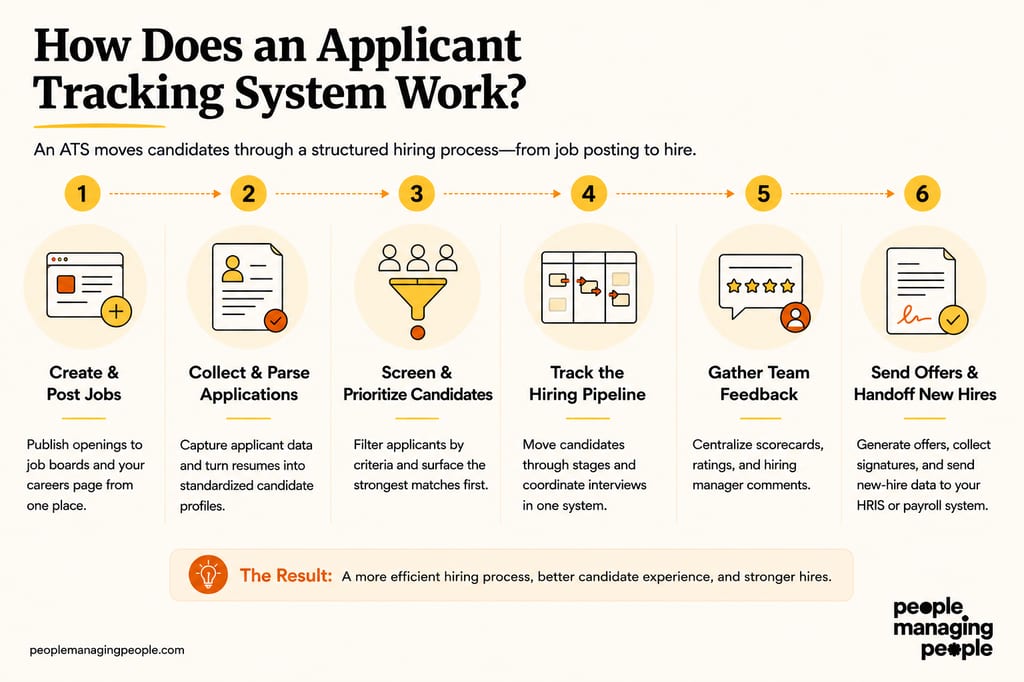
Um sistema de acompanhamento de candidatos funciona através da recolha de dados dos candidatos e da sua progressão num processo de contratação passo a passo. Eis como o processo funciona do início ao fim:
Funcionalidades dos ATS
Os melhores sistemas de acompanhamento de candidatos automatizam as tarefas administrativas dos recrutadores, mantêm os responsáveis pela contratação envolvidos e centralizam os dados dos candidatos num único sistema pesquisável. Ao avaliar plataformas, concentre-se nestas principais funcionalidades dos ATS:
- Gestão da publicação de ofertas: Publique vagas em aberto em vários portais de emprego com apenas alguns cliques, para aumentar o número de candidatos sem voltar a introduzir dados manualmente.
- Análise de currículos e base de dados de candidatos: Extraia automaticamente os dados dos candidatos para perfis normalizados e pesquisáveis, criando grupos de talentos para funções atuais e futuras.
- Agendamento e mensagens automatizados: Sincronize os calendários dos entrevistadores para que os candidatos possam marcar autonomamente as entrevistas, centralizando simultaneamente os e-mails e as atualizações por SMS numa única conversa.
- Colaboração da equipa e grelhas de avaliação: Centralize o feedback das entrevistas, as avaliações dos candidatos e as notas privadas num único local, para acelerar a tomada de decisões entre as equipas de contratação.
- Automatização dos fluxos de trabalho e conformidade: Acione automaticamente, em segundo plano, as mudanças de fase e os e-mails de confirmação, acompanhando simultaneamente dados regulamentares, como os requisitos EEO/OFCCP, desde o início.
O maior erro que as organizações cometem é comprar uma plataforma concebida para uma empresa de grande dimensão quando têm necessidades de contratação de uma startup (ou vice-versa), ou escolher uma ferramenta repleta de funcionalidades que os recrutadores e os responsáveis pela contratação se recusam a adotar.
Funcionalidades de IA
Para além das ferramentas padrão dos ATS, muitas plataformas incluem agora funcionalidades de IA integradas para reduzir o trabalho manual dos recrutadores. Eis as principais que vale a pena analisar:
- Triagem automatizada de candidatos: Analisa os currículos recebidos com base nos principais requisitos da função e classifica os melhores candidatos, para que possa contactar primeiro as pessoas qualificadas.
- Correspondência inteligente de candidatos: Destaca candidatos anteriores na sua base de dados cujas competências correspondem a novas descrições de funções, revelando candidatos fortes de que se poderá ter esquecido.
- Informações preditivas sobre contratação: Analisa dados históricos de contratação para destacar candidatos cujo perfil corresponde ao dos seus colaboradores com melhor desempenho ou que têm maior probabilidade de aceitar uma proposta.
- Chatbot de interação com candidatos: Responde a perguntas básicas dos candidatos na sua página de carreiras, recolhe dados das candidaturas e ajuda os candidatos a escolher horários para entrevistas, 24 horas por dia, 7 dias por semana.
- Ferramentas de redução de enviesamentos: Assinala automaticamente linguagem associada a género ou excludente nas descrições de funções e permite ocultar nomes, fotografias ou anos de conclusão dos currículos, para uma triagem inicial mais justa.
Benefícios de um ATS
Gerir várias funções em aberto ao mesmo tempo exige acompanhar diferentes conjuntos de competências, fases de entrevista e comunicações com os candidatos em simultâneo. A utilização de um sistema de acompanhamento de candidaturas reúne todos estes elementos numa única plataforma organizada, proporcionando benefícios operacionais e financeiros claros para a sua empresa:
- Preenche vagas mais rapidamente: Funcionalidades como o agendamento autónomo no calendário e as atualizações rápidas eliminam a interminável troca de e-mails, ajudando-o a contratar pessoas várias semanas mais cedo.
- Reduz os custos de recrutamento: Uma base de dados pesquisável de candidatos permite voltar a contactar candidatos anteriores, em vez de pagar a agências externas ou comprar mais anúncios em plataformas de emprego.
- Conduz a melhores contratações: Grelhas de avaliação simples incentivam os gestores a avaliar os candidatos com base nas competências efetivamente necessárias para a função, em vez de se basearem apenas numa impressão instintiva, o que contribui para uma maior retenção a longo prazo.
- Mantém os candidatos satisfeitos: As atualizações automatizadas garantem que os candidatos não ficam sem resposta, proporcionando uma impressão muito melhor da sua empresa.
- Facilita o crescimento: O sistema absorve aumentos repentinos e sazonais nas contratações, para que a sua equipa não fique soterrada em papelada adicional quando o ritmo de contratação acelera.
- Apresenta informações baseadas em dados: Tome melhores decisões baseadas em dados, obtendo informações sobre métricas de desempenho e tendências de contratação.
Preços
Em geral, os sistemas de acompanhamento de candidaturas tendem a custar entre $10 e $100 por utilizador, por mês, embora alguns sistemas funcionem antes com um modelo de preço fixo. Alguns sistemas também incluem uma taxa única de configuração.
As plataformas ATS disponibilizam normalmente planos para organizações de diferentes dimensões e com diferentes necessidades de contratação, desde opções ATS gratuitas para pequenas empresas e empresas em fase de arranque até pacotes com mais funcionalidades para grandes empresas.
Compreender estas opções ajudá-lo-á a selecionar um plano alinhado com os seus objetivos de recrutamento, orçamento e dimensão das suas operações de contratação.
Tabela de comparação de preços e planos
| Tipo de plano | Preço médio por utilizador | Preço fixo médio | Funcionalidades comuns |
|---|---|---|---|
| Tipo de planoGratuito | Preço médio por utilizador$0 | Preço fixo médio$0 | Funcionalidades comunsPublicação básica de ofertas de emprego, acompanhamento limitado de candidatos, notificações por e-mail e relatórios simples |
| Tipo de planoBásico | Preço médio por utilizador$10 a $20 por utilizador, por mês | Preço fixo médio$50 - $100/mês | Funcionalidades comunsPublicação melhorada de ofertas de emprego em várias plataformas, análise de currículos, CRM básico, integração de e-mail e análise básica |
| Tipo de planoProfissional | Preço médio por utilizador$50 a $100 por utilizador, por mês | Preço fixo médio$200 - $500/mês | Funcionalidades comunsFuncionalidades avançadas de CRM, envio de e-mails em massa, análise avançada, integração com sistemas de RH e fluxos de trabalho personalizáveis |
| Tipo de planoEmpresarial | Preço médio por utilizadorPreço personalizado | Preço fixo médioPreço personalizado | Funcionalidades comunsConjunto completo de funcionalidades, incluindo análise orientada por IA, suporte dedicado, segurança reforçada e ofertas de emprego ilimitadas |
Uma análise dos tipos de planos, custos e funcionalidades dos sistemas de acompanhamento de candidaturas.
Quando deve atualizar o seu ATS?
As opções ATS gratuitas oferecem normalmente uma amostra das capacidades do sistema, o que as torna ideais para empresas muito pequenas ou que se encontram nas fases iniciais de expansão das suas operações.
Se as suas necessidades de contratação forem reduzidas, poderá começar inicialmente com um plano gratuito ou básico. No entanto, há muitas razões pelas quais poderá querer optar por um plano mais avançado, incluindo:
- Maior volume de contratações: Se a sua empresa registar um aumento no número de vagas, um plano mais avançado poderá ajudá-lo a gerir o maior volume de candidatos através de funcionalidades avançadas, como a triagem de currículos com IA.
- Análise avançada: Se precisar de informações mais aprofundadas sobre as suas métricas de recrutamento, os planos avançados disponibilizam ferramentas analíticas robustas para acompanhar e otimizar as suas estratégias de contratação.
- Marca empregadora: Para o ajudar a destacar-se num mercado de trabalho competitivo, os planos avançados incluem frequentemente funcionalidades de marketing de recrutamento que aumentam a visibilidade e a atratividade da sua empresa junto dos melhores talentos.
- Capacidades de integração: Os planos básicos não incluem frequentemente capacidades de integração, pelo que terá de atualizar o plano para desbloquear esta funcionalidade. Os planos avançados oferecem geralmente uma integração perfeita com outras ferramentas e sistemas de RH, permitindo um fluxo de trabalho unificado.
Em última análise, é importante escolher um plano que ofereça as funcionalidades de que necessita para responder às suas necessidades atuais e resolver os seus desafios sem ultrapassar o seu orçamento.
Perguntas frequentes
Eis algumas respostas a perguntas frequentes que poderá ter sobre o software de acompanhamento de candidatos e o seu funcionamento:
Qual é a diferença entre um ATS e um CRM?
Um sistema de acompanhamento de candidatos foi concebido para gerir candidatos ativos que se candidatam a uma vaga em aberto, enquanto um sistema de gestão de relações com candidatos (CRM) foi concebido para manter o contacto com talento passivo tendo em vista futuras necessidades de contratação.
-
Um ATS destina-se a candidatos ativos: Acompanha os candidatos ao longo do processo de contratação oficial — análise de currículos, marcação de entrevistas, recolha de feedback e envio de cartas de oferta. É transacional, operacional e orientado para o preenchimento de vagas imediatas.
-
Um CRM destina-se a talento passivo: Um CRM armazena potenciais candidatos que ainda não se candidataram necessariamente a uma função específica — como antigos candidatos, candidatos que ficaram em segundo lugar em entrevistas anteriores ou potenciais candidatos encontrados no LinkedIn.
Qual é a diferença entre um ATS e um HRIS?
Um ATS gere o recrutamento anterior à contratação, que inclui atrair candidatos, analisar currículos e marcar entrevistas. Já um HRIS (Sistema de Informação de Recursos Humanos) gere os dados dos colaboradores após a contratação, como processamento salarial, administração de benefícios e avaliações de desempenho. Muitos HRIS oferecem módulos ATS integrados e funcionalidades de contratação.
Como funciona a classificação de currículos num ATS?
Um ATS classifica os currículos comparando-os diretamente com as palavras-chave, competências exigidas, experiência profissional e formação descritas na oferta de emprego. Os currículos com correspondências exatas de palavras-chave e uma formatação clara obtêm pontuações mais elevadas, permitindo aos recrutadores identificar rapidamente os melhores candidatos.
Se está a tentar perceber como o seu próprio currículo poderá ser classificado, poderá obter algumas respostas experimentando um software de triagem de currículos para ver como o seu currículo se compara. Recolha contributos das partes interessadas (as equipas de TI e finanças são sempre úteis) e utilize esse feedback para elaborar casos de utilização e criar uma matriz que compare o que é importante para cada grupo de partes interessadas.
Quais são as principais limitações de um sistema de acompanhamento de candidatos?
Um ATS pode excluir candidatos qualificados devido à correspondência rígida de palavras-chave, interpretar incorretamente formatos de currículo complexos e criar uma experiência robótica para os candidatos quando as respostas automatizadas são utilizadas em excesso. Eis as principais desvantagens a ter em conta:
-
Dependência excessiva de palavras-chave exatas: Os analisadores de currículos procuram formulações específicas. Os candidatos qualificados que utilizem sinónimos, títulos de funções diferentes ou termos não normalizados podem ser classificados mais abaixo ou ser excluídos.
-
Sensibilidade à formatação: Estruturas de currículo complexas — como modelos com várias colunas, tabelas ou elementos gráficos — podem confundir o analisador e causar a ausência ou desorganização dos dados dos candidatos.
-
Ausência de contexto humano: Um ATS avalia palavras numa página, não a verdadeira capacidade, as competências interpessoais ou o potencial no mundo real.
-
Experiência fria para o candidato: O uso excessivo de rejeições automatizadas e atualizações sobre as etapas pode fazer com que o processo de contratação pareça impessoal e prejudicar a marca empregadora.
-
Risco de enviesamento algorítmico: As ferramentas de classificação automatizada podem perpetuar enviesamentos de contratação anteriores se os critérios não forem analisados regularmente por recrutadores reais.
Como detetam os sistemas de acompanhamento de candidatos os candidatos falsos?
A maioria das plataformas ATS deteta candidatos falsos assinalando sinais de alerta nas candidaturas, como currículos duplicados ou quase idênticos, dados de contacto ou localização incompatíveis e padrões de texto gerados por IA. Algumas também verificam a identidade antes ou durante as entrevistas, ou estabelecem ligação a ferramentas de verificação de antecedentes, para que qualquer situação suspeita seja encaminhada para análise por uma pessoa antes de ser feita uma oferta.
É verdade que um ATS pode rejeitar automaticamente candidatos qualificados?
Sim. Embora não seja uma função principal, os ATS podem contribuir para a rejeição de candidatos qualificados ao filtrarem candidatos com base em palavras-chave, formatação inadequada ou parâmetros definidos pelo empregador que podem excluir involuntariamente pessoas qualificadas. A ideia de que um ATS toma a decisão final de rejeição é um mito, uma vez que o sistema organiza e pesquisa principalmente as candidaturas, deixando a decisão final aos recrutadores humanos. No entanto, a conceção e configuração do sistema podem fazer com que candidatos qualificados sejam ignorados ou rejeitados sem que uma pessoa analise o seu perfil completo.
Que integrações devo priorizar ao escolher um ATS?
As plataformas ATS disponibilizam normalmente planos para organizações de diferentes dimensões e com necessidades de contratação distintas, desde opções ATS gratuitas para pequenas empresas e empresas em fase de arranque até pacotes mais abrangentes e repletos de funcionalidades para grandes empresas. Priorize as integrações do ATS com as ferramentas que a sua equipa já utiliza, como HRIS, plataformas de verificação de antecedentes, entrevistas por vídeo, calendários e correio eletrónico. A integração com sites de emprego e ferramentas de avaliação também pode simplificar a pesquisa e a avaliação. Uma integração fácil poupa-lhe a introdução manual de dados e melhora o fluxo de trabalho.
Como gere um ATS as ofertas de emprego?
Um ATS permite-lhe redigir uma descrição da função uma única vez e publicá-la em vários sites de emprego — como o LinkedIn, o Indeed e o Glassdoor —, bem como na página de carreiras da sua empresa, com um único clique.
Quando edita uma descrição da função ou encerra uma vaga, o ATS atualiza ou remove automaticamente o anúncio em todas as plataformas em simultâneo. Também adiciona ligações de acompanhamento a cada anúncio, para que saiba exatamente qual o site de emprego que lhe traz os melhores candidatos.
Como funcionam as funcionalidades de pesquisa e filtragem de um ATS?
Um ATS permite aos recrutadores filtrar grandes grupos de candidatos utilizando pesquisas por palavras-chave e operadores booleanos para competências ou títulos de funções específicos. Também restringe os candidatos por localização ou experiência, utiliza perguntas de exclusão para desqualificar imediatamente candidatos inadequados e etiqueta perfis para destacar as melhores correspondências para as vagas em aberto.