

O software empresarial de gestão da força de trabalho ajuda as grandes organizações a coordenar a elaboração de horários, o controlo do tempo, a previsão das necessidades de mão de obra e a conformidade em toda a sua força de trabalho. Se procura uma forma melhor de gerir equipas dispersas, equilibrar os orçamentos de mão de obra e antecipar alterações regulamentares, é essencial encontrar o software certo.
Este guia reúne as principais plataformas de gestão da força de trabalho desenvolvidas para lidar com a complexidade empresarial e melhorar a experiência dos colaboradores, para que possa comparar as suas opções, perceber o que distingue cada uma e escolher uma solução alinhada com os seus objetivos de recursos humanos e empresariais.
Why Trust Our Software Recommendations
6,700+
Reviews
20
Industry experts
16+
Evaluation factors
14
Years
Our team has been testing and reviewing software since 2012. As HR experts ourselves, we know how difficult—and important—it is to choose the right software.
For this guide, we evaluated tools using hands-on testing and independent research, scoring tools using our selection criteria. We also draw on insights from industry thought leaders and practicing HR experts.
Our reviews reflect our human editorial judgment, not a sales pitch.
Expert reviewers:
- Phil GrayCOO
 Kim BehnkeHR Tech Editor & Analyst
 Josh BarkerPeople Ops Manager

Tabela de comparação de software empresarial de gestão da força de trabalho
Esta tabela de comparação resume os detalhes de preços das minhas principais escolhas de software empresarial de gestão da força de trabalho:
| Tool | Best For | Trial Info | Price | ||
|---|---|---|---|---|---|
| 1 | Best for automated employee lifecycle tracking | Free demo available | From $5/user/month | Website | |
| 2 | Best for UK retail and healthcare scheduling | Free demo available | From $500/month | Website | |
| 3 | Best for omnichannel workforce forecasting accuracy | Free demo available | Pricing upon request | Website | |
| 4 | Best for biometric time and attendance tracking | 30-day free trial + free demo available | From $80/month | Website | |
| 5 | Best for payroll-connected multi-location scheduling | Free demo available | Pricing upon request | Website | |
| 6 | Best for employee engagement and shift autonomy | 14-day free trial + free demo available | From $5/user/month | Website | |
| 7 | Best for integrated compliance management tools | Free demo available | From $15/user/month | Website | |
| 8 | Best for AI-powered scheduling automation | 30-day free trial + free demo available | Pricing upon request | Website | |
| 9 | Best for demand-driven, flexible scheduling | Free demo available | Pricing upon request | Website | |
| 10 | Best for real-time frontline staff scheduling | Free demo available | Pricing upon request | Website |


Avaliações do melhor software empresarial de gestão da força de trabalho
Abaixo encontram-se os meus resumos detalhados do melhor software empresarial de gestão da força de trabalho que integrou a minha lista restrita. As minhas avaliações analisam detalhadamente as funcionalidades, os melhores casos de utilização e as integrações de cada plataforma, para o ajudar a encontrar a melhor opção para si.
 Best for automated employee lifecycle tracking
- Free demo available
- From $5/user/month
Visit WebsiteCustomer Rating:4.8/5
Deel HR is a global HRIS for payroll, compliance, and workforce management. Deel HR is a global HRIS platform that centralizes employee and contractor management, onboarding automation, compliance tracking, payroll operations, and workforce analytics across 150+ countries.
Who Is Deel HR Best For?
Deel HR is best suited for enterprise organizations managing distributed teams across multiple countries and worker types who need centralized HR infrastructure with built-in compliance controls.
Why I Picked Deel HR
I picked Deel HR because enterprise workforce management isn’t just about hiring — it’s about controlling the full employee lifecycle across jurisdictions. Deel automates onboarding, contract generation, compliance tracking, time off policies, and offboarding within one unified system. The ability to apply country-specific workflow logic ensures large enterprises can maintain standardized HR processes while adapting to regional labor laws without manual oversight.
Deel HR Key Features
- Compliance hub: Monitors local regulatory updates and flags risks across jurisdictions with recommended actions.
- People analytics dashboards: Build workforce reports filtered by country, department, worker type, or cost center.
- Time off management: Create region-specific leave policies with automated approval workflows.
- Org chart and directory: View a live, searchable workforce structure across global teams.
Deel HR Integrations
Deel HR integrates with major platforms including Workday, SAP SuccessFactors, BambooHR, QuickBooks, Xero, NetSuite, Greenhouse, Slack, Okta, and Azure AD. It also provides API access, webhooks, and Zapier connectivity for custom integrations.
Pros and Cons
Pros:
- Scales with business growth
- Strong global compliance tools
- Unified workforce management
Cons:
- Setup can be time-consuming
- Limited workforce scheduling
 Best for UK retail and healthcare scheduling
- Free demo available
- From $500/month
Visit WebsiteCustomer Rating:4.6/5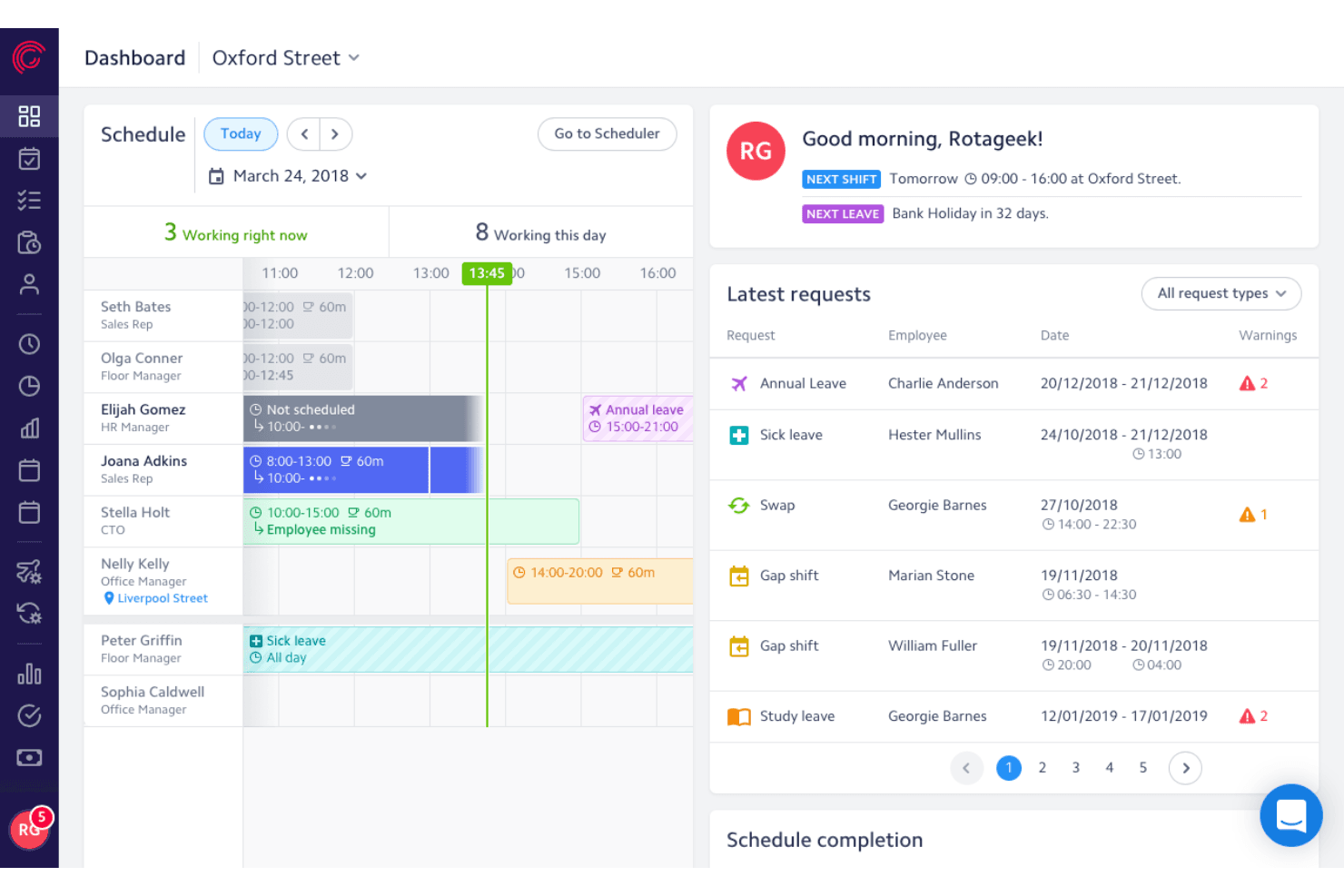
Rotageek lets managers view schedules and approve staff leave requests in one dashboard. Rotageek is a workforce management platform built around AI-driven scheduling, demand-based labor forecasting, and time and attendance tracking, with dedicated configurations for retail and healthcare environments.
Who Is Rotageek Best For?
Rotageek is a strong fit for UK and European retail and healthcare enterprises that need AI-driven scheduling and precise demand forecasting across dozens or hundreds of locations.
Why I Picked Rotageek
I picked Rotageek as one of the best because it's purpose-built for UK retail and healthcare environments in a way most enterprise workforce management platforms simply aren't. Its AI Auto Scheduling engine generates millions of compliant shift combinations in roughly 30 seconds, factoring in skills, working-time regulations, and fairness rules simultaneously. Pair that with 15-minute interval demand forecasting using real footfall and sales data, and you get scheduling that actually reflects what's happening on the floor at Nando's or an NHS trust.
Rotageek Key Features
- Skills and certifications matching: Tag employees with specific skills and qualifications so that multi-activity shifts are automatically assigned to workers who meet the role's requirements.
- Employee self-service mobile app: Employees can view schedules, swap or pick up shifts, submit availability, request leave, and receive push notifications directly from iOS or Android devices.
- Labour Modelling add-on: Converts demand forecast outputs into deployable rotas and supports what-if scenario modeling for volume changes, cost pressures, and new operating hours.
- Multi-step timesheet approval: Auto-generated timesheets move through a configurable approval hierarchy before payroll export, with custom pay codes aligned to labor laws and company policies.
Rotageek Integrations
Rotageek offers native integrations with Zellis HCM Cloud, IRIS HR and Payroll, ELMO, and Cascade. ADP, Oracle, SAP, and Sage are listed as enterprise partners, while APIs, webhooks, and SFTP support custom connections.
Pros and Cons
Pros:
- Employee mobile app supports real-time shift swaps
- 15-minute demand forecasting boosts staffing accuracy
- AI auto scheduling handles complex compliance rules
Cons:
- Mobile app users report reliability issues
- Quote-based pricing requires sales contact
Learn more about Rotageek: Best for omnichannel workforce forecasting accuracy
- Free demo available
- Pricing upon request
Visit WebsiteCustomer Rating:3.7/5
Verint offers forecasting views for workforce demand planning. Verint is an enterprise workforce management software platform built for contact centers and back-office operations, offering features for omnichannel forecasting, scheduling, adherence monitoring, and real-time analytics.
Who Is Verint Best For?
Large contact centers and service operations leaders needing unified forecasting across voice, chat, email, and digital engagement channels.
Why I Picked Verint
I picked Verint because I rely on its AI-driven omnichannel forecasting engine to align workforce plans across call, chat, and email. I use its intraday reforecasting and shrinkage modeling, so my team can adapt staffing to real-time changes in demand patterns.
Verint Key Features
- Automated scheduling: Build multi-skill schedules based on forecasted demand and employee availability.
- Performance tracking dashboards: Monitor real-time adherence, agent KPIs, and historical productivity metrics.
- Self-service shift swaps: Enable employees to request, swap, or bid on available shifts in a unified portal.
Verint Integrations
Verint offers native integrations with Salesforce, Microsoft, ServiceNow, and Workday, and provides an API for custom integrations.
Pros and Cons
Pros:
- Automated compliance with labor regulations
- Real-time intraday reforecasting capabilities
- AI-powered omnichannel forecasting models
Cons:
- Configuration requires specialized expertise
- Interface can feel overly complex
Learn more about Verint: Best for biometric time and attendance tracking
- 30-day free trial + free demo available
- From $80/month
Visit WebsiteCustomer Rating:4.5/5
TimeTrex lets you monitor and verify time tracking, scheduling, and exceptions. TimeTrex is a workforce management platform that combines time and attendance, employee scheduling, payroll processing, HR management, and recruitment tools into a single configurable system for large organizations.
Who Is TimeTrex Best For?
TimeTrex is a strong fit for mid-to-large organizations managing hourly and salaried workforces across multiple locations, particularly those that need payroll, scheduling, and time tracking under one system.
Why I Picked TimeTrex
I've included TimeTrex in my top picks because of how it handles biometric time and attendance at scale. What stands out to me is that it turns any standard tablet or phone into a facial recognition time clock, so large organizations don't need to invest in proprietary hardware across every site. The recognition is fast (as little as one second to clock in) and handles real-world variables like hats, glasses, and facial hair. Each punch also captures GPS location and an optional photo, which I find especially useful for distributed teams or multi-site operations where verifying who clocked in and from where actually matters.
TimeTrex Key Features
- Drag-and-drop shift scheduling: Build and manage employee schedules using a visual calendar, with support for rotating shifts, split shifts, and absence coverage across multiple locations.
- Multi-jurisdiction payroll processing: Run payroll across different states, provinces, or countries, with automatic tax calculations and support for multiple pay periods and wage types.
- Job costing and work order tracking: Assign employee punches to specific jobs, tasks, or cost centers so you can track labor costs at a granular level.
- Document management: Store and manage employee documents directly in their HR profiles, with expiry date tracking and access controls tied to user permissions.
TimeTrex Integrations
TimeTrex offers integrations with payroll and accounting platforms, including ADP, QuickBooks, Sage, Paychex, and Surepay, as well as Ceridian, CompuPay, Tyler Technologies, and Vensure Employer Services. It also provides an API for custom integrations.
Pros and Cons
Pros:
- Biometric facial recognition prevents buddy punching
- Built-in job costing and invoicing
Cons:
- Lacks automatic payroll tax filing
- Some modules look dated and confusing
Learn more about TimeTrex: Best for payroll-connected multi-location scheduling
- Free demo available
- Pricing upon request
Visit WebsiteCustomer Rating:4.3/5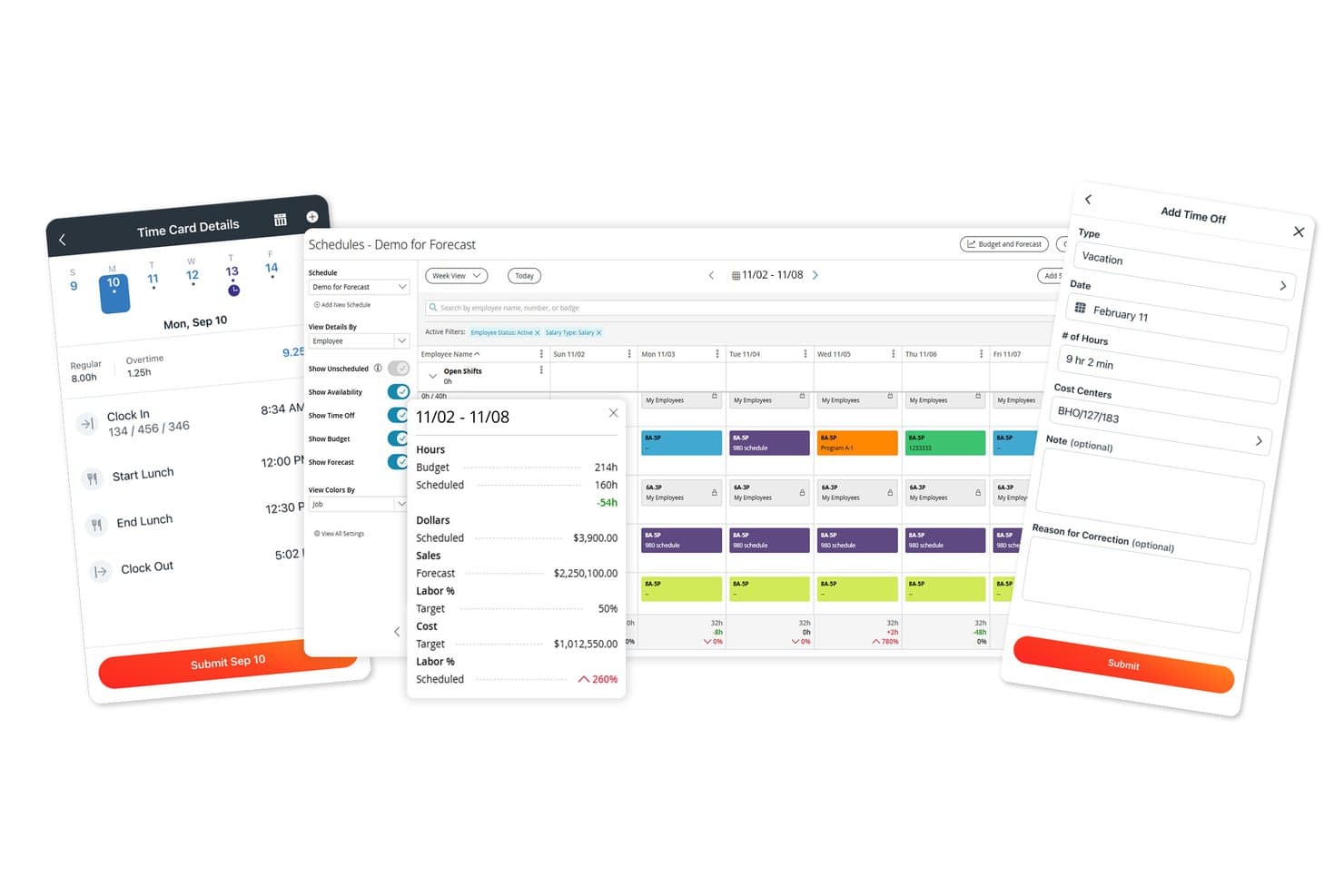
Paylocity centralizes scheduling, time cards, and time-off requests in one platform. Paylocity is an HCM platform that combines payroll, time and attendance tracking, AI-assisted scheduling, labor forecasting, and workforce analytics across multi-location organizations.
Who Is Paylocity Best For?
Paylocity suits mid-to-large organizations that need scheduling and time tracking connected directly to payroll, especially those managing staff across multiple locations.
Why I Picked Paylocity
I picked Paylocity as one of the best because it's built around the idea that scheduling and payroll shouldn't live in separate systems. When a manager at a 30-location organization builds a shift schedule, hours and labor allocations flow directly into payroll, with the system flagging anyone who may need retroactive or prorated pay. I also like that AI-driven shift recommendations factor in historical staffing trends, while certification validation ensures only qualified employees get scheduled for roles that require it.
Paylocity Key Features
- Multi-method time collection: Employees can clock in via badge, biometric reader, mobile app, tablet kiosk, or web, with geolocation verification available on mobile.
- Certification validation: The scheduling tool checks employee certifications against role requirements before placing them on a shift.
- Labor cost allocation: Web timesheets let managers assign hours to jobs, projects, cost centers, and labor levels within a single entry.
- Break and meal-waiver attestation: Time clocks and kiosks can prompt attestations at the point of punch, recording responses directly to the timecard and triggering supervisor alerts.
Paylocity Integrations
Paylocity offers hundreds of integrations, including marketplace integrations with Comprehensive Integration, Checkr, Aeqium, Microsoft Entra, Google Workspace, and Okta. Its APIs support custom connections for employee, punch, punch-import, and scheduling data.
Pros and Cons
Pros:
- Break attestations can alert supervisors
- AI shift recommendations draw on historical trends
- Schedules by role, location, and skill
Cons:
- Reports can take extra work to customize
- Some users report missing punches and glitches
 Best for employee engagement and shift autonomy
- 14-day free trial + free demo available
- From $5/user/month
Visit WebsiteCustomer Rating:4.6/5
Deputy offers mobile shift swaps with schedule and request tracking. Deputy is a workforce management platform for large and mid-sized organizations that handles shift scheduling, time and attendance, team communication, and labor compliance from a centralized dashboard.
Who Is Deputy Best For?
Deputy is a strong fit for retail, hospitality, and healthcare teams managing shift-based, hourly staff across multiple locations.
Why I Picked Deputy
I picked Deputy as one of the best because I see how its shift swapping, open shift bidding, and news feed help my frontline teams feel more in control of their schedules and communication. I also use its real-time attendance alerts daily.
Deputy Key Features
- Task management: Managers can assign and track task completion for individual employees or teams.
- Demand forecasting: Auto-generates shift schedules based on projected business activity and staffing needs.
- Time clock with photo capture: Employees clock in and out using a digital time clock that verifies identity with a photo.
Deputy Integrations
Deputy offers native integrations with ADP, Gusto, QuickBooks Online, Xero, Square, BambooHR, Paychex, Netsuite, CloudPayroll, MYOB, and Zapier. An API is available for custom integrations.
Pros and Cons
Pros:
- In-app news feed for workforce communications
- Automated labor compliance monitoring tools
- Employee shift swap and bidding features
Cons:
- Occasional delays syncing schedule updates across teams
- GPS clock-in issues reported by users
Learn more about Deputy: Best for integrated compliance management tools
- Free demo available
- From $15/user/month
Visit WebsiteCustomer Rating:4.3/5
Oracle HCM Cloud lets you assign validation settings for time and labor rules. Oracle HCM Cloud is a comprehensive talent management and enterprise workforce management platform that delivers time tracking, scheduling, absence management, and workforce optimization in a unified solution.
Who Is Oracle HCM Cloud Best For?
Large international organizations that need centralized compliance and workforce management across multiple locations and jurisdictions.
Why I Picked Oracle HCM Cloud
I picked Oracle HCM Cloud because I need built-in compliance rules that automatically track regional labor regulations. My team relies on audit-ready reporting and real-time alerts when schedules or timecards don’t align with compliance standards.
Oracle HCM Cloud Key Features
- Advanced scheduling engine: Automates shift assignments based on business priorities.
- Centralized time capture: Collects time worked from multiple devices and locations.
- Absence and leave management: Tracks, approves, and audits leave requests within the platform.
Oracle HCM Cloud Integrations
Oracle HCM Cloud offers native integrations with Oracle ERP Cloud, Oracle Cloud Payroll, Oracle Learning, Salesforce, Workday, Shopify, and SAP SuccessFactors, and provides an API for custom integrations.
Pros and Cons
Pros:
- Highly configurable global scheduling and time capture
- Real-time compliance alerts and monitoring
- Advanced AI-driven workforce planning tools
Cons:
- Implementation process requires significant time investment
- Reporting customization options are limited
Learn more about Oracle HCM Cloud: Best for AI-powered scheduling automation
- 30-day free trial + free demo available
- Pricing upon request
Visit WebsiteCustomer Rating:4.3/5
Workday allows weekly scheduling with shifts, labor hours, timesheets, and publishing. Workday is an enterprise workforce management platform that brings together scheduling, time tracking, and labor analytics in one integrated system designed for large organizations.
Who Is Workday Best For?
Workday fits large organizations and enterprises that need to manage complex workforce scheduling and compliance at scale.
Why I Picked Workday
I picked Workday as one of the best because its AI-powered scheduling automation stands out when tackling fluctuating staffing needs. My team is able to automate shift assignments, adapt coverage in real time, and reduce manual scheduling steps.
Workday Key Features
- Time tracking integration: Syncs time clocks and digital payroll systems for accurate labor reporting.
- Labor compliance monitoring: Tracks changing labor laws and flags compliance risks in real time.
- Mobile workforce access: Lets employees and managers handle scheduling and time tracking from mobile devices.
Workday Integrations
Workday offers native integrations with platforms like Salesforce, Microsoft 365, Oracle, ADP, and Okta, and provides an API for custom integrations.
Pros and Cons
Pros:
- Detailed absence and attendance tracking
- Real-time labor compliance flagging
- AI-driven shift and workload recommendations
Cons:
- Reporting customization can be limited
- Initial implementation requires significant time
Learn more about Workday: Best for demand-driven, flexible scheduling
- Free demo available
- Pricing upon request
Visit WebsiteCustomer Rating:4.2/5
Dayforce lets you manage Flex Work shifts, check-ins, and unfilled shift alerts. Dayforce is an enterprise workforce management solution that centralizes employee scheduling, time tracking, labor planning, and compliance oversight in one system.
Who Is Dayforce Best For?
Dayforce fits mid-sized to large enterprises that need real-time, demand-driven workforce coverage in sectors like retail, healthcare, and manufacturing.
Why I Picked Dayforce
I picked Dayforce because its demand-driven, flexible scheduling lets my team automatically align staffing levels to real-time forecasts and shifting business needs. I also rely on built-in shift swapping and mobile self-service to empower frontline employees and boost overall retention.
Dayforce Key Features
- Labor compliance engine: Monitors wage and hour regulations for every shift.
- Real-time analytics dashboard: Presents live workforce metrics to improve operational efficiency for managers.
- Absence management tools: Tracks and approves employee leave requests.
Dayforce Integrations
Dayforce offers native integrations with Workday, Oracle, and SAP SuccessFactors. An API is available for custom integrations.
Pros and Cons
Pros:
- Mobile tools for workforce self-service
- Built-in compliance monitoring for shift hours
- Real-time scheduling based on labor demand
Cons:
- Implementation process is often time-intensive
- Reporting tools can feel restrictive
Learn more about Dayforce: 10Best for real-time frontline staff scheduling
Infor
- Free demo available
- Pricing upon request
Visit WebsiteCustomer Rating:3.9/5
Infor offers healthcare workforce KPIs, overtime, and scheduling metrics. Infor Workforce Management is an enterprise workforce management software solution that centralizes scheduling, time and attendance, labor tracking, and compliance management for large businesses with complex staffing needs.
Who Is Infor Best For?
Infor is ideal for large organizations with hourly frontline workforces in sectors like healthcare, manufacturing, and retail that need intelligent, dynamic scheduling.
Why I Picked Infor
I picked Infor because my team can generate and adjust frontline schedules instantly as staffing needs fluctuate. I also use its demand-driven forecasting and mobile self-scheduling, so our managers and employees stay in sync throughout each shift.
Infor Key Features
- Automated leave management: Track and approve employee leave requests within the platform.
- Compliance rule engine: Enforce labor compliance policies for shift scheduling and attendance.
- Labor analytics dashboard: Analyze workforce data with built-in, customizable dashboards and reports to drive fast, accurate decision-making.
Infor Integrations
Native integrations are not publicly listed. Infor provides an API for custom integrations.
Pros and Cons
Pros:
- Mobile access for frontline employees
- Automated compliance with labor regulations
- Real-time intraday reforecasting for schedules
Cons:
- Implementation often requires specialized expertise
- Interface can be difficult to navigate
Learn more about Infor :
Outro software empresarial de gestão da força de trabalho
Eis algumas opções adicionais de software empresarial de gestão da força de trabalho que não integraram a minha lista restrita, mas que vale a pena consultar:
- 11LegionBest for AI-optimized hourly workforce planning
- 12SAP SuccessFactorsBest for global labor law compliance adaptation
- 13Zoho PeopleBest for multi-location workforce data centralization
- 14QuinyxBest for industry-specific workforce optimization
- 15ADP Workforce NowBest for integrated payroll and analytics tools
- 16InsightfulBest for advanced productivity and activity analytics
- 17ConnecteamBest for mobile-first daily operations management
- 18UKGBest for complex compliance scheduling needs
- 19RipplingBest for unified HR, IT, and finance automation
How I Evaluate Enterprise Workforce Management Software
When a company needs to schedule 5,000 shift workers across dozens of sites, I look for two things: baseline capabilities every tool must have, and the differentiators that set the best options apart.
Core Functionality (Table Stakes For This List)
When I'm selecting tools for my list, I rank each one on a scale from 0 (does not offer the functionality) to 5 (excels in this area) for each core functionality listed below. Then, I calculate the tool's total score into a percentage. Each tool needs to achieve a minimum total score of 75% to be considered for inclusion.
- Employee Scheduling: I look for automated, rule-based scheduling that handles multi-location shift plans, open shift posting, and employee self-service swaps.
- Time & Attendance Tracking: Capture methods matter here—I evaluate clock-in options like mobile, biometric, and kiosk alongside exception alerts and absence management.
- Labor Demand Forecasting: I check whether the platform uses historical data, seasonal trends, or real-time demand signals to project staffing needs by role and location.
- Compliance Management: Overtime rules, mandatory rest periods, predictive scheduling laws—I evaluate how well each tool enforces labor regulations across jurisdictions.
- Workforce Analytics: Dashboards should cover labor cost, attendance trends, and schedule adherence. I look for drill-down reporting and role-based visibility for managers.
- HRIS & Payroll Integration: I check for native connectors to platforms like Workday, ADP, and SAP SuccessFactors, plus open APIs for syncing hours and employee data.
Once I have a list of tools that meet the criteria, I consider what sets each platform apart.
Differentiating Factors (What Sets Vendors Apart)
Here's how I compare and contrast different vendors:
Standout Features
Skills and certifications tracking is a big differentiator. When you're staffing a hospital floor or a manufacturing line, the system should auto-match qualified workers to shifts that require specific licenses. I also evaluate employee self-service tools, since frontline workers need mobile access to pick up open shifts, submit time-off requests, and swap schedules without manager bottlenecks. AI-powered recommendations round things out by surfacing staffing risks and absence patterns before they become coverage gaps.
Beyond Features
Enterprise workforce management rollouts often span thousands of users across multiple regions, so I evaluate each vendor's implementation support closely. Phased rollout options and dedicated project teams make a real difference when onboarding a 10,000-person retail chain versus a single office. Industry-specific fit also matters—a platform pre-loaded with healthcare scheduling rules saves months of configuration compared to a generic setup. I check security posture too, looking for SOC 2 Type II certification, role-based access controls, and regional data hosting options for global workforces.
Como escolher software empresarial de gestão da força de trabalho
É fácil ficar atolado em longas listas de funcionalidades e estruturas de preços complexas. Para o ajudar a manter o foco enquanto analisa o seu processo específico de seleção de software, apresentamos uma lista de verificação dos fatores a ter em conta:
| Fator | O que considerar |
|---|---|
| FatorEscalabilidade | O que considerarO sistema consegue acompanhar o crescimento do seu número de colaboradores ou reestruturações em vários locais, agora e no futuro? Considere o número de colaboradores previsto e os novos locais. |
| FatorIntegrações | O que considerarEstá ligado de forma nativa às ferramentas de processamento salarial, SIRH ou análise que a sua equipa já utiliza? Tenha cuidado com sistemas que exigem soluções alternativas ou desenvolvimentos personalizados para aplicações essenciais. |
| FatorPossibilidade de personalização | O que considerarOs fluxos de trabalho, campos e processos podem ser configurados para corresponder às suas políticas? As ferramentas rígidas podem dificultar a adoção e levar à criação de soluções manuais alternativas. |
| FatorFacilidade de utilização | O que considerarOs utilizadores sem conhecimentos técnicos, especialmente os gestores locais, conseguirão aprender a utilizá-lo rapidamente? Procure demonstrações ou períodos de teste práticos com os colaboradores que o utilizarão diariamente. |
| FatorImplementação e integração inicial | O que considerarO que é necessário para migrar dados e configurar fluxos de trabalho? Verifique se existem ferramentas de migração, integração inicial orientada e apoio de formação disponível. |
| FatorCusto | O que considerarOs preços são transparentes e previsíveis, com todos os módulos necessários incluídos? Esteja atento a suplementos ocultos, sobretaxas de apoio ou taxas relativas a utilizadores adicionais. |
| FatorSalvaguardas de segurança | O que considerarO fornecedor disponibiliza acesso baseado em funções, registos de auditoria e certificações relevantes, como SOC 2 ou ISO 27001? Adapte os controlos de dados às suas necessidades de conformidade. |
| FatorDisponibilidade do apoio | O que considerarOs recursos de ajuda, o chat ou o apoio telefónico estão disponíveis no seu horário e na sua região ou idioma? Confirme os SLA e os processos de escalamento antes de assumir um compromisso. |
O que é o software empresarial de gestão da força de trabalho?
O software empresarial de gestão da força de trabalho é um sistema digital que centraliza e automatiza processos essenciais, como o planeamento de horários, o registo de tempos, a gestão de ausências e a monitorização do desempenho, para organizações de grande dimensão com várias localizações. Estas plataformas reúnem dados dos colaboradores, apoiam a conformidade dos recursos humanos e ligam as operações de RH em grande escala, facilitando a coordenação das equipas e o acesso dos líderes a informações atualizadas sobre a força de trabalho.
Funcionalidades
Ao selecionar software empresarial de gestão da força de trabalho, procure as seguintes funcionalidades essenciais:
- Base de dados centralizada dos colaboradores: Armazena e organiza perfis, registos, contratos e documentos dos trabalhadores num único local, permitindo um acesso e atualizações fáceis em todas as localizações.
- Registo de tempos e assiduidade: Regista as horas de trabalho, as entradas e saídas e as ausências, sincronizando os dados para processamento salarial, conformidade e auditoria.
- Planeamento automatizado: Permite aos gestores criar, atribuir e ajustar os horários e turnos dos colaboradores com base na procura, disponibilidade e regras laborais.
- Gestão de férias e ausências: Regista férias, dias de doença e pedidos de ausência, permitindo aos utilizadores solicitar folgas e aos gestores aprovar ou recusar pedidos com regras transparentes.
- Gestão da conformidade: Faz cumprir a legislação laboral, as políticas da empresa e as regras sindicais, alertando os RH para potenciais violações ou riscos de trabalho suplementar.
- Gestão do desempenho: Apoia a definição de objetivos, o feedback de 360 graus, as avaliações de competências e os ciclos de avaliação, permitindo acompanhar o crescimento dos colaboradores e alinhá-lo com os objetivos empresariais.
- Portal de autosserviço dos colaboradores: Permite aos colaboradores atualizar informações pessoais, consultar horários, enviar pedidos e visualizar documentos, reduzindo as questões manuais dirigidas aos RH.
- Fluxos de trabalho personalizáveis: Permite às equipas criar ou modificar processos de RH e administrativos, aprovações e notificações para responder às necessidades da organização.
- Relatórios e análises: Disponibiliza painéis e relatórios exportáveis sobre tendências da força de trabalho, custos, produtividade e conformidade, apoiando decisões baseadas em dados.
- Controlo de acesso baseado em funções: Limita a visibilidade dos dados e o acesso a informações sensíveis com base nas funções dos utilizadores, reforçando a privacidade dos dados e a governação interna.
Benefícios
A implementação de software empresarial de gestão da força de trabalho proporciona vários benefícios à sua equipa e à sua empresa. Eis alguns dos benefícios que pode esperar:
- Processos consistentes em todas as localizações: Uniformiza o planeamento de horários, o tratamento de dados e os procedimentos de conformidade para equipas distribuídas, reduzindo inconsistências e erros manuais.
- Melhoria da conformidade regulamentar: Automatiza o acompanhamento das horas, políticas e regras laborais, minimizando o risco de multas ou violações.
- Visibilidade centralizada da força de trabalho: Reúne todos os dados dos colaboradores, o seu estado e o histórico de desempenho num único painel, facilitando a tomada de decisões informadas por parte dos RH e dos líderes.
- Maior autonomia dos colaboradores: Permite aos utilizadores atualizar informações pessoais, solicitar folgas e aceder a documentos através de um portal de autosserviço intuitivo.
- Melhor alocação de recursos: Utiliza ferramentas de planeamento e análises para distribuir as cargas de trabalho de forma eficiente e reduzir tanto a falta de pessoal como o trabalho suplementar desnecessário.
- Operações de RH otimizadas: Reduz tarefas administrativas repetitivas através da automatização de aprovações, gestão de documentos e notificações.
- Maior segurança dos dados: Protege os dados sensíveis da força de trabalho com controlos de acesso eficientes e registos de auditoria adaptados às normas de privacidade empresariais.
Custos e preços
A seleção de software empresarial de gestão da força de trabalho exige uma compreensão dos vários modelos de preços e planos disponíveis. Os custos variam consoante as funcionalidades, a dimensão da equipa, os complementos e outros fatores. A tabela abaixo resume os planos comuns, os respetivos preços médios e as funcionalidades normalmente incluídas nas soluções de software empresarial de gestão da força de trabalho:
Tabela de comparação de planos de software empresarial de gestão da força de trabalho
| Tipo de plano | Preço médio | Funcionalidades comuns |
|---|---|---|
| Tipo de planoPlano gratuito | Preço médio$0 | Funcionalidades comunsDiretório básico de colaboradores, registo simples de tempos, número limitado de utilizadores e relatórios essenciais. |
| Tipo de planoPlano pessoal | Preço médio$5-$10/utilizador/mês | Funcionalidades comunsSuporte para um único utilizador, ferramentas de gestão de ausências, armazenamento de documentos e funções básicas de planeamento. |
| Tipo de planoPlano empresarial | Preço médio$12-$25/utilizador/mês | Funcionalidades comunsSuporte para vários utilizadores, planeamento de turnos, alertas de conformidade, portal de autosserviço e análises padrão. |
| Tipo de planoPlano empresarial avançado | Preço médio$30-$50/utilizador/mês | Funcionalidades comunsAutomatização avançada, fluxos de trabalho personalizados, acesso baseado em funções, localizações ilimitadas e suporte prioritário. |
Perguntas frequentes sobre software empresarial de gestão da força de trabalho
Eis algumas respostas a perguntas comuns sobre software empresarial de gestão da força de trabalho:
Como é que estes sistemas ajudam na gestão de uma força de trabalho distribuída por várias localizações?
Estes sistemas centralizam os dados dos colaboradores e fornecem agendamento, controlo do tempo e gestão da conformidade normalizados em todas as suas instalações. Esta abordagem unificada facilita a coordenação das equipas, o acompanhamento do número de colaboradores e a aplicação de políticas de RH consistentes, quer esteja a gerir duas localizações ou duzentas.
O software empresarial de gestão da força de trabalho pode integrar-se com as ferramentas de RH e processamento salarial existentes?
Sim, a maioria das soluções disponibiliza integrações nativas ou baseadas em API com plataformas populares de HRIS, processamento salarial, contabilidade e análise. Verifique se as suas principais opções incluem conectores prontos a utilizar, para evitar a introdução manual de dados ou a criação de interfaces personalizadas.
Quais são as principais funcionalidades de segurança a procurar?
Entre as principais funcionalidades de segurança encontram-se os controlos de acesso baseados em funções, o registo de auditoria das ações dos utilizadores, a encriptação de dados e a certificação segundo normas como SOC 2 ou ISO 27001. Confirme a existência destas salvaguardas se tratar dados sensíveis ou tiver de cumprir requisitos de conformidade específicos do setor.
Como é que os fornecedores apoiam normalmente o processo de integração?
Os fornecedores disponibilizam habitualmente visitas guiadas autónomas ao produto, tutoriais de configuração passo a passo, sessões de formação a pedido ou em direto e especialistas dedicados ao processo de integração. Alguns também fornecem ferramentas de migração de dados e orientação sobre integrações para ajudar na transição sem problemas, sem interromper os processos atuais.
O preço costuma variar em função das funcionalidades, do número de utilizadores ou das localizações?
A maioria dos planos varia em função do número de utilizadores (ou colaboradores geridos), mas as funcionalidades avançadas, as localizações adicionais ou os níveis de suporte premium podem aumentar os custos. Esclareça sempre como o preço se altera à medida que a sua equipa ou as suas necessidades crescem, para evitar surpresas orçamentais mais tarde.