

10 Best AI Board Management Software Reviewed in 2026

10 Best AI Board Management Software Shortlist


Managing board meetings and decisions can be a hassle, especially when you're juggling multiple tasks. You need a solution that makes it easier to organize, collaborate, and make informed decisions. That's where AI board management software comes in.
These tools use AI to help you analyze data, manage documents, and improve communication with your team. In my experience, AI features can save you time and reduce errors, making your job less stressful.
I'll guide you through the best AI board management software, focusing on its unique capabilities. You'll learn how these tools can address your specific challenges and improve your team's efficiency. Let's dive into the top picks that can transform how you manage board activities.
Why Trust Our Software Recommendations
Our team has been testing and reviewing software since 2012. As HR experts ourselves, we know how difficult—and important—it is to choose the right software.
For this guide, we evaluated tools using hands-on testing and independent research, scoring tools using our selection criteria. We also draw on insights from industry thought leaders and practicing HR experts.
Our reviews reflect our human editorial judgment, not a sales pitch.
Expert reviewers:
AI Board Management Software Comparison Table
This comparison table summarizes pricing details for my top AI board management software selections:
| Tool | Best For | Trial Info | Price | ||
|---|---|---|---|---|---|
| 1 | Best for intuitive AI insights | Free trial + free demo available | Pricing upon request | Website | |
| 2 | Best for small teams with AI tools | 14-day free trial available | From $20.99/user/month (billed annually) | Website | |
| 3 | Best for AI meeting management | Free demo available | Pricing upon request | Website | |
| 4 | Best for AI-driven compliance | Free demo available | Pricing upon request | Website | |
| 5 | Best for adaptable AI solutions | Free demo available | Pricing upon request | Website | |
| 6 | Best for secure AI collaboration | Free demo available | Pricing upon request | Website | |
| 7 | Best for strategic AI analysis | Free demo available | Pricing upon request | Website | |
| 8 | Best for AI-driven board agendas | 30-day free trial + free demo available | From $165/board/month | Website | |
| 9 | Best for AI-based document management | Free demo available | From $250/user (billed annually) | Website | |
| 10 | Best for AI-powered governance | Free demo available | From €149/month | Website |
Best AI Board Management Software Review
Below are my detailed summaries of the best AI board management software that made it onto my shortlist. My reviews offer a detailed look at the key features, pros & cons, integrations, and ideal use cases of each tool to help you find the best one for you.

OnBoard
Best for intuitive AI insights

OnBoard is a cloud-based board portal that helps board of directors teams manage meetings, board books, and governance tools more efficiently. It offers AI features like Agenda AI, Minutes AI, and Book Builder AI to support meeting preparation and follow-up tasks.
Why I picked OnBoard: OnBoard’s AI tools, including Minutes AI, Agenda AI, and Book Builder AI, make it well-suited for intuitive insights during meeting preparation. These features help generate summaries, draft agendas, and highlight action items, which support stakeholders who need fast, clear context. Its AI-driven summarization and analytics provide helpful direction for meeting discussions while keeping board needs organized and easy to follow.
Standout features & integrations:
Features include a searchable governance library, agenda builder tools, role-based controls, real-time AI summarization, annotations, voting, e-signatures, and compliance options such as SOC 2.
Integrations include Microsoft 365, Zoom, Teams, Dropbox, Google Drive, Slack, Salesforce, Docusign, OneDrive, and Box.
Pros and Cons
Pros:
- Supports compliance standards
- Secure data management
- AI-driven agenda creation
Cons:
- Limited customization options
- Restrictive notification controls

Best for small teams with AI tools

Boardable is a board management solution tailored for small to medium-sized organizations seeking to improve meeting efficiency. It offers AI features for meeting minutes, video conferencing summaries, and agenda support, helping teams manage follow-up tasks, questionnaires, and action items in one board portal.
Why I picked Boardable: Boardable excels with features like AI-assisted scheduling and automatic reminders, ensuring your team stays on track. Its intuitive AI tools help manage agendas and minutes, making it ideal for small teams. The software focuses on user-friendly navigation, allowing you to easily adapt and manage your board activities. With Boardable, you can apply AI capabilities to improve overall productivity.
Standout features & integrations:
Features include centralized document storage, task tracking, an agenda builder, polling, and integrated video conferencing with AI transcription and summarization.
Integrations include Zoom, Slack, Microsoft Teams, Google Calendar, Outlook, Dropbox, Trello, Asana, OneDrive, and Google Drive.
Pros and Cons
Pros:
- Good for small teams
- User-friendly interface
- Easy AI-driven scheduling
Cons:
- Basic document collaboration tools
- Non-intuitive interface

Govenda
Best for AI meeting management

Govenda is a board management software designed for directors and executives looking to improve their meeting management processes. It offers AI capabilities to improve document management, minutes drafting, and committee workflows, helping teams work more efficiently.
Why I picked Govenda: Govenda provides AI-driven minutes drafting and transcript generation that helps simplify your meeting preparation and execution. Its AI features help automate agenda creation and ensure that your team stays on track with intelligent notifications. The platform's focus on efficient meeting management makes it a compelling choice for busy executives. Govenda’s AI tools improve collaboration and decision-making by providing valuable insights.
Standout features & integrations:
Features include digital voting, secure document storage, and real-time collaboration. You can also take advantage of its task management and compliance tracking features. The software offers customizable dashboards for better meeting oversight.
Integrations include Microsoft Office 365, Google Workspace, Slack, Zoom, Box, Docusign, Salesforce, Dropbox, OneDrive, and Adobe Sign.
Pros and Cons
Pros:
- Improves meeting collaboration
- Efficient document management
- AI-driven minutes drafting tools
Cons:
- File conversion restricts formats
- Few visual or workflow customizations


Diligent Boards is a board management platform aimed at organizations that prioritize compliance and governance. Its AI features support automated board book creation, risk scanning, and lifecycle documentation, helping organizations maintain structured oversight across sensitive board materials.
Why I picked Diligent Boards: Diligent Boards excels in AI-driven compliance monitoring and risk assessment, which ensures your organization meets regulatory standards. The software's AI tools analyze documents and identify potential compliance issues, making it easier for your team to stay compliant. Its intuitive AI features also facilitate secure communication and data sharing. Diligent Boards provides a complete solution for governance, with AI tools that assist in maintaining transparency.
Standout features & integrations:
Features include Smart Book Builder, Smart Risk Scanner, secure document storage, voting, audit trails, and AI-summarized board materials. The software offers customizable dashboards for easy access to important information.
Integrations include Microsoft Office, Zoom, Slack, Docusign, Google Workspace, Salesforce, Box, OneDrive, Dropbox, and Okta.
Pros and Cons
Pros:
- Real-time document collaboration
- Secure communication channels
- Strong focus on compliance
Cons:
- Complex setup process
- Lacks key mobile features


BoardEffect is a board management platform tailored for non-profit organizations and healthcare institutions, focusing on governance and meeting management. It applies AI to improve document management and simplify board communications.
Why I picked BoardEffect: BoardEffect offers adaptable AI tools that help optimize board operations and decision-making. Its AI-driven document management system ensures that your team can quickly access and organize essential information. The platform's focus on simplyfiny communications aids in effective governance and meeting preparation. With BoardEffect, you can tailor AI solutions to meet your organization's unique needs and improve overall board performance.
Standout features & integrations:
Features include agenda creation, task tracking, and secure voting. You can also utilize its real-time collaboration tools for efficient meeting management. The software provides a centralized dashboard for easy access to key documents.
Integrations include Microsoft Office 365, Google Workspace, Zoom, Slack, Dropbox, OneDrive, Box, Docusign, Salesforce, and Adobe Sign.
Pros and Cons
Pros:
- Improves board communications
- Customizable board solutions
- AI-driven document management
Cons:
- Limited integrations restrict flexibility
- Document navigation layout is cumbersome


Convene is a board management software tailored for organizations prioritizing secure and efficient meeting management. It provides AI-driven tools to improve collaboration and unify board processes.
Why I picked Convene: Convene offers AI features like real-time updates and smart notifications, which ensure your team stays informed and engaged. The platform's secure AI-driven communication tools facilitate confidential discussions and document sharing. With AI-powered agenda management, you can easily organize and prioritize meeting topics. Convene's focus on security and collaboration makes it a preferred choice for organizations handling sensitive information.
Standout features & integrations:
Features include digital signatures, voting, annotation tools, AI-generated meeting summaries, and presentation tools for interactive sessions. The software provides a centralized repository for all your documents.
Integrations include Microsoft Teams, Zoom, Microsoft 365, Dropbox, Google Drive, Docusign, Adobe Sign, Slack, OneDrive, and Box.
Pros and Cons
Pros:
- AI-powered agenda management
- Real-time collaboration tools
- Strong security features
Cons:
- Limited integrations; add-ons cost extra
- Ongoing training required

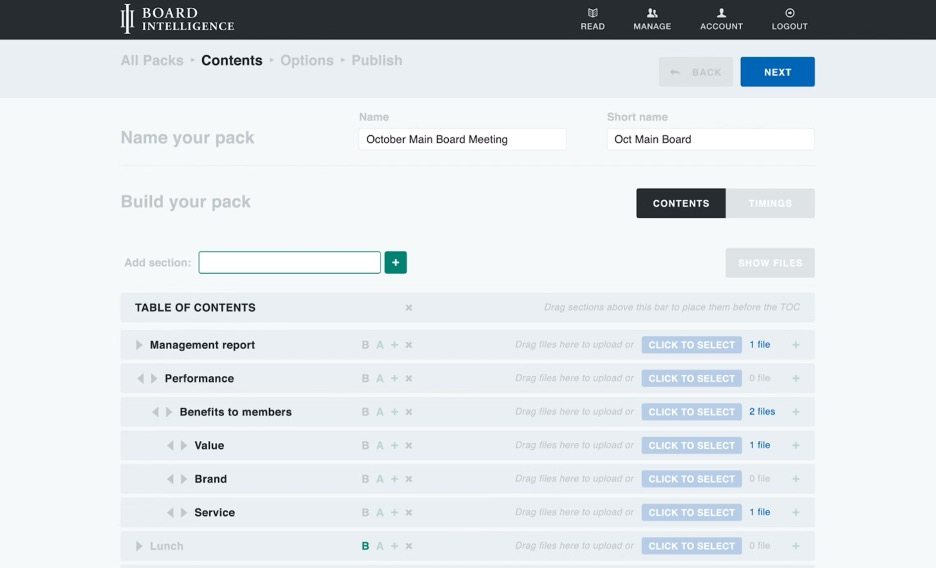
Board Intelligence is a strategic board management platform tailored for executives and board members, focusing on decision-making and performance improvement. It applies AI to offer insights and analytics for better strategic planning and governance.
Why I picked Board Intelligence: Board Intelligence uses AI to provide strategic analysis that helps your team make informed decisions. Its AI tools offer deep insights into board performance and governance trends, aligning with strategic goals. The platform's focus on data-driven decision-making aids in improving organizational performance. With its AI-driven analytics, Board Intelligence supports your team's strategic planning and execution.
Standout features & integrations:
Features include customizable dashboards, performance tracking, and report generation. You can use its intuitive interface for easy navigation and data access. The software also provides tools for strategic planning and risk management.
Integrations include Microsoft Office, Google Workspace, Slack, Zoom, Salesforce, Dropbox, OneDrive, Box, Docusign, and Adobe Sign.
Pros and Cons
Pros:
- Improves board performance
- Supports data-driven decision-makin
- AI-driven strategic insights
Cons:
- Pricing details are not readily available
- May require initial training


BoardPro is a board management software designed for small to medium-sized organizations, focusing on simplifying board meeting processes. It uses AI to automate agenda creation and simplify meeting preparation.
Why I picked BoardPro: BoardPro's AI features make agenda creation effortless, allowing your team to focus on strategic discussions. The platform's automated reminders and task tracking ensure that board members stay informed and organized. With AI-driven insights, you can make data-informed decisions that align with your organization's goals. BoardPro's emphasis on simplifying board processes makes it a valuable tool for efficient governance.
Standout features & integrations:
Features include meeting minutes, task management, and board pack creation. You can easily access past meeting records and manage documents securely. The software also offers a centralized dashboard for real-time updates.
Integrations include Microsoft Office 365, Google Workspace, Zoom, Slack, Dropbox, OneDrive, Box, Docusign, Salesforce, and Adobe Sign.
Pros and Cons
Pros:
- Simplifies meeting preparation
- Efficient task tracking
- AI-driven agenda creation
Cons:
- Editing documents directly in the platform is limited
- Document search and navigation functions can be inconsistent


eBoard is a digital board management platform designed for educational institutions and non-profit organizations to improve governance and document management. It applies AI to automate document workflows and improve accessibility.
Why I picked eBoard: eBoard's AI-powered document management tools offer automated filing and retrieval, making it easier for your team to access critical documents. The platform also features AI-driven search capabilities, which help simplify the process of locating important information. With eBoard, you can efficiently manage board materials and ensure compliance with organizational standards. Its focus on document management makes it a valuable tool for organizations with extensive record-keeping needs.
Standout features & integrations:
Features include customizable meeting templates, agenda management, and real-time collaboration. You can also benefit from its secure document repository and voting capabilities. The platform provides role-based access to improve security.
Integrations include Microsoft Teams, Google Meet, Zoom, SharePoint, Adobe, and Docusign.
Pros and Cons
Pros:
- Improves compliance and record-keeping
- Efficient search capabilities
- AI-driven document management
Cons:
- Template layouts are rigid
- Features require additional modules


Govrn is an AI-powered board management platform designed for industries like financial services, healthcare, and real estate. It focuses on improving decision-making, compliance tracking, and real-time collaboration.
Why I picked Govrn: Govrn offers AI-driven insights and compliance monitoring to boost governance standards. Its AI tools aid in organizing documents and tracking compliance, making it an ideal choice for industries with strict regulatory requirements. The platform provides real-time collaboration features to help your team engage effectively. Govrn's secure document centralization and data-driven decision-making set it apart in the board management landscape.
Standout features & integrations:
Features include task management, integrated communication, and enterprise-grade security. You can benefit from real-time engagement tracking and automated meeting scheduling. The platform also offers role-based access to ensure data security.
Integrations include Microsoft Office 365, Slack, Zoom, Google Workspace, Dropbox, Docusign, OneDrive, Box, Salesforce, and Adobe Sign.
Pros and Cons
Pros:
- Secure document centralization
- Real-time collaboration tools
- AI-driven compliance monitoring
Cons:
- Too many features overwhelm some users
- Automation may miss context or nuance without manual review
Other AI Board Management Software
Here are some additional AI board management software options that didn’t make it onto my shortlist, but are still worth checking out:
- Zeck
For AI-powered task automation
- Pervasent
For AI-based compliance tools
- Board Management
For AI-driven data security


How I Evaluate AI Board Management Software
I look for platforms where AI does more than check a box—it should save directors real prep time by summarizing board packets or drafting minutes, not just sit behind a chatbot icon. I split my evaluation into core functionality every tool needs to qualify and differentiating factors that separate the best fit from the rest.
Core Functionality (Table Stakes For This List)
When I'm selecting tools for my list, I rank each one on a scale from 0 (does not offer the functionality) to 5 (excels in this area) for each core functionality listed below. Then, I calculate the tool's total score into a percentage. Each tool needs to achieve a minimum total score of 55% to be considered for inclusion.
- AI Meeting Intelligence: I look for AI that can transcribe a board session and turn it into structured minutes with action items and speaker attribution, not just a raw transcript dump.
- AI Document Summarization: Each tool should condense lengthy HR reports and board packets into director-ready briefings, so members aren't reading 200-page PDFs the night before.
- Secure Board Portal: A centralized hub with role-based permissions and encryption is what I evaluate here, especially for handling sensitive compensation and succession data.
- Agenda & Minutes Management: I check whether the platform supports a full agenda-to-minutes workflow, from building structured agendas to AI-assisted drafting and formal archival.
- Voting & Resolutions: Tools should enable digital voting and e-signatures with a clear resolution history, so decisions on executive pay or policy changes are fully traceable.
- Compliance & Audit Trails: I evaluate whether the platform maintains detailed audit logs and retention controls aligned with governance standards like GDPR or SOX.
Once I have a list of tools that meet the criteria, I consider what sets each platform apart.
Differentiating Factors (What Sets Vendors Apart)
Here's how I compare and contrast different vendors:
Standout Features
Predictive governance insights are a big differentiator—I look for platforms that can surface succession risk trends or compensation benchmarks ahead of a board review. AI-powered director Q&A is another feature I value, letting members ask plain-language questions about past resolutions or HR reports instead of digging through archives. Smart conflict detection also matters, especially when boards vote on executive compensation and the tool can flag related-party risks on its own.
Beyond Features
Security posture is one of the first things I evaluate—boards handle sensitive executive compensation and succession data, so I check for certifications like SOC 2 Type II and clear AI data governance policies. Integration depth matters just as much, particularly native connections to HRIS platforms like Workday or SAP SuccessFactors that let HR teams pull workforce data directly into board reports. I also consider onboarding support, since many board directors aren't technical and need guided setup to actually adopt the platform.
How to Choose AI Board Management Software
It’s easy to get bogged down in long feature lists and complex pricing structures. To help you stay focused as you work through your unique software selection process, here’s a checklist of factors to keep in mind:
| Factor | What to Consider |
| Scalability | Will the software grow with your organization? Consider if it can handle an increasing number of users or documents without performance issues. |
| Integrations | Does it work with your current tools? Check compatibility with existing software to ensure smooth workflow integration. |
| Customizability | Can you tailor the software to fit your needs? Look for options to customize workflows, dashboards, and user permissions. |
| Ease of use | Is it user-friendly? Evaluate the learning curve for your team and whether it offers a straightforward interface. |
| Implementation and onboarding | How long will it take to get started? Consider the time and resources needed for setup and training. Look for guides or support options. |
| Cost | Does it fit your budget? Compare pricing plans and watch for hidden fees. Consider the total cost over time, including upgrades and maintenance. |
| Security safeguards | How does it protect your data? Ensure it offers encryption, access controls, and compliance with data protection regulations. |
| Support availability | Is help readily available? Check for 24/7 support, response times, and access to resources like FAQs or live chat. |
What Is AI Board Management Software?
AI board management software is a digital platform that helps manage board meetings and governance processes using artificial intelligence. Executives, board members, and administrators typically use these tools to improve decision-making and meeting efficiency. AI-driven insights, automated agenda creation, and data security features help with organizing meetings, tracking compliance, and ensuring secure communication. Overall, these tools provide a structured and efficient way to manage board activities and improve organizational governance.
Features of AI Board Management Software
When selecting AI board management software, keep an eye out for the following key features:
- AI-driven insights: Provides data analysis and recommendations to improve decision-making and strategic planning.
- Automated agenda creation: simplifies the process of preparing meeting agendas, saving time and reducing errors.
- Secure document management: Ensures that sensitive documents are stored and shared securely, maintaining confidentiality.
- Real-time collaboration: Allows board members to work together efficiently, regardless of their location.
- Compliance tracking: Monitors regulatory requirements to help your organization stay compliant with industry standards.
- Dynamic commenting: Facilitates immediate feedback and discussion on documents and agenda items.
- Intelligent notifications: Keep board members informed of important updates and deadlines.
- Task automation: Simplifies repetitive tasks, freeing up time for strategic activities.
- Voting and polling capabilities: Provides a secure and efficient way to gather board member input and make decisions.
- Customizable dashboards: Offers tailored views and insights to meet the specific needs of your organization.
Benefits of AI Board Management Software
Implementing AI board management software provides several benefits for your team and your business. Here are a few you can look forward to:
- Improved decision-making: AI-driven insights provide data analysis that helps your team make informed strategic decisions.
- Time savings: Automated agenda creation and task automation reduce preparation time, allowing your team to focus on high-priority tasks.
- Powered security: Secure document management keeps your sensitive information protected and ensures compliance with regulations.
- Better collaboration: Real-time collaboration features enable efficient teamwork, even for remote board members.
- Increased compliance: Compliance tracking ensures your organization meets industry standards and reduces the risk of regulatory issues.
- Efficient communication: Intelligent notifications keep everyone updated on important developments and deadlines.
- Simplified voting: Voting and polling capabilities offer a quick and secure way to gather input and make decisions.
Costs and Pricing of AI Board Management Software
Selecting AI board management software requires an understanding of the various pricing models and plans available. Costs vary based on features, team size, add-ons, and more. The table below summarizes common plans, their average prices, and typical features included in AI board management software solutions:
Plan Comparison Table for AI Board Management Software
| Plan Type | Average Price | Common Features |
| Free Plan | $0/user/month | Basic agenda management, document sharing, and limited collaboration tools. |
| Personal Plan | $29-$1,650/user/month | Powered document management, basic AI insights, and task automation. |
| Business Plan | $29-$6,250/user/month | Advanced AI features, real-time collaboration, and secure voting capabilities. |
| Enterprise Plan | $35 - $95,000/month | Customizable dashboards, compliance tracking, and dedicated support services. |
AI Board Management Software FAQs
Here are some answers to common questions about AI board management software:
How secure is AI board management software?
Yes, AI board management software is generally secure. These tools use encryption and access controls to protect sensitive data. You can improve security by choosing a platform with compliance certifications like SOC 2 or GDPR. Always ensure your team uses strong passwords and follows best practices for data security.
Can AI board management software integrate with existing tools?
Yes, most AI board management software can integrate with existing tools like Microsoft Office, Google Workspace, and Slack. Check the software’s integration capabilities before purchasing to ensure compatibility with your current systems. Integrations can help unify workflows and improve efficiency across your team.
Is there a steep learning curve for new users?
No, many AI board management tools are designed with user-friendly interfaces that minimize the learning curve. Look for platforms that offer tutorials, training videos, and interactive product tours to help your team get started quickly. A straightforward setup process can make onboarding smoother and faster.
How do I evaluate the ROI of AI board management software?
To evaluate ROI, consider the time saved on manual tasks and the improved decision-making from AI insights. Calculate the cost savings from reduced meeting prep time and increased efficiency. Compare these benefits to the software’s cost to determine if it provides good value for your organization.
What should I consider when customizing AI board management software?
When customizing, focus on aligning the software with your organization’s workflows and governance needs. Adjust dashboards, user permissions, and notification settings to suit your team. Ensure the software allows for enough flexibility without compromising on security or functionality. Customization should improve, not complicate, your processes.