

20 Best AI Business Strategy Software in 2026

Best AI Business Strategy Software Shortlist


AI business strategy software uses artificial intelligence to help you plan, track, and adapt your company’s high-level goals and actions. If you’re looking for smarter ways to manage strategy, respond to changing markets, or align teams, these platforms can help you stay ahead. Here, you’ll find the top tools for analyzing data, modeling scenarios, monitoring competitors, and driving results—so you can choose the right solution to support your most important decisions this 2026.
Why Trust Our Software Reviews
Our team has been testing and reviewing software since 2012. As HR experts ourselves, we know how difficult—and important—it is to choose the right software.
For this guide, we evaluated tools using hands-on testing and independent research, scoring tools using our selection criteria. We also draw on insights from industry thought leaders and practicing HR experts.
Our reviews reflect our human editorial judgment, not a sales pitch.
Expert reviewers:
AI Business Strategy Software Comparison Table
This comparison table summarizes pricing details for my top AI business strategy software selections:
| Tool | Best For | Trial Info | Price | ||
|---|---|---|---|---|---|
| 1 | Best for prioritizing strategic initiatives | 30-day free trial + free demo available | From $9/user/month | Website | |
| 2 | Best for uncovering digital market trends | Free trial available | From $125/month | Website | |
| 3 | Best for modeling enterprise what-if scenarios | Free demo available | Pricing upon request | Website | |
| 4 | Best for large-scale project portfolio management | Free demo available | Pricing upon request | Website | |
| 5 | Best for monitoring competitors | Free demo available | Pricing upon request | Website | |
| 6 | Best for visualizing goal progress | Free demo available | Pricing upon request | Website | |
| 7 | Best for tracking strategic plan execution | Free trial + free demo available | Pricing upon request | Website | |
| 8 | Best for dynamic financial scenario modeling | Free demo available | Pricing upon request | Website | |
| 9 | Best for aligning teams with OKR frameworks | Free demo available | Pricing upon request | Website | |
| 10 | Best for analyzing market intelligence data | Free demo available | Pricing upon request | Website |
Best AI Business Strategy Software Reviews
Below are my detailed summaries of the best AI business strategy software that made it onto my shortlist. My reviews offer a detailed look at the features, capabilities, and best use cases of each platform to help you find the best one for you.

Aha!
Best for prioritizing strategic initiatives
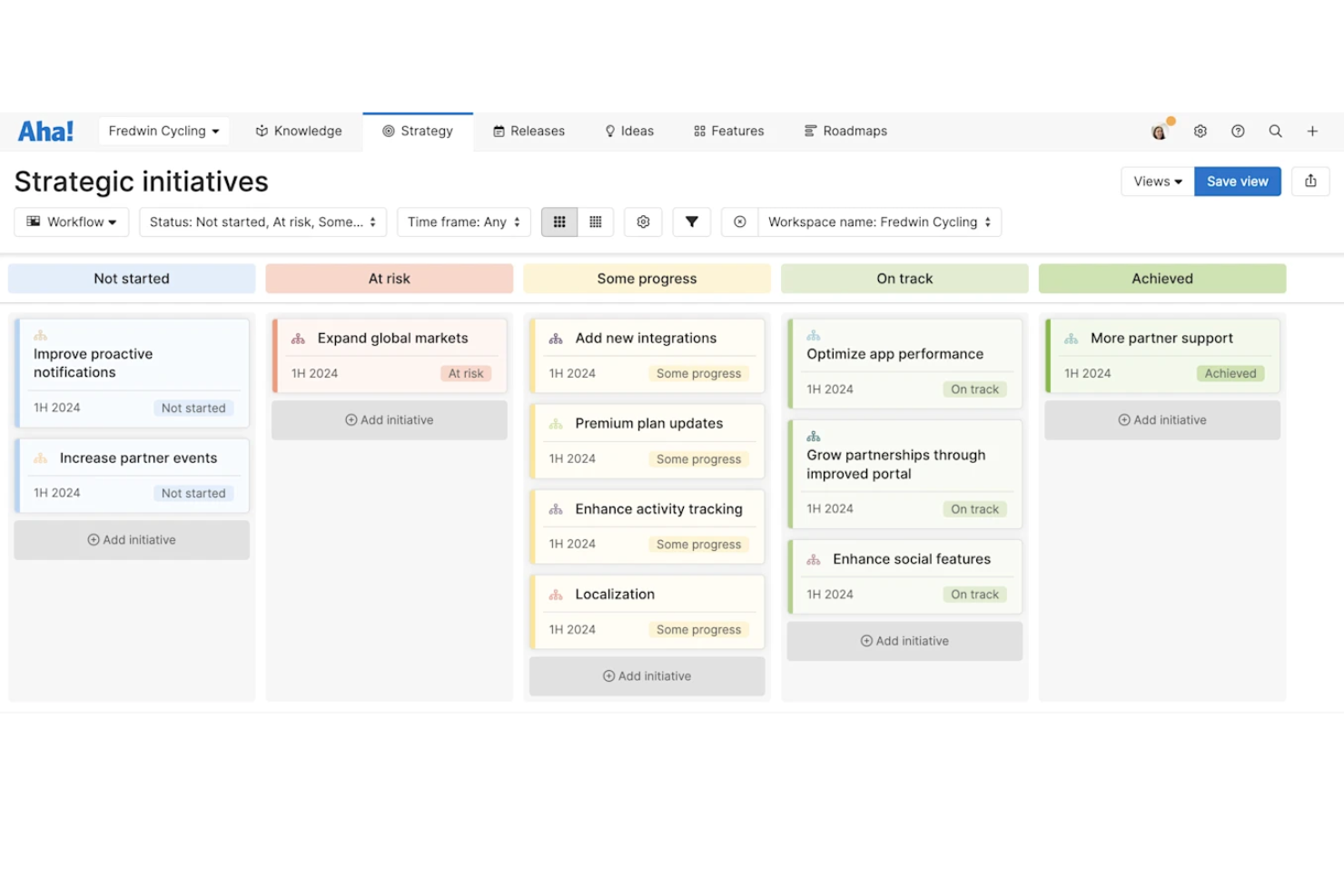
Aha! is a product management and business strategy platform for building strategic roadmaps, visualizing initiatives, prioritizing features, organizing goals, and connecting plans across teams.
Who Is Aha! Best For?
Product managers and strategy teams at mid-sized and large organizations who need to align business goals and manage cross-functional planning.
Why I Picked Aha!
I picked Aha! because I can map out product strategies, prioritize initiatives using visual scoring tools, and tie those decisions to my organization’s goals. I use its custom scorecards and initiative swimlanes to clarify what matters most.
Aha! Key Features
- Notes and whiteboards: Capture meeting notes and visualize ideas with whiteboard templates.
- Release planning: Organize, track, and ship product releases with custom workflows.
- Idea portals: Collect and manage feedback with secure, branded idea portals.
- Goal tracking: Set, share, and monitor progress against business goals in real time.
Aha! Integrations
Aha! offers native integrations with Jira, Salesforce, Azure DevOps, Slack, Microsoft Teams, Trello, Asana, GitHub, Google Analytics, and Google Drive, and provides an API for custom integrations.
Pros and Cons
Pros:
- Direct connection to epic backlogs
- Native roll-up metric worksheet calculation
- Automated strategic framework model drafting
Cons:
- Extensive workspace setup requirements
- Complex custom reporting query creation

Best for uncovering digital market trends

Similarweb is a digital market intelligence platform that provides AI-powered tools for analyzing website traffic, uncovering audience insights, benchmarking competitors, and tracking digital trends in real time.
Who Is Similarweb Best For?
Market researchers, digital marketing teams, and strategy leaders in ecommerce, media, and technology who need deep analysis of online competitors and emerging industry trends.
Why I Picked Similarweb
I picked Similarweb as one of the best for AI business strategy because I can analyze global website traffic patterns, benchmark competitors using up-to-date market data, and spot digital trends that influence strategic decisions.
Similarweb Key Features
- Keyword research tool: Identify top-performing keywords by channel and geography.
- Audience overlap reports: Analyze shared audiences between competitors and your own domains.
- Mobile app analysis: Track installs, engagement, and publisher metrics for mobile apps.
- Traffic acquisition channels: Break down site visits by paid, organic, referral, and social sources.
Similarweb Integrations
Similarweb offers native integrations with Google Analytics, Adobe Analytics, Salesforce, and HubSpot, and provides an API for custom integrations.
Pros and Cons
Pros:
- Custom segmentation for niche market research
- Deep insights into digital channel performance
- Advanced website traffic and audience analysis
Cons:
- Limited offline or in-app tracking capabilities
- Some metrics use estimated rather than actual data

Anaplan
Best for modeling enterprise what-if scenarios

Anaplan is a cloud-based business planning and modeling platform purpose-built for enterprises to connect data, simulate scenarios, and manage dynamic, AI-enabled business strategy workflows.
Who Is Anaplan Best For?
Large enterprises and finance teams managing complex planning, forecasting, and scenario modeling across global business units.
Why I Picked Anaplan
I picked Anaplan as one of the best for AI business strategy because I can build complex driver-based models, run unlimited what-if scenarios, and collaborate with stakeholders using real-time data and interactive visualizations.
Anaplan Key Features
- Connected planning modules: Integrate finance, sales, supply chain, and HR plans in one environment.
- User access controls: Assign permissions by role, function, or location for data security.
- Audit trail: Track every data change with detailed logs and timestamps.
- Version control: Store and compare different plan iterations across users and periods.
Anaplan Integrations
Anaplan offers native integrations with Salesforce, Tableau, Microsoft Power BI, and Informatica, and provides an API for custom integrations.
Pros and Cons
Pros:
- Built-in workflow management for approvals
- Real-time data sync across business units
- Handles complex cross-functional plans
Cons:
- Excel integration Limited in-app collaboration
- No Mac-compatible native
Best for large-scale project portfolio management
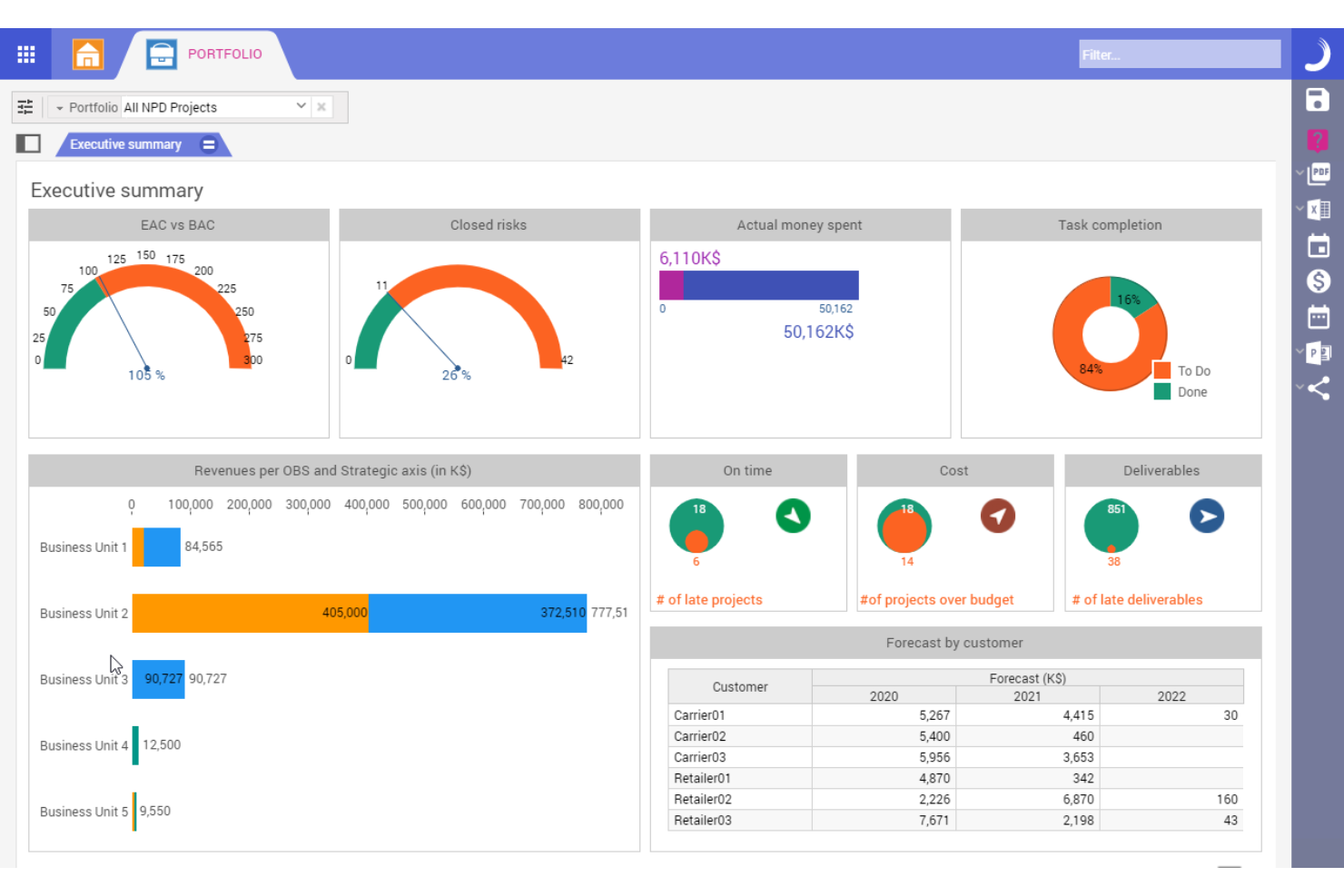
Planisware is an enterprise project portfolio management platform for AI-driven business strategy that centralizes project data, supports complex financial planning, integrates resource management, and offers advanced scenario modeling capabilities.
Who Is Planisware Best For?
Large enterprise PMOs and portfolio leaders in industries like pharmaceuticals, engineering, and manufacturing needing to align and oversee high-value, cross-regional project portfolios.
Why I Picked Planisware
I picked Planisware because I can oversee high-value project portfolios, manage global resources, and run what-if scenario analyses at scale. I use its configurable workflows and advanced financial controls to coordinate complex initiatives across business units.
Planisware Key Features
- Interactive Gantt charts: Visualize schedules, dependencies, and milestones across multiple projects.
- Real-time reporting: Build dynamic dashboards with drill-down capabilities for any metric.
- Resource scenario planning: Simulate headcount and skill allocations before committing.
- Stage-gate process support: Model and track gated workflows for new initiatives.
Planisware Integrations
Planisware offers native integrations with SAP, Oracle, Jira, Microsoft Project, and Primavera P6, and provides an API for custom integrations.
Pros and Cons
Pros:
- Highly configurable workflows for enterprise users
- Centralized portfolio financial controls
- Advanced scenario modeling for business strategy
Cons:
- Limited machine learning features
- Steep setup and onboarding requirements


Crayon is a competitive intelligence platform for AI business strategy that tracks, analyzes, and summarizes competitors' moves, online activity, product updates, and strategic decisions in one place.
Who Is Crayon Best For?
Marketing and product teams in mid-sized to large organizations that need real-time insights into competitor strategies and market shifts.
Why I Picked Crayon
I picked Crayon because I can track competitors’ moves across web, social, and product channels in real time. I use its dashboard to surface key intelligence trends, set up custom alerts, and review collected insights with my strategy team.
Crayon Key Features
- Insights feed: See a continuous stream of automatically collected competitive updates.
- Visual change tracking: Monitor competitors’ website changes with before-and-after views.
- Battlecard builder: Create and update sales battlecards from gathered intelligence.
- Team collaboration tools: Assign insights, comment, and share findings across your team.
Crayon Integrations
Crayon offers native integrations with Salesforce, Slack, Highspot, Microsoft Teams, Seismic, and Klue, with an API also available for custom integrations.
Pros and Cons
Pros:
- Customizable intelligence board and workflows
- Visual website change detection tools
- Competitor tracking updates in near real time
Cons:
- Limited predictive analytics for strategy planning
- Setup and configuration can be time-intensive

Best for visualizing goal progress

Profit.co is an AI-powered OKR management platform that helps teams create, align, monitor, and track objectives, key results, and performance metrics across departments.
Who Is Profit.co Best For?
HR leads and department managers at mid-to-large organizations who need structured, AI-driven goal setting and progress tracking across teams.
Why I Picked Profit.co
I picked Profit.co because I can visualize OKR progress using dashboards, heatmaps, and custom reporting. I like how AI suggestions help set measurable goals and track real-time progress, making it easy to spot alignment issues or priorities at a glance.
Profit.co Key Features
- Task management modules: Assign, track, and organize tasks linked to OKRs.
- Performance review workflows: Customize review cycles and feedback forms for employee evaluations.
- Automated check-ins: Schedule recurring progress updates and reminders for key results.
- KPI library: Access a range of predefined and customizable key performance indicators.
Profit.co Integrations
Profit.co offers native integrations with Microsoft Teams, Slack, Jira, Salesforce, HubSpot, Google Workspace, Office 365, BambooHR, and Zapier. An API is available for custom integrations.
Pros and Cons
Pros:
- Automated check-ins and reminders for progress
- Labeled metric check-in execution scorecards
- AI suggests measurable OKRs for teams
Cons:
- High enterprise plan configuration dependencies
- Restrictive user performance check-in history

Cascade
Best for tracking strategic plan execution

Cascade is an AI-enabled business strategy platform for organizing objectives, linking projects, managing progress, and centralizing key strategic information in one workspace.
Who Is Cascade Best For?
Strategy and operations leaders in mid-sized to large organizations who need a unified system to coordinate plans and monitor progress across teams.
Why I Picked Cascade
I picked Cascade as one of the best because it excels at tracking strategic plan execution. I use its visual strategy map and automated progress tracking to keep objectives, projects, and KPIs linked and transparent across every level of our organization.
Cascade Key Features
- AI-powered insights: Analyze performance metrics and surface trends using integrated AI tools.
- Role-based permissions: Control access to data, dashboards, and reports by user role.
- Automated reporting: Generate up-to-date strategy, project, and status reports with scheduled delivery.
- Collaboration boards: Share plans and updates with structured comments and file attachments within each workspace.
Cascade Integrations
Cascade offers native integrations with Snowflake, Microsoft 365, Google Workspace, Jira, Slack, Salesforce, HubSpot, and Asana. An API is available for custom integrations.
Pros and Cons
Pros:
- Automated tracking of plan progress
- Visual maps connect strategy to projects
- AI-driven suggestions for goal alignment
Cons:
- Goal hierarchy setup requires manual input
- Limited offline capabilities for field teams

Best for dynamic financial scenario modeling

Workday Adaptive Planning is a financial planning and analysis platform for teams seeking AI-driven budgeting, forecasting, scenario modeling, reporting, and collaboration within one system.
Who Is Workday Adaptive Planning Best For?
Financial teams at mid-sized and enterprise organizations that need agile, collaborative planning for complex budgeting and forecasting.
Why I Picked Workday Adaptive Planning
I picked Workday Adaptive Planning because I can quickly model multiple financial scenarios and forecast outcomes using its drag-and-drop interface. My team builds granular budgets, tracks KPIs, and adjusts plans in real time using its AI-powered analysis tools.
Workday Adaptive Planning Key Features
- Collaborative planning: Multiple users can work on the same plan in real time.
- Sheets and modeling engine: Customizable templates for department-level or organization-wide planning.
- Role-based access controls: Set permissions for users based on their responsibilities.
- Workflow management: Automate plan reviews and approvals to simplify the planning process.
Workday Adaptive Planning Integrations
Workday Adaptive Planning offers native integrations with Workday HCM, Microsoft Excel, Microsoft Power BI, and NetSuite, with an API available for custom integrations.
Pros and Cons
Pros:
- Strong audit trails for financial plan changes
- Granular user permissions for secure collaboration
- Scenario models update dynamically
Cons:
- Advanced reports require additional configuration
- Multi-currency support can be limited

Best for aligning teams with OKR frameworks
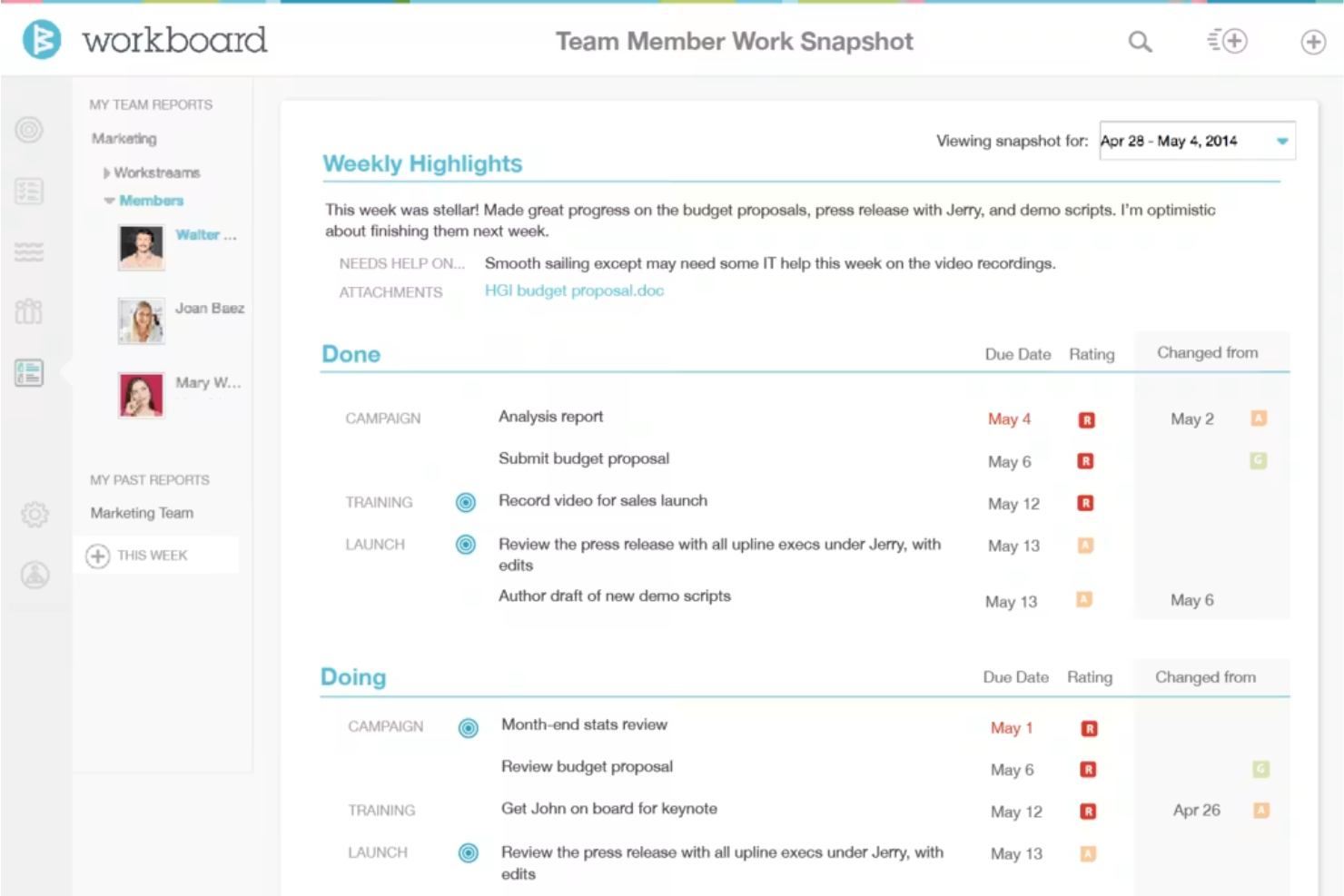
WorkBoard is an OKR and strategy execution platform designed for businesses that want to set, track, and manage objectives, align goals across teams, and view progress dashboards in one place.
Who Is WorkBoard Best For?
Large and mid-sized organizations with distributed teams looking to coordinate and measure objectives using the OKR methodology.
Why I Picked WorkBoard
I picked WorkBoard because I can set, align, and monitor OKRs across distributed teams, link objectives to real-time key results, and surface alignment gaps using built-in heatmaps and dashboards. I use its meeting management to keep teams focused on priorities.
WorkBoard Key Features
- Automated status updates: Schedule recurring updates to track objective and key result progress.
- Action item tracking: Assign, monitor, and update completion of team action items.
- OKR library: Access templates for common objectives and key results by function or industry.
- Business review workspaces: Create organized spaces for recurring business review meetings and reports.
WorkBoard Integrations
WorkBoard offers native integrations with Microsoft Teams, Slack, Jira, Salesforce, Asana, Excel, Google Sheets, and Workday, and provides an API for custom integrations.
Pros and Cons
Pros:
- Meets enterprise governance and reporting needs
- Automated MBR and QBR scorecard generation
- Real-time heatmaps reveal alignment issues
Cons:
- No standalone native mobile application
- Limited AI-driven insights for OKR suggestions

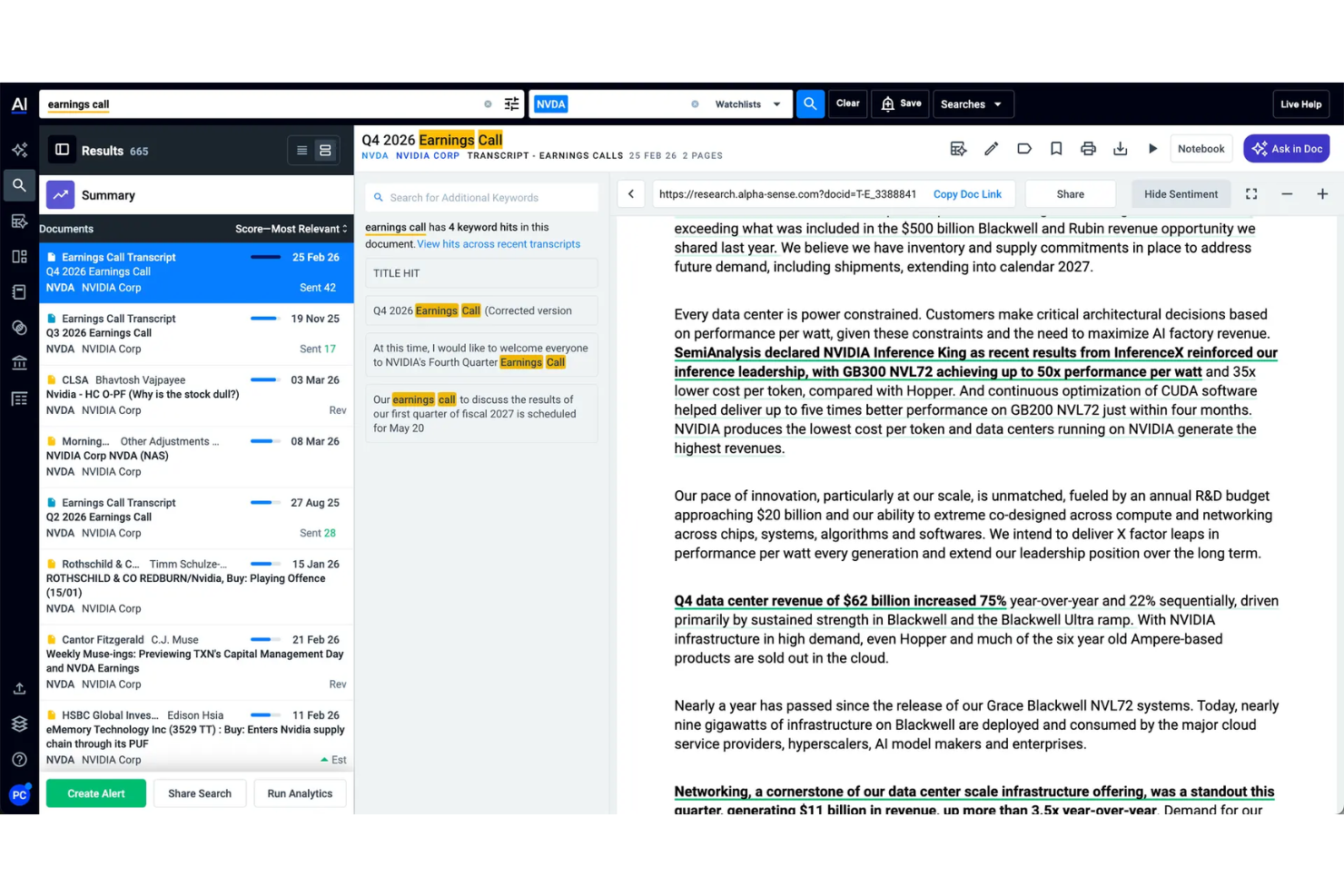
AlphaSense is an AI-powered market intelligence and research platform for business strategy teams to search, aggregate, and analyze financial documents, news, expert insights, and company filings.
Who Is AlphaSense Best For?
Research analysts and corporate strategy teams in finance or professional services who need to monitor market, industry, and competitor intelligence.
Why I Picked AlphaSense
I picked AlphaSense as one of the best because its AI searches and summarizes thousands of market reports, earnings transcripts, and analyst notes. I rely on its real-time monitoring and document comparison features to quickly analyze shifting market intelligence data.
AlphaSense Key Features
- Smart synonym recognition: Surfaces related concepts and terminology in research queries.
- Collaboration tools: Enables teams to comment and share annotated content.
- Customized alerts: Sends notifications for new documents matching saved search criteria.
- Saved search history: Provides quick access to past queries and results.
AlphaSense Integrations
AlphaSense offers native integrations with Sharepoint, OneNote, Evernote, Box, Egnyte, Google Drive, Dropbox, One Drive, and Amazon S3. It provides an API for custom integrations.
Pros and Cons
Pros:
- Real-time alerts for market changes
- Advanced filters for financial and ESG insights
- AI-powered search across industry documents
Cons:
- Occasional delays updating the latest filings
- Limited export options for data analysis
Other AI Business Strategy Software
Here are some additional AI business strategy software options that didn’t make it onto my shortlist, but are still worth checking out:
- ClearPoint Strategy
For automating performance reporting
- Workpath
For coordinating outcome-driven priorities
- LivePlan
For guided business plan creation
- Lattice
For performance feedback
- Upmetrics
For step-by-step strategy planning templates
- OnePlan
For integrating with Microsoft tools
- ChatGPT
For generating insights from text
- ThoughtSpot
For natural language data exploration
- PrometAI
For automating strategic document drafting
- ITONICS
For centralizing innovation management


How I Evaluate AI Business Strategy Software
Every tool here has to prove its AI drives real strategic output—like generating defensible scenarios or surfacing competitive shifts—not just dress up basic analytics. I split my evaluation into core functionality a tool needs to make the list and differentiating factors that set one vendor apart from another.
Core Functionality (Table Stakes For This List)
When I'm selecting tools for my list, I rank each one on a scale from 0 (does not offer the functionality) to 5 (excels in this area) for each core functionality listed below. Then, I calculate the tool's total score into a percentage. Each tool needs to achieve a minimum total score of 55% to be considered for inclusion.
- AI-Driven Strategic Analysis: I look for tools that go beyond summarization and actually produce tailored frameworks—like a SWOT grounded in your revenue data or a Porter's Five Forces built from live market signals.
- Scenario & Simulation Modeling: Each tool should let strategy teams model multiple what-if paths, such as simulating entry into a new market or projecting the impact of a pricing shift across regions.
- Market & Competitive Intelligence: I evaluate how well a platform ingests external data—competitor moves, industry trends, market sizing—and synthesizes it into insights you can act on during planning cycles.
- Strategic Roadmap Building: Tools earn higher marks when roadmaps connect directly to AI-generated insights and track initiative progress against KPIs rather than serving as static timeline views.
- Data Integration & Connectivity: Strong contenders connect to your CRM, ERP, and BI stack so the AI works with proprietary company data, not just generic inputs or manual uploads.
- Executive Reporting & Dashboards: I check whether a tool can generate board-ready narrative summaries and dynamic dashboards that surface AI-driven takeaways leadership can use without digging into raw data.
- Collaboration & Workflow: Strategy is a team sport, so I look for shared workspaces, comment threads, and review cycles that let cross-functional stakeholders contribute to and sign off on strategic plans.
- Enterprise Security & Governance: Given the sensitivity of strategic data, I evaluate each platform's security posture—SOC 2 compliance, SSO, role-based access controls, and audit logging are what I check first.
Once I have a list of tools that meet this criteria, I consider what sets each platform apart.
Differentiating Factors (What Sets Vendors Apart)
Here's how I compare and contrast different vendors:
Standout Features
Benchmarking intelligence stands out—I look for platforms that pull in external market and competitor data and cross-reference it with your internal metrics to ground strategy in real competitive context. Sentiment and culture analytics add depth when a tool uses NLP to correlate employee feedback signals with strategic performance outcomes. I also value platforms that auto-generate narrative strategy reports from underlying data, saving teams hours of manual slide-building before board reviews.
Beyond Features
AI governance and explainability matter a lot here—when a platform recommends a market entry or flags a competitive threat, strategy leaders need to understand the reasoning behind that output. I evaluate whether vendors document their models and offer audit trails for AI-generated recommendations. Implementation support is another key factor, especially for enterprises rolling these tools out across multiple business units where dedicated success teams and structured onboarding accelerate adoption. I also check integration depth with ERP and CRM systems, since strategy AI is only as good as the proprietary data feeding it.
How to Choose AI Business Strategy Software
It’s easy to get bogged down in long feature lists and complex pricing structures. To help you stay focused as you work through your unique software selection process, here’s a checklist of factors to keep in mind:
| Factor | What to Consider |
|---|---|
| Scalability | Will the tool accommodate your team’s projected growth and evolving strategic needs without forcing a migration? |
| Integrations | Can the tool connect natively with your essential platforms, such as HRIS, analytics, or productivity suites? |
| Customizability | Are you able to tailor reports, metrics, and workflows to match your organization’s operating model and goals? |
| Ease of use | Is the software intuitive enough for non-technical users to regularly update and interpret strategy progress? |
| Implementation and onboarding | Does the vendor offer migration support, onboarding resources, or dedicated success specialists to speed up adoption? |
| Cost | Are pricing tiers clear, and can you anticipate future costs as users, departments, or scenarios expand? |
| Security safeguards | Does the platform offer necessary data protection and role-based controls to meet both IT and compliance policies? |
| Support availability | What support channels exist—live chat, phone, or tickets—and are SLAs or response times suitable for your needs? |
What Is AI Business Strategy Software?
AI business strategy software is a digital tool that uses artificial intelligence to help organizations set, monitor, and adapt high-level business objectives. It centralizes goal management, analyzes real-time performance data, and provides recommendations for strategic planning. These platforms help leaders visualize progress, make data-driven adjustments, and align teams with company-wide goals and priorities.
Features of AI Business Strategy Software
When selecting AI business strategy software, keep an eye out for the following key features:
- Objective and key results management: Lets you set, track, and update strategic objectives and measurable outcomes so everyone can see how daily efforts contribute to big-picture business goals.
- Real-time analytics dashboards: Presents up-to-date visualizations and metrics on goal progress, resource allocation, and performance so you can make informed, data-driven decisions quickly.
- AI-powered recommendations: Uses machine learning to suggest actions, flag misaligned objectives, or call out risks based on current data and emerging trends.
- Automated check-ins and reminders: Schedules recurring prompts and notifications to keep teams accountable and focused on important milestones.
- Custom report generation: Allows users to build and share detailed strategy performance reports, tailored to different stakeholders and executive audiences.
- Task and initiative tracking: Lets you assign, monitor, and manage the granular projects and activities linked to each strategic goal or outcome.
- Collaboration tools: Provides in-app messaging, comment threads, or document sharing so teams can coordinate directly within the platform.
- Integration capabilities: Connects with key business, HR, and analytics systems to import data and simplify workflows across the organization.
- Role-based access controls: Allows you to define user permissions and protect sensitive information, ensuring the right people can see and edit strategic data.
- KPI libraries: Offers a bank of predefined and customizable key performance indicators to help standardize measurement and reporting across teams.
Benefits of AI Business Strategy Software
Implementing AI business strategy software provides several benefits for your team and your business. Here are a few you can look forward to:
- Improved goal alignment: Ensures everyone is focused on unified objectives through centralized OKR and goal-setting functionality.
- Faster decision-making: Equips leaders with real-time analytics dashboards and AI-driven recommendations for quick, data-backed choices.
- Greater accountability: Keeps teams on track with automated check-ins, progress updates, and clearly assigned tasks linked to business goals.
- Enhanced collaboration: Brings project discussions, document sharing, and stakeholder input into a single platform for simplified teamwork.
- More actionable insights: Uses AI analysis and custom reports to turn raw performance data into clear strategic guidance.
- Efficient integration: Connects easily with other HR, business, or analytics platforms to ensure your data and workflows remain synchronized.
- Better visibility and control: Provides role-based access, clear tracking, and KPI libraries so leaders can confidently monitor and adjust strategies.
Costs and Pricing of AI Business Strategy Software
Selecting AI business strategy software requires an understanding of the various pricing models and plans available. Costs vary based on features, team size, add-ons, and more. The table below summarizes common plans, their average prices, and typical features included in AI business strategy software solutions:
Plan Comparison Table for AI Business Strategy Software
| Plan Type | Average Price | Common Features |
|---|---|---|
| Free Plan | $0 | Basic objective tracking, limited users, essential analytics, and standard support. |
| Personal Plan | $5-$15/user/month | Goal setting, individual analytics, task management, limited integrations, and email support. |
| Business Plan | $15-$40/user/month | Team collaboration tools, advanced reporting, workflow automation, enhanced integrations, and onboarding resources. |
| Enterprise Plan | $40-$80/user/month | Customizable dashboards, role-based access, dedicated account manager, advanced security, and SLA-backed support. |
AI Business Strategy Software FAQs
Here are some answers to common questions about AI business strategy software:
What types of organizations benefit most from AI business strategy software?
Any organization looking to align its teams, measure progress on strategic goals, and make smarter, data-driven decisions can benefit. Business leaders can use data-driven insights to break down organizational silos and optimize performance.
- Large and fast-growing businesses: These tools are especially valuable for managing complex strategies and maintaining accountability across teams.
- Small business teams: They can leverage these tools to rapidly scale operations and adapt their business model to evolving market demands.
Can AI business strategy software integrate with other HR or analytics systems?
Yes, most AI business strategy software solutions offer integrations with HR systems, project management tools, data visualization platforms, and more. This connects diverse data sources to centralize information, reduce double entry, and provide deeper strategic insights from a unified dashboard. These integrations ingest vast datasets to help companies address specific business needs and analyze complex data through automated data analytics.
How does AI enhance traditional business strategy planning?
AI can analyze large amounts of data, spot trends, and surface recommendations that would take humans much longer to uncover. Modern platforms incorporate advanced AI technologies to significantly optimize planning by utilizing:
- Algorithms and specialized AI models to process information and predict outcomes.
- Natural language processing to power an intuitive AI assistant or autonomous AI agents that generate useful outputs.
- Generative AI to deliver AI-generated summaries, helping teams make better decisions and more informed decisions.
Is AI business strategy software secure enough for sensitive business data?
Yes, leading platforms provide strong security safeguards like encryption, role-based access controls, and compliance features to protect your strategic plans and confidential information. Because these tools rely heavily on sensitive corporate data, vendors prioritize data privacy to ensure safe AI adoption. Always verify a vendor’s security certifications before committing to any new AI solutions.
How long does it take to implement AI business strategy software?
Implementation typically takes a few days to several weeks, depending on your organization’s size, complexity, and integration needs. Tools that offer powerful AI capabilities wrapped in a user-friendly user experience help speed up the process. Platforms with built-in onboarding resources, training materials, and clear migration steps make it easy to deploy a detailed AI strategy quickly.