

10 Best AI Hiring Software in 2026

Best AI Hiring Software Shortlist


AI hiring software uses machine learning and automation to help you screen, evaluate, and connect with qualified candidates. If you’re looking for ways to save time, make fairer decisions, or boost your talent pipeline, these platforms can make a big difference. With so many new tools on the market, it’s tough to know which options are truly reliable.
This guide highlights the best AI hiring software in 2026, so you can compare features side by side and choose what fits your recruitment goals.
Why Trust Our Software Recommendations
Our team has been testing and reviewing software since 2012. As HR experts ourselves, we know how difficult—and important—it is to choose the right software.
For this guide, we evaluated tools using hands-on testing and independent research, scoring tools using our selection criteria. We also draw on insights from industry thought leaders and practicing HR experts.
Our reviews reflect our human editorial judgment, not a sales pitch.
Expert reviewers:
AI Hiring Software Comparison Table
This comparison table summarizes pricing details for my top AI hiring software selections:
| Tool | Best For | Trial Info | Price | ||
|---|---|---|---|---|---|
| 1 | Best for explainable AI screening with bias controls | Free demo available | Pricing upon request | Website | |
| 2 | Best for programmatic job advertising optimization | Free demo available | Pricing upon request | Website | |
| 3 | Best for automated candidate sourcing and outreach | Free demo available | From $115/month (billed annually) | Website | |
| 4 | Best for end-to-end automation at scale | Free demo available | Pricing upon request | Website | |
| 5 | Best for skills-based matching and career pathing | Free demo available | Pricing upon request | Website | |
| 6 | Best for sourcing hard-to-find technical talent | Free trial + free demo available | From $149/month (billed annually) | Website | |
| 7 | Best for AI-powered video interview analysis | Free demo available | Pricing upon request | Website | |
| 8 | Best for talent rediscovery and internal mobility | Free demo available | Pricing upon request | Website | |
| 9 | Best for conversational AI candidate screening | Free demo available | Pricing upon request | Website | |
| 10 | Best for deep Workday platform integration | Free demo available | Pricing upon request | Website |

Best AI Hiring Software Reviews
Below are my detailed summaries of the best AI hiring software that made it onto my shortlist. My reviews offer a detailed look at the features, integrations, and best use cases of each platform to help you find the best one for you.
Pinpoint
Best for explainable AI screening with bias controls
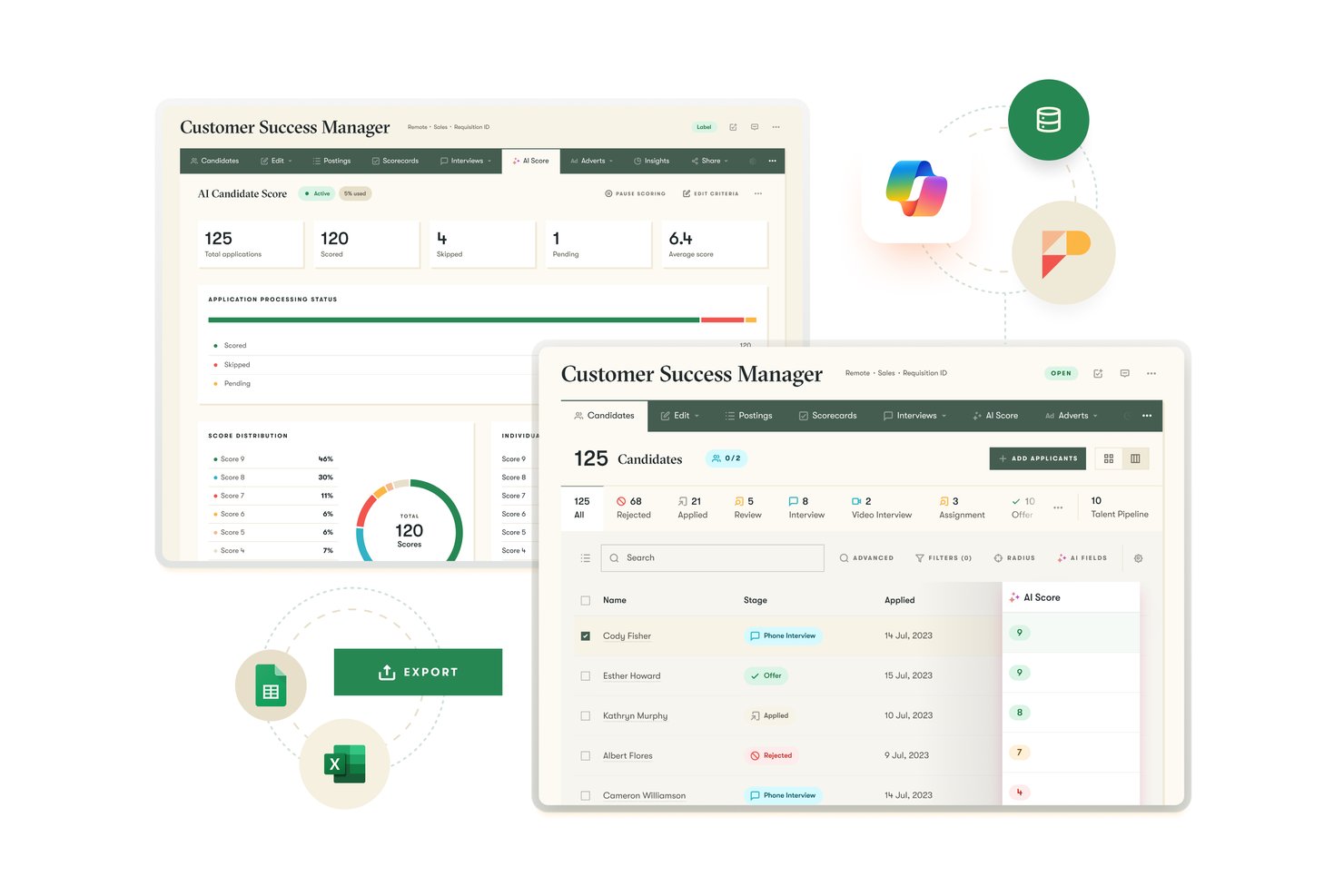
Pinpoint is an ATS with built-in AI hiring tools—including criteria-based candidate scoring, an AI hiring copilot, async video interviews, and an AI notetaker—designed for mid-market and enterprise recruiting teams managing structured, high-volume hiring.
Who Is Pinpoint Best For?
Pinpoint is a strong fit for mid-market and enterprise recruiting teams that need structured, criteria-driven screening with clear compliance controls across regulated or multi-brand hiring environments.
Why I Picked Pinpoint
I picked Pinpoint as one of the best because it's the only ATS I've seen that pairs explainable AI screening with genuine bias governance built directly into the workflow. The AI Match Score gives each candidate a 1–10 rating against recruiter-defined, role-specific criteria, with a plain-language breakdown of strengths and concerns per criterion. Alongside anonymized screening and audit logs that support NYC Local Law 144 and EU AI Act compliance, that level of transparency is hard to replicate in tools that treat AI scoring as a black box.
Pinpoint Key Features
- AI Hiring Copilot: A natural-language assistant embedded in the ATS that drafts job descriptions, candidate communications, and moves candidates between stages—always with human approval required before any action is taken.
- One-way video interviews: Candidates record async video responses to role-specific questions, with auto-generated transcripts, configurable retake limits, and in-platform scoring for reviewers.
- AI Notetaker: Joins live interviews to transcribe conversations in real time, generate structured summaries, and surface relevant transcript excerpts to help interviewers complete scorecards.
- Silver-medalist rediscovery: Copilot's natural-language search scans your full talent pool—past applicants, sourced candidates, and pipeline members—to surface previously screened people who match a new role's criteria.
Pinpoint Integrations
Pinpoint offers 100+ native integrations, including Workday, Oracle HCM, UKG, ADP Workforce Now, LinkedIn Recruiter, Zoom, Microsoft Teams, Google Meet, SHL, and Power BI. It also supports an open API, webhooks, plugin framework, and Zapier.
Pros and Cons
Pros:
- Human-in-the-loop for all AI actions
- Anonymized candidate review supports fair screening
- Fully explainable AI scoring with bias controls
Cons:
- Requires migrating from your existing ATS
- No predictive analytics for quality-of-hire
New Product Updates from Pinpoint

Pinpoint Adds Copilot, Hire Surveys, and LinkedIn Apply Connect
Pinpoint adds Copilot in Teams, Quality of hire surveys, LinkedIn Apply Connect integration, and onboarding updates. These releases expand AI, hiring insights, integrations, and onboarding capabilities. For more information, visit Pinpoint’s official site.
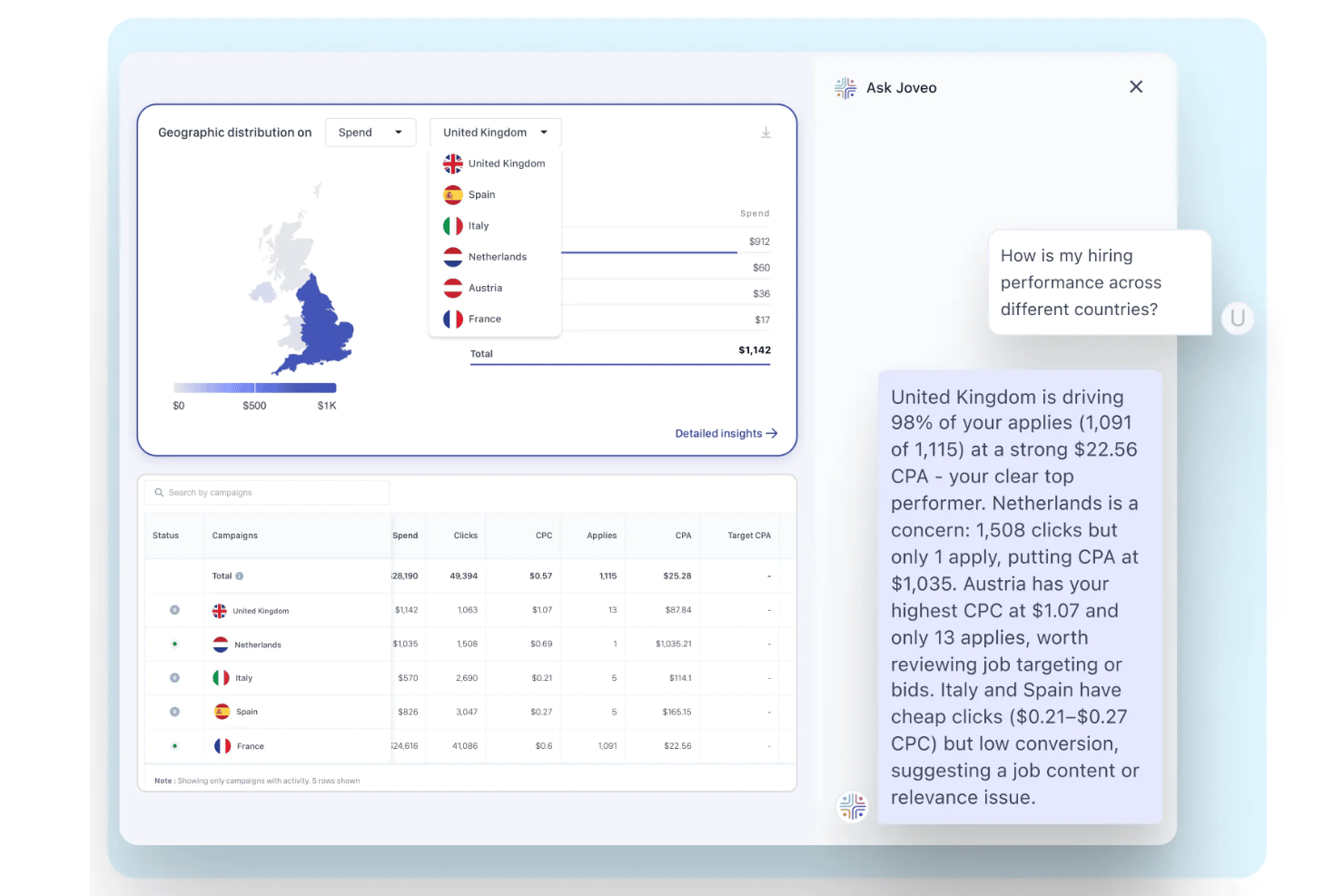
Joveo is an AI-powered recruitment advertising platform that combines programmatic job distribution, multi-channel candidate sourcing, conversational pre-screening, and automated campaign optimization across hundreds of publisher sources.
Who Is Joveo Best For?
Joveo is a strong fit for enterprise talent acquisition teams, RPOs, and staffing firms managing high-volume hiring across multiple locations and job categories.
Why I Picked Joveo
I picked Joveo as one of the best because its MOJO Pro engine continuously reallocates job advertising spend in real time, shifting budget toward sources delivering the lowest cost per applicant. I also like that MOJO Social reaches passive candidates across the open web, not just active job board browsers. The click-to-hire analytics dashboard gives my team a live view of CPA and CPH across every publisher, so we can see exactly where budget is producing hires.
Joveo Key Features
- AI career site builder: Create branded, personalized career sites and landing pages with dynamic content using AI prompts.
- Automated talent campaigns: Set up always-on campaigns to target and re-engage candidates across multiple channels automatically.
- Publisher and channel analytics: Access real-time reporting that breaks down performance by channel, job, and publisher for transparent optimization.
- ATS integrations: Sync jobs and candidates automatically with over 100 applicant tracking systems, including Workday, Greenhouse, and Bullhorn.
Joveo Integrations
Joveo offers native integrations with Workday, Greenhouse, iCIMS, Bullhorn, SAP SuccessFactors, SmartRecruiters, Lever, UKG, Oracle Taleo, and Jobvite, and provides an API for custom integrations.
Pros and Cons
Pros:
- Granular cost-per-hire reporting by publisher source
- Multi-channel programmatic reach
- Real-time budget reallocation across job publishers
Cons:
- No native candidate assessment or interview tools
- Limited AI resume screening or candidate scoring

Fetcher
Best for automated candidate sourcing and outreach
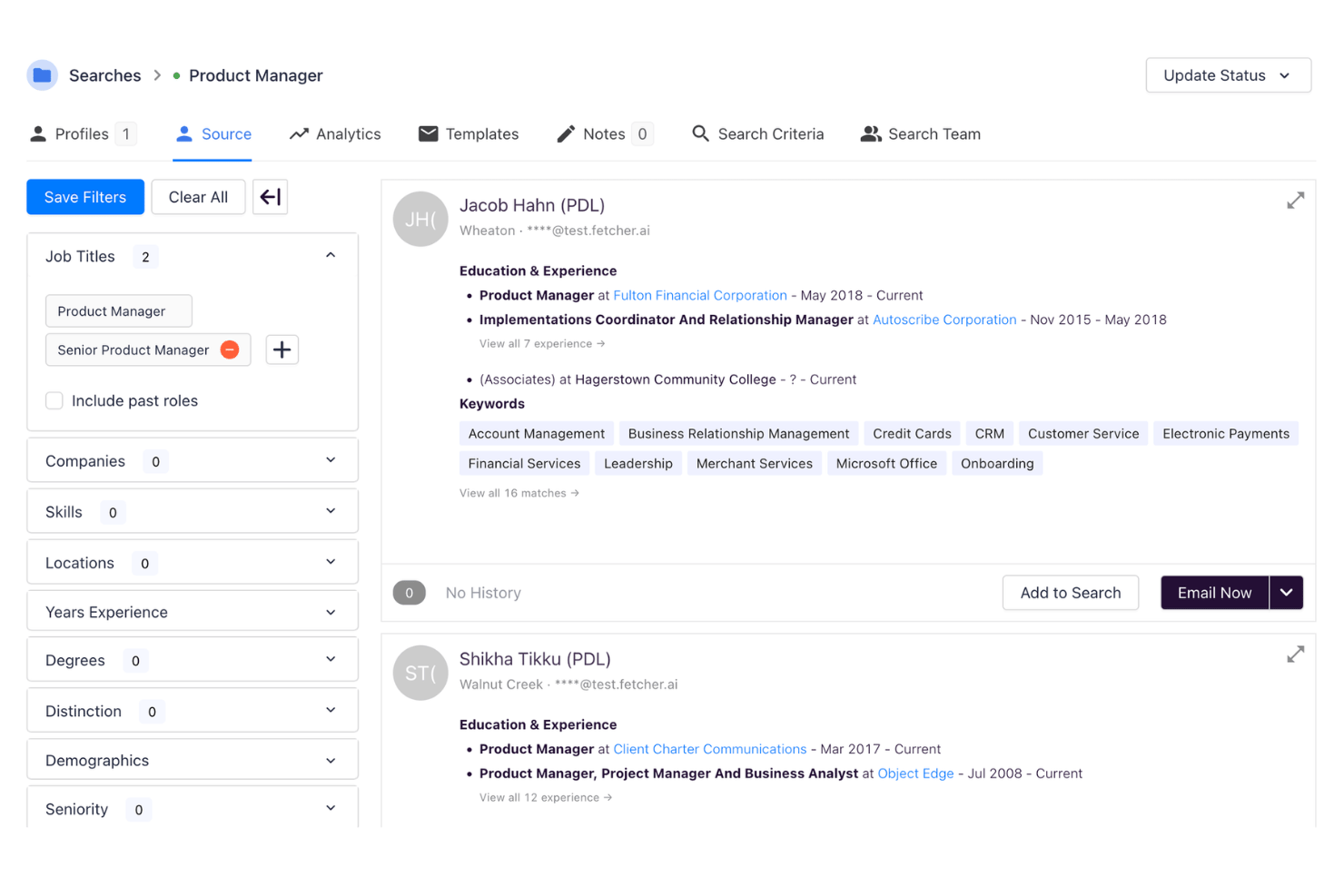
Fetcher is an AI-powered talent sourcing platform that combines automated candidate discovery, multi-touch email outreach, inbound resume screening, and diversity pipeline building across a 500M+ candidate database.
Who Is Fetcher Best For?
Fetcher is a strong fit for in-house recruiting teams at growing companies that need to scale passive candidate sourcing without expanding their recruiting headcount.
Why I Picked Fetcher
Fetcher earns its spot on my shortlist because no other tool I've tested matches its combination of AI sourcing and automated outreach in a single workflow. I can paste a job description, let Fetcher parse it into structured search criteria, and receive a curated batch of passive candidates with a personalized email sequence already queued. What I find especially useful is how the AI sharpens its candidate recommendations over time based on which profiles I approve or reject.
Fetcher Key Features
- Diversity search filters: Add specific diversity criteria to sourcing parameters for every role.
- Inbound applicant screening: Batch review and triage inbound applicants using automated resume parsing.
- CRM and email sync: Connect directly with Gmail, Outlook, and popular CRMs to optimize communication.
- Smart analytics dashboard: Track sourcing volume, pipeline health, and diversity statistics for all open searches.
Fetcher Integrations
Fetcher offers native integrations with Ashby, Greenhouse, Lever, UKG, Workday, Avature, BambooHR, Lano, SAP, and more. An API is available for custom integrations.
Pros and Cons
Pros:
- Diversity-focused candidate search features available
- Personalized email outreach automation built in
- AI sourcing delivers high-quality passive candidates
Cons:
- Limited bias detection and auditing capabilities
- No AI-powered interview or assessment tools

Phenom
Best for end-to-end automation at scale
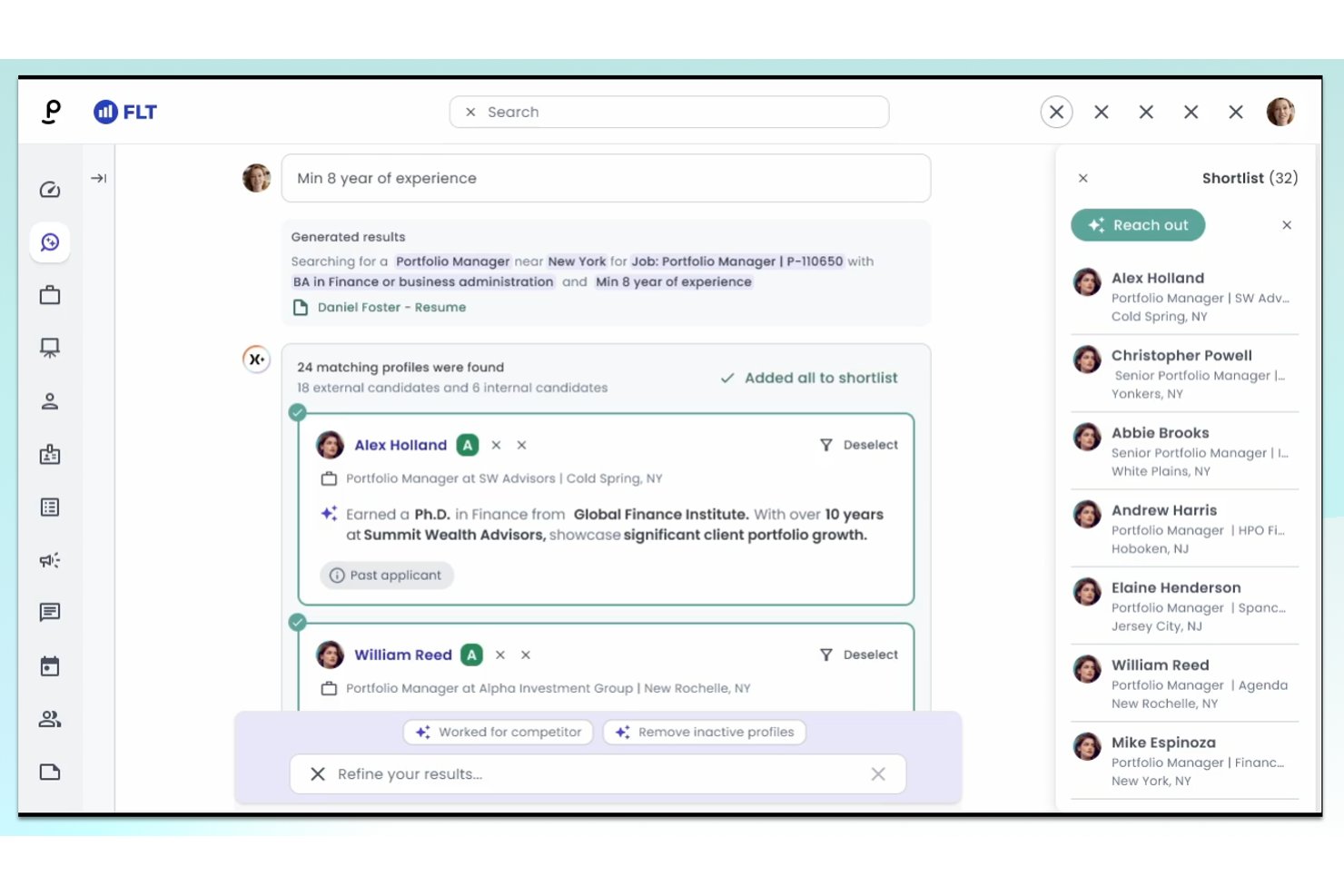
Phenom is an applied AI talent acquisition platform that combines AI-driven candidate matching, automated sourcing, chatbot pre-screening, video interviews, and predictive analytics across the full recruiting workflow.
Who Is Phenom Best For?
Phenom is built for enterprise organizations with large-scale recruiting operations, particularly those managing high-volume hiring across multiple roles, regions, or business units.
Why I Picked Phenom
I picked Phenom as one of the best because no other platform I've tested automates as much of the recruiting funnel within a single system. The Autonomous Recruiting agents qualify and screen candidates 24/7 without recruiter input, and the High-Volume Hiring engine runs no-code automation workflows that can schedule thousands of interviews in days. I've seen that throughput demonstrated concretely: Waste Connections booked over 1,600 interviews in just two weeks using those same workflows.
Phenom Key Features
- AI-powered career site: Dynamically delivers job recommendations and personalized content to candidates based on their skills, interests, and location.
- Phenom CRM with dynamic talent pipelines: Lets recruiters organize prospects, apply fit scoring, and track candidate movement across stages.
- Talent analytics dashboard: Surfaces real-time insights into sourcing effectiveness, candidate flow, and campaign performance.
- Direct sourcing for contingent roles: Enables sourcing, engaging, and managing external talent pools for gig and contract hiring needs.
Phenom Integrations
Phenom offers native integrations with SAP SuccessFactors, Workday, UKG, ServiceNow, Edflex, Chekr, RedDot, Legion, ADP, and provides additional integrations through a partner ecosystem. An API is available for custom integrations.
Pros and Cons
Pros:
- Customizable workflows for unique hiring processes
- Real-time analytics for talent pipeline performance
- Automates high-volume screening with AI agents
Cons:
- Setup can be complex for smaller teams
- AI bias mitigation tools not highly visible
Beamery
Best for skills-based matching and career pathing
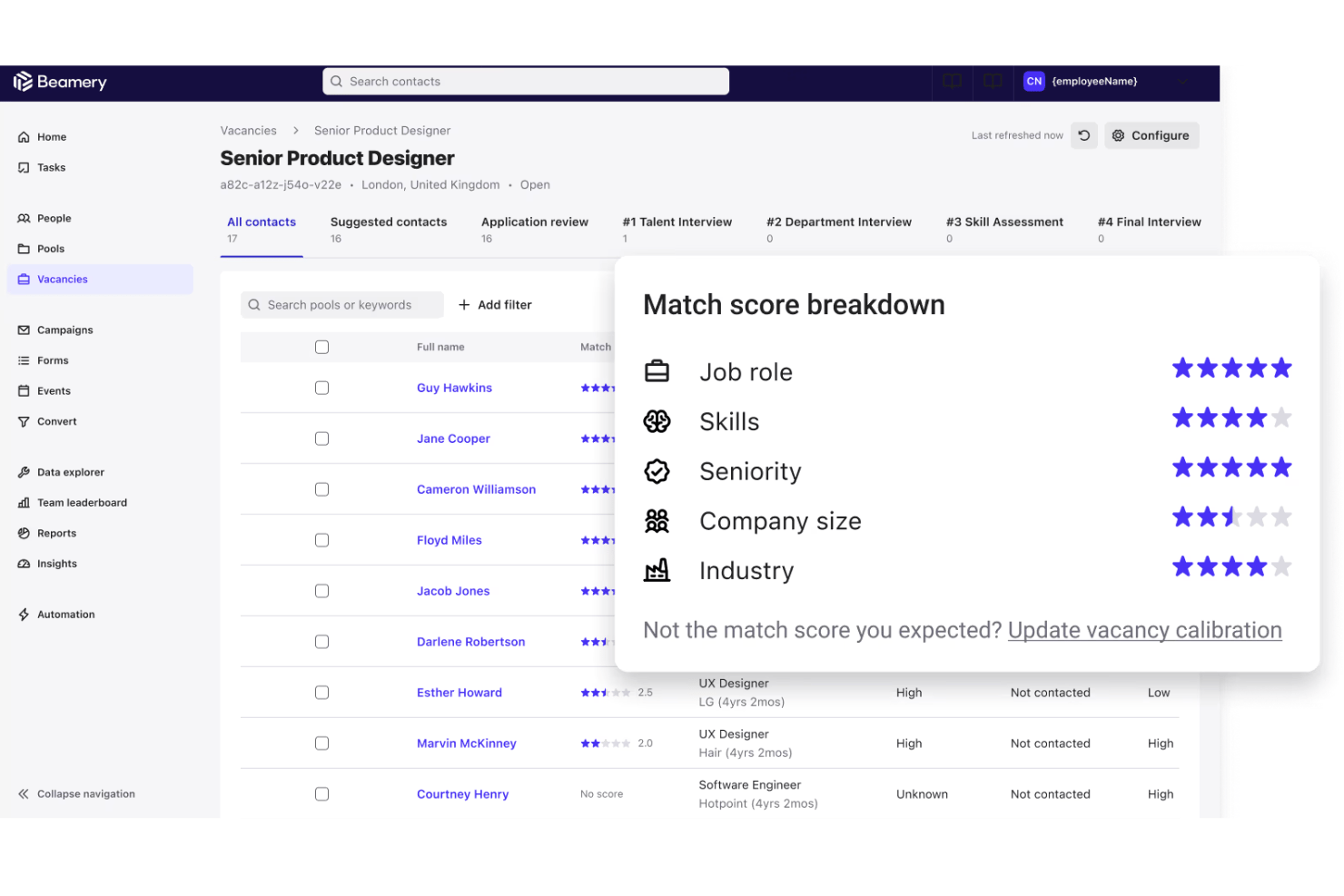
Beamery is an enterprise talent lifecycle management platform that uses AI to handle candidate sourcing, CRM, skills inference, internal mobility, and workforce planning across the full hiring lifecycle.
Who Is Beamery Best For?
Beamery is built for enterprise organizations with large-scale hiring needs and dedicated talent acquisition teams managing complex, multi-role pipelines.
Why I Picked Beamery
Beamery earns its spot on my shortlist because its AI doesn't just match keywords. It infers skills from resumes, LinkedIn profiles, and behavioral signals, normalizes them into a structured taxonomy, and uses that data to surface candidates for both open roles and internal career moves. I especially like how that same skills layer powers the talent marketplace, letting my team identify employees ready for lateral moves before we go external.
Beamery Key Features
- Predictive analytics dashboard: Surfaces AI-driven forecasts on pipeline health and future hiring needs for talent acquisition teams.
- Bias detection and audit logging: Provides tools for tracking, alerting, and documenting AI-driven candidate score fairness throughout the hiring process.
- Talent pool segmentation: Lets teams segment and organize large candidate pools based on skill, location, experience, or other criteria for targeted sourcing.
- Native ATS integrations: Supports real-time, bi-directional syncing with platforms like Workday, SAP SuccessFactors, and Greenhouse.
Beamery Integrations
Beamery offers native integrations with Workday, SAP SuccessFactors, Greenhouse, Entelo, GoodTime, JobVite, Drafted, Carahsoft, and more. An API is available for custom integrations.
Pros and Cons
Pros:
- AI-driven bias detection and audit features
- Supports internal mobility with talent marketplace
- Skills inference uncovers hidden candidate potential
Cons:
- Complex deployment for smaller HR teams
- No native AI interview tooling
SeekOut
Best for sourcing hard-to-find technical talent
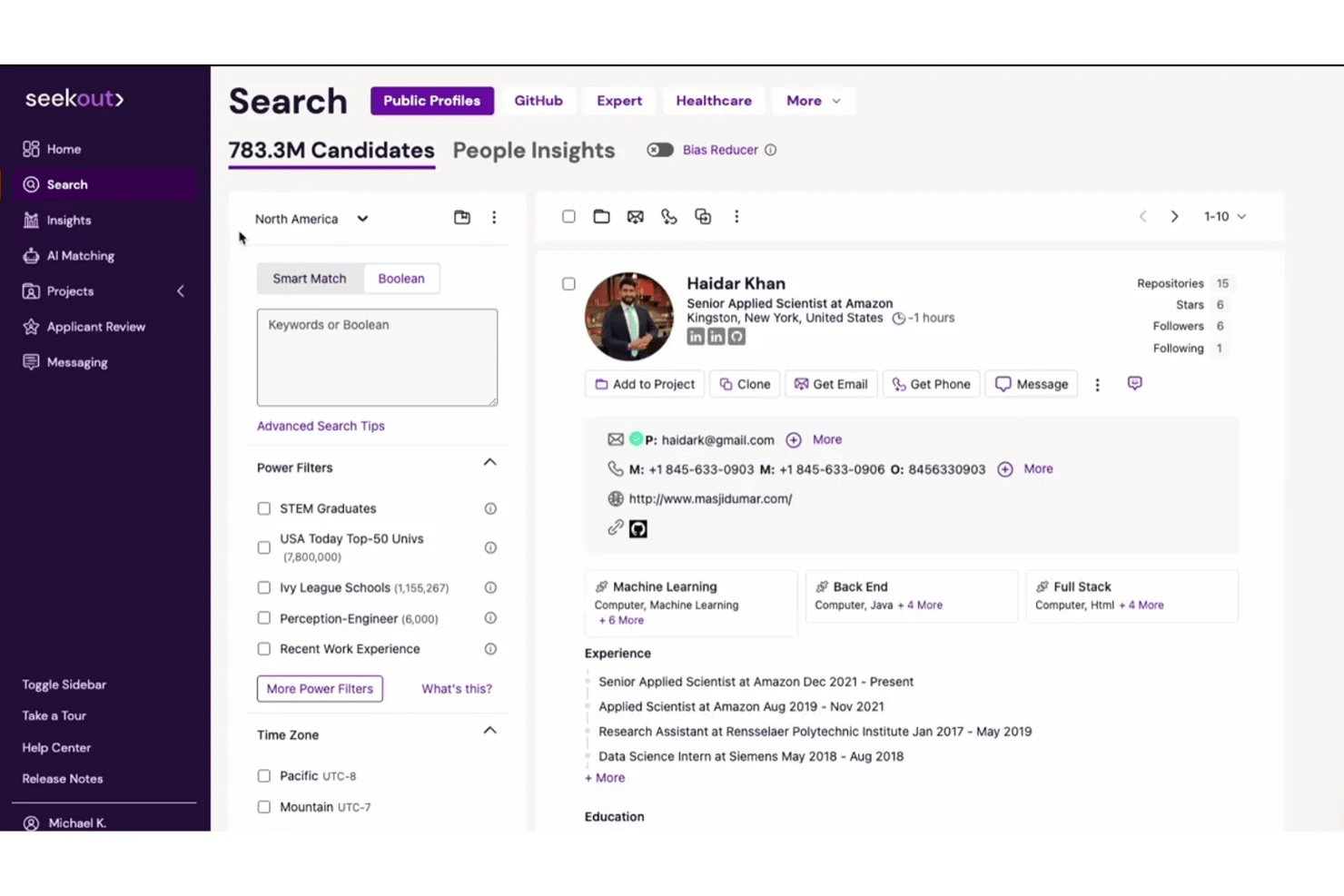
SeekOut is an AI-powered talent sourcing and recruiting platform that searches across 1B+ profiles, scores inbound applicants, and surfaces passive candidates using semantic AI search, job-specific workflows, and advanced diversity filters.
Who Is SeekOut Best For?
SeekOut is a strong fit for enterprise and mid-market recruiting teams that regularly hire for specialized technical roles, including engineering, AI/ML, and security-cleared positions.
Why I Picked SeekOut
SeekOut earns its spot on my shortlist because it searches beyond LinkedIn, pulling from GitHub, Google Scholar, patents, and academic papers to surface technical candidates who rarely appear in standard searches. I also like the Workspace feature, which generates AI search criteria and scoring rubrics directly from a job description. The inferred security clearance filter and DEI-focused power filters make it especially precise for niche technical hiring.
SeekOut Key Features
- AI-powered inbound evaluation: Automatically scores and prioritizes applicants using machine learning models against job-specific rubrics.
- ATS rediscovery tools: Surfaces overlooked past applicants and silver medalists using AI scoring from existing ATS data.
- Talent insights dashboard: Provides labor market analytics, compensation benchmarks, and diversity pipeline metrics for evidence-based recruiting.
- Native AI-assistant integrations: Lets recruiters source and analyze talent using SeekOut directly within ChatGPT, Claude, Gemini, and Copilot.
SeekOut Integrations
SeekOut offers native integrations with Workday, Greenhouse, Ashby, SAP SuccessFactors, Talemetry, Bullhorn, Taleo, iCIMS, and Lever. An API is available for custom integrations.
Pros and Cons
Pros:
- Deep candidate profiles from external sources
- Powerful diversity and DEI search filters
- Advanced AI for technical talent sourcing
Cons:
- Messaging campaigns can feel impersonal
- Lacks full-suite interview automation tools
HireVue
Best for AI-powered video interview analysis
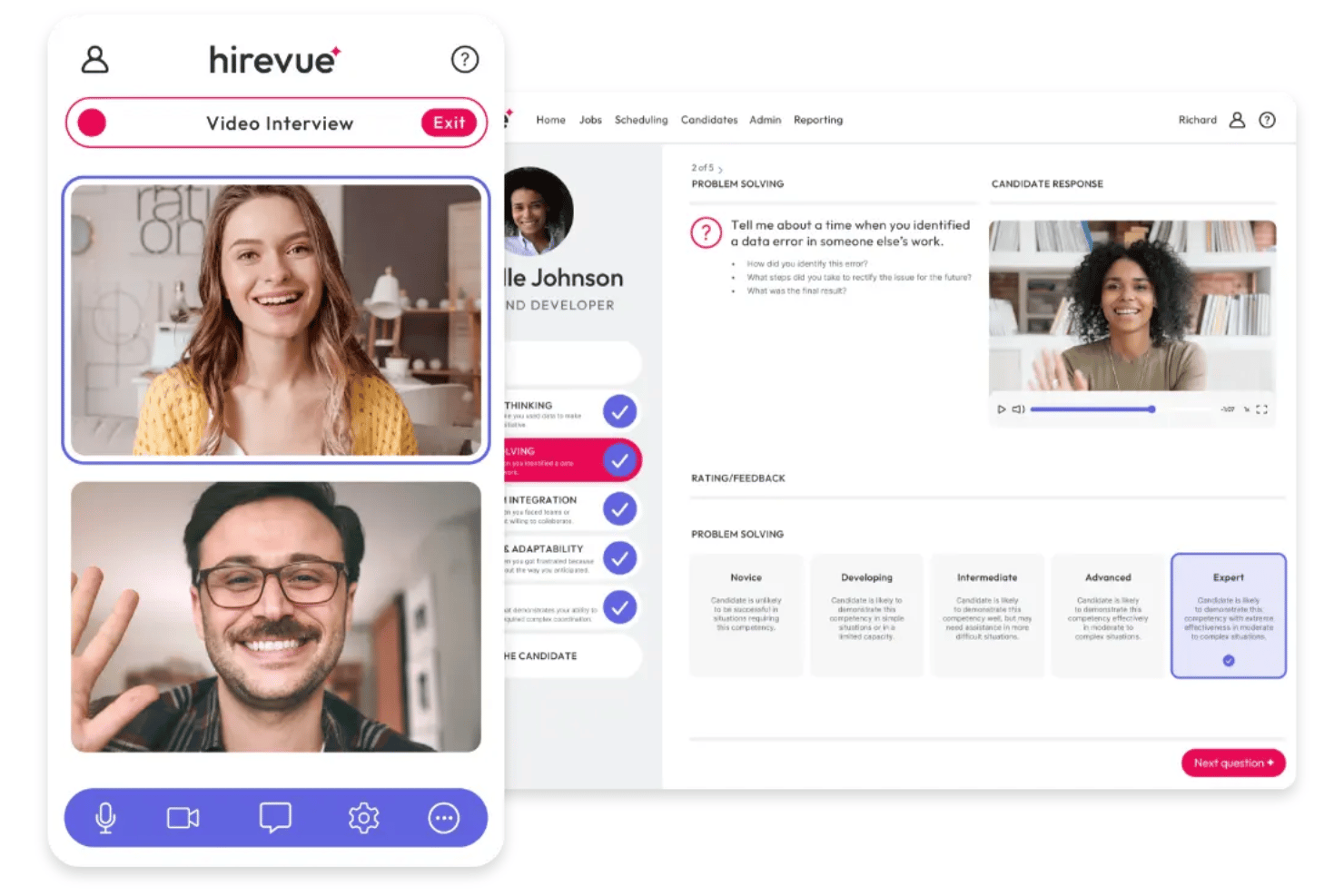
HireVue is an enterprise AI hiring platform built around video interviewing, structured candidate assessment, conversational AI prescreening, and automated interview scheduling.
Who Is HireVue Best For?
HireVue is built for enterprise talent acquisition teams that manage high-volume hiring across professional, hourly, campus, and technical roles.
Why I Picked HireVue
I picked HireVue as one of the best because its Interview Insights feature does something I haven't seen elsewhere: it uses AI to scan recorded interviews and surface the specific moments where a candidate best demonstrates a job-relevant skill. That means my team isn't scrubbing through full video recordings during high-volume hiring cycles. Paired with IO-psychologist-vetted structured scoring guides, every reviewer is evaluating candidates against consistent, validated criteria.
HireVue Key Features
- Game-based assessments: Candidates complete interactive job-relevant challenges to demonstrate essential skills and aptitudes.
- Talent Engagement Agent: An AI-driven recruiter guides candidates throughout their journey, from application to scheduling interviews.
- FedRAMP certification: The platform meets rigorous government security and compliance standards for data protection.
- ATS integration: HireVue syncs with leading applicant tracking systems to embed video and assessment workflows into existing hiring processes.
HireVue Integrations
HireVue offers native integrations with Workday, SAP, Oracle, SmartRecruiters, PageUp, Eightfold, Cornerstone, Avature, and more. An API is available for custom integrations.
Pros and Cons
Pros:
- Game-based assessments measure real workplace skills
- Structured scoring ensures consistent evaluations
- Interview Insights pinpoints job-relevant candidate moments
Cons:
- Advanced features require enterprise-scale commitment
- No AI-driven external candidate sourcing
Best for talent rediscovery and internal mobility
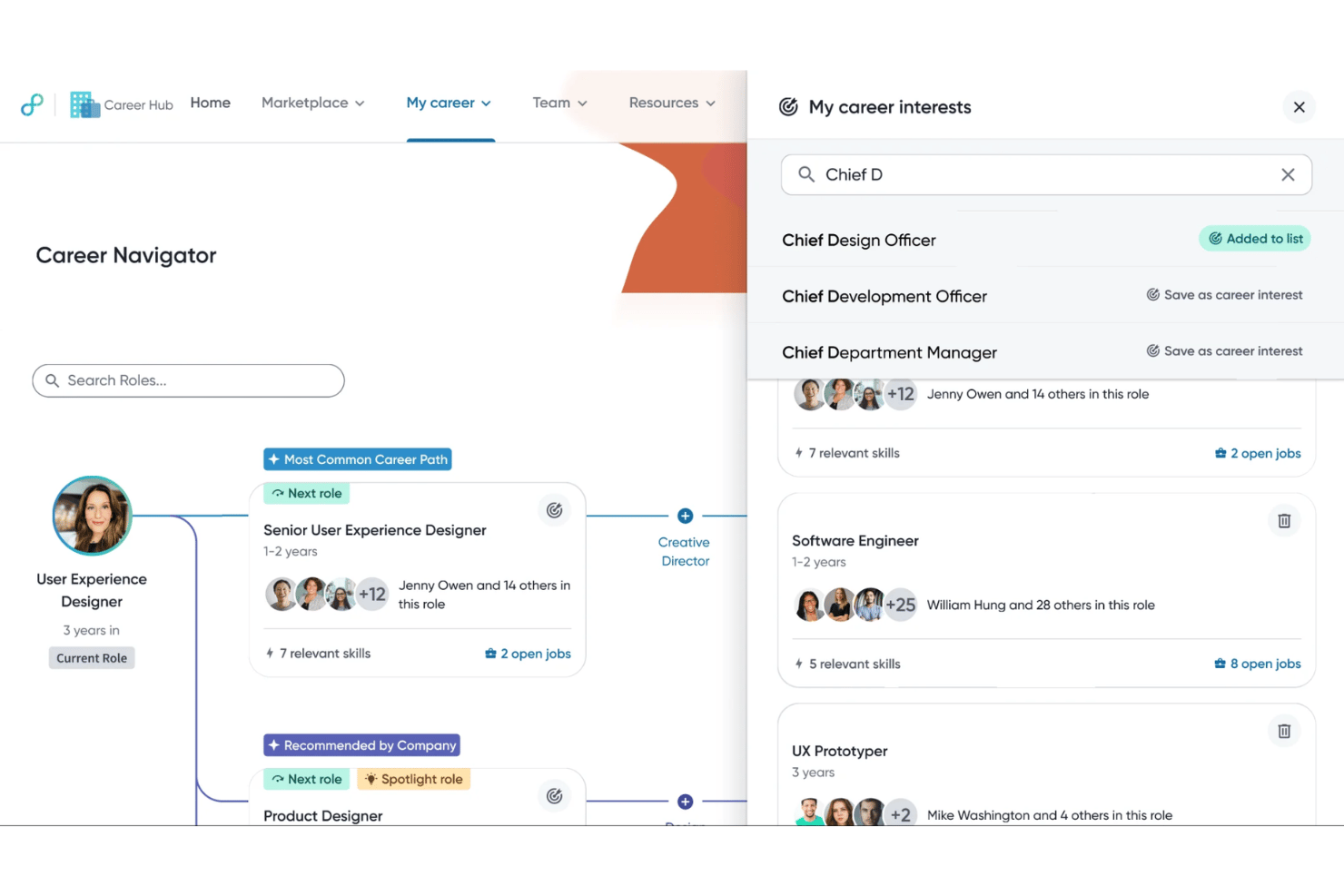
Eightfold AI is an enterprise talent intelligence platform that combines skills-graph-based candidate matching, AI sourcing, talent rediscovery, and an autonomous AI Interviewer across the full hiring lifecycle.
Who Is Eightfold AI Best For?
Eightfold AI is built for large enterprises with complex, high-volume hiring needs and existing HR tech stacks to integrate with.
Why I Picked Eightfold AI
Eightfold AI earns its spot on my shortlist because of how it handles talent rediscovery at enterprise scale. The skills graph automatically surfaces past applicants for new open roles, so recruiters aren't starting from scratch every time a position opens. I also like the Workforce Exchange, which maps current employees to internal opportunities based on inferred skills, not just job titles or tenure.
Eightfold AI Key Features
- Bias detection and auditing: Automated tools monitor for adverse impact and provide compliance-ready audit reports.
- Conversational AI recruiter: Virtual agents autonomously screen candidates, answer hiring FAQs, and schedule interviews.
- Predictive quality-of-hire analytics: Machine learning models analyze hiring signals to predict post-hire outcomes.
- Automated interview intelligence: Real-time transcription and structured scoring are generated from video or async interviews.
Eightfold AI Integrations
Eightfold AI offers native integrations with Oracle, SAP SuccessFactors, Salesforce, and Microsoft, with an API available for custom integrations.
Pros and Cons
Pros:
- Role-matching based on inferred and adjacent skills
- AI Interviewer supports 22+ languages natively
- Candidate rediscovery from large internal talent pools
Cons:
- Customization of dashboards and reports is restricted
- Predictive analytics export options are limited

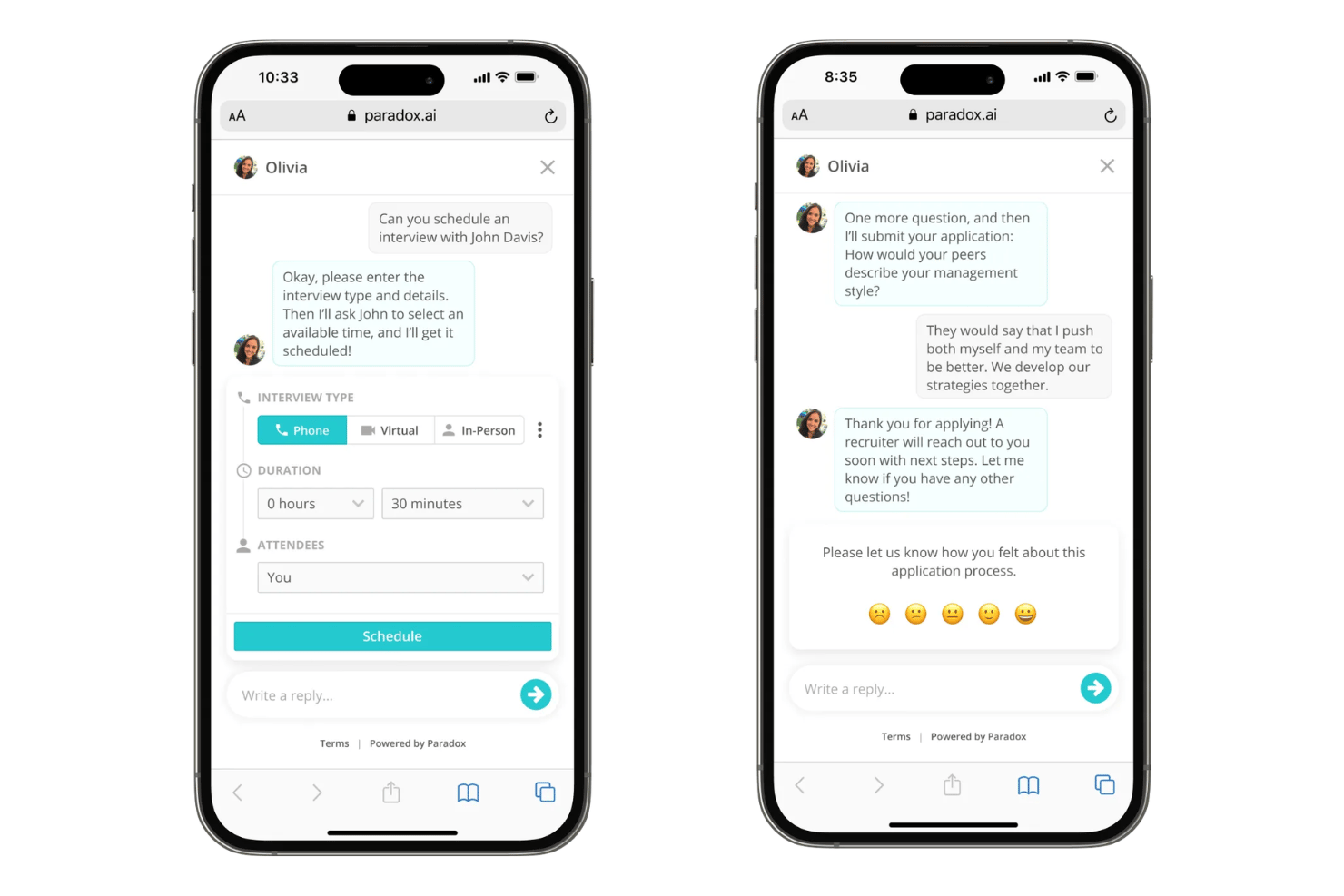
Paradox is a conversational AI recruiting platform that automates candidate screening, interview scheduling, and onboarding through an AI assistant that engages candidates via SMS, chat, and messaging apps like WhatsApp and Facebook Messenger.
Who Is Paradox Best For?
Paradox is a strong fit for enterprise organizations in retail, hospitality, healthcare, and manufacturing that hire frontline workers at high volume across multiple locations.
Why I Picked Paradox
I picked Paradox as one of the best because Olivia, its AI assistant, screens candidates through live conversational exchanges via SMS, WhatsApp, and Facebook Messenger rather than static forms. Olivia applies knockout questions 24/7 without any recruiter action required. I've also found the 100-plus language support genuinely useful: it means Olivia can screen candidates in their preferred language, right from the first touchpoint.
Paradox Key Features
- Conversational ATS: Offers a mobile-first applicant tracking system designed for high-volume frontline and hourly hiring needs.
- Dynamic interview scheduling: Automatically syncs with calendars and sends interview invites using SMS, WhatsApp, and other messaging platforms.
- Multilingual candidate communication: Supports candidate conversations in over 100 languages to reach global talent pools.
- Recruitment analytics dashboard: Tracks over 1,000 metrics and visualizes data with dashboards or exports to external BI tools.
Paradox Integrations
Paradox offers native integrations with Avature, Dayforce, Cornerstone, Oracle, Workday, UKG, Greenhouse, Infor, SmartRecruiters, and more. An API is available for custom integrations.
Pros and Cons
Pros:
- Automated interview scheduling for high-volume hiring
- Multilingual engagement across 100+ languages
- Live conversational screening via SMS and chat
Cons:
- No built-in bias detection or audit tools
- Limited AI resume parsing and ranking
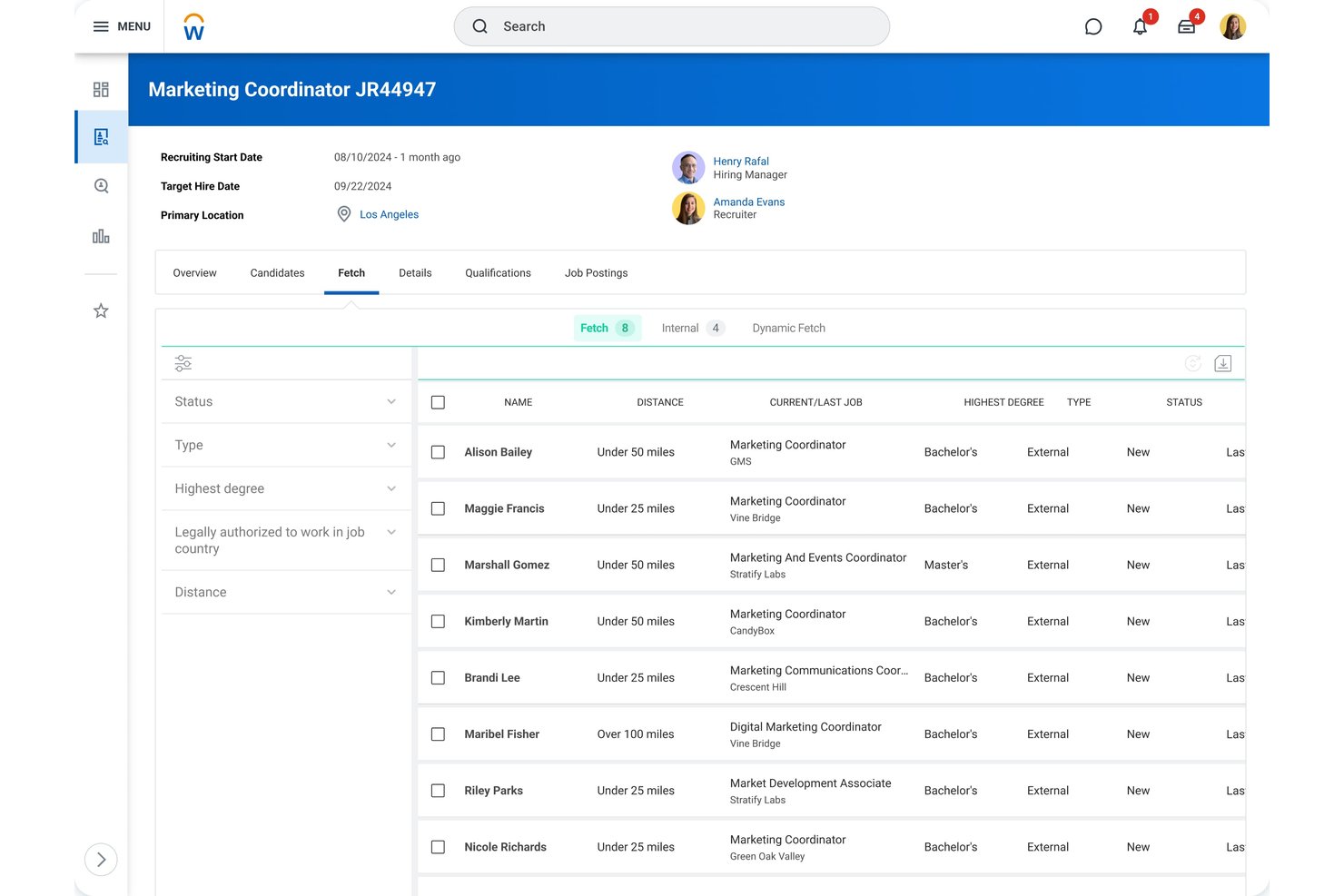
HiredScore is a Workday-native AI talent orchestration platform that combines AI-driven candidate prioritization, talent rediscovery, passive candidate sourcing, internal mobility matching, and recruiter workflow automation.
Who Is HiredScore (Workday) Best For?
HiredScore is built for enterprise talent acquisition teams running high-volume hiring inside a Workday HCM environment.
Why I Picked HiredScore (Workday)
I've included HiredScore in my top picks because its AI lives entirely inside Workday Recruiting, not bolted on top of it. The bidirectional integration means candidate grades (A through D), Dynamic Fetch sourcing results, and talent rediscovery from past applicants all surface directly in the recruiter's Workday workflow. I particularly like that hiring manager reminders and candidate profile updates push through Microsoft Teams without requiring anyone to leave their existing tools.
HiredScore (Workday) Key Features
- Responsible AI compliance controls: Built-in bias auditing, explainable model outputs, and adherence to global AI hiring regulations.
- Talent rediscovery engine: Surfaces qualified candidates from past applicants, CRM leads, and internal databases for open roles.
- Skills-based candidate ranking: Uses AI to extract and compare relevant skills from resumes and job descriptions for objective candidate scoring.
- Internal mobility agent: Matches existing employees to open positions using real-time data and alerts, supporting internal career growth.
HiredScore (Workday) Integrations
HiredScore offers native integrations with Workday Recruiting, DailyPay, CloudRock, CrossVue, Kainos, Strada, Microsoft Teams, and more, and provides an API for custom integrations.
Pros and Cons
Pros:
- Bias auditing tools meet global compliance needs
- Surfaces top-matched candidates from existing databases
- Candidate scoring is fully explainable by AI
Cons:
- Requires Workday Recruiting to access full features
- No AI interview analysis capabilities
Other AI Hiring Software
Here are some additional AI hiring software options that didn’t make it onto my shortlist, but are still worth checking out:
- iCIMS Talent Cloud
For scalable hiring analytics and compliance
- hireEZ
For external talent pipeline expansion
- Greenhouse
For integrated structured hiring workflows
- Findem
For attribute-driven talent search
- Workable
For rapid job posting across global boards
- SmartRecruiters
For collaborative multi-stakeholder hiring
- CVViZ
For AI-driven shortlisting with ranking
- Manatal
For LinkedIn and social profile enrichment
- Gem
For passive talent CRM and outreach tracking
- Ashby
For unified analytics and reporting


How I Evaluate AI Hiring Software
Every tool here has to go beyond keyword filters and deliver real AI value—like surfacing hidden candidates or scoring for role fit. I evaluate in two layers: the core functionality a platform needs to qualify, and the differentiating factors that set one vendor apart.
Core Functionality (Table Stakes For This List)
When I'm selecting tools for my list, I rank each one on a scale from 0 (does not offer the functionality) to 5 (excels in this area) for each core functionality listed below. Then, I calculate the tool's total score into a percentage. Each tool needs to achieve a minimum total score of 65% to be considered for inclusion.
- AI Resume Screening: I check whether the tool can parse and rank applicants against job criteria—not just match keywords, but extract skills and explain why a candidate scored high or low.
- Intelligent Candidate Matching: Good matching goes beyond job titles. I look for AI that factors in career trajectory, adjacent skills, and role fit across departments.
- AI Sourcing: I evaluate how well a platform surfaces passive candidates from both internal talent pools and external channels, including candidate rediscovery from past applicants.
- Automated Interview Tools: Whether it's chatbot pre-screening or video analysis, I look for tools that actively reduce scheduling back-and-forth and add structure to evaluations.
- Predictive Hiring Analytics: Dashboards with funnel metrics aren't enough. I look for AI-generated insights on pipeline health, quality-of-hire indicators, and forecasting.
- Bias Mitigation Controls: I evaluate whether the platform offers anonymization, adverse impact monitoring, or audit trails that help teams meet evolving hiring regulations.
Once I have a list of tools that meet the criteria, I consider what sets each platform apart.
Differentiating Factors (What Sets Vendors Apart)
Here's how I compare and contrast different vendors:
Standout Features
Skills-based matching is a big differentiator—I look for AI that infers adjacent skills from a candidate's experience rather than relying on exact job title matches. Predictive quality-of-hire models also stand out when they correlate hiring signals with retention and ramp time, giving recruiters data to refine future scoring. I evaluate bias detection and auditing capabilities too, especially platforms that monitor scoring patterns for adverse impact and generate compliance-ready audit reports.
Beyond Features
Integration depth matters a lot here. I look for native, bi-directional connections with platforms like Workday, Greenhouse, or iCIMS so recruiters can stay in their existing workflows. Compliance is another key factor—I check whether a vendor offers third-party bias audits and transparent model documentation to support evolving AI hiring regulations. Data security rounds things out, where I evaluate certifications like SOC 2 Type II or ISO 27001 alongside configurable retention policies for candidate data.
How to Choose AI Hiring Software
It’s easy to get bogged down in long feature lists and complex pricing structures. To help you stay focused as you work through your unique software selection process, here’s a checklist of factors to keep in mind:
| Factor | What to Consider |
|---|---|
| Scalability | Will the software handle your current and future hiring volumes, including seasonal spikes? Ask how it performs with thousands of active candidates at once. |
| Integrations | Does it connect bi-directionally with your ATS, HRIS, and scheduling tools? Check for native integrations to reduce manual data transfers and workflow gaps. |
| Customizability | Can you easily adapt automations, job templates, and screening rules to fit your processes? Look for vendor flexibility—not just configuration limits. |
| Ease of use | Will recruiters, hiring managers, and candidates find the interface intuitive? Ask about required training, day-to-day friction, and feedback from real users. |
| Implementation and onboarding | How long will setup take, and what resources are needed on your end? Clarify vendor support, project timelines, and any required historical data uploads. |
| Cost | Is pricing transparent and predictable based on your hiring scale? Watch for limits on users, jobs, and candidate data volumes that may increase your spend. |
| Security safeguards | What data protections, certifications, and access controls are in place? Confirm GDPR/CCPA compliance and industry certifications like SOC 2 or ISO 27001. |
| Compliance requirements | Will the platform help you adhere to local and global AI hiring regulations? Ask about bias audit options, consent workflows, and available documentation. |
What Is AI Hiring Software?
AI hiring software is a category of platforms that use artificial intelligence to automate and improve key steps in the recruitment process. These tools help teams screen resumes, match candidates to open roles, and identify talent using machine learning—not just keyword searches—to save time and support more objective, data-driven hiring decisions.
Features
When selecting AI hiring software, keep an eye out for the following key features:
- AI resume screening: Uses machine learning to automatically parse, score, and rank resumes against job requirements, helping you identify top candidates quickly.
- Intelligent candidate matching: Matches candidates to open roles based on skillsets, experience, and potential role fit—not just keywords or job titles.
- Automated candidate sourcing: Actively searches internal and external databases to surface qualified passive and active talent you might otherwise miss.
- Bias mitigation controls: Incorporates anonymization, audit logs, and monitoring to reduce bias in candidate evaluation and support compliant, fair hiring.
- Predictive hiring analytics: Generates insights and forecasts around candidate quality, hiring pipelines, and possible recruitment outcomes using AI-driven models.
- Conversational AI recruiter: Engages candidates via chatbot, answering questions, screening for basic fit, and scheduling interviews around the clock.
- Automated interview intelligence: Analyzes video or audio interviews to provide real-time transcriptions, structured scoring, and actionable coaching tips for interviewers.
- Integration with ATS and HRIS: Smoothly connects to existing recruitment, HR, and scheduling systems to reduce manual data entry and maintain workflow continuity.
- Compliance and audit support: Tracks candidate consent, provides bias audit tools, and generates documentation to support various legal and regulatory hiring requirements.
- Customizable workflows: Lets teams tailor automation rules, scoring metrics, and communications to match unique hiring processes and organizational needs.
Benefits
Implementing AI hiring software provides several benefits for your team and your business. Here are a few you can look forward to:
- Faster candidate screening: Automated resume parsing and candidate ranking help recruiters quickly identify the most qualified applicants without the bottleneck of manual review.
- Reduced hiring bias: Bias mitigation tools, including anonymization and audit trails, support fairer decision-making and increased compliance with evolving hiring regulations.
- Improved talent matching: AI-driven matching considers skills, experience, and role fit—helping teams connect with candidates who might otherwise be overlooked.
- Greater workflow efficiency: Integrations with ATS and HRIS, along with automated candidate outreach and scheduling, cut repetitive tasks and free up time for strategic work.
- Data-driven hiring decisions: Predictive analytics and quality-of-hire insights allow HR teams to make more confident, evidence-based choices about who to hire.
- Scalable recruitment processes: Automated sourcing and high-volume candidate management support consistent hiring standards, even as hiring needs grow or spike seasonally.
- Improved candidate experience: Conversational chatbots provide prompt responses and scheduling, keeping candidates informed and engaged throughout the process.
Costs and Pricing
Selecting ai hiring software requires an understanding of the various pricing models and plans available. Costs vary based on features, team size, add-ons, and more. The table below summarizes common plans, their average prices, and typical features included in ai hiring software solutions:
Plan Comparison Table for AI Hiring Software
| Plan Type | Average Price | Common Features |
|---|---|---|
| Free Plan | $0 | Basic resume parsing, limited candidate matching, basic analytics, single-user account, and email support. |
| Personal Plan | $20-$50/user/month | AI resume screening, limited automated sourcing, basic integration options, single job posting, and simple reporting tools. |
| Business Plan | $60-$120/user/month | Multi-role matching, AI sourcing, predictive analytics, bias mitigation tools, ATS/HRIS integrations, and role-based access. |
| Enterprise Plan | $150-$300/user/month | Advanced custom workflows, automated interview intelligence, global compliance tools, dedicated support, and security controls. |
FAQs
Here are some answers to common questions about ai hiring software:
How does AI hiring software reduce bias in recruitment?
AI hiring software reduces bias by anonymizing candidate data, tracking scoring patterns, and offering bias audit reports. This helps teams identify and address potential adverse impact across candidate groups and stay compliant with regulations.
Can AI hiring software integrate with our existing ATS?
Yes, most AI hiring software offers bi-directional integrations with popular ATS platforms. This lets you connect workflows, sync candidate data, and avoid manual data transfers.
Is AI hiring software suitable for high-volume hiring?
Yes, many solutions are designed to handle thousands of applicants, automate communications, and manage bulk screening. This is particularly useful for seasonal hiring or organizations with large candidate pipelines.
What should I consider when implementing AI hiring software?
Consider your team’s technical readiness, how easily the tool integrates with your current systems, and what onboarding resources are available. Clarify the level of support offered during setup and the time needed to train your team.
Will using AI hiring software affect the candidate experience?
AI hiring software often improves candidate experience by providing faster feedback, automated scheduling, and 24/7 support via chatbots. Responsive, transparent processes keep candidates informed and engaged.