

10 Best AI Learning and Development Software in 2026

Best AI Learning and Development Software Shortlist


AI learning and development software uses artificial intelligence to personalize, automate, and enhance training, skill assessments, and upskilling for your workforce. If you’re searching for these tools, you want to unlock smarter, faster ways to close skill gaps, adapt to change, and keep teams engaged in 2026. I know you face high expectations to deliver results with limited time and headcount—that’s exactly why getting the right platform matters.
In this guide, you’ll find trusted recommendations, helpful context, and direct insights to help you pick the best AI-powered learning platform for your needs.
Why Trust Our Software Recommendations
Our team has been testing and reviewing software since 2012. As HR experts ourselves, we know how difficult—and important—it is to choose the right software.
For this guide, we evaluated tools using hands-on testing and independent research, scoring tools using our selection criteria. We also draw on insights from industry thought leaders and practicing HR experts.
Our reviews reflect our human editorial judgment, not a sales pitch.
Expert reviewers:
AI Learning and Development Software Comparison Table
This comparison table highlights pricing for top AI learning and development software selections:
| Tool | Best For | Trial Info | Price | ||
|---|---|---|---|---|---|
| 1 | Best for fast AI-assisted course launches | Free plan + free demo available | From $119/month (billed annually) | Website | |
| 2 | Best for integrated PowerPoint course creation | Free trial available | From $6.91/user/month (billed annually) | Website | |
| 3 | Best for prebuilt HR and CRM integrations | Free demo available | Pricing upon request | Website | |
| 4 | Best for collaborative peer-driven course creation | 30-day free trial + free demo available | From $8/user/month | Website | |
| 5 | Best for centralized multi-audience training | Free demo available | Pricing upon request | Website | |
| 6 | Best for creating multi-language training videos | Free plan + free demo available | From $14/month (billed annually) | Website | |
| 7 | Best for unifying skills data and learning | Free demo available | Pricing upon request | Website | |
| 8 | Best for personalized enterprise content delivery | Free plan available | Pricing upon request | Website | |
| 9 | Best for verifying workforce skills with AI | Free demo available | Pricing upon request | Website | |
| 10 | Best for combining intelligence data | Free demo available | Pricing upon request | Website |


Best AI Learning and Development Software Reviews
Below are my detailed summaries of the best AI learning and development software that made it onto my shortlist. My reviews offer a detailed look at the features, best use cases, and integrations of each platform to help you find the best one for you.

Best for fast AI-assisted course launches
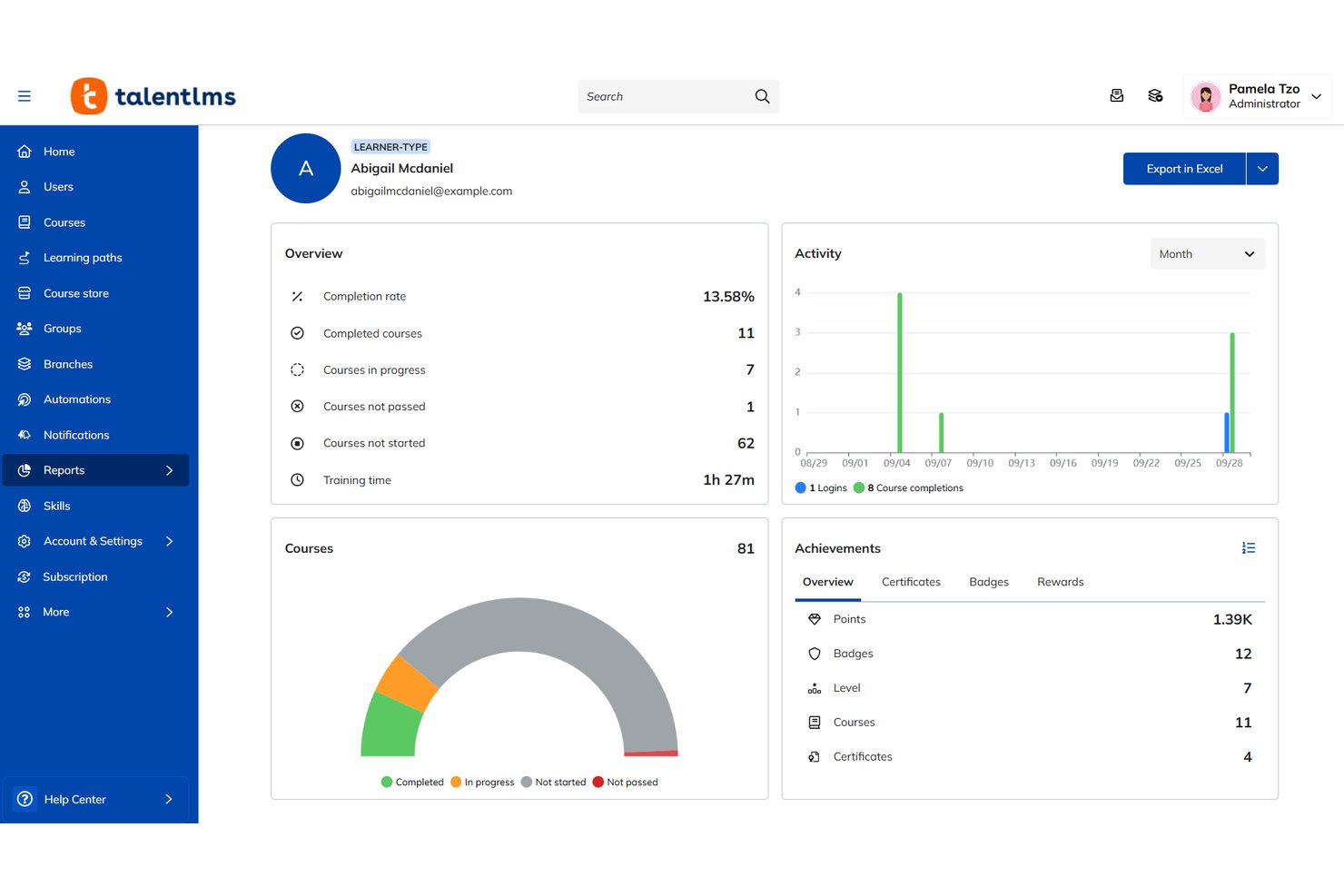
TalentLMS is an AI-assisted learning management system that combines generative course authoring, adaptive learning paths, skills tracking, and a built-in content library for employee, partner, and customer training.
Who Is TalentLMS Best For?
TalentLMS is a strong fit for small to mid-sized businesses that need to launch structured training programs quickly without a large L&D team behind them.
Why I Picked TalentLMS
TalentLMS earns its spot on my shortlist because of TalentCraft, its built-in AI authoring tool that generates full course content, quizzes, and images from a simple prompt. I particularly like the AI course translation feature, which pushes content into 40+ languages without a separate localization workflow. The AI test creation tool also converts existing training material into assessments in just a few clicks.
TalentLMS Key Features
- AI Coach: An interactive chatbot that offers learners instant, personalized guidance and answers about training material.
- Branch management: Enable separate training portals for different teams, clients, or brands within one account.
- Multilingual course translation: Instantly translate full courses into over 40 languages to serve global teams.
- Custom reporting: Build, export, and schedule custom completion, engagement, and skills development reports.
TalentLMS Integrations
TalentLMS offers native integrations with BambooHR, ADP Workforce Now, Sage People, Zoom, Salesforce, Slack, and GoToMeeting. An API is available for custom integrations.
Pros and Cons
Pros:
- Supports training for employees, partners, and customers
- Built-in skills gap tracking across teams
- TalentCraft generates full courses from prompts
Cons:
- Reporting customization is limited
- AI personalization is less advanced
New Product Updates from TalentLMS
TalentLMS Adds Learning Paths, AI Video, and Learner Experience Updates
TalentLMS introduced updates across learning management, content creation, and learner experience, including Learning Paths for Groups, AI video generation in TalentCraft, video bookmarking, and expanded administration tools. For more information, visit TalentLMS’s official site.

Best for integrated PowerPoint course creation
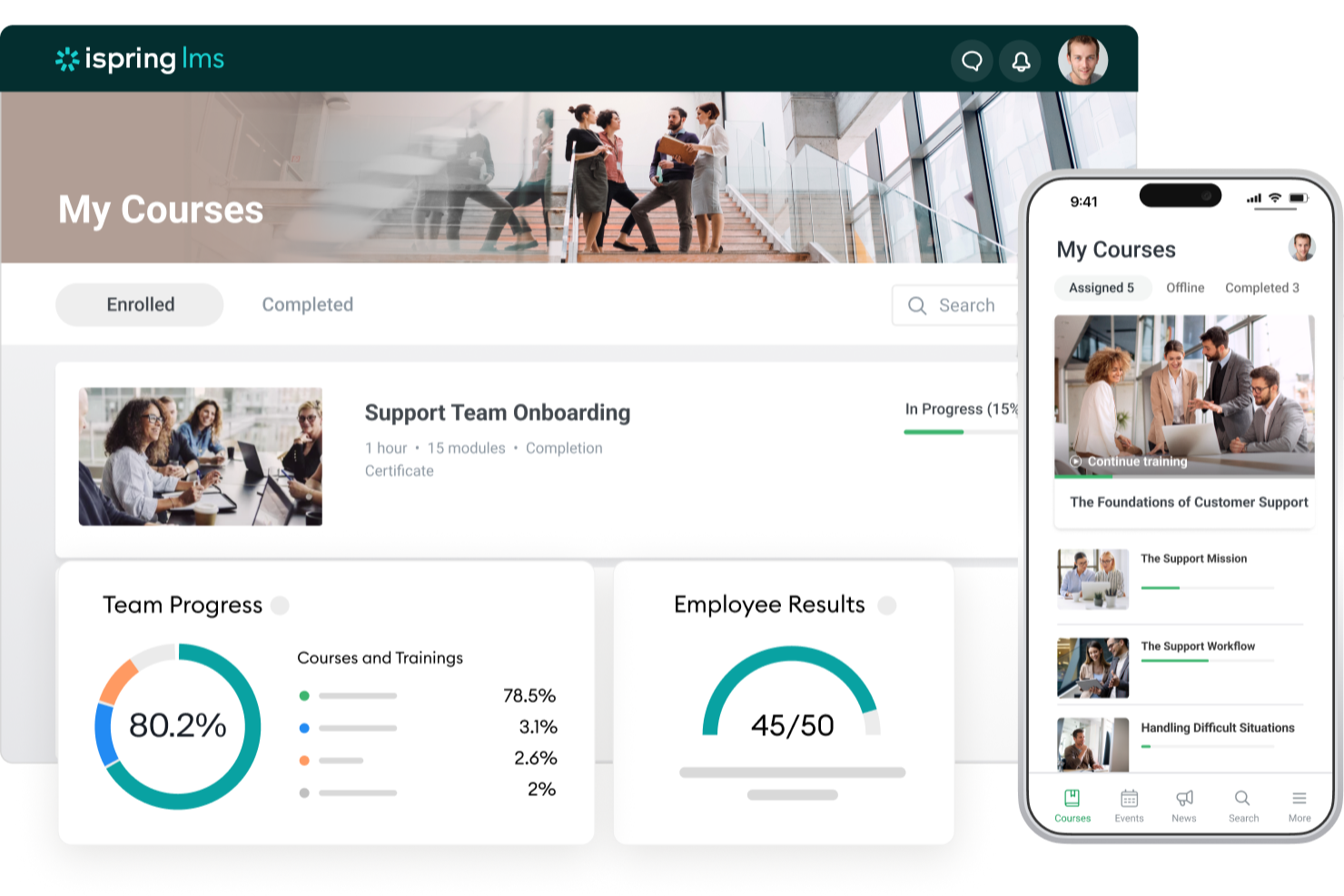
iSpring LMS is an AI-powered learning management system that covers the full employee development lifecycle, from onboarding and compliance training to performance assessment and individual development planning.
Who Is iSpring LMS Best For?
iSpring LMS is a strong fit for mid-sized organizations with dedicated L&D teams who need a structured, scalable platform for employee training programs.
Why I Picked iSpring LMS
iSpring LMS is one of my top picks because I love how tightly it connects with PowerPoint through the iSpring Suite add-in. I can build full courses, quizzes, and branching dialogue simulations without ever leaving the PowerPoint interface, then publish directly to the LMS in one click. The built-in AI assistant also lets me generate course text and quiz questions from within that same authoring environment, which keeps the whole creation process in one place.
iSpring LMS Key Features
- AI course builder: Upload existing documents or describe a topic, and AI generates a full course structure with a draft and knowledge checks.
- Learning paths: Assign sequential or role-specific training programs that automatically unlock the next course when the previous one is complete.
- Gamification: Motivate learners with points, badges, and leaderboards tied to course completions and quiz performance.
- Mobile learning app: Learners can access and complete courses on iOS and Android devices, including offline.
iSpring LMS Integrations
iSpring LMS offers native integrations with Zoom, Microsoft Teams, Google Meet, BambooHR, OrangeHRM, Salesforce, Microsoft Outlook, Microsoft Entra ID, Shopify, Udemy, Go1, LinkedIn Learning, and GoodHabitz. It also connects with Albato for workflow automation and provides a REST API for custom integrations.
Pros and Cons
Pros:
- On-the-job training observation checklists included
- Offline mobile learning on iOS and Android
- Built-in PowerPoint course authoring via iSpring Suite
Cons:
- Limited portal design and branding flexibility
- Small library of prebuilt training courses
New Product Updates from iSpring LMS

iSpring LMS Adds Multiple Observations to OJT Sessions
iSpring LMS now lets managers log multiple observations within one OJT session, grouping visits and auto-generating summary stats like averages, criterion results, and comparisons. For more information, visit iSpring LMS's official site.

Absorb
Best for prebuilt HR and CRM integrations
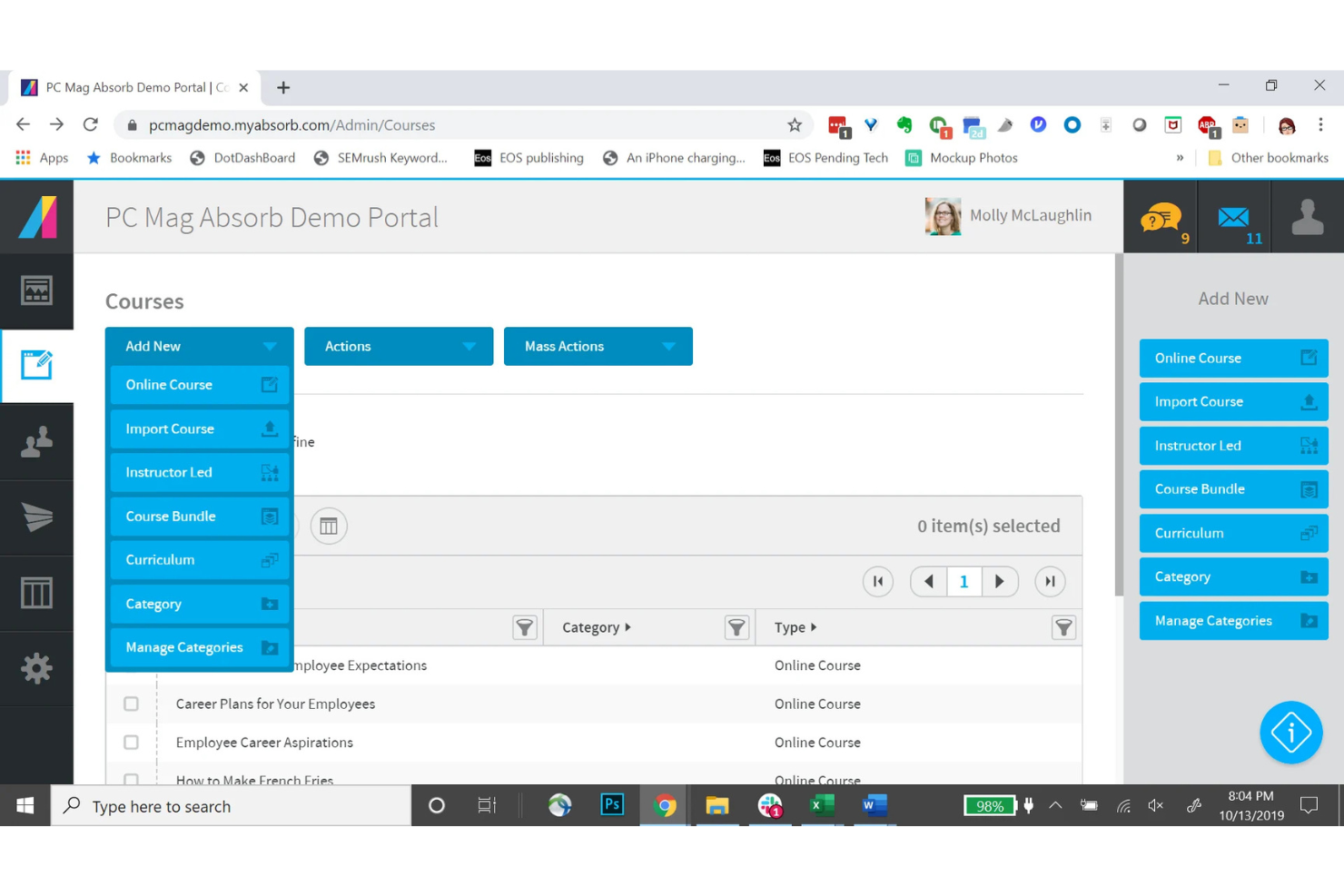
Absorb is an AI-powered learning management system built for enterprise teams that need to manage onboarding, compliance, upskilling, customer education, and partner training from a single platform.
Who Is Absorb Best For?
Absorb is a strong fit for mid-to-large organizations that already run established HR and CRM tech stacks and need an LMS that connects directly with those systems.
Why I Picked Absorb
I've included Absorb in my top picks because of how well it handles the connection between learning and existing business systems. The prebuilt connectors for HCM platforms like ADP, Workday, SAP SuccessFactors, UKG Pro, and Dayforce mean learner profiles sync automatically, without manual data entry.
On the CRM side, the Salesforce and HubSpot connectors let you deliver learning content directly within those tools and tie training activity to customer lifecycle data.
Absorb Key Features
- Absorb Aura: An AI layer that surfaces personalized course recommendations and flags skill gaps based on individual learner activity.
- Observational checklists: Lets managers verify and log hands-on skill demonstrations directly within the platform, alongside online training records.
- Absorb Pinpoint: An AI-powered search tool that lets learners jump to the exact moment in a video where a topic is covered.
- eCommerce portal: A built-in module for selling courses externally, including discount codes, tiered pricing, and tax configuration.
Absorb Integrations
Absorb offers dozens of prebuilt connectors, including ADP, Workday, SAP SuccessFactors, UKG Pro, Dayforce, BambooHR, Salesforce, HubSpot, Zoom, and Google Workspace, with additional connectors for tools like Zendesk Sell, ServiceNow, Marketo, and Intercom. RESTful API and webhooks are available for custom integrations.
Pros and Cons
Pros:
- Mobile app supports offline learning
- Multi-portal branding for different audiences
- AI content creator builds courses from PDFs
Cons:
- Imported PowerPoint content often breaks
- Reporting needs extra tools for flexibility
New Product Updates from Absorb
Absorb Aura Adds Claude and ChatGPT Connections
Absorb Aura now connects to Claude or ChatGPT via MCP, enabling users to ask questions about their learning and the LMS directly inside the AI tool after a simple setup. For more information, visit Absorb's official site.
 .
.
Best for collaborative peer-driven course creation
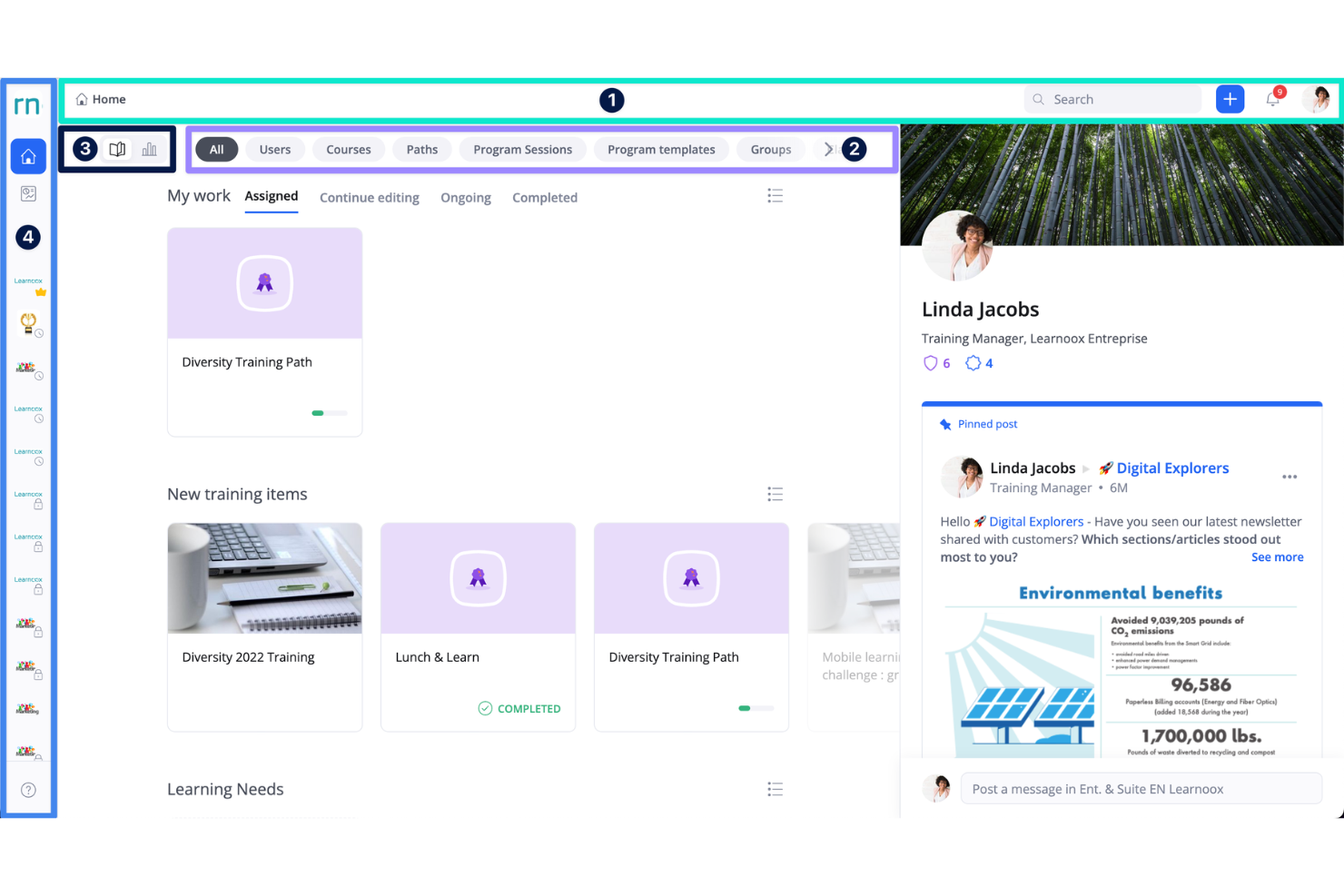
360Learning is an AI-powered LMS that combines course authoring, learner engagement tools, and in-platform collaboration features to let subject matter experts build and deliver training from within the platform.
Who Is 360Learning Best For?
360Learning is a natural fit for mid-sized to large organizations that rely on internal subject matter experts and collaborative learning to produce and maintain training content at scale.
Why I Picked 360Learning
I've included 360Learning in my top picks because its approach to course creation is genuinely different from other LMS platforms. Instead of keeping content creation locked inside the L&D team, any subject matter expert can author and publish a corporate training course directly, with peer reactions and discussion built into every lesson.
I also like the learning needs feature, where employees flag knowledge gaps and internal experts respond by building targeted courses, which keeps training tied to real, declared needs.
360Learning Key Features
- AI course recommendations: Surfaces relevant content to each learner based on their role, activity, and skill gaps.
- Automated enrollment rules: Trigger course assignments and program enrollments based on learner attributes like department or job title.
- Skills tracking: Map courses to specific skills and track progress across your workforce over time.
- Custom reporting dashboards: Build and filter reports on completion rates, scores, and learner engagement across programs.
360Learning Integrations
360Learning offers 85+ integrations through its partner marketplace, including native connections with BambooHR, Workday, SAP SuccessFactors, Personio, HiBob, Salesforce, Slack, Microsoft Teams, Zoom, and Google Drive. Content library integrations include LinkedIn Learning, Coursera, Udemy Business, and Pluralsight. An API is available for custom integrations, and the platform also connects with Snowflake for BI and data analysis.
Pros and Cons
Pros:
- AI auto-suggests quizzes from uploaded content
- Built-in discussion forums on every lesson
- Subject matter experts author courses without prior eLearning experience
Cons:
- Inactivity timeout resets learner progress mid-course
- Advanced branding and reporting customization limited
Best for centralized multi-audience training
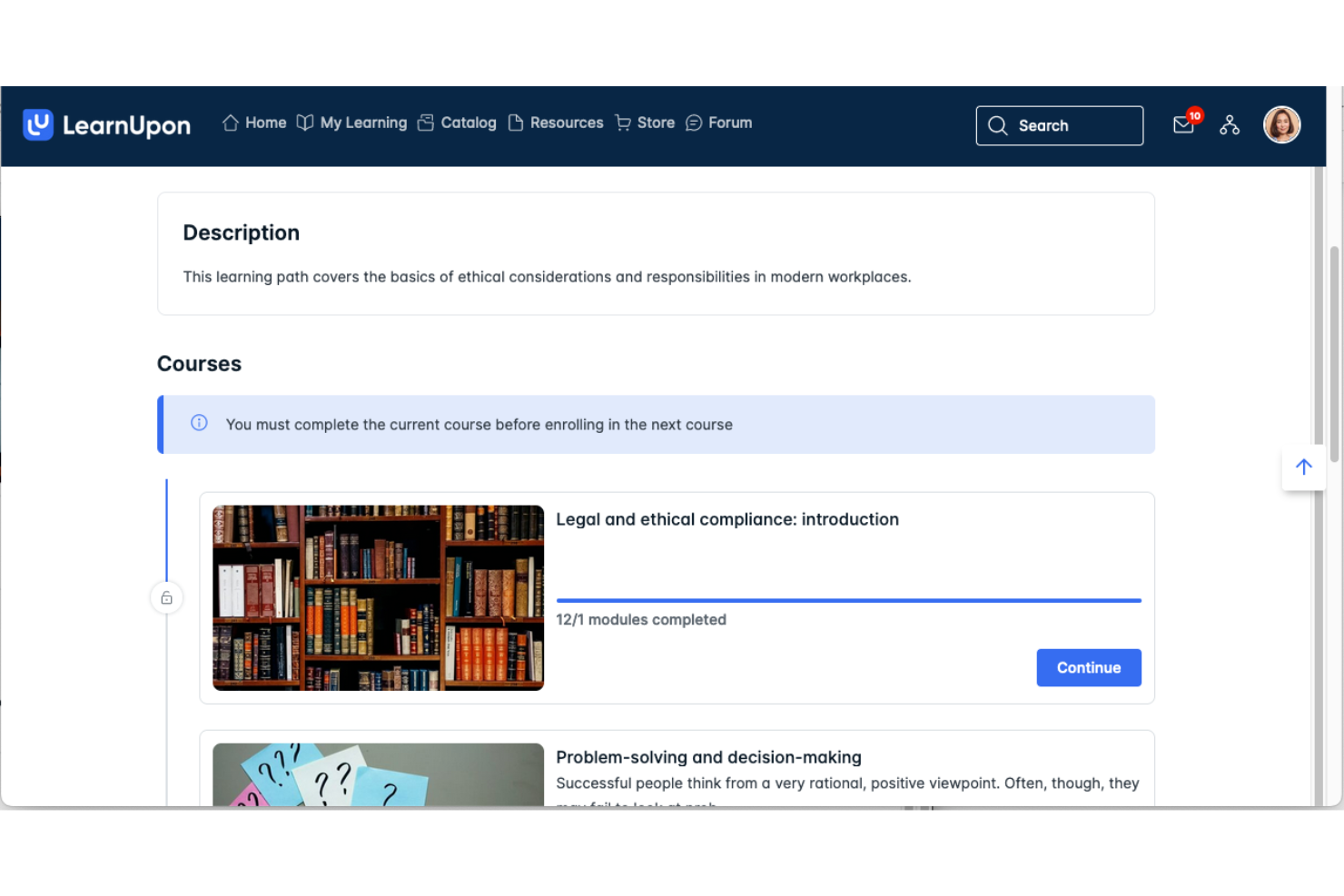
LearnUpon is a cloud-based LMS that lets organizations build, deliver, and manage structured training programs across employees, partners, and customers from a single platform.
Who Is LearnUpon Best For?
LearnUpon is a strong fit for mid-to-large organizations that need to run separate, branded training programs for internal teams, channel partners, and customers simultaneously.
Why I Picked LearnUpon
I picked LearnUpon as one of the best because its portal feature is genuinely one of a kind. You can spin up separate, fully branded training environments for employees, partners, and customers, all managed from a single admin account. Each portal gets its own URL, color scheme, and content library, so a reseller sees a completely different experience than an internal hire.
I also like that courses can be shared or licensed across portals, so you're not rebuilding content from scratch every time you add an audience.
LearnUpon Key Features
- Learning journeys: Automate course enrollment using if/then logic and user data, routing learners to role- or skill-specific content without manual admin work
- Skills library: Build a centralized skills catalog linked to roles, proficiency levels, and courses, with automatic updates when learners complete relevant training
- Create+: An AI content authoring tool that generates course content from existing materials, significantly reducing the time to build new training
- Scheduled reporting: Export and auto-deliver reports on course completions, exam results, and training histories via Excel or PDF on a set schedule
LearnUpon Integrations
LearnUpon offers native integrations with Salesforce, HubSpot, BambooHR, ADP Workforce Now, SAP SuccessFactors, Dayforce, Slack, Zoom, Microsoft Teams, and LinkedIn Learning, among others, spanning HRIS, CRM, content, ecommerce, and access management categories. It also connects with Zapier and provides a REST API with webhooks for custom integrations.
Pros and Cons
Pros:
- Supports 20+ languages for global teams
- Dedicated customer success manager included
- Branded multi-portal setup for distinct audiences
Cons:
- Reporting filters need more flexibility
- Native content authoring lacks interactivity

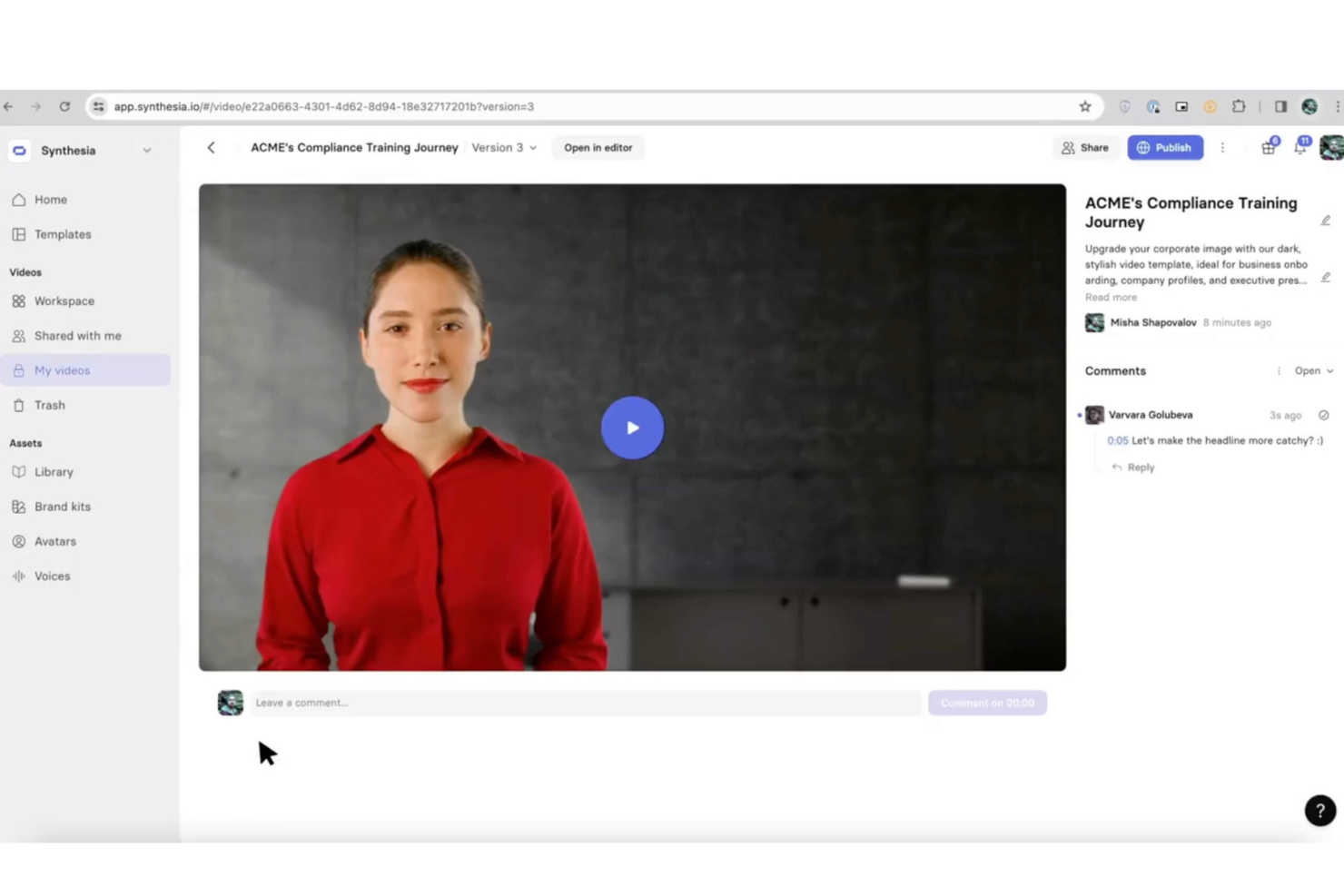
Synthesia is an AI video creation platform that lets you build professional training videos using AI avatars, text-to-speech voiceovers, and screen recordings without cameras, actors, or studios.
Who Is Synthesia Best For?
Synthesia is a strong fit for L&D teams at global companies that need to produce and localize training video content at scale without video production resources.
Why I Picked Synthesia
I picked Synthesia as one of the best because its video translation feature is unlike anything else I've seen in this space. You can produce a training video once and translate it into 140+ languages, with the AI avatar's lips automatically re-syncing to each new language.
I also like the custom avatar feature, where you can clone a real presenter's likeness, so localized videos still feel on-brand and personal rather than generic.
Synthesia Key Features
- Text-to-video generation: Type or paste a script, and Synthesia builds a complete video with an AI avatar presenting your content.
- Pre-built video templates: Choose from a library of templates designed for training formats like onboarding, compliance, and tutorials.
- Screen recording: Capture software walkthroughs directly in Synthesia and embed them alongside avatar-led narration.
- SCORM export: Export finished videos as SCORM packages for direct upload into your LMS.
Synthesia Integrations
Synthesia offers 50+ integrations, primarily through embed support with LMS and content platforms like 360Learning, Docebo, Moodle, SAP Litmos, TalentLMS, Articulate 360, Thinkific, and Thought Industries, plus tools like HubSpot, Notion, and WordPress. It also connects with Make and Zapier, and provides an API for custom integrations.
Pros and Cons
Pros:
- Upload scripts via PDF, Word, or text files
- Text-to-video workflow produces videos in minutes
- Supports 140+ languages and accents
Cons:
- Video minute caps require purchasing add-ons
- Avatar gestures can appear stiff in longer clips

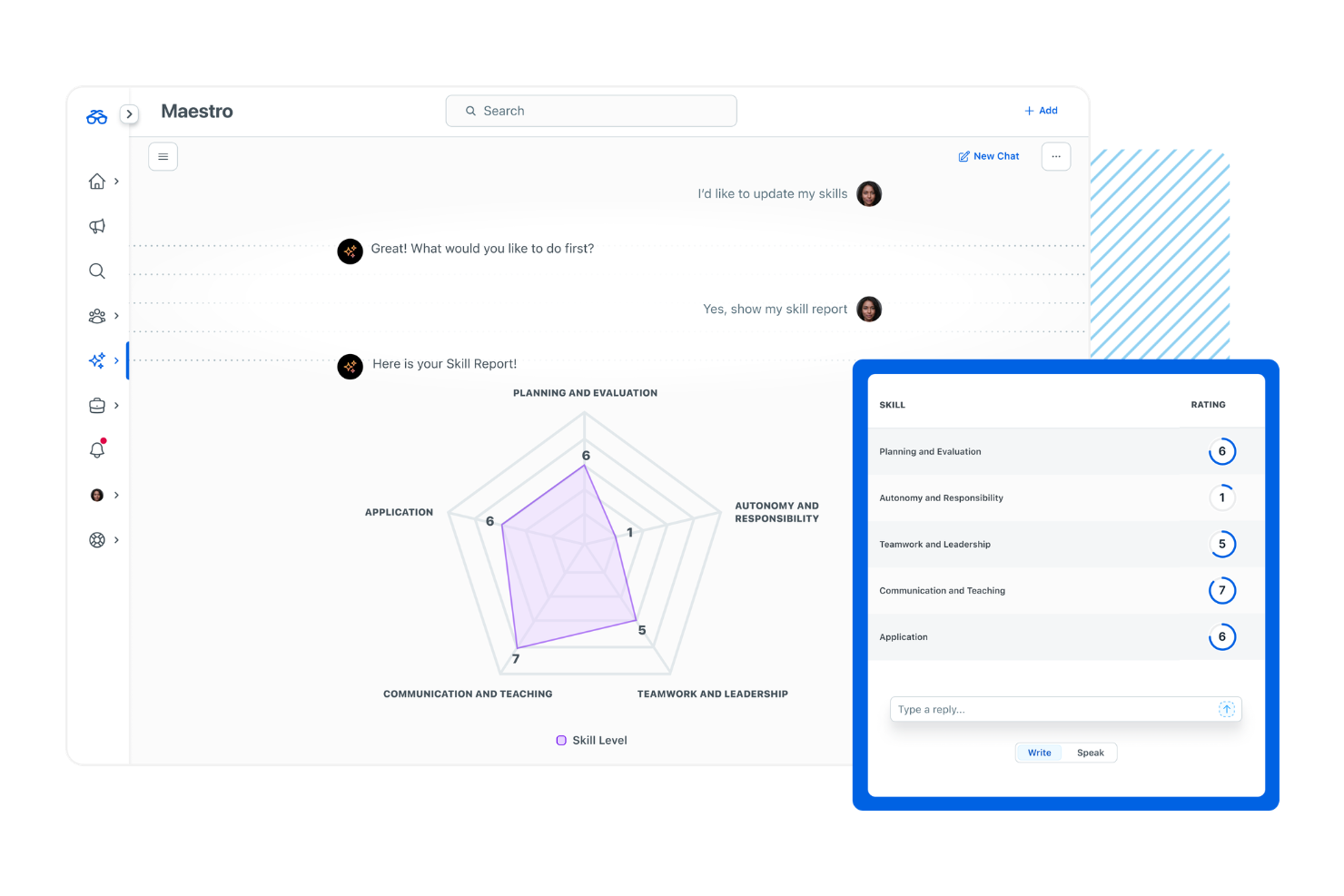
Degreed is an AI-powered learning experience platform (LXP) built around skills intelligence, letting organizations aggregate content from internal and external sources, map it to skill taxonomies, and track workforce-wide skill development over time.
Who Is Degreed Best For?
Degreed is a strong fit for enterprise L&D and talent teams that need to connect learning activity to workforce skills planning at scale.
Why I Picked Degreed
Degreed earns its spot on my shortlist because no other platform ties learning activity to skills data as tightly. I like that every article, course, or video a learner completes gets mapped back to specific skills in a centralized skill graph, so my team can see real workforce-wide skill coverage at a glance. The skill gap analysis pulls from declared skills, manager assessments, and learning history together, giving a much fuller picture than self-reported data alone.
Degreed Key Features
- Pathway builder: Create structured learning journeys by sequencing course outlines and content from multiple sources into a single assigned path.
- AI content recommendations: Surfaces relevant articles, videos, and courses through automated curation based on each learner's skills profile and activity history.
- Opportunity marketplace: Lets employees browse and apply for internal projects, mentorships, and stretch assignments tied to specific skills.
- Learning activity feed: Captures self-directed learning across external sources like YouTube, podcasts, and articles alongside formal courses.
Degreed Integrations
Degreed offers an open ecosystem with 80+ content sources, 14 LMS providers, and 12 platform integrations spanning HCM, talent, and skills tools, and Workday, SAP SuccessFactors, Cornerstone OnDemand, Docebo, LearnUpon, LinkedIn Learning, Coursera, Pluralsight, and Udemy. An API and xAPI are available for custom integrations.
Pros and Cons
Pros:
- Flexible custom pathway creation for teams
- Skills graph maps all learning to skills
- Tracks informal learning across external sources
Cons:
- Relies heavily on connected content quality
- Search for content discovery needs improvement

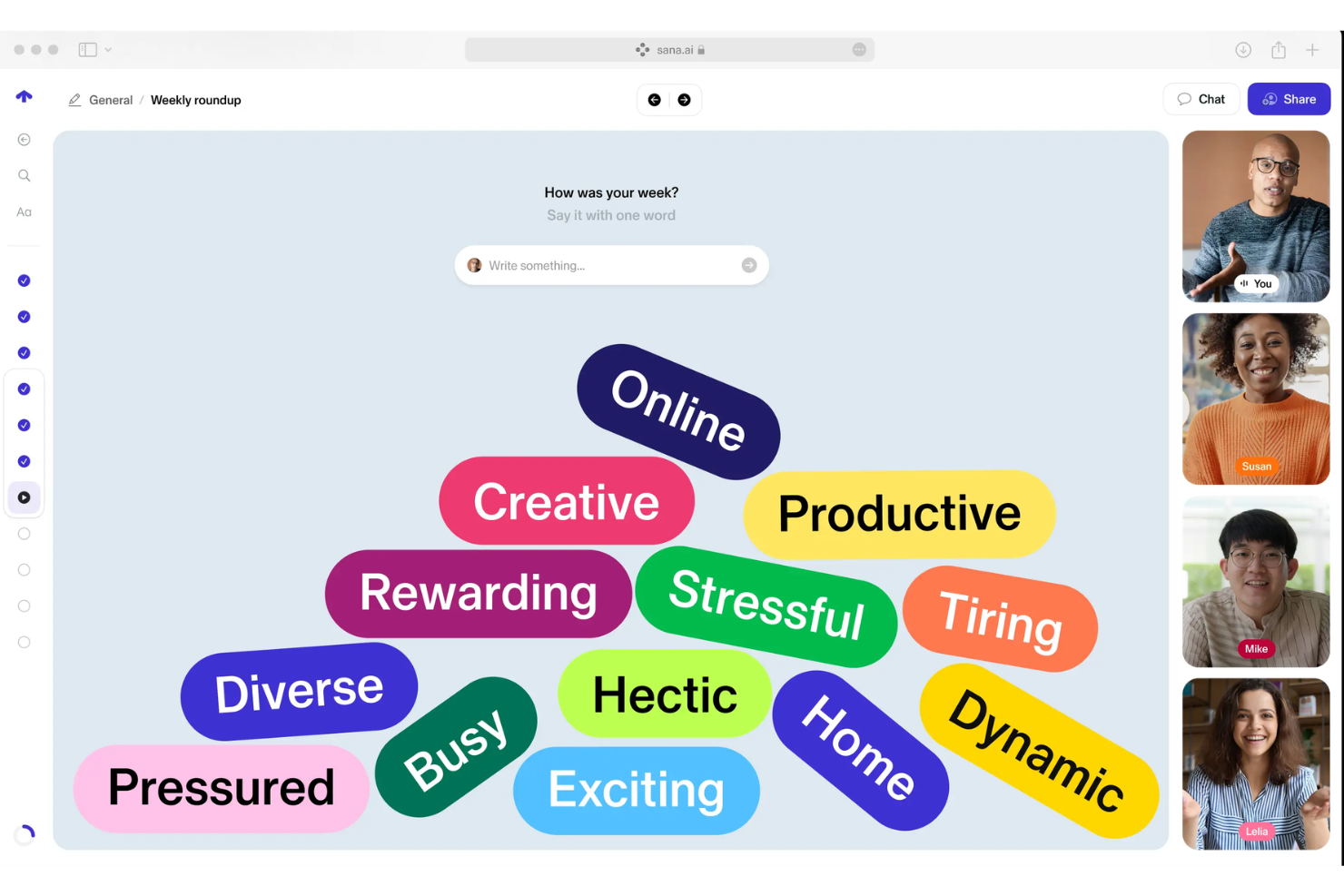
Sana Learn is an AI-native platform that combines LMS, LXP, authoring, and virtual classroom capabilities to deliver personalized learning experiences at enterprise scale.
Who Is Sana Learn Best For?
Sana Learn is a strong fit for mid-to-large enterprises with active L&D teams that need to replace fragmented tools with a single AI-native platform spanning content creation, delivery, and analytics.
Why I Picked Sana Learn
I've included Sana Learn on my shortlist because of how it personalizes content delivery at scale, not just in theory. The AI tutor adapts every learning experience to the individual learner, while the just-in-time search answers questions directly in natural language, pulling from your content library. I also like that AI generates course content dynamically from source materials like PDFs, so your L&D team spends less time building and more time on strategy.
Sana Learn Key Features
- Virtual classroom: Run live, instructor-led sessions and blended learning programs from within the same platform as your async content.
- Learning management automation: Configure rules to handle enrollments, scheduling, and course assignments without manual admin work or tedious administrative tasks.
- Learning analytics: Build shareable dashboards and query learner performance data in real time using natural language.
- White-label branding: Customize the platform with your own colors, fonts, and logos for a fully branded learner experience.
Sana Learn Integrations
Sana Learn offers a broad set of native integrations across identity providers, HR systems, CRM platforms, productivity tools, and content libraries, including Okta, BambooHR, Workday, SAP SuccessFactors, Salesforce, HubSpot, Slack, Microsoft Teams, LinkedIn Learning, and Coursera. An API is available for custom integrations.
Pros and Cons
Pros:
- Natural language queries in analytics dashboards
- Live sessions are auto-transcribed into searchable assets
- Collaborative course authoring with drag-and-drop blocks
Cons:
- AI features are less reliable in non-English languages
- Content layout and text editing feel restrictive

Workera
Best for verifying workforce skills with AI
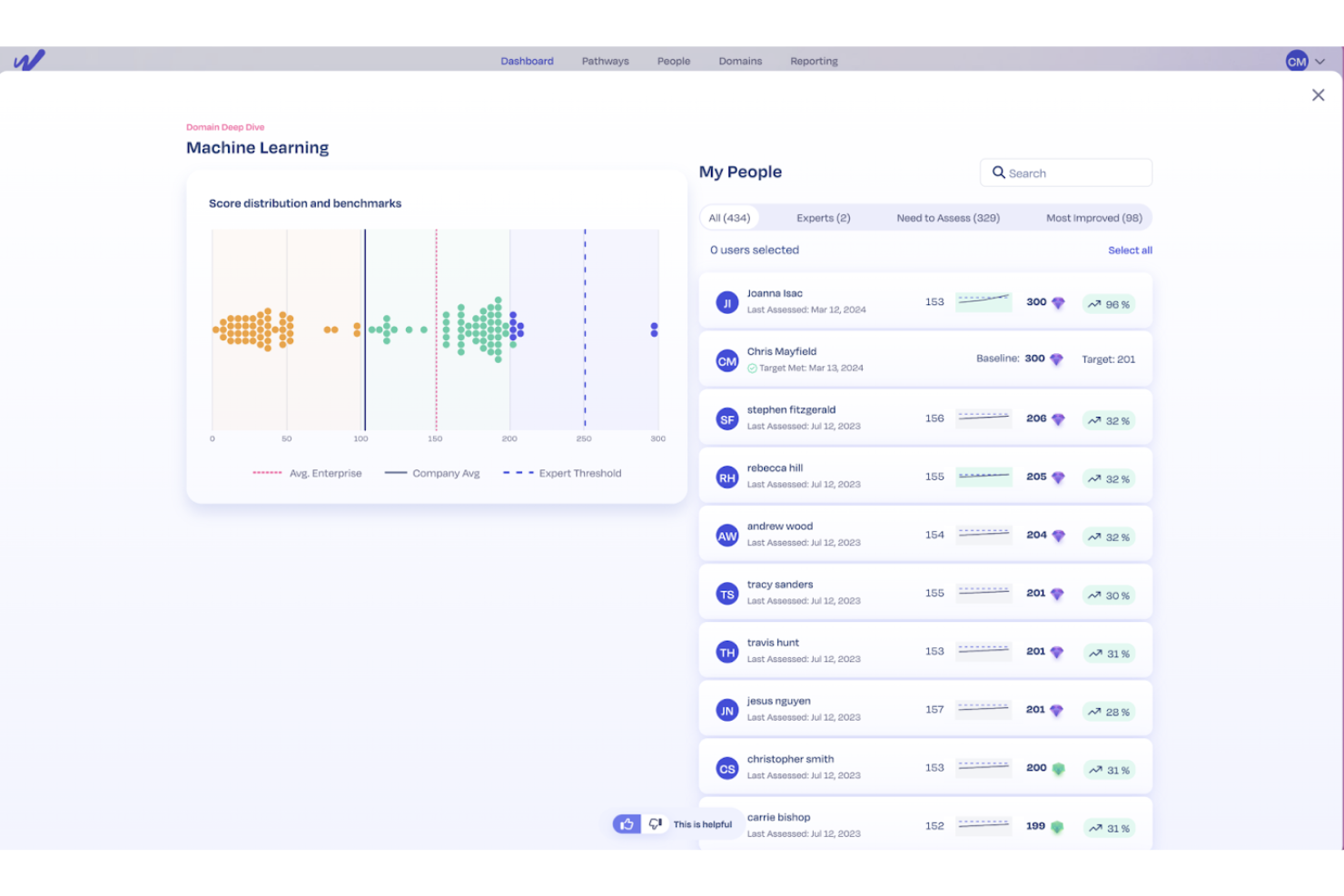
Workera is a skills intelligence platform that uses AI agents to assess, verify, and measure workforce capabilities through skills assessments, hiring evaluations, personalized learning paths, and ambient coaching.
Who Is Workera Best For?
Workera is a good fit for large enterprises and tech-forward organizations that need to assess and verify AI and technical skills across their workforce.
Why I Picked Workera
I picked Workera as one of the best because its approach to skills verification goes beyond self-reported data or completion tracking. What I find compelling is the Skills Assessments feature, which uses 100+ benchmarked assessments where credentials are earned by demonstrating capability, not clocking seat time.
I also like AI Studio, which lets my team build and launch custom assessments in a day. On top of that, Ambient Coaching runs continuous, always-on skill measurement in the flow of work, spotting gaps before they affect performance.
Workera Key Features
- Hiring assessments: Verify candidate skills before making an offer using performance-based assessments with intelligent proctoring and custom benchmarks.
- Personalized learning paths: Target verified skill gaps with tailored learning content pulled from multiple content partners and updated as skills evolve.
- AI Readiness Index: A pre-built bundle of five enterprise AI personas and ten signature assessment domains that map AI capability across every function and level.
- Internal mobility matching: Surface transferable skills at the cohort, role, and individual level to match existing talent to open roles based on verified capability.
Workera Integrations
Workera connects to 250+ HRIS, ATS, and LMS systems through its partnership with Kombo, providing bidirectional sync with platforms like Coursera, DataCamp, Degreed, Udacity, Udemy, and Workday. Verified gaps also flow into LinkedIn Learning and O'Reilly, and the platform supports SAML SSO, SCIM provisioning, and SFTP for systems outside the unified-API catalog.
Pros and Cons
Pros:
- Strong focus on technical and AI skills
- AI-generated custom assessments deploy fast
- Granular, verified skill gap identification
Cons:
- Limited content for non-technical skill areas
- Skill badges lack broad industry recognition
TechWolf is an AI-powered workforce intelligence platform that unifies skills, work, and labor market data to support strategic workforce planning, skills gap analysis, and AI impact assessment across large organizations.
Who Is TechWolf Best For?
TechWolf is a strong fit for enterprise HR and L&D leaders at large organizations who need to connect skills data across multiple systems for workforce planning decisions.
Why I Picked TechWolf
I picked TechWolf as one of the best because it's the only platform I've seen that brings skills intelligence, work intelligence, and market intelligence into a single data layer. In practice, that means my team can see not just what skills employees currently have, but also how AI is reshaping specific tasks at a job level and where the labor market is heading.
I also like the Work Intelligence feature, which scores each task in a role for automation or augmentation potential, giving L&D leaders real data to prioritize reskilling investments.
TechWolf Key Features
- Skills validation: Push inferred skill profiles to employees and managers for human review, keeping data aligned with on-the-ground reality.
- Skill gap analysis: Get a real-time view of skills supply and demand across your workforce to guide hiring, mobility, and learning investments.
- Skills insights dashboard: View dynamic dashboards that surface redeployment options and help allocate L&D budgets based on live skills data.
- Internal mobility mapping: Match employees to open roles based on inferred skill profiles, surfacing internal candidates before defaulting to external hiring.
TechWolf Integrations
TechWolf offers native integrations with Workday, SAP SuccessFactors, Visier, Crunchr, Power BI, Tableau, Degreed, iCIMS, Oracle, and Salesforce, as well as ServiceNow, Jira, Confluence, Asana, Trello, and Google Drive. TechWolf uses an API-first integration approach, and an API is available for custom integrations.
Pros and Cons
Pros:
- Embeds directly into existing HR systems
- Scores tasks for AI automation potential
- Unifies skills, work, and market intelligence
Cons:
- No public pricing or self-service plans
- Geared toward large enterprise organizations
Other AI Learning and Development Software
Here are some additional AI learning and development software options that didn’t make it onto my shortlist, but are still worth checking out:
- Articulate 360
For rapid AI-powered workplace training
- Docebo
For mapping and closing workforce skill gaps
- Cornerstone
For connecting workforce data with talent
- Axonify
For frontline staff microlearning at scale
- Exec
For AI roleplays
- Easygenerator
For user-friendly content authoring
- Pluralsight
For in-depth technology upskilling content
- Fuel50
For personalized career pathing journeys
- iMocha
For AI-powered technical skills assessments
- Eightfold AI
For AI-driven talent matching


How I Evaluate AI Learning and Development Software
Every tool here needs to show that its AI does real work—like building a course from a product doc or surfacing skill gaps across teams. I evaluate each platform across core functionality it must have to qualify and differentiating factors that set the best options apart.
Core Functionality (Table Stakes For This List)
When I'm selecting tools for my list, I rank each one on a scale from 0 (does not offer the functionality) to 5 (excels in this area) for each core functionality listed below. Then, I calculate the tool's total score into a percentage. Each tool needs to achieve a minimum total score of 65% to be considered for inclusion.
- AI Content Generation: I look for platforms that can turn a product doc or policy PDF into a full lesson with quiz questions, not just suggest an outline.
- Personalized Learning Paths: Each tool should use AI to adapt learning journeys based on role, skills, and behavior—not just assign static tracks per department.
- Skills Intelligence & Gap Analysis: I evaluate whether the platform maps competencies across teams and flags gaps, like spotting a leadership skills deficit before a reorg.
- Adaptive Assessments: Assessments should adjust based on learner responses, scoring proficiency and routing employees to the right next step in their path.
- Learning Analytics & Insights: I check whether AI surfaces actionable data—like connecting course completion trends to retention rates—beyond basic progress dashboards.
- HRIS/Talent System Integrations: The platform should sync with systems like Workday, BambooHR, or SAP SuccessFactors to pull employee data into learning workflows.
Once I have a list of tools that meet this criteria, I consider what sets each platform apart.
Differentiating Factors (What Sets Vendors Apart)
Here's how I compare and contrast different vendors:
Standout Features
Conversational AI coaching matters a lot to me. Platforms where employees can role-play scenarios like handling a tough performance review with an AI tutor offering real-time feedback add genuine value. Predictive learning analytics also carries weight—I look for tools where AI forecasts outcomes like attrition risk or training ROI so L&D leaders can act before problems surface. AI content authoring that turns a policy doc into a deployable microlearning series in minutes further separates contenders.
Beyond Features
Data privacy and AI governance deserve close attention here. I evaluate whether platforms hold SOC 2 Type II or ISO 27001 certifications and are transparent about how learner data trains their AI models. Integration ecosystem matters just as much—a tool that connects with your HRIS, Slack, and content libraries like LinkedIn Learning keeps learning embedded in daily workflows. I also consider primary use case fit, since a platform built for compliance training won't serve a team focused on leadership development the same way.
How to Choose AI Learning and Development Software
It’s easy to get bogged down in long feature lists and complex pricing structures. To help you stay focused as you work through your unique software selection process, here’s a checklist of factors to keep in mind:
| Factor | What to Consider |
|---|---|
| Scalability | Will the software support your headcount growth, multiple business units, and fluctuations in usage without degraded experience? |
| Integrations | Does it connect smoothly with your HRIS, collaboration tools, and content libraries, or will you need workarounds for critical workflows? |
| Customizability | Can you align learning branding, roles, paths, and reporting to your organization's exact needs, or is it one-size-fits-all? |
| Ease of use | Will your HR team and employees actually use it, and how steep is the learning curve for admins and everyday users? |
| Implementation and onboarding | What will getting up and running look like—are quick-start templates, training, and support included? |
| Cost | How do pricing tiers fit your current and projected user count, and what add-on expenses should you expect as usage grows? |
| Security safeguards | Does the vendor disclose data handling practices, privacy compliance, and certifications? How do they manage access and controls? |
| International capabilities | Will the platform support your global team’s languages, time zones, currencies, and local compliance needs from day one? |
What Is AI Learning and Development Software?
AI learning and development software uses artificial intelligence to personalize, automate, and measure workforce training and upskilling. These platforms deliver tailored learning paths, analyze skill gaps, generate content, and provide adaptive assessments based on each employee’s needs and performance.
Teams use them to scale development programs, address compliance, and tie learning outcomes directly to business goals.
Features of AI Learning and Development Software
When selecting AI learning and development software, keep an eye out for the following key features:
- AI content generation: Automates the creation of custom courses, quizzes, and microlearning modules from prompts, existing documents, or videos, reducing manual authoring time for L&D teams.
- Personalized learning paths: Uses AI to recommend and update individual learning journeys based on skill levels, roles, and ongoing performance data, ensuring development aligns with business needs.
- Skills gap analysis: Identifies strengths and weaknesses across teams or the organization, enabling focused upskilling and reskilling based on real-time workforce data.
- Adaptive assessments: Adjusts quiz difficulty and recommendations in response to learner performance, creating a more supportive and challenging learning experience for each user.
- Learning analytics dashboards: Present actionable data on engagement, course completion, skill progression, and ROI, helping L&D teams measure the impact of learning programs.
- HRIS and talent system integration: Connects with HR platforms to sync employee data and learning progress, embedding training into existing talent management workflows.
- Conversational AI coaching: Offers on-demand chatbots or simulations to practice soft skills with instant feedback, supporting real-world application and confidence building.
- Content library access: Provides an extensive range of ready-to-use courses and resources, allowing quick rollout of training for compliance, onboarding, and professional development.
- Localization and language support: Delivers learning materials in multiple languages and formats, meeting the needs of global workforces and improving accessibility.
- Compliance and security controls: Ensures secure handling of employee data, supports industry regulations, and offers tools for privacy, content moderation, and governance.
Benefits of AI Learning and Development Software
Implementing AI learning and development software provides several benefits for your team and your business. Here are a few you can look forward to:
- Personalized learning experiences: AI tailors content, pacing, and recommendations to each employee’s skills and goals, boosting relevance and engagement.
- Faster upskilling and reskilling: Automated course creation and adaptive learning paths speed up time-to-competency across roles and departments.
- Stronger talent insights: Skill gap analysis and predictive analytics offer clear visibility into workforce capabilities, informing strategic planning and L&D investments.
- Improved training ROI: Real-time analytics and reporting connect learning outcomes directly to business performance and goal tracking.
- Streamlined administration: HRIS integrations and automated content authoring save time for L&D teams, eliminating manual data syncing and repetitive tasks.
- Consistent compliance and security: Built-in controls and monitoring help you manage sensitive employee data and meet regulatory requirements.
- Support for global teams: Multilingual content and localization features make it easy to deploy scalable learning initiatives across different regions and languages.
Costs & Pricing of AI Learning and Development Software
Selecting AI learning and development software requires an understanding of the various pricing models and plans available. Costs vary based on features, team size, add-ons, and more. The table below summarizes common plans, their average prices, and typical features included in AI learning and development software solutions:
Plan Comparison Table for AI Learning and Development Software
| Plan Type | Average Price | Common Features |
|---|---|---|
| Free Plan | $0 | Access to limited content, basic learning paths, simple assessments, and community support. |
| Personal Plan | $5–$25/user/month | Individual course creation, skill tracking, adaptive quizzes, limited analytics, and email support. |
| Business Plan | $20–$50/user/month | Team-based reporting, integration with HRIS, customization options, content libraries, and live support. |
| Enterprise Plan | $40–$100/user/month | Advanced analytics, AI skill gap analysis, custom integrations, multilingual support, and dedicated onboarding. |
AI Learning and Development Software FAQs
Here are some answers to common questions about AI learning and development software:
How does AI personalize employee learning?
AI reviews skills data, learning habits, and job roles to tailor content, pacing, and assessments for each person. This makes learning programs more relevant, engaging, and effective across different teams and individuals.
Can these platforms integrate with our existing HR and payroll systems?
Yes, most AI learning and development software platforms offer integrations with popular HRIS and payroll tools. This ensures employee records, learning activity, and workforce analytics stay in sync across your organization.
What should I know about data privacy and AI use?
Vendors should be transparent about how employee data is used, stored, and whether it trains their AI models. Look for solutions that offer clear policies, security certifications, and options for data localization or limited data sharing.
How quickly can we launch and see adoption?
Many solutions have pre-built content libraries and onboarding templates, which means small teams can start within days, while large or global rollouts might take several weeks, factoring in integration and change management.
Is AI-generated content reviewed for accuracy and bias?
Most platforms combine AI content creation with human oversight, allowing L&D teams to edit, moderate, or approve learning materials before employees use them, reducing the risk of inaccuracies or bias in the training content.