

10 Best Business Performance Management Software Reviewed in 2026

Best Business Performance Management Software Shortlist


Managing your team's performance can be a challenge. You might be juggling multiple spreadsheets, struggling with data accuracy, or just trying to keep everyone aligned with your goals. Business performance management software can simplify these tasks, allowing you to focus on what matters most: your people and your objectives.
In my experience, the right software can make a big difference. It offers a clearer view of your team's performance, helping you make data-driven decisions. I've independently tested and reviewed various software solutions to bring you an unbiased list of the best options available.
In this article, you'll find my top picks, each with its unique strengths to fit your needs. Let's find the right tool to help you and your team succeed
Why Trust Our Software Recommendations
Our team has been testing and reviewing software since 2012. As HR experts ourselves, we know how difficult—and important—it is to choose the right software.
For this guide, we evaluated tools using hands-on testing and independent research, scoring tools using our selection criteria. We also draw on insights from industry thought leaders and practicing HR experts.
Our reviews reflect our human editorial judgment, not a sales pitch.
Expert reviewers:
Comparison Table: Business Performance Management Software
This comparison table summarizes pricing details for my top business performance management software selections.
| Tool | Best For | Trial Info | Price | ||
|---|---|---|---|---|---|
| 1 | Best for decision-making tools | Free demo available | Pricing upon request | Website | |
| 2 | Best for cloud analytics | Free demo available | Pricing upon request | Website | |
| 3 | Best for AI-driven financial management | Free demo available | From £1,200/month | Website | |
| 4 | Best for employee learning paths | Free demo available | From $15,000 (billed annually) | Website | |
| 5 | Best for finance teams | Free demo available | Pricing upon request | Website | |
| 6 | Best for custom dashboards with AI features | 7-day free trial + free demo available | Pricing upon request | Website | |
| 7 | Best for AI-powered planning and analytics | Free demo available | Pricing upon request | Website | |
| 8 | Best for AI-enabled data visualization | Free demo available | Pricing information not available | Website | |
| 9 | Best for strategy execution | Free demo available | Pricing upon request | Website | |
| 10 | Best for AI-driven budgeting features | Free demo available | Pricing upon request | Website |

Best Business Performance Management Software Review
Below are my detailed summaries of the best business performance management software that made it onto my shortlist. My reviews offer a detailed look at the key features, pros and cons, integrations, and ideal use cases of each tool to help you find the best one for you

Board
Best for decision-making tools
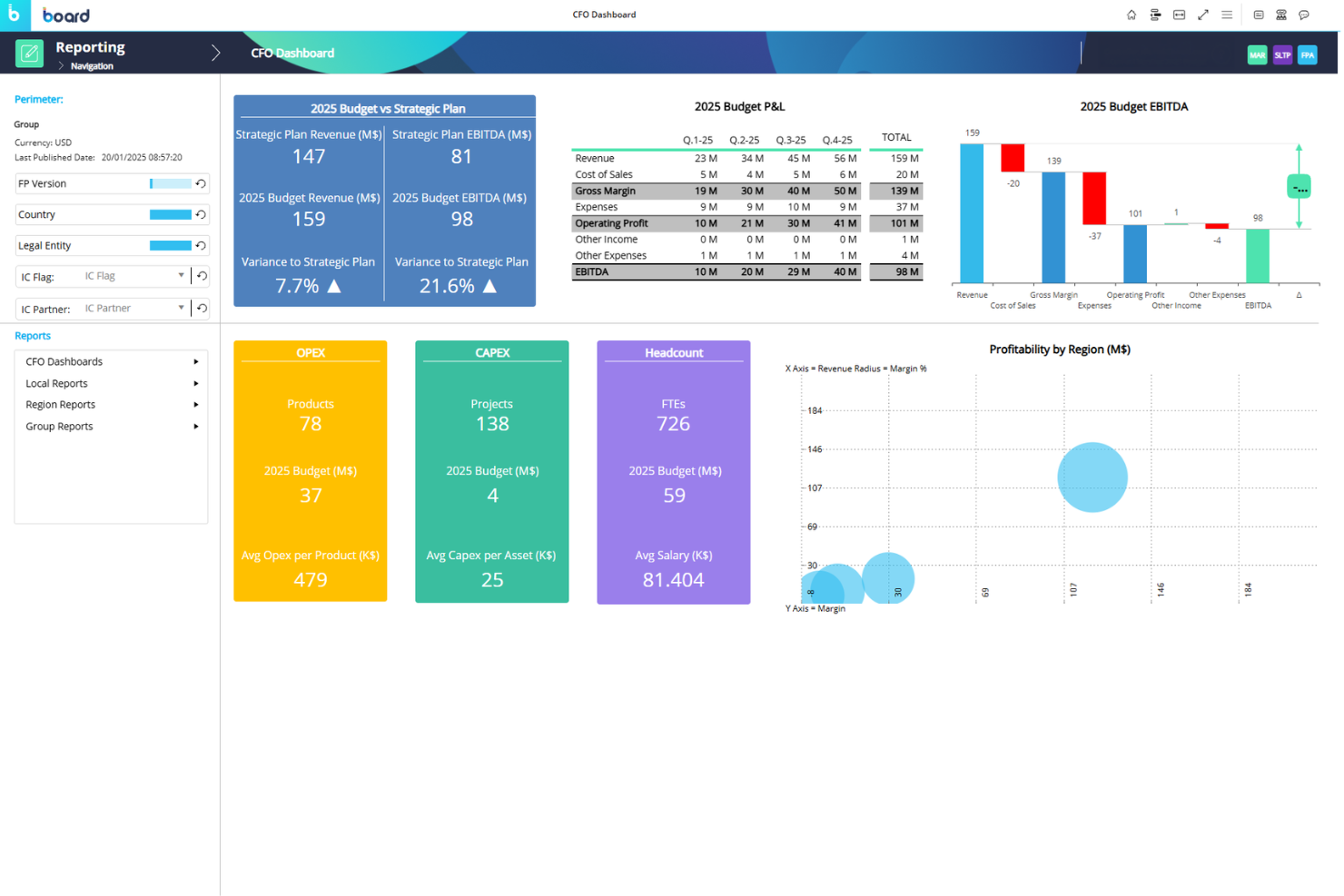
Board is a business intelligence and performance management platform designed for enterprises needing integrated decision-making capabilities. It serves executives and managers by offering tools for reporting, planning, and analytics.
Why I picked Board: Board offers a unified platform where you can perform data analysis, reporting, and forecasting. Its decision-making tools provide valuable insights that help your team make informed choices.
The software's ability to combine various business intelligence functions in one place is its key advantage. This focus on aiding decision-making sets it apart from others in the market.
Standout Features and Integrations:
Features include advanced reporting capabilities, which help you understand your data better. Its forecasting tools allow you to predict business trends accurately. You can also use its simulation features to explore different business scenarios.
Integrations are not currently listed by Board.
Pros and Cons
Pros:
- Simulation features for scenarios
- Accurate forecasting tools
- Unified platform for BI functions
Cons:
- Time-consuming initial configuration
- Limited report creation customization

Best for cloud analytics
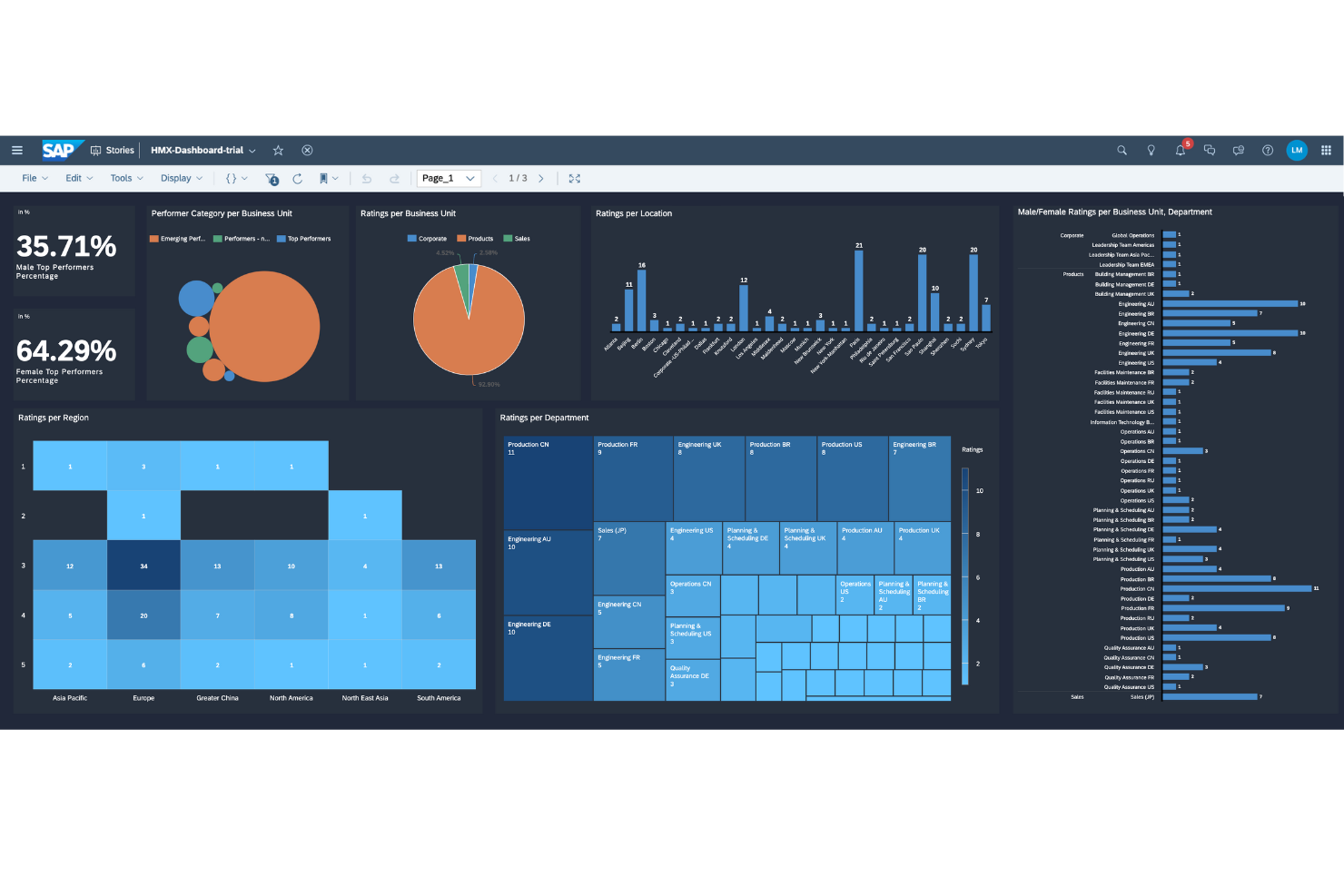
SAP Analytics Cloud is a cloud-based analytics platform designed for businesses that need integrated data analysis and visualization. It serves a wide range of users, from data analysts to business leaders, performing key functions such as data discovery, planning, and predictive analytics.
Why I picked SAP Analytics Cloud: SAP Analytics Cloud offers a suite of analytics tools all in one platform, which is ideal for those seeking cloud-based solutions. It provides real-time data connections and collaborative features to help your team make informed decisions. The focus on cloud analytics ensures scalability and flexibility for growing businesses.
Standout Features and Integrations:
Features include data visualization tools that make your data easy to understand. Predictive analytics help you anticipate future trends and make strategic decisions. The software also offers collaborative planning features to align your team's efforts.
Integrations include SAP S/4HANA, SAP BusinessObjects, SAP SuccessFactors, and more.
Pros and Cons
Pros:
- Strong planning capabilities
- Scalable cloud platform
- Integrated analytics tools
Cons:
- Non-SAP integrations often complex
- Slow performance with large datasets

Best for AI-driven financial management
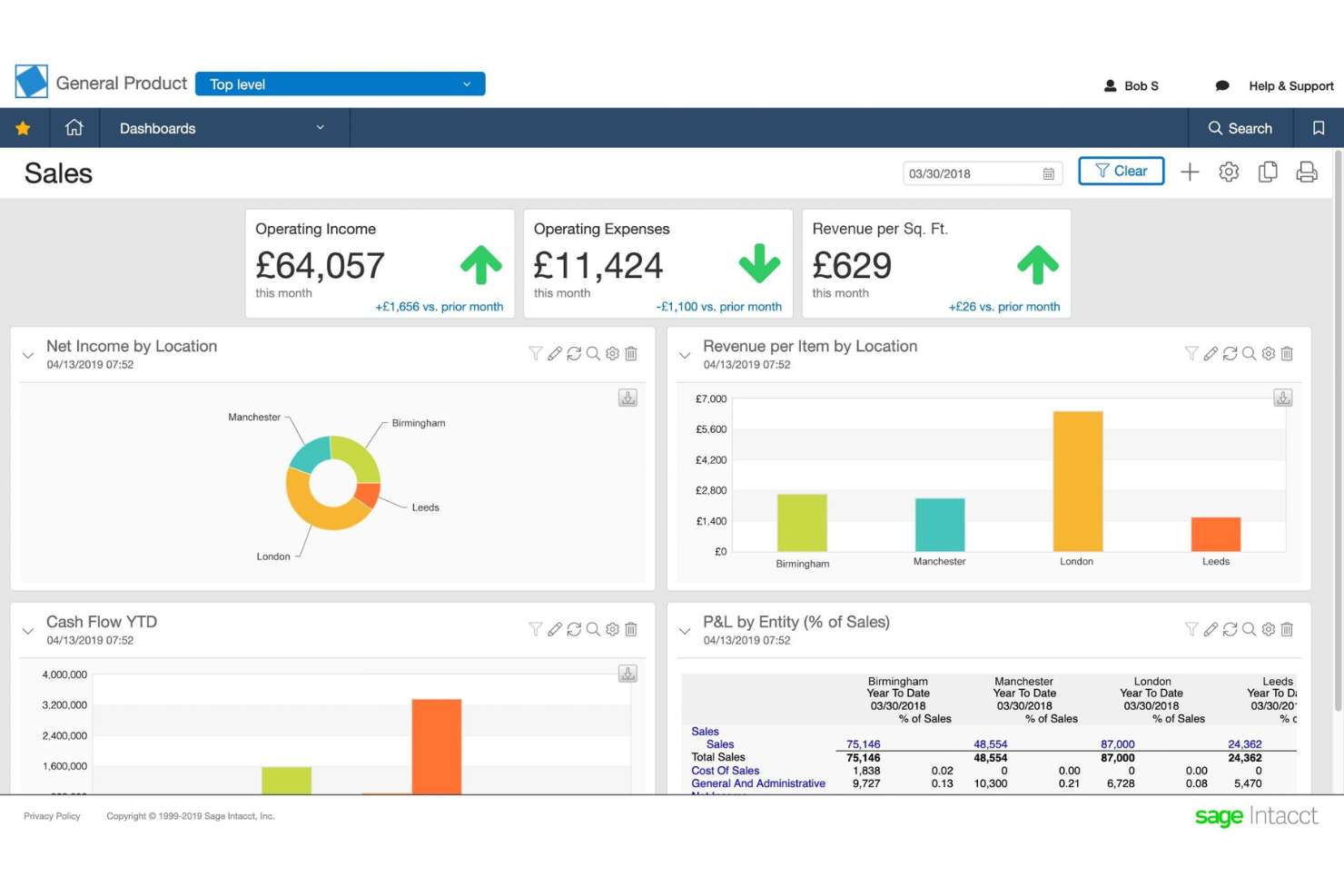
Sage Intacct is a cloud-based financial management software tailored for finance teams looking to upgrade their end-to-end accounting processes. It helps users with core financial tasks such as accounts payable, accounts receivable, and cash management.
Why I picked Sage Intacct: Sage Intacct offers a wide range of financial management features that cater to your accounting needs. With its cloud-based platform, you can access financial data anytime, which is key for dynamic business environments. This focus on financial management makes it an ideal tool for businesses seeking to optimize their accounting functions.
Standout Features and Integrations:
Features include advanced multi-dimensional reporting that helps you analyze financial data in depth. The software's automation of core financial processes reduces manual tasks and errors. You can also benefit from its real-time visibility into your financial operations, which keeps your team informed.
Integrations include Salesforce, ADP, Expensify, BILL, Stripe, Avalara, and more.
Pros and Cons
Pros:
- Cloud-based platform
- Advanced reporting capabilities
- Remote self-service data access
Cons:
- Access limitations can disrupt workflow
- Limited advanced filters
Bridge
Best for employee learning paths
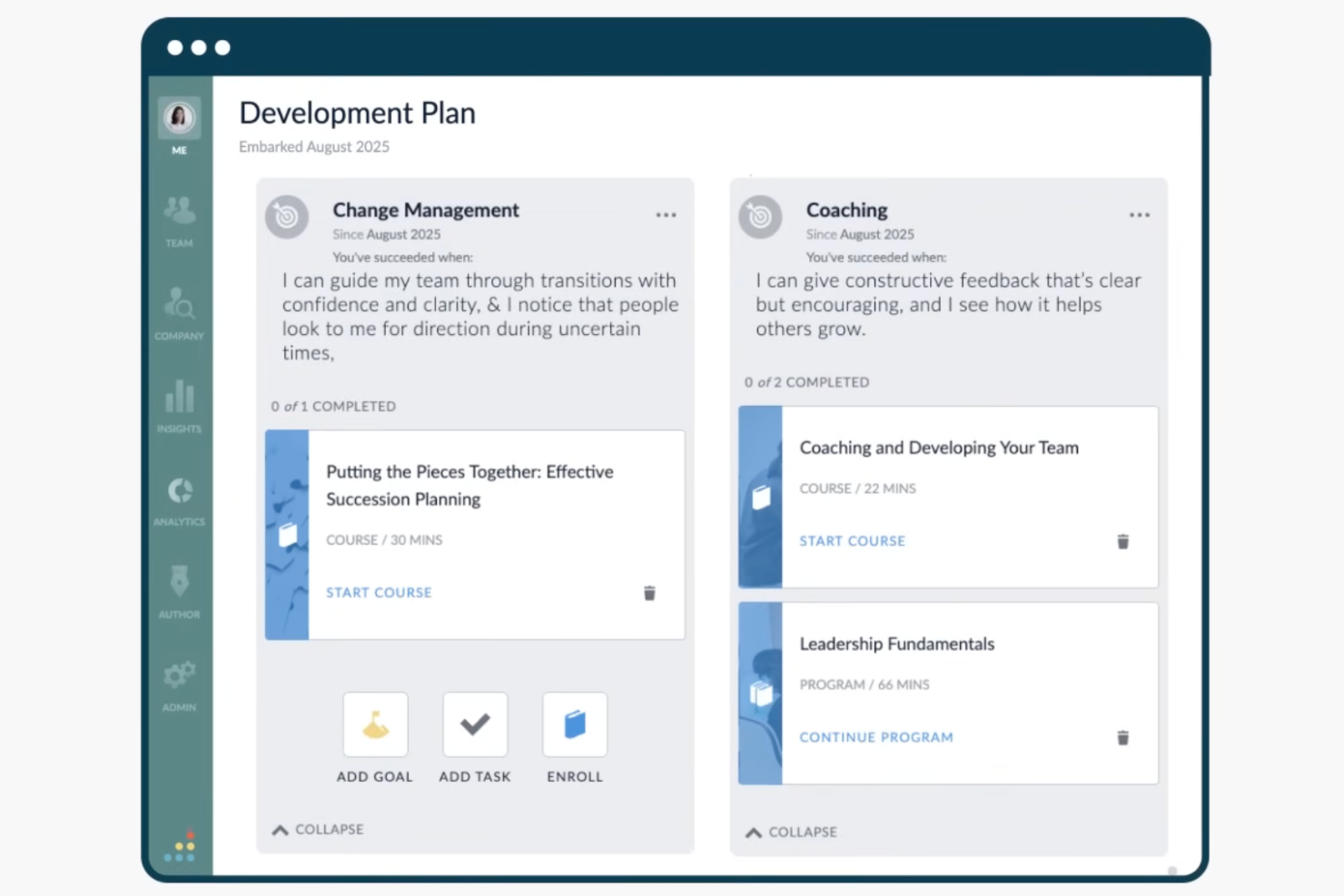
Bridge is a learning and performance management platform that combines employee training, goal alignment, performance reviews, skills tracking, and talent development tools in a single system.
Who Is Bridge Best For?
Bridge is a good fit for mid-sized to enterprise organizations with dedicated L&D or HR teams who need to manage employee learning, performance reviews, and goal tracking in one place.
Why I Picked Bridge
Bridge is one of my top picks because I love how its configurable learning paths let L&D teams build role-specific training sequences that adapt to each employee's skill gaps and individual development plan. The AI-driven skills mapping automatically tags courses and surfaces personalized recommendations, so the right training reaches the right person without manual curation. Pair that with individual development plans tied directly to skills data, and you get a clear line between employee learning and performance progress.
Bridge Key Features
- Performance reviews: Run structured review cycles with self-assessments, manager evaluations, and calibration tools across your organization.
- Cascading goals: Set company-level goals and break them down to team and individual levels so everyone's work connects to broader priorities.
- 1-on-1 agendas: Create shared meeting agendas between managers and direct reports to track ongoing conversations and action items.
- Talent reviews: Use a 9-box grid to assess employee performance and potential during talent review cycles.
Bridge Integrations
Bridge offers native integrations across content providers, HRIS platforms, SSO tools, and video management systems, including LinkedIn Learning, OpenSesame, BambooHR, Slack, Google Calendar, Shopify, Credly, Kaltura, Panopto, and Vimeo. It also syncs with HRIS platforms, such as Workday, ADP, and SAP, for user provisioning. Bridge is available on Zapier and provides an open API and webhooks for custom integrations.
Pros and Cons
Pros:
- Goals link to employee bonuses and development plans
- Automated Learning Journeys deliver staged training sequences
- Learning and performance tools live in one platform
Cons:
- No built-in way to categorize goal types
- Advanced reporting options are limited for complex analytics

Cube
Best for finance teams
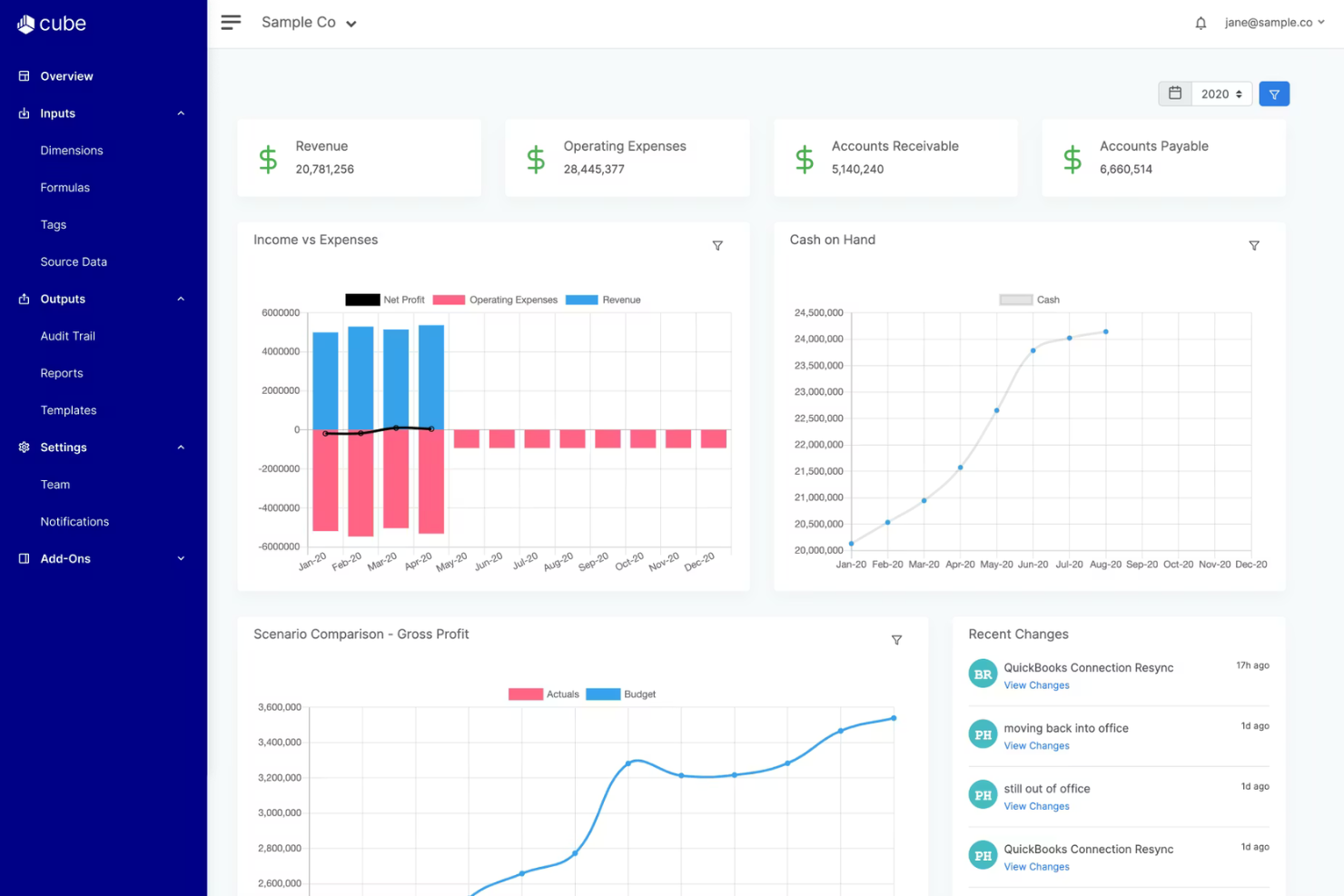
Cube is a financial planning and analysis platform tailored for finance teams. It focuses on budgeting, forecasting, and reporting to improve financial management.
Why I picked Cube: Cube offers a unique combination of spreadsheet integration and data management, which is ideal for finance professionals. Its ability to connect with existing spreadsheets allows you to maintain the familiarity of Excel while gaining advanced functionalities.
Standout Features and Integrations:
Features include real-time consolidation, which helps you keep your data updated. Its collaboration tools allow your team to work together efficiently. Cube also offers scenario planning to help you anticipate financial outcomes.
Integrations include NetSuite, QuickBooks, Salesforce, Workday, Google Sheets, Slack, Microsoft Excel, and more.
Pros and Cons
Pros:
- BI reporting automation
- Flexible configuration
- Easy spreadsheet integration
Cons:
- May need IT support for BI integration
- Preaggregation bug issues

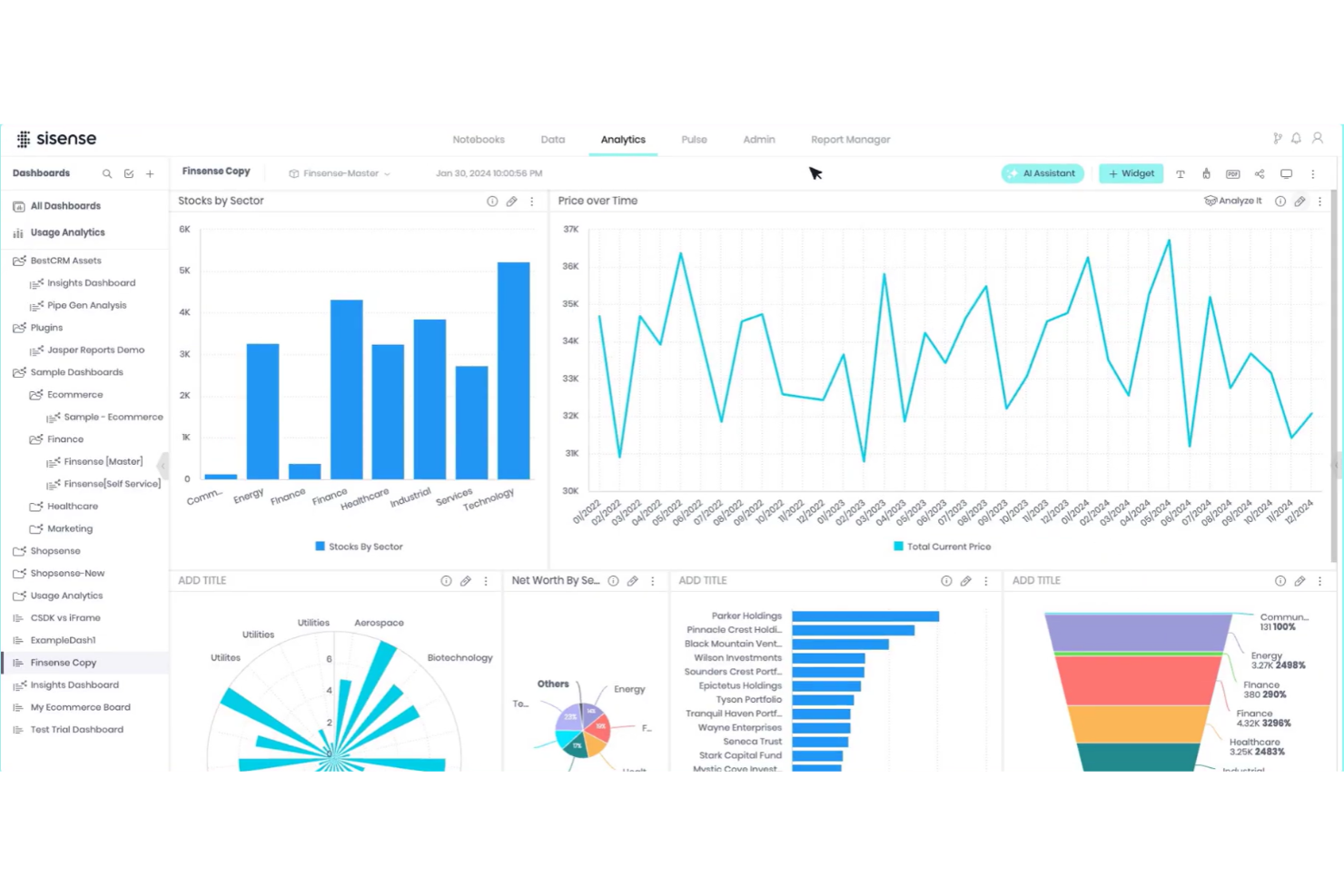
Sisense is a business intelligence and analytics platform designed for high-performance teams looking to create custom dashboards and visualizations. It caters to data professionals and business users who need to analyze and visualize complex datasets.
Why I picked Sisense: Sisense excels in providing custom dashboards that allow you to tailor data visualizations to your specific needs. The platform's flexibility in handling large datasets is a significant advantage. This focus on customizable dashboards makes it a great choice for those prioritizing data visualization.
Standout Features and Integrations:
Features include in-chip technology that speeds up data processing. Its interactive dashboards let you explore data in detail. You can also leverage its drag-and-drop interface to build visualizations.
Integrations include Salesforce, Google Analytics, Amazon Redshift, Amazon Athena, Microsoft SQL Server, and more.
Pros and Cons
Pros:
- Easy drag-and-drop interface
- Interactive data exploration
- Handles large datasets well
Cons:
- Non-intuitive user interface
- Requires significant hardware power
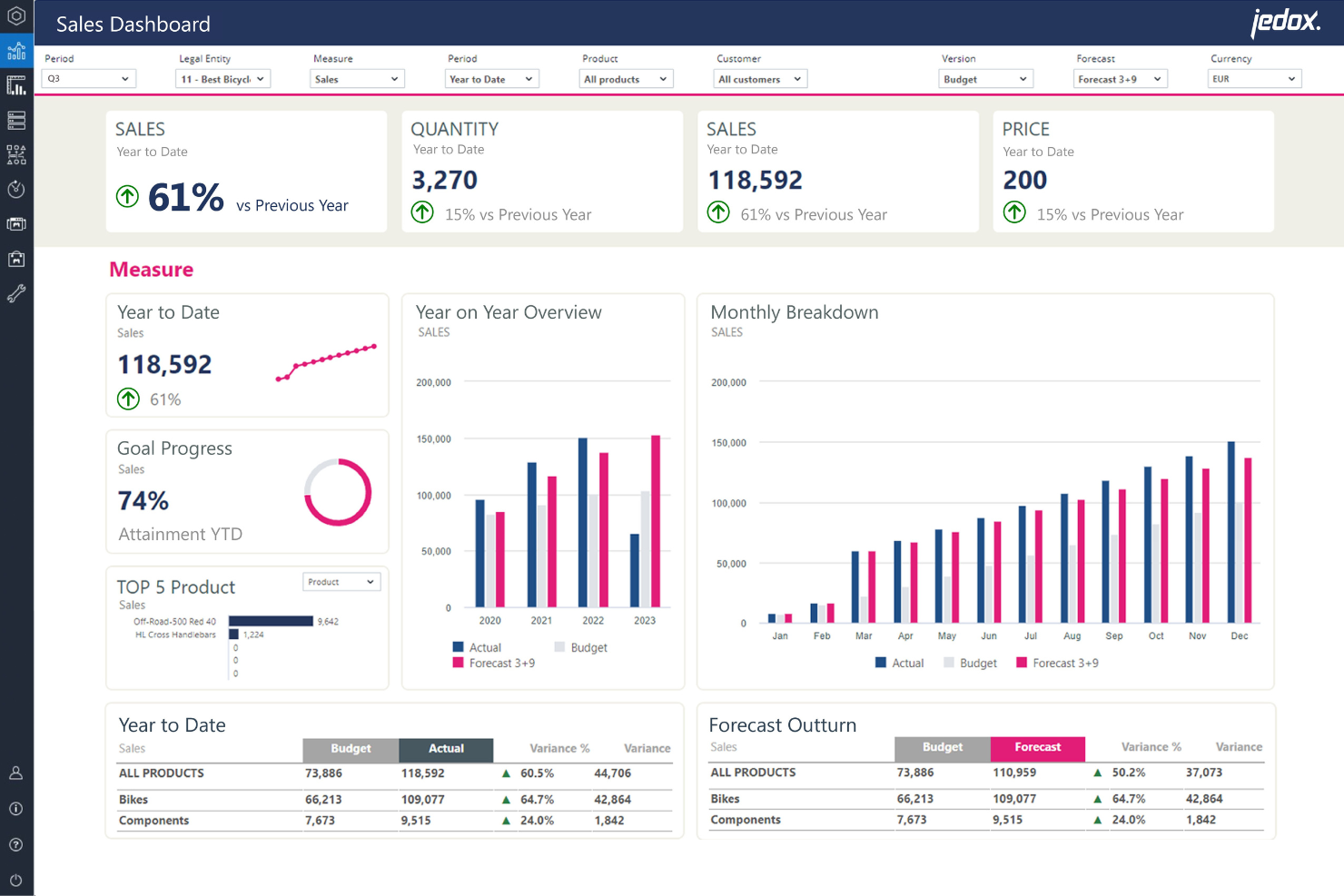
Jedox is a performance management system designed for companies seeking to optimize their planning, analysis, and reporting processes. It caters to finance teams and business analysts who need to simplify budgeting and forecasting tasks.
Why I picked Jedox: Jedox offers a unique blend of planning and analytics tools that improve your team's efficiency. Its Excel-like interface provides comfort and familiarity for users transitioning from spreadsheets.
The tool's flexibility in planning allows you to tailor solutions to your specific business needs. This combination of planning and analytics makes it a valuable asset for financial teams.
Standout Features and Integrations:
Features include advanced analytics that help you gain insights from your data. The software's data modeling capabilities allow you to simulate various business scenarios. You can also benefit from its real-time performance data access, which keeps your team updated with the latest information.
Integrations include SAP, Salesforce, Microsoft Dynamics 365, Oracle NetSuite, Qlik, Power BI, Tableau, and more.
Pros and Cons
Pros:
- Supports business scenario simulations
- Advanced analytics capabilities
- Flexible planning options
Cons:
- Advanced modeling requires training
- Complexity increases with more datasets

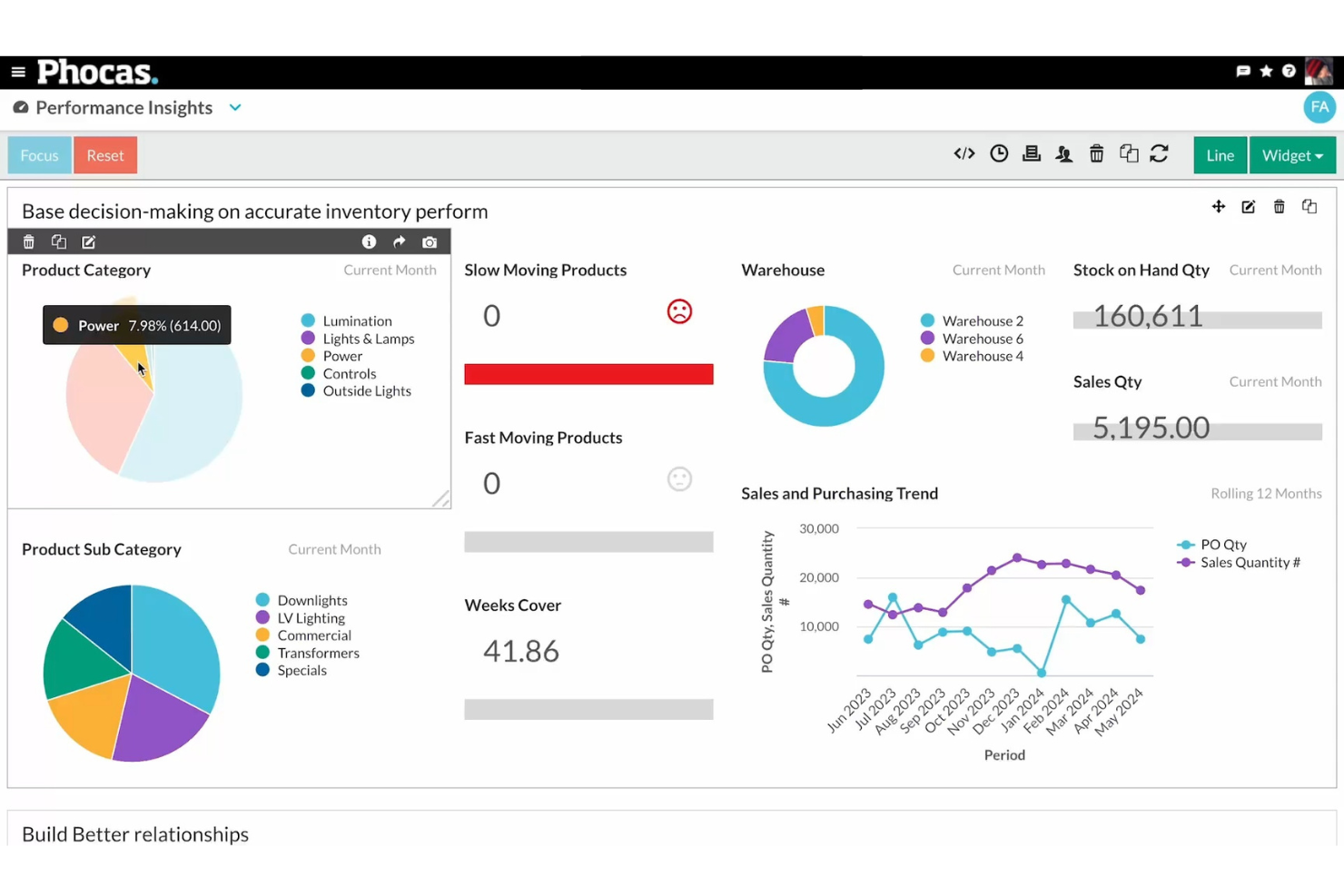
Phocas is a business intelligence software designed for businesses aiming to upgrade their data analysis capabilities. It primarily serves industries looking to improve decision-making through intuitive data visualization and reporting.
Why I picked Phocas: Phocas offers user-friendly dashboards that make data accessible and understandable for your team. Its strong data visualization capabilities allow you to create insightful reports quickly.
The software's flexibility in handling various data sources makes it a reliable choice. The focus on visualizing data effectively is what sets Phocas apart from others.
Standout Features and Integrations:
Features include customizable dashboards, which let you tailor information to your needs. The ad-hoc analysis feature allows you to explore data in real-time. You can also benefit from its predictive analytics to forecast trends.
Integrations include Microsoft Dynamics, SAP, Epicor, Infor, MYOB, Sage, NetSuite, and more.
Pros and Cons
Pros:
- Customizable dashboards
- Strong data visualization
- User-friendly interface
Cons:
- Difficulties with column arrangement
- Limited real-time data updates

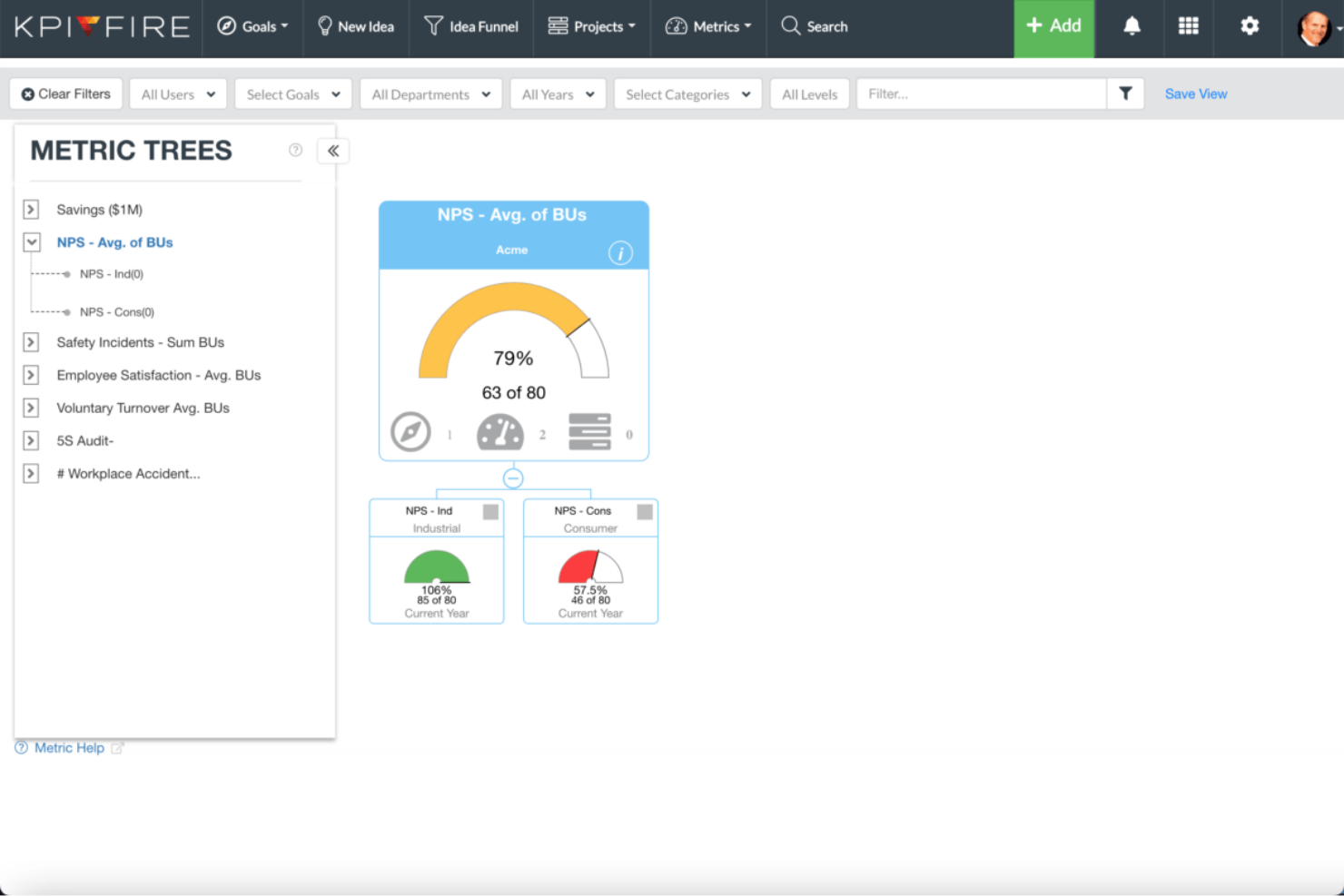
KPI Fire is a strategy execution software designed for teams focused on aligning their goals with actionable plans. It serves managers and team leaders who need to track and execute business strategies effectively.
Why I picked KPI Fire: KPI Fire provides a clear framework for executing strategies, ensuring your team stays aligned with business objectives. You can visualize project progress with its intuitive dashboards, making it easier to manage tasks. This emphasis on strategy execution makes it a powerful tool for driving business success.
Standout Features and Integrations:
Features include intuitive dashboards that provide a visual overview of your projects. Its goal-setting tools allow you to define and track key performance indicators. The software also supports task management, helping your team stay organized and focused.
Integrations include Microsoft Teams, Microsoft Power BI, Zapier, and more.
Pros and Cons
Pros:
- Aligns team objectives
- Effective goal-setting capabilities
- Clear strategy execution framework
Cons:
- Potential integration challenges
- Missing project presentation flexibility

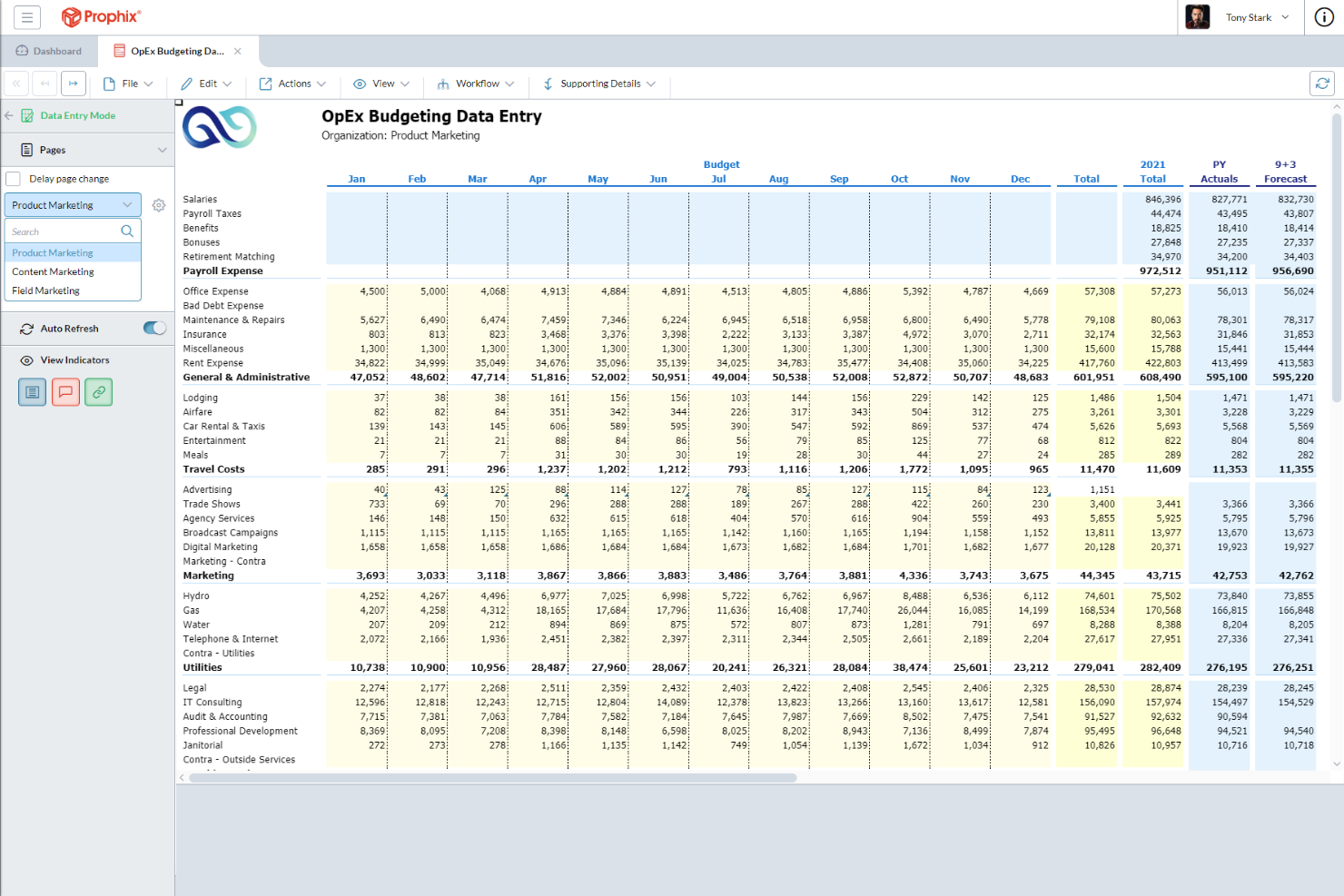
Prophix One is a corporate performance management tool focused on budgeting, forecasting, and financial reporting. It targets finance teams aiming to simplify their financial processes and improve data accuracy.
Why I picked Prophix One: Prophix One excels in budgeting features, offering automated financial processes that save your team time. The tool's reporting capabilities provide actionable insights that support strategic planning. This focus on budgeting makes it a preferred choice for finance-oriented teams.
Standout Features and Integrations:
Features include automated financial processes that reduce manual tasks. Its user-friendly interface helps you create and manage budgets efficiently. Prophix One also offers detailed management reporting capabilities that support strategic planning.
Integrations include Microsoft Dynamics 365, Oracle NetSuite, SAP, Sage, Salesforce, and more.
Pros and Cons
Pros:
- Supports strategic planning
- Detailed reporting features
- Automated financial processes
Cons:
- Difficulty generating reports with multiple filters
- Limited bug reporting options
Other Business Performance Management Software
Here are some additional business performance management software options that didn’t make it onto my shortlist, but are still worth checking out:
- Spider Impact
For performance tracking
- PerformYard
For AI-assisted HR performance reviews
- Vena
For AI-powered Excel integration
- 15Five
For AI-powered employee engagement
- Paycom
For payroll integration


How I Evaluate Business Performance Management Software
I split my evaluation into two layers: the core capabilities a tool must offer—like cascading OKRs and headcount forecasting—and the differentiators that separate the best from the rest.
Core Functionality (Table Stakes For This List)
When I'm selecting tools for my list, I rank each one on a scale from 0 (does not offer the functionality) to 5 (excels in this area) for each core functionality listed below. Then, I calculate the tool's total score into a percentage. Each tool needs to achieve a minimum total score of 65% to be considered for inclusion.
- KPI & Goal Management: I look at whether goals can cascade from the executive level down through departments and individuals, similar to how Workday Adaptive Planning and Betterworks handle OKR alignment.
- Financial & Workforce Planning: Each tool should let you model scenarios like headcount changes, compensation adjustments, or hiring freezes against your budget in real time.
- Performance Dashboards & Reporting: I evaluate whether dashboards can be configured by role so a CHRO sees retention trends while a people analytics manager drills into team-level productivity data.
- Data Consolidation & Integrations: The platform should pull data from your HRIS, payroll, and ERP systems into one view rather than requiring manual exports and reconciliation.
- Analytics & Predictive Insights: I check for capabilities like attrition risk modeling, performance trend analysis, and benchmarking that go beyond basic descriptive reporting.
- Strategy Execution & Alignment: Tools should support recognized frameworks like OKRs or the Balanced Scorecard so daily work ties back to broader organizational strategy.
Once I have a list of tools that meet this criteria, I consider what sets each platform apart.
Differentiating Factors (What Sets Vendors Apart)
Here's how I compare and contrast different vendors:
Standout Features
Compensation modeling is a major differentiator. I look for platforms that let total rewards leads simulate merit cycles and bonus structures against live performance data. Talent and succession planning features also carry weight, especially when they map high-potential employees to critical roles with clear readiness timelines. AI-powered recommendations round out my evaluation—tools that flag attrition risks or suggest goal adjustments based on historical trends give people analytics managers a real edge over static reporting.
Beyond Features
HR tech stack integrations matter just as much as features. I evaluate whether a platform connects natively with your existing HRIS, payroll, and LMS so performance data flows without manual reconciliation. Compliance and data security are equally important—I check for SOC 2 certification, role-based access controls, and regional data residency options, which matter most for multinational teams. Implementation support also shapes my assessment. Platforms that offer dedicated onboarding consultants and phased rollout plans tend to deliver faster time-to-value than self-service-only options.
How To Choose Business Performance Management Software
It's easy to get bogged down in long feature lists and complex pricing structures. To help you stay focused as you work through your unique software selection process, here's a checklist of factors to keep in mind:
| Factor | What To Consider |
|---|---|
| Scalability | Can the software grow with your business? Consider if it can handle increased data volume and users without performance issues. Look for flexible licensing. |
| Integrations | Does it work with your existing tools? Ensure it integrates with your current systems, such as CRM, ERP, and HR software, to avoid data silos. |
| Customizability | Can you tailor the software to your needs? Check if you can modify dashboards, reports, and workflows to fit your business processes. |
| Ease of use | Is it user-friendly for your team? Evaluate the interface and learning curve. A complex system may lead to lower adoption rates. |
| Implementation and onboarding | How long will it take to get started? Assess the setup time, available training resources, and support during the initial phase. |
| Cost | Does the price fit your budget? Compare the total cost of ownership, including licenses, support, and potential hidden fees. |
| Security safeguards | How secure is your data? Verify the software's compliance with industry standards and its ability to protect sensitive information. |
| Support availability | Will you get help when you need it? Consider the provider's support options, such as 24/7 availability, response times, and channels. |
What Is Business Performance Management Software?
Business performance management software is a tool that helps organizations plan, monitor, and analyze their business performance. Finance professionals, managers, and executives typically use these tools to fine-tune decision-making and ensure alignment with strategic goals. Budgeting, forecasting, and reporting capabilities help with tracking progress and identifying areas for improvement. These tools provide valuable insights that drive efficiency and support business growth.
Features
When selecting business performance management software, keep an eye out for the following key features:
- Budgeting and forecasting: Allows you to plan and predict financial outcomes, helping manage resources effectively.
- Data visualization: Transforms complex data into easy-to-understand visual formats, aiding in quick decision-making.
- Performance tracking: Monitors progress against goals, ensuring alignment with business objectives.
- Scenario planning: Simulates different business situations to prepare for potential challenges and opportunities.
- Customizable dashboards: Let you tailor data displays to fit your specific needs, supporting usability.
- Real-time analytics: Provide up-to-date insights, enabling timely and informed decisions.
- KPI management: Tracks key performance indicators to measure success and identify areas for improvement.
- Collaboration tools: Facilitate teamwork by allowing multiple users to access and work on data simultaneously.
- Integration capabilities: Connect with existing systems such as CRM and ERP to ensure data consistency across platforms.
Benefits
Implementing business performance management software provides several benefits for your team and your business. Here are a few you can look forward to:
- Improved decision-making: Provides real-time data and insights to help you make informed decisions quickly.
- Improved collaboration: Allows your team to work together using shared dashboards and data access, fostering teamwork.
- Increased efficiency: Automates budgeting and reporting tasks, reducing manual workloads and saving time.
- Goal alignment: Ensures your team stays on track with company objectives through performance tracking and KPI management.
- Risk mitigation: Uses scenario planning to prepare for potential business challenges, minimizing risks.
- Data consistency: Integrates with existing systems to provide a unified view of business data, ensuring accuracy.
- Performance visibility: Offers clear visualizations of data, helping you track progress and identify areas for improvement.
Costs and Pricing
Selecting business performance management software requires an understanding of the various pricing models and plans available. Costs vary based on features, team size, add-ons, and more. The table below summarizes common plans, their average prices, and typical features included in business performance management software solutions:
Plan Comparison Table for Business Performance Management Software
Plan Type | Average Price | Common Features |
| Free Plan | $0/user/month | Basic reporting, limited dashboards, and restricted data access. |
| Personal Plan | $5-$160/user/month | Customizable dashboards, performance tracking, and basic data visualization. |
| Business Plan | $750-$1650/month | Advanced analytics, scenario planning, and integration capabilities. |
| Enterprise Plan | $2500+/user/month | Extensive reporting, KPI management, and full customization options. |
Business Performance Management Software FAQs
Here are some answers to common questions about business performance management software:
What is the main purpose of business performance management software?
The main purpose of business performance management software is to help you plan, monitor, and analyze your organization’s performance. It provides tools for budgeting, forecasting, and reporting, allowing you to track progress against goals. These tools can improve decision-making by offering real-time insights and data visualization. By using this software, you can ensure alignment with your strategic objectives and identify areas for improvement.
How do I choose the right business performance management software for my team?
To choose the right software, consider your team’s specific needs, such as scalability, integrations, and customizability. Evaluate how well each option aligns with your existing systems and workflows. Look for software that offers the features you need at a price that fits your budget. It’s also helpful to read customer reviews to understand the experiences of other users. Don’t forget to take advantage of free trials or demos to test the software before committing.
Can business performance management software integrate with my existing systems?
Yes, most business performance management software can integrate with existing systems such as CRM, ERP, and HR platforms. When evaluating options, check for compatibility with your current tools to ensure a smooth data flow. Integration can help eliminate data silos and provide a unified view of your business performance. Be sure to ask vendors about the ease of integration and any potential challenges during implementation.
Is training required to use business performance management software?
Yes, training is often required, especially if the software is complex. Many vendors offer training resources such as videos, webinars, and product tours to help you and your team get started. It’s important to assess the learning curve and support available from the vendor. Proper training can maximize the software’s effectiveness and ensure your team uses it to its full potential. Consider the availability of ongoing support and resources to address any future questions.