

10 Best Painting Hiring Software in 2026

Best Painting Hiring Software Shortlist


Painting hiring software helps you find, track, and hire painters and crews for your business. If you’re looking to fill painting jobs, manage candidate pipelines, and reduce the time you spend on paperwork, the right software can make a big difference.
With labour shortages and tough competition, it’s more important than ever to use tools designed for the painting industry's needs. In this guide, you’ll find an expert-curated list of painting hiring software so you can quickly compare your options and choose a solution that supports your recruiting goals.
Why Trust Our Software Recommendations
Our team has been testing and reviewing software since 2012. As HR experts ourselves, we know how difficult—and important—it is to choose the right software.
For this guide, we evaluated tools using hands-on testing and independent research, scoring tools using our selection criteria. We also draw on insights from industry thought leaders and practicing HR experts.
Our reviews reflect our human editorial judgment, not a sales pitch.
Expert reviewers:
Painting Hiring Software Comparison Table
This comparison table summarizes pricing details for my painting hiring software:
| Tool | Best For | Trial Info | Price | ||
|---|---|---|---|---|---|
| 1 | Best for branded candidate portals | 7-day free trial + free demo available | From $99/month (billed annually) | Website | |
| 2 | Best for GPS time tracking on crew job sites | 14-day free trial + free demo available | From $40/month | Website | |
| 3 | Best for automated interview booking | Free demo available | Pricing upon request | Website | |
| 4 | Best for payroll-ready employee timesheets | 14-day free trial + free demo available | From $6/user/month (billed annually) | Website | |
| 5 | Best for syncing candidate data to ERPs | Free demo available | Pricing upon request | Website | |
| 6 | Best for customizable applicant pipelines | 14-day free trial available + free demo available | From $29.99/month | Website | |
| 7 | Best for custom quoting workflows | 14-day free trial + free demo available | From $79/month (billed annually) | Website | |
| 8 | Best for tracking project labour costs | Free demo available | Pricing upon request | Website | |
| 9 | Best for QR code job application flows | Free demo available | Pricing upon request | Website | |
| 10 | Best for text-to-apply field recruiting | Free demo available | Pricing upon request | Website |
Best Painting Hiring Software Reviews
Below are my detailed summaries of the best painting hiring software that made it onto my shortlist. My reviews offer a detailed look at the features, use cases, and integrations of each software to help you find the best one for you.

AvaHR
Best for branded candidate portals
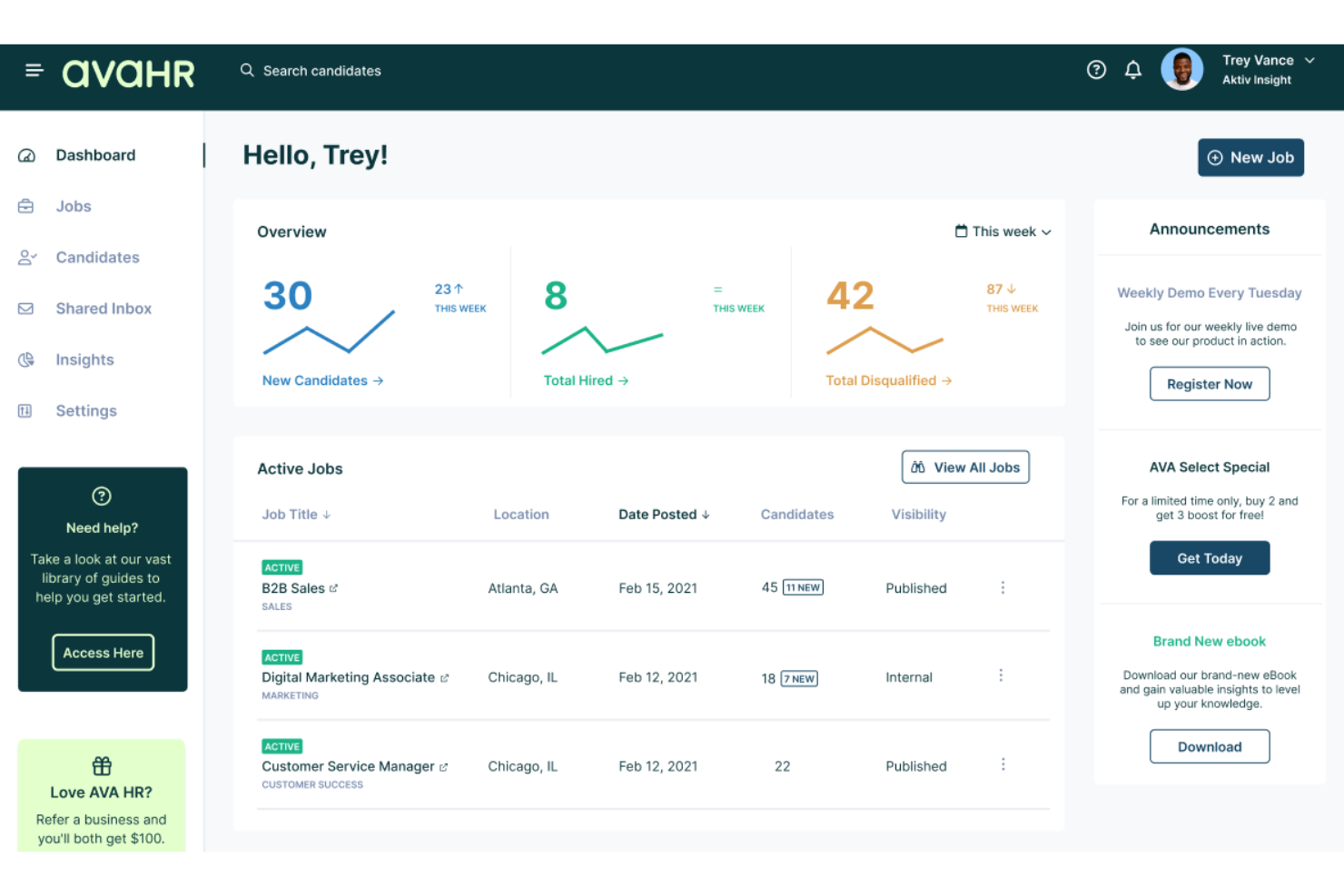
AvaHR is a cloud-based hiring platform made for painting companies, offering candidate tracking, job posting management, branded career pages, and collaborative review tools.
Who Is AvaHR Best For?
AvaHR fits painting businesses that want to showcase their employer brand and create custom candidate experiences during recruiting.
Why I Picked AvaHR
I picked AvaHR as one of the best because I can design branded portals that match my painting company’s style and create a tailored application journey. My team uses the drag-and-drop portal builder and custom logo uploads to stand out to candidates.
AvaHR Key Features
- Automated interview scheduling: Syncs candidate interviews with team calendars automatically.
- Bulk candidate actions: Move, tag, or communicate with multiple applicants at once.
- Custom application forms: Build unique application forms tailored to each job posting.
- Team collaboration tools: Share feedback and ratings with your hiring team inside the platform.
AvaHR Integrations
Integrations include Paychex, Gusto, Google Analytics, Shopify, Salesforce, Google Docs, HubSpot, Mailchimp, Microsoft Teams, and Zoom.
Pros and Cons
Pros:
- Assign team members to the hiring stages
- Drag-and-drop builder for application workflows
- Custom-branded candidate portals for job postings
Cons:
- Limited reporting on sourcing channels
- Requires manual candidate screening

Best for GPS time tracking on crew job sites
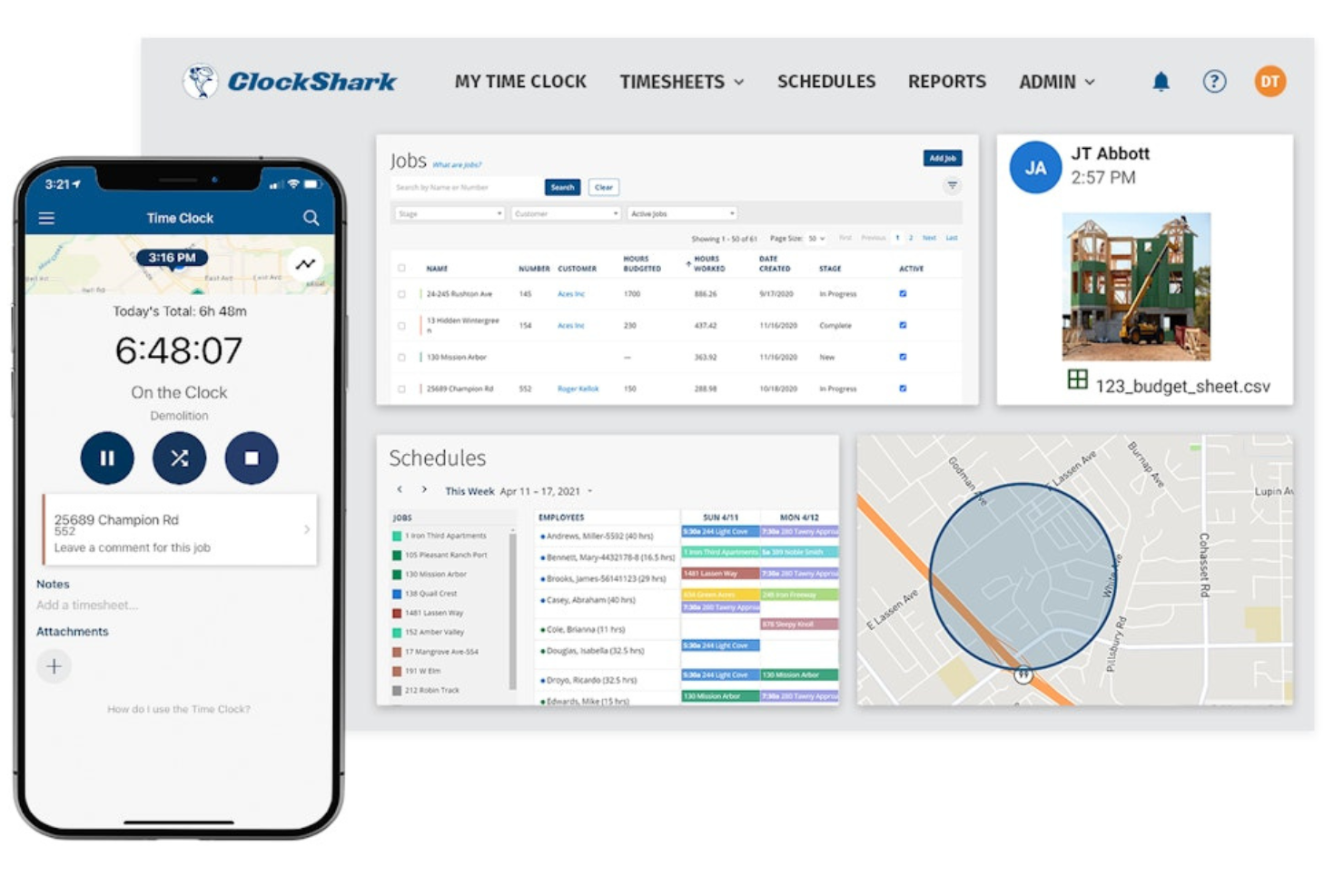
ClockShark is a workforce management platform built for painting contractors to handle crew scheduling, mobile time tracking, GPS monitoring, and job costing.
Who Is ClockShark Best For?
Painting companies need to manage mobile crews across multiple job sites and track employee locations.
Why I Picked ClockShark
I picked ClockShark as one of the best because I rely on its GPS time tracking to confirm crew locations and shifts across job sites. Geofencing, mobile punch-ins, and job-specific tracking make route management and accountability much easier for painting crews.
ClockShark Key Features
- Job scheduling: Assign painters to jobs and manage shift calendars visually.
- Mobile app: Access timesheets, schedules, and job details from any smartphone.
- Payroll reporting: Export approved hours directly to payroll processing formats.
- Document attachments: Upload job site photos and paperwork for each project.
ClockShark Integrations
ClockShark offers native integrations with QuickBooks, ADP, Gusto, Sage, Xero, MYOB, Paychex, and Zapier. An API is available for custom integrations.
Pros and Cons
Pros:
- Mobile app captures field activity in real time
- Document uploads support job-specific records
- GPS tracking confirms crew locations at jobs
Cons:
- Limited customization for job costing reports
- Occasional GPS drift reported during use
Fountain
Best for automated interview booking

Fountain is a high-volume hiring platform designed for employers who need screening, interview scheduling, messaging, and onboarding tools tailored for the painting and trade industry recruiting.
Who Is Fountain Best For?
High-volume employers in the painting and field services industries who need to quickly screen, schedule, and onboard candidates.
Why I Picked Fountain
Fountain is one of my top picks because I can automate interview scheduling right from the candidate application, making it almost instant for our painters to book slots. I use workflows to auto-invite qualified applicants and keep our calendar coordinated.
Fountain Key Features
- Mobile-friendly application forms: Candidates can apply for painting roles directly from their phones.
- Automated screening questions: Customize pre-screening steps to filter out unqualified applicants.
- Bulk messaging capabilities: Send updates or reminders to multiple painter applicants at once.
- Hiring stage analytics: Track candidate progress and funnel performance across all job postings.
Fountain Integrations
Fountain offers native integrations with Workday, SAP SuccessFactors, Oracle HCM, ADP, and Sterling, and connects with Zapier. An API is available for custom integrations.
Pros and Cons
Pros:
- Bulk candidate stage movement and messaging
- Custom hiring workflows for field teams
- Automated interview scheduling for painter roles
Cons:
- Reporting for candidate sources is limited
- Limited skill assessment configuration options
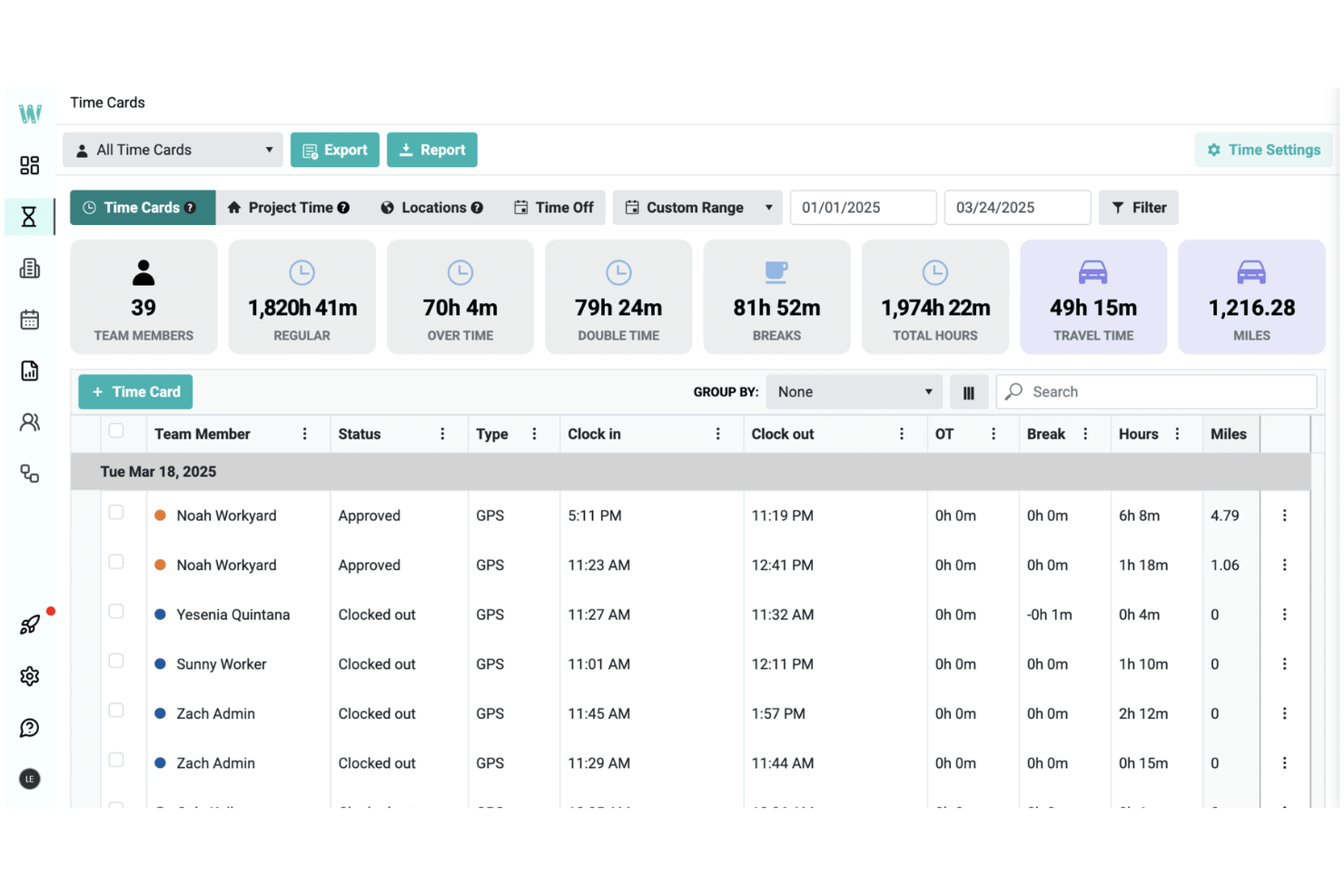
Workyard is a workforce management platform for painting businesses that features GPS time tracking, job and crew scheduling, site activity logs, and payroll preparation.
Who Is Workyard Best For?
Workyard fits painting contractors who want to manage timesheets, scheduling, and job tracking for field crews across multiple sites.
Why I Picked Workyard
I picked Workyard as one of the best because I can generate payroll-ready timesheets from precise GPS and project-based tracking. I like that my team can review job and worker time data in detail before every payroll run.
Workyard Key Features
- Task management: Assign and track project-specific tasks for each painter or crew.
- Mobile app: Let field teams clock in, view schedules, and upload job photos from smartphones.
- Job costing: Track labour expenses tied to specific painting projects.
- Custom tags: Organize employees, jobs, or cost codes with customizable labels.
Workyard Integrations
Workyard offers native integrations with QuickBooks Online, Gusto, ADP, Paychex, Sage, and Zapier. An API is available for custom integrations.
Pros and Cons
Pros:
- Photo uploads for job progress documentation
- Mobile scheduling updates for daily crew changes
- GPS timestamped clock-ins for on-site painters
Cons:
- Schedules can't be edited in bulk
- Limited reporting for large painting crews
hh2
Best for syncing candidate data to ERPs
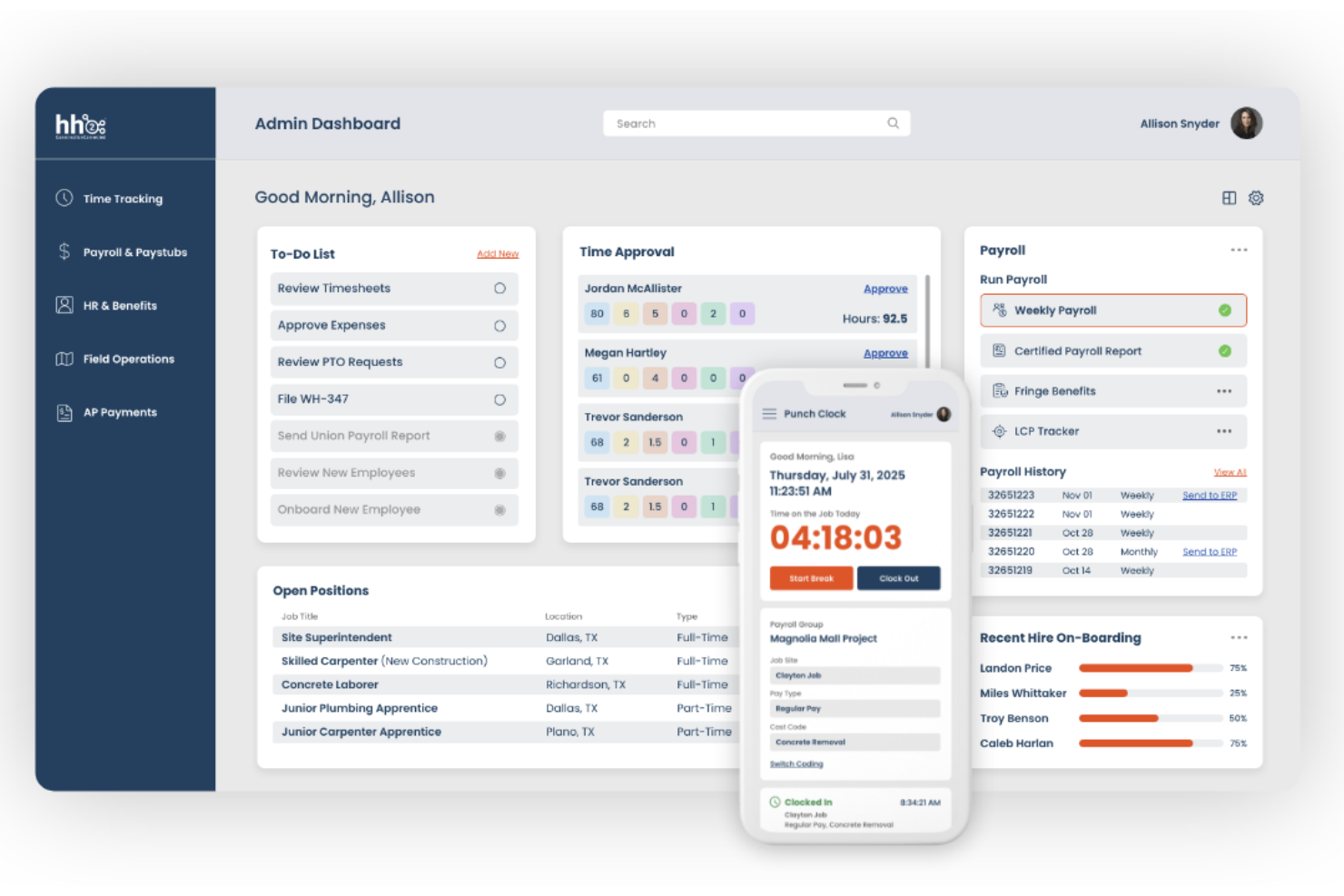
hh2 is an applicant tracking system for construction and field service contractors that handles job postings, candidate screening, recruitment workflows, and new hire onboarding.
Who Is hh2 Best For?
Construction companies and trade contractors need to centralize recruiting and sync candidate data directly with their ERP or payroll system.
Why I Picked hh2
I picked hh2 because I can sync candidate applications, resumes, and onboarding data straight into our ERP and payroll records. I like that I can automate the transfer of hire data from open spots to payroll without rekeying. I use custom status triggers to keep our process tight.
hh2 Key Features
- Job board syndication: Post openings to multiple job boards from a single dashboard.
- Customizable application forms: Tailor candidate application fields to match each position.
- Hiring team collaboration tools: Assign interviewers and tag users for reviews and feedback.
- Candidate document storage: Store, organize, and search applicant resumes and documents securely.
hh2 Integrations
hh2 offers native integrations with ERP systems, including Sage 300 CRE, Sage 100 Contractor, Foundation, Viewpoint Vista, and Viewpoint Spectrum. An API is available for custom integrations.
Pros and Cons
Pros:
- Secure document storage for painter applications
- Customizable hiring workflows for field roles
- Syncs applicant data into construction ERPs
Cons:
- No built-in background check functionality
- Limited reporting options for applicant analytics

ApplicantStack is a hiring management platform built for small and midsize businesses that need online tools for job posting, candidate tracking, pipeline management, and collaborative review.
Who Is ApplicantStack Best For?
ApplicantStack is well-suited for small businesses in the trades, like painting contractors, looking to build and tailor their own hiring pipelines.
Why I Picked ApplicantStack
I picked ApplicantStack as one of the best because I use its customizable applicant pipelines to set up stages that match my painting business’s process. I like being able to automate emails and assign tasks at each stage.
ApplicantStack Key Features
- Job board posting: Post open painting roles to multiple popular job boards from one dashboard.
- Questionnaire builder: Create custom screening questions for applicants during the application process.
- Document storage: Keep applicant resumes, licenses, and certifications organized in one location.
- Collaborative rating: Let team members score and comment on candidates within the system.
ApplicantStack Integrations
ApplicantStack offers native integrations with job boards like Indeed, ZipRecruiter, Glassdoor, Monster, and CareerBuilder. An API is available for custom integrations.
Pros and Cons
Pros:
- Bulk email to candidates by stage
- Customizable job application forms
- Drag-and-drop applicant stage builder
Cons:
- No built-in candidate texting option
- Basic analytics dashboard features


PaintScout is a quoting and job management platform built for painting businesses, with features for proposal creation, client management, digital signatures, job scheduling, and cost tracking.
Who Is PaintScout Best For?
PaintScout suits residential and commercial painting contractors that need detailed quoting and client management features tailor-made for painting businesses.
Why I Picked PaintScout
I picked PaintScout as one of the best because I can build detailed, customizable quoting workflows for every type of painting job. My team uploads measurements, product details, and job photos directly to each proposal, making every quote unique and accurate.
PaintScout Key Features
- Digital signature capture: Clients can sign proposals electronically for instant approval.
- Automated follow-up reminders: Schedule and send follow-up emails to prospects directly from the system.
- Job calendar: View, assign, and manage project schedules using a built-in calendar.
- Custom document templates: Create branded templates for proposals, invoices, and client-facing documents.
PaintScout Integrations
PaintScout offers native integrations with QuickBooks Online and Zapier. An API is available for custom integrations.
Pros and Cons
Pros:
- Supports branded proposal and invoice templates
- Includes digital signature capture on proposals
- Generates detailed paint job estimates quickly
Cons:
- Mobile app offers partial feature access only
- Limited project management features

LumberFi is a workforce management platform for construction and painting businesses that offers digital time tracking, crew scheduling, payroll reporting, and cost allocation tools.
Who Is LumberFi Best For?
LumberFi is a fit for painting and construction contractors who need to allocate labour costs accurately across multiple job sites.
Why I Picked LumberFi
I picked LumberFi because I rely on live project dashboards that break down field crews, hours, and specific job labour costs. I like using the automated job costing and certified payroll export for tracking project finances on painting projects.
LumberFi Key Features
- Crew scheduling board: Assign painters and teams to projects on a visual calendar.
- GPS mobile time clock: Field staff can clock in and out using location verification.
- Role-based user permissions: Control access to sensitive timesheet and payroll data by role.
- QuickBooks integration: Sync labour data and payroll details with QuickBooks for accounting.
LumberFi Integrations
LumberFi offers native integrations with QuickBooks Online and QuickBooks Desktop. An API is available for custom integrations.
Pros and Cons
Pros:
- Certified payroll reports for compliance
- Tracks painters’ field and office hours
- Job costing updates in real time
Cons:
- No candidate sourcing features included
- Mobile app only available in English

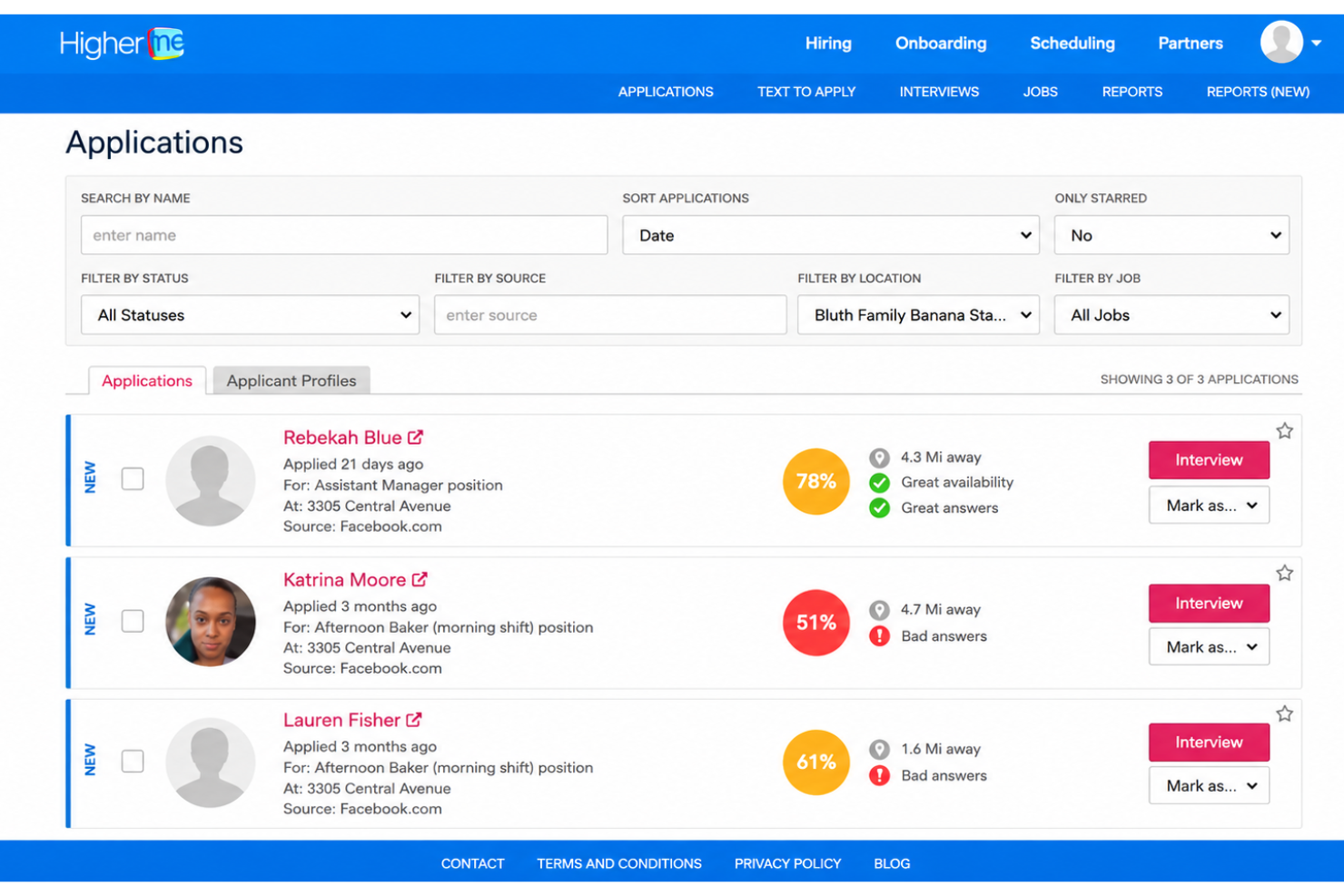
HigherMe is a hiring software platform made for businesses in service industries, offering candidate sourcing, application customization, screening, scheduling, and communication tools for high-volume hiring.
Who Is HigherMe Best For?
Franchise operators and field service companies are looking to attract walk-in or on-the-go candidates for painter roles.
Why I Picked HigherMe
I picked HigherMe as one of the best because my team uses QR code application flows at job sites, letting candidates scan and apply instantly from their phones. I like that I can customize these flows for each painting job and location, giving us control over the applicant experience.
HigherMe Key Features
- Text-to-apply functionality: Let candidates start applications by texting a keyword to a dedicated number.
- Automated interview scheduling: Handles candidate interview booking and reminders automatically.
- Video cover letter requests: Let you request short video introductions from applicants.
- Automated reference checks: Let you collect references and scores via built-in workflows.
HigherMe Integrations
HigherMe offers native integrations with ADP, Paycor, TalentReef, and Lever. An API is available for custom integrations.
Pros and Cons
Pros:
- Bulk messaging to painter applicants
- Text-to-apply workflow for mobile candidates
- QR code job application flows for painters
Cons:
- Lacks automated candidate ranking tools
- Reporting dashboard lacks advanced filters

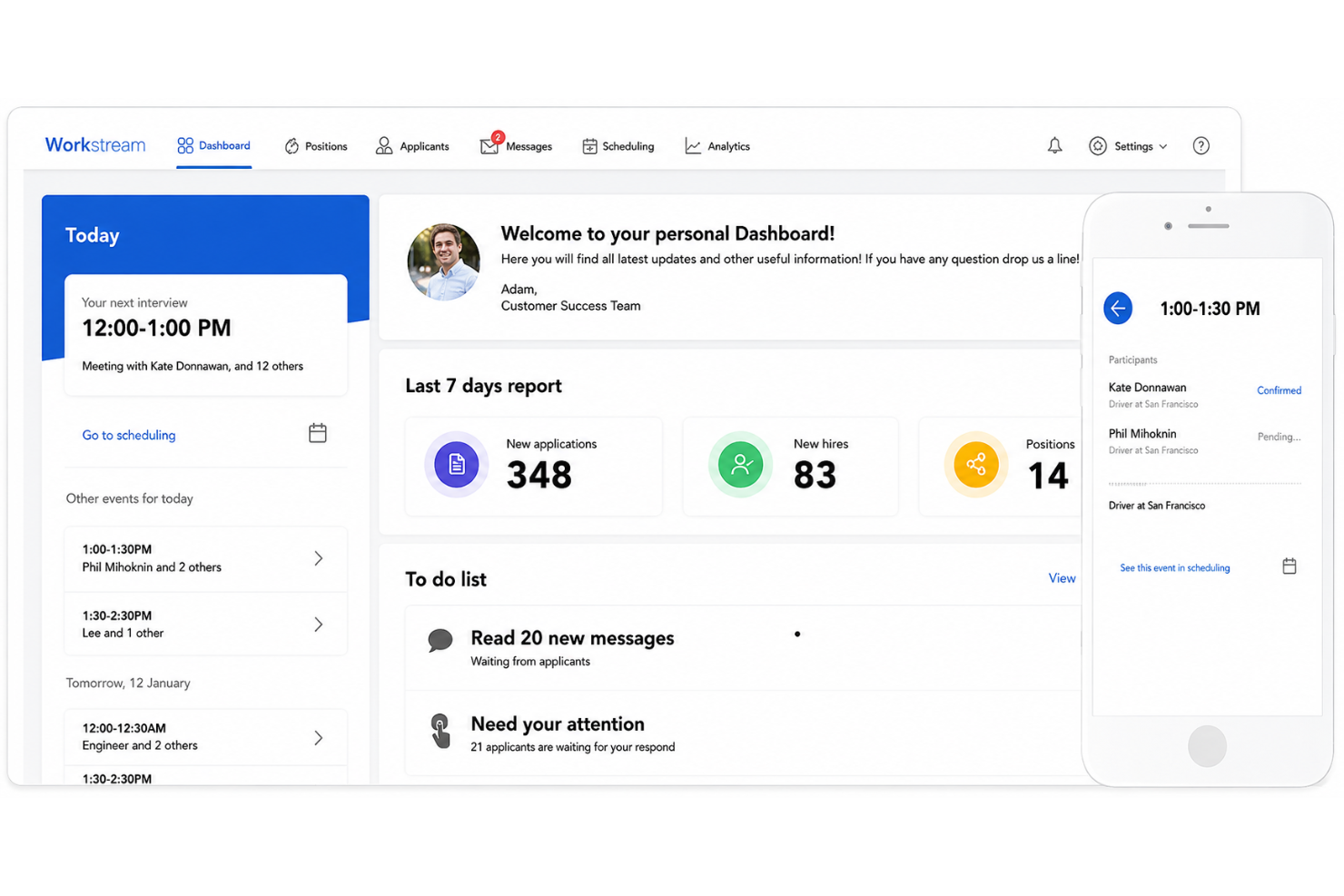
Workstream is a hiring automation platform built for high-volume hourly recruiting, offering job distribution, mobile-first application flows, communication tools, and interview scheduling tailored to painting businesses.
Who Is Workstream Best For?
Hiring managers at fast-growing painting companies who need to recruit field staff quickly using mobile and text-based workflows.
Why I Picked Workstream
I picked Workstream as one of the best because my crew leads use text-to-apply job postings at painting sites, which lets walk-in applicants start applications right from their phones. I also like that I can automate interview invites and reminders.
Workstream Key Features
- Job board distribution: Post painting jobs to dozens of job boards with one click.
- Automated document collection: Collect I-9s, W-4s, and certifications from candidates in the hiring workflow.
- Custom hiring stages: Build and customize hiring pipelines tailored for painting crews.
- Team collaboration tools: Assign hiring tasks, leave notes, and share candidate feedback with your team.
Workstream Integrations
Workstream offers native integrations with ADP, Paylocity, Google Calendar, Indeed, and Checkr. An API is available for custom integrations.
Pros and Cons
Pros:
- Mobile-first application and screening process
- Bulk SMS messaging to painter candidates
- Text-to-apply job application workflow
Cons:
- Limited advanced reporting customization
- No built-in skills assessment tools
Other Painting Hiring Software
Here are some additional painting hiring software options that didn’t make it onto my shortlist, but are still worth checking out:
- When I Work
With shift broadcast alerts
- Housecall Pro
For automating job assignments
- 7shifts
For team shift coordination
- Greenhouse
For structured interview kits
- CareerPlug
For multi-location staff hiring
- Jobber
For dispatching newly hired crews
- BambooHR
For onboarding and e-signature tools
- Service Fusion
For work order tracking by job
- Team Engine
For automated new hire messaging
- Sprockets
For AI-driven candidate matching


How I Evaluate Painting Hiring Software
I split my evaluation into baseline criteria—like multi-board job posting and SMS apply—and differentiators that separate tools built for painting crews from generic hiring platforms.
Core Functionality (Table Stakes For This List)
When I'm selecting tools for my list, I rank each one on a scale from 0 (does not offer the functionality) to 5 (excels in this area) for each core functionality listed below. Then, I calculate the tool's total score into a percentage. Each tool needs to achieve a minimum total score of 65% to be considered for inclusion.
- Trade Job Distribution: I check whether a platform can push a single painter job post to multiple boards at once, including blue-collar networks beyond just Indeed or ZipRecruiter.
- High-Volume Applicant Tracking: Painting companies often hire entire crews at once, so I look for ATS pipelines with bulk actions, tagging, and multi-location views.
- SMS & Mobile Apply: Most painters apply from a phone between jobs, so the apply flow should require no account creation, and two-way texting should be built in.
- Screening & Qualification: I evaluate whether you can set up custom knockout questions around things like years of experience, valid licenses, and availability for travel.
- Interview Scheduling Automation: Self-scheduling links with calendar sync and automated reminders matter here because painting crews are hard to pin down by phone or email.
- Onboarding & Compliance: Digital I-9s, W-4s, e-signatures, and background check integrations should be in the platform so new hires can complete paperwork before day one.
Once I have a list of tools that meet this criteria, I consider what sets each platform apart.
Differentiating Factors (What Sets Vendors Apart)
Here's how I compare and contrast different vendors:
Standout Features
Referral tools are a big deal in painting because word-of-mouth is how most crews grow. I look for platforms that let you track and incentivize referrals from current painters. Multilingual candidate experiences also matter—Spanish-language apply flows and SMS help you reach a broader labor pool. I evaluate hiring analytics too, checking whether a platform shows source-level data so you know if trade board posts outperform general job sites.
Beyond Features
Industry fit matters a lot here. I check whether a platform already serves painting or home services companies, since pre-built job templates and trades-specific screening save real setup time. Integrations with field service tools like Jobber or ServiceTitan and payroll systems like Gusto or QuickBooks also weigh heavily—new hires need to flow into the systems your crews already use. Speed-to-value is another factor I evaluate, because most painting business owners need to post a job the same day, not wait weeks for implementation.
How to Choose Painting Hiring Software
It’s easy to get bogged down in long feature lists and complex pricing structures. To help you stay focused as you work through your unique software selection process, here’s a checklist of factors to keep in mind:
| Factor | What to Consider |
|---|---|
| Scalability | Can the software handle seasonal hiring surges and support growth as your painting business expands across locations or franchises? |
| Integrations | Does the software connect with payroll, background check, and scheduling tools you already use, or will switching create manual workarounds? |
| Customizability | Can you tailor application forms, pipelines, and notifications to your hiring workflow, or are you stuck with generic presets not suited to painters? |
| Ease of use | Will it be easy for non-technical managers, field leads, and applicants to navigate the dashboard and start using it with minimal hand-holding? |
| Implementation and onboarding | How much time, support, and training does it take to set up the system, import candidate data, and train managers at every branch or site? |
| Cost | Beyond the monthly fee, are there charges for extra seats, hires, or features? Does the pricing fit your average hiring volume and staffing budget? |
| Security safeguards | Are applicant data and sensitive documents protected with encryption and permission controls that meet industry legal and privacy standards? |
| Support availability | Is responsive support available when hiring issues arise after hours, and what does the vendor guarantee for onboarding help or urgent troubleshooting? |
What Is Painting Hiring Software?
Painting hiring software is a digital tool that helps painting businesses recruit, screen, and hire field staff. It centralizes job postings, application tracking, candidate communication, and interview scheduling, making it easier to fill positions quickly.
This software is designed to meet the unique demands of painting companies, including high turnover, seasonal surges, and field-ready hiring workflows.
Features
When selecting painting hiring software, keep an eye out for the following key features:
- Job board posting: Share open roles to multiple online job boards from one platform, saving time and increasing applicant reach.
- Application tracking: Monitor each candidate’s progress through the hiring funnel, from initial application to offer acceptance.
- Mobile-friendly workflows: Let candidates and hiring managers apply, communicate, and manage tasks from any smartphone or tablet, supporting field-based hiring.
- Automated messaging: Send interview invitations, reminders, and follow-ups to candidates using text or email without manual effort.
- Custom hiring stages: Build unique hiring pipelines that match your painting company’s process, such as phone screens, skills assessment, and onboarding.
- Document collection: Gather necessary documents like licenses, IDs, and tax forms securely and store them with each candidate profile.
- Bulk candidate communication: Reach groups of applicants simultaneously with group messages about interview schedules or next steps.
- Team collaboration tools: Allow multiple supervisors, managers, or recruiters to add notes, assign tasks, and share feedback on candidates.
- Reporting and analytics: Review hiring metrics, such as time-to-fill and source-of-hire, to improve recruiting strategies.
- API or integration support: Connect the hiring platform with your primary CRM, payroll, background check, or scheduling tools already in use by your business.
Benefits
Implementing painting business software to manage your recruitment provides several benefits for your team and your business. Here are a few you can look forward to:
- Faster hiring cycles: Automating job postings, applicant tracking, and messaging speeds up the process from first contact to onboarding.
- Improved candidate sourcing: Posting to multiple job boards and enabling text-to-apply increases the number and quality of applicants.
- Better team collaboration: Built-in communication tools let managers, recruiters, and site leads coordinate easily throughout the hiring process.
- Enhanced compliance and documentation: Collecting necessary licenses and forms in one secure platform helps you stay organized for audits.
- Greater visibility into hiring metrics: Reporting dashboards reveal bottlenecks and help you identify which sources bring in the most effective hires.
- Stronger sales execution: A fully staffed team gives estimators the confidence to send out professional proposals quickly, leveraging specialized painting estimating software to produce accurate estimates that reflect your actual labour capacity and win more painting estimating jobs.
- Better operational alignment: Choosing the right painting contractor software ensures your production team is fully staffed, making it easier to manage backend tasks like inventory management and dispatching crews to projects.
Costs and Pricing
Selecting painting hiring software requires an understanding of the various pricing models and plans available. Costs vary based on features, team size, add-ons, and more. The table below summarizes common plans, their average prices, and typical features included in painting hiring software solutions:
Plan Comparison Table for Painting Hiring Software
| Plan Type | Average Price | Common Features |
|---|---|---|
| Free Plan | $0 | Post a limited number of jobs, basic applicant tracking, and email support. |
| Personal Plan | $20-$50/user/month | Unlimited job postings, basic team collaboration, mobile access, and standard reporting tools. |
| Business Plan | $50-$100/user/month | Advanced applicant tracking, bulk messaging, custom hiring stages, integration options, and analytics. |
| Enterprise Plan | $100+/user/month | Custom workflows, advanced security, dedicated onboarding and support, compliance tools, and API access. |
Painting Hiring Software FAQs
Here are some answers to common questions about painting hiring software:
Can painting hiring software help reduce no-shows for interviews?
Yes, many painting hiring software tools let you automate reminders and confirmations via text or email, which reduces candidate no-shows and late arrivals for interviews. This helps business owners keep their hiring pipeline moving so they can accurately forecast labour costs before they even schedule jobs.
Is painting hiring software only for large companies?
No, painting hiring software can benefit businesses of any size—from small subcontractors to national chains—because it helps manage applicant flow, communication, and documentation regardless of scale. Implementing these systems protects your profit margin by ensuring you onboard the right crew members to deliver high-quality painting services. Many owners look for the best software options that double as an all-in-one platform to handle both recruiting and day-to-day operations.
How does painting hiring software handle field-based hiring?
Most solutions offer mobile-friendly dashboards, text-to-apply features, and workflows designed for fast hiring, making it easy to recruit, screen, and hire workers who spend little time at a desk. Because the onboarding process is optimized for Android and iOS mobile devices, candidates and homeowners alike experience a highly user-friendly process from the initial application to the final project walkthrough.
What documents can I collect from candidates through painting hiring software?
You can collect IDs, certifications, background check releases, tax forms, licenses, and other onboarding paperwork, storing them securely alongside each candidate’s profile. Keeping these records organized supports better business management, fits well alongside your existing field service management tools, and simplifies tracking overall profitability across your entire team.
Can painting hiring software integrate with my payroll system?
Yes, many platforms offer integrations or APIs for connecting your hiring software with payroll, background check providers, or scheduling systems to simplify your HR processes. Connecting these tools ensures you maintain a steady cash flow, making it easier to collect payments via credit card and manage company resources without administrative delays.