

Bordro yönetimi, özellikle birden fazla görevi aynı anda yürütürken, CPA'lar ve İK ekipleri için baş ağrısına dönüşebilir. Doğruluğa ve verimliliğe ihtiyacınız vardır; ancak manuel süreçler genellikle hatalara ve zaman kaybına yol açar. İşte basit bordro yazılımı burada devreye girer; iş yükünüzü hafifletmenin ve bordro yönetimini iyileştirmenin bir yolunu sunar.
Deneyimlerime göre doğru yazılım size zaman kazandırabilir ve içinizin rahat etmesini sağlayabilir. Size mevcut en iyi seçenekleri sunmak için çeşitli seçenekleri bağımsız olarak test edip inceledim. Görüşlerimin kapsamlı araştırmalara dayandığından ve tarafsız olduğundan emin olabilirsiniz.
Bu makalede, ekibinizin ihtiyaçlarını göz önünde bulundurarak değerlendirdiğim, kolay bordro çözümleri için en iyi seçimlerimi bulacaksınız. Bu araçların bordroyu sizin için nasıl daha az zahmetli hâle getirebileceğini inceleyelim.
Why Trust Our Software Recommendations
6,700+
Reviews
20
Industry experts
16+
Evaluation factors
14
Years
Our team has been testing and reviewing software since 2012. As HR experts ourselves, we know how difficult—and important—it is to choose the right software.
For this guide, we evaluated tools using hands-on testing and independent research, scoring tools using our selection criteria. We also draw on insights from industry thought leaders and practicing HR experts.
Our reviews reflect our human editorial judgment, not a sales pitch.
Expert reviewers:
- Phil GrayCOO
 Kim BehnkeHR Tech Editor & Analyst
 Josh BarkerPeople Ops Manager

Basit Bordro Yazılımları Karşılaştırma Tablosu
Bu karşılaştırma tablosu, basit bordro yazılımları arasından en iyi seçimlerim için fiyatlandırma ayrıntılarını özetler:
Score legend (out of 5)
- Excellent4.5–5
- Good4–4.4
- Average3–3.9
- Below average2–2.9
- Poor1–1.9
Sorted by: Default
| Tool | Starting Price | Website | |||||||
|---|---|---|---|---|---|---|---|---|---|
Best for multi-currency payroll and payments | 3.2 out of 5 | 3 | 3 | 4 | 3 | 3 | 3 | $29/user/month Free demo available | Website |
Best for payroll with biometric clock-ins | 2.5 out of 5 | 2 | 3 | 2 | 3 | 3 | 2 | $50/user/month 30-day free trial + free demo available | Website |
Best for shift scheduling | 3.3 out of 5 | 3 | 4 | 4 | 3 | 3 | 3 | $99/month Free plan + 30-day free trial + free demo available | Website |
Best for customizable payroll packages | 3.7 out of 5 | 3 | 3 | 5 | 4 | 4 | 3 | Pricing upon request Free demo available | Website |
Best for paying employees and contractors | 3.7 out of 5 | 3 | 4 | 3 | 4 | 4 | 4 | $6/user/month Free trial + free demo available | Website |
Best for IT and device management | 3.8 out of 5 | 3 | 3 | 5 | 4 | 4 | 4 | $8/user/month Free trial + free demo available | Book Demo |
Best for integrated benefits management | 4.0 out of 5 | 4 | 5 | 4 | 4 | 4 | 3 | $49/month Free trial + free demo available | Book Demo |
Best for payroll anomaly checks before payday | 3.7 out of 5 | 3 | 4 | 4 | 4 | 4 | 3 | $50/month Not available | Website |
Best for payment integration | 3.5 out of 5 | 3 | 4 | 4 | 4 | 4 | 2 | $35/month + $6/person/month Free demo available | Website |
Best for small businesses | 3.8 out of 5 | 4 | 3 | 4 | 4 | 4 | 4 | $17/month 30-day free trial + free demo available | Website |


En İyi Basit Bordro Yazılımları İncelemeleri
Aşağıda, kısa listeme giren en iyi basit bordro yazılımlarına ilişkin ayrıntılı özetlerimi bulabilirsiniz. İncelemelerim, sizin için en uygun seçeneği bulmanıza yardımcı olmak amacıyla her aracın temel özelliklerine, artılarına ve eksilerine, entegrasyonlarına ve ideal kullanım alanlarına ayrıntılı bir bakış sunar.
 Best for multi-currency payroll and payments
- Free demo available
- From $29/user/month
Visit WebsiteCustomer Rating:4.9/5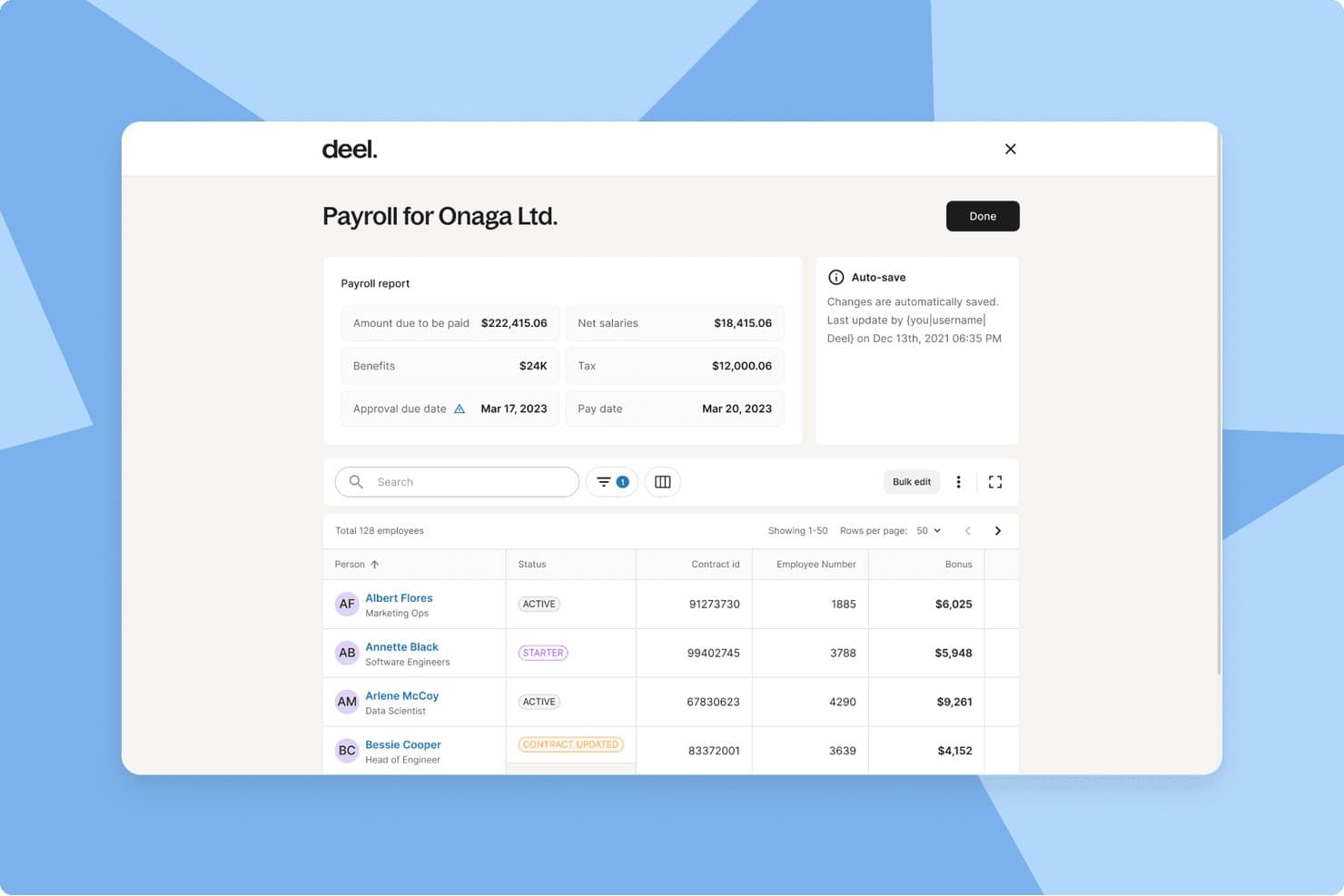
Deel Payroll centralizes payroll reports, employee statuses, and bonuses simply. Deel Payroll is a global payroll platform that handles multi-currency payments, automated tax filings, contractor management, and compliance across 130+ countries from a single dashboard.
Who Is Deel Payroll Best For?
Deel Payroll is a strong fit for startups and growing companies that pay employees or contractors across multiple countries in different currencies.
Why I Picked Deel Payroll
Deel Payroll earns its spot on my shortlist because it handles something most payroll tools simply don't: paying workers in 120+ currencies without requiring manual wire transfers or separate FX tools. I particularly like that its 55+ native payroll engines handle tax filings and statutory deductions automatically, regardless of where your team is based. If you're running a single payroll cycle that covers a contractor in Brazil and a salaried employee in Germany, Deel keeps both compliant.
Deel Payroll Key Features
- Employee self-service portal: Lets employees and contractors access pay stubs, tax forms, and banking details online.
- HRIS capabilities: Centralizes employee records, organizational charts, and document management alongside payroll.
- Automated compliance updates: Continuously updates contracts, wage rates, and workflows to match local labour laws in 130+ countries.
- Payroll analytics and reporting: Provides built-in dashboards and exportable reports for payroll, taxes, and workforce costs.
Deel Payroll Integrations
Deel Payroll offers native integrations with QuickBooks, Xero, NetSuite, BambooHR, and Greenhouse, and provides an API for custom integrations.
Pros and Cons
Pros:
- Built-in compliance tools across 150+ countries
- Handles contractor and employee payroll together
- Pays workers in 120+ currencies automatically
Cons:
- Overkill for single-country payroll needs
- Setup complexity for small domestic-only teams
Learn more about Deel Payroll: Best for payroll with biometric clock-ins
- 30-day free trial + free demo available
- From $50/user/month
Visit WebsiteCustomer Rating:4.5/5
TimeTrex tracks employee punch times and overtime in a weekly timesheet view. TimeTrex is a workforce management platform that combines payroll processing, time and attendance tracking, employee scheduling, leave management, and HR tools in a single system.
Who Is TimeTrex Best For?
TimeTrex is a strong fit for small businesses that need time tracking and payroll in one place, especially those managing hourly teams who clock in and out on-site.
Why I Picked TimeTrex
I picked TimeTrex as one of the best because of how tightly it connects biometric clock-ins to payroll. When your team clocks in using facial recognition, that verified attendance data flows directly into payroll calculations, which means you're not manually reconciling timesheets before every pay run. I also like that the Professional Edition bundles employee scheduling and leave management alongside payroll, so hourly teams with rotating shifts don't need a separate system to track who worked when.
TimeTrex Key Features
- Payroll processing wizard: A step-by-step workflow guides you through pay periods, timesheet verification, pay-stub generation, and transaction processing.
- Employee self-service portal: Employees can view and download pay stubs and government tax documents, such as W-2s and T4s, directly from their accounts.
- Configurable tax and deduction formulas: Supports federal, state/provincial, and local tax calculations using percentage, bracket, fixed-amount, and custom formula types.
- Direct deposit with multiple pay methods: Pays employees via ACH or EFT and lets you split net pay across multiple bank accounts by fixed amount or percentage.
TimeTrex Integrations
TimeTrex lists integrations with Intuit QuickBooks, Sage, ADP, Paychex, Surepay, and Ceridian. It supports RESTful API and flat-file connections for custom payroll and accounting workflows.
Pros and Cons
Pros:
- Reports track attendance and leave accruals
- Support helps resolve payroll setup questions
- Attendance data feeds directly into payroll
Cons:
- Initial setup needs configuration and test runs
- Tax filing still requires external portal steps
Learn more about TimeTrex: Best for shift scheduling
- Free plan + 30-day free trial + free demo available
- From $99/month (billed annually)
Visit WebsiteCustomer Rating:4.2/5
Homebase manages scheduling and time tracking for teams with hourly workers. Homebase is a workforce management tool designed for small businesses, focusing on employee scheduling and time tracking. It serves businesses that need efficient management of hourly workers and shift planning.
Why I picked Homebase: The tool offers extensive shift scheduling, making it ideal for businesses with complex scheduling needs. It provides features such as time tracking and employee communication, which are essential for managing hourly workers. Homebase also allows you to manage labor costs by keeping track of hours worked and overtime. Its emphasis on scheduling and time management makes it a valuable tool for businesses needing precise shift control.
Standout features and integrations:
Features include time tracking, which helps you monitor employee hours accurately. The platform also offers labor cost management, so you can keep track of expenses related to employee shifts. Additionally, Homebase provides employee communication tools, allowing your team to stay connected and informed.
Integrations include QuickBooks, Square, Gusto, ADP, Shopify, Clover POS, Toast POS, Lightspeed, Square, Paychex, and more.
Pros and Cons
Pros:
- Employee communication tools
- Labor cost management
- Effective shift scheduling and time tracking
Cons:
- No advanced HR features
- Limited to hourly workers
 Best for customizable payroll packages
- Free demo available
- Pricing upon request
Visit WebsiteCustomer Rating:4.1/5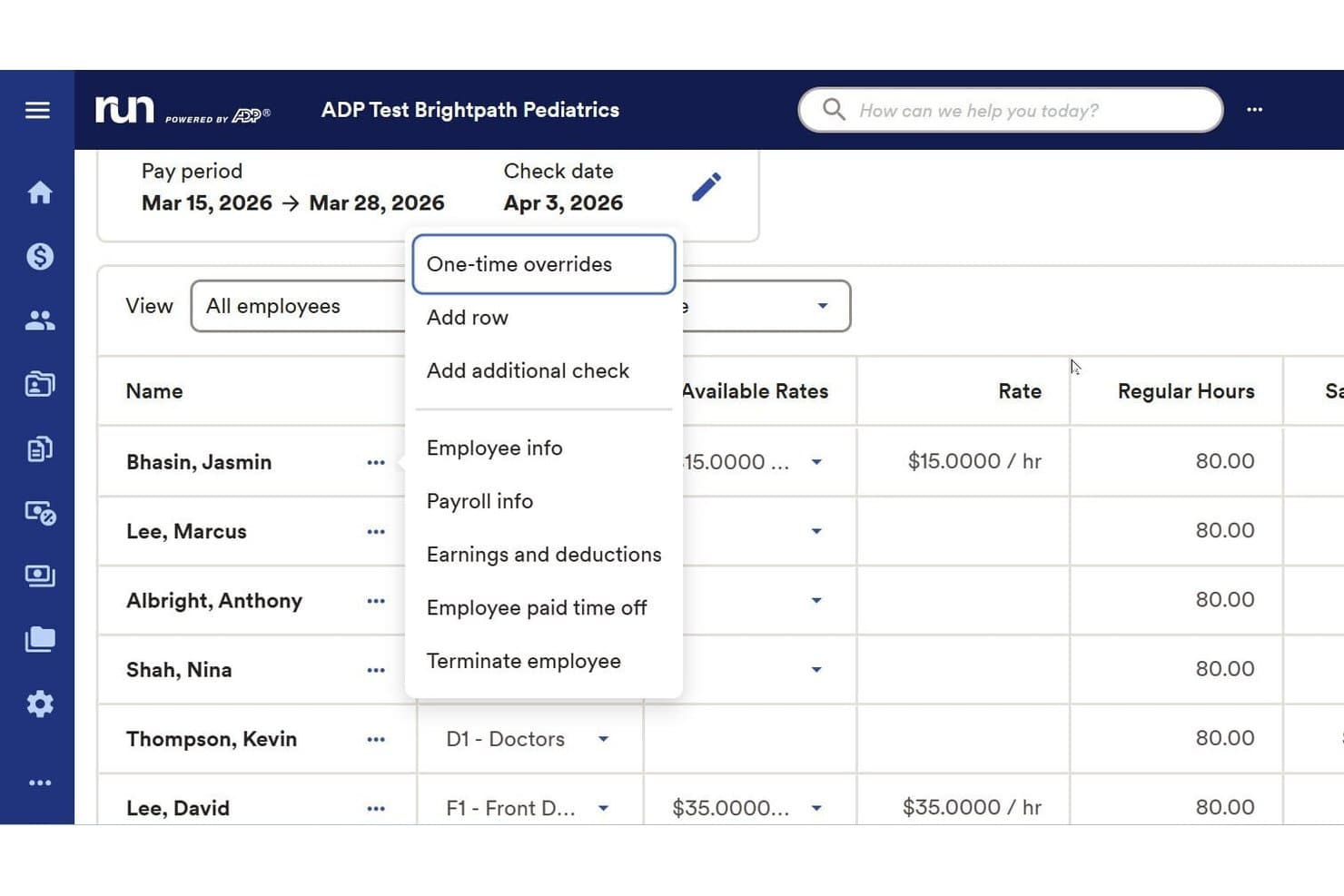
RUN Powered by ADP offers a one-time override dropdown menu during payroll processing. RUN Powered by ADP is a payroll software platform built for small businesses that simplifies recurring payroll, handles tax filing, manages employee and contractor payments, and supports benefits and compliance requirements.
Who Is RUN Powered by ADP Best For?
Small business owners and HR teams looking for an all-in-one payroll solution with flexible setup and support for both employees and contractors.
Why I Picked RUN Powered by ADP
I picked RUN Powered by ADP as one of the best because I can tailor payroll packages to specific business needs, including advanced deductions and garnishments. The platform adapts as staffing needs change, letting my team manage hourly, salaried, and contract workers easily.
RUN Powered by ADP Key Features
- Automated payroll tax filing: The platform automatically calculates, files, and pays federal, state, and local payroll taxes.
- Employee self-service portal: Employees can access pay stubs, tax forms, and update personal information online.
- Mobile payroll processing: Run payroll and manage employee data from a dedicated mobile app.
- Multi-jurisdiction compliance management: Stay up to date with changing labor laws and tax rates across multiple states.
RUN Powered by ADP Integrations
RUN Powered by ADP offers native integrations with QuickBooks, Xero, Wave, When I Work, and Slack. An API is available for custom integrations.
Pros and Cons
Pros:
- Supports multistate compliance for small businesses
- Includes built-in tax filing and reporting
- Handles payroll for both employees and contractors
Cons:
- Some users encounter unexpected processing fees
- Inconsistent customer support experiences
Learn more about RUN Powered by ADP®: 5Best for paying employees and contractors
Eddy
- Free trial + free demo available
- From $6/user/month
Visit WebsiteCustomer Rating:4.7/5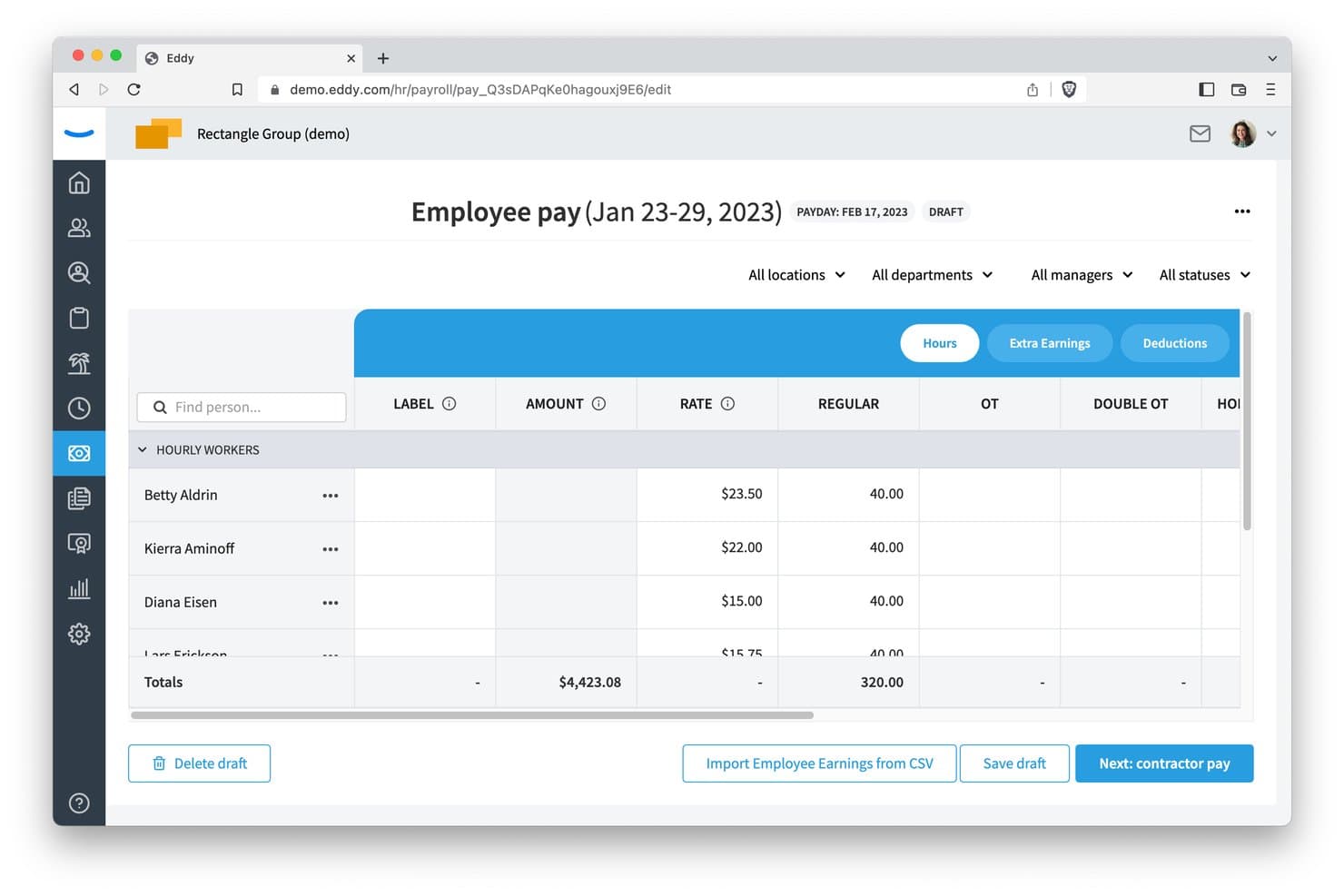
Eddy lets users review employee hours and pay rates in one view. Eddy is a payroll and HR platform for small and midsize businesses that handles payroll processing for hourly employees, salaried employees, and contractors, with built-in tax filing, direct deposit, and employee self-service access.
Who Is Eddy Best For?
Eddy is a good fit for small and midsize business owners who need to pay both hourly employees and contractors without managing two separate systems.
Why I Picked Eddy
I've included Eddy in my top picks because it handles employees and contractors in a single payroll run, which removes the need to manage two separate payment workflows. When you run payroll, Eddy pulls in approved hours and time-off for hourly staff while simultaneously generating a contractor-pay summary, then calculates W-2s and 1099-NECs for both. I especially like that it covers all 50 U.S. states for tax filing and direct deposit, with 2-day, 4-day, or next-day options.
Eddy Key Features
- Employee self-service portal: Employees can view pay stubs, tax documents, and benefits, and update their direct deposit details and W-4 withholding information through the Eddy app or website.
- Unlimited payroll runs: Run regular, bonus, and off-cycle payroll as often as needed each month without incurring additional per-run charges.
- QuickBooks Online sync: Eddy sends payroll journal-entry data to QuickBooks Online, with account mapping by class, department, location, or worker classification.
- Benefits and deductions management: Payroll runs automatically include benefit withholdings, post-tax deductions, reimbursements, tips, and bonuses pulled from employee records.
Eddy Integrations
Eddy’s integration directory lists QuickBooks Online, Employee Navigator, Vestwell, 401GO, SimplyInsured, SmartPay, and Next. QuickBooks Online account mapping is available as an early-access beta.
Pros and Cons
Pros:
- Employees manage pay stubs and tax details
- Reviewers praise quick payroll runs
- Handles hourly, salaried, and contractor pay together
Cons:
- Some uncommon taxes still need manual payment
- Admins must review and submit every run
Learn more about Eddy: Best for IT and device management
- Free trial + free demo available
- From $8/user/month
Visit WebsiteCustomer Rating:4.9/5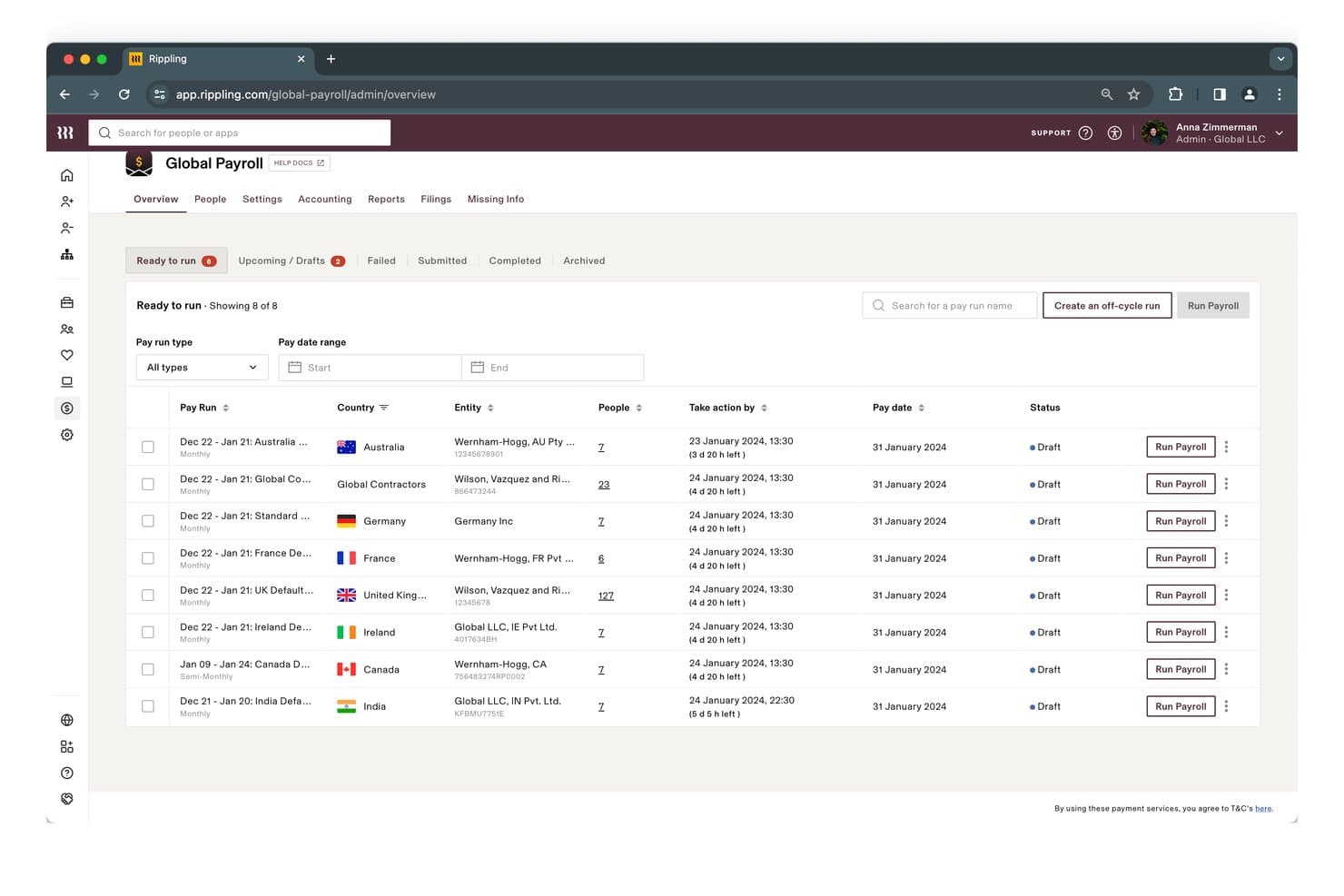
Rippling lets users run payroll across multiple countries from one dashboard. Rippling is a payroll and HR platform that automates payroll runs, handles multi-jurisdiction tax calculation and filing, and unifies employee and contractor payments alongside HR, IT, and finance tools in one system.
Who Is Rippling Best For?
Rippling is a strong fit for growing businesses that want to manage payroll, HR, and IT—like device provisioning and app access—from a single platform.
Why I Picked Rippling
I've included Rippling in my top picks because it's the only payroll tool on this list that also handles IT and device management from the same platform. When a new hire joins, Rippling can provision their laptop, set up app access, and run their first paycheck without touching a separate system. I also like that payroll syncs automatically with HR data, so salary changes and benefits deductions flow into each pay run without manual entry.
Rippling Key Features
- Unified employee and contractor pay runs: Pay salaried employees, hourly workers, and contractors together in a single payroll run with support for multiple pay schedules and pay rates.
- Automatic tax filing across jurisdictions: Rippling calculates, files, and remits payroll taxes with federal, state, and local agencies, and flags issues before filing.
- Accounting software integrations: Payroll syncs with QuickBooks, Xero, and NetSuite through automated journal entries, reducing manual reconciliation work.
- Employee self-service portal: Current and former employees can view pay stubs, access tax forms, and update direct-deposit details through a web portal or mobile app.
Rippling Integrations
Rippling lists 650+ integrations, including Xero, QuickBooks, and NetSuite. These connections can link payroll with accounting and ERP systems.
Pros and Cons
Pros:
- Employee and contractor runs stay together
- Employees access pay stubs without HR
- Automated tax filing reduces manual follow-up
Cons:
- Admins still review each payroll run
- Payroll setup can take several weeks
 Best for integrated benefits management
- Free trial + free demo available
- From $49/month
Visit WebsiteCustomer Rating:4.6/5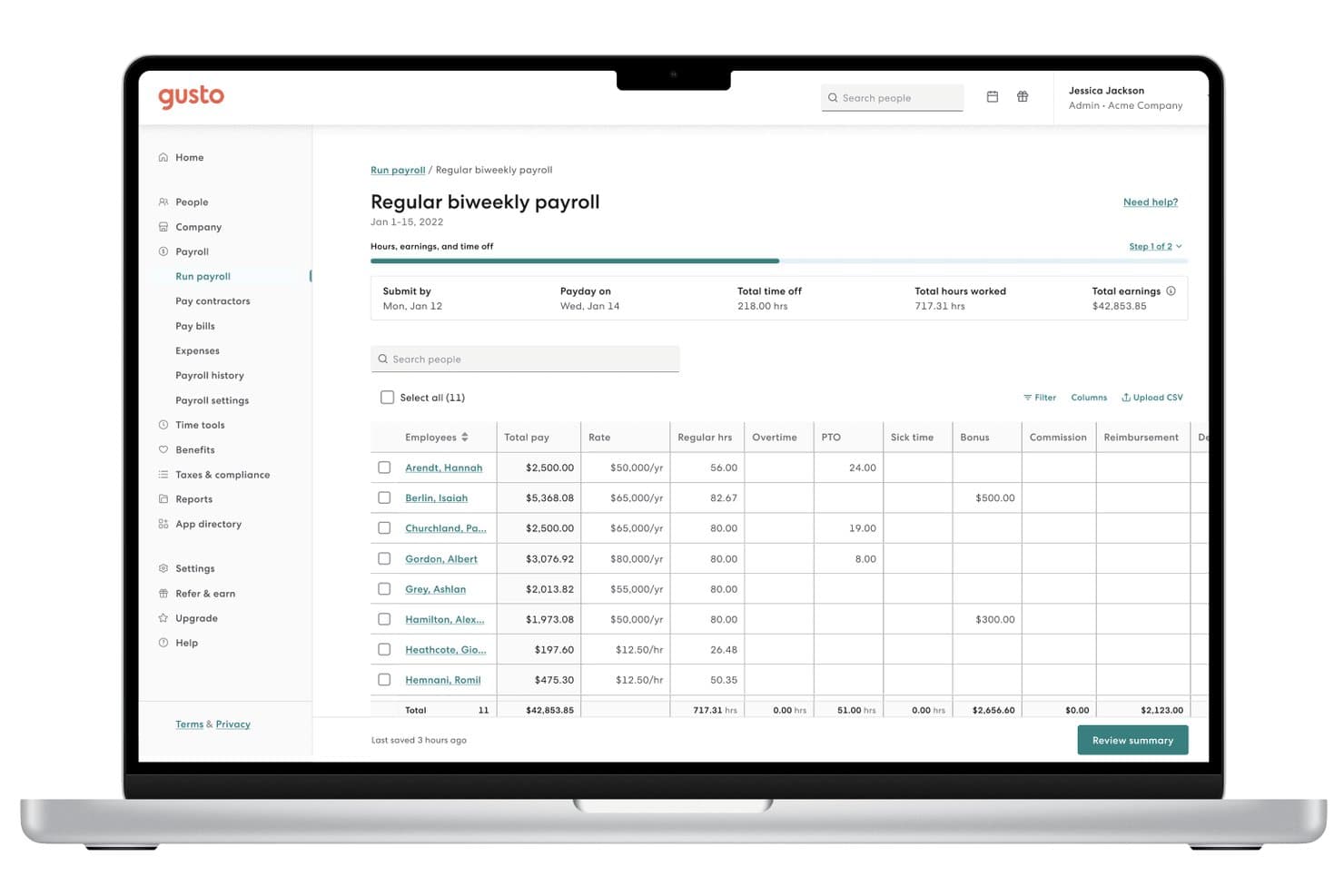
Gusto lets users run biweekly payroll and review employee earnings easily. Gusto is a payroll platform for small businesses that handles payroll runs, automated tax calculations and filings, direct deposit, contractor payments, and employee self-service access to pay stubs and tax forms.
Who Is Gusto Best For?
Gusto is a strong fit for small business owners and office managers who want to handle payroll, benefits, and contractor payments from a single platform without needing a dedicated HR team.
Why I Picked Gusto
I've included Gusto in my top picks because it handles payroll, benefits, and contractor payments from one platform in a way that actually reduces the coordination overhead small teams deal with daily. What I find most useful is that health insurance, 401(k), HSAs, FSAs, and workers' comp are all administered inside Gusto and sync directly with payroll deductions—no manual reconciliation between separate systems. AutoPilot also automates recurring payroll runs, so a small team isn't manually triggering every cycle.
Gusto Key Features
- Multi-state payroll support: Plus and Premium plan users can run payroll across multiple states, with state tax registration available as an add-on in all 50 states.
- Employee and employer mobile app: Both employers and employees can manage payroll tasks, view pay stubs, and access tax documents directly from iOS and Android apps.
- Contractor invoice management: Plus plan users can upload and manage contractor invoices within Gusto, alongside standard domestic contractor payments.
- QuickBooks Online sync: Gusto automatically creates and syncs a detailed journal entry to QuickBooks Online each time payroll is run.
Gusto Integrations
Gusto lists 154 marketplace integrations, including QuickBooks Online, Aplos, Bench, and AttendanceBot. Its REST API and OAuth2 support custom payroll integrations.
Pros and Cons
Pros:
- Employees retrieve pay stubs and tax forms
- Tax filing reduces manual compliance work
- AutoPilot handles recurring employee payroll
Cons:
- Deposit timing can disappoint employees
- Support waits can delay issue resolution
 Best for payroll anomaly checks before payday
- Not available
- From $50/month
Visit WebsiteCustomer Rating:4.4/5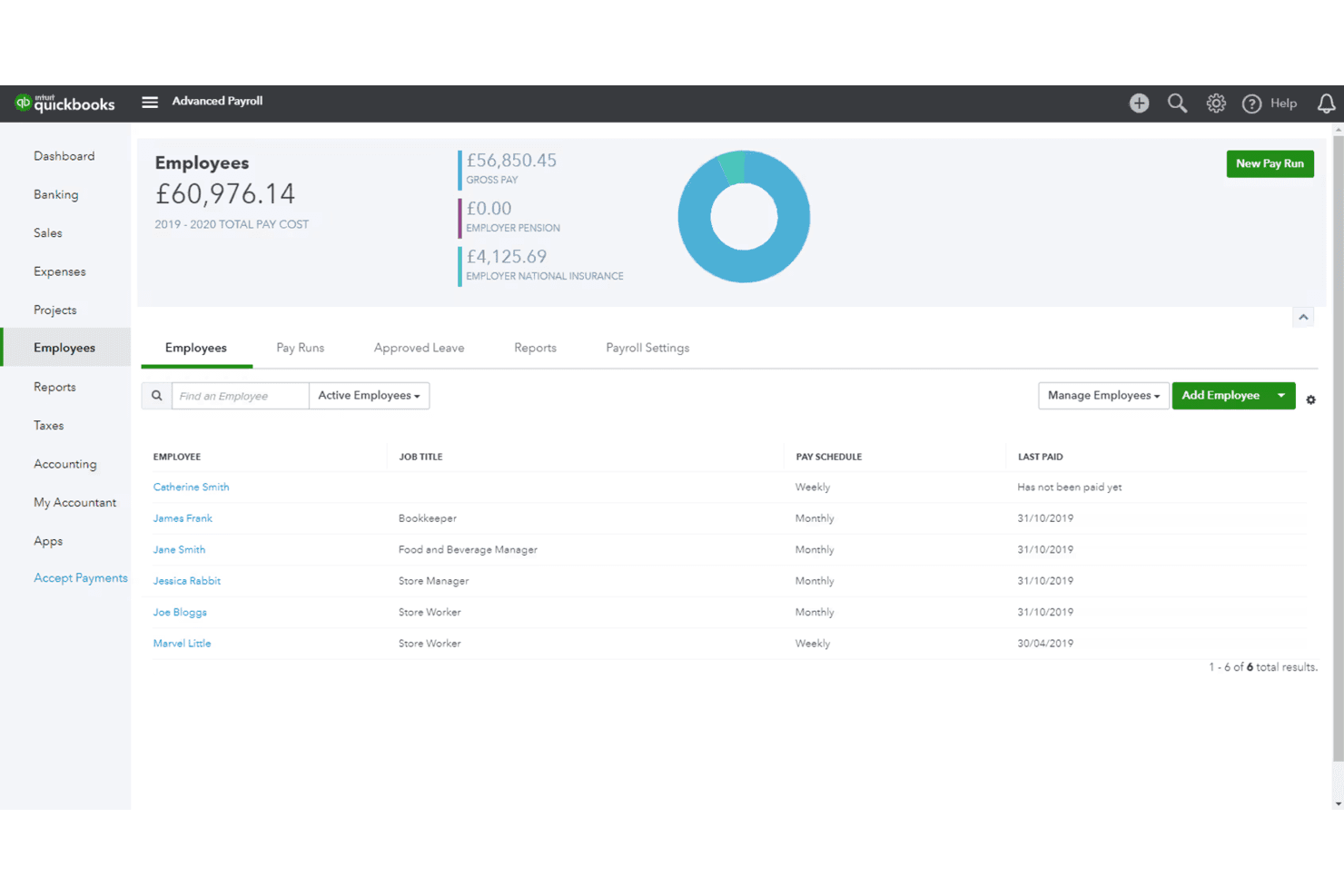
QuickBooks Payroll tracks employee pay schedules and total payroll costs. QuickBooks Payroll is a full-service payroll solution from Intuit that handles payroll processing, automated tax calculation and filing, direct deposit, employee self-service, and AI-driven anomaly detection across its Workforce Payroll, Premium, and Elite plans.
Who Is QuickBooks Payroll Best For?
QuickBooks Payroll is a strong fit for small businesses already using QuickBooks Online who want payroll and accounting tightly connected in one ecosystem.
Why I Picked QuickBooks Payroll
QuickBooks Payroll earns its spot on my shortlist because of how its Payroll AI handles anomaly detection before payday actually arrives. I love that it proactively collects employee time via SMS or the Workforce app, then flags inconsistencies automatically so I can catch problems before submitting, not after. On top of that, Auto Payroll handles recurring salaried runs without me touching them each cycle.
QuickBooks Payroll Key Features
- Full-service tax filing: Automatically calculates, files, and pays federal and state payroll taxes on your behalf each pay period.
- Direct deposit: Pays employees via next-day direct deposit on the base plan, with same-day deposit available on Premium and Elite tiers.
- Employee self-service portal: Lets employees view pay stubs, W-2s, and year-to-date earnings online or through the Workforce mobile app.
- QuickBooks Online sync: Automatically transfers payroll data into your QuickBooks Online account to keep books and payroll aligned.
QuickBooks Payroll Integrations
QuickBooks Payroll offers native integrations with QuickBooks Online, QuickBooks Time, Checkr, QuickBooks 401(k) by Vestwell, Allstate Health Solutions, NEXT, and Mineral. Its GraphQL API supports custom integrations.
Pros and Cons
Pros:
- Employees retrieve pay stubs and W-2s
- Routine payroll runs save time after setup
- Payroll AI flags anomalies before payday
Cons:
- Complex issues can require repeated support calls
- Initial tax and employee setup takes work
Learn more about QuickBooks Payroll: Best for payment integration
- Free demo available
- From $35/month + $6/person/month
Visit WebsiteCustomer Rating:4.2/5
Square Payroll manages payroll processes, benefits management, and retirement plans in one platform. Square Payroll is an online payroll service designed for small businesses, providing payroll processing and compliance support. It serves businesses that need easy payroll management and integration with payment systems.
Why I picked Square Payroll: The tool integrates with Square's payment systems, making it perfect for businesses already using Square for transactions. It supports automatic payroll tax calculations and filings, reducing manual tasks for your team. Square Payroll also offers benefits management, including health insurance and retirement plans, which adds value for businesses wanting to offer full employee benefits. This integration with payment processing sets Square Payroll apart from other payroll solutions.
Standout features and integrations:
Features include automatic payroll tax calculations, which keep your business compliant with tax regulations. The platform also provides benefit management options, allowing you to offer health insurance and retirement plans to your employees. Additionally, Square Payroll supports both W-2 employees and 1099 contractors, giving you flexibility in managing different types of workers.
Integrations include QuickBooks, Xero, FreshBooks, Homebase, Deputy, When I Work, TSheets, Zapier, and more.
Pros and Cons
Pros:
- Benefits management included
- Automatic tax calculations
- Supports both regular employees and independent contractors
Cons:
- Requires a Square account for full features
- Limited to U.S. businesses
Learn more about Square Payroll: Best for small businesses
- 30-day free trial + free demo available
- From $17/month
Visit WebsiteCustomer Rating:5/5
Patriot Software automates payroll and tax tasks for small business teams. Patriot Software provides a payroll solution tailored for small businesses, offering customizable payroll options and automated processes. It typically serves small business owners and managers by handling payroll calculations and tax filings efficiently.
Why I picked Patriot Software: This tool is designed with small businesses in mind, offering features such as unlimited payroll runs and easy setup assistance. It simplifies payroll management with accurate tax calculations and provides secure access to pay information through a free employee portal. The integration of health benefits and workers' compensation adds value for small businesses looking to manage additional employee benefits. These features make Patriot Software a practical small business payroll software for those looking to simplify their payroll processes.
Standout features and integrations:
Features include customizable payroll options that allow you to tailor payroll settings to your business needs. The automated payroll processes save you time by handling calculations and tax filings. This product also allows you to manage employee benefits and workers' comp. The free employee portal offers secure access for employees to view their pay information.
Integrations include Vestwell, SimplyInsured, NEXT, QuickBooks, TSheets, and more.
Pros and Cons
Pros:
- Free employee portal
- Accurate tax calculations
- Unlimited payroll runs
Cons:
- Limited custom reporting
- No support for IRS Form 943 (for agricultural employees)
Learn more about Patriot Software:
Diğer Basit Bordro Yazılımları
İşte kısa listeme giremeyen ancak yine de göz atmaya değer bazı ek basit bordro yazılımı seçenekleri:
- 11SurePayrollBest for household employers
- 12Paychex FlexBest for payroll tax filing and penalty help
- 13Keka HRBest for headcount and compensation planning
- 14JustworksBest for employee and contractor payments
- 15OnPayBest for payroll without PEO co-employment
- 16FridayBest for multi-client payroll management
How I Evaluate Simple Payroll Software
I split my evaluation into three parts, giving the most weight to core needs: calculate wages and deductions, and file payroll taxes. Next, I consider differentiators such as same-day pay. Finally, I weigh factors beyond features, including guided setup, accessible support, and transparent pricing.
Core Functionality (Table Stakes For This List)
When I'm selecting tools for my list, I score each one on a scale from 0 (does not offer the functionality) to 5 (excels in this area) for each core functionality listed below. I then convert the total into a percentage to help assess each tool's overall fit, with extra weight on any functionalities I’ve deemed essential.
- Automated Payroll (Essential): I look for accurate wage, deduction, and net pay calculations, plus recurring payroll runs that flag exceptions such as missing hours.
- Tax Calculation & Filing (Essential): I assess how the tool calculates payroll taxes and handles filing and remittance, including visibility into submission status.
- Direct Deposit: I check whether employees can receive pay electronically and what processing options are available for regular and off-cycle runs.
- Employee Self-Service: I look for employee access to pay stubs, tax forms, and payment history, plus options to update personal or bank details.
- Guided Setup: I evaluate whether an administrator can configure pay schedules, add worker details, and get payroll ready with clear in-product guidance.
- Hourly & Contractor Pay: I check whether one payroll run can handle hourly, salaried, and contractor pay, including different rates and schedules.
Once I have a list of tools that meet the criteria, I consider what sets each platform apart.
Differentiating Factors (What Sets Vendors Apart)
Here's how I compare and contrast different vendors:
Standout Features
I look for a tax penalty guarantee, since it shifts compliance risk off your plate when automated filings hit a snag. Same-day or instant pay matters too—if your workforce includes hourly or gig workers, faster access to earned wages can reduce turnover. I also evaluate whether payroll data syncs automatically with accounting tools like QuickBooks or Xero, because re-keying figures invites errors. Finally, flat per-employee pricing helps you forecast costs as headcount changes.
Beyond Features
I check how quickly you can go from signup to a completed first payroll run, since a slow migration can mean missed pay dates—especially if you're a small team without dedicated HR staff. Support accessibility matters just as much; I look for live phone or chat options, because a filing error during tax season needs a human response, not a help article. I also evaluate whether pricing stays predictable as headcount grows and whether the vendor backs its tax calculations with a penalty guarantee.
Basit Bordro Yazılımı Nasıl Seçilir?
Özellikle farklı bordro yazılımı türlerini karşılaştırırken, uzun özellik listeleri ve karmaşık fiyatlandırma yapıları içinde kaybolmak kolaydır. Bordro yazılımı seçiminiz üzerinde çalışırken odağınızı korumanıza yardımcı olmak için aklınızda bulundurmanız gereken faktörleri içeren bir kontrol listesi hazırladım:
| Faktör | Dikkate Alınması Gerekenler |
| Ölçeklenebilirlik | Yazılımın işletmenizle birlikte büyüyüp büyüyemeyeceğini değerlendirin. Artan çalışan sayısını ve daha karmaşık bordro ihtiyaçlarını karşılayabilecek mi? Kademeli fiyatlandırma veya özellikler sunan çözümleri arayın. |
| Entegrasyonlar | Yazılımın muhasebe veya İK sistemleri gibi mevcut araçlarınızla entegre olup olmadığını kontrol edin. Entegrasyon eksikliği, manuel veri girişine ve hatalara yol açabilir. |
| Özelleştirilebilirlik | Yazılımı iş akışınıza uyacak şekilde ne ölçüde uyarlayabileceğinizi değerlendirin. Raporları ve gösterge tablolarını özelleştirebilir misiniz? Bu esneklik size zaman kazandırabilir. |
| Kullanım Kolaylığı | Yazılımın ekibiniz için kullanıcı dostu olup olmadığını belirleyin. Özellikle yeni işe alınanlar için zorlu bir öğrenme süreci daha fazla eğitim ve destek gerektirebilir. |
| Uygulama ve İşe Alıştırma | Kurulum için gereken zamanı ve kaynakları değerlendirin. Geçişi kolaylaştırmak için sağlayıcı eğitimler gibi destek veya kaynaklar sunuyor mu? |
| Maliyet | Fiyatlandırma planlarını ve bunlara nelerin dahil olduğunu karşılaştırın. Gizli ücretler var mı? Maliyetin bütçenize uygun olduğundan ve iyi bir değer sunduğundan emin olun. |
| Güvenlik Önlemleri | Fiyatlandırma planlarını ve bunlara nelerin dahil olduğunu karşılaştırın. Gizli ücretler var mı? Maliyetin bütçenize uygun olduğundan ve iyi bir değer sunduğundan emin olun. |
Basit Bordro Yazılımı Nedir?
Basit bordro yazılımı, çalışan bordrosu süreçlerini verimli bir şekilde otomatikleştirmek ve yönetmek için tasarlanmış bir araçtır. Genellikle bordro görevlerini fazla uğraşmadan yerine getirmesi gereken İK profesyonelleri, küçük işletme sahipleri ve muhasebeciler tarafından kullanılır.
Otomatik vergi hesaplamaları, doğrudan ödeme, çalışan self servis portalları ve entegre bordro ve zaman takibi gibi özellikler hataları azaltmaya, zamandan tasarruf etmeye ve bordro doğruluğunu artırmaya yardımcı olur. Genel olarak bu araçlar, bordroyu yönetmenin kolay bir yolunu sunarak mevzuata uyumu sağlar ve diğer işletme görevleri için zaman kazandırır.
Özellikler
Basit ve tam hizmet sunan bir platform seçerken aşağıdaki temel bordro yazılımı özelliklerine dikkat edin:
- Otomatik vergi hesaplamaları ve bildirimleri: Bordro vergilerini otomatik olarak hesaplayıp bildirerek ulusal ve eyalet vergi yasalarına uyumu sağlayın; böylece vergi beyannamesi verirken hata ve ceza riskini azaltın.
- Doğrudan ödeme: Çalışanların maaşlarını doğrudan ödeme olarak almasını sağlar; zamandan tasarruf ettirir ve fiziksel çeklerle uğraşma zahmetini azaltır.
- Çalışan self servis portalı: Çalışanlara maaş bordrolarına, vergi formlarına ve kişisel bilgilerine erişim sunarak kendi verilerini yönetmelerini sağlar.
- Özelleştirilebilir raporlama: İhtiyaca göre uyarlanmış raporlar oluşturma olanağı sunarak bordro verilerine ilişkin içgörüler sağlar ve finansal analize yardımcı olur.
- Zaman takibi entegrasyonu: Çalışanların çalışma saatlerini sorunsuz şekilde takip ederek doğru bordro işlemesini sağlar ve iş gücü maliyetlerinin yönetilmesine yardımcı olur.
- Mobil uygulama erişimi: Çevrimiçi bordro araçlarına akıllı telefonlardan veya tabletlerden erişilmesini sağlayarak hareket hâlindeyken bordro yönetimini kolaylaştırır.
- Mevzuata uyum yönetimi: Yazılımı en güncel iş yasaları ve düzenlemeleriyle güncel tutarak bordronun her zaman yasalara uygun olmasını sağlar.
- Muhasebe sistemleriyle entegrasyon: Finansal kayıtların doğru ve güncel olmasını sağlamak için muhasebe yazılımıyla senkronize olur ve manuel veri girişini azaltır.
- Yan hak yönetimi: Sağlık sigortası ve emeklilik planları gibi çalışan yan haklarını yöneterek çalışanların toplam ücretlendirmesine ilişkin kapsamlı bir görünüm sunar.
- Müşteri desteği: Gerektiğinde yardım ve rehberliğe erişim sağlayarak bordroyla ilgili sorunların hızlı ve verimli bir şekilde çözülmesini sağlar.
Faydalar
Basit bordro yazılımını uygulamak ekibiniz ve işletmeniz için çeşitli faydalar sağlar. Yararlanmayı bekleyebileceğiniz birkaç fayda şunlardır:
- Zaman tasarrufu: Vergi hesaplamaları ve doğrudan para yatırma gibi bordro görevlerini otomatikleştirmek, her ödeme döneminde saatlerce süren manuel çalışmayı ortadan kaldırır.
- Hataların azaltılması: Otomatik hesaplamalar ve uyumluluk güncellemeleri, hataları en aza indirmeye yardımcı olarak doğru bordro hesaplamaları yapılmasını sağlar ve maliyetli cezalardan kaçınmanıza yardımcı olur.
- Geliştirilmiş uyumluluk: Yazılım, yasal gereklilikleri takip ederek ek çaba harcamadan vergi ve iş kanunlarına uyumlu kalmanıza yardımcı olur.
- Çalışanların güçlendirilmesi: Self servis portalları, çalışanlara ücret bilgilerine erişim sağlayarak idari talepleri azaltır ve kendi verilerini yönetmeleri için onları güçlendirir.
- Maliyet verimliliği: Manuel süreçlerin ve hataların azaltılması, idari maliyetleri düşürebilir ve genel finansal verimliliği artırabilir.
- Veri güvenliği: Güvenli sistemler, hassas bordro verilerini koruyarak çalışan ve işletme bilgilerinin gizli kalmasını sağlar.
- Ölçeklenebilirlik: Doğru yazılım, işletmeniz büyüdükçe daha fazla çalışanı ve karmaşık bordro ihtiyaçlarını karşılayacak şekilde uyarlanabilir; böylece büyümenizi kesintiye uğramadan destekler.
Maliyetler ve Fiyatlandırma
Basit bordro yazılımı seçmek, mevcut çeşitli fiyatlandırma modellerinin ve planların anlaşılmasını gerektirir. Maliyetler; özelliklere, ekip büyüklüğüne, eklentilere ve diğer unsurlara göre değişir. Aşağıdaki tablo, basit bordro yazılımı çözümlerinde yaygın olarak sunulan planları, ortalama fiyatlarını ve tipik özelliklerini özetlemektedir:
Basit Bordro Yazılımı İçin Plan Karşılaştırma Tablosu
| Plan Türü | Ortalama Fiyat | Yaygın Özellikler |
| Ücretsiz Plan | $0 | Temel bordro işlemleri, çalışan self servis portalı ve doğrudan para yatırma. |
| Kişisel Plan | $5-$25/kullanıcı/ay | Otomatik vergi hesaplamaları, doğrudan para yatırma, çalışan self servisi ve temel raporlama. |
| İşletme Planı | $25-$50/kullanıcı/ay | Gelişmiş raporlama, uyumluluk yönetimi, yan hak yönetimi ve zaman takibi entegrasyonu. |
| Kurumsal Plan | $50-$100/kullanıcı/ay | Özelleştirilebilir raporlama, özel hesap desteği, gelişmiş güvenlik özellikleri ve tam İK entegrasyonu. |