

Bordro, küçük hataların hem çalışanlar hem de uyumluluk açısından anında sonuçlara yol açabileceği az sayıdaki iş sürecinden biridir. Bordro gereklilikleri daha karmaşık hâle geldikçe manuel süreçlere veya birbiriyle bağlantısı olmayan sistemlere güvenmek, doğruluğu ve verimliliği korumayı zorlaştırır. Doğru bordro uygulaması, bordro görevlerini merkezileştirmeye, idari iş yükünü azaltmaya ve ekibinizin programa uygun çalışmasını sağlamaya yardımcı olur. Bu kılavuzda en iyi seçenekleri karşılaştıracak ve hangilerinin farklı işletme ihtiyaçlarına en uygun olduğunu açıklayacağım.
Why Trust Our Software Recommendations
6,700+
Reviews
20
Industry experts
16+
Evaluation factors
14
Years
Our team has been testing and reviewing software since 2012. As HR experts ourselves, we know how difficult—and important—it is to choose the right software.
For this guide, we evaluated tools using hands-on testing and independent research, scoring tools using our selection criteria. We also draw on insights from industry thought leaders and practicing HR experts.
Our reviews reflect our human editorial judgment, not a sales pitch.
Expert reviewers:
- Phil GrayCOO
 Kim BehnkeHR Tech Editor & Analyst
 Josh BarkerPeople Ops Manager

Bordro Uygulaması Karşılaştırma Tablosu
Bu karşılaştırma tablosu, en iyi bordro uygulaması seçimlerimin fiyatlandırma ayrıntılarını özetlemektedir:
Score legend (out of 5)
- Excellent4.5–5
- Good4–4.4
- Average3–3.9
- Below average2–2.9
- Poor1–1.9
Sorted by: Default
| Tool | Starting Price | Website | |||||||
|---|---|---|---|---|---|---|---|---|---|
Best for employee self-service | 4.2 out of 5 | 4 | 4 | 4 | 5 | 3 | 5 | Pricing upon request Free demo available | Book Demo |
Best with multi-state and international payroll | 3.2 out of 5 | 2 | 3 | 4 | 3 | 3 | 4 | $79/user/month Free demo available | Book Demo |
Best for scheduling integration | 3.8 out of 5 | 4 | 4 | 3 | 4 | 4 | 4 | $99/month Free plan + 30-day free trial + free demo available | Website |
Best for adding HR services as you grow | 3.7 out of 5 | 3 | 4 | 4 | 3 | 4 | 4 | Pricing upon request Free demo available | Website |
Best for India-specific statutory compliance | 3.2 out of 5 | 2 | 4 | 3 | 3 | 4 | 3 | $29/month 14-day free trial + free demo available | Website |
Best for tipped teams using Square POS | 3.7 out of 5 | 3 | 4 | 4 | 4 | 3 | 4 | $35/month + $6/person/month Free demo available | Website |
Best for Canadian data hosting needs | 3.3 out of 5 | 2 | 3 | 4 | 4 | 3 | 4 | $4/employee/month + $20/month 14-day free trial + free demo available | Website |
Best for nanny and household employers | 3.8 out of 5 | 4 | 4 | 4 | 3 | 4 | 4 | $29/month Not available | Website |
Best for provider-run pay cycles | 2.8 out of 5 | 2 | 3 | 4 | 3 | 1 | 4 | Pricing upon request Free demo available | Website |
Best for restaurant tip pooling | 3.3 out of 5 | 2 | 4 | 4 | 3 | 3 | 4 | Pricing upon request Free demo available | Website |
Best for earned-wage access and money tools | 4.0 out of 5 | 3 | 4 | 4 | 5 | 3 | 5 | $99/month Free demo available | Website |
Best for reviewing pay-run changes before approval | 3.3 out of 5 | 2 | 4 | 4 | 3 | 3 | 4 | $8/user/month Free trial + free demo available | Book Demo |





En İyi Bordro Uygulaması İncelemesi
Aşağıda, kısa listeme giren en iyi bordro uygulamalarının ayrıntılı özetlerini bulabilirsiniz. İncelemelerim, sizin için en iyi seçeneği bulmanıza yardımcı olmak amacıyla her aracın temel özelliklerine, avantajlarına ve dezavantajlarına, entegrasyonlarına ve ideal kullanım alanlarına ayrıntılı bir bakış sunmaktadır.
 Best for employee self-service
- Free demo available
- Pricing upon request
Visit WebsiteCustomer Rating:4.3/5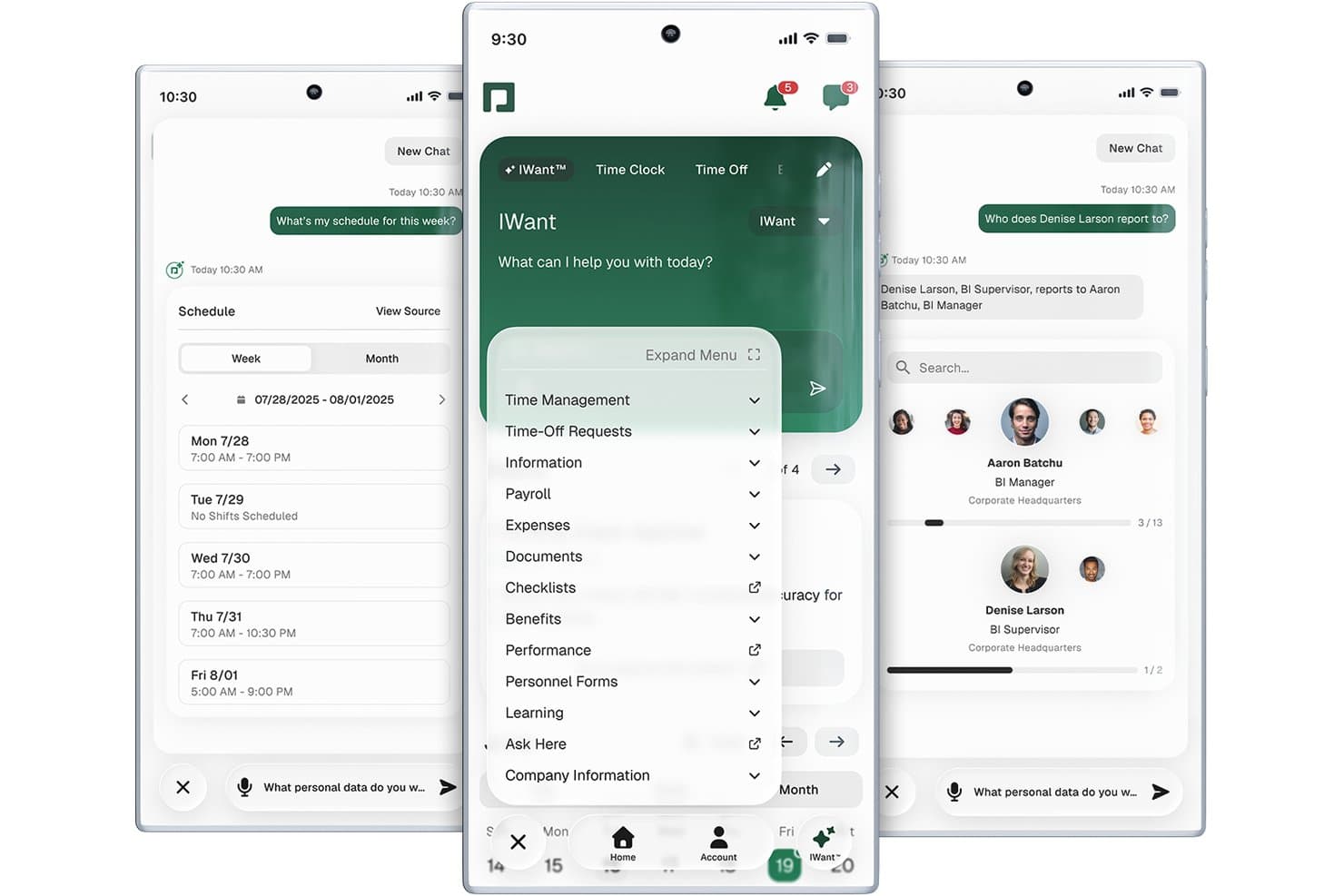
Paycom offers a mobile app with AI-assisted payroll, scheduling, time-off, and org chart features accessible from a single interface. Paycom is a single-database payroll and HCM platform that covers automated payroll processing, tax filing, time and attendance, benefits administration, and employee self-service in one unified system.
Who Is Paycom Best For?
Paycom is a strong fit for mid-market U.S. companies with 50 or more employees that want payroll and HR managed in a single platform.
Why I Picked Paycom
Paycom earns its spot on my shortlist because its employee self-service goes deeper than most payroll apps. I particularly like Beti, which flips the traditional payroll model by having employees verify their own pay data before the run, catching errors before they become costly corrections. The self-service portal also gives workers direct access to pay stubs, tax forms, and time-off requests through GONE, which auto-approves or denies requests based on preset rules your team defines.
Paycom Key Features
- Direct Data Exchange dashboard: Delivers real-time visibility into ROI and software usage for admins.
- Native time and attendance module: Tracks employee hours, manages PTO, and syncs automatically with payroll.
- Dedicated implementation specialist: Assigns a named expert to guide setup and support, avoiding generic support tickets.
- Built-in benefits administration: Automates enrollment, deduction syncing, and compliance with health, vision, and retirement plans.
Paycom Integrations
Native integrations are not currently listed. However, Paycom provides an API for custom integrations.
Pros and Cons
Pros:
- Built-in time tracking syncs directly with payroll
- Single database connects HR and payroll
- Beti lets employees self-verify payroll data
Cons:
- U.S.-only, no international payroll support
- Limited native integrations with third-party tools
 Best with multi-state and international payroll
- Free demo available
- From $79/user/month
Visit WebsiteCustomer Rating:4.6/5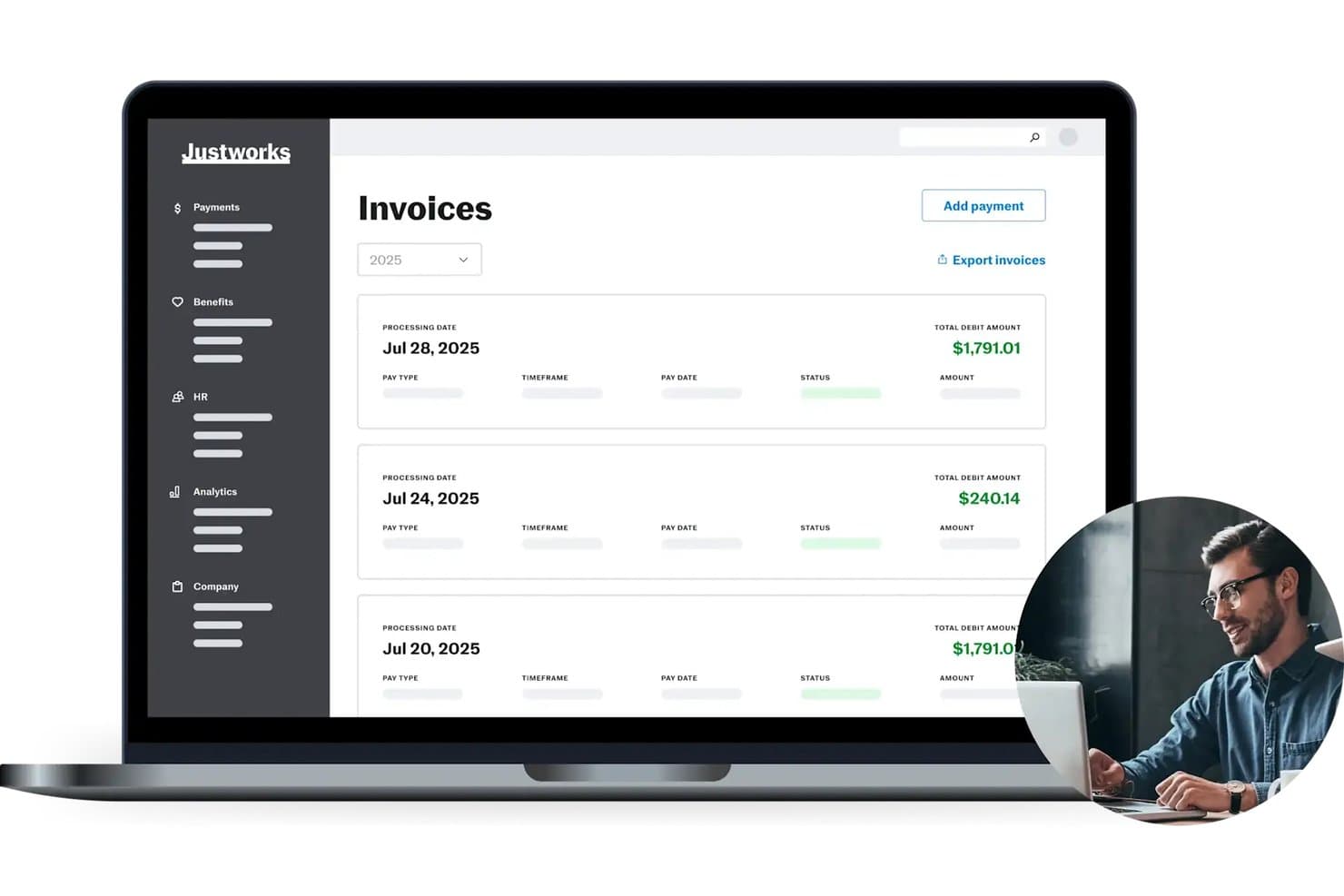
Justworks offers a clear invoices dashboard displaying payroll processing dates, total debit amounts, and payment statuses for easy payroll management. Justworks is a PEO and payroll platform that combines automated payroll processing, tax filing, benefits administration, and HR tools in a single system.
Who Is Justworks Best For?
Justworks is a strong fit for small to mid-sized businesses with distributed teams across multiple states who need payroll, compliance, and benefits managed in one place.
Why I Picked Justworks
I picked Justworks as one of the best because it handles the multi-state payroll complexity that trips up so many growing teams. It automatically files payroll taxes across 2,000+ tax localities, covering every state without requiring me to manage separate state registrations. On top of that, I can pay international contractors in 60+ countries and hire full-time global employees through its built-in Employer of Record service, all within the same platform.
Justworks Key Features
- Employee self-service portal: Lets employees update personal info, access pay stubs, and view tax documents online.
- Built-in benefits administration: Manages health insurance, 401(k), HSA/FSA, and more directly through the platform.
- Time tracking add-on: Offers mobile time tracking, geofencing, and automated shift syncing for payroll accuracy.
- Accounting integrations: Syncs payroll data with QuickBooks, Xero, NetSuite, and Sage Intacct.
Justworks Integrations
Justworks offers native integrations with QuickBooks Online, Xero, NetSuite, Sage Intacct, Greenhouse, JazzHR, Lever, 15Five, and Culture Amp.
Pros and Cons
Pros:
- Includes built-in benefits administration
- Pays international contractors in 60+ countries
- Handles multi-state payroll complexity for admins
Cons:
- Fewer third-party integrations than some competitors
- Limited custom reporting capabilities
Learn more about Justworks: Best for scheduling integration
- Free plan + 30-day free trial + free demo available
- From $99/month (billed annually)
Visit WebsiteCustomer Rating:4.2/5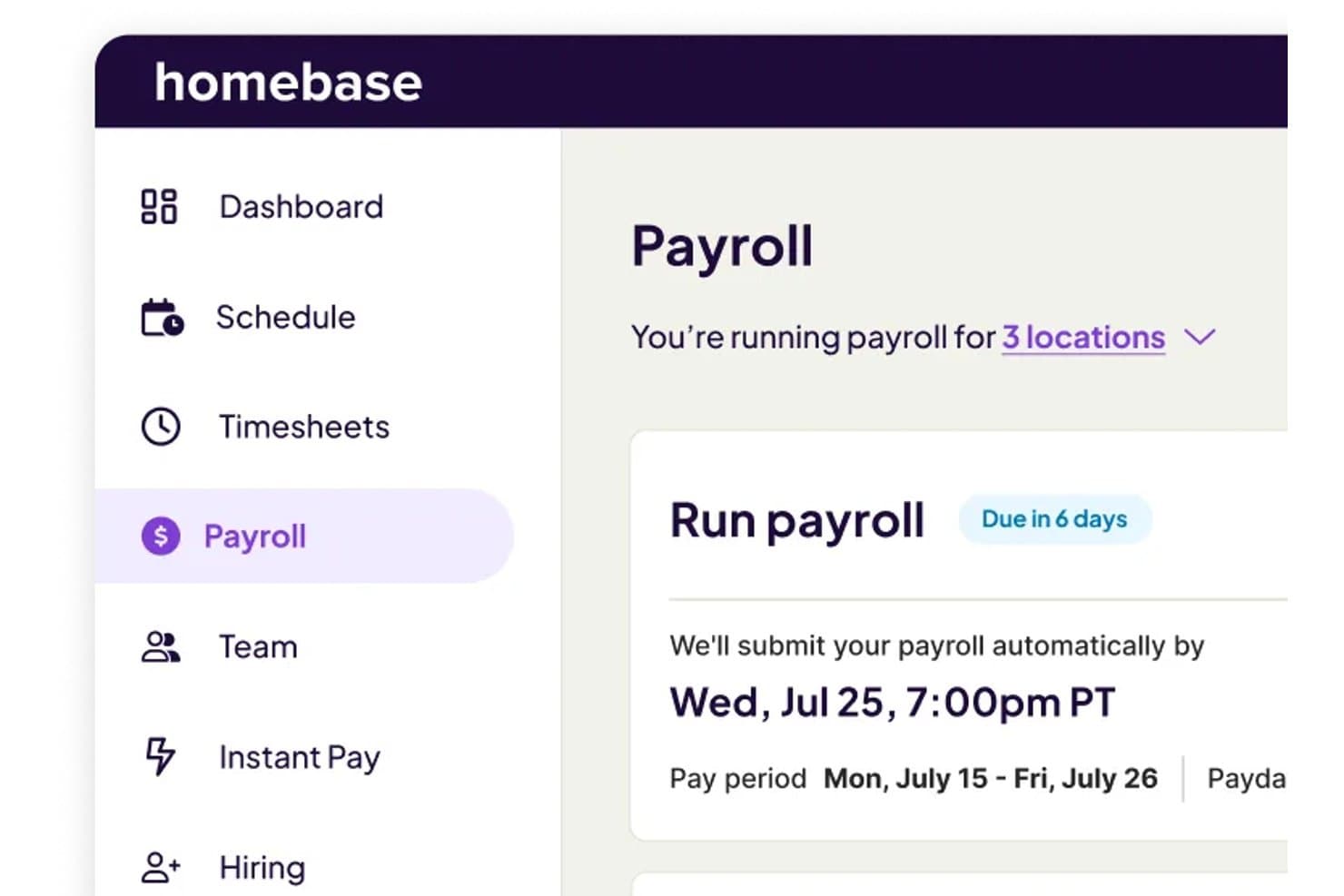
Homebase offers an automated payroll submission dashboard showing pay period dates, due dates, and multi-location payroll management. Homebase is a workforce management and payroll platform built for hourly teams that combines scheduling, time tracking, and payroll processing with automated tax filing and direct deposit.
Who Is Homebase Best For?
Homebase is a strong fit for small business owners in restaurants, retail, and service industries managing hourly workers across one or a few locations.
Why I Picked Homebase
I've included Homebase in my top picks because its scheduling and payroll tools share the same data layer. When my team builds a shift schedule, those hours flow directly into timesheets and then into payroll with no re-entry or reconciliation step in between. The AI Payroll Assistant also catches timecard gaps and conflicts before I run payroll, which cuts down on corrections mid-cycle and keeps pay runs on schedule.
Homebase Key Features
- Native mobile app: Lets admins run payroll and employees access pay stubs and tax forms from their phones.
- Employee self-service portal: Allows staff to update personal details and download pay documents online.
- Federal and state tax filing: Automatically handles payroll tax calculation, withholding, and submission for employees and contractors.
- QuickBooks Online integration: Syncs payroll data directly with QuickBooks for seamless accounting.
Homebase Integrations
Homebase offers 25+ native integrations, including QuickBooks Online, Gusto, ADP, Paychex, Square, Shopify, Toast, Heartland, and more. An API is available for custom integrations.
Pros and Cons
Pros:
- Employees can access pay stubs in app
- Built-in time clock with GPS geofencing
- Direct scheduling-to-payroll workflow for hourly teams
Cons:
- No international contractor payment support
- Reports of tax filing errors in reviews
 Best for adding HR services as you grow
- Free demo available
- Pricing upon request
Visit WebsiteCustomer Rating:4.1/5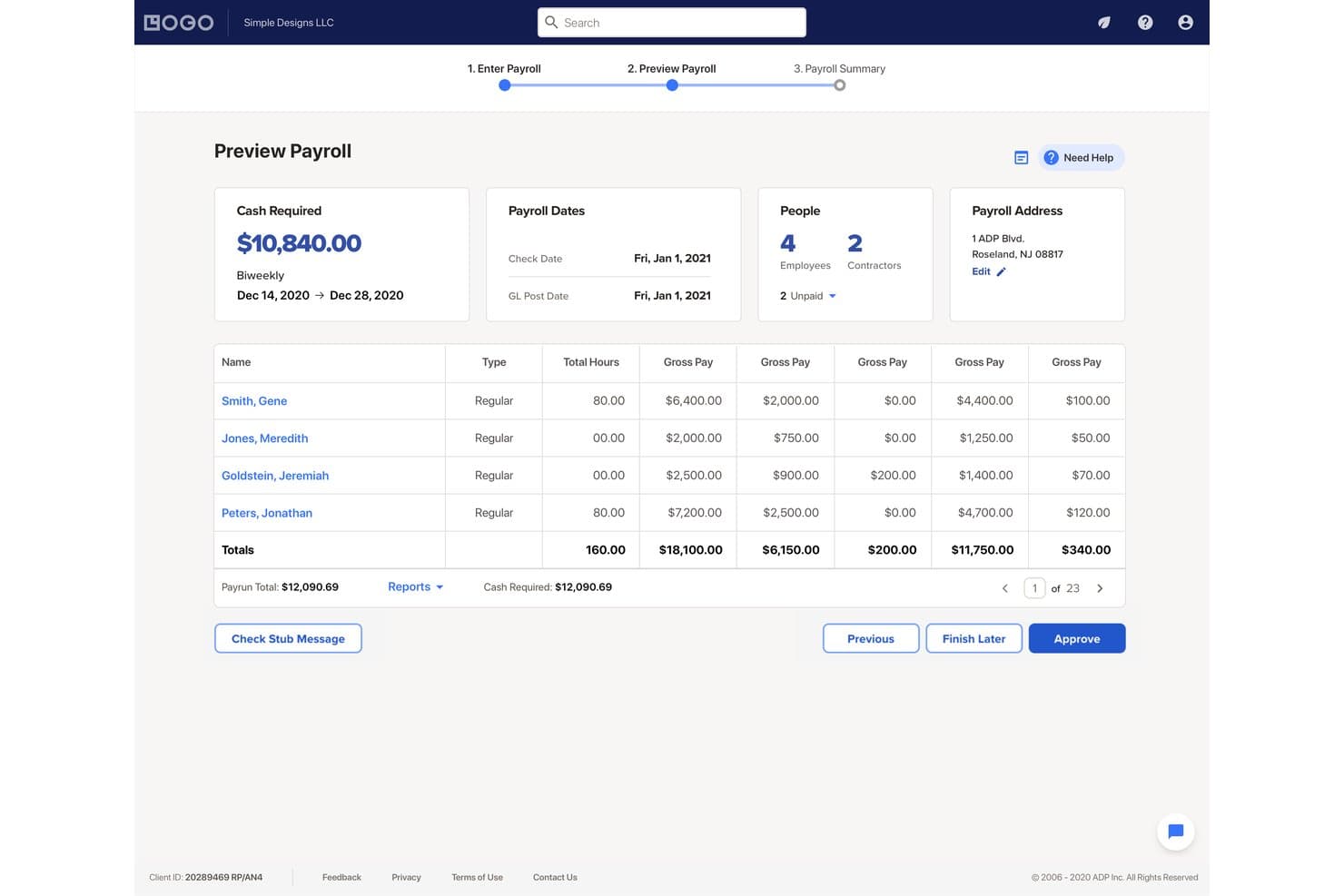
RUN Powered by ADP lets users preview payroll totals before approving. RUN Powered by ADP is a payroll and HR software platform for small businesses that handles payroll processing, tax calculation and filing, direct deposit, employee self-service, and scalable HR tools across four tiered packages.
Who Is RUN Powered by ADP Best For?
RUN Powered by ADP is a strong fit for small businesses that want to start with payroll and layer in HR tools—like handbook support, recruiting, and compliance training—as their team grows.
Why I Picked RUN Powered by ADP
I've included RUN Powered by ADP in my top picks because it's one of the few payroll platforms that lets small businesses start lean and layer in HR capabilities without switching systems. The Complete Payroll & HR+ package adds a live HR HelpDesk, an employee handbook wizard, and salary benchmarking, while HR Pro brings in a CareerPlug-powered ATS and a learning management system. That kind of structured progression means your payroll platform grows alongside your people operations.
RUN Powered by ADP Key Features
- Tax penalty guarantee: ADP pays fines or penalties imposed by taxing authorities when it makes a tax-filing error.
- Multi-jurisdiction payroll: Processes pay for employees working across multiple state or local jurisdictions in the same pay period.
- AI-powered payroll error flagging: Flags potential payroll mistakes before submission using ADP Assist.
- New-hire onboarding: Lets new employees complete W-4s, direct deposit details, and personal information electronically before their first day.
RUN Powered by ADP Integrations
RUN Powered by ADP offers native integrations with QuickBooks, Xero, Wave, Creative Solutions, and Clover POS. Its Enterprise Reports API supports custom report retrieval and downloads, but broad payroll write access isn't documented.
Pros and Cons
Pros:
- Payroll and HR tools share one platform
- Weekly and supplemental payroll runs feel straightforward
- Tax filing reduces manual compliance work
Cons:
- Support response times can be inconsistent
- Payroll reports offer limited customization
Learn more about RUN Powered by ADP®: Best for India-specific statutory compliance
- 14-day free trial + free demo available
- From $29/month (billed annually)
Visit WebsiteCustomer Rating:4.2/5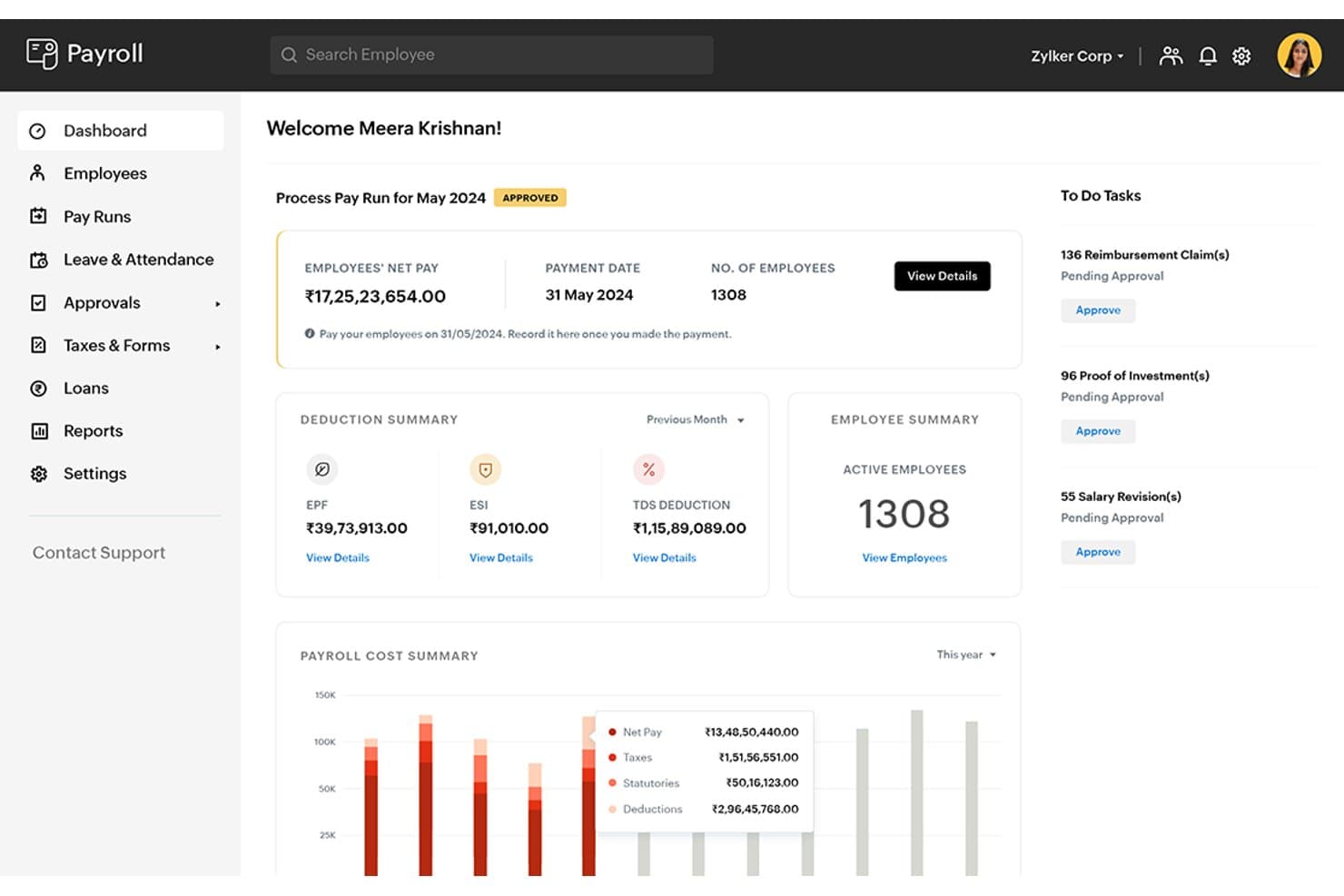
Zoho Payroll offers a centralized dashboard displaying pay run status, deduction summaries, employee counts, and pending approval tasks. Zoho Payroll is India-focused payroll software that handles salary processing, statutory compliance across EPF, ESI, PT, LWF, and income tax, employee self-service, and built-in leave and attendance management.
Who Is Zoho Payroll Best For?
Zoho Payroll is a strong fit for Indian businesses that need to manage EPF, ESI, PT, LWF, and income tax compliance without building a dedicated compliance team.
Why I Picked Zoho Payroll
Zoho Payroll earns its spot on my shortlist because it's built from the ground up for Indian statutory compliance, covering EPF, ESI, PT, LWF, and income tax across all 28 states. I particularly like how it automatically calculates TDS liabilities and generates Form 130 with a digital signature, so your compliance records stay audit-ready without manual reconstruction. The contractor payroll feature also handles India-specific TDS under sections 194C and 194J natively, which is something I find genuinely useful when managing a mixed workforce.
Zoho Payroll Key Features
- Employee self-service portal: Employees can access payslips, tax worksheets, Form 16, investment declarations, reimbursement claims, and loan details through a web portal or mobile app.
- Salary component configuration: Administrators can set up prebuilt and custom earnings and deductions, including formula-based and scheduled components for variable or future pay.
- Leave and attendance management: Organizations can configure shift timings, leave types, attendance check-in/out, regularization rules, LOP calculations, and leave encashment from within the platform.
- Zoho Books integration: Payroll expenses and journal entries sync directly with Zoho Books, keeping accounting records current without manual data entry.
Zoho Payroll Integrations
Zoho Payroll offers native integrations with Zoho Books, Zoho People, Zoho Expense, Zoho Practice, Zoho Analytics, Zoho Payments, HSBC, ICICI Bank, and WhatsApp. It also supports custom integrations through APIs and webhooks; no total integration count is stated.
Pros and Cons
Pros:
- India-specific statutory calculations cover key deductions
- Employees can retrieve payslips independently
- Reviewers praise straightforward payroll calculations
Cons:
- Tax filing still needs external validation
- Mobile reviews favor desktop over phone
Learn more about Zoho Payroll: Best for tipped teams using Square POS
- Free demo available
- From $35/month + $6/person/month
Visit WebsiteCustomer Rating:4.2/5
Square Payroll lets users review employee hours and gross pay before submitting. Square Payroll is a payroll app built by Block, Inc. that handles employee and contractor pay, automated tax filings, time and tip importing, and benefits deductions within the Square ecosystem.
Who Is Square Payroll Best For?
Square Payroll is a natural fit for small businesses in food service and retail that already use Square POS and need payroll to stay inside that same ecosystem.
Why I Picked Square Payroll
Square Payroll earns its spot on my shortlist because of how naturally it handles tipped teams already running on Square POS. I love that tip data flows directly from the POS into payroll, so there's no manual entry or reconciliation before each pay run. The Square Team App also lets staff clock in and out, with those hours importing straight into payroll alongside their tips, which is exactly what a busy restaurant or retail floor needs.
Square Payroll Key Features
- Automated tax filing: Square Payroll calculates, withholds, and files federal and state payroll taxes on your behalf across all 50 states and DC.
- Auto payroll: Set payroll to run automatically each pay period, with timecards, tips, and commissions imported and processed at a scheduled time.
- Employee self-onboarding: Invite employees to enter their own personal, tax, and banking details directly through the platform.
- QuickBooks Online integration: Sync payroll data with QuickBooks Online to keep your bookkeeping records up to date after each pay run.
Square Payroll Integrations
Square Payroll offers native integrations with Square POS, Square Team App, Cash App, and QuickBooks Online. It connects with SimplyInsured, Vestwell, and NEXT for benefits and workers’ compensation, while its Team API supports custom team-data integrations.
Pros and Cons
Pros:
- Direct deposit setup is rated highly
- Automated tax handling earns reviewer praise
- Routine pay runs feel straightforward
Cons:
- Custom payroll reports require a computer
- Local tax coverage can be incomplete
Learn more about Square Payroll: Best for Canadian data hosting needs
- 14-day free trial + free demo available
- From $4/employee/month + $20/month
Visit WebsiteCustomer Rating:4.3/5
Wagepoint displays multiple pay groups on the payroll overview. Wagepoint is Canadian payroll software for small businesses that handles employee and contractor pay runs, tax calculations, CRA remittances, year-end forms, and time tracking.
Who Is Wagepoint Best For?
Wagepoint is a strong fit for Canadian small businesses and their accountants or bookkeepers who need straightforward payroll with built-in CRA compliance.
Why I Picked Wagepoint
I picked Wagepoint as one of the best because it's the only tool on this list that stores payroll data in Canadian AWS and Microsoft Azure data-centre regions by default, which matters when your business is subject to PIPEDA or Québec's Law 25. Beyond data hosting, it handles CRA remittances and generates T4s, T4As, and RL1s automatically, so Canadian compliance is built into every pay run rather than bolted on.
Wagepoint Key Features
- Auto-run payroll: Set payroll to run automatically on your chosen schedule so pay goes out without manual intervention each period.
- WagePro+ partner dashboard: Manage multiple client payrolls from one place, with flexible billing options and tiered discounts up to 20%.
- My Wagepoint mobile app: Employees and contractors can clock in and out, submit time-off requests, and view paystubs from their phones.
- Accounting software integrations: Two-way syncs with Xero, QuickBooks Online, and FreshBooks push payroll data to your books after every pay run.
Wagepoint Integrations
Wagepoint offers three documented native integrations: Xero, QuickBooks Online, and FreshBooks, each syncing payroll data after every pay run. API availability and a broader integration marketplace aren’t documented.
Pros and Cons
Pros:
- Timesheet imports cut manual hour entry
- Employee access to paystubs reduces follow-up
- Automates payroll deductions and year-end tax slips
Cons:
- Support delays surface during payroll problems
- Migration issues have disrupted automatic payroll
Learn more about Wagepoint:
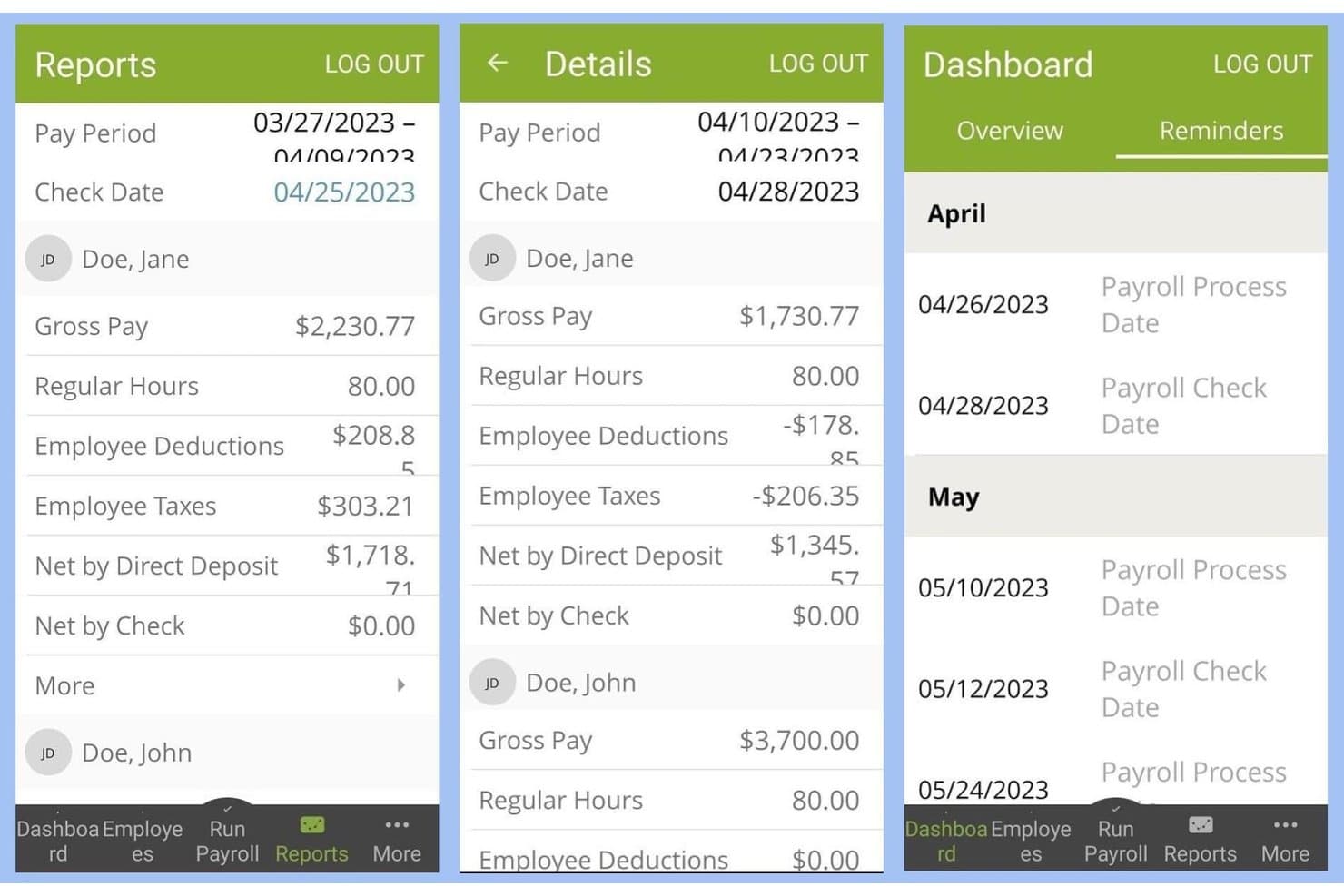
SurePayroll offers a mobile app with payroll reports, pay period details, and dashboard reminders for upcoming payroll processing and check dates. SurePayroll is a small-business payroll service that handles automated payroll runs, payroll tax calculation and filing, direct deposit, and employee and contractor payments, including a dedicated plan for nanny and household employers.
Who Is SurePayroll Best For?
SurePayroll is a strong fit for small business owners who want simple, hands-off payroll without managing tax filings themselves.
Why I Picked SurePayroll
I picked SurePayroll as one of the best because it's the only option on my list with a plan built specifically for nanny and household employers. That dedicated plan includes automatic federal and state tax filing, Schedule H preparation, and state tax ID registration assistance, which are real pain points when you're paying a household worker. I also like that the nanny plan includes one employee in the flat monthly rate and lets you run payroll from your phone.
SurePayroll Key Features
- W-2 and 1099 contractor payments: Run payroll for both employees and contractors from a single account, with year-end form generation included.
- Employee self-service portal: Employees can view pay stubs, access W-2s and tax documents, and update their own personal information online or through the mobile app.
- Unlimited payroll runs: Process as many regular and off-cycle payroll runs as you need each month at no extra charge.
- Multi-state payroll filing: File and deposit payroll taxes across multiple states, with each additional state available for a flat monthly add-on fee.
SurePayroll Integrations
SurePayroll documents a native integration with stratustime, which syncs tracked employee hours into payroll. It also supports imports from third-party time-clock systems, but doesn't name those providers or document an API.
Pros and Cons
Pros:
- Household payroll includes Schedule H preparation
- Automated tax filing saves employers time
- Routine payroll runs feel quick and straightforward
Cons:
- Employee account lockouts disrupt self-service access
- Tax reporting problems can take time to resolve
Learn more about SurePayroll:

Payworks centralizes employee profile data in one place. Payworks is a Canadian payroll platform that handles automated pay runs, CRA and Revenu Québec tax remittances, year-end filing, employee self-service, and direct deposit for businesses across all provinces and territories.
Who Is Payworks Best For?
Payworks is a strong fit for Canadian small business owners and payroll administrators who want their provider to handle tax remittances, year-end filings, and Records of Employment on their behalf.
Why I Picked Payworks
Payworks earns its spot on my shortlist because it genuinely runs pay cycles on your behalf rather than just automating the mechanics for you to manage. With its Managed Payroll Services, a dedicated payroll specialist imports and balances hours, pre-edits payroll registers, and handles CRA and Revenu Québec remittances and ROE submissions without you touching any of it. I also like that the per-run fee model only charges for employees actually paid on that run, so off-cycle bonus runs don't come at a premium.
Payworks Key Features
- Employee self-service portal: Employees can view pay statements and tax forms, update banking and personal details, and onboard remotely through a dedicated self-service app.
- Unlimited payroll previews: Run as many payroll previews as needed before finalizing a pay cycle to catch and correct errors ahead of processing.
- Multi-frequency payroll scheduling: Supports a range of pay frequencies—from weekly to quarterly—with guidance on jurisdictional minimums during setup.
- QuickBooks Online and Xero integration: Sends journal-entry data from Payworks directly to your accounting software after each pay run, with mapping for departments and cost centres.
Payworks Integrations
Payworks offers native integrations with QuickBooks Online and Xero for journal-entry data, including department and cost-centre mapping. It also provides REST APIs for Payroll, Employees, Reports, Time Management, and authentication.
Pros and Cons
Pros:
- Specialists can run payroll on your behalf
- Responsive, knowledgeable client support
- Canadian tax remittances and year-end support
Cons:
- Navigation can make functions hard to find
- Mobile app serves employees, not payroll admins
Learn more about Payworks:

Proliant lets managers review and complete employee merit adjustments. ProLiant is a payroll and HR platform that combines online payroll processing, automated tax filing, time and labor management, benefits administration, and earned wage access in one system.
Who Is ProLiant Best For?
ProLiant is a strong fit for restaurant and hospitality businesses that need tip pooling, earned wage access, and payroll built into one system.
Why I Picked ProLiant
I picked ProLiant as one of the best because its GratPro module handles tip pooling in a way I haven't seen built this natively into a payroll platform. It automates tip distribution based on hours worked, supports nightly payouts via direct deposit, and calculates daily taxes on those tips automatically. Pair that with ReadyPay Today, and tipped employees can access earned wages before payday without waiting for the next pay cycle.
ProLiant Key Features
- Multi-state tax filing: Certified Payroll Professionals configure tax rules and calculate withholding requirements across multiple state and local jurisdictions.
- Employee self-service portal: Employees can view pay stubs, W-2s, and 1099s, update personal information, and enroll in direct deposit from one place.
- Time and labor management: Tracks hours, overtime, PTO, and missed punches in real time and connects that data directly to payroll processing.
- Built-in payroll audits: Flags potential inaccuracies before payroll submission and sends automated data-validity notifications to help catch errors early.
ProLiant Integrations
ProLiant lists marketplace integrations with QuickBooks Online, Sage Intacct, Restaurant365, Toast, and Aloha, among others, but doesn’t state a total count. Its REST API supports custom connections for managing company, employee, deduction, and cost-center data.
Pros and Cons
Pros:
- Tip pooling automates nightly payouts
- Helpful account reps answer payroll questions
- Straightforward biweekly payroll runs
Cons:
- Time and labor may not sync cleanly
- Payroll reports can be hard to interpret
Learn more about Proliant: 11Best for earned-wage access and money tools
Paycor
- Free demo available
- From $99/month
Visit WebsiteCustomer Rating:4.3/5
Paycor tracks overtime insights and department labor costs in real time. Paycor is a payroll and HR platform that combines automated pay runs, tax filing, earned-wage access, employee self-service, and a built-in HR suite spanning onboarding, time tracking, benefits, and performance tools.
Who Is Paycor Best For?
Paycor fits small to mid-sized businesses that want payroll, earned-wage access, and HR tools in one platform without stitching together separate systems.
Why I Picked Paycor
I picked Paycor as one of the best because its earned-wage access tools go well beyond a standard direct deposit setup. The OnDemand Pay feature lets employees pull up to 50% of their earned wages before payday, and the Paycor Mobile Wallet pairs that with budgeting tools, financial counseling, and direct bill pay. I also like that employees can preview their pay stub up to three days before payday, so there's real visibility into what's coming, not just access after the fact.
Paycor Key Features
- AutoRun scheduling: Lets administrators set payroll to process automatically at a specified day and time without logging in.
- Compliance dashboard: Flags missing or invalid tax IDs, unverified addresses, and direct-deposit discrepancies in real time.
- Custom report writer: Lets administrators build, schedule, and export tailored payroll and workforce reports.
- Employee self-service portal: Gives employees access to pay stubs, W-2s, 1099s, and tax withholding updates via web and mobile app.
Paycor Integrations
Paycor offers marketplace integrations with QuickBooks, Sage Intacct, Deputy, Timeero, and WEX Health, plus hundreds of pre-built partner connectors. Its public API supports payroll, time, and reporting endpoints for custom integrations.
Pros and Cons
Pros:
- Employees preview pay stubs before payday
- Some teams report faster payroll processing
- On-demand access to half of earned wages
Cons:
- Mobile timekeeping can lag or freeze
- Users report tax filing errors requiring follow-up
 12Best for reviewing pay-run changes before approval
Rippling
- Free trial + free demo available
- From $8/user/month
Visit WebsiteCustomer Rating:4.9/5
Diğer Bordro Uygulamaları
Kısa listeme giremeyen ancak yine de göz atmaya değer bazı ek bordro uygulaması seçenekleri şunlardır:
- 13Deel PayrollBest for earned-wage access before payday
- 14PaylocityBest for spotting pay anomalies before approval
- 15Paychex FlexBest for payroll tax penalty protection
- 16GustoBest for employee pay advances between paydays
- 17QuickBooks PayrollBest for QuickBooks accounting workflows
- 18Patriot SoftwareBest for fees tied to workers paid each month
- 19OnPayBest for off-cycle runs without extra fees
How I Evaluate Payroll Apps
I split my evaluation into three parts, giving the most weight to core functionality: running accurate pay and calculating and filing payroll taxes. Next, I consider standout features such as earned-wage access. Finally, I weigh factors beyond features, including onboarding, ongoing support, and pricing as headcount changes.
Core Functionality (Table Stakes For This List)
When I'm selecting tools for my list, I score each one on a scale from 0 (does not offer the functionality) to 5 (excels in this area) for each core functionality listed below. I then convert the total into a percentage to help assess each tool's overall fit, with extra weight on any functionalities I’ve deemed essential.
- Automated Pay Runs (Essential): I look for payroll that handles hourly, salaried, and variable pay, including deductions, across recurring schedules.
- Tax Calculation & Filing (Essential): I assess whether the tool calculates payroll taxes and supports filing across the jurisdictions where the workforce is based.
- Direct Deposit: Can the tool send wages directly to employee bank accounts? I consider how the payment process fits regular payroll schedules.
- Employee Self-Service: I check whether employees can independently access pay stubs, tax forms, and payment history when they need them.
- Mobile App Access: I look for an app that lets administrators handle payroll tasks or approvals and employees view pay information on a phone or tablet.
- Employee & Contractor Pay: I assess whether one system can pay employees and contractors, with pay and tax details handled for each worker type.
Once I have a list of tools that meet the criteria, I consider what sets each platform apart.
Differentiating Factors (What Sets Vendors Apart)
Here's how I compare and contrast different vendors:
Standout Features
I look for a tax penalty guarantee, where the vendor covers costs if a filing error occurs—a real safety net for small teams without dedicated tax staff. On-demand pay access is another differentiator I evaluate, since letting employees draw earned wages early can improve retention. I also check whether the platform bundles HR tools like onboarding and benefits admin alongside payroll, reducing the need to manage separate systems.
Beyond Features
I evaluate how each vendor handles multi-state and local tax compliance, especially automatic registration when you hire in a new jurisdiction. That alone can save hours of manual filings for distributed teams. I also check pricing transparency—some apps charge extra for year-end tax forms or adding new pay regions, which catches growing teams off guard. Finally, I look at integration depth with accounting and time-tracking tools, since payroll data that flows into your general ledger without re-entry reduces costly errors.
Bordro Uygulaması Nasıl Seçilir?
Uzun özellik listeleri ve karmaşık fiyatlandırma yapıları arasında kaybolmak kolaydır. Kendinize özgü yazılım seçimi sürecinizde ilerlerken odağınızı korumanıza yardımcı olmak için göz önünde bulundurmanız gereken faktörlerin bir kontrol listesini burada bulabilirsiniz:
| Faktör | Göz Önünde Bulundurulması Gerekenler |
|---|---|
| FaktörÖlçeklenebilirlik | Göz Önünde Bulundurulması GerekenlerYazılım işletmenizle birlikte büyüyebilir mi? Ek maliyet veya karmaşıklık olmadan çalışan sayısındaki artışı karşılayıp karşılayamayacağını değerlendirin. |
| FaktörEntegrasyonlar | Göz Önünde Bulundurulması GerekenlerMevcut araçlarınızla çalışıyor mu? Manuel veri girişinden kaçınmak için muhasebe, insan kaynakları ve zaman takibi sistemleriyle uyumluluk arayın. |
| FaktörÖzelleştirilebilirlik | Göz Önünde Bulundurulması Gerekenlerİhtiyaçlarınıza göre uyarlayabilir misiniz? Uygulamanın, özel ödeme türleri veya raporlama biçimleri gibi bordro süreçlerinize uyacak şekilde ayarlamalara izin verip vermediğini kontrol edin. |
| FaktörKullanım kolaylığı | Göz Önünde Bulundurulması GerekenlerEkibiniz için kullanıcı dostu mu? Arayüzü ve kullanılabilirliği değerlendirin; gereken eğitimin minimum düzeyde olduğundan ve görevlerin kolayca gerçekleştirilebildiğinden emin olun. |
| FaktörUygulama ve kullanıma alma | Göz Önünde Bulundurulması GerekenlerNe kadar hızlı kullanmaya başlayabilirsiniz? Kurulum için gereken süreyi ve kaynakları, ayrıca yönlendirmeli kullanıma alma veya destek seçeneklerinin mevcut olup olmadığını değerlendirin. |
| FaktörMaliyet | Göz Önünde Bulundurulması GerekenlerBütçeniz dâhilinde mi? Gizli ücretler açısından fiyatlandırma planlarını inceleyin ve maliyeti sunulan özellikler ve avantajlarla karşılaştırın. |
| FaktörGüvenlik önlemleri | Göz Önünde Bulundurulması GerekenlerVerilerinizi nasıl koruyor? Hassas bordro bilgilerini korumak için uygulamanın şifreleme ve erişim denetimleri gibi güçlü güvenlik önlemlerine sahip olduğundan emin olun. |
| FaktörUyumluluk gereklilikleri | Göz Önünde Bulundurulması GerekenlerYasal standartları karşılıyor mu? Uyumluluk sorunlarından kaçınmak için yazılımın yerel vergi yasalarına ve bordro düzenlemelerine uygun olduğunu doğrulayın. |
Bordro Uygulamalarını Değiştirme: Geçiş Kontrol Listesi
İlk bordro çalıştırmanızdan önce hazırlık yaptığınızda bordro uygulamalarını değiştirmek daha kolaydır. Biraz planlama, bordro kesintilerini azaltmaya, veri sorunlarını önlemeye ve ekibinize kullanıma alma için her şeyin hazır olduğuna dair güven vermeye yardımcı olabilir.
| ✓ | Bordro uygulamalarını değiştirmeden önce… |
|---|---|
| ✓☐ | Bordro uygulamalarını değiştirmeden önce…Mevcut sağlayıcınızdan geçmiş bordro kayıtlarını ve vergi belgelerini indirin. |
| ✓☐ | Bordro uygulamalarını değiştirmeden önce…Verileri içe aktarmadan önce çalışan bilgilerini, vergi ayrıntılarını ve doğrudan para yatırma bilgilerini doğrulayın. |
| ✓☐ | Bordro uygulamalarını değiştirmeden önce…Bordro takvimlerinizin, ödeme gruplarınızın ve kesinti ayarlarınızın mevcut sürecinizle eşleştiğini doğrulayın. |
| ✓☐ | Bordro uygulamalarını değiştirmeden önce…Muhasebe, İK, zaman takibi ve yan hak entegrasyonlarınızın doğru şekilde yapılandırıldığını kontrol edin. |
| ✓☐ | Bordro uygulamalarını değiştirmeden önce…Çalışanlara yeni bordro sisteminin ne zaman kullanıma sunulacağını ve herhangi bir işlem yapmaları gerekip gerekmediğini bildirin. |
| ✓☐ | Bordro uygulamalarını değiştirmeden önce…Mümkünse ilk bordronuzu erken çalıştırın; ödeme gününden önce raporları incelemek ve sorunları çözmek için zaman bırakın. |
Sizin İçin En İyi Bordro Uygulaması Hangisi?
Doğru bordro uygulaması, şirketinizin büyüklüğünden çok çalışanlarınıza nasıl ödeme yaptığınıza bağlıdır. Ayda bir kez kendisine ödeme yapan bir serbest çalışan ile birden fazla eyalette saatlik çalışanları yöneten büyüyen bir işletmenin bordro ihtiyaçları birbirinden oldukça farklıdır.
Aşağıdaki rehberi kullanarak işletmenize en uygun bordro çözümü türünü belirleyin.
| Eğer… | Şunlara öncelik veriyorsanız… | Örnekler |
| Serbest çalışan veya tek kişilik bir işletme yürütüyorsanız | Basit bordro, işletme sahibi ödemeleri ve uygun fiyatlandırma. | Wave, Patriot Software, Roll by ADP, Payroll4Free |
| Küçük bir işletme sahibiyseniz (1–20 çalışan) | Otomatik vergi bildirimi, doğrudan para yatırma ve çalışanların kendi işlemlerini yapabilmesi. | Gusto, RUN Powered by ADP, QuickBooks Payroll |
| Saatlik çalışanları yönetiyorsanız | Zaman takibi entegrasyonları, fazla mesai hesaplamaları ve esnek ödeme takvimleri. | Homebase |
| Çalışanlara ve yüklenicilere ödeme yapıyorsanız | Birden fazla çalışan türü ve vergi raporlaması. | Xero |
| Birden fazla eyalette faaliyet gösteriyorsanız | Çok eyaletli bordro ve otomatik vergi uyumluluğu. | Paycom, Paylocity, Proliant |
| Bordro ve İK'yı birlikte yürütmeniz gerekiyorsa | Bordro, işe alıştırma, yan haklar ve ücretli izin yönetimi. | Justworks, Paychex Flex, HR.my |
| Uluslararası işe alım yapıyorsanız | Küresel bordro ve yerel mevzuata uyumluluk. | Remote, Reckon One |
| Bordroyu hareket hâlindeyken yönetiyorsanız | Tüm özelliklere sahip bir mobil uygulama. | Gusto, Paychex Flex |
Ücretsiz Bordro Yazılımı Ne Zaman Yeterli Olmaz?
en iyi ücretsiz bordro uygulamalarının çoğu, basit bordro ihtiyaçlarına sahip işletmeler için uygundur. Ancak işletmeniz büyüdükçe manuel süreçler, uyumluluk gereklilikleri ve sınırlı işlevler, yazılımın sağladığı tasarruftan daha fazla iş yükü oluşturmaya başlayabilir.
Aşağıdaki durumlardan herhangi biri size uyuyorsa ücretli bir bordro çözümüne geçmenin zamanı gelmiş olabilir.
| Eğer… | Şu nedenle yükseltme yapma zamanı gelmiş olabilir… |
| İlk çalışanlarınızı işe alıyorsanız | Bordro vergileri, yasal kesintiler ve raporlama, çoğu ücretsiz aracın destekleyebileceğinden daha karmaşık hâle gelir. |
| Çalışanları ve yüklenicileri yönetiyorsanız | Farklı çalışan sınıflandırmaları çoğu zaman ayrı ödeme iş akışları ve vergi raporlaması gerektirir. |
| Birden fazla eyalete açılıyorsanız | Eyalet vergi kayıtları, stopaj gereklilikleri ve uyumluluk yükümlülüklerini manuel olarak yönetmek zorlaşır. |
| Bordro sorunlarını düzeltmek için saatler harcıyorsanız | Manuel hesaplamalar ve tekrarlanan veri girişi, bordro hataları riskini artırabilir. |
| Muhasebe için bordro raporlarına ihtiyaç duyuyorsanız | Finans ekipleri mutabakat, bütçeleme ve vergi hazırlığı için çoğu zaman daha ayrıntılı raporlamaya ihtiyaç duyar. |
| Ekibinizi hızla büyütüyorsanız | Ücretli bordro platformları, çalışan sayısı arttıkça genellikle daha güçlü otomasyon, entegrasyonlar ve destek sunar. |
Bordro Uygulaması Nedir?
Bordro uygulaması, işletmeler için bordro süreçlerini otomatikleştirmek ve yönetmek üzere tasarlanmış bir yazılım çözümüdür. İK profesyonelleri, muhasebeciler ve küçük işletme sahipleri, çalışan ödemelerinin doğru ve zamanında yapılmasını sağlamak için genellikle bu araçları kullanır. Otomatik vergi hesaplamaları, doğrudan para yatırma ve uyumluluk takibi hataları en aza indirmeye, zamandan tasarruf etmeye ve idari yükleri azaltmaya yardımcı olur. Genel olarak bu araçlar, bordro görevlerini basitleştirerek ve verimliliği artırarak değer sağlar.
Özellikler
Her iyi bordro uygulaması yazılımının sahip olması gereken temel özellikler şunlardır:
- Otomatik vergi hesaplamaları: Doğru eyalet vergisi kesintilerini ve beyanlarını destekleyerek hata ve ceza riskini azaltır.
- Doğrudan para yatırma: Çalışanların kazançlarını doğrudan banka hesaplarına almalarını sağlayarak ödeme sürecini hızlandırır.
- Çalışan self servis portalı: Çalışanların maaş bordrolarına, vergi formlarına ve kişisel bilgilerine erişmesini sağlayarak idari iş yükünü azaltır.
- Uyumluluk takibi: İşletmenizin yerel ve federal bordro düzenlemelerine uyumlu kalmasına yardımcı olarak uyumluluk risklerini en aza indirir.
- Özelleştirilebilir raporlama: Giderler ve eğilimler hakkında içgörüler sunan, amaca özel bordro veri raporları sağlayarak daha iyi finansal planlamaya yardımcı olur.
- Entegrasyon olanakları: Bordro ile muhasebe veya insan kaynakları gibi diğer sistemler arasında veri akışını sağlayarak zaman alan veri girişini azaltır.
- Mobil erişim: Maaş dönemi görevlerinin hareket hâlindeyken yönetilmesine olanak tanıyarak uzaktan çalışan veya yoğun yöneticilere esneklik sağlar.
- Zaman takibi entegrasyonu: Fiilen çalışılan saatlere göre doğru ücret hesaplamaları yapılmasını sağlamak için puantaj sistemlerine bağlanır.
- Yan haklar yönetimi: Çalışan yan haklarının yönetimini basitleştirerek kayıt ve kesintilerin en iyi şekilde düzenlenmesine yardımcı olur.
- Ölçeklenebilirlik: Büyük değişikliklere gerek kalmadan bordro yazılımını artan çalışan sayısına kolayca uyarlayarak işletmenin büyümesini destekler.
Avantajlar
Bir bordro uygulamasını hayata geçirmek ekibiniz ve işletmeniz için çeşitli avantajlar sağlar. Yararlanabileceğiniz avantajlardan bazıları şunlardır:
- Zaman tasarrufu: Otomatik bordro işlemleri, manuel hesaplamalar ve evrak işleri için harcanan zamanı azaltarak ekibinizin diğer görevlere odaklanmasını sağlar.
- Geliştirilmiş doğruluk: Otomatik vergi hesaplamaları ve doğrudan para yatırma gibi çevrimiçi bordro özellikleri, bordro ve vergi beyanlarındaki hataları en aza indirmeye yardımcı olur.
- Gelişmiş uyumluluk: Hepsi bir arada takip, işletmenizin bordro düzenlemelerine uymasını sağlayarak para cezaları ve yaptırım riskini azaltır.
- Çalışanları güçlendirme: Self servis gösterge paneli, çalışanların bilgilerine erişmesine olanak tanıyarak insan kaynakları müdahalesi ihtiyacını azaltır.
- Daha iyi finansal içgörüler: Özelleştirilebilir raporlama, bordro giderleri hakkında değerli içgörüler sağlayarak bilinçli karar alma süreçlerine yardımcı olur.
- Esneklik: Mobil erişim, yöneticilerin maaş günü görevlerini her yerden yürütmesine olanak tanıyarak uzaktan çalışmaya ve yoğun programlara uyum sağlar.
- Ölçeklenebilirlik: İşletmenizle birlikte büyüyebilme özelliği, bordro sistemlerinin kesinti olmadan daha fazla çalışanı destekleyebilmesini sağlar.
Maliyetler ve Fiyatlandırma
Bir bordro uygulaması seçmek, mevcut çeşitli fiyatlandırma modellerini ve planları anlamayı gerektirir. Maliyetler özelliklere, ekip büyüklüğüne, eklentilere ve daha fazlasına göre değişir. Aşağıdaki tabloda yaygın planlar, ortalama fiyatları ve bordro uygulaması çözümlerinde genellikle bulunan özellikler özetlenmektedir:
Bordro Uygulamaları için Plan Karşılaştırma Tablosu
| Plan Türü | Ortalama Fiyat | Yaygın Özellikler |
|---|---|---|
| Plan TürüÜcretsiz Plan | Ortalama Fiyat$0 | Yaygın ÖzelliklerTemel bordro işlemleri, sınırlı destek ve basit vergi hesaplamaları. |
| Plan TürüBireysel Plan | Ortalama Fiyat$5-$25/kullanıcı/ay | Yaygın ÖzelliklerBordro işlemleri, doğrudan para yatırma, çalışan self servisi ve temel raporlama. |
| Plan Türüİşletme Planı | Ortalama Fiyat$30-$75/kullanıcı/ay | Yaygın ÖzelliklerGelişmiş raporlama, otomatik vergi beyanları, yan haklar yönetimi ve entegrasyon olanakları. |
| Plan TürüKurumsal Plan | Ortalama Fiyat$100-$150/kullanıcı/ ay | Yaygın ÖzelliklerÖzelleştirilebilir çözümler, özel hesap yönetimi, gelişmiş uyumluluk takibi ve kapsamlı analizler. |
SSS
Maaş bordrosu uygulamaları hakkında yaygın soruların bazı yanıtları:
ChatGPT gibi yapay zeka araçları bordro işlemlerini yapabilir mi?
\u003cspan style=\u0022font-weight: 400;\u0022\u003eChatGPT gibi yapay zeka araçları, bordro kavramlarını açıklamaya, bordro raporlarını özetlemeye, çalışan iletişimleri taslağı hazırlamaya ve genel bordro sorularını yanıtlamaya yardımcı olabilir. Ayrıca olası sorunları belirlemeye veya bordro düzenlemelerini anlaşılır bir dille açıklamaya da yardımcı olabilirler.\u003c/span\u003e
\u003cspan style=\u0022font-weight: 400;\u0022\u003eBununla birlikte yapay zeka, bordro yazılımının yerini alamaz. Bordro vergilerini hesaplamaz, doğrudan para yatırma işlemlerini gerçekleştirmez, vergi formlarını göndermez veya resmi bordro kayıtlarını tutmaz. Yapay zeka kullanıyorsanız onu bordro uygulamanızın yerine geçen bir araç olarak değil, uygulamanızı tamamlayan bir araştırma ve üretkenlik aracı olarak düşünün.\u003c/span\u003e
Bordro uygulamaları doğrudan para yatırma ve diğer ödeme yöntemlerini destekler mi?
\u003cspan style=\u0022font-weight: 400;\u0022\u003eEvet. Çoğu bordro uygulaması, çalışanlara ödeme yapmanın en yaygın yöntemi olan doğrudan para yatırmayı destekler. Birçok platform kâğıt çekleri, manuel ödemeleri ve ödeme kartlarını da desteklerken bazı sağlayıcılar küresel ekipler için uluslararası ödeme seçenekleri sunar.\u003c/span\u003e
\u003cspan style=\u0022font-weight: 400;\u0022\u003eÖdeme yöntemleri ve işlem süreleri sağlayıcıya göre değişir. İşletmeniz için hızlı bordro önemliyse, çalışanlarınızın ihtiyaç duyduğu ödeme seçeneklerinin yanı sıra aynı gün veya ertesi gün doğrudan para yatırma olanağı sunan sağlayıcıları arayın.\u003c/span\u003e
Bordro işlemlerini tamamen telefonumdan yürütebilir miyim?
\u003cspan style=\u0022font-weight: 400;\u0022\u003eBirçok bordro uygulaması, bordroyu mobil uygulamadan incelemenize, onaylamanıza ve yürütmenize olanak tanır. Sağlayıcıya bağlı olarak zaman çizelgelerini onaylayabilir, bordro raporlarına erişebilir, çalışan bilgilerini yönetebilir ve çalışanların maaş bordrolarını veya vergi belgelerini görüntülemesine olanak sağlayabilirsiniz.\u003c/span\u003e
\u003cspan style=\u0022font-weight: 400;\u0022\u003eBununla birlikte masaüstü sürümleri genellikle daha gelişmiş işlevler sunar. İlk bordro kurulumu, vergi yapılandırması ve ayrıntılı raporlama genellikle bir web tarayıcısından daha kolay tamamlanır. Mobil bordro sizin için öncelikliyse sağlayıcının yalnızca temel idari görevleri değil, tam bordro işlemlerini desteklediğini doğrulayın.\u003c/span\u003e
Hangi bordro uygulaması işletme sahibinin çekişi yoluyla kendime ödeme yapmamı sağlar?
\u003cspan style=\u0022font-weight: 400;\u0022\u003eÇoğu bordro uygulaması, bordro işlemi yerine muhasebe işlemi oldukları için işletme sahibinin çekişlerini gerçekleştirmez. Şahıs işletmesi sahipleri ve birçok LLC sahibi genellikle kendilerine işletme sahibinin çekişleri yoluyla ödeme yaparken, S şirketi ve C şirketi sahipleri genellikle bordro üzerinden ücret alır.\u003c/span\u003e
\u003cspan style=\u0022font-weight: 400;\u0022\u003eİşletme sahibinin çekişlerini düzenli olarak yapıyorsanız muhasebe platformunuzla entegre olan bir bordro yazılımı seçin. Bu sayede çalışanlarınızın bordrosunu yönetirken işletme sahibine yapılan dağıtımları mali kayıtlarınızda doğru şekilde kaydedebilirsiniz.\u003c/span\u003e
Bordro uygulamalarını değiştirirken nelere dikkat etmeliyim?
\u003cp class=\u0022p1\u0022\u003eÖzellikler ve fiyatlandırmanın yanı sıra geçişin bordro takviminizi nasıl etkileyeceğini de değerlendirin. Sağlayıcının çalışan kayıtları, vergi bilgileri ve geçmiş bordro verileri için geçiş desteği sunup sunmadığını kontrol edin. Ayrıca uygulamanın muhasebe, İK ve zaman takip sistemlerinizle entegre olduğunu doğrulamak ve ilk canlı bordronuzdan önce uygulamanın ne kadar süreceğini anlamak isteyeceksiniz.\u003c/p\u003e
Bir bordro uygulamasındaki bordro verileri ne kadar güvenlidir?
\u003cp class=\u0022p1\u0022\u003eSeçim kriterleri: Bordro sistemleri son derece hassas çalışan bilgilerini depolar; bu nedenle güvenlik öncelik olmalıdır. Veri şifreleme, çok faktörlü kimlik doğrulama, role dayalı erişim denetimleri ve düzenli güvenlik denetimleri gibi özellikleri arayın. Kuruluşunuz düzenlemeye tabi bir sektörde faaliyet gösteriyorsa sağlayıcının bölgeniz için geçerli uyumluluk gereksinimlerini karşıladığını doğrulayın.\u003c/p\u003e
Bordro uygulamaları birden fazla ülkedeki çalışanları yönetebilir mi?
\u003cp class=\u0022p1\u0022\u003eBazı bordro uygulamaları küresel bordroyu desteklerken diğerleri tek bir ülke için tasarlanmıştır. Uluslararası çalışanlar istihdam ediyorsanız sağlayıcının hangi ülkeleri desteklediğini, yerel vergi bildirimlerini ve yasal kesintileri yönetip yönetmediğini ve ödemeleri birden fazla para biriminde işleyip işleyemediğini doğrulayın. Bazı durumlarda bunun yerine özel bir küresel bordro platformuna veya kayıtlı işveren (EOR) hizmetine ihtiyacınız olabilir.\u003c/p\u003e
Bir bordro sağlayıcısından ne düzeyde müşteri desteği beklemeliyim?
\u003cp class=\u0022p1\u0022\u003eBordro sorunları, özellikle maaş ödeme günü yaklaştığında, genellikle anında müdahale gerektirir. Sohbet veya e-posta hizmetinin bulunup bulunmadığının ötesinde yanıt sürelerini, destek saatlerini, işe alım sürecindeki yardımı ve bordro uzmanlarına erişimi değerlendirin. Uygulama rehberliği, bilgi tabanları ve özel hesap desteği sunan sağlayıcılar, bordro sorunlarını çözerken veya mevzuat değişikliklerine uyum sağlarken önemli bir fark yaratabilir.\u003c/p\u003e
\u0026nbsp;