

10 Best Free Payroll Apps in 2026

Best Free Payroll App Shortlist


A free payroll app is payroll software that offers a no-cost plan or trial, allowing businesses to manage payroll without upfront investment. These tools are designed to streamline payroll tasks, making it easier to calculate wages, handle deductions, and stay compliant. Many options focus on a user-friendly interface and a hassle-free setup, helping small businesses pay employees accurately while reducing administrative effort. This guide cuts through the noise, helping you compare top free payroll apps so you can find a solution that fits your business and keeps payroll stress off your plate.
Why Trust Our Software Recommendations
Our team has been testing and reviewing software since 2012. As HR experts ourselves, we know how difficult—and important—it is to choose the right software.
For this guide, we evaluated tools using hands-on testing and independent research, scoring tools using our selection criteria. We also draw on insights from industry thought leaders and practicing HR experts.
Our reviews reflect our human editorial judgment, not a sales pitch.
Expert reviewers:
Free Payroll Apps Comparison Table
Compare pricing details for my top free payroll app selections in the table below.
| Tool | Best For | Trial Info | Price | ||
|---|---|---|---|---|---|
| 1 | Best for flexible payroll services | Free demo available | Pricing upon request | Website | |
| 2 | Best for scalable payroll compliance | Free demo available | Pricing upon request | Website | |
| 3 | Best for unified payroll and HR | Free demo available | Pricing upon request | Website | |
| 4 | Best for easy payroll and tax filing | Free demo + free plan available | From $49/month + $6/user/month | Website | |
| 5 | Best for global team payroll | Free demo available | From $29/user/month | Website | |
| 6 | Best for payroll with employee engagement | Free demo available | Pricing upon request | Website | |
| 7 | Best for open-source payroll solutions | 30-day free trial | From $50/month (billed annually) | Website | |
| 8 | Best for payroll with accounting integration | 30-day free trial | From $88/month | Website | |
| 9 | Best for small team payroll | Free plan + 14-day free trial available; | From $24/month (billed annually) | Website | |
| 10 | Best for payroll and workforce management | Free demo available | Pricing upon request | Website |

Best Free Payroll App Reviews
Below are my detailed summaries of the free payroll apps that made it onto my shortlist. My reviews offer a detailed look at the features, pricing, and best use cases of each software to help you find the best one for you.
Paychex
Best for flexible payroll services
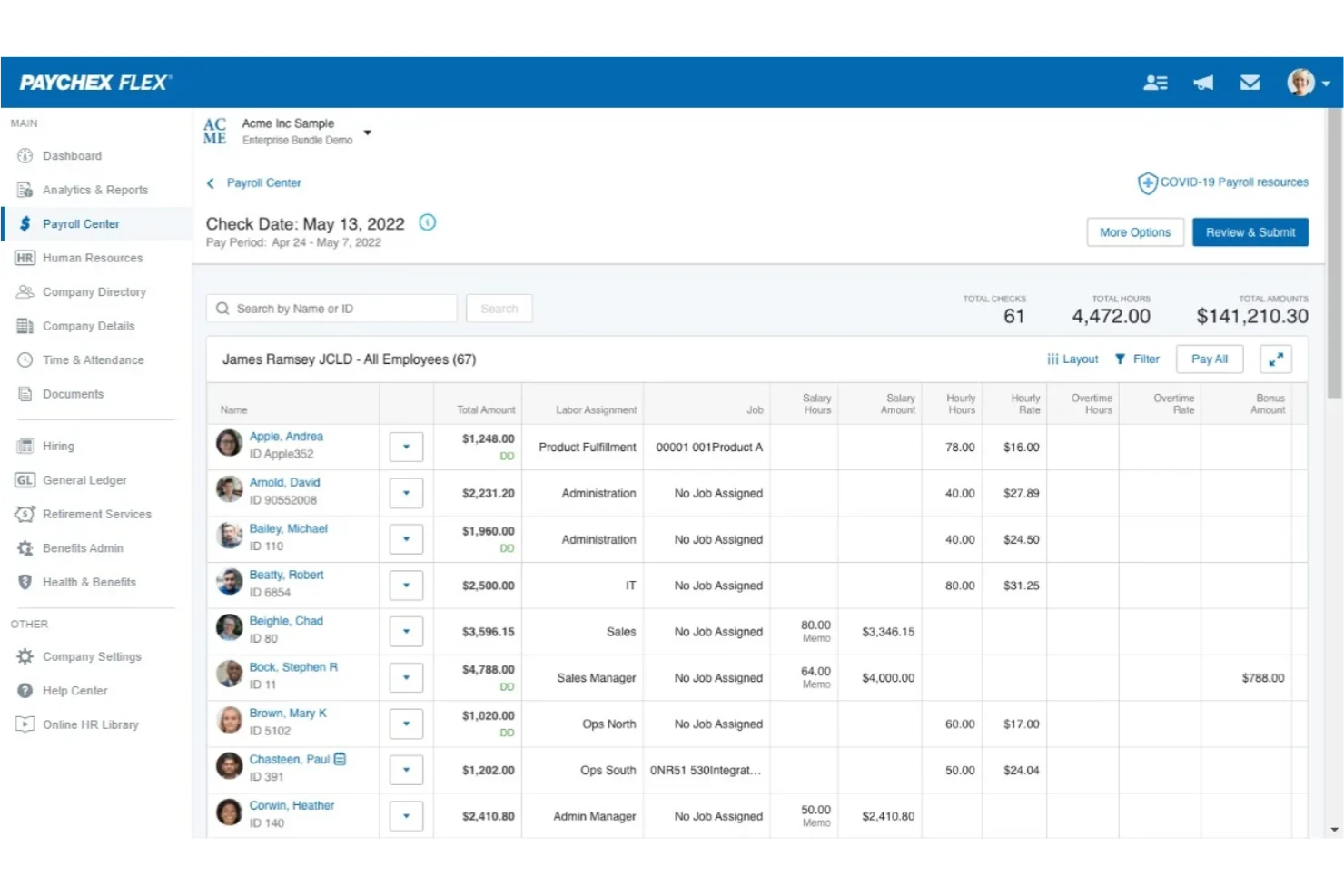
Paychex is a payroll and HR software platform that lets you process payroll, manage employee data, handle tax administration, and access HR tools from a single system.
Who Is Paychex Best For?
Paychex is a good fit for small to midsize businesses that want flexible payroll and HR management in one platform.
Why I Picked Paychex
I picked Paychex as one of the best because I can manage payroll and HR tasks together, which is rare among free payroll apps. I like that Paychex lets me customize pay schedules and automate tax calculations for different employee types. My team uses the platform’s employee self-service features to let staff access pay stubs and update personal information without extra admin work.
Paychex Key Features
- Mobile payroll processing: Run payroll and manage employee data from the Paychex mobile app.
- Direct deposit management: Set up and manage direct deposit for employees within the platform.
- Garnishment payment services: Handle court-ordered wage garnishments automatically through the system.
- Payroll tax compliance alerts: Receive notifications about upcoming payroll tax deadlines and requirements.
Paychex Integrations
Paychex offers native integrations with QuickBooks, Sage Intacct, Xero, Oracle NetSuite, Jirav, Connecteam, SwyftOps, and more. An API is available for custom integrations.
What's Free?
Paychex does not offer a free-forever plan or a limited-time free trial. Users can request a free demo to see the platform in action, but all payroll features require a paid subscription.
Pros and Cons
Pros:
- Includes employee self-service for pay access
- Offers tax calculation and W-2 form generation
- Supports automatic direct deposit to employees
Cons:
- Year-end tax filing requires a paid upgrade
- Add-on fees for some payroll features

ADP
Best for scalable payroll compliance
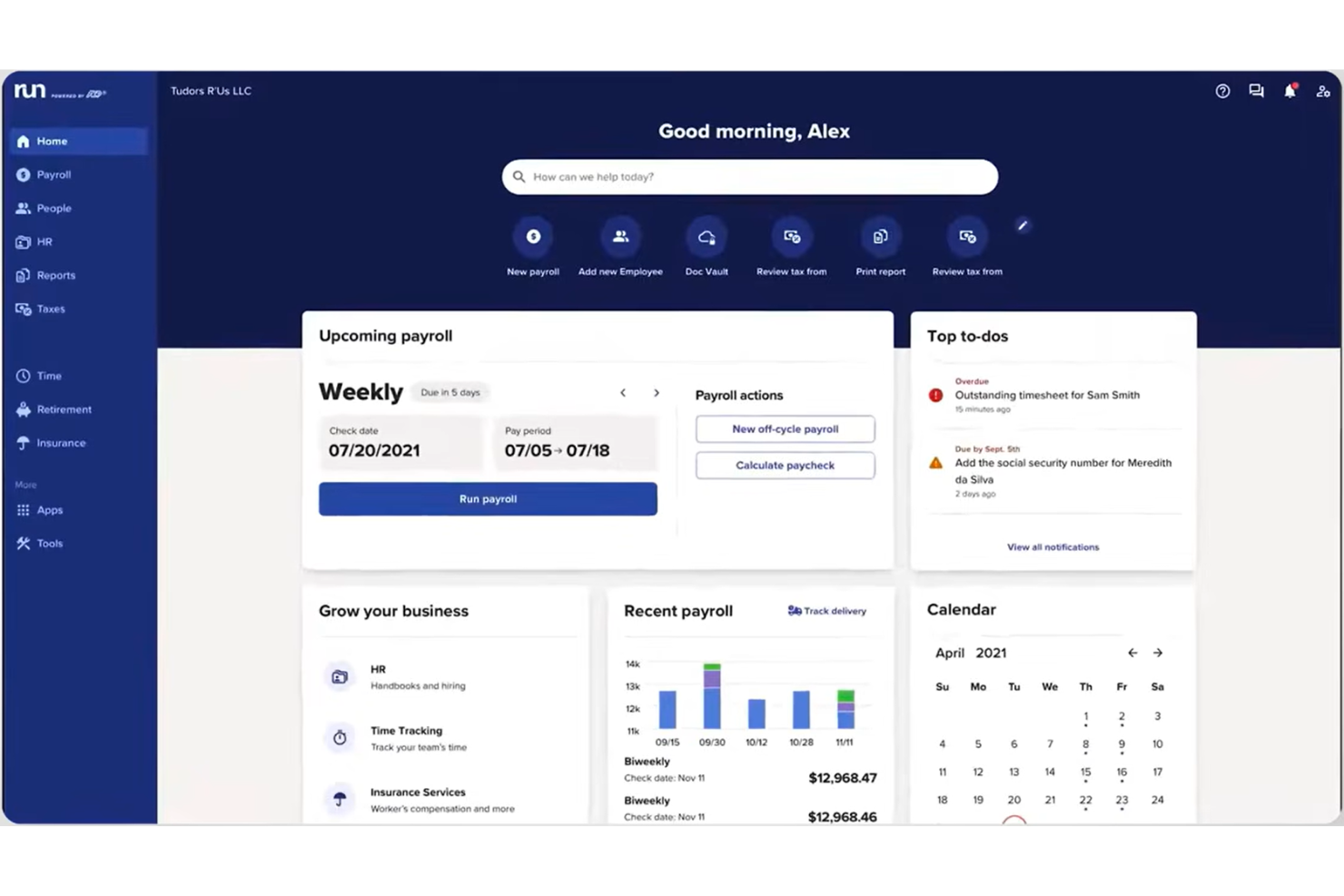
ADP is a payroll and HR management platform that provides automated payroll processing, tax filing, employee self-service, and compliance tools for businesses of all sizes.
Who Is ADP Best For?
ADP is a good fit for midsize to large businesses in the US that need scalable payroll and HR solutions.
Why I Picked ADP
I picked ADP as one of the best because it’s the most widely used payroll provider in the US, which means I can rely on its compliance expertise and up-to-date tax filing tools. I like that ADP handles multi-state payroll and automates complex deductions, which is essential for larger teams. My team is able to access employee self-service features and detailed reporting, making payroll management more efficient.
ADP Key Features
- Mobile payroll app: Run payroll and manage employee data from your phone.
- Garnishment payment services: Automate wage garnishments and agency payments.
- Customizable pay schedules: Set up multiple pay frequencies for different employee groups.
- ACA compliance management: Track and report Affordable Care Act requirements within the platform.
ADP Integrations
ADP offers native integrations with QuickBooks, Xero, Wave, Sage, Oracle, SAP SuccessFactors, Workday, and more. An API is available for custom integrations.
What's Free?
ADP does not offer a free-forever plan. You can request a free demo, but there is no limited-time free trial or free payroll processing available.
Pros and Cons
Pros:
- Provides detailed payroll and compliance reports
- Integrates with major accounting platforms
- Handles multi-state and complex payroll needs
Cons:
- Customer support response times vary
- Setup process can be time-consuming
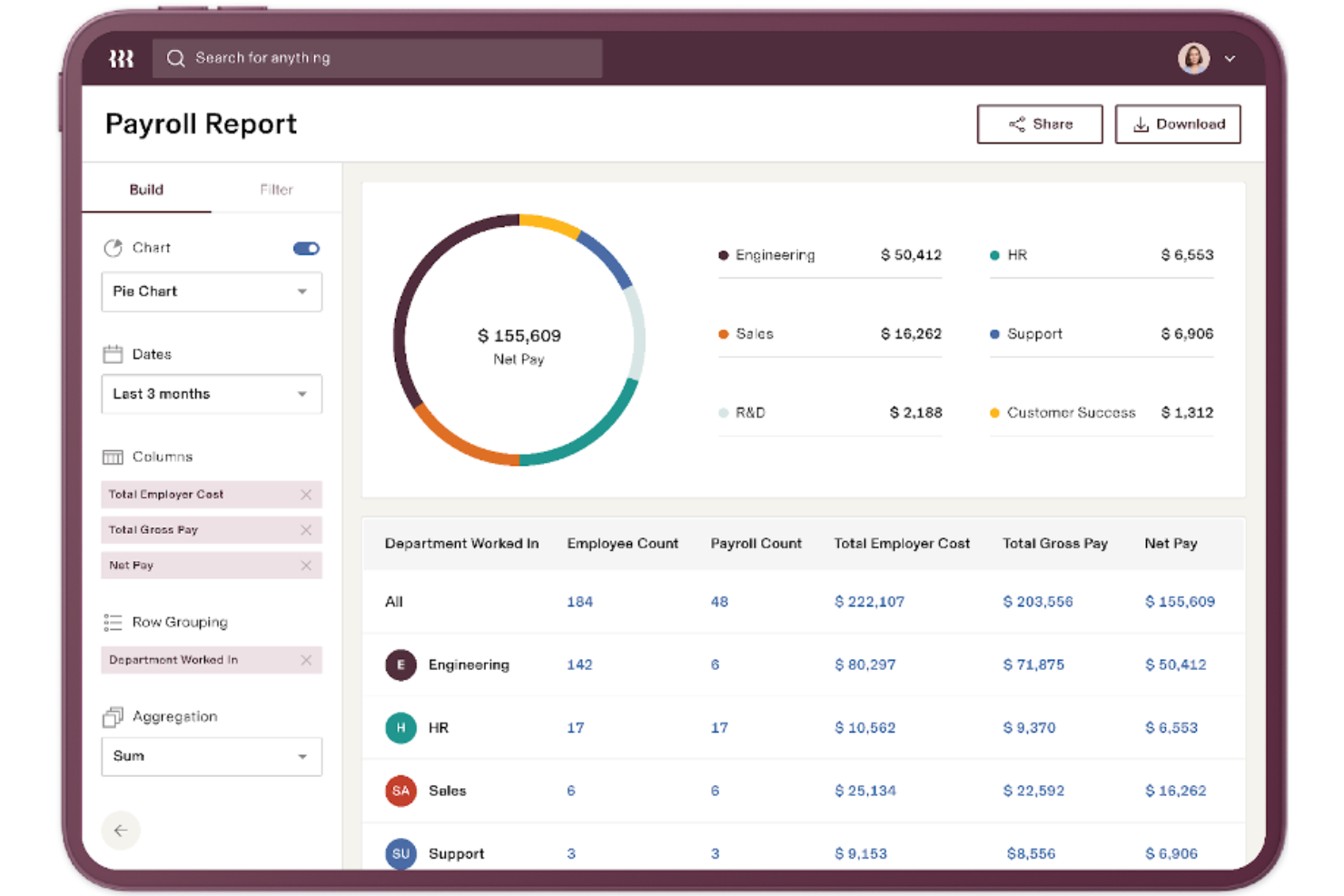
Rippling is a cloud-based payroll and HR platform that lets you manage payroll, automate tax filings, and handle compliance for employees and contractors in multiple countries.
Who Is Rippling Best For?
Global companies and HR teams that need to manage payroll and compliance for a distributed workforce across multiple countries.
Why I Picked Rippling
I picked Rippling as one of the best because I can manage payroll and HR for global teams in one place. I like that I can automate tax filings and compliance for employees and contractors in multiple countries. My team uses Rippling to sync payroll with HR data, so we avoid manual entry and reduce errors.
Rippling Key Features
- Custom pay types: Set up unique pay types for bonuses, commissions, or reimbursements.
- Automated pay stubs: Generate and distribute digital pay stubs to employees automatically.
- Time tracking integration: Sync employee hours directly from time tracking tools.
- Role-based permissions: Control payroll access by assigning specific roles and permissions.
Rippling Integrations
Rippling offers native integrations with QuickBooks Online, Xero, NetSuite, Slack, Google Workspace, Okta, and more. An API is available for custom integrations.
What's Free?
Rippling does not offer a free-forever plan or a limited-time free trial. Access to payroll features requires a paid subscription, and all pricing details are available upon request.
Pros and Cons
Pros:
- Integrates natively with major HR tools
- Offers custom pay types and deductions
- Syncs payroll with HR and benefits data
Cons:
- Add-on modules increase overall cost quickly
- Limited payroll features for hourly workers

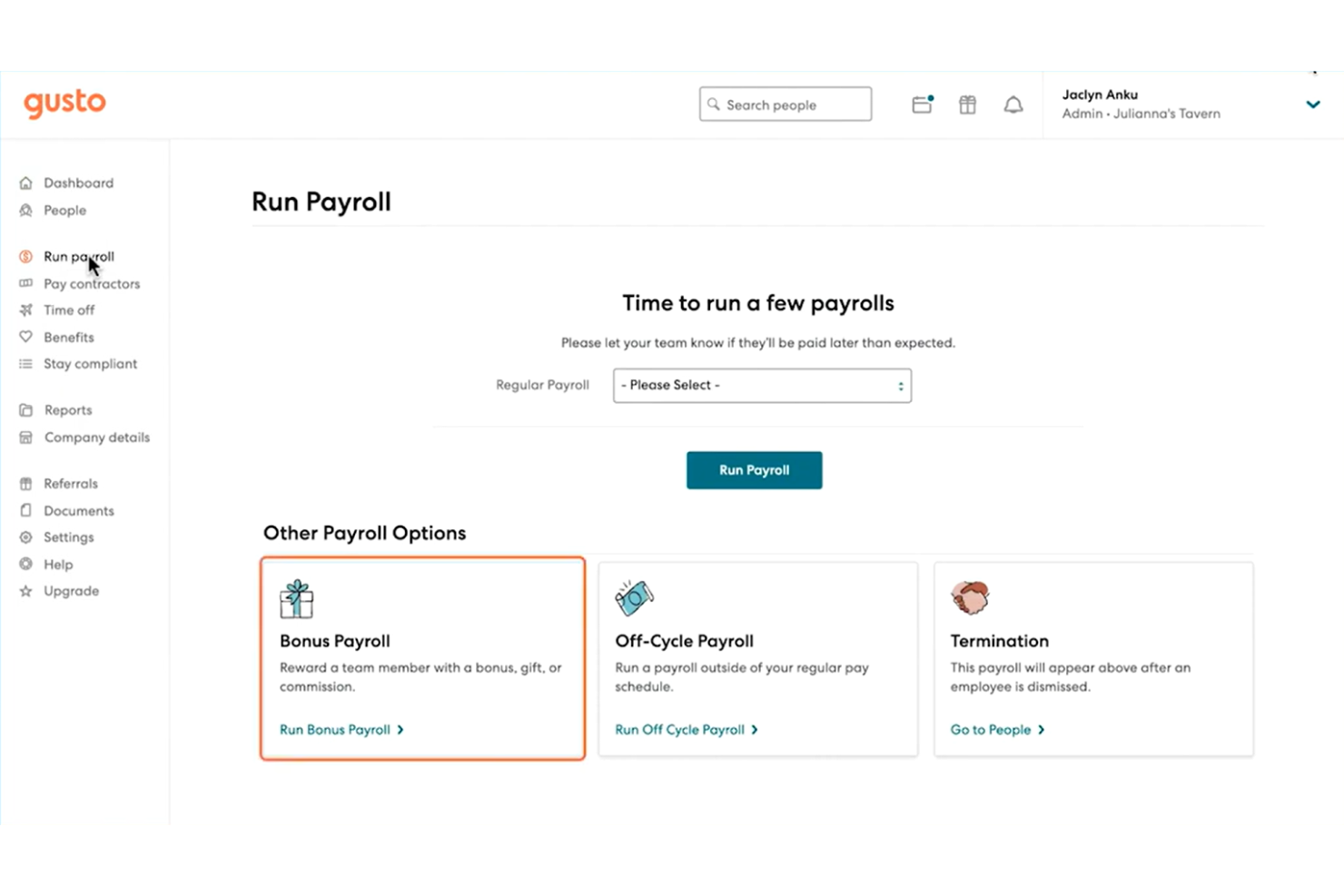
Gusto is a payroll software platform designed for small businesses that need automated payroll runs, tax filing, and integrated benefits management.
Who Is Gusto Best For?
Small business owners and HR teams in the United States who want automated payroll and tax filing.
Why I Picked Gusto
I picked Gusto as one of the best because I can automate payroll runs and tax filings without extra manual steps. I like that Gusto handles federal, state, and local payroll taxes automatically. My team is able to generate and send digital pay stubs and manage benefits enrollment all in one place.
Gusto Key Features
- Employee self-service portal: Employees can access pay stubs, tax forms, and update personal details online.
- Direct deposit setup: Pay employees directly to their bank accounts with customizable deposit schedules.
- Contractor payments: Pay contractors alongside employees and generate 1099 forms automatically.
- Time-off tracking: Track and manage employee PTO, sick leave, and holiday accruals within the platform.
Gusto Integrations
Gusto offers native integrations with 7Shifts, 15Five, Accelo, Asana, Box, Carta, ClickUp, Clover, and more. An API is available for custom integrations.
What's Free?
Gusto does not offer a free-forever plan. You can request a free demo, but all payroll features require a paid subscription, with no limited-time free trial available.
Pros and Cons
Pros:
- Employee self-onboarding and document storage
- Built-in benefits administration options
- Automated tax filing for all states
Cons:
- Time tracking requires higher-tier plans
- Limited support for international payroll

Best for global team payroll
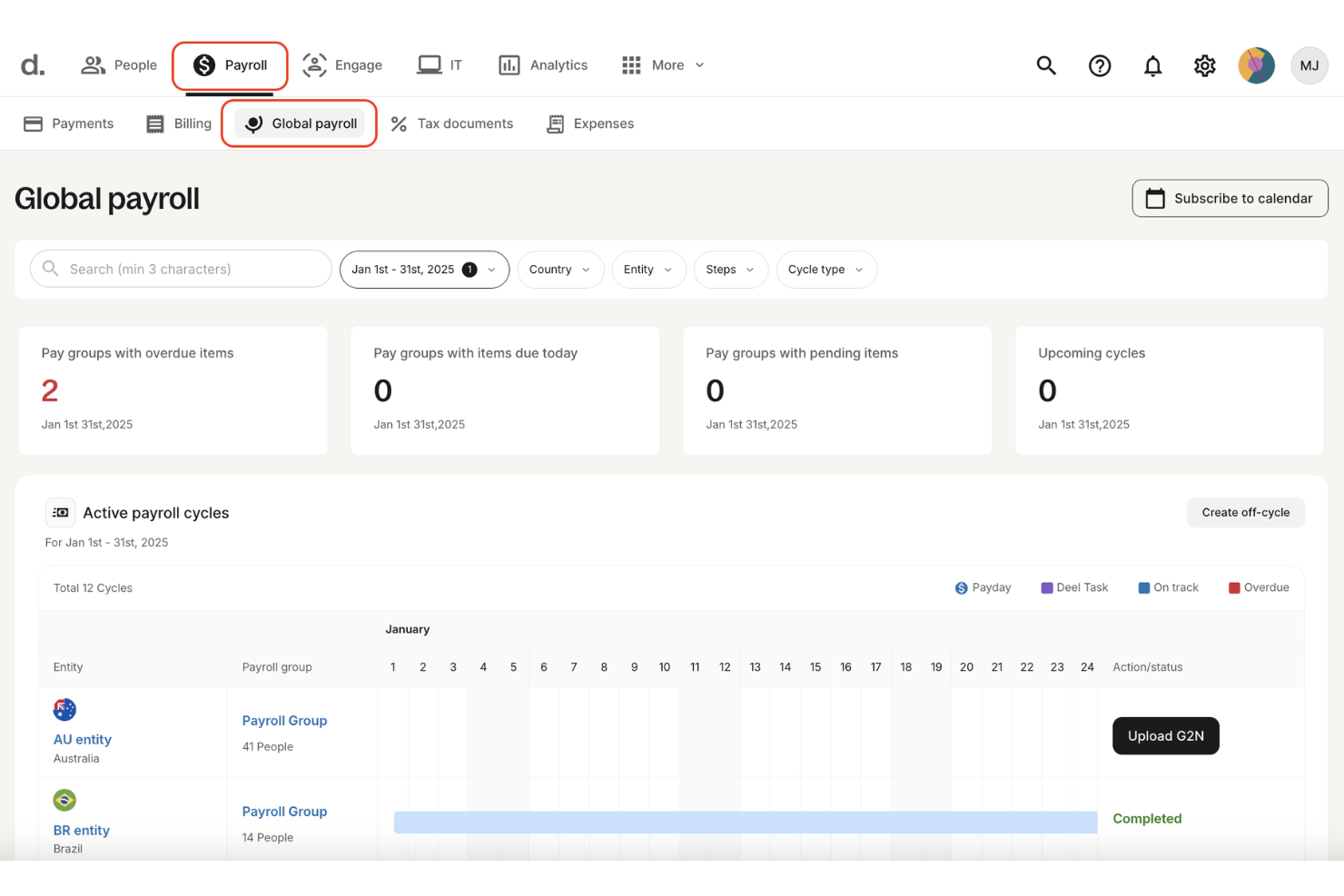
Deel Payroll is a global payroll software platform that lets you manage payroll, contractor payments, and employer of record services for distributed teams in over 100 countries.
Who Is Deel Payroll Best For?
Global HR and finance teams managing payroll and compliance for remote employees and contractors across multiple countries.
Why I Picked Deel Payroll
I picked Deel Payroll as one of the best because I can run payroll for employees and contractors in over 100 countries from a single dashboard. I like that Deel handles built-in contractor and employer of record (EOR) support, so my team can onboard and pay global talent without separate systems. Deel also automates local tax compliance and generates country-specific payslips, which saves me time managing international payroll requirements.
Deel Payroll Key Features
- Bulk payments: Send payments to multiple employees or contractors at once.
- Expense management: Track, approve, and reimburse employee expenses within the platform.
- Custom payroll reports: Generate downloadable payroll and tax reports for any pay cycle.
- Localized document templates: Access country-specific employment and compliance document templates.
Deel Payroll Integrations
Deel Payroll offers native integrations with SAP SuccessFactors, NetSuite, Google Workspace, Slack, and more. An API is available for custom integrations.
What's Free?
Deel Payroll does not offer a free-forever plan or a limited-time free trial. All payroll features require a paid subscription with no free tier available.
Pros and Cons
Pros:
- Automated local tax compliance features
- Built-in contractor and EOR management
- Supports payroll in over 100 countries
Cons:
- Some integrations require manual setup
- Occasional delays in international payments

Best for payroll with employee engagement
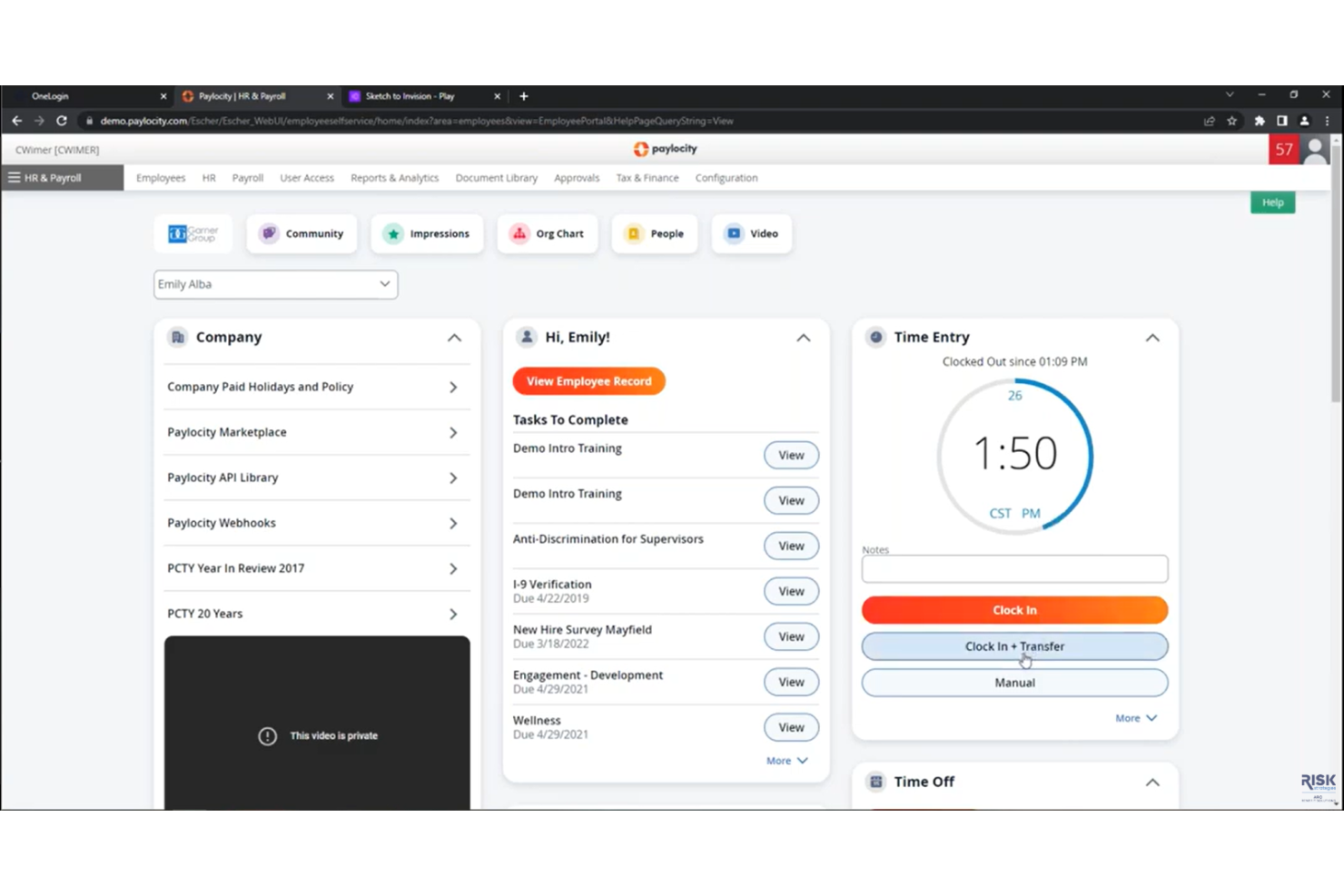
Paylocity is a cloud-based payroll and HR platform that combines automated payroll processing, tax filing, employee self-service, and compliance management for businesses seeking a unified payroll app solution.
Who Is Paylocity Best For?
Paylocity is a good fit for mid-sized and large businesses that want to manage payroll and HR processes in one platform.
Why I Picked Paylocity
I picked Paylocity as one of the best because I can manage payroll and HR tasks together in a single platform. I like that it handles automated payroll runs, tax filing, and employee self-service from one dashboard. My team is able to track compliance and manage onboarding without switching tools, which fits the unified payroll and HR platform for modern workforces' USP.
Paylocity Key Features
- Direct deposit management: Set up and manage employee direct deposit accounts within the platform.
- Garnishment processing: Automatically calculate and process wage garnishments for employees.
- Year-end tax form generation: Generate and distribute W-2 and 1099 forms for employees and contractors.
- Mobile payroll access: Run payroll and access payroll data from the Paylocity mobile app.
Paylocity Integrations
Paylocity offers native integrations with QuickBooks, NetSuite, ADP, SAP SuccessFactors, and has native integrations across the Microsoft ecosystem. An API is available for custom integrations.
What's Free?
Paylocity does not offer a free-forever plan or a limited-time free trial. Access to the platform requires contacting sales for a demo and custom pricing.
Pros and Cons
Pros:
- Garnishment processing supported in all plans
- Mobile payroll approvals for managers
- Customizable payroll reporting and analytics
Cons:
- Implementation fee required for new clients
- Add-on fees for document management
New Product Updates from Paylocity

Paylocity Expands Expense and Purchase Request Tools
Paylocity adds connected personal cards, smarter expense categorization, and a streamlined purchase request experience. This reduces manual entry and helps finance teams manage expenses and approvals more efficiently. For more information, visit Paylocity’s official site.
 .
.
TimeTrex
Best for open-source payroll solutions
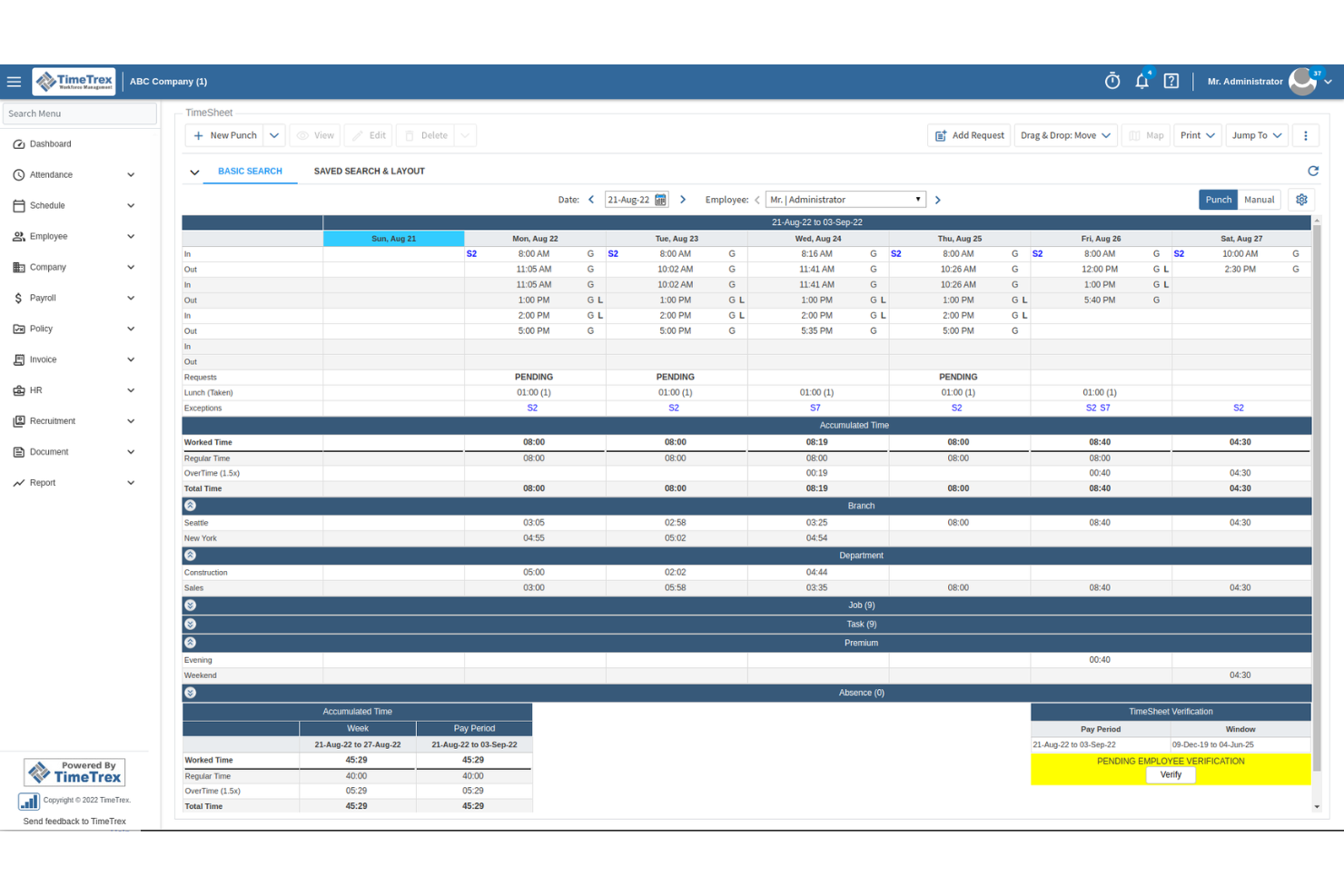
TimeTrex is an open-source payroll and time tracking platform that combines employee scheduling, attendance management, payroll processing, and tax calculations in a single system.
Who Is TimeTrex Best For?
TimeTrex is a good fit for small to midsize businesses and nonprofits that need open-source payroll and time tracking with customizable workflows.
Why I Picked TimeTrex
I picked TimeTrex as one of the best because it’s the only free, open-source payroll and time tracking platform I’ve found that covers everything from scheduling to payroll tax calculations. I like that I can automate pay runs, manage employee attendance, and handle compliance tasks without paying for a license. My team is able to customize workflows and reporting, which is rare among free payroll apps.
TimeTrex Key Features
- Mobile app: Track time and manage payroll from iOS or Android devices.
- Geofencing: Restrict clock-ins and clock-outs to specific locations.
- Custom pay policies: Set up unique overtime, holiday, and break rules.
- Document management: Store and organize employee documents securely within the platform.
TimeTrex Integrations
TimeTrex offers native integrations with ADP, Sage, QuickBooks, Paychex, Meditech, Insync, and more. TimeTrex offers an API for custom integrations.
What's Free?
TimeTrex offers a free-forever Community Edition with no user limits. Some advanced features, integrations, and support options are only available in paid plans.
Pros and Cons
Pros:
- Supports biometric time clock hardware
- Includes payroll tax calculation tools
- Open-source with no user limits
Cons:
- Lacks built-in direct deposit support
- Interface feels outdated and cluttered
New Product Updates from TimeTrex
TimeTrex Adds Quick Punch App With Offline and QR Support
TimeTrex adds a new Quick Punch app, offline punching, QR code scanning, punch images, configurable messages, and punch warnings or lockouts to improve employee clock-ins across browsers and local computers. For more information, visit TimeTrex’s official site.
 .
.
Best for payroll with accounting integration
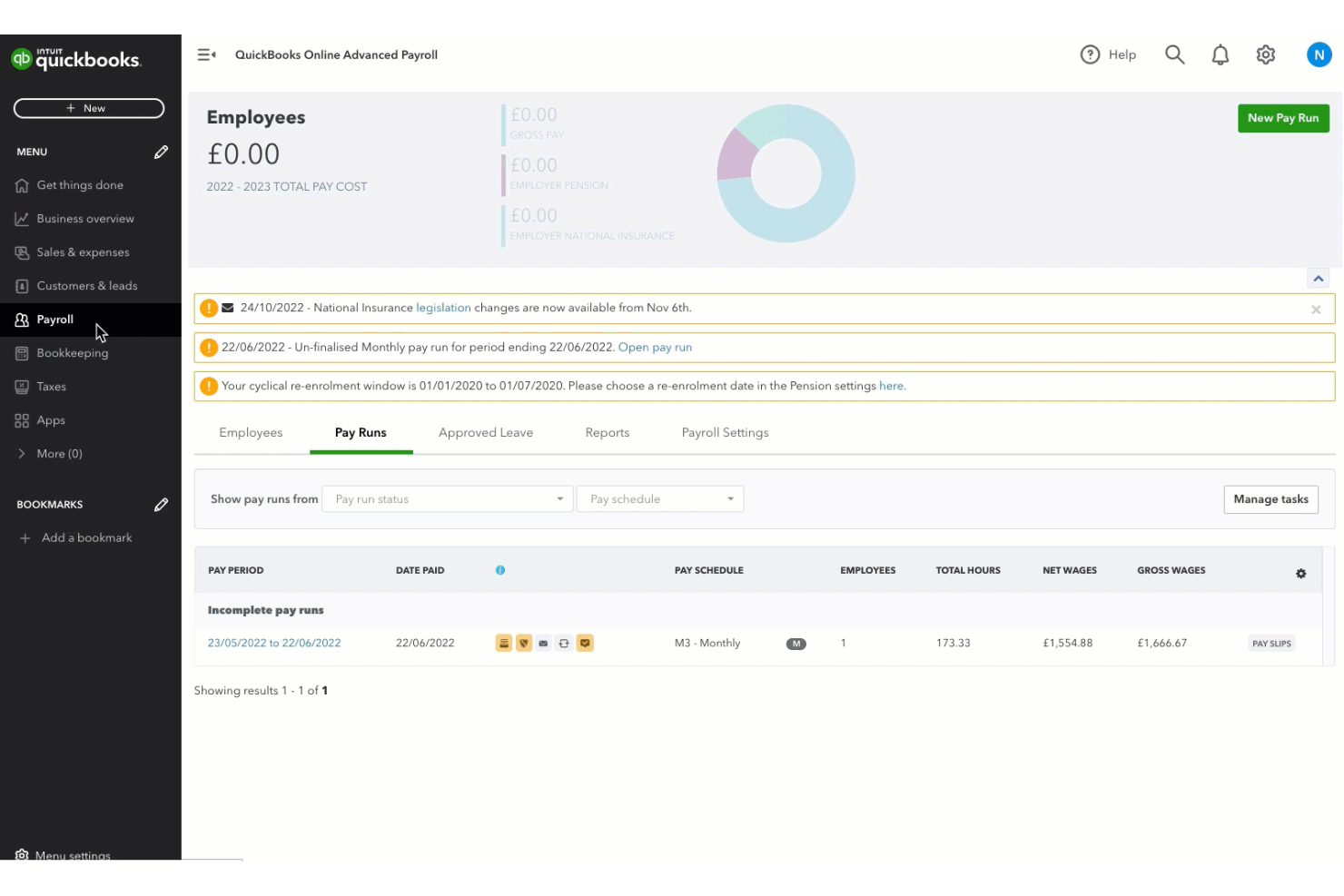
QuickBooks Workforce (formerly known as QuickBooks Payroll) is a cloud-based payroll software that lets you run payroll, manage tax filings, and handle direct deposit while syncing payroll data with QuickBooks accounting.
Who Is QuickBooks Workforce Best For?
QuickBooks Workforce is a good fit for small businesses and accountants who want integrated payroll and accounting in one platform.
Why I Picked QuickBooks Workforce
I picked QuickBooks Workforce as one of the best because I can run payroll and sync all payroll data directly with QuickBooks accounting, which keeps everything in one place. I like that I can automate tax filings and payments, and handle direct deposit without switching platforms. My team is able to manage payroll, tax compliance, and accounting from a single dashboard, which saves us from juggling multiple systems.
QuickBooks Workforce Key Features
- Automatic payroll runs: Schedule payroll to run each pay period automatically.
- Employee self-service portal: Let employees access pay stubs and tax forms online.
- Garnishment and deduction management: Set up and manage wage garnishments and deductions.
- Year-end tax form generation: Generate and distribute W-2s and 1099s for employees and contractors.
QuickBooks Workforce Integrations
QuickBooks Workforce offers native integrations with QuickBooks Online, PayPal, Etsy, Square, eBay, and more. An API is available for custom integrations.
What's Free?
QuickBooks Workforce does not offer a free-forever plan but does offer a limited-time free trial. However, most of the features require a paid subscription.
Pros and Cons
Pros:
- Offers same-day and next-day direct deposit
- Automates federal and state tax filings
- Syncs payroll data with QuickBooks accounting
Cons:
- Mobile app lacks full payroll functionality
- Charges extra for multi-state payroll processing

Homebase
Best for small team payroll
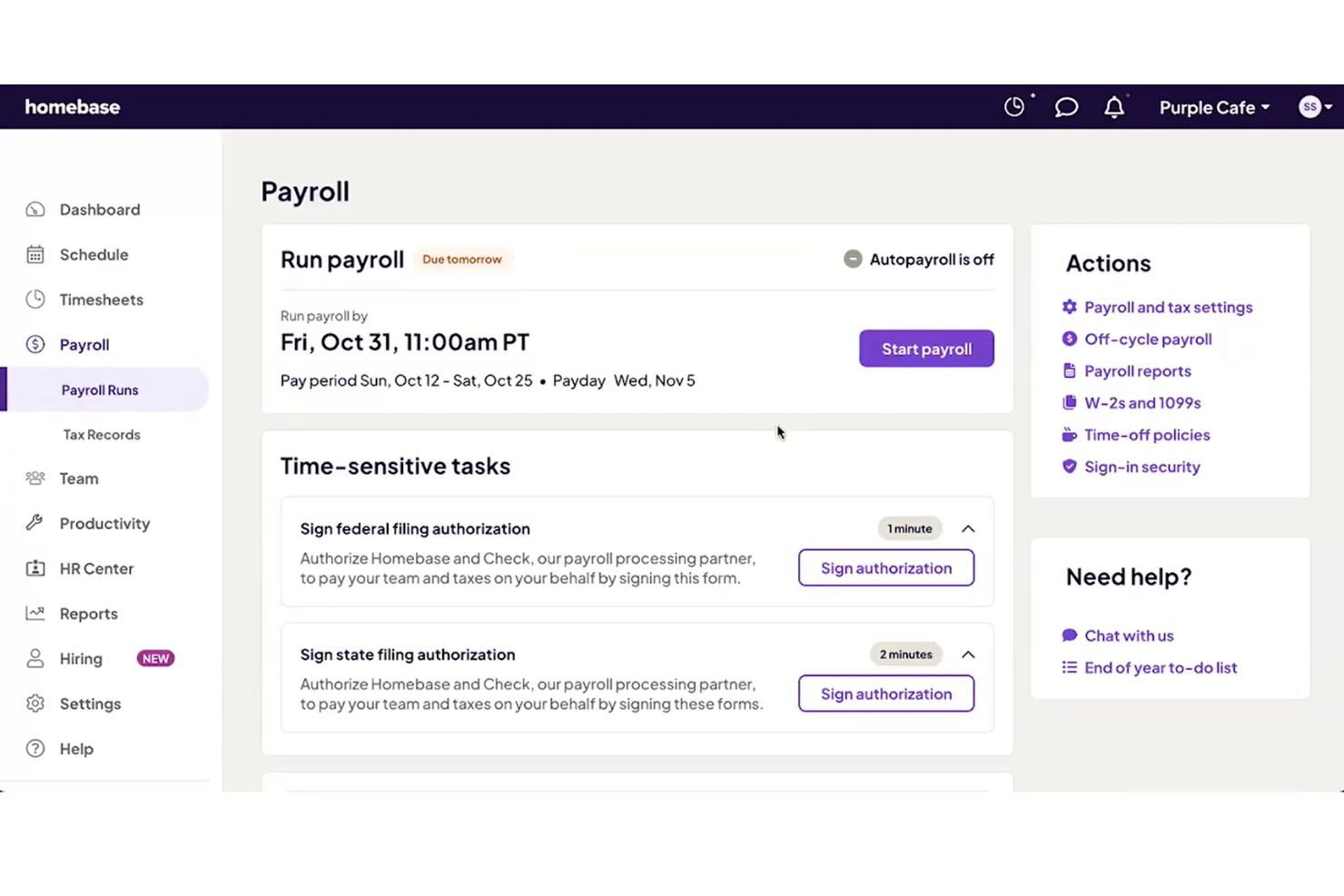
Homebase is a payroll and team management platform for small businesses that combines automated payroll processing, time tracking, scheduling, and compliance tools in one system.
Who Is Homebase Best For?
Homebase is a good fit for small businesses in retail, hospitality, or food service that need simple payroll and hourly team management.
Why I Picked Homebase
I picked Homebase as one of the best because it lets me run payroll for hourly teams and track time in one place. I like that I can sync timesheets directly into payroll, which helps avoid manual entry. My team uses Homebase to handle wage calculations and tax filings automatically, which is especially useful for small businesses with hourly staff.
Homebase Key Features
- Direct deposit payments: Pay employees quickly with direct deposit to their bank accounts.
- W-2 and 1099 preparation: Generate and file W-2 and 1099 forms for employees and contractors.
- Garnishment management: Handle wage garnishments and deductions directly within payroll.
- Multi-location support: Manage payroll for multiple business locations from a single dashboard.
Homebase Integrations
Homebase offers native integrations with QuickBooks, Square, Toast, Shopify, Clover, ADP, Gusto, Paychex, and more. An API is available for custom integrations.
What's Free?
Homebase offers a free-forever plan that includes time tracking, scheduling, and basic team management for unlimited employees at a single location. Payroll features are not included in the free plan and require a paid upgrade.
Pros and Cons
Pros:
- Supports multi-location businesses
- Integrates with major POS systems
- Free payroll for up to 20 employees
Cons:
- Lacks advanced HR management features
- No support for salaried employee payroll

Paycor
Best for payroll and workforce management
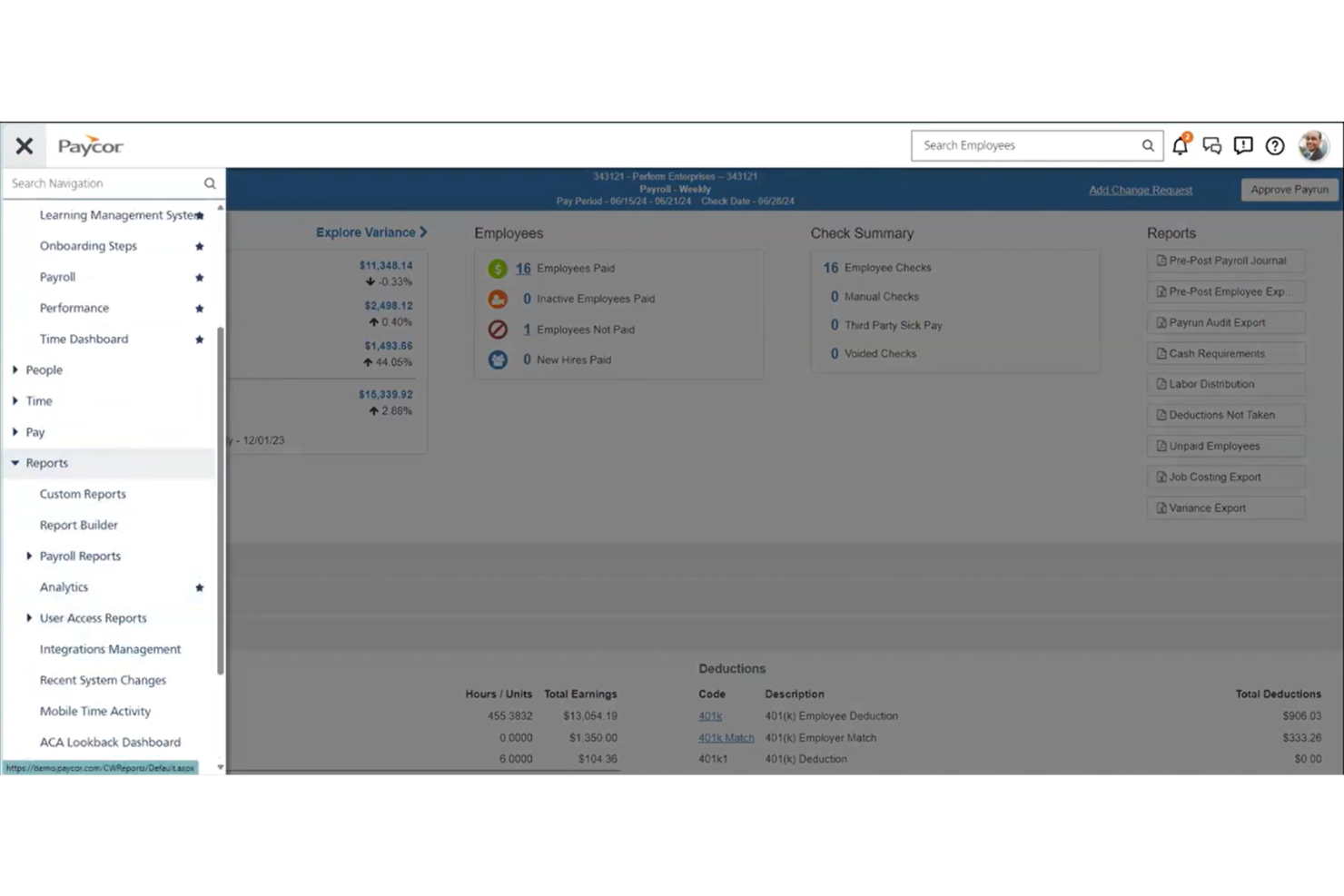
Paycor is a cloud-based payroll and HR platform that combines payroll processing, tax management, employee self-service, and workforce analytics for businesses seeking a free payroll app solution.
Who Is Paycor Best For?
Paycor is a good fit for midsize and growing businesses that need scalable payroll and HR management across multiple locations.
Why I Picked Paycor
I picked Paycor as one of the best because its flexible payroll and HR platform lets me manage payroll, tax compliance, and employee records in one place. I like that I can automate payroll runs and access workforce analytics for better decision-making. My team uses Paycor to handle multi-location payroll and track employee data as we grow.
Paycor Key Features
- Employee self-service portal: Employees can view pay stubs, tax forms, and update personal information online.
- On-demand pay: Employees can access earned wages before payday through the platform.
- Garnishment management: The system handles wage garnishments and deductions automatically.
- ACA compliance tools: Paycor tracks and manages Affordable Care Act reporting requirements.
Paycor Integrations
Paycor offers hundreds of native integrations through its marketplace, including AssureHire, Sterling, Clearstar, and more. An API is available for custom integrations.
What's Free?
Paycor does not offer a free-forever plan or a limited-time free trial. Users can request a free demo, but access to payroll features requires a paid subscription.
Pros and Cons
Pros:
- Marketplace offers many HR integrations
- Built-in ACA and benefits management tools
- Handles multi-state payroll compliance well
Cons:
- Integration setup may require IT support
- Year-end filings can carry additional fees
Other Free Payroll App
Here are some additional free payroll app options that didn’t make it onto my shortlist, but are still worth checking out:
- OnPay
For simple payroll with HR tools
- Patriot Payroll
For affordable payroll setup
- TMetric
For time tracking with payroll
- Remote
For global payroll compliance
- Square Payroll
For payroll for hourly teams
- Wave Payroll
For payroll with free accounting
- SurePayroll
For payroll for hourly teams
- SumoPayroll
For payroll with employee self-service
- HR.my
For cloud HR and payroll
- Payroll4Free
For free payroll for small teams
- ExcelPayroll
For Excel-based payroll tracking
- Zoho Payroll
For automated payroll compliance
- Microkeeper
For payroll with time tracking
- Wise BatchTransfer
For bulk payroll payments
- TaxBandits
For payroll tax filing
- PaycheckManager
For paycheck calculations
- Payment Evolution
For Canadian payroll services


How I Evaluate Free Payroll Apps
I split my evaluation into two layers: core requirements—like a genuinely free plan and automated tax calculations—and differentiators that set the best options apart.
Core Functionality (Table Stakes For This List)
When I'm selecting tools for my list, I rank each one on a scale from 0 (does not offer the functionality) to 5 (excels in this area) for each core functionality listed below. Then, I calculate the tool's total score into a percentage. Each tool needs to achieve a minimum total score of 65% to be considered for inclusion.
- Payroll Calculation Engine: I check whether the tool automatically handles gross-to-net calculations across different pay types like hourly, salaried, overtime, and bonuses.
- Tax Withholding & Filing: Each tool should calculate payroll taxes and generate end-of-year forms—some tools like Gusto and Wave auto-file, while others provide forms for manual filing.
- Free Tier Availability: I look for a genuinely free plan that lets you run real payroll on an ongoing basis, not a 14- or 30-day trial disguised as a free product.
- Direct Deposit & Pay Distribution: The app should offer at least one method to pay employees, whether that's direct deposit, printed checks, or pay cards.
- Pay Stub & Records Generation: I evaluate whether the platform produces itemized digital pay stubs and maintains a searchable payroll history you can reference at tax time or during audits.
- Employee Self-Service Access: Your team members should be able to log in and pull their own pay stubs, tax documents, and personal info without pinging HR every pay cycle.
Once I have a list of tools that meet this criteria, I consider what sets each platform apart.
Differentiating Factors (What Sets Vendors Apart)
Here's how I compare and contrast different vendors:
Standout Features
Multi-state payroll matters if your team is distributed—I look for tools that handle jurisdiction-specific tax rules without forcing manual research. Contractor payments are another big one, especially for small businesses that rely on a mix of W-2 and 1099 workers and need year-end forms generated for both. I also evaluate whether time tracking is built in or connected, since auto-flowing hours into payroll cuts down on manual data entry errors every pay cycle.
Beyond Features
True cost transparency is the first thing I check—some "free" tools bury fees in direct deposit processing or year-end tax form generation. I also evaluate how well each app connects to popular accounting platforms like QuickBooks or Xero, since clean payroll-to-ledger sync prevents reconciliation headaches. Data security deserves close attention too. Payroll apps store sensitive information like bank details and government IDs, so I look for SOC 2 compliance, encryption standards, and role-based access controls.
How to Choose a Free Payroll App
It’s easy to get bogged down in long feature lists and complex pricing structures. To help you stay focused as you work through your unique software selection process, here’s a checklist of factors to keep in mind:
| Factor | What to Consider |
| Scalability | Will the app support your team as you grow? Check user or employee limits and upgrade paths. |
| Integrations | Does it connect with your accounting, HR, or time tracking tools? Confirm native integrations, not just CSV exports. |
| Customizability | Can you adjust pay schedules, deduction types, or reporting formats to fit your processes? |
| Ease of use | Is the interface clear and simple for both admins and employees? Test with real payroll scenarios. |
| Implementation and onboarding | How quickly can you get set up? Look for guided setup, data import options, and onboarding support. |
| Cost | Are there hidden fees for tax filings, direct deposit, or support? Review the full pricing breakdown. |
| Security safeguards | Does the app offer encryption, user permissions, and audit trails to protect sensitive payroll data? |
| Compliance requirements | Will the app keep you up to date with local, state, and federal payroll regulations? |
What is a Free Payroll App?
A free payroll app is software that lets you calculate employee pay, manage tax withholdings, and generate payroll reports without a subscription fee. These tools help small businesses or teams automate payroll tasks, stay compliant with tax regulations, and provide pay stubs or direct deposit, all at no cost.
Features of Free Payroll App
Let’s go over the features commonly found in payroll app solutions, and which ones are usually included in free vs. paid plans.
Typically Free Payroll App Features
- Payroll calculations: Automatically calculates gross pay, deductions, and net pay for each employee based on hours worked or salary.
- Pay stub generation: Creates digital or printable pay stubs for employees to review their earnings and deductions.
- Basic tax calculations: Calculates standard federal, state, and local payroll taxes for each pay period.
- Direct deposit support: Allows you to pay employees directly into their bank accounts without printing checks.
- Employee self-service: Lets employees view pay stubs, tax forms, and personal information through a secure portal.
- Basic reporting: Provides standard payroll reports, such as payroll summaries and tax liability reports, for recordkeeping and compliance.
- Manual check printing: Enables you to print physical paychecks for employees who do not use direct deposit.
- Employee management: Stores basic employee information, such as contact details, job titles, and pay rates.
Typically Paid Payroll App Features
- Automated tax filing: Handles filing of federal, state, and local payroll taxes on your behalf, reducing manual work and risk of errors.
- Year-end tax forms: Generates and files W-2s, 1099s, and other required year-end tax documents for employees and contractors.
- Multi-state payroll support: Manages payroll and tax compliance for employees working in multiple states or jurisdictions.
- Customizable pay schedules: Lets you set up multiple pay frequencies and custom pay periods to fit your business needs.
- Advanced integrations: Connects payroll data with accounting, HR, and time tracking systems for streamlined workflows.
- Garnishment processing: Calculates and processes wage garnishments, such as child support or tax levies, automatically.
- Advanced reporting and analytics: Offers customizable reports and analytics to track payroll trends, costs, and compliance metrics.
- Dedicated customer support: Provides access to priority or live support channels, including phone, chat, or dedicated account managers.
- Mobile payroll processing: Allows you to run payroll and manage employee data from a mobile app or device.
- Compliance updates: Automatically updates tax tables and compliance rules to reflect the latest federal, state, and local regulations.
Benefits of Free Payroll App
Implementing a free payroll app provides several benefits for your team and your business. Here are a few you can look forward to:
- Cost savings: Eliminates subscription fees, letting you manage payroll without adding to your overhead.
- Automated calculations: Reduce manual errors by automatically calculating pay, deductions, and taxes each pay period.
- Faster payroll processing: Speeds up pay runs with features like direct deposit and batch processing.
- Employee empowerment: Gives employees access to pay stubs and tax forms through self-service portals.
- Regulatory compliance: Helps you stay compliant with basic tax calculations and reporting requirements.
- Easy onboarding: Offers guided setup and templates so you can get started quickly, even with limited payroll experience.
- Scalability for small teams: Supports small businesses or growing teams without requiring immediate upgrades or paid plans.
Costs and Pricing of Payroll App
I realize you came to this article looking for the best payroll app options that are available for free. However, since free plans only offer limited features, there's a good chance you'll need to scale your plan up in the future.
The table below summarizes common plans, their average prices, and typical features included in payroll app solutions:
Plan Comparison Table for Payroll App
| Plan Type | Average Price | Common Features |
| Free Plan | $0 | Basic payroll calculations, pay stub generation, direct deposit support, basic tax calculations, and employee self-service. |
| Personal Plan | $5-$15/user/month | All free features, plus automated tax filing, year-end tax forms, and limited integrations. |
| Business Plan | $20-$40/user/month | All personal features, plus multi-state payroll, advanced reporting, custom pay schedules, and priority support. |
| Enterprise Plan | $40-$70/user/month | All business features, plus dedicated account management, advanced compliance tools, custom integrations, and enhanced security. |
Free Payroll App FAQs
Here are some answers to common questions about the free payroll app:
Are free payroll apps safe to use?
Yes, most free payroll apps use encryption and security protocols to protect your payroll data. Always review the vendor’s privacy policy and security certifications before entering sensitive information.
Can I run payroll for multiple employees with a free payroll app?
Yes, many free payroll apps let you process payroll for multiple employees, but some may limit the number of users or employees you can add. Check each app’s terms to confirm any restrictions.
Do free payroll apps handle tax filings automatically?
No, most free payroll apps only calculate taxes but don’t file them automatically. You’ll usually need to handle tax filings yourself or upgrade to a paid plan for automated filing.
What happens if I outgrow a free payroll app?
If your team grows or your needs become more complex, you can usually upgrade to a paid plan for advanced features like multi-state payroll, automated tax filing, or integrations.
Can I integrate a free payroll app with my accounting software?
Some free payroll apps offer basic integrations or CSV exports, but full accounting integrations are often reserved for paid plans. Review the integration options before choosing a solution.