

En iyi İK hizmet sunumu yazılımı, çalışan taleplerini kolaylaştırmanıza, vaka yönetimini otomatikleştirmenize ve kuruluşunuz genelinde daha hızlı ve tutarlı destek sunmanıza yardımcı olur.
İK ekipleri talepleri ve iş akışlarını yönetmek için e-postalara, elektronik tablolara ve dağınık sistemlere güvendiğinde gecikmeler, gözden kaçan talepler ve hayal kırıklığı yaşayan çalışanlar ortaya çıkar. Doğru platform hizmet sunumunu merkezileştirir, bilet oluşturma ve onayları otomatikleştirir, hem İK'nın hem de çalışanların durum ve sonuçlar hakkında görünürlük kazanmasını sağlar.
İK ve iş yeri teknolojilerini inceleme deneyimimden yararlanarak bugün kullanıma sunulan en iyi İK hizmet sunumu araçlarının bir listesini derledim. Bu kılavuzda idari yükü azaltan, çalışan deneyimini iyileştiren ve İK'nın daha verimli ve etkili çalışmasına yardımcı olan çözümleri bulacaksınız.
Why Trust Our Software Recommendations
6,700+
Reviews
20
Industry experts
16+
Evaluation factors
14
Years
Our team has been testing and reviewing software since 2012. As HR experts ourselves, we know how difficult—and important—it is to choose the right software.
For this guide, we evaluated tools using hands-on testing and independent research, scoring tools using our selection criteria. We also draw on insights from industry thought leaders and practicing HR experts.
Our reviews reflect our human editorial judgment, not a sales pitch.
Expert reviewers:
- Phil GrayCOO
 Kim BehnkeHR Tech Editor & Analyst
 Josh BarkerPeople Ops Manager

İK Hizmet Sunumu Yazılımları Karşılaştırma Tablosu
Bu karşılaştırma tablosu, en iyi İK hizmet sunumu yazılımı seçimlerimin fiyatlandırma ayrıntılarını özetlemektedir:
Score legend (out of 5)
- Excellent4.5–5
- Good4–4.4
- Average3–3.9
- Below average2–2.9
- Poor1–1.9
Sorted by: Default
| Tool | Starting Price | Website | |||||||
|---|---|---|---|---|---|---|---|---|---|
Best for integrated time tracking | Not rated | 1 | Not rated | 2 | Not rated | 3 | 2 | $79/user/month Free demo available | Book Demo |
Best for managing global worker lifecycle | Not rated | 2 | Not rated | 5 | Not rated | 4 | 5 | $5/user/month Free demo available | Website |
Best for centralized service catalog | 4.3 out of 5 | 5 | 4 | 5 | 4 | 5 | 3 | $19/user/month 14-day free trial | Book Demo |
Best for employee self-service access | Not rated | 2 | Not rated | 4 | Not rated | 5 | 4 | Pricing upon request Free demo available | Website |
Best for AI-assisted case management | 4.5 out of 5 | 5 | 5 | 4 | 4 | 5 | 4 | Pricing upon request Free demo available | Website |
Best for personalized employee experiences | 4.8 out of 5 | 5 | 5 | 5 | 4 | 5 | 5 | Pricing upon request Free demo available | Website |
Best for enterprise-wide HR journey orchestration | 5.0 out of 5 | 5 | 5 | 5 | 5 | 5 | 5 | Pricing upon request Free demo available | Website |
Best for agentic AI that acts on HR requests | 4.8 out of 5 | 5 | 5 | 5 | 5 | 5 | 4 | Pricing upon request Not available | Website |
Best for mobile AI assistance in HR | 5.0 out of 5 | 5 | 5 | 5 | 5 | 5 | 5 | Pricing upon request Free demo available | Website |
Best for scalable all-in-one HR Solutions | 4.7 out of 5 | 5 | 5 | 5 | 3 | 5 | 5 | Pricing upon request 30-day free trial | Website |


En İyi İK Hizmet Sunumu Yazılımı İncelemeleri
En iyi İK hizmet sunumu yazılımlarına ilişkin ayrıntılı analizim aşağıdadır; bu analizde yazılımların güçlü yönleri ve sınırlamaları öne çıkarılmaktadır. Her inceleme, özelliklerine ve her araç için en uygun kullanım alanlarına ilişkin kapsamlı bilgiler sunmaktadır.
 Best for integrated time tracking
- Free demo available
- From $79/user/month
Visit WebsiteCustomer Rating:4.6/5
Combined payroll, benefits, PTO requests, company directory, and employee self-service features displayed across desktop and mobile app interfaces. Justworks is an HR service delivery platform that combines payroll, benefits administration, compliance support, time tracking, and onboarding tools for small and midsize businesses.
Who Is Justworks Best For?
Justworks is a good fit for small and midsize businesses that want a unified HR, payroll, and compliance platform.
Why I Picked Justworks
I picked Justworks as one of the best because it includes integrated time tracking alongside payroll and HR tools. My team can track employee hours directly in the platform, which syncs with payroll processing. I like that this setup helps us manage attendance and overtime without juggling separate systems.
Justworks Key Services
- Automated payroll processing: Run payroll for salaried and hourly employees with automated tax filings.
- Benefits administration: Manage health, dental, vision, and 401(k) plans from a single dashboard.
- HR document management: Store and organize onboarding documents, policies, and employee files securely.
- Employee self-service portal: Let employees access pay stubs, benefits information, and personal details online.
Justworks Integrations
Native integrations are not clearly documented. Justworks offers an API for custom integrations.
Pros and Cons
Pros:
- Live HR consulting for policy questions
- Automated payroll tax filings and remittance
- Built-in time tracking for hourly teams
Cons:
- No built-in performance management tools
- Reporting features lack advanced customization
Learn more about Justworks: Best for managing global worker lifecycle
- Free demo available
- From $5/user/month
Visit WebsiteCustomer Rating:4.8/5
Deel allows for timely payments to employees and contractors across 150+ countries. Deel is built for companies that need to manage employees and contractors across multiple countries without juggling separate payroll, compliance, and HR systems.
Why I Picked Deel
I picked Deel because it lets you manage the entire global worker lifecycle without switching between multiple vendors. You can hire employees or contractors in different countries while Deel handles local payroll, tax filings, and labor-law compliance through its built-in Employer of Record services.
I like that onboarding, contract management, time off, and document storage all live in the same platform, which reduces handoffs between HR tools, and Deel also supports employee relocation and visa sponsorship, making it easier for your team to support international mobility. For global HR teams, this removes much of the manual coordination usually required to stay compliant across regions.
Deel Key Features
Here are some key features worth highlighting:
- Global Payroll Automation: Run compliant payroll across multiple countries from a single dashboard.
- Localized Benefits Management: Offer country-specific benefits aligned with local regulations.
- Contract & Document Management: Create, store, and manage locally compliant employment contracts.
- Global Equipment Logistics: Ship, track, and recover employee equipment internationally.
Deel Integrations
Integrations include Slack, Google Workspace, Microsoft Teams, BambooHR, Greenhouse, SAP SuccessFactors, Okta, Azure Active Directory, and Workday.
Pros and Cons
Pros:
- Additional features like learning, engagement, and IT asset management
- Easy payments for employees and contractors
- Emphasis on global compliance
Cons:
- May be challenging to learn for new users
- Could offer more customization options
 Best for centralized service catalog
- 14-day free trial
- From $19/user/month (billed annually)
Visit WebsiteCustomer Rating:4.6/5
Freshservice's service catalog centralizes employee service requests. Freshservice is designed for organizations looking to improve HR service delivery by simplifying complex processes and providing a unified platform for service management. It includes a centralized service catalog that helps HR teams manage employee requests, onboarding tasks, and internal services in one place. Freshservice appeals to HR professionals and business teams across industries aiming to improve employee experiences and streamline HR operations.
Why I Picked Freshservice
I picked Freshservice for its centralized service catalog, which provides a centralized location for employees to access various HR services and resources, simplifying the process of finding and requesting what they need. It also supports automated onboarding, reducing manual steps and helping new employees transition smoothly. In addition, its structured case management system helps HR teams track and resolve employee requests more efficiently.
Freshservice Key Features
In addition to centralized service catalog, Freshservice offers:
- Employee Journeys: Facilitates the management of employee lifecycle events, such as promotions and relocations, ensuring consistency and reducing administrative burden.
- Document Management: Allows HR teams to store and manage important documents securely, making it easy to access and share necessary information with employees.
- Analytics & Reporting: Provides insights into HR operations, helping teams make data-driven decisions and improve service delivery.
Freshservice Integrations
Integrations include Workday, Slack, Microsoft Teams, Google Workspace, Jira, Okta, Azure AD, Salesforce, and Zapier. An API is also available for custom integrations.
Pros and Cons
Pros:
- HR service catalog for managing employee requests across the lifecycle
- Visual dashboards and analytics to measure service efficiency and satisfaction
- Multiple support channels, including email, portal, mobile app, phone, and chatbot
Cons:
- Some HR capabilities depend on integrations with other systems
- Advanced HR workflows may require setup and configuration
Learn more about Freshservice: Best for employee self-service access
- Free demo available
- Pricing upon request
Visit WebsiteCustomer Rating:4.3/5
Paylocity’s HRIS dashboard provides a comprehensive overview of employee data, payroll status, and workforce analytics. Paylocity is a cloud-based HR and payroll platform, aimed at mid-sized organizations, that combines core workforce management and employee self-service in one system.
Why I Picked Paylocity
I picked Paylocity because it brings payroll and HR together in a single platform instead of forcing your team to work across disconnected tools. You can run payroll with built-in tax compliance and direct deposit support, so pay calculations and filings happen accurately and on time.
I like how its employee self-service portal lets staff view pay stubs, update personal info, and submit time-off requests without needing HR to intervene, and time and attendance tracking feeds directly into payroll, reducing errors from manual entry. I also like that its mobile app keeps your workforce connected to their HR data wherever they are.
Paylocity Key Features
Here are some key features worth highlighting:
- Payroll & Tax Management: Automates payroll calculations, direct deposits, and compliance with federal, state, and local tax rules.
- Employee Self-Service: Enables employees to access pay stubs, benefits info, and personal records from desktop or mobile.
- Time & Attendance: Tracks hours, overtime, and scheduling, feeding data directly into payroll to cut admin work.
- Talent Management Tools: Supports recruiting, onboarding, and performance workflows to help develop and retain staff.
Paylocity Integrations
Integrations include Indeed, Jira Software, OneTrust, Ironclad, 15Five, Asana, Greenhouse, Slack, Microsoft 365 (Entra ID), Salesforce, and Zoom.
Pros and Cons
Pros:
- Advanced workforce analytics reporting
- Robust employee self-service portal
- Comprehensive payroll and compliance features
Cons:
- Lacks built-in case management module
- Limited customization for workflows
 Best for AI-assisted case management
- Free demo available
- Pricing upon request
Visit WebsiteCustomer Rating:5/5
Dovetail Software's centralization of cases prevents issues from falling through the cracks. Dovetail Software is built for mid-sized to enterprise HR teams that need tighter control over employee inquiries at scale. It centralizes HR cases, knowledge, and self-service in one system, making it easier to respond consistently without losing track of sensitive or complex requests.
Why I Picked Dovetail Software
I picked Dovetail Software because it helps your HR team manage complex, high-volume cases without relying on inboxes or spreadsheets. Its AI-powered HR Copilot supports faster triage and resolution by suggesting responses and automating repetitive steps within case workflows.
You can route cases intelligently using configurable rules, which helps ensure the right HR specialist handles each issue, and I also like that employees can resolve common questions themselves through the self-service portal, backed by a centralized knowledge base that HR controls. Together, these features help your team respond faster while maintaining consistency and compliance.
Dovetail Software Key Features
Here are some key features worth highlighting:
- Case SLA Tracking: Monitor response times and resolution performance against defined service-level targets.
- Email-to-Case Automation: Automatically converts employee emails into trackable HR cases.
- HR Analytics Dashboards: Gives visibility into case volume, resolution trends, and team workload.
- Secure Audit Trails: Logs all case actions to support compliance and internal reviews.
Dovetail Software Integrations
Integrations include Workday, SAP SuccessFactors, ADP, BambooHR, Microsoft Dynamics, Google Workspace, Slack, Gmail, and Intercom.
Pros and Cons
Pros:
- AI Copilot reduces manual effort in high-volume case handling
- Detailed audit trails help meet compliance and reporting needs
- Strong case routing keeps sensitive HR issues properly assigned
Cons:
- No free trial available for testing the platform
- Mobile experience is less robust compared to the desktop version
Learn more about Dovetail Software: Best for personalized employee experiences
- Free demo available
- Pricing upon request
Visit WebsiteCustomer Rating:4.3/5
Workday delivers full-scale HR service management with real-time analytics, talent management, and efficient payroll processes for large enterprises. Workday is a feature-rich platform designed to cater to various HR needs. It excels in delivering personalized experiences to employees, enhancing their engagement and satisfaction.
Why I Picked Workday: I selected Workday for its exceptional ability to create tailored experiences for each employee, which is a standout feature in the realm of HR service delivery software. Its commitment to personalization is evident in its design, making it the best choice for companies looking to provide individualized support to their workforce.
Standout Features & Integrations
Features include an employee database, AI-backed automation, an employee skills cloud, financial management, financial planning, employee experience, and employee management. Workday’s reskilling feature helps you identify growth opportunities for your team members and create development plans to help them acquire new skills.
Integrations include Salesforce, Microsoft Azure, Slack, ServiceNow, Google Workspace, Okta, ADP, SAP, Oracle, and IBM.
Pros and Cons
Pros:
- Broad integration capabilities
- Comprehensive HR solutions
- Tailored employee experiences
Cons:
- Limited customization options compared to some competitors
- Complex implementation process
Learn more about Workday: Best for enterprise-wide HR journey orchestration
- Free demo available
- Pricing upon request
Visit WebsiteCustomer Rating:4.2/5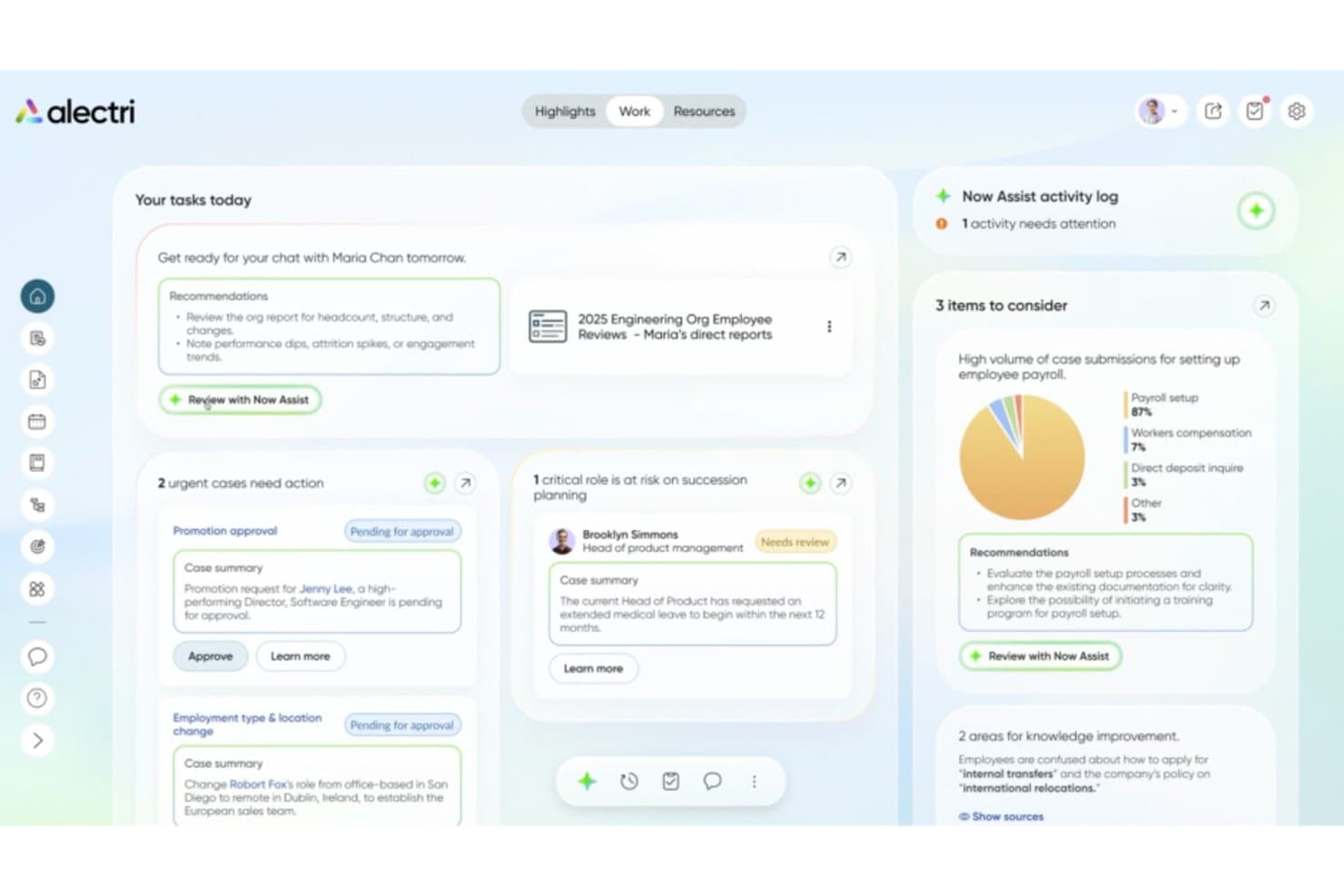
ServiceNow HR Service Delivery surfaces AI-driven task prioritization for HR managers. ServiceNow HR Service Delivery is an enterprise HR service management platform that centralizes case management, employee self-service, knowledge management, and lifecycle journey orchestration across HR, IT, and facilities.
Who Is ServiceNow HR Service Delivery Best For?
ServiceNow HR Service Delivery is built for large enterprises that need to coordinate HR, IT, and facilities workflows across a complex, global workforce.
Why I Picked ServiceNow HR Service Delivery
ServiceNow HR Service Delivery earns its spot on my shortlist because no other platform matches its depth of enterprise-wide journey orchestration. I'm particularly impressed by Journey Designer, which lets HR teams build no-code lifecycle workflows spanning HR, IT, and Facilities simultaneously, so a new hire's equipment request, badge access, and onboarding tasks all move in parallel. The AI-powered "Resolve HR Cases v3" workflow adds three autonomous agents that predict case categories, route to the right specialist, and generate resolution plans without human triage.
ServiceNow Key Features
- Employee Center portal: A branded, personalized self-service portal where employees submit requests, track case status, and access HR services across web, mobile, Microsoft Teams, and Outlook.
- Advanced Work Assignment (AWA): Skills-based routing engine that automatically matches incoming HR cases to available agents based on skills, workload, and availability.
- Listening Posts: Pulse surveys embedded directly within journey workflows to collect employee feedback at key lifecycle moments.
- Employee Document Management: A managed document template system with built-in e-signature capability for offer letters, policy acknowledgments, and HR task documents.
ServiceNow Integrations
ServiceNow HR Service Delivery offers native integrations with Workday, SAP SuccessFactors, Oracle HCM Cloud, UKG, and Microsoft 365. IntegrationHub and open APIs support custom connections to payroll, benefits, learning management, and IT service management systems.
Pros and Cons
Pros:
- Pre-built journeys for onboarding, offboarding, transitions
- Enterprise workflows span HR, IT, facilities
- Market-leading AI automates case routing
Cons:
- AI features require additional licensing
- Complex, resource-heavy implementation process
Learn more about ServiceNow HR Service Delivery: Best for agentic AI that acts on HR requests
- Not available
- Pricing upon request
Visit WebsiteCustomer Rating:4.6/5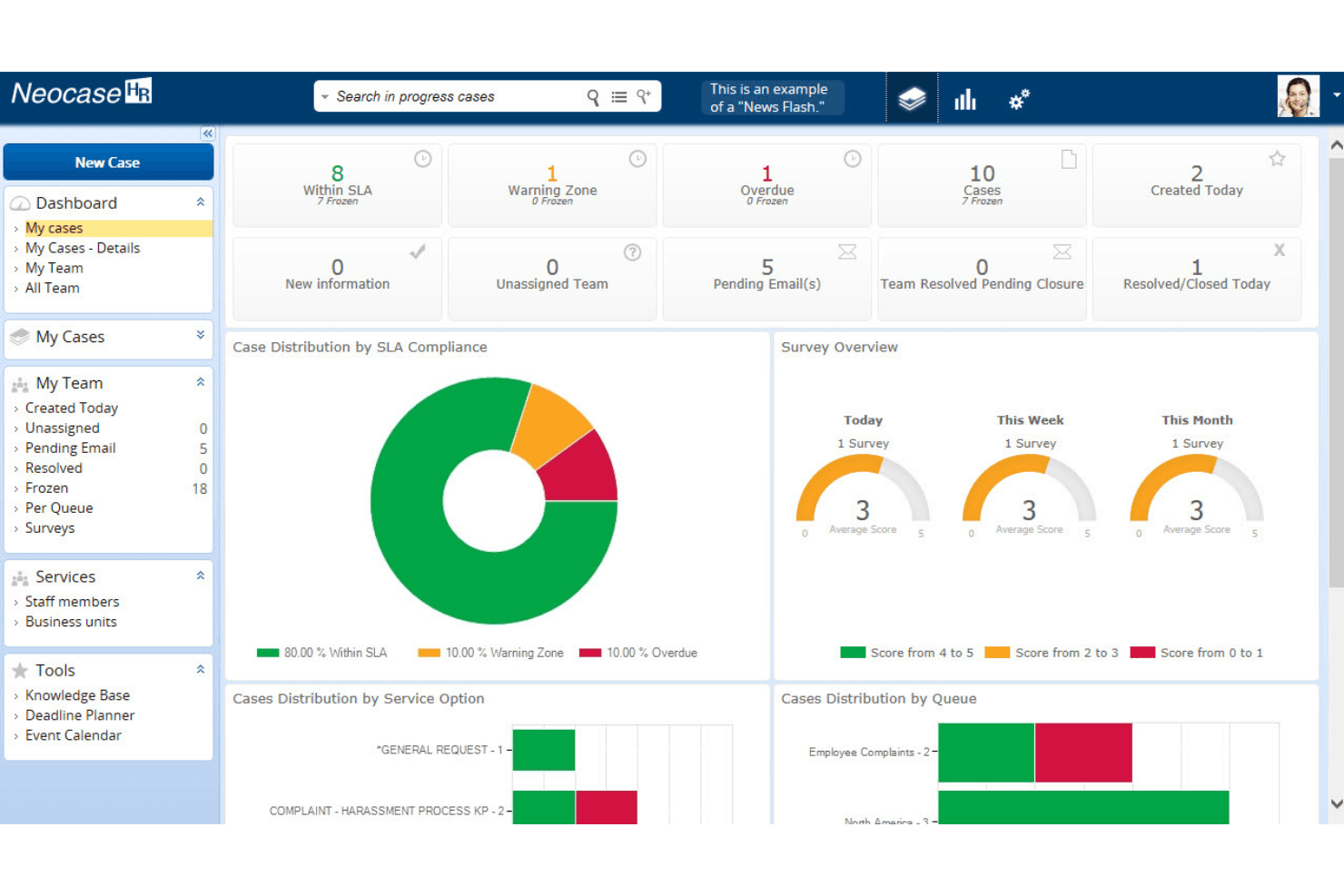
Neocase offers AI-powered HR solutions to support and automate HR service delivery. Neocase is designed to enhance efficiency and accuracy in HR operations. It automates repetitive tasks, reducing manual effort and streamlining HR services.
Why I Picked Neocase: I chose Neocase for its AI-powered HR solutions that excel in automating HR service delivery. The tool's AI capabilities automate repetitive tasks, reducing manual effort and increasing efficiency. Its wide array of HR functionalities include advanced case management, automated workflows, and a self-service portal for employees to handle their HR queries independently.
Standout Features & Integrations
Features include AI-driven case management, which automates issue resolution and improves response times, and a self-service portal that empowers employees to handle HR tasks independently. It also offers detailed analytics and reporting tools for data-driven decision-making.
Integrations include SAP SuccessFactors, Workday, Oracle HCM, Microsoft Dynamics 365, ADP, Salesforce, ServiceNow, UKG, Cornerstone OnDemand, and BambooHR.
Pros and Cons
Pros:
- Detailed analytics and reporting tools
- Business process automation
- Advanced case management
Cons:
- Pricing not transparent
- Slight learning curve
Learn more about Neocase HR: Best for mobile AI assistance in HR
- Free demo available
- Pricing upon request
Visit WebsiteCustomer Rating:2.4/5
Applaud provides personalized, mobile-first HR service delivery with customizable workflows, employee self-service, and real-time analytics for enhanced engagement. Applaud offers a user-friendly HR service delivery platform focused on enhancing the employee experience through personalized, mobile-first solutions. Its features include customizable workflows, employee self-service, and real-time analytics, making it ideal for modernizing HR processes and improving engagement.
Why I Picked Applaud: I chose Applaud for its integration with existing HRIS systems and consumer-grade experience. Its focus on mobile AI assistance sets it apart from other HR service delivery software. I believe Applaud is best for mobile AI assistance because it provides personalized support and services directly to employees through their mobile devices.
Standout Features & Integrations
Features include an intelligent portal, knowledge management, AI assistant, journeys, creator platform, advanced AI, and analytics, all designed to provide a unified and personalized employee experience.
Integrations include Workday, SAP SuccessFactors, Oracle HCM, Microsoft Dynamics 365, ADP, BambooHR, ServiceNow, Google Workspace, Office 365, and Slack.
Pros and Cons
Pros:
- Integrates with HRIS
- Consumer-grade experience
- Mobile AI assistance
Cons:
- It may require significant customization for specific needs
- Pricing is not transparent
Learn more about Applaud: Best for scalable all-in-one HR Solutions
- 30-day free trial
- Pricing upon request
Visit WebsiteCustomer Rating:3.8/5
SAP SuccessFactors offers automated workflows, case management, reporting, and mobile access. SAP SuccessFactors is built for mid-sized and enterprise organizations that need HR service delivery to scale across regions, teams, and complex processes.
Why I Picked SAP SuccessFactors
I picked SAP SuccessFactors because it supports large, distributed HR teams with a single system that can scale as your organization grows. It helps you manage high volumes of employee inquiries through structured case management and standardized workflows, which reduces manual follow-ups and inconsistent responses.
Your team can give employees self-service access to HR knowledge and requests while still maintaining centralized oversight through configurable rules and approvals. I also like that reporting and analytics are built into the platform, so you can track service volume, response times, and recurring issues without relying on third-party tools. Overall, it’s a strong fit if you need HR service delivery to remain consistent as headcount, locations, and policies expand.
SAP SuccessFactors Key Features
Here are key features worth highlighting:
- HR Case Management: Track, assign, and resolve employee HR requests with defined categories, SLAs, and escalation rules.
- Employee Central Service Center: Provide employees with self-service access to HR knowledge, forms, and request submissions.
- Configurable Workflows: Standardize HR processes with approval paths and automation tailored to regional or role-based rules.
- Workforce Analytics & Reporting: Monitor service performance, trends, and bottlenecks using built-in dashboards and reports.
SAP SuccessFactors Integrations
Integrations include Microsoft 365, Microsoft Outlook, Microsoft Teams, SAP S/4HANA, SAP Concur, SuccessFactors Learning, ADP, Kronos, Workday, and Google Workspace.
Pros and Cons
Pros:
- Insightful service delivery analytics
- Scalable for any company size
- Extensive HR management suite
Cons:
- Transaction-based pricing complexity
- Steep learning curve
Learn more about SAP SuccessFactors:
Diğer İK Hizmet Sunumu Yazılımları
Aşağıda, en iyi 10 listesine giremeyen ancak yine de göz atmaya değer diğer İK hizmet sunumu yazılımlarının bir listesi yer almaktadır:
- 11Leena AIBest for KB auto-built from policy docs
- 12Oracle HR Help DeskBest for Oracle HCM-native HR service delivery
- 13Jira Service ManagementBest for ITSM and HR collaboration
- 14Ivanti Neurons for HRBest for IT-native cross-department HR delivery
- 15UKGBest for AI-driven workplace culture
- 16Zoho PeopleBest for cloud-based HR scalability
- 17Avature HR Case ManagementBest for CRM-native enterprise HR case management
- 18Infor HR Service Delivery Best for industry-specific solutions
İlgili İK Yazılımı İncelemeleri
Burada aradığınızı hâlâ bulamadıysanız, test edip değerlendirdiğimiz diğer ilgili araçlara göz atın:
- İK Yazılımı
- Bordro Yazılımı
- İşe Alım Yazılımı
- Kayıtlı İşveren Hizmetleri
- Aday Takip Sistemleri
- İşgücü Yönetimi Yazılımı
How I Evaluate HR Service Delivery Software
I split my evaluation into two layers: the baseline features every HR ops team needs—case management, self-service, workflows—and the differentiators that separate good tools from great ones.
Core Functionality (Table Stakes For This List)
When I'm selecting tools for my list, I rank each one on a scale from 0 (does not offer the functionality) to 5 (excels in this area) for each core functionality listed below. Then, I calculate the tool's total score into a percentage. Each tool needs to achieve a minimum total score of 65% to be considered for inclusion.
- HR Case Management: I look for dedicated case types, assignment rules, and audit trails so HR teams can track an employee relations inquiry from intake through resolution.
- Employee Self-Service Portal: The portal should let employees submit requests, check case status, and access HR resources on any device without emailing the HR team.
- HR Knowledge Base: I evaluate whether the KB surfaces relevant policy articles and FAQs—like dress code, leave entitlements, or expense guidelines—before an employee opens a ticket.
- Workflow Automation: Configurable lifecycle workflows matter here. I check how the tool handles multi-step processes like onboarding checklists or offboarding task chains.
- SLA & Tier-Based Routing: Escalation rules and SLA timers keep service levels visible. I look at how tickets route across tiers—from general HR to payroll or benefits specialists.
- HRIS Integration & Reporting: Connecting to core HCM platforms like Workday, SAP SuccessFactors, or BambooHR is key, along with dashboards that track case volume and resolution time.
Once I have a list of tools that meet this criteria, I consider what sets each platform apart.
Differentiating Factors (What Sets Vendors Apart)
Here's how I compare and contrast different vendors:
Standout Features
A conversational AI chatbot can deflect a high volume of tier-0 questions—things like "how many vacation days do I have left?"—before they ever reach an HR agent. I also evaluate employee journey orchestration, where the platform chains cross-functional tasks for moments like onboarding or parental leave into a single automated flow. Document generation and e-signature capabilities round things out, letting HR teams send offer letters or policy acknowledgments without toggling to a separate tool.
Beyond Features
Integration depth matters a lot here. I check whether a platform connects bi-directionally with the HCM you already run—syncing employee records, org changes, and job data without manual updates. Compliance and data privacy posture is another area I evaluate, especially how a vendor handles sensitive employee relations cases with role-based access and regional data residency. Finally, I consider implementation timelines and whether pre-built content packs, like starter knowledge bases and onboarding templates, help HR teams go live faster.
İK Hizmet Sunumu Yazılımı Nasıl Seçilir?
Kendinize özgü yazılım seçim sürecinizi yürütürken aşağıdaki noktaları göz önünde bulundurun:
- Kurumsal İhtiyaçları Anlama: İK hizmet sunumu yazılımını seçmeden önce kuruluşunuzun özel ihtiyaçlarını net bir şekilde anlamanız çok önemlidir. İş gücünüzün büyüklüğünü, İK süreçlerinizin karmaşıklığını ve şirketinizin karşılaştığı benzersiz zorlukları göz önünde bulundurun.
- Entegrasyon Olanakları: Mevcut sistemlerle entegre olabilme yeteneği, dikkate alınması gereken önemli bir unsurdur. İK yazılımı; bordro sistemleri, performans yönetimi platformları ve işe alım yazılımları gibi diğer araçlarla bağlantı kurabilmelidir. Bu entegrasyon, veri silolarını en aza indirir ve İK yönetimine birleşik bir yaklaşım sağlar.
- Kullanıcı Deneyimi ve Erişilebilirlik: Kullanıcı dostu bir arayüz ve erişilebilirlik, tüm çalışanların İK yazılımından etkili bir şekilde yararlanabilmesini sağlar. Sezgisel ve kullanımı kolay yazılımlar, kullanıcıların benimsemesini ve memnuniyetini artırabilir. Örneğin mobil erişilebilirlik, çalışanların İK hizmetlerine her yerden erişmesine olanak tanır.
- Ölçeklenebilirlik: Seçilen İK hizmet sunumu yazılımı kuruluşunuzla birlikte büyüyebilmelidir. Önemli ek maliyetler veya teknik zorluklar olmadan artan kullanıcı sayısını desteklemeli ve gelişen iş süreçlerine uyum sağlamalıdır. Büyüyen işletmeler için yazılımın ölçeklenebilir olması, yeni çalışanların sisteme kolayca eklenebilmesini sağlar.
- Uyumluluk ve Güvenlik: Yazılımın ilgili İK yasalarına ve düzenlemelerine uygun olmasını sağlamak, kuruluşu yasal risklerden korumak açısından kritik öneme sahiptir. Ayrıca hassas çalışan verilerini korumak için güçlü güvenlik önlemleri gereklidir. Birden fazla bölgede faaliyet gösteren şirketler için yazılım; Avrupa'daki çalışanlar için GDPR veya ABD'deki sağlıkla ilgili bilgiler için HIPAA gibi çeşitli uyumluluk gerekliliklerini karşılayabilmelidir.
İK Hizmet Sunumu Yazılımındaki Trendler
Burada, girişimler için İK hizmet sunumu yazılımındaki bazı trendleri ve bunların pazarlama sektörü üzerindeki potansiyel etkilerini bulabilirsiniz. Önemli içgörüleri belirlemek için çok sayıda ürün güncellemesini, basın bültenini ve sürüm günlüğünü analiz ettim.
- Uzaktan Çalışma Platformlarıyla Entegrasyon: İK yazılımları, uzaktan çalışma platformlarıyla giderek daha fazla entegre oluyor. Bu trend, dağıtık iş gücünü yönetmeye yönelik artan ihtiyacı yansıtıyor. Ekip bütünlüğünü ve operasyonel verimliliği korumak açısından önem taşıyor.
- Çalışanların Kendi Kendine Hizmet Özelliklerine Vurgu: Kendi kendine hizmet olanakları, İK yazılımlarının temel özelliklerinden biri haline geliyor. Çalışanlar artık birçok İK görevini bağımsız olarak yerine getirebiliyor. Bu değişim, çalışanları güçlendiriyor ve İK ekiplerinin idari yükünü azaltıyor.
- Karar Alma İçin Gelişmiş Analizler: İK yazılımlarındaki gelişmiş analizler, veriye dayalı karar alma süreçlerini güçlendiriyor. Bu araçlar, iş gücü dinamikleri ve İK süreçleri hakkında içgörüler sağlıyor. Stratejik planlama ve İK hizmetlerinin iyileştirilmesi için kritik öneme sahipler.
- Kişiselleştirilmiş Çalışan Deneyimleri İçin Yapay Zekâ: Yapay zekâ, İK yazılımlarında çalışan deneyimini kişiselleştiriyor. Yapay zekâ, İK hizmetlerini her çalışanın bireysel ihtiyaçlarına göre uyarlıyor. Bu trend, çalışan memnuniyeti ve çalışanların elde tutulması açısından önemli.
- Mobil Öncelikli Tasarım: İK yazılımları mobil erişilebilirliğe öncelik veriyor. Bu yaklaşım, İK hizmetlerinin her zaman ve her yerde kullanılabilmesini sağlıyor. Modern ve mobil bir iş gücünü desteklemek için hayati önem taşıyor.
İK Hizmet Sunumu Yazılımı Nedir?
İK hizmet sunumu yazılımı, bir kuruluşun insan kaynakları departmanı ile çalışanları arasındaki etkileşimi kolaylaştıran dijital bir platformdur. İK uzmanları tarafından işe alımdan emekliliğe kadar çalışan yaşam döngüsü boyunca İK hizmetlerini yönetmek ve optimize etmek için kullanılır.
Çalışanların şirket politikaları ve kişisel veriler gibi İK hizmetlerine ve bilgilerine genellikle mobil cihazlar aracılığıyla her zaman ve her yerden erişmesini sağlar. Esasen çalışanlarla ilgili soruları, talepleri ve İK süreçlerini yönetmek için merkezi bir merkez görevi görür; İK ekiplerinin idari yükünü azaltırken genel çalışan deneyimini iyileştirir.
İK Hizmet Sunumu Yazılımının Özellikleri
İK hizmet sunumu yazılımını seçerken aşağıdaki temel özelliklere dikkat edin:
- Çalışan self servis portalı: Bu özellik, ekibinizin İK departmanına başvurmasına gerek kalmadan kişisel bilgilerine erişmesine ve bunları güncellemesine, izin talep etmesine ve önemli belgeleri indirmesine olanak tanır. Çalışanları güçlendirirken İK personelinizin günlük iş yükünü azaltır.
- Vaka yönetimi: Vaka yönetimi sayesinde çalışan taleplerini veya iş yeri sorunlarını düzenli bir şekilde takip edebilir, yönetebilir ve çözüme kavuşturabilirsiniz. İK ile çalışanlar arasındaki iletişimi kolaylaştırarak hiçbir konunun gözden kaçmamasını sağlar.
- Belge yönetimi: Bu özellik; sözleşmeler, politikalar ve işe alım belgeleri gibi temel İK belgelerini güvenli bir şekilde depolamanıza, düzenlemenize ve paylaşmanıza yardımcı olur. Bitmek bilmeyen e-posta zincirlerinden kurtulmanızı sağlar ve kayıtlara erişmeyi son derece kolaylaştırır.
- Bilgi tabanı: Sık sorulan sorular, İK politikaları ve en iyi uygulamalardan oluşan bir kitaplık oluşturabilir ve bunu güncel tutabilirsiniz. Talep üzerine kullanılabilen bu kaynak, çalışanlara anında yanıtlar sunar; böylece size yöneltilen tekrarlayan sorular azalır.
- İş akışı otomasyonu: Onaylar, işe alım veya işten ayrılma gibi rutin İK süreçlerini otomatikleştirin. Bu, her şeyi hızlandırmanın yanı sıra hiçbir adımın atlanmamasını da sağlar; bu durum uyumluluk ve tutarlılık açısından oldukça faydalıdır.
- Entegrasyon özellikleri: Mevcut maaş bordrosu, yan haklar veya performans yönetimi sistemlerinize sorunsuz şekilde bağlanan bir yazılım seçerek işinizi kolaylaştırın. Bu, veri silolarını azaltır ve her şeyin senkronize kalmasını sağlar.
- Analiz ve raporlama: İşe alım süresi veya çalışan memnuniyeti puanları gibi İK verilerinizden yalnızca birkaç tıklamayla net ve uygulanabilir içgörüler elde edin. Bu raporlar eğilimleri fark etmenize, daha iyi kararlar almanıza ve İK'nın kuruma sağladığı değeri göstermenize yardımcı olur.
- Uyumluluk yönetimi: Yerel, bölgesel ve federal gereklilikleri karşılamanıza yardımcı olan yerleşik araçlarla değişen düzenlemelere uyum sağlayın. Bu, şirketinizi korur ve içinizin rahat olmasını sağlar.
Yaygın İK Hizmet Sunumu Yazılımı Yapay Zekâ Özellikleri
Yukarıda sıralanan standart İK hizmet sunumu yazılımı özelliklerinin yanı sıra, bu çözümlerin çoğu aşağıdaki gibi özelliklerle yapay zekâyı da bünyesine katmaktadır:
- Otomatik talep yönlendirme: Yapay zekâ, çalışan taleplerinin niteliğini belirler ve bunları doğru İK uzmanına veya departmanına yönlendirerek manuel sınıflandırma ihtiyacını azaltır ve yanıt sürelerini hızlandırır.
- Doğal dil sohbet robotları: Yapay zekâ destekli bu yardımcılar, izin bakiyelerini kontrol etme veya yan hakları açıklama gibi rutin İK sorularını 7/24 yanıtlayarak İK ekibinizin daha karmaşık görevlere odaklanmasını sağlar.
- Öngörücü analiz: Yapay zekâ, çalışan devir oranı veya devamsızlık gibi eğilimleri öngörmek için iş gücü verilerini inceler; böylece proaktif adımlar atabilir ve hoş olmayan sürprizlerden kaçınabilirsiniz.
- Duygu analizi: Bu özellik, çalışan iletişimlerini veya anket yanıtlarını tarayarak ruh hâli ya da bağlılık düzeylerini belirler ve sorunlar daha büyük problemlere dönüşmeden önce bunları fark etmenize yardımcı olur.
- Otomatik belge işleme: Yapay zekâ dijital belgeleri hızlı bir şekilde tarar, sınıflandırır ve dosyalar; önemli ayrıntıları çıkararak İK personelinizi tekrarlayan veri girişinden kurtarır.
İK Hizmet Sunumu Yazılımının Faydaları
İK hizmet sunumu yazılımı, süreçleri kolaylaştırarak ve genel verimliliği artırarak hem kullanıcılar hem de kuruluşlar için çok sayıda avantaj sunar. Bu faydaları anlamak, bu yazılımın İK operasyonlarına sağlayabileceği değeri ve etkiyi ortaya koyabilir.
- Artan Verimlilik: Yazılım, tekrarlayan İK görevlerini otomatikleştirerek İK profesyonellerinin stratejik faaliyetlere odaklanması için değerli zaman kazandırır.
- Geliştirilmiş Çalışan Deneyimi: Çalışanlar, self servis portalları üzerinden yan haklar ve maaş bordrosu verileri gibi İK hizmetlerine ve bilgilerine kolayca erişerek genel deneyimlerini iyileştirebilir.
- Gelişmiş Veri Yönetimi: Merkezi veri depolama, tüm çalışan bilgilerinin kolayca erişilebilir ve güncel olmasını sağlayarak hataları azaltır ve veri bütünlüğünü iyileştirir.
- Uyumluluk Yönetimi: Yazılım, İK süreçlerinin yasal ve düzenleyici gerekliliklere uygun olmasını sağlamaya yardımcı olarak uyumsuzluk ve olası cezalar riskini azaltır.
- Maliyet Tasarrufu: İK süreçlerini otomatikleştirmek ve manuel görevleri azaltmak, kuruluşlar için önemli maliyet tasarrufları sağlayarak kârlılığı artırabilir.
İK hizmet sunumu yazılımına yatırım yapmak, İK operasyonlarını kolaylaştırmak ve geliştirmek için gerekli araçları sağlar. Bu, daha verimli süreçleri, daha iyi veri yönetimini ve iyileştirilmiş çalışan deneyimlerini güvence altına alır.
İK Hizmet Sunumu Yazılımı Maliyetleri ve Fiyatlandırması
İK hizmet sunumu yazılımını seçmek, mevcut çeşitli fiyatlandırma modellerinin ve planlarının anlaşılmasını gerektirir. Bu yazılım, İK süreçlerini önemli ölçüde kolaylaştırabilir; ancak maliyetler özelliklere ve kuruluşun büyüklüğüne göre değişir.
İK hizmet sunumu yazılımı genellikle ücretsiz temel seçeneklerden kapsamlı kurumsal çözümlere kadar çeşitli fiyatlandırma planları sunar. Aşağıdaki tabloda yaygın planlar, ortalama fiyatları ve tipik özellikleri özetlenmektedir.
HR Hizmeti Sunum Yazılımı İçin Plan Karşılaştırma Tablosu
| Plan Türü | Ortalama Fiyat | Yaygın Özellikler |
| Ücretsiz | $0 | Temel HR işlevleri, sınırlı kullanıcı erişimi, temel raporlama ve çalışan kayıtları |
| Temel | $30-$50/ay + $5-$10/çalışan | Çalışan kayıtları, bordro işlemleri, temel raporlama ve sınırlı entegrasyonlar |
| Standart | $50-$100/ay + $10-$15/çalışan | Gelişmiş raporlama, çalışanların kendi hizmetlerini kullanabilmesi, zaman ve devam takibi ve entegrasyonlar |
| Premium | $100-$200/ay + $15-$25/çalışan | Performans yönetimi, gelişmiş analizler, uyumluluk yönetimi ve özel iş akışları |
| Kurumsal | Özel fiyatlandırma | Eksiksiz HR araçları paketi, özel destek, kapsamlı özelleştirme ve entegrasyonlar |
HR hizmeti sunum yazılımındaki plan türlerinin, maliyetlerin ve özelliklerin dökümü.
Her plan, farklı kuruluş büyüklüklerine, bütçelere ve belirli HR ihtiyaçlarına hitap eder. Ücretsiz ve temel planlar küçük işletmeler için idealken standart, premium ve kurumsal planlar daha büyük kuruluşlar için gelişmiş özellikler sunar. İş gereksinimlerinizle uyumlu olduklarından emin olmak için her planın özelliklerini değerlendirin.
HR Hizmeti Sunum Yazılımı Hakkında Sıkça Sorulan Sorular
HR hizmeti sunum yazılımı hakkında sıkça sorulan sorulardan bazıları şunlardır:
HR hizmeti sunum yazılımı uzaktan veya hibrit çalışma ortamlarını destekleyebilir mi?
Evet, modern HR hizmeti sunum yazılımlarının çoğu mobil erişim, bulut tabanlı hizmetler ve sanal iletişim ve iş birliği araçları sunarak uzaktan ve hibrit çalışma
ortamlarını destekler.
Yazılım, veri güvenliğini ve GDPR gibi düzenlemelere uyumluluğu nasıl ele alıyor?
Saygın HR hizmeti sunum yazılımları şifreleme, erişim kontrolleri ve düzenli denetimlerle güçlü veri güvenliği sağlar. GDPR gibi düzenlemelere uyumluluk; veri anonimleştirme, izin yönetimi ve ayrıntılı raporlama özellikleriyle sağlanır.
Satıcı ne tür müşteri desteği ve eğitim sağlıyor?
Satıcılar genellikle telefon, e-posta ve canlı sohbet desteği dahil olmak üzere çeşitli müşteri desteği seçenekleri sunar. Ayrıca sizin ve ekibinizin sistemi hızlı bir şekilde kullanmaya başlamasına yardımcı olmak için kullanıcı kılavuzları, web seminerleri ve yerinde eğitim oturumları gibi eğitim kaynakları da sağlarlar.
Kuruluşumuzdaki gelecekteki büyümeye ve değişikliklere uyum sağlamak için yazılım ne kadar ölçeklenebilir?
HR hizmeti sunum yazılımları genellikle ölçeklenebilir olacak şekilde tasarlanır; kuruluşunuz büyüyüp geliştikçe önemli kesintiler olmadan yeni kullanıcılar, özellikler ve modüller eklemenize olanak tanır.
HR hizmeti sunum yazılımı birden fazla dili ve para birimini yönetebilir mi?
Evet, birçok HR hizmeti sunum platformu birden fazla dili ve para birimini destekler; bu da onları çeşitli iş gücüne sahip çok uluslu kuruluşlar için uygun hale getirir.
Çalışanlar ve yöneticiler için kendi kendine hizmet seçenekleri var mı?
Evet, çoğu HR hizmeti sunum yazılımı çalışanların ve yöneticilerin bilgilere erişmesine, kişisel bilgilerini güncellemesine, izin talep etmesine ve diğer HR görevlerini bağımsız olarak gerçekleştirmesine olanak tanıyan kendi kendine hizmet portalları sunar.
Uygulama sırasında ne tür veri aktarımı desteği sağlanıyor?
HR hizmeti sunum yazılımları genellikle mevcut HR verilerini yeni sisteme aktarmanıza yardımcı olmak için veri aktarımı desteği sunar ve minimum veri kaybı veya hatayla sorunsuz bir geçiş sağlar.
HR hizmeti sunum yazılımı ne tür özelleştirme seçenekleri sunuyor?
Çoğu HR hizmeti sunum yazılımı, iş akışlarını, formları ve kullanıcı arayüzlerini belirli HR ihtiyaçlarınızı karşılayacak şekilde uyarlamanıza olanak tanıyan kapsamlı özelleştirme seçenekleri sunar.