

Birçok farklı İK iş akışı yazılımı seçeneği mevcut olduğundan, doğru olanı seçmek zordur. İK süreçlerinizi kolaylaştırmak istiyorsunuz, ancak hangi aracın ihtiyaçlarınıza en uygun olduğunu belirlemeniz gerekiyor. Doğru yerdesiniz. İK süreçleri hakkındaki bilgilerim ve farklı İK yazılım sistemlerini kullanma ve test etme deneyimimden yararlanarak, ihtiyaçlarınıza en uygun İK iş akışı yazılımını bulmanıza yardımcı olmak için bu listeyi oluşturdum.
İK iş akışı yazılımını tekrarlayan görevleri otomatikleştirmek, veri doğruluğunu artırmak ve çalışan yönetimini geliştirmek için kullanabilirsiniz. Bu yazılımlar ayrıca manuel veri girişi, uyumluluk sorunları ve verimsiz iletişim gibi sorunlu noktaları da çözer.
Why Trust Our Software Recommendations
6,700+
Reviews
20
Industry experts
16+
Evaluation factors
14
Years
Our team has been testing and reviewing software since 2012. As HR experts ourselves, we know how difficult—and important—it is to choose the right software.
For this guide, we evaluated tools using hands-on testing and independent research, scoring tools using our selection criteria. We also draw on insights from industry thought leaders and practicing HR experts.
Our reviews reflect our human editorial judgment, not a sales pitch.
Expert reviewers:
- Phil GrayCOO
 Kim BehnkeHR Tech Editor & Analyst
 Josh BarkerPeople Ops Manager

İK İş Akışı Yazılımları Karşılaştırma Tablosu
Bu karşılaştırma tablosu, en iyi İK iş akışı yazılımı seçimlerim için fiyatlandırma ayrıntılarını özetlemektedir:
Sorted by: Default
| Tool | Starting Price | Website | |
|---|---|---|---|
Best with dedicated support & implementation teams | 4.3 out of 5 | Pricing upon request Free demo available | Book Demo |
Best for HR processes among global teams | 4.8 out of 5 | $5/user/month Free demo available | Website |
Best for integrated time tracking | 4.6 out of 5 | $79/user/month Free demo available | Book Demo |
Best for reusable automation workflows | 4.5 out of 5 | Pricing upon request Free demo available | Website |
Best for centralized HR document workflows | 4.3 out of 5 | Pricing upon request Free demo available | Website |
Best as AI for business | 4.4 out of 5 | $8/user/month Free trial + Free demo available | Website |
Best for built-in analytics and reporting | 4.3 out of 5 | $99/month Free demo available | Website |
Best for syncing multi-app HR tech stacks | Not rated | Pricing upon request 30-day free trial available | Website |
Best for document-driven workflows | 4.7 out of 5 | Pricing upon request 14-day free trial; free demo available | Website |
Best for customizable HR automation | 4.8 out of 5 | $11/user/month 14-day free trial + free demo available | Website |


En İyi İK İş Akışı Yazılımları İncelemeleri
İşte en iyi 10 kısa listeme giren en iyi İK iş akışı otomasyonu yazılımlarının ayrıntılı özetleri ve onları neden seçtiğime dair notlar. Her incelemede ayrıca her sistemin artıları ve eksileri, temel özellikleri ve ideal kullanım senaryoları da yer almaktadır.
 Best with dedicated support & implementation teams
- Free demo available
- Pricing upon request
Visit WebsiteCustomer Rating:4.3/5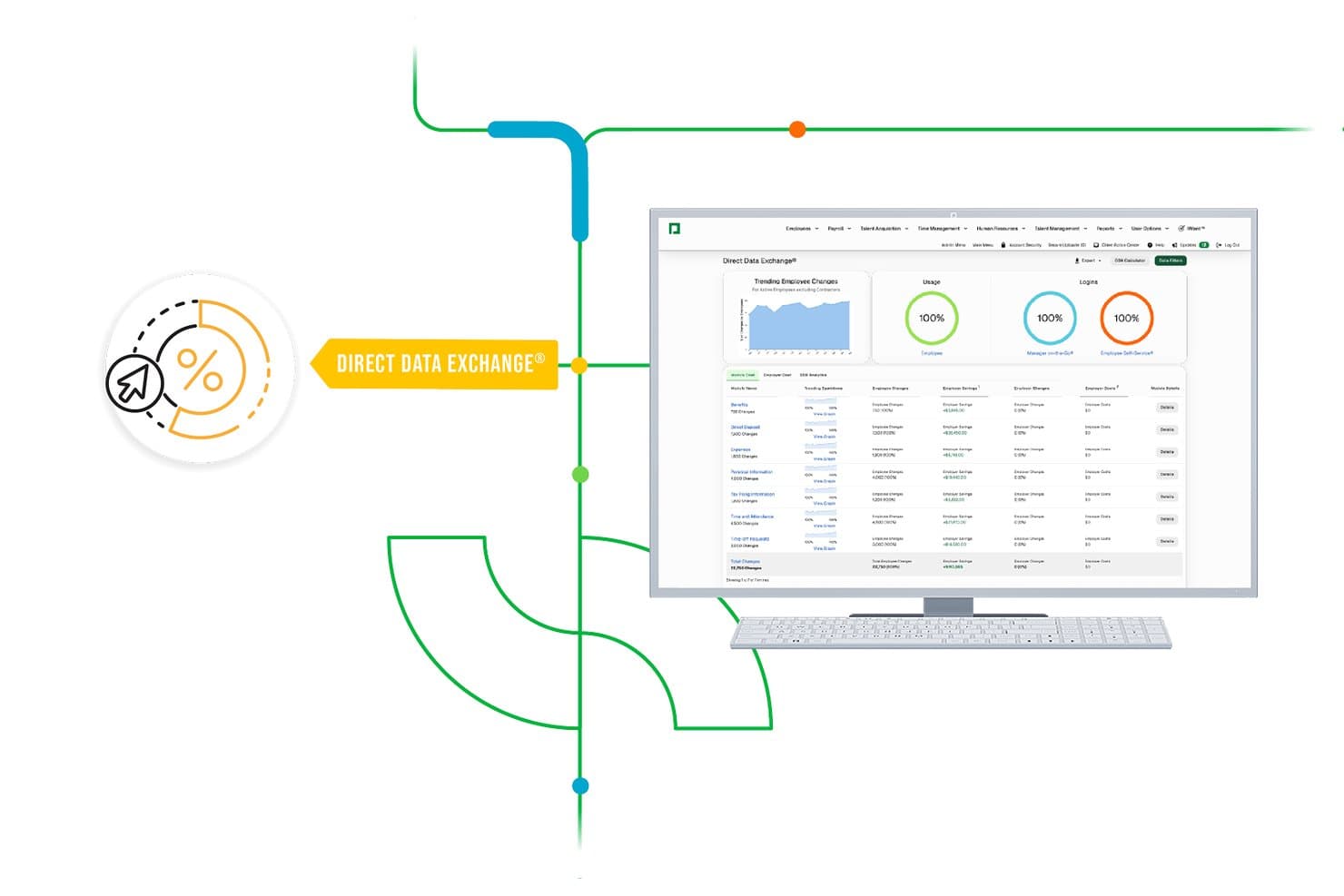
Paycom offers Direct Data Exchange®, an HR dashboard that tracks trending employee changes, usage rates, and login activity across modules. Paycom is a single-database HCM platform that automates HR workflows across the full employee lifecycle, covering payroll, onboarding, time and labor management, talent management, and HR forms within one unified system.
Who Is Paycom Best For?
Paycom is a strong fit for mid-size to enterprise U.S. businesses that want to consolidate HR and payroll into a single platform managed by one dedicated support team.
Why I Picked Paycom
Paycom earns its spot on my shortlist because of how seriously it takes implementation. Every client gets a dedicated specialist at no extra cost, which means when I'm configuring GONE's automated PTO decisioning rules or setting up personnel action form routing, I'm not figuring it out alone. In practice, my team can rely on that specialist to get complex workflow configurations right from day one, not months after go-live.
Paycom Key Features
- Beti payroll automation: Employees preview, verify, and correct their own payroll before submission within a guided workflow.
- Document creator and management: HR can create digital forms, collect e-signatures, and store documents in centralized employee files.
- GONE automated time-off decisioning: Time-off requests are automatically decided based on configurable rules and tracked in real time.
- Direct Data Exchange analytics: Provides a dashboard to monitor HR workflow usage and process efficiency across your organization.
Paycom Integrations
Native integrations are not clearly documented. Paycom supports integrations via third-party middleware such as Celigo, Lingk, and RoboMQ, and offers an API for custom integrations.
Pros and Cons
Pros:
- Automated decisioning for PTO and payroll
- Comprehensive employee lifecycle workflow coverage
- Dedicated implementation and support specialist
Cons:
- Custom workflow logic is not fully visual
- Integration options are limited and complex
 Best for HR processes among global teams
- Free demo available
- From $5/user/month
Visit WebsiteCustomer Rating:4.8/5
Deel's HR features include compliance tracking and documentation to align with various jurisdictions. Deel is a comprehensive HR platform designed to streamline and manage human resources for global teams. It caters to businesses looking to hire, onboard, and manage employees across various countries without the hassle of setting up local entities or worrying about compliance issues.
Why I picked Deel: I chose Deel for its workflow features tailored to international operations. It offers seamless onboarding processes that comply with local laws and provides flexible payment options in multiple currencies. The platform’s ability to handle complex HR tasks such as payroll, benefits, and compliance across over 150 countries makes it indispensable for companies looking to expand their global talent efficiently.
Standout features & integrations:
Features include automated onboarding, localized compliance tools, detailed analytics and reporting, customizable access levels, a comprehensive employee directory, and specialized modules for global recruiting, benefits administration, and payroll.
Integrations include QuickBooks, Xero, Gusto, Slack, Microsoft Teams, Google Workspace, Dropbox, Zapier, and Trello.
Pros and Cons
Pros:
- Support from local compliance experts
- Automated invoicing
- Simplifies international payroll and compliance for businesses
Cons:
- Limited platform customization options
- No mobile app available
 Best for integrated time tracking
- Free demo available
- From $79/user/month
Visit WebsiteCustomer Rating:4.6/5
Combined payroll, benefits, PTO requests, company directory, and employee self-service features displayed across desktop and mobile app interfaces. Justworks is an HR workflow software platform that brings together payroll, benefits administration, compliance management, and HR support in one system for small and midsize businesses.
Who Is Justworks Best For?
Justworks is a good fit for small to midsize businesses that want a unified HR, payroll, and compliance solution.
Why I Picked Justworks
I picked Justworks as one of the best because I can manage payroll and HR tasks while tracking employee hours in the same platform. The integrated time tracking lets my team capture work hours, sync them directly to payroll, and reduce manual entry. I like that I can review timesheets and approve hours without switching between systems.
Justworks Key Services
- Automated payroll processing: Run payroll for salaried and hourly employees with automated tax filings.
- Benefits administration: Manage health insurance, 401(k), and other employee benefits from one dashboard.
- HR document storage: Store and organize employee handbooks, policies, and onboarding documents securely.
- Compliance support: Access tools and resources to help maintain compliance with labor laws and regulations.
Justworks Integrations
Native integrations are not clearly documented. Justworks offers an API for custom integrations.
Pros and Cons
Pros:
- Access to large-group health insurance plans
- Automated payroll tax filings and payments
- Integrated time tracking for hourly teams
Cons:
- Custom reporting options are somewhat basic
- No built-in performance management features
Learn more about Justworks: Best for reusable automation workflows
- Free demo available
- Pricing upon request
Visit WebsiteCustomer Rating:4.5/5
HiBob's DE&I dashboard offers insights into diversity, equity, and inclusion metrics. HiBob is a modern HR platform that helps fast-growing organizations streamline core HR processes, automate workflows, and gain real-time visibility into workforce metrics. It centralizes people data, performance tracking, and compensation management, enabling HR teams to manage the entire employee lifecycle efficiently. With customizable workflows, built-in analytics, and a focus on employee engagement, HiBob empowers companies to align HR strategies with business goals.
Why I picked HiBob: I picked HiBob because it offers a broad suite of HR management tools—covering everything from onboarding and time tracking to performance reviews and payroll—while keeping the experience intuitive for both HR teams and employees. Its reusable automation workflows save time on recurring tasks like onboarding and offboarding, and its analytics capabilities help HR leaders make data-driven decisions about hiring, retention, and workforce planning. I also appreciate its strong integration ecosystem, connecting HR processes with communication, productivity, and payroll systems to create a seamless workflow environment.
Standout features & integrations:
Features include core HR management, onboarding and offboarding workflows, time and attendance tracking, compensation management, payroll automation (including UK payroll), hiring and applicant tracking, learning management, performance evaluations, employee surveys, whistleblower compliance tools, people analytics, and workforce planning dashboards. HiBob also offers customizable access rights for data security and tailored employee experiences that align individual goals with organizational objectives.
Integrations include ADP, Breezy, Globalization Partners, Paylocity, Trinet, Xero, Sequoia Tech, Greenhouse, Slack, Deel, and NetSuite.
Pros and Cons
Pros:
- Comprehensive HR tools
- Employee self-service capabilities
- Provides detailed and insightful reports
Cons:
- End-to-end payroll only offered for UK businesses
- Could offer more configuration options
 Best for centralized HR document workflows
- Free demo available
- Pricing upon request
Visit WebsiteCustomer Rating:4.3/5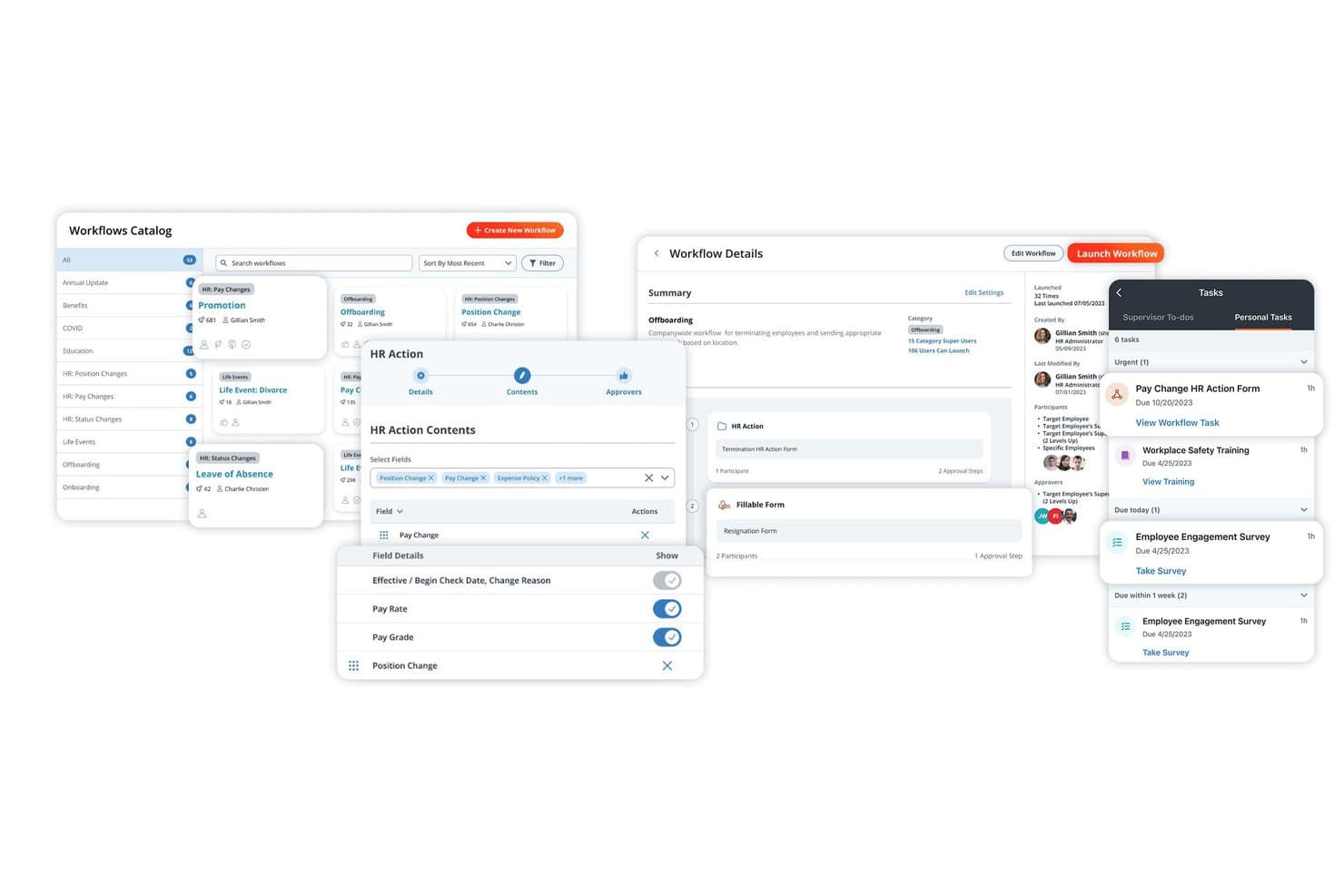
Paylocity lets users build, manage, and assign HR workflows in one place. Paylocity is an HCM platform that combines HR workflows, document management, approval routing, onboarding and offboarding automation, compliance templates, and employee self-service.
Who Is Paylocity Best For?
Paylocity suits HR teams that want to manage workflows, approvals, and employee documents from a single platform without juggling multiple tools.
Why I Picked Paylocity
Paylocity earns its spot on my shortlist because it keeps HR documents, workflows, and approvals inside a single system rather than scattered across tools. I particularly like how you can build conditional document-collection workflows, like automatically prompting an employee to upload a life-event form and routing it to HR for approval, all without leaving the platform. The searchable, taggable document database with role-based permissions and digital signatures makes it genuinely easy to stay on top of records across the employee lifecycle.
Paylocity Key Features
- Employee self-service portal: Employees get 24/7 access to view pay stubs, manage personal information, request time off, and complete HR tasks without admin involvement.
- Mobile app with push notifications: Available on iOS and Android, the app lets employees and managers complete approvals, upload documents, and track task progress from their phones.
- Compliance training automation: The platform sends phone or email notifications, triggers periodic reminders, and tracks completion status through a dashboard for required training programs.
- 350+ marketplace integrations: Prebuilt connections to tools like Greenhouse, Slack, and Okta automate data flow between Paylocity and third-party HR, payroll, and productivity systems.
Paylocity Integrations
Paylocity offers 350+ marketplace integrations, including Greenhouse, iCIMS, Workable, Okta, Slack, Google Workspace, and Microsoft 365 (Entra ID). It also supports APIs and webhooks for custom integrations.
Pros and Cons
Pros:
- Reviewers value pre-start onboarding workflows
- Searchable employee records support document collection
- Conditional workflows route approvals by thresholds
Cons:
- Support follow-up can be slow or inconsistent
- Onboarding may fail to create employee records
 Best as AI for business
- Free trial + Free demo available
- From $8/user/month
Visit WebsiteCustomer Rating:4.4/5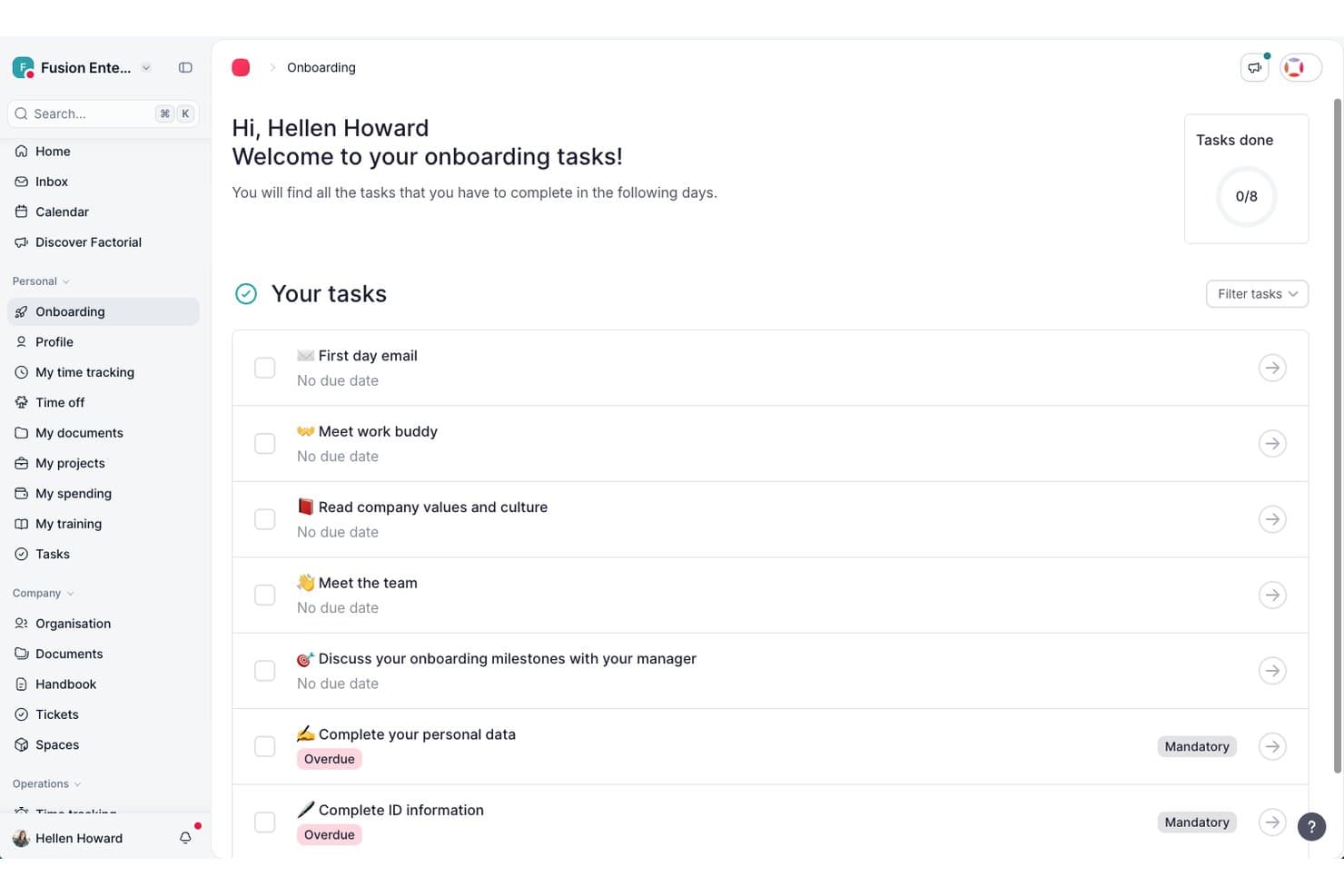
Factorial guides new hires through onboarding tasks in one place. Factorial is an HR workflow software platform that combines workflow automation, onboarding and offboarding, approval routing, time tracking, document management, and AI-assisted reporting into a single system.
Who Is Factorial Best For?
Factorial fits HR teams at small to mid-sized businesses that want a single platform to handle everyday people operations—onboarding, approvals, time tracking, and reporting—with AI assistance built in.
Why I Picked Factorial
I picked Factorial as one of the best because its AI sits at the center of daily HR operations, not as a bolt-on feature. Factorial One acts like an extra team member: it can answer employee questions about policies, generate reports from your company data, and help plan timetables, so your HR team spends less time fielding routine requests. I also like how its workflow automation engine ties these AI capabilities into structured processes, triggering onboarding steps, routing leave approvals, and keeping everything moving without manual chasing.
Factorial Key Features
- Factorial One AI agent: An AI agent that uses your company's data to search, analyze, and act—handling tasks like answering employee policy questions and generating custom reports.
- Time-off approval flows: Configurable, multi-step approval routing for employee leave requests, with leave balances and team absences visible to both employees and managers.
- Legal entity management: Supports multiple companies or branches in a single account, with separate fields for employee country of residence and work location to handle cross-border employment.
- Employee self-service portal: Employees can access their own records, payslips, and documents, and submit requests directly through their profile without going through HR.
Factorial Integrations
Factorial offers marketplace integrations with Silae, DATEV LODAS, a3innuva Nómina, Recruitee, Slack, Google Workspace, Microsoft Power BI, and Okta. It also provides an API with OAuth 2.0, webhooks, SDKs, and OpenAPI support, plus Zapier.
Pros and Cons
Pros:
- Leave approvals surface balances and team absences
- Employee-triggered workflows keep onboarding steps moving
- AI answers policy questions and creates reports
Cons:
- Country-specific processes can be hard to standardize
- Complex workflows can be difficult to adapt
 Best for built-in analytics and reporting
- Free demo available
- From $99/month
Visit WebsiteCustomer Rating:4.3/5
Paycor performance management dashboard displaying employee objectives, reviews, recognition tools, and mobile team member feedback features. Paycor is an HCM platform that brings together HR workflow automation, payroll, recruiting, onboarding, and talent management in a single system.
Who Is Paycor Best For?
Paycor is a strong fit for small to mid-sized businesses that need a unified HR and payroll platform to manage the full employee lifecycle.
Why I Picked Paycor
I've included Paycor in my top picks because its built-in analytics go well beyond basic headcount reports. I find the predictive resignation feature particularly useful—it uses AI to surface at-risk employees, flag the factors driving turnover risk, and project expected resignations across departments over the next 12 months. I also like that the unified data model pulls from payroll, time, and talent into a single analytics view, so you're not manually reconciling data from separate systems. Automated report delivery lets you schedule recurring reports and push them directly to stakeholders on any cadence.
Paycor Key Features
- Onboarding workflow automation: Assign onboarding tasks, collect e-signatures, and track new hire completion status from a single dashboard.
- Applicant tracking system (ATS): Post jobs, manage candidate pipelines, and move applicants through configurable hiring stages.
- Performance review management: Build and launch review cycles, set employee goals, and track progress against them over time.
- Compensation planning tools: Model pay changes, manage merit cycles, and submit compensation recommendations through a structured approval workflow.
Paycor Integrations
Paycor offers 320+ marketplace connectors through its Integration Platform, which includes the Paycor Marketplace, Developer Services, and Developer Tools. Marketplace integrations include Indeed, QuickBooks, Sterling, Cornerstone, and Equifax, among others spanning background screening, scheduling, benefits admin, and point of sale categories. Paycor's Developer Tools include 140+ APIs for building custom integrations. Zapier support is not clearly available.
Pros and Cons
Pros:
- Top-rated mobile app with GPS clock-in
- Onboarding collects records and e-signatures automatically
- Built-in ATS and performance management modules
Cons:
- Acquired modules can feel disjointed from core
- Time tracking and scheduling are paid add-ons
 Best for syncing multi-app HR tech stacks
- 30-day free trial available
- Pricing upon request

Celigo lets you choose from pre-built integrations to build automated data flows. Celigo is an integration platform (iPaaS) designed to unify disparate software by automating data transfers between them. It serves PeopleOps and HR departments by ensuring employee information remains consistent across HRIS, payroll, and benefits systems without manual entry.
Who Is Celigo Best For?
HR teams at mid-sized to large organizations that need to connect and automate workflows across multiple HR and business applications.
Why I Picked Celigo
I chose Celigo because it excels at creating a single source of truth for complex HR tech stacks. I can connect our HR systems to over 1,000 business apps without custom development, as Celigo has the ability to handle multi-app synchronization. My team uses the prebuilt connectors to sync data between payroll, benefits, and recruiting platforms. In practice, that means we automate onboarding tasks and keep employee records up to date across all our tools.
Celigo Key Features
- Workflow builder: Design and automate multi-step HR processes with a visual drag-and-drop interface.
- Error management dashboard: Monitor, troubleshoot, and resolve integration errors from a centralized dashboard.
- Role-based access controls: Set permissions and manage user access for sensitive HR data and workflows.
- Data transformation tools: Map, filter, and transform HR data between different systems and formats.
Celigo Integrations
Celigo offers 1,000+ prebuilt native connectors, including ADP, NetSuite, SAP, Microsoft Dynamics 365, Oracle, QuickBooks, Salesforce, Workday, BambooHR, Greenhouse, and Google Sheets. An API is available for custom integrations.
Pros and Cons
Pros:
- Provides detailed audit logs for compliance tracking
- Enables protocol-level connections for legacy HR tools
- Offers AI-driven workflow optimization suggestions
Cons:
- Limited HR-specific templates
- Some connectors require manual configuration updates
Learn more about Celigo: Best for document-driven workflows
- 14-day free trial; free demo available
- Pricing upon request
Visit WebsiteCustomer Rating:4.7/5
Process Street is an HR workflow software that streamlines and automates HR tasks, including onboarding, training, and employee management, with checklists. Process Street offers comprehensive HR workflow software to help human resources professionals digitize their operations. It is best for document-driven workflows because it’s easy for users to embed procedural documents or checklists without any coding knowledge.
Why I picked Process Street: I chose Process Street for the list because of its unique approach to document-driven workflows. The platform breaks workflow management down into three chunks: handling documentation (creating, exporting, and embedding procedure documents and templates), running trigger-based workflows (for random events initiated by a trigger, such as employee onboarding), and programming scheduled tasks that run on an automated schedule (such as monthly productivity reports).
Standout features & integrations:
Features include workflow management, task scheduling & tracking, a drag-and-drop task manager, attendance tracking, data visualization, an employee database, a vacation & absence calendar, process reporting, status notifications, employee incentive management, and process modeling.
Integrations are available by connecting Process Street to third-party app connectors such as Zapier, Make, or Microsoft Power Automate, or through Process Street’s webhooks and API.
Pros and Cons
Pros:
- Unlimited workflow checklists and templates
- Easy task assignment
- No coding required
Cons:
- Basic reporting only
- No drag-and-drop reordering feature for checklists
Learn more about Process Street: 10Best for customizable HR automation
Cflow
- 14-day free trial + free demo available
- From $11/user/month (billed annually)
Visit WebsiteCustomer Rating:4.8/5
Cflow is an HR workflow software that automates and optimizes HR processes, enhancing efficiency in recruitment, onboarding, and employee management. Cflow is a comprehensive workflow automation tool for streamlining HR and admin processes. It excels at customizable HR automation, allowing businesses to tailor workflows to their needs.
Why I picked Cflow: I chose Cflow for its exceptional ability to customize HR workflows, which sets it apart from other HR automation tools. The platform's flexibility in designing and modifying workflows ensures it can adapt to any organization's unique requirements, making it the best for customizable HR automation.
Standout features & integrations:
Features include visual workflow creation, form design, multiple process stages, rule-based email notifications, and customizable emails.
Integrations are available by connecting Cflow to a paid Zapier account. Cflow also offers webhooks and an API.
Pros and Cons
Pros:
- User-friendly interface
- Role-based access control for enhanced security
- Customizable workflows to suit various HR processes
Cons:
- Limited to 20 processes on the basic plan
- Minimum of 10 users required
Learn more about Cflow:
Diğer İK İş Akışı Yazılımları
Aşağıda, en iyi 10 listeme giremeyen ancak yine de göz atmaya değer ek İK iş akışı yazılımlarının bir listesi yer almaktadır:
- 11PipefyBest for simplifying HR processes with automation
- 12GoCoBest for automating the employee onboarding process
- 13ContractbookBest for integrated contract management
- 14ChartHopBest for customizable, data-driven HR workflows
- 15FormstackBest for integrating HR forms and documents
- 16HappyFox WorkflowsBest for automating HR request management
- 17KenjoBest for customizable HR workflows
- 18RedwoodBest for automating exception handling
- 19RipplingBest for centralized HR, IT, and finance workflows
- 20Jotform WorkflowsBest for drag-and-drop builder
How I Evaluate HR Workflow Software
I split my evaluation into two layers: baseline capabilities a tool must have—like onboarding automation, approval routing, and digital forms—and the differentiators that set the genuinely useful options apart.
Core Functionality (Table Stakes For This List)
When I'm selecting tools for my list, I rank each one on a scale from 0 (does not offer the functionality) to 5 (excels in this area) for each core functionality listed below. Then, I calculate the tool's total score into a percentage. Each tool needs to achieve a minimum total score of 65% to be considered for inclusion.
- Workflow Automation Builder: I evaluate whether the platform lets you design multi-step HR processes with triggers and conditions—like auto-launching a probation review workflow 90 days after a start date.
- Employee Lifecycle Workflows: Prebuilt templates for onboarding, offboarding, role changes, and leave matter here. I check how many lifecycle stages are covered and how editable each template is.
- Approval Routing & Task Assignment: I look for conditional routing that assigns approvals based on attributes like department or location—not just a single static chain of command.
- HR Forms & Document Management: Digital forms, e-signatures, and centralized document storage all come into play. A tool should let you generate an offer letter, collect a signature, and file it automatically.
- HRIS & HR Stack Integrations: The platform should connect with your existing HRIS, payroll, and ATS. I check for native integrations, open API access, and middleware compatibility with tools like Zapier or Workato.
- Compliance & Audit Trails: Every approval, document change, and workflow action should be logged. I look for role-based permissions, retention controls, and relevant certifications like SOC 2 or GDPR readiness.
Once I have a list of tools that meet this criteria, I consider what sets each platform apart.
Differentiating Factors (What Sets Vendors Apart)
Here's how I compare and contrast different vendors:
Standout Features
Cross-departmental orchestration is a big differentiator. When a new hire starts, the best workflows don't just notify HR—they trigger IT provisioning, finance payroll setup, and facilities desk assignment in one sequence. I also look for workflow analytics dashboards that surface bottlenecks, like flagging that manager approvals in a specific department consistently stall. Native Slack or Teams integration matters too, because approvals that happen inside chat see much faster turnaround than ones buried in email.
Beyond Features
Implementation speed matters a lot. A platform with prebuilt onboarding and offboarding templates can go live in days, while one that requires building every workflow from scratch may take weeks. I also evaluate how well the tool scales—whether it supports multi-entity structures and multiple languages for organizations with distributed teams. Security and compliance posture rounds out my evaluation. I check for SOC 2 certification, role-based access controls, and data residency options, especially for teams handling sensitive employee records across regions.
İK İş Akışı Yazılımı Nasıl Seçilir?
Uzun özellik listeleri ve karmaşık fiyatlandırma yapıları içinde kaybolmak kolaydır. Kendinize özgü yazılım seçim sürecinizi yürütürken odağınızı korumanıza yardımcı olmak için aklınızda bulundurmanız gereken faktörlerin bir kontrol listesini burada bulabilirsiniz:
| Faktör | Dikkat Edilmesi Gerekenler |
|---|---|
| FaktörÖlçeklenebilirlik | Dikkat Edilmesi GerekenlerYazılım ekibinizle birlikte büyüyebilir mi? Kullanıcı eklemeyi ve özellikleri önemli bir maliyet artışı olmadan genişletmeyi destekleyip desteklemediğini değerlendirin. |
| FaktörEntegrasyonlar | Dikkat Edilmesi GerekenlerBordro sistemleri veya iletişim platformları gibi mevcut araçlarınızla uyumluluğunu kontrol edin. Kolay entegrasyon seçenekleri sunan çözümleri arayın. |
| FaktörÖzelleştirilebilirlik | Dikkat Edilmesi Gerekenlerİş akışlarını özel İK süreçlerinize uyacak şekilde uyarlayabilir misiniz? Esneklik sizin için önemliyse, sizi katı şablonlara zorlayan çözümlerden kaçının. |
| FaktörKullanım kolaylığı | Dikkat Edilmesi GerekenlerArayüz ekibiniz için sezgisel mi? Karmaşık bir sistem kapsamlı eğitim gerektirebilir ve benimsenme sürecini yavaşlatabilir. |
| FaktörUygulama ve işe alıştırma | Dikkat Edilmesi GerekenlerKurulum ve ekibinizi eğitme işlemleri ne kadar sürecek? Hızlı başlangıç kılavuzları ve kapsamlı işe alıştırma desteği sunan sağlayıcıları arayın. |
| FaktörMaliyet | Dikkat Edilmesi GerekenlerGizli ücretler de dahil olmak üzere toplam maliyeti değerlendirin. Fiyatlandırmanın bütçenize uygun olup olmadığını ve sunulan özellikler karşılığında iyi bir değer sağlayıp sağlamadığını göz önünde bulundurun. |
| FaktörGüvenlik önlemleri | Dikkat Edilmesi GerekenlerYazılım GDPR gibi veri koruma standartlarına uyuyor mu? Çalışan verilerini korumak için güçlü güvenlik önlemlerine sahip olduğundan emin olun. |
| FaktörDestek erişilebilirliği | Dikkat Edilmesi GerekenlerMüşteri desteğine ihtiyaç duyduğunuzda erişebiliyor musunuz? 7/24 destek seçeneklerini ve birden fazla iletişim yönteminin bulunup bulunmadığını kontrol edin. |
İK İş Akışı Yazılımı Trendleri
İK iş akışı yazılımları, teknolojideki gelişmeleri bünyesine katmak ve değişen iş ihtiyaçlarına uyum sağlamak için gelişmeye devam ediyor. Günümüzde iş akışı yönetimi yazılımlarının geliştirilmesini etkileyen çeşitli trendler şunlardır:
- Yapay Zekâ Destekli İşe Alım: İş akışı araçları, özgeçmişleri taramaya ve adayları iş tanımlarıyla eşleştirmeye yardımcı olmak için işe alım odaklı iş akışlarına yapay zekâyı dâhil etmeye başladı. Bu, manuel görevlere harcanan zamanı azaltır ve pozisyonlar için en uygun adayın bulunmasına yardımcı olur.
- Diğer İş Araçlarıyla Entegrasyon: İK yazılımları; proje yönetimi ve iletişim platformları gibi diğer iş araçlarıyla giderek daha fazla entegre oluyor. Bu, daha uyumlu bir çalışma ortamı oluşturur ve sistemler arasında veri tutarlılığını sağlar.
- Gelişmiş Analiz ve Raporlama: İK iş akışı araçları artık iş gücü trendleri hakkında daha derin içgörüler sağlayan daha gelişmiş analizler sunuyor. Bu, ekiplerin veriye dayalı daha iyi kararlar almasına ve iyileştirme alanlarını belirlemesine yardımcı olur.
Gördüğünüz gibi bu trendler, ekiplerin yazılımlarından en iyi şekilde yararlanmasına ve manuel çalışmayı azaltmasına yardımcı olmak için yeni teknolojilerin İK iş akışı yazılımlarına dâhil edilmesine odaklanıyor.
İK İş Akışı Yazılımı Nedir?
İK iş akışı yazılımı, insan kaynakları süreçlerini otomatikleştirmek ve yönetmek için tasarlanmış bir araçtır. Genellikle İK profesyonelleri ve yöneticiler tarafından kullanılan bu yazılım, işe alım sürecine dâhil etme, performans takibi ve uyumluluk gibi görevleri kolaylaştırmaya yardımcı olur. Otomasyon, görev yönetimi ve raporlama özellikleri verimliliğin artırılmasına, manuel çalışmanın azaltılmasına ve tutarlılığın sağlanmasına yardımcı olur. Genel olarak bu araçlar, İK operasyonlarında önemli ölçüde zaman tasarrufu ve daha yüksek doğruluk sağlar.
Özellikler
İK iş akışı yazılımı seçerken aşağıdaki temel özelliklere dikkat edin:
- Otomasyon araçları: Zamandan tasarruf etmek ve manuel hataları azaltmak için tekrarlayan görevleri otomatikleştirin.
- Özelleştirilebilir iş akışları: Süreçleri özel İK ihtiyaçlarınıza uyacak şekilde düzenleyerek verimliliği artırın.
- Entegrasyon özellikleri: Kesintisiz veri akışı için bordro sistemleri ve iletişim platformları gibi mevcut araçlara bağlanın.
- Çalışan self servis hizmeti: Çalışanların kendi bilgilerini yönetmesine izin vererek İK üzerindeki idari yükü azaltın.
- Performans takibi: Gelişimi ve ilerlemeyi desteklemek için çalışanların ilerlemesini ve performansını izleyin.
- Raporlama ve analiz: Bilinçli İK kararları almak için verilerden içgörüler oluşturun.
- Uyumluluk takibi: Yasal standartlara uyulmasını sağlayın ve doğru kayıtlar tutun.
- Belge yönetimi: İK belgelerini kolay erişim ve geri alma için güvenli bir şekilde düzenleyin ve saklayın.
- Geri bildirim araçları: Düzenli çalışan geri bildirimleri yoluyla sürekli iyileştirmeyi kolaylaştırın.
- İşe alım süreci desteği: Yönlendirmeli işe alım ve eğitim kaynaklarıyla yeni çalışanların işe alım sürecini kolaylaştırın.
Faydalar
İK iş akışı yazılımını uygulamak, ekibiniz ve işletmeniz için çeşitli faydalar sağlar. Yararlanabileceğiniz birkaç fayda şunlardır:
- Zaman tasarrufu: Otomasyon araçları manuel görevleri azaltarak daha stratejik çalışmalar için zaman kazandırır.
- Geliştirilmiş doğruluk: Otomatikleştirilmiş süreçler insan hatalarını en aza indirerek tutarlı ve güvenilir sonuçlar sağlar.
- Gelişmiş uyumluluk: Uyumluluk takibi, olası cezalardan kaçınarak işletmenizin yasal standartlara uygun kalmasına yardımcı olur.
- Daha iyi karar verme: Raporlama ve analiz, İK stratejilerini ve kararlarını şekillendiren içgörüler sağlar.
- Artan çalışan memnuniyeti: Çalışan self servis özellikleri, personele kendi bilgilerini yönetme imkânı vererek bağlılığı artırır.
- Kolaylaştırılmış işe alım süreci: İşe alım süreci desteği, yeni çalışanların sorunsuz bir şekilde uyum sağlamasına yardımcı olarak yeni çalışanların işe alım sürecini basitleştirir.
- Verimli belge yönetimi: Merkezi belge depolama, önemli İK dosyalarına erişmeyi ve bunları yönetmeyi kolaylaştırır.
Maliyetler ve Fiyatlandırma
İK iş akışı yazılımı seçmek, mevcut çeşitli fiyatlandırma modellerinin ve planların anlaşılmasını gerektirir. Maliyetler özelliklere, ekip büyüklüğüne, eklentilere ve daha fazlasına göre değişir. Aşağıdaki tablo, İK iş akışı yazılımı çözümlerinde yaygın olarak sunulan planları, ortalama fiyatlarını ve tipik özelliklerini özetlemektedir:
İK İş Akışı Yazılımı için Plan Karşılaştırma Tablosu
| Plan Türü | Ortalama Fiyat | Yaygın Özellikler |
|---|---|---|
| Plan TürüÜcretsiz Plan | Ortalama Fiyat$0 | Yaygın ÖzelliklerTemel görev yönetimi, sınırlı kullanıcı erişimi ve temel raporlama. |
| Plan TürüBireysel Plan | Ortalama Fiyat$5-$25/kullanıcı/ay | Yaygın ÖzelliklerÖzelleştirilebilir iş akışları, temel entegrasyonlar ve çalışanların kendi işlemlerini yapabilmesi. |
| Plan Türüİşletme Planı | Ortalama Fiyat$30-$60/kullanıcı/ay | Yaygın ÖzelliklerGelişmiş otomasyon, ayrıntılı analizler ve uyumluluk takibi. |
| Plan TürüKurumsal Plan | Ortalama Fiyat$70-$120/kullanıcı/ay | Yaygın ÖzelliklerTam entegrasyon olanakları, özel destek ve gelişmiş güvenlik özellikleri. |
İK İş Akışı Yazılımı Hakkında SSS
İK iş akışı yazılımı ve işleyişi hakkında sık sorulan bazı soruların yanıtları:
İK iş akışı yazılımını değerlendirmenin en iyi yolu nedir?
Ekibinizin özel ihtiyaçlarını ve süreçlerini değerlendirerek başlayın. İhtiyaç duyduğunuz özellikleri listeleyin ve bunlara öncelik verin. Ölçeklenebilirlik, entegrasyon olanakları ve kullanım kolaylığı gibi faktörleri göz önünde bulundurun. Hangilerinin iş akışınızla uyumlu olduğunu görmek için birkaç seçeneği tanıtım sürümüyle deneyin. Önerilerini ve deneyimlerini öğrenmek için diğer İK profesyonelleriyle görüşün.
İK iş akışı yazılımı ne kadar güvenlidir?
Güvenlik sağlayıcılar arasında farklılık gösterir, ancak saygın İK iş akışı yazılımlarının çoğu güçlü güvenlik önlemleri içerir. Bunlar veri şifreleme, düzenli güvenlik denetimleri ve GDPR gibi veri koruma düzenlemelerine uyumluluğu içerebilir. Karar vermeden önce bir yazılım sağlayıcısının güvenlik yeterliliklerini mutlaka doğrulayın.
İK iş akışı yazılımı ekip içi iş birliğini nasıl geliştirebilir?
İK iş akışı yazılımı, bilgileri ve görevleri merkezileştirerek iş birliğini geliştirir. Ekip üyelerinin paylaşılan belgelere erişmesine, görev ilerlemesini izlemesine ve platform içinde iletişim kurmasına olanak tanır. Bildirimler ve görev atamaları gibi özellikler, yanlış anlaşılmaları azaltıp verimliliği artırarak herkesin aynı bilgiye sahip olmasını sağlar.