

Les logiciels de paie pour travailleurs indépendants aident les entreprises dirigées par leur propriétaire à se rémunérer et à payer leurs employés, à gérer les charges sociales et à conserver des registres de paie organisés. Le choix le plus adapté dépend de vos besoins : salaire W-2 du propriétaire, paiements aux prestataires, paie des employés ou assistance fiscale. Comparez 20 options pour trouver le logiciel adapté à votre configuration de rémunération actuelle et à vos projets de croissance.
Pourquoi faire confiance à nos avis sur les logiciels
6,700+
Reviews
20
Industry experts
16+
Evaluation factors
14
Years reviewing software
Notre équipe teste et évalue des logiciels depuis 2012. En tant qu’experts RH nous-mêmes, nous savons à quel point il est difficile — et important — de choisir le bon logiciel.
Pour ce guide, nous avons évalué les outils grâce à des tests pratiques et une recherche indépendante, en notant les outils selon nos critères de sélection. Nous nous appuyons également sur les enseignements de leaders d’opinion du secteur et de professionnels des RH en activité.
Nos avis reflètent notre jugement éditorial humain, et non un argumentaire de vente.
Réviseurs experts:
- Phil GrayCOO
 Kim BehnkeRédactrice et analyste HR Tech
 Josh BarkerResponsable People Ops

Tableau comparatif : logiciels de paie pour travailleurs indépendants
Comparez côte à côte les tarifs et les caractéristiques des logiciels de paie pour travailleurs indépendants qui figurent dans ma sélection.
Score legend (out of 5)
- Excellent4.5–5
- Good4–4.4
- Average3–3.9
- Below average2–2.9
- Poor1–1.9
Sorted by: Default
| Tool | Starting Price | Website | |||||||
|---|---|---|---|---|---|---|---|---|---|
Best for owner-led businesses adding staff | 2.8 out of 5 | 3 | 2 | 3 | 1 | 4 | 4 | Pricing upon request Free demo available | Website |
Best for S-corp owners paying a W-2 salary | 2.8 out of 5 | 3 | 3 | 3 | 2 | 3 | 3 | $29 USD/month + $7/employee/month Not available | Website |
Best for S Corp payroll and tax coordination | 3.5 out of 5 | 4 | 4 | 4 | 3 | 3 | 3 | $349 USD/month for the S Corp plan Not available | Website |
Best for therapists' payroll and tax support | 3.0 out of 5 | 4 | 3 | 3 | 2 | 3 | 3 | $169/month No free trial available | Website |
Best for owner payroll across S-corp election | 4.0 out of 5 | 4 | 4 | 4 | 3 | 4 | 5 | $49 USD/month + $6/payroll recipient/month Free trial + free demo available | Book Demo |
Best for teams with employees and contractors | 2.8 out of 5 | 3 | 2 | 4 | 1 | 4 | 3 | $50 USD/month + $8/employee/month Free demo available | Website |
Best for owner payroll with a solo 401(k) | 3.0 out of 5 | 2 | 4 | 2 | 2 | 4 | 4 | Pricing upon request Free demo available | Website |
Best for QuickBooks users paying contractors | 2.7 out of 5 | 3 | 1 | 4 | 1 | 3 | 4 | $50 USD/month + $7/employee/month 30-day free trial + Free demo available | Website |
Best for paying yourself and contractors | 3.3 out of 5 | 3 | 4 | 4 | 2 | 4 | 3 | $49 USD/month + $6/worker/month Free trial + free demo available | Website |
Best for multi-state staff and contractor pay | 3.2 out of 5 | 3 | 3 | 4 | 1 | 4 | 4 | $37 USD/month + $5/worker/month 30-day free trial + Free demo available | Website |


Avis sur les logiciels de paie pour travailleurs indépendants
Vous trouverez ci-dessous mes résumés détaillés des meilleurs logiciels de paie pour travailleurs indépendants de ma sélection. Mes avis examinent les fonctionnalités de paie, les capacités de rémunération du propriétaire et l’assistance fiscale de chaque option afin de vous aider à trouver la solution la plus adaptée.
 Best for owner-led businesses adding staff
- Free demo available
- Pricing upon request
Visit WebsiteCustomer Rating:4.7/5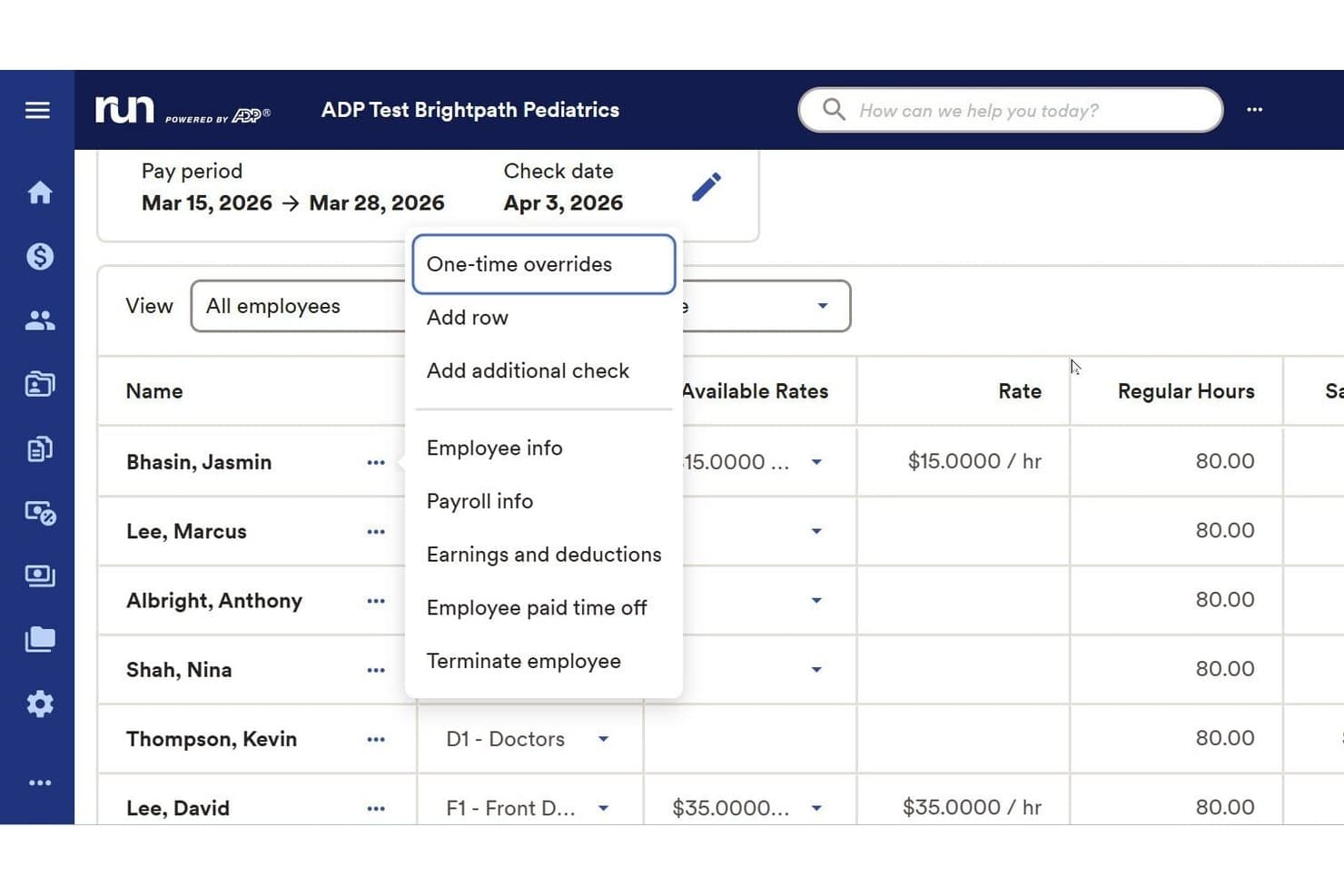
ADP Run payroll screen with one-time overrides and employee actions menu for a pay period. RUN Powered by ADP is a payroll and HR platform built for small businesses with employees, covering payroll processing, tax filing, new-hire onboarding, and contractor payments.
Who Is RUN Powered by ADP Best For?
RUN Powered by ADP is a strong fit for small business owners who are actively hiring and need payroll, tax filing, and HR tools to grow beyond a solo operation.
Why I Picked RUN Powered by ADP
I've included RUN Powered by ADP in my top picks because it's built for the moment a solo operator becomes an employer. When you're bringing on your first hire, RUN handles new-hire reporting, W-2 and 1099 filing, and multi-state payroll tax calculations automatically. I particularly like the new-hire onboarding flow, which lets employees complete their W-4, direct deposit details, and Form I-9 electronically before day one.
RUN Powered by ADP Key Features
- Multi-state payroll tax filing: RUN calculates, files, and deposits payroll taxes across multiple states and local jurisdictions automatically.
- Contractor payment bundle: Pay contractors and generate year-end 1099 forms through a dedicated contractor payment add-on.
- General Ledger Interface: Export payroll journal entries directly to QuickBooks, Xero, Wave, or Creative Solutions.
- ADP Assist™ payroll inspector: An AI-enabled tool that flags potential payroll errors before you submit each pay run.
ADP Run Integrations
RUN connects with QuickBooks, Xero, and Clover. Its General Ledger Interface also supports exports for Wave and Creative Solutions.
Pros and Cons
Pros:
- Supports contractor payments and 1099s
- Users value straightforward payroll setup
- Reviewers praise multi-state payroll handling
Cons:
- Sole proprietors must track draws separately
- Doesn’t calculate owners’ self-employment taxes
Learn more about ADP Run: Best for S-corp owners paying a W-2 salary
- Not available
- From $29 USD/month + $7/employee/month
Visit WebsiteCustomer Rating:4.3/5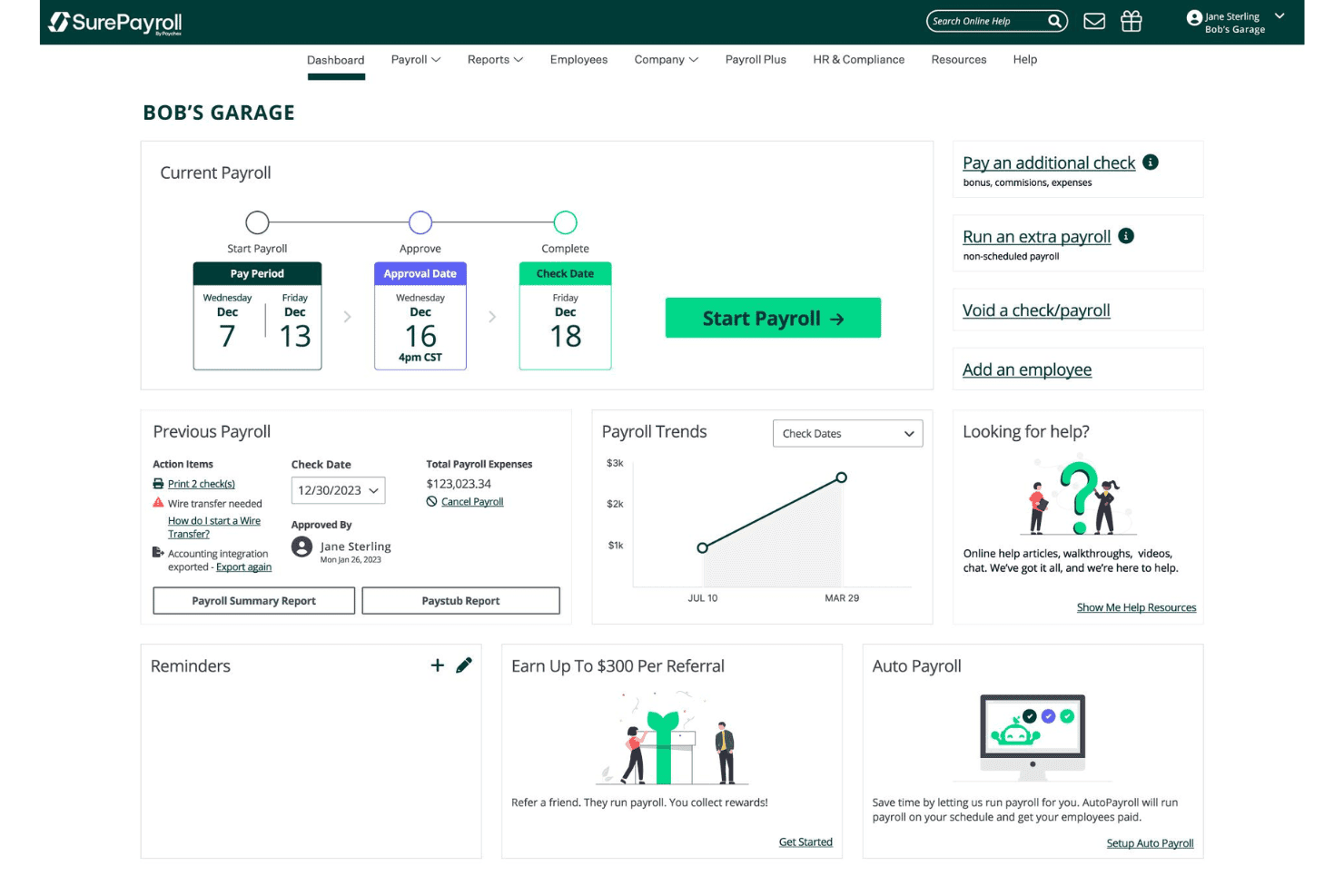
The SurePayroll dashboard shows current payroll steps, previous payroll status, and payroll trends at a glance. SurePayroll is a small business payroll platform that handles W-2 employee and 1099 contractor pay runs, automated payroll tax calculations, and federal and state tax filing—with a dedicated one-employee payroll option built around S-corp owner-employee scenarios.
Who Is SurePayroll Best For?
SurePayroll is a strong fit for S-corp owner-employees who need to pay themselves a consistent W-2 salary and have federal and state payroll taxes filed automatically.
Why I Picked SurePayroll
I picked SurePayroll as one of the best because it's one of the few payroll platforms with a dedicated one-employee setup built specifically around the S-corp owner-employee scenario. When you elect S-corp status and pay yourself a W-2 salary, SurePayroll calculates, withholds, and files your federal and state payroll taxes automatically, including quarterly Form 941 filings. It also handles direct deposit and year-end W-2s, so the paper trail required for S-corp compliance is covered in one place.
SurePayroll Key Features
- Automatic payroll scheduling: Set payroll to run on a recurring schedule so your W-2 salary goes out consistently without manual runs each pay period.
- 1099 contractor payments: Pay independent contractors alongside W-2 employees in the same account, with integrated 1099-NEC form preparation.
- Unlimited off-cycle payroll runs: Run bonus or correction payrolls at any time without extra charges beyond your standard monthly fee.
- Online payroll records access: View and download pay stubs, payroll reports, and tax filings from your account 24/7.
SurePayroll Integrations
SurePayroll integrates with stratustime for time tracking. Accounting and timeclock integration services are available as paid options.
Pros and Cons
Pros:
- Pays W-2 employees and 1099 contractors
- Payroll tax filings cover owner-employees
- Scheduled payroll supports S-corp owner salaries
Cons:
- Contractor deposits can snag with Tax IDs
- Self-employment tax isn’t calculated within payroll
Learn more about SurePayroll: Best for S Corp payroll and tax coordination
- Not available
- From $349 USD/month for the S Corp plan
Visit WebsiteCustomer Rating:5/5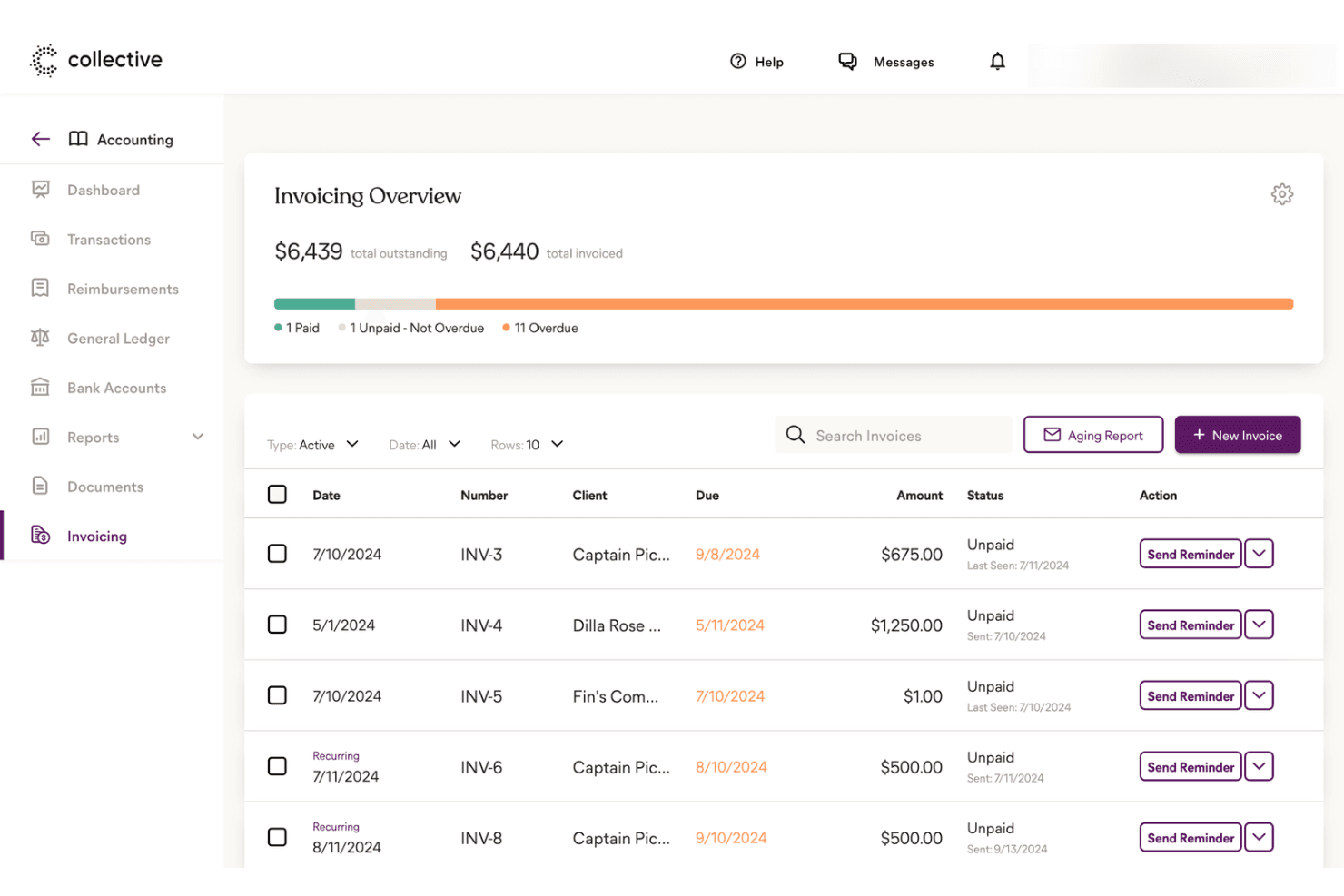
Collective's invoicing dashboard tracks outstanding and overdue invoices, with reminders and aging reports. Collective is a back-office membership platform for self-employed business owners that bundles S Corp formation, bookkeeping, payroll, tax filing, and contractor payments into a single subscription.
Who Is Collective Best For?
Collective is built for self-employed business owners running as an S Corp who want bookkeeping, payroll, and taxes handled under one membership.
Why I Picked Collective
Collective earns its spot on my shortlist because it's the only platform I've found that bundles S Corp payroll directly with bookkeeping and business tax filing under one membership. I particularly like the reasonable-compensation guidance, which helps S Corp owners set a compliant salary rather than guessing, and the payroll-to-books sync that automatically reconciles each payroll run with monthly financials. Contractor payments with 1099 generation are built into the same workflow, so there's no juggling separate tools at year-end.
Collective Key Features
- Automated monthly payroll: Set up recurring monthly payroll runs so your S Corp salary processes without manual intervention each pay period.
- State payroll registration: Collective registers your required state withholding and unemployment tax accounts so your payroll is compliant from the start.
- Employee W-2 payroll: Beyond paying yourself, the S Corp plan supports payroll for W-2 employees, with tax filings handled through Gusto.
- Invoice-to-books sync: Invoices created in Collective sync directly to your books, keeping your financial records current without manual data entry.
Collective Integrations
Collective uses Gusto to power payroll processing and connect payroll with its bookkeeping workflow.
Pros and Cons
Pros:
- Reviewers praise patient S Corp setup guidance
- Reasonable-salary guidance supports S Corp payroll
- Payroll runs reconcile into monthly books
Cons:
- Some reviewers report delayed human support
- Transaction misclassification can distort reported income
Learn more about Collective: Best for therapists' payroll and tax support
- No free trial available
- From $169/month (billed annually)
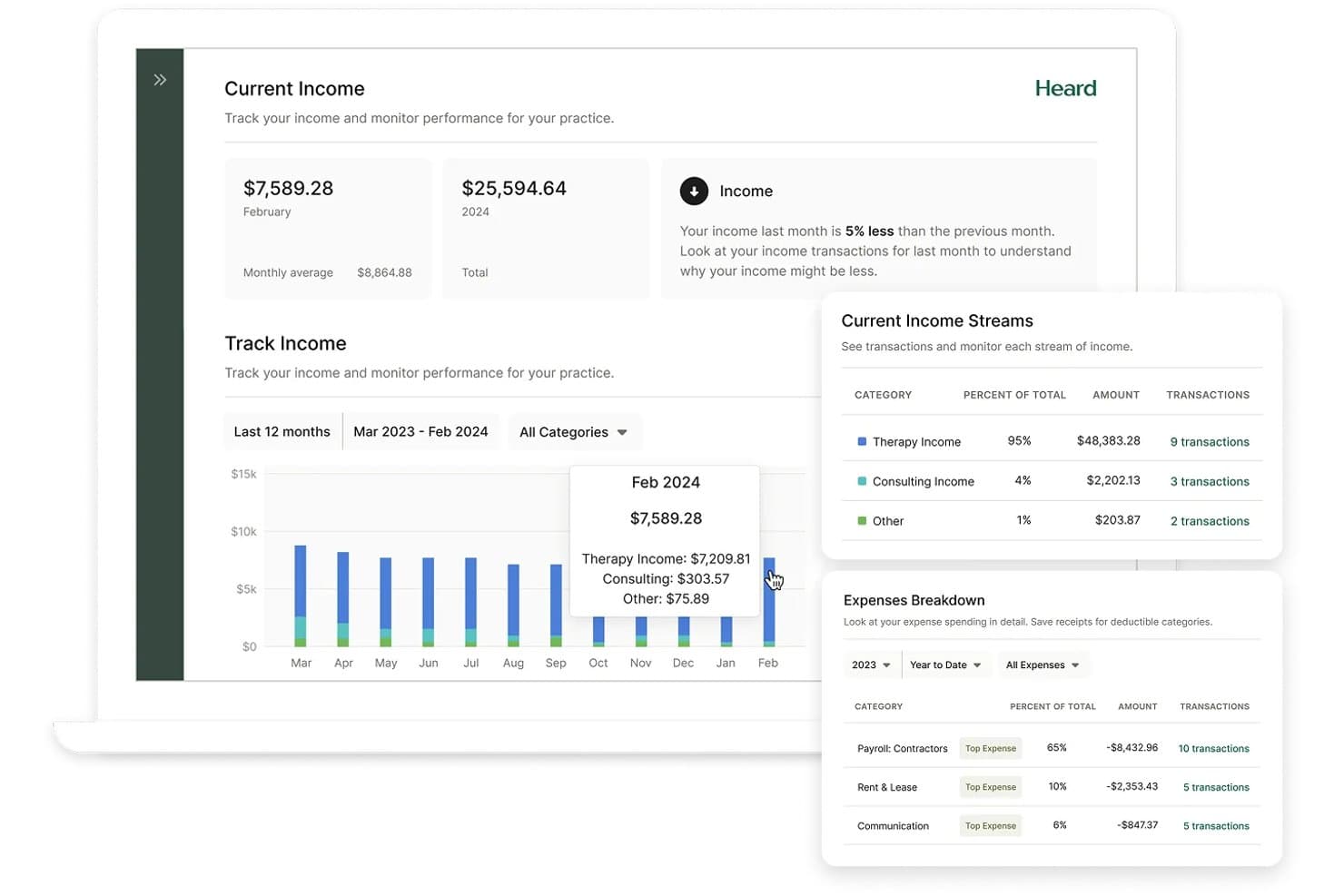
Heard's dashboard tracks monthly income, income streams, and top expense categories in one view. Heard is a done-for-you financial platform for therapists and wellness practitioners that combines bookkeeping, tax preparation and filing, and business banking, with payroll processing available as an optional paid add-on.
Who Is Heard Best For?
Heard is built specifically for therapists and wellness practitioners running solo or small private practices who want bookkeeping, taxes, and payroll handled in one place.
Why I Picked Heard
I picked Heard as one of the best because it's the only self-employed payroll software built specifically for therapists and wellness practitioners, bundling bookkeeping, tax filing, and Gusto-powered payroll under one roof. I love that S corp owners get quarterly salary and distribution guidance alongside payroll, so reasonable compensation stays compliant without hiring a separate CPA. The platform also files payroll taxes automatically each time payroll runs and generates W-2s and 1099s directly within the app.
Heard Key Features
- Profit allocation guide: View a built-in guide that recommends how to split practice income across taxes, savings, and owner pay each month.
- S corp reasonable salary guidance: Get quarterly reviews of your owner salary and distribution split to stay compliant with IRS reasonable compensation rules.
- Business banking with auto-categorization: Open separate checking and savings accounts where transactions are automatically sorted into therapist-specific tax categories.
- Tax document management: Store, organize, and receive automated reminders for tax filing deadlines and required documents directly within the platform.
Heard Integrations
Heard Payroll is powered by Gusto for payroll processing and payroll tax filing.
Pros and Cons
Pros:
- Contractor payments include 1099 generation
- Payroll taxes filed with each run
- Therapist-focused tax and bookkeeping support
Cons:
- Some users report delayed support responses
- Sole proprietors cannot run owner payroll
Learn more about Heard: Best for owner payroll across S-corp election
- Free trial + free demo available
- From $49 USD/month + $6/payroll recipient/month
Customer Rating:4.6/5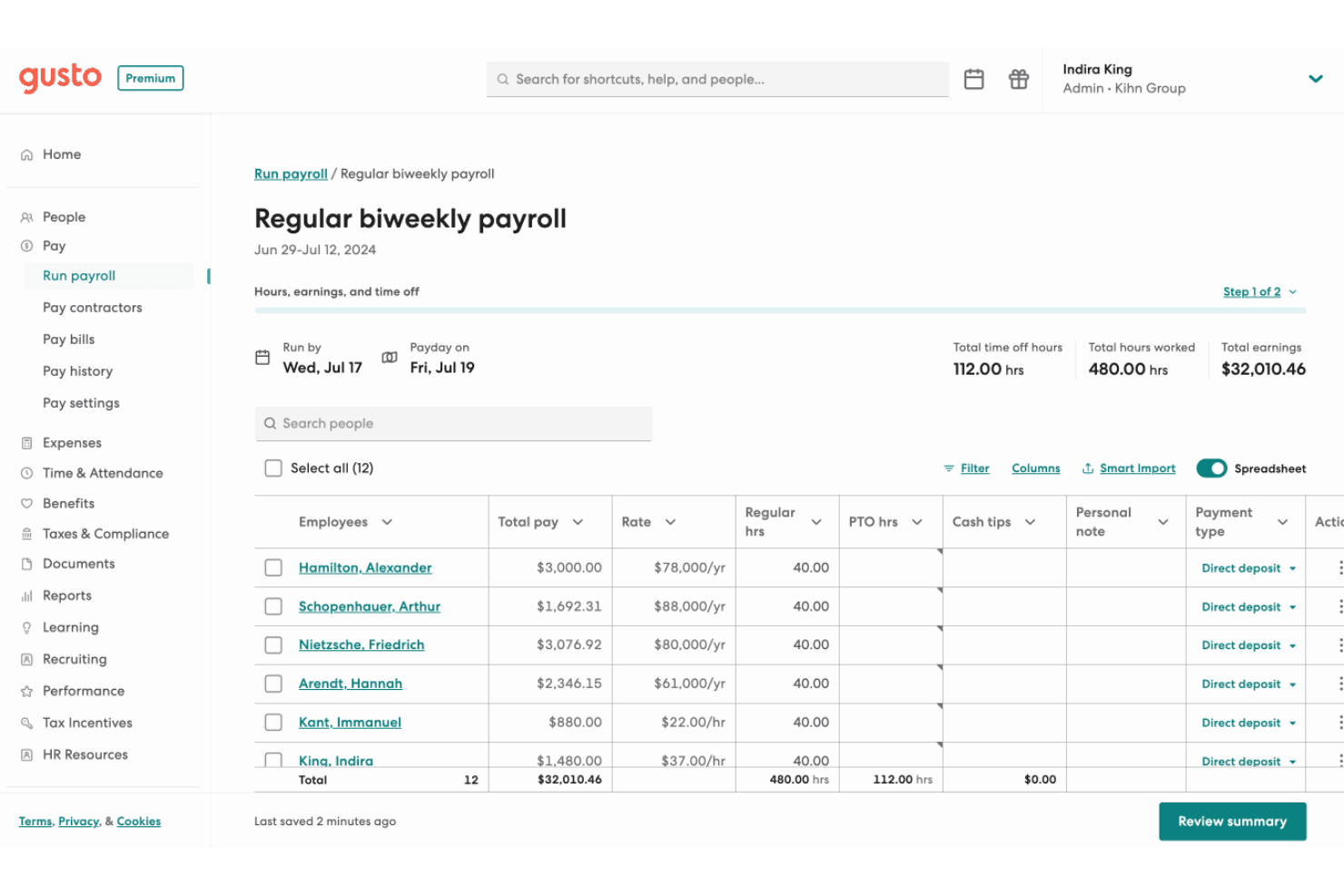
Gusto's payroll run screen lets admins review hours, earnings and time off before submitting biweekly payroll. Gusto is a payroll platform built for solopreneurs and small business owners that handles owner payroll, S-corp election setup, contractor payments, and automated federal and state tax filings.
Who Is Gusto Best For?
Sole proprietors generally take owner’s draws rather than pay themselves a W-2 salary. Owner payroll applies to qualifying corporate tax structures, such as S-corps, where owners can receive wages as employees of their business.
Why I Picked Gusto
I picked Gusto as one of the best because it's the only tool on my list with a dedicated owner-only payroll plan built specifically around S-corp election. The Solo plan includes a reasonable salary calculator that factors in your role, location, and business revenue, plus guided Form 2553 preparation with postage included. Automated quarterly payroll tax filings and W-2 generation mean the S-corp compliance side of owner payroll runs without manual intervention.
Gusto Key Features
- Payroll on AutoPilot: Automates recurring payroll runs so your owner salary processes on schedule without manual intervention each pay period.
- Domestic and global contractor payments: Pays contractors in the US and across 120+ countries directly through the platform, with integrated 1099 generation.
- Multi-state tax filing: Automatically calculates and files federal, state, and local payroll taxes, with state tax registration support across all 50 states.
- W-2 and 1099 generation: Produces and files both W-2s and 1099s automatically, with electronic copies delivered to recipients at year-end.
Gusto Integrations
Gusto integrates with Aplos, Bench, Bookkeeper360, and Betterment. Its App Integrations API supports approved app connections.
Pros and Cons
Pros:
- Reviewers praise straightforward recurring payroll runs
- Automated payroll taxes and W-2 filings
- Purpose-built S-corp owner payroll
Cons:
- Broader HR tools can clutter solo workflows
- No Schedule SE or personal estimated taxes
 Best for teams with employees and contractors
- Free demo available
- From $50 USD/month + $8/employee/month
Customer Rating:4.6/5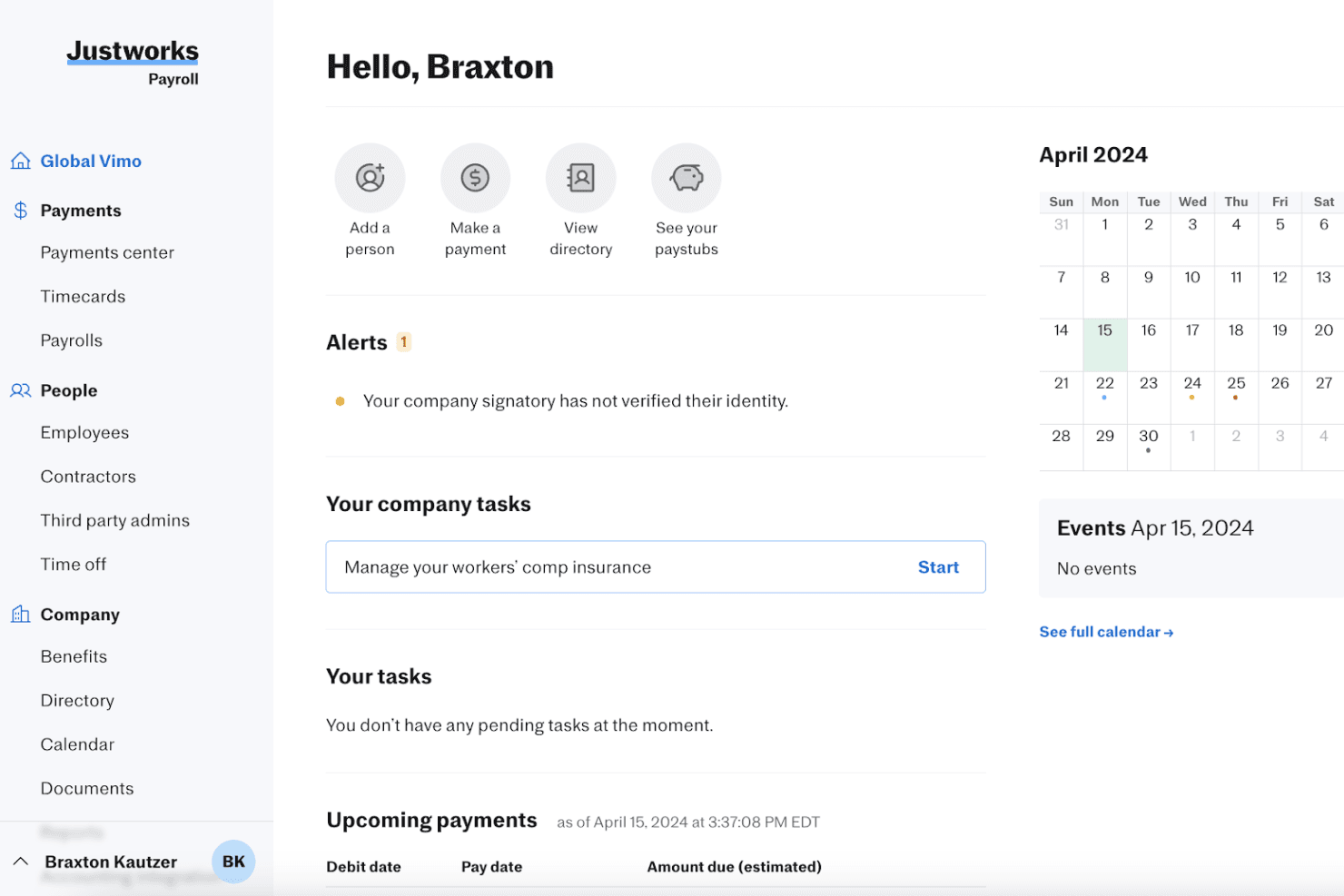
The Justworks Payroll dashboard, with quick actions, alerts, tasks, and upcoming payments in one view. Justworks Payroll is a small business payroll platform that handles employee and contractor payments, payroll tax filings, multi-state compliance, and HR tools like onboarding and document management. Time tracking is available as a paid add-on.
Who Is Justworks Best For?
Justworks Payroll works well for small businesses that pay a mix of W-2 employees and contractors and need multi-state tax compliance handled alongside HR tools like onboarding and document management.
Why I Picked Justworks
I've included Justworks in my top picks because it handles W-2 employee and contractor payments from the same platform, which is a real advantage when your team is a mix of both. I like that contractor payments extend to 60-plus countries alongside US-based payroll, and that multi-state tax filings and compliance alerts are built in rather than bolted on. It's the right fit when you need employee payroll and contractor management under one roof without juggling separate tools.
Justworks Key Features
- Payroll tax filing: Justworks files your federal and state payroll taxes, including W-2 and 1099 forms, on your behalf.
- Off-cycle payments: Run bonus, reimbursement, or owner draw payments outside of your regular payroll schedule at any time.
- Document Center: Store, organize, and access employee and company documents directly within the platform.
- Compliance alerts: Receive federal and state compliance notifications so you can stay ahead of regulatory changes.
Justworks Integrations
Justworks Payroll integrates with QuickBooks, Xero, and Brex.
Pros and Cons
Pros:
- Reviews praise straightforward payroll and onboarding
- Handles multi-state employer payroll filings
- Pays contractors alongside W-2 employees
Cons:
- Owner draws require manual off-cycle payments
- Doesn’t calculate self-employment taxes
Learn more about Justworks: Best for owner payroll with a solo 401(k)
- Free demo available
- Pricing upon request
Visit WebsiteCustomer Rating:4.2/5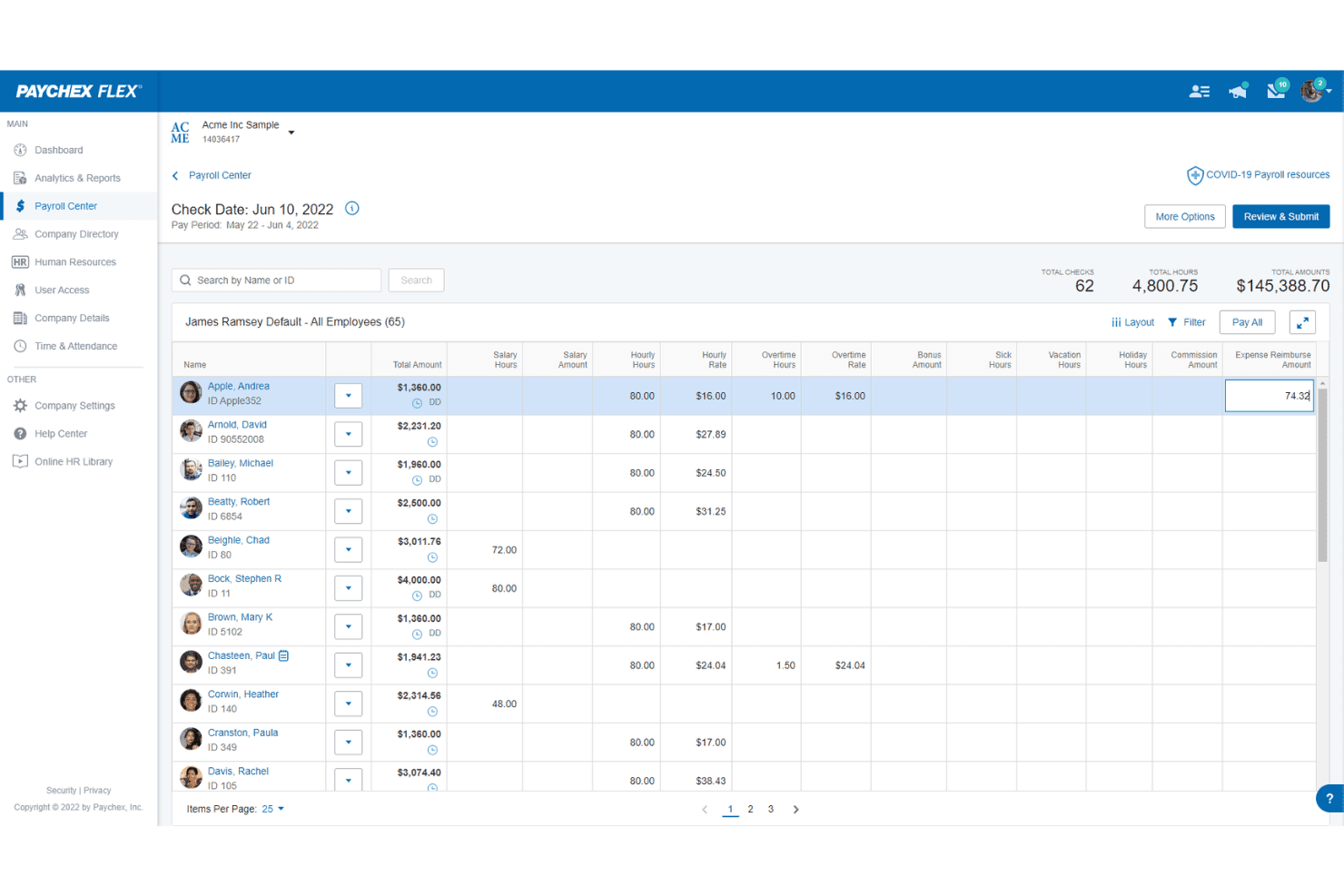
The Paychex Flex Payroll Center lists each employee's pay, hours and totals before payroll is reviewed and submitted. Paychex Flex is a payroll and HR platform built for businesses of all sizes, including owner-only businesses, that handles payroll processing, payroll tax administration, and retirement plan integration for self-employed owners.
Who Is Paychex Flex Best For?
Paychex Flex is a strong fit for incorporated sole proprietors and S-corp owners who want to run owner payroll and pair it with a solo 401(k) on a single platform.
Why I Picked Paychex Flex
I picked Paychex Flex as one of the best because it's one of the few payroll platforms that directly pairs owner payroll with a solo 401(k) in a single setup. If you're running an incorporated sole proprietorship or S-corp, Paychex lets you run payroll for yourself as an employee of your own business, handle federal and state payroll tax withholding automatically, and funnel pre-tax contributions straight into a solo 401(k) without juggling separate systems.
Paychex Flex Key Features
- Multi-state payroll tax administration: Automatically calculates, withholds, files, and remits federal, state, and local payroll taxes across every state where you work.
- Direct deposit and pay card support: Pay yourself via direct deposit, paper check, or pay card, depending on what works best for your setup.
- Year-end tax form access: Generates and provides digital W-2 and 1099 forms through the platform so your records are ready at tax time.
- Employee self-service mobile app: Access pay stubs, tax forms, and direct deposit details from iOS or Android without contacting support.
Paychex Flex Integrations
Paychex Flex integrates with QuickBooks Online, Xero, and Sage Intacct. Paychex also supports API-based connections.
Pros and Cons
Pros:
- Reviewers praise straightforward payroll processing
- Automatic multi-state payroll tax filing
- Solo 401(k) contributions pair with owner payroll
Cons:
- Reviewers report delays resolving support issues
- Self-employment tax calculations aren’t clearly documented
Learn more about Paychex Flex: Best for QuickBooks users paying contractors
- 30-day free trial + Free demo available
- From $50 USD/month + $7/employee/month
Visit WebsiteCustomer Rating:4.4/5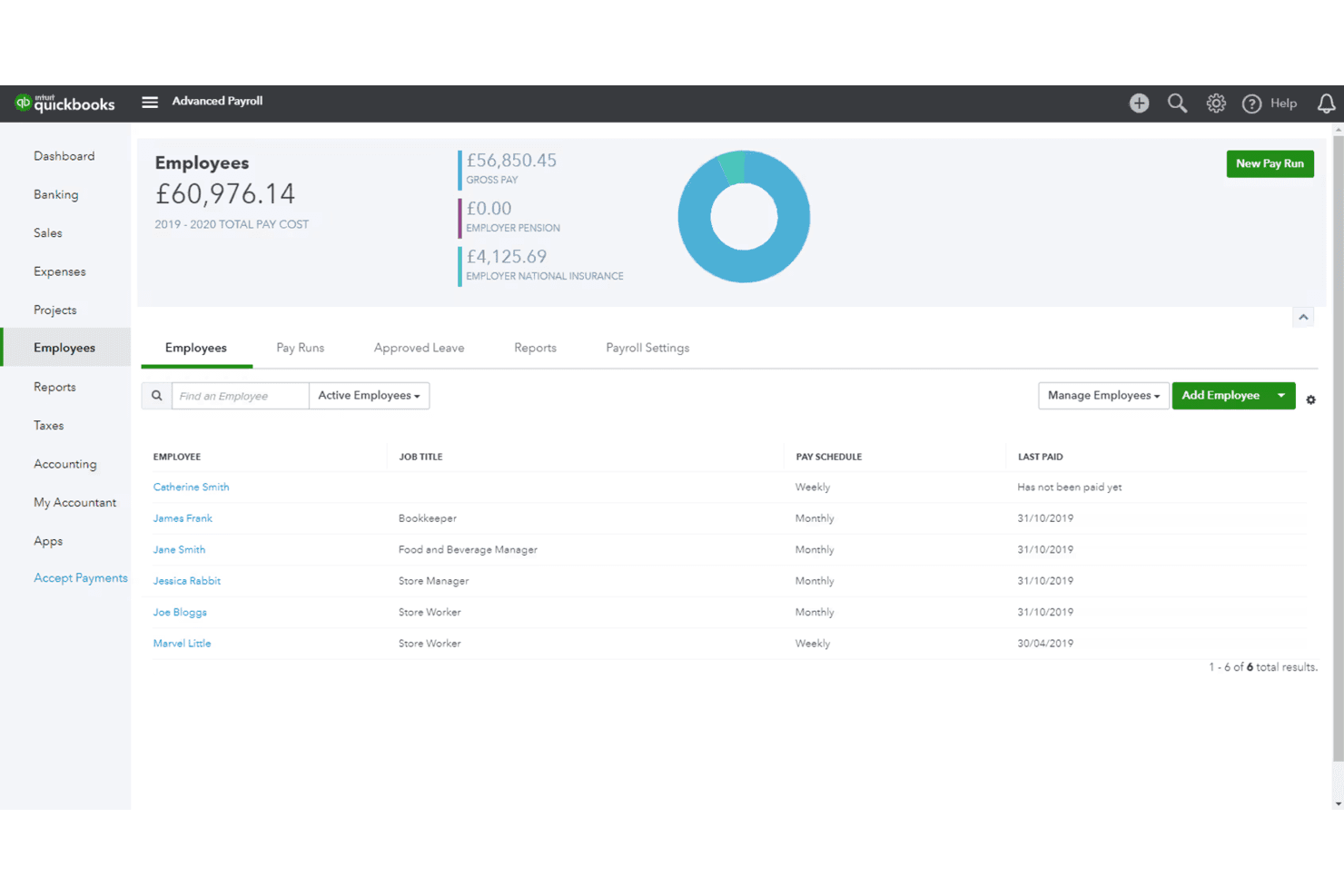
The Employees screen in QuickBooks Payroll lists staff with their job titles, pay schedules and last paid dates. QuickBooks Payroll is a full-service payroll platform that handles payroll tax calculation, filing, and payment, plus contractor 1099 e-filing, direct deposit, and employee HR tools.
Who Is QuickBooks Payroll Best For?
QuickBooks Payroll is a natural fit for small business owners who already use QuickBooks Online and need to pay both W-2 employees and 1099 contractors from one place.
Why I Picked QuickBooks Payroll
I picked QuickBooks Payroll for this list because, if you're already running your books in QuickBooks Online, the payroll and accounting data sync natively, so contractor payments post directly to your general ledger without manual reconciliation. What I really like is the unlimited 1099-MISC and 1099-NEC e-filing built into every plan, which means you can pay as many contractors as your business needs and file their forms directly with the IRS from the same dashboard.
QuickBooks Payroll Key Features
- Full-service payroll tax filing: Calculates, files, and pays federal and state payroll taxes automatically, covering garnishments and deductions in every plan.
- Auto payroll: Runs payroll automatically for eligible salaried employees on direct deposit, flagging the run for your review before paychecks go out.
- Next-day direct deposit: Sends contractor and employee payments via direct deposit as quickly as the next business day on the base plan, with same-day deposit on higher tiers.
- Payroll Agent: Collects employee time and attendance data, scans for inconsistencies, and prepares a draft payroll for your approval via SMS or the Workforce app.
QuickBooks Payroll Integrations
QuickBooks Payroll connects with QuickBooks Online and offers integrations with Allstate, Vestwell, NEXT, and Checkr.
Pros and Cons
Pros:
- Users praise straightforward payroll runs
- Payroll taxes calculate, file, and pay automatically
- Unlimited 1099 e-filing accompanies contractor payments
Cons:
- No clear owner self-pay workflow
- No documented self-employment tax calculations
Learn more about QuickBooks Payroll: Best for paying yourself and contractors
- Free trial + free demo available
- From $49 USD/month + $6/worker/month
Visit WebsiteCustomer Rating:5/5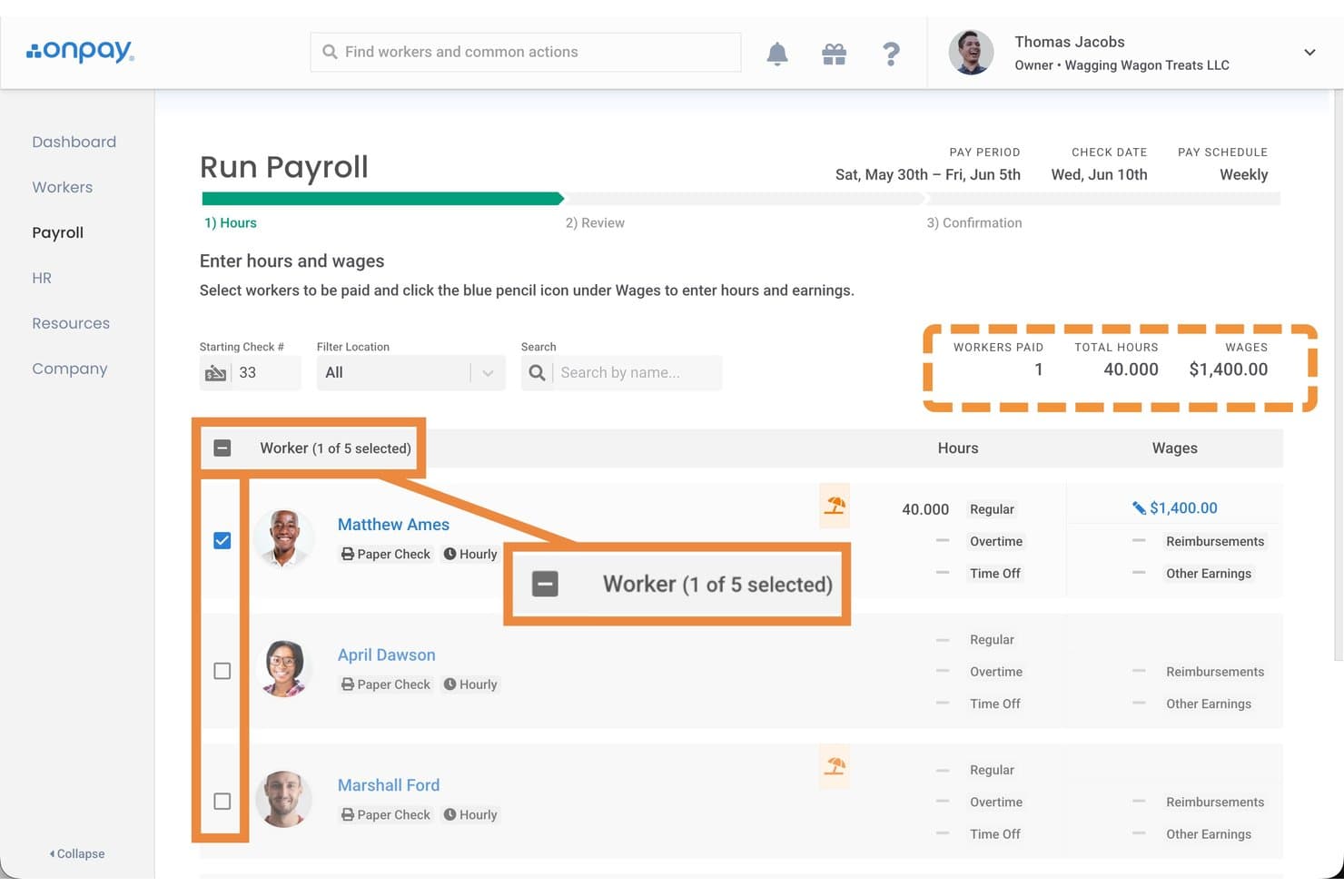
OnPay's Run Payroll screen, where users select workers and enter hours and wages for each pay period. OnPay is a full-service payroll platform that handles owner payroll, W-2 and 1099 contractor payments, automated tax filings, and multi-state compliance for small and solo businesses.
Who Is OnPay Best For?
OnPay is a strong fit for S-corp owners who need to pay themselves a regular W-2 salary, as well as sole proprietors who need to manage employee and contractor payments.
Why I Picked OnPay
I picked OnPay as one of the best because it has a dedicated owner-payroll workflow that lets you set your own federal and state income-tax withholding and lock in a reasonable compensation amount in just a few clicks. I also like that W-2 and 1099 contractor payments run in the same payroll, so you can pay a freelance designer alongside your own salary without juggling separate tools. Automated quarterly and year-end filings, including blank filings for low-activity periods, round out the solo-business use case well.
OnPay Key Features
- Multi-state payroll compliance: OnPay calculates and files federal, state, and local taxes across all 50 states, including automatic state tax registrations.
- Custom payroll report designer: Build and save custom payroll reports using more than 50 data fields, with real-time filtering and PDF or spreadsheet export.
- Employee self-service portal: Employees can log in to view and download their own pay stubs and tax documents at any time.
- PTO accrual policy management: Set custom PTO accrual rules and let OnPay calculate balances automatically with each payroll run.
OnPay Integrations
OnPay integrates with QuickBooks Online, Xero, QuickBooks Time, Deputy, and When I Work. It also lists Middesk for state tax registration.
Pros and Cons
Pros:
- Reviewers praise responsive onboarding support
- Contractors share owner payroll runs
- Owner payroll supports adjustable tax withholding
Cons:
- Inactive months cannot pause accounts
- No dedicated self-employment tax calculations
 Best for multi-state staff and contractor pay
- 30-day free trial + Free demo available
- From $37 USD/month + $5/worker/month
Visit WebsiteCustomer Rating:5/5
Patriot Payroll's Employee Info page, showing personal, contact, work and demographic details for an employee. Patriot Payroll is a small business payroll platform that handles W-2 employee and contractor payments, payroll tax calculations, 1099 generation, and direct deposit. Its Basic Payroll plan calculates payroll taxes, while the Full Service Payroll plan also handles tax filings and payments.
Who Is Patriot Payroll Best For?
Patriot Payroll is a strong fit for small business owners who need to pay a mix of W-2 employees and contractors across multiple states without paying enterprise-level prices.
Why I Picked Patriot Payroll
I've included Patriot Payroll in my top picks because it handles multi-state W-2 and contractor payroll in a single run, which is exactly what small business owners with staff spread across states need. Full Service Payroll automatically files and deposits federal, state, and local taxes across all 50 states, and 1099 generation with e-filing is built right into the contractor workflow.
Patriot Payroll Key Features
- Auto payroll: Set up recurring payroll runs for salaried or hourly workers, with advance notifications before each scheduled run processes.
- S-corp health insurance handling: Add company-paid health premiums for shareholders owning more than 2% directly to their W-2s.
- Employee and contractor self-service portal: Let workers view pay stubs, manage direct deposit details, and access tax forms without contacting you.
- Net-to-gross payroll calculation: Enter a target take-home amount and Patriot calculates the gross pay needed to cover taxes and deductions.
Patriot Payroll Integrations
Patriot Payroll connects with Patriot Accounting and QuickBooks Online, with export support for QuickBooks Desktop. It also integrates with SimplyInsured, Vestwell, and ERGO NEXT.
Pros and Cons
Pros:
- Multi-state payroll tax filings cover all states
- Contractor payments and 1099 filing together
- S-corp owners report straightforward monthly payroll
Cons:
- Standard direct deposit needs four-day lead time
- No self-employment tax or Schedule SE calculation
Learn more about Patriot Payroll:
Autres logiciels de paie pour travailleurs indépendants
Voici quelques autres options qui ne figurent pas dans ma sélection, mais qui méritent tout de même votre attention :
- 11FreshBooksBest for freelancers linking books and payroll
- 12MelioBest for contractor payouts and 1099 filing
- 13Square PayrollBest for Square sellers with tipped staff
- 14Wave PayrollBest for Wave users keeping payroll in books
- 15XeroBest for solo businesses adding staff payroll
- 16WagepointBest for Canadian employee and contractor pay
- 17Roll by ADPBest for paying staff and contractors together
- 18Payroll MateBest for payroll across multiple companies
- 19Payroll4FreeBest for free monthly pay for up to nine people
- 20FoundBest for freelancer banking and tax tracking
How I Evaluate Self-Employed Payroll Software
I split my evaluation into three parts. First, core functionality: the tool must calculate self-employment taxes automatically and support owner payroll runs—this carries the most weight. Second, I look for standout features like owner's draw versus salary guidance. Third, I consider support access, onboarding clarity, and pricing transparency.
Core Functionality (Table Stakes for This List)
When I'm selecting tools for my list, I score each one on a scale from 0 (does not offer the functionality) to 5 (excels in this area) for each core functionality listed below. I then convert the total into a percentage to help assess each tool's overall fit, with extra weight on any functionalities I've deemed essential.
- Self-Employment Tax Calculation (Essential): I check whether the tool calculates Social Security and Medicare obligations for owners and adjusts as income changes throughout the year.
- Owner Payroll Processing (Essential): I evaluate how well each tool handles owner pay runs, including whether it adapts to different structures like S-corp salary or owner's draw.
- Tax Form Filing Support: Tools that generate and e-file forms like 1099s and quarterly estimates score higher than those that only pre-fill templates for manual submission.
- Direct Deposit or Disbursement: I look at deposit speed, scheduling flexibility, and whether the tool supports electronic payments for both owner and contractor payouts.
- Multi-State and Federal Compliance: Each tool's ability to apply and update the correct federal and state tax rates matters, especially for owners who work or hire across state lines.
- Contractor Payment Management: I evaluate whether contractor payments and 1099 tracking live in the same workflow as owner payroll or require a separate process.
Once I have a list of tools that meet the criteria, I consider what sets each platform apart.
Differentiating Factors (What Sets Vendors Apart)
Here's how I compare and contrast different vendors:
Standout Features
I look for integrated bookkeeping sync because it eliminates double entry between payroll and your books. Tools like Gusto and QuickBooks Payroll handle this differently, so I check whether the sync is native or requires a connector. Quarterly tax savings automation matters too—especially for owners who owe estimated taxes and want funds set aside automatically. I also evaluate whether a tool offers owner's draw versus salary guidance, since S-corp owners need clarity on how to split compensation for tax purposes.
Beyond Features
I check whether pricing stays predictable as you move from solo owner payroll to adding a contractor or W-2 employee—tools like Gusto and OnPay handle that scaling differently. Onboarding clarity matters just as much, since most self-employed owners aren't payroll specialists and need plain-language setup wizards to avoid costly misclassifications. I also evaluate how well each tool connects to accounting platforms and business bank accounts, because a direct sync between payroll and your books cuts reconciliation work during tax season.
Comment choisir un logiciel de paie pour travailleurs indépendants
Choisissez votre logiciel en faisant correspondre votre structure de rémunération et vos obligations fiscales à ce que le prestataire prendra en charge, déclarera et documentera.
| Si votre priorité est de | Recherchez |
|---|---|
| Si votre priorité est deVous verser un salaire | RecherchezUne paie du propriétaire compatible avec la structure de votre entreprise et enregistrant chaque cycle de paie |
| Si votre priorité est dePayer des prestataires | RecherchezLes paiements aux prestataires, les formulaires fiscaux de fin d'année et les obligations déclaratives réunis dans un même processus |
| Si votre priorité est deGérer vos obligations fiscales | RecherchezUne gestion claire des charges sociales, des impôts estimés et des déclarations obligatoires |
| Si votre priorité est deAjouter des employés dans plusieurs régions | RecherchezLa configuration des taxes régionales et les obligations de conformité documentées pour chaque lieu de travail |
Comment évaluer votre sélection
- Testez un cycle de paie du propriétaire : Utilisez une version d'essai ou une démonstration pour saisir une paie de propriétaire, puis demandez au fournisseur d'expliquer le bulletin de paie obtenu et les calculs fiscaux.
- Demandez un dossier fiscal type : Demandez un dossier de fin d'année anonymisé indiquant quels formulaires le prestataire prépare, dépose ou vous laisse gérer.
- Ouvrez un ticket correspondant à un scénario : Demandez comment le prestataire gère le passage de prélèvements du propriétaire à un salaire, puis conservez sa réponse écrite et le numéro du ticket.
- Obtenez un devis de croissance : Demandez une estimation écrite pour un propriétaire, un prestataire et un employé supplémentaire, en détaillant chaque frais récurrent et de déclaration.
- Choisissez votre compromis : Comparez un service limité à la paie avec un prestataire qui coordonne la paie et les tâches fiscales ; utilisez la liste écrite des responsabilités pour décider si un périmètre de services réduit ou un accompagnement intégré répond le mieux à vos besoins.
Qu'est-ce qu'un logiciel de paie pour travailleurs indépendants ?
Les logiciels de paie pour travailleurs indépendants aident les propriétaires d'entreprise à se rémunérer et à payer leurs employés, à calculer les charges sociales et à conserver des registres de paie. Les fonctionnalités adaptées dépendent de la structure de votre entreprise : le propriétaire d'une société S peut avoir besoin d'établir une paie W-2, tandis qu'un entrepreneur individuel effectue généralement des prélèvements plutôt que de se verser un salaire. Certains outils prennent également en charge les paiements aux prestataires, les formulaires fiscaux et les déclarations de charges sociales.
Fonctionnalités
Voici les principales fonctionnalités que je recherche dans un logiciel de paie pour travailleurs indépendants :
- Traitement de la paie du propriétaire : vous permet d'établir votre propre rémunération en fonction de la structure de votre entreprise. Par exemple, un propriétaire qui a besoin d'un salaire peut enregistrer des cycles de paie, tandis qu'un propriétaire qui effectue des prélèvements a besoin d'un outil qui distingue ces transactions des salaires des employés.
- Calcul des taxes sur les salaires : calcule les taxes applicables sur les salaires à partir des montants versés et des informations relatives aux travailleurs. Vérifiez si l'outil gère séparément les taxes des propriétaires et celles des employés, car leur traitement fiscal peut différer.
- Assistance pour les déclarations et les paiements fiscaux : prépare, soumet ou vous aide à suivre les déclarations et les paiements de taxes sur les salaires requis. Vérifiez quelles étapes sont prises en charge par le prestataire et lesquelles restent à votre charge.
- Paiements des contractants et formulaires fiscaux : enregistre les paiements versés aux contractants et prend en charge les déclarations fiscales de fin d'année requises. Cela permet de distinguer la rémunération des contractants de la paie des employés et de clarifier si le logiciel prépare ou dépose les formulaires.
- Virements et planification des paiements : verse les salaires par voie électronique et vous permet de planifier les dates de paie. Vérifiez les délais de traitement et si les paiements des contractants et des propriétaires utilisent les mêmes options de paiement.
- Relevés de paie et rapports : conserve les détails des cycles de paie et fournit des rapports ou des relevés de paie que vous pouvez consulter ultérieurement. Ces documents vous aident à rapprocher la paie, à répondre aux questions des travailleurs et à vous préparer aux déclarations fiscales.
- Configuration fiscale selon le lieu : applique les règles fiscales pertinentes en fonction du lieu où votre entreprise et vos travailleurs exercent leur activité. Examinez les lieux pris en charge et vérifiez comment le logiciel gère les changements lorsque vous-même ou un travailleur déménagez.
- Connexions comptables : transfère les données de paie vers un système comptable connecté, directement ou par l'intermédiaire d'un connecteur. Vérifiez quels détails relatifs aux salaires, aux taxes et aux dépenses sont synchronisés afin de savoir ce qui doit encore être saisi manuellement.
Avantages
Un logiciel de paie pour travailleurs indépendants peut vous aider à gérer la rémunération du propriétaire et les tâches fiscales, notamment grâce aux avantages suivants :
- Calculs fiscaux : les fonctionnalités de calcul fiscal peuvent estimer les taxes applicables aux travailleurs indépendants ou sur les salaires à partir des revenus et des informations de rémunération.
- Relevés de rémunération du propriétaire : les outils de paie du propriétaire enregistrent séparément les cycles de paie correspondant à un salaire et les prélèvements, ce qui vous aide à tenir des documents adaptés à la structure de votre entreprise.
- Assistance pour les déclarations fiscales : les fonctionnalités de déclaration peuvent préparer ou soumettre les formulaires et les paiements liés à la paie, tout en précisant quelles tâches fiscales restent à votre charge.
- Gestion des contractants : le suivi des paiements aux contractants et les formulaires fiscaux de fin d'année regroupent les paiements aux travailleurs et les informations déclaratives dans un même flux de travail.
- Paiements électroniques : les virements et la planification des paiements vous permettent de verser électroniquement les paiements au propriétaire ou aux travailleurs lorsque cette possibilité est prise en charge.
- Configuration fiscale selon le lieu : les paramètres fiscaux fédéraux et propres à chaque État aident à appliquer les règles pertinentes aux lieux d'activité de votre entreprise et de vos travailleurs.
- Documents comptables : les connexions comptables peuvent transférer les informations de paie dans votre comptabilité, réduisant ainsi la saisie manuelle lors du rapprochement.
Tarifs
Le coût d'un logiciel de paie pour travailleurs indépendants dépend de la structure de votre entreprise, du nombre de travailleurs et du niveau d'assistance pour les déclarations fiscales dont vous avez besoin. Le tableau suivant présente des tarifs indicatifs en USD basés sur les tarifs publiés par les prestataires.
Tableau comparatif des forfaits de logiciels de paie pour travailleurs indépendants
| Essai gratuit ou démonstration | $0 | Accès temporaire ou présentation des produits, selon le prestataire. |
| Paie de base | À partir de 17 $/mois + 4 $/travailleur/mois | Traitement de la paie, virements et calculs fiscaux. |
| Paie avec service complet | À partir de 37 $/mois + 5 $/travailleur/mois | Déclarations automatisées des taxes sur les salaires, paiements et formulaires fiscaux de fin d'année. |
| Paie du propriétaire d'une S-Corp | À partir de 49 $/mois + 6 $/bénéficiaire de la paie/mois | Traitement du salaire du propriétaire, déclarations des taxes sur les salaires et création des formulaires W-2. |
| Services financiers tout-en-un | À partir de 349 $/mois | Tenue de la comptabilité, déclaration fiscale de l'entreprise et assistance pour la paie d'une S-Corp. |
Des frais supplémentaires peuvent s'appliquer aux déclarations dans plusieurs États, aux services facultatifs et aux autres options complémentaires.
FAQ
Voici les réponses aux questions fréquentes sur les logiciels de paie pour travailleurs indépendants :
Ai-je besoin d’un logiciel de paie si je suis travailleur indépendant ?
Pas toujours. Si vous êtes entrepreneur individuel ou membre unique d’une LLC imposée comme une entreprise individuelle, vous effectuez généralement des prélèvements du propriétaire plutôt que de vous verser un salaire via une paie W-2. Un logiciel de paie peut néanmoins vous être utile si vous rémunérez des salariés ou des prestataires. Si votre entreprise est imposée comme une société S, vous devrez généralement établir votre paie en tant que salarié de votre propre entreprise. Adaptez le logiciel à votre structure fiscale et confirmez vos obligations auprès d’un professionnel de la fiscalité avant de mettre en place la rémunération du propriétaire.
Puis-je me verser un salaire en tant qu’entrepreneur individuel ?
Non, un entrepreneur individuel ne peut généralement pas se verser un salaire W-2 provenant de sa propre entreprise. Il effectue des prélèvements, qui ne sont pas des salaires et ne sont pas soumis à une retenue au titre des taxes sur la paie comme le salaire d’un salarié. Les bénéfices de l’entreprise peuvent néanmoins être soumis à l’impôt sur le revenu et aux taxes sur le travail indépendant. Si vous avez choisi le régime fiscal d’une société S, les règles sont différentes : le propriétaire qui travaille dans l’entreprise doit généralement recevoir une rémunération raisonnable via la paie. Vérifiez le statut juridique et le régime fiscal de votre entreprise avant de choisir votre processus de paie.
Un logiciel de paie gère-t-il les impôts trimestriels estimés ?
Certains outils de paie vous aident à calculer ou à mettre de côté les impôts estimés, mais la déclaration et le paiement des taxes sur la paie sont des tâches différentes du paiement des acomptes d’impôt sur le revenu. Un logiciel de paie peut retenir et reverser les taxes liées aux salaires des salariés, tandis que vous devrez peut-être toujours effectuer des acomptes sur les revenus de l’entreprise. Demandez au fournisseur quels impôts il calcule, paie ou déclare, et quelles tâches restent à votre charge. Avant de vous fier à une estimation, comparez-la à l’ensemble de vos revenus et de votre situation fiscale avec un professionnel de la fiscalité.
Quelle est la différence entre les taxes sur le travail indépendant et les taxes sur la paie ?
Les taxes sur le travail indépendant couvrent généralement les cotisations de sécurité sociale et d’assurance maladie appliquées aux revenus nets tirés d’une activité indépendante. Les taxes sur la paie sont liées aux salaires des salariés et comprennent les montants retenus sur leur rémunération ainsi que ceux pris en charge par l’employeur. La structure de votre entreprise détermine les règles applicables : les prélèvements d’un entrepreneur individuel ne sont pas des salaires, tandis que le propriétaire d’une société S qui travaille dans l’entreprise reçoit généralement un salaire via la paie. Vérifiez que l’outil distingue les prélèvements du propriétaire, les salaires et les paiements versés aux prestataires, au lieu de traiter tous les paiements de la même manière.