

10 migliori alternative a ClickUp per i team delle risorse umane nel 2026

Elenco delle alternative a ClickUp


Le migliori alternative a ClickUp per i team delle risorse umane combinano una gestione flessibile delle attività, una collaborazione chiara tra i team e funzionalità pensate per le attività legate al personale. Se stai cercando alternative a ClickUp, probabilmente hai bisogno di strumenti che supportino i flussi di lavoro delle risorse umane, semplifichino il monitoraggio dei dipendenti e si adattino ai processi specifici del tuo team.
Scegliere la piattaforma giusta può aiutarti a gestire l'inserimento dei dipendenti, le valutazioni delle prestazioni e la conformità normativa senza aggiungere complessità. In questa guida troverai un elenco curato delle principali alternative a ClickUp, ognuna con punti di forza in grado di affrontare le sfide comuni delle risorse umane e aiutarti a creare un ambiente di lavoro più organizzato e incentrato sulle persone.
Che cos'è ClickUp?
ClickUp è una piattaforma software per la gestione dei progetti progettata per aiutare i team a gestire attività e sottoattività, monitorare i progressi e collaborare in tempo reale. In quanto soluzione SaaS, riunisce la gestione del lavoro, il monitoraggio delle attività e strumenti di collaborazione completi in un'interfaccia intuitiva che supporta gli ambienti con più team. Grazie alle ampie possibilità di personalizzazione e al supporto per flussi di lavoro complessi, viene spesso utilizzato dai team di marketing e dai team operativi che desiderano centralizzare il lavoro.
Perché fidarsi delle nostre recensioni sui software
Il nostro team testa e recensisce software dal 2012. In quanto esperti HR noi stessi, sappiamo quanto sia difficile — e importante — scegliere il software giusto.
Per questa guida, abbiamo valutato gli strumenti attraverso test pratici e ricerche indipendenti, assegnando un punteggio agli strumenti in base ai nostri criteri di selezione. Ci basiamo inoltre sulle competenze di leader di pensiero del settore e di professionisti HR attivi.
Le nostre recensioni riflettono il nostro giudizio editoriale umano, non un discorso di vendita.
Revisori esperti:
Riepilogo delle migliori alternative a ClickUp
Questa tabella comparativa riassume i dettagli dei prezzi delle mie migliori alternative a ClickUp, per aiutarti a trovare quella più adatta al tuo budget e alle esigenze della tua azienda.
| Tool | Best For | Trial Info | Price | ||
|---|---|---|---|---|---|
| 1 | Ideale per gestire progetti complessi di team | Prova gratuita di 14 giorni + dimostrazione gratuita disponibile | A partire da $8/utente/mese (fatturato annualmente) | Website | |
| 2 | Ideale per flussi di lavoro basati sui traguardi | Piano gratuito senza scadenza disponibile | A partire da $39/mese (con fatturazione annuale) | Website | |
| 3 | Ideale per creare elementi visivi con sequenze temporali | Piano gratuito disponibile | Prezzi su richiesta | Website | |
| 4 | Ideale per la pianificazione e l'assegnazione delle risorse | Disponibile una prova gratuita di 14 giorni | A partire da $9/utente/mese (fatturato annualmente) | Website | |
| 5 | Ideale per la semplice collaborazione tra team | Prova gratuita di 30 giorni + demo gratuita disponibile | A partire da $15/utente/mese | Website | |
| 6 | Ideale per la gestione delle agenzie creative | Demo gratuita disponibile | A partire da $10.50/utente/mese (con fatturazione annuale) | Website | |
| 7 | Ideale per la pianificazione delle attività basata sull'IA | Prova gratuita disponibile | A partire da $19/utente/mese (con fatturazione annuale) | Website | |
| 8 | Ideale per modelli di progetto personalizzabili | Piano gratuito disponibile per sempre | Da $1/utente/mese (con fatturazione annuale) | Website | |
| 9 | Ideale per tenere traccia delle ore fatturabili dei dipendenti | Demo gratuita disponibile | A partire da $12/utente/mese (con fatturazione annuale) | Website | |
| 10 | Ideale per il monitoraggio del tempo di lavoro | Prova gratuita di 14 giorni + dimostrazione gratuita disponibile | A partire da $4.99/utente/mese (fatturato annualmente) | Website |
Recensioni delle alternative a ClickUp
Di seguito trovi i miei riepiloghi dettagliati delle migliori alternative a ClickUp incluse nel mio elenco. Le mie recensioni offrono un’analisi approfondita delle funzionalità, dei casi d’uso migliori e delle integrazioni di ogni piattaforma, per aiutarti a trovare quella più adatta a te.

Workzone
Ideale per gestire progetti complessi di team

Workzone offre ai team HR una piattaforma centralizzata per coordinare i progetti, gestire le attività dei dipendenti e monitorare i progressi tra i vari reparti. Il suo design strutturato dello spazio di lavoro è adatto alle organizzazioni che necessitano di una supervisione chiara di iniziative HR complesse e della collaborazione tra team.
Per chi è più indicato Workzone?
I reparti HR di organizzazioni di medie e grandi dimensioni che gestiscono più progetti e team interfunzionali.
Perché Workzone è una buona alternativa a ClickUp
Ho scelto Workzone per la sua capacità di gestire progetti HR articolati e con più team senza perdere visibilità sui diversi flussi di lavoro. Mi piace il modo in cui i suoi pannelli di controllo dei progetti offrono una panoramica chiara e in tempo reale delle responsabilità e delle scadenze delle attività, utile quando si coordinano campagne di assunzione o programmi di inserimento tra più reparti. Apprezzo anche la funzione di gestione del carico di lavoro, che mi permette di vedere esattamente dove i membri del team sono sovraccarichi prima di assegnare nuove attività. In pratica, questo consente al mio team di bilanciare le esigenze dei progetti HR senza ricorrere a controlli manuali o riunioni sullo stato di avanzamento.
Funzionalità principali di Workzone
- Dipendenze tra attività: Collega le attività correlate affinché il lavoro proceda nella sequenza corretta nei progetti HR.
- Condivisione dei file: Allega e archivia i documenti direttamente nei progetti per consentire un facile accesso al team.
- Notifiche via e-mail: Invia aggiornamenti automatici per tenere informate le parti interessate sull'avanzamento delle attività.
- Monitoraggio del tempo: Registra le ore dedicate alle attività e ai progetti HR direttamente nella piattaforma.
Integrazioni di Workzone
Le integrazioni includono Box, Dropbox, Everhour, FreshBooks, GitHub, Google Drive, Harvest, HubSpot, Jira e Microsoft Office 365.
Pros and Cons
Pros:
- Modelli di progetto dettagliati per i flussi di lavoro HR
- Solide opzioni per le dipendenze e la sequenza delle attività
- Archiviazione centralizzata dei documenti all'interno di ogni progetto
Cons:
- Funzionalità limitate dell'applicazione mobile per i team HR
- Nessuna funzionalità integrata di sistema per il monitoraggio dei candidati
New Product Updates from Workzone

Workzone Enterprise Adds Multi-Stage Approval Workflows
Workzone Enterprise now includes Approval Workflows, enabling multi-stage document approvals to standardize complex processes and reduce manual effort. For more information, visit Workzone's official site.
 .
.
Nifty
Ideale per flussi di lavoro basati sui traguardi
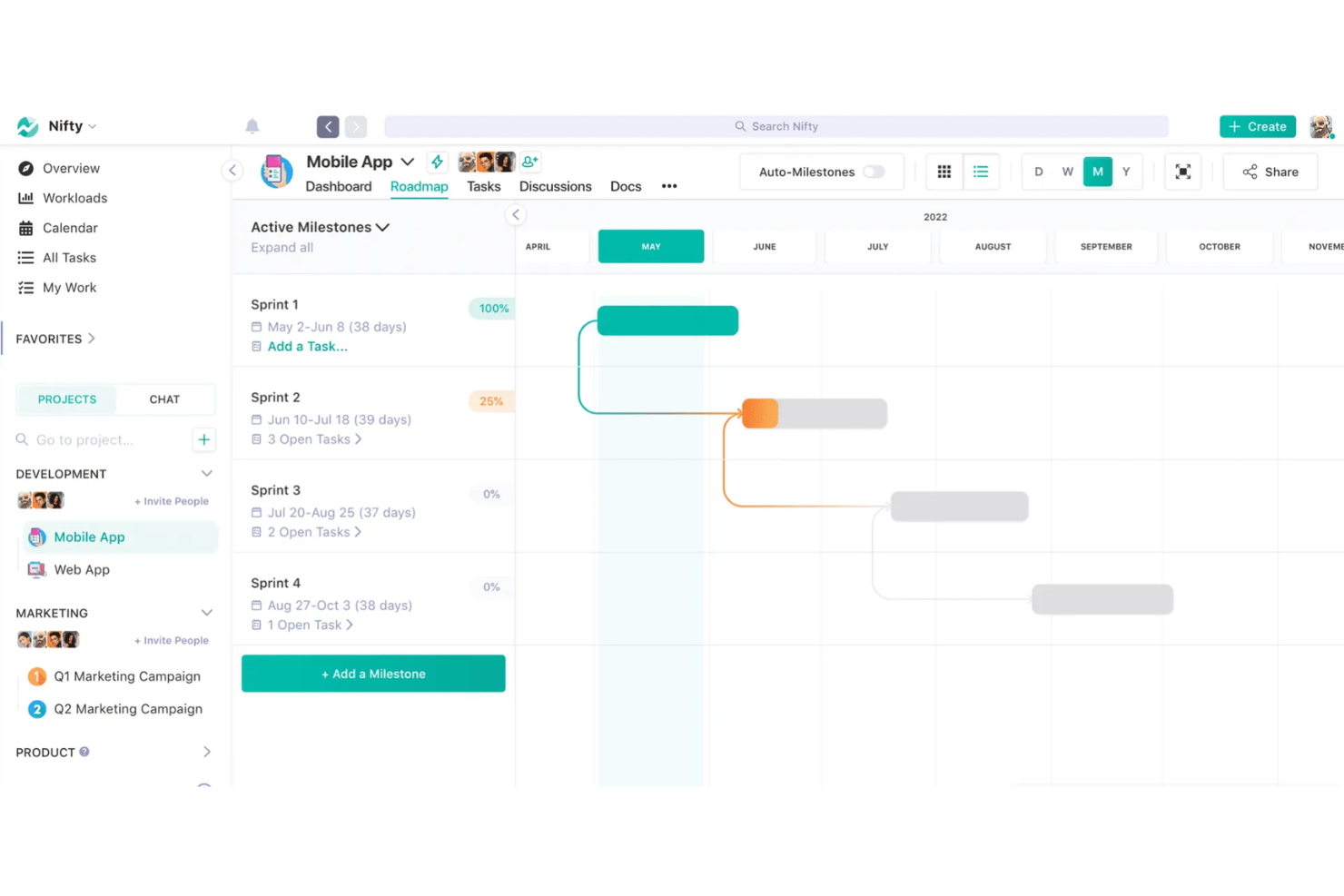
Nifty è una piattaforma di gestione dei progetti progettata per i team delle risorse umane e i responsabili del personale che devono coordinare attività, documenti e comunicazioni del team in un unico luogo. È adatta alle organizzazioni che cercano un modo strutturato per gestire i progetti, monitorare i progressi e mantenere tutti allineati senza dover utilizzare diversi strumenti.
Per chi è più adatto Nifty?
I team delle risorse umane presso aziende in crescita che devono coordinare progetti e traguardi tra diversi reparti.
Perché Nifty è una buona alternativa a ClickUp
Ho scelto Nifty in particolare per il modo in cui la sua funzione Tabella di marcia collega l'avanzamento dei traguardi direttamente al completamento delle attività. Quando il mio team configura un progetto di inserimento, ad esempio, ogni fase—accettazione dell'offerta, configurazione dell'attrezzatura, orientamento del primo giorno—diventa un traguardo che si aggiorna automaticamente man mano che le attività vengono contrassegnate come completate. Apprezzo anche la funzione di dipendenza tra traguardi, che blocca le attività di una fase finché quella precedente non è completata. Questo tipo di sequenza strutturata richiede una configurazione più manuale in ClickUp per essere replicata.
Funzionalità principali di Nifty
- Obiettivi: Imposta obiettivi monitorabili collegati ad attività, elenchi di attività o campi personalizzati, con un avanzamento che si aggiorna automaticamente man mano che il lavoro viene completato.
- Monitoraggio del tempo: Registra le ore a livello di attività su diversi dispositivi, con fogli presenze esportabili suddivisi per progetto, attività e membro del team.
- Moduli: Crea moduli di raccolta dati che generano automaticamente attività, pubblicano messaggi nelle discussioni o creano documenti quando viene inviata una risposta.
- Verifiche automatiche: Pianifica aggiornamenti asincroni ricorrenti con domande successive condizionali per far emergere gli ostacoli senza aggiungere riunioni.
Integrazioni di Nifty
Le integrazioni includono Slack, Zoom, Webex, Google Drive, Microsoft 365, Harvest, GitHub, Miro, Typeform e Outlook.
Pros and Cons
Pros:
- Il monitoraggio dei traguardi si aggiorna automaticamente con l'avanzamento delle attività
- Monitoraggio del tempo integrato e fogli presenze esportabili
- I moduli creano attività o documenti a partire dagli invii
Cons:
- Nessuna visualizzazione integrata del diagramma di Gantt
- Opzioni limitate di automazione avanzata dei flussi di lavoro

Lucen
Ideale per creare elementi visivi con sequenze temporali
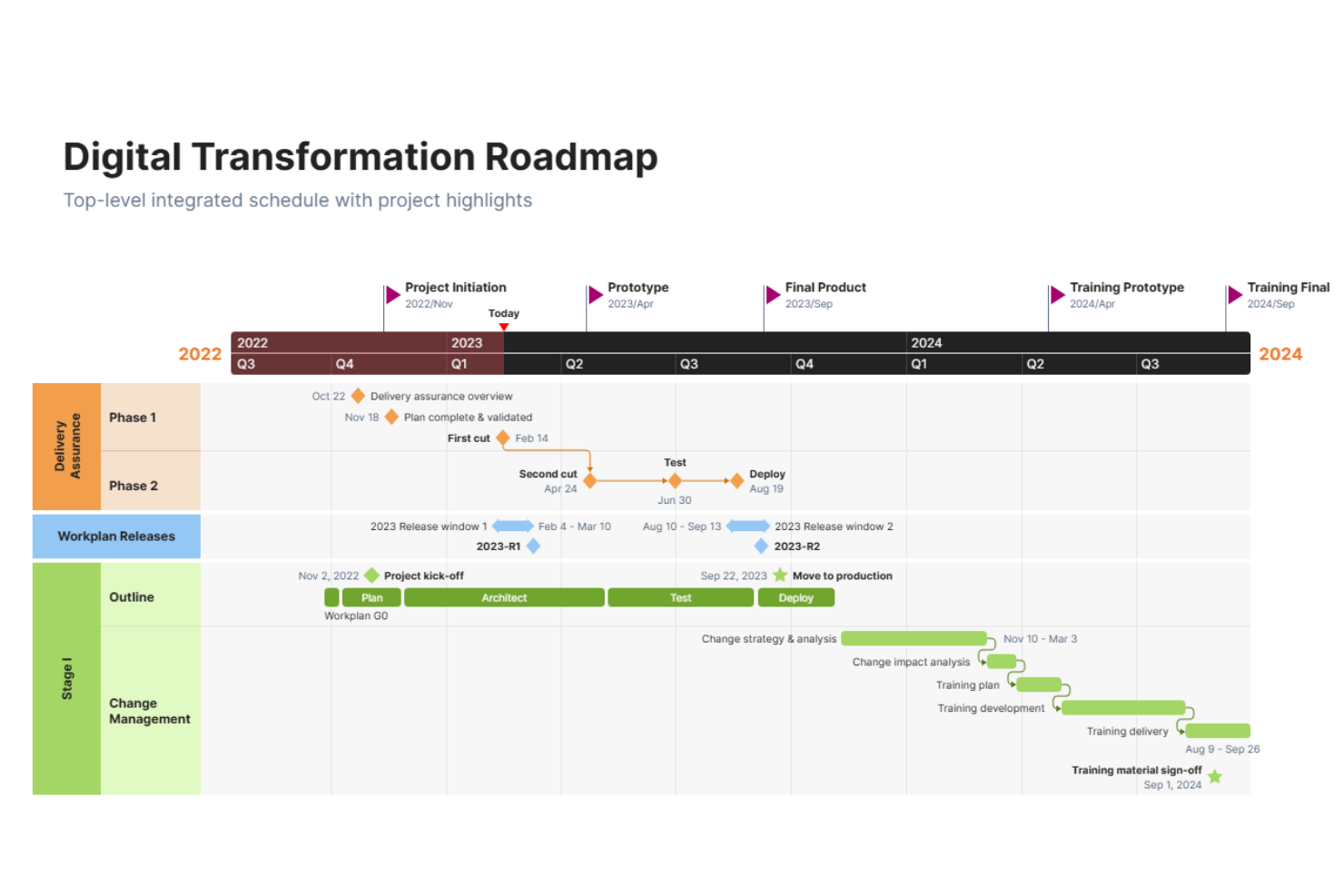
OfficeTimeline è uno strumento per creare sequenze temporali e diagrammi di Gantt, progettato per i professionisti che devono presentare visivamente piani e traguardi dei progetti. I team delle risorse umane lo utilizzano per creare elementi visivi chiari e pronti per le presentazioni, relativi alle tempistiche delle assunzioni, ai programmi di inserimento e alla pianificazione della forza lavoro.
Per chi è più adatto OfficeTimeline?
Professionisti delle risorse umane e responsabili di progetto che devono presentare piani di assunzione o della forza lavoro in formato visivo.
Perché OfficeTimeline è una buona alternativa a ClickUp
Ho scelto OfficeTimeline perché la vista integrata della sequenza temporale di ClickUp è funzionale, ma non è pronta per le presentazioni. Quando devo illustrare ai dirigenti una tabella di marcia delle assunzioni o un programma di inserimento, il componente aggiuntivo di OfficeTimeline per PowerPoint mi consente di creare elementi visivi curati e pronti per le diapositive direttamente in PowerPoint, senza bisogno di riformattarli. Mi piace anche la funzione delle corsie, che mi consente di separare flussi di lavoro come reclutamento, inserimento e formazione in percorsi visivi distinti all'interno di un'unica diapositiva. In pratica, ciò significa che il mio team può presentare un piano completo della forza lavoro in un'unica diapositiva chiara, rivolta ai dirigenti, senza esportare dati o ricostruire gli elementi visivi da zero.
Caratteristiche principali di OfficeTimeline
- Monitoraggio pianificato rispetto a effettivo: Confronta i programmi di progetto originali con l'avanzamento effettivo utilizzando sovrapposizioni della linea di base sulla sequenza temporale.
- Editor visivo con trascinamento: Riposiziona direttamente attività e traguardi nell'area di lavoro della sequenza temporale senza reinserire i dati.
- Modelli pronti all'uso: Accedi a modelli predefiniti di sequenze temporali e diagrammi di Gantt per tipologie di progetto come IT, settore farmaceutico e tabelle di marcia.
- Assegnazione delle attività: Assegna singole attività ai membri del team direttamente nella vista online della sequenza temporale.
Integrazioni di OfficeTimeline
Le integrazioni includono Microsoft PowerPoint, Microsoft Excel, Microsoft Project, Microsoft Word e Office 365.
Pros and Cons
Pros:
- Esporta direttamente le sequenze temporali nelle diapositive di PowerPoint
- Supporta le corsie per elementi visivi relativi a più progetti
- Consente il confronto con la linea di base per il monitoraggio dei progetti
Cons:
- Non offre la gestione delle attività tramite schede Kanban o elenchi
- Non è uno strumento completo di gestione dei progetti

Birdview
Ideale per la pianificazione e l'assegnazione delle risorse
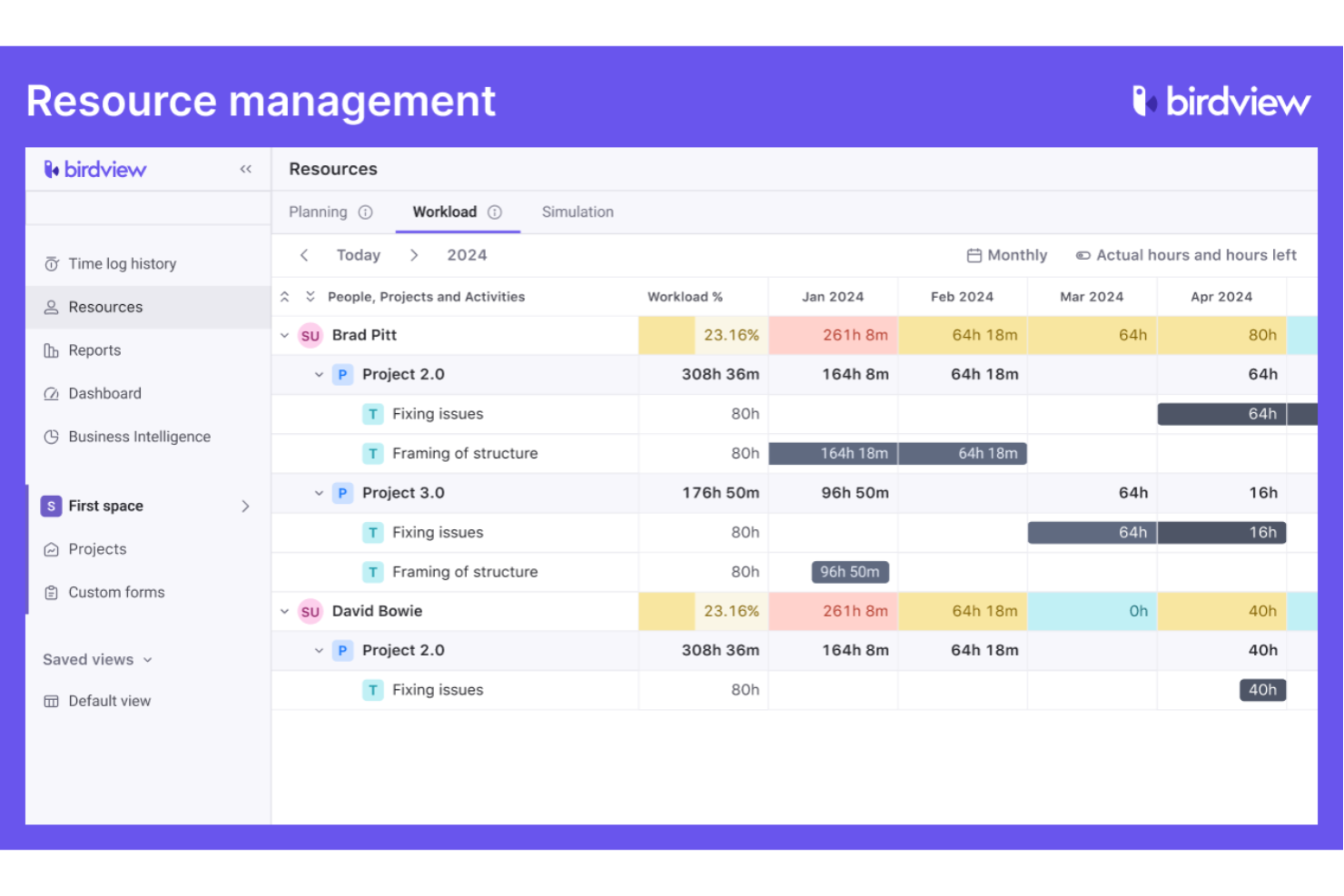
Birdview è una piattaforma per la gestione di progetti e risorse pensata per le organizzazioni che devono coordinare persone, progetti e capacità tra le squadre. I professionisti delle risorse umane e i responsabili delle operazioni utilizzano Birdview per ottenere visibilità sui carichi di lavoro, prevedere il fabbisogno di personale e bilanciare le assegnazioni in contesti dinamici.
Per chi è più adatto Birdview?
Responsabili delle risorse e squadre HR di organizzazioni di medie e grandi dimensioni che coordinano più progetti e squadre.
Ho scelto Birdview perché ClickUp non offre una pianificazione delle risorse dedicata con il livello di profondità di cui hanno effettivamente bisogno le squadre che gestiscono più progetti contemporaneamente. Il Generatore di squadre basato sull'IA di Birdview abbina i ruoli lavorativi aperti ai dipendenti o ai collaboratori disponibili in base alle competenze e alla disponibilità, così, quando prende il via un nuovo progetto, non devo esaminare manualmente i fogli di calcolo per capire chi può occuparsene. Mi affido anche alla visualizzazione delle previsioni della domanda rispetto alla capacità, che mi mostra con settimane di anticipo dove la mia squadra è sovraccarica, invece di evidenziarlo solo a posteriori. Per le squadre HR che supportano organizzazioni con molti progetti, questa visibilità sul futuro cambia il modo in cui si pianifica il personale e il lavoro.
Funzionalità principali di Birdview
- Pianificazione con diagramma di Gantt: Crea e modifica le tempistiche dei progetti con dipendenze tra attività utilizzando una visualizzazione interattiva con diagramma di Gantt.
- Portale clienti: Offri ai clienti esterni uno spazio dedicato per esaminare l'avanzamento dei progetti, commentare e approvare i materiali finali.
- Fatturazione ed emissione delle fatture: Genera fatture dettagliate in base al tempo registrato, alle spese o alle attività a tariffa fissa, utilizzando diversi modelli di fatturazione.
- Gestione del portafoglio progetti: Raggruppa i progetti in portafogli per monitorare budget, stati e priorità di più iniziative contemporaneamente.
Integrazioni di Birdview
Le integrazioni includono QuickBooks, MS Outlook, Jira, Salesforce, HubSpot, Adobe Creative Cloud, MS Project, Excel, Office 365 e Gmail.
Pros and Cons
Pros:
- Strumenti avanzati per l'allocazione e la previsione delle risorse
- Portale clienti dedicato per la collaborazione esterna
- Diagramma di Gantt con dipendenze tra attività incluso
Cons:
- Nessuna funzione integrata di chat o messaggistica
- Automazione limitata per le attività HR ripetitive

Basecamp
Ideale per la semplice collaborazione tra team
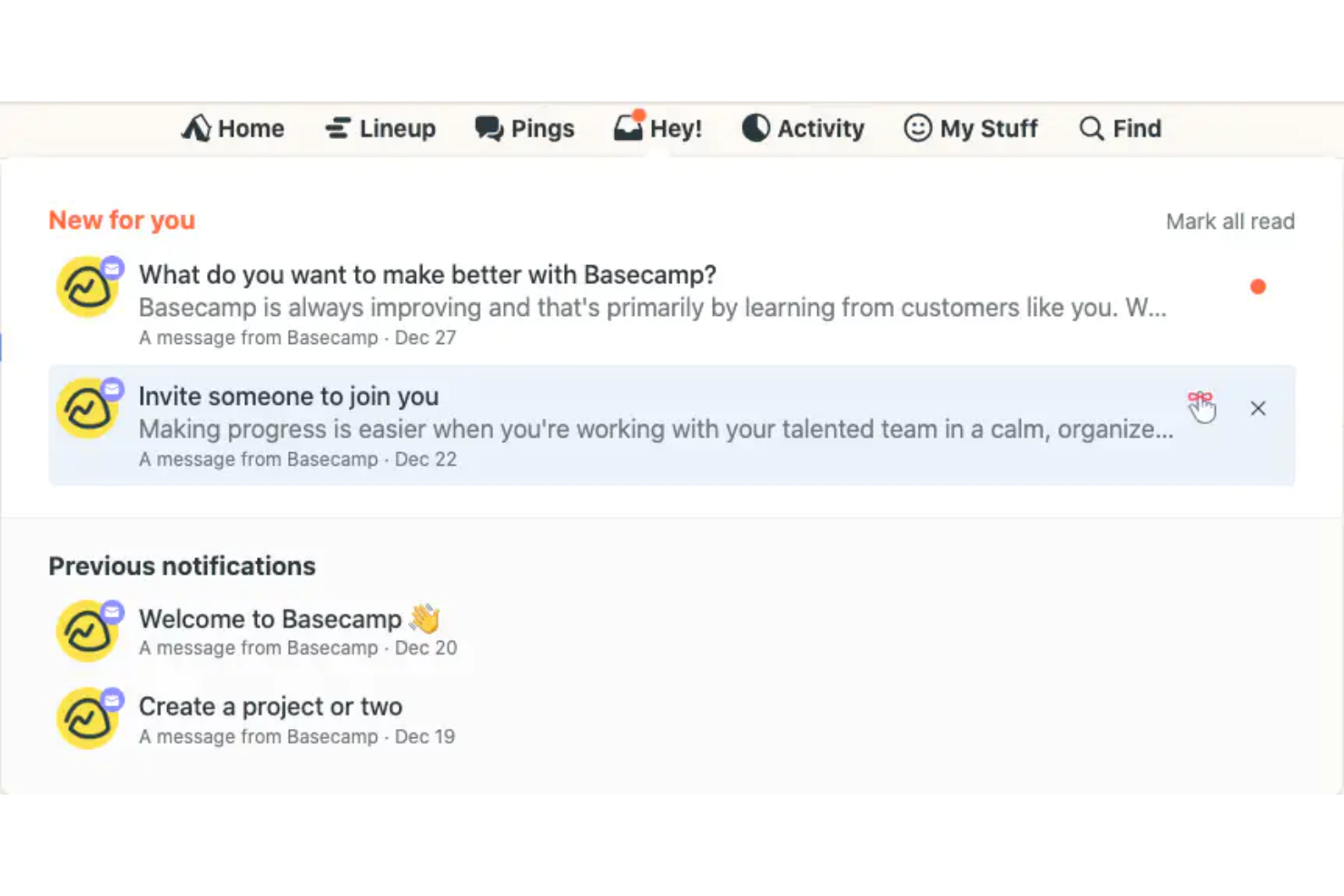
Basecamp è una piattaforma di collaborazione per team progettata per le organizzazioni che desiderano un modo semplice per gestire comunicazioni, attività e pianificazioni. I team delle risorse umane e i responsabili del personale la utilizzano per centralizzare le discussioni sui progetti, condividere file e mantenere tutti allineati senza una configurazione complessa.
Per chi è più adatto Basecamp?
Team di piccole e medie dimensioni che cercano uno spazio di lavoro semplice e centralizzato per la comunicazione e il coordinamento dei progetti.
Perché Basecamp è una buona alternativa a ClickUp
Ho scelto Basecamp perché elimina la complessità che fa sembrare ClickUp opprimente per i team che hanno solo bisogno di rimanere organizzati. Ogni progetto dispone di uno spazio dedicato con bacheche per i messaggi, liste di cose da fare, archiviazione dei file e una chat di gruppo, tutto in un unico posto e senza bisogno di configurazioni. Mi piace il modo in cui la funzione di chat Campfire mantiene le conversazioni del team collegate a progetti specifici, così le discussioni delle risorse umane sull'inserimento dei nuovi dipendenti o sugli aggiornamenti delle policy non vengono sepolte in un canale generale. Per i team che non hanno bisogno di flussi di lavoro avanzati, la struttura lineare di Basecamp rende più facile coinvolgere tutti fin dal primo giorno.
- Liste di cose da fare: Crea e assegna liste di attività con scadenze e commenti associati direttamente a ogni elemento.
- Documenti e file: Carica, archivia e condividi documenti e file all'interno dello spazio di ogni progetto.
- Tabella delle schede: Organizza e sposta le attività su una bacheca in stile kanban per monitorare il lavoro in corso.
- Grafici collinari: Visualizza l'avanzamento delle attività su una curva per mostrare cosa deve ancora essere definito rispetto a ciò che è in fase di esecuzione.
Integrazioni di Basecamp
Le integrazioni includono Google Drive, Slack, GitHub, Harvest, Clockify, Everhour, Trello, Zendesk, Dropbox e Asana.
Pros and Cons
Pros:
- La struttura lineare dei progetti riduce il disordine organizzativo
- Bacheche integrate per discussioni specifiche sui progetti
- I grafici collinari visualizzano l'avanzamento in modo unico
Cons:
- Opzioni limitate per report e analisi
- Meno integrazioni rispetto alla maggior parte dei concorrenti

Ideale per la gestione delle agenzie creative

FunctionFox è una piattaforma per la gestione dei progetti e il monitoraggio del tempo, progettata per team creativi e agenzie che devono gestire il lavoro per i clienti, le scadenze e le risorse. I professionisti delle risorse umane negli ambienti creativi la utilizzano per coordinare le assegnazioni dei progetti, monitorare i carichi di lavoro del team e tenere traccia delle ore fatturabili.
A chi è più adatto FunctionFox?
Responsabili di agenzie creative e responsabili delle risorse umane che coordinano i progetti dei clienti e i carichi di lavoro del team.
Perché FunctionFox è una buona alternativa a ClickUp
Ho scelto FunctionFox perché ClickUp è pensato per la gestione generale dei progetti, mentre FunctionFox è progettato specificamente per le agenzie creative. Per i team delle risorse umane che supportano i reparti creativi, questa distinzione è importante. Apprezzo la funzione di gestione degli accordi continuativi, che consente al mio team di monitorare le ore rispetto agli accordi in corso con i clienti e di segnalare quando un accordo si avvicina al limite: qualcosa che ClickUp non gestisce in modo nativo. Anche la visualizzazione della capacità in tempo reale è una funzione su cui faccio molto affidamento. Posso vedere esattamente chi ha disponibilità prima di assegnare nuovo lavoro, evitando così di sovraccaricare i membri del team durante i periodi intensi delle campagne.
Funzionalità principali di FunctionFox
- Flusso di approvazione dei fogli presenze: Esamina e approva i fogli presenze inviati direttamente all'interno della piattaforma prima che vengano finalizzati.
- Monitoraggio del tempo fatturabile e non fatturabile: Contrassegna le attività come fatturabili o non fatturabili durante la configurazione, in modo che le ore registrate vengano categorizzate automaticamente.
- Oltre 50 report predefiniti: Accedi a oltre 50 tipi di report pronti all'uso che riguardano le ore dei clienti, la redditività dei progetti e l'utilizzo del personale.
- Monitoraggio del budget rispetto ai valori effettivi: Confronta le stime iniziali del progetto con le ore e le spese effettivamente registrate per individuare tempestivamente gli sforamenti.
Integrazioni di FunctionFox
Non sono disponibili integrazioni native elencate pubblicamente; tuttavia, è disponibile un'API personalizzata per le integrazioni personalizzate.
Pros and Cons
Pros:
- Tiene traccia separatamente delle ore fatturabili e non fatturabili
- Include flussi di approvazione dei fogli presenze integrati
- Fornisce il monitoraggio del budget rispetto ai valori effettivi
Cons:
- Non include dipendenze tra attività o diagrammi di Gantt
- Non dispone di integrazioni native con altri strumenti

Motion
Ideale per la pianificazione delle attività basata sull'IA

Motion è una piattaforma di gestione dei progetti e delle attività basata sull'IA, progettata per le squadre delle risorse umane che devono coordinare orari, riunioni e scadenze tra reparti molto impegnati. È adatta alle organizzazioni che desiderano automatizzare la definizione delle priorità delle attività e ridurre la gestione manuale del calendario.
Per chi è più adatto Motion?
Professionisti delle risorse umane presso aziende dinamiche che necessitano di pianificazione automatizzata e gestione delle attività.
Perché Motion è una buona alternativa a ClickUp
Ho scelto Motion perché il suo pianificatore basato sull'IA crea e ricrea automaticamente il programma giornaliero delle attività della mia squadra in base a scadenze, priorità e orari di lavoro disponibili—qualcosa che ClickUp non fa nativamente. Quando viene aggiunta una nuova attività di selezione del personale o cambia una scadenza, Motion riorganizza l'intero programma senza interventi manuali. Apprezzo anche l'assistente IA per le riunioni, che individua gli orari ottimali per gli incontri e vi organizza attorno periodi di concentrazione. In pratica, questo significa che la mia squadra delle risorse umane dedica meno tempo a coordinare i calendari e più tempo al lavoro effettivo con le persone.
Funzionalità principali di Motion
- Grafico di Gantt basato sull'IA: Visualizza tutti i progetti su una sequenza temporale aggiornata in tempo reale, che aggiorna automaticamente le date delle attività e i programmi dei membri della squadra quando cambiano le scadenze.
- Generatore di flussi di lavoro basato sull'IA: Genera piani di progetto completi con attività e scadenze assegnate automaticamente a partire da una richiesta scritta o da una procedura operativa standard caricata.
- Assistente IA per gli appunti delle riunioni: Acquisisce e riassume automaticamente gli appunti delle riunioni durante le chiamate.
- Pannelli di controllo basati sull'IA: Monitorano lo stato delle attività, la capacità della squadra e l'avanzamento dei progetti per tutti i lavori attivi in un'unica vista.
Integrazioni di Motion
Le integrazioni includono Google Calendar, Zoom, Gmail, Microsoft Teams, Google Meet, Microsoft Outlook 365, iCloud Calendar e Siri.
Pros and Cons
Pros:
- Pianificazione automatica tramite IA di attività e riunioni
- Sincronizzazione del calendario in tempo reale tra le piattaforme
- Blocco integrato del tempo di concentrazione
Cons:
- Nessuna bacheca Kanban per la gestione delle attività
- Opzioni limitate per i rapporti e l'analisi


Hive è una piattaforma di gestione dei progetti e dei processi pensata per i team delle risorse umane che necessitano di flussi di lavoro flessibili e di una collaborazione centralizzata. È adatta alle organizzazioni che desiderano standardizzare l'onboarding, gestire i processi di selezione e coordinare le iniziative HR tra più team in un unico luogo.
A chi è più adatto Hive?
Responsabili HR di aziende di medie dimensioni che devono standardizzare e automatizzare i processi ricorrenti relativi al personale.
Perché Hive è una buona alternativa a ClickUp
Ho scelto Hive soprattutto per la sua libreria di modelli di progetto, che consente al mio team di applicare in pochi secondi strutture predefinite per processi HR ricorrenti come onboarding, valutazioni delle prestazioni e processi di selezione. Ogni modello include responsabili delle attività già assegnati, scadenze e layout predefiniti che il mio team può modificare prima di avviare un progetto. Apprezzo anche il fatto che Hive permetta di salvare qualsiasi progetto esistente come nuovo modello, così, una volta perfezionato un processo, possiamo definirlo per utilizzarlo in futuro. Questa combinazione di modelli pronti all'uso e personalizzati offre ai team HR un livello di coerenza dei processi che il sistema di modelli di ClickUp, pur essendo valido, richiede più configurazione per essere raggiunto.
Caratteristiche principali di Hive
- Gestione delle risorse: Assegna i membri del team ai progetti e visualizza la loro disponibilità nell'intera durata del progetto.
- Revisione e approvazioni: Esamina e approva i documenti con gli interlocutori interni o esterni direttamente all'interno di Hive.
- Livelli di urgenza: Contrassegna le attività con indicatori di urgenza codificati a colori per mettere in evidenza il lavoro con la priorità più alta all'interno di un progetto.
- Note di Hive: Crea e modifica documenti collaborativi in tempo reale con i colleghi prima, durante o dopo le riunioni.
Integrazioni di Hive
Le integrazioni includono Google Drive, Dropbox, Slack, Zoom, Microsoft Teams, Outlook Calendar, Jira, QuickBooks, Box e GitHub.
Pros and Cons
Pros:
- I modelli di progetto possono essere personalizzati e salvati
- Flussi di lavoro integrati per la revisione e le approvazioni
- La vista delle risorse mostra il carico di lavoro del team
Cons:
- Nessuna vista del diagramma di Gantt integrata
- Automazione limitata rispetto a ClickUp

Ideale per tenere traccia delle ore fatturabili dei dipendenti

ClickTime offre ai team HR e ai responsabili finanziari un modo per tenere traccia delle ore dei dipendenti, gestire i budget dei progetti e monitorare l'allocazione delle risorse. I suoi strumenti dettagliati per l'inserimento delle ore e la creazione di report aiutano le organizzazioni a migliorare la precisione della fatturazione e a controllare i costi della manodopera.
Per chi è più adatto ClickTime?
Le aziende di servizi professionali e le società di consulenza devono tenere traccia delle ore fatturabili dei dipendenti su più progetti.
Ho scelto ClickTime perché si concentra specificamente sul monitoraggio delle ore fatturabili, a differenza di ClickUp. ClickUp considera il monitoraggio del tempo come un componente aggiuntivo per la gestione dei progetti, mentre ClickTime costruisce l'intera piattaforma attorno a questa funzionalità. Apprezzo il fatto che la sua funzione per le ore fatturabili consenta al mio team di assegnare tariffe di fatturazione personalizzate in base al ruolo o al progetto, così le fatture dei clienti riflettono i costi effettivi della manodopera anziché stime fisse. Apprezzo anche lo Studio dei report, che mi consente di creare report personalizzati sui costi della manodopera per progetto, reparto o centro di costo: qualcosa che la reportistica nativa di ClickUp semplicemente non è in grado di offrire ai team orientati alla gestione finanziaria.
Funzionalità principali di ClickTime
- Fogli presenze online: Registra e gestisci le ore dei dipendenti su progetti e attività da un browser web o da un'app mobile.
- Gestione delle assenze: Tieni traccia delle richieste dei dipendenti relative a ferie, malattia e altre assenze in uno strumento dedicato per il monitoraggio delle ferie.
- Stima dei progetti: Imposta budget di ore e costi per ogni progetto e monitora in tempo reale l'avanzamento rispetto a tali stime.
- Flusso di lavoro automatizzato: Configura regole per automatizzare promemoria, approvazioni e inserimenti ricorrenti nei fogli presenze.
Integrazioni di ClickTime
Le integrazioni includono ADP WorkforceNow, Azure Entra, Bamboo HR, GitHub, Google Calendar, Google SSO, Hibob, Jira e Microsoft Outlook Calendar. Sono inoltre disponibili integrazioni personalizzate tramite API.
Pros and Cons
Pros:
- Tiene traccia delle ore fatturabili con dettaglio a livello di progetto
- Offre controlli granulari sulle autorizzazioni per i manager
- Include il monitoraggio integrato di ferie e permessi
Cons:
- Non dispone di bacheche integrate per la gestione delle attività
- Automazione dei flussi di lavoro limitata rispetto a ClickUp

Hubstaff
Ideale per il monitoraggio del tempo di lavoro
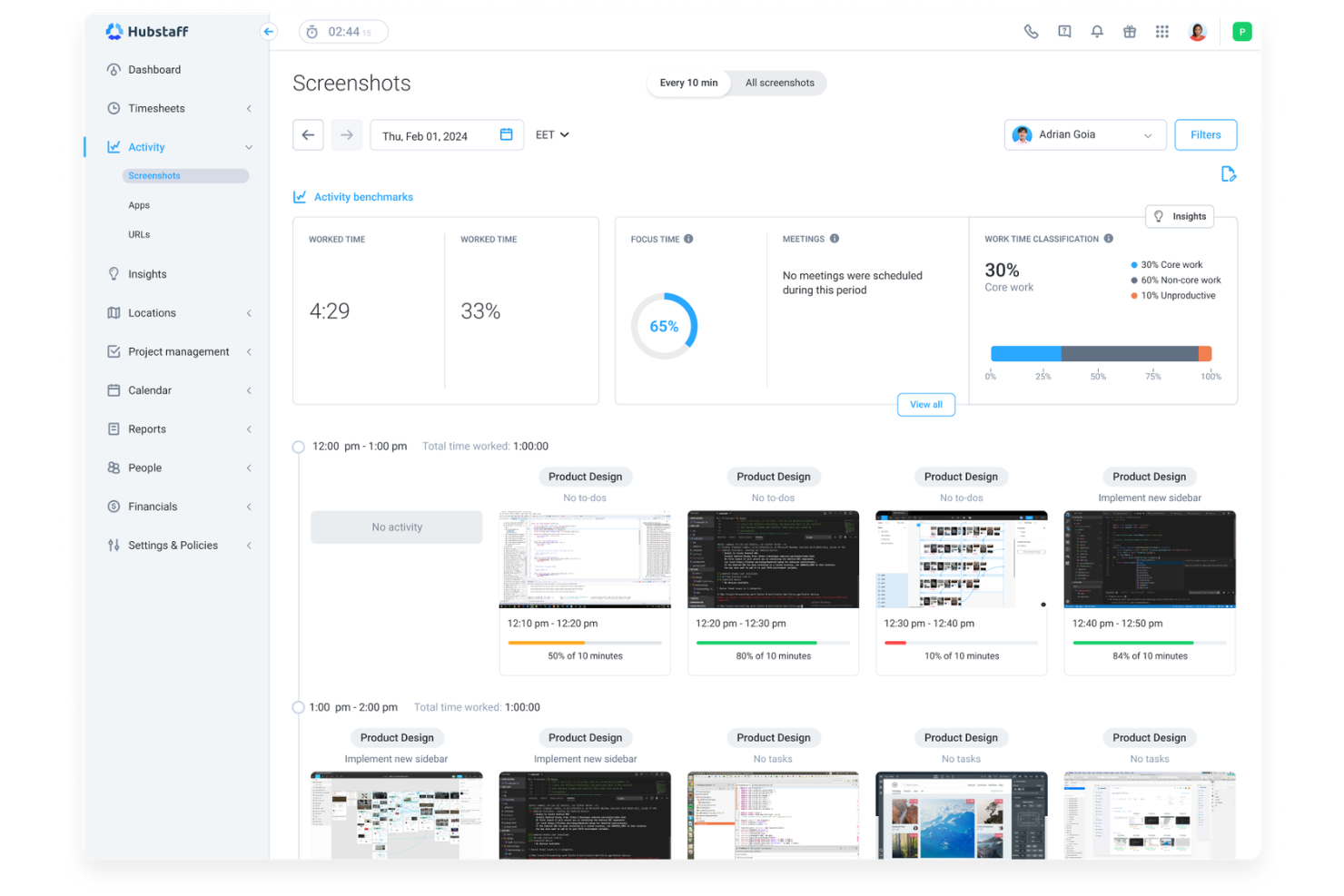
Hubstaff offre ai team delle risorse umane e ai responsabili operativi un modo per monitorare il tempo, l'attività e la produttività dei dipendenti nelle forze lavoro da remoto o distribuite. Le sue funzionalità dettagliate di monitoraggio e reportistica aiutano le aziende a gestire presenze, buste paga e conformità con meno lavoro manuale.
Per chi è più adatto Hubstaff?
Team da remoto e responsabili delle risorse umane di aziende basate sui servizi che necessitano di un monitoraggio preciso del tempo di lavoro.
Perché Hubstaff è una buona alternativa a ClickUp
Ho scelto Hubstaff perché offre un monitoraggio del tempo di lavoro molto più approfondito rispetto a ClickUp. Mentre ClickUp tratta il monitoraggio del tempo come una funzionalità secondaria, Hubstaff costruisce tutto attorno a essa. Mi piace il modo in cui i suoi fogli presenze automatici convertono direttamente le ore monitorate in dati pronti per le buste paga: il mio team non deve riconciliare manualmente le ore alla fine del periodo di paga. Apprezzo anche la geolocalizzazione basata sul GPS, che registra automaticamente l'entrata e l'uscita dei dipendenti sul campo quando entrano o escono da un luogo di lavoro, una funzionalità che ClickUp semplicemente non offre.
Funzionalità principali di Hubstaff
- Acquisizione di schermate: Acquisisci automaticamente schermate dei computer dei dipendenti a intervalli prestabiliti durante l'orario di lavoro.
- Pianificazione: Crea e assegna turni ai dipendenti, applicando il rispetto degli orari di entrata e uscita.
- Definizione del budget dei progetti: Imposta limiti di ore o costi per progetto e ricevi avvisi quando ti avvicini al limite.
- Reportistica delle presenze: Genera report dettagliati sulle presenze dei dipendenti, sugli ingressi in ritardo e sulle assenze.
Integrazioni di Hubstaff
Le integrazioni includono Asana, Trello, Jira, QuickBooks, PayPal, Slack, FreshBooks, Salesforce, Zendesk e Gusto.
Pros and Cons
Pros:
- Monitoraggio avanzato dei dipendenti con livelli di attività
- Monitoraggio GPS per team mobili e sul campo
- Buste paga automatiche basate sulle ore monitorate
Cons:
- Nessuna bacheca integrata per la gestione delle attività
- Funzionalità limitate per la collaborazione sui documenti
Altre alternative a ClickUp
Ecco alcune ulteriori alternative a ClickUp che non sono state incluse nel mio elenco, ma che vale comunque la pena prendere in considerazione:
- Kantata
Ideale per la gestione delle risorse nei servizi
- Vantage
Ideale per il monitoraggio dei progetti governativi
- Portfolio Manager
Ideale per la reportistica a livello di portafoglio


Come valuto le alternative a ClickUp
Divido la mia valutazione in criteri di base, come la gestione delle attività con più visualizzazioni e le automazioni dei flussi di lavoro, e fattori distintivi come le funzionalità di IA, i modelli specifici per le risorse umane e i controlli di conformità.
Funzionalità fondamentali per questo elenco
Quando seleziono gli strumenti per il mio elenco, assegno a ciascuno un punteggio su una scala da 0 (non offre la funzionalità) a 5 (eccelle in quest'area) per ogni funzionalità fondamentale elencata di seguito. Quindi, converto il punteggio totale dello strumento in una percentuale. Ogni strumento deve raggiungere un punteggio totale minimo del 65% per essere preso in considerazione.
- Gestione delle attività e dei progetti: cerco più visualizzazioni—bacheca, elenco, calendario, Gantt—così i team HR possono gestire i processi di selezione in Kanban e monitorare le tempistiche dell'inserimento con un diagramma di Gantt.
- Flussi di lavoro e automazioni personalizzabili: ogni strumento dovrebbe consentire di creare processi personalizzati e automazioni basate su eventi attivatori e azioni, come l'assegnazione automatica di un'attività per l'iscrizione ai benefit quando un nuovo assunto raggiunge il trentesimo giorno.
- Modelli e moduli: valuto se le piattaforme offrono modelli pertinenti per le risorse umane e strumenti per la creazione di moduli, poiché una solida lista di controllo per l'inserimento o un modulo di raccolta dati dei dipendenti consente di risparmiare ore di configurazione.
- Collaborazione e gestione dei documenti: documenti condivisi, commenti e @menzioni sono importanti per il lavoro interfunzionale delle risorse umane—si pensi alle bozze di politiche revisionate dall'ufficio legale o agli appunti dei colloqui di uscita condivisi con la dirigenza.
- Autorizzazioni e controlli sulla privacy dei dati: l'accesso granulare basato sui ruoli è fondamentale quando gli spazi di lavoro HR contengono dati sensibili dei dipendenti, quindi verifico la presenza di spazi privati, ruoli personalizzati e limitazioni per gli ospiti.
- Integrazioni e reportistica: esamino i connettori nativi per HRIS, ATS, sistemi paghe e strumenti di comunicazione, oltre ai pannelli di controllo che monitorano metriche come il tempo necessario per l'assunzione o i tassi di completamento dell'inserimento.
Una volta ottenuto un elenco di strumenti che soddisfano questi criteri, valuto ciò che distingue ogni piattaforma.
Fattori distintivi (ciò che differenzia i fornitori)
Ecco come confronto i diversi fornitori:
Funzionalità di spicco
Le funzionalità basate sull'IA rappresentano un vero elemento distintivo: valuto se uno strumento è in grado di redigere descrizioni delle posizioni, riassumere i riscontri dei colloqui o generare documenti sulle politiche senza dover uscire dallo spazio di lavoro. Anche il monitoraggio del ciclo di vita dei dipendenti è importante, poiché alcune piattaforme consentono di tracciare l'intero percorso, dalla lettera d'offerta alla procedura di uscita, in un'unica bacheca. Le funzionalità integrate di firma elettronica e i flussi di approvazione completano l'offerta, consentendo ai team HR di instradare le lettere d'offerta o le attestazioni di presa visione delle politiche senza passare a uno strumento separato.
Oltre le funzionalità
La conformità e la sicurezza dei dati incidono notevolmente sulla mia valutazione: gli spazi di lavoro HR contengono dati personali sensibili, quindi verifico la certificazione SOC 2, la conformità al GDPR e la registrazione degli audit. Anche il costo totale di proprietà è un altro fattore che considero attentamente, in particolare se i limiti delle automazioni o i prezzi per utente fanno aumentare i costi con la crescita del team HR. Valuto inoltre il supporto all'implementazione, poiché le piattaforme che forniscono modelli di inserimento specifici per le risorse umane e responsabili dedicati del successo del cliente tendono a essere adottate più rapidamente dai team che si occupano della gestione del personale.
Perché cercare un'alternativa a ClickUp?
Sebbene ClickUp sia una buona scelta come software per la gestione dei progetti, ci sono diversi motivi per cui i team delle risorse umane potrebbero cercare soluzioni alternative. Potresti essere alla ricerca di un'alternativa a ClickUp perché…
- Hai bisogno di funzionalità avanzate per la pianificazione delle risorse
- Il tuo team gestisce portafogli di progetti complessi
- Hai bisogno di un monitoraggio più approfondito della conformità alle normative sulle risorse umane
- Desideri integrazioni più specializzate per gli strumenti delle risorse umane
- La tua organizzazione ha bisogno di flussi di lavoro specifici per il settore
Se ti riconosci in una di queste situazioni, sei nel posto giusto. Il mio elenco include diverse opzioni software più adatte ai team che affrontano queste difficoltà con ClickUp e cercano soluzioni alternative.
Funzionalità principali di ClickUp
Ecco alcune delle funzionalità principali di ClickUp, per aiutarti a confrontare ciò che offrono le soluzioni alternative:
- Gestione delle attività: crea, assegna e monitora le attività con supporto per sottoattività, elenchi di controllo e monitoraggio dettagliato delle attività tra i team.
- Viste personalizzate: accedi a più viste dei progetti, tra cui viste elenco, bacheca e calendario, offrendo ai team flessibilità nel modo in cui gestiscono il lavoro.
- Monitoraggio del tempo: monitora il tempo dedicato alle attività per supportare report avanzati e una migliore pianificazione delle risorse.
- Monitoraggio degli obiettivi: allinea gli obiettivi del team al lavoro sui progetti, aiutando le organizzazioni con più team a rimanere coordinate in tempo reale.
- Documenti e wiki: crea documentazione interna simile a Notion, supportando la condivisione delle conoscenze e migliorando la facilità d'uso.
- Automazioni: gestisci le attività ripetitive con automazioni basate su regole, riducendo lo sforzo manuale nei flussi di lavoro.
- Reportistica e pannelli di controllo: utilizza strumenti avanzati di reportistica per ottenere informazioni dettagliate sulle prestazioni, sui carichi di lavoro e sull'avanzamento dei progetti.
- Integrazioni: connettiti ad altre piattaforme, come sistemi CRM, Airtable e strumenti di collaborazione, per ampliare le funzionalità.
- Generatore di moduli: raccogli dati strutturati per supportare flussi di lavoro come le richieste di presa in carico o i processi interni.
- Controlli delle autorizzazioni e della privacy: gestisci gli accessi tra i team, supportando sicurezza e controllo a livello aziendale.