

I 10 migliori software di analisi della forza lavoro del 2026: recensione

10 Elenco dei migliori software di analisi della forza lavoro


Gestire un team può essere impegnativo, soprattutto quando si cerca di dare un senso a tutti i dati. Il software di analisi della forza lavoro può aiutarti a trasformare questi dati in informazioni utili, rendendo il tuo lavoro un po’ più semplice.
In base alla mia esperienza, questi strumenti possono aiutarti a comprendere meglio il tuo team, migliorare la produttività e prendere decisioni informate. Inoltre, possono aiutarti a gestire altre sfide comuni delle risorse umane, come il monitoraggio delle prestazioni e la pianificazione delle future esigenze di personale.
Per aiutarti a risparmiare tempo, ho ricercato e analizzato i migliori software di analisi della forza lavoro, elaborando questo elenco accuratamente selezionato. Ti presenterò le principali soluzioni di analisi della forza lavoro disponibili sul mercato e ti aiuterò a scegliere quella più adatta al tuo team.
Perché fidarsi delle nostre recensioni sui software
Il nostro team testa e recensisce software dal 2012. In quanto esperti HR noi stessi, sappiamo quanto sia difficile — e importante — scegliere il software giusto.
Per questa guida, abbiamo valutato gli strumenti attraverso test pratici e ricerche indipendenti, assegnando un punteggio agli strumenti in base ai nostri criteri di selezione. Ci basiamo inoltre sulle competenze di leader di pensiero del settore e di professionisti HR attivi.
Le nostre recensioni riflettono il nostro giudizio editoriale umano, non un discorso di vendita.
Revisori esperti:
Tabella comparativa dei software di analisi della forza lavoro
Questa tabella comparativa riassume i prezzi, i periodi di prova e i dettagli delle demo delle mie migliori selezioni di software di analisi della forza lavoro
| Tool | Best For | Trial Info | Price | ||
|---|---|---|---|---|---|
| 1 | Ideale per l'analisi della forza lavoro internazionale | Demo gratuita disponibile | A partire da $5/dipendente/mese | Website | |
| 2 | Ideale per approfondimenti sulla pianificazione della forza lavoro basati sull’IA | Demo gratuita disponibile | Prezzo su richiesta | Website | |
| 3 | Ideale per il monitoraggio della produttività | Prova gratuita di 14 giorni + piano gratuito + dimostrazione gratuita disponibile | Da $10/utente/mese (fatturato annualmente) | Website | |
| 4 | Ideale per il monitoraggio dei dipendenti configurabile | Prova gratuita di 14 giorni disponibile | A partire da $3.99/utente/mese | Website | |
| 5 | Ideale per il monitoraggio della forza lavoro ibrida | Prova gratuita + demo gratuita disponibili | A partire da $14/postazione/mese (fatturato annualmente) | Website | |
| 6 | Ideale per approfondimenti HR | Demo gratuita disponibile | Prezzi su richiesta | Website | |
| 7 | Ideale per dashboard in tempo reale | Prova gratuita di 30 giorni disponibile | Prezzo su richiesta | Website | |
| 8 | Ideale per la pianificazione dell'organico | Demo gratuita + piano gratuito disponibile | Da $5/dipendente/mese (fatturato annualmente) | Website | |
| 9 | Miglior HCM per analisi avanzate | Demo gratuita disponibile | Prezzo su richiesta | Website | |
| 10 | Ideale per la visibilità sulla forza lavoro | Demo gratuita disponibile | Prezzo su richiesta | Website |

Recensioni dei migliori software di analisi della forza lavoro
Di seguito sono riportati i miei riepiloghi dettagliati dei migliori software di analisi della forza lavoro inclusi nel mio elenco. Le mie recensioni offrono un’analisi approfondita delle funzionalità principali, dei pro e dei contro, delle integrazioni e dei casi d’uso ideali di ogni strumento, per aiutarti a trovare quello più adatto a te.

Deel HR
Ideale per l'analisi della forza lavoro internazionale

Deel è una piattaforma innovativa che offre soluzioni complete per la gestione delle retribuzioni, delle risorse umane e della conformità per team globali. È progettata per aiutare le aziende a gestire con facilità la propria forza lavoro internazionale, offrendo strumenti che migliorano l'efficienza e le capacità di analisi.
Perché ho scelto Deel: Ho scelto Deel come software di analytics per la forza lavoro perché offre strumenti avanzati per la pianificazione degli organici, la gestione dei costi, la pianificazione degli scenari e l'analisi del gap delle competenze—consentendo decisioni informate e lungimiranti sulla forza lavoro. Il suo focus sulla gestione strategica della forza lavoro è supportato da approfondimenti in tempo reale e report personalizzabili, permettendo ai team di adattarsi rapidamente ai cambiamenti e rimanere allineati agli obiettivi aziendali. Queste capacità fanno di Deel una scelta solida per le organizzazioni che puntano a migliorare produttività e crescita tramite decisioni guidate dai dati.
Caratteristiche e integrazioni principali:
Le funzionalità includono il feedback dei dipendenti in tempo reale, che ti aiuta a monitorare il morale e il livello di coinvolgimento del team. Deel offre anche strumenti basati sull'intelligenza artificiale che forniscono indicazioni sulle prestazioni, consentendoti di individuare aree di miglioramento.
Le integrazioni includono Hubstaff, QuickBooks, Slack, Google Workspace, JIRA, Brex, Xero, Bob, Okta, Expensify, BambooHR e NetSuite.
Pros and Cons
Pros:
- Garantisce la conformità globale con le leggi del lavoro locali
- Funzionalità complete per la gestione di HR, IT e paghe
- Strumento solido per la gestione dei team e il lavoro da remoto
Cons:
- Configurazione complessa per i team di piccole dimensioni
- Opzioni di personalizzazione limitate
New Product Updates from Deel HR

Deel Expands Stablecoin Wallet to 80+ Countries
Deel expands its Stablecoin Wallet to 80+ countries with dollar-backed balances and optional rewards. This gives eligible contractors more ways to hold and manage earnings inside Deel. For more information, visit Deel’s official site.
 .
.
Ideale per approfondimenti sulla pianificazione della forza lavoro basati sull’IA

Paylocity è una piattaforma di analisi della forza lavoro che fornisce visibilità in tempo reale sui costi del lavoro, turnover, coinvolgimento e conformità. I suoi dashboard guidati dall’IA e gli strumenti predittivi aiutano i team HR a prevedere le necessità della forza lavoro e ad adottare azioni informate.
Perché ho scelto Paylocity: Paylocity si distingue per la capacità di trasformare i dati sulla forza lavoro in azioni concrete. Il suo dashboard Modern Workforce Index (MWI) mette in evidenza metriche chiave come il rischio di abbandono e la diversità, mentre l’assistente IA integrato fornisce risposte e raccomandazioni su richiesta. Questo rende più facile identificare problemi e intervenire rapidamente, invece di limitarsi a osservare le tendenze.
Funzionalità principali & integrazioni:
Le funzionalità includono dashboard HR personalizzabili, modellazione del rischio di turnover, monitoraggio di Diversità, Equità, Inclusione e Accessibilità (DEIA), analisi dei costi del lavoro, approfondimenti sulla programmazione e report di utilizzo dei dipendenti. Supporta inoltre il monitoraggio delle variazioni dell’organico nel tempo e mette in evidenza aree dove migliorare la fidelizzazione.
Le integrazioni includono Salesforce, Slack, NetSuite, Snowflake, Jira, Zendesk, HubSpot, OpenAI, Microsoft Teams, Microsoft SharePoint, Azure Active Directory, BambooHR, Greenhouse, ADP, SAP SuccessFactors e UltiPro.
Pros and Cons
Pros:
- Include servizi di conformità fiscale
- Opzioni di pagamento su richiesta
- Flussi di lavoro e report personalizzati
Cons:
- Opzioni di personalizzazione limitate in alcuni moduli
- La configurazione può richiedere tempo
New Product Updates from Paylocity

Paylocity Expands Expense and Purchase Request Tools
Paylocity adds connected personal cards, smarter expense categorization, and a streamlined purchase request experience. This reduces manual entry and helps finance teams manage expenses and approvals more efficiently. For more information, visit Paylocity’s official site.
 .
.
Ideale per il monitoraggio della produttività
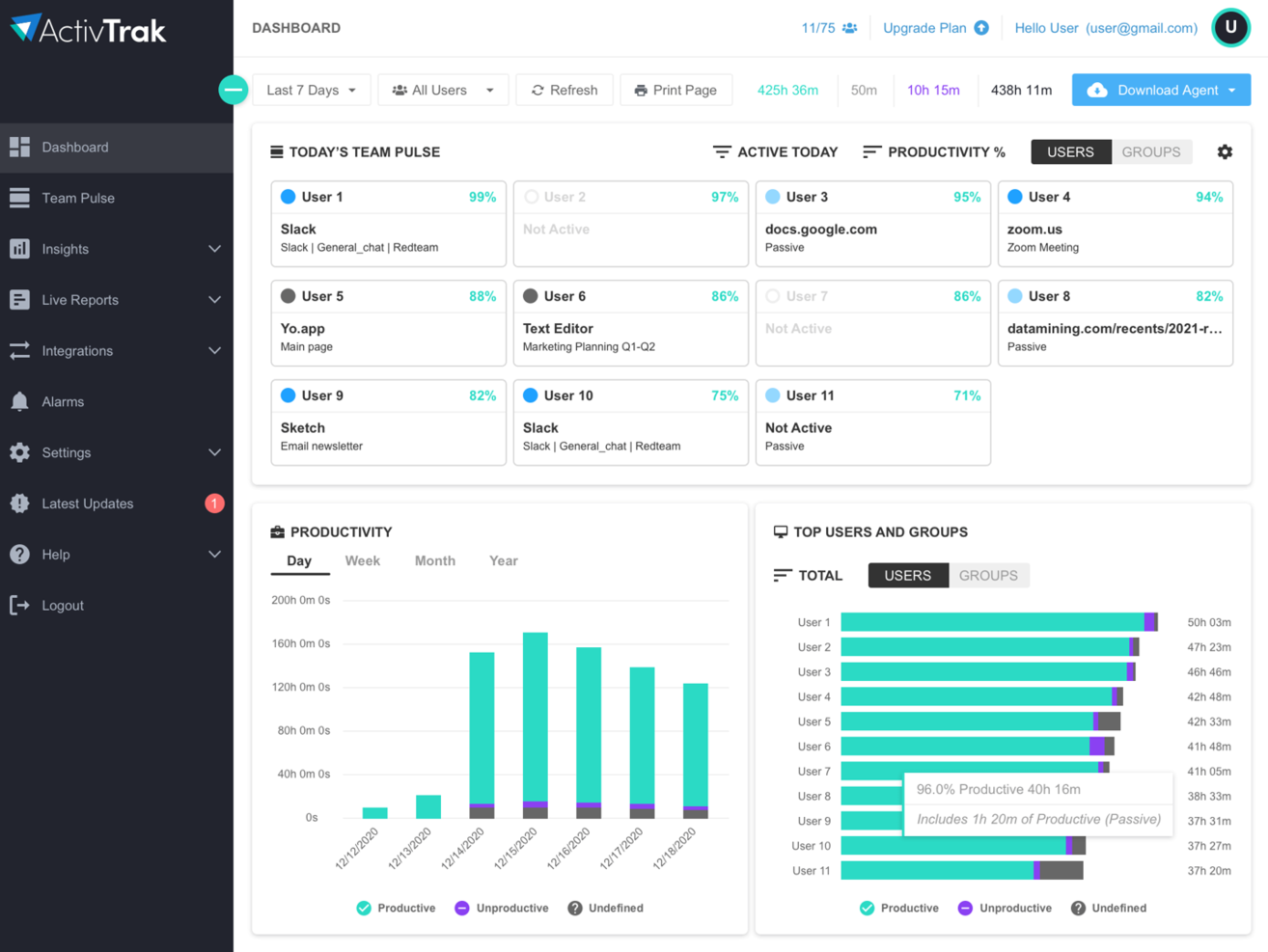
ActivTrak è una soluzione di analisi della forza lavoro pensata per le aziende che desiderano monitorare la produttività e l'attività dei dipendenti. Offre approfondimenti dettagliati sulle attività dei dipendenti per aiutare i team a comprendere le abitudini di lavoro e ottimizzare le prestazioni.
Perché ho scelto ActivTrak: È eccellente per la gestione della produttività, fornendoti una visione chiara di come i membri del team trascorrono il loro tempo. Con il suo monitoraggio in tempo reale, puoi vedere quali progetti stanno utilizzando più risorse. I report di produttività dello strumento ti aiutano anche a individuare tendenze e aree da migliorare.
Inoltre, gli avvisi personalizzabili di ActivTrak ti tengono informato sulle attività insolite, come grandi volumi di download di file o visite frequenti ai siti di social media.
Funzionalità e integrazioni in evidenza:
Funzionalità includono un monitoraggio dettagliato della produttività e report che ti aiutano a tenere traccia delle prestazioni dei dipendenti e a monitorare le attività in corso. Lo strumento offre anche avvisi personalizzabili che notificano attività insolite, aiutandoti a individuare rapidamente potenziali problemi.
Integrazioni includono Slack, Microsoft Teams, Google Workspace, Salesforce, Jira, Trello, Asana, Zoom e Microsoft Office 365.
Pros and Cons
Pros:
- Monitoraggio delle attività in tempo reale
- Report dettagliati sulla produttività
- Offre approfondimenti sui modelli di lavoro
Cons:
- Può risultare invasivo per i dipendenti
- Alcune funzionalità richiedono configurazioni tecniche
Ideale per il monitoraggio dei dipendenti configurabile

Per chi cerca una soluzione intuitiva per migliorare l'analisi della forza lavoro, WebWork Time Tracker offre un'opzione interessante. Questo software supportato dall'IA è particolarmente attraente per le aziende di settori come il recruiting, il marketing e la sanità, dove la gestione della produttività e dell'allocazione del tempo è fondamentale. Semplificando processi come il monitoraggio del tempo, il controllo della produttività e la gestione delle buste paga, risponde alla necessità di una maggiore responsabilità e prestazioni sia nei team remoti che in quelli in sede.
Perché ho scelto WebWork Time Tracker
Ho scelto WebWork Time Tracker per la sua eccezionale capacità di fornire monitoraggio in tempo reale e approfondimenti guidati dall'IA, elementi essenziali per l'analisi della forza lavoro. La funzione di rilevamento automatico del tempo del software, insieme al monitoraggio tramite screenshot e attività, offre una visualizzazione trasparente su come viene speso il tempo tra diversi compiti e progetti. Inoltre, gli strumenti di monitoraggio della produttività aiutano ad analizzare i modelli di rendimento, assicurando che il tuo team rimanga sulla buona strada per raggiungere gli obiettivi. Queste caratteristiche, nel loro insieme, ti permettono di prendere decisioni informate per aumentare la produttività e la responsabilità del team.
Caratteristiche principali di WebWork Time Tracker
Oltre alle solide capacità analitiche, WebWork Time Tracker offre anche altre funzionalità degne di nota:
- Gestione di progetti e attività: Permette di organizzare e supervisionare i compiti in modo efficiente, garantendo il rispetto delle tempistiche di progetto.
- Monitoraggio delle presenze: Controlla le presenze e i turni, fornendo dati utili per migliorare la gestione della forza lavoro.
- Calcolo automatico delle buste paga: Semplifica il processo delle paghe calcolando automaticamente le ore lavorate e generando le fatture.
- Approfondimenti guidati dall'IA: Fornisce suggerimenti e raccomandazioni utili per ottimizzare la performance del team e l'allocazione delle risorse.
Integrazioni di WebWork Time Tracker
Le integrazioni includono Slack, Notion, Asana, ClickUp, Trello, Jira, Deel e PayPal.
Pros and Cons
Pros:
- Piattaforma completa di gestione della forza lavoro
- Opzioni di monitoraggio flessibili e attente alla privacy
- Ampia gamma di funzionalità per il prezzo
Cons:
- Gli strumenti di monitoraggio possono risultare invasivi
- La configurazione iniziale richiede tempo

Teramind
Ideale per il monitoraggio della forza lavoro ibrida
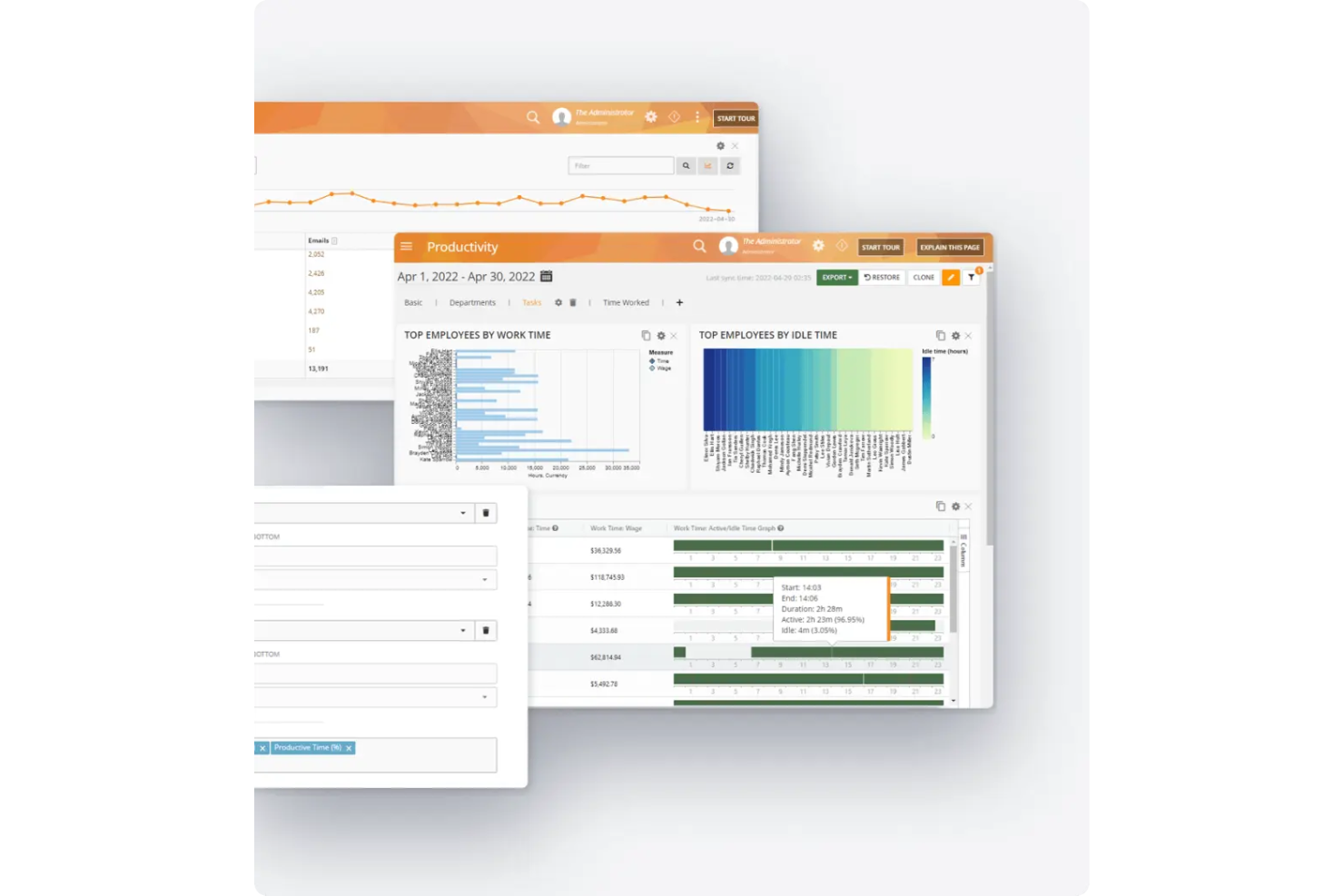
Teramind è una piattaforma di analisi della forza lavoro progettata per aiutare le organizzazioni a monitorare l'attività dei dipendenti, ottimizzare la produttività e migliorare la conformità sia per i team in ufficio che per quelli remoti. Combina analisi comportamentali, ottimizzazione dei processi e gestione dei rischi interni per offrire una visione completa delle prestazioni e della sicurezza della forza lavoro.
Perché ho scelto Teramind: Ho scelto Teramind per le sue solide capacità di monitoraggio della forza lavoro ibrida. Offre una visibilità in tempo reale sull'attività dei dipendenti, aiutandoti a comprendere i modelli di produttività e identificare i migliori performer, sia in sede che da remoto. Mi piace anche come le sue funzioni di analisi comportamentale e del sentiment forniscano una comprensione più profonda del coinvolgimento e del morale dei dipendenti.
Un altro motivo per cui Teramind si distingue è l'attenzione nell'equilibrare produttività e protezione dei dati. Gli strumenti di gestione dei rischi interni e prevenzione della perdita di dati della piattaforma possono aiutarti a mantenere la conformità proteggendo allo stesso tempo le informazioni sensibili—una combinazione preziosa per i team distribuiti.
Funzionalità principali e integrazioni:
Le funzionalità includono monitoraggio delle attività in tempo reale, analisi del sentiment e comportamentali, rilevamento dei rischi interni e ottimizzazione dei processi aziendali. Puoi personalizzare le dashboard per mettere in evidenza le metriche di produttività più rilevanti per il tuo team.
Le integrazioni includono Splunk, HP ArcSight, IBM QRadar, LogRhythm, Jira, Redmine, Zendesk, ServiceNow, Microsoft Purview, Active Directory, Microsoft BI e Tableau.
Pros and Cons
Pros:
- Strumenti approfonditi di analisi comportamentale
- Supporta team remoti e ibridi
- Include protezione dai rischi interni
Cons:
- Occasionali problemi di prestazioni del software
- Ritardi nelle risposte dell'assistenza clienti

Crunchr
Ideale per approfondimenti HR
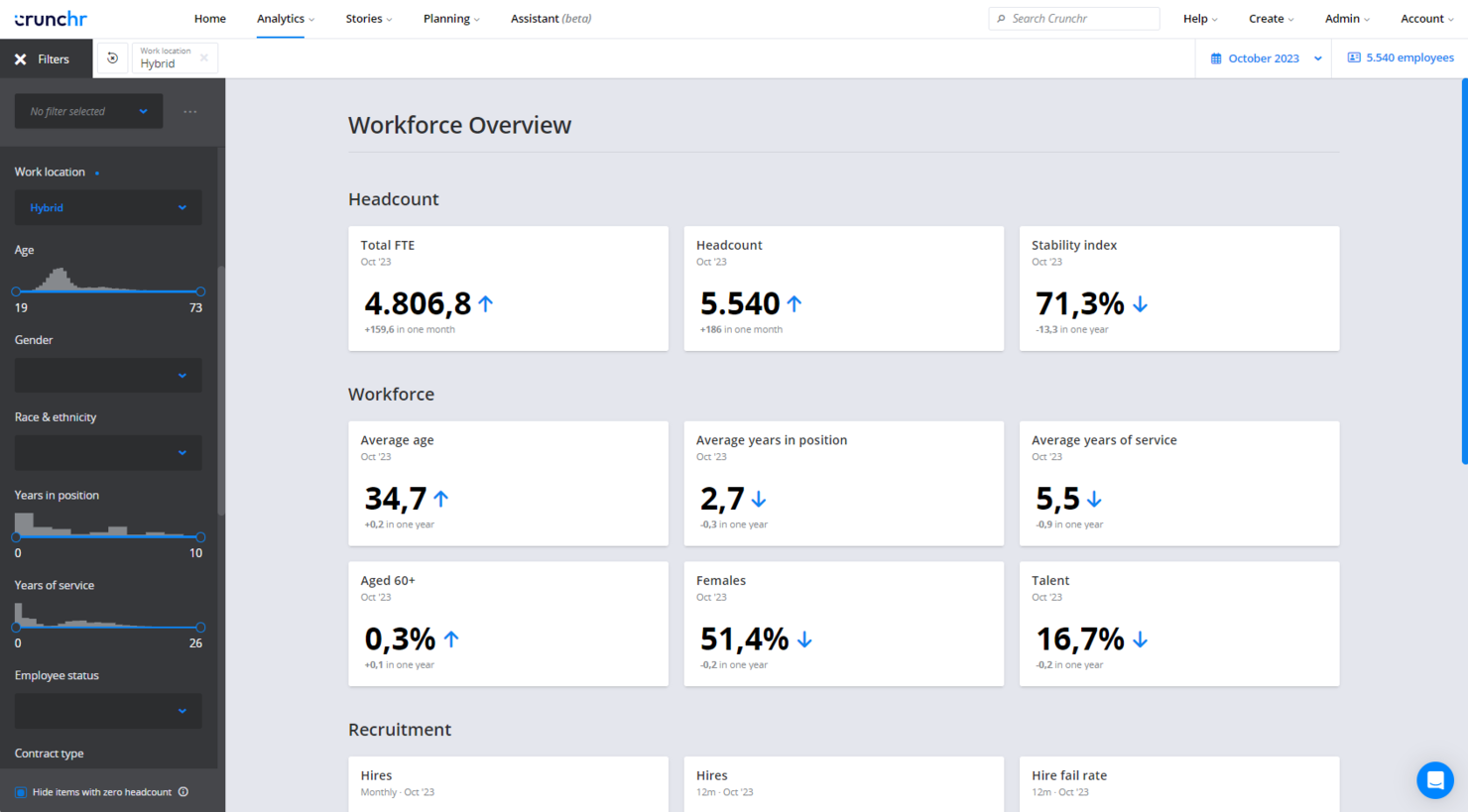
Crunchr è uno strumento di analisi della forza lavoro progettato per i team HR e i manager aziendali. Si concentra sul fornire approfondimenti sui dati della forza lavoro per migliorare le decisioni e la pianificazione strategica.
Perché ho scelto Crunchr: Offre approfondimenti HR che ti aiutano a comprendere la dinamica dei dipendenti e le tendenze della forza lavoro. Le dashboard intuitive dello strumento forniscono anche rappresentazioni visive dei dati per un'analisi rapida.
La pianificazione degli scenari di Crunchr ti consente di modellare diversi scenari della forza lavoro per vedere i possibili risultati. Lo strumento mette inoltre l'accento sulla privacy dei dati, garantendo che le tue informazioni siano sicure.
Caratteristiche principali e integrazioni:
Caratteristiche includono la pianificazione degli scenari, che ti permette di esplorare diverse strategie di gestione della forza lavoro. Le dashboard sono intuitive e consentono di visualizzare efficacemente le fonti dei dati.
Inoltre, le sue funzionalità di privacy dei dati garantiscono che le informazioni del tuo team rimangano protette.
Integrazioni includono Workday, SAP SuccessFactors, Oracle, ADP, Cornerstone e BambooHR.
Pros and Cons
Pros:
- Funzionalità di pianificazione degli scenari
- Supporta la pianificazione strategica della forza lavoro
- Facile onboarding per i nuovi utenti
Cons:
- Nessuna applicazione mobile
- Opzioni di personalizzazione limitate

Visier
Ideale per dashboard in tempo reale
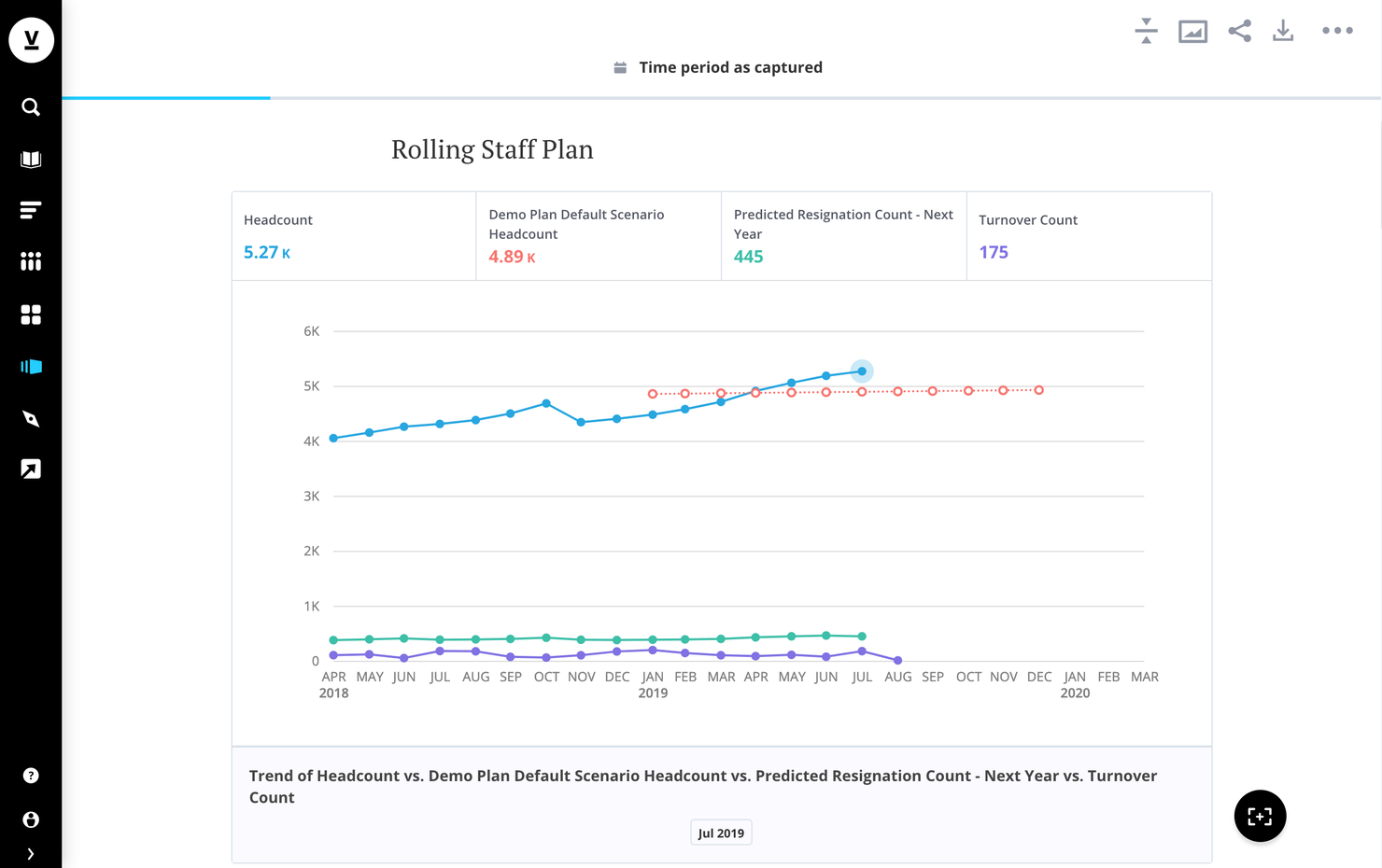
Visier è un software di analisi della forza lavoro pensato per professionisti HR e leader aziendali. Offre informazioni in tempo reale sui dati della forza lavoro per migliorare l'efficienza operativa, la pianificazione e il processo decisionale.
Perché ho scelto Visier: Eccelle nel fornire dashboard in tempo reale, permettendoti di visualizzare i dati mentre si aggiornano. Inoltre, le metriche e le dashboard preimpostate ti fanno risparmiare tempo offrendo analisi pronte all'uso.
Il suo assistente digitale, Vee, offre analisi self-service per fornire al tuo team accesso rapido alle informazioni. Inoltre, gli strumenti di automazione di Visier semplificano le attività analitiche di routine, rendendolo una scelta efficiente per il tuo team.
Funzionalità e integrazioni principali:
Funzionalità includono un modello dati completo che integra sia i dati aziendali che quelli delle persone, fornendo una visione olistica della tua forza lavoro. Vee, l'assistente digitale, migliora l'esperienza utente offrendo analisi self-service in base alle tue specifiche esigenze.
Visier include anche metriche e dashboard preimpostate che forniscono informazioni rapide senza configurazioni complesse.
Integrazioni includono Salesforce, AWS e diverse altre applicazioni di terze parti.
Pros and Cons
Pros:
- Visualizzazione dati in tempo reale
- Strumenti di automazione per attività di routine
- Alto indice di soddisfazione degli utenti
Cons:
- Flessibilità di personalizzazione limitata
- Nessuna app mobile disponibile
ChartHop
Ideale per la pianificazione dell'organico

ChartHop è una piattaforma di analisi della forza lavoro per i team HR e i dirigenti aziendali che supporta la pianificazione dell'organico e iniziative di progettazione organizzativa. Aiuta a visualizzare le strutture dei team e pianificare efficacemente le esigenze future della forza lavoro.
Perché ho scelto ChartHop: È specializzato nella pianificazione dell'organico e offre strumenti per mappare la crescita futura del team. La visualizzazione dell'organigramma della piattaforma ti aiuta a vedere come i ruoli si allineano all'interno dell'azienda. Puoi anche utilizzare la funzione di budgeting per allocare le risorse con precisione.
Inoltre, la pianificazione di scenari di ChartHop permette di anticipare le future esigenze di personale e i risultati, prevedendo in modo proattivo i colli di bottiglia nell'organico.
Caratteristiche e integrazioni principali:
Caratteristiche includono una visualizzazione dell'organigramma che mostra chiaramente la struttura aziendale. La funzione di budgeting aiuta il tuo team a gestire le risorse in modo efficace. La pianificazione degli scenari consente di esplorare diverse strategie di staffing e i loro potenziali impatti.
Integrazioni includono BambooHR, Greenhouse, ADP, Rippling, Workday, Gusto, UKG, Lever, Namely e Slack.
Pros and Cons
Pros:
- Visualizzazione dettagliata dell'organigramma
- Supporta la pianificazione delle risorse
- Ideale per la progettazione organizzativa
Cons:
- Può essere complesso per i nuovi utenti
- Richiede aggiornamenti costanti dei dati
New Product Updates from ChartHop
ChartHop Adds Role and Filter Controls for Ask ChartHop
AI Pro customers can now set access controls for Ask ChartHop in AI settings, restricting who can use the assistant by role or filter criteria. For more information, visit ChartHop's official site.
 .
.
Workday
Miglior HCM per analisi avanzate

Workday è una piattaforma cloud-based per la gestione del capitale umano (HCM) che aiuta le organizzazioni a gestire le operazioni della forza lavoro e i processi finanziari. Fornisce alle aziende insight basati sui dati per supportare le decisioni e ottimizzare la pianificazione della forza lavoro.
Perché ho scelto Workday: Offre analisi su misura per la gestione del capitale umano, fornendo al tuo team informazioni in tempo reale sulle tendenze della forza lavoro. Presenta capacità predittive per anticipare i fabbisogni di personale e individuare potenziali rischi, aiutandoti a prendere decisioni informate.
Con dashboard integrate, è possibile visualizzare i principali indicatori della forza lavoro senza report manuali. La piattaforma comprende anche l’analisi del sentiment, che consente di misurare il benessere e il coinvolgimento dei dipendenti nel tempo.
Funzionalità e integrazioni principali:
Funzionalità includono il rilevamento delle anomalie basato su intelligenza artificiale che identifica cambiamenti nella forza lavoro prima che diventino problematici. Il monitoraggio automatico della conformità mantiene la tua organizzazione allineata ai requisiti normativi. Inoltre, la reportistica interattiva e approfondita permette di esplorare i dati nel dettaglio, semplificando la pianificazione della forza lavoro.
Integrazioni includono Salesforce, Microsoft Office 365, Slack, ServiceNow, Google Workspace, Okta, SAP, ADP, Oracle e LinkedIn.
Pros and Cons
Pros:
- Analisi HCM approfondite
- Informazioni sui dati in tempo reale
- Supporta le decisioni strategiche
Cons:
- I dettagli sui prezzi non sono trasparenti
- Implementazione iniziale complessa

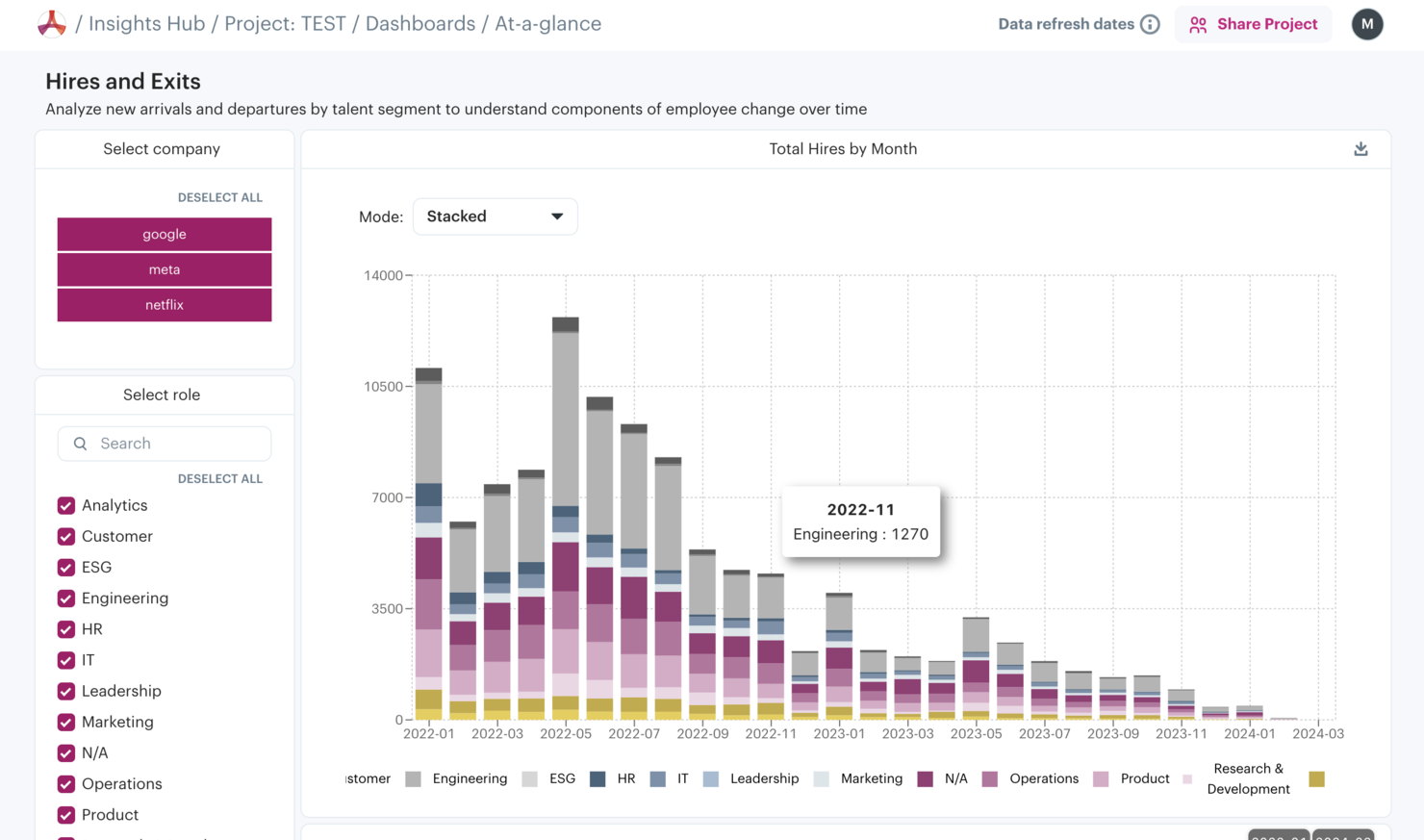
Aura è uno strumento di analisi della forza lavoro progettato per le aziende che desiderano ottenere informazioni sulle prestazioni e sull'engagement dei dipendenti. Si rivolge a team HR e manager che hanno bisogno di monitorare e migliorare la produttività della forza lavoro.
Perché ho scelto Aura: Si concentra sulla visibilità della forza lavoro, offrendo strumenti che forniscono una visione chiara delle attività dei dipendenti e delle metriche di performance. Le dashboard in tempo reale della piattaforma aiutano a monitorare le tendenze della produttività man mano che si verificano. Puoi anche personalizzare i report per evidenziare aree di interesse specifiche.
Funzionalità e integrazioni principali:
Funzionalità includono dashboard in tempo reale che consentono di monitorare le tendenze di produttività. La piattaforma offre report personalizzabili per aiutarti a concentrarti su metriche specifiche. Aura garantisce inoltre la privacy dei dati, offrendo un ambiente sicuro per le informazioni del tuo team.
Integrazioni includono Slack, Microsoft Teams, Google Workspace, Salesforce, Jira, Trello, Asana, Zoom, Microsoft Office 365 e ADP.
Pros and Cons
Pros:
- Visibilità in tempo reale sulla forza lavoro
- Supporta il monitoraggio della produttività
- Utile per tracciare l'engagement
Cons:
- Le informazioni sui prezzi non sono trasparenti
- La configurazione iniziale può essere complessa
Altri software di analisi della forza lavoro
Ecco alcuni strumenti aggiuntivi di analisi della forza lavoro che non sono entrati nel mio elenco, ma che vale comunque la pena prendere in considerazione:
- Nakisa
Ideale per la pianificazione strategica
- Knoetic
Ideale per le people analytics
- Insightful
Ideale per il monitoraggio dei dipendenti
- Prodoscore
Ideale per assegnare punteggi giornalieri di produttività
- Agentnoon
Ideale per le prestazioni del team
- Intelogos
Ideale per analisi predittive
- One Model
Ideale per l'integrazione dei dati


Come Valuto i Software di Workforce Analytics
Analizzo gli strumenti di workforce analytics su due livelli: le caratteristiche di base imprescindibili—come le integrazioni HRIS, gli indicatori HR integrati e la previsione dell’attrito—e gli elementi differenzianti che distinguono le migliori opzioni.
Funzionalità Chiave (Requisiti Minimi per questa Lista)
Quando seleziono gli strumenti per la mia lista, li valuto ciascuno su una scala da 0 (non offre la funzionalità) a 5 (eccelle in quest’area) per ogni funzionalità chiave elencata qui sotto. Calcolo poi il punteggio totale dello strumento in percentuale. Ogni software deve raggiungere un punteggio minimo totale del 65% per essere considerato per l’inclusione.
- Integrazione dei Dati delle Persone: Verifico se la piattaforma può raccogliere dati dai tuoi sistemi HR principali—HRIS, ATS, payroll, strumenti di performance—in un unico livello di analisi anziché costringerti a esportazioni manuali e unione di fogli Excel.
- Metriche HR & KPI Preimpostati: Un buon software offre metriche pronte all’uso come tasso di turnover, time-to-fill e assenteismo affinché il tuo team possa ottenere insight fin dal primo giorno, senza dover creare formule da zero.
- Workforce Analytics Predittiva: Valuto se la piattaforma va oltre i report storici per modellare risultati come punteggi di rischio di abbandono o domanda futura di assunzioni utilizzando metodi statistici o AI.
- Dashboard e Visualizzazioni Personalizzabili: Le migliori opzioni consentono di costruire viste specifiche per ruolo—un riepilogo esecutivo per il CHRO, un dettaglio a livello di team per un responsabile di reparto—senza doversi affidare a un analista dati per la configurazione.
- Pianificazione Organico & Modellazione di Scenari: Cerco strumenti che supportino la pianificazione degli organici e gli scenari what-if, come simulare l’impatto di un blocco assunzioni sulla copertura delle competenze nei diversi business unit nei prossimi due trimestri.
- Analytics su DEI & Compensi: Le piattaforme avanzate offrono segmentazione demografica e analisi dell’equità retributiva con filtri intersezionali, così puoi confrontare i gap di compensazione tra genere, etnia, livello di ruolo e geografia.
Una volta che ho un elenco di strumenti che soddisfano questi criteri, considero cosa distingue ciascuna piattaforma.
Fattori Differenzianti (Cosa Distingue i Fornitori)
Ecco come confronto e metto a paragone i diversi fornitori:
Caratteristiche Distintive
Pongo particolare attenzione alle interrogazioni in linguaggio naturale, che consentono ai generalisti HR di porre domande come "qual è il nostro turnover volontario nell’ingegneria?" senza scrivere alcuna formula. Anche i dati di benchmarking esterni rappresentano un grande fattore differenziante: conoscere il tasso di attrito è utile, ma contestualizzarlo rispetto ai pari del settore cambia del tutto la conversazione. Valuto inoltre le capacità di intelligenza delle competenze, poiché le piattaforme che mappano e monitorano automaticamente le skill del personale offrono un vantaggio reale ai responsabili del talento nella pianificazione della mobilità interna o dei programmi di reskilling.
Oltre le Caratteristiche
La sicurezza dei dati qui è fondamentale, perché le piattaforme di workforce analytics gestiscono alcune delle informazioni più sensibili dell’organizzazione—dettagli sui compensi, dati demografici, valutazioni delle performance. Verifico la conformità SOC 2, i controlli di accesso basati sui ruoli e opzioni di anonimizzazione dei dati. Implementazione e time-to-value sono altri aspetti che peso molto: piattaforme con modelli dati HR pre-configurati portano i team ai primi insight in settimane, non mesi. Considero infine il supporto alla maturità analitica—se il fornitore offre formazione, playbook o consulenza per aiutare i team a passare dal reporting base all’analisi predittiva.
Come scegliere un software di analisi della forza lavoro
È facile perdersi in lunghi elenchi di funzionalità e strutture di prezzo complesse. Per aiutarti a rimanere concentrato mentre affronti il tuo processo di selezione del software, tieni presenti i seguenti fattori:
| Fattore | Cosa considerare |
| Scalabilità | Assicurati che il software possa crescere insieme al tuo team. Cerca soluzioni in grado di gestire un volume crescente di dati e utenti senza compromettere le prestazioni. |
| Integrazioni | Verifica se il software si integra con i sistemi e gli strumenti per le risorse umane già in uso. Un flusso di dati continuo tra le piattaforme fa risparmiare tempo e riduce gli errori. |
| Personalizzazione | Scegli un software che ti consenta di adattare pannelli di controllo e report alle tue esigenze specifiche. Le opzioni personalizzabili ti aiutano a concentrarti su ciò che conta di più. |
| Facilità d’uso | Scegli un’interfaccia intuitiva che richieda una formazione minima. Un design intuitivo aiuterà il tuo team a diventare operativo rapidamente. |
| Budget | Considera il costo totale di proprietà, inclusi i costi di abbonamento, di configurazione e gli eventuali componenti aggiuntivi. Assicurati che sia compatibile con i tuoi vincoli finanziari. |
| Misure di sicurezza | Verifica che il software disponga di solide misure di protezione dei dati. Cerca funzionalità di crittografia, controlli degli accessi e conformità alle normative sulla privacy dei dati. |
| Assistenza | Valuta la qualità dell’assistenza clienti offerta. Un’assistenza tempestiva può essere fondamentale se riscontri problemi o hai bisogno di aiuto. |
| Profondità delle analisi | Valuta la profondità e l’ampiezza delle funzionalità di analisi. Assicurati che offra le informazioni necessarie per guidare le decisioni strategiche e migliorare i risultati della forza lavoro. |
Tendenze nei software di analisi della forza lavoro
Come parte del mio processo di ricerca, ho raccolto innumerevoli aggiornamenti di prodotto, comunicati stampa e registri delle versioni da diversi fornitori di software di analisi della forza lavoro. Ecco alcune delle tendenze emergenti che ho notato:
- Analisi predittiva: l'analisi predittiva sta acquisendo sempre più importanza, aiutando le aziende a prevedere le tendenze della forza lavoro e a prendere decisioni proattive. Strumenti come Knoetic Intelogos stanno integrando queste funzionalità per migliorare la pianificazione strategica e anticipare le esigenze future.
- Visualizzazione dei dati in tempo reale: sempre più fornitori offrono la visualizzazione dei dati in tempo reale per fornire informazioni immediate sulle metriche della forza lavoro. Questa tendenza consente ai team di agire rapidamente sulla base dei dati attuali, come avviene su piattaforme come Visier.
- Metriche del coinvolgimento dei dipendenti: si presta sempre maggiore attenzione al monitoraggio del coinvolgimento e del sentiment dei dipendenti. Analizzando questi parametri di riferimento, le aziende possono migliorare la cultura aziendale e i tassi di fidelizzazione. Aura è un esempio di strumento che pone l'accento su questa tendenza.
- Pianificazione degli scenari: la pianificazione degli scenari sta diventando sempre più importante, consentendo alle aziende di esplorare diverse strategie per la forza lavoro e i relativi risultati. ChartHop e Nakisa offrono entrambe questa funzionalità per supportare la pianificazione strategica della forza lavoro.
- Maggiore privacy dei dati: con l'aumento delle normative sulla protezione dei dati, i fornitori stanno dando priorità a funzionalità avanzate per la privacy dei dati. Questa tendenza garantisce che i dati della forza lavoro siano sicuri e conformi alle normative, un aspetto prioritario per tutti gli strumenti di analisi della forza lavoro presenti in questo elenco.
Che cos'è un software di analisi della forza lavoro?
Il software di analisi della forza lavoro è uno strumento che aiuta le organizzazioni ad analizzare e interpretare i dati sui dipendenti per migliorare il processo decisionale e l'efficienza. I professionisti delle risorse umane, i responsabili e i dirigenti aziendali utilizzano generalmente questi strumenti per ottenere informazioni sulle tendenze della forza lavoro e ottimizzare le prestazioni dei team.
Queste piattaforme includono funzionalità come l'analisi predittiva, la visualizzazione dei dati in tempo reale e le metriche del coinvolgimento dei dipendenti per aiutare a prevedere le tendenze, agire sulla base dei dati attuali e migliorare la cultura aziendale.
Nel complesso, questi strumenti forniscono informazioni preziose che guidano la pianificazione strategica della forza lavoro e migliorano l'efficacia organizzativa.
Consiglio dell'esperto: se hai bisogno di ulteriore assistenza oltre al semplice software, o anche di aiuto per configurare un nuovo sistema di analisi della forza lavoro, potresti rivolgerti anche a un consulente di analisi delle risorse umane per ricevere assistenza.
Funzionalità dei software di analisi della forza lavoro
Quando scegli un software di analisi della forza lavoro, presta attenzione alle seguenti funzionalità chiave:
- Analisi predittiva: questa funzionalità aiuta a prevedere le tendenze della forza lavoro e supporta la pianificazione strategica fornendo informazioni sulle esigenze future.
- Visualizzazione dei dati in tempo reale: offre informazioni immediate sulle metriche della forza lavoro, consentendo ai team di agire rapidamente sulla base dei dati attuali.
- Metriche del coinvolgimento dei dipendenti: molti sistemi monitorano il sentiment e il coinvolgimento dei dipendenti, contribuendo a migliorare la cultura aziendale e i tassi di fidelizzazione.
- Pianificazione degli scenari: questa funzionalità consente alle aziende di esplorare diverse strategie per la forza lavoro e i relativi potenziali risultati, così da prendere decisioni migliori.
- Dashboard personalizzabili: molte piattaforme consentono agli utenti di personalizzare le dashboard per concentrarsi sui punti dati più importanti per la propria organizzazione.
- Controlli sulla privacy dei dati: si tratta di un insieme di funzionalità di sicurezza che garantisce la protezione dei dati della forza lavoro e la conformità alle normative sulla protezione dei dati.
- Funzionalità di integrazione: le integrazioni facilitano il flusso continuo dei dati tra il software e i sistemi HR esistenti, per una gestione efficiente dei dati.
- Monitoraggio del tempo: la maggior parte dei sistemi fornisce informazioni sulle tendenze della produttività per aiutare gli utenti a gestire efficacemente le prestazioni dei team.
- Informazioni basate sull'AI: molti sistemi utilizzano l'AI per offrire raccomandazioni e informazioni basate sull'analisi dei dati, migliorando i processi decisionali.
- Scalabilità: garantisce che il software possa crescere insieme alla tua organizzazione, gestendo in modo efficiente un volume crescente di dati e utenti.
Vantaggi dei software di analisi della forza lavoro
L'implementazione di un software di analisi della forza lavoro può offrire diversi vantaggi al tuo team e alla tua azienda. Ecco alcuni dei benefici che puoi aspettarti:
- Migliore processo decisionale: grazie all'analisi predittiva e ai dati in tempo reale, puoi prendere decisioni informate in linea con i tuoi obiettivi aziendali.
- Maggiore coinvolgimento dei dipendenti: il monitoraggio delle metriche di coinvolgimento ti aiuta a comprendere la percezione dei dipendenti e a migliorare la cultura aziendale.
- Pianificazione strategica della forza lavoro: gli strumenti di pianificazione degli scenari e i pannelli di controllo personalizzabili ti consentono di pianificare efficacemente le esigenze future della forza lavoro.
- Aumento della produttività: il monitoraggio del tempo e gli approfondimenti sulle prestazioni ti aiutano a individuare le tendenze della produttività e a ottimizzare le prestazioni del team.
- Efficienza dei costi: analizzando i dati sulla forza lavoro, puoi individuare le aree in cui ridurre i costi e allocare le risorse in modo oculato.
Costi e prezzi dei software per l'analisi della forza lavoro
La scelta di un software per l'analisi della forza lavoro richiede la comprensione dei diversi modelli e piani tariffari disponibili. I costi variano in base alle funzionalità, alle dimensioni del team, ai componenti aggiuntivi e ad altri fattori.
La tabella seguente riepiloga i piani più comuni, i relativi prezzi medi e le funzionalità tipicamente incluse nelle soluzioni software per l'analisi della forza lavoro.
Tabella comparativa dei piani per i software di analisi della forza lavoro
| Tipo di piano | Prezzo medio | Funzionalità comuni |
| Piano gratuito | $0 | Analisi di base, spazio di archiviazione dei dati limitato e assistenza minima. |
| Piano personale | $5-$25 per utente/mese | Visualizzazione dei dati, reportistica di base e integrazioni limitate. |
| Piano aziendale | $25-$50 per utente/mese | Analisi avanzata, pannelli di controllo personalizzati e maggiore spazio di archiviazione dei dati. |
| Piano Enterprise | $50-$100 per utente, al mese | Accesso a tutte le funzionalità, analisi predittiva, assistenza prioritaria e integrazioni illimitate. |
Domande frequenti sui software di analisi della forza lavoro
Ecco alcune risposte alle domande frequenti sui software di analisi della forza lavoro:
Quali sono alcuni vantaggi che prevedi di ottenere dall'uso dell'analisi della forza lavoro?
L’analisi della forza lavoro può migliorare il processo decisionale basato sui dati e il coinvolgimento dei dipendenti. Questi sistemi possono aiutare a rilevare i primi segnali di esaurimento e ad aumentare la produttività della forza lavoro. Puoi anche ridurre i costi individuando i software inutilizzati e bilanciando in modo più efficace i carichi di lavoro tra i dipendenti.
Qual è l'obiettivo principale dell'analisi della forza lavoro per la gestione dei talenti?
L’obiettivo principale è allineare l’assunzione, il coinvolgimento dei dipendenti, la fidelizzazione e lo sviluppo agli obiettivi aziendali. L’analisi della forza lavoro ti aiuta a raccogliere e analizzare i dati per garantire che le strategie di gestione dei talenti supportino gli obiettivi della tua organizzazione.
Qual è la differenza tra l'analisi delle risorse umane e l'analisi della forza lavoro?
L’analisi delle risorse umane si concentra sul miglioramento dei metodi di assunzione e sulla fidelizzazione dei lavoratori qualificati. L’analisi della forza lavoro, invece, fornisce informazioni sulle prestazioni complessive della forza lavoro, offrendo un ritorno sull’investimento per i risultati economici dell’organizzazione.
Come posso garantire la privacy dei dati con un software di analisi della forza lavoro?
Assicurati che il software scelto disponga di solide misure di protezione dei dati, come la crittografia e i controlli degli accessi basati sui ruoli. La conformità alle normative sulla privacy dei dati è fondamentale per proteggere le informazioni del tuo team durante l’utilizzo degli strumenti di analisi della forza lavoro.
Il software di analisi della forza lavoro può prevedere le esigenze future della forza lavoro?
Sì, molte piattaforme di analisi della forza lavoro offrono strumenti di analisi predittiva che prevedono le tendenze della forza lavoro. Questa funzionalità ti aiuta a pianificare le future esigenze di personale e a prendere decisioni proattive in linea con gli obiettivi aziendali.
In che modo il software di analisi della forza lavoro migliora il coinvolgimento dei dipendenti?
Monitorando le metriche di coinvolgimento, il software di analisi della forza lavoro aiuta a individuare le aree da migliorare nella cultura aziendale. Fornisce informazioni che possono portare a una maggiore soddisfazione lavorativa e a tassi di fidelizzazione più elevati tra i dipendenti.