

I 10 migliori software per la gestione delle paghe per team remoti nel 2026

Elenco dei migliori software per la gestione delle paghe per team da remoto


I software per la gestione delle paghe per team da remoto consentono di pagare dipendenti e collaboratori in località diverse, gestendo tasse, conformità normativa e valute in un unico sistema. Se supporti una forza lavoro distribuita, hai bisogno di strumenti che eliminino le difficoltà della gestione globale delle paghe, riducano al minimo i rischi di non conformità e ti aiutino a rimanere organizzato mentre il tuo team cresce. In questa guida troverai soluzioni per la gestione delle paghe valutate da esperti che rendono possibile il lavoro da remoto, oltre a opzioni pratiche per specifiche esigenze transfrontaliere e di conformità. Potrai confrontare le funzionalità, capire cosa rende unico ogni strumento e scegliere la piattaforma migliore per il successo del tuo team da remoto.
Perché fidarsi delle nostre recensioni sui software
Il nostro team testa e recensisce software dal 2012. In quanto esperti HR noi stessi, sappiamo quanto sia difficile — e importante — scegliere il software giusto.
Per questa guida, abbiamo valutato gli strumenti attraverso test pratici e ricerche indipendenti, assegnando un punteggio agli strumenti in base ai nostri criteri di selezione. Ci basiamo inoltre sulle competenze di leader di pensiero del settore e di professionisti HR attivi.
Le nostre recensioni riflettono il nostro giudizio editoriale umano, non un discorso di vendita.
Revisori esperti:
Tabella comparativa dei software per la gestione delle paghe per team da remoto
Questa tabella comparativa riassume i dettagli sui prezzi delle mie migliori selezioni di software per la gestione delle paghe per team da remoto:
| Tool | Best For | Trial Info | Price | ||
|---|---|---|---|---|---|
| 1 | Ideale per assistenza clienti payroll globale 24/7 | Demo gratuita disponibile | Da $29/dipendente/mese | Website | |
| 2 | Ideale per la conformità dal ruolo di collaboratore a quello di Datore di lavoro di riferimento in un unico piano | Demo gratuita disponibile | A partire da $19/lavoratore/mese | Website | |
| 3 | La migliore automazione per pagamenti internazionali | Piano gratuito + demo gratuita disponibile | Da $29/mese | Website | |
| 4 | La migliore flessibilità nei cicli retributivi per team internazionali | Demo gratuita disponibile | Prezzi su richiesta | Website | |
| 5 | Ideale per la copertura globale delle entità legali | Demo gratuita disponibile | Prezzo su richiesta | Website | |
| 6 | Ideale per onboarding rapido in nuovi mercati | Demo gratuita disponibile | Da $40/mese | Website | |
| 7 | Ideale per la gestione di entità globali | Demo gratuita disponibile | Da $399/dipendente/mese | Website | |
| 8 | Miglior payroll multivaluta per team distribuiti | Demo gratuita disponibile | Da $29/dipendente/mese | Website | |
| 9 | Ideale per la gestione di freelancer su scala globale | Demo gratuita + piano gratuito disponibile | Da $25/persona/mese | Website | |
| 10 | Ideale per coprire le commissioni di trasferimento tramite banca intermediaria | Demo gratuita disponibile | A partire da $49/mese + $6/mese/persona | Website |


Recensioni dei migliori software per la gestione delle paghe per team da remoto
Di seguito trovi i miei riepiloghi dettagliati dei migliori software per la gestione delle paghe per team da remoto inclusi nella mia selezione. Le mie recensioni offrono un’analisi approfondita delle funzionalità, dei prezzi e delle integrazioni di ciascuna piattaforma, per aiutarti a trovare quella più adatta alle tue esigenze.

Ideale per assistenza clienti payroll globale 24/7
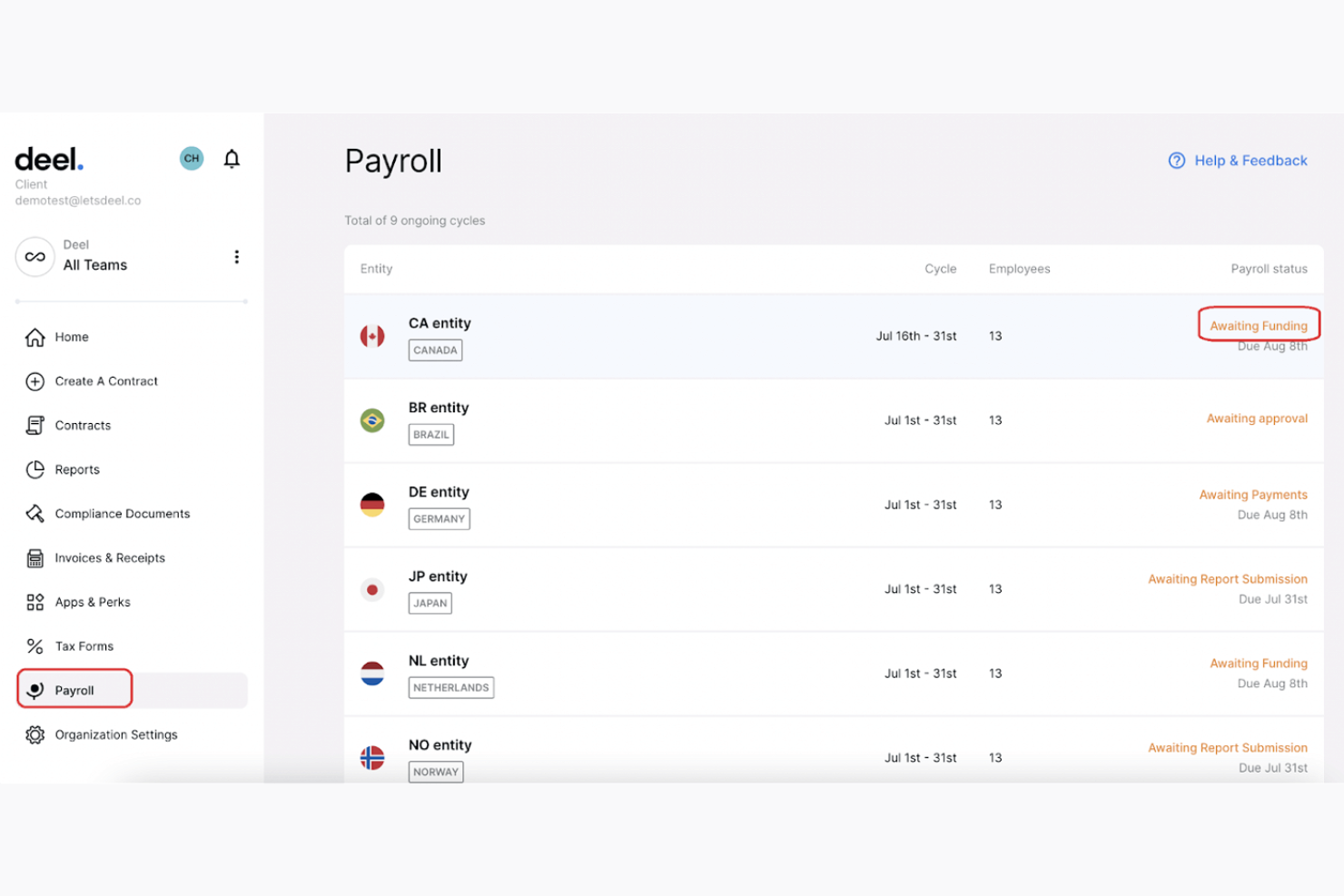
Deel Payroll è una piattaforma globale per la gestione delle paghe che consente di effettuare il pagamento su più paesi, la gestione dei collaboratori, l’occupazione tramite EOR e la conformità normativa da un unico sistema costruito su entità legali e infrastruttura paghe proprie.
Per chi è ideale Deel Payroll?
Deel Payroll è particolarmente adatto ad aziende distribuite a livello globale che hanno bisogno di pagare sia dipendenti che collaboratori in diversi paesi, gestendo tutto da un'unica piattaforma.
Perché ho scelto Deel Payroll
Ho selezionato Deel Payroll nella mia shortlist per il modo in cui gestisce il supporto ai team globali: il 91% delle richieste viene risolto al primo contatto tramite chat dal vivo, e la maggior parte delle problematiche EOR e dei collaboratori viene chiusa in circa sei minuti. Questo è fondamentale quando si elaborano paghe in una dozzina di fusi orari e può presentarsi un problema a mezzanotte. Apprezzo inoltre che il team di supporto sia composto da oltre 2.000 esperti interni in ambito payroll, legale e compliance, e non da generalisti esternalizzati.
Funzionalità principali di Deel Payroll
- Motore globale di conformità fiscale: Automatizza calcoli, trattenute e dichiarazioni fiscali secondo le normative locali di ogni lavoratore.
- Infrastruttura payroll su entità proprie: Gestisce le paghe tramite entità legali Deel in oltre 150 paesi senza ricorrere a partner terzi.
- Opzioni di pagamento flessibili: Supporta pagamenti tramite bonifico locale, Wise, PayPal e perfino criptovalute in alcune regioni.
- Classificazione automatica dei collaboratori: Segnala rischi di conformità e genera contratti e documenti fiscali conformi alle norme locali durante l'onboarding.
Integrazioni di Deel Payroll
Deel Payroll offre integrazioni con QuickBooks, Xero, BambooHR, Expensify, NetSuite, Sage Intacct, Greenhouse, Workday, SAP e ADP, tra le altre disponibili tramite il proprio app store. Si collega anche a Zapier e fornisce un'API per integrazioni personalizzate.
Pros and Cons
Pros:
- Entità legali proprie in oltre 150 paesi
- Copertura assistenza clienti globale 24/7
- Gestisce EOR, collaboratori e paghe in un unico posto
Cons:
- Configurazione complessa per grandi migrazioni multi-paese
- Può risultare sovradimensionato per team remoti molto piccoli

Ideale per la conformità dal ruolo di collaboratore a quello di Datore di lavoro di riferimento in un unico piano
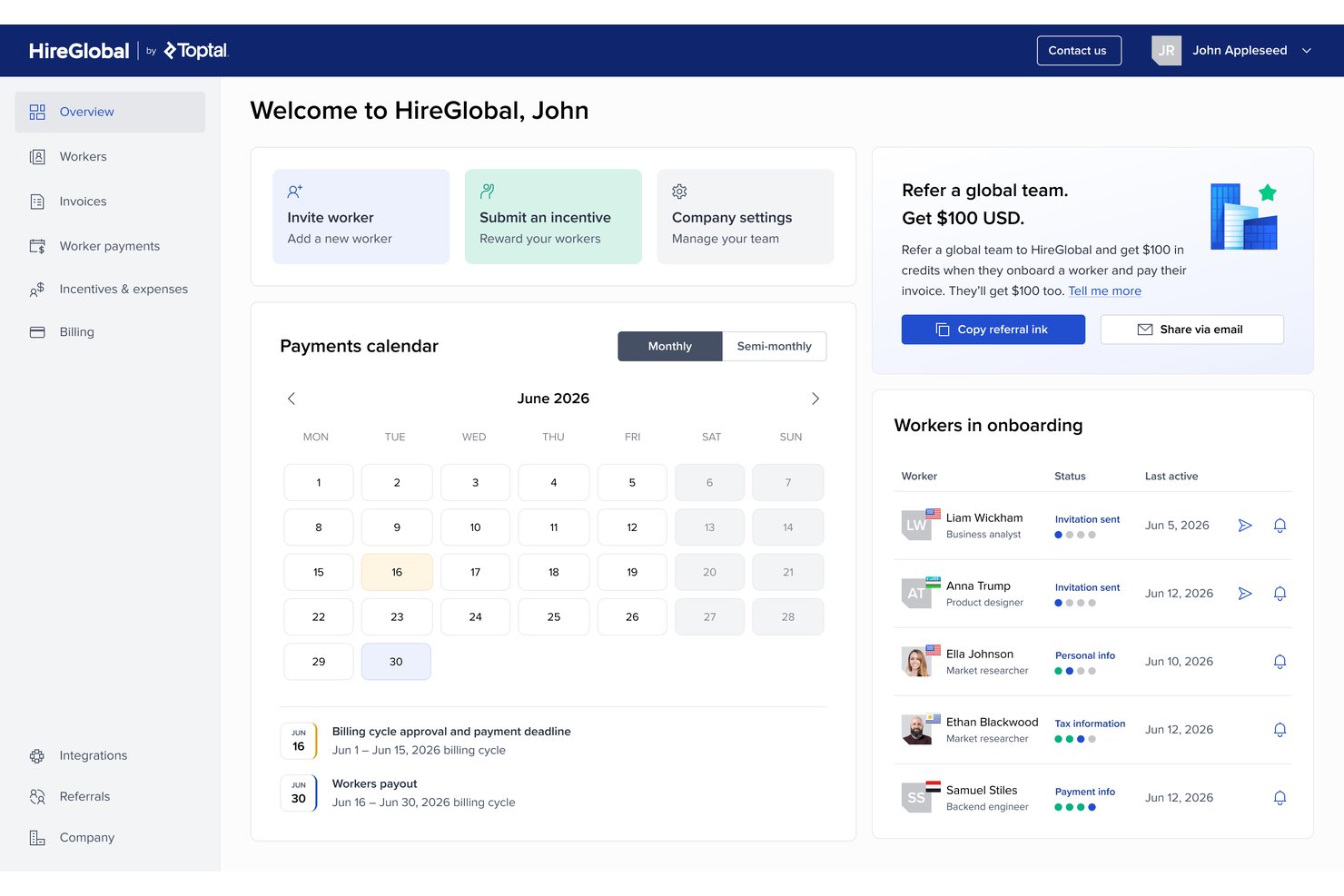
HireGlobal è una piattaforma globale per la gestione delle paghe e la conformità della forza lavoro di Toptal, che gestisce i pagamenti ai collaboratori, le paghe in più valute e l'assunzione in tre livelli di collaborazione: Agente di riferimento, Datore di lavoro virtuale di riferimento e Datore di lavoro di riferimento, in oltre 180 Paesi.
Per chi è più adatto HireGlobal?
HireGlobal è particolarmente adatto ai team che lavorano principalmente da remoto e devono gestire sia collaboratori sia dipendenti a tempo pieno oltre i confini nazionali, senza dover coordinare più fornitori.
Perché ho scelto HireGlobal
HireGlobal è entrato nella mia selezione perché è l'unica piattaforma che ho visto permettere il passaggio di un lavoratore da collaboratore a Datore di lavoro virtuale di riferimento all'interno di un unico piano, senza cambiare fornitore. Apprezzo in particolare l'indennizzo per la conformità da 1 milione di dollari per ogni lavoratore V-EOR, il che significa che, se un rapporto di collaborazione viene successivamente segnalato come erroneamente classificato, HireGlobal copre le conseguenze legali e finanziarie. Il livello integrato di Agente di riferimento gestisce inoltre contratti conformi e paghe per i collaboratori a $49 per lavoratore al mese, così non si pagano le tariffe del Datore di lavoro di riferimento finché il rapporto non lo richiede effettivamente.
Funzionalità principali di HireGlobal
- Dashboard HRIS centralizzata: Gestisci assunzioni, paghe, benefit e conformità per collaboratori e dipendenti in oltre 180 Paesi da un'unica piattaforma.
- Indennizzo per la conformità da $1M: Il livello V-EOR copre fino a 1 milione di dollari per lavoratore in costi legali e finanziari nel caso emerga una controversia sulla classificazione.
- Invii normativi automatizzati: HireGlobal gestisce automaticamente gli adempimenti fiscali specifici di ogni Paese e gli aggiornamenti sulla conformità in tutte le giurisdizioni supportate.
- Oltre 40 avvocati interni: Un team legale dedicato esamina i contratti, monitora le modifiche normative e fornisce assistenza per le questioni di conformità nei mercati internazionali.
Integrazioni di HireGlobal
HireGlobal dispone di un'integrazione documentata con TopTracker.
Pros and Cons
Pros:
- Copre oltre 180 Paesi con conformità multilivello
- Indennizzo di 1 milione di dollari per lavoratore in caso di errata classificazione
- Gestisce collaboratori e dipendenti in un'unica piattaforma
Cons:
- Nessuna integrazione nativa con i principali strumenti HR
- Storia limitata di recensioni indipendenti dal lancio del 2025

La migliore automazione per pagamenti internazionali

Borderless AI è una piattaforma EOR nativa dell'IA e di gestione dei collaboratori che gestisce assunzioni globali, pagamenti e conformità in oltre 170 paesi grazie a strumenti di intelligenza artificiale e generazione automatica dei contratti.
A chi è più adatto Borderless AI?
Borderless AI è perfetto per startup e aziende in crescita che assumono collaboratori e dipendenti a tempo pieno oltreconfine e che desiderano gestire la busta paga in modo automatico e conforme senza lavoro manuale aggiuntivo.
Perché ho scelto Borderless AI
Ho inserito Borderless AI tra le mie scelte migliori perché la sua automazione dei pagamenti internazionali si distingue davvero. Grazie alla partnership con Nium, la piattaforma preleva fondi dal conto bancario in appena 20 minuti per distribuire pagamenti in oltre 90 valute, senza richiedere il deposito anticipato degli stipendi. Apprezzo anche quanto siano configurabili i flussi di approvazione e pagamento direttamente nella piattaforma, senza bisogno di sviluppi personalizzati. Questa combinazione la rende una delle opzioni di payroll più automatiche per i team che gestiscono talenti da remoto in più paesi contemporaneamente.
Funzionalità principali di Borderless AI
- Generatore di contratti AI: genera automaticamente contratti di lavoro conformi alle normative locali, basandosi sul paese e sul ruolo del lavoratore.
- HRGPT: un assistente AI che risponde a domande specifiche su HR e conformità in base al paese direttamente dalla piattaforma.
- Gestione benefit locali: configura benefit specifici per paese, inclusi assicurazione sanitaria e congedi previsti dalla legge secondo gli standard locali.
- Rete di entità di proprietà al 100%: Borderless AI possiede entità legali proprie in ognuno dei 170+ paesi supportati, senza partner terzi coinvolti.
Integrazioni di Borderless AI
Borderless AI è attiva su ADP Workforce Now Marketplace, con BambooHR e Greenhouse citate tra le integrazioni disponibili. È disponibile un'API aperta per connessioni personalizzate, ma l'ecosistema di integrazione nativo è ancora limitato rispetto ai principali concorrenti del settore.
Pros and Cons
Pros:
- L'agente AI Alberni automatizza i pagamenti internazionali
- Strumenti integrati per rilevamento del rischio di errata classificazione
- Onboarding nello stesso giorno disponibile in oltre 170 paesi
Cons:
- Fornitore relativamente nuovo con esperienza limitata
- Meno opzioni di benefit specifici per paese disponibili
New Product Updates from Borderless AI
Borderless AI Enhances Nium Onboarding and Payroll Workflows
Borderless AI enhances Nium onboarding, payroll adjustment requests, Cayman Islands payroll support, and actionable document workflows to simplify onboarding and payroll management. For more information, visit Borderless AI's official site.
 .
.
La migliore flessibilità nei cicli retributivi per team internazionali

Progettato per aziende con forza lavoro distribuita, Safeguard Global gestisce pagamenti multi-paese, EOR, gestione dei collaboratori e servizi HR in 187 paesi.
Per chi è più indicato Safeguard Global?
I team HR e finanziari che gestiscono pagamenti internazionali in aree con calendari retributivi diversi otterranno il massimo valore da Safeguard Global.
Perché ho scelto Safeguard Global
Ho scelto Safeguard Global come uno dei migliori per come gestisce la realtà in cui i team internazionali raramente operano seguendo lo stesso calendario retributivo. Il calendario retributivo unificato offre piena visibilità su ogni ciclo di paga e sulle scadenze di ogni paese, tutte regolate sul tuo fuso orario, il che significa che non dovrai più destreggiarti tra strumenti o fogli di calcolo separati per team in regioni diverse. Mi piace anche che la piattaforma permetta di inviare modifiche agli stipendi, monitorare i diritti maturati e aggiungere elementi retributivi come bonus e adeguamenti salariali a livello di singolo dipendente, così non sei vincolato a cicli di paga uguali per tutti. Una dashboard unica mostra l’andamento dei pagamenti, i costi e le scadenze di ogni paese, con visibilità immediata sulle spese per il personale per paese, area geografica o ruolo.
Funzionalità principali di Safeguard Global
- Servizi EOR: Safeguard Global funge da datore di lavoro legale in 187 paesi, gestendo contratti locali, benefit e dichiarazioni fiscali a tuo nome.
- Gestione pagamenti in più valute: Paga i dipendenti nella loro valuta locale in diversi paesi tramite un unico ciclo di pagamento.
- Gestione dei collaboratori: Gestisci onboarding, pagamenti e documentazione di conformità dei collaboratori da una sola piattaforma.
- Supporto alla conformità nel paese: Accedi a esperti locali che si occupano di dichiarazioni di legge, aggiornamenti normativi e rendicontazione di fine anno per ciascun paese.
Integrazioni di Safeguard Global
Safeguard Global offre un set limitato di integrazioni native, con Workday come unica integrazione nativa chiaramente documentata. È disponibile un’API per integrazioni personalizzate tramite il programma partner.
Pros and Cons
Pros:
- Cicli di pagamento flessibili e personalizzati per paese
- Oltre 17 anni di esperienza nei pagamenti internazionali
- Esperti HR multilingue in loco
Cons:
- Nessun prezzo disponibile pubblicamente sul sito web
- Le dashboard dei report non sono aggiornate in tempo reale

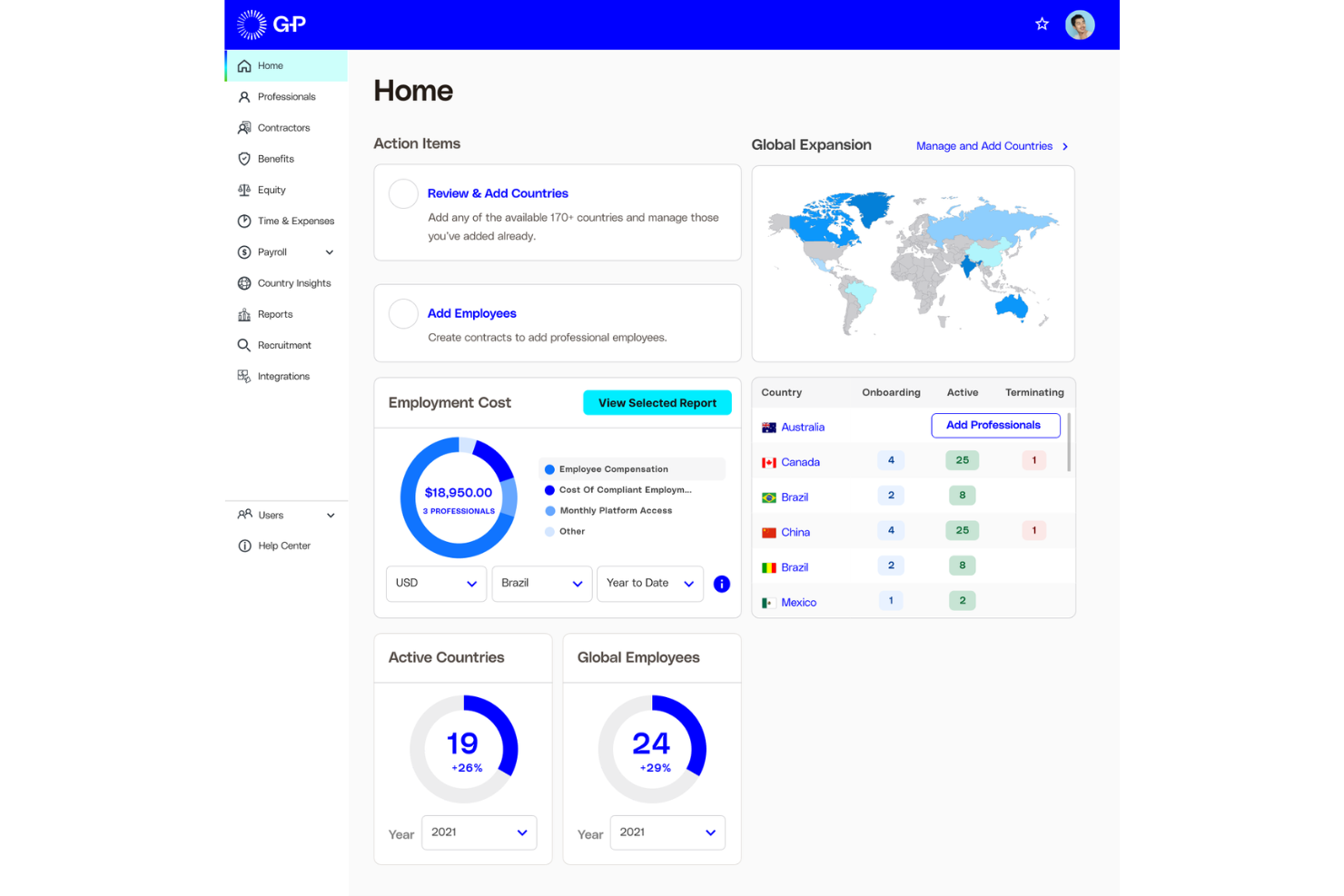
Globalization Partners (G-P) è una piattaforma globale EOR e per la gestione delle buste paga che consente di assumere, pagare e gestire dipendenti a tempo pieno e collaboratori in oltre 180 paesi attraverso le proprie entità legali di proprietà.
Per chi è ideale Globalization Partners (G-P)?
G-P è particolarmente adatto a team HR e legali aziendali che necessitano di entità legali di proprietà — non reti di partner — per assumere in modo conforme in un elevato numero di paesi.
Perché ho scelto Globalization Partners (G-P)
G-P merita il suo posto tra i miei consigli perché la sua rete di entità legali di proprietà in oltre 180 paesi è realmente rara in questo settore. La maggior parte dei fornitori EOR si affida a partner locali almeno per alcune aree, ma G-P possiede direttamente le entità, il che accentua la responsabilità per la conformità e riduce i tempi di assunzione. Apprezzo anche che la piattaforma G-P Meridian includa la generazione integrata di contratti con termini di lavoro conformi alle normative locali, evitando così corse per validare i documenti quando si entra in un nuovo mercato.
Caratteristiche principali di Globalization Partners (G-P)
- Global Compliance Engine: Il motore proprietario di G-P applica automaticamente le leggi sul lavoro locali a contratti, buste paga, onboarding e offboarding in oltre 180 paesi.
- Gestione dei benefit competitivi a livello locale: Offri e gestisci pacchetti di benefit specifici per ogni paese, in linea con gli standard e i requisiti normativi locali della posizione di ciascun dipendente.
- Reporting e analisi: Accedi in tempo reale a dati HR e crea report personalizzati per monitorare le operazioni della tua forza lavoro globale.
- G-P Gia™: Un assistente HR basato su intelligenza artificiale che genera contratti conformi, lettere di offerta e documenti HR sulla base di oltre 100.000 articoli controllati da esperti.
Integrazioni di Globalization Partners (G-P)
G-P offre integrazioni native con ADP TotalSource, ADP Workforce Now, Paylocity, BambooHR, HiBob, Personio, SAP SuccessFactors, SAP BTP, TriNet e UKG Pro, oltre a Workday, UKG Ready e connessioni SSO tramite Google Workspace, Microsoft Entra ID e Okta/Auth0. È disponibile anche un'API per la realizzazione di integrazioni personalizzate.
Pros and Cons
Pros:
- Entità legali di proprietà in oltre 180 paesi
- Guida alla conformità tramite AI grazie a G-P Gia
- Dashboard centralizzato per pagamenti e contratti
Cons:
- Manca il pagamento automatico fuori ciclo
- Personalizzazione limitata della piattaforma per le policy locali
Ideale per onboarding rapido in nuovi mercati
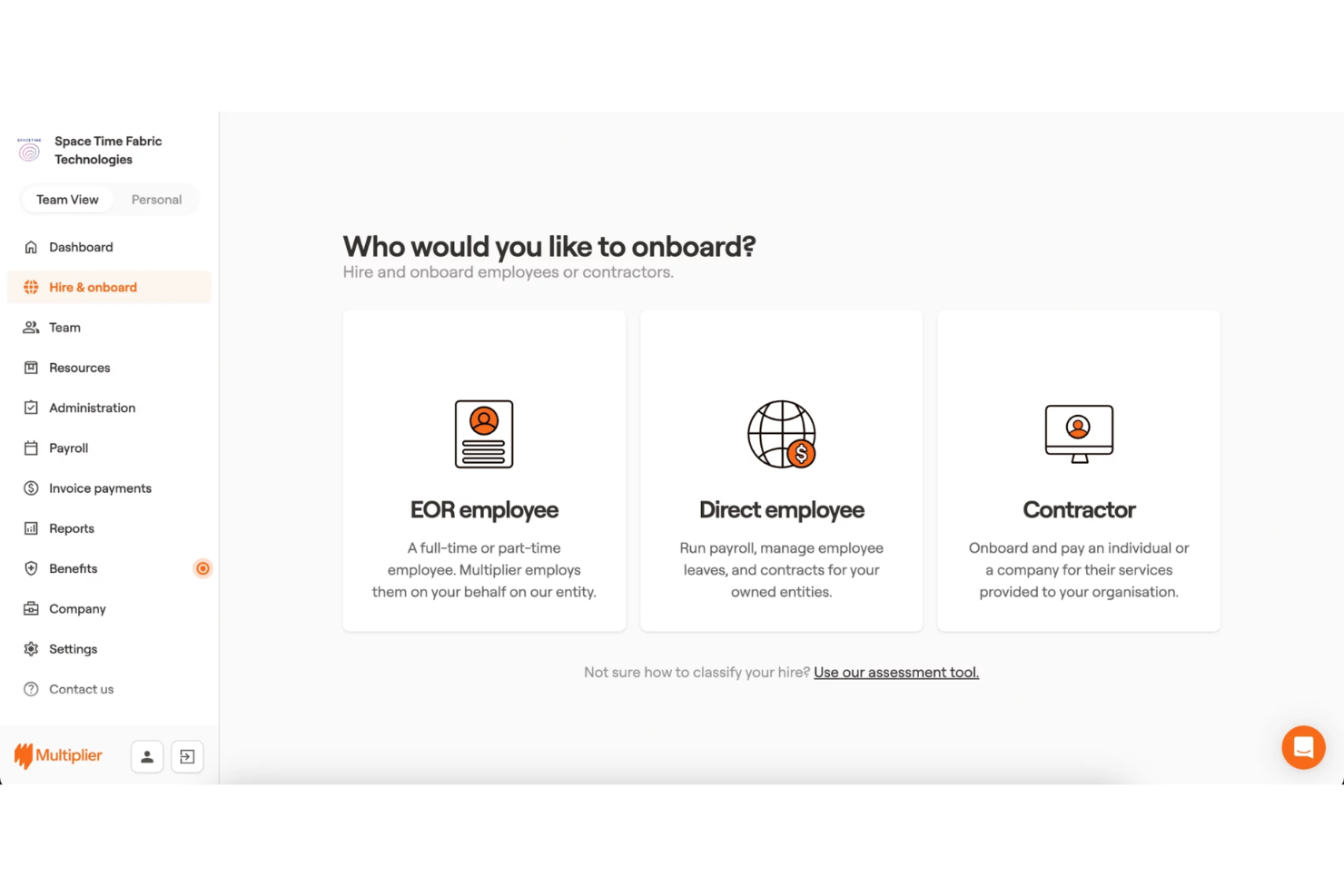
Multiplier è un datore di lavoro ufficiale e una piattaforma di gestione delle buste paga a livello globale che consente alle aziende di assumere, pagare e gestire dipendenti e collaboratori in oltre 150 paesi, occupandosi della conformità, della gestione delle buste paga in valuta multipla e dei benefit locali senza la necessità di una società locale.
Per chi è ideale Multiplier?
Multiplier è particolarmente adatto ad aziende in rapida crescita che devono assumere rapidamente in nuovi mercati internazionali senza dover prima creare entità legali locali.
Perché ho scelto Multiplier
Ho scelto Multiplier come una delle migliori piattaforme perché la sua velocità di onboarding è davvero difficile da eguagliare in questo settore. La piattaforma genera contratti di lavoro conformi alle normative locali in pochi minuti utilizzando modelli predefiniti in oltre 150 paesi, così posso completare la documentazione per una nuova assunzione lo stesso giorno in cui faccio un'offerta. Inoltre, apprezzo il fatto che l'iscrizione alle buste paga avvenga nello stesso flusso di lavoro, senza un passaggio di configurazione separato prima dell'elaborazione del primo ciclo stipendiale del nuovo dipendente.
Caratteristiche principali di Multiplier
- Buste paga in più valute: Gestisce le buste paga in oltre 120 valute, calcolando il netto secondo le regole fiscali e di detrazione di ciascun paese.
- Gestione delle spese: I dipendenti presentano le richieste di rimborso spese direttamente sulla piattaforma, con approvazioni e rimborsi elaborati nello stesso ciclo di busta paga.
- Gestione dei collaboratori: Onboarding e pagamento di collaboratori internazionali secondo contratti conformi, gestiti separatamente dai dipendenti a tempo pieno.
- Protezione della proprietà intellettuale e delle invenzioni: Genera clausole di assegnazione della proprietà intellettuale adattate alla legislazione locale e incluse in ogni contratto di lavoro.
Integrazioni di Multiplier
Multiplier offre integrazioni native con BambooHR, HiBob, Workday, Personio, Greenhouse, Workable, QuickBooks, Xero, NetSuite e Slack. Si collega inoltre a Zapier e fornisce un'API per integrazioni personalizzate.
Pros and Cons
Pros:
- Dashboard unica per la gestione delle buste paga in più paesi
- Calcoli automatizzati di tasse locali e conformità
- Semplifica i trasferimenti di pagamento in valuta multipla
Cons:
- Richiede conti bancari separati per i fondi
- Mancano funzionalità integrate di tracciamento candidature

Pebl
Ideale per la gestione di entità globali
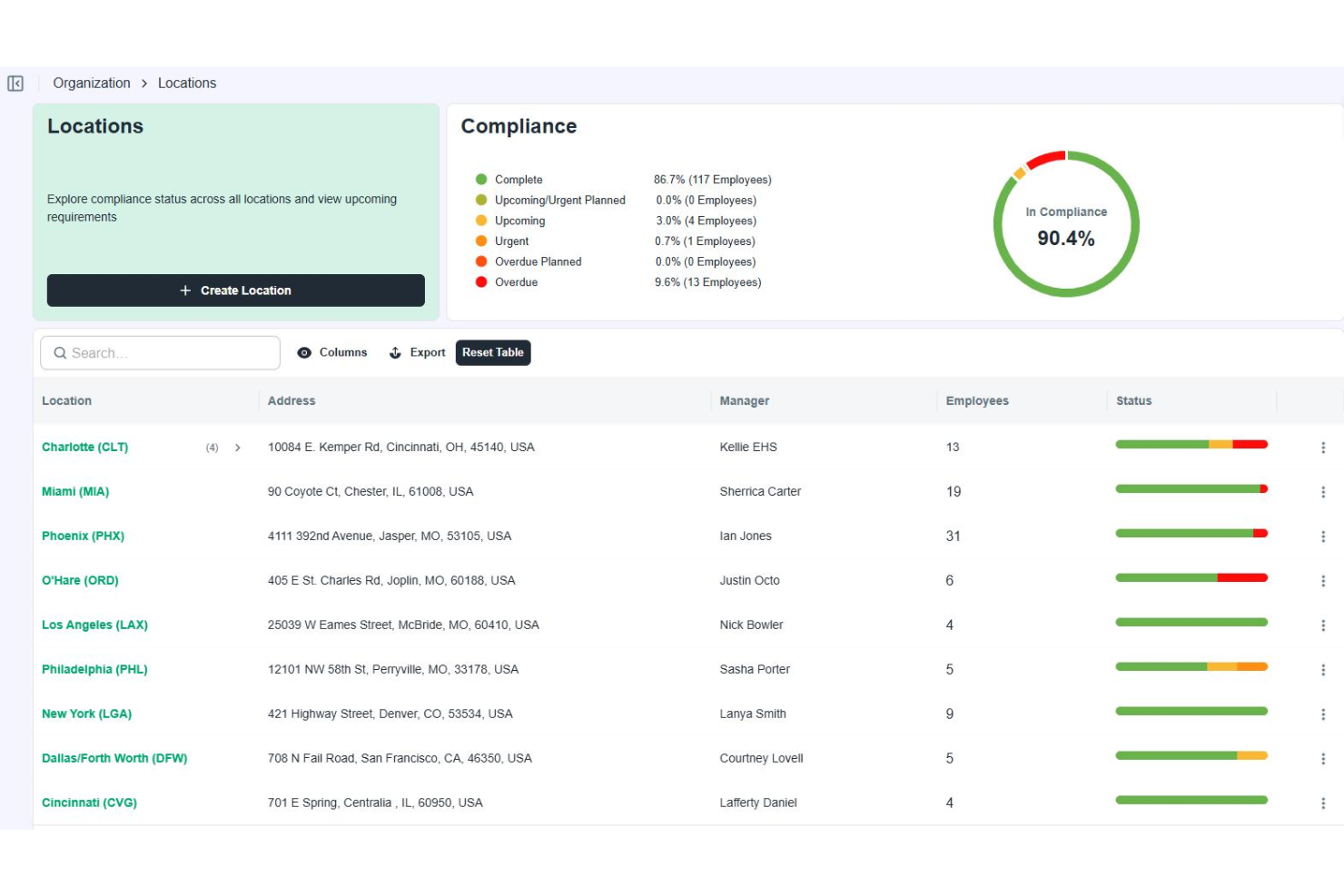
Pebl è una piattaforma di employer of record e gestione del payroll globale che copre assunzioni, elaborazione delle buste paga, gestione della conformità e benefici per i dipendenti in oltre 185 paesi.
Per chi è ideale Pebl?
Pebl è una scelta ideale per team aziendali che hanno bisogno di assumere e pagare dipendenti in numerosi paesi senza dover costituire entità legali locali in ognuno di essi.
Perché ho scelto Pebl
Ho incluso Pebl nella mia lista perché la sua copertura di oltre 185 paesi è davvero difficile da eguagliare nel settore EOR. La funzione che trovo più utile è il calcolatore del costo totale integrato, che mostra l’intero costo per il datore di lavoro in qualsiasi mercato prima di procedere all’assunzione. Apprezzo anche il fatto che Pebl utilizzi propri team regionali invece di intermediari terzi: il referente dell’account gestisce direttamente conformità, contratti e payroll, senza passaggi a partner locali che potrebbero creare lacune nella responsabilità.
Caratteristiche principali di Pebl
- Elaborazione delle buste paga in più valute: Gestisci le buste paga in oltre 185 paesi nelle valute locali attraverso una sola fattura e servizio.
- Supporto globale all’immigrazione: Specialisti interni gestiscono domande per visti di lavoro, trasferimenti e conformità immigratoria così che i nuovi assunti possano iniziare senza ritardi.
- Conversione da collaboratore a dipendente: Trasforma collaboratori stranieri in dipendenti a tempo pieno con contratti conformi alle normative locali, mantenendo il rapporto di lavoro legale.
- Gestione globale dei benefit: Configura e gestisci benefit per i dipendenti specifici per ogni paese in tutti i mercati supportati, con Pebl che si occupa di amministrazione e conformità per ciascuno.
Integrazioni di Pebl
Pebl offre oltre 250 integrazioni tramite la sua piattaforma, tra cui BambooHR, HiBob, Workday, ADP Workforce Now, Greenhouse, Lever, NetSuite, QuickBooks, Slack e SAP Concur. È inoltre disponibile un’API per integrazioni personalizzate.
Pros and Cons
Pros:
- Controlli integrati sul rischio di errata classificazione dei collaboratori
- Forte supporto per assunzioni nella regione APAC
- Manager dedicato per l'onboarding assegnato a ciascun account
Cons:
- I ricarichi FX non sono completamente trasparenti
- Nessun sistema di tracciamento dei candidati integrato
Miglior payroll multivaluta per team distribuiti
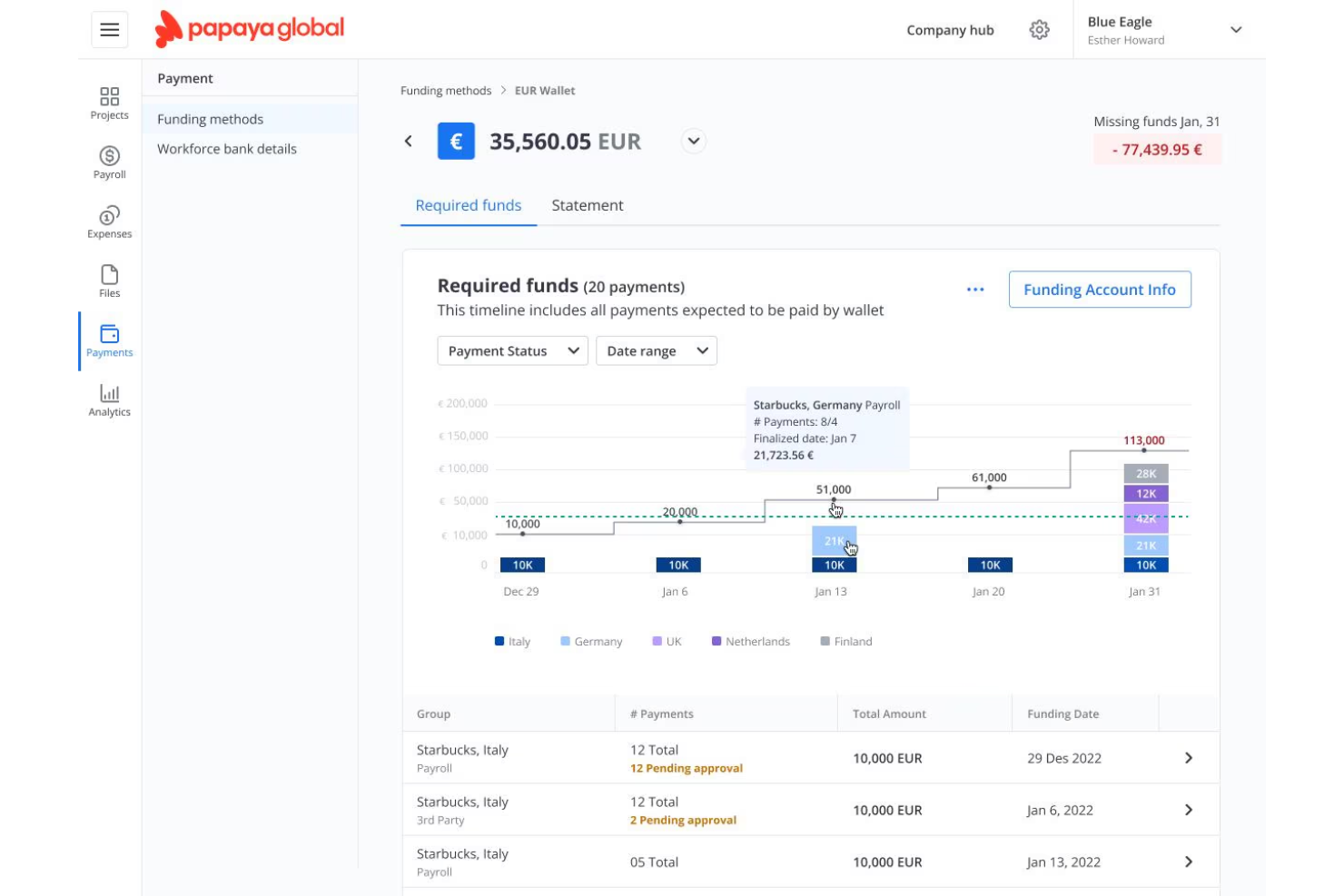
Papaya Global è una piattaforma cloud per la gestione globale delle paghe e dei pagamenti ai lavoratori che si occupa di elaborazione delle buste paga, pagamenti ai collaboratori e servizi di employer of record in oltre 160 paesi e in molteplici valute.
Per Chi È Ideale Papaya Global?
Papaya Global è particolarmente indicata per team finanziari e risorse umane di aziende in crescita che pagano dipendenti e collaboratori in diversi paesi e valute locali differenti.
Perché Ho Scelto Papaya Global
Ho incluso Papaya Global tra le mie migliori scelte perché la sua gestione delle valute è più avanzata rispetto a molti altri strumenti per le paghe. Paga i lavoratori in oltre 160 paesi nella loro valuta locale, applicando tassi di cambio in tempo reale a ogni ciclo di paga. Apprezzo anche l'hub Workforce Payments, che separa lo strato di pagamento dall'elaborazione delle paghe, consentendomi di finanziare la busta paga in una valuta e distribuirla in un'altra senza riconciliazioni manuali.
Caratteristiche Principali di Papaya Global
- Validazione delle paghe tramite AI: Evidenzia anomalie, dati mancanti e valori anomali nelle buste paga prima della finalizzazione di ogni ciclo.
- Report G2N standardizzati: Genera report da lordo a netto coerenti in ogni paese, ciclo ed entità in un unico formato.
- App mobile per dipendenti: Consente ai lavoratori di accedere in autonomia alle buste paga, ai dati anagrafici e allo stato dei pagamenti dal proprio telefono.
- Presenze e orari integrati: Sincronizza ore lavorate, assenze e turni dai sistemi di rilevazione direttamente nel payroll senza inserimenti manuali.
Integrazioni di Papaya Global
Papaya Global offre connettori per i principali HCM, ERP e piattaforme di gestione spese, inclusi SAP SuccessFactors, Oracle HCM, Workday, BambooHR, HiBob, NetSuite, Sage, Personio, Expensify e UKG. È disponibile un'API per integrazioni personalizzate. Il supporto a Zapier non è chiaramente documentato.
Pros and Cons
Pros:
- Pagamenti in valute locali di oltre 160 paesi
- Report aggregati lordo-netto a livello globale
- Account manager dedicati per regione
Cons:
- Prezzo premium superiore alla maggior parte dei concorrenti
- Manca la visualizzazione localizzata dei calendari payroll

Ideale per la gestione di freelancer su scala globale

RemoFirst è una piattaforma globale di employer of record e gestione pagamenti che si occupa di assumere, pagare e gestire sia dipendenti a tempo pieno sia collaboratori internazionali in oltre 185 paesi, con conformità integrata, pagamenti in più valute e flussi di lavoro specifici per i collaboratori.
Per chi è ideale RemoFirst?
RemoFirst è particolarmente adatto per aziende che si affidano a una forza lavoro distribuita di collaboratori, in particolare quelle che gestiscono grandi volumi di freelancer in più paesi contemporaneamente.
Perché ho scelto RemoFirst
Ho scelto RemoFirst tra i migliori perché la sua copertura nella gestione dei collaboratori è davvero ampia, abbracciando oltre 150 paesi con generazione di contratti localmente conformi direttamente nel processo di onboarding. Inoltre mi piace che i collaboratori registrino le ore lavorate sulla piattaforma, tu possa approvarle con un solo clic e i pagamenti vengano elaborati automaticamente nella valuta locale del collaboratore. Il piano per collaboratori è gratuito da gestire e costa solo $25/mese per ogni collaboratore attivamente pagato, il che lo rende pratico per gestire una vasta rete di freelancer senza costi eccessivi.
Caratteristiche principali di RemoFirst
- Controlli globali dei precedenti: Esegui verifiche su identità, precedenti penali, sanzioni, formazione e storia finanziaria dei candidati in oltre 185 paesi, direttamente dalla piattaforma.
- Supporto per visti e permessi di lavoro: RemoFirst coordina pratiche di visto e permesso di lavoro in oltre 110 paesi come parte del processo di onboarding dei dipendenti.
- RemoHealth: Offre assicurazione sanitaria globale (medica, dentistica e oculistica) ai dipendenti internazionali, gestita e amministrata dalla piattaforma.
- Fornitura di attrezzature: Spedisce le attrezzature di lavoro a nuovi dipendenti o collaboratori in tutto il mondo, con gestione della logistica come parte del flusso di onboarding.
Integrazioni RemoFirst
RemoFirst offre un piccolo set di integrazioni native, tra cui BambooHR, ADP Workforce Now e GoCardless. È disponibile una API per integrazioni personalizzate.
Pros and Cons
Pros:
- Tariffa EOR accessibile e fissa in oltre 185 paesi
- Account manager dedicato a ogni livello
- Conversione da collaboratore a dipendente tramite un'unica piattaforma
Cons:
- Capacità limitata di caricamento pagamenti massivi
- Libreria di integrazioni native limitata

Gusto
Ideale per coprire le commissioni di trasferimento tramite banca intermediaria

New Product Updates from Gusto
Gusto Adds Solo Advisory Tools and Mobile Money Features
Gusto adds Solo S-Corp Advisory Tools and Gusto Money on Mobile for tax guidance, invoicing, and bill payments. These updates help accountants advise solopreneurs and let users manage business finances from their phones. For more information, visit Gusto’s official site.
Altri software per la gestione delle paghe per team da remoto
Ecco alcune ulteriori opzioni di software per la gestione delle paghe per team da remoto che non sono entrate nella mia selezione, ma che vale comunque la pena valutare:
- Payoneer WFM
La migliore esperienza di onboarding in oltre 160 paesi
- ADP GlobalView Payroll
La migliore integrazione dei dati con i sistemi HCM aziendali
- CloudPay
La migliore dashboard per la visibilità in tempo reale delle buste paga
- Lano
Ideale per la consolidazione delle buste paga tra diversi fornitori
- RemotePass
Ideale per monitorare i pagamenti basati su traguardi


Come valuto il software per le buste paga per team remoti
Valuto questi strumenti su due livelli: se una piattaforma è in grado di gestire la retribuzione oltre confine e poi cosa differenzia realmente i migliori fornitori.
Funzionalità di base (Requisiti minimi per questa lista)
Queste capacità di base rappresentano i criteri di ammissione per essere inclusi nel mio elenco:
- Buste paga multi-paese: Controllo il numero di paesi supportati nativamente da una piattaforma e se gestisce i cicli di retribuzione locali e le trattenute obbligatorie senza configurazioni manuali.
- Conformità fiscale globale: Qui sono importanti i calcoli fiscali automatizzati e gli adempimenti, soprattutto dato che le normative locali cambiano: cerco piattaforme che siano sempre aggiornate ai cambiamenti.
- Pagamenti a collaboratori e dipendenti: Valuto se uno strumento supporta entrambi i tipi di lavoratori con flussi di lavoro di classificazione adeguati e documentazione conforme alle leggi locali integrata.
- Supporto EOR o entità locale: Per i team che assumono in paesi dove non hanno una propria entità, verifico se il servizio EOR è offerto tramite filiali di proprietà o tramite partner terzi.
- Distribuzione multi-valuta: Prendo in considerazione la gamma di valute e i metodi di pagamento supportati, oltre a quanto la piattaforma sia trasparente sulle commissioni di cambio valuta.
- Integrazione HRIS e rilevazione presenze: Un software paghe che non si integra con l’ecosistema HR esistente genera doppi inserimenti: cerco quindi integrazioni native e accesso API.
Valuto ogni fornitore su una scala da 0 (non offre la funzionalità) a 5 (eccelle in quest'area) per ciascun criterio.
I fornitori devono raggiungere un punteggio medio minimo per essere considerati per l'inclusione nella mia lista. Da lì, considero cosa rende ogni piattaforma unica.
Fattori di differenziazione (Cosa distingue i fornitori)
Dopo aver selezionato la mia lista, così confronto i diversi fornitori:
Funzionalità distintive
Un hub di gestione collaboratori che va oltre il pagamento è fondamentale. Cerco workflow automatizzati per la generazione dei contratti e la classificazione dei ruoli, che riducano il rischio nell’onboarding internazionale. L’amministrazione dei benefit localizzati è un’altra area che valuto con attenzione: i dipendenti remoti si aspettano pacchetti in linea con le norme nazionali, quindi le piattaforme che offrono benefit sanitari, pensionistici ed equity specifici per paese si distinguono. Anche metodi di pagamento flessibili come portafogli digitali o valute scelte dal dipendente fanno la differenza per team distribuiti.
Oltre le funzionalità
Parto dalla copertura della conformità globale. Valuto se il fornitore monitora attivamente i cambiamenti normativi e aggiorna senza intervento manuale le tabelle fiscali e i requisiti sul diritto del lavoro. Anche la sicurezza dei dati è essenziale – quando si conservano dati sensibili di dipendenti oltre confine, verifico la certificazione SOC 2 Type II e i controlli di residenza dei dati specifici per paese. Implementazione e supporto su più fusi orari completano il quadro. Una piattaforma che offre assistenza solo in orario d’ufficio e in un solo fuso orario non va bene per team distribuiti che hanno bisogno di risolvere subito questioni legate alle buste paga.
Come scegliere un software per la gestione delle paghe per team da remoto
È facile perdersi in lunghi elenchi di funzionalità e strutture di prezzo complesse. Per aiutarti a rimanere concentrato mentre affronti il tuo particolare processo di selezione del software, ecco una lista di fattori da tenere a mente:
| Fattore | Cosa considerare |
|---|---|
| Scalabilità | La piattaforma ti consentirà di aggiungere nuovi Paesi o raddoppiare il numero globale di dipendenti senza cambiare fornitore o rinegoziare i contratti? |
| Integrazioni | Il software può collegarsi direttamente all'HRIS, agli strumenti di rilevazione delle presenze e agli strumenti finanziari già utilizzati dal tuo team, oppure saranno necessari trasferimenti manuali dei dati? |
| Personalizzazione | Le tipologie di retribuzione, le norme sul lavoro dei singoli Paesi e i flussi di approvazione delle paghe sono configurabili in base ai tuoi processi e ruoli specifici? |
| Facilità d'uso | Gli amministratori globali, le risorse umane locali e i team finanziari troveranno tutti l'interfaccia e i flussi di lavoro intuitivi, anche per elaborazioni delle paghe complesse e multi-paese? |
| Implementazione e onboarding | Quanto tempo è realisticamente necessario per completare la configurazione, la verifica delle entità e l'onboarding dei dipendenti? Di quali risorse interne avrà bisogno il tuo team? |
| Costi | I prezzi relativi a componenti aggiuntivi, conversione valutaria, pagamenti fuori ciclo ed espansioni in nuovi Paesi sono chiari, oppure ci sono costi imprevedibili che potrebbero accumularsi? |
| Misure di sicurezza | Gli standard di privacy dei dati sono documentati e rispettano le certificazioni (ad es. SOC 2 Type II, GDPR) in tutte le regioni e le entità operative? |
| Requisiti di conformità | Il fornitore si manterrà proattivamente aggiornato sulle leggi fiscali, del lavoro e di rendicontazione dei Paesi in cui operi, oppure dovrai occuparti tu di questi aggiornamenti? |
Che cos'è un software per la gestione delle paghe per team da remoto?
Il software per la gestione delle buste paga dei team da remoto è una categoria di piattaforme digitali progettate per automatizzare i pagamenti, le imposte e la conformità per dipendenti e collaboratori distribuiti in più Paesi. Queste piattaforme aiutano i team delle risorse umane e della finanza a gestire l'erogazione in più valute, le dichiarazioni fiscali locali, l'amministrazione dei benefit e la documentazione, anche quando i membri del team si trovano in regioni diverse o lavorano da qualsiasi luogo.
Funzionalità del software per la gestione delle buste paga dei team da remoto
Quando scegli un software per la gestione delle buste paga dei team da remoto, presta attenzione alle seguenti funzionalità chiave:
- Gestione delle buste paga in più Paesi: Elabora le buste paga per dipendenti e collaboratori in Paesi diversi, gestendo in un unico sistema i calendari di pagamento locali, le imposte e le detrazioni previste dalla legge.
- Automazione della conformità: Tiene traccia delle leggi locali sul lavoro, delle aliquote fiscali e della documentazione richiesta, garantendo dichiarazioni puntuali e adeguandosi automaticamente ai cambiamenti normativi.
- Servizi di datore di lavoro registrato: Assume e paga legalmente i membri del team nelle regioni in cui la tua azienda non dispone di un'entità costituita, occupandosi della conformità e dell'inserimento.
- Pagamenti in più valute: Emette i pagamenti nella valuta locale di ciascun lavoratore, convertendo automaticamente i fondi e offrendo tassi di cambio trasparenti.
- Gestione dei collaboratori: Inserisce, classifica e paga i collaboratori internazionali, generando contratti conformi e gestendo i moduli fiscali necessari.
- Gestione localizzata dei benefit: Gestisce vantaggi specifici per ciascun Paese, come assicurazione sanitaria, pensioni e congedi previsti dalla legge, mantenendo le offerte conformi alle norme locali.
- Funzionalità di integrazione: Si collega alle piattaforme per le risorse umane, agli strumenti contabili e ai sistemi di rilevazione delle ore per sincronizzare i dati dei dipendenti, le ore lavorate e le transazioni finanziarie.
- Flussi di approvazione personalizzabili: Consente di definire processi di approvazione personalizzati per le elaborazioni delle buste paga, permettendo alle organizzazioni di stabilire fasi e autorizzazioni in base alla struttura del team.
- Sicurezza dei dati e conformità alla privacy: Protegge i dati sensibili relativi alle buste paga e i dati personali attraverso la crittografia, i controlli degli accessi e il rispetto delle normative globali sulla privacy.
- Portale self-service per i dipendenti: Consente ai lavoratori da remoto di accedere ai cedolini paga, ai documenti fiscali e ai dettagli dei benefit, oppure di aggiornare le informazioni personali, riducendo il lavoro amministrativo delle risorse umane.
Vantaggi del software per la gestione delle buste paga dei team da remoto
L'implementazione di un software per la gestione delle buste paga dei team da remoto offre diversi vantaggi al tuo team e alla tua azienda. Eccone alcuni:
- Gestione accurata delle buste paga a livello globale: Automatizza i calcoli e le ritenute fiscali locali, riducendo gli errori manuali e garantendo che ogni lavoratore venga pagato in conformità alle leggi regionali.
- Tranquillità in materia di conformità: Gestisce l'evoluzione delle leggi sul lavoro e delle dichiarazioni previste dalla legge, consentendo alla tua azienda di stare al passo con le normative in cambiamento in più Paesi.
- Gestione semplificata dei collaboratori: Centralizza l'inserimento dei collaboratori, la generazione dei contratti e i pagamenti transfrontalieri all'interno di un'unica piattaforma.
- Pagamenti efficienti in più valute: Semplifica le elaborazioni delle buste paga e paga i lavoratori da remoto nelle loro valute locali, evitando procedure bancarie manuali e costi di conversione nascosti.
- Gestione semplificata dei benefit: Offre e gestisce vantaggi, assicurazioni e benefit previsti dalla legge specifici per ciascun Paese direttamente tramite la piattaforma per i dipendenti da remoto.
- Esperienza dei dipendenti migliorata: Permette al team di accedere ai cedolini paga e ai moduli fiscali e di aggiornare le informazioni personali quando necessario, riducendo gli scambi con le risorse umane.
- Espansione globale più rapida: Supporta l'aggiunta di nuove entità, Paesi o membri del team senza richiedere importanti modifiche al sistema, mantenendo ridotti gli ostacoli alla crescita.
Costi e prezzi del software per la gestione delle buste paga dei team da remoto
La scelta di un software per la gestione delle buste paga dei team da remoto richiede la comprensione dei vari modelli e piani tariffari disponibili. I costi variano in base alle funzionalità, alle dimensioni del team, agli elementi aggiuntivi e ad altri fattori. La tabella seguente riassume i piani più comuni, i relativi prezzi medi e le funzionalità tipicamente incluse nelle soluzioni software per la gestione delle buste paga dei team da remoto:
Tabella di confronto dei piani per il software di gestione delle buste paga dei team da remoto
| Tipo di piano | Prezzo medio | Funzionalità comuni |
|---|---|---|
| Piano gratuito | $0 | Calcoli di base delle buste paga, semplici pagamenti ai collaboratori, profili dei dipendenti limitati e supporto via email. |
| Piano personale | $20-$40/utente/mese | Gestione delle buste paga in più Paesi, gestione dei collaboratori, calcoli delle imposte locali e accesso autonomo per i dipendenti. |
| Piano aziendale | $40-$80/utente/mese | Conformità automatizzata, integrazioni con software HR o di contabilità, benefit localizzati e pagamenti cumulativi. |
| Piano aziendale avanzato | $80-$120+/utente/mese | Flussi di lavoro personalizzati, account manager dedicato, sicurezza avanzata, postazioni illimitate e accesso API. |
Domande frequenti sul software per la gestione delle buste paga per team da remoto
Ecco alcune risposte alle domande più comuni sul software per la gestione delle buste paga per team da remoto:
In che modo il software per la gestione delle buste paga gestisce le diverse normative fiscali di ogni Paese?
Il software per la gestione delle buste paga per team da remoto monitora e aggiorna automaticamente le normative fiscali locali, aiutando le aziende a rispettare le leggi sul lavoro e i requisiti fiscali relativi alle buste paga senza dover disporre di esperti interni per ogni area geografica. Questi strumenti calcolano detrazioni, dichiarazioni e contributi in base alla posizione di ciascun lavoratore.
Posso pagare collaboratori e dipendenti a tempo pieno tramite lo stesso sistema?
Sì, la maggior parte dei sistemi completi per la gestione delle buste paga per team da remoto consente di elaborare i pagamenti sia per i collaboratori sia per i dipendenti in un unico luogo. Forniscono flussi di inserimento, contrattuali e fiscali diversi per adattarsi a ciascun tipo di lavoratore, supportando al contempo le operazioni quotidiane di gestione delle buste paga.
Quali integrazioni dovrei cercare in un software per la gestione delle buste paga?
Cerca integrazioni con strumenti HR, piattaforme di contabilità, sistemi di monitoraggio del tempo e strumenti di comunicazione come Slack o Microsoft Teams. In questo modo è più facile sincronizzare i dati e ridurre il lavoro duplicato tra i team delle risorse umane e della finanza.
Quanto sono sicuri i dati delle buste paga su queste piattaforme?
I principali strumenti per la gestione delle buste paga utilizzano la crittografia, l’accesso basato sui ruoli e certificazioni come SOC 2 Tipo II o ISO 27001. Dovresti sempre verificare la loro conformità agli standard sulla privacy applicabili in ogni Paese in cui operi. Molti fornitori di servizi per la gestione delle buste paga offrono inoltre un’assistenza clienti dedicata per aiutare a risolvere i problemi di sicurezza e conformità.
Quanto velocemente posso implementare un software per la gestione delle buste paga per team distribuiti?
I tempi di implementazione variano, ma la maggior parte delle piattaforme offre configurazione guidata o opzioni autonome con un’esperienza intuitiva, che può richiedere da alcuni giorni a diverse settimane. Preparati a raccogliere informazioni sulla registrazione dell’azienda, coordinate bancarie, dati dei lavoratori e buste paga per l’inserimento. Questo è particolarmente importante per le piccole aziende che adottano una nuova soluzione per la gestione delle buste paga o un processo locale di elaborazione delle buste paga.