

Lønnshåndtering kan være en hodepine for HR-team. Du må håndtere nøyaktighet, overholdelse av regler og tidsfrister, ofte med begrensede ressurser. Det er her AI-lønnsprogramvare kommer inn, ved å automatisere kjedelige oppgaver og redusere feil.
Etter min erfaring kan det å velge riktig verktøy spare teamet ditt for tid og stress. Som en uavhengig anmelder med inngående kunnskap om HR-programvare er jeg her for å veilede deg gjennom de beste tilgjengelige alternativene for AI-lønnsprogramvare.
I denne artikkelen deler jeg objektiv innsikt om de beste alternativene, med fokus på funksjoner som betyr mest for deg. Enten du ønsker å forbedre effektiviteten eller sikre overholdelse av regler, finnes det en løsning som passer behovene dine. La oss se nærmere på hvordan disse verktøyene kan forvandle lønnsprosessen din.
Hvorfor du kan stole på våre programvareanbefalinger
6,700+
Reviews
20
Industry experts
16+
Evaluation factors
14
Years
Teamet vårt har testet og anmeldt programvare siden 2012. Vi er selv HR-eksperter, så vi vet hvor vanskelig og hvor viktig det er å velge riktig programvare.
I denne guiden har vi vurdert verktøyene gjennom praktisk testing og uavhengig research og gitt dem poeng ut fra våre utvelgelseskriterier. Vi bygger også på innsikt fra ledende eksperter i bransjen og erfarne HR-eksperter.
Anmeldelsene våre bygger på vår egen redaksjonelle vurdering. De er ikke et salgsargument.
Ekspertanmeldere:
- Phil GrayCOO
 Kim BehnkeHR Tech Editor & Analyst
 Josh BarkerPeople Ops Manager

Sammenligningstabell for AI-lønnsprogramvare
Denne sammenligningstabellen oppsummerer prisopplysningene for mine beste utvalgte løsninger for AI-lønnsprogramvare:
Score legend (out of 5)
- Excellent4.5–5
- Good4–4.4
- Average3–3.9
- Below average2–2.9
- Poor1–1.9
Sorted by: Default
| Tool | Starting Price | Website | |||||||
|---|---|---|---|---|---|---|---|---|---|
Best for everyday AI assistance in HR and payroll | 2.3 out of 5 | 2 | 2 | 2 | 3 | 2 | 3 | Pricing upon request Free demo available | Book Demo |
Best for AI-driven multi-country payroll | 2.0 out of 5 | 3 | 1 | 2 | 2 | 2 | 2 | $29/user/month Free demo available | Website |
Best for mobile paystub access | 2.3 out of 5 | 3 | 1 | 2 | 2 | 3 | 3 | $88/month 30-day free trial | Book Demo |
Best for intuitive scheduling workflows | 3.0 out of 5 | 3 | 3 | 3 | 4 | 2 | 3 | $99/month Free demo available | Website |
Best with integrated time tracking | Not rated | Not rated | 1 | 1 | 2 | 2 | 2 | $79/user/month Free demo available | Book Demo |
Best for mid-sized companies | 2.5 out of 5 | 4 | 1 | 2 | 2 | 3 | 3 | Pricing upon request Free demo available | Website |
Best for AI-powered error detection | Not rated | 3 | Not rated | 2 | 2 | 2 | 3 | Pricing upon request Free demo available | Website |
Best for payroll reporting with 600+ templates | 2.3 out of 5 | 3 | 2 | 2 | 2 | 2 | 3 | Pricing upon request Not available | Website |
Best for embedded AI agents | Not rated | 4 | Not rated | 3 | 3 | 3 | 4 | Pricing upon request Free demo available | Website |
Best for self-service for UK employees | 3.0 out of 5 | 4 | 2 | 3 | 3 | 3 | 3 | Pricing upon request Free demo available | Website |


Anmeldelse av den beste AI-lønnsprogramvaren
Nedenfor finner du mine detaljerte sammendrag av den beste AI-lønnsprogramvaren som kom med på utvalgslisten min. Anmeldelsene mine gir en detaljert gjennomgang av de viktigste funksjonene, fordelene og ulempene, integrasjonene og ideelle bruksområdene for hvert verktøy, slik at du kan finne det som passer best for deg.
 Best for everyday AI assistance in HR and payroll
- Free demo available
- Pricing upon request
Visit WebsiteCustomer Rating:4.3/5
Paycom provides an AI-powered platform that automates HR and payroll tasks. Paycom earns its spot for the way it uses embedded AI to automate and simplify core HR and payroll processes. When I see teams juggling everything from payroll runs to time-off requests, Paycom's AI prompts and automated workflows really save time and help catch errors before they hit payroll.
What I like is that features like Beti actually guide employees through paycheck verification, so you get fewer surprises or corrections later. I usually recommend Paycom when teams want AI tools integrated into their everyday HR and payroll experience, not as an add-on or afterthought.
Paycom’s Best For
- HR teams automating routine payroll and compliance tasks
- Organizations needing AI-driven error detection in pay runs
Paycom’s Not Great For
- Companies with highly unique or non-standard payroll needs
- Small businesses wanting basic, no-frills payroll tools
What sets Paycom apart
Paycom is built for organizations that want payroll and HR tasks handled from a single place, where automated checks and AI-powered self-service are part of the daily workflow. Unlike options like ADP or QuickBooks Payroll, which often act as payroll processors with some HR add-ons, Paycom centers everything around employee interaction and real-time validation.
This works best when you want staff to take more ownership over their payroll and HR records as part of their normal routine.
Tradeoffs with Paycom
Paycom optimizes for standardized HR and payroll flows, so when you need unique calculations or highly custom processes, you run into limits on customization and flexibility.
Pros and Cons
Pros:
- User-friendly interface
- Simplifies repetitive administrative tasks
- Built-in AI tools for HR and payroll automation
Cons:
- Limited to insights from existing data
- Lacks predictive and prescriptive analytics
 Best for AI-driven multi-country payroll
- Free demo available
- From $29/user/month
Visit WebsiteCustomer Rating:4.9/5
Deel manages a global payroll, contractor payments, and compliance for remote teams in over 150 countries. Deel Payroll earns its spot here for the way it automates multi-country payroll using AI. When I work with HR teams handling talent in dozens of countries, this is the system I see that manages complex rules and compliance reliably.
I appreciate how Deel lets you run payroll, manage statutory deductions, and process local requirements instantly across more than 100 countries, making global payroll less of a headache.
Deel Payroll’s Best For
- HR teams running payroll for global workforces
- Organizations managing local compliance in 100+ countries
Deel Payroll’s Not Great For
- Companies operating in a single country
- Teams needing granular custom workflows or niche pay rules
What sets Deel Payroll apart
Deel Payroll is shaped around instant compliance and automation for global payroll, leaning into AI to minimize manual setup and maintenance as you expand across countries. Unlike platforms like QuickBooks Payroll, which handle local payroll well, I find Deel expects you’re handling a workforce split over dozens of jurisdictions and want local rules managed for you.
In practice, this fits best when you want a hands-off solution for global employee and contractor pay.
Tradeoffs with Deel Payroll
Deel Payroll optimizes for broad international coverage and automation, but you give up granular workflow customization and advanced local pay rule tailoring. This becomes a limitation if your payroll team wants to build custom exceptions or highly specific routines.
Pros and Cons
Pros:
- Flexible payment options
- Reliable and verified AI-powered compliance support
- Handles over 180 currencies
Cons:
- Some users report issues when withdrawing funds
- Initial setup time and complexity for small teams
Learn more about Deel Payroll:

QuickBooks Workforce lets employees access paystubs and pay details on mobile. QuickBooks Payroll is a full-service AI payroll platform with an AI assistant that automates payroll processing, tax filing, time tracking, and employee self-service pay access via the QuickBooks Workforce mobile app.
Who Is QuickBooks Workforce Best For?
QuickBooks Workforce is a natural fit for small to mid-sized businesses and accounting firms that want to manage payroll, HR, time tracking, tax filing, and employee workforce data in one connected system.
Why I Picked QuickBooks Workforce
I picked QuickBooks Workforce because employees can access their pay stubs, tax forms, and payroll details through the self-service portal without needing to contact HR. Your team can review previous paychecks, including gross pay, net pay, deductions, and tax withholdings from any device. I also like that payroll, time, and employee data stay connected, making it easier to check pay details and resolve discrepancies.
QuickBooks Workforce Key Features
- Payroll tax management: Calculate, file, and pay federal and state payroll taxes to help businesses manage payroll compliance.
- Payroll AI: Collect payroll data, draft payroll, send reminders, and flag anomalies before review.
- Time tracking: Employees can track hours through QuickBooks Time, with GPS and geofencing tools available on supported plans.
- Employee benefits management: Manage employee benefits, including health insurance, workers’ compensation, and retirement plan options.
QuickBooks Workforce Integrations
Integrations include QuickBooks Online, QuickBooks Time, QuickBooks Payroll, QuickBooks Online Accountant, QuickBooks Payments, Guideline 401(k), Allstate Health Solutions, and Checkr. Custom integrations are available through Intuit’s developer APIs.
Pros and Cons
Pros:
- Combines payroll and HR tools
- Auto Payroll automates eligible payroll runs
- AI flags payroll anomalies before approval
Cons:
- Better suited for QuickBooks users
- Advanced HR tools require higher-tier plans
Learn more about QuickBooks Workforce: Best for intuitive scheduling workflows
- Free demo available
- From $99/month
Visit WebsiteCustomer Rating:4.3/5
Paycor is an AI-powered HCM platform that covers payroll processing, scheduling, time tracking, workforce analytics, and HR management in a single system.
Who Is Paycor Best For?
Paycor is a strong fit for mid-sized businesses that need a unified HR and payroll platform with built-in AI tools and workforce management capabilities.
Why I Picked Paycor
Paycor is one of my top picks because I love how its Smart Scheduler removes the manual guesswork from building a workforce schedule. The AI automatically generates schedules against your predefined criteria, matching shifts to employees based on skills, certifications, and availability in one pass. I also like that labor forecasting ties directly into the scheduler, pulling in business drivers like sales data or foot traffic so managers build schedules that reflect actual demand. And because scheduling connects natively to payroll and time tracking, there's no re-entering data when payroll runs.
Paycor Key Features
- WISE AI assistant: An AI payroll assistant that surfaces in email and chat to flag errors and handle back-office payroll tasks before they become problems.
- Time card scoring: AI scores time cards against pre-configured attributes and auto-approves those that meet your set thresholds.
- OnDemand Pay: Gives employees access to earned wages before their scheduled payday directly through the platform.
- Real-time payroll calculations: Payroll updates calculate instantly as changes are made, rather than waiting for a batch processing cycle to complete.
Paycor Integrations
Paycor offers over 320 pre-built connectors through its marketplace, including QuickBooks, Greenhouse, iCIMS, Okta, Microsoft Entra ID, Google Workspace, ServiceNow, NetSuite, Oracle, and Jira. Paycor also provides an API and developer tools for building custom integrations. Zapier support is not currently available.
Pros and Cons
Pros:
- Configurable pay grids and payroll workflows
- Talent tools strengthened by acquired ATS
- AI assistant answers plain-language payroll questions
Cons:
- Support responses slow during urgent payroll issues
- Only supports U.S.-based payroll processing
 Best with integrated time tracking
- Free demo available
- From $79/user/month
Visit WebsiteCustomer Rating:4.6/5
Employee paystub dashboard displaying year-to-date gross, net pay, taxes, benefits, 401(k) contributions, and downloadable pay history records. Justworks is on my list because it makes time tracking a core part of payroll, not an afterthought. I've worked with teams who need payroll to stay in lockstep with tracked hours, PTO, and overtime, and this setup actually delivers. I appreciate how Justworks simplifies syncing work hours straight into payroll runs, so you're not dealing with manual exports or mismatched timesheets.
Justworks’s Best For
- Teams that need integrated time tracking and payroll
- Businesses managing hourly, shift, and salaried workers together
Justworks’s Not Great For
- Organizations with advanced payroll automation needs
- Companies needing deep custom payroll reporting
What sets Justworks apart
Justworks is designed to fold time tracking directly into payroll and HR so you handle everything in one place. It expects you to centralize time, attendance, and payment details, which avoids juggling separate apps or spreadsheets. Unlike ADP or Paychex, which often bolt time tracking on, Justworks treats it as a core part of running payroll, not an extra box to check. This works especially well when you prefer a simple, unified way to keep hours and pay up to date.
Tradeoffs with Justworks
By optimizing for all-in-one simplicity, Justworks provides less customization and fewer advanced automation options than some larger, payroll-only systems. That can make it feel limiting if you need highly tailored processes or deep analytics.
Pros and Cons
Pros:
- Simple onboarding workflows for new hires
- Automated payroll tax filings and payments
- Built-in time tracking for hourly workers
Cons:
- No advanced AI-driven payroll analytics
- Benefits administration only available in the US
Learn more about Justworks: Best for mid-sized companies
- Free demo available
- Pricing upon request
Visit WebsiteCustomer Rating:4.3/5
Paylocity supports payroll, talent management, and workforce engagement in the cloud. Paylocity is my pick for mid-sized companies that want modern payroll and HR automation with an AI edge. I like how it uses AI features to assist with payroll audits, detect anomalies, and automatically flag areas that need attention as your business grows. I see teams benefit most when they're outgrowing entry-level payroll and need more automation, analytics, and compliance built into daily operations.
Paylocity’s Best For
- Mid-sized companies automating payroll and HR with AI
- Teams needing AI-driven anomaly detection and compliance tools
Paylocity’s Not Great For
- Small businesses with basic payroll needs
- Companies seeking global payroll or complex international support
What sets Paylocity apart
Paylocity stands out by centering its workflows around payroll and HR automation for mid-sized companies, using AI-driven checks and guidance. It focuses on helping you surface issues before they become costly, which reminds me more of Rippling’s proactive alerts than the passive reporting you get from legacy payroll providers. In practice, this works best when you’ve outgrown small-business payroll tools and want tighter handling of compliance.
Tradeoffs with Paylocity
Paylocity optimizes for automation and mid-market scalability, but you lose out on the simplicity and speed you see in tools built for smaller, less complex payroll needs.
Pros and Cons
Pros:
- Unify and automate legacy HR and payroll systems
- Advanced analytics tools
- Strong focus on employee engagement
Cons:
- Initial setup can be time-consuming
- Complex customization options
 Best for AI-powered error detection
- Free demo available
- Pricing upon request
Visit WebsiteCustomer Rating:4.1/5
RUN Powered by ADP® dashboard shows payroll setup and compliance tools in one place. RUN Powered by ADP® lands on my shortlist because its AI-powered error detection is the best I’ve tested in payroll software. Automatic flagging catches common mistakes—like duplicate entries and calculation irregularities—which helps you stay compliant from the start.
What I really appreciate is how the system steps you through specific issues, making payroll accuracy feel much less stressful for HR teams.
RUN Powered by ADP®’s Best For
- Small businesses that want automated payroll error detection
- HR managers focused on compliance and payroll accuracy
RUN Powered by ADP®’s Not Great For
- Companies with highly customized payroll needs
- Large enterprises needing advanced global payroll capabilities
What sets RUN Powered by ADP® apart
RUN Powered by ADP® stands out for how directly it bakes AI error detection into payroll, flagging and explaining issues in real time. Rather than expecting you to check and double-check figures, RUN surfaces potential errors as you go, making it easier to catch problems before they turn into real headaches. Unlike QuickBooks Payroll, which leaves more to manual review, this approach helps HR managers spend less time second-guessing calculations.
Tradeoffs with RUN Powered by ADP®
RUN optimizes for simplicity and guided workflows, but that means you lose some flexibility when it comes to customizing payroll processes for unique or complex situations.
Pros and Cons
Pros:
- Flexible service package options
- Scales with business growth
- Strong payroll tax compliance
Cons:
- Limited report customization
- Higher starting monthly cost
Learn more about RUN Powered by ADP®: Best for payroll reporting with 600+ templates
- Not available
- Pricing upon request
Visit WebsiteCustomer Rating:3.4/5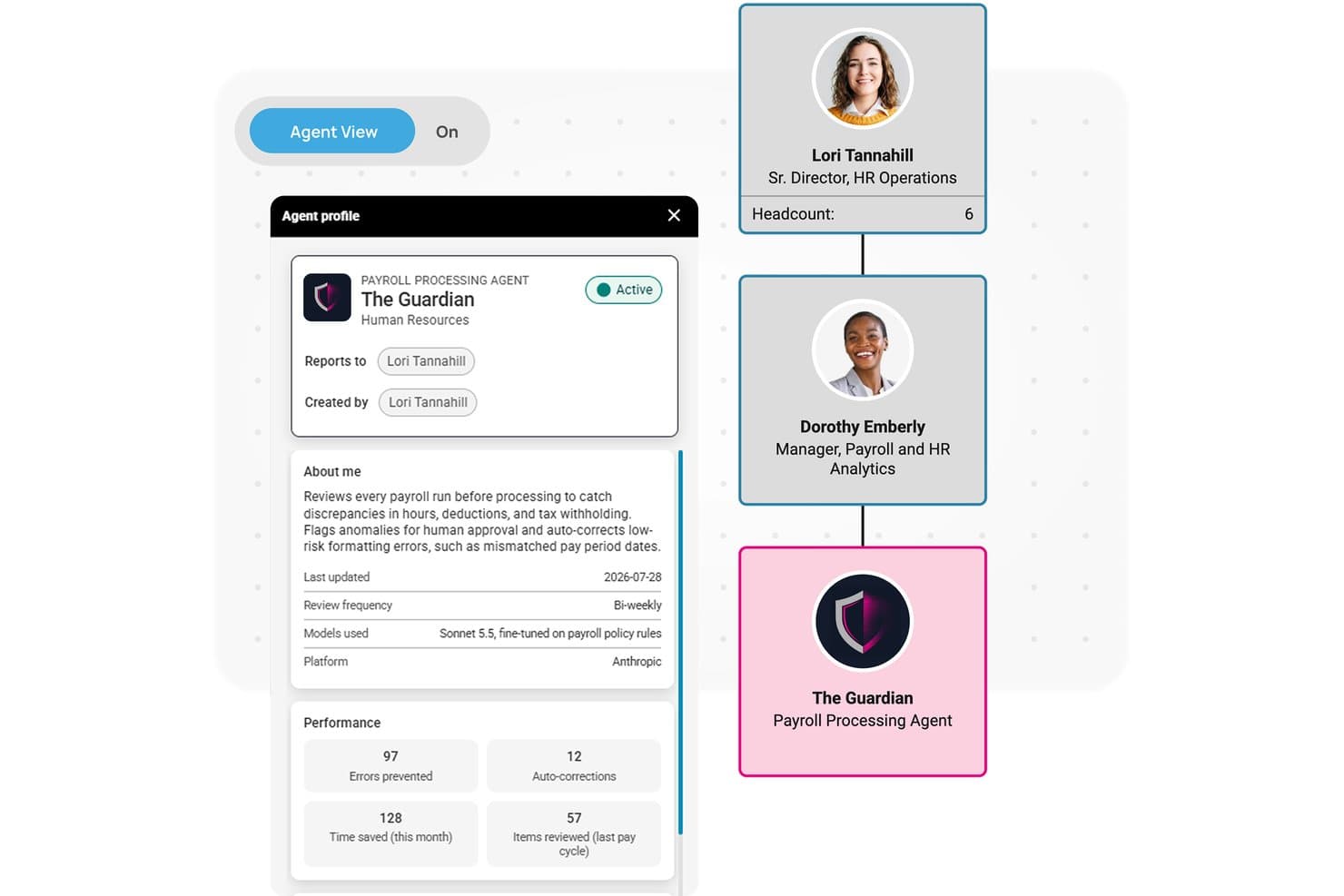
isolved's AI Guardian agent reviews payroll runs to catch errors automatically. isolved is an HCM platform with payroll software that automates pay processing, tax management, and compliance, and includes The Guardian, an AI agent that flags payroll anomalies and prepares corrections before each run closes.
Who Is isolved Best For?
isolved suits HR and payroll teams at small to mid-sized businesses that want payroll, tax management, and anomaly detection in one connected platform.
Why I Picked isolved
I picked isolved as one of the best because its reporting depth is genuinely hard to match at this scale: 600+ pre-built report templates, plus configurable custom reports, give payroll teams immediate access to the data they actually need. I also like The Guardian, which analyzes each payroll run before it closes, ranks anomalies by severity (Critical down to Informational), and prepares corrections for review so nothing slips through unnoticed.
isolved Key Features
- Tax management and filing: isolved calculates payroll taxes and handles federal, state, and local tax deposits, registrations, filings, amendments, and remittances on your behalf.
- Employee self-service portal: Employees can access pay stubs, tax statements, time-off balances, and benefits information directly, without routing requests through an administrator.
- Predictive People Analytics: Uses predictive modeling and historical data to surface workforce trends around salary, tenure, and turnover across your organization.
- HR AI chatbot: An always-on chatbot lets employees ask payroll and HR questions and complete common tasks inside People Cloud or Microsoft Teams.
isolved Integrations
isolved has a native Claude integration through its People Cloud Connector for Claude. Its marketplace offers Remote for international employees and global payroll; no broader integration count or public API is documented.
Pros and Cons
Pros:
- The Guardian prepares selected fixes for review
- Pre-close anomaly alerts rank by severity
- 600+ payroll report templates
Cons:
- Prepared fixes cover only three issue types
- AI doesn't calculate wages or deductions
Learn more about isolved: Best for embedded AI agents
- Free demo available
- Pricing upon request
Visit WebsiteCustomer Rating:4.3/5
Workday Illuminate provides Workday’s HR and financial workflows with embedded AI agents. Workday lands on my AI payroll shortlist because its embedded AI agents handle complex payroll actions automatically. I see teams who run multi-country payrolls benefit by letting these AI agents track, analyze, and flag potential errors before they hit payouts. When I tested its recommendation engine, I liked how it called out unusual compensation patterns and guided corrections in real time.
Workday’s Best For
- Enterprises needing AI-driven multi-country payroll oversight
- HR teams focused on compliance and real-time anomaly detection
Workday’s Not Great For
- Small businesses with simple payroll requirements
- Organizations that avoid cloud-based HR platforms
What sets Workday apart
Workday approaches payroll by designing around automation and compliance at scale, rather than manual intervention or flexible templates like in QuickBooks Payroll. The system expects you to centralize complex payroll across different countries with AI agents proactively monitoring for errors and regulatory shifts. In practice, this makes it good for global companies that want payroll risk flagged and handled early, not left for post-processing.
Tradeoffs with Workday
Workday optimizes for scale and automation, but you give up agility when making quick, custom payroll edits. That rigidity can slow you down if you need to handle lots of exceptions or small customizations frequently.
Pros and Cons
Pros:
- Customizable dashboards for tailored insights
- Natural language processing simplifies data interaction
- Predictive analytics enhances decision-making
Cons:
- Limited customization options for small teams
- Requires some technical knowledge to set up
Learn more about Workday: Best for self-service for UK employees
- Free demo available
- Pricing upon request
Visit WebsiteCustomer Rating:5/5
PayCaptain empowers employees with payroll control and financial management. PayCaptain is here because it sets the bar for letting UK-based employees manage pay-related tasks themselves. When I helped a team transition off spreadsheets, features like on-demand pay access and real-time pay breakdowns made a huge difference. I like how PayCaptain's self-service portal lets people handle HMRC status and tax code changes, without HR getting involved.
PayCaptain’s Best For
- UK businesses wanting employee-managed pay and tax tasks
- Teams needing on-demand pay access and interactive payslips
PayCaptain’s Not Great For
- Companies based outside the UK
- Organizations with complex international payroll requirements
What sets PayCaptain apart
PayCaptain is built around letting employees manage their own payroll and tax tasks. Instead of relying on HR for routine pay queries, people use the self-service portal to make changes themselves. Compared to more traditional payroll tools like Sage, I see UK companies get much more employee enablement with PayCaptain. This works best for organizations that want to decentralize pay management.
Tradeoffs with PayCaptain
PayCaptain optimizes for employee autonomy, but if you rely on one system for global payroll, you’ll miss country coverage and advanced international compliance.
Pros and Cons
Pros:
- Wide-ranging integration options
- Customizable employee benefits
- Instant access to pay advances at no cost
Cons:
- Limited scalability for large enterprises
- Limited to UK businesses
Learn more about PayCaptain:
Annen AI-lønnsprogramvare
Her er noen flere alternativer for AI-lønnsprogramvare som ikke kom med på utvalgslisten min, men som likevel er verdt å se nærmere på:
- 11ZellisONEBest for HR integration in the UK and Ireland
- 12Papaya GlobalBest for multinational and global payroll
- 13DayforceBest for shift-linked earned-wage access
- 14GustoBest for small-business people operations
- 15Keka HRBest for 100+ plug-and-play payroll integrations
- 16UKG ProBest for complex pay rules across entities
- 17RemoteBest for payroll migration parallel testing
Related Reviews
How I Evaluate AI Payroll Software
To make this list, a tool’s AI needs to handle real payroll work, like calculating wages and deductions or flagging unusual pay patterns. From there, I evaluate three things. Core functionality carries the most weight, like running payroll and managing tax filings. Then I look at standout features, like natural-language reporting, and what a tool offers beyond its feature set, like clear safeguards for employee payroll data.
Core Functionality (Table Stakes For This List)
When I'm selecting tools for my list, I score each one on a scale from 0 (does not offer the functionality) to 5 (excels in this area) for each core functionality listed below. I then convert the total into a percentage to help assess each tool's overall fit, with extra weight on any functionalities I’ve deemed essential.
- AI Payroll Processing (Essential): I look for AI that calculates wages, deductions, and withholdings across varied pay structures, including bonuses and multiple rates.
- Error And Anomaly Detection (Essential): I assess whether the system flags duplicate payments, rate mismatches, or unusual overtime before payroll is approved.
- Tax Compliance Updates: I check how AI applies changing tax rules and supports filings across the jurisdictions where the workforce is paid.
- Predictive Payroll Insights: I look for forecasts based on past payroll data that surface labor-cost trends, overtime patterns, or upcoming spend.
- AI Payroll Assistance: I assess whether an AI assistant can answer employee questions about pay, deductions, and payroll status in context.
- HR And Time Reconciliation: I check whether HR, benefits, and time data sync and reconcile, such as catching mismatched hours before a pay run.
Once I have a list of tools that meet the criteria, I consider what sets each platform apart.
Differentiating Factors (What Sets Vendors Apart)
Here's how I compare and contrast different vendors:
Standout Features
I look for global payroll orchestration—whether the AI adapts pay runs to local currency, statutory rules, and language requirements across countries. Natural-language reporting is another key differentiator; I check if admins can ask questions like "show me overtime costs for Q3" and get an instant, accurate breakdown. I also evaluate audit trail intelligence, since AI-curated documentation saves hours of manual prep during compliance reviews.
Beyond Features
I evaluate how transparent a vendor is about its AI decisions—whether there's clear documentation on how the model flags errors or adjusts tax calculations, and whether a human can review changes before they're finalized. Data security matters just as much; I check for SOC 2 compliance, encryption standards, and role-based access controls, since payroll data is some of the most sensitive information your organization holds. I also look at total cost of ownership, including hidden fees for multi-jurisdiction tax filings or premium AI modules that aren't included in base pricing.
Slik velger du AI-lønnsprogramvare
Det er lett å gå seg vill i lange funksjonslister og kompliserte prisstrukturer. For å hjelpe deg med å holde fokus når du går gjennom den unike prosessen din for valg av programvare, får du her en sjekkliste over faktorer du bør ha i bakhodet:
| Faktor | Hva du bør vurdere |
|---|---|
| FaktorSkalerbarhet | Hva du bør vurdereKan programvaren vokse med virksomheten din? Vurder om den kan håndtere et økende antall ansatte og mer komplekse lønnsbehov etter hvert som selskapet utvider seg. |
| FaktorIntegrasjoner | Hva du bør vurdereKontroller om den kan integreres med de eksisterende HR- og regnskapssystemene dine. Sømløs dataflyt kan spare tid og redusere feil. Se etter populære integrasjoner som QuickBooks og SAP. |
| FaktorTilpasningsmuligheter | Hva du bør vurdereGir programvaren deg mulighet til å tilpasse arbeidsflyter etter behovene dine? Tilpasning kan bidra til å tilpasse verktøyet til de unike prosessene dine. |
| FaktorBrukervennlighet | Hva du bør vurdereVurder om grensesnittet er intuitivt og brukervennlig. En bratt læringskurve kan hindre innføring og effektivitet. |
| FaktorImplementering og oppstart | Hva du bør vurdereVurder hvor mye tid og hvilke ressurser som trengs for å komme i gang. Se etter leverandører som tilbyr omfattende opplæring og støtte under overgangen. |
| FaktorKostnad | Hva du bør vurdereVurder de totale eierkostnadene, ikke bare abonnementsavgiften. Ta med kostnader til oppsett, opplæring og eventuelle tillegg. |
| FaktorSikkerhetstiltak | Hva du bør vurdereSørg for at programvaren har robuste sikkerhetstiltak for å beskytte sensitive lønnsdata. Se etter kryptering, flerfaktorautentisering og regelmessige sikkerhetsrevisjoner. |
| FaktorOverholdelseskrav | Hva du bør vurdereBekreft om programvaren oppfyller kravene til overholdelse av regler i bransjen og regionen din. Manglende overholdelse kan føre til bøter og juridiske problemer. |
Hva er AI-lønnsprogramvare?
AI-lønnsprogramvare er et verktøy som automatiserer lønnskjøring og -administrasjon ved hjelp av kunstig intelligens. HR-fagfolk og lønnsspesialister bruker vanligvis AI i lønnsarbeidet for å forbedre nøyaktigheten, spare tid og sikre overholdelse av regelverket.
Automatiserte beregninger, samsvarsvarsler og integrasjonsmuligheter bidrar til å redusere feil og håndtere komplekse lønnsbehov. Alt i alt gir disse verktøyene effektivitet og trygghet ved håndtering av lønnsoppgaver.
Funksjoner i AI-lønnssystemer
Når du velger en AI-drevet plattform, bør du se etter følgende viktige funksjoner i lønnssystemer:
- Automatiserte beregninger: Beregner automatisk lønn, skatter og fradrag for å redusere feil og spare tid.
- Samsvarsvarsler: Gir varsler om endringer i arbeidslovgivningen for å bidra til at virksomheten overholder regelverket.
- Integrasjonsmuligheter: Kobles til eksisterende HR- og regnskapssystemer for sømløs dataflyt og økt effektivitet.
- Selvbetjening for ansatte: Lar ansatte få tilgang til og administrere sine egne lønnsopplysninger, noe som reduserer den administrative arbeidsmengden.
- Tilpassbar rapportering: Tilbyr skreddersydde rapporter som gir innsikt i lønnstrender og resultatmålinger.
- Støtte for flere valutaer: Håndterer lønn i ulike valutaer, noe som er avgjørende for globale selskaper.
- Analyse i sanntid: Gir umiddelbar innsikt i lønnsdata for å støtte informerte beslutninger.
- Sikkerhetstiltak: Beskytter sensitive lønnsopplysninger med kryptering og autentiseringstiltak.
- Mobil tilgang: Gjør det mulig å administrere lønn på farten via mobile enheter, noe som gir større fleksibilitet.
- Automatiserte arbeidsflyter: Effektiviserer rutineoppgaver ved å automatisere prosesser, slik at det frigjøres tid til strategisk arbeid.
Fordeler med AI-lønnssystemer
Implementering av et AI-lønnssystem gir flere fordeler for teamet og virksomheten din. Her er noen av fordelene du kan se frem til:
- Økt nøyaktighet: Automatiserte beregninger reduserer risikoen for feil i lønnsbehandlingen.
- Tidsbesparelser: Automatiserte arbeidsflyter og selvbetjeningsfunksjoner frigjør tid til mer strategiske oppgaver.
- Overholdelse av regelverk: Samsvarsvarsler bidrar til å holde virksomheten i tråd med endringer i arbeidslovgivningen.
- Bedre datainnsikt: Analyse i sanntid gir verdifull innsikt i lønnstrender og resultater.
- Bedre medarbeidertilfredshet: Selvbetjeningsfunksjoner gir ansatte mulighet til å administrere egne lønnsdata.
- Kostnadseffektivitet: Reduksjon av manuelle oppgaver minimerer behovet for flere lønnsmedarbeidere.
- Global rekkevidde: Støtte for flere valutaer gjør det enkelt å administrere lønn for internasjonale team.
Kostnader og priser for AI-lønnssystemer
Ved valg av et AI-lønnssystem er det nødvendig å forstå de ulike prismodellene og abonnementene som er tilgjengelige. Kostnadene varierer basert på funksjoner, teamstørrelse, tilleggstjenester og mer. Tabellen nedenfor oppsummerer vanlige abonnementer, gjennomsnittsprisene deres og typiske funksjoner som inngår i AI-lønnssystemløsninger:
Sammenligningstabell for AI-lønnssystemer
| Abonnementstype | Gjennomsnittspris | Vanlige funksjoner |
|---|---|---|
| AbonnementstypeGratisabonnement | Gjennomsnittspris$0 | Vanlige funksjonerGrunnleggende lønnsbehandling, begrenset rapportering og e-poststøtte. |
| AbonnementstypePersonlig abonnement | Gjennomsnittspris$5-$25/bruker/måned | Vanlige funksjonerLønnsbehandling, skatteberegninger og selvbetjening for ansatte. |
| AbonnementstypeBedriftsabonnement | Gjennomsnittspris$30-$75/bruker/måned | Vanlige funksjonerAvansert rapportering, samsvarsvarsler og integrasjonsmuligheter. |
| AbonnementstypeEnterprise-abonnement | Gjennomsnittspris$80-$150/bruker/måned | Vanlige funksjonerTilpassbare arbeidsflyter, støtte for flere valutaer, analyse i sanntid og prioritert støtte. |
Vanlige spørsmål om AI-lønnsprogramvare
Her er noen svar på vanlige spørsmål om AI-lønnsprogramvare:
Hvordan håndterer AI-lønnsprogramvare kravene til regelverk?
AI-lønnsprogramvare oppdateres kontinuerlig for å overholde endringer i skattelover og arbeidslivsregler. Den automatiserer samsvarskontroller og varsler teamet ditt om eventuelle regelverksendringer, slik at dere kan overholde kravene uten manuell oppfølging.
Kan AI-lønnsprogramvare integreres med eksisterende systemer?
Ja, det meste av AI-lønnsprogramvaren kan integreres med systemer som SAP og Oracle HCM. Disse integrasjonene sørger for sømløs dataflyt mellom lønnssystemet og andre forretningssystemer, noe som reduserer feil og dobbeltarbeid.
Hvilke sikkerhetstiltak finnes for AI-lønnsprogramvare?
AI-lønnsprogramvare prioriterer datasikkerhet ved å bruke SSL-kryptering og andre sikkerhetsprotokoller. Den sørger for at sensitive lønnsdata beskyttes mot uautorisert tilgang, slik at teamets informasjon holdes trygg.
Hvordan kan AI-lønnsprogramvare forbedre effektiviteten?
AI-lønnsprogramvare automatiserer repetitive oppgaver som beregninger og avstemminger, slik at teamet ditt kan fokusere på mer strategiske aktiviteter. Denne automatiseringen fører til raskere lønnskjøringer og færre feil.
Kan AI-lønnsprogramvare skaleres for virksomheter i vekst?
Ja, AI-lønnsprogramvare er utviklet for å skalere i takt med virksomheten din. Enten du ansetter nye medarbeidere eller utvider til nye lokasjoner, kan programvaren tilpasses for å håndtere økt kompleksitet og volum. Denne skalerbarheten er spesielt viktig når du skal velge lønnsprogramvare for små bedrifter som forventer å vokse.
Hvordan håndterer AI-lønnsprogramvare spørsmål fra ansatte?
Mange AI-lønnsløsninger har chatboter som kan svare på vanlige spørsmål fra ansatte. Denne funksjonaliteten bidrar til å redusere belastningen på HR-teamet ved å gi umiddelbare svar på rutinemessige henvendelser.