

10 beste konkurrenter til BambooHR for HR-administrasjon i 2026

10 Kortliste over BambooHR-konkurrenter


De beste BambooHR-konkurrentene hjelper deg med å administrere HR-, lønns- og prestasjonsoppgaver, samtidig som de tilbyr ulike styrker innen tilpasning, integrasjoner eller priser for å passe bedre til organisasjonens behov.
Selv om BambooHR er et populært valg for små og mellomstore bedrifter, er det ikke en løsning som passer alle. Avhengig av teamets størrelse, struktur eller prioriterte funksjoner kan en annen plattform tilby bedre skalerbarhet, rapporteringsmuligheter eller fleksibilitet.
Med utgangspunkt i min erfaring som tidligere HR-spesialist har jeg testet og sammenlignet de beste alternativene til BambooHR som effektiviserer sentrale HR-funksjoner, forbedrer effektiviteten og passer til ulike budsjetter. I denne veiledningen finner du pålitelige alternativer som bidrar til å forenkle personaladministrasjonen og støtter teamets vekst.
Hva er BambooHR?
BambooHR er et skybasert HR-informasjonssystem (HRIS) som primært er utviklet for små og mellomstore bedrifter.
Pakken omfatter funksjoner som administrasjon av medarbeiderinformasjon, rekruttering og onboarding (får gode tilbakemeldinger), resultatstyring, registrering av permisjoner og lønnskjøring.
Verktøyet har som mål å gjøre HR-prosessene mer effektive, forbedre organiseringen av data og rapporteringen samt styrke medarbeidernes utvikling og engasjement.
Why Trust Our Software Recommendations
Our team has been testing and reviewing software since 2012. As HR experts ourselves, we know how difficult—and important—it is to choose the right software.
For this guide, we evaluated tools using hands-on testing and independent research, scoring tools using our selection criteria. We also draw on insights from industry thought leaders and practicing HR experts.
Our reviews reflect our human editorial judgment, not a sales pitch.
Expert reviewers:
Sammenligningstabell for BambooHR-alternativer
Denne sammenligningstabellen oppsummerer prisopplysningene for mine beste utvalgte BambooHR-konkurrenter.
| Tool | Best For | Trial Info | Price | ||
|---|---|---|---|---|---|
| 1 | Best for unified payroll and HR in one database | Not available | Pricing upon request | Website | |
| 2 | Best for hands-on payroll tax filings | Not available | From $599/employee/month | Website | |
| 3 | Best for dynamic workforce planning and analytics | Free demo available | Pricing upon request | Website | |
| 4 | Best as AI for business | Free demo available | From $8/user/month | Website | |
| 5 | Best for company-wide goal alignment | Free demo available | Pricing upon request | Website | |
| 6 | Best for scalable recruitment workflows | Free demo available | Pricing upon request | Website | |
| 7 | Best for automation and performance insights | 14-day free trial | Pricing upon request | Website | |
| 8 | Best for time and attendance management | 30-day free trial | From $50/month (billed annually) | Website | |
| 9 | Best for mobile-first onboarding | 60-day free trial; free demo available | From $192/month | Website | |
| 10 | Best for candidate sourcing and applicant tracking | Not available | Pricing upon request | Website |


Anmeldelser av de beste BambooHR-konkurrentene \u0026 alternativene
Nedenfor finner du mine detaljerte sammendrag av de beste BambooHR-alternativene som kom med på kortlisten. Anmeldelsene mine gir en detaljert gjennomgang av de viktigste funksjonene, fordeler \u0026 ulemper, integrasjoner og ideelle bruksområder for hvert verktøy, slik at du kan finne det som passer best for deg.

Paycom
Best for unified payroll and HR in one database
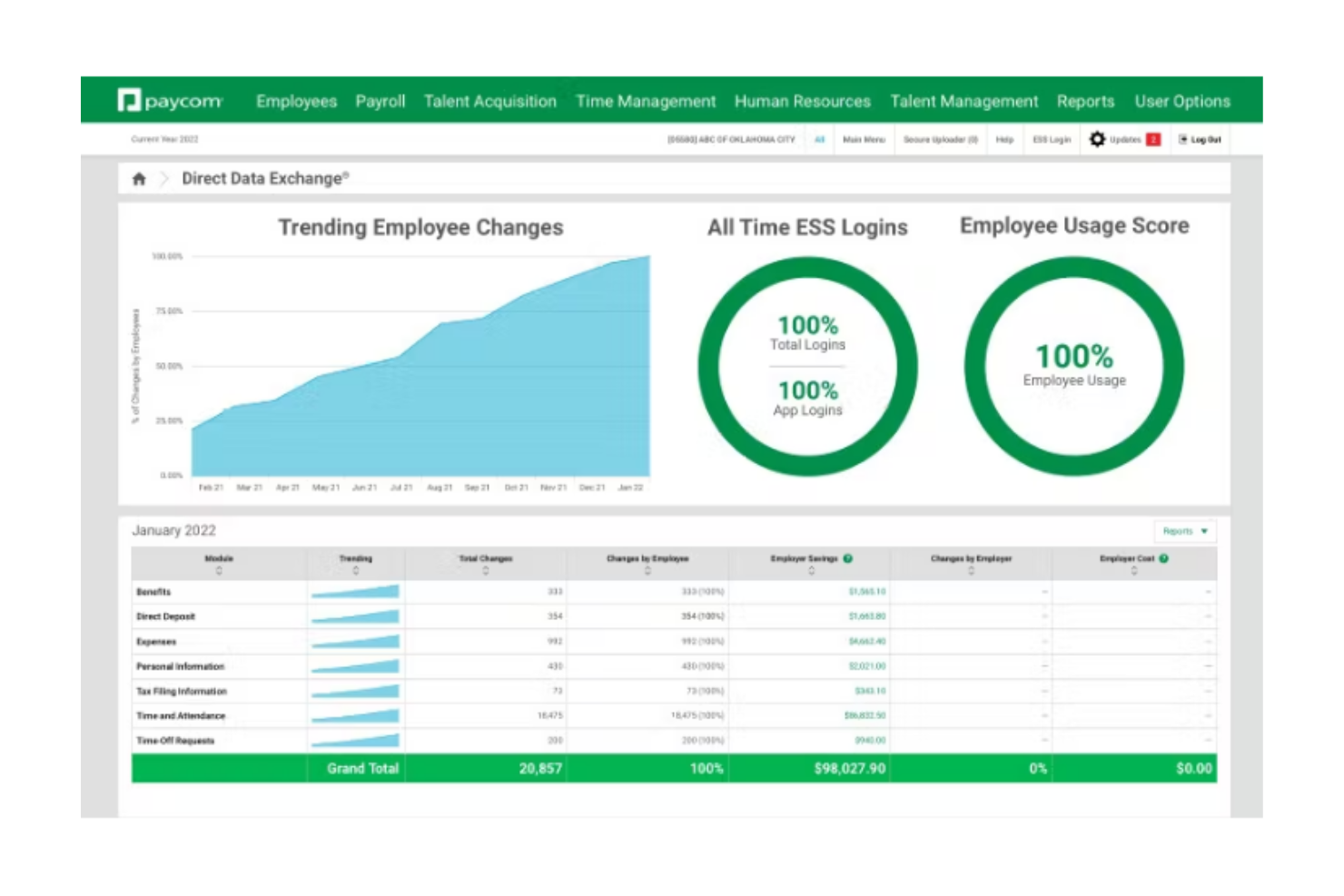
Paycom is an all-in-one HR and payroll platform that centralizes HR, payroll, talent acquisition, time tracking, and performance management in a single system. It’s a strong alternative to BambooHR for organizations that want deeper payroll integration and employee-driven data management.
Who Is Paycom Best For?
Paycom is best suited for mid-sized to large organizations that want employees to manage and verify their own HR and payroll information directly within the system.
Why I Picked Paycom
I picked Paycom because its employee self-service model goes beyond simple profile access. Employees enter and maintain their own information, which flows automatically across payroll, benefits, and time off without HR reentry. Beti® adds another layer by allowing employees to review and approve their payroll before submission, helping catch errors at the source. The IWant AI tool also lets employees retrieve HR data on demand, which encourages real adoption rather than passive access.
Paycom Key Features
- GONE time-off automation: Automatically approves or denies time-off requests based on predefined rules.
- Manager on-the-Go: Enables managers to complete approvals and HR tasks from mobile devices.
- Direct Data Exchange: Tracks employee software usage and quantifies adoption impact.
- Applicant tracking: Posts roles to job boards and flows candidate data directly into onboarding.
Paycom Integrations
Paycom provides API access for custom integrations and supports select connections with accounting and recruiting platforms. Public documentation on open native integrations is limited.
Pros and Cons
Pros:
- Strong employee self-service with payroll verification
- Integrated payroll built directly into the HR platform
- Mobile app supports full employee HR functionality
Cons:
- System navigation can feel complex for new users
- Limited publicly documented third-party integrations

Best for hands-on payroll tax filings
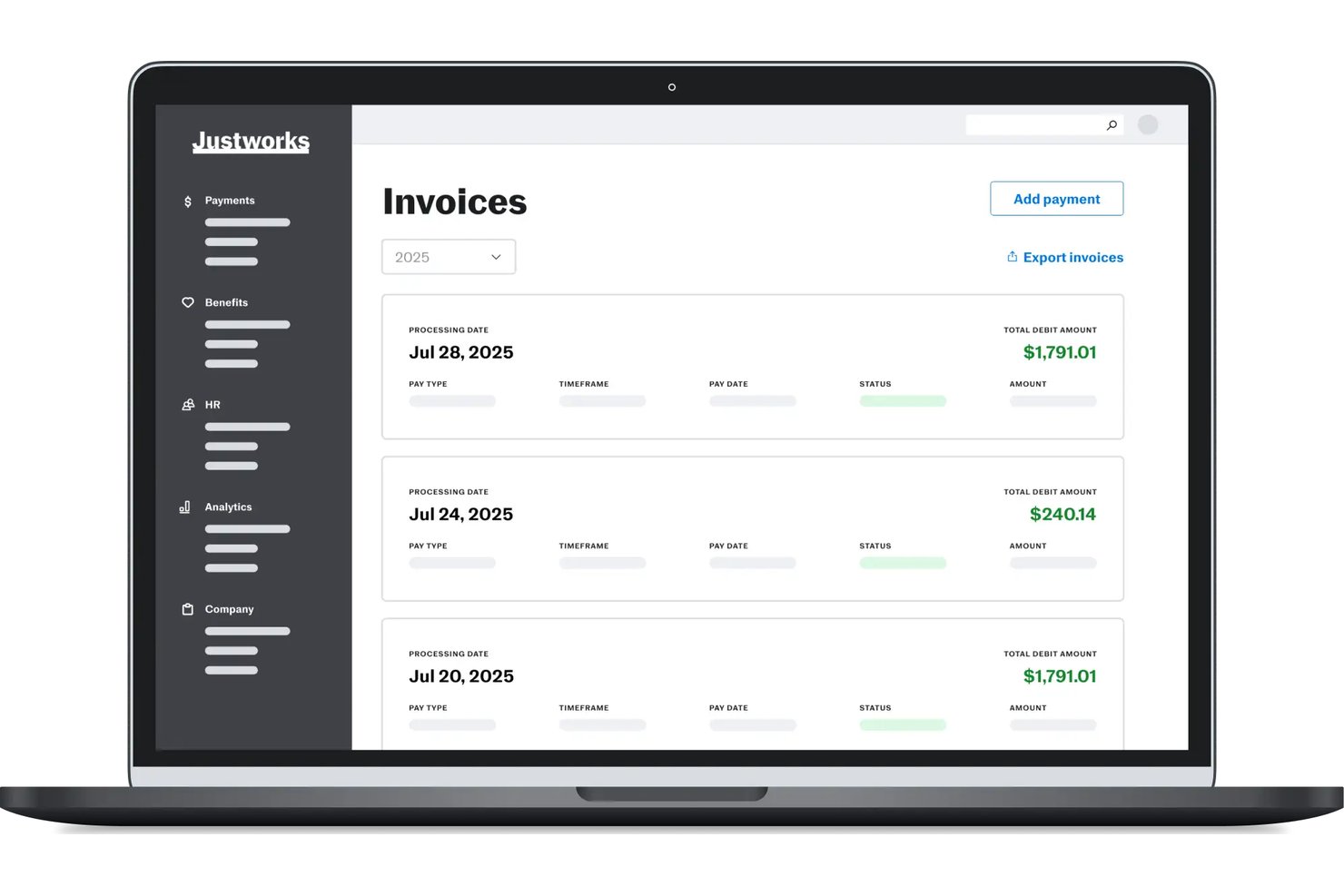
Justworks is a cloud-based HR platform built for small and midsize businesses that want to simplify payroll, benefits, compliance, and onboarding tasks while scaling their people operations confidently.
Who Is Justworks Best For?
HR teams and business owners at small to midsize U.S.-based companies managing multi-state payroll, benefits, and compliance needs.
Why I Picked Justworks
I picked Justworks as one of the best because I can manage detailed payroll tax filings for all US states from a single dashboard, handle W-2 and 1099 processing, and keep all federal, state, and local compliance tasks under one roof.
Justworks Key Features
- Automated onboarding checklists: Streamline new hire setup with customizable digital task lists.
- Document storage and e-signature: Store employee documents securely and collect e-signatures for compliance needs.
- Employee self-service portal: Allow employees to manage their PTO, benefits elections, and personal details online.
- HR reporting tools: Generate and export workforce and payroll reports with customizable filters.
Justworks Integrations
Justworks offers native integrations with QuickBooks, Xero, Greenhouse, Lever, and Slack, and provides an API for custom integrations.
Pros and Cons
Pros:
- Provides access to health and retirement benefits
- Automates employee onboarding and offboarding workflows
- Handles payroll compliance across all US states
Cons:
- Reporting features are limited in customization
- Lacks built-in performance management tools

HiBob
Best for dynamic workforce planning and analytics
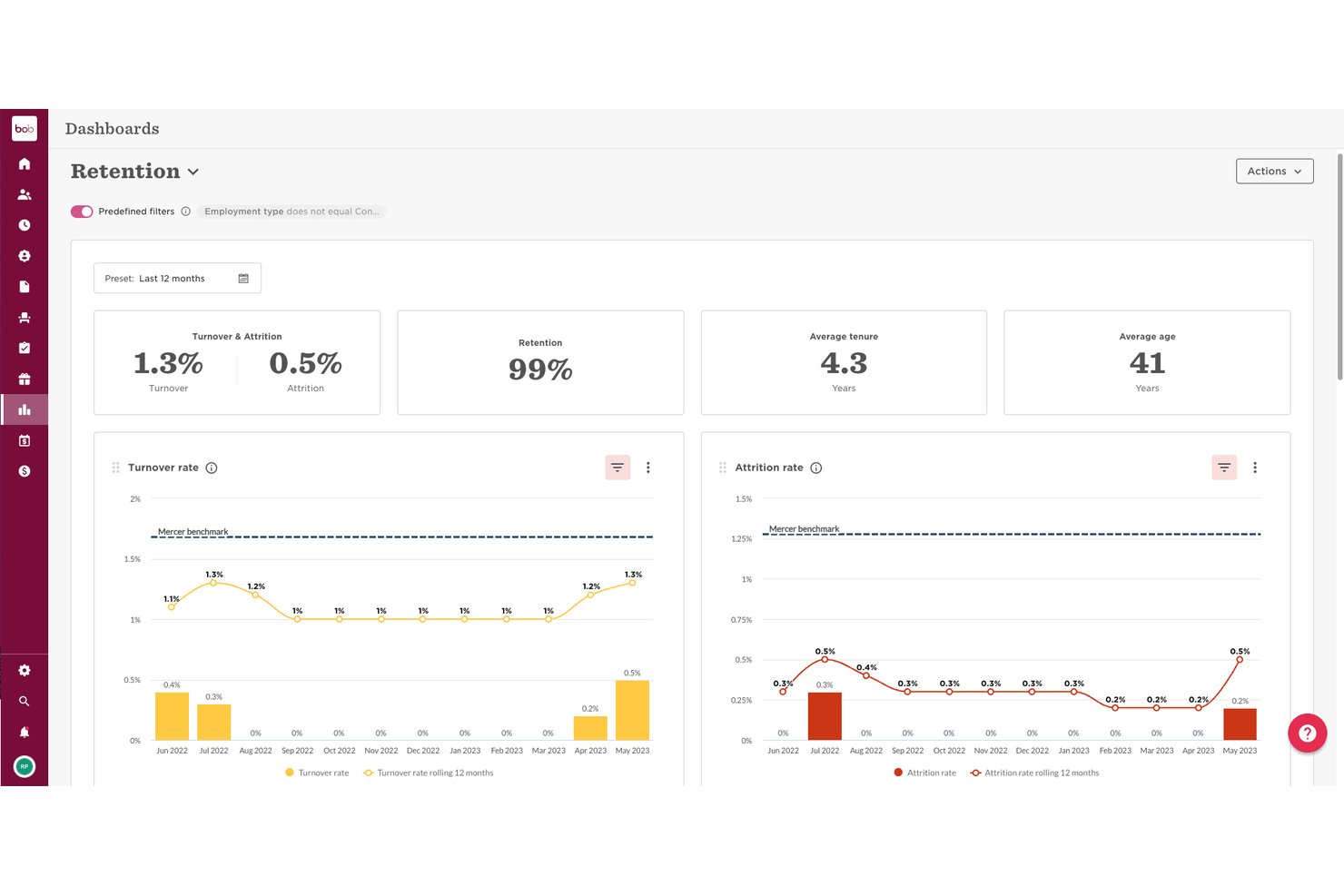
HiBob is a modular HRIS built for scaling mid-sized companies that need a people platform to connect HR, payroll, and workforce planning without juggling disconnected tools.
Who Is HiBob Best For?
HiBob is a strong fit for People Ops teams at companies with 50 to 1,000 employees managing distributed or hybrid workforces across multiple regions.
Why I Picked HiBob
I picked HiBob as one of the best because its workforce planning capabilities go well beyond what BambooHR offers. I rely on its scenario planning tools to model headcount changes before they happen, and the 150+ built-in metrics across 35+ dashboards give my team a real-time view of workforce trends. Bob AI lets me query people data in plain language, cutting the time I'd spend building custom reports from scratch.
HiBob Key Features
- Customizable employee database: Organize records with unlimited custom fields, document management, and detailed org charts.
- Automated onboarding workflows: Set up task-driven flows for new hires with e-signatures and preboarding capabilities.
- Integrated benefits administration: Manage benefits enrollment, tracking, and eligibility from the same people platform.
- Role-based permissions: Control access and enforce security with granular permission settings across modules and data.
HiBob Integrations
HiBob offers native integrations with platforms like Slack, Microsoft Teams, Greenhouse, DocuSign, Okta, Google Workspace, Workable, and Jira, plus an API for custom integrations.
Pros and Cons
Pros:
- Built-in pulse surveys and eNPS tracking
- Highly configurable org chart and people directory
- Strong workforce planning and scenario modeling tools
Cons:
- Payroll is limited to select regions only
- Reporting setup requires significant admin time

Best as AI for business
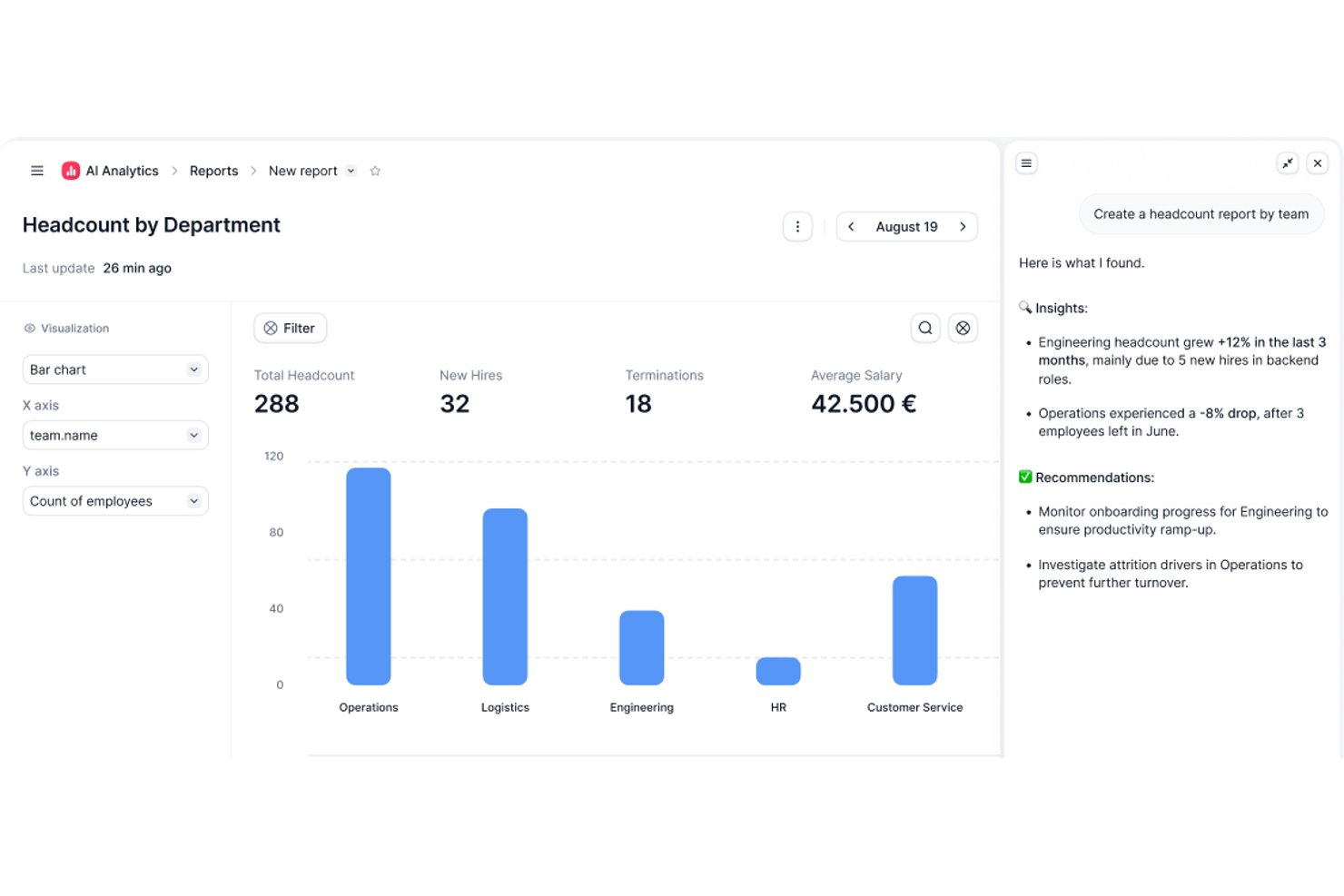
Factorial is an AI for business platform that helps HR teams handle day-to-day operations, including planning timetables, creating reports, and answering employee questions about policies.
Who Is Factorial Best For?
Factorial is a good fit for HR professionals who want AI assistance with employee support and routine workforce administration.
Why I Picked Factorial
I picked Factorial as a BambooHR alternative because its AI for business assists with day-to-day operations. It can help plan timetables, create reports, and answer employee questions about policies, covering practical tasks HR teams handle throughout the workweek.
Factorial Key Features
- Absence management : Employees can submit time-off requests, and managers can review them against a shared team calendar.
- Applicant tracking : Create career pages and job ads, centralize candidate details, and manage applications.
- Document management : Store employee documents and set up approval workflows with selected reviewers.
- Payroll tools : Create and distribute payslips in bulk, and connect payroll providers through an open API.
Factorial Integrations
Factorial’s marketplace lists integrations with Google Workspace, Slack, Microsoft Azure, DATEV LODAS, Sage 200, LinkedIn, Recruitee, Okta, Microsoft Power BI, and Zapier. It also offers a public API for custom integrations.
Pros and Cons
Pros:
- Team calendars make absence planning easier
- Employees manage leave, documents, and onboarding themselves
- AI answers policy questions and plans timetables
Cons:
- Complex reporting and workflows remain limited
- Payroll depth trails dedicated payroll platforms

Best for company-wide goal alignment
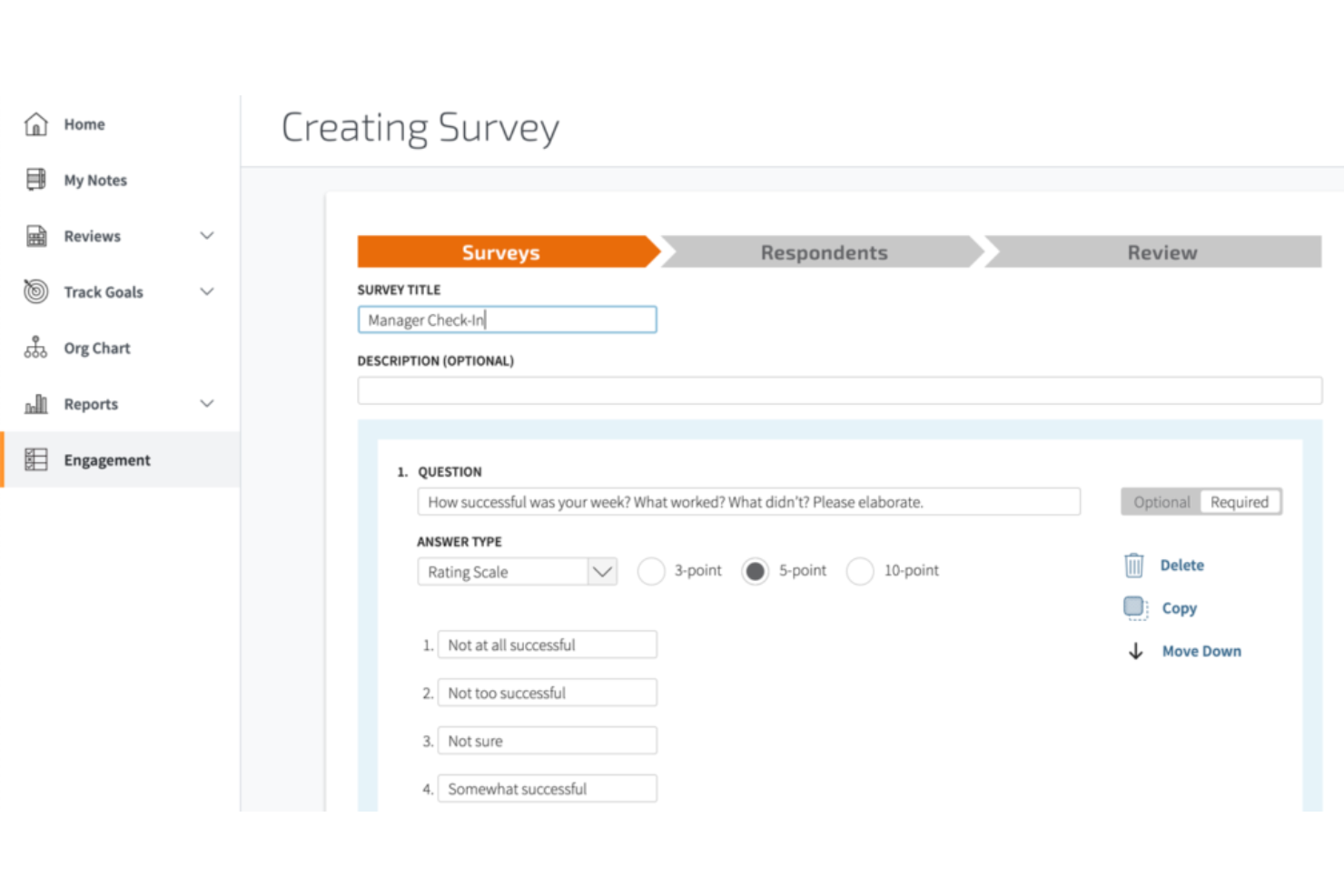
Mitratech Perform combines reviews, employee development, and ongoing feedback in a performance management platform for HR teams coordinating consistent processes across an organization.
Who Is Mitratech Perform Best For?
Mitratech Perform suits HR teams that need to align employee goals with company-wide priorities.
Why I Picked Mitratech Perform
I picked Mitratech Perform for the “Best for company-wide goal alignment” category because it supports cascading goals at company, team, and individual levels. Teams can set SMART or metric-based targets and link them to reviews, helping HR see whether employee assessments reflect broader priorities.
Mitratech Perform Key Features
- Review templates: Create review forms with unlimited templates and 100+ competencies.
- 360-degree feedback: Gather input from managers, peers, direct reports, and external contributors.
- Pulse surveys: Send employee surveys and check-ins before one-to-one meetings.
- Performance reporting: Track trends, review rater bias, and view succession insights.
Mitratech Perform Integrations
Mitratech Perform supports HRIS integrations with Workday, ADP Workforce Now, ADP Enterprise, BambooHR, UKG Pro, Paylocity, Paycor, and TalentReef. It also offers an API for custom connections and SFTP data feeds for other HRIS platforms, including TriNet.
Pros and Cons
Pros:
- Goals link employee targets to company priorities
- Review reminders and status tracking support completion
- Customizable 360 reviews gather peer feedback
Cons:
- Goal progress offers only three update choices
- Navigation changes can confuse infrequent reviewers

Best for scalable recruitment workflows
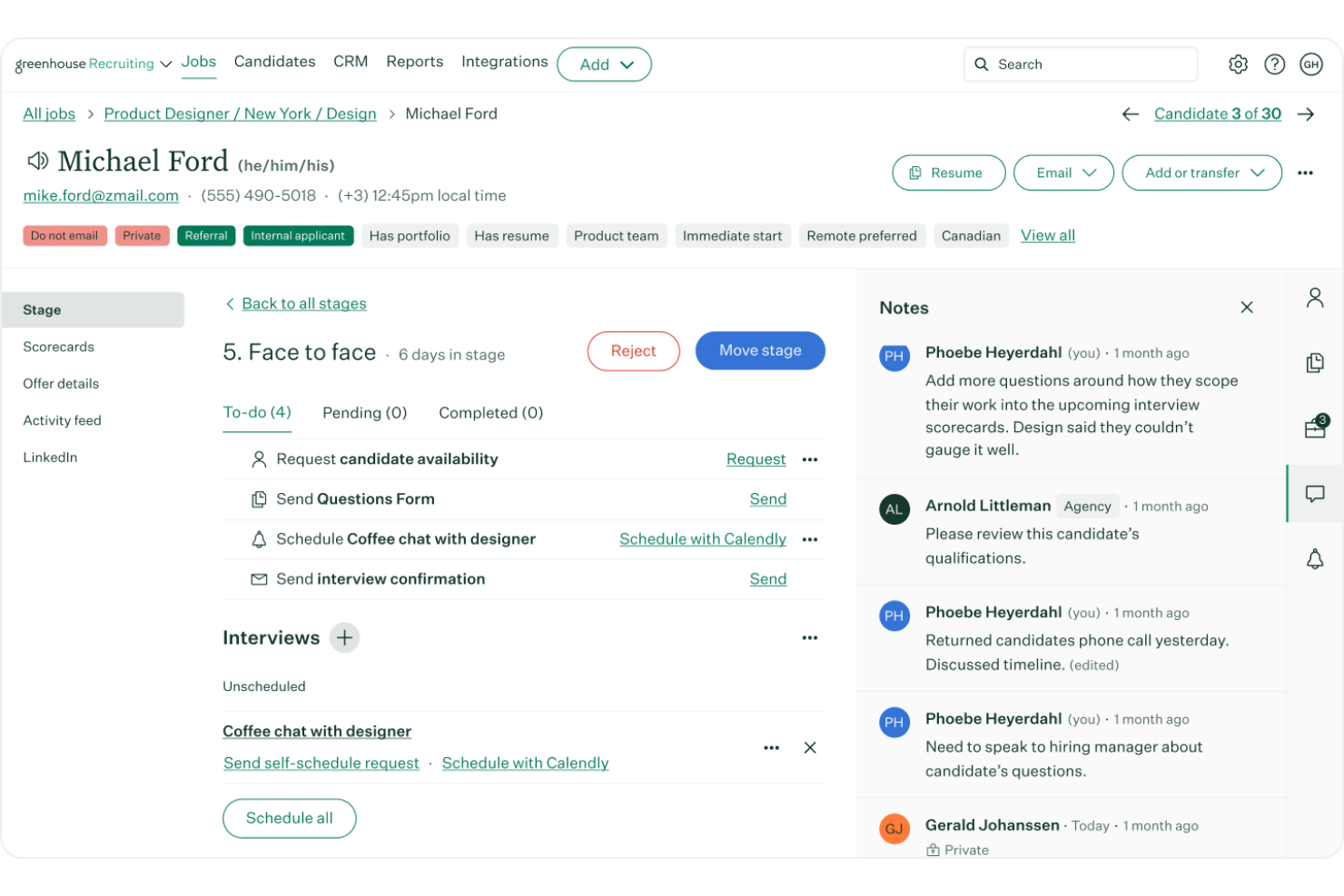
Greenhouse is recruiting software for organizations that need to coordinate hiring teams, manage candidate pipelines, and create consistent processes as hiring needs grow.
Who Is Greenhouse Best For?
Greenhouse suits recruiting teams at growing organizations that need consistent hiring workflows across multiple roles.
Why I Picked Greenhouse
I picked Greenhouse as a BambooHR alternative for its “Best for scalable recruitment workflows” fit. Standardized interview plans and scorecards help hiring teams assess applicants against the same role criteria across multiple openings, while documented decision workflows keep feedback tied to each process.
Greenhouse Key Features
- Job board distribution: Post and promote open roles across more than 1,000 job boards.
- Talent pools: Group and nurture prospective candidates and past applicants.
- Candidate self-scheduling: Let candidates select interview times from available options.
- Branded careers pages: Feature your employer brand and integrate Greenhouse job listings with your website.
Greenhouse Integrations
Greenhouse offers 400+ pre-built integrations, including Google Calendar, Outlook 365, Calendly, LinkedIn Recruiter System Connect, Docusign, Checkr, and Workday. It also provides an open API for custom integrations.
Pros and Cons
Pros:
- Candidate self-scheduling reduces interview coordination
- Centralized pipelines coordinate recruiters and hiring managers
- Scorecards standardize feedback across hiring teams
Cons:
- Bulk actions require extra manual steps
- Custom reporting often requires exports or workarounds
New Product Updates from Greenhouse

Greenhouse Opens Candidate Insights and Talent Matching Assistants to Beta
Greenhouse opens Candidate Insights and Talent Matching assistants to beta for candidate questions and natural-language search. This helps recruiters review candidates and build searches faster. For more information, visit Greenhouse’s official site.
 .
.
Sloneek
Best for automation and performance insights
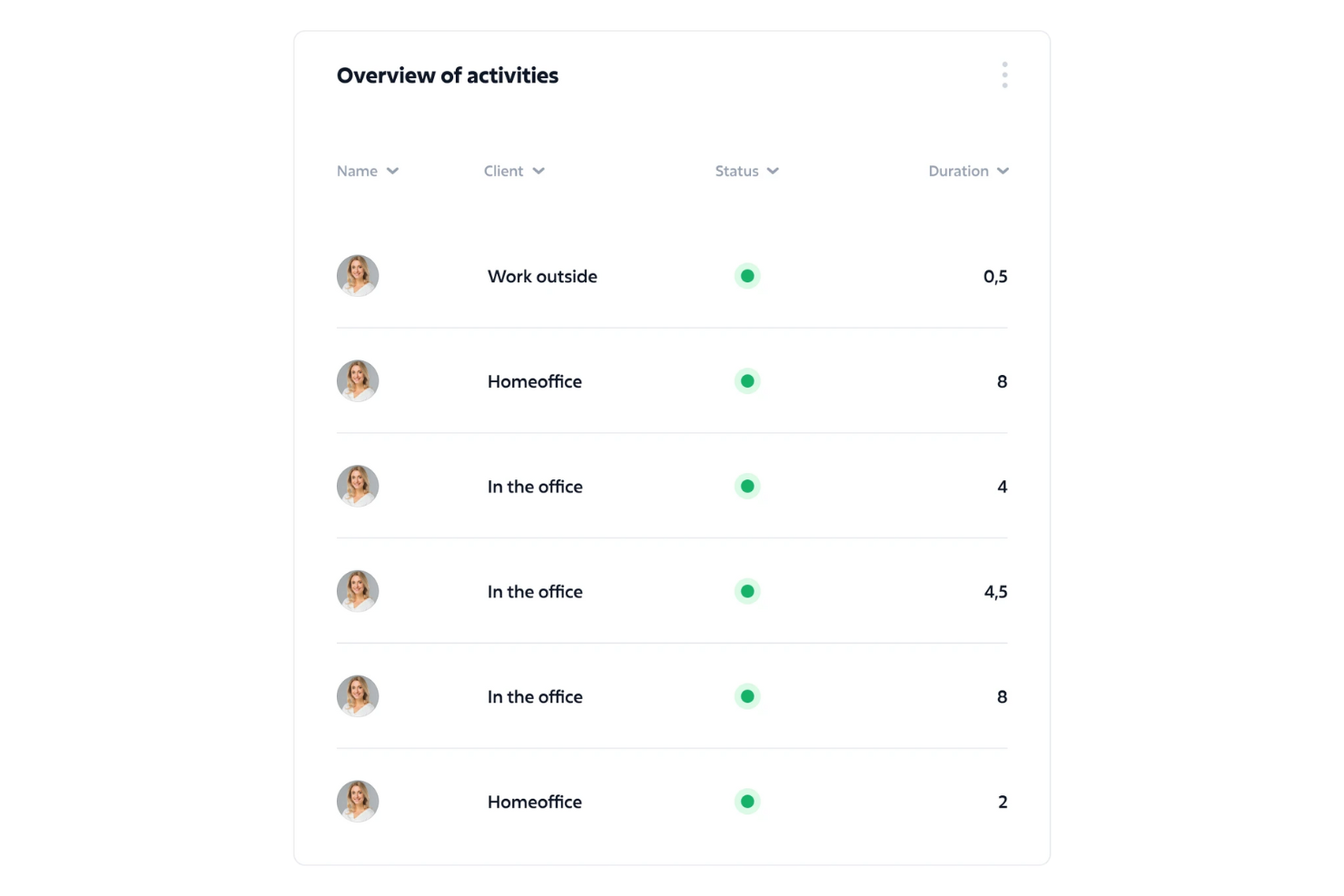
Sloneek is an HR management platform for growing businesses that brings employee data, onboarding, attendance, and people operations together, helping HR teams reduce manual admin and support employees throughout the work lifecycle.
Who Is Sloneek Best For?
Sloneek suits HR teams that want to automate people operations and gain clearer insights into employee performance.
Why I Picked Sloneek
I picked Sloneek, labeled “Best for automation and performance insights,” because it combines people-operations automation with a focus on employee performance. It brings employee data, onboarding, and attendance together, helping HR reduce manual admin across the employee lifecycle. I value that focus when comparing BambooHR alternatives.
Sloneek Key Features
- Document signing: Create and electronically sign HR documents in the platform.
- Asset records: Track company equipment assigned to employees.
- Employee surveys: Create surveys to gather employee feedback.
- Applicant tracking: Manage hiring activities with Sloneek’s ATS.
Sloneek Integrations
Sloneek documents integrations with Google Workspace, Microsoft Entra ID, Okta, Slack, Jira, Google Calendar, and Outlook for sign-in, user imports, absence-calendar syncing, and time-tracking workflows. It also provides a public API for custom integrations.
Pros and Cons
Pros:
- Keeps employee records, documents, and assets together
- Adds goals and 360° performance feedback
- Automates attendance and absence workflows
Cons:
- Reviewers report occasional slow loading and bugs
- Country-specific legal setup can take work

TimeTrex
Best for time and attendance management
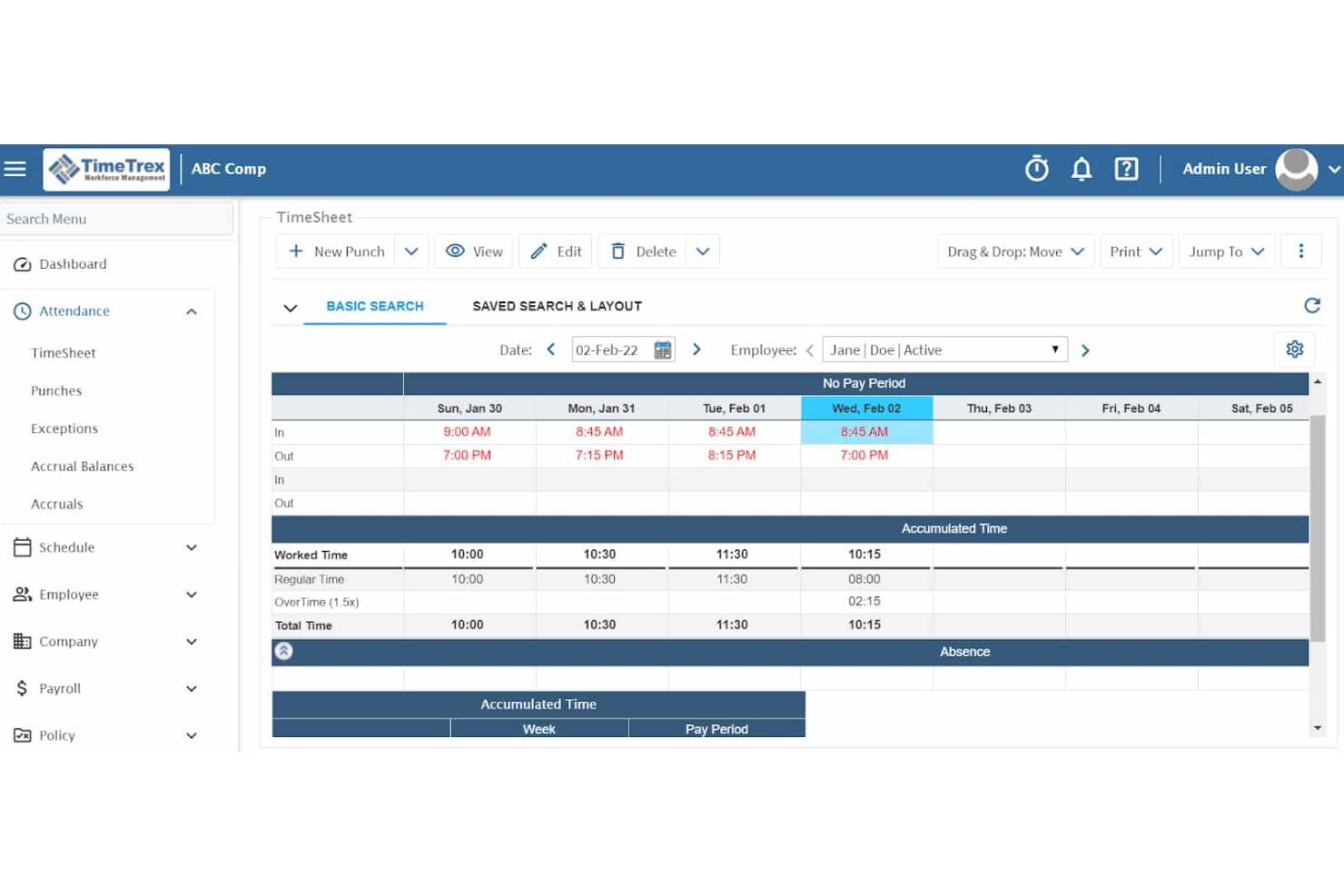
For employers managing hourly or distributed teams, TimeTrex brings workforce and HR administration together to help reduce manual work across employee records, payroll, and scheduling.
Who Is TimeTrex Best For?
TimeTrex is a good fit for HR and operations teams managing attendance and work hours for shift-based employees.
Why I Picked TimeTrex
I picked TimeTrex as a BambooHR alternative because it’s Best for time and attendance management. I like its GPS geofencing and facial recognition options, which help verify that mobile staff clock in at the correct job site. Real-time attendance updates also give HR a clearer view of hours before payroll processing.
TimeTrex Key Features
- Payroll processing: Calculates wages and supports tax filings, paystubs, and direct deposit.
- Shift scheduling: Create shifts based on employee availability, skills, and staffing demand.
- Leave management: Employees submit time-off requests, and managers review approvals.
- Employee records: Maintain profiles and manage onboarding, performance, and benefits.
TimeTrex Integrations
TimeTrex lists integrations with ADP, Intuit QuickBooks, Sage, Paychex, Ceridian, Surepay, CompuPay, Tyler Technologies, and Vensure Employer Services. It also offers an API for custom integrations to sync employee records, time punches, and reports.
Pros and Cons
Pros:
- Detailed labor reports support job costing
- GPS geofencing verifies remote clock-ins
- Real-time attendance feeds payroll calculations
Cons:
- Custom reports can require developer help
- Dated dashboard can feel cluttered
New Product Updates from TimeTrex
TimeTrex Adds Quick Punch App With Offline and QR Support
TimeTrex adds a new Quick Punch app, offline punching, QR code scanning, punch images, configurable messages, and punch warnings or lockouts to improve employee clock-ins across browsers and local computers. For more information, visit TimeTrex’s official site.
 .
.
Best for mobile-first onboarding
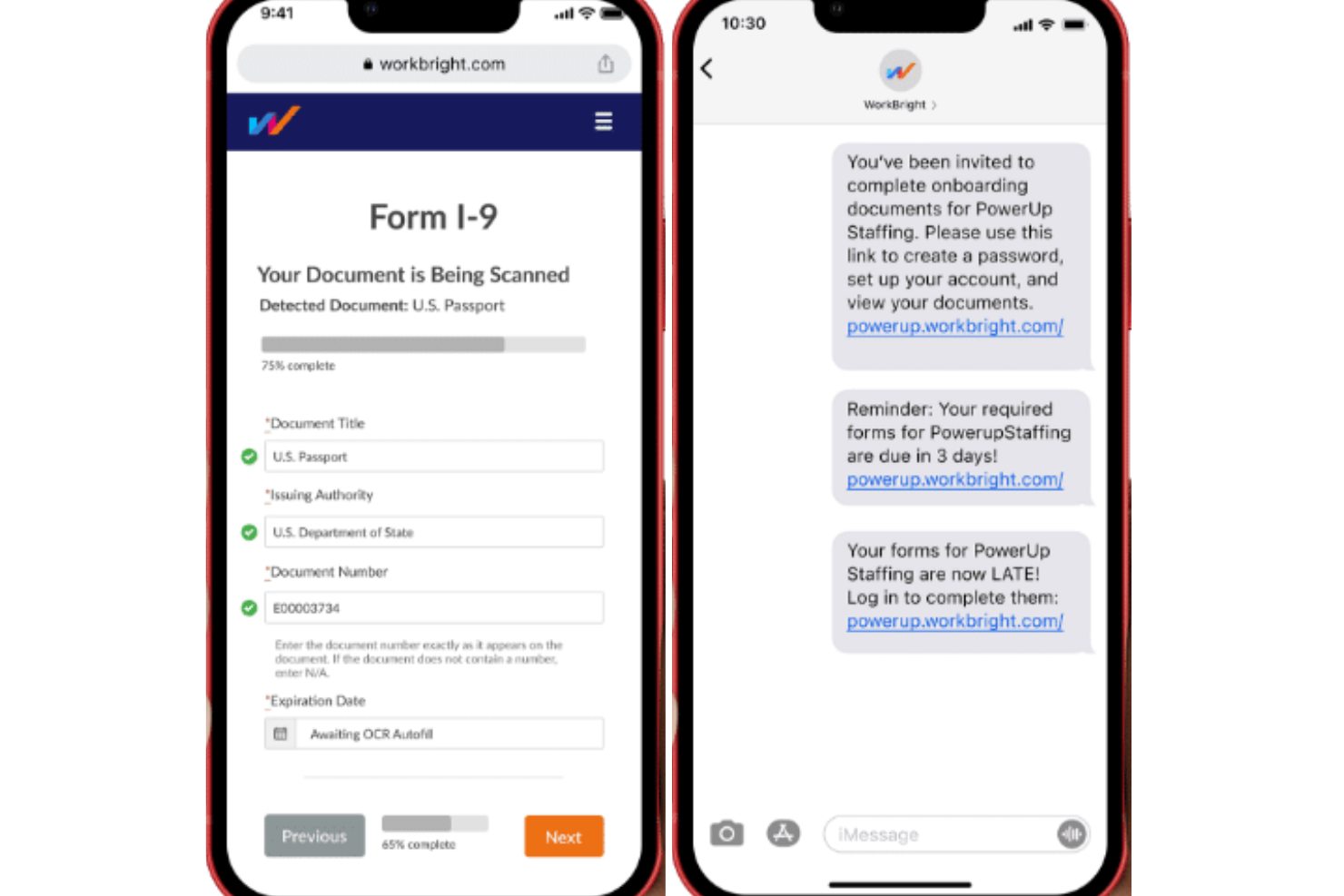
WorkBright is an employee onboarding platform for employers with hourly, seasonal, or distributed teams, helping HR staff manage new-hire paperwork and prepare employees across locations.
Who Is WorkBright Best For?
WorkBright suits HR teams that need new hires to complete onboarding paperwork on smartphones, especially when employees aren’t regularly at a desk.
Why I Picked WorkBright
I picked WorkBright as a BambooHR alternative because its focus is “Best for mobile-first onboarding.” New hires can complete paperwork on smartphones, which suits hourly and seasonal staff who aren’t regularly at a desk. HR teams can also prepare employees across locations.
WorkBright Key Features
- I-9 and E-Verify case management: Track verification cases, review status, and handle next steps in WorkBright.
- Automated document checks: Use OCR, document analysis, and compliance checks to flag potential errors or altered documents.
- Employment forms library: Access more than 200 state and federal forms.
- HR system integrations: Connect WorkBright with HRIS platforms through no-code integrations or its open API.
WorkBright Integrations
WorkBright offers 200+ no-code integrations, including ADP, Workday, and UKG, with two-way HRIS data sync. It also provides an open API for custom integrations.
Pros and Cons
Pros:
- Seasonal workflows reuse employee paperwork
- I-9 case tracking supports compliance follow-up
- Mobile paperwork suits deskless new hires
Cons:
- Focused on onboarding, not full employee lifecycle
- Some hires struggle with logins and uploads
Freshteam
Best for candidate sourcing and applicant tracking
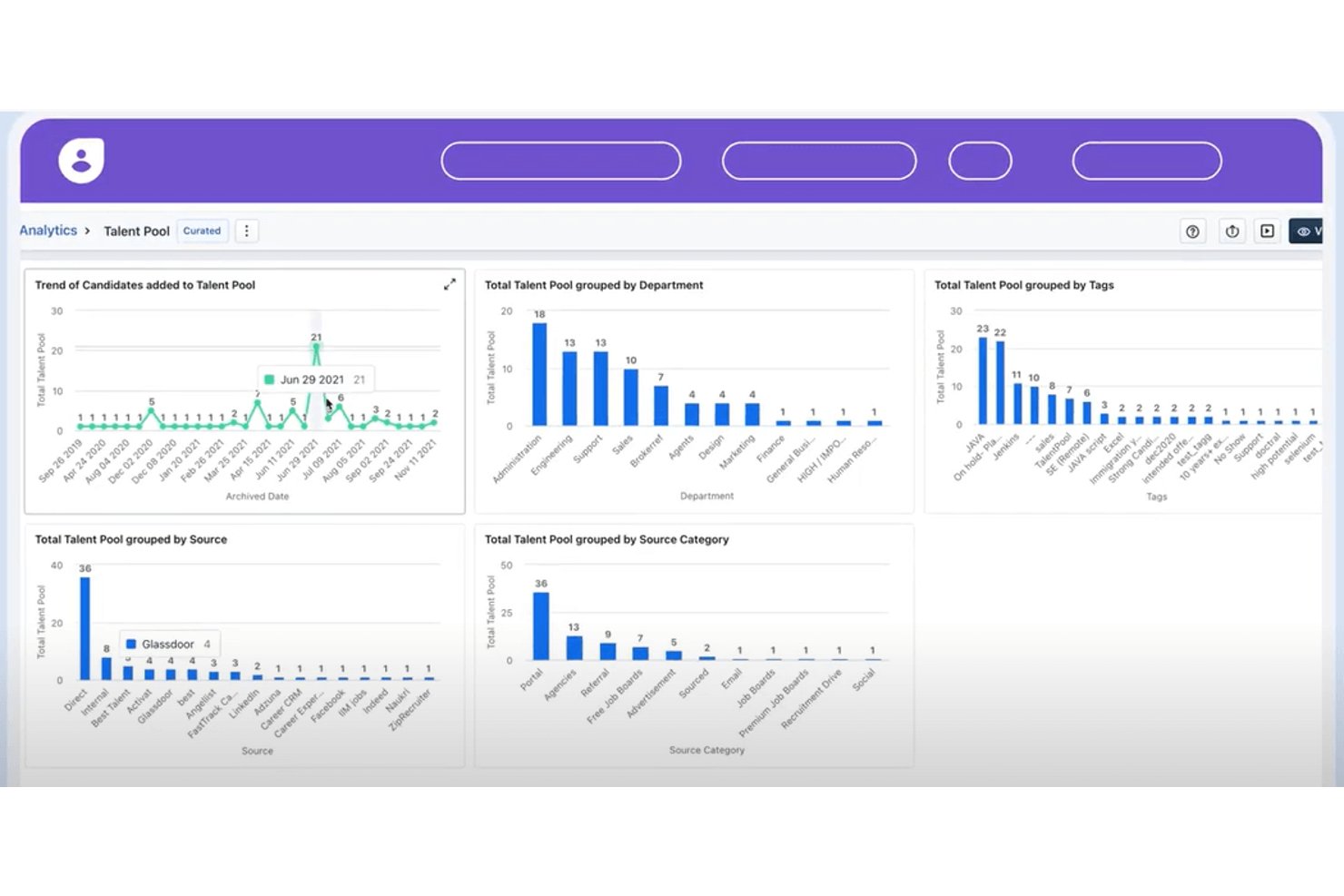
Freshteam is Freshworks’ HR platform for growing businesses, bringing recruiting, onboarding, and employee information together for teams comparing alternatives to BambooHR.
Who Is Freshteam Best For?
Freshteam suits recruiters and hiring teams that need a shared place to source candidates and manage applications.
Why I Picked Freshteam
Freshteam is my pick as Best for candidate sourcing and applicant tracking because it gives recruiters a dedicated hiring pipeline. I like that teams can publish roles on a career site and track applicants through recruitment stages, keeping candidate progress visible as hiring decisions move forward.
Freshteam Key Features
- Onboarding workflows: Assign onboarding tasks and manage new-hire paperwork.
- Employee database: Store employee profiles and work details in one directory.
- Time-off management: Record leave balances and manage time-off requests.
- Employee referrals: Let employees submit referrals for open positions.
Freshteam Integrations
Freshteam supports integrations with Google Calendar, Google Meet, Zoom, Microsoft Teams through Office 365, and Slack. Google Meet requires Google Calendar, and Freshteam provides APIs for custom integrations.
Pros and Cons
Pros:
- Career pages and job boards help attract applicants
- Interview feedback and alerts support hiring-team coordination
- Candidate profiles keep applicant details centralized
Cons:
- Candidate database growth has caused occasional downtime
- Reporting customization can limit HR analysis
Andre BambooHR-alternativer
Her er noen flere BambooHR-alternativer som ikke kom med på kortlisten, men som likevel er verdt å se nærmere på:
- GoCo
For ease-of-use
- HiBob
For deepening company culture and employee engagement
- IntelliHR
For managing compliance and advanced data analysis
- Workday
For streamlining HR processes
- Kallidus Sapling
For creating customizable workflows and automating processes
- UKG Pro
For learning management and high-volume recruiting
- Namely
For performance management
- TriNet HR Plus
For benefits management and mobile access
- Sage HR
For expense management and unlimited recruiting
- Rippling
For quick onboarding automation
- Deel HR
For BambooHR users adding global payroll
- ClearCo
For AI-powered applicant tracking
- Paylocity
For comprehensive HR management
- Keka HR
For integrating HR, payroll, and projects


How I Evaluate BambooHR Competitors
I split my evaluation into two layers: the baseline capabilities—employee records, PTO tracking, onboarding—and the differentiators that separate the best-fit options from the rest.
Core Functionality (Table Stakes For This List)
When I'm selecting tools for my list, I rank each one on a scale from 0 (does not offer the functionality) to 5 (excels in this area) for each core functionality listed below. Then, I calculate the tool's total score into a percentage. Each tool needs to achieve a minimum total score of 75% to be considered for inclusion.
- Centralized Employee Database: I check whether the platform stores employee records, documents, and org charts in one place with custom fields and role-based access controls.
- Onboarding & Offboarding Workflows: Each tool should handle new hire task lists, e-signatures, and equipment provisioning rather than requiring separate tools or manual checklists.
- Time & Leave Management: I evaluate how the platform handles PTO requests, accrual policies, and time tracking, including whether employees can self-serve through a portal or mobile app.
- Payroll & Benefits Administration: Whether native or through integrations, I look for payroll processing, tax filing, and benefits enrollment that keep data synced with employee records.
- Performance Management: Goal setting, review cycles, and feedback tools matter here. Some platforms like Gusto keep this light, while others like Rippling go deeper with OKRs.
- HR Reporting & Analytics: I look at whether the tool provides customizable dashboards and exportable reports on headcount, turnover, and compliance data beyond canned templates.
Once I have a list of tools that meet this criteria, I consider what sets each platform apart.
Differentiating Factors (What Sets Vendors Apart)
Here's how I compare and contrast different vendors:
Standout Features
A built-in applicant tracking system is a big differentiator because it keeps hiring and onboarding connected in a single workflow. I also look at employee engagement tools like pulse surveys and eNPS tracking, which help HR teams spot retention risks before they become turnover problems. For companies with distributed teams, global payroll support separates platforms like Deel and Rippling from more domestically focused options.
Beyond Features
Pricing transparency matters a lot in this space. Some vendors publish clear per-employee-per-month rates, while others require a sales call just to get a ballpark. I also evaluate integration ecosystems closely, since most HR teams rely on connections to payroll providers, accounting tools like QuickBooks, and communication apps like Slack. Finally, I consider how well a platform scales. A 20-person startup outgrowing its HR tool within a year is a common and avoidable problem.
Hvorfor se etter et BambooHR-alternativ?
Selv om BambooHR er et solid valg når det gjelder HRIS-systemer, finnes det flere grunner til at du kanskje ønsker å velge et BambooHR-alternativ, blant annet:
1. Begrensede avanserte funksjoner
BambooHR er flott for grunnleggende HR-oppgaver, men mangler dypere funksjonalitet som avansert analyse, kompensasjonsplanlegging og kompleks organisasjonsstyring. Hvis du skalerer raskt eller trenger strategiske HR-verktøy, kan du raskt vokse fra løsningen.
2. Begrensninger innen lønn
Den innebygde lønnsløsningen (TRAXPayroll) støtter bare USA, og er ganske grunnleggende. Hvis du har ansatte i flere land eller planlegger å ansette internasjonalt, trenger du flere systemer for å administrere internasjonal lønn.
3. Grunnleggende tilpasning
Egendefinerte arbeidsflyter og rapportering er noe begrenset sammenlignet med mer robuste plattformer. Dette kan være en ulempe hvis prosessene dine er unike eller utvikler seg raskt.
4. Integrasjonsmangler
BambooHR integreres med mange verktøy, men integrasjonene er ikke alltid dyptgående eller sømløse. Du kan trenge omveier eller ekstra verktøy for å bygge en komplett HR-teknologiplattform.
Konklusjon: Enigheten blant HR-miljøet er at BambooHR er utmerket for mindre selskaper, men det anbefales ikke som en skalerbar løsning hvis virksomheten din har 400+ ansatte eller planlegger å nå dette nivået snart.
BambooHRs viktigste funksjoner
Når du velger alternativer til BambooHR, bør du se etter følgende nøkkelfunksjoner:
- Selvbetjeningsportal for ansatte: Konkurrenter bør tilby intuitive selvbetjeningsverktøy som lar ansatte oppdatere personopplysninger, se stillingsinformasjon, be om fri og få tilgang til HR-dokumenter. Dette reduserer den administrative belastningen på HR og gir de ansatte større selvstendighet.
- Mobilapp: Ledende alternativer tilbyr omfattende mobilfunksjoner som støtter forespørsler om fri, profiloppdateringer, godkjenninger og varsler – slik at ansatte og ledere kan holde kontakten mens de er på farten.
- Verktøy for medarbeiderengasjement (inkludert eNPS): Sterke konkurrenter tilbyr innebygde undersøkelser av medarbeiderengasjement, pulsmålinger og sporing av eNPS for å måle arbeidsmiljøet, identifisere kulturelle styrker eller mangler og støtte langsiktige strategier for å beholde ansatte.
- Rapportering & analyse: Konkurrenter tilbyr ofte mer avansert rapportering enn BambooHR, med større tilpasningsmuligheter, dashbord i sanntid og bredere analyser som omfatter HR-nøkkeltall, etterlevelse, arbeidskrafttrender og innsikt i prestasjoner.
- Introduksjon og avslutning av arbeidsforhold: Se etter plattformer som effektiviserer overganger med automatiserte arbeidsflyter, rollebaserte sjekklister, digital innsamling av dokumenter og tilpassede introduksjonsforløp. Disse verktøyene hjelper nyansatte med å føle seg ivaretatt og sikrer en ryddig og regelverksmessig korrekt avslutning av arbeidsforhold.
- Rekrutteringsfunksjoner: De beste alternativene inkluderer kraftige ATS-funksjoner – for eksempel distribusjon av stillingsannonser, CV-screening, planlegging av intervjuer, kandidatvurderinger og automatiserte e-postmaler – for å støtte raskere og mer effektiv rekruttering.
- Tilgangstillatelser: Alternativer på bedriftsnivå tilbyr detaljerte innstillinger for tillatelser, slik at sensitiv informasjon begrenses samtidig som samarbeid på tvers av team fortsatt er mulig. Disse funksjonene er spesielt nyttige for team i vekst med flere administratorer.
- Integrasjoner: Konkurrenter til BambooHR tilbyr ofte sterkere eller mer fleksible integrasjoner som kobler sømløst til lønnssystemer, verktøy for prestasjonsoppfølging, læringsplattformer, systemer for kandidatsporing, dokumentlagring og løsninger for enkel pålogging (SSO).
Vanlige AI-funksjoner hos BambooHR-konkurrenter
Mange alternativer til BambooHR bruker nå AI for å forbedre HR-automatisering, medarbeideropplevelsen og beslutningstaking, for eksempel:
- AI-drevet kandidatscreening: AI evaluerer automatisk CV-er, matcher kandidater med stillingskrav og rangerer søkere – noe som bidrar til å redusere tiden det tar å ansette og forbedre kandidatkvaliteten.
- Prediktiv innsikt i personalavgang og engasjement: AI analyserer fraværsmønstre, prestasjonshistorikk, tilbakemeldinger om arbeidsmiljøet og teamdynamikk for å identifisere ansatte i risikosonen og proaktivt støtte arbeidet med å beholde dem.
- Automatiserte arbeidsflyter for introduksjon: AI tildeler oppgaver i introduksjonsperioden, angir påminnelser, tilpasser arbeidsflyter etter rolle eller avdeling og sørger for at alle dokumenter leveres i tide.
- Smarte prestasjonsanalyser: AI fremhever trender i prestasjonsvurderinger, identifiserer kompetansemangler og anbefaler utviklingsmuligheter eller coachingtiltak.
- Intelligent planlegging og prognoser for fri: AI forutsier perioder med mange fraværsforespørsler, bemanningsmangler, overtidsrisiko og ubalanse i teamenes arbeidsbelastning – noe som hjelper ledere med å planlegge mer effektivt.
- AI-drevne chatboter for medarbeiderstøtte: Chatboter håndterer vanlige HR-spørsmål om retningslinjer, personalgoder, tilgjengelig saldo for fri og trinn i introduksjonsperioden, noe som reduserer gjentatte henvendelser til HR.
- Avansert innsikt fra rapporter: AI forbedrer dashbord ved å avdekke skjulte trender, avvik eller risikoer knyttet til etterlevelse og anbefale neste steg basert på dataene.
- AI-forsterkede verktøy for intern mobilitet: Noen konkurrenter til BambooHR bruker AI til å anbefale interne kandidater til ledige stillinger, identifisere muligheter for etterfølgerplanlegging og matche ansatte med utviklingsløp.