

10 beste lønnsprogrammer for oppdragstakere i 2026

Lønnssystemer for oppdragstakere – kortliste


Lønnssystemer for oppdragstakere lar deg betale frilansere, konsulenter og gigarbeidere nøyaktig og til rett tid, samtidig som de håndterer etterlevelse av regelverk og skatteskjemaer. Hvis du leter etter lønnssystemer for oppdragstakere, trenger du sannsynligvis verktøy som håndterer betalinger til ikke-ansatte, automatiserer 1099-skjemaer og forenkler dokumentasjonen.
Det riktige valget kan spare tid, redusere feil og hjelpe deg med å overholde regelverket etter hvert som teamet ditt av oppdragstakere vokser. På denne listen finner du de beste lønnsplattformene for betalinger til oppdragstakere, samt viktig informasjon som hjelper deg med å ta et informert valg for virksomheten din i 2026.
Why Trust Our Software Recommendations
Our team has been testing and reviewing software since 2012. As HR experts ourselves, we know how difficult—and important—it is to choose the right software.
For this guide, we evaluated tools using hands-on testing and independent research, scoring tools using our selection criteria. We also draw on insights from industry thought leaders and practicing HR experts.
Our reviews reflect our human editorial judgment, not a sales pitch.
Expert reviewers:
Sammenligningstabell over de beste lønnssystemene for oppdragstakere
Denne sammenligningstabellen oppsummerer priser, prøveperioder og demodetaljer for mine beste utvalg av lønnssystemer:
| Tool | Best For | Trial Info | Price | ||
|---|---|---|---|---|---|
| 1 | Best with automated direct deposit | Not available | From $599/employee/month | Website | |
| 2 | Best for compliant payments in 150+ countries | Free demo available | From $29/user/month | Website | |
| 3 | Best for automating 1099 filings | Free demo available | From $49/month + $6/month/user | Website | |
| 4 | Best for contractor payment flexibility | Free demo available | From $199/employee/month | Website | |
| 5 | Best for organizing contractor documents | Free demo available | Pricing upon request | Website | |
| 6 | Best for paying contractors in 200+ countries | Free plan available | Pricing upon request | Website | |
| 7 | Best for mass payments to global contractors | Free demo available | From $249/month | Website | |
| 8 | Best for automated contractor onboarding | Free demo available | Pricing upon request | Website | |
| 9 | Best for paying contractors across 210+ countries | 30-day free trial | From $2,399/year (billed annually) | Website | |
| 10 | Best for same-day contractor pay runs | Free demo available | From $0.50/payment | Website |


Anmeldelser av de beste lønnssystemene for oppdragstakere
Her er noen av de beste lønnssystemene for håndtering av betalinger utelukkende til oppdragstakere, inkludert de viktigste funksjonene, fordeler & ulemper og merknader om hvorfor jeg har tatt dem med på denne listen. Jeg har også notert ytterligere bruksområder for hvert programvaresystem på listen, slik at du kan finne det beste alternativet for virksomhetens behov.

Best with automated direct deposit
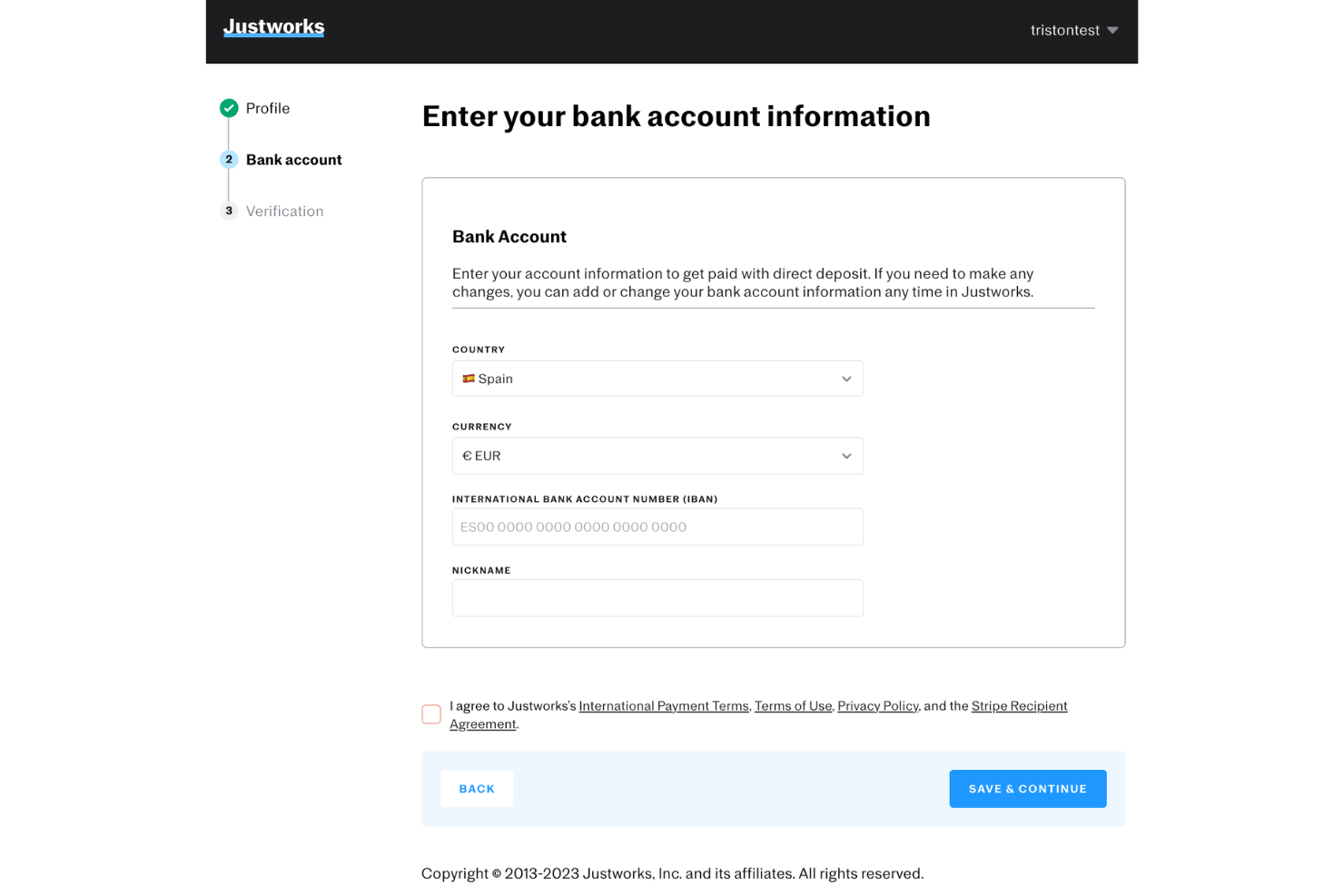
Justworks is a PEO and payroll platform that handles payroll for both W-2 employees and 1099 contractors, covering tax filings, direct deposits, and multi-state compliance across all 50 states.
Who Is Justworks Best For?
Justworks suits small to mid-size US-based businesses that pay a mix of full-time employees and contractors and want payroll, compliance, and benefits in one place.
Why I Picked Justworks
Justworks is one of my top picks because I love how it automates the actual deposit of contractor payments, routing funds directly to bank accounts once a pay run is approved, with no manual transfer steps involved. My team can also schedule regular payment cycles, and 1099 generation happens automatically at year-end. With coverage across more than 2,000 tax localities, multi-state contractor tax calculations don't require any manual work on our end.
Justworks Key Features
- PEO-level benefits administration: Manage access to health, dental, and vision for eligible workers through a single platform.
- HR document storage: Upload and organize contracts, tax forms, and onboarding materials for both employees and contractors.
- Automated 1099 filing: Generate and file 1099 forms for contractors directly from the payroll system.
- Multi-state payroll support: Run payroll compliantly for contractors and employees across all 50 US states.
Justworks Integrations
Justworks offers native integrations with QuickBooks and Xero, and provides an API for custom integrations.
Pros and Cons
Pros:
- Flexible scheduling for contractor payment cycles
- Handles payroll tax compliance across all states
- Automatically generates contractor 1099 forms
Cons:
- Requires multiple steps to offboard contractors
- Benefits access limited for contractors
Best for compliant payments in 150+ countries
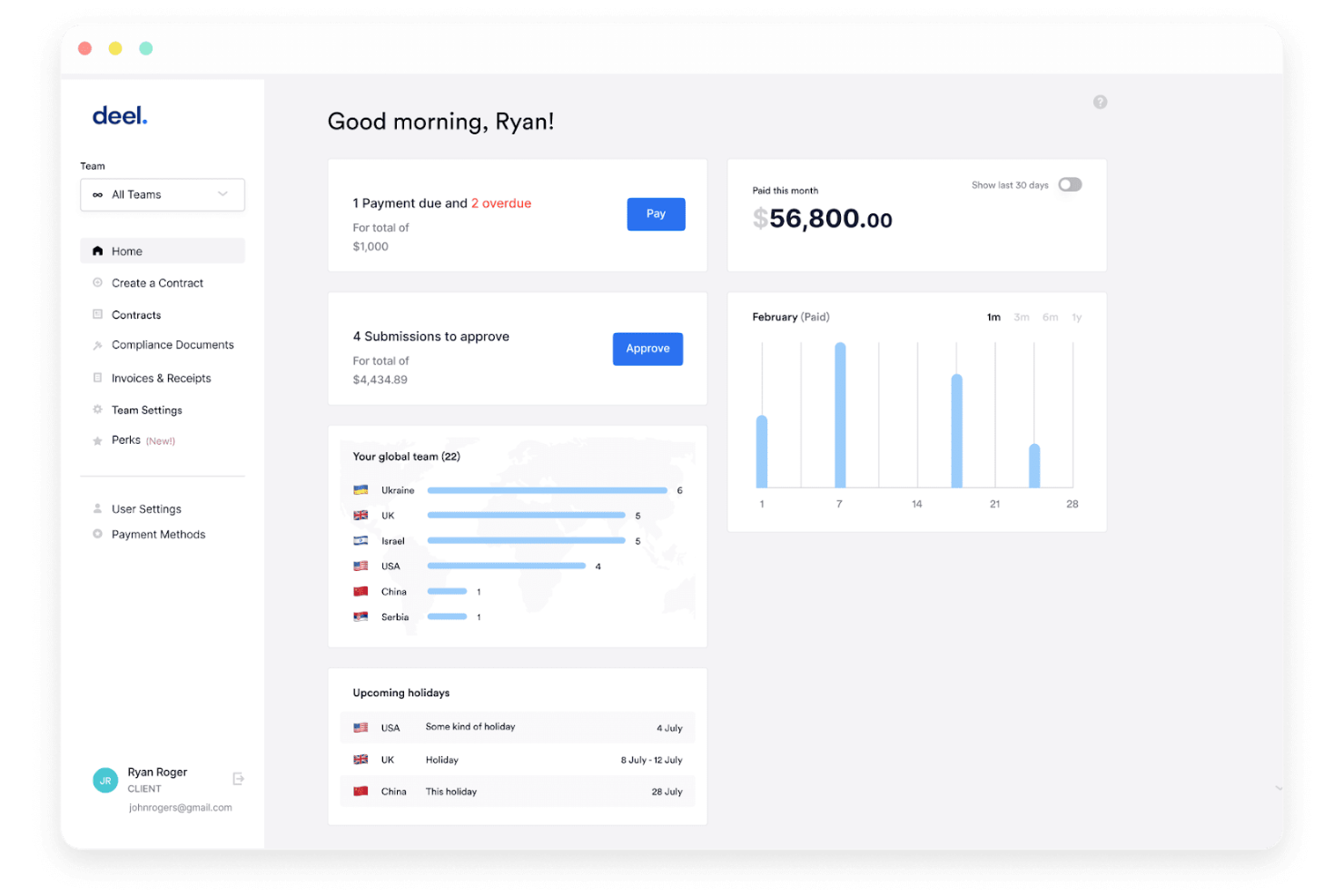
Deel Payroll is a global contractor payroll platform that handles contract creation, multi-currency payments, automated invoicing, tax form collection, and worker classification compliance across 150+ countries.
Who Is Deel Payroll Best For?
Deel Payroll is a strong fit for companies that regularly pay international contractors across multiple countries and need built-in compliance without setting up foreign entities.
Why I Picked Deel Payroll
Deel Payroll earns its spot on my shortlist because no other contractor payroll tool covers compliance at this scale. I especially like Deel Shield, which assesses worker classification and indemnifies against misclassification liability, a real risk when paying contractors across dozens of countries. The platform also generates locally compliant contracts and supports payouts in 120+ currencies, so paying a designer in Brazil and a developer in Nigeria happens from one place.
Deel Payroll Key Features
- Automated invoicing: Easily create, send, and manage invoices for contractor payments in multiple currencies.
- Tax form management: Collect, generate, and store required contractor tax documents, like W-8 and W-9 forms, directly on the platform.
- Payment scheduling: Schedule one-time or recurring payments to contractors worldwide with flexible frequency options.
- Multi-method withdrawals: Contractors can withdraw funds through local bank transfers, PayPal, Wise, Payoneer, or even crypto.
Deel Payroll Integrations
Deel Payroll offers over 130 native integrations, including Workday, QuickBooks, Xero, BambooHR, NetSuite, Slack, Personio, Mesh Payments, 15Five, and JIRA. An API is available for custom integrations.
Pros and Cons
Pros:
- Supports multiple payment withdrawal methods
- Offers local tax document automation
- Handles contractor payments in 150+ countries
Cons:
- Limited built-in reporting customizations
- Global support response times can vary

Gusto
Best for automating 1099 filings
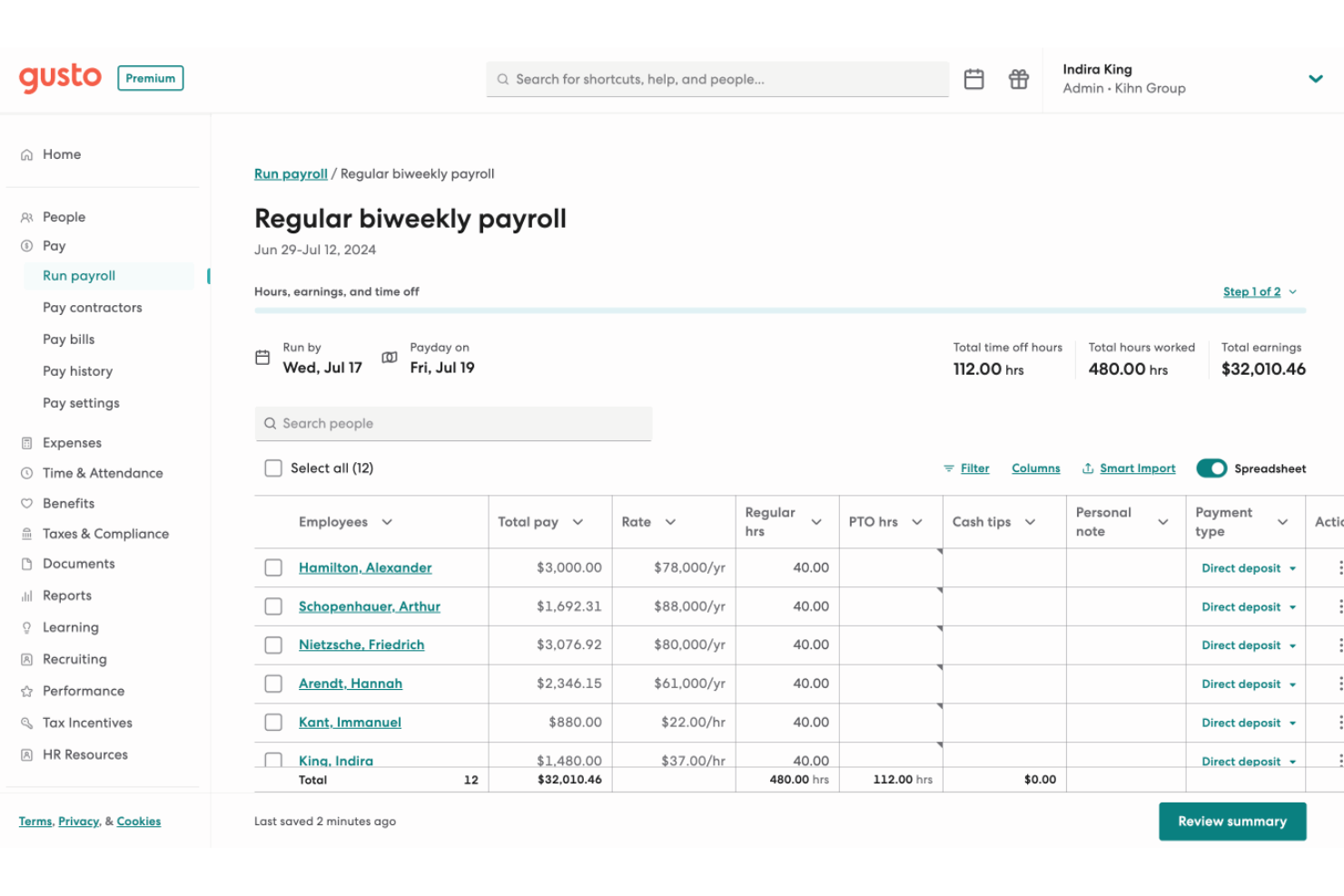
Gusto is a payroll and HR platform that handles contractor and employee payments, tax filings, benefits administration, and compliance in one place.
Who Is Gusto Best For?
Gusto is a strong fit for small businesses in the US that pay a mix of W-2 employees and 1099 contractors and want to manage both from a single platform.
Why I Picked Gusto
Gusto earns its spot as one of the best on my shortlist because of how thoroughly it handles 1099 filings without any extra effort on my part. When December rolls around, Gusto automatically generates, files, and delivers 1099-NEC forms to every contractor I've paid that year, at no added cost. I also like that contractors self-onboard and submit their own tax info upfront, which means I'm not chasing down W-9s at year-end.
Gusto Key Features
- Unlimited payroll runs: You can submit as many payrolls as needed each month without extra charges.
- Integrated time tracking: Capture contractor hours directly within Gusto for more accurate payroll processing.
- Multi-state payroll support: Pay contractors working in different states and manage compliance requirements in one platform.
- Accounting software integrations: Connect with platforms like QuickBooks or Xero to sync payroll data automatically.
Gusto Integrations
Gusto offers 150+ native integrations, including QuickBooks, Xero, Homebase, 7Shifts, 15Five, Expensify, Clover, Checkr, Ashby, BambooHR, and Hubstaff. An API is available for custom integrations.
Pros and Cons
Pros:
- Onboards contractors with self-service tax forms
- Automatically files and distributes 1099-NEC forms
- Handles unlimited contractor payments monthly
Cons:
- Some state tax forms require manual input
- International contractor payments not supported
New Product Updates from Gusto
Gusto Adds Solo Advisory Tools and Mobile Money Features
Gusto adds Solo S-Corp Advisory Tools and Gusto Money on Mobile for tax guidance, invoicing, and bill payments. These updates help accountants advise solopreneurs and let users manage business finances from their phones. For more information, visit Gusto’s official site.

Best for contractor payment flexibility
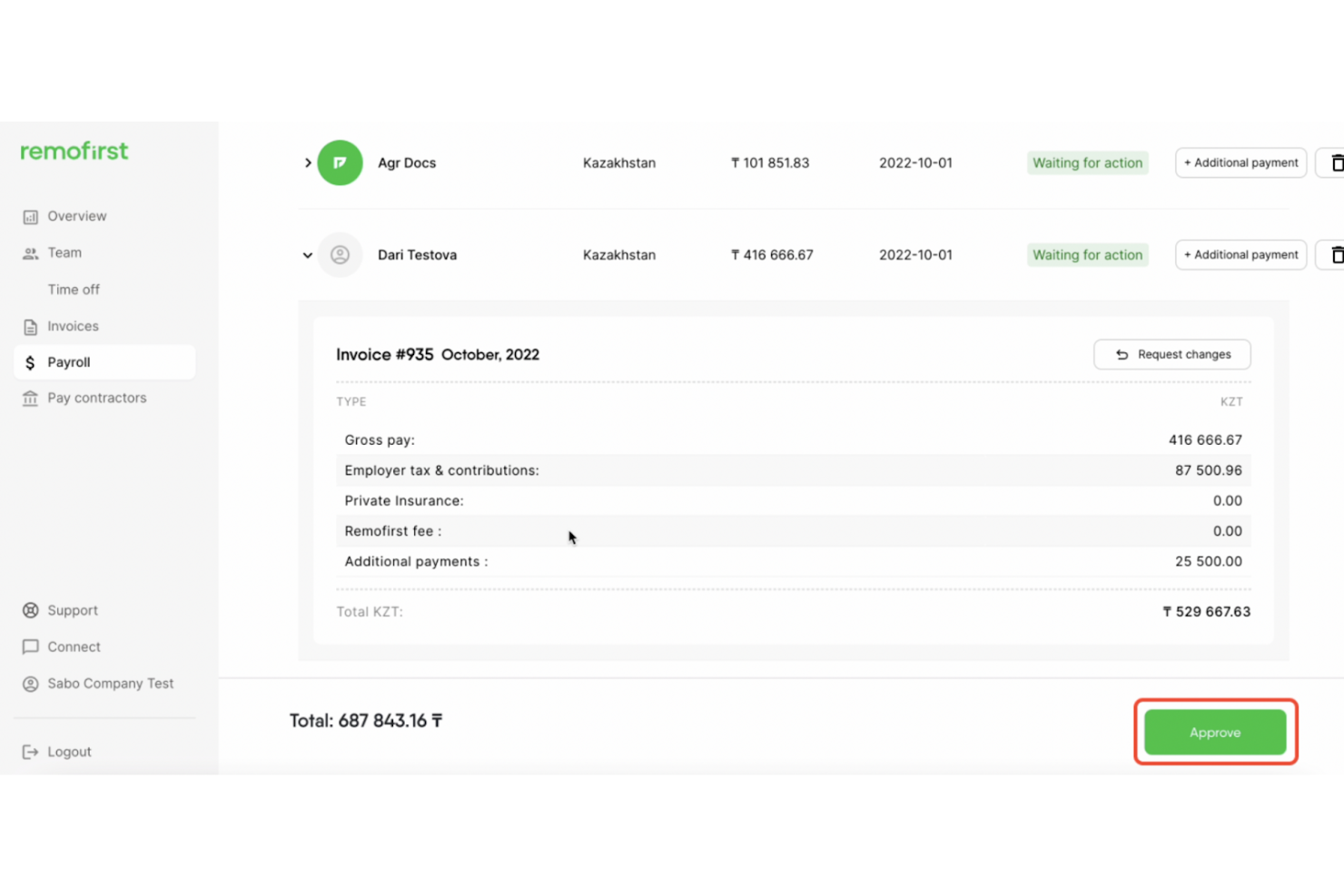
RemoFirst is an EOR and contractor management platform that handles cross-border payroll, compliant contract generation, multi-currency payments, and time tracking for international contractors and employees across 185+ countries.
Who Is RemoFirst Best For?
RemoFirst is a strong fit for startups and growth-stage companies hiring international contractors for the first time.
Why I Picked RemoFirst
RemoFirst earns its spot on my shortlist because of how it handles contractor payments across borders. I love that you can invoice contractors in seven currencies (USD, EUR, GBP, CAD, AUD, NZD, SGD) while they still receive payment in their own local currency. I also like the one-click invoice generation on the Premium tier, which removes the manual back-and-forth when paying contractors across 150+ countries.
RemoFirst Key Features
- Compliant contract generation: Automatically create localized contracts for contractors in over 150 countries.
- Time tracking and timesheet management: Track contractor hours and manage digital timesheets within the platform.
- Integrated background checks: Run contractor background screenings globally with no added cost at the free tier.
- Expense reimbursement management: Enable contractors to submit expenses directly for approval and payment through the platform.
RemoFirst Integrations
RemoFirst offers native integrations with BambooHR, ADP Workforce Now, and GoCardless. An API is available for custom integrations.
Pros and Cons
Pros:
- Integrated background checks at no extra cost
- Automated compliant contracts in 150+ countries
- Fast onboarding for international contractors
Cons:
- Lacks in-depth local tax guidance
- VAT support is limited for some countries

Best for organizing contractor documents
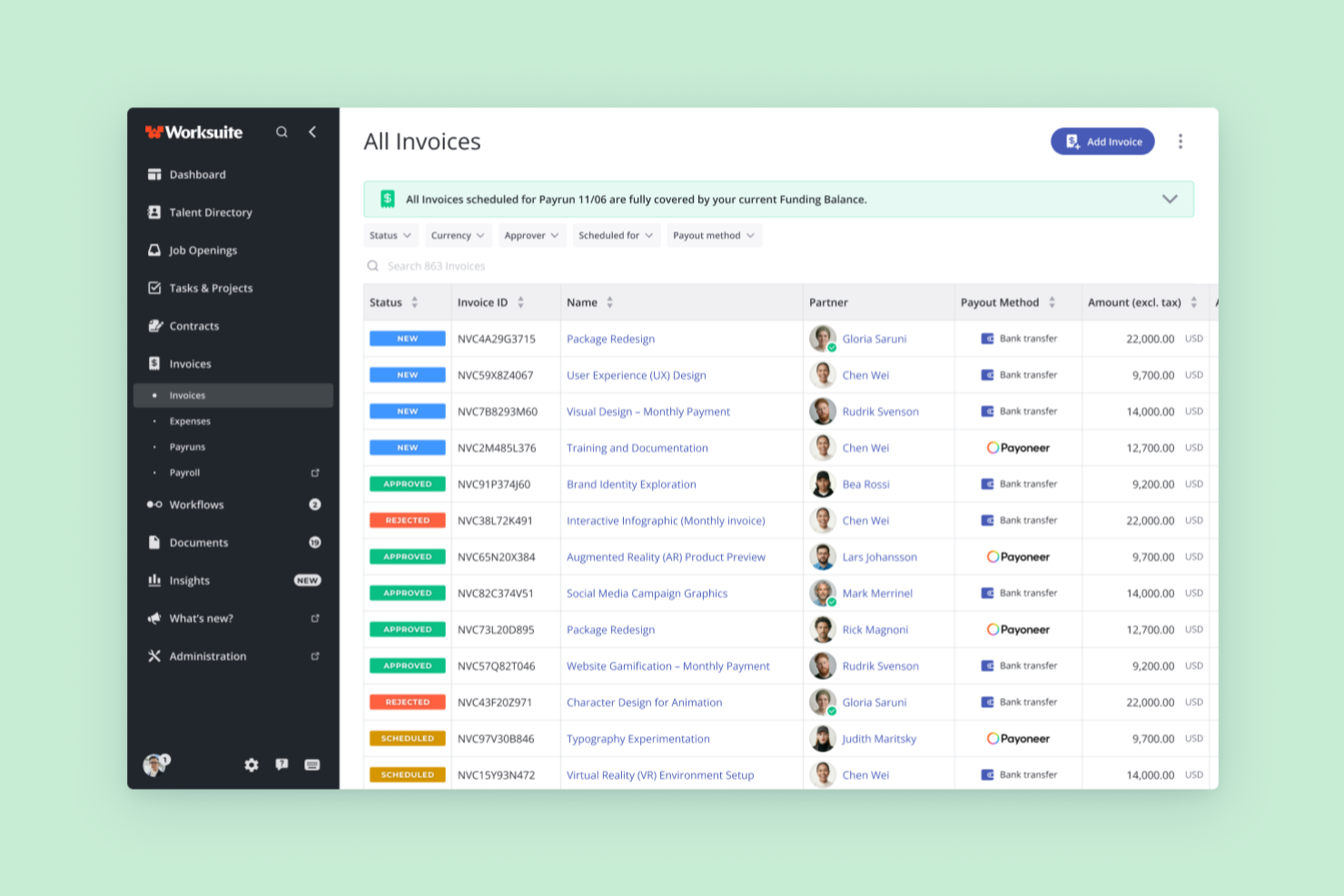
Worksuite is a freelancer management system that combines contractor onboarding, document collection, compliance management, contract lifecycle tracking, and multi-currency global payments in one platform.
Who Is Worksuite Best For?
Worksuite is a strong fit for mid-size to enterprise teams in media, publishing, and production that manage large, distributed contractor networks across multiple countries.
Why I Picked Worksuite
I've included Worksuite in my top picks because of how it handles contractor document organization at scale. When you're managing hundreds of contractors, documents like W-9s, signed contracts, and compliance certifications tend to scatter. Worksuite centralizes all of this with configurable onboarding workflows that automatically collect and store documents per entity or region. Compliance gates are built directly into those workflows, so a contractor can't advance to payment until their documentation is verified.
Worksuite Key Features
- Global payments: Send payments to contractors in 190+ countries with 120+ currencies supported.
- Contract lifecycle management: Create, negotiate, e-sign, and renew contracts all within the platform.
- Integrated compliance checks: Automatically verify classification, background, and KYC before issuing payments.
- Business intelligence dashboards: Track contractor headcount, spend, and onboarding metrics in real time.
Worksuite Integrations
Worksuite offers native integrations with NetSuite, QuickBooks, Xero, Salesforce, HubSpot, monday.com, Slack, Asana, Veriff, and Checkr. It connects with Zapier and has an API for custom integrations.
Pros and Cons
Pros:
- Real-time contractor workforce analytics
- Centralized contractor document storage
- Automated onboarding and compliance workflows
Cons:
- Global tax calculation setup can be complex
- Contractor portal branding options are limited

Plane
Best for paying contractors in 200+ countries

Plane is a contractor payroll platform that handles cross-border payments, automated 1099-NEC filing, embedded invoicing, and unified workforce management for contractors, US employees, vendors, and EOR hires in one system.
Who Is Plane Best For?
Plane works well for small businesses and HR teams that pay contractors across multiple countries and want to manage contractors, employees, and EOR hires in one place.
Why I Picked Plane
Plane earns its spot as one of the best on my shortlist because no other tool in this category matches its reach for paying contractors across 200+ countries with direct-to-bank deposits in 130+ currencies, no e-wallet required. I also love that it automatically collects W-9 and W-8 forms during onboarding and files 1099-NEC forms directly with the IRS on your behalf. On top of that, contractors, US employees, vendors, and EOR hires all live in one system.
Plane Key Features
- Recurring pay schedules: Set up weekly, biweekly, twice-monthly, or monthly pay schedules with auto-approval rules that process payments when no blockers exist.
- Embedded invoicing: Contractors submit payment requests directly in Plane, which flow into a structured approval and payment workflow before being added to payroll.
- Unified workforce dashboard: Manage US W2 employees, contractors, vendors, and EOR hires in a single system with grouped payroll runs and custom reports.
- Localized contract templates: Access lawyer-reviewed, country-specific contractor contracts with built-in e-signature and automatic update suggestions when local laws change.
Plane Integrations
Plane offers a native QuickBooks Online integration and a Slack marketplace integration. Its REST API, MCP server, CLI, webhooks, and sandbox support custom payroll workflows.
Pros and Cons
Pros:
- Contractors access documents and submit invoices
- Automated 1099-NEC filing with IRS
- Global contractor payments to 240+ countries
Cons:
- Only QuickBooks Online supported for accounting
- No mobile app for on-the-go access
Tipalti
Best for mass payments to global contractors
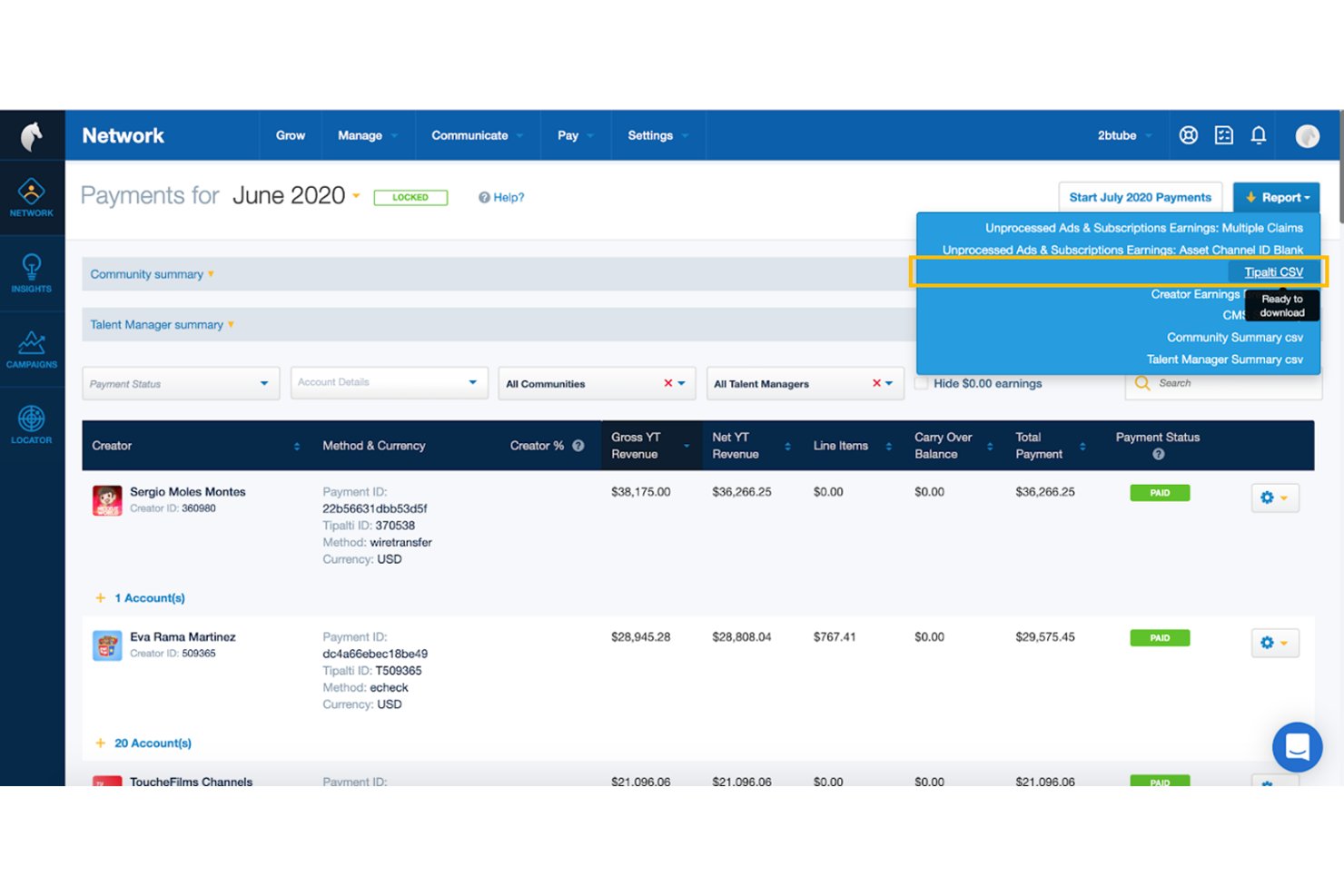
Tipalti is a global mass payments and accounts payable automation platform that handles contractor payouts across 200+ countries, tax form collection and compliance, multi-payee management, and self-service contractor onboarding.
Who Is Tipalti Best For?
Tipalti is built for finance and accounting teams managing high-volume payouts to contractors across multiple countries.
Why I Picked Tipalti
Tipalti earns its spot on my shortlist because no other tool I've reviewed matches its depth for paying contractors across borders at scale. I'm particularly impressed by its KPMG-reviewed tax engine, which automates W-9/W-8 collection, TIN matching, and 1099/1042-S filing without manual chasing. Its self-billing feature is a standout for high-volume payout workflows, generating invoices on behalf of contractors so your team never waits on paperwork to release payments.
Tipalti Key Features
- Multi-entity support: Manage separate payment workflows, approval rules, and branding for multiple business entities from a single centralized dashboard.
- Payee portal in 27+ languages: Contractors onboard themselves, select payment preferences, and track payment status through a white-labeled self-service portal.
- AI invoice capture agent: Automatically extracts and codes invoice data from PDFs, emails, and scanned documents across 146 languages.
- OFAC and sanctions screening: Every payment is checked against global sanctions lists and monitored for suspicious activity before funds are released.
Tipalti Integrations
Tipalti offers integrations with QuickBooks Online, Xero, Oracle NetSuite, Sage Intacct, Workday, BambooHR, and Zenwork. It also supports RESTful APIs for custom integrations.
Pros and Cons
Pros:
- Self-service onboarding with 27+ language portal
- Automated W-9/W-8 collection and tax filing
- Global mass payments to 200+ countries
Cons:
- Onboarding and ERP integration can be complex
- No employee payroll or W-2 support

Rippling is an HR, payroll, and workforce management platform that handles contractor onboarding, global payments in 185+ countries, automated invoicing, tax form generation, and unified employee and contractor management in one system.
Who Is Rippling Best For?
Rippling is a strong fit for HR and operations teams that need to onboard and pay both employees and contractors across multiple countries from a single platform.
Why I Picked Rippling
I picked Rippling as one of the best because its contractor onboarding automation is genuinely impressive: a new contractor signs their agreement, completes KYC verification, and enters their payment details in a single guided flow, without any back-and-forth emails. I also like that Rippling auto-generates and auto-approves invoices for fixed-rate contractors, which means payroll runs practically trigger themselves once the timecard is approved. Add in 185+ countries and 50+ currencies supported, and it's a strong fit if your contractor roster spans borders.
Rippling Key Features
- Unified workforce dashboard: View and manage employees, EOR workers, and contractors across all locations from a single real-time dashboard.
- Workflow Studio: Build no-code automation triggers for approvals, onboarding steps, and compliance tasks without engineering support.
- 1099 and W-2 generation: Rippling automatically generates, delivers, and stores tax forms for contractors and employees, including print-and-mail options.
- Native accounting integrations: Sync payroll data directly to QuickBooks, Xero, NetSuite, or Sage Intacct with automatic journal-entry pushes and custom GL mapping.
Rippling Integrations
Rippling offers 650+ out-of-the-box integrations, including QuickBooks Online, Xero, NetSuite, Sage Intacct, Slack, and Microsoft 365. It also provides an API and developer platform for custom integrations.
Pros and Cons
Pros:
- Manages employees and contractors in one system
- Auto-generates and approves contractor invoices
- Onboards global contractors with one automated flow
Cons:
- FX and vendor payment fees not transparent
- Contractor payroll requires buying core HRIS



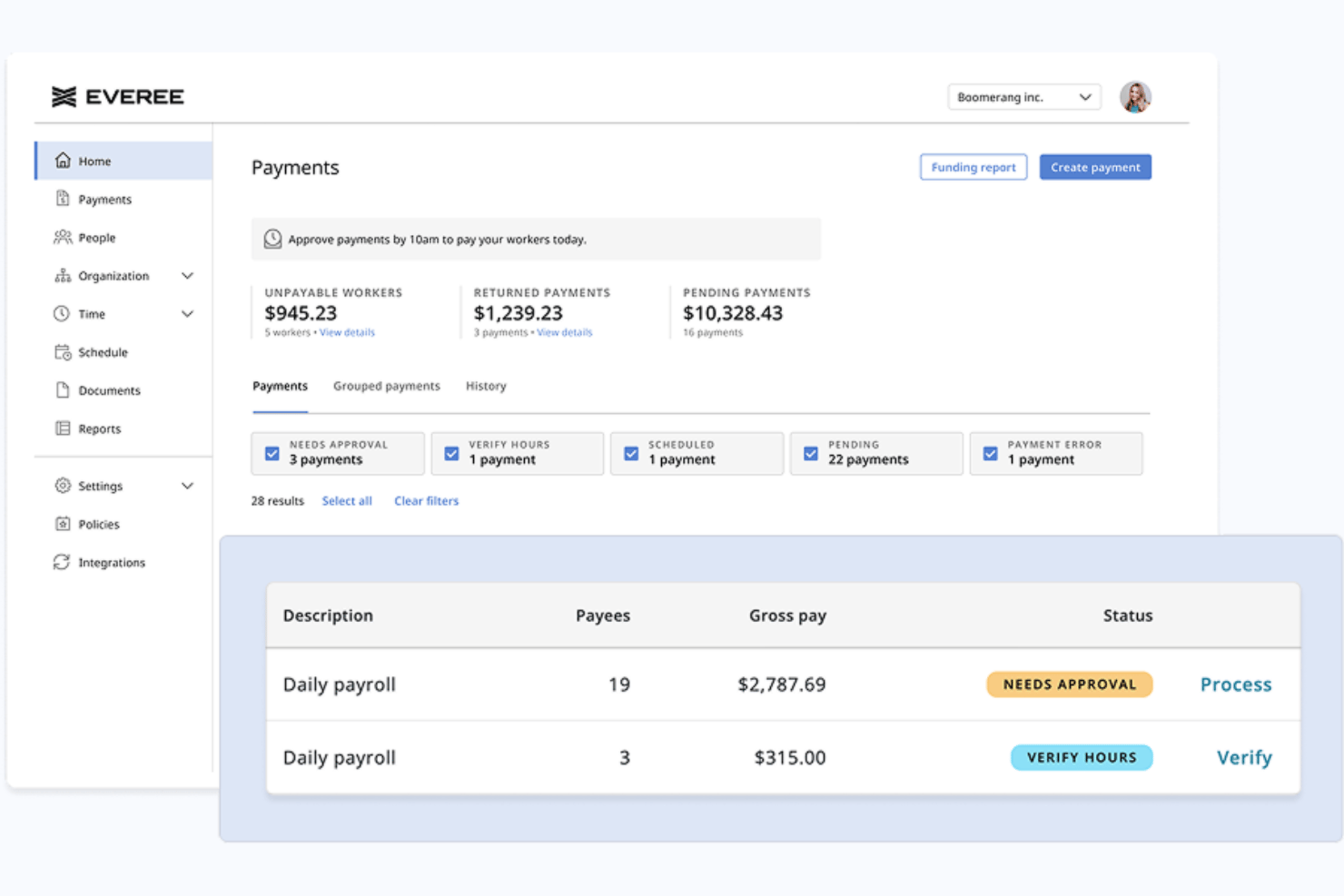
Everee is a payroll platform built for businesses with flexible, non-traditional workforces that combines W-2 and 1099 contractor payroll, automated tax filings, and same-day payment processing in a single system.
Who Is Everee Best For?
Everee is a strong fit for small businesses, staffing agencies, and gig-work platforms that pay high volumes of US-based 1099 contractors on flexible or daily schedules.
Why I Picked Everee
Everee earns its spot on my shortlist because it's the only platform I've found that lets you process a contractor pay run in the morning and have funds in workers' bank accounts that same afternoon. I like that you can run 1099 and W-2 payroll together in a single pay run, so mixed workforces don't need two separate systems. The Everee Visa Pay Card adds instant access on top of same-day ACH, giving contractors a real choice in how they receive their money.
Everee Key Features
- Mobile onboarding and pay access: Contractors can onboard and manage payouts through Everee’s mobile app.
- Automated tax paperwork handling: W-2 and 1099 tax forms are generated and filed automatically for all payees.
- Multi-state payroll compliance: Supports tax filings and payments across all 50 US states for both W-2 and 1099 workers.
- Payroll API and white-label options: Offers APIs for custom integrations and the option to embed payroll into other platforms.
Everee Integrations
Native integrations are not clearly documented. Everee offers an API for custom integrations.
Pros and Cons
Pros:
- Everee Pay Card enables instant contractor access
- Runs W-2 and 1099 payroll together
- Same-day ACH payments for contractors
Cons:
- Limited reporting compared to larger payroll platforms
- US-only contractor payments, no global payouts
Andre lønnssystemer for oppdragstakere
Nedenfor finner du en liste over flere lønnssystemer for oppdragstakere som ikke kom med på min topp 10-liste, men som likevel er verdt å undersøke:
- RUN Powered by ADP®
For automatic tax calculations
- TopSource
For 24/5 dedicated support
- TimeTrex
For accurate time-to-payroll integration
- Patriot Payroll
For paying US-based contractors
- Papaya Global
For managing global contractor payments
- Remote
For international compliance
- QuickBooks Payroll
For quick payroll processing
- Wingspan
For end-to-end contractor management


Relaterte anmeldelser av HR-programvare
Hvis du fortsatt ikke har funnet det du leter etter her, kan du se på disse andre relaterte verktøyene som vi har testet og evaluert:
- HR-programvare
- Lønnssystemer
- Rekrutteringsprogramvare
- Tjenester for registrert arbeidsgiver
- Systemer for søkersporing
- Programvare for arbeidsstyring
How I Evaluate Payroll Software for Contractors
I split my evaluation into two layers: the baseline capabilities a tool needs to qualify—like contractor payments and tax document automation—and the differentiators that set the best options apart.
Core Functionality (Table Stakes For This List)
When I'm selecting tools for my list, I rank each one on a scale from 0 (does not offer the functionality) to 5 (excels in this area) for each core functionality listed below. Then, I calculate the tool's total score into a percentage. Each tool needs to achieve a minimum total score of 65% to be considered for inclusion.
- Contractor Payment Processing: I check how many payout methods each platform supports and whether it can handle bulk pay runs, recurring schedules, and one-off payments to dozens of contractors at once.
- Multi-Currency & Global Payouts: Paying a designer in Europe and a developer in Southeast Asia from one dashboard matters, so I evaluate country coverage, supported currencies, and local payment rails.
- Tax Form Management: Each tool should collect W-9s and W-8BENs digitally, generate 1099-NECs at year-end, and ideally handle e-filing—platforms like Deel and Gusto approach this differently, but automation is what I look for.
- Contractor Onboarding: I evaluate whether the platform lets contractors self-serve through contract signing, identity verification, and banking setup without back-and-forth emails or manual document chasing.
- Compliance & Classification: Worker misclassification is a real risk, so I look for built-in classification questionnaires, jurisdiction-specific guidance, and risk flagging before you finalize a contractor agreement.
- Invoicing & Approval Workflows: I consider whether contractors can submit invoices directly in the platform and whether your team can route those through multi-step approvals before payments are triggered.
Once I have a list of tools that meet the criteria, I consider what sets each platform apart.
Differentiating Factors (What Sets Vendors Apart)
Here's how I compare and contrast different vendors:
Standout Features
EOR capabilities matter if you're planning to convert top-performing contractors into full-time employees abroad without setting up a local entity. I also look at whether platforms offer optional benefits like health coverage or stipends that contractors can opt into—this helps attract and retain skilled independents. For teams managing contractors across multiple subsidiaries, multi-entity support lets you handle everything from one dashboard rather than toggling between separate accounts.
Beyond Features
Pricing transparency is something I evaluate closely because FX markups and wire fees can quietly inflate your per-contractor costs. I also check how each platform integrates with accounting tools like QuickBooks, Xero, or NetSuite—without a clean sync, your finance team ends up reconciling contractor payments manually every month. Payout speed is another differentiator worth comparing; some vendors offer same-day transfers while others take several business days, which directly affects how contractors experience working with you.
Hva er lønnssystemer for oppdragstakere?
Lønnssystemer for oppdragstakere er et verktøy som automatiserer hvordan du betaler frilansere, gigarbeidere og uavhengige oppdragstakere som mottar 1099. I motsetning til standard lønnskjøring for ansatte, som håndterer forutsigbare månedslønninger og trekk til ytelser, håndterer lønnssystemer for oppdragstakere variable, fakturabaserte betalinger. Disse plattformene automatiserer direkte innbetalinger, samler inn skatteskjemaer (som W-9 og 1099-NEC), beregner utbetalinger i flere valutaer til internasjonale arbeidere og sørger for at virksomheten overholder lokale skattelover.
Slik velger du lønnssystemer for oppdragstakere
Det er lett å gå seg vill i lange funksjonslister og kompliserte prisstrukturer. For å hjelpe deg med å holde fokus mens du arbeider deg gjennom prosessen med å velge lønnssystem, får du her en oversikt over de viktigste faktorene du bør vurdere:
| Faktor | Hva bør vurderes |
|---|---|
| Støtte for klassifisering av arbeidstakere | Skiller programvaren mellom selvstendige 1099-oppdragstakere (skjema 1099-NEC) og W-2-ansatte for å redusere risikoen for feilklassifisering under revisjoner? |
| Automatiserte verktøy for 1099-skatt og betaling | Se etter systemer med fleksible lønnsplaner, direkte innskudd og automatisk generering og innlevering av 1099-NEC-skjemaet til IRS. |
| Sertifisert lønnsrapportering | Hvis du byr på offentlige prosjekter eller prosjekter med gjeldende lønnssatser, automatiserer verktøyet offentlige skjemaer som WH-347 for å overholde Davis-Bacon Act? |
| Jobbkostnadsberegning og tidsregistrering | Kan programvaren synkroniseres med feltapper for å loggføre timer mot bestemte arbeidssteder og spore nøyaktige arbeidskostnader per prosjekt? |
| Integrasjoner med regnskapssystemer | Kobler plattformen seg til systemer som QuickBooks eller Xero for å eliminere manuell dobbeltføring av fakturaer og utbetalinger til oppdragstakere? |
Velge lønnsprogramvare for bygge- og fagarbeidsoppdragstakere
Arbeidslag og underleverandører innen spesialiserte fag trenger en dedikert lønnsarkitektur for byggebransjen for å håndtere arbeidssteder og strenge krav til etterlevelse:
- Sertifisert lønnsrapportering: Genererer automatisk føderalt skjema WH-347 og delstatlige dokumenter for sertifisert lønnsrapportering for prosjekter med gjeldende lønnssatser i henhold til Davis-Bacon Act.
- Synkronisering av jobbkostnader og timelister: Integreres med mobile feltapper for å knytte timer direkte til bestemte arbeidssteder, faser og kostnadskoder.
- Fagforenings- og delstatsoverskridende regler: Tar automatisk hensyn til ulike nivåer for fagforeningsytelser, tilleggsgoder og lokale lønnssatser for fagarbeidere.
- De best egnede plattformene: Foundation Software, Sage 100 Contractor, Payroll4Construction.
Velge lønnsprogramvare for selvstendige 1099-oppdragstakere
Bedriftsteam som ansetter prosjektbaserte frilansere eller 1099-underleverandører, trenger administrative utbetalingssystemer med fokus på hastighet og automatisering av skatt:
- Automatisering av 1099-skatt: Samler automatisk inn skjema W-9 (eller W-8BEN for utenlandske arbeidere) under oppstarten og sender inn skjema 1099-NEC elektronisk til IRS ved årets slutt.
- Fleksible og globale utbetalinger: Tilbyr direkte batchinnskudd, ACH-overføringer samme dag og internasjonale overføringer i flere valutaer.
- Sikring mot feilklassifisering: Innebygde risikovurderinger for å hindre at 1099-oppdragstakere behandles som W-2-ansatte i henhold til skattelovgivningen.
- Modeller for betaling per aktiv oppdragstaker: Sørger for at systemet tillater fakturabaserte utbetalinger uten å tvinge deg inn i månedlige grunngebyrer for W-2-ansatte eller komplekse W-2-arbeidsflyter.
- De best egnede plattformene: Gusto, Deel, Rippling, Wise.
Trender innen lønnsprogramvare for oppdragstakere
Lønnsverktøy for oppdragstakere utvikler seg raskt for å holde tritt med eksterne team og endrede skattelover. Her er flere viktige trender som omformer området:
- Umiddelbare utbetalinger og fleksible betalingsalternativer: Oppdragstakere forventer i økende grad rask tilgang til opptjente lønninger. Programvareleverandører integrerer nå direkte kortinnskudd og betalingsoverføringer samme dag for å hjelpe teamet ditt med å beholde de beste talentene.
- Automatiserte sikkerhetsmekanismer for klassifisering av arbeidstakere: Feilklassifisering av 1099-oppdragstakere som W-2-ansatte medfører høye straffer ved skatterevisjoner. Plattformene bygger nå inn automatiserte risikovurderingsskjemaer og skattekontroller direkte i arbeidsflytene for oppstart.
- Etterlevelse på tvers av landegrenser og utbetalinger i flere valutaer: Håndtering av globale frilansere krever lokalt tilpassede kontrakter og utenlandsk skatterapportering. De beste plattformene inkluderer nå innebygde lokalt tilpassede avtaler og automatisk innsamling av skatteskjemaer for over 150 land.
Funksjoner i lønnsprogramvare for oppdragstakere
Når du velger en plattform rettet mot oppdragstakere, bør du se etter disse viktige funksjonene i lønnsprogramvare:
- Støtte for klassifisering av arbeidstakere: Skill 1099-uavhengige oppdragstakere (skjema 1099-NEC) fra W-2-ansatte for å redusere risikoen for feilklassifisering under skatterevisjoner.
- Jobbkostnadsberegning og tidsregistrering: Synkroniser med feltapplikasjoner som QuickBooks Time eller BusyBusy for å loggføre timer mot spesifikke prosjekter og beregne arbeidskostnader per arbeidssted.
- Rapportering av sertifisert lønn: Generer rapporteringsdokumenter for myndigheter og fagforeninger, inkludert skjema WH-347, hvis selskapet ditt legger inn anbud på offentlige prosjekter eller prosjekter med gjeldende minstelønn.
- Automatiserte betalinger til oppdragstakere: Planlegg, send og følg opp betalinger til oppdragstakere ved hjelp av direkte innbetaling, sjekker eller lokale betalingssystemer.
- Generering av 1099-skatteskjemaer: Generer og send automatisk inn til IRS, og distribuer skattedokumenter av typen skjema 1099-NEC ved årets slutt til personer som ikke er ansatte.
- Verktøy for registrering av oppdragstakere: Samle inn skjema W-9 eller W-8BEN, kontrakter og bankopplysninger digitalt for å fremskynde oppsettet av nye arbeidstakere.
- Støtte for internasjonale betalinger: Betal globale oppdragstakere i flere lokale valutaer, samtidig som du opprettholder nøyaktige registre for skattemessig etterlevelse på tvers av landegrenser.
- Selvbetjeningsportaler for oppdragstakere: Gi arbeidstakere direkte tilgang til å oppdatere personlige bankopplysninger, laste opp fakturaer og laste ned årlige skatteskjemaer.
- Integrasjoner med regnskapsplattformer: Overfør utbetalingsdata direkte til systemer som QuickBooks eller Xero for å eliminere dobbeltregistrering og manuell avstemming.
- Tilgangskontroller for flere brukere: Tildel bestemte brukertillatelser basert på roller, slik at bare autoriserte medlemmer av HR- og økonomiteamet kan se sensitive opplysninger om godtgjørelse.
Fordeler med lønnssystemer for oppdragstakere
Implementering av lønnssystemer for oppdragstakere gir flere fordeler for teamet og virksomheten din. Her er noen av fordelene du kan se frem til:
- Tidsbesparelser: Automatisering av betalinger til oppdragstakere, registrering og generering av skatteskjemaer gjør at du kan bruke mindre tid på papirarbeid og mer tid på oppgaver som skaper merverdi.
- Større nøyaktighet: Innebygde skatteberegninger, rapportering og samsvarskontroller bidrar til å redusere risikoen for manuelle registreringsfeil og unngå kostbare feil.
- Enklere etterlevelse: Automatiske 1099-innleveringer og dokumentoppfølging holder deg i samsvar med stadig skiftende skatteregler og reduserer risikoen under revisjoner.
- Bedre opplevelse for oppdragstakere: Selvbetjeningsportaler og raskere betalinger gir oppdragstakere den åpenheten og effektiviteten de forventer.
- Skalerbarhet: Håndter enkelt betalinger og dokumentasjon for voksende team av oppdragstakere uten å øke den administrative arbeidsbelastningen betydelig.
- Datasikkerhet: Sentraliserte, krypterte systemer beskytter opplysningene til oppdragstakere og begrenser tilgangen basert på brukertillatelser.
- Forenklet rapportering: Detaljerte betalingshistorikker og eksporterbare rapporter forenkler kostnadsoppfølgingen og støtter de bredere regnskapsprosessene dine.
Kostnader og priser for lønnssystemer for oppdragstakere
Ved valg av lønnssystem for oppdragstakere er det nødvendig å forstå de ulike prismodellene og abonnementene som er tilgjengelige. Kostnadene varierer basert på funksjoner, teamstørrelse, tillegg og mer. Tabellen nedenfor oppsummerer vanlige abonnementer, gjennomsnittsprisene deres og typiske funksjoner som er inkludert i løsninger for lønnssystemer for oppdragstakere:
Sammenligningstabell for lønnssystemer for oppdragstakere
| Abonnementstype | Gjennomsnittspris | Vanlige funksjoner |
|---|---|---|
| Gratisabonnement | $0 | Grunnleggende verktøy for betaling til oppdragstakere, begrenset 1099-innlevering og minimal rapportering. |
| Personlig abonnement | $5-$15/bruker/måned | Automatiserte betalinger, grunnleggende rapportering, enkel registrering av oppdragstakere og begrensede integrasjoner. |
| Bedriftsabonnement | $20-$40/bruker/måned | Avansert registrering, samsvarsoppfølging, støtte for flere valutaer, integrasjoner med regnskapssystemer og rapportering. |
| Foretaksabonnement | $50+/bruker/måned | Tilpassede integrasjoner, forbedrede sikkerhetskontroller, førsteklasses registrering, dedikert brukerstøtte og fullstendige revisjonsspor. |
Lønnssystemer for oppdragstakere – vanlige spørsmål
Her er noen svar på vanlige spørsmål om lønnssystemer for oppdragstakere: