

10 beste programmer for beleggsregistrering i 2026

Beste programvare for sporing av belegg


Programvare for sporing av belegg overvåker hvordan personer bruker og beveger seg gjennom lokalene dine, og gir deg sanntidsdata slik at du kan ta bedre beslutninger om arbeidsplassen. Hvis du ser etter den beste programvaren for sporing av belegg, står du sannsynligvis overfor utfordringen med å balansere sikkerhet, effektivitet og kostnader, samtidig som du skal støtte et fleksibelt og produktivt miljø. Det riktige verktøyet hjelper deg med å håndtere skiftende behov for belegg, oppfylle krav til samsvar og unngå bortkastet plass eller overfylte lokaler. I denne listen finner du velprøvde alternativer som ivaretar disse prioriteringene – slik at du trygt kan velge en løsning som faktisk passer teamets behov.
Why Trust Our Software Recommendations
Our team has been testing and reviewing software since 2012. As HR experts ourselves, we know how difficult—and important—it is to choose the right software.
For this guide, we evaluated tools using hands-on testing and independent research, scoring tools using our selection criteria. We also draw on insights from industry thought leaders and practicing HR experts.
Our reviews reflect our human editorial judgment, not a sales pitch.
Expert reviewers:
Sammenligningstabell: Programvare for sporing av belegg
Denne sammenligningstabellen oppsummerer prisopplysningene for mine beste utvalgte løsninger for sporing av belegg.
| Tool | Best For | Trial Info | Price | ||
|---|---|---|---|---|---|
| 1 | Best for flexible workspace booking | Free trial + free demo available | From $5/user/month (billed annually) | Website | |
| 2 | Best for actionable workplace utilization data | Free demo available | Pricing upon request | Website | |
| 3 | Best for hybrid office coordination | Free demo available | Pricing upon request | Website | |
| 4 | Best for custom space access rules | 30-day free trial + free demo available | From $249/month (billed annually) | Website | |
| 5 | Best for team attendance planning | Free demo available | Pricing upon request | Website | |
| 6 | Best for real-time desk availability insights | Free demo available | Pricing upon request | Website | |
| 7 | Best for visitor and employee flow management | Free plan + free demo available | From $362/location/month (billed annually) | Website | |
| 8 | Best for enterprise-grade facility integration | 14-day free trial + free demo available | From $3,315.15 | Website | |
| 9 | Best for privacy-first people counting | Free demo available | From $229/unit | Website | |
| 10 | Best wireless sensor accuracy for workplaces | Free demo available | Pricing upon request | Website |

Anmeldelser av den beste programvaren for sporing av belegg
Nedenfor finner du mine detaljerte sammendrag av den beste programvaren for sporing av belegg som kom med på kortlisten min. Anmeldelsene mine gir en detaljert gjennomgang av funksjonene, integrasjonene og de beste bruksområdene for hver plattform, slik at du kan finne den som passer best for deg.

deskbird
Best for flexible workspace booking
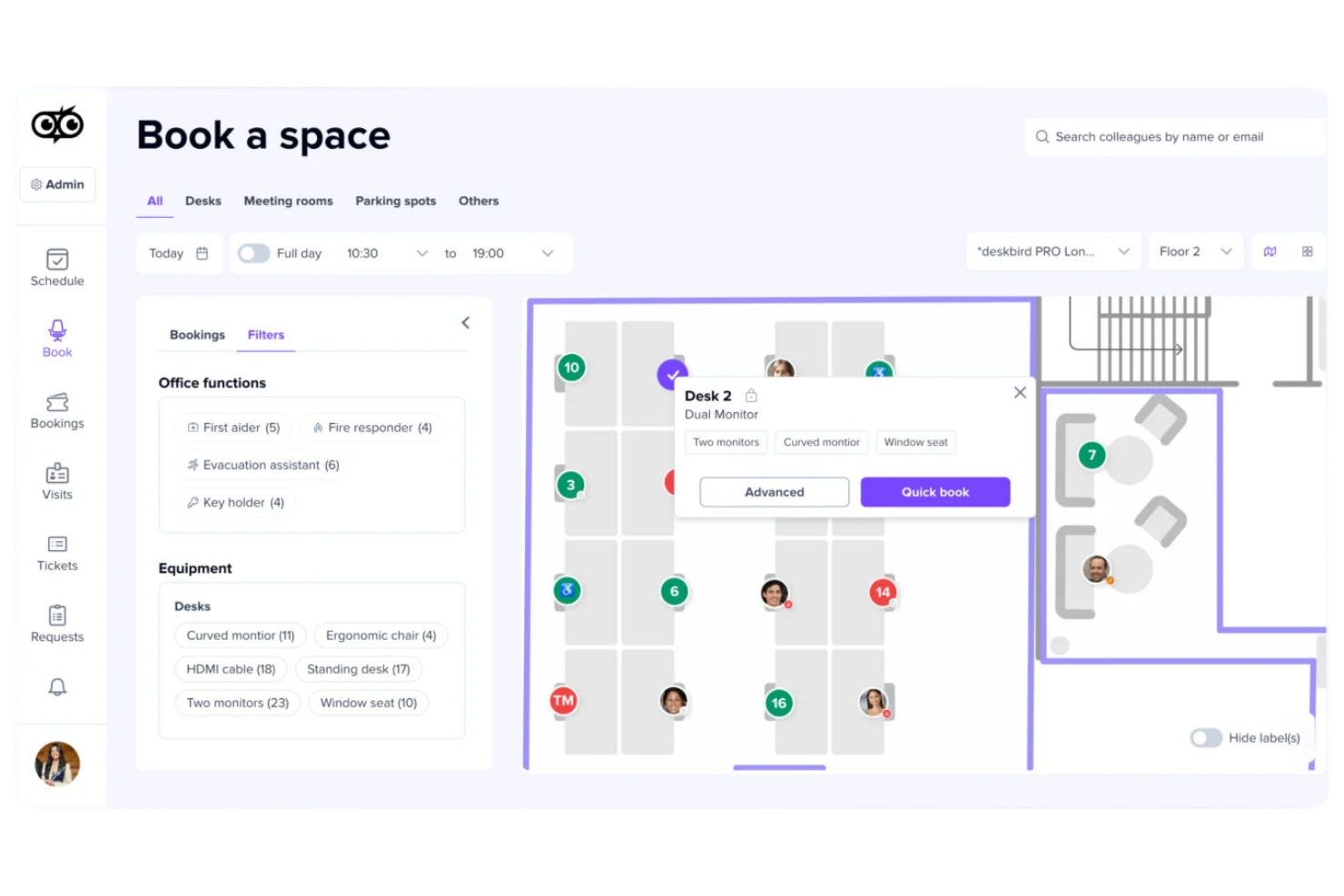
deskbird is a hybrid workplace management platform that covers desk booking, meeting room booking, parking space reservations, visitor management, and real-time occupancy analytics across multiple office locations.
Who is deskbird Best for?
deskbird is a strong fit for mid-sized companies managing hybrid work schedules who need employees to self-manage desk and resource bookings.
Why I Picked deskbird
I've included deskbird on this list because its flexible booking system genuinely covers the full range of hybrid workspace scenarios. I particularly like that you can mix hot desking and assigned seating on the same interactive floor plan, so teams that use a neighbourhood model don't have to manage two separate systems. The auto-booking and smart desk recommendations, which suggest spots based on team schedules and past habits, make the booking experience low-effort for employees. And when occupancy data feeds directly into the analytics dashboard, I find it much easier to act on real utilization patterns rather than estimating from headcounts.
deskbird Key Features
- Meeting room booking: Reserve meeting rooms directly from the floor plan or calendar view, with real-time availability and capacity details visible before booking.
- Week planning: Employees can map out their in-office and remote schedule for the week ahead, giving managers visibility into team attendance patterns.
- Visitor management: Register and track guests with digital check-in, host notifications, and visitor logs tied to specific office locations.
- Parking space booking: Employees can reserve parking spots alongside their desk, with the same booking and release logic applied to parking occupancy.
deskbird Integrations
deskbird offers a large catalogue of integrations spanning Microsoft Teams, Slack, Microsoft Outlook, Google Calendar, MS Entra ID, Google Workspace, Okta, BambooHR, Personio, and HiBob, plus dozens of additional HRIS, SSO, access control, and hardware integrations. An API is available for custom integrations.
Pros and Cons
Pros:
- Auto-release frees no-show desk bookings
- Employees can coordinate in-office days
- Interactive floor plans with amenity filters
Cons:
- Per-user pricing scales up quickly
- Analytics lack depth for larger teams
Best for actionable workplace utilization data
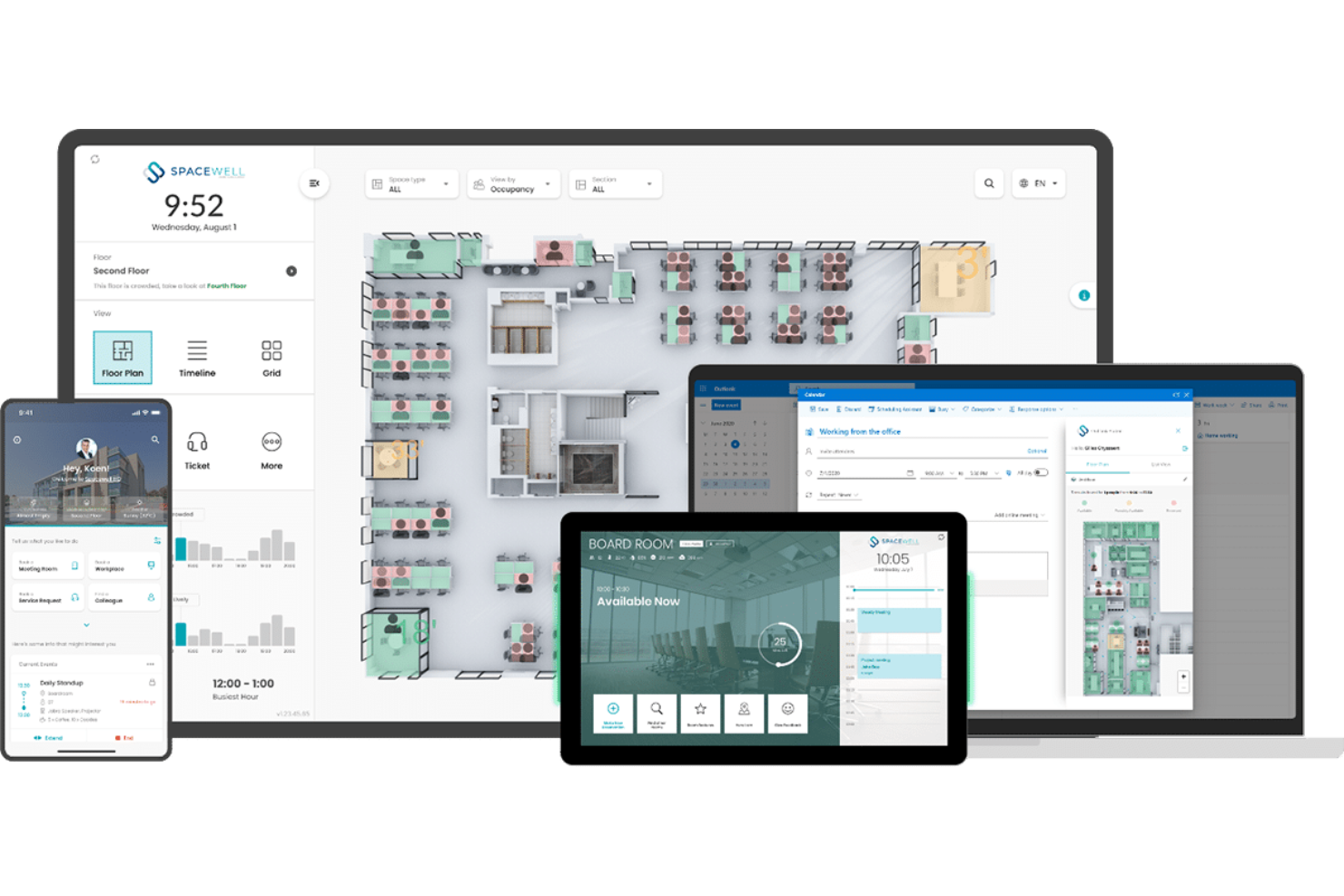
Spacewell is a smart building platform that combines workplace space management, IoT-based occupancy monitoring, indoor air quality tracking, desk and room reservations, and space utilization analytics across building portfolios.
Who Is Spacewell Best For?
Spacewell is a strong fit for facilities managers and corporate real estate teams in mid-to-large enterprises that rely on IoT sensor data to make space decisions.
Why I Picked Spacewell
I picked Spacewell as one of the best because it's one of the few occupancy tracking tools that turns raw IoT sensor data into genuinely actionable insights. I like that the Opportunity Simulator lets you benchmark space performance across your entire portfolio and run consolidation scenarios before committing to any changes. The timelapse feature also stands out to me: you can replay past occupancy trends to understand how space is actually used over time, not just in the moment. That combination of historical playback and multi-building benchmarking makes it unusually strong for data-driven real estate decisions.
Spacewell Key Features
- Sensor management console: Configure, monitor, and troubleshoot connected occupancy sensors across your building from a single interface.
- Indoor environmental quality monitoring: Track CO2 levels, temperature, humidity, and noise in real time alongside occupancy data.
- Desk and room reservations: Let employees book workspaces through a self-service portal, with occupancy data feeding directly into availability displays.
- Workplace app: Employees can check space availability, navigate the office, and submit service requests from a mobile device.
Spacewell Integrations
Spacewell offers pre-built connectors for Microsoft 365, Google Workspace, SAP, Oracle, Microsoft Dynamics, ServiceNow, Jira, Freshservice, Workday, and SuccessFactors, and also supports connections to AutoCAD, Revit, and BMS platforms. REST APIs, SDKs, and webhook support are available for custom integrations.
Pros and Cons
Pros:
- Modular design scales across multiple buildings
- Real-time air quality and occupancy combined
- IoT sensor-agnostic platform supports any hardware
Cons:
- Mobile app lacks some advanced desktop features
- Complex initial setup needs technical expertise

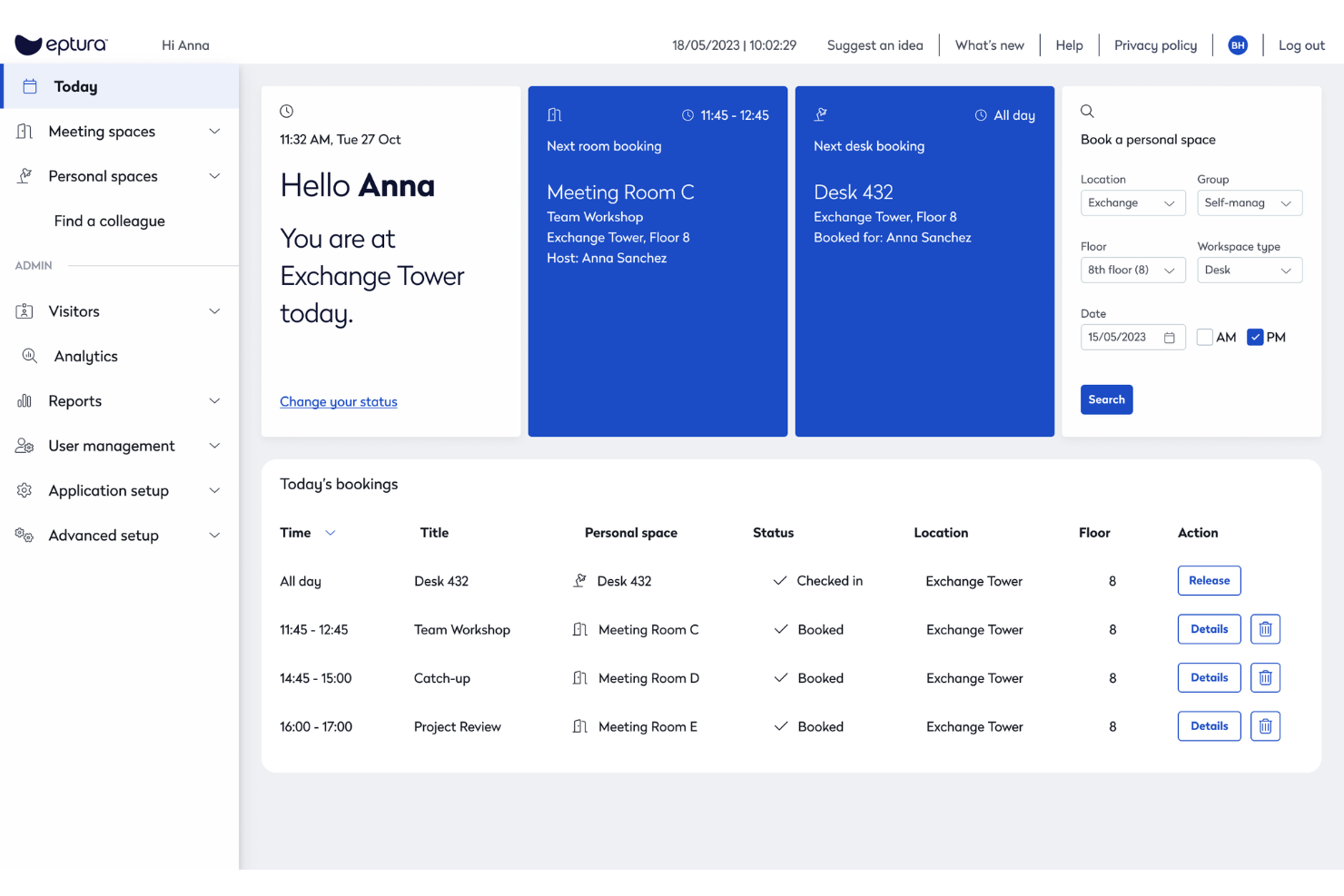
Eptura Workplace is a workplace operations and space management platform that combines desk booking, room scheduling, occupancy analytics, space planning, and move management across single and multi-site office environments.
Who Is Eptura Workplace Best For?
Eptura Workplace is a strong fit for large enterprises managing complex, multi-site office portfolios where real estate decisions need to be backed by live occupancy and utilization data.
Why I Picked Eptura Workplace
I've included Eptura Workplace in my top picks because it handles hybrid office coordination better than most tools I've tested. The AI-powered Copilot lets employees book desks and rooms using natural language, and the team days feature lets coworkers see who's coming in and plan in-office time together. I also like that workplace analytics surface peak days, no-show rates, and utilization trends in one place, so space decisions are based on actual behaviour rather than assumptions.
Eptura Workplace Key Features
- Move management: Plan and execute employee moves end-to-end, from seat assignments to department relocations, with built-in tracking across each step.
- Wayfinding: Let employees navigate the office and locate desks, rooms, and colleagues through interactive floor maps.
- Service request tickets: Submit and track workplace maintenance or facilities requests directly within the platform.
- Space planning: Redesign floor plans and model seating scenarios using live occupancy data and interactive layout tools.
Eptura Workplace Integrations
Eptura Workplace offers a broad tech partner ecosystem with integrations across categories like access control, sensors, calendars, collaboration, HR, and SSO. Native integrations include Microsoft Teams, Microsoft Outlook, Google Calendar, Slack, Okta, Power BI, and VergeSense, and the platform connects with access control providers like Brivo, Genetec, and Gallagher. An API is available for custom integrations.
Pros and Cons
Pros:
- Per-office policy settings across multiple locations
- Custom dashboards for occupancy reporting
- Interactive floor plans show live desk availability
Cons:
- Outlook room bookings don't always sync back
- Requires manual CAD imports

Skedda
Best for custom space access rules

Skedda is a space booking and scheduling platform that covers desk reservations, meeting room bookings, visitor management, and space utilization tracking with a customizable rules and permissions engine.
Who Is Skedda Best For?
Skedda suits facilities and workplace teams at mid-size to enterprise organizations that need granular control over who can access and book shared spaces.
Why I Picked Skedda
I picked Skedda as one of the best because its rules and roles engine is the most granular I've seen in this space. I can set booking conditions by team (for example, only the marketing team can book desks between 9 AM and 5 PM), cap individual usage with quotas, and require admin approval for specific rooms. For organizations where not every space should be open to every employee, that level of access control is exactly what the tool is built around.
Skedda Key Features
- Interactive floor map: Browse a visual map of your space to see real-time desk and room availability before booking.
- Visitor management: Register and track guests, send invitations, and log visitor activity alongside internal space bookings.
- Recurring bookings: Set up repeat reservations on a daily or weekly schedule without recreating the booking each time.
- Calendar sync: Connect bookings to Google Calendar or Microsoft 365 so reservations appear alongside existing schedules.
Skedda Integrations
Skedda offers native (direct) integrations with Microsoft 365, Microsoft Teams, Microsoft Entra ID, Google Workspace, Slack, Zoom, Stripe, Okta, OneLogin, and JumpCloud, along with third-party connections to ServiceNow, Kisi, QuickBooks, Xero, and Trello. It also connects with Zapier and supports webhooks for custom integrations.
Pros and Cons
Pros:
- No-show auto-release frees unused spaces
- Granular booking rules per team and role
- Wi-Fi-based occupancy tracking needs no hardware
Cons:
- No native HRIS integration via aggregator
- Visitor management costs extra as add-on
New Product Updates from Skedda

Skedda Expands Visit Exports With Custom Field Data
Skedda adds Summary and Breakdown visit exports with custom field data, filter support, and XLSX or CSV formats. These updates give teams more flexibility when exporting visit- and visitor-level information for reporting and analysis. For more information, visit Skedda’s official site.
 .
.
Kadence
Best for team attendance planning

Kadence is a workplace management platform that combines desk and space booking, team scheduling, occupancy analytics, visitor management, and AI-driven space planning into a single system.
Who Is Kadence Best For?
Kadence is a strong fit for mid-sized and enterprise companies managing hybrid teams across multiple office locations.
Why I Picked Kadence
I picked Kadence as one of the best because of how well it handles team attendance planning alongside occupancy tracking. The Team Kadences feature lets managers suggest and coordinate in-office days across their teams, so you can see real attendance intent before the day even starts. I also like the office activity view, which shows team bookings across the week and gives you a live read on how occupied your space will actually be.
Kadence Key Features
- Desk booking: Reserve individual desks by date, location, or floor directly within the platform, with auto-release for no-show bookings.
- Capacity limits: Set occupancy thresholds per floor or area on any given day to prevent overcrowding across your office.
- Kadence Sense: Tracks real workplace occupancy data without physical sensors, giving you accurate usage insights from booking behaviour alone.
- Scenario planning: Models "what-if" situations like headcount growth or policy changes to evaluate the impact on space and costs before making decisions.
Kadence Integrations
Kadence offers native integrations with Microsoft Teams, Slack, Google Calendar, Microsoft Outlook, Google Workspace, Microsoft Azure, BambooHR, Rippling, Workday, and Okta, among others, including SSO providers like OneLogin, JumpCloud, and Ping Identity, plus ticketing tools like Zendesk, Jira, ServiceNow, and Freshdesk. A public API is also available for custom integrations.
Pros and Cons
Pros:
- Multi-location management from one dashboard
- AI suggests the best days to commute
- Sensorless occupancy tracking via booking data
Cons:
- Advanced support limited to enterprise plans
- Floor plan setup requires manual effort
New Product Updates from Kadence
Kadence MCP Comes to Popular AI Assistants
Kadence launches MCP support for Claude, ChatGPT, and Microsoft Copilot to manage workplace tasks and access space insights. This brings booking, scheduling, and reporting into the AI assistants teams already use. For more information, visit Kadence’s official site.
 .
.
Robin
Best for real-time desk availability insights

Robin is a hybrid workplace platform that covers desk booking, meeting room scheduling, visitor management, and space utilization analytics across office environments.
Who Is Robin Best For?
Robin is a strong fit for mid-size to enterprise companies managing hybrid work schedules across multi-floor office environments.
Why I Picked Robin
Robin earns its spot on my shortlist because of how it handles real-time desk availability. Its interactive floor maps update live, showing which desks are booked, checked in, or open across every floor. I also like the AI-powered auto-booking, which reads past behaviour and preferences to reserve the right desk automatically. On top of that, the real-time "who's in the office" view lets employees see where teammates are sitting before they even arrive.
Robin Key Features
- In-office policies: Set and communicate hybrid work policies, and let employees track their own in-office attendance progress
- Visitor management: Handle pre-registration, check-in, and visit logs for office guests in one place
- Access control data: Connect your access control system to trigger automatic check-ins and pull badge data into occupancy reports
- Wayfinding: Let employees and visitors navigate office floors and locate available resources on a live map display
Robin Integrations
Integrations include Microsoft, Outlook, Teams, Exchange, Google, Slack, Zoom, Okta, OneLogin, and Rippling.
Pros and Cons
Pros:
- Predictive analytics forecast future space usage
- Auto-cancels ghost meetings to free rooms
- Visualizes live seat vacancy
Cons:
- Per-headcount pricing penalizes low attendance
- Floor plan edits require vendor assistance

Envoy
Best for visitor and employee flow management
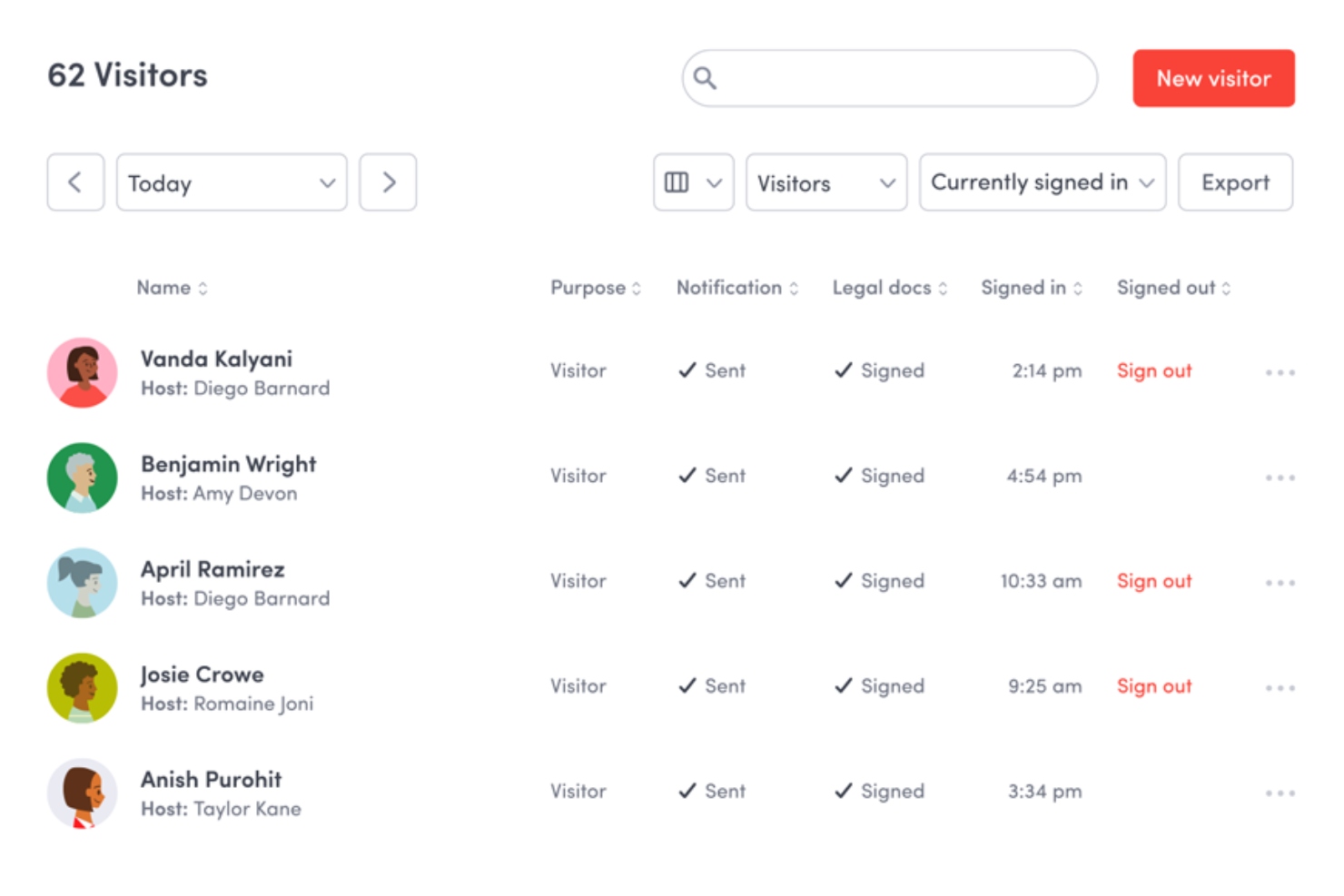
Envoy is a workplace management platform that combines visitor management, desk and room booking, occupancy analytics, emergency notifications, and digital signage into a single connected system.
Who Is Envoy Best For?
Envoy is a strong fit for mid-size to large companies managing hybrid workplaces where tracking both visitor check-ins and employee desk usage matters daily.
Why I Picked Envoy
Envoy earns its spot on my shortlist because no other tool I've tested handles the intersection of visitor check-in and employee desk booking with this level of live visibility. I particularly like the interactive live map, which lets my team see in real time which desks are occupied and where specific coworkers are sitting. Envoy's presence signals also feed directly into occupancy analytics, so I can see actual attendance patterns rather than just booking data.
Envoy Key Features
- Room booking: Reserve conference rooms directly through Envoy, with real-time availability visible across the workplace.
- Neighbourhood management: Group desks into zones assigned to specific teams, making it easier to manage seating arrangements at scale.
- Capacity limits: Set maximum occupancy thresholds per space and prevent bookings from exceeding defined limits.
- Emergency headcount: Trigger alerts during safety events and track who has confirmed their status in real time.
Envoy Integrations
Envoy offers over 100 integrations through its app directory, including Slack, Microsoft Teams, Google Calendar, Microsoft Outlook, Okta, Salesforce, Brivo Access, Verkada, Kisi, and Butlr. It also connects with Zapier and provides an API for custom integrations.
Pros and Cons
Pros:
- Multi-channel emergency alerts tied to headcounts
- Visitor and employee tracking in one view
- Live map shows real-time desk occupancy
Cons:
- Add-on modules increase total cost quickly
- Require iPad hardware setups in the kiosk operations

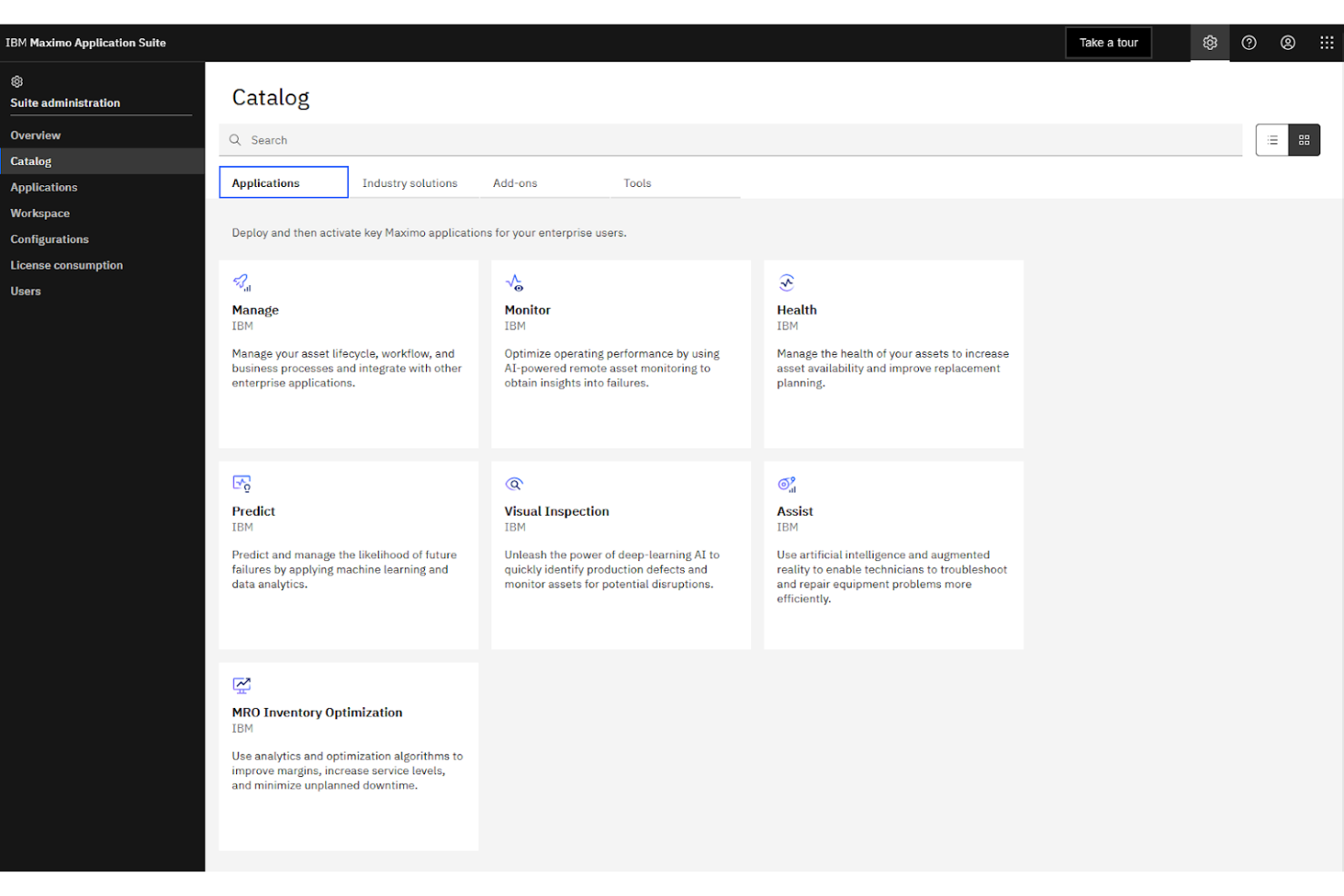
IBM Maximo is an enterprise asset management platform that tracks space utilization, manages work orders, monitors facility assets, and connects with IoT-enabled building systems across large-scale operations.
Who Is IBM Maximo Best For?
IBM Maximo is purpose-built for large enterprises and public sector organizations managing complex, multi-site facility and infrastructure portfolios.
Why I Picked IBM Maximo
I picked IBM Maximo because no other tool on this list connects occupancy data to the physical infrastructure of a building the way it does. Maximo's asset topology maps link space utilization data directly to the equipment, systems, and maintenance records within that space. I also like that it pulls live sensor data from BMS and IoT-connected devices into a single asset record, so facility teams aren't toggling between platforms to understand what's happening across a campus or multi-site portfolio.
IBM Maximo Key Features
- Space management: Track room assignments, area classifications, and occupancy allocations across an entire location hierarchy
- Work order automation: Automatically generate maintenance work orders when occupancy thresholds or asset conditions trigger predefined rules
- AI-powered health scoring: Use built-in AI to assess asset and facility conditions based on real-time utilization and sensor data
- Inspection management: Schedule and log facility inspections tied directly to specific locations and assets within the system
IBM Maximo Integrations
IBM Maximo integrates with enterprise systems like SAP, Oracle, Microsoft Dynamics, ServiceNow, Workday, and Esri GIS platforms through its built-in Maximo Integration Framework (MIF) and dedicated connectors. IBM App Connect extends connectivity further to tools like Jira, Salesforce, and Slack, and a REST API is available for custom integrations.
Pros and Cons
Pros:
- AI flags asset issues before failures occur
- Covers multi-site portfolios in one platform
- IoT sensor data tied to individual assets
Cons:
- Adding assets to the hierarchy is slow
- Initial setup demands significant IT resources

Density Waffle is a plug-and-play radar sensor paired with occupancy software that delivers real-time and historical people count data for meeting rooms, phone booths, open spaces, and desks.
Who Is Density Waffle Best For?
Density Waffle is a particularly good fit for workplace teams at mid-sized companies that need accurate room and desk occupancy data without the cost or complexity of enterprise-grade sensor systems.
Why I Picked Density Waffle
I picked Density Waffle as one of the best because its radar-based sensor counts people without capturing any images or biometric data, which removes the privacy review process that camera-based sensors typically trigger. In practice, that means my team can deploy it across sensitive spaces like private offices and phone booths without compliance pushback. I also like that Waffle counts in three discrete tiers (0, 1, 2, or 3+ people) with under one second of data latency, giving genuinely actionable real-time occupancy data.
Density Waffle Key Features
- Flexible mounting options: Waffle supports three mounting configurations, so you can install it on ceilings, walls, or furniture without structural changes.
- Historical occupancy data: Alongside real-time counts, Waffle stores historical usage data can be queried to analyze space trends over time.
- Mobile access: View live and historical occupancy data directly from a mobile device, without needing to log into a desktop dashboard.
- Real-time and historical API: Access raw occupancy data through a dual-mode API, enabling custom reporting, wayfinding displays, or third-party system connections.
Density Waffle Integrations
Density Waffle relies on a real-time and historical API with WebSocket support, which you can use to pipe occupancy data into your existing tools, dashboards, or building management systems.
Pros and Cons
Pros:
- Sub-one-second real-time data latency
- Self-installable with no professional help needed
- Radar sensors ensure complete occupant anonymity
Cons:
- iOS is required for initial sensor setup
- Counts max three people per sensor

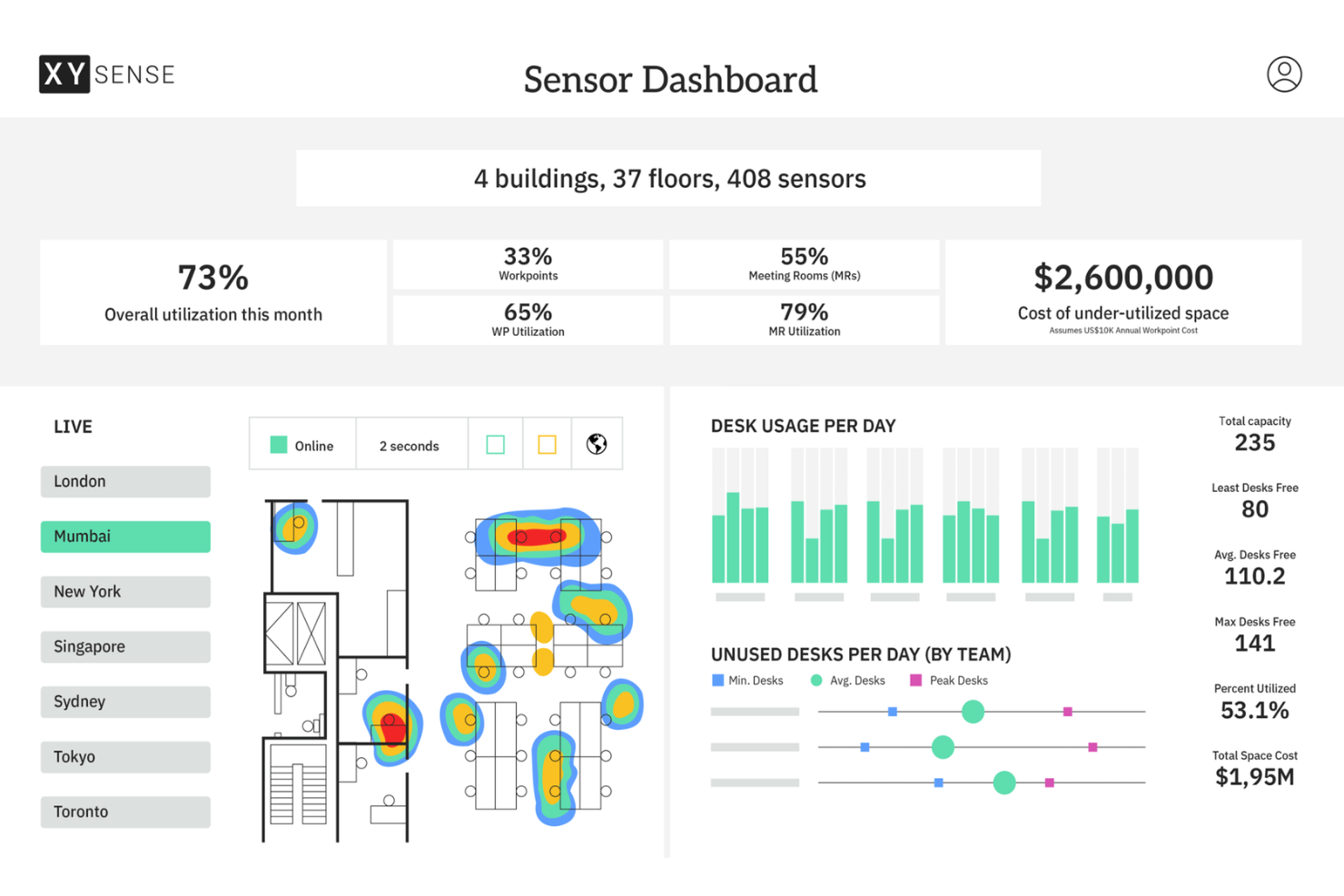
XY Sense is an occupancy intelligence platform that combines wireless sensors, a real-time insights dashboard, and an API to track how meeting rooms, open areas, small spaces, and building entries are used throughout the workday.
Who Is XY Sense Best For?
XY Sense is a strong fit for enterprise workplace teams and corporate real estate managers who need precise, floor-level occupancy data across large, multi-zone office environments.
Why I Picked XY Sense
I picked XY Sense as one of the best because its Area Pro Sensor covers up to 3,000 sq ft per unit and tracks people to within one foot, updating every two seconds. That level of precision means I can map real movement patterns across large open floors, not just detect whether a zone is occupied. I also like that the sensors run on wired PoE, so there's no battery maintenance, degrading data quality over time across a large deployment.
XY Sense Key Features
- Occupancy replays: Review a visual, time-stamped playback of how desks, rooms, and floors were used throughout the day
- Predictive forecasting: View projected demand and capacity trends before they become visible in real-time data
- Neighbourhood and department balancing: See how specific teams use zones across a floor to inform space allocation decisions
- Customizable alerts: Set occupancy thresholds for specific spaces and get notified the moment those thresholds are crossed
XY Sense Integrations
Integrations include Microsoft, Google, Appspace, Calven, Entrak, GoSpace, Habitap, HubStar, NHance, and Nura.
Pros and Cons
Pros:
- Real-time desk-level occupancy detection available
- Thermal sensing avoids collecting identifiable data
- Battery-powered sensors need no wired infrastructure
Cons:
- Dashboard reporting could offer deeper granularity
- Limited booking features compared to competitors
Annen programvare for sporing av belegg
Her er noen flere alternativer for programvare for sporing av belegg som ikke kom med på kortlisten min, men som likevel er verdt å se nærmere på:
- VergeSense
For AI-powered spatial analytics
- SpaceIQ
For scenario-based office space planning
- YAROOMS
For AI assistant integration in Teams
- Tactic
For unified workplace request management
- Archie
For coworking space automation
- Officely
For chat-based check-ins via Teams
- OfficeSpace
For visual seat allocation layouts
- Eden Workplace
For connected desk and visitor reservations
- HybridHero
With integrated employee leave workflows
- Maptician
For multi-floor real-time presence mapping


How I Evaluate Occupancy Tracking Software
I evaluate occupancy tracking tools across two layers: the baseline capabilities every platform must have—like real-time monitoring and HRIS sync—and what separates the best fits for hybrid HR teams.
Core Functionality (Table Stakes For This List)
When I'm selecting tools for my list, I rank each one on a scale from 0 (does not offer the functionality) to 5 (excels in this area) for each core functionality listed below. Then, I calculate the tool's total score into a percentage. Each tool needs to achieve a minimum total score of 65% to be considered for inclusion.
- Real-Time Occupancy Monitoring: I look for live headcount visibility across buildings, floors, and zones so workplace leaders can spot underused wings or overcrowded areas as the workday unfolds.
- Attendance & Check-In Tracking: Whether it's badge swipes, mobile check-ins, or Wi-Fi detection, I evaluate how many automated methods a platform supports and how reliably it logs individual employee presence.
- Space Utilization Analytics: Strong reporting goes beyond raw counts. I check for historical trend dashboards, peak-time analysis, and the ability to filter by department or location to support workforce planning conversations.
- Capacity Threshold Management: I look at whether admins can set per-space occupancy caps and receive automated alerts when a floor or meeting area approaches its limit, which matters for safety compliance and event planning.
- Desk & Room Booking Integration: Booking data only tells half the story. I evaluate whether a tool reconciles reservations against actual usage, surfacing ghost bookings and no-shows that distort utilization reports.
- HRIS & Calendar Integration: Syncing with platforms like Workday, BambooHR, Google Calendar, or Outlook keeps employee rosters and schedules current, so I check for native connectors and the depth of data flowing between systems.
Once I have a list of tools that meet this criteria, I consider what sets each platform apart.
Differentiating Factors (What Sets Vendors Apart)
Here's how I compare and contrast different vendors:
Standout Features
Real-time heatmaps make a difference when workplace leaders need to assess density at a glance. I look for live floor plan overlays that color-code zones by occupancy level, so you can spot a packed floor without pulling a report. Predictive analytics add another layer—platforms that forecast next week's occupancy from historical patterns help HR teams plan desk availability proactively. Sensor-agnostic hardware support also matters, since teams that inherit existing sensors shouldn't need to rip and replace to adopt a new platform.
Beyond Features
Privacy and compliance posture is one of the first things I check. HR teams tracking employee presence need anonymized counting methods and clear GDPR or CCPA documentation, especially when legal reviews how occupancy data is collected. Deployment flexibility matters too. I evaluate whether a platform supports wireless sensors that retrofit into existing office infrastructure without major construction. Pricing structure also shapes long-term viability—I look at whether vendors charge per sensor, per location, or per square foot, and whether hardware is bundled as a service or requires upfront capital investment.
Slik velger du programvare for sporing av belegg
Det er lett å gå seg vill i lange funksjonslister og kompliserte prisstrukturer. For å hjelpe deg med å holde fokus mens du går gjennom den unike prosessen med å velge programvare, får du her en sjekkliste over faktorer du bør ha i bakhodet:
| Faktor | Hva du bør vurdere |
|---|---|
| Skalerbarhet | Vil dette verktøyet håndtere teamstørrelsen din og fremtidig vekst på tvers av flere lokasjoner eller avdelinger uten omfattende systemendringer eller ekstra kostnader? |
| Integrasjoner | Fungerer programvaren med HRIS-, kalender- eller adgangskontrollsystemene dine, slik at du unngår manuell dataregistrering og opprettholder nøyaktige oversikter over tilstedeværelse? |
| Tilpasningsmuligheter | Kan du enkelt tilpasse retningslinjer, plantegninger, brukertillatelser og arbeidsområdekategorier slik at de samsvarer med dine spesifikke krav til hybridarbeid eller kontorlokaler? |
| Brukervennlighet | Vil ansatte og administratorer raskt forstå grensesnittet, eller vil innføringen stoppe opp på grunn av forvirrende navigasjon, treg innlasting eller unødvendige trinn? |
| Implementering og oppstart | Finnes det maler, oppsettveiledninger eller støtteressurser som hjelper deg med å konfigurere verktøyet og importere katalogdata eller plantegninger med minimal IT-støtte? |
| Kostnad | Samsvarer prisnivåene med budsjettet ditt, eller finnes det kostbare tillegg og bruksbegrensninger som kan gjøre en lav startpris om til en høy totalkostnad? |
| Sikkerhetstiltak | Tilbyr løsningen sterk brukerautentisering, rollebasert tilgang, datakryptering og alternativer for å overholde personvernstandarder som GDPR? |
| Tilgjengelig kundestøtte | Får du rask hjelp hvis det oppstår problemer, og tilbyr leverandøren chat i sanntid, telefon eller oppstartstjenester som er tilpasset virksomhetens behov? |
Hva er programvare for sporing av belegg?
Programvare for registrering av belegg er et digitalt verktøy som overvåker, registrerer og administrerer hvordan mennesker bruker delte områder på en arbeidsplass eller i et lokale. Disse systemene gir sanntidsdata og historiske data om beleggmønstre, støtter reservasjon av arbeidsplasser eller rom og hjelper team med å håndheve retningslinjer for kapasitet og sikkerhet. Ved å bruke denne informasjonen kan organisasjoner optimalisere bruken av lokaler, forbedre arbeidsplassopplevelsen og ta informerte beslutninger om kontorløsninger og ressursplanlegging.
Funksjoner i programvare for registrering av belegg
Når du velger programvare for registrering av belegg, bør du se etter følgende viktige funksjoner:
- Sanntidsovervåking av belegg: Registrerer hvor mange personer som befinner seg i et område til enhver tid ved hjelp av sensorer, innsjekking fra brukere eller systemintegrasjoner, slik at du kan opprettholde trygg og effektiv bruk av lokalene.
- Bestilling av arbeidsplasser og rom: Lar ansatte reservere bestemte arbeidsplasser eller møterom på forhånd, noe som reduserer konflikter, støtter hybridarbeid og gir tydelig innsikt i fremtidig belegg.
- Interaktive plantegninger: Tilbyr digitale kart som viser ledige og opptatte områder i sanntid, slik at ansatte enkelt kan finne og bestille arbeidsplasser eller møteområder som passer behovene deres.
- Håndheving av kapasitetsgrenser: Begrenser automatisk reservasjoner eller sender varsler når områder nærmer seg maksimal kapasitet, og støtter etterlevelse av sikkerhets- eller avstandsregler.
- Bruksanalyse og rapportering: Gir data og visuelle oversikter over hvordan områder brukes over tid, slik at HR- og driftsavdelinger kan identifisere trender, underutnyttelse eller flaskehalser.
- Besøkshåndtering: Registrerer eksterne gjester som kommer inn på arbeidsplassen, sikrer nøyaktige beleggsdata, smidigere innsjekking og bedre sikkerhet for ansatte og besøkende.
- Mobil tilgang: Gjør det mulig for brukere å sjekke tilgjengelighet, foreta reservasjoner og motta varsler på farten, noe som er avgjørende for hybride eller fleksible arbeidsmiljøer.
- Integrasjon med kalendere: Synkroniserer reservasjoner og beleggsdata med de eksisterende kalendersystemene dine, slik at bestillingsinformasjon vises sammen med møter og ansattes timeplaner.
Vanlige KI-funksjoner i programvare for registrering av belegg
I tillegg til standardfunksjonene i programvare for registrering av belegg som er nevnt ovenfor, tar mange av disse løsningene i bruk KI med funksjoner som:
- Prediktiv analyse av arealbruk: Bruker KI til å analysere historiske beleggsdata og forutsi fremtidig etterspørsel etter arealer, slik at du kan planlegge for travle perioder og optimalisere kontorløsningene.
- Smarte bestillingsanbefalinger: Foreslår de beste tilgjengelige arbeidsplassene eller møterommene basert på ansattes preferanser, arbeidsmønstre og teamenes timeplaner, noe som sparer tid og forbedrer trivselen på arbeidsplassen.
- Automatisk avviksdeteksjon: Overvåker beleggsdata for uvanlige mønstre, som vedvarende overkapasitet eller underutnyttede områder, og flagger deretter problemer for gjennomgang og oppfølging.
- KI-basert håndheving av retningslinjer: Bruker maskinlæringsmodeller til automatisk å justere tilgangstillatelser og reservasjonsregler som svar på endringer i retningslinjene for arbeidsplassen eller faktisk utnyttelse.
- Rengjøringsplanlegging basert på belegg: Planlegger rengjøring eller vedlikehold basert på sanntidsdata og forventet bruk av lokalene, slik at områder med mye trafikk prioriteres av hensyn til helse og sikkerhet.
Fordeler med programvare for registrering av belegg
Implementering av programvare for registrering av belegg gir flere fordeler for teamet og virksomheten din. Her er noen av fordelene du kan se frem til:
- Mer effektiv bruk av lokaler: Få sanntidsdata og historiske data for å optimalisere kontorløsninger, eliminere bortkastet plass og sikre at ressursene samsvarer med teamenes behov.
- Bedre sikkerhet og etterlevelse: Håndhev kapasitetsgrenser automatisk og registrer belegg for å støtte helseveiledning, beredskapsplanlegging og organisatoriske retningslinjer.
- Bedre opplevelse for ansatte: Gjør det enklere for ansatte å finne og reservere egnede arbeidsplasser, og støtt fleksible arbeidsordninger og samarbeid.
- Informerte beslutninger: Bruk analyser og prognoser til å planlegge utvidelser, sammenslåinger eller redesign av kontorer basert på reelle beleggsdata og behov.
- Mindre administrativ arbeidsbelastning: Automatiser rutineoppgaver som bestilling av arbeidsplasser, registrering av besøkende og rapportering, slik at HR- og driftsavdelinger får mer tid til arbeid med høyere verdi.
- Lavere kostnader for lokaler: Identifiser underutnyttede områder og muligheter for å redusere eller omdisponere areal, slik at leie- og driftskostnadene reduseres over tid.
- Bedre sikkerhet på arbeidsplassen: Overvåk hvem som er på stedet, administrer besøkendes tilgang og før nøyaktige logger for å støtte beredskap eller revisjoner.
Kostnader og priser for programvare for registrering av belegg
Ved valg av programvare for beleggsregistrering er det nødvendig å forstå de ulike prismodellene og tilgjengelige abonnementene. Kostnadene varierer basert på funksjoner, teamstørrelse, tillegg og mer. Tabellen nedenfor oppsummerer vanlige abonnementer, gjennomsnittsprisene deres og typiske funksjoner som er inkludert i løsninger for programvare for beleggsregistrering:
Sammenligningstabell for programvare for beleggsregistrering
| Abonnementstype | Gjennomsnittspris | Vanlige funksjoner |
|---|---|---|
| Gratisabonnement | $0 | Grunnleggende beleggsregistrering, begrenset skrivebordsbestilling, støtte for én lokasjon og grunnleggende rapportering. |
| Personlig abonnement | $5-$15/bruker/måned | Bestilling av skrivebord og rom, standard plantegninger, mobiltilgang, e-poststøtte og enkel analyse. |
| Bedriftsabonnement | $15-$35/bruker/måned | Støtte for flere lokasjoner, avansert analyse, besøksadministrasjon, integrasjoner og automatisert håndheving av kapasitetsgrenser. |
| Foretaksabonnement | $35-$70/bruker/måned | Tilpassede arbeidsflyter, prioritert støtte, enkel pålogging, verktøy for samsvar, API-tilgang og dedikert kundeoppfølging. |
Vanlige spørsmål om programvare for beleggsregistrering
Her er noen svar på vanlige spørsmål om programvare for beleggsregistrering:
Hvordan fungerer programvare for beleggsregistrering?
Programvare for beleggsregistrering bruker sensorer, innsjekking av ansatte eller systemintegrasjoner for å samle inn sanntidsdata om hvor mange personer som befinner seg i hvert område av en arbeidsplass. Disse dataene behandles og vises via skybaserte dashbord, interaktive varmekart eller rapporter for å hjelpe team med å administrere areal, reservasjoner og kapasitetsgrenser uten gjetting.
Kan programvare for beleggsregistrering hjelpe med hybride arbeidsordninger?
Ja, programvare for beleggsregistrering brukes ofte til å støtte hybridarbeid ved at ansatte kan reservere skrivebord eller rom på dagene de kommer inn på kontoret. Det forbedrer brukeropplevelsen for eksterne team og gir ledere data om kontorbruken, slik at de kan justere planløsninger, bemanning eller retningslinjer etter hvert som behovene endres.
Hvilke integrasjoner bør jeg se etter i programvare for beleggsregistrering?
Du bør se etter integrasjoner med HR-systemer, kalendere (som Google eller Outlook), adgangskontroll, HVAC-enheter og kommunikasjonsplattformer. De riktige integrasjonene bidrar til å automatisere reservasjoner, støtte innsjekking og holde registreringene nøyaktige uten manuell dataregistrering.
Passer programvare for beleggsregistrering for organisasjoner med flere lokasjoner?
Ja, de fleste moderne løsninger kan administrere belegg på tvers av flere lokasjoner eller kontorer fra ett enkelt dashbord. Dette gjør det mulig å spore bruksmønstre, håndheve retningslinjer og opprette rapporter, uansett om arbeidsstyrken er sentralisert eller spredt over en region.
Hvordan beskytter disse systemene personvernet til de ansatte?
God programvare for beleggsregistrering beskytter personvernet ved å bruke anonymiserte eller aggregerte data, begrense individuell sporing og overholde forskrifter som GDPR. Administratorinnstillinger styrer også hvilken informasjon ulike brukere kan få tilgang til. Gå alltid gjennom leverandørens personvernerklæring før implementering.