

10 beste programvareløsninger for rekrutteringsbyråer i 2026

10 Liste over den beste programvaren for rekrutteringsbyråer


Den beste programvaren for rekrutteringsbyråer hjelper profesjonelle rekrutterere med å håndtere flere kunder, kandidatprosesser og administrative oppgaver – alt fra én sentralisert plattform.
Rekrutterere er under konstant press for å levere resultater raskt, samtidig som de skal gi både kunder og kandidater en god opplevelse. Den riktige programvaren forenkler denne prosessen ved å automatisere repetitive administrative oppgaver, organisere talentbaser og effektivisere kommunikasjonen på tvers av ansettelser.
Med utgangspunkt i min erfaring med å evaluere HR- og rekrutteringsverktøy har jeg satt sammen en liste over den beste programvaren for rekrutteringsbyråer, utviklet for å øke produktiviteten, nøyaktigheten og kundetilfredsheten. I denne veiledningen finner du plattformer som hjelper byråer med å jobbe smartere, styrke relasjoner og oppnå bedre ansettelsesresultater i stor skala.
Hvorfor du kan stole på våre programvareanbefalinger
Teamet vårt har testet og anmeldt programvare siden 2012. Vi er selv HR-eksperter, så vi vet hvor vanskelig og hvor viktig det er å velge riktig programvare.
I denne guiden har vi vurdert verktøyene gjennom praktisk testing og uavhengig research og gitt dem poeng ut fra våre utvelgelseskriterier. Vi bygger også på innsikt fra ledende eksperter i bransjen og erfarne HR-eksperter.
Anmeldelsene våre bygger på vår egen redaksjonelle vurdering. De er ikke et salgsargument.
Ekspertanmeldere:
Sammenligningstabell for programvare til rekrutteringsbyråer
Denne sammenligningstabellen oppsummerer prisdetaljene for mine utvalgte programmer for rekrutteringsbyråer:
| Tool | Best For | Trial Info | Price | ||
|---|---|---|---|---|---|
| 1 | Best for integrated recruitment automation | Free trial available | From $95/user/month | Website | |
| 2 | Best for social media recruitment | Free trial available | From $15/user/month (billed annually) | Website | |
| 3 | Best for novice recruiting specialists | Free trial + free demo available | From $85/user/month (billed annually) | Website | |
| 4 | Best for recruitment task tracking | Free demo available | Pricing upon request | Website | |
| 5 | Best for referral-based recruiting | Free demo available | Pricing upon request | Website | |
| 6 | Best sourcing for hourly positions | Free demo available | Pricing upon request | Website | |
| 7 | Best for organized candidate databases | Free demo available | From $99/user/month | Website | |
| 8 | Best for branded career pages | Free demo available | From $175/user/month | Website | |
| 9 | Best for candidate scoring in bulk | Free trial available | From $4.99/month (billed annually) | Website | |
| 10 | Best for talent engagement | Free demo available | From $270/10 users/per month | Website |
Anmeldelser av den beste programvaren for rekrutteringsbyråer
Her er mine detaljerte sammendrag av den beste programvaren for rekrutteringsbyråer som kom med på topp 10-listen min, inkludert merknader om hvorfor jeg valgte dem. Hver anmeldelse gir en detaljert gjennomgang av de viktigste funksjonene, fordeler og ulemper, integrasjoner og ideelle bruksområder for hvert system, slik at du kan finne det beste verktøyet for deg.

Best for integrated recruitment automation

Recruit CRM combines the functionalities of a CRM with an ATS, making it an excellent choice for high-volume recruiters or recruitment agencies.
Why I picked Recruit CRM: Their user interface is intuitive and includes a Kanban style view that visually organizes all the prospective candidates in your hiring pipeline with separate columns for whichever recruitment phase they’re in. Moving them along in the pipeline is also straightforward, with just a click.
To increase your productivity, you can set up triggers for automated emails and other tasks to occur once you move a candidate from one phase to the next.
Recruit CRM Standout Features and Integrations:
Features include a Chrome browser extension that simplifies candidate sourcing through LinkedIn. You can use it to tag promising candidates and add them to your general database, or to one of your active hot lists, which function as individual talent pools for each position. Once flagged, Recruit CRM automatically scans the candidate’s profile details and transfers their personal details into your system for future use.
Their suite of built-in reports is what makes Recruit CRM stand out as an asset for recruiting teams or staffing firms.
You can run custom reports on all types of common recruiting metrics, or use one of their built-in reports, such as their Recruiter KPI Report, their Candidate Lifecycle Report, a Job Statistics Report, or a Client Performance Report.
Within each report, the data is visualized graphically, as well as in a table format that can be exported as a CSV file. Managers can even compare the output of recruiters side-by-side or click into the individual graph points to drill down into more nitty-gritty details.
Integrations for this software are entirely based on Zapier's offering. RecruitCRM has a Zapier connector that lets you integrate the software with thousands of apps like Gmail, Slack, HubSpot, and Typeform. Keep in mind that you will need to have a paid account with Zapier to be able to connect external apps.
Pros and Cons
Pros:
- Includes Boolean and radius searches to capture more candidates
- Huge list of third-party app integrations (over 5,000 via Zapier)
- Includes powerful AI features like resume parsing, email sequencing, and candidate matching
Cons:
- No freemium plan
- Custom branding locked to highest paid plan
Manatal
Best for social media recruitment
Manatal is an award-winning recruitment solution suitable for internal hiring teams and recruiting agencies and headhunters.
Why I picked Manatal: It comes with a range of features to help secure top talent across diverse roles using advanced sourcing capabilities and AI-driven candidate recommendations.
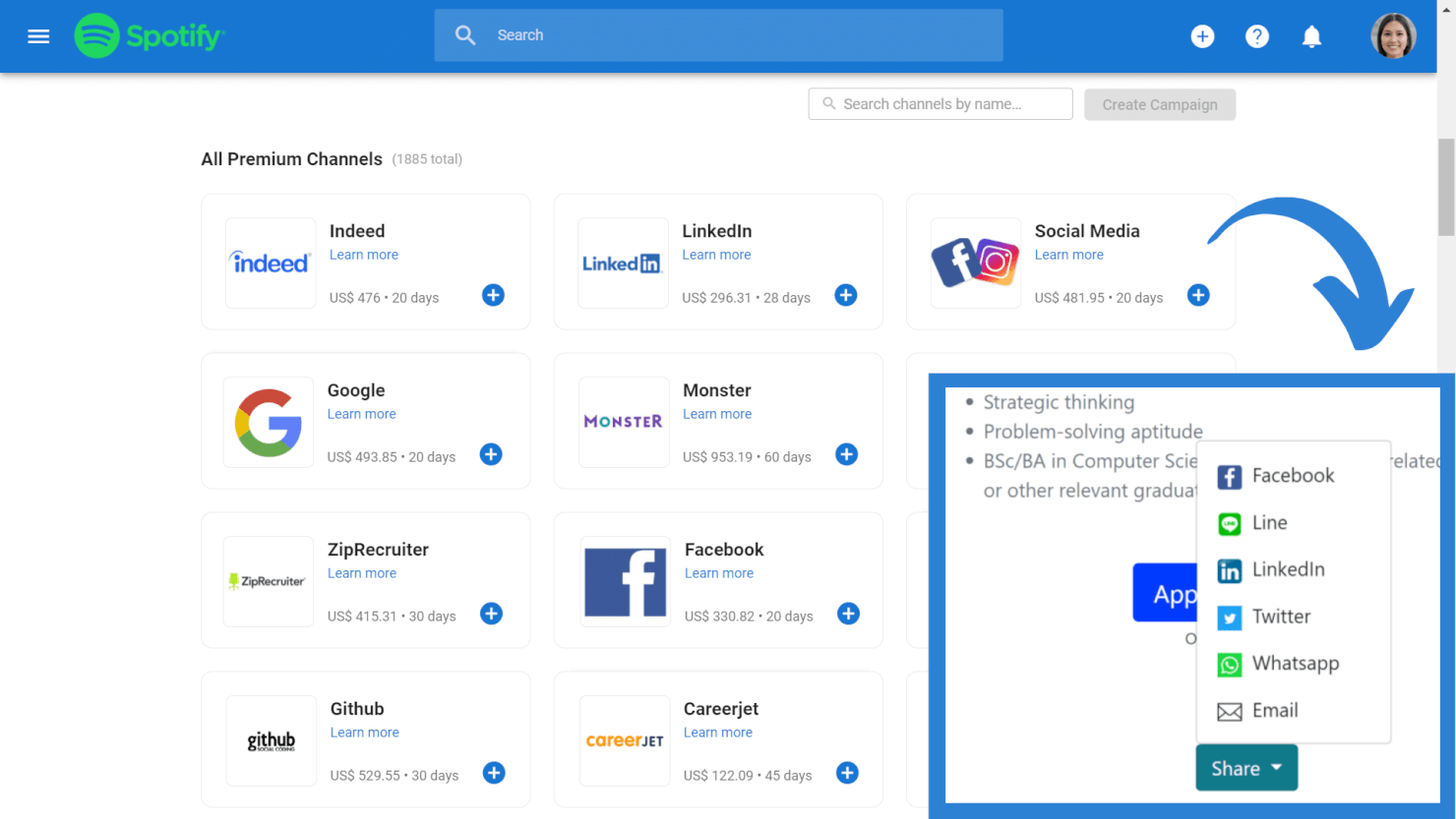
This includes ability to share roles across 2,500+ free and premium channels, import profiles directly from LinkedIn and LinkedIn Recruiter, and access to an external database of over 600 million professionals.
Manatal Standout Features & Integrations:
Standout features for Manatal include their intelligent candidate sourcing and AI-powered recommendations. These features work in tandem to help you sift through your stacks of candidate data, with the system automatically picking out candidates who check the most boxes.
It's also possible to retrieve verified email addresses and phone numbers directly from candidate profiles and their Vendor Management System, VM, empowers hiring teams and recruitment agencies to work together more efficiently.
Integrations are available with Facebook, Gmail, G Suite, Line, LinkedIn, Microsoft Outlook, Office 365, Wechat, and WhatsApp. Zapier integration and API access are available on their custom plan subscription.
Pros and Cons
Pros:
- You can create customizable career landing pages with embedded application forms
- Includes task tracking and team collaboration tools
- Candidate sourcing tool draws from 2,500+ job platforms
Cons:
- Annual billing only
- SMS recruitment features only available in their top-level plan
New Product Updates from Manatal

Manatal Adds Candidate Login and Employee Portal to Career Pages
Manatal has added Candidate Login, Internal Employee Portal, and internal job visibility controls for Career Pages. These features help teams simplify applications, support employee mobility, and manage internal hiring workflows. For more information, visit Manatal’s official site.
 .

Crelate
Best for novice recruiting specialists

Crelate is a recruiting agency recruiting tool built by recruiters with plenty of useful ATS and CRM features.
Why I picked Crelate: I selected Crelate due the tool's ease of use, customizability, and extensive feature list.
For example, you can easily drag and drop applicant records as candidates move through your recruitment process.
You can also tag applicants with skills, experience, source, or any other information that can be surfaced when searching.
It's the same with the CRM too, which is full customizable to adapt to your sales workflow. The customization filter allows you to search jobs by placements, companies, opportunities.
Crelate Standout Features and Integrations:
Standout features include resume parsing and automated candidate profile creation. Crelate pulls the information from your candidate’s resumes and uses it to create detailed profiles, complete with each job seeker’s social media information.
Also useful is their client portal allowing recruiters to communicate with clients via automated real-time alerts and record all client interactions and feedback regarding candidates in one centralized, easily accessible location.
Integrations include communication and analytics tools, and ATS solutions, such as ZoomInfo, hireEZ, CareerBuilder, Seekout, Glassdoor, Monster, JobInventory, Dice, CareerJet, Google Workspace, and Microsoft Outlook.
Pros and Cons
Pros:
- Drag-and-drop visual editor
- Automation features help you capture candidate data
- Great support department
Cons:
- You can’t customize the required fields for job applications
- Limited number of email templates

JobAdder
Best for recruitment task tracking

JobAdder is a recruiting agency platform that enables you to track applicants through your recruiting funnels. The solution gives you an overview of your recruiting efforts, allowing you to identify potential bottlenecks in your workflows.
Why I picked JobAdder: JobAdder made my list thanks to its applicant tracking features. The platform shows hiring managers the status of each candidate in real-time, allowing them to understand how the hiring process is going at a glance. Team members can rate candidates and leave comments for one another in candidate profiles, ensuring that only the best candidates move deeper into the funnel.
JobAdder’s Interview and Task dashboard enables you to keep your team members on track. The dashboard allows you to view upcoming tasks so you can optimize your calendar and your team’s workload.
JobAdder Standout Features and Integrations:
Standout features include candidate records, search and match automation, record enrichment, and talent pools. Combined, these features allow you to source candidates in a short amount of time by performing lookalike searches with advanced filters.
Integrations include communication, CRM, payroll, and ATS solutions, such as BambooHR, Calendly, Checkmate, Applyflow, Seek, Aircall, Deputy, Deel, QuickBooks, and HubSpot.
Pros and Cons
Pros:
- Good customization options
- Interview scorecards
- Great mobile app
Cons:
- May lag when saving multiple candidate profiles at once
- Some functionalities may seem complicated to novice users
Boon
Best for referral-based recruiting

Boon is a recruiting automation platform built to help recruiters and companies hire faster through referral-based sourcing. It connects employers with potential candidates by turning existing networks into a dynamic recruiting engine.
Why I picked Boon: I chose Boon because it’s centered on automating and incentivizing referrals. It allows you to crowdsource referrals from employees, alumni, and your broader network, then automatically engages those contacts with pre-set campaigns. This makes it especially effective for teams looking to tap into their existing relationships instead of only sourcing externally. You can set bounties for each job, giving people a reason to recommend candidates, which expands your reach without a traditional sourcing team.
Boon Standout Features and Integrations
Features include a referral leaderboard that gamifies participation by showing who brings in the most candidates, helping boost engagement. The tracking dashboard also shows how many referrals are coming in, what stage they’re at, and who made them, so your team can measure impact and accountability.
Integrations include NetSuite, Lever, Workday, Greenhouse, Google Workspace, Okta, Slack, Microsoft Teams, Facebook, LinkedIn, QuickBooks, Xero, and SmartRecruiters.
Pros and Cons
Pros:
- Referral tracking is efficient and easy to manage
- Gamification features help increase employee engagement
- AI automation helps recruiters identify better candidates faster
Cons:
- Uploading data manually can be difficult or time-consuming
- Incentive tracking lacks deeper customization options

Best sourcing for hourly positions

TalentReef's cloud-based recruitment and hiring platform purpose-built for location-based, high-volume recruiting.
Why I picked TalentReef: I included TalentReef in this list because of their unique focus on sourcing candidates to fill hourly positions. This makes their software particularly well-suited for sourcing talent for businesses in the service industry, such as restaurants, retail stores, and other hourly employers that frequently hire new staff in bulk.
TalentReef Standout Features and Integrations
Standout features include their conversational AI chatbot, a text-to-apply feature, two-way texting abilities, and social recruiting tools. Recruiters can also save a lot of time by using their campaign communication features to create templated email and SMS communications for candidate interactions, allowing them to stay in touch with high volumes of candidates at scale.
Another plus worth highlighting is their interview scheduling automation. By allowing candidates to pick a time that works for them, you'll reduce the likelihood of no-shows or last-minute cancellations, and eliminate the need for back-and-forth phone tag to find a time that works.
Integrations are available with payroll systems, candidate assessment tools, background check providers, and learning management systems, though individual platforms are not specified.
Pros and Cons
Pros:
- Well-suited for filling hourly roles in bulk
- Offers branded email communications
- Includes mobile-friendly features
Cons:
- No free trial available
- Pricing details are not transparent
Bullhorn
Best for organized candidate databases

Bullhorn aims to offer a single source of truth for busy staffing agencies and even acts as the central hub for the wider tech stack.
Why I picked Bullhorn: Bullhorn understands how busy recruitment teams are but also the need to balance efficiency (read, automation) with the human touch. As such, they're careful to implement automation with caution and use it to improve the experience for teams and candidates.
They're also generous with knowledge, providing playbooks to help organizations engage with candidates and differentiate their offering.
Bullhorn Standout Features and Integrations
Standout features include their AI tool, built on a sea of recruitment data, to help source and screen candidates and craft relevant communications, as well as advanced analytics features such as real-time dashboards and custom reporting.
Additionally, the platform allows you to create custom recruitment flows using omnichannel communication. This enables you to attract candidates on social media, engage them via SMS, and nurture them through personalized emails.
Integrations include applicant tracking systems (ATS), communication tools, background checkers, and customer relationship management (CRM) tools, such as Accurate Background, ADP, Checkr, First Advantage, hireEZ, Indeed, Arya, SkillCheck, LinkedIn, and Sterling.
Pros and Cons
Pros:
- Allows you to build multi-step custom flows
- Great for omnichannel communication
- Robust reporting and analytics capabilities
Cons:
- User interface can feel clunky when performing large searches
- Large number of features can feel overwhelming

Best for branded career pages

TargetRecruit is a recruiting agency software targeted at commercial, healthcare, and professional staffing.
Why I picked TargetRecruit: The platform helps you quickly source candidates through accurately searching your own database, external sources, job boards or posting to your own career pages.
Regarding the latter, the software offers a variety of templates to start with, but you can also build your own careers pages from scratch. These allow your candidates to search your open positions by title, skills, or location.
They can also create and update profiles, submit resumes, activate notifications so they receive alerts when you open a job that matches their profile, and complete onboarding and compliance docs.
From a sales perspective, their CRM provides a 360-degree view of your customer and candidate relationships and can also auto-convert new business to job orders to ensure the fastest possible placements.
TargetRecruit Standout Features and Integrations:
Standout features include Boolean search, automated lead scoring and routing for a quicker outreach, and a timesheet portal making it easy for contractors to record work hours and expenses and client hiring managers to accept and pay or reject requests as necessary.
I’m also a fan of TargetRecruit’s reporting features. The platform enables all your users to create custom reports and dashboards using only the data accessible with their permission levels, and they can also export reports to clients via email.
Integrations include CRMs, accounting and invoicing tools, and job posting solutions, such as QuickBooks, PayChex, ADP, ZoomInfo, Quip, DocuSign, Salesforce, CloudCall, Relias, and DataTrim.
Pros and Cons
Pros:
- Multiple add-ons available
- Flexible, customizable solution
- Great reporting features
Cons:
- Advanced features may feel overwhelming
- May be less effective outside North America

Best for candidate scoring in bulk

Unnanu Hire is an advanced hiring platform that uses artificial intelligence and automation to optimize the recruiting process. Due to its ability to manage large volumes of candidate data and quickly rank candidate applications in bulk, it's a great tool for recruiting agencies who are dealing with high-volume hiring. Using Unnanu Hire, you can manage job postings, track applicants, and even conduct video interviews.
Why I picked Unnanu Hire: I included Unnanu Hire in this list because I really like its AI-powered candidate-matching capabilities. By leveraging AI algorithms, Unnanu Hire accurately analyzes job requirements and candidate profiles to find the best match for each position. Unnanu Hire also has a pre-populated talent database sourced from around the web, giving you quick and easy access to hundreds of vetted candidates (part of the Pro plan and above).
Unnanu Hire Standout Features & Integrations:
One of the standout features of Unnanu Hire is its video interviewing capability. Instead of having to schedule and conduct interviews in person or via a separate video conferencing tool, you can do it all within Unnanu Hire. This makes the whole process more efficient and provides a better candidate experience on the receiving end too.
Another feature that I really appreciate is the applicant tracking system. It's super easy to see where each applicant is in the hiring process, and you can even set up automated emails to keep candidates updated. It's a great way to keep everything organized and ensure no one falls through the cracks.
Integrations are not currently listed on their site.
Pros and Cons
Pros:
- Free plan includes unlimited job postings
- Supports mass emails and other bulk actions
- Includes a pre-populated talent database
Cons:
- AI evaluations costs extra
- Limited customer support on lower plans


Gem is a popular ATS and CRM with plenty of useful automations and AI-powered features.
Why I picked Gem: Gem’s suite of AI recruiting solutions helps teams boost productivity throughout the recruiting process.
For example, the tool searches across 600M+ public profiles and uses context from all channels to find you the best candidates. The AI makes it easy to set up and refine searches and highlights exactly what criteria from your search matched the candidate’s profile, enabling you to easily fine-tune your qualifications.
Gem Standout Features and Integrations:
Standout features include the Chrome extension enabling you to view your relationship history with specific candidates when browsing social media or email, so you can quickly catch up on previous conversations and send follow-ups to continue your nurturing efforts.
Gem also makes it easy to nurture talent relationships and keep talent warm for future opportunities by sending invitations to events, videos, thought leadership content, and job posts to your database.
Integrations include popular ATS solutions, and communication and collaboration tools, such as Ashby, JazzHR, ICiMS, Jobvite, Lever, Workday, SmartRecruiters, GMail, Calendly, Slack, and Microsoft Outlook.
Pros and Cons
Pros:
- Good variety of communication templates
- Helps you keep your candidate database organized with lists
- Allows you to nurture candidates with multichannel customizable sequences
Cons:
- Setting up dashboards can be time-consuming
- Reports customization could be easier
Annen programvare for rekrutteringsbyråer
Nedenfor finner du en liste over annen programvare for rekrutteringsbyråer som ikke kom med på topp 10-listen min, men som likevel er verdt å se nærmere på:
- Top Echelon
For pipeline management
- Vincere
For AI candidate matching
- Arya
For diversity hiring
- Mindscope
For mobile-first candidate experiences
- Recruiterflow
For custom hiring pipelines
- hireEZ
For candidate sourcing using AI
- Tracker
ATS with CRM
- Juicebox
For AI candidate outreach and sourcing
- TE Recruit
For split placement network access
- Greenhouse
For scalable workflows
- Zoho Recruit
For candidate sourcing
- Atlas
For reviewable CRM migration
- Ceipal
For advanced candidate ranking
- PCRecruiter
For job management
- CATS
For for agency and high-volume staffing workflows
- Fountain
For hiring hourly workers
- Avionté
For high volume hiring
- JobDiva
For complex recruiting funnels


Relaterte anmeldelser av HR-programvare
Hvis du fortsatt ikke har funnet det du leter etter her, kan du se nærmere på disse andre relaterte verktøyene for personaladministrasjon som vi har testet og evaluert:
- HR-programvare
- Lønnsprogramvare
- Rekrutteringsprogramvare
- Systemer for kandidatsporing
- Tjenester for arbeidsgiverregistrering
- Programvare for personalstyring
How I Evaluate Recruiting Agency Software
I evaluate recruiting agency tools in two layers: the must-haves—candidate pipelines, client CRM, job board posting—that qualify a platform, and the differentiators that distinguish the best options.
Core Functionality (Table Stakes For This List)
When I'm selecting tools for my list, I rank each one on a scale from 0 (does not offer the functionality) to 5 (excels in this area) for each core functionality listed below. Then, I calculate the tool's total score into a percentage. Each tool needs to achieve a minimum total score of 65% to be considered for inclusion.
- Applicant Tracking & Pipelines: I look for customizable recruiting pipelines that let you build unique workflows per job order—like separating IT contract roles from permanent executive searches with distinct stages and automations.
- Candidate CRM & Database: Resume parsing, Boolean search, and tagging matter here. A good candidate database lets recruiters rediscover past applicants when a matching role comes in months later.
- Client & Contact CRM: I evaluate whether the platform tracks client companies, hiring managers, and job orders separately from candidates—agencies need to log BD activity alongside recruitment activity.
- Multi-Job, Multi-Client Workflows: Agencies juggle dozens of open roles across clients simultaneously. I check that each job order maintains its own pipeline, ownership, and submission tracking without cross-contamination.
- Sourcing & Job Distribution: I look at how many job boards a tool posts to natively and whether it connects to sourcing channels like LinkedIn Recruiter or resume aggregators to widen your candidate reach.
- Placement & Billing Tracking: Staffing firms live on placement fees. I evaluate whether the tool tracks perm placements, contract margins, and commission splits—and whether it connects to accounting tools for invoicing.
Once I have a list of tools that meet this criteria, I consider what sets each platform apart.
Differentiating Factors (What Sets Vendors Apart)
Here's how I compare and contrast different vendors:
Standout Features
AI candidate matching is a major differentiator—I check whether the platform can auto-rank database candidates against new job orders, which saves hours on high-volume desks. Contractor back-office tools also matter for temp staffing firms that need timesheets, expense tracking, and onboarding built into the recruiting workflow. I look for branded client portals, too. Giving hiring managers a space to review submissions and leave feedback directly cuts out the usual email chains that slow down placements.
Beyond Features
Pricing model fit matters a lot here—some platforms charge per recruiter seat while others tier by job volume, and the wrong structure can quietly erode margins as your agency scales. I also evaluate the integration ecosystem, especially connections to major job boards and accounting tools like QuickBooks or Xero, since placement invoicing touches both recruiting and finance workflows. Implementation and data migration deserve attention, too. Agencies switching from legacy systems like Bullhorn or even spreadsheets need a clear path to move candidate and client data without losing history.
Slik velger du programvare for rekrutteringsbyråer
Mens du går gjennom din egen unike prosess for valg av verktøy, bør du ha følgende punkter i tankene:
- Hvilket problem prøver du å løse - Begynn med å identifisere utfordringene du prøver å overvinne. Dette vil hjelpe deg med å avklare hvilke funksjoner og hvilken funksjonalitet den nye programvaren må tilby.
- Hvem trenger å bruke det - For å vurdere kostnader og krav bør du vurdere hvem som skal bruke verktøyet, og hvor mange lisenser du trenger. Når dette er avklart, er det også nyttig å rangere behovene til de ulike brukerne dine for å identifisere de viktigste prioriteringene for superbrukere, ledere og ansatte, slik at alle behovene deres blir dekket.
- Hvilke andre verktøy det må fungere sammen med - Avklar hvilke verktøy du erstatter, hvilke verktøy som skal beholdes, og hvilke verktøy du må integrere med, for eksempel regnskaps- og faktureringsprogramvaren din, ferdighetsvurderingsprogramvare eller andre viktige systemer. Du må avgjøre om verktøyene skal integreres med hverandre, eller om du i stedet kan erstatte flere verktøy med en alt-i-ett-plattform for rekrutteringsbyråer.
- Hvilke resultater som er viktige - Gå gjennom funksjonene du ønsker å få eller forbedre, og hvordan du skal måle suksess. Det kan for eksempel være at du ønsker AI-drevne verktøy for å sammenligne kandidater med stillingsbeskrivelser raskere, eller bedre verktøy for å administrere flere kunder samtidig. Du kan imidlertid kaste bort mye verdifull tid hvis du ikke definerer resultatmålene dine på forhånd.
- Hvordan det vil fungere i organisasjonen din - Vurder valg av verktøy sammen med de eksisterende arbeidsflytene og systemene dine. Evaluer hva som fungerer godt, og eventuelle problemområder som må håndteres.
Husk at alle virksomheter er forskjellige — ikke anta at et system for rekrutteringsbyråer vil fungere for organisasjonen din bare fordi det er populært.
Hva er programvare for rekrutteringsbyråer?
Programvare for rekrutteringsbyråer brukes av profesjonelle rekrutterere til å organisere rekrutteringskampanjer og tilhørende talentpuljer for ulike kunder. Den støtter en teambasert ansettelsesmodell og inkluderer verktøy for intern kommunikasjon og samarbeid, samt andre funksjoner for administrasjon, som verktøy for regnskap, fakturering og tidsregistrering, i tillegg til kundeportaler. De er utviklet for å forenkle rekruttering for flere kunder samtidig, slik at team kan besette mange stillinger raskt, samtidig som de tilbyr en god opplevelse for både kunder og kandidater.
Programvare for rekrutteringsbyråer bidrar i siste instans til raskere og bedre ansettelser gjennom automatisering, forbedret håndtering av kandidatdata og transparente verktøy for teambasert kommunikasjon og samarbeid. Du kan bruke disse løsningene til å automatisere alle deler av rekrutteringsprosessen – fra publisering av stillingsannonser til CV-tolking, bakgrunnssjekk, sporing av søkere, planlegging av intervjuer, oppfølging av kandidater og rapportering.
Funksjoner i programvare for rekrutteringsbyråer
Selv om plattformer for rekrutteringsbyråer tilbyr en rekke funksjoner, er følgende viktige:
- Sporing av søkere: Du bør kunne følge fremdriften til hver kandidat du presenterer for kundene dine, slik at du kan beregne tiden det tar å besette en stilling og få betalt for resultatene dine.
- Kunderelasjonshåndtering (CRM): En CRM-funksjon lar deg administrere og pleie relasjonene til kundene dine, slik at du forstår behovene deres og kan tilby best mulig service.
- Automatisering: Verktøyet bør gjøre det mulig å automatisere noen, om ikke alle, av trinnene i rekrutteringsprosessen, slik at du kan besette et stort antall stillinger på kort tid.
- Publisering av stillingsannonser: Løsningen bør gjøre det mulig å publisere stillingsannonser flere steder, slik at du har større sjanse for å nå målgruppen din.
- Kandidatsøk: Verktøyet bør hjelpe deg med å tiltrekke kandidater fra flere kilder, for eksempel sosiale medier, jobbportaler, karrieresider og så videre.
- Avanserte søkefiltre: Bemanningsløsninger som tilbyr avanserte søkefiltre eller funksjoner for ledersøk hjelper deg med å identifisere de riktige kandidatene raskt, uten å kaste bort tid. Dette er spesielt viktig for dem som rekrutterer til stillinger som er vanskelige å besette, i bransjer med høy etterspørsel.
- Kommunikasjonsverktøy: Muligheten til å styre kommunikasjonen fra ett sentralt sted gjør det enkelt å følge opp diskusjoner og pleie kandidatrelasjoner.
- Mobil tilgang: Dedikerte mobilapper eller mobiltilpasset funksjonalitet som lar deg administrere rekrutteringsaktiviteter hvor som helst, slik at du raskt kan svare på behovene til kunder og kandidater.
- Rapportering og analyse: Detaljerte rapporter og analyser gir innsikt i rekrutteringsprosessene dine, hjelper deg med å identifisere forbedringsområder og dokumentere verdien du skaper for kundene.
- Programvareintegrasjoner: Viktige integrasjoner med systemer for sporing av søkere, kommunikasjonsverktøy, CRM-systemer og løsninger for bakgrunnssjekk kan hjelpe teamet ditt med å arbeide mer effektivt.
- Administrasjonsfunksjoner: Den beste programvaren for rekrutteringsbyråer bør også inkludere administrative funksjoner som hjelper deg med å drive småbedriften din, blant annet verktøy for bokføring og kombinerte verktøy for fakturering og lønn for å administrere kontantstrømmen din.
Kostnader og priser for programvare for rekrutteringsbyråer
Programvare for rekrutteringsbyråer kommer i en rekke abonnementer som er utformet for å møte behovene til virksomheter av alle størrelser, fra små bedrifter og oppstartsbedrifter til store selskaper. Hvert abonnement varierer når det gjelder funksjoner, brukergrenser og priser, slik at du kan velge det som passer best til virksomhetens krav og budsjett.
Sammenligningstabell for abonnementer for programvare for rekrutteringsbyråer
| Abonnement | Pris | Funksjoner |
|---|---|---|
| Gratis | $0 | Grunnleggende kandidatsporing, begrenset antall stillingsannonser, kandidatdatabase og brukerstøtte via e-post |
| Start | $49 per måned | Alle funksjonene i Gratis, flere stillingsannonser, CV-tolkning, grunnleggende rapportering og brukerstøtte via telefon |
| Profesjonell | $149 per måned | Alle funksjonene i Start, avansert rapportering, CRM-integrasjon, kandidatsøk og prioritert brukerstøtte |
| Bedrift | Tilpasset pris | Alle funksjonene i Profesjonell, ubegrenset antall brukere, tilpassede integrasjoner og en egen kundeansvarlig |
Når du vurderer disse abonnementene, bør du ta hensyn til byråets spesifikke behov, hvor mange brukere dere vil ha, og hvilket nivå av brukerstøtte dere trenger. Dette hjelper deg med å velge det abonnementet som passer best for budsjettet og de spesifikke behovene deres.
Vanlige spørsmål om programvare for rekrutteringsbyråer
Vil du vite mer om programvare for rekrutteringsbyråer? Her er noen svar på vanlige spørsmål om dette emnet:
Hva er fordelene ved å bruke et rekrutteringsbyrå?
Å bruke et rekrutteringsbyrå gir flere fordeler, blant annet:
- Ekspertise: Rekrutteringsbyråer finner kandidater for flere kunder, så de vet hvordan de kan utvide rekkevidden og presentere tilbudet ditt for målgruppen din. (For eksempel spesialiserer enkelte byråer seg på rekruttering innen økonomi, mens andre kan være spesielt gode på rekruttering av ingeniører, osv.)
- Kortere tid til ansettelse: Bemanningsbyråer har vanligvis omfattende kandidatdatabaser, så det er mer sannsynlig at de finner en passende kandidat på kort tid og har bedre rekrutteringsmåltall enn interne HR-avdelinger.
Hvordan bidrar programvare for rekrutteringsbyråer til å administrere relasjoner med flere kunder?
God programvare lar deg segmentere kundeprofiler, spore kommunikasjon og administrere stillingsordrer separat for hver kunde. Du kan konfigurere automatiske påminnelser, lagre møtenotater og generere kundespesifikke rapporter. Alt dette hjelper deg med å gi en personlig opplevelse samtidig som du håndterer flere kunders behov.
Hva er noen vanlige utfordringer ved bytte av rekrutteringsprogramvare, og hvordan kan byråer håndtere dem?
Vanlige utfordringer omfatter migrering av data, opplæring av ansatte og tilpasning av arbeidsflyter. For å overvinne disse bør du planlegge en gradvis overgang, tilby praktisk opplæring og velge programvare med god støtte under innføringen. Sikkerhetskopiering av eksisterende data og oppstart med en testgruppe kan bidra til å minimere forstyrrelser.