

10 beste programvarer for CV-screening for HR-team i 2026

10 Kortliste over den beste programvaren for CV-screening


Den beste programvaren for CV-screening hjelper deg med raskt å identifisere de beste kandidatene, redusere tiden du bruker på manuell gjennomgang og holde rekrutteringsprosessen effektivt i gang.
Når du håndterer store mengder søknader, kan manuell screening bremse alt og øke risikoen for å overse kvalifiserte kandidater. Det riktige verktøyet rydder opp i mengden ved å rangere CV-er automatisk, fremheve relevante ferdigheter og løfte frem de beste treffene for stillingene dine.
Basert på min erfaring som intern rekrutterer og grundig gjennomgang av HR-programvare har jeg satt sammen en oversikt over de beste løsningene for CV-screening, utviklet for hurtighet, nøyaktighet og skalerbarhet.
Hva er programvare for CV-screening?
Programvare for CV-screening er et verktøy rekrutterere bruker til å skanne, analysere og filtrere jobbsøknader for å identifisere kandidatene med flest samsvarende ferdigheter for hver ledige stilling. Du kan bruke det til å søke etter bestemte nøkkelord og ferdigheter, filtrere CV-er etter bestemte kriterier og rangere kandidater objektivt opp mot kravene i stillingen. Mange bruker også kunstig intelligens (AI) som analyserer innsikt fra tidligere rekrutteringsprosesser for å forbedre arbeidsflytene i rekrutteringen.
Ved å automatisere den innledende fasen med CV-screening og filtrering kan programvare for CV-screening spare rekrutterere for svært mye tid. Den kan også forbedre rekrutteringsresultatene dine ved å bruke AI til å finne samsvar mellom ferdigheter og bestemte kriterier, slik at du enkelt finner de beste talentene. Andre fordeler omfatter muligheten til å oppdage unøyaktigheter i stillingsprofiler, eliminere skjevheter i rekrutteringen, fremme mangfoldig rekruttering og tilby verktøy for å bygge en effektiv og produktiv arbeidsstyrke.
Why Trust Our Software Recommendations
Our team has been testing and reviewing software since 2012. As HR experts ourselves, we know how difficult—and important—it is to choose the right software.
For this guide, we evaluated tools using hands-on testing and independent research, scoring tools using our selection criteria. We also draw on insights from industry thought leaders and practicing HR experts.
Our reviews reflect our human editorial judgment, not a sales pitch.
Expert reviewers:
Sammenligningstabell for priser på programvare for CV-screening
Tabellen nedenfor sammenligner prisopplysninger for mine beste utvalgte programmer for CV-screening.
| Tool | Best For | Trial Info | Price | ||
|---|---|---|---|---|---|
| 1 | Best as AI for business | Free demo available | From $8/user/month | Website | |
| 2 | Best for cross-department recruitment workflows | Free plan available; 14-day free trial | From $9/user/month (billed annually) | Website | |
| 3 | Best for multilingual resume parsing | Free demo available | Pricing upon request | Website | |
| 4 | Best with AI-powered video interview analysis | 7-day free trial + free demo available | From $99/month (billed annually) | Website | |
| 5 | Best for real-time team collaboration in hiring | 7-day free trial + free demo available | From $99/month (billed annually) | Website | |
| 6 | Best for pre-screening tests and deep resume parsing capabilities | Not available | Pricing upon request | Website | |
| 7 | Best for shortlisting candidates with automated screening and video interviewing | Free demo available | Pricing upon request | Website | |
| 8 | Best for AI-powered background checks | Free demo available | From $29.99/report | Website | |
| 9 | Best for contextual candidate tracking and selection | 14-day free trial | From $69/month (billed annually) | Website | |
| 10 | Best for customizable recruiting solutions | Free demo available | From $350/month | Website |

Anmeldelser av den beste programvaren for CV-screening
Her får du en omfattende oversikt over de 10 beste programmene for CV-screening, med høydepunkter som viser deres fremste egenskaper, priser samt fordeler og ulemper.

Best as AI for business
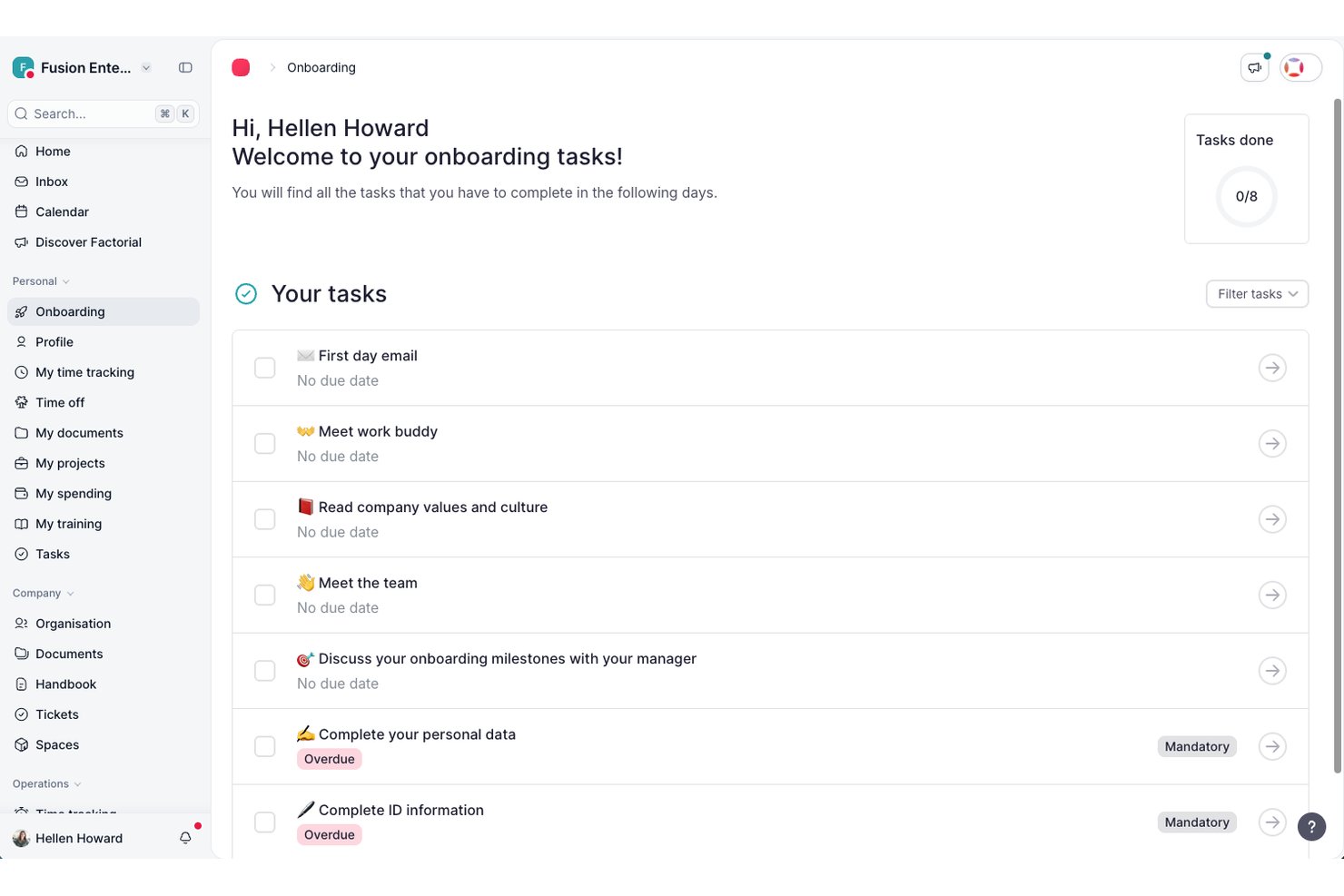
Factorial is an AI-driven HR platform that handles resume screening, candidate tracking, CV parsing, and hiring-pipeline management alongside broader workforce operations.
Who Is Factorial Best For?
Factorial is a strong fit for HR teams that want a single AI-driven platform to manage both day-to-day operations and hiring workflows without juggling multiple tools.
Why I Picked Factorial
I've included Factorial in my top picks because it approaches resume screening as part of a broader AI for business platform, which means your hiring workflow sits alongside the same AI agent handling timetables, reports, and policy questions. I particularly like how its AI generates resume summaries and applies role context to evaluate candidates, so recruiters get a match label tied to the specific role rather than a generic read. Its AI calling feature can also reach out to candidates directly within a configured window, reducing the back-and-forth that slows early screening down.
Factorial Key Features
- Candidate pipeline customization: Teams can build and adjust hiring stages to match their specific recruitment workflow for each role.
- Screening question templates: Recruiters can create and reuse customized screening questions or draw from built-in templates when setting up job postings.
- Candidate tagging: Tags let you filter and group applicant profiles by criteria like skills, seniority level, or hiring status.
- Interview scheduling: The platform connects with team calendars so recruiters and hiring managers can coordinate and book interviews directly within Factorial.
Factorial Integrations
Factorial has documented integrations with InfoJobs, Recruitee, LinkedIn, Google Workspace, Slack, and Microsoft Power BI. It supports API keys, OAuth 2.0, webhooks, SDKs, and Zapier for custom connectivity.
Pros and Cons
Pros:
- Recruiters and managers share candidate evaluation notes
- Screening questions and pipelines fit hiring workflows
- AI summaries support role-context candidate reviews
Cons:
- Bulk uploads stop at 20 resumes
- Match labels lack disclosed scoring rationale

Best for cross-department recruitment workflows
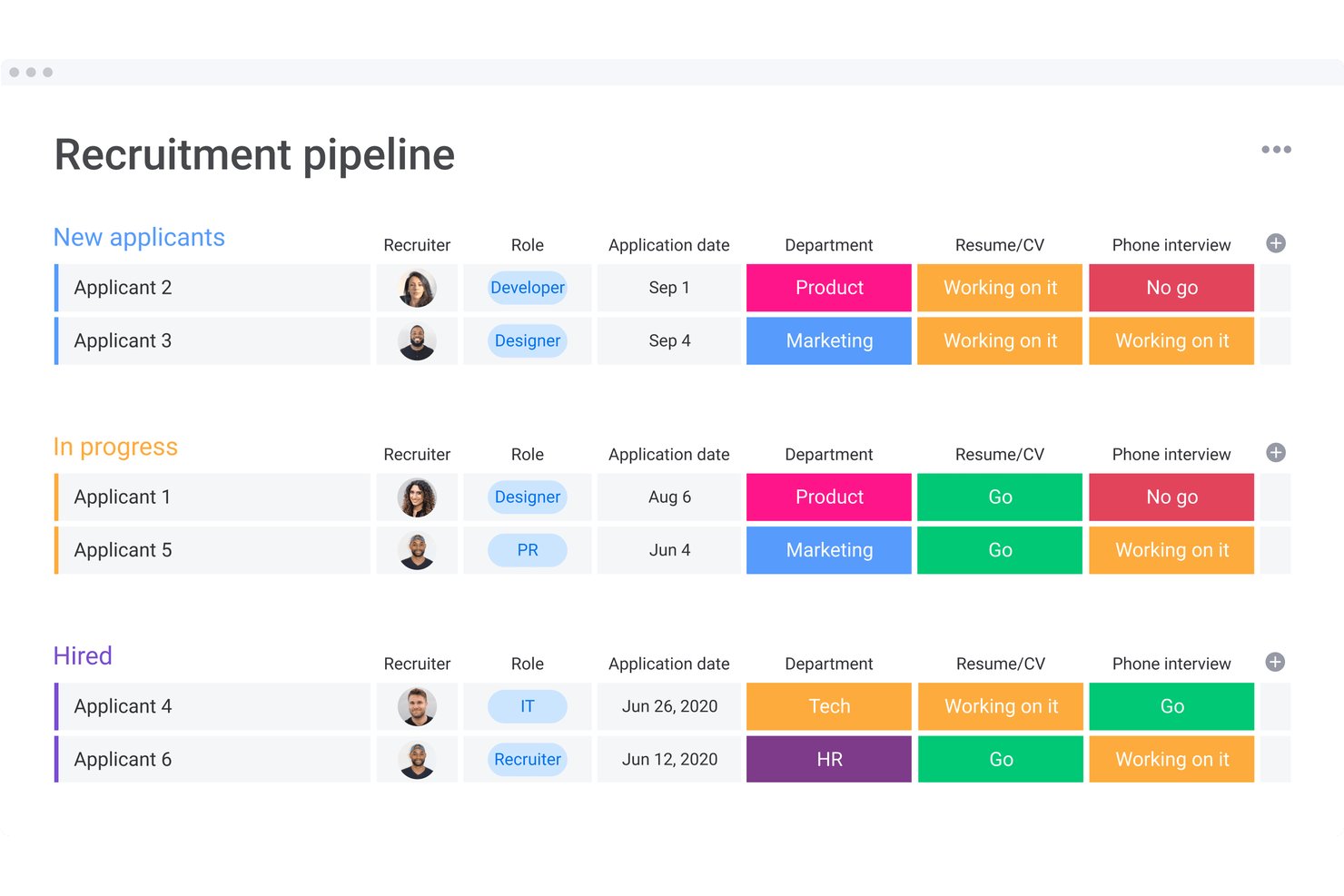
monday AI Workspace is a configurable work management platform that lets recruiting teams build AI-powered candidate screening pipelines with automated resume data extraction, status routing, and cross-department hiring workflows.
Who Is monday AI Workspace Best For?
It's a strong fit for mid-size to enterprise organizations where hiring spans multiple departments and recruiters need to coordinate with managers across teams.
Why I Picked monday AI Workspace
monday AI Workspace earns its spot on my shortlist because of how well it connects screening to collaboration across departments. When a new application lands, an AI agent can extract resume data, summarize the candidate, and notify a hiring manager in a completely separate team, all automatically. I also like that the AI Sidekick lets me share that candidate summary across stakeholders without anyone needing to open a separate tool.
monday AI Workspace Key Features
- AI-powered data extraction: Extracts structured candidate details from resume files into configurable board columns.
- Custom automation builder: Lets you create rules to route, tag, or update candidate records based on triggers you set.
- Document management: Stores resumes, interview notes, and offer letters directly within recruiting boards.
- Team permissions controls: Allows granular access settings for sensitive hiring data and recruiter collaboration.
monday AI Workspace Integrations
monday AI Workspace offers hundreds of built-in integrations, including Slack, Salesforce, HubSpot, Google Workspace, Microsoft 365, Outlook, Gmail, Zoom, GitHub, and connects with Zapier. An API is available for custom integrations.
Pros and Cons
Pros:
- Configurable candidate pipelines for multi-team hiring
- Automates candidate status and routing steps
- AI summary and extraction from resumes
Cons:
- No native bulk resume processing tool
- Lacks built-in bias mitigation features
New Product Updates from monday AI Workspace
monday AI Workspace Adds Human Approval Routing
monday AI Workspace adds a human-in-the-loop approval block to AI Workflows, sending approval requests and routing workflow paths based on responses. For more information, visit monday AI Workspace's official site.

Best for multilingual resume parsing
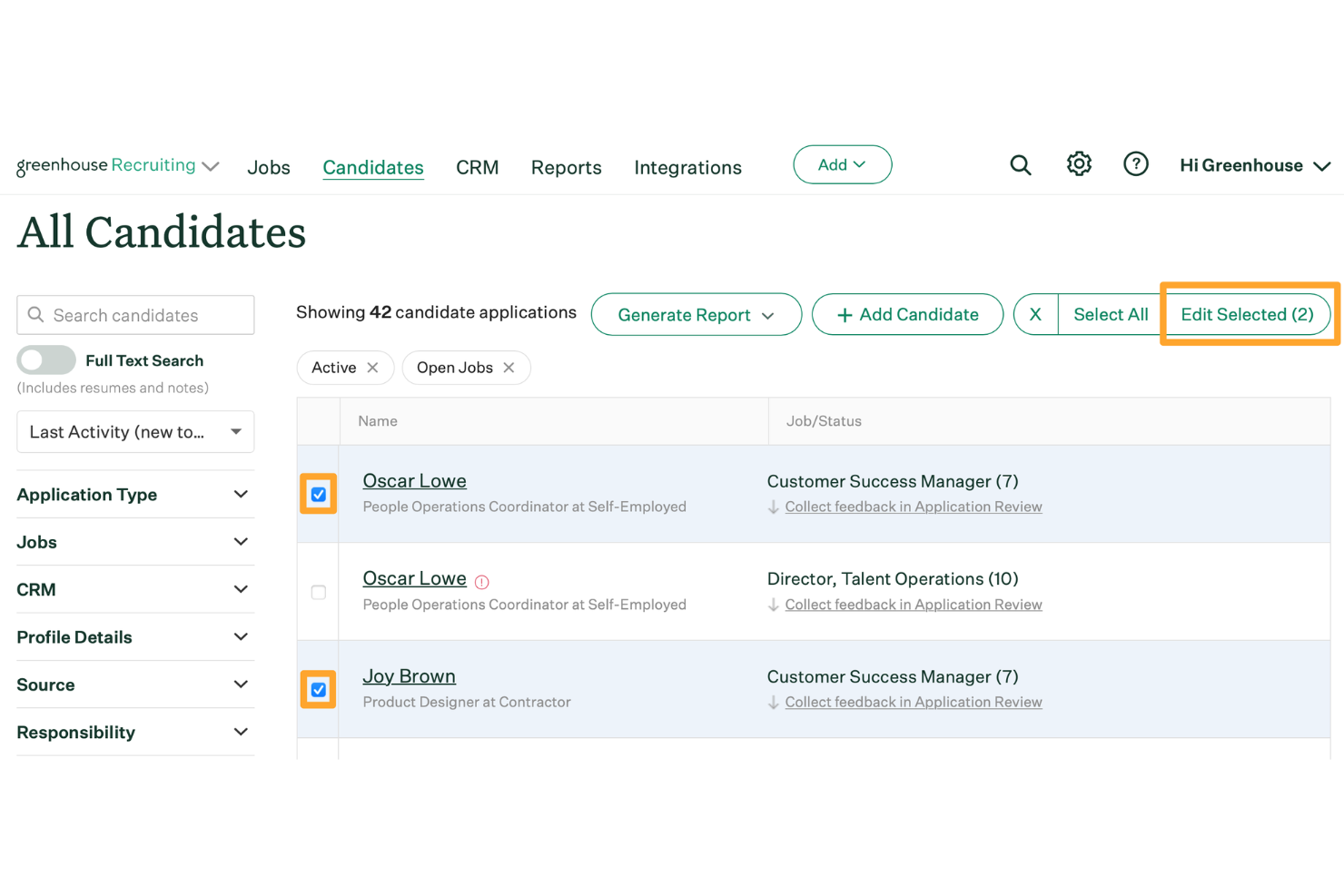
Greenhouse is an applicant tracking system designed for HR teams and recruiters to screen, organize, and advance candidates through every stage of the hiring process.
Who Is Greenhouse Best For?
Greenhouse is a strong fit for mid-size to enterprise companies with structured, high-volume hiring needs across multiple departments or locations.
Why I Picked Greenhouse
I picked Greenhouse as one of the best because of how well it handles multilingual resume parsing for teams hiring across borders. Greenhouse job boards support 19 languages, and the interview experience is available in six—meaning candidates can apply and move through the process in their native language, and the parsed data still flows into your pipeline. I also like the Greenhouse Real Talent™ feature, which filters out fraud and spam at the top of the funnel so my team isn't wasting time reviewing illegitimate applications. Additionally, AI-generated candidate summaries give recruiters a quick read on each applicant without digging through every resume manually.
Greenhouse Key Features
- Interview scorecard templates: Build role-specific scorecards that give every interviewer a consistent framework for evaluating candidates against defined criteria.
- Talent Match: Uses AI to surface the best-fit applicants to the top of your queue based on job criteria, so your team reviews the strongest candidates first.
- Custom report builder: Filter and build reports by candidates, sources, departments, jobs, offers, and more using boolean searches and multilayer filtering.
- Candidate self-scheduling: Let candidates book their own interview times on branded self-scheduling pages, with automatic conflict checks and calendar syncing.
Greenhouse Integrations
Integrations include Checkr, Criteria Corp, Findem, HireRight, BrightHire, Pave, Grayscale, AmazingHiring, Alva Labs, and Apideck.
Pros and Cons
Pros:
- Supports fair screening through resume anonymization
- Structured scorecards keep evaluations consistent
- Accurately parses resumes submitted in multiple languages
Cons:
- Limited resume keyword tuning compared to niche parsers
- Could offer more social media integrations
New Product Updates from Greenhouse

Greenhouse Opens Candidate Insights and Talent Matching Assistants to Beta
Greenhouse opens Candidate Insights and Talent Matching assistants to beta for candidate questions and natural-language search. This helps recruiters review candidates and build searches faster. For more information, visit Greenhouse’s official site.
 .
.
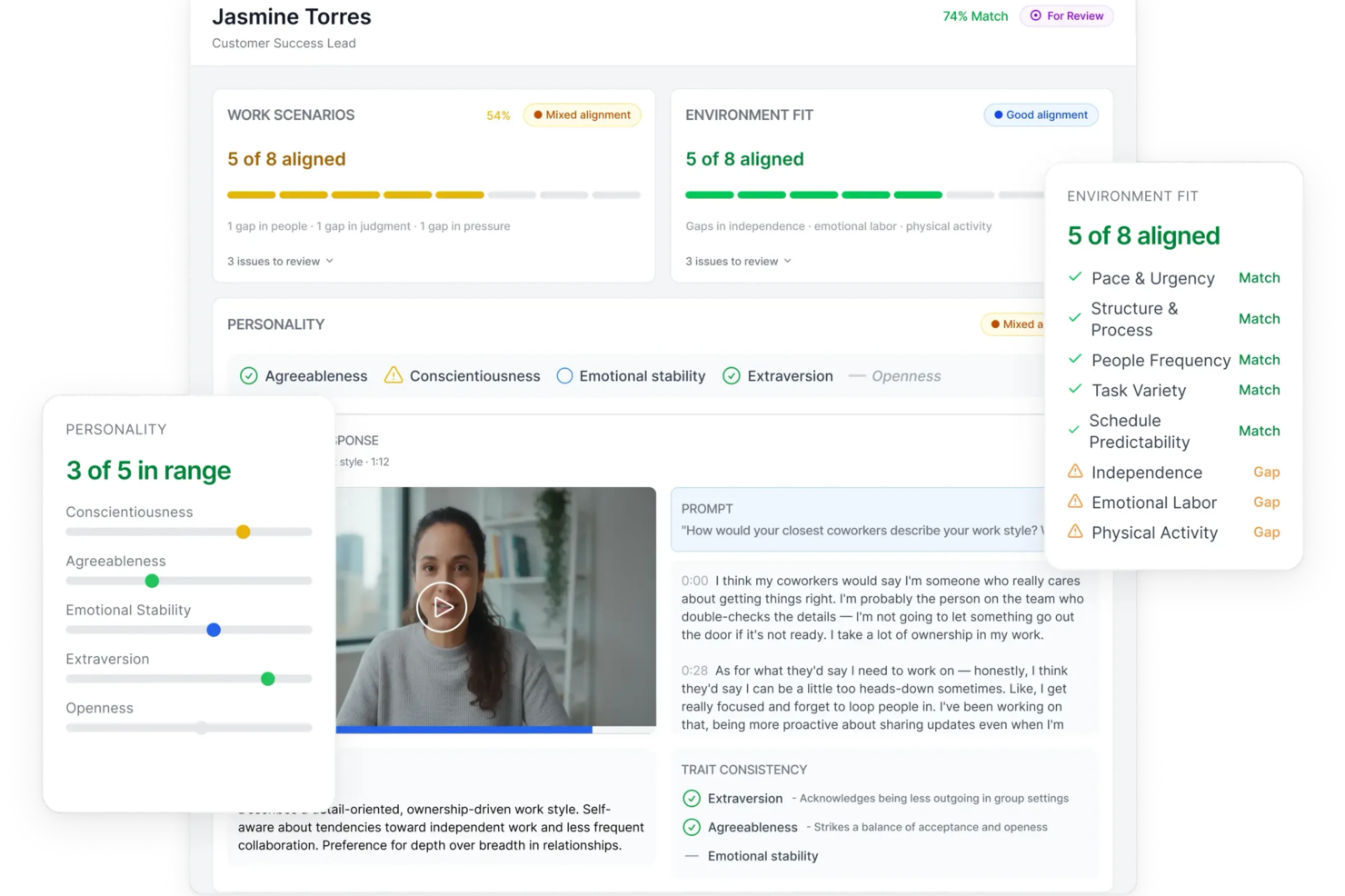
Truffle is an AI-driven resume screening platform designed for recruiters and HR teams who want to automate candidate evaluation and reduce manual screening time.
Who Is Truffle Best For?
Truffle is a strong fit for small to mid-sized businesses that need to screen high volumes of applicants without a large recruiting team.
Why I Picked Truffle
Truffle earns its spot on my shortlist because of how it handles AI-powered video interview analysis. I like that the AI doesn't just transcribe candidate responses—it evaluates each answer against a custom rubric and generates a match score with transparent reasoning, so I can see exactly why a candidate ranked where they did. The "Candidate Shorts" feature gives me a 30-second AI-generated recap of each interview, which means I can move through a large applicant pool without watching every full recording. I also find the AI Check flag genuinely useful—it surfaces patterns that suggest AI-assisted responses, so I can flag those candidates for a closer look before moving them forward.
Truffle Key Features
- Talent assessments: Three structured pre-employment assessments—Personality (Big Five), Situational Judgment, and Environment Fit—score candidates based on role alignment rather than rehearsed responses.
- Smart candidate ranking: Truffle ranks applicants against your defined requirements and generates a match percentage, so you can prioritize your shortlist without manually comparing profiles.
- Team reviews and scorecards: Hiring team members submit independent reviews, and Truffle surfaces consensus scores instantly using a three-option decision framework (Move Forward, Unsure, Pass).
- Candidate branding customization: Interview landing pages, instructions, and confirmation emails can carry your logo, brand colors, and custom messaging throughout the screening process.
Truffle Integrations
Integrations include Ashby, Breezy HR, and Indeed.
Pros and Cons
Pros:
- Customizable screening questions for tailored filtering
- Automated resume parsing organizes candidate data
- Plug-and-play setup takes under 15 minutes
Cons:
- Lacks advanced analytics or reporting dashboards
- No direct job board posting from the platform
AvaHR
Best for real-time team collaboration in hiring
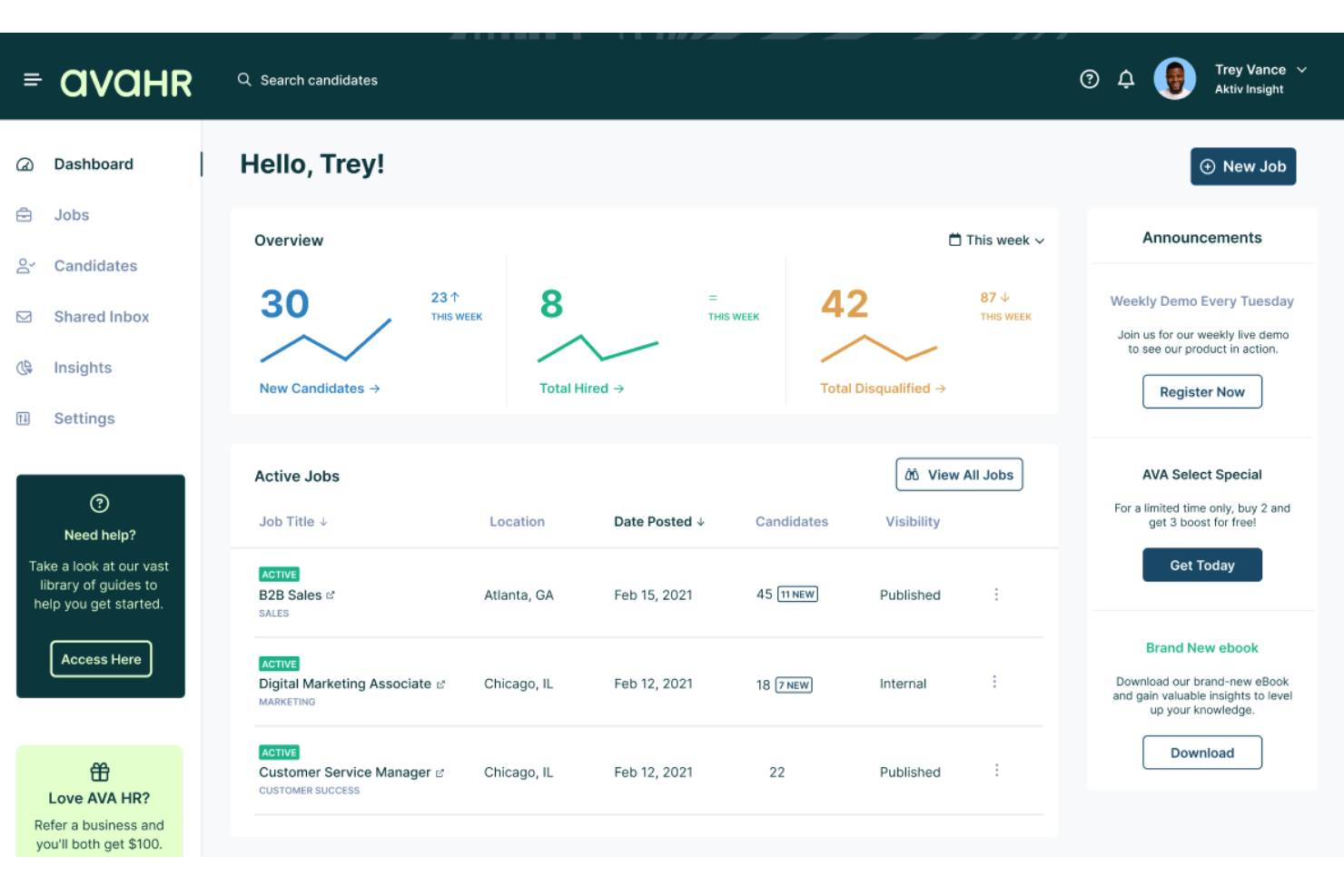
AvaHR is an applicant tracking system that combines AI-powered resume parsing, candidate scoring, and custom hiring pipelines with built-in team collaboration tools and one-click job distribution to 100+ job boards.
Who Is AvaHR Best For?
AvaHR is a strong fit for small businesses in industries like construction, healthcare, retail, and hospitality that need to fill roles quickly without a dedicated recruiting team.
Why I Picked AvaHR
AvaHR earns its spot on my shortlist because it treats resume screening as a team activity rather than a solo task. I love that hiring managers can leave shared notes, compare candidate scorecards, and move applicants through a custom pipeline all in real time. The AI Candidate Scoring layer adds real weight to that process, ranking applicants automatically before the team sits down to compare.
AvaHR Key Features
- AI job description generator: Automatically creates job descriptions to help kickstart postings.
- Knockout questions: Let you add pre-screen questions that filter out unqualified candidates early.
- Resume uploader and parser: Converts applicant resumes into structured digital profiles for faster sorting.
- Branded careers page: Allows you to build a customized job portal reflecting your company’s culture.
AvaHR Integrations
AvaHR offers over 70 native integrations, including BambooHR, Checkr, DocuSign, Google Calendar, Slack, Microsoft Teams, HubSpot, Salesforce, Gusto, and Calendly. An API is available for custom integrations.
Pros and Cons
Pros:
- Customizable knockout screening questions
- Real-time team collaboration features
- Fast AI resume parsing and scoring
Cons:
- Limited analytics and reporting tools
- Lacks bulk emailing to candidates
Best for pre-screening tests and deep resume parsing capabilities

Freshteam is an applicant tracking system designed for HR teams and recruiters who need to screen, parse, and manage large volumes of resumes to find the right candidates faster.
Who Is Freshteam Best For?
Freshteam is a strong fit for growing mid-sized companies that need a structured, scalable hiring process without a dedicated recruiting operations team.
Why I Picked Freshteam
I picked Freshteam as one of the best because I love how it handles both sides of early-stage screening: parsing resumes and testing candidates before they ever reach a recruiter's calendar. When a resume is uploaded, Freshteam automatically scans and parses it into a structured Candidate 360 profile, pulling out experience, skills, education, and previous employers. That means my team isn't manually entering data for every applicant. On top of that, Freshteam's Autopilot workflow builder lets you trigger pre-screening tests automatically when a candidate hits a specific hiring stage—so if someone applies for a technical role, an assessment goes out the moment they're moved to the online test stage, without anyone lifting a finger.
Freshteam Key Features
- Interview scorecards: Create structured evaluation forms for each job so hiring panel members can rate and compare candidates against consistent criteria.
- Talent pool management: Save promising candidates who weren't hired into a searchable pool, so you can revisit them for future openings without starting from scratch.
- Custom application forms: Build job-specific application forms with drag-and-drop fields to capture the exact information you need from applicants upfront.
- Candidate self-scheduling: Let candidates book their own interview slots based on interviewer availability, cutting back-and-forth scheduling emails.
Freshteam Integrations
Integrations include Microsoft Teams, Slack, Google Calendar, Outlook, LinkedIn, Zoom, HackerRank, DocuSign, and Google Meet.
Pros and Cons
Pros:
- Provides an birds-eye-view into applicants by screening stage
- Easy integration with other Freshworks apps
- Enables detailed daily, weekly, and monthly customized report creation
Cons:
- Mobile application could be improved
- Cannot generate custom salary breakups
Best for shortlisting candidates with automated screening and video interviewing

myInterview (now known as Radancy) gives recruiters and HR teams a way to automate resume screening and add video interviews to their hiring process, helping them identify top candidates earlier in the process and streamline early-stage selection.
Who Is myInterview Best For?
myInterview is a strong fit for talent acquisition teams and recruiters at small to mid-sized businesses that need to screen high volumes of applicants without adding headcount.
Why I Picked myInterview
myInterview earns its spot on my shortlist because of how it combines automated screening with one-way video in a single workflow. I like that the AI conducts and scores candidate interactions using transparent, data-driven evaluations, so my team isn't manually sifting through dozens of applications to find the strongest fits. The one-way video feature is particularly useful—candidates record answers on their own schedule, and the AI transcribes those responses and factors them directly into each candidate's screening score. That combination of automated scoring and video context gives my team a much clearer picture of a candidate than a resume alone ever could.
myInterview Key Features
- Customizable screening templates: Build role-specific screening workflows using AI-recommended qualifications and skills pulled directly from job descriptions.
- Candidate self-scheduling: Candidates receive personalized interview invitations and select their own time slots, syncing directly with recruiter and hiring manager calendars.
- Microsoft Teams integration: Schedule and manage interviews without leaving Teams, with real-time calendar syncing across Outlook, Google Calendar, and Teams.
- Personality insights: AI analyzes candidate responses to surface personality traits and culture fit signals beyond what a resume can show.
myInterview Integrations
Integrations include SAP SuccessFactors, Oracle, Workday, LinkedIn, Glassdoor, and LinkedIn.
Pros and Cons
Pros:
- Allows for more applicants to be screened
- Enhanced resume screening with AI technology
- Automates video interviews
Cons:
- No mobile application
- Limitations on group interviews
Checkr
Best for AI-powered background checks
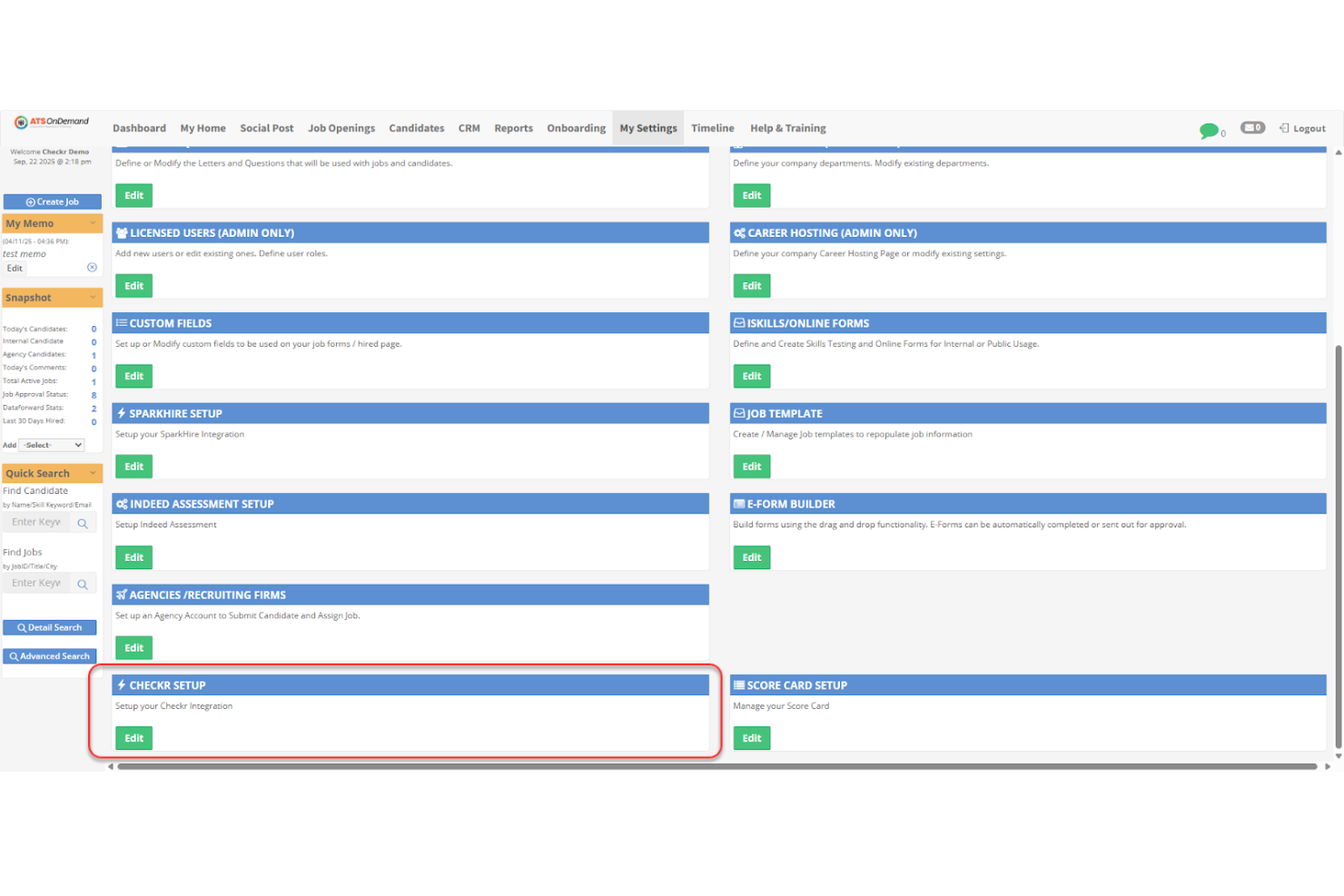
Checkr helps HR teams and recruiters in fast-paced industries verify candidate backgrounds and credentials, offering automated checks that support confident, compliant hiring decisions alongside your resume screening process.
Who Is Checkr Best For?
Checkr is a strong fit for high-volume hiring teams in industries like gig economy, healthcare, and retail that need fast, automated candidate verification at scale.
Why I Picked Checkr
Checkr earns its spot on my shortlist because its AI-powered background checks run faster than traditional manual processes, which matters when you're moving candidates through a hiring pipeline. I like that Checkr's continuous checks flag new criminal records or license changes on existing employees, not just new hires. The AI also reduces bias by standardizing how adjudication decisions are applied across candidates, which I find valuable for teams maintaining fair hiring practices at scale.
Checkr Key Features
- Candidate portal: Candidates submit their own information and consent directly through a self-service portal, reducing back-and-forth for your HR team.
- Drug screening: Order and manage drug tests alongside background checks from within the same platform.
- Compliance tools: Built-in federal, state, and local compliance guidance helps your team apply hiring rules correctly across different jurisdictions.
- Checkr Assess: Customizable adjudication rules let you automatically pre-adverse or clear candidates based on your own criteria.
Checkr Integrations
Integrations include Greenhouse, Lever, iCIMS, Workday, BambooHR, JazzHR, SmartRecruiters, Jobvite, SAP SuccessFactors, and Oracle Taleo.
Pros and Cons
Pros:
- Fast turnaround for background checks helping speed up hiring decisions
- User-friendly dashboard and candidate portal for easy background screening management
- Integrates with popular ATS tools, increasing workflow efficiency
Cons:
- May lack some resume screening software functionalities compared to dedicated tools
- Limited support for heavily regulated industries
New Product Updates from Checkr
Checkr Adds Post-Hire Drug & Alcohol Clearinghouse Screening
Checkr adds post-hire limited-query support to its Drug & Alcohol Clearinghouse screening, alongside existing pre-hire full queries. The update helps employers manage recurring FMCSA screening requirements for employed CDL drivers within the same platform. For more information, visit Checkr’s official site.
 .
.
CVViZ
Best for contextual candidate tracking and selection

CVViZ uses AI-driven resume screening to help recruiters and HR teams in fast-paced industries identify, rank, and shortlist top candidates based on contextual relevance and job fit.
Who Is CVViZ Best For?
CVViZ is a strong fit for in-house recruiting teams and growing businesses that need to screen high volumes of resumes without sacrificing candidate quality.
Why I Picked CVViZ
CVViZ earns its spot on my shortlist because of how it handles contextual resume screening—rather than flagging resumes based on keyword matches, its NLP and machine learning algorithm reads resumes the way a domain expert would. I like that it can tell the difference between a company secretary and a personal secretary, or an Oracle developer and a Java developer, which cuts down on the false positives that waste a recruiter's time. The relative ranking feature: CVViZ scores candidates against each other based on your organization's specific hiring history and the types of candidates you've previously engaged, not just a generic match score. I find the automated candidate tracking across pipeline stages useful—you can set triggers to move candidates, send notifications, and log stage changes without manual input.
CVViZ Key Features
- Candidate pre-screening questions: Set knockout or multiple-choice questions that candidates answer on application, then filter the applicant pool based on their responses.
- Resume database management: Upload resumes in bulk, parse them automatically, flag duplicates, tag candidates, and track the source of each application.
- Recruitment workflow automation: Define triggers to send emails or notifications automatically when a candidate moves stages, a new resume arrives, or a job is added.
- Recruitment analytics: Track sourcing performance, team activity, and time-to-fill metrics, with reports exportable in CSV, PDF, or JPG formats.
CVViZ Integrations
Native integrations are not currently listed.
Pros and Cons
Pros:
- Integrates with many job boards
- Intuitive and user-friendly UX
- Easy to integrate with any company website
Cons:
- Interview scheduling and talent scoring features can be improved
- Limited customizable email template options

JazzHR
Best for customizable recruiting solutions
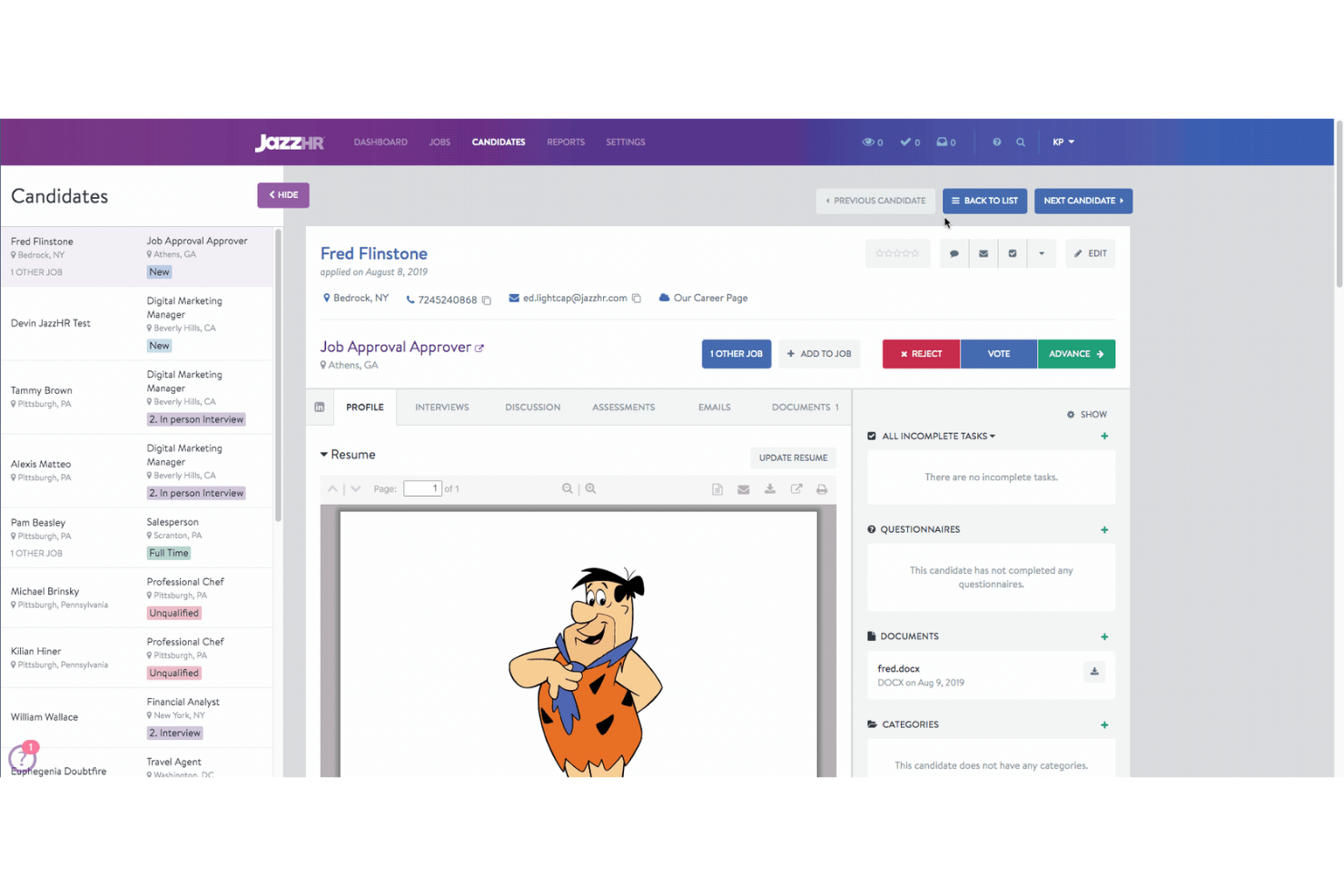
JazzHR gives HR teams and recruiters in small to midsize businesses a way to automate resume screening, manage candidate pipelines, and collaborate on hiring decisions, helping you identify top talent faster and reduce manual review.
Who Is JazzHR Best For?
JazzHR is a strong fit for small to midsize businesses that need a structured, scalable hiring process without the complexity of enterprise-level recruiting platforms.
Why I Picked JazzHR
I picked JazzHR as one of the best because I love how much flexibility it gives you to shape the recruiting process around your team's actual workflow. The customizable workflow automation lets you build hiring stages that match your specific screening criteria—so when a high-volume role opens up, my team isn't manually triaging every application from scratch. I also find the customizable interview guides genuinely useful: you can build role-specific question sets that keep evaluations consistent across hiring managers, which makes comparing candidates a lot cleaner. The automated resume parsing then layers on top of that, pulling key candidate details into structured profiles so you're not hunting through attachments to make a call.
JazzHR Key Features
- Candidate sourcing: Post open roles to multiple job boards simultaneously directly from the JazzHR platform.
- Collaborative hiring tools: Leave comments, ratings, and feedback on candidate profiles so hiring teams can evaluate applicants together.
- Offer letter management: Create, send, and track offer letters from within the platform without switching to a separate tool.
- Reporting and analytics: Access pre-built reports on pipeline activity, time-to-hire, and source performance to track recruiting progress.
JazzHR Integrations
Integrations include BambooHR, UKG, LinkedIn Recruiter, and more.
Pros and Cons
Pros:
- Interview guide templates
- Bulk email communication
- Custom branding options
Cons:
- No internal video interviewing options
- Limited advanced analytics
Annen programvare for CV-screening
Her er noen flere alternativer for CV-screening som er verdt å vurdere:
- eSkill
For evaluating industry-specific skills
- Boon
For community-powered AI referrals
- RecruiterCloud
For tailored screening with personalized outreach
- Unnanu Hire
For mitigating bias in candidate scoring
- Ideal
For eliminating hiring discrimination and promoting equality
- Daxtra Technologies
Resume screening software with semantic search technology for sourcing candidates across multiple databases
- HireBeat
For parsing resumes to create a 360-degree candidate profile
- Affinda
For job description parsing with recruitment AI capabilities
- Sovren
For AI search-and-match capabilities and data enrichment APIs
- Endorsed AI
Resume screening software for ranking candidates
- CiiVSOFT
For deep integrations with multiple HR and ATS systems
- CVJury
Free resume screening software with an AI-powered resume builder
- Recruit CRM
For AI-driven resume parsing
- Deel HR
For centralized global workforce management
- Manatal
For AI-driven recruitment automation
- Pinpoint
For hiring and onboarding talent
- Workable
For advanced resume filtering
- Peoplebox.ai
For screening both resumes and ATS
- Canditech
For replacing resume screening with auto-scored skill assessments
- ClearCo
For AI-driven recruiting


How I Evaluate Resume Screening Software
I split my evaluation into two layers: baseline criteria every tool must meet—like accurate parsing and ATS integration—and differentiators that separate tools for high-volume hiring from lean recruiting teams.
Core Functionality (Table Stakes For This List)
When I'm selecting tools for my list, I rank each one on a scale from 0 (does not offer the functionality) to 5 (excels in this area) for each core functionality listed below. Then, I calculate the tool's total score as a percentage. Each tool needs to achieve a minimum total score of 65% to be considered for inclusion.
- Resume Parsing: I check whether the tool accurately extracts work history, skills, education, and contact details from PDFs, DOCX files, and other common formats without manual cleanup.
- Keyword & Skills Matching: Each tool should go beyond exact keyword hits—I look for synonym recognition and contextual matching that connects "project management" to "Scrum" or "Agile."
- Candidate Ranking & Scoring: I evaluate how the tool scores applicants against job criteria and whether recruiters can adjust weighting to prioritize certifications, years of experience, or specific skills.
- Bulk Resume Processing: High-volume teams need to ingest hundreds of resumes at once, so I look at batch upload limits and automated intake from job boards and email inboxes.
- AI/ML-Based Screening: I consider whether the AI layer adds genuine value beyond rules-based filters, such as learning from past hiring patterns or flagging transferable skills across industries.
- ATS Integration: The tool should sync candidate data with platforms like Greenhouse, Lever, or iCIMS so recruiters aren't copying records between systems manually.
Once I have a list of tools that meet the criteria, I consider what sets each platform apart.
Differentiating Factors (What Sets Vendors Apart)
Here's how I compare and contrast different vendors:
Standout Features
Bias mitigation tools matter a lot here—I look for features like automated name and demographic anonymization that let recruiters run blind screenings. Candidate rediscovery is another feature I value, especially for teams sitting on large talent databases. A tool that resurfaces past applicants who match a new req saves sourcing time and ad spend. I also evaluate whether platforms support custom scoring models that recruiters can train on their own historical hiring data to reflect role-specific priorities.
Beyond Features
Compliance is a big one—I check whether a vendor provides audit trails for AI-driven decisions and supports data privacy standards like GDPR and SOC 2. Hiring volume fit also matters. A staffing agency processing thousands of resumes weekly has very different scalability needs than a mid-size company hiring a few roles per quarter. I also look at implementation speed, specifically whether the platform offers pre-built skills libraries and templates so recruiting teams can start screening without weeks of configuration.
Funksjoner i programvare for CV-screening
Når det gjelder programvare for CV-screening, kan de riktige funksjonene utgjøre hele forskjellen når du skal identifisere de beste talentene raskt. Følgende nøkkelfunksjoner fungerer sammen for å eliminere tidkrevende manuelle oppgaver og forbedre nøyaktigheten og hastigheten i CV-vurderingene.
- Automatisert søkeordmatching: Programvaren skanner CV-er etter søkeord knyttet til stillingsbeskrivelsen, slik at du finner kandidater med ferdigheter og erfaring som samsvarer med behovene dine – ikke mer endeløs manuell gjennomgang.
- CV-parsing: Denne funksjonen henter strukturerte data som kontaktinformasjon, utdanning og jobbhistorikk fra CV-er, slik at du kan gå gjennom det viktigste med et øyekast uten å måtte veksle mellom dokumenter.
- Opplasting av CV-er i bulk: Du kan laste opp hundrevis (eller tusenvis) av CV-er samtidig, slik at programvaren kan behandle store kandidatgrupper raskere enn du noen gang ville klart på egen hånd.
- Tilpassbare filtre: Finjuster utvelgelsesprosessen ved å angi filtre basert på kriterier som antall års erfaring, utdanningsnivå, sertifiseringer eller geografisk plassering. Dette hjelper deg med å fokusere på kandidater som faktisk oppfyller kravene dine.
- Oppdagelse av duplikater: Programvaren markerer automatisk dupliserte søknader, slik at gjennomgangen ikke blir forsinket av at du ser den samme kandidaten fem ganger.
- Kandidatrangering: Basert på kriteriene du har valgt, rangerer programvaren kandidatene slik at du ser de mest lovende personene øverst på listen, noe som sparer tid ved den første gjennomgangen.
- Integrasjonsmuligheter: Koble CV-utvelgelsesverktøyet til det eksisterende systemet for kandidatsporing eller HR-programvaren din for å effektivisere arbeidsflyten og unngå manuelle dataoverføringer.
- Kontroller av regelverksetterlevelse: Programvaren hjelper deg med å unngå problemer ved å fremheve risikoer knyttet til regelverksetterlevelse, for eksempel manglende samtykke til behandling av personopplysninger eller flaggede problemer med arbeidstillatelse.
- Samarbeidsverktøy: Del notater, vurderinger og kommentarer om kandidater med rekrutteringsteamet ditt direkte i plattformen, slik at det blir enkelt for alle å holde seg oppdatert.
Vanlige AI-funksjoner i programvare for CV-utvelgelse
I tillegg til standardfunksjonene i programvare for CV-utvelgelse som er nevnt ovenfor, tar mange av disse løsningene i bruk AI med funksjoner som:
- AI-drevet matching: AI-en analyserer ikke bare søkeord, men også kontekst, arbeidshistorikk og ferdigheter for å foreslå kandidater som kan passe godt – selv om CV-ene deres ikke samsvarer perfekt med søkeordene.
- Automatisert reduksjon av skjevheter: AI-algoritmer identifiserer og reduserer ubevisste skjevheter ved å skjule kandidatdata som navn, alder eller kjønn under utvelgelsesprosessen, noe som bidrar til rettferdig rekruttering.
- Prediktiv kandidatscoring: Programvaren bruker AI til å forutsi hvilke søkere som sannsynligvis vil lykkes i stillingen, basert på data fra tidligere ansettelser og gjeldende jobbkrav.
- Behandling av naturlig språk (NLP): AI bruker NLP til å tolke meningen bak innholdet i CV-er og identifisere relevante prestasjoner og ansvarsområder, selv når de er formulert på unike måter.
- Automatisert utarbeiding av kortlister: AI-en oppretter selvstendig kortlister over de beste kandidatene basert på de spesifikke stillingskriteriene dine, slik at du kan rette oppmerksomheten mot det som betyr mest.
Vanlige spørsmål
Her er noen vanlige spørsmål og svar om programvare for CV-screening:
Hvordan fungerer automatisert programvare for CV-screening?
Automatisert programvare for CV-screening effektiviserer den innledende fasen av rekrutteringen: å finne de ideelle kandidatene til stillingen. Disse verktøyene henter ut og sammenligner data fra CV-er med forhåndsdefinerte nøkkelord og andre kriterier.
CV-ene tildeles deretter poeng eller rangeringer basert på hvor godt de samsvarer med jobbkravene dine. CV-er som oppnår en minimumsscore, sendes videre til manuell gjennomgang, mens CV-er med lavere score avvises. CV-screening er en sentral del av systemer for sporing av jobbsøkere.
Avansert programvare for CV-screening er utviklet for å forbedre nøyaktigheten og redusere skjevheter i rekrutteringen. Slike systemer bruker AI- og maskinlæringsalgoritmer som utfører kontekstuell analyse. Når disse verktøyene integreres med ATS-en din, kan de dessuten effektivisere arbeidsflyten i ansettelsesprosessen.
Hvilke teknikker kan brukes for å fremskynde rekrutteringsprosessen?
For å fremskynde rekrutteringsprosessen kan du begynne med å utarbeide tydelige og presise stillingsbeskrivelser og bruke programvare for CV-screening til å filtrere kandidater effektivt og automatisere videre rekrutteringsprosesser.
Ansettelsesansvarlige kan i dag bruke AI-drevet programvare til å finne kandidater på ulike jobbportaler og til og med i sosiale medier. Enkelte programmer hjelper også med å gjennomføre tester før ansettelse eller innledende videointervjuer for å vurdere hvor godt kandidaten passer.
Til slutt bør du kontinuerlig gjennomgå og forbedre rekrutteringsstrategiene dine for å identifisere potensielle hindringer.
Hvilke tips finnes for å finne de beste kandidatene?
Begynn først med å definere jobbkravene dine tydelig.
Bruk deretter programvare for CV-screening som tilbyr tolking av stillingsbeskrivelser og publisering på flere plattformer, slik at du kan legge ut stillingene dine på LinkedIn og andre bransjespesifikke nettsteder. Du kan også sette opp en intern henvisningskampanje som motiverer eksisterende ansatte til å henvise kandidater, siden dette ofte bidrar til å øke kvaliteten på ansettelsene.
I tillegg kan det være svært nyttig å etablere en sterk tilstedeværelse i sosiale medier for å komme i kontakt med passive kandidater, samt å samarbeide med anerkjente rekrutteringsbyråer for å få tilgang til nettverkene deres.
Hvordan kan du sile ut kandidater hvis du ikke har en HR-avdeling?
Du trenger en effektiv fremgangsmåte for å sile ut og ansette kandidater uten støtte fra en HR-avdeling. Du kan engasjere eksterne rekrutterere til dette formålet eller investere i automatisert programvare for CV-screening og CV-tolking for å gjøre prosessen enklere.
Begynn med å definere jobbkravene dine tydelig og etablere en strukturert søknadsprosess. Når søknadene begynner å komme inn, kan automatiserte verktøy for CV-screening filtrere søknadene effektivt basert på forhåndsbestemte kriterier.
Det er avgjørende å holde kandidatopplysningene organisert og dokumentere grundige tilbakemeldinger gjennom hele prosessen. Selv om HR-kompetanse er uvurderlig, kan små bedrifter fortsatt sile ut kandidater effektivt ved hjelp av disse trinnene.
En annen tilnærming er å engasjere selskaper som tilbyr outsourcing av rekrutteringsprosesser (RPO-er) for å dekke ansettelsesbehovene dine. Hvis du er interessert i dette, finner du her min liste over de ti beste RPO-selskapene, som kan hjelpe deg i riktig retning.
Når du velger programvare for CV-screening, bør du se etter følgende viktige funksjoner:
- Automatisert nøkkelordmatching: Programvaren skanner CV-er etter nøkkelord knyttet til stillingsbeskrivelsen, slik at du finner kandidater med ferdigheter og erfaring som samsvarer med behovene dine – ikke mer endeløs manuell sortering.
- CV-tolking: Denne funksjonen henter ut strukturerte data som kontaktinformasjon, utdanning og arbeidshistorikk fra CV-er, slik at du kan gjennomgå det viktigste med et blikk uten å måtte veksle mellom dokumenter.
- Opplasting av flere CV-er samtidig: Du kan laste opp hundrevis eller tusenvis av CV-er samtidig, slik at programvaren kan behandle store kandidatgrupper raskere enn du noen gang kunne gjort på egen hånd.
- Tilpassbare filtre: Finjuster screeningprosessen ved å sette filtre basert på kriterier som antall års erfaring, utdanningsnivå, sertifiseringer eller geografisk plassering. Dette hjelper deg med å fokusere bare på kandidater som faktisk oppfyller kravene dine.
- Oppdagelse av duplikater: Programvaren markerer automatisk dupliserte innsendinger, slik at gjennomgangen ikke forsinkes av at du ser den samme kandidaten fem ganger.
- Kandidatrangering: Basert på kriteriene du velger, rangerer programvaren kandidatene slik at de mest lovende personene vises øverst på listen, noe som sparer tid ved den innledende gjennomgangen.
- Integrasjonsmuligheter: Koble verktøyet for CV-screening til det eksisterende systemet ditt for sporing av jobbsøkere eller HR-programvaren din for å effektivisere arbeidsflyten og unngå manuell overføring av data.
- Samsvarskontroller: Programvaren hjelper deg med å unngå problemer ved å fremheve risikoer knyttet til regelverksetterlevelse, for eksempel manglende samtykke til behandling av personopplysninger eller varslede problemer med arbeidstillatelse.
- Samarbeidsverktøy: Del notater, vurderinger og kommentarer om kandidater med ansettelsesteamet ditt direkte i plattformen, slik at alle enkelt kan holde seg oppdatert.
Vanlige AI-funksjoner i programvare for CV-screening
I tillegg til standardfunksjonene i programvare for CV-screening som er nevnt ovenfor, integrerer mange av disse løsningene AI-funksjoner som:
- AI-drevet matching: AI-en analyserer ikke bare nøkkelord, men også kontekst, arbeidshistorikk og ferdigheter for å foreslå kandidater som kan passe godt – selv om CV-ene deres ikke samsvarer perfekt med nøkkelordene.
- Automatisert reduksjon av skjevheter: AI-algoritmer identifiserer og reduserer ubevisste skjevheter ved å skjule kandidatdata som navn, alder eller kjønn under screeningprosessen, noe som bidrar til mer rettferdige ansettelser.
- Prediktiv kandidatscoring: Programvaren bruker AI til å forutsi hvilke søkere som sannsynligvis vil lykkes i rollen, basert på data fra tidligere ansettelser og gjeldende jobbkrav.
- Naturlig språkbehandling (NLP): AI bruker NLP til å tolke betydningen av innholdet i CV-en og identifisere relevante prestasjoner og ansvarsområder, selv når de er formulert på uvanlige måter.
- Automatisert utvelgelse: AI-en oppretter selvstendig lister over de beste kandidatene basert på de spesifikke jobbkravene dine, slik at du kan rette oppmerksomheten mot det som betyr mest.
Annen programvare som kan forbedre ansettelsesrutinene dine
CV-screening og CV-tolking er bare toppen av isfjellet. Å ansette den rette kandidaten til en stilling har mange andre aspekter, og du har mange ulike typer programvare tilgjengelig med noen få tastetrykk: