

10 beste skybaserte lønnssystemer i 2026

Kortliste over den beste skybaserte lønnsprogramvaren


Skybasert lønnsprogramvare lar deg administrere, automatisere og følge opp lønn i skyen, slik at du kan kjøre lønn nøyaktig og overholde regelverket på alle steder der teamet ditt arbeider. Hvis du leter etter den beste skybaserte lønnsprogramvaren, trenger du verktøy som håndterer komplekse lønnssykluser, skatteregler og ulike typer arbeidstakere – uten tidkrevende manuelt arbeid.
I denne veiledningen finner du praktiske anbefalinger for 2026 som dekker det viktigste: samordnede HR- og lønnsdata, global regelverksetterlevelse, automatisering for økt nøyaktighet og fleksibel støtte for team av alle størrelser og strukturer. Bruk denne listen til å sammenligne alternativene og velge det som passer best for virksomheten din.
Why Trust Our Software Recommendations
Our team has been testing and reviewing software since 2012. As HR experts ourselves, we know how difficult—and important—it is to choose the right software.
For this guide, we evaluated tools using hands-on testing and independent research, scoring tools using our selection criteria. We also draw on insights from industry thought leaders and practicing HR experts.
Our reviews reflect our human editorial judgment, not a sales pitch.
Expert reviewers:
Sammenligningstabell for skybasert lønnsprogramvare
Sammenlign priser og nøkkelspesifikasjoner for mine beste utvalg av skybasert lønnsprogramvare i tabellen nedenfor.
| Tool | Best For | Trial Info | Price | ||
|---|---|---|---|---|---|
| 1 | Best for global payroll across all worker types | Free demo available | From $29/user/month | Website | |
| 2 | Best for embedded benefits tied to payroll runs | Free demo available | From $49/month + $6/month/user | Website | |
| 3 | Best for built-in time tracking | 30-day free trial | From $50/month (billed annually) | Website | |
| 4 | Best for enterprise global payroll at scale | Free demo available | Pricing upon request | Website | |
| 5 | Best for unified HR-to-payroll with global reach | Free demo available | From $8/user/month | Website | |
| 6 | Best for real-time payroll across global teams | Free demo available | Pricing upon request | Website | |
| 7 | Best for HCM-native payroll with global reach | Free demo available | Pricing upon request | Website | |
| 8 | Best for Workday-native global payroll ops | Not available | Pricing upon request | Website | |
| 9 | Best for payroll across 60-country compliance | 30-day free trial | Pricing upon request | Website | |
| 10 | Best for mid-market AI-assisted payroll audits | Free demo available | Pricing upon request | Website |


Anmeldelser av den beste skybaserte lønnsprogramvaren
Nedenfor finner du mine detaljerte sammendrag av den beste skybaserte lønnsprogramvaren som kom med på kortlisten min. Anmeldelsene mine gir en detaljert gjennomgang av funksjonene, evnen til å overholde regelverket og de beste bruksområdene for hver plattform, slik at du kan finne den som passer best for deg.

Best for global payroll across all worker types
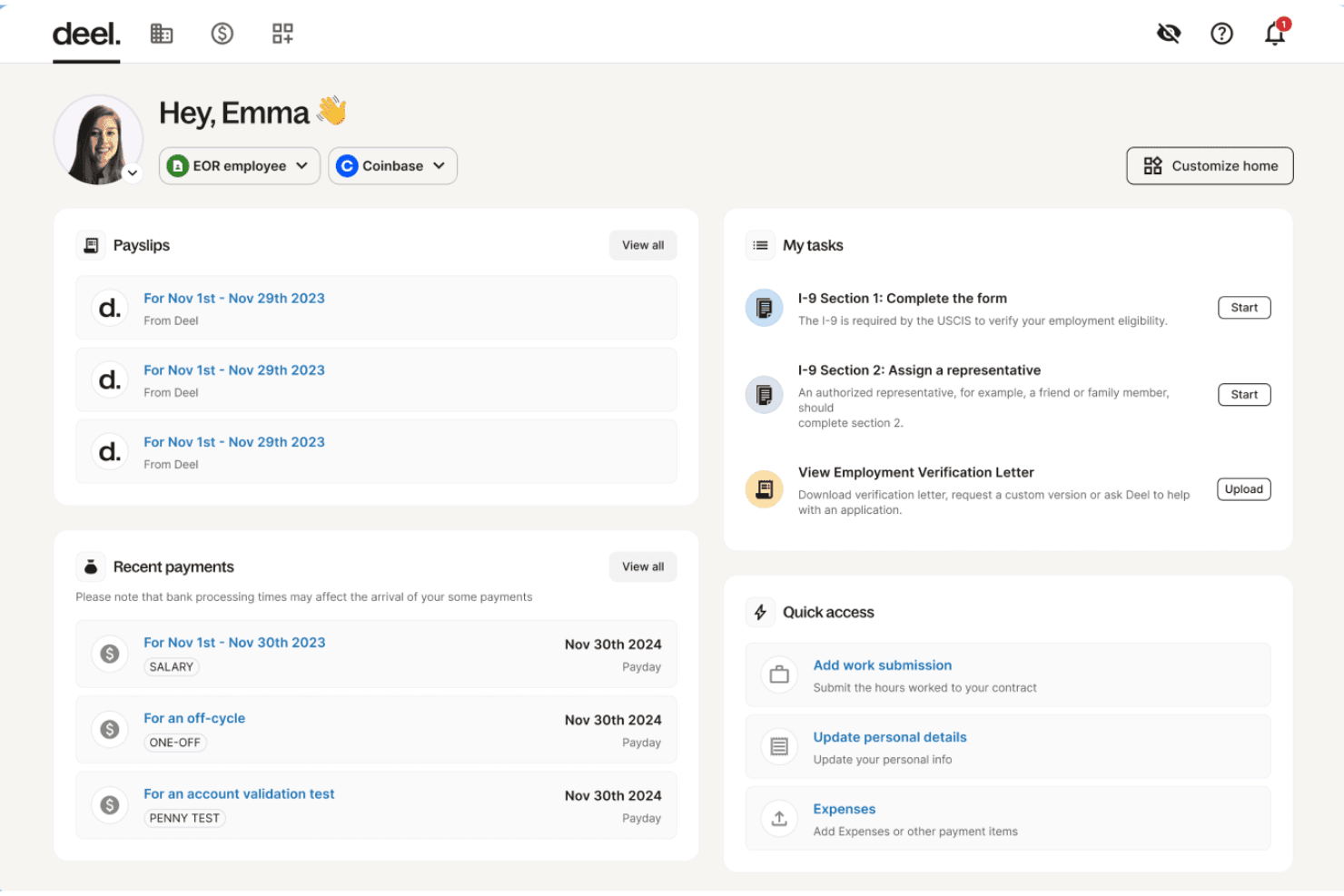
Deel Payroll is a cloud-native payroll platform that handles global payroll, US payroll, contractor payments, and employer of record services across 150+ countries and all 50 US states from a single system.
Who Is Deel Payroll Best For?
Deel Payroll is a strong fit for HR and payroll teams managing a mix of employees, contractors, and EOR workers across multiple countries from a single platform.
Why I Picked Deel Payroll
Deel Payroll earns its spot on my shortlist because no other platform I've seen handles employees, contractors, EOR workers, and PEO arrangements across 150+ countries from a single pay run. I particularly like the Payroll Detective feature, which uses AI to flag anomalies and unusual entries before a run closes, catching errors that manual review would likely miss. On top of that, Anytime Pay lets EOR employees draw up to 50% of earned wages before payday, with no fees or manager approvals required.
Deel Payroll Key Features
- Payroll Connect: View and manage Deel payroll alongside legacy third-party payrolls in a single consolidated dashboard during phased transitions.
- Worker misclassification tool: An AI-powered assessment that flags contractor vs. employee classification risk with reported 90% accuracy.
- Unlimited off-cycle payroll runs: Run additional pay cycles outside your standard schedule at no extra charge, with automatic recalculation triggered by last-minute adjustments.
- Compliance Hub: A real-time monitoring center that tracks changing labor and tax laws across jurisdictions and sends proactive alerts to administrators.
Deel Payroll Integrations
Deel Payroll offers 68+ native integrations, including Workday, SAP SuccessFactors, Oracle HCM, BambooHR, NetSuite, QuickBooks, Xero, Employee Navigator, Okta, and Expensify. It also provides an open API and Workflow Builder for custom connections and automations.
Pros and Cons
Pros:
- Unlimited off-cycle payroll runs included
- AI flags payroll errors before processing
- Manages global payroll for all worker types
Cons:
- Reported payroll issues in certain countries
- US payroll pricing lacks transparency

Gusto
Best for embedded benefits tied to payroll runs
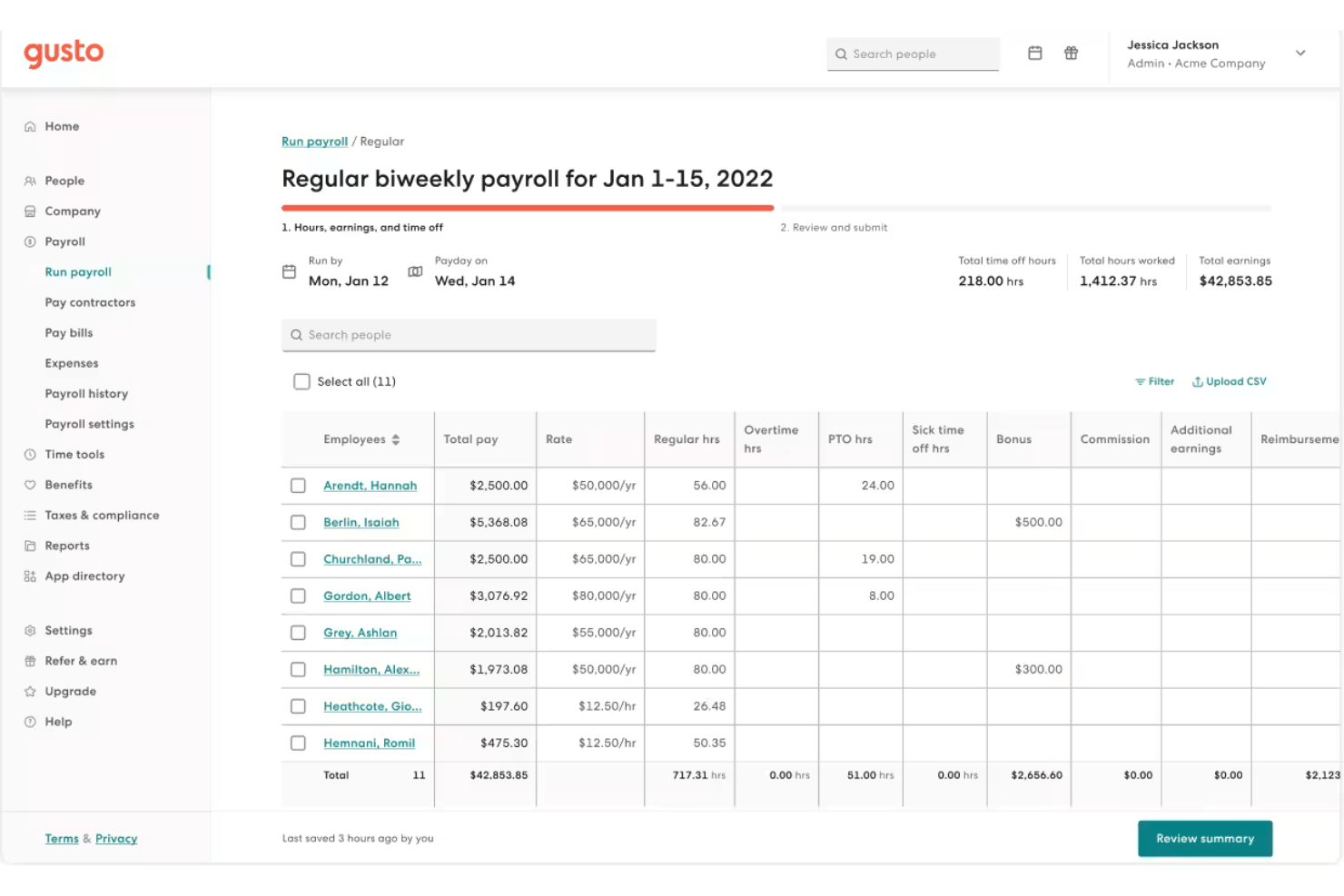
Gusto is a cloud payroll platform that combines automated payroll runs, full-service tax filing, employee self-service, and natively embedded benefits administration for small and mid-size businesses.
Who Is Gusto Best For?
Gusto is a strong fit for small and mid-size businesses that want health insurance, 401(k), and workers' comp enrollment managed in the same place as payroll.
Why I Picked Gusto
I picked Gusto as one of the best cloud payroll options because it natively embeds health insurance, 401(k), FSA/HSA, and workers' comp enrollment directly into the payroll run itself. When an employee changes their benefits election, the deduction updates automatically, with no manual syncing between separate systems. I also rate Gusto's AutoPilot highly: once configured, it executes recurring pay runs without any manual trigger, which is hard to replicate at this price point.
Gusto Key Features
- Full-service tax filing: Gusto automatically calculates, withholds, and files federal, state, and local payroll taxes in all 50 states, including year-end W-2 and 1099 forms.
- On-demand pay via Clair: Employees can access their earned wages between pay periods with no interest or fees through Gusto's Clair integration.
- Multi-state payroll support: The Plus and Premium plans handle payroll tax calculations and filings across all 50 U.S. states simultaneously, including local tax jurisdictions.
- Custom report builder: A drag-and-drop report builder lets you create tailored payroll summaries, workforce cost breakdowns, and tax liability reports exportable as CSV or PDF.
Gusto Integrations
Gusto offers 20+ software integrations, including QuickBooks Online, Xero, FreshBooks, Hubstaff, Homebase, Clover, and Expensify. It also provides an open API and Gusto Embedded Payroll for custom payroll integrations.
Pros and Cons
Pros:
- Employees get on-demand pay via Clair
- Embedded benefits deductions update with payroll changes
- AutoPilot fully automates recurring payroll runs
Cons:
- Customer support sometimes slow or inconsistent
- Multi-state payroll requires a higher tier
New Product Updates from Gusto
Gusto Adds Solo Advisory Tools and Mobile Money Features
Gusto adds Solo S-Corp Advisory Tools and Gusto Money on Mobile for tax guidance, invoicing, and bill payments. These updates help accountants advise solopreneurs and let users manage business finances from their phones. For more information, visit Gusto’s official site.

TimeTrex
Best for built-in time tracking
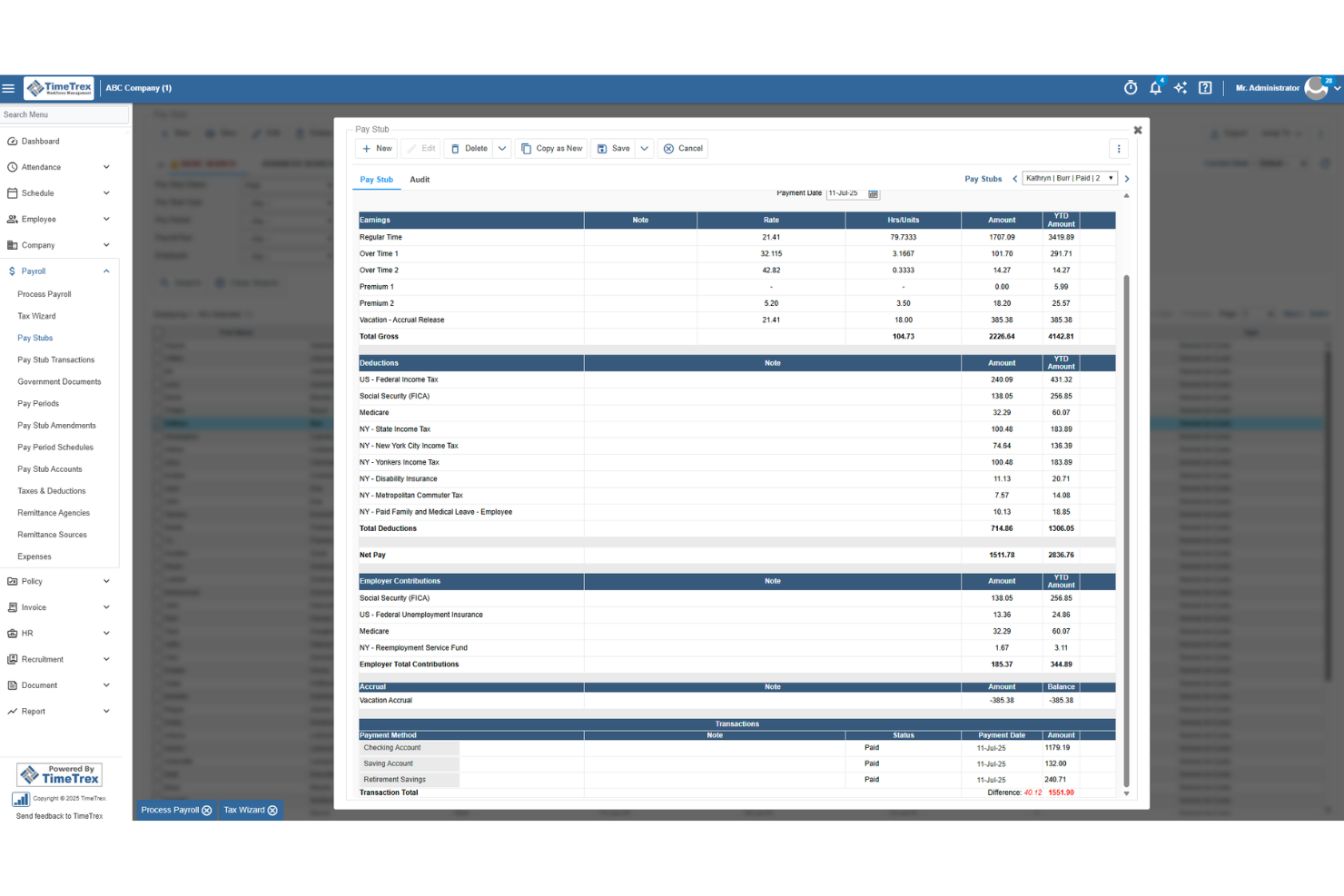
TimeTrex is a workforce management and cloud payroll platform that combines time tracking, scheduling, attendance, HR, and payroll processing in a single system.
Who Is TimeTrex Best For?
TimeTrex is a strong fit for small businesses managing hourly or shift-based teams who need time tracking and payroll to work as one system.
Why I Picked TimeTrex
TimeTrex earns its spot on my shortlist because the payroll run calculates directly from schedule and punch data, so there's no manual entry step between what your team worked and what they get paid. I particularly like how overtime, bonuses, and multi-state wages are all handled in the same engine that drives your shift schedules. Features like geofencing, biometric clock-ins, and job costing across multiple cost centers make it especially practical for businesses running crews across different sites or shifts.
TimeTrex Key Features
- Direct deposit notifications: Employees receive an email or SMS alert when funds are deposited, with a direct link to their pay stub.
- Audit trail with snapshots: Every payroll edit, view, or deletion is logged with before-and-after data snapshots for recordkeeping and compliance review.
- Job costing across cost centers: TimeTrex tracks labor costs across up to four cost-center levels, useful for businesses running multiple sites or crews.
- 1099-NEC contractor tracking: Contractors are tracked alongside W-2 employees in the same system, with 1099-NEC support built into the payroll engine.
TimeTrex Integrations
TimeTrex documents integrations with ADP, Intuit QuickBooks, Sage, Paychex, Surepay, Ceridian, CompuPay, Tyler Technologies, Vensure, Accero, Chris21, the IRS, and about 45 state revenue departments. A RESTful API supports custom integrations.
Pros and Cons
Pros:
- Reviewers frequently praise responsive customer support
- Real-time timesheets help verify employee hours
- Payroll calculates directly from shift punches
Cons:
- Reviewers report a dated, hard-to-navigate interface
- Employers handle payroll tax filing themselves
New Product Updates from TimeTrex
TimeTrex Adds Quick Punch App With Offline and QR Support
TimeTrex adds a new Quick Punch app, offline punching, QR code scanning, punch images, configurable messages, and punch warnings or lockouts to improve employee clock-ins across browsers and local computers. For more information, visit TimeTrex’s official site.
 .
.
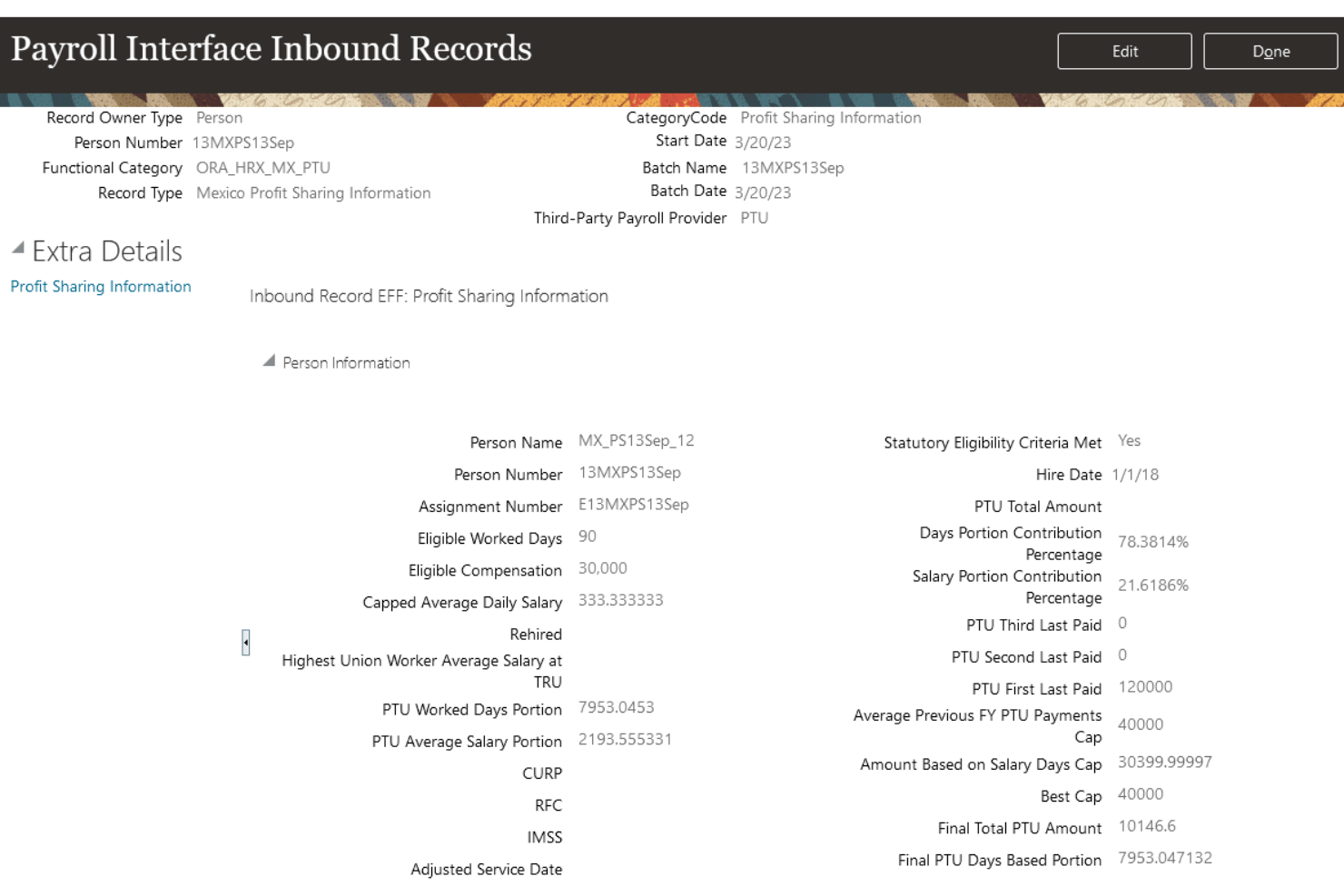
Oracle Fusion Cloud Payroll is a cloud-native payroll engine built into the Oracle Fusion HCM suite, offering gross-to-net processing, multi-jurisdiction tax compliance, employee self-service, and native payroll support across 60+ countries.
Who Is Oracle Fusion Cloud Payroll Best For?
Oracle Fusion Cloud Payroll is built for large enterprises running Oracle Fusion HCM that need to manage payroll across multiple countries and legal entities from a single platform.
Why I Picked Oracle Fusion Cloud Payroll
Oracle Fusion Cloud Payroll earns its spot on my shortlist because it's one of the only platforms that can run payroll natively across 60+ countries from a single, unified engine—no middleware, no reconciliation across disconnected systems. I particularly like the AI Payroll Run Analyst, which monitors active payroll runs, flags anomalies like duplicate payments or calculation errors, and surfaces fixes before a pay run is finalized. The platform also processes payroll for 16M+ employees monthly, so if your organization spans dozens of legal entities and countries, it's built for exactly that scale.
Oracle Fusion Cloud Payroll Key Features
- Retroactive pay processing: Handles retroactive pay calculations with effective-dated transactions, including controls for retroactive overpayment and recovery on earnings elements.
- Global Payroll Interface (GPI): A bi-directional integration framework that connects Oracle Fusion HCM data with third-party payroll processors for countries beyond the 60+ with native support.
- Payroll costing and GL integration: Posts payroll journals and cost distributions directly to Oracle Fusion Cloud ERP finance modules, including accounts payable, general ledger, and project costing.
- Court Order Processing Agent: An AI agent that automates the intake and processing of income withholding orders, reducing manual handling for payroll and HR teams.
Oracle Fusion Cloud Payroll Integrations
Oracle Fusion Cloud Payroll offers native integrations with Oracle Fusion Cloud HR, Time and Labor, Absence, Benefits, ERP, General Ledger, and Project Costing. It also connects with ADP, Dayforce, Neeyamo, and Ramco through Global Payroll Interface, plus DailyPay and Tapcheck through Oracle Cloud Marketplace, with REST APIs for custom integrations.
Pros and Cons
Pros:
- Deep HCM and ERP data unification
- Payroll natively supports 60+ countries
- Advanced AI for payroll anomaly detection
Cons:
- Implementation is lengthy and complex
- Not designed for small businesses

Rippling
Best for unified HR-to-payroll with global reach
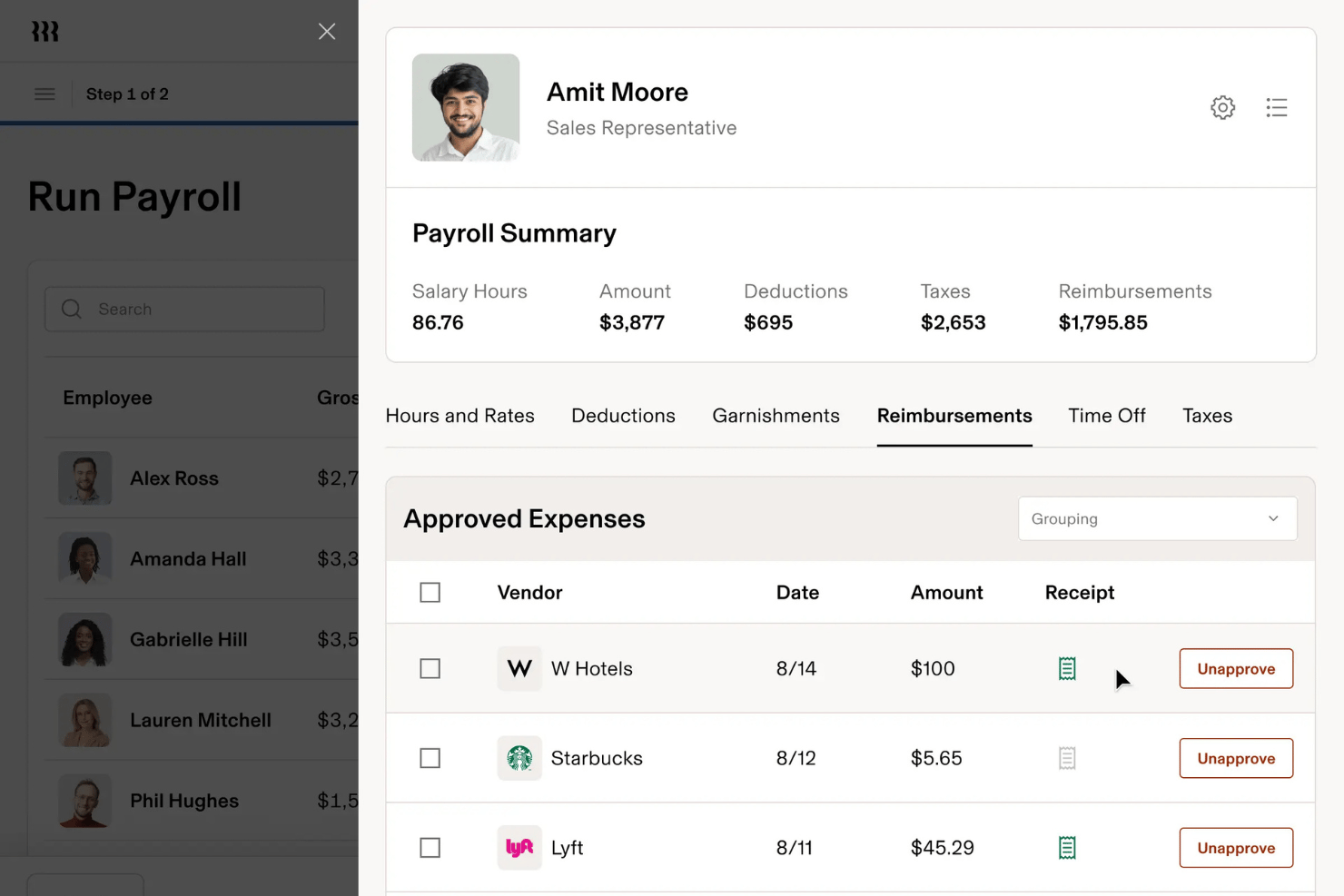
Rippling is a cloud payroll platform that combines automated pay runs, multi-jurisdiction tax filing, employee self-service, and built-in HR, benefits, and IT management in a single unified system.
Who Is Rippling Best For?
Rippling is a strong fit for growing and mid-market companies that need HR, IT, and payroll to operate from a single system—especially those managing employees across multiple countries.
Why I Picked Rippling
Rippling earns its spot on my shortlist because it's the only cloud payroll platform where HR and payroll genuinely share one data layer, not just a sync. When someone gets a promotion, their new salary, updated tax withholdings, and benefits deductions adjust automatically in the next pay run without any manual input. I also love the payroll comparison tool, which flags discrepancies in gross pay and deductions before a run is approved, and the AI anomaly detection, which catches overtime irregularities across a workforce running payroll in multiple countries simultaneously.
Rippling Key Features
- Workflow Studio: A no-code automation builder that lets you create custom triggers across payroll, HR, IT, and finance events—like auto-provisioning software access when a new hire's payroll is set up.
- Unlimited off-cycle payroll runs: Run bonus payments or corrections as often as needed in U.S. domestic jurisdictions at no extra charge.
- Custom report builder: Generate headcount, labor cost, and compensation reports using pre-built templates or build your own with no-code filters and formulas.
- Employer of Record (EOR) service: Rippling acts as the legal employer in 185+ countries, handling local employment contracts, payroll, tax filings, and in-country benefits compliance.
Rippling Integrations
Rippling offers 650+ native app integrations, including QuickBooks, NetSuite, Xero, Slack, Microsoft Teams, Google Workspace, Okta, and Tapcheck. It also provides an open API and Workflow Studio for custom connections and no-code workflows.
Pros and Cons
Pros:
- Unified HR, payroll, and IT system
- Employer of record in 185+ countries
- Built-in AI flags payroll anomalies pre-run
Cons:
- Employees cannot contact support directly
- Payroll module requires HRIS subscription
New Product Updates from Rippling

Rippling Expands Automated Compliance With AI Workflows
Rippling expands Automated Compliance with multi-framework support, AI workflows, an audit portal, and trust centers. These updates help GRC teams manage compliance work and audits. For more information, visit Rippling’s official site.
Dayforce
Best for real-time payroll across global teams
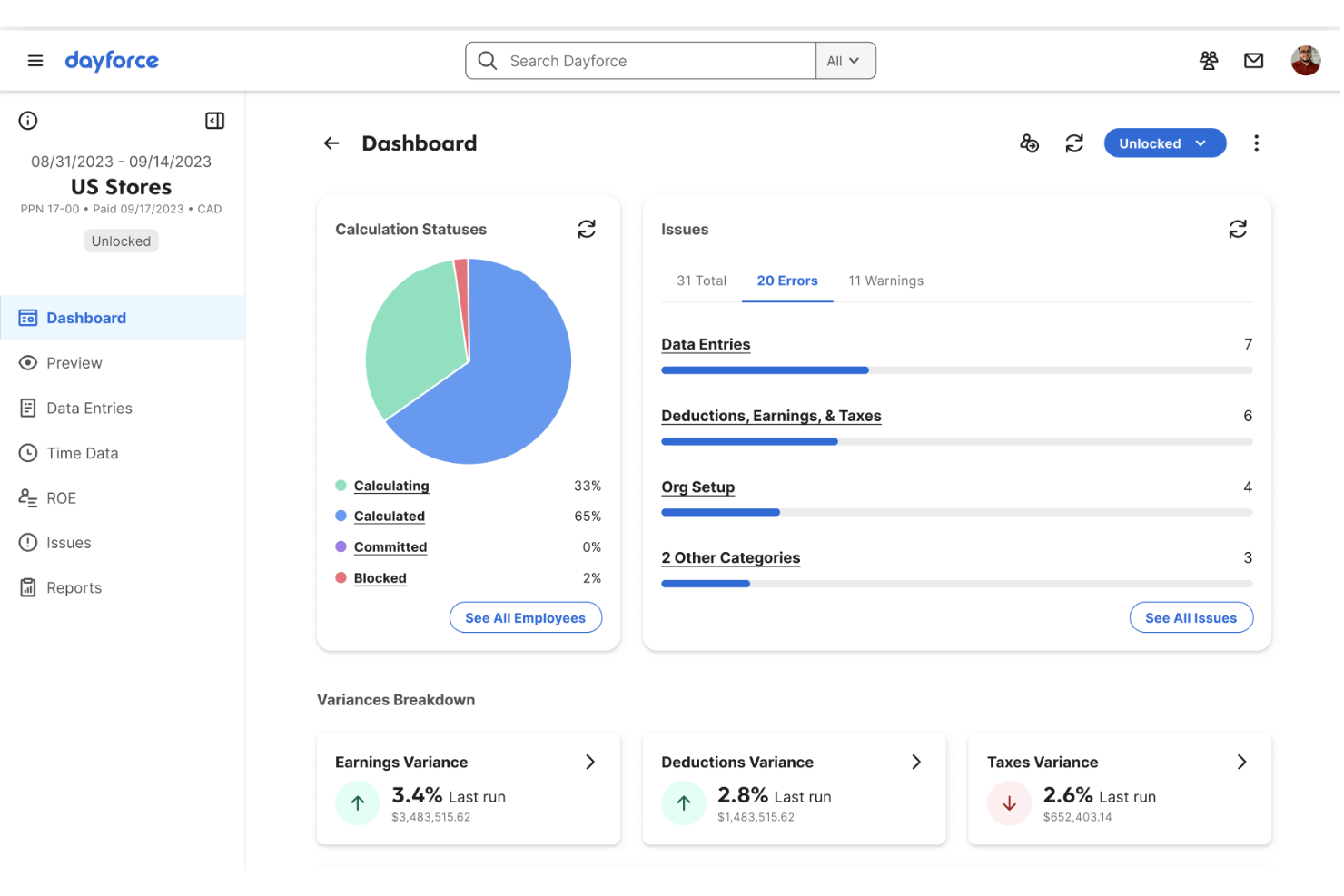
Dayforce is a cloud-native HCM and payroll platform that handles payroll processing, tax compliance, workforce management, benefits administration, and global multi-jurisdiction payroll across 200+ countries on a single unified data model.
Who Is Dayforce Best For?
Dayforce is a strong fit for mid-market and enterprise HR and payroll teams managing complex, multi-jurisdiction workforces across multiple countries.
Why I Picked Dayforce
I picked Dayforce as one of the best because its continuous calculation engine genuinely sets it apart for global payroll teams. Instead of batch-processing at period-end, it runs payroll simulations in real time throughout the pay period, so your team catches errors before they become pay run problems. Layer in Dayforce Co-Pilot's AI anomaly detection, which flags irregularities like duplicate entries or unusual hour spikes mid-cycle, and you get a level of real-time oversight that's rare across 200+ countries on a single contract.
Dayforce Key Features
- Dayforce Wallet: Employees can access earned wages before payday via a fee-free Mastercard-enabled pay card or direct transfer to a personal bank account.
- Integration Studio: A built-in, low-code integration tool with event-driven APIs and pre-built connectors for systems like Workday, SAP, Oracle, and Microsoft Dynamics 365.
- Pay Run Management: Tracks multi-state tax thresholds, generates compliance risk assessments, and produces audit-ready payroll reports across jurisdictions.
- Managed Payroll Services: Dayforce's team can run payroll operations on your behalf, handling end-to-end pay run execution for organizations that need operational support.
Dayforce Integrations
Dayforce offers native integrations with Workday, SAP SuccessFactors, Oracle HCM, ADP, UKG, Microsoft Dynamics 365, and Microsoft Azure Active Directory. Integration Studio and an open API support custom connections.
Pros and Cons
Pros:
- AI anomaly detection for payroll errors
- Global compliance support for 200+ countries
- Real-time payroll calculations across pay periods
Cons:
- Implementation process is lengthy and complex
- Customer support often slow to resolve issues
UKG Pro
Best for HCM-native payroll with global reach
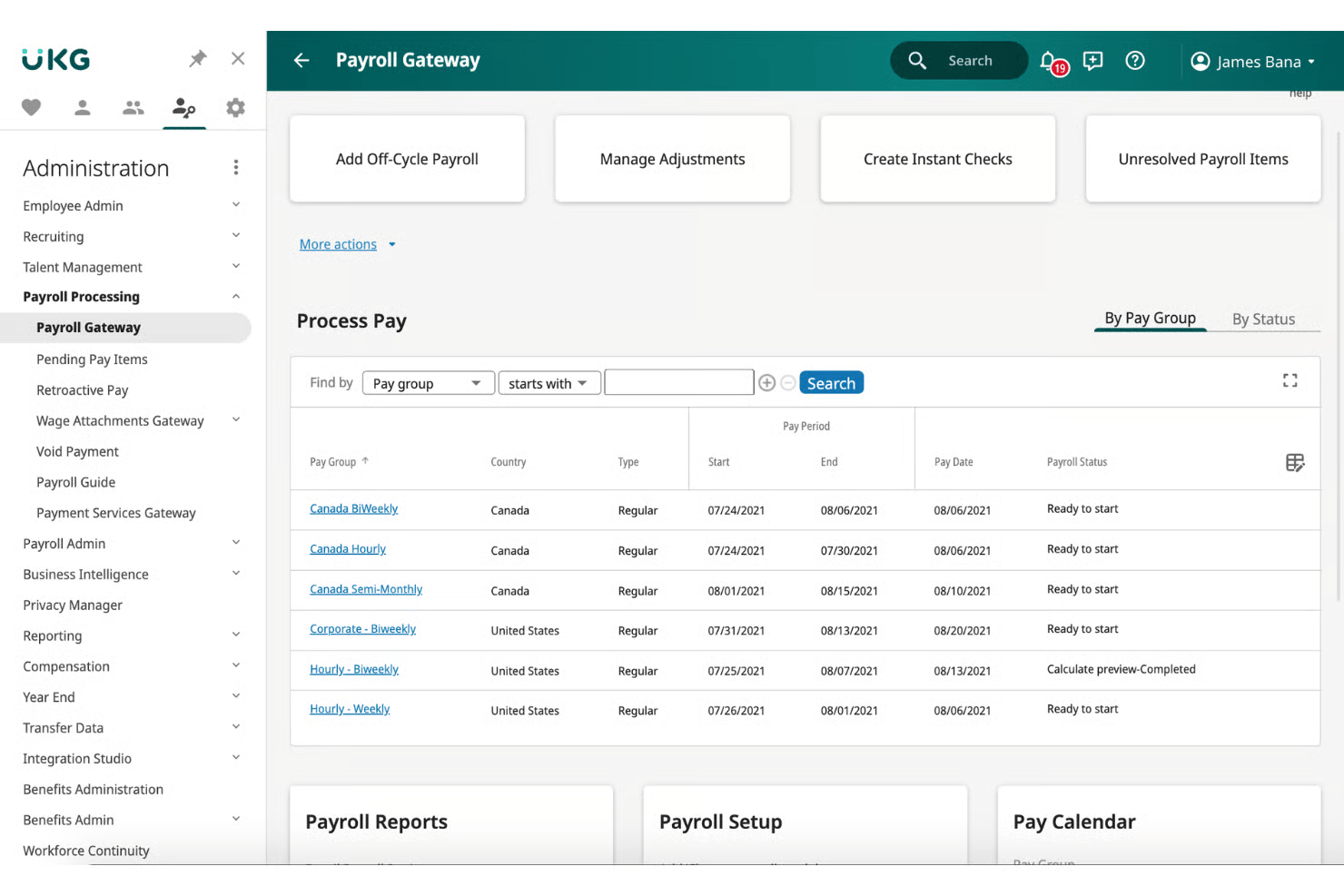
UKG Pro is a cloud-native HCM platform that combines payroll processing, tax filing, benefits administration, time tracking, and global payroll management across 160+ countries in a single system.
Who Is UKG Pro Best For?
UKG Pro is built for mid-market and enterprise organizations that need payroll, HR, benefits, time tracking, and global workforce management running on a single platform.
Why I Picked UKG Pro
I picked UKG Pro as one of the best because it's the rare payroll platform that lives fully inside a native HCM suite, meaning payroll deductions, benefits enrollment, and time data all flow together without a single manual sync. I especially like Bryte AI, which monitors every pay run in real time and flags anomalies before payroll is finalized. UKG One View extends that same payroll engine across 160+ countries without requiring you to replace local payroll providers.
UKG Pro Key Features
- Smart Tax Search: Automatically recommends the correct tax setup for employees based on their work and home jurisdictions, reducing multi-state filing errors.
- Garnishment deduction wizard: Guides payroll teams through wage garnishment processing within the same pay run workflow.
- Predict My Pay: A self-service paycheck modeling tool that lets employees estimate their take-home pay after taxes and deductions before payday.
- UKG Wallet earned wage access: Lets employees withdraw accrued wages before their scheduled payday via a dedicated mobile app, including a Visa payroll card option.
UKG Pro Integrations
UKG Pro offers Marketplace integrations through a 400+ partner network, including ADP, Workday, SAP, Oracle, Okta, ServiceNow, DocuSign, and Microsoft Teams. It also provides a REST API and general ledger export for custom payroll and accounting connections.
Pros and Cons
Pros:
- Global payroll coverage across 160+ countries
- Earned wage access through UKG Wallet
- Real-time AI payroll anomaly detection
Cons:
- Complex reporting tools need technical expertise
- Crowded interface requires frequent user guidance

CloudPay
Best for Workday-native global payroll ops
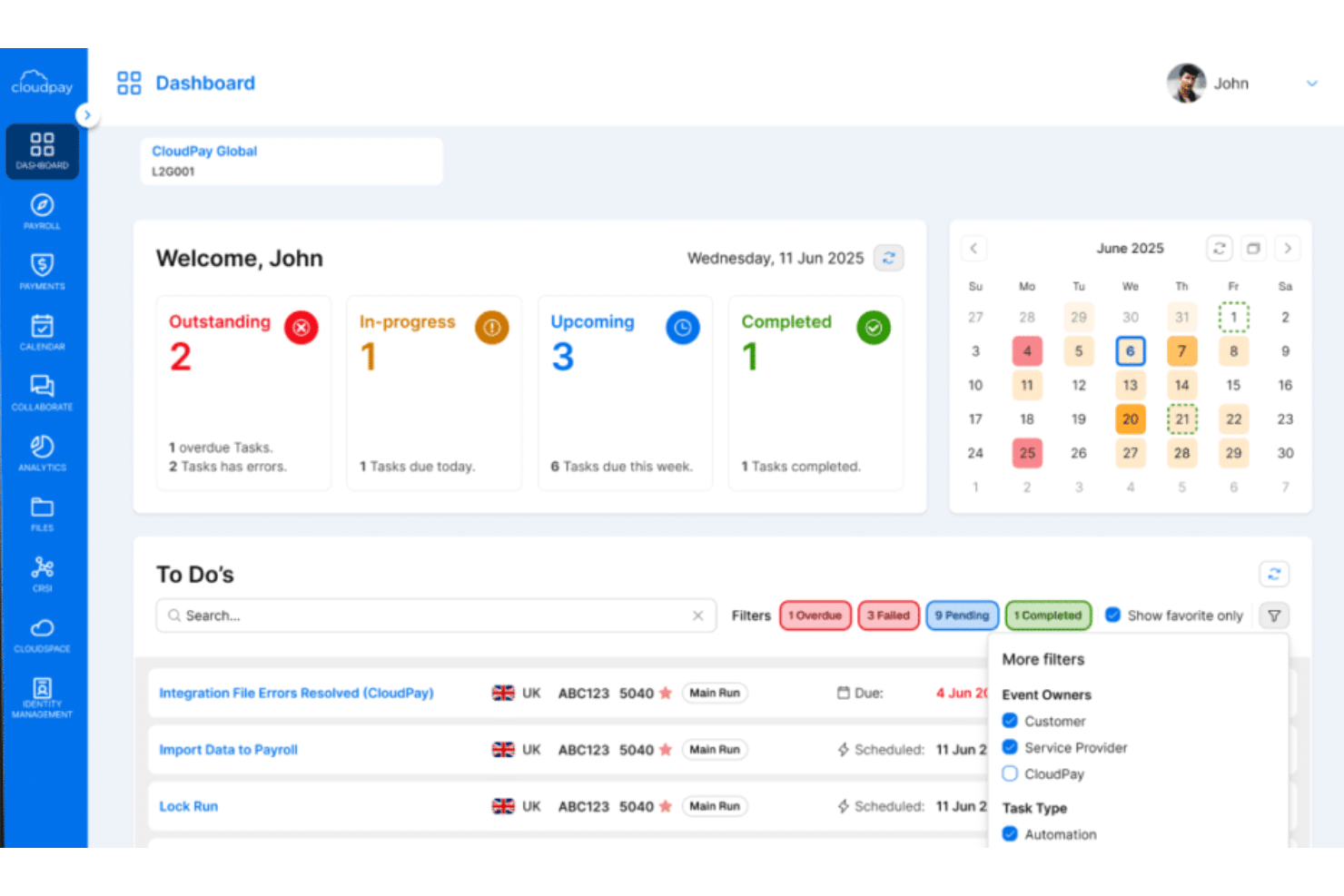
CloudPay is a managed global cloud payroll platform built around multi-country payroll processing, automated compliance, HCM integrations, and employee pay access across 130+ countries and 110+ currencies.
Who Is CloudPay Best For?
CloudPay is a strong fit for midmarket and enterprise teams running Workday as their HCM and needing a payroll layer that spans multiple countries without stitching together regional vendors.
Why I Picked CloudPay
I picked CloudPay as one of the best because it's the most mature Workday-native global payroll option I've come across. Its PECI-certified integration with Workday has been active since 2012, and the September 2024 Workday Global Payroll Connect launch tightens that relationship further, pushing bi-directional payroll data across 130+ countries without manual handoffs. CloudPai, its AI reconciliation layer, catches errors before pay runs finalize, which matters when you're managing payroll across dozens of entities simultaneously.
CloudPay Key Features
- Pay on-Demand: Employees can access earned wages before payday instantly via the CloudPay app, with payments delivered in approximately 30 seconds through Visa Direct.
- Robotic Data Validation: Automated RPA scans each payroll run for errors and omissions before pay is finalized, flagging issues across multi-country payrolls.
- Global payroll calendar: A multi-country workflow tool that syncs payroll deadlines and sends automated notifications to reduce missed cutoffs across jurisdictions.
- General ledger file automation: Post-payroll GL files are automatically generated and pushed to connected finance systems like NetSuite, Dynamics 365, and Sage.
CloudPay Integrations
CloudPay has native integrations with Workday, SAP SuccessFactors, Oracle HCM Cloud, HiBob, BambooHR, UKG Pro, ADP, NetSuite, Microsoft Dynamics 365, and Sage. It also offers an open API and general ledger file automation.
Pros and Cons
Pros:
- AI-powered error detection before pay runs
- On-demand pay with instant Visa Direct payments
- Workday-native payroll operations across 130+ countries
Cons:
- Limited self-service customization for employees
- Admin interface feels outdated for some users
Best for payroll across 60-country compliance
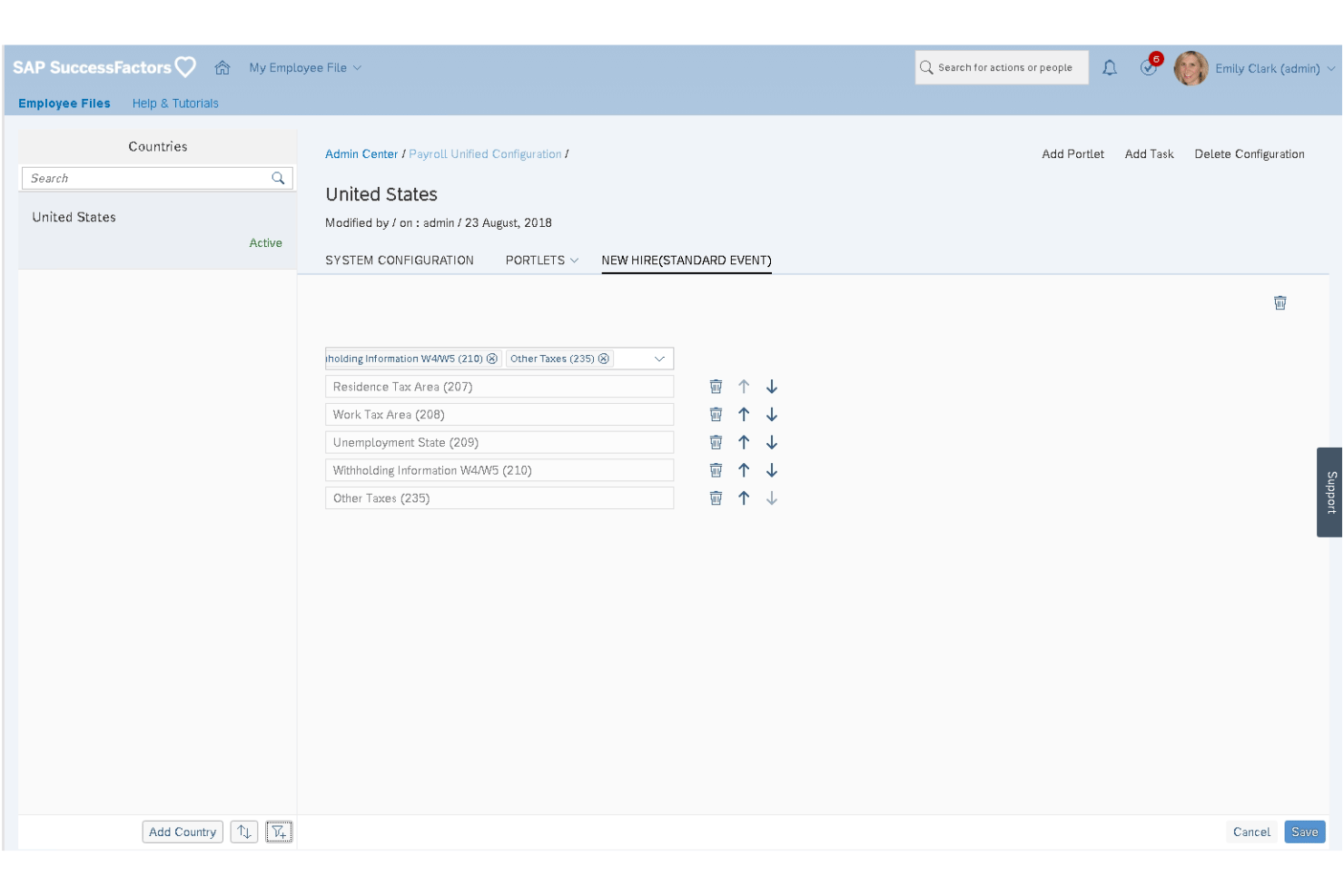
SAP SuccessFactors Employee Central Payroll is an enterprise cloud payroll platform that handles gross-to-net calculations, continuous payroll monitoring, multi-country tax compliance, and employee self-service across a globally localized payroll engine.
Who Is SAP SuccessFactors Employee Central Payroll Best For?
It's built for large, multinational enterprises that need a single payroll platform to manage compliance across dozens of countries simultaneously.
Why I Picked SAP SuccessFactors Employee Central Payroll
SAP SuccessFactors Employee Central Payroll earns its spot on my shortlist because no other platform I've seen handles payroll compliance at this scale, covering 60 countries with over 100 in-country product managers maintaining localized tax rules and statutory reporting. I particularly like the Payroll Control Center, which monitors payroll data continuously throughout the pay period, catching errors before a run finalizes rather than after. The built-in AI anomaly detection flags calculation inconsistencies in real time, which matters enormously when you're running payroll across dozens of jurisdictions simultaneously.
SAP SuccessFactors Employee Central Payroll Key Features
- Payroll simulation tools: Run pre-cycle simulations to validate pay calculations before committing to a live payroll run.
- Retroactive payroll calculation: Process late changes to prior pay periods without disrupting current or future pay cycles.
- Regulatory Change Manager: Tracks incoming compliance and regulatory updates and maps them to the affected business processes within your payroll setup.
- Alumni self-service access: Former employees can access their pay slips and tax documents through a configurable post-employment self-service portal.
SAP SuccessFactors Employee Central Payroll Integrations
SAP SuccessFactors Employee Central Payroll offers native integrations with Employee Central, Time Management, Benefits, Compensation, and SAP S/4HANA. SAP Business Accelerator Hub APIs, SAP BTP, and SAP Store marketplace integrations such as DailyPay and Payactiv support custom connectivity and earned wage access.
Pros and Cons
Pros:
- Continuous payroll monitoring before pay runs
- AI-powered anomaly detection for payroll errors
- Global payroll compliance for 60 countries
Cons:
- Long implementation and migration timelines
- Requires SAP Employee Central module

Paylocity
Best for mid-market AI-assisted payroll audits
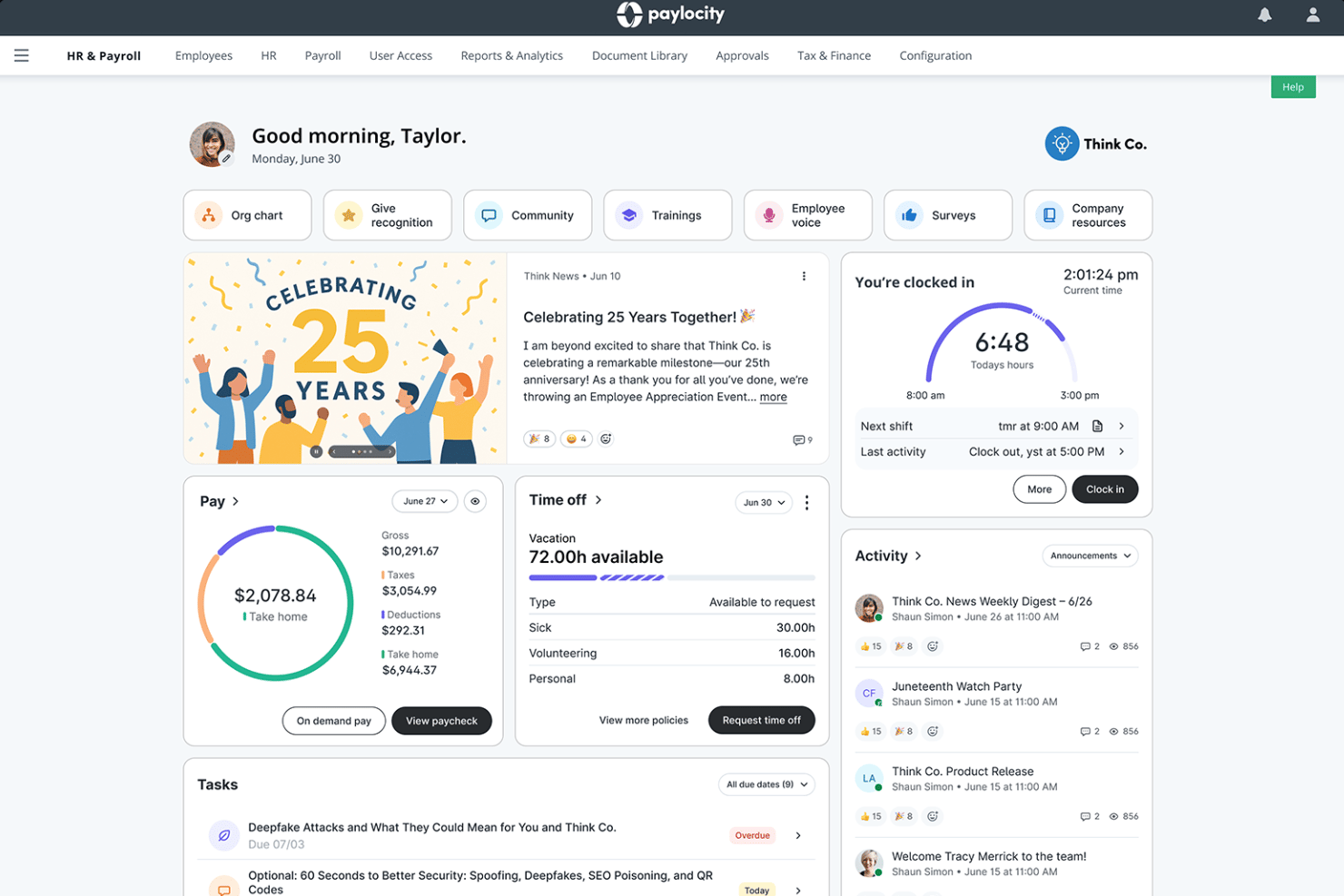
Paylocity is a cloud-native HCM platform that combines full-cycle payroll processing, multi-state and global tax compliance, benefits administration, time tracking, and AI-powered payroll auditing in one unified system.
Who Is Paylocity Best For?
Paylocity is a strong fit for mid-market HR and payroll teams managing complex, multi-state workforces who need AI-powered audit tools built directly into the pay run workflow.
Why I Picked Paylocity
Paylocity earns its spot on my shortlist because of how deeply its AI audit capabilities are woven into the pay run itself. The Payroll Analysis Agent, part of Paylocity's Ignite AI suite, flags anomalies and payroll variances before you finalize a run, not after. Paired with 30+ built-in pre-submission audits and a Payroll Readiness Dashboard, mid-market teams processing complex, multi-state payrolls get a structured safety net that catches errors before they become compliance issues.
Paylocity Key Features
- On-Demand Payment: Employees can request same-day access to earned wages directly through the platform, with no disruption to your existing payroll cycle.
- Tax geolocation audit: Automatically verifies that the correct state and local taxes are withheld based on each employee's work location, which is especially useful for remote and hybrid teams.
- Multi-state pay run consolidation: Processes payroll across all 50 U.S. states in a single unified pay run, with automated local tax rules applied per jurisdiction.
- Integration Marketplace: Connects Paylocity to hundreds of third-party tools—including QuickBooks, NetSuite, Okta, and LinkedIn—via pre-built connectors, API, and EDI.
Paylocity Integrations
Paylocity offers hundreds of marketplace integrations, including QuickBooks Online, NetSuite, Acumatica, Okta, Microsoft Entra, LinkedIn, Checkr, and DocuSign. An open API supports custom integrations, with API, EDI, and SFTP connectivity available.
Pros and Cons
Pros:
- #1-rated mobile app for HR tasks
- Multi-state payroll with real-time tax audits
- AI flags payroll errors before submission
Cons:
- Pricing requires custom sales consultations
- Customer support feedback is inconsistent
New Product Updates from Paylocity

Paylocity Expands Expense and Purchase Request Tools
Paylocity adds connected personal cards, smarter expense categorization, and a streamlined purchase request experience. This reduces manual entry and helps finance teams manage expenses and approvals more efficiently. For more information, visit Paylocity’s official site.
 .
.Annen skybasert lønnsprogramvare
Her er noen flere alternativer for skybasert lønnsprogramvare som ikke kom med på kortlisten min, men som likevel er verdt å undersøke:
- Paychex Flex
For AI-driven payroll anomaly detection
- TriNet
For SMB payroll under PEO co-employment
- RUN Powered by ADP
For small business tax compliance guarantee
- BambooHR®
For HR-to-payroll on one employee record
- Papaya Global
For AI-driven global payroll compliance
- Paycor
For payroll automation with on-demand pay access
- Remote
For owned-entity payroll across 100+ countries
- QuickBooks Payroll
For QBO-native payroll and accounting sync
- Paycom
For employee-driven payroll error prevention
- isolved
For mid-market payroll with AI pre-run checks


How I Evaluate Cloud Payroll Software
I split my evaluation into baseline criteria every tool must meet—like automated tax filing and multi-jurisdiction support—and the differentiators, like AI anomaly detection and embedded benefits, that separate good from great.
Core Functionality (Table Stakes For This List)
When I'm selecting tools for my list, I rank each one on a scale from 0 (does not offer the functionality) to 5 (excels in this area) for each core functionality listed below. I then calculate the tool's total score into a percentage, using 75% as a benchmark to help assess its overall fit for the list.
- Cloud-based access: I check for full browser and mobile app access so admins and employees can run or review payroll from anywhere, not just a desktop.
- Automated payroll processing: Each tool should handle wage calculations, deductions, and pay runs with minimal manual input across multiple pay schedules and disbursement methods.
- Tax filing and compliance: I evaluate whether the platform automates tax withholdings, filings, and year-end forms like W-2s or regional equivalents, and keeps pace with changing tax law.
- Employee self-service portal: The portal should let employees view pay stubs, download tax documents, update direct deposit details, and access pay history on their own.
- HR and accounting integrations: I look for native connections to popular HRIS, time-tracking, benefits, and general ledger platforms, plus an open API for custom workflows.
- Multi-jurisdiction support: Tools need to handle payroll across multiple states, provinces, or countries with localized tax rules, multi-currency pay, and region-specific compliance built in.
Once I have a list of tools that meet the criteria, I consider what sets each platform apart.
Differentiating Factors (What Sets Vendors Apart)
Here's how I compare and contrast different vendors:
Standout Features
I look for AI anomaly detection that flags duplicate payments or misclassifications before a pay run finalizes—catching a ghost employee or a tax code mismatch after the fact is expensive. On-demand pay is another differentiator I evaluate, since letting employees access earned wages early directly reduces turnover in hourly workforces. I also check how each platform handles embedded benefits administration, where health insurance and retirement plan deductions sync natively with payroll so you're not reconciling two systems every cycle.
Beyond Features
I evaluate each vendor's total cost of ownership, including off-cycle pay run fees and multi-state filing charges that inflate the sticker price. Implementation speed matters too—I check whether a platform offers guided data migration and parallel payroll runs so you're not flying blind on your first live cycle. I also look for tax penalty guarantees, since vendors willing to reimburse filing errors signal real confidence in their compliance engine.
Slik velger du skybasert lønnsprogramvare
Slik velger du en skybasert lønnsløsning som gir nøyaktighet, regelverksetterlevelse og enkel bruk i den skalaen og med den hastigheten teamet ditt trenger:
| Hvis prioriteten din er ... | Se etter ... |
|---|---|
| Å kjøre lønn i flere regioner | Automatiske skatteoppdateringer og -innrapporteringer på tvers av jurisdiksjoner |
| Å unngå lønnsfeil | Innebygd avviksdeteksjon og varsling av feil før lønnskjøringer |
| Rask innfasing av ansatte | Selvbetjeningsverktøy som reduserer behovet for manuell dataregistrering |
| Å håndtere komplekse arbeidstakertyper | Fleksible lønnsregler for ansatte, oppdragstakere og midlertidig ansatte |
| Enkel integrasjon med HR og økonomi | Ferdigbygde koblinger til HRIS- og regnskapssystemene dine |
Slik vurderer du kortlisten
- Test regelverksmotoren: Be om en demonstrasjon som viser skatteberegninger i sanntid på tvers av tre forskjellige land eller regioner.
- Valider avviksdeteksjonen: Be om en eksempelrapport fra en lønnskjøring som viser hvordan systemet flagger feil eller duplikate oppføringer.
- Kontroller hastigheten på onboarding: Sett opp en prøveperiode og mål tiden det tar å onboarde fem nyansatte fullt ut, inkludert oppsett av direkte innskudd og skatteskjemaer.
- Bekreft integrasjonsdybden: Be om dokumenterte arbeidsflyter for synkronisering av lønn med HRIS og hovedbok – be om en ekte referansekunde som bruker begge deler.
- Avveiningsfilter: Finn ut om innebygd global etterlevelse (høyere sikkerhet, tregere oppdateringer) eller utvidbarhet basert på API-er (raskere, mer gjør-det-selv) passer best med virksomhetens toleranse for risiko og ønsket hastighet.
Hva er skybasert lønnsprogramvare?
Skybasert lønnsprogramvare er et nettleserbasert system for å behandle, administrere og følge opp ansattes lønn på nettet. Det håndterer lønnsberegninger, innsending av skatt, trekk for personalgoder og oppdateringer for etterlevelse automatisk. Team bruker det til å betale ansatte på flere steder, holde tritt med endringer i lønnslovgivningen og gi medarbeidere tilgang til lønnsdokumenter overalt. Dette bidrar til å redusere manuell dataregistrering, begrense lønnsfeil og minimere risikoen for manglende etterlevelse.
Funksjoner i skybasert lønnsprogramvare
Når du velger skybasert lønnsprogramvare, bør du se etter følgende viktige funksjoner:
- Skybasert tilgang: Lar deg logge inn fra alle enheter med internettilkobling. Lønnsadministratorer og ansatte kan se gjennom, godkjenne og laste ned lønnsinformasjon fra alle steder, noe som støtter hybride og distribuerte arbeidsstyrker.
- Automatisert lønnsbehandling: Beregner lønn, trekk og skatter for hver lønnskjøring. Dette sikrer at lønningsdagene kommer som planlagt, og reduserer behovet for manuell dataregistrering i hver syklus.
- Skatteinnsending og etterlevelse: Samler inn, trekker og sender inn lønnsskatt automatisk i alle relevante jurisdiksjoner. Disse oppdateringene holder tritt med endringer i lokale, regionale og nasjonale skattelover, slik at risikoen for manglende etterlevelse blir mindre.
- Selvbetjeningsportal for ansatte: Gir ansatte sikre innlogginger for å se lønnsslipper, skattedokumenter og betalingshistorikk. Medarbeidere kan også oppdatere informasjon som bankopplysninger, slik at HR-team bruker mindre tid på mindre dataendringer.
- Integrasjoner med HR og regnskap: Kobler seg direkte til populære HRIS-, tidsregistrerings-, personalgode- og regnskapsplattformer. Synkroniserer lønnsdata med hovedbøker og ansattregistre, noe som reduserer arbeidet med avstemming og manuelle feil.
- Støtte for flere jurisdiksjoner: Håndterer lønn for arbeidstakere i ulike delstater, provinser eller land, og bruker riktige skatteregler, lønnsfrekvenser og lovpålagte innrapporteringer basert på sted.
- Lønn på forespørsel: Gjør det mulig for ansatte å få tilgang til en del av opptjent lønn før lønningsdagen. Dette bidrar til å støtte timelønnede og kontraktsarbeidere som kan ha behov for tidligere tilgang til inntektene sine.
- Avviksdeteksjon og feilmerking: Bruker AI eller regelbaserte systemer til å identifisere doble utbetalinger, uvanlige lønnsposter eller avvik i klassifisering. Dette reduserer risikoen for utilsiktede overbetalinger eller manglende etterlevelse.
- Innebygd administrasjon av personalgoder: Synkroniserer helseforsikring, pensjon og andre trekk for personalgoder direkte med lønnen, slik at bidrag og trekk beregnes automatisk sammen med den vanlige lønnen.
- Støtte for mobilapp: Tilbyr en egen mobilapplikasjon slik at både lønnsadministratorer og ansatte kan godkjenne, gå gjennom og få tilgang til lønnsdata mens de er på farten, noe som gjør lønnshåndteringen mer tilgjengelig.
Fordeler med skybasert lønnsprogramvare
Implementering av skybasert lønnsprogramvare gir flere fordeler for teamet og virksomheten din. Her er noen av fordelene du kan se frem til:
- Tilgang fra alle steder: Skybasert tilgang lar lønnsadministratorer og ansatte se gjennom, godkjenne og laste ned lønnsinformasjon fra alle enheter, noe som støtter eksterne og distribuerte team.
- Automatiserte lønnskjøringer: Automatiserte lønnsberegninger, trekk og lønnsslipper reduserer det manuelle arbeidet i hver lønnssyklus og bidrar til at lønningsdagene kommer som planlagt.
- Innebygd etterlevelse: Funksjoner for skatteinnsending og etterlevelse holder automatisk tritt med endringer i lokale, regionale og nasjonale lover, slik at risikoen for manglende etterlevelse ved lønn i flere jurisdiksjoner blir mindre.
- Selvbetjening for ansatte: Sikre ansattportaler lar medarbeidere se lønnsslipper og skatteskjemaer og oppdatere personopplysninger uten å være avhengige av HR for enkle endringer.
- Integrert HR og regnskap: Ferdigbygde koblinger og API-støtte lar deg synkronisere lønnsdata direkte med HR-systemet, tidsregistrering, fordeler og regnskapssystemer, noe som reduserer behovet for avstemmingsarbeid.
- Tidlig tilgang til lønn: Med lønnsutbetaling ved behov kan ansatte få tilgang til deler av den opptjente lønnen før lønningsdagen, et alternativ som støtter timebaserte og kontingente arbeidsstyrker.
- Forebygging og oppdagelse av feil: KI-basert avviksdeteksjon flagger doble utbetalinger, uvanlige posteringer eller feil i kategoriseringen før behandlingen, noe som reduserer risikoen for kostbare lønnsfeil.
Kostnader og priser
Valg av skybasert lønnsprogramvare krever en forståelse av de ulike prismodellene og abonnementene som er tilgjengelige. Kostnadene varierer basert på funksjoner, teamstørrelse, tillegg og mer. Tabellen nedenfor oppsummerer vanlige abonnementer, gjennomsnittsprisene deres og typiske funksjoner som er inkludert i skybaserte lønnsløsninger:
Sammenligningstabell for abonnementer
| Abonnementstype | Gjennomsnittspris | Vanlige funksjoner |
|---|---|---|
| Gratisabonnement | $0 | Grunnleggende lønnsbehandling, begrenset selvbetjening for ansatte, grunnleggende skatteberegninger og kundestøtte via e-post. |
| Personlig abonnement | $10-$25/bruker/måned | Standard lønnsbehandling, direkte innskudd, standard skatteinnrapportering, selvbetjeningsportal og begrensede integrasjoner. |
| Bedriftsabonnement | $25-$50/bruker/måned | Automatisert skatteinnrapportering, støtte for flere jurisdiksjoner, avanserte integrasjoner, lønnsutbetaling ved behov og tilgang til mobilapp. |
| Storselskapsabonnement | $50-$100/bruker/måned | Tilpassede lønnsarbeidsflyter, dedikert kundeansvarlig, forbedret regelverksetterlevelse, integrerte personalgoder og API-tilgang. |