

De 10 beste AI-programvarene for bedrifter i 2026

10 Beste AI-programvare for bedrifter – kortliste


AI-programvare for bedrifter bruker kunstig intelligens til å automatisere, analysere og forbedre daglige forretningsprosesser – slik at du kan ta raskere, datadrevne beslutninger og oppnå nye effektivitetsgevinster. Hvis du leter etter verktøy som faktisk innfrir løftene om AI, kjenner du utfordringen: å skille reelle løsninger fra overhypede trender.
I denne veiledningen finner du ekspertvurderte alternativer som hjelper HR- og forretningsteam med å skape verdi, forbedre opplevelsen og ligge i forkant i 2026.
Hvorfor du kan stole på våre programvareanbefalinger
Teamet vårt har testet og anmeldt programvare siden 2012. Vi er selv HR-eksperter, så vi vet hvor vanskelig og hvor viktig det er å velge riktig programvare.
I denne guiden har vi vurdert verktøyene gjennom praktisk testing og uavhengig research og gitt dem poeng ut fra våre utvelgelseskriterier. Vi bygger også på innsikt fra ledende eksperter i bransjen og erfarne HR-eksperter.
Anmeldelsene våre bygger på vår egen redaksjonelle vurdering. De er ikke et salgsargument.
Ekspertanmeldere:
Sammenligningstabell for AI-programvare for bedrifter
Denne sammenligningstabellen oppsummerer prisdetaljene for mine beste utvalgte løsninger innen AI-programvare for bedrifter:
| Tool | Best For | Trial Info | Price | ||
|---|---|---|---|---|---|
| 1 | Best as AI for business | Free demo available | From $8/user/month | Website | |
| 2 | Best for continuous employee performance insights | Free demo available | From $4/user/month (billed annually) | Website | |
| 3 | Best for unifying core HR processes | Free demo available | Pricing upon request | Website | |
| 4 | Best for talent sourcing from diverse pools | Free trial + free demo available | From $149/month (billed annually) | Website | |
| 5 | Best for structured video interview assessments | Free demo available | Pricing upon request | Website | |
| 6 | Best for workforce analytics reporting | 30-day free trial + free demo | Pricing upon request | Website | |
| 7 | Best for personalized talent recommendations | Free demo available | Pricing upon request | Website | |
| 8 | Best for conversational hiring experiences | Free demo available | Pricing upon request | Website | |
| 9 | Best for automated employee support answers | Free demo | Pricing upon request | Website | |
| 10 | Best for autonomous employee query resolution | Free demo available | Pricing upon request | Website |
Anmeldelser av den beste AI-programvaren for bedrifter
Nedenfor finner du mine detaljerte sammendrag av den beste AI-programvaren for bedrifter som kom med på kortlisten. Anmeldelsene mine gir et detaljert innblikk i funksjonene, egenskapene og integrasjonene til hver plattform, slik at du kan finne den beste løsningen for deg.

Best as AI for business
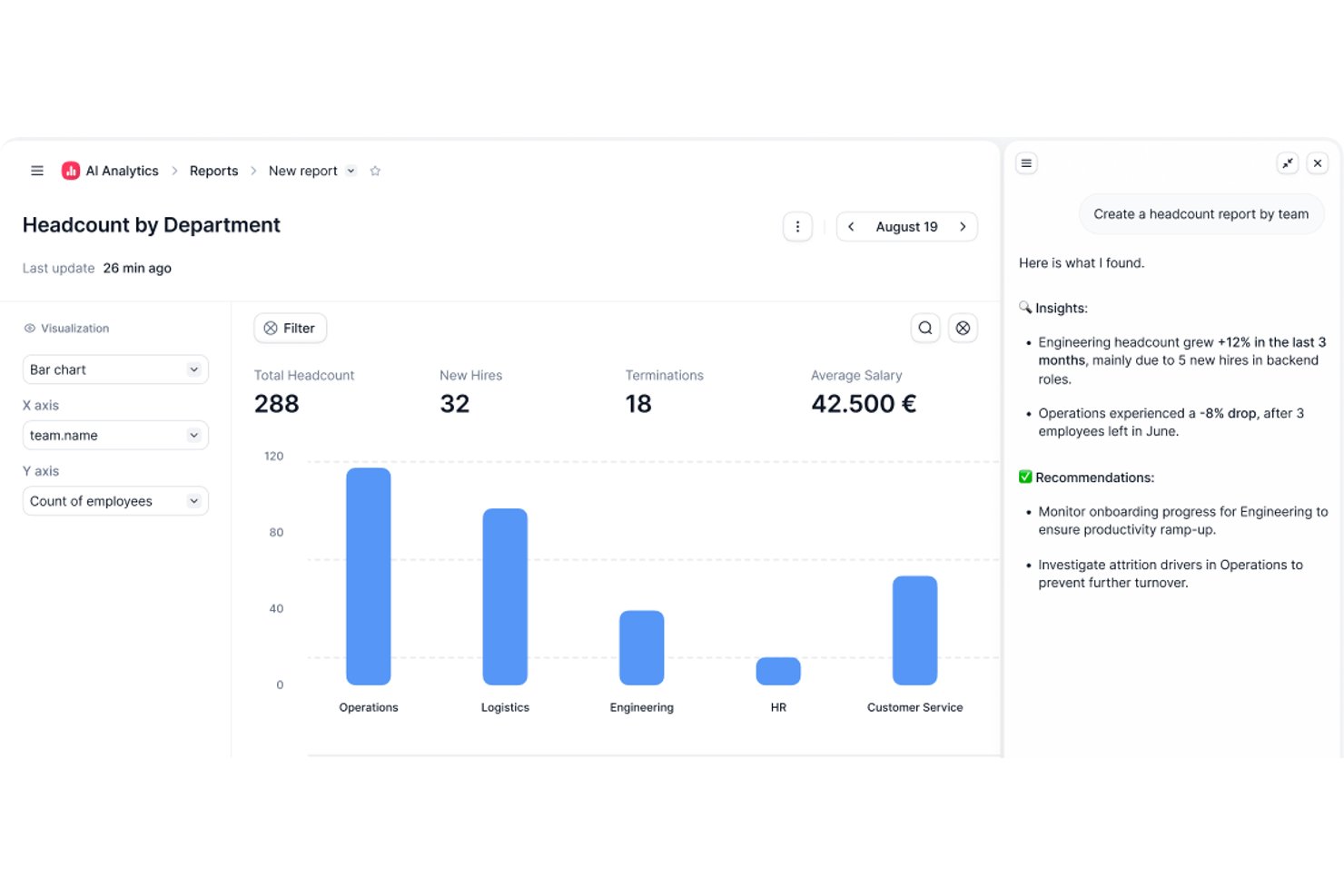
Factorial is an AI for business platform that brings HR, finance, and IT operations together, with its One AI agent helping teams plan schedules, generate reports, answer policy questions, and automate workflows across departments.
Who Is Factorial Best For?
Factorial suits mid-sized teams that want a single platform to handle HR, finance, and IT operations without juggling separate tools for each department.
Why I Picked Factorial
I've included Factorial in my top picks because it brings HR, finance, and IT operations into one platform through its One AI agent, which is purpose-built for daily business tasks. I like how One can draft schedules, pull live reports, and answer employee policy questions in plain language, so your team isn't bouncing between tools to get answers. It can even flag payroll anomalies before a payroll run, which is the kind of proactive support that cuts real administrative load.
Factorial Key Features
- One AI agent: A built-in AI agent that works across HR, finance, and IT using your company's own data to answer questions and take actions.
- Receipt OCR extraction: AI-powered optical character recognition pulls data from uploaded receipts to auto-fill expense details.
- 360-degree performance reviews: Collects structured feedback from employees, managers, and peers within a single review cycle.
- IT inventory and MDM: Tracks devices from order to assignment and supports zero-touch provisioning, remote wipe, and device security policies.
Factorial Integrations
Factorial offers marketplace integrations with Microsoft Power BI, Okta, Slack, Microsoft Business Central, Sage, DATEV, and SAP Business One, plus Zapier. Its REST API, webhooks, SDKs, and MCP connections extend One to ChatGPT and Claude.
Pros and Cons
Pros:
- Centralized HR records reduce scattered files
- Answers employee policy questions in plain language
- One connects HR, finance, and IT workflows
Cons:
- Country-specific workflows can need manual workarounds
- Tailored turnover reporting can be difficult
Lattice
Best for continuous employee performance insights
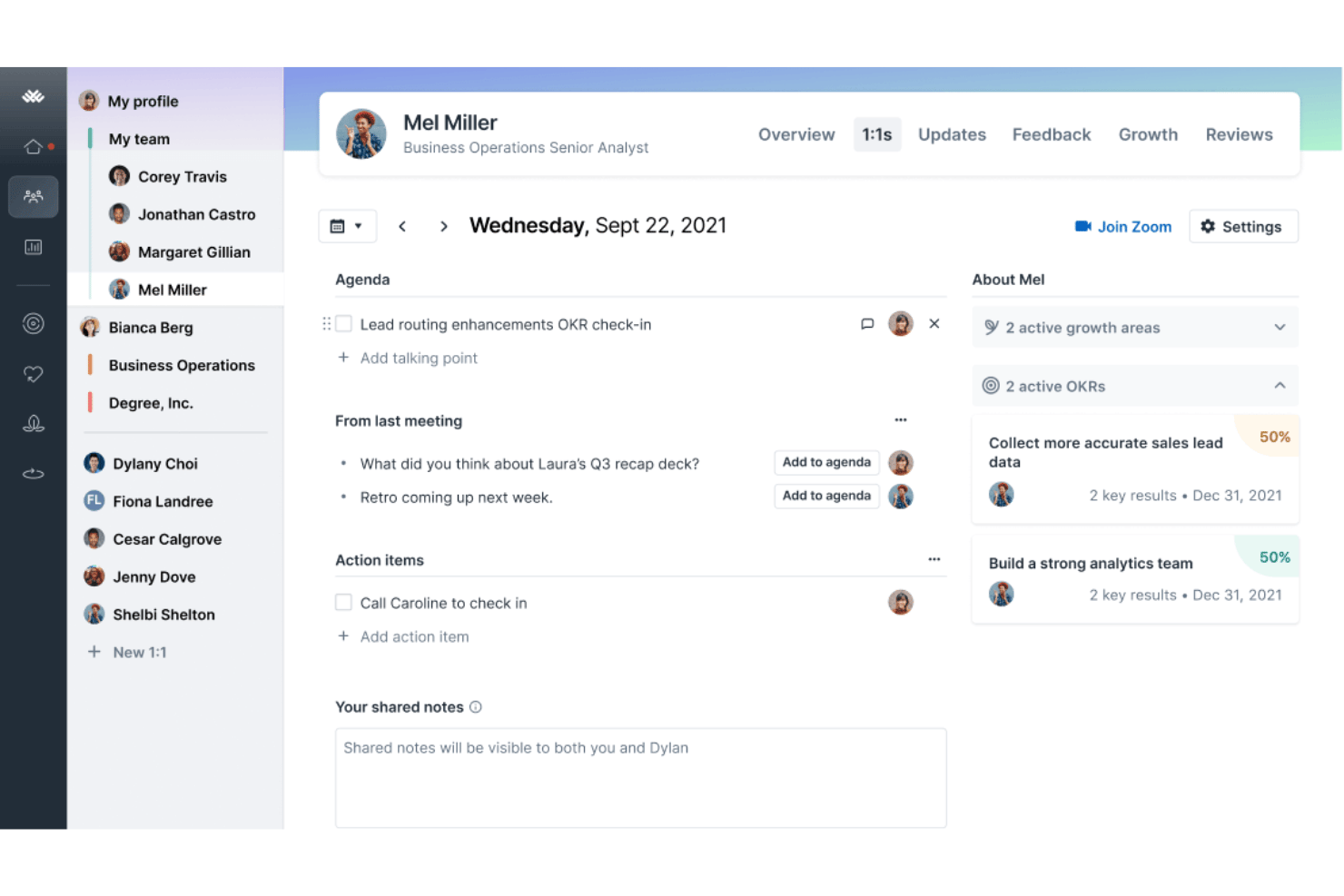
Lattice is a people management platform that combines performance reviews, goal tracking, employee engagement surveys, compensation management, and an AI agent that surfaces workforce insights and coaches managers.
Who Is Lattice Best For?
Lattice is a strong fit for mid-sized to enterprise HR teams that need a structured, ongoing approach to performance management and employee development.
Why I Picked Lattice
I picked Lattice because it treats performance as an ongoing conversation, not a once-a-year event. The Habits framework, which bundles 1:1s, Weekly Updates, and Feedback into the daily workflow, keeps a continuous stream of performance data flowing between managers and their teams. The AI Agent then acts on that data to coach managers in real time, and Lattice MCP connects talent data directly to Claude and ChatGPT for AI-assisted review drafting and trend analysis.
Lattice Key Features
- Pulse surveys: Run short, recurring surveys to quickly gauge employee engagement and sentiment.
- Calibration tools: Facilitate fairer performance reviews with calibration sessions across teams and departments.
- Compensation management: Manage salary reviews, comp bands, cycle approvals, and analytics in one system.
- Integration ecosystem: Connect with HRIS, Slack, Microsoft Teams, Jira, and major SSO providers for unified workflows.
Lattice Integrations
Lattice offers 25+ native integrations, including ADP, BambooHR, Gusto, HiBob, Personio, Workday, Rippling, Slack, Microsoft Teams, Jira, and Salesforce. An API is available for custom integrations.
Pros and Cons
Pros:
- Succession planning with data-driven suggestions
- AI-generated summaries for review cycles
- Continuous feedback and performance monitoring
Cons:
- Predictive analytics are limited in scope
- No external candidate matching or ATS
New Product Updates from Lattice

Lattice Introduces MCP Connector for AI Chat Tools
Lattice introduced Lattice MCP, a new connector that brings talent data into Claude, ChatGPT, and other LLM tools. The connector helps teams access performance context from reviews, 1:1 notes, feedback, goals, and updates within AI chat workflows. For more information, visit Lattice’s official site.
 .
.
Workday
Best for unifying core HR processes
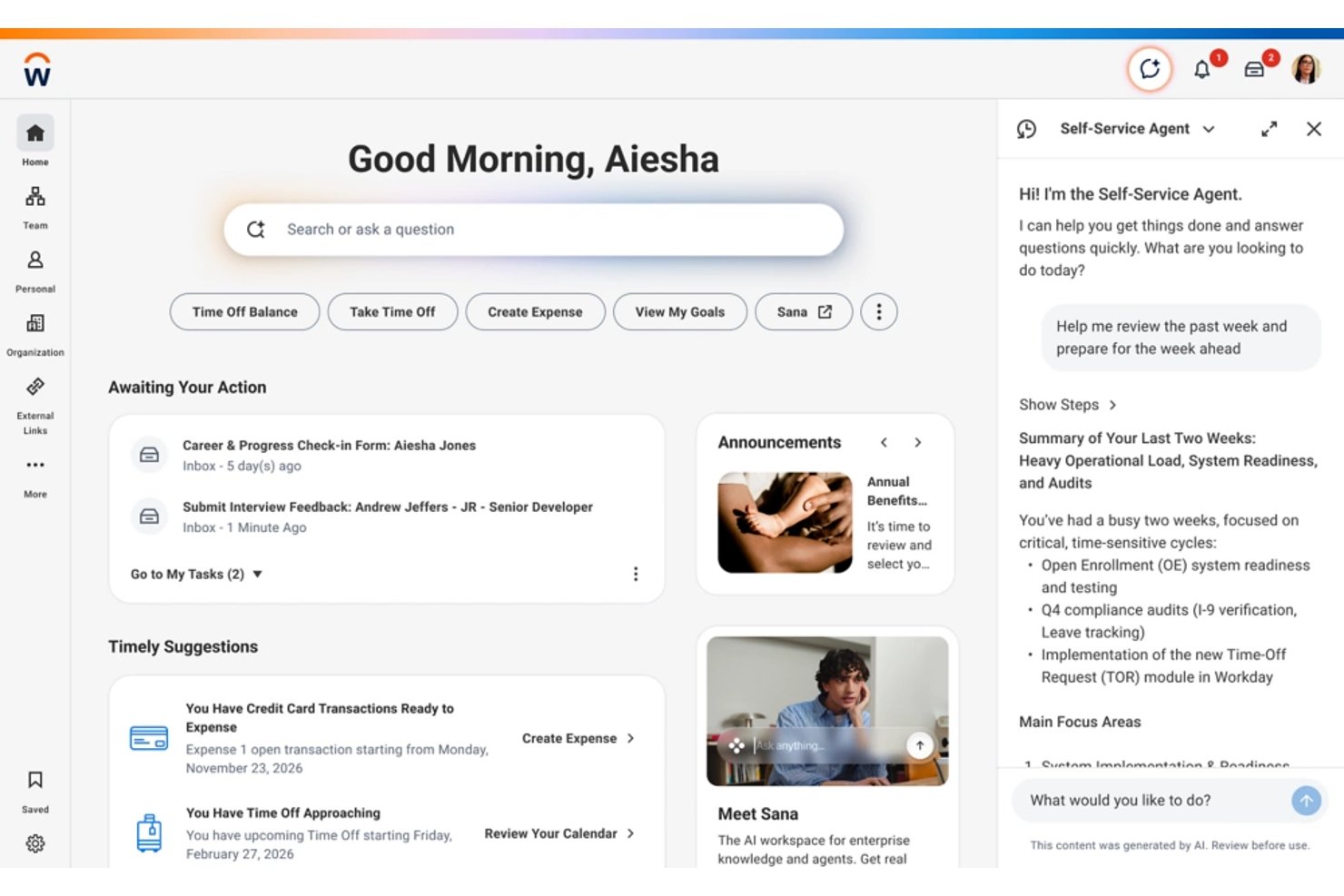
Workday is an enterprise cloud HCM platform that brings together core HR, payroll, talent management, workforce planning, and AI-driven analytics in a single unified system.
Who Is Workday Best For?
Workday is built for large enterprises with complex, multi-country HR operations that need a single system to manage their entire workforce.
Why I Picked Workday
Workday earns its spot on my shortlist because every HR function- payroll, talent, and workforce planning runs on a single data model rather than stitched-together modules. I like that the Illuminate AI agents (Recruiter Agent, Payroll Agent, Succession Agent) act directly within that unified data layer, so a change in recruiting instantly surfaces in workforce planning. Workday Skills Cloud also ties hiring, internal mobility, and succession into one connected skills map, which I rarely see done this cleanly in a single platform.
Workday Key Features
- Workday Assistant: Conversational AI that answers HR queries and helps users complete tasks using natural language.
- Prism analytics: Unified analytics tool that blends internal and external people data for deep workforce insights.
- AI-powered time tracking: Automated, AI-driven time and attendance capture across global locations and job types.
- Compliance controls: Built-in governance, audit trails, and bias detection in AI models to support data privacy and regulatory needs.
Workday Integrations
Workday offers native integrations with Slack, LinkedIn Learning, SAP Fieldglass, ADP SmartCompliance, Cornerstone LMS, UiPath, and Dokmee ECM. An API is available for custom integrations.
Pros and Cons
Pros:
- AI-driven skills management and talent pathways
- Generative AI assistant for policies and HR data
- All-in-one AI workforce analytics and planning
Cons:
- GenAI features require additional enablement
- Long implementation cycles for large organizations
SeekOut
Best for talent sourcing from diverse pools
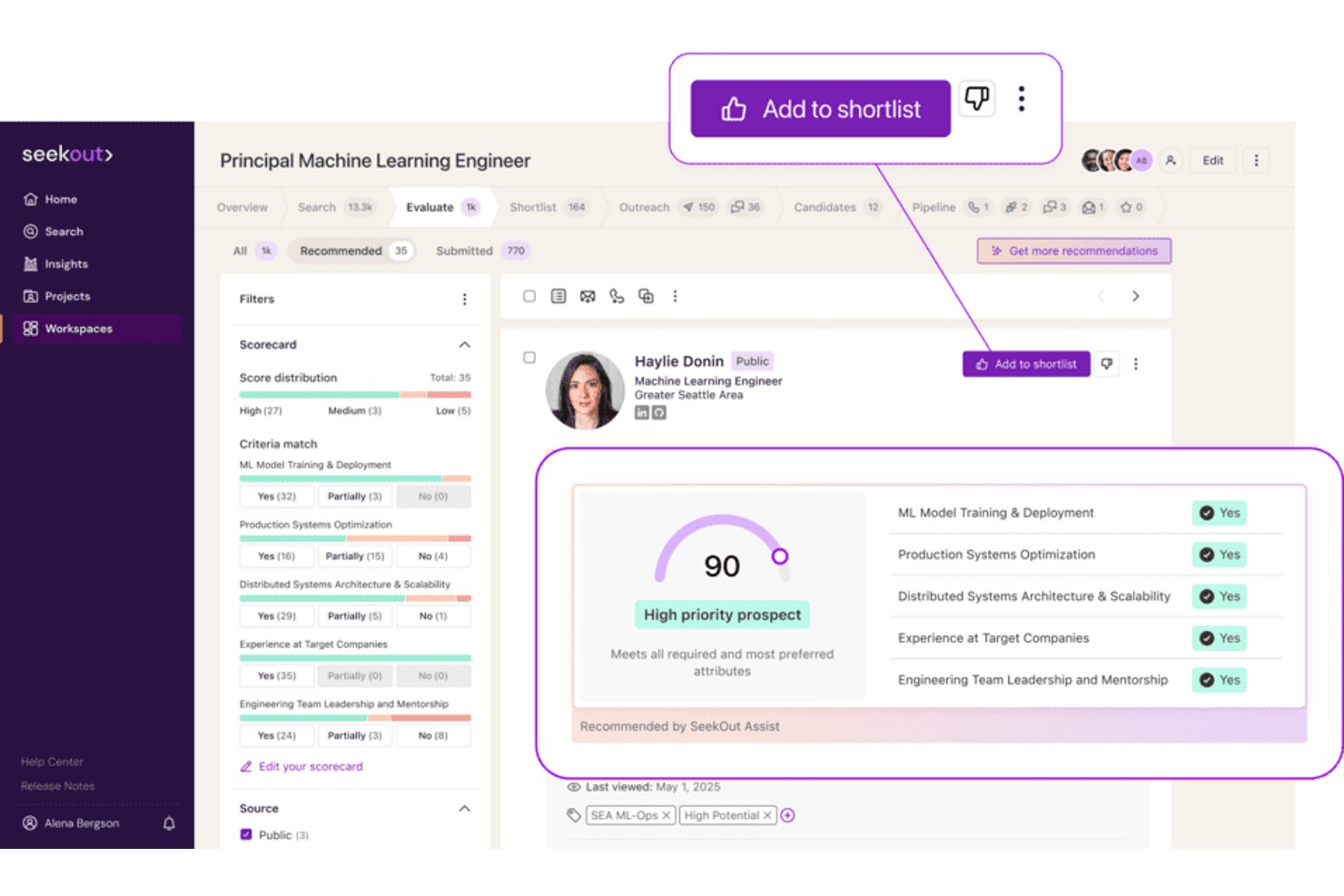
SeekOut is an AI recruiting platform that combines external talent sourcing, inbound applicant evaluation, ATS rediscovery, diversity-focused search filters, and candidate outreach into a single talent intelligence tool.
Who Is SeekOut Best For?
SeekOut is a strong fit for enterprise talent acquisition teams that need to source technical or underrepresented candidates at scale.
Why I Picked SeekOut
SeekOut earns its spot on my shortlist because of how far its diversity sourcing filters go beyond anything else I've seen. I can filter candidates by gender, ethnicity, veteran status, and disability indicators without relying on self-reported data. On top of that, SeekOut parses GitHub activity and patent records to surface technical candidates who simply don't appear in a LinkedIn-only search.
SeekOut Key Features
- AI-powered inbound evaluation: Instantly rates and shortlists applicants based on custom criteria set by your team.
- Talent pool insights: Provides labour market intelligence, compensation benchmarks, and skills gap data for targeted recruiting.
- ATS rediscovery: Finds past silver medalist candidates and unearths overlooked applicants already in your applicant tracking system.
- AI-integrated outreach campaigns: Builds and sends multi-stage, personalized candidate emails directly from the platform.
SeekOut Integrations
SeekOut offers native integrations with Ashby, Avature, Beamery, Bullhorn, Gem, Greenhouse, iCIMS, Jobvite, Lever, Phenom, SAP SuccessFactors, SmartRecruiters, Talemetry, and Workday. An API is available for building custom integrations.
Pros and Cons
Pros:
- AI search across technical GitHub and patent records
- Large external talent and candidate data pool
- Advanced diversity-focused talent sourcing filters
Cons:
- Limited workflow automations beyond recruiting functions
- No internal workforce analytics or metrics
HireVue
Best for structured video interview assessments
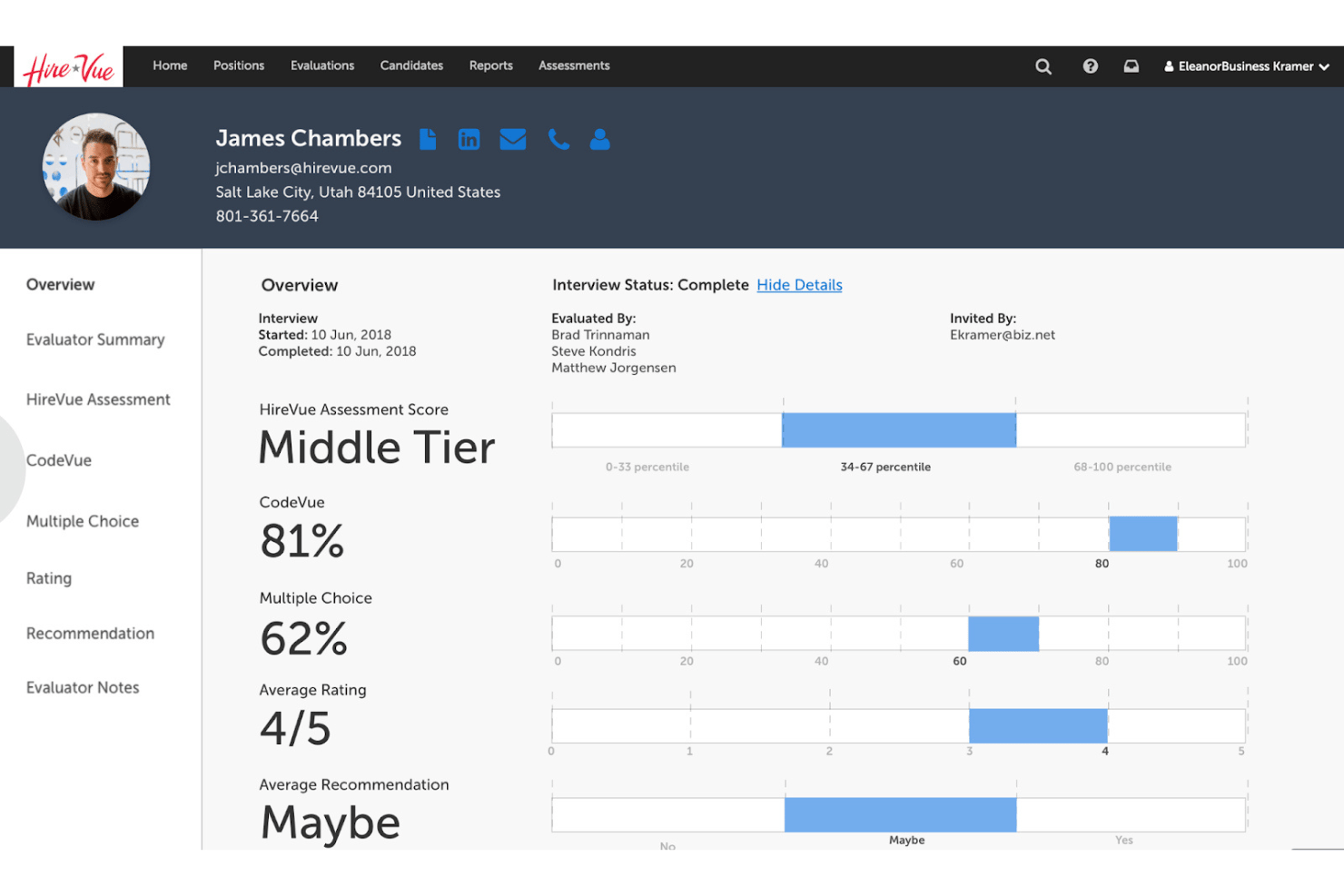
HireVue is an AI-powered hiring platform that combines on-demand and live video interviewing, structured assessments, and conversational AI to support candidate screening and talent acquisition workflows.
Who Is HireVue Best For?
HireVue is a strong fit for enterprise talent acquisition teams managing high-volume hiring across multiple roles or locations.
Why I Picked HireVue
I've included HireVue in my top picks because its structured interview format is genuinely differentiated from standard video tools. Where most platforms just record responses, HireVue applies IO psychology-backed AI scoring against defined competencies, so every candidate is evaluated on the same criteria. I also use the virtual job tryout feature to assess role-specific skills before a single live interview takes place, which tightens early-stage screening considerably.
HireVue Key Features
- Conversational AI chatbot: Engages candidates 24/7 with automated pre-screening and Q&A.
- Live video interviewing: Supports multi-interviewer live panels and integrates with leading ATS platforms.
- Game-based assessments: Offers interactive cognitive and behavioural games tailored to role requirements.
- Self-scheduling tool: Lets candidates select interview times and syncs with recruiter calendars automatically.
HireVue Integrations
HireVue offers native integrations with Workday, SAP SuccessFactors, Oracle and Taleo, SmartRecruiters, iCIMS, Avature, Greenhouse, PageUp, Cornerstone, and Eightfold. An API is also available for custom integrations.
Pros and Cons
Pros:
- Automated candidate engagement with conversational AI
- Virtual job tryouts for real-world skills
- AI-driven scoring for objective candidate assessment
Cons:
- No natural language query support
- Analytics limited to pre-hire stage
Visier
Best for workforce analytics reporting
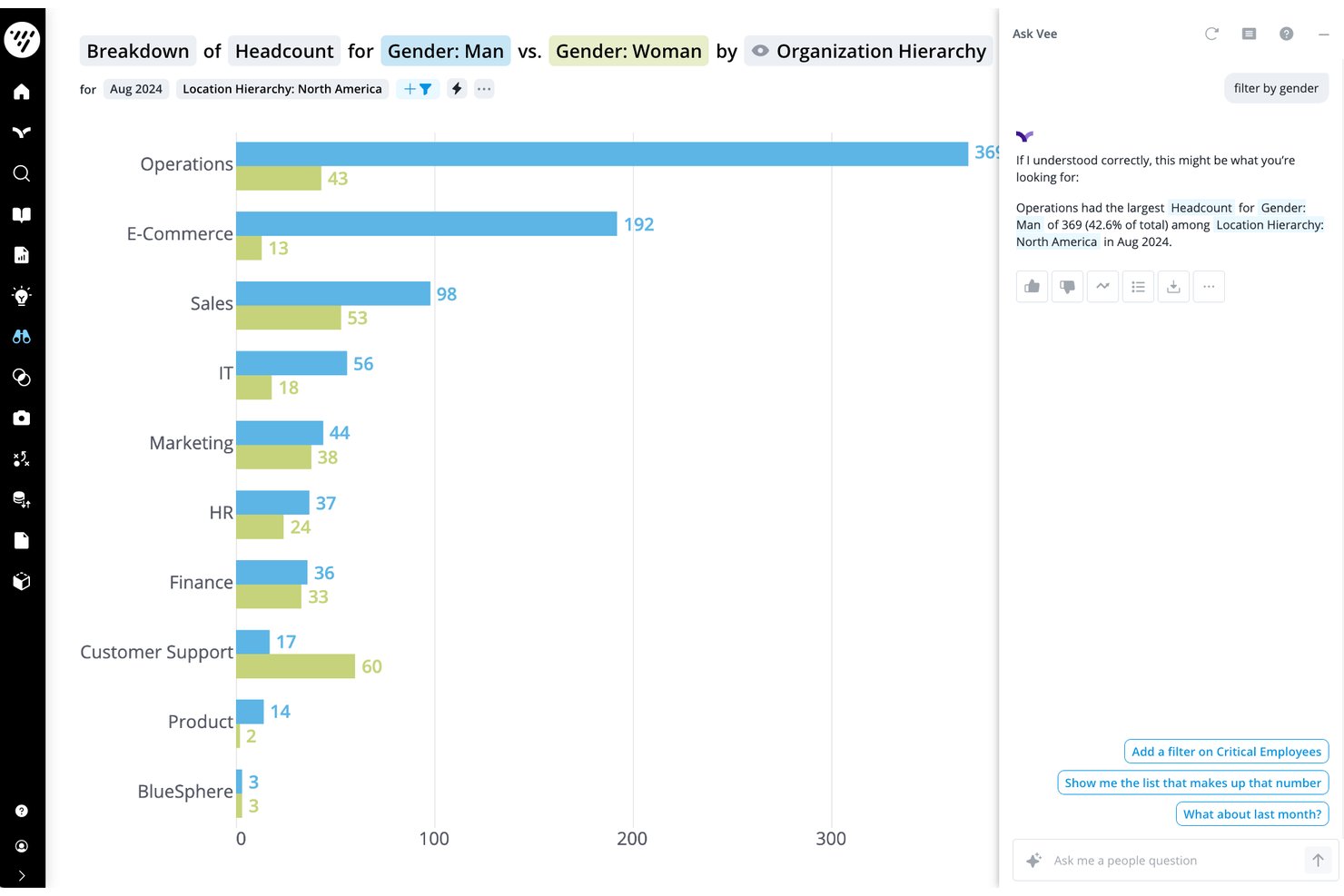
Visier is an AI-powered people analytics platform that unifies workforce data from multiple HR systems to deliver predictive insights, natural-language data queries via its Vee AI assistant, and executive-level reporting dashboards.
Who Is Visier Best For?
Visier is a strong fit for enterprise HR and people analytics teams at large organizations with complex, multi-system workforce data environments.
Why I Picked Visier
I picked Visier as one of the best because no other platform I've seen handles workforce analytics reporting at this depth. Vee, its generative AI assistant, lets my team query live people data in plain language, turning complex HR datasets into instant, visualized answers. Then Vee Boards surface those insights as executive-ready views, connecting headcount movements and compensation changes directly to P&L impact.
Visier Key Features
- Data unification and harmonization: Consolidates and structures HR, payroll, and operational data into a single, standardized platform.
- Automated benchmark analytics: Provides access to proprietary workforce benchmarks for comparing against industry peers.
- Role-based data permissions: Lets admins control access to sensitive datasets using granular, customizable user roles.
- Out-of-the-box analytics modules: Offers pre-built analyses for workforce planning, turnover, DEI, and talent mobility.
Visier Integrations
Visier offers native integrations with Workday, SAP SuccessFactors, Oracle HCM, ADP, UKG, Google Workspace, and Microsoft. An API is available for custom integrations, and Visier supports data connectors for Amazon S3, Amazon Redshift, Google BigQuery, and Microsoft SQL Server.
Pros and Cons
Pros:
- Conversational AI for natural-language queries
- Provides predictive analytics for HR outcomes
- Connects fragmented workforce data sources
Cons:
- Limited workflow automation beyond analytics
- Long implementation timeline for new clients
Best for personalized talent recommendations
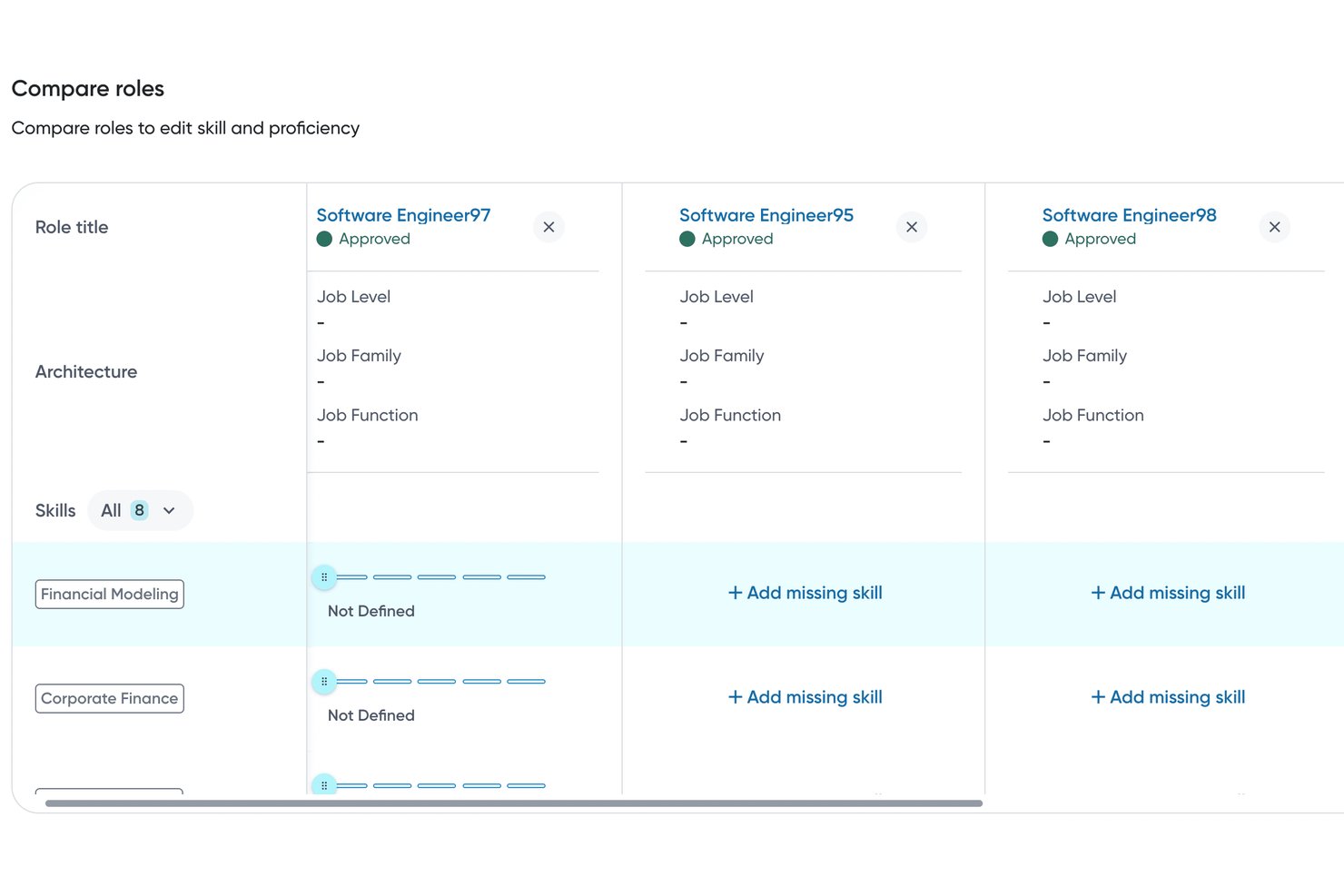
Eightfold AI is an AI-native talent intelligence platform that combines candidate matching, internal mobility, workforce analytics, and skills-based recruiting across the full talent lifecycle.
Who Is Eightfold AI Best For?
Eightfold AI is a strong fit for enterprise HR and talent acquisition teams at large organizations managing high-volume, complex hiring across multiple roles or regions.
Why I Picked Eightfold AI
Eightfold AI earns its spot on my shortlist because its matching engine infers skills not explicitly listed on a resume. A Java developer who's never written "Spring Boot" on their CV can still surface as a strong match based on their career trajectory. I also like the Employee Copilot, which delivers personalized career path recommendations and internal job matches tied to each person's actual skill profile, not just their job title.
Eightfold AI Key Features
- Recruiter Copilot: Automates scheduling, sends reminders, and helps draft job descriptions for open roles.
- Talent marketplace: Connects employees with internal growth opportunities based on mapped skills and interests.
- Resource management: Uses AI to staff projects and allocate team members according to real skill profiles.
- Diversity analytics and bias mitigation: Monitors candidate representation and includes candidate masking for equitable hiring.
Eightfold AI Integrations
Eightfold AI offers native integrations with Workday, SAP SuccessFactors, Oracle HCM Cloud, Greenhouse, iCIMS, Lever, ADP, SmartRecruiters, Taleo, Microsoft Outlook, and Jira. An API is available for custom integrations.
Pros and Cons
Pros:
- DEI analytics with candidate masking and audits
- Supports enterprise-scale talent mobility programs
- AI infers skills not on resumes
Cons:
- Initial configuration can be resource intensive
- Limited AI automation beyond recruiting workflows

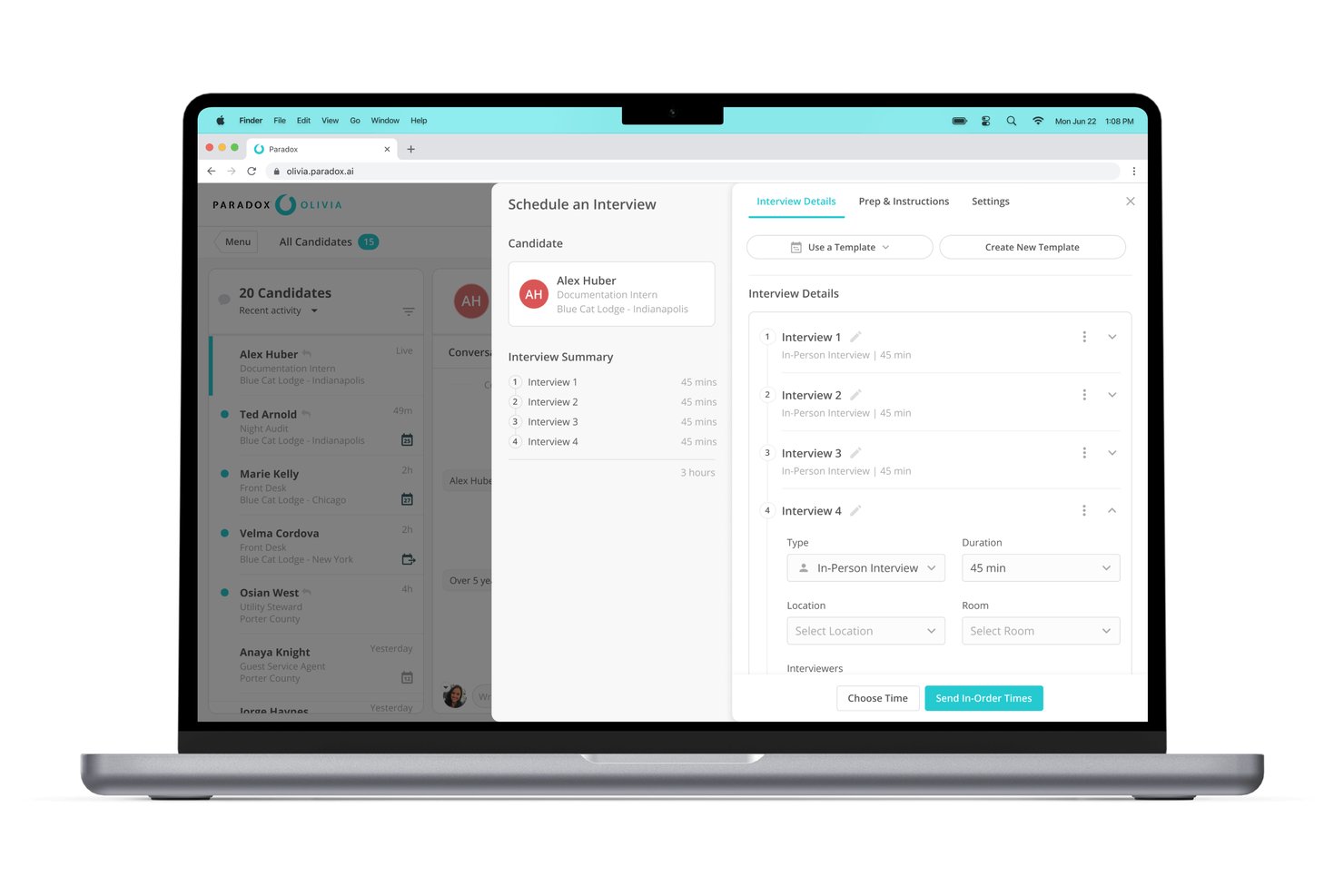
Paradox is a conversational AI recruiting platform built around Olivia, an AI assistant that automates candidate screening, interview scheduling, and onboarding through chat and SMS in 100+ languages.
Who Is Paradox Best For?
Paradox is a strong fit for enterprise and franchise organizations in high-volume hiring industries like retail, hospitality, and healthcare.
Why I Picked Paradox
Paradox earns its spot as one of the best on my shortlist because Olivia's conversational apply feature lets candidates apply through a text exchange on their phone, no login or form required. I especially like how the automated scheduling syncs directly with recruiter calendars, removing the back-and-forth entirely. In practice, that means a candidate can go from first contact to a confirmed interview in under five minutes.
Paradox Key Features
- Conversational career sites: Let candidates search and learn about roles using chat interactions instead of static listings.
- Conversational CRM: Manage and nurture talent pipelines through automated candidate engagement.
- Event automation: Handle registration, reminders, and candidate screening for hiring events with AI-driven workflows.
- Survey collection: Gather real-time feedback from candidates and interviewers through SMS or chat-based surveys.
Paradox Integrations
Paradox offers native integrations with Workday, SAP SuccessFactors, Indeed, and iCIMS. An API is available for custom integrations.
Pros and Cons
Pros:
- Automates high-volume hiring workflows end-to-end
- SMS and chat support in 100+ languages
- Conversational AI screens and qualifies candidates
Cons:
- Analytics limited to recruiting data only
- No internal mobility or employee experience features

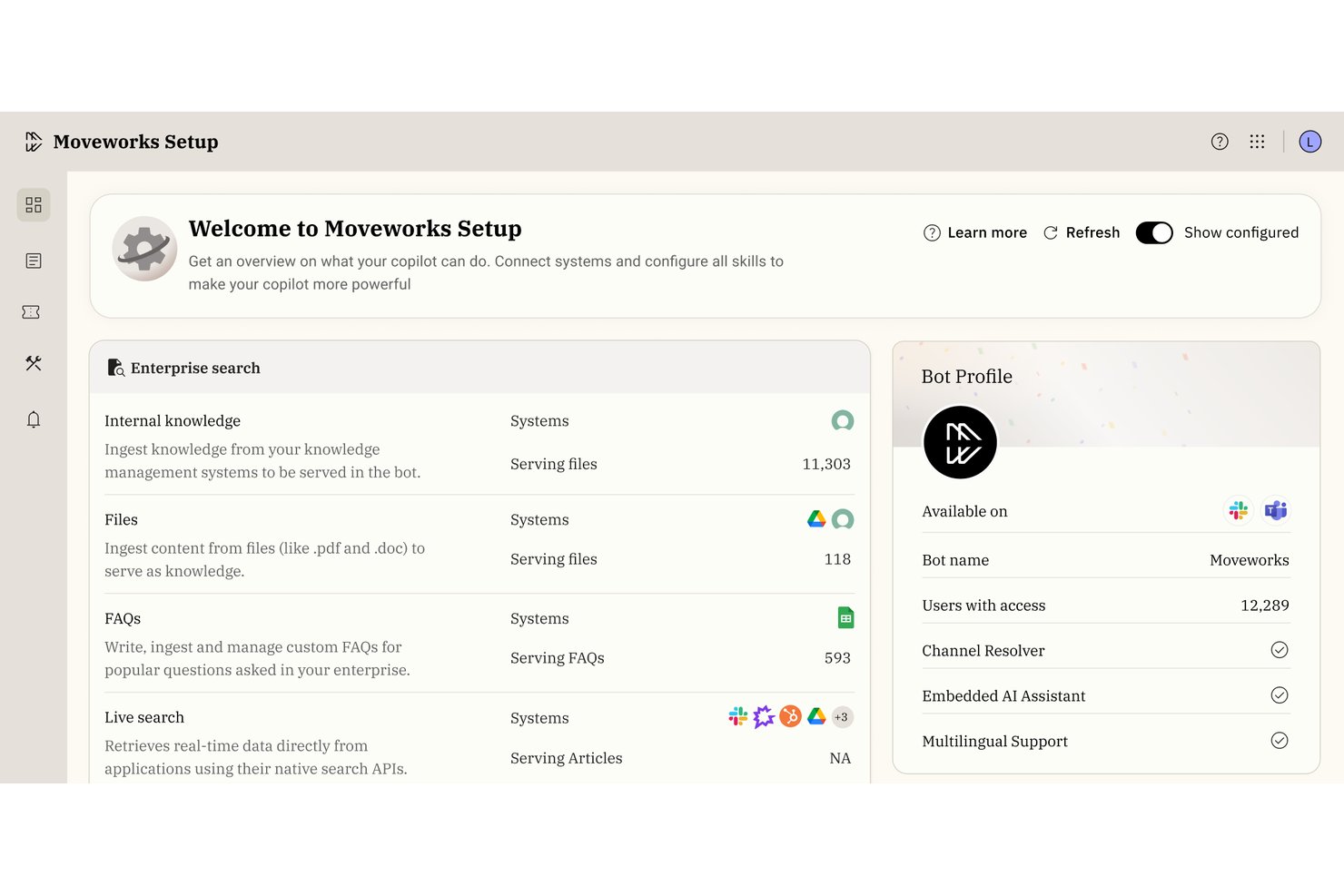
Moveworks is an agentic AI platform that delivers a conversational AI assistant for enterprise HR, IT, and Finance teams, combining workflow automation, enterprise search, and knowledge management across business applications.
Who Is Moveworks Best For?
Moveworks is a strong fit for large enterprises with distributed workforces where HR and IT teams need to handle high volumes of employee requests at scale.
Why I Picked Moveworks
I've included Moveworks in my top picks because its agentic Reasoning Engine doesn't just answer employee questions; it completes the underlying task, whether that's booking time off, generating an employee verification letter, or updating a legal name in the system. I particularly like the Knowledge Studio, which surfaces the right HR policy content without employees digging through a knowledge base. It runs natively inside Slack and Teams in over 100 languages.
Moveworks Key Features
- Agent Studio: Build and customize low-code AI workflows for HR use cases.
- Enterprise search: Query data and documents across connected HR systems using natural language.
- Multi-system integrations: Connects with platforms like Workday, ServiceNow, and Jira for unified support.
- Compliance controls: Includes FedRAMP, SOC 2, HIPAA, and GDPR certifications for data privacy and security.
Moveworks Integrations
Moveworks offers native integrations with ServiceNow, Workday, Jira, Freshservice, Slack, and Microsoft Teams. An API is available for custom integrations.
Pros and Cons
Pros:
- Automatically translates support tickets
- Handles over 100 languages natively
- Completes HR tasks directly from chat
Cons:
- Limited talent matching and recruiting tools
- No predictive people analytics features

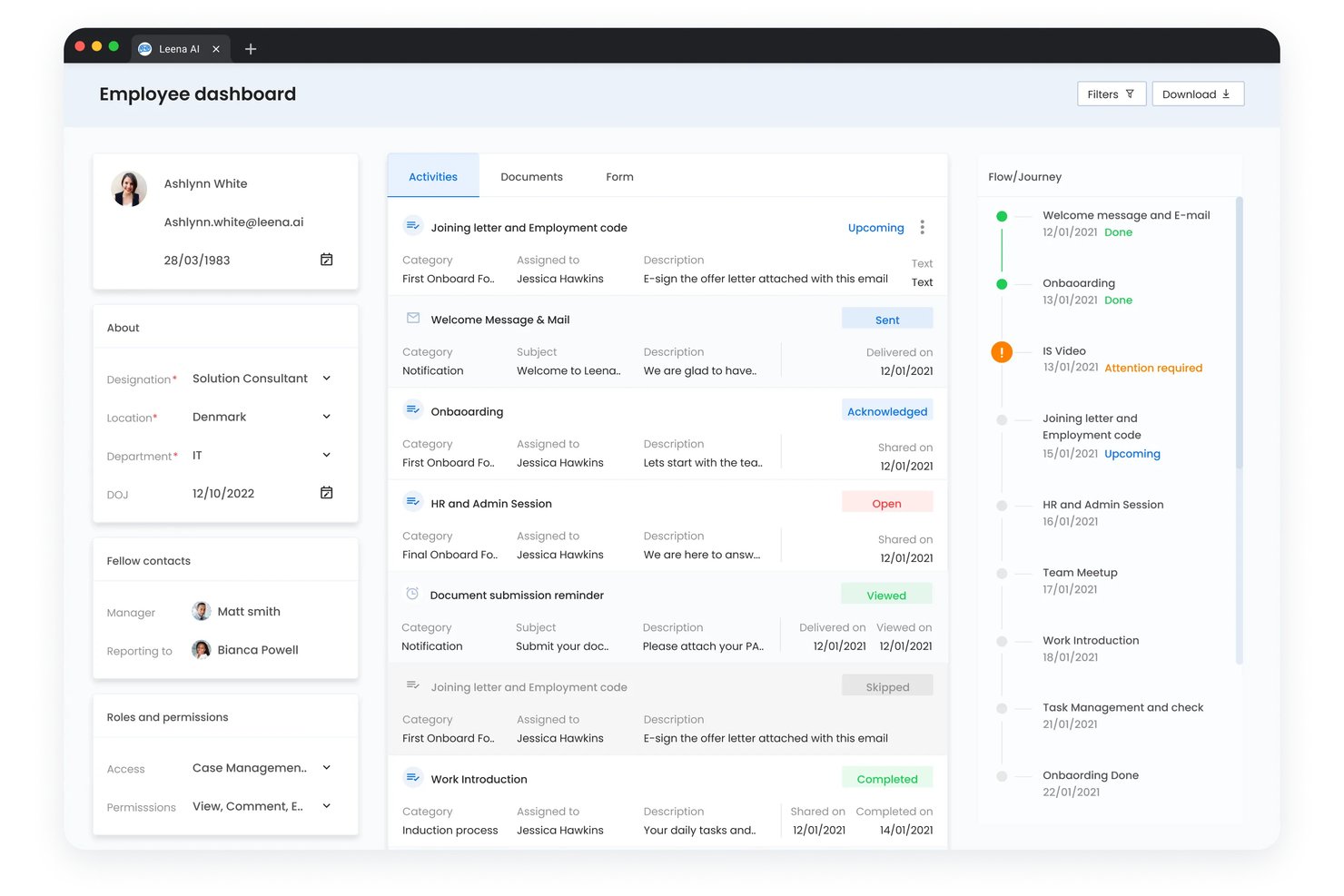
Leena AI is an agentic AI platform that automates employee query resolution across HR, IT, and finance through a conversational assistant that connects with HRIS, ITSM, payroll, and benefits systems.
Who Is Leena AI Best For?
Leena AI is a strong fit for HR operations teams at mid-to-large enterprises managing high volumes of employee queries across HR, IT, and finance.
Why I Picked Leena AI
Leena AI earns its spot on my shortlist because of how far it pushes autonomous employee query resolution. Harrison, its HR AI colleague, doesn't just answer questions. It executes transactions: filing leave requests, pulling payslips, or enrolling employees in benefits without any human handoff. I especially like AOPs (Agent Operating Procedures), which let you define exactly how Harrison handles multi-step workflows, including built-in guardrails that require manager approval before any irreversible action runs.
Leena AI Key Features
- Multilingual conversational assistant: Interacts in 100+ languages to address global workforce needs.
- Pre-built enterprise integrations: Connects with HRIS, ITSM, payroll, ATS, and messaging platforms out of the box.
- Multi-channel deployment: Offers access via web, mobile, Microsoft Teams, Slack, WhatsApp, and phone.
- Role-based access controls: Lets administrators set permissions and policies for data, actions, and information visibility.
Leena AI Integrations
Leena AI offers over 200 native integrations, including Workday, SAP SuccessFactors, Oracle Fusion, ServiceNow, Jira, Microsoft Teams, Slack, ADP, and Salesforce, with an API available for custom integrations.
Pros and Cons
Pros:
- Configurable workflow automation using AOPs
- Built-in compliance approvals
- Handles high query volume across departments
Cons:
- No native AI-driven candidate matching
- Predictive analytics capabilities are limited
Annen AI-programvare for bedrifter
Her er noen flere alternativer innen AI-programvare for bedrifter som ikke kom med på kortlisten, men som likevel er verdt å undersøke:
- Phenom
For talent experience optimization
- Beamery
For relationship-based talent engagement
- SAP SuccessFactors HCM
For global workforce management compliance
- Rippling
For unified HR and IT administration
- BambooHR®
For intuitive onboarding workflows
- Paylocity
For customizable payroll automation
- Gusto
For benefits administration simplicity
- Deel HR
For international payroll compliance
- HiBob
For modern employee engagement features
- UKG
For flexible workforce scheduling solutions


How I Evaluate AI Business Software
Every tool on this list has to show that its AI does more than surface-level automation—I want to see it actually improving decisions around hiring, retention, or workforce planning. I split my evaluation into core functionality every platform needs and the differentiating factors that separate good from great.
Core Functionality (Table Stakes For This List)
When I'm selecting tools for my list, I rank each one on a scale from 0 (does not offer the functionality) to 5 (excels in this area) for each core functionality listed below. Then, I calculate the tool's total score as a percentage. Each tool needs to achieve a minimum total score of 65% to be considered for inclusion.
- AI Workflow Automation: I evaluate whether the tool automates multi-step HR processes like onboarding sequences, approval chains, and case routing with adaptive logic.
- Predictive People Analytics: The platform should surface forward-looking models—like attrition risk scores or engagement trends—not just backward-looking dashboards.
- Generative AI Assistant: I check whether the assistant handles real employee questions about leave policies or benefits and can draft content like job descriptions.
- AI Talent Matching: Tools should go beyond keyword matching to rank candidates by inferred skills and support internal mobility, not just external sourcing.
- Natural Language Data Queries: HR users should be able to ask plain-language questions like "show me turnover by department" and get visual, exportable results.
- AI Governance & Compliance: I look for bias detection, explainability features, and audit logs that help your team trust and defend AI-driven decisions.
Once I have a list of tools that meet the criteria, I consider what sets each platform apart.
Differentiating Factors (What Sets Vendors Apart)
Here's how I compare and contrast different vendors:
Standout Features
Autonomous AI agents are a major differentiator—I look for platforms where an agent can handle multi-step tasks like scheduling interviews and sending follow-ups without manual prompting. Custom model training matters too, especially when your team needs outputs tuned to your internal job architecture or competency frameworks. I also evaluate cross-app workflow automation, since most HR teams run separate systems for recruiting, payroll, and performance—and the best tools connect those handoffs automatically.
Beyond Features
Data privacy and model governance are top of mind when I evaluate these platforms—I check whether employee data stays isolated in your tenant or gets fed into shared training models. Compliance certifications like SOC 2 Type II and ISO 27001 also carry weight, especially for HR teams handling sensitive personal records. Integration depth rounds out the picture. A tool that connects natively to your HRIS, payroll system, and Slack means less manual data entry and faster adoption across your team.
Slik velger du AI-programvare for bedrifter
Det er lett å gå seg vill i lange funksjonslister og komplekse prismodeller. For å hjelpe deg med å holde fokus mens du går gjennom den unike prosessen med å velge programvare, får du her en sjekkliste over faktorer du bør ha i tankene:
| Faktor | Hva du bør vurdere |
|---|---|
| Skalerbarhet | Vil programvaren håndtere veksten i antall brukere og datamengde de neste to til tre årene? |
| Integrasjoner | Kan den kobles til de viktigste HRIS-, lønns-, ATS- og kommunikasjonsplattformene dine? |
| Tilpasningsmuligheter | Kan arbeidsflyter, språk og brukerroller tilpasses teamets struktur? |
| Brukervennlighet | Kan ikke-tekniske HR- og forretningsbrukere ta den i bruk på en trygg måte uten løpende hjelp fra IT? |
| Implementering og innføring | Hvor lang tid vil oppsettet ta? Finnes det praktisk støtte, eller må teamet selv finne ut av konfigurasjonen? |
| Kostnad | Hvor forutsigbare er de løpende kostnadene? Finnes det kostnader basert på brukere, forespørsler eller arbeidsflyter som du bør være oppmerksom på? |
| Sikkerhetstiltak | Er personvern, kryptering og tilgangskontroller for brukere tilstrekkelig robuste for arbeidsstyrkens data? |
| Etterlevelseskrav | Støtter leverandøren standardene du trenger – som GDPR eller HIPAA – særlig hvis virksomheten opererer globalt? |
Hva er AI-programvare for bedrifter?
AI-programvare for bedrifter er digitale plattformer som bruker kunstig intelligens til å automatisere, analysere og forbedre prosesser innen HR, drift og administrasjon. Disse verktøyene hjelper team med å håndtere repetitive oppgaver, finne frem til nyttig innsikt og svare på spørsmål eller forespørsler i naturlig språk – slik at HR-medarbeidere kan ta datadrevne beslutninger raskere og på en mer tilgjengelig måte.
Funksjoner
Når du velger AI-programvare for bedrifter, bør du se etter følgende viktige funksjoner:
- AI-arbeidsflytautomatisering: Bruker maskinlæring til å håndtere repetitive HR-oppgaver som introduksjon av nyansatte, dokumenthåndtering eller godkjenningsflyt uten manuell inngripen.
- Prediktiv analyse: Avdekker fremtidige trender i arbeidsstyrkemålinger som avgang, engasjement eller prestasjon ved hjelp av avansert datamodellering, noe som hjelper organisasjoner med å utnytte AI-strategiverktøy bedre.
- Generativ AI-assistent: Tilbyr en samtalebasert samtalerobot eller kopilot som svarer på spørsmål fra HR og ansatte, utarbeider dokumenter eller hjelper med tolkning av retningslinjer.
- Talentmatching: Evaluerer kandidatprofiler og matcher dem med ledige stillinger eller interne muligheter basert på ferdigheter, erfaring og egnethet.
- Dataspørringer på naturlig språk: Lar brukere stille spørsmål eller be om rapporter på dagligspråk uten å ha behov for tekniske ferdigheter eller programmering.
- AI-styring og etterlevelse: Overvåker og beskytter mot skjevheter, ivaretar personvernet og opprettholder revisjonsspor for å støtte ansvarlig og forklarbar bruk av AI.
- Integrasjonsmuligheter: Kobler seg til sentrale HR-, lønns-, produktivitets- og kommunikasjonsverktøy, skaper en samlet arbeidsflyt og unngår datasiloer.
- Tilpasset modelltrening: Gjør det mulig for organisasjoner å finjustere AI-modeller ved hjelp av egne data, slik at resultatene gjenspeiler virksomhetens spesifikke terminologi og prosesser.
- Brukervennlige kontrollpaneler: Visualiserer viktige måltall og analyser slik at HR-team kan forstå dataene og handle raskt.
- Automatisk dokumentgenerering: Produserer kontrakter, retningslinjer og kommunikasjon med minimal innsats, noe som reduserer manuelt skrivearbeid og administrativ arbeidsbelastning.
Fordeler
Implementering av AI-programvare for virksomheter gir flere fordeler for teamet og virksomheten din. Her er noen av fordelene du kan se frem til:
- Tidsbesparelser: Automatiserer repetitive HR-oppgaver som introduksjon av nyansatte, saksbehandling og godkjenninger, slik at teamet ditt kan fokusere på arbeid med større effekt.
- Bedre beslutningstaking: Synliggjør prediktive analyser og handlingsrettet innsikt, slik at du kan identifisere trender innen avgang, engasjement og prestasjon før de eskalerer.
- Forbedret medarbeideropplevelse: Gir rask og personlig tilpasset støtte gjennom generative AI-assistenter og grensesnitt på naturlig språk for spørsmål om retningslinjer, lønn eller permisjon.
- Bedre talentresultater: Fremskynder og forbedrer matching av kandidater og intern mobilitet ved å utnytte AI-drevne funksjoner for matching av ferdigheter og roller.
- Forbedret etterlevelse: Overvåker skjevheter, logger AI-drevne beslutninger og gir forklarbarhet, slik at prosessene dine forblir transparente og klare for revisjon.
- Fleksibel ressursbruk: Tilpasser seg teamets vekst, endringer i arbeidsflyten eller en ny teknologistakk gjennom tilpassbare modeller og gode integrasjonsmuligheter.
- Datadrevet rapportering: Forvandler spørringer på dagligspråk til handlingsrettede rapporter og diagrammer, slik at kompleks informasjon blir tydelig for HR og ledelsen.
Kostnader og priser
Valg av AI-programvare for virksomheter krever en forståelse av de ulike prismodellene og abonnementene som er tilgjengelige. Kostnadene varierer basert på funksjoner, teamstørrelse, tillegg og mer. Tabellen nedenfor oppsummerer vanlige abonnementer, gjennomsnittsprisene deres og typiske funksjoner som er inkludert i AI-programvareløsninger for virksomheter:
Sammenligningstabell for abonnementer for AI-programvare for virksomheter
| Abonnementstype | Gjennomsnittspris | Vanlige funksjoner |
|---|---|---|
| Gratisabonnement | $0 | Grunnleggende arbeidsflytautomatisering, begrensede analyser, AI-assistent med begrenset bruk og brukerstøtte fra fellesskapet. |
| Personlig abonnement | $5-$25/bruker/måned | Standardanalyser, AI-drevne spørringer, grunnleggende integrasjoner og tilpasning for individuell bruk. |
| Forretningsabonnement | $20-$70/bruker/måned | Avansert automatisering, prediktiv analyse, tilgang for hele teamet, forbedret sikkerhet og prioritert brukerstøtte. |
| Virksomhetsabonnement | $60-$150/bruker/måned | Tilpassede integrasjoner, avansert etterlevelse, tilpasset modelltrening, dedikert oppstartsstøtte og administratorkontroller. |
Vanlige spørsmål om AI-forretningsprogramvare
Her er noen svar på vanlige spørsmål om AI-forretningsprogramvare:
Hvordan støtter AI-forretningsprogramvare personvern og samsvar med regelverk?
AI-forretningsprogramvare inkluderer ofte datakryptering, revisjonslogger og rollebaserte tilgangskontroller, noe som hjelper deg med å oppfylle personvernstandarder og krav til samsvar med regelverk. Mange AI-løsninger tilbyr sertifiseringer som SOC 2 og støtte for GDPR, i tillegg til lokaliserte alternativer for datalagring for globale team, slik at småbedriftseiere kan håndtere risiko under driften med høy sikkerhet av høy kvalitet og beskytte kundeopplevelsen.
Kan brukere uten teknisk bakgrunn enkelt sette opp og bruke AI-forretningsprogramvare?
Ja, de fleste AI-verktøy uten kode er utformet med intuitive kontrollpaneler og grensesnitt på naturlig språk, slik at HR- og forretningsbrukere ikke trenger tekniske ferdigheter for å konfigurere komplekse arbeidsflyter, kjøre rapporter eller samhandle med AI-funksjoner. Dette hjelper små team med å håndtere de daglige forretningsprosessene og behovene innen prosjektstyring uten å trenge en utvikler, noe som gjør det til et av de beste AI-verktøyene for rask konfigurering.
Hva er forskjellen mellom automatisering og AI i forretningsprogramvare?
Automatisering utfører handlinger basert på logikk, mens kunstig intelligens tolker data og forutsier resultater. Generativ AI hjelper for eksempel med innholdsproduksjon, oppsummering av notater og beslutningstaking, i stedet for bare å utføre repetitive oppgaver som å oppdatere regneark eller sende oppfølginger. Dette gjør teknologien ideell for idémyldring rundt nye markedsføringsideer og for å opprettholde en konsekvent merkevareidentitet.
Vil AI-forretningsprogramvare fungere med de eksisterende HR-systemene mine?
Ja, ledende løsninger tilbyr vanligvis innebygde integrasjoner eller API-er, slik at du kan synkronisere data og automatisere arbeidsflyter på tvers av HRIS-, lønns- og kommunikasjonsverktøyene dine. Dette kobler sammen hele programvareøkosystemet ditt for å støtte bedre dataanalyse og gi deg handlingsrettet innsikt på tvers av teamets arbeidsområde. Det er utviklet for å støtte salgsteamene dine, organisere delte dokumenter og håndtere innkommende henvendelser til kundestøtten.
Hvor forutsigbare blir abonnementskostnadene etter hvert som bruken øker?
Prisen er vanligvis basert på antall brukere eller bruk, og skaleres etter teamets størrelse. Det er viktig å undersøke om det påløper ekstrakostnader når behovene for data eller automatisering øker. Finn ut om de tilbyr en gratisplan eller tydelige prisnivåer, slik at du sikrer at programvaren forblir skalerbar når du skal forutsi vekst. Dette gjelder enten du bruker ferdiglagde maler for SEO og sosiale medier eller trenger å transkribere lydfiler til tekst.