

De 10 beste programvarene for arbeidsstyring i store virksomheter i 2026

Beste programvare for arbeidsstyring i virksomheter – kortliste


Programvare for arbeidsstyring i store virksomheter hjelper organisasjoner med å koordinere turnusplanlegging, tidsregistrering, bemanningsprognoser og overholdelse av regelverk på tvers av hele arbeidsstyrken. Hvis du ser etter en bedre måte å administrere geografisk spredte team på, holde arbeidsbudsjettene i balanse og ligge i forkant av endringer i regelverket, er det viktig å finne riktig programvare.
Denne veiledningen samler de beste plattformene for arbeidsstyring som er utviklet for kompleksiteten i store virksomheter, med mål om å forbedre medarbeideropplevelsen. Dermed kan du sammenligne alternativene dine, se hva som skiller dem fra hverandre og velge en løsning som samsvarer med HR- og forretningsmålene dine.
Hvorfor du kan stole på våre programvareanbefalinger
Teamet vårt har testet og anmeldt programvare siden 2012. Vi er selv HR-eksperter, så vi vet hvor vanskelig og hvor viktig det er å velge riktig programvare.
I denne guiden har vi vurdert verktøyene gjennom praktisk testing og uavhengig research og gitt dem poeng ut fra våre utvelgelseskriterier. Vi bygger også på innsikt fra ledende eksperter i bransjen og erfarne HR-eksperter.
Anmeldelsene våre bygger på vår egen redaksjonelle vurdering. De er ikke et salgsargument.
Ekspertanmeldere:
Sammenligningstabell for programvare for arbeidsstyring i virksomheter
Denne sammenligningstabellen oppsummerer prisopplysningene for mine beste utvalgte programmer for arbeidsstyring i virksomheter:
| Tool | Best For | Trial Info | Price | ||
|---|---|---|---|---|---|
| 1 | Best for automated employee lifecycle tracking | Free demo available | From $5/employee/month | Website | |
| 2 | Best for UK retail and healthcare scheduling | Free demo available | From $500/month | Website | |
| 3 | Best for omnichannel workforce forecasting accuracy | Free demo available | Pricing upon request | Website | |
| 4 | Best for biometric time and attendance tracking | 30-day free trial | From $50/month | Website | |
| 5 | Best for payroll-connected multi-location scheduling | Free demo available | Pricing upon request | Website | |
| 6 | Best for employee engagement and shift autonomy | 14-day free trial + free demo available | From $5/user/month | Website | |
| 7 | Best for integrated compliance management tools | Free demo available | Pricing upon request | Website | |
| 8 | Best for AI-powered scheduling automation | 30-day free trial + free demo available | Pricing upon request | Website | |
| 9 | Best for demand-driven, flexible scheduling | Free demo available | Pricing upon request | Website | |
| 10 | Best for real-time frontline staff scheduling | Free demo available | Pricing upon request | Website |
Anmeldelser av den beste programvaren for arbeidsstyring i virksomheter
Nedenfor finner du mine detaljerte sammendrag av den beste programvaren for arbeidsstyring i virksomheter som kom med på kortlisten min. Anmeldelsene mine gir en detaljert gjennomgang av funksjonene, de beste bruksområdene og integrasjonene til hver plattform, slik at du kan finne den som passer best for deg.
Deel HR
Best for automated employee lifecycle tracking

Deel HR is a global HRIS platform that centralizes employee and contractor management, onboarding automation, compliance tracking, payroll operations, and workforce analytics across 150+ countries.
Who Is Deel HR Best For?
Deel HR is best suited for enterprise organizations managing distributed teams across multiple countries and worker types who need centralized HR infrastructure with built-in compliance controls.
Why I Picked Deel HR
I picked Deel HR because enterprise workforce management isn’t just about hiring — it’s about controlling the full employee lifecycle across jurisdictions. Deel automates onboarding, contract generation, compliance tracking, time off policies, and offboarding within one unified system. The ability to apply country-specific workflow logic ensures large enterprises can maintain standardized HR processes while adapting to regional labor laws without manual oversight.
Deel HR Key Features
- Compliance hub: Monitors local regulatory updates and flags risks across jurisdictions with recommended actions.
- People analytics dashboards: Build workforce reports filtered by country, department, worker type, or cost center.
- Time off management: Create region-specific leave policies with automated approval workflows.
- Org chart and directory: View a live, searchable workforce structure across global teams.
Deel HR Integrations
Deel HR integrates with major platforms including Workday, SAP SuccessFactors, BambooHR, QuickBooks, Xero, NetSuite, Greenhouse, Slack, Okta, and Azure AD. It also provides API access, webhooks, and Zapier connectivity for custom integrations.
Pros and Cons
Pros:
- Scales with business growth
- Strong global compliance tools
- Unified workforce management
Cons:
- Setup can be time-consuming
- Limited workforce scheduling
New Product Updates from Deel HR

Deel Expands Stablecoin Wallet to 80+ Countries
Deel expands its Stablecoin Wallet to 80+ countries with dollar-backed balances and optional rewards. This gives eligible contractors more ways to hold and manage earnings inside Deel. For more information, visit Deel’s official site.
 .

Rotageek
Best for UK retail and healthcare scheduling
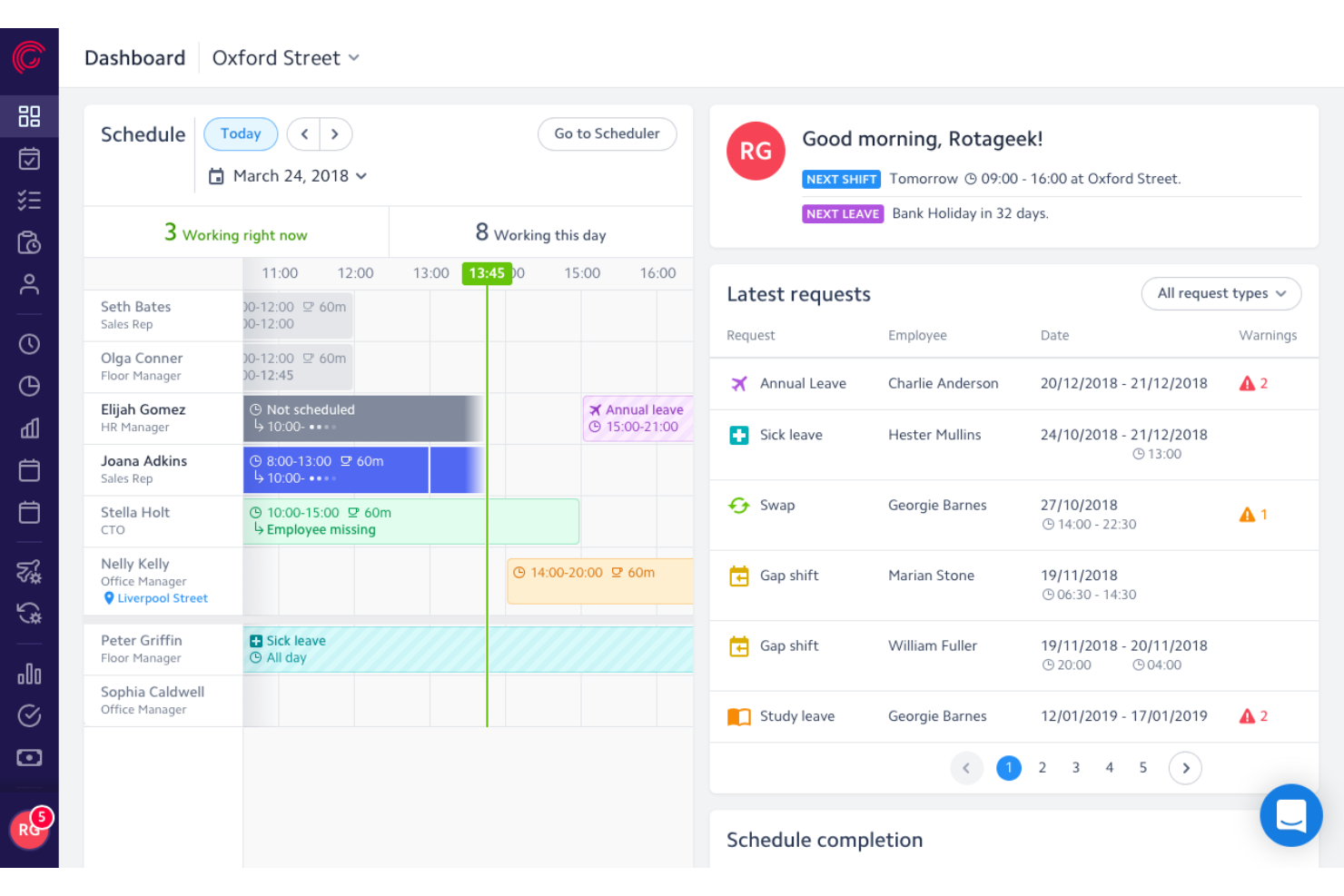
Rotageek is a workforce management platform built around AI-driven scheduling, demand-based labor forecasting, and time and attendance tracking, with dedicated configurations for retail and healthcare environments.
Who Is Rotageek Best For?
Rotageek is a strong fit for UK and European retail and healthcare enterprises that need AI-driven scheduling and precise demand forecasting across dozens or hundreds of locations.
Why I Picked Rotageek
I picked Rotageek as one of the best because it's purpose-built for UK retail and healthcare environments in a way most enterprise workforce management platforms simply aren't. Its AI Auto Scheduling engine generates millions of compliant shift combinations in roughly 30 seconds, factoring in skills, working-time regulations, and fairness rules simultaneously. Pair that with 15-minute interval demand forecasting using real footfall and sales data, and you get scheduling that actually reflects what's happening on the floor at Nando's or an NHS trust.
Rotageek Key Features
- Skills and certifications matching: Tag employees with specific skills and qualifications so that multi-activity shifts are automatically assigned to workers who meet the role's requirements.
- Employee self-service mobile app: Employees can view schedules, swap or pick up shifts, submit availability, request leave, and receive push notifications directly from iOS or Android devices.
- Labour Modelling add-on: Converts demand forecast outputs into deployable rotas and supports what-if scenario modeling for volume changes, cost pressures, and new operating hours.
- Multi-step timesheet approval: Auto-generated timesheets move through a configurable approval hierarchy before payroll export, with custom pay codes aligned to labor laws and company policies.
Rotageek Integrations
Rotageek offers native integrations with Zellis HCM Cloud, IRIS HR and Payroll, ELMO, and Cascade. ADP, Oracle, SAP, and Sage are listed as enterprise partners, while APIs, webhooks, and SFTP support custom connections.
Pros and Cons
Pros:
- Employee mobile app supports real-time shift swaps
- 15-minute demand forecasting boosts staffing accuracy
- AI auto scheduling handles complex compliance rules
Cons:
- Mobile app users report reliability issues
- Quote-based pricing requires sales contact
Verint
Best for omnichannel workforce forecasting accuracy
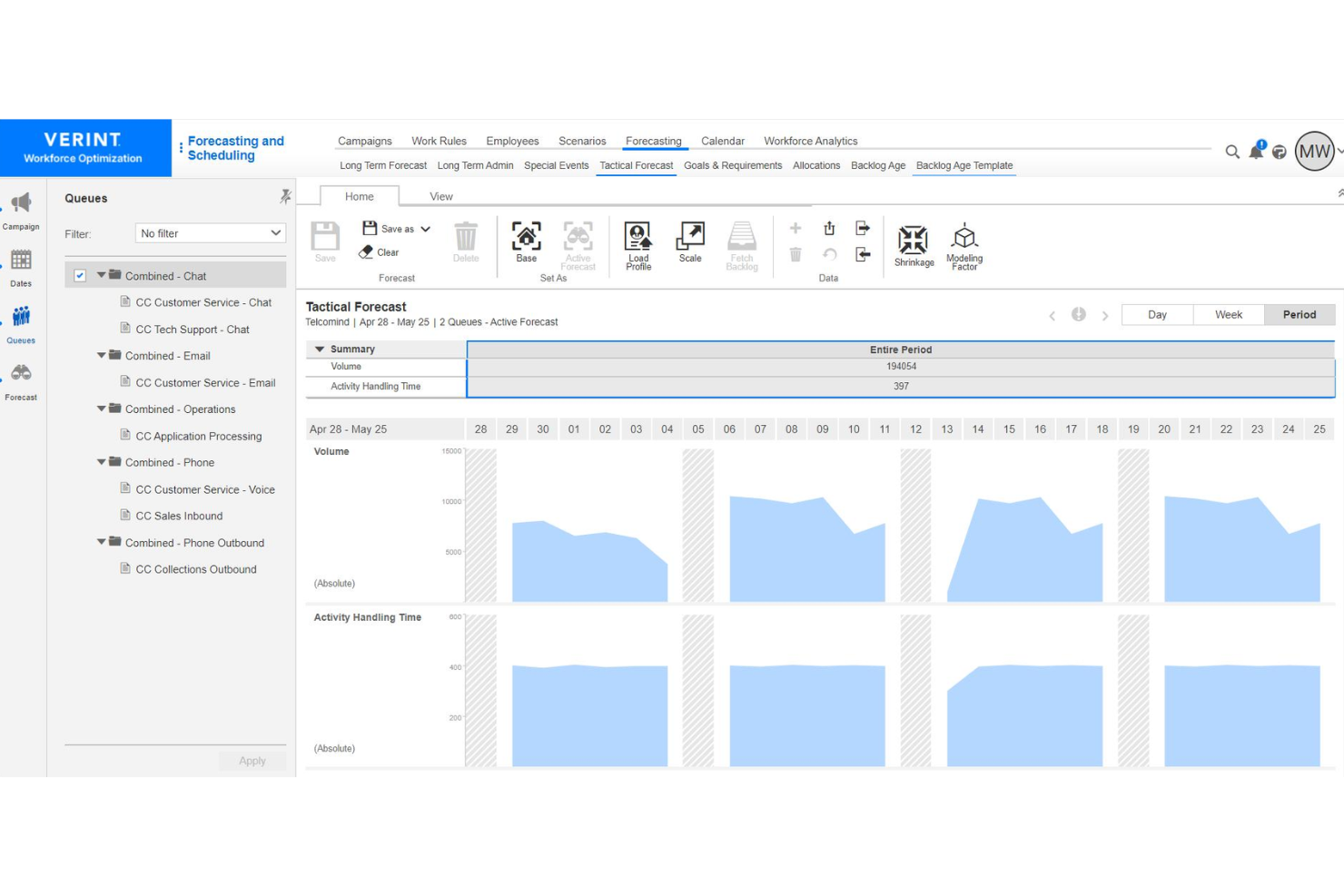
Verint is an enterprise workforce management software platform built for contact centers and back-office operations, offering features for omnichannel forecasting, scheduling, adherence monitoring, and real-time analytics.
Who Is Verint Best For?
Large contact centers and service operations leaders needing unified forecasting across voice, chat, email, and digital engagement channels.
Why I Picked Verint
I picked Verint because I rely on its AI-driven omnichannel forecasting engine to align workforce plans across call, chat, and email. I use its intraday reforecasting and shrinkage modeling, so my team can adapt staffing to real-time changes in demand patterns.
Verint Key Features
- Automated scheduling: Build multi-skill schedules based on forecasted demand and employee availability.
- Performance tracking dashboards: Monitor real-time adherence, agent KPIs, and historical productivity metrics.
- Self-service shift swaps: Enable employees to request, swap, or bid on available shifts in a unified portal.
Verint Integrations
Verint offers native integrations with Salesforce, Microsoft, ServiceNow, and Workday, and provides an API for custom integrations.
Pros and Cons
Pros:
- Automated compliance with labor regulations
- Real-time intraday reforecasting capabilities
- AI-powered omnichannel forecasting models
Cons:
- Configuration requires specialized expertise
- Interface can feel overly complex

TimeTrex
Best for biometric time and attendance tracking

TimeTrex is a workforce management platform that combines time and attendance, employee scheduling, payroll processing, HR management, and recruitment tools into a single configurable system for large organizations.
Who Is TimeTrex Best For?
TimeTrex is a strong fit for mid-to-large organizations managing hourly and salaried workforces across multiple locations, particularly those that need payroll, scheduling, and time tracking under one system.
Why I Picked TimeTrex
I've included TimeTrex in my top picks because of how it handles biometric time and attendance at scale. What stands out to me is that it turns any standard tablet or phone into a facial recognition time clock, so large organizations don't need to invest in proprietary hardware across every site. The recognition is fast (as little as one second to clock in) and handles real-world variables like hats, glasses, and facial hair. Each punch also captures GPS location and an optional photo, which I find especially useful for distributed teams or multi-site operations where verifying who clocked in and from where actually matters.
TimeTrex Key Features
- Drag-and-drop shift scheduling: Build and manage employee schedules using a visual calendar, with support for rotating shifts, split shifts, and absence coverage across multiple locations.
- Multi-jurisdiction payroll processing: Run payroll across different states, provinces, or countries, with automatic tax calculations and support for multiple pay periods and wage types.
- Job costing and work order tracking: Assign employee punches to specific jobs, tasks, or cost centers so you can track labor costs at a granular level.
- Document management: Store and manage employee documents directly in their HR profiles, with expiry date tracking and access controls tied to user permissions.
TimeTrex Integrations
TimeTrex offers integrations with payroll and accounting platforms, including ADP, QuickBooks, Sage, Paychex, and Surepay, as well as Ceridian, CompuPay, Tyler Technologies, and Vensure Employer Services. It also provides an API for custom integrations.
Pros and Cons
Pros:
- Biometric facial recognition prevents buddy punching
- Built-in job costing and invoicing
Cons:
- Lacks automatic payroll tax filing
- Some modules look dated and confusing
New Product Updates from TimeTrex
TimeTrex Redesigns Workforce Management With New Payroll, Scheduling, and AI Tools
TimeTrex redesigns its workforce management experience with new dashboards, scheduling and timesheet tools, a rebuilt payroll workflow, and expanded AI assistance. These updates give teams more flexible ways to manage schedules, payroll, reporting, and employee data. For more information, visit TimeTrex’s official site.
 .
Best for payroll-connected multi-location scheduling
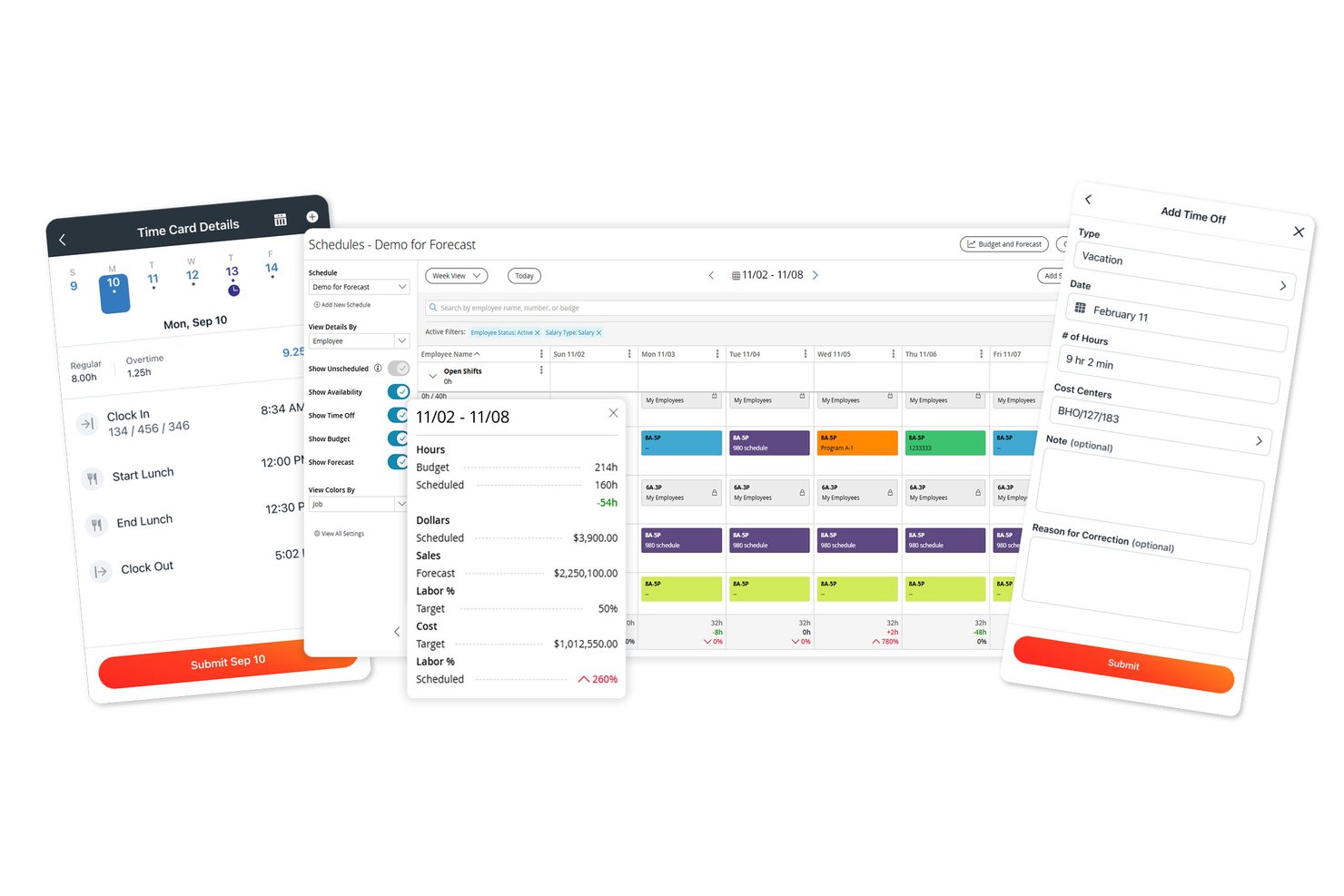
Paylocity is an HCM platform that combines payroll, time and attendance tracking, AI-assisted scheduling, labor forecasting, and workforce analytics across multi-location organizations.
Who Is Paylocity Best For?
Paylocity suits mid-to-large organizations that need scheduling and time tracking connected directly to payroll, especially those managing staff across multiple locations.
Why I Picked Paylocity
I picked Paylocity as one of the best because it's built around the idea that scheduling and payroll shouldn't live in separate systems. When a manager at a 30-location organization builds a shift schedule, hours and labor allocations flow directly into payroll, with the system flagging anyone who may need retroactive or prorated pay. I also like that AI-driven shift recommendations factor in historical staffing trends, while certification validation ensures only qualified employees get scheduled for roles that require it.
Paylocity Key Features
- Multi-method time collection: Employees can clock in via badge, biometric reader, mobile app, tablet kiosk, or web, with geolocation verification available on mobile.
- Certification validation: The scheduling tool checks employee certifications against role requirements before placing them on a shift.
- Labor cost allocation: Web timesheets let managers assign hours to jobs, projects, cost centers, and labor levels within a single entry.
- Break and meal-waiver attestation: Time clocks and kiosks can prompt attestations at the point of punch, recording responses directly to the timecard and triggering supervisor alerts.
Paylocity Integrations
Paylocity offers hundreds of integrations, including marketplace integrations with Comprehensive Integration, Checkr, Aeqium, Microsoft Entra, Google Workspace, and Okta. Its APIs support custom connections for employee, punch, punch-import, and scheduling data.
Pros and Cons
Pros:
- Break attestations can alert supervisors
- AI shift recommendations draw on historical trends
- Schedules by role, location, and skill
Cons:
- Reports can take extra work to customize
- Some users report missing punches and glitches
New Product Updates from Paylocity

Paylocity Adds Candidate Engagement and Talent Rediscovery Agents
Paylocity adds Candidate Engagement and Talent Rediscovery Agents to automate candidate outreach, scheduling, and re-engagement. This helps recruiting teams move candidates through hiring faster. For more information, visit Paylocity’s official site.
 .

Deputy
Best for employee engagement and shift autonomy
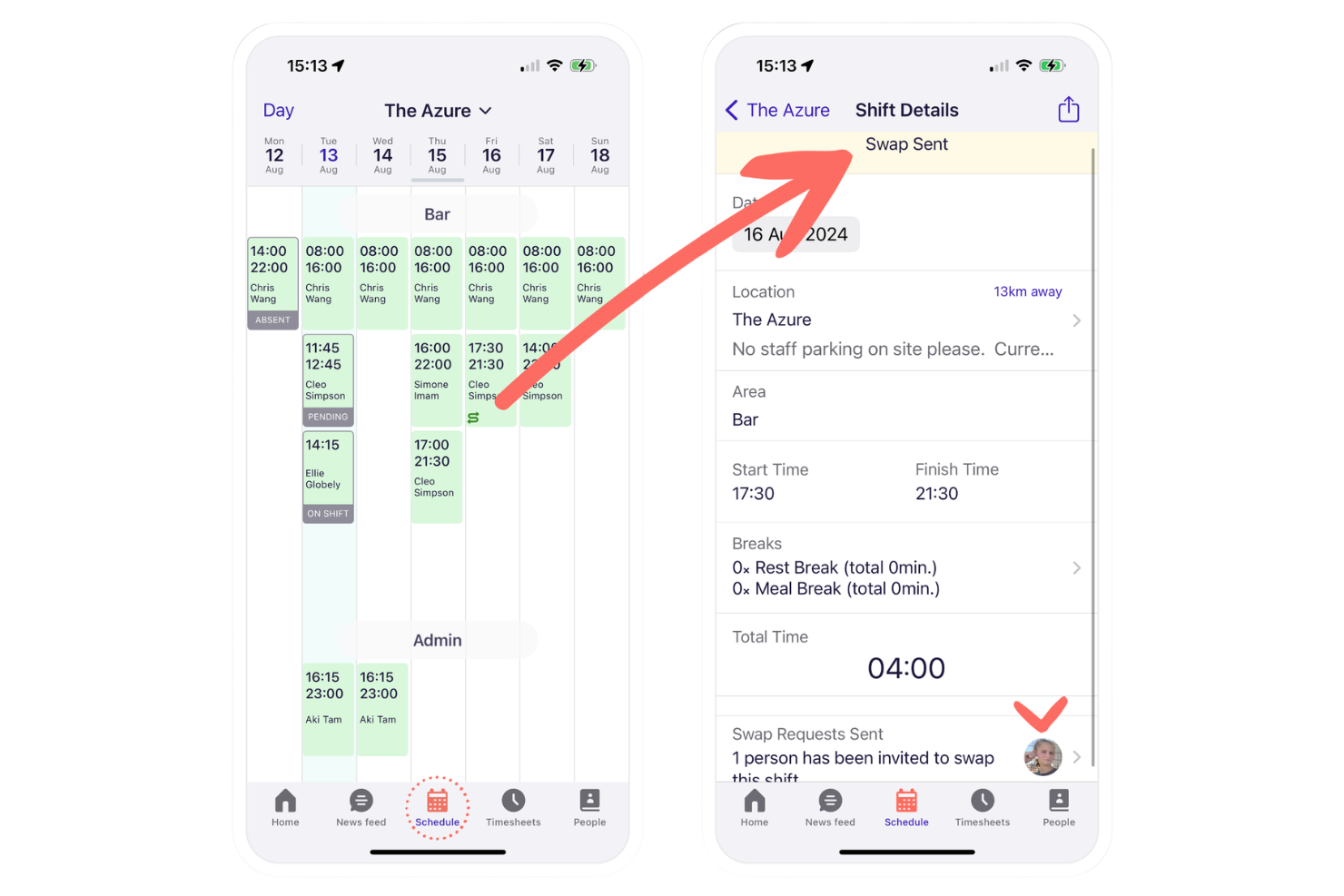
Deputy is a workforce management platform for large and mid-sized organizations that handles shift scheduling, time and attendance, team communication, and labor compliance from a centralized dashboard.
Who Is Deputy Best For?
Deputy is a strong fit for retail, hospitality, and healthcare teams managing shift-based, hourly staff across multiple locations.
Why I Picked Deputy
I picked Deputy as one of the best because I see how its shift swapping, open shift bidding, and news feed help my frontline teams feel more in control of their schedules and communication. I also use its real-time attendance alerts daily.
Deputy Key Features
- Task management: Managers can assign and track task completion for individual employees or teams.
- Demand forecasting: Auto-generates shift schedules based on projected business activity and staffing needs.
- Time clock with photo capture: Employees clock in and out using a digital time clock that verifies identity with a photo.
Deputy Integrations
Deputy offers native integrations with ADP, Gusto, QuickBooks Online, Xero, Square, BambooHR, Paychex, Netsuite, CloudPayroll, MYOB, and Zapier. An API is available for custom integrations.
Pros and Cons
Pros:
- In-app news feed for workforce communications
- Automated labor compliance monitoring tools
- Employee shift swap and bidding features
Cons:
- Occasional delays syncing schedule updates across teams
- GPS clock-in issues reported by users
Best for integrated compliance management tools
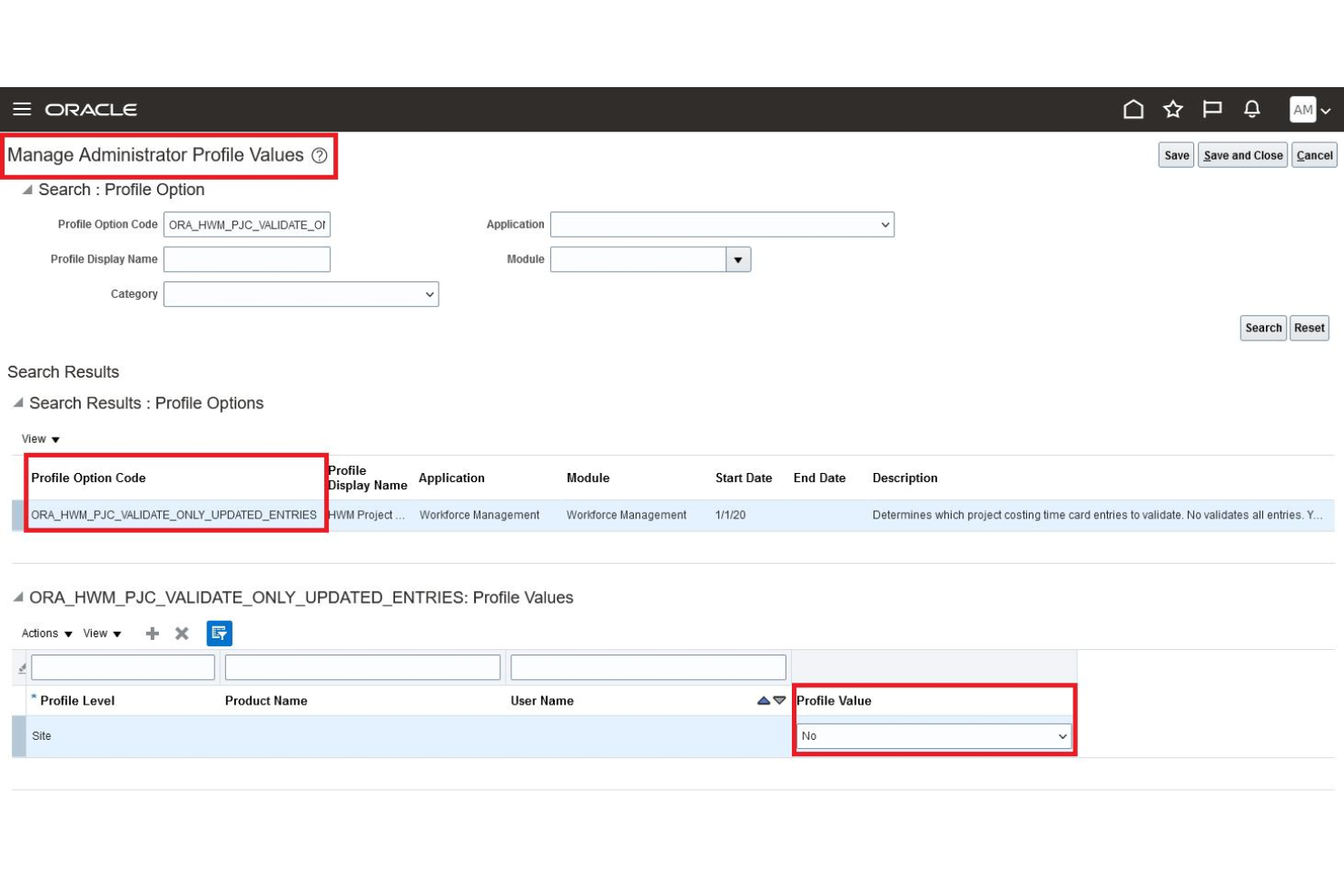
Oracle HCM Cloud is a comprehensive talent management and enterprise workforce management platform that delivers time tracking, scheduling, absence management, and workforce optimization in a unified solution.
Who Is Oracle HCM Cloud Best For?
Large international organizations that need centralized compliance and workforce management across multiple locations and jurisdictions.
Why I Picked Oracle HCM Cloud
I picked Oracle HCM Cloud because I need built-in compliance rules that automatically track regional labor regulations. My team relies on audit-ready reporting and real-time alerts when schedules or timecards don’t align with compliance standards.
Oracle HCM Cloud Key Features
- Advanced scheduling engine: Automates shift assignments based on business priorities.
- Centralized time capture: Collects time worked from multiple devices and locations.
- Absence and leave management: Tracks, approves, and audits leave requests within the platform.
Oracle HCM Cloud Integrations
Oracle HCM Cloud offers native integrations with Oracle ERP Cloud, Oracle Cloud Payroll, Oracle Learning, Salesforce, Workday, Shopify, and SAP SuccessFactors, and provides an API for custom integrations.
Pros and Cons
Pros:
- Highly configurable global scheduling and time capture
- Real-time compliance alerts and monitoring
- Advanced AI-driven workforce planning tools
Cons:
- Implementation process requires significant time investment
- Reporting customization options are limited
Workday
Best for AI-powered scheduling automation
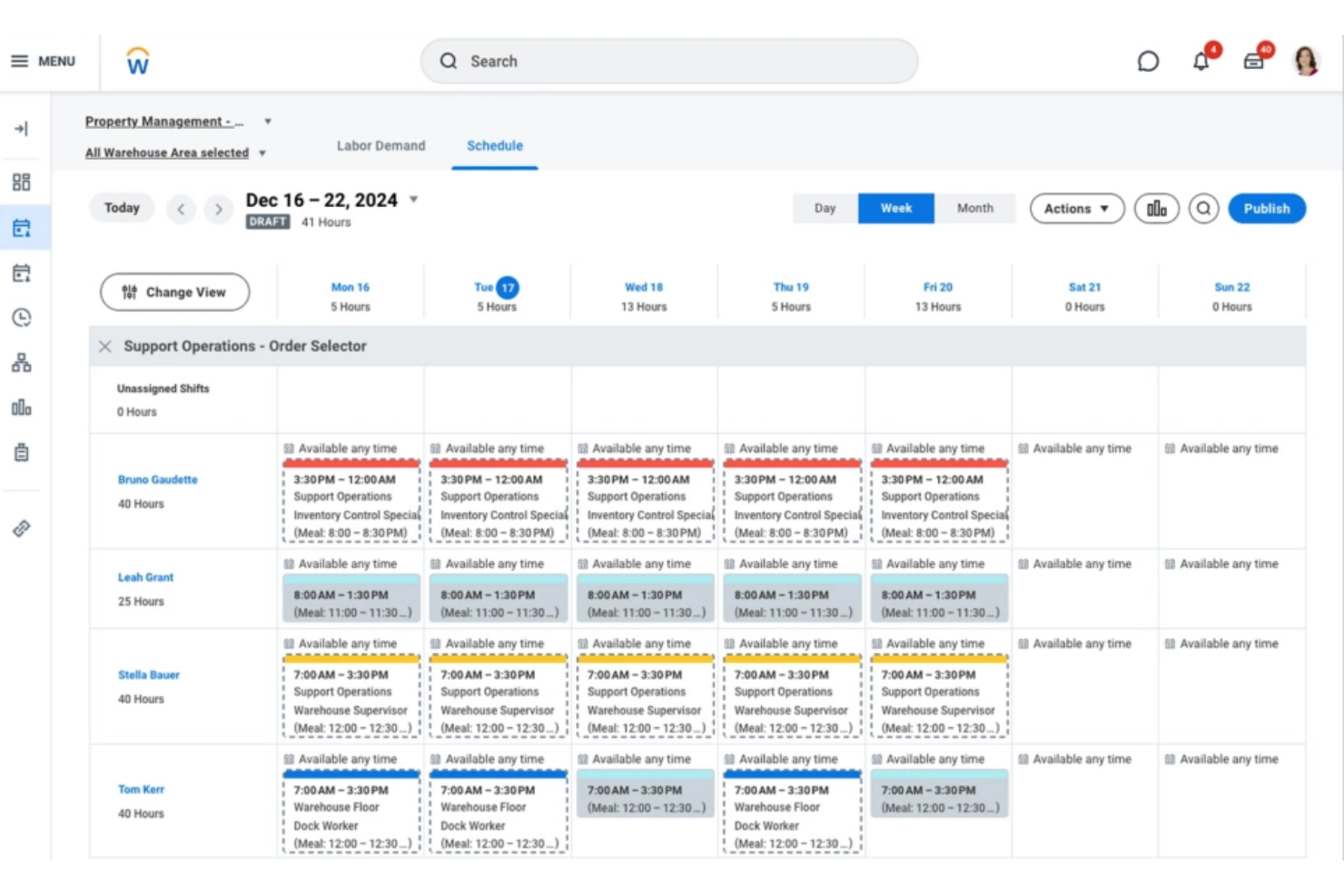
Workday is an enterprise workforce management platform that brings together scheduling, time tracking, and labor analytics in one integrated system designed for large organizations.
Who Is Workday Best For?
Workday fits large organizations and enterprises that need to manage complex workforce scheduling and compliance at scale.
Why I Picked Workday
I picked Workday as one of the best because its AI-powered scheduling automation stands out when tackling fluctuating staffing needs. My team is able to automate shift assignments, adapt coverage in real time, and reduce manual scheduling steps.
Workday Key Features
- Time tracking integration: Syncs time clocks and digital payroll systems for accurate labor reporting.
- Labor compliance monitoring: Tracks changing labor laws and flags compliance risks in real time.
- Mobile workforce access: Lets employees and managers handle scheduling and time tracking from mobile devices.
Workday Integrations
Workday offers native integrations with platforms like Salesforce, Microsoft 365, Oracle, ADP, and Okta, and provides an API for custom integrations.
Pros and Cons
Pros:
- Detailed absence and attendance tracking
- Real-time labor compliance flagging
- AI-driven shift and workload recommendations
Cons:
- Reporting customization can be limited
- Initial implementation requires significant time
Dayforce
Best for demand-driven, flexible scheduling

Dayforce is an enterprise workforce management solution that centralizes employee scheduling, time tracking, labor planning, and compliance oversight in one system.
Who Is Dayforce Best For?
Dayforce fits mid-sized to large enterprises that need real-time, demand-driven workforce coverage in sectors like retail, healthcare, and manufacturing.
Why I Picked Dayforce
I picked Dayforce because its demand-driven, flexible scheduling lets my team automatically align staffing levels to real-time forecasts and shifting business needs. I also rely on built-in shift swapping and mobile self-service to empower frontline employees and boost overall retention.
Dayforce Key Features
- Labor compliance engine: Monitors wage and hour regulations for every shift.
- Real-time analytics dashboard: Presents live workforce metrics to improve operational efficiency for managers.
- Absence management tools: Tracks and approves employee leave requests.
Dayforce Integrations
Dayforce offers native integrations with Workday, Oracle, and SAP SuccessFactors. An API is available for custom integrations.
Pros and Cons
Pros:
- Mobile tools for workforce self-service
- Built-in compliance monitoring for shift hours
- Real-time scheduling based on labor demand
Cons:
- Implementation process is often time-intensive
- Reporting tools can feel restrictive
Infor
Best for real-time frontline staff scheduling
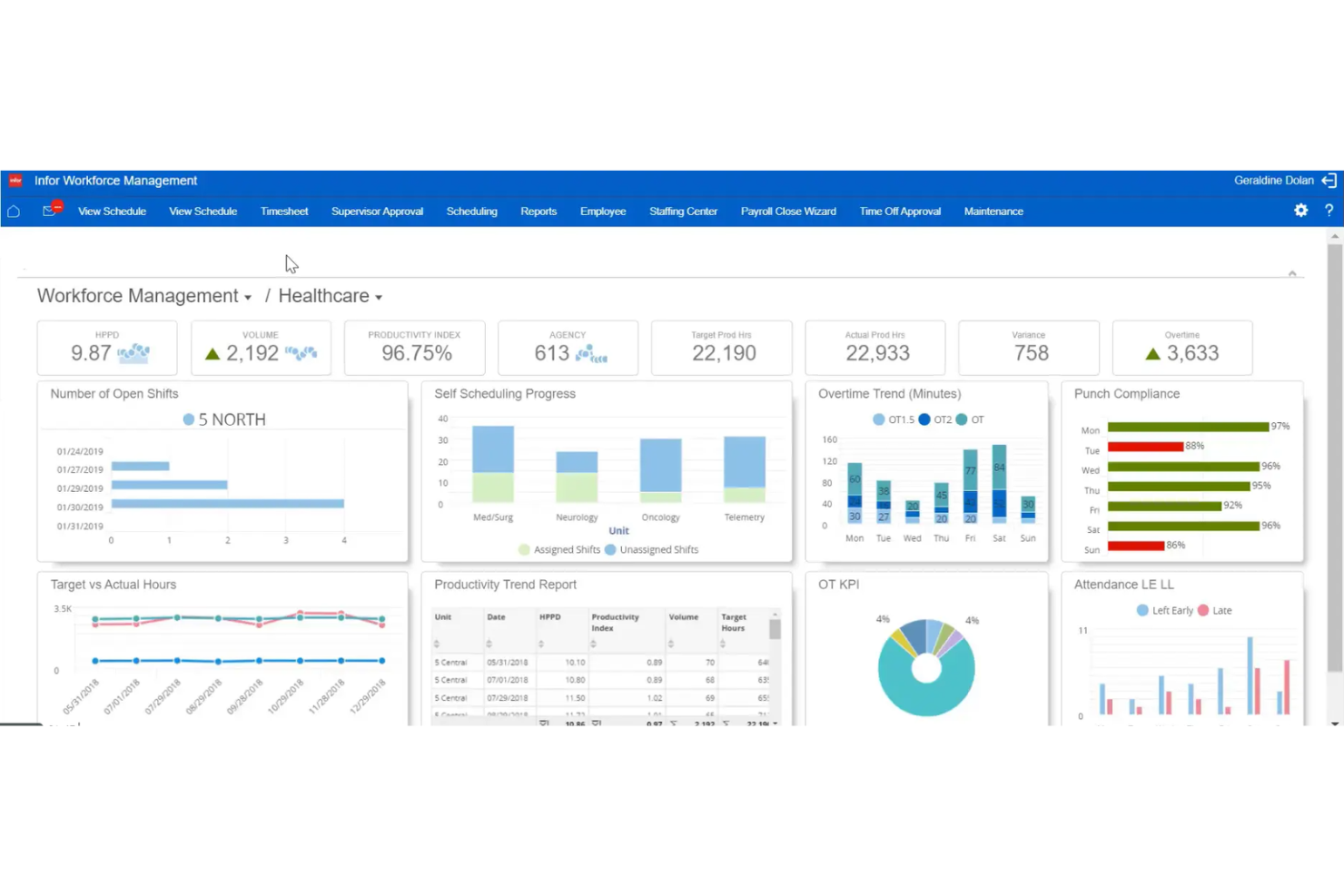
Infor Workforce Management is an enterprise workforce management software solution that centralizes scheduling, time and attendance, labor tracking, and compliance management for large businesses with complex staffing needs.
Who Is Infor Best For?
Infor is ideal for large organizations with hourly frontline workforces in sectors like healthcare, manufacturing, and retail that need intelligent, dynamic scheduling.
Why I Picked Infor
I picked Infor because my team can generate and adjust frontline schedules instantly as staffing needs fluctuate. I also use its demand-driven forecasting and mobile self-scheduling, so our managers and employees stay in sync throughout each shift.
Infor Key Features
- Automated leave management: Track and approve employee leave requests within the platform.
- Compliance rule engine: Enforce labor compliance policies for shift scheduling and attendance.
- Labor analytics dashboard: Analyze workforce data with built-in, customizable dashboards and reports to drive fast, accurate decision-making.
Infor Integrations
Native integrations are not publicly listed. Infor provides an API for custom integrations.
Pros and Cons
Pros:
- Mobile access for frontline employees
- Automated compliance with labor regulations
- Real-time intraday reforecasting for schedules
Cons:
- Implementation often requires specialized expertise
- Interface can be difficult to navigate
Annen programvare for arbeidsstyring i virksomheter
Her er noen flere alternativer for programvare for arbeidsstyring i virksomheter som ikke kom med på kortlisten min, men som likevel er verdt å se nærmere på:
- Legion
For AI-optimized hourly workforce planning
- SAP SuccessFactors
For global labor law compliance adaptation
- Zoho People
For multi-location workforce data centralization
- Quinyx
For industry-specific workforce optimization
- ADP Workforce Now
For integrated payroll and analytics tools
- Insightful
For advanced productivity and activity analytics
- Connecteam
For mobile-first daily operations management
- UKG
For complex compliance scheduling needs
- Rippling
For unified HR, IT, and finance automation


How I Evaluate Enterprise Workforce Management Software
When a company needs to schedule 5,000 shift workers across dozens of sites, I look for two things: baseline capabilities every tool must have, and the differentiators that set the best options apart.
Core Functionality (Table Stakes For This List)
When I'm selecting tools for my list, I rank each one on a scale from 0 (does not offer the functionality) to 5 (excels in this area) for each core functionality listed below. Then, I calculate the tool's total score into a percentage. Each tool needs to achieve a minimum total score of 75% to be considered for inclusion.
- Employee Scheduling: I look for automated, rule-based scheduling that handles multi-location shift plans, open shift posting, and employee self-service swaps.
- Time & Attendance Tracking: Capture methods matter here—I evaluate clock-in options like mobile, biometric, and kiosk alongside exception alerts and absence management.
- Labor Demand Forecasting: I check whether the platform uses historical data, seasonal trends, or real-time demand signals to project staffing needs by role and location.
- Compliance Management: Overtime rules, mandatory rest periods, predictive scheduling laws—I evaluate how well each tool enforces labor regulations across jurisdictions.
- Workforce Analytics: Dashboards should cover labor cost, attendance trends, and schedule adherence. I look for drill-down reporting and role-based visibility for managers.
- HRIS & Payroll Integration: I check for native connectors to platforms like Workday, ADP, and SAP SuccessFactors, plus open APIs for syncing hours and employee data.
Once I have a list of tools that meet the criteria, I consider what sets each platform apart.
Differentiating Factors (What Sets Vendors Apart)
Here's how I compare and contrast different vendors:
Standout Features
Skills and certifications tracking is a big differentiator. When you're staffing a hospital floor or a manufacturing line, the system should auto-match qualified workers to shifts that require specific licenses. I also evaluate employee self-service tools, since frontline workers need mobile access to pick up open shifts, submit time-off requests, and swap schedules without manager bottlenecks. AI-powered recommendations round things out by surfacing staffing risks and absence patterns before they become coverage gaps.
Beyond Features
Enterprise workforce management rollouts often span thousands of users across multiple regions, so I evaluate each vendor's implementation support closely. Phased rollout options and dedicated project teams make a real difference when onboarding a 10,000-person retail chain versus a single office. Industry-specific fit also matters—a platform pre-loaded with healthcare scheduling rules saves months of configuration compared to a generic setup. I check security posture too, looking for SOC 2 Type II certification, role-based access controls, and regional data hosting options for global workforces.
Slik velger du programvare for arbeidsstyring i virksomheter
Det er lett å gå seg vill i lange funksjonslister og komplekse prismodeller. For å hjelpe deg med å holde fokus når du går gjennom den unike prosessen din for valg av programvare, får du her en sjekkliste over faktorer du bør ha i bakhodet:
| Faktor | Hva du bør vurdere |
|---|---|
| Skalerbarhet | Kan systemet håndtere vekst i antall ansatte eller omorganiseringer på tvers av flere lokasjoner, både nå og i fremtiden? Ta hensyn til forventet antall ansatte og nye lokasjoner. |
| Integrasjoner | Kobler det seg direkte til lønns-, HR- eller analyseverktøyene teamet ditt allerede bruker? Vær oppmerksom på systemer som krever omveier eller spesialutvikling for sentrale apper. |
| Tilpasningsmuligheter | Kan arbeidsflyter, felt og prosesser konfigureres slik at de samsvarer med retningslinjene dine? Lite fleksible verktøy kan føre til motstand mot å ta løsningen i bruk og manuelle omveier. |
| Brukervennlighet | Vil ikke-tekniske brukere, særlig lokale ledere, lære seg systemet raskt? Se etter demonstrasjoner eller praktiske prøveperioder med ansatte som skal bruke det daglig. |
| Implementering og innføring | Hva kreves for å migrere data og sette opp arbeidsflyter? Undersøk om det finnes migreringsverktøy, veiledet innføring og tilgjengelig opplæringsstøtte. |
| Kostnad | Er prisene transparente og forutsigbare, med alle nødvendige moduler inkludert? Vær oppmerksom på skjulte tillegg, ekstra supportkostnader eller gebyrer for flere brukere. |
| Sikkerhetstiltak | Tilbyr leverandøren rollebasert tilgang, revisjonslogger og relevante sertifiseringer som SOC 2 eller ISO 27001? Sørg for at datakontrollene samsvarer med kravene til etterlevelse. |
| Tilgjengelig kundestøtte | Er hjelperessurser, chat eller telefonstøtte tilgjengelig når det passer for deg, og i din region eller på ditt språk? Bekreft tjenestenivåavtaler og eskaleringsrutiner før du forplikter deg. |
Hva er programvare for arbeidsstyring i virksomheter?
Programvare for administrasjon av arbeidsstyrken i virksomheter er digitale systemer som sentraliserer og automatiserer kjerneprosesser som planlegging, tidsregistrering, fraværsadministrasjon og resultatoppfølging for store organisasjoner med flere lokasjoner. Disse plattformene samler medarbeiderdata, støtter overholdelse av krav innen menneskelige ressurser og kobler sammen HR-operasjoner i stor skala, noe som gjør det enklere for team å koordinere arbeidet og for ledere å få tilgang til sanntidsinnsikt i arbeidsstyrken.
Funksjoner
Når du velger programvare for administrasjon av arbeidsstyrken i virksomheter, bør du se etter følgende nøkkelfunksjoner:
- Sentralisert medarbeiderdatabase: Lagrer og organiserer medarbeiderprofiler, registre, kontrakter og dokumenter på ett sted, slik at de enkelt kan åpnes og oppdateres på tvers av lokasjoner.
- Registrering av arbeidstid og tilstedeværelse: Registrerer arbeidstimer, inn- og utstemplinger og fravær, og synkroniserer data for lønn, etterlevelse og revisjon.
- Automatisert planlegging: Gjør det mulig for ledere å opprette, tildele og justere arbeidsplaner og skift basert på etterspørsel, tilgjengelighet og arbeidsregler.
- Administrasjon av permisjon og fravær: Holder oversikt over PTO, sykedager og permisjonssøknader, slik at brukere kan søke om fri og ledere kan godkjenne eller avslå søknader etter tydelige regler.
- Etterlevelsesstyring: Håndhever arbeidsregelverk, virksomhetens retningslinjer og fagforeningsregler, og varsler HR om mulige brudd eller risiko for overtid.
- Resultatstyring: Støtter målsetting, 360-graders tilbakemeldinger, kompetanseevalueringer og vurderingssykluser for å følge medarbeidernes utvikling og samordne den med virksomhetens mål.
- Selvbetjeningsportal for medarbeidere: Lar medarbeidere oppdatere personopplysninger, sjekke arbeidsplaner, sende inn forespørsler og se dokumenter, noe som reduserer manuelle henvendelser til HR.
- Tilpassbare arbeidsflyter: Gjør det mulig for team å utforme eller endre HR- og administrative prosesser, godkjenninger og varsler slik at de samsvarer med organisasjonens behov.
- Rapportering og analyse: Tilbyr dashbord og eksporterbare rapporter om trender i arbeidsstyrken, kostnader, produktivitet og etterlevelse for å støtte datadrevne beslutninger.
- Rollebasert tilgangskontroll: Begrenser synlighet og tilgang til sensitiv informasjon basert på brukerroller, noe som styrker personvernet og den interne styringen.
Fordeler
Implementering av programvare for administrasjon av arbeidsstyrken i virksomheter gir flere fordeler for teamet og virksomheten din. Her er noen av fordelene du kan se frem til:
- Ensartede prosesser på tvers av lokasjoner: Standardiserer planlegging, datahåndtering og etterlevelsesprosedyrer for distribuerte team, og reduserer uoverensstemmelser og manuelle feil.
- Forbedret etterlevelse av regelverk: Automatiserer registrering av timer, retningslinjer og arbeidsregler, og minimerer risikoen for bøter eller brudd.
- Sentralisert oversikt over arbeidsstyrken: Samler alle medarbeiderdata, statusopplysninger og resultathistorikk i ett dashbord, slik at HR og ledere enklere kan ta informerte beslutninger.
- Større selvstendighet for medarbeidere: Gir brukerne mulighet til å oppdatere personopplysninger, søke om fri og få tilgang til dokumenter gjennom en intuitiv selvbetjeningsportal.
- Bedre ressursfordeling: Utnytter planleggingsverktøy og analyser til å fordele arbeidsmengden effektivt og redusere både underbemanning og unødvendig overtid.
- Optimaliserte HR-operasjoner: Reduserer repetitive administrative oppgaver ved å automatisere godkjenninger, dokumenthåndtering og varsler.
- Forbedret datasikkerhet: Beskytter sensitive arbeidsstyrkedata med smidige tilgangskontroller og revisjonsspor tilpasset personvernstandarder for virksomheter.
Kostnader og priser
Ved valg av programvare for administrasjon av arbeidsstyrken i virksomheter er det nødvendig å forstå de ulike prismodellene og tilgjengelige abonnementene. Kostnadene varierer basert på funksjoner, teamstørrelse, tillegg og mer. Tabellen nedenfor oppsummerer vanlige abonnementer, gjennomsnittsprisene deres og typiske funksjoner som er inkludert i programvareløsninger for administrasjon av arbeidsstyrken i virksomheter:
Sammenligningstabell for abonnementer for programvare for administrasjon av arbeidsstyrken i virksomheter
| Abonnementstype | Gjennomsnittspris | Vanlige funksjoner |
|---|---|---|
| Gratisabonnement | $0 | Grunnleggende medarbeiderkatalog, enkel tidsregistrering, begrenset antall brukerplasser og grunnleggende rapportering. |
| Personlig abonnement | $5-$10/bruker/måned | Støtte for én bruker, verktøy for fraværsadministrasjon, dokumentlagring og grunnleggende planleggingsfunksjoner. |
| Bedriftsabonnement | $12-$25/bruker/måned | Støtte for flere brukere, skiftplanlegging, varsler om manglende etterlevelse, selvbetjeningsportal og standardanalyser. |
| Virksomhetsabonnement | $30-$50/bruker/måned | Avansert automatisering, tilpassede arbeidsflyter, rollebasert tilgang, ubegrenset antall lokasjoner og prioritert kundestøtte. |
Vanlige spørsmål om programvare for arbeidsstyring for virksomheter
Her er noen svar på vanlige spørsmål om programvare for arbeidsstyring for virksomheter:
Hvordan hjelper disse systemene med arbeidsstyring på flere lokasjoner?
Disse systemene sentraliserer medarbeiderdata og tilbyr standardisert planlegging, tidsregistrering og samsvarsadministrasjon på alle stedene dine. Denne enhetlige tilnærmingen gjør det enklere å koordinere bemanningen, overvåke antall ansatte og håndheve konsekvente HR-retningslinjer, enten du administrerer to lokasjoner eller to hundre.
Kan programvare for arbeidsstyring for virksomheter integreres med eksisterende HR- og lønnsverktøy?
Ja, de fleste løsninger tilbyr integrasjoner via innebygde koblinger eller API-er med populære HRIS-, lønns-, regnskaps- og analyseplattformer. Undersøk om de fremste kandidatene dine har ferdige koblinger, slik at du unngår manuell dataregistrering eller å bygge tilpassede grensesnitt.
Hvilke sikkerhetsfunksjoner bør du først og fremst se etter?
Viktige sikkerhetsfunksjoner omfatter rollebasert tilgangskontroll, revisjonslogging av brukerhandlinger, datakryptering og sertifisering i henhold til standarder som SOC 2 eller ISO 27001. Bekreft at disse sikkerhetstiltakene er på plass hvis du håndterer sensitive data eller må oppfylle bransjespesifikke samsvarskrav.
Hvordan støtter leverandører vanligvis introduksjonsprosessen?
Leverandører tilbyr vanligvis produktomvisninger du kan følge på egen hånd, trinnvise veiledninger for oppsett, opplæringsøkter ved behov eller i sanntid, samt dedikerte introduksjonsspesialister. Noen tilbyr også verktøy for datamigrering og veiledning om integrasjoner, slik at du kan gå smidig over uten å forstyrre de nåværende prosessene dine.
Skaleres prisen vanligvis etter funksjoner, brukere eller lokasjoner?
De fleste abonnementer skaleres etter antall brukere (eller medarbeidere som administreres), men avanserte funksjoner, flere lokasjoner eller nivåer med premiumstøtte kan øke kostnadene. Avklar alltid hvordan prisen endres når teamet eller behovene dine vokser, for å unngå uventede budsjettoverskridelser senere.