

De 10 beste programvarene for fakturering og lønn i 2026

10 De beste fakturerings- og lønnssystemene på kortlisten


Det kan være et stort hodebry å håndtere fakturaer og lønn. Som HR-medarbeider kjenner du utfordringene med å balansere regelverksetterlevelse, nøyaktighet og tidsstyring. Det er her riktig fakturerings- og lønnssystem kommer inn, med løsninger som sparer tid og reduserer feil.
Jeg har brukt flere år på å teste og vurdere disse verktøyene, og jeg vil dele objektiv innsikt i hva som fungerer best. Målet mitt er å hjelpe deg med å finne det som passer best for teamet ditt, enten du driver en liten bedrift eller en virksomhet i vekst.
I denne artikkelen finner du en grundig undersøkt liste over de beste alternativene, som hver har unike funksjoner for å dekke behovene dine. La oss se nærmere på alternativene som kan gjøre HR-oppgavene dine mer håndterbare.
Hvorfor du kan stole på våre programvareanbefalinger
Teamet vårt har testet og anmeldt programvare siden 2012. Vi er selv HR-eksperter, så vi vet hvor vanskelig og hvor viktig det er å velge riktig programvare.
I denne guiden har vi vurdert verktøyene gjennom praktisk testing og uavhengig research og gitt dem poeng ut fra våre utvelgelseskriterier. Vi bygger også på innsikt fra ledende eksperter i bransjen og erfarne HR-eksperter.
Anmeldelsene våre bygger på vår egen redaksjonelle vurdering. De er ikke et salgsargument.
Ekspertanmeldere:
Sammenligningstabell for fakturerings- og lønnssystemer
Denne sammenligningstabellen oppsummerer prisopplysningene for mine beste utvalgte fakturerings- og lønnssystemer:
| Tool | Best For | Trial Info | Price | ||
|---|---|---|---|---|---|
| 1 | Best for real-time pay stub access | 30-day free trial | From $88/month | Website | |
| 2 | Best for payroll-connected reimbursements | Free demo available | Pricing upon request | Website | |
| 3 | Best for managing international payroll compliance | Free demo available | From $199/employee/month | Website | |
| 4 | Best for global invoicing and payroll | Free demo available | From $29/user/month | Website | |
| 5 | Best for small and mid-sized businesses | Free demo available | From $49/month + $6/month/user | Website | |
| 6 | Best for automating complex payroll processes | 30-day free trial + free demo available | From $50/user/month | Website | |
| 7 | Best for affordability | 30-day free trial | From $17/month + $4/employee/month | Website | |
| 8 | Best for diverse business tools | 30-day free trial | From $38/month | Website | |
| 9 | Best for online accounting | 30-day free trial available | From $2.50/month | Website | |
| 10 | Best for free financial software | 30-day free trial | From $40/month | Website |


Anmeldelser av de beste fakturerings- og lønnssystemene
Her er mine detaljerte oppsummeringer av de beste fakturerings- og lønnssystemene som kom med på min topp 10-kortliste, inkludert merknader om hvorfor jeg valgte dem. Hver anmeldelse inneholder også fordeler og ulemper ved hvert system, de viktigste funksjonene og ideelle brukssituasjoner.
Best for real-time pay stub access
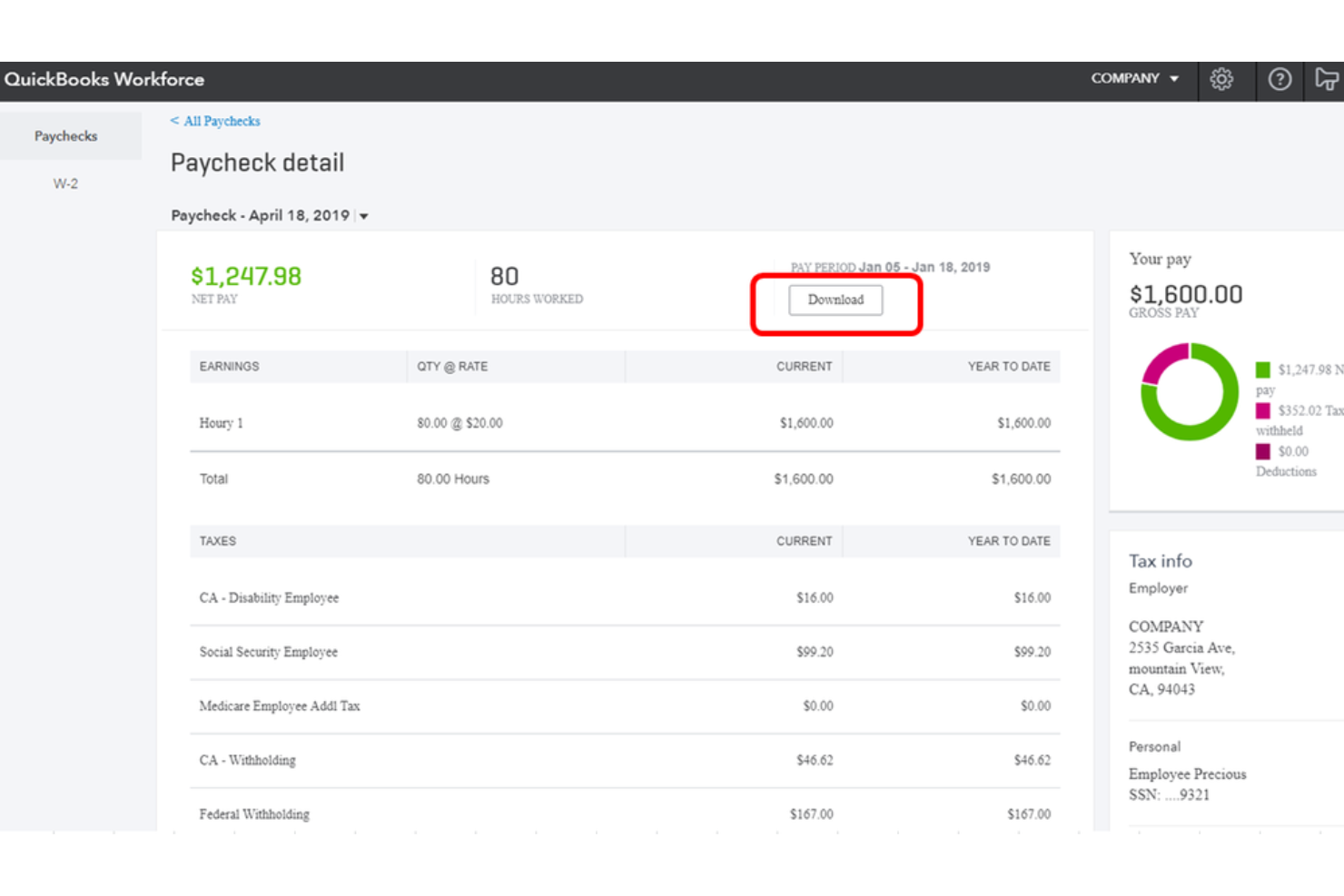
QuickBooks Workforce is a payroll and employee self-service platform that handles payroll processing, tax filing, invoicing, time tracking, and benefits administration within the QuickBooks ecosystem.
Who Is QuickBooks Workforce Best For?
QuickBooks Workforce is a natural fit for small to midsize businesses already using QuickBooks Online who want payroll and invoicing in one connected system.
Why I Picked QuickBooks Workforce
I picked QuickBooks Workforce as one of the best for real-time pay stub access because the employee portal gives every team member instant visibility into their pay stubs and W-2s, on both desktop and the mobile app, the moment payroll runs. Pair that with next-day or same-day direct deposit options, and employees aren't left waiting or guessing about their pay. I also like that employees can update their own direct deposit and tax info directly in the portal, which cuts down on the back-and-forth between staff and HR.
QuickBooks Workforce Key Features
- Auto payroll: Automatically runs payroll for salaried employees on direct deposit on a set schedule without manual input each cycle.
- Automated tax filing: Calculates, files, and pays federal and state payroll taxes on your behalf, including year-end filings.
- 1099 e-filing: Generates and electronically files 1099 forms for contractors directly through the platform.
- Invoicing integration: Connects payroll data with QuickBooks Online so you can manage invoicing, expenses, and payroll from a single account.
QuickBooks Workforce Integrations
QuickBooks integrates with over 800 popular business apps through its app marketplace, including tools like Shopify, PayPal, Square, Mailchimp, Gusto, QuickBooks Time, Amazon Business, and Housecall Pro. It's also available on Zapier, and an API is available for custom integrations.
Pros and Cons
Pros:
- Same-day and next-day direct deposit options
- Pays both W-2 employees and 1099 contractors
- Payroll and tax data sync to accounting automatically
Cons:
- Base plan excludes automated local tax filing
- Hard cap of 150 employees per account
Best for payroll-connected reimbursements

Rippling Spend helps finance and operations teams manage company-wide spending, bill payments, corporate cards, expense reimbursements, and payroll-connected reimbursements in one platform.
Why I Picked Rippling Spend
I picked Rippling Spend because it brings all critical financial spend functions into a single system instead of scattered point tools. You can issue virtual and physical corporate cards with preset limits tied to roles and departments, so your team can stay within budget without constant oversight.
Automated approval workflows use employee data (like department or role) to route expenses or invoices to the right approver, saving hours of manual chasing each month. Tight integration with payroll means reimbursements show up in pay runs automatically, cutting out separate payroll or payroll-expense reconciliation steps. And with policy controls that block out-of-compliance spend upfront, you don’t have to hunt down errors after the fact.
Rippling Spend Key Features
Here are some key features worth highlighting:
- Policy-based spend controls: Build custom rules using employee attributes to block out-of-policy spend before it happens.
- Multi-level approval workflows: Define approval chains that adjust based on amount, category, or employee role.
- Global reimbursements: Pay and report expenses in local currencies for employees worldwide.
- General ledger sync: Automatically sync categorized spend into your accounting system to speed up month-end close.
Rippling Spend Integrations
Integrations include QuickBooks, Xero, Sage Intacct, Netsuite, Checkr, Jira, Slack, and Microsoft 365.
Pros and Cons
Pros:
- Automates expense categorization to expedite month-end close
- Enforces spending policies and routes approvals automatically
- Unified system for expense management, bill payments, and payroll
Cons:
- Setting up complex policies may require additional effort
- Mobile app is limited compared to desktop version

Best for managing international payroll compliance

Remofirst is a global employment services platform that offers tools for hiring and managing a global team, including employer of record services, payroll management, benefits management, and compliance support.
Why I picked Remofirst: I like that Remofirst has an all-in-one HRIS platform that includes features like automatic payroll calculations, compliance audits, and dedicated account managers for support. Additionally, the platform's ability to handle local laws and regulations for employee contracts and benefits management makes it easier to hire internationally, whether it's salaried employees or contractors.
Standout features & integrations:
Features include tools for managing visas and work permits, workforce management, and equipment provisioning, ensuring businesses can efficiently handle their global workforce needs. It also includes an employee cost calculator to determine the cost of employing someone in a different country.
Integrations include ADP.
Pros and Cons
Pros:
- Ensures compliance with local labor laws
- Responsive, 24/7 customer support
- Handles payroll and invoicing in multiple countries
Cons:
- Lack of extensive integrations
- No mobile app available
Best for global invoicing and payroll

Deel lets you run payroll, pay contractors, and manage invoices in over 150 countries while handling local tax rules, contracts, and compliance for you. If your team works with international employees or contractors, Deel helps you centralize global payroll and payments in one place.
Why I Picked Deel
I picked Deel because it makes global payroll and invoicing manageable for companies operating in multiple countries. You can pay employees and contractors in local currencies while Deel handles country-specific tax calculations and statutory deductions behind the scenes.
Its built-in invoicing tools let contractors submit compliant invoices directly in the platform, reducing manual back-and-forth, and I also like that Deel supports Employer of Record (EOR) hiring, so you can employ full-time staff abroad without opening foreign entities. For teams scaling internationally, this combination of payroll, invoicing, and compliance support is hard to match.
Deel Key Features
Here are some key features worth highlighting:
- Global Payroll Processing: Run compliant payroll across multiple countries with automated tax and deduction handling.
- Contractor Invoicing: Contractors generate invoices directly in Deel based on approved contracts and payment terms.
- Multi-Currency Payments: Pay workers in their preferred currencies using local bank transfers or supported payment methods.
- Compliance Management: Automatically applies local labor laws, tax rules, and required documentation by country.
Deel Integrations
Integrations include QuickBooks, Xero, NetSuite, BambooHR, Greenhouse, HiBob, Workday, Ashby, and Expensify.
Pros and Cons
Pros:
- Handles local tax calculations and statutory deductions automatically
- Localized benefits and compliance
- Supports various payment options, including cryptocurrency
Cons:
- Limited invoice customization
- No mobile app available

Gusto
Best for small and mid-sized businesses

Gusto helps small and midsize businesses handle both invoicing and payroll in one platform so you don’t have to juggle separate systems for billing clients and paying your team. It’s especially useful if your business needs straightforward tools that manage incoming payments and payroll taxes without complicated workflows.
Why I Picked Gusto
I picked Gusto because it combines payroll and invoicing features in a way that’s easy to adopt for small business owners or HR teams new to these tasks. You can create branded invoices, let customers pay by bank transfer or credit card, and receive payments directly into your bank account through its invoicing tools.
On the payroll side, Gusto supports unlimited payroll runs, automated tax calculation and filings, and direct deposits so you can pay employees and contractors with confidence. Its payroll dashboard syncs with benefits and time tracking, meaning you spend less time switching between systems and fixing data errors. Plus, employees can access pay stubs, tax forms, and benefits info on their own, which reduces admin questions.
Gusto Key Features
Here are some key features worth highlighting:
- Custom Invoicing: Build and send branded invoices and payment links so your clients can pay by bank transfer or card.
- Automated Tax Filing: Gusto calculates, withholds, and files federal, state, and local payroll taxes automatically.
- Employee Self-Service: Team members can view pay stubs, tax forms, and benefits details without HR involvement.
- Time Sync to Payroll: When you add hours or time-off, it flows directly into payroll to cut down manual entry.
Gusto Integrations
Integrations include QuickBooks, Xero, FreshBooks, Expensify, Homebase, Deputy, TSheets (QuickBooks Time), and Asana.
Pros and Cons
Pros:
- Send invoices and accept bank transfers or card payments in one dashboard
- Payroll includes unlimited runs and automatic tax filing
- Time-tracking syncs directly to payroll for accurate pay based on hours worked
Cons:
- Some advanced HR automations require higher-tier plans
- Not customizable enough to handle large, complex orgs
New Product Updates from Gusto
Gusto Adds Solo Advisory Tools and Mobile Money Features
Gusto adds Solo S-Corp Advisory Tools and Gusto Money on Mobile for tax guidance, invoicing, and bill payments. These updates help accountants advise solopreneurs and let users manage business finances from their phones. For more information, visit Gusto’s official site.

TimeTrex
Best for automating complex payroll processes

TimeTrex is a comprehensive workforce management software that provides businesses with an all-in-one solution for managing payroll, invoicing, time and attendance, and other HR functions.
Why I picked TimeTrex: The platform offers a sophisticated payroll engine that can handle complex pay structures and processes. It automatically calculates federal, state, and local taxes, ensuring compliance with all regulatory requirements. Additionally, TimeTrex's invoicing features allow businesses to create and manage invoices directly from the platform, seamlessly integrating with payroll data to ensure accurate billing.
Standout features & integrations:
Features include real-time payroll calculations, multi-currency support, direct deposit, custom deductions, automated tax filings, digital pay stubs, customizable reports, employee self-service portal, time and attendance tracking, job costing, scheduling, leave management, document management, and expense tracking.
Integrations include QuickBooks, Sage, ADP, Xero, Microsoft Dynamics, Paychex, Gusto, FreshBooks, Zoho Books, and NetSuite.
Pros and Cons
Pros:
- Integrated payroll and HR functions
- Advanced time tracking and scheduling
- Automated payroll and tax calculations
Cons:
- Navigating to certain features can be challenging
- Platform design looks outdated
New Product Updates from TimeTrex
TimeTrex Adds Quick Punch App With Offline and QR Support
TimeTrex adds a new Quick Punch app, offline punching, QR code scanning, punch images, configurable messages, and punch warnings or lockouts to improve employee clock-ins across browsers and local computers. For more information, visit TimeTrex’s official site.
 .
.
Best for affordability

Patriot simplifies accounting and payroll for small businesses by offering integrated products for both Payroll and Accounting. It's recognized for its affordability, providing a comprehensive solution without a significant financial burden.
Why I picked Patriot: I selected Patriot Software for its exceptional balance of cost and functionality. It distinguishes itself from other invoicing and payroll tools through its competitive pricing, making it an ideal choice for small businesses. I regard it as best for affordability due to its ability to offer vital accounting and payroll features at a price point that is accessible for smaller operations.
Its Accounting and Payroll products are separate, though closely intertwined if you purchase both.
Standout features & integrations:
Features that make Patriot Software shine include unlimited invoicing, free setup and support, and no long-term contracts. It supports both cash-basis and accrual accounting, and users can run payroll in three easy steps. The software integrates with several essential tools, enhancing its utility for businesses.
Its Accounting product also offers account reconciliation, subaccounts, estimates, recurring invoice tools, invoice payment reminders, and receipt management tools.
Its Payroll product covers multiple pay rates, 2-day direct deposit, employee or contractor payments, electronic or printable W-2 forms, and the option to e-file 1099 forms directly with the IRS.
Integrations include QuickBooks Online, Shopify, WooCommerce, Xero, Zapier, Clover, Square, PayPal, Gusto, and ADP.
Pros and Cons
Pros:
- Competitive pricing for small businesses
- Comprehensive payroll and accounting features
- Free setup and support, enhancing user experience
Cons:
- Higher-tier features require plan upgrades
- Limited third-party integrations compared to some competitors

Best for diverse business tools

QuickBooks is a comprehensive accounting solution that streamlines financial management for businesses. It's best for offering a suite of diverse business tools that cater to various needs, from accounting to payroll.
Why I picked QuickBooks: I chose QuickBooks for this list because it provides a robust set of features that are essential for businesses of all sizes. Its versatility and the breadth of tools available make it a standout choice for managing finances comprehensively. I believe QuickBooks is best for diverse business tools because it offers a wide array of functionalities that go beyond basic accounting, including payroll processing, time tracking, and payment solutions, all integrated into one platform.
Standout features & integrations:
Features include automated bookkeeping, invoice and payment processing, tax deductions, and comprehensive reporting. These tools are designed to automate tedious tasks, allowing business owners to focus on growth.
Integrations are available natively with numerous other tools, including TurboTax, Shopify, Square, PayPal, TSheets, Gusto, Bill.com, and many more, facilitating an efficient workflow across different business operations.
Pros and Cons
Pros:
- Extensive integration options with other business applications
- Cloud-based, ensuring real-time data access from anywhere
- Connects to bank accounts and credit cards with ease
Cons:
- Limited number of users
- Occasional customer support issues
Xero
Best for online accounting

Xero is a comprehensive cloud-based accounting platform designed for small businesses and accountants. It is best for online accounting because it offers real-time financial data access from anywhere, streamlining financial processes and decision-making.
Why I picked Xero: I chose Xero for this list because of its ability to integrate with a vast number of financial institutions globally, which make it a standout choice. I believe Xero is best for cloud-based accounting due to its accessibility, real-time data updates, and comprehensive financial management tools that cater to the needs of modern small business owners.
Standout features & integrations:
Features include online invoicing, bank connections, multi-currency accounting, and detailed financial reporting. Users can track and pay bills on time, manage expenses, reconcile bank transactions, and get a clear overview of their cash flow and accounts payable and receivable.
Integrations are available natively with a wide range of tools, including Gusto, Avalara, Wagepoint, Payevo, Jibble, Humi, Timedock,Oyster, Payworks, Knit, Rise, Rippling, Remote, Deel, Hubdoc, Stripe, PayPal, WorkflowMax, Square, Expensify, Vendy, Deputy, and Shopify. It also connects with over 21,000 financial institutions globally, allowing for automated bank feeds and reconciliation.
Pros and Cons
Pros:
- A comprehensive set of accounting features
- Integration with over 21,000 financial institutions
- Real-time access to financial data
Cons:
- Payroll features are only suitable for a small number of employees
- Higher-tier plans can be costly for very small businesses

Wave
Best for free financial software

Wave is a comprehensive tool for small business financial management. It is recognized as the best for free financial software, offering a set of basic financial and invoicing tools for no cost.
Why I picked Wave: I selected Wave for the list because it offers a basic financial solution for small businesses and freelancers without any fees, which is quite rare. It distinguishes itself from other invoicing and payroll software by not charging for basic features, including bookkeeping, invoicing, and the ability to accept online payments.
Standout features & integrations:
Features include invoicing, bookkeeping, and cash flow management tools, all of which are available for free. If you scale up to their paid plan, Wave also platform also offers receipt scanning and direct bank account and credit card connections for automatic transaction import, which simplifies bookkeeping.
Integrations are available natively with Google Sheets, PayPal, Stripe, Etsy, Shopify, Shoeboxed, Zapier, Mailchimp, Square, and RBC (Royal Bank of Canada).
Pros and Cons
Pros:
- Customizable invoicing and expense tracking
- Direct bank account and credit card connections
- No monthly fees for basic features
Cons:
- Limited third-party app integrations
- Per-transaction fees for Wave Payments
Andre fakturerings- og lønnssystemer
\u003cspan style=\u0022font-weight: 400\u0022\u003eHer er noen flere alternativer for fakturerings- og lønnssystemer som ikke kom med på kortlisten min, men som likevel er verdt å se nærmere på:\u003c/span\u003e
- Zoho Books
For automation features
- Sage 50cloud
For comprehensive accounting solutions
- KashFlow
For UK-based payroll and compliance
- Paychex
For integrated HR solutions


How I Evaluate Invoicing Payroll Software
I evaluate these tools in two layers: the payroll and invoicing fundamentals a product must cover—think 1099 contractor payments and tax filing—and the differentiators that make one a better fit.
Core Functionality (Table Stakes For This List)
When I'm selecting tools for my list, I rank each one on a scale from 0 (does not offer the functionality) to 5 (excels in this area) for each core functionality listed below. Then, I calculate the tool's total score into a percentage. Each tool needs to achieve a minimum total score of 65% to be considered for inclusion.
- Payroll Processing & Pay Runs: I check whether a tool handles automated wage calculations, direct deposit, and flexible pay schedules for both salaried and hourly workers across multiple cycles.
- Invoice Creation & Tracking: Each platform should let you generate, send, and monitor invoices tied to billable hours or contractor work rather than relying on a separate billing tool.
- Tax Compliance & Filing: Automatic tax withholding, form generation for W-2 and 1099 workers, and multi-jurisdiction filing support are what I evaluate here.
- Contractor Payment Support: I look for dedicated contractor workflows, from onboarding a freelancer to processing invoice-based payments and producing year-end tax documents.
- Time & Attendance Integration: Hours captured through native tracking or a connected app should flow directly into payroll and invoice calculations without manual re-entry.
- Accounting & HR Integrations: The tool should sync payroll and invoicing data with platforms like QuickBooks, Xero, or your HRIS so your finance and people teams work from the same numbers.
Once I have a list of tools that meet the criteria, I consider what sets each platform apart.
Differentiating Factors (What Sets Vendors Apart)
Here's how I compare and contrast different vendors:
Standout Features
I look for employee self-service portals that let workers access pay stubs, download tax forms, and submit contractor invoices without pinging HR. Client payment processing matters too. Tools that accept ACH or card payments on invoices and auto-reconcile them to payroll funding save your team from manual follow-up. Custom reporting rounds things out. I check whether a platform lets you build dashboards tracking labor costs alongside invoice aging so you can spot cash flow gaps before they become problems.
Beyond Features
Pricing transparency is something I evaluate closely. Some vendors charge extra for off-cycle runs or 1099 filings, so I check whether the advertised tier actually covers a mixed workforce. Compliance and security also weigh heavily. Payroll data is sensitive, and I look for SOC 2 certification and role-based access controls as a baseline. Implementation support matters just as much. Migrating payroll history and contractor records from a legacy system can stall a rollout, so I consider whether a vendor offers guided data migration or bulk import tools.
Slik velger du fakturerings- og lønnssystem
Det er lett å gå seg vill i lange funksjonslister og kompliserte prismodeller. For å hjelpe deg med å holde fokus når du går gjennom den unike prosessen med å velge system, har jeg laget en sjekkliste over faktorer du bør ha i tankene:
| Faktor | Hva bør du vurdere? |
|---|---|
| Skalerbarhet | Vil systemet vokse sammen med virksomheten din? Vurder fremtidig ekspansjon, brukerbegrensninger og om det kan håndtere økt transaksjonsvolum etter hvert som teamet ditt vokser. |
| Integrasjoner | Kan det kobles til verktøyene du allerede bruker? Sjekk kompatibilitet med regnskapssystemer, CRM og andre viktige systemer for å sikre effektive arbeidsflyter. |
| Tilpasningsmuligheter | Kan du tilpasse det etter behovene dine? Se etter muligheter for å justere maler, rapporter og prosesser slik at de passer til virksomhetens spesifikke krav. |
| Brukervennlighet | Er det brukervennlig for teamet ditt? Vurder grensesnittet og brukeropplevelsen for å unngå lange opplæringsperioder og sikre rask innføring. |
| Implementering og oppstart | Hvor lang tid tar det å komme i gang? Vurder tiden og ressursene som kreves for oppsettet, inkludert eventuell opplæring eller datamigrering. |
| Kostnad | Passer det inn i budsjettet ditt? Sammenlign prisplaner, skjulte gebyrer og valuta for pengene. Vurder rabatter ved årlig betaling eller pakker med flere tjenester. |
| Sikkerhetstiltak | Hvor sikre er dataene dine? Sørg for at systemet oppfyller bransjestandarder for kryptering, databeskyttelse og overholdelse av regelverk som GDPR. |
Hva er fakturerings- og lønnssystemer?
Faktura- og lønnsprogramvare er et verktøy som automatiserer fakturering og betaling av ansatte for virksomheter. Disse verktøyene brukes vanligvis av HR-fagfolk, regnskapsførere og bedriftseiere til å håndtere økonomiske transaksjoner og lønn på en effektiv måte. Funksjoner som automatisert fakturering, skatteberegninger og integrasjon med regnskapssystemer bidrar til nøyaktighet og tidsbesparelser. Alt i alt forenkler disse verktøyene økonomistyringen og sikrer betalinger til rett tid.
Funksjoner
Når du velger faktura- og lønnsprogramvare, bør du se etter følgende viktige funksjoner:
- Automatisert fakturering: Opprett, send og følg opp fakturaer automatisk, slik at du aldri går glipp av en betaling – eller en frist. Dette sparer deg for timevis med manuelt arbeid og holder likviditeten i gang.
- Integrasjon med betalingsbehandling: Ta imot betalinger direkte fra fakturaene dine gjennom flere metoder, for eksempel kredittkort, ACH eller digitale lommebøker. Dette gjør betalingsprosessen smidigere og gjør det enklere for kundene (og deg) å gjøre opp raskt.
- Lønnsadministrasjon: Håndter beregninger av lønn, fradrag, skatter og ytelser på én og samme plattform. Dette gjør lønningsdagen fri for drama (eller i det minste mindre dramatisk).
- Skatteberegning og etterlevelse: Beregn og bruk skatter nøyaktig i henhold til føderale, delstatlige og lokale lover, slik at du unngår hodebry – og IRS.
- Selvbetjeningsportaler for ansatte: Gi teamet ditt tilgang til lønnsslipper, skatteskjemaer og arbeidsplaner uten at innboksen din fylles opp med forespørsler. Det føles godt å gi ansatte mer kontroll, og du får færre avbrytelser.
- Integrasjon med tidsregistrering: Hent sømløst inn arbeidstimer for nøyaktige lønnsberegninger, slik at du slipper å tyde håndskrevne timelister eller sette sammen regneark ved midnatt.
- Støtte for flere valutaer: Opprett fakturaer og kjør lønn i ulike valutaer hvis du arbeider med internasjonale kunder eller ansatte. Slutt på forvirring rundt valutakonvertering.
- Rapportering og analyse: Generer detaljerte rapporter om fakturaer, betalinger, lønn og utgifter for å oppdage trender og ta smartere økonomiske beslutninger uten å trenge en doktorgrad i regneark.
- Utgiftshåndtering: Følg opp virksomhetens utgifter sammen med lønn og fakturaer, slik at ingenting faller mellom sprekkene (eller på mystisk vis forsvinner).
- Tilpassbare maler: Bruk og tilpass faktura- og lønnsmaler som passer merkevaren og arbeidsflyten din, slik at du kan fremstå profesjonell og samtidig arbeide effektivt.
Fordeler
Implementering av faktura- og lønnsprogramvare gir flere fordeler for teamet og virksomheten din. Her er noen av fordelene du kan se frem til:
- Tidsbesparelser: Automatisering av faktura- og lønnsoppgaver reduserer manuelt arbeid og frigjør tid til mer strategiske aktiviteter.
- Nøyaktighet: Automatiserte beregninger minimerer feil i fakturaer og lønn og sikrer nøyaktige økonomiske registreringer.
- Etterlevelse: Innebygde funksjoner for skatteetterlevelse hjelper virksomheten din med å oppfylle lovpålagte krav uten problemer.
- Kostnadseffektivitet: Ved å effektivisere prosessene reduserer programvaren behovet for ytterligere administrative ressurser.
- Forbedret likviditet: Fakturering og betalingsbehandling til rett tid forbedrer likviditetsstyringen.
- Forbedret sikkerhet: Datakryptering og tiltak for etterlevelse beskytter sensitiv økonomisk informasjon mot datainnbrudd.
- Fleksibilitet: Mobil tilgang og integrasjonsmuligheter gjør det mulig å administrere økonomien fra hvor som helst og tilpasse seg behovene ved fjernarbeid.
Kostnader og priser
Ved valg av faktura- og lønnsprogramvare må du forstå de ulike prismodellene og abonnementene som er tilgjengelige. Kostnadene varierer basert på funksjoner, teamstørrelse, tillegg og mer. Tabellen nedenfor oppsummerer vanlige abonnementer, gjennomsnittsprisene deres og typiske funksjoner som er inkludert i løsninger for faktura- og lønnsprogramvare:
Sammenligningstabell for abonnementer for faktura- og lønnsprogramvare
| Abonnementstype | Gjennomsnittspris | Vanlige funksjoner |
|---|---|---|
| Gratisabonnement | $0 | Grunnleggende fakturering, begrenset lønnsbehandling og grunnleggende rapportering. |
| Personlig abonnement | $5-$25/user/month | Automatisert fakturering, lønnsbehandling, skatteberegninger og e-poststøtte. |
| Bedriftsabonnement | $30-$60/user/month | Avansert rapportering, støtte for flere valutaer, integrasjoner med regnskapsverktøy og støtte via direktechat. |
| Abonnement for større virksomheter | $70-$120/user/month | Tilpassbare maler, egen kundeansvarlig, API-tilgang og forbedrede sikkerhetsfunksjoner. |
Vanlige spørsmål om faktura- og lønnsprogramvare
Her er noen svar på vanlige spørsmål om faktura- og lønnsprogramvare:
Kan faktura- og lønnsprogramvare integreres med mine eksisterende systemer?
Ja, det meste av faktura- og lønnsprogramvare kan integreres med dine eksisterende systemer, for eksempel regnskaps-, CRM- og HR-plattformer. Denne integrasjonen bidrar til å effektivisere arbeidsflyten og reduserer manuell dataregistrering. Før du kjøper, bør du kontrollere at programvaren er kompatibel med verktøyene du bruker i dag, for å sikre en problemfri integrasjonsprosess. Det kan hende du må rådføre deg med IT-teamet ditt for å håndtere tekniske aspekter eller nødvendige tilpasninger.
Er det viktig at fakturaprogramvare tilbyr tilpasningsmuligheter for fakturaer?
Ja, tilpasning er avgjørende for å personalisere fakturaer med merkevarelogoen, fargene og de spesifikke detaljene dine. Dette bidrar til å gi kundene et profesjonelt inntrykk. Se etter programvare som tilbyr tilpasningsmuligheter, slik at du kan opprette fakturaer som gjenspeiler merkevareidentiteten din.
Hvordan håndterer fakturaprogramvare automatiserte fakturaer og påminnelser?
God fakturaprogramvare bør gjøre arbeidsbelastningen enklere ved å automatisere tilbakevendende fakturaer og påminnelser om forfalte betalinger. Denne funksjonen sparer tid, sikrer at fakturaer sendes i tide og forbedrer kontantstrømmen. Kontroller om programvaren kan automatisere fakturaplaner og sende påminnelser til kunder om forfalte betalinger.
Hvilke sikkerhetstiltak bør være på plass for å beskytte data i fakturaprogramvare?
Prioriter sikkerhet når du velger fakturaprogramvare, spesielt når du håndterer sensitiv økonomisk informasjon. Se etter programvare som benytter robuste sikkerhetstiltak, for eksempel datakryptering, regelmessige sikkerhetskopier og sikre servere. Sørg for at programvaren følger bransjestandarder for å beskytte økonomiske data mot uautorisert tilgang.
Er det viktig at fakturaprogramvare overholder relevante forskrifter?
Ja, overholdelse av forskrifter er avgjørende, spesielt ved håndtering av økonomiske transaksjoner. Sørg for at fakturaprogramvaren du velger, overholder relevante bransjeforskrifter og standarder, inkludert skatteregler, fakturastandarder og personvernlover.