

As melhores alternativas ao Gusto ajudam a gerir salários, benefícios e tarefas de RH, mas com especializações e áreas de foco ligeiramente diferentes.
O Gusto é uma plataforma de RH e processamento salarial de confiança para pequenas e médias empresas, mas pode não ser a opção perfeita para todas as equipas.
Com base na minha experiência a testar e comparar sistemas de RH, selecionei uma lista das melhores alternativas ao Gusto, que oferecem fiabilidade, automatização e escalabilidade.
Neste guia, encontrará plataformas de confiança que simplificam a gestão de RH, agilizam o processamento salarial e dão-lhe liberdade para escolher a solução que melhor funciona para a sua organização.
O que é o Gusto?
O Gusto oferece uma combinação de software e serviços de RH concebidos para gerir salários, benefícios e recursos humanos nas empresas. A sua solução de software é habitualmente utilizada por pequenas e médias empresas que precisam de gerir a remuneração dos colaboradores, a administração de benefícios e o cumprimento da legislação laboral, mas que pretendem apoio adicional para gerir estas funções de forma eficiente.
Why Trust Our Software Recommendations
6,700+
Reviews
20
Industry experts
16+
Evaluation factors
14
Years
Our team has been testing and reviewing software since 2012. As HR experts ourselves, we know how difficult—and important—it is to choose the right software.
For this guide, we evaluated tools using hands-on testing and independent research, scoring tools using our selection criteria. We also draw on insights from industry thought leaders and practicing HR experts.
Our reviews reflect our human editorial judgment, not a sales pitch.
Expert reviewers:
- Phil GrayCOO
 Kim BehnkeHR Tech Editor & Analyst
 Josh BarkerPeople Ops Manager

Tabela comparativa de preços das alternativas ao Gusto
Utilize esta tabela comparativa para comparar os detalhes de preços das minhas principais alternativas ao Gusto.
| Tool | Best For | Trial Info | Price | ||
|---|---|---|---|---|---|
| 1 | Best for scaling mid-sized businesses | Free demo available | Pricing upon request | Website | |
| 2 | Best for payroll outside the US | Free demo available | From $29/user/month | Website | |
| 3 | Best for migrating from Gusto | Free demo available | From $35/user/month + $89/month platform fee | Website | |
| 4 | Best for indemnification-backed hiring | Not available | From $19/contractor/month | Website | |
| 5 | Best PEO-based HR & payroll support | Free demo available | From $8/user/month | Website | |
| 6 | Best for flexible HR service models | Free demo available | Pricing upon request | Website | |
| 7 | Best for employee self-service portal | Free demo available | From $99/month | Website | |
| 8 | Best for minimizing payroll complexity | Free demo available | From $459/employee/month (billed annually) | Website | |
| 9 | Best for managing hourly staff in small businesses | Free plan + 30-day free trial + free demo available | From $99/month (billed annually) | Website | |
| 10 | Best for multi-jurisdiction tax filing | Free demo available | Pricing upon request | Website |


Análises das melhores alternativas ao Gusto
Abaixo encontrará resumos detalhados das minhas recomendações para as melhores alternativas ao Gusto. Apresentarei as vantagens e desvantagens de cada ferramenta, as suas funcionalidades e os casos de utilização mais adequados, para o ajudar a encontrar a opção mais indicada para as suas necessidades.
 Best for scaling mid-sized businesses
- Free demo available
- Pricing upon request
Visit WebsiteCustomer Rating:4.3/5
Paycom offers a tax center dashboard for important actions required. Paycom is a single-database payroll and HR platform that helps growing teams automate payroll, manage benefits, streamline onboarding, and handle complex compliance in one system designed for scaling mid-sized organizations.
Who Is Paycom Best For?
HR teams at mid-sized and larger organizations seeking advanced payroll automation and integrated HR management in the US.
Why Paycom Is a Good Gusto Alternative
I picked Paycom as one of the best because it handles the payroll, HR, and compliance needs of scaling mid-sized businesses all in one place. I appreciate automating payroll across multiple states, as well as using built-in onboarding and advanced time tracking as teams grow.
Paycom Key Features
- Native document management: Store and manage employee files and compliance documents in a secure digital vault.
- Custom reporting tools: Build, schedule, and export custom payroll and HR reports directly from the platform.
- Org chart visualization: Create and maintain dynamic organization charts based on your live employee data.
- Employee self-service portal: Empower employees to update personal info, download pay stubs, and access HR tasks on demand.
Paycom Integrations
Native integrations are not clearly documented. Paycom offers an API for custom integrations.
Pros and Cons
Pros:
- Offers compliance for multi-state employers
- Employee-driven payroll corrections
- Payroll changes sync instantly across all modules
Cons:
- Contract requires longer-term commitment
- Custom third-party app connections are limited
 Best for payroll outside the US
- Free demo available
- From $29/user/month
Visit WebsiteCustomer Rating:4.9/5
Deel’s powerful interface makes it easy to manage employee and contractor data. Deel is a global payroll and compliance management solution designed to streamline hiring and payments for international teams. HR professionals and payroll specialists use it to manage remote workers and contractors. It automates compliance processes, handling things like local tax laws, and provides a unified platform for managing contracts, payments, and documentation.
Why it's a good Gusto alternative: What sets Deel apart from Gusto is its ability to manage international payroll and compliance. Deel is particularly well-suited for companies that employ remote workers or contractors across multiple countries, providing tools to handle complex compliance issues, local tax laws, and multi-currency payments. For businesses in industries with a significant number of international hires, Deel offers a solid solution to manage global teams effectively. In contrast, Gusto excels in managing payroll, benefits, and HR needs for U.S.-based businesses, making Deel the better choice for organizations with a global workforce.
Standout Features & Integrations:
Features include global mobility support, integrated Slack tools, and advanced integrations. Their global mobility service helps companies with visa sponsorship, allowing them to bring in candidates from abroad. Deel is one of the largest international payroll solutions out there, with the company reporting over 100,000 active worker contracts. They offer 24/7 online support and dedicated account managers for specific requests.
Integrations are available with Ashby, BambooHR, Expensify, Greenhouse, Hibon, NetSuite, Okta, OneLogin, Quickbooks, Xero, Workday, and Workable. They also have an Open API to support additional custom integrations too.
Pros and Cons
Pros:
- Pay employees in 150+ currencies, including crypto
- Advanced employer of record (EOR) services also available
- Covers up to $25,000 if a misclassification/legal case arises
Cons:
- No mobile app available
- No free trial available
Learn more about Deel Payroll: 3Best for migrating from Gusto
Warp
- Free demo available
- From $35/user/month + $89/month platform fee
Visit WebsiteCustomer Rating:4.1/5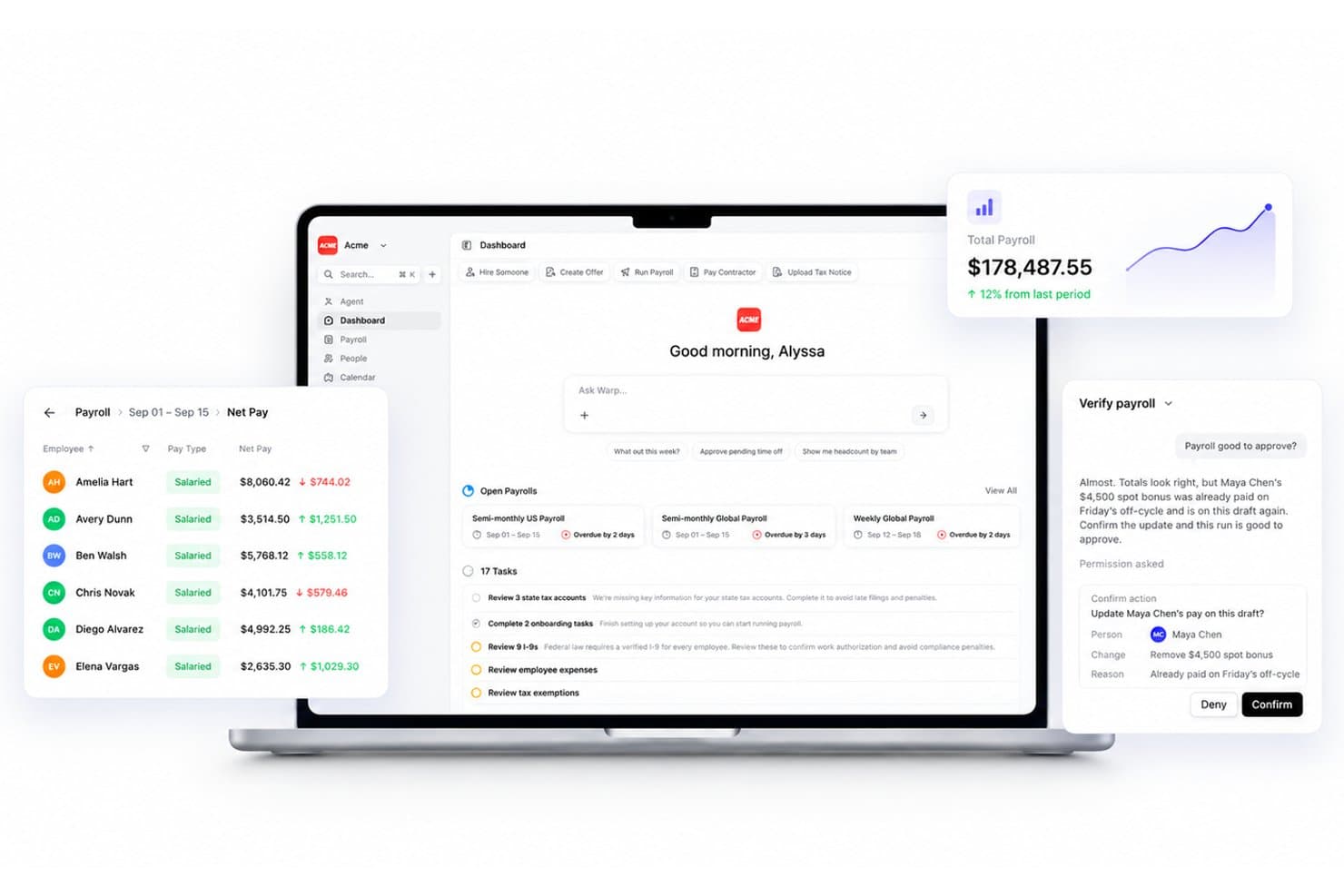
Warp automates payroll verification and flags duplicate bonus payments. Warp is an HR and payroll platform for growing businesses that want to manage payroll, benefits, and employee information in one system as they move beyond Gusto.
Who Is Warp Best For?
Warp suits founders and lean HR or operations teams that have outgrown Gusto and want payroll, benefits, and employee records managed together.
Why I Picked Warp
I like Warp as a Gusto alternative because its white-glove migration transfers employee records, pay history, tax filings, and benefits enrollment, while Warp handles tax-account setup and employee onboarding. I also value its year-to-date payroll import and record checks before the first payroll, which help teams switch midyear without rekeying prior pay data.
Warp Key Features
- Benefits plans: Offers health, dental, vision, and 401(k) benefits.
- IT provisioning: Sets up SSO, devices, and app access when employees join, then revokes access when they leave.
- Global contractor payroll: Pays contractors in more than 150 countries with local currency, compliant contracts, and invoicing.
- Integrations: Connects with tools including QuickBooks, Xero, NetSuite, and Okta.
Warp Integrations
Warp offers native integrations with QuickBooks, Xero, NetSuite, Rillet, Ashby, Lever, Checkr, Human Interest, Accrue 401k, and Vestwell. It also provides REST API, CLI, and MCP access on Starter and Pro, with custom ERP integrations on Enterprise.
Pros and Cons
Pros:
- Reviewers praise responsive support and quick setup
- Automates new-state tax setup and notice handling
- White-glove migration carries payroll history and filings
Cons:
- Reports of sales promises exceeding delivered features
- Benefits and 401(k) choices trail larger platforms
Learn more about Warp: Best for indemnification-backed hiring
- Not available
- From $19/contractor/month
Visit WebsiteCustomer Rating:4.5/5
HireGlobal offers a dashboard with a payments calendar, worker onboarding tracker, and quick actions for managing global teams. HireGlobal is an employer of record (EOR) service for businesses hiring internationally, handling payroll, benefits, and local employment requirements so HR teams can expand without setting up entities abroad.
Who Is HireGlobal Best For?
HireGlobal suits HR and legal teams hiring internationally who want EOR support with indemnification to help manage employment-related risk.
Why HireGlobal Is a Good Gusto Alternatives
I picked HireGlobal because its indemnification-backed hiring model supports international payroll without requiring your business to establish local entities. I use its employer of record service to manage local employment requirements, payroll, and benefits when hiring abroad. That added support helps my team address employment-related risk during global expansion.
HireGlobal Key Features
- Employee onboarding: Add international hires through a managed EOR onboarding process.
- Employment contracts: Prepare locally appropriate employment agreements for supported countries.
- Tax filings: Manage required employer tax reporting and statutory contributions.
- Time-off administration: Track employee leave according to applicable local requirements.
HireGlobal Integrations
Native integrations are not clearly documented for HireGlobal. API support and Zapier connectivity are also not clearly documented.
Pros and Cons
Pros:
- Supports international hiring without local entities
- Handles local payroll and statutory requirements
- Indemnification helps reduce employment-related risk
Cons:
- Few independent reviews document customer experiences
- Limited public information on country coverage
Learn more about HireGlobal: Best PEO-based HR & payroll support
- Free demo available
- From $8/user/month
Visit WebsiteCustomer Rating:4.6/5
The dashboard in Justworks centralizes all alerts and tasks. Justworks offers a compelling alternative to Gusto for businesses that want more than just payroll software. Instead of focusing solely on payroll and HR tools, Justworks operates as a professional employer organization (PEO) that helps you manage payroll, benefits, and compliance in one platform while connecting you with HR experts when you need guidance. Its payroll processing, benefits administration, and compliance support are designed to meet the needs of small to mid-size companies looking to offload administrative work and access competitive health plans and employment support.
Why I Picked Justworks
I picked Justworks because it combines PEO-level HR support with payroll and benefits management, giving your business access to enterprise-type benefits and regulatory guidance that you won’t get from many traditional payroll platforms. Justworks pairs integrated payroll processing with compliance support across multiple states and access to group health insurance and other benefits that can help you attract and retain talent. In doing so, it shifts much of the administrative burden from you to a partner that understands the nuances of HR administration and employment law.
Justworks Key Features
Aside from the core HR and payroll capabilities, Justoworks offers:
- Payroll Automation: Automates payroll processing for both employees and contractors, including tax calculations and filings.
- Time Tracking: Simplifies attendance management with integrated time tracking tools.
- COBRA Administration: Manages COBRA benefits, ensuring compliance with federal regulations.
- Integrated Onboarding Tools: Syncs hiring data from ATS platforms like Greenhouse and Lever directly to your HR system.
Justworks Integrations
Integrations include QuickBooks, NetSuite, Xero, Sage Intacct, Lever, and Trainual. If you need custom integrations, Justworks offers an API for developers.
Pros and Cons
Pros:
- Justworks simplifies onboarding, offboarding, and payroll processes.
- Provides comprehensive HR tools and compliance support.
- Accessible expert support as a Professional Employer Organization.
Cons:
- Some admins want more flexibility than platform defaults allow.
- Global coverage is only available as a paid add-on.
Learn more about Justworks: Best for flexible HR service models
- Free demo available
- Pricing upon request
Visit WebsiteCustomer Rating:4/5
TriNet supports recruiting workflows with applicant tracking and skill assessment visibility. For businesses seeking a Gusto alternative, TriNet offers a tailored approach to HR management that can align with various industry needs. If you're managing a small to medium-sized business and need a comprehensive solution for payroll, benefits, and compliance, TriNet's flexible service packages might be appealing. With a focus on personalized support and advanced technology, TriNet addresses the common challenges of managing HR tasks efficiently and compliantly.
Why I Picked TriNet
I picked TriNet because of its dual service model that caters to different business needs, providing both full-service PEO and flexible HR Plus options. This flexibility allows you to choose between a shared HR responsibility and maintaining employer status while receiving support. TriNet's emphasis on compliance and risk management can be crucial for businesses looking to navigate complex regulatory environments. Additionally, the platform offers advanced technology tools that facilitate seamless payroll processing and benefits management, addressing key concerns for businesses transitioning from Gusto.
TriNet Key Features
In addition to its flexible service models, TriNet offers several other features that could be beneficial for your business:
- HR Consulting Expertise: Access to seasoned HR professionals who can guide you through complex HR challenges and compliance issues.
- Comprehensive Benefits Access: A wide range of benefits options that can be tailored to meet the specific needs of your workforce.
- Contractor and Global Workforce Support: Tools and services to manage a diverse and geographically dispersed workforce.
- Tailored Training Programs: Customized training solutions designed to enhance employee skills and productivity.
TriNet Integrations
Native integrations are not currently listed by TriNet.
Pros and Cons
Pros:
- Comprehensive payroll, benefits, and compliance
- Strong compliance credentials and support
- Flexible PEO or HR models
Cons:
- Platform may feel complex for new users
- Pricing is unclear
 Best for employee self-service portal
- Free demo available
- From $99/month
Visit WebsiteCustomer Rating:4.3/5
Paycor performance management dashboard displaying employee objectives, reviews, recognition tools, and mobile team member feedback features. Paycor is a people operations platform designed for HR and payroll teams looking for flexibility in managing workforce processes. With tools for payroll, benefits, and onboarding, Paycor supports growing businesses and organizations that want more control over their employee experience.
Who Is Paycor Best For?
Paycor suits HR teams at mid-sized businesses in the US that need to centralize payroll and empower employees with direct access to their information.
Why Paycor Is a Good Gusto Alternative
I picked Paycor for its employee self-service portal, which gives employees direct access to pay stubs, tax documents, and benefits enrollment without routing every request through HR. I appreciate that employees can update their own personal information and complete open enrollment tasks independently, which takes real administrative pressure off my team. Paycor's mobile app extends that access further, so employees aren't tied to a desktop to manage their own HR needs.
Paycor Key Features
- Payroll processing: Run payroll for hourly and salaried employees with automated tax calculations and direct deposit.
- Time and attendance tracking: Log employee hours, manage schedules, and flag overtime directly within the platform.
- Performance management: Set goals, conduct reviews, and track employee development through structured review cycles.
- Recruiting and applicant tracking: Post job listings, manage candidates, and move applicants through a hiring pipeline from one place.
Paycor Integrations
Paycor offers native integrations with QuickBooks, Indeed, ZipRecruiter, Microsoft 365, and Xero, and provides an API for custom integrations.
Pros and Cons
Pros:
- Mobile app for employees and managers
- Customizable permission levels for user access
- Employee self-service portal for pay and benefits
Cons:
- Reporting suite lacks advanced customization
- Occasional delays with payroll processing
 Best for minimizing payroll complexity
- Free demo available
- From $459/employee/month (billed annually)
Visit WebsiteCustomer Rating:4.7/5
Multiplier’s 4-step onboarding process will get your EOR employees up and running quickly. Multiplier is a global Employer of Record (EOR) that helps businesses hire, onboard, and pay employees in 150+ countries without setting up local entities. The platform focuses on multi-currency payroll, compliance management, and cost-effective global hiring.
Why I picked Multiplier: I picked Multiplier as a Gusto alternative because it focuses on fast global hiring while minimizing payroll complexity. You can onboard employees quickly, manage payments in over 120 currencies, and stay compliant with local tax laws. I especially liked their flat pricing model with no hidden fees, which can help with predictable budgeting.
Multiplier also offers a user-friendly dashboard that combines payroll, time-off tracking, and expenses in one place. Their 24/7 customer support with dedicated account managers makes it easier to manage international teams across time zones.
Multiplier Key Features:
Features include multi-country payroll, fast contract generation, benefits administration, time-off and expense management, and support for payments in over 120 currencies. The platform automatically adjusts payroll for expenses and leave, reducing manual work.
Integrations include Workday, BambooHR, Personio, and HiBob.
Pros and Cons
Pros:
- Fast global onboarding with compliant contracts
- 24/7 support with dedicated account managers
- Multi-currency payments across 120+ countries
Cons:
- Some users may find the interface initially difficult to navigate
- Limited self-service resources and troubleshooting guides
Learn more about Multiplier: Best for managing hourly staff in small businesses
- Free plan + 30-day free trial + free demo available
- From $99/month (billed annually)
Visit WebsiteCustomer Rating:4.2/5
Homebase offers a Manager View dashboard with real-time employee clock-in status, shift schedules, late alerts, and built-in team messaging tools. Homebase is a workforce management and payroll platform designed for small businesses with hourly teams, making it easier to handle scheduling, time tracking, payroll, and team communication all in one place.
Who Is Homebase Best For?
Owners and managers of small businesses who need to coordinate hourly teams, simplify payroll, and manage employee schedules with minimal overhead.
Why Homebase Is a Good Gusto Alternative
I picked Homebase as one of the best because it lets my team manage hourly staff with tools for scheduling, time tracking, and payroll in one place, saving us time each week and making shift changes painless.
Homebase Key Features
- Tip management: Automatically import and allocate tips from your POS system.
- HR document storage: Maintain compliance by securely storing employee forms and records.
- Integrated hiring tools: Post jobs, screen candidates, and start onboarding directly from the platform.
- Mobile time clock: Let hourly staff clock in or out from mobile devices with GPS verification.
Homebase Integrations
Homebase offers native integrations with Square, Toast, Clover, Shopify, Revel Systems, Heartland, ADP, QuickBooks, Gusto, and Paychex. An API is available for custom integrations.
Pros and Cons
Pros:
- Mobile time clock with GPS verification
- Auto-calculates overtime and wage compliance
- Built-in tools for managing hourly schedules
Cons:
- Requires a separate paid add-on to run payroll
- Locks geofencing tools behind the upper tiers
 Best for multi-jurisdiction tax filing
- Free demo available
- Pricing upon request
Visit WebsiteCustomer Rating:4.1/5
RUN by ADP's main dashboard provides an overview of payroll tasks and quick navigation to essential features. RUN by ADP is a comprehensive payroll and HR software solution designed to simplify payroll processing and human resource management for small businesses.
Why it's a good Gusto alternative: RUN by ADP differentiates itself with its extensive tax filing support across multiple jurisdictions, automated compliance updates, and a dedicated team of experts to help navigate complex tax laws, which can be a significant advantage over Gusto’s more simplified tax services. Additionally, RUN by ADP offers advanced HR tools like employee background checks, access to legal assistance, and custom reporting capabilities.
Standout features & integrations:
Features include direct deposit, an employee self-service portal, HR compliance support, time and attendance tracking, garnishment payment services, new hire reporting, retirement plan services, workers' compensation management, payroll and tax reports, and mobile app access.
Integrations include Quickbooks, Wave, Xero, ClockShark, Points North, TruSaic, Compy, Wex, Synerion, JazzHR, 7Shifts, Snappy Gifts, Absorb LMS, SmartRecruiters, and hundreds more.
Pros and Cons
Pros:
- Employee self-service option
- Good mobile app
- Automates tax calculations and filing
Cons:
- Setup can be complex
- Most HR functions are only available on higher-tier plans
Learn more about RUN Powered by ADP®:
Outras alternativas ao Gusto
Se quiser considerar mais algumas opções, estas são várias outras alternativas ao Gusto que também vale a pena conhecer:
- 11RemoFirstBest for budget-conscious remote team expansion
- 12TimeTrexBest for complex pay structures and time tracking
- 13Patriot PayrollBest for unlimited payroll runs
- 14UKG ReadyBest for AI-powered HR and workforce management solutions
- 15SurePayrollBest for unlimited payroll runs and tax filing guarantee
- 16NamelyBest for customizable HR solutions with robust analytics
- 17TrinetBest for comprehensive HR outsourcing services
- 18Patriot SoftwareBest for affordable and easy-to-use payroll software
- 19WaveBest for automatic tax payments
- 20Paychex Best for comprehensive payroll and HR solutions
Análises relacionadas de software de RH
Se ainda não encontrou aqui o que procura, consulte estas outras ferramentas relacionadas que testámos e avaliámos:
- Software de RH
- Software de processamento salarial
- Software de recrutamento
- Serviços de empregador de registo
- Sistemas de acompanhamento de candidatos
- Software de gestão da força de trabalho
How I Evaluate Gusto Alternatives
I evaluate Gusto alternatives in two layers: core requirements like payroll tax filing and benefits admin, and the differentiators that matter for your team size, budget, and HR complexity.
Core Functionality (Table Stakes For This List)
When I'm selecting tools for my list, I rank each one on a scale from 0 (does not offer the functionality) to 5 (excels in this area) for each core functionality listed below. Then, I calculate the tool's total score into a percentage. Each tool needs to achieve a minimum total score of 75% to be considered for inclusion.
- Full-Service Payroll Processing: I check whether a platform handles automated pay runs, wage calculations, and tax withholdings across multiple jurisdictions without requiring manual intervention.
- Benefits Administration: Each tool is evaluated on how it manages enrollment for health, dental, vision, and retirement plans, and whether deductions sync directly into payroll.
- Employee & Contractor Onboarding: I look for digital onboarding workflows that collect tax forms, e-signatures, and direct deposit details so new hires are payroll-ready from day one.
- Time Tracking & PTO Management: The platform should offer built-in or tightly integrated time tracking and leave management that feeds hours and accruals straight into payroll runs.
- Compliance & Tax Filing: I evaluate whether the tool generates year-end forms like W-2s and 1099s, handles new-hire reporting, and stays current with changing tax regulations.
- HRIS & Employee Records: A central employee database with document storage, role history, and org charts matters here, especially for teams outgrowing spreadsheets.
Once I have a list of tools that meet this criteria, I consider what sets each platform apart.
Differentiating Factors (What Sets Vendors Apart)
Here's how I compare and contrast different vendors:
Standout Features
Global payroll and EOR capabilities matter if your team is distributed across borders, since platforms like Deel and Rippling let you pay international contractors and employees without setting up local entities. I also look for built-in performance and engagement tools—pulse surveys, review cycles, and goal tracking—that save you from bolting on a separate platform. Automated HR workflows for approvals, onboarding tasks, and notifications are another separator worth evaluating.
Beyond Features
Pricing transparency is one of the first things I check. Some vendors bundle tax filing and year-end forms into the base price, while others charge add-on fees that stack up fast as headcount grows. I also evaluate how well each platform connects to the tools teams already use—especially accounting software like QuickBooks or Xero—since a clean payroll-to-ledger sync prevents reconciliation headaches. Migration support matters too. Switching payroll providers mid-year is stressful, so I look for guided data imports and dedicated onboarding help.
Por que procurar uma alternativa ao Gusto?
O Gusto contrata colaboradores no estrangeiro através de um parceiro, reserva os relatórios personalizados para o seu plano superior e alguns utilizadores consideram difícil contactar o apoio em direto, algo importante à medida que as pequenas equipas crescem. Eis quando outra ferramenta poderá ser mais adequada:
- Está a contratar trabalhadores a tempo inteiro fora dos EUA. A Gusto paga diretamente a prestadores de serviços internacionais, mas os trabalhadores no estrangeiro são contratados através de um serviço parceiro de entidade empregadora registada. Ferramentas como a Deel Payroll ou a Multiplier foram concebidas para a gestão de salários a nível global, com conformidade para muitos países num só lugar.
- Quer obter rapidamente ajuda especializada quando as questões relacionadas com salários ou impostos se tornam complexas. Alguns utilizadores afirmam que é difícil contactar uma pessoa, especialmente em períodos movimentados, como o final do ano, ou fora do horário de expediente. Plataformas como a Justworks ou a RUN Powered by ADP combinam o processamento salarial com acesso a especialistas de recursos humanos ou impostos.
- Precisa de relatórios flexíveis e detalhados. Os relatórios personalizados só estão disponíveis no plano mais avançado da Gusto e alguns utilizadores consideram os relatórios padrão demasiado rígidos. Opções como a Paycom ou a TimeTrex oferecem relatórios personalizados mais aprofundados sobre dados salariais e de tempo.
- Precisa de funções e permissões de administrador detalhadas. Alguns utilizadores afirmam que é difícil personalizar funções e permissões. Se vários gestores ou administradores precisarem de diferentes níveis de acesso, faça uma lista de quem deve consultar e aprovar cada elemento e, em seguida, peça a cada fornecedor uma demonstração dessas definições específicas.
A Gusto continua a ser a escolha certa se for uma pequena empresa dos EUA que pretende um processamento salarial completo e fácil, com o preenchimento automático de declarações fiscais e benefícios num só lugar. Para pequenas equipas nos EUA com necessidades simples, isso pode compensar a contratação no estrangeiro através de parceiros, o acesso mais difícil ao suporte e os relatórios limitados.
Principais funcionalidades a procurar nas alternativas à Gusto
Eis algumas das principais funcionalidades da Gusto que o seu programa alternativo deve conseguir replicar ou melhorar para ser adequado:
- Processamento salarial: Automatiza os cálculos salariais e o preenchimento de declarações fiscais.
- Benefícios dos trabalhadores: Gere seguros de saúde, planos de reforma e outros benefícios.
- Registo de horas: Regista as horas dos trabalhadores e integra-se com o processamento salarial.
- Integração de novos trabalhadores: Simplifica a documentação e os processos relativos a novas contratações.
- Conformidade: Garante o cumprimento da legislação laboral e dos regulamentos fiscais.
- Depósito direto: Facilita os pagamentos por depósito direto aos trabalhadores.
- Autoatendimento dos trabalhadores: Permite aos trabalhadores aceder aos recibos de vencimento e atualizar as suas informações pessoais.
- Relatórios: Gera relatórios detalhados sobre salários e recursos humanos.
- Suporte ao cliente: Disponibiliza assistência através de vários canais.
- Integração: Liga-se a outros programas e ferramentas empresariais.
Existem alternativas gratuitas à Gusto?
Quando se trata de gerir salários, a Gusto é uma escolha popular para muitas pequenas empresas. No entanto, tem um custo que pode não ser viável para todas as empresas. Felizmente, existem várias alternativas gratuitas à Gusto que oferecem funcionalidades robustas para ajudar a gerir os salários sem gastar demasiado. Eis alguns dos melhores programas gratuitos de processamento salarial que vale a pena considerar:
- Payroll4Free: Este programa é ideal para pequenas empresas com até 25 trabalhadores. Oferece funcionalidades como cálculos fiscais, depósito direto e um portal dos trabalhadores. No entanto, só funciona no Windows e inclui anúncios.
- TimeTrex: A TimeTrex oferece uma edição comunitária gratuita que inclui registo de horas, criação de horários e processamento salarial. É baseada na nuvem e suporta um número ilimitado de trabalhadores, mas não submete declarações fiscais relativas aos salários.
- HR.my: Esta plataforma é totalmente gratuita e suporta um número ilimitado de trabalhadores. Oferece funcionalidades multilingues, registo de horas e um portal dos trabalhadores. No entanto, não calcula nem submete declarações fiscais relativas aos salários.
- eSmart Paycheck: A eSmart Paycheck disponibiliza uma calculadora salarial gratuita capaz de efetuar cálculos de impostos federais e estaduais. Também oferece planos pagos com funcionalidades adicionais, como a submissão eletrónica de declarações.
- ExcelPayroll: Esta é uma solução gratuita de processamento salarial baseada em folhas de cálculo que funciona com o Microsoft Excel. Suporta até 50 trabalhadores e inclui funcionalidades como a impressão de formulários fiscais e a gestão de deduções.
- Homebase: A Homebase oferece um plano gratuito que inclui a criação de horários e o registo de horas. Os serviços de processamento salarial estão disponíveis como complemento, a partir de $6 por trabalhador por mês.
- Zoho Payroll: A Zoho Payroll oferece um plano gratuito para pequenas equipas com até 10 trabalhadores. Inclui funcionalidades como cálculos salariais automáticos e depósitos diretos.
Estas ferramentas disponibilizam uma série de funcionalidades que podem ajudá-lo a gerir eficazmente as suas tarefas de processamento salarial e de recursos humanos, sem a necessidade de um serviço pago como o Gusto.