

10 Best Absence Management Software Solutions for 2026

Best Absence Management Software Shortlist


Absence management software helps your team track, manage, and report on employee leave, PTO, and attendance in one place. If you’re searching for the best absence management software, you’re likely balancing compliance, policy complexity, and the need for clear visibility across your workforce.
The right tool can help you reduce manual tracking, avoid errors, and support both business and employee needs. In this list, you’ll find a range of solutions for different organization sizes, industries, and leave policies—so you can compare features and choose the best fit for your HR goals.
Why Trust Our Software Recommendations
Our team has been testing and reviewing software since 2012. As HR experts ourselves, we know how difficult—and important—it is to choose the right software.
For this guide, we evaluated tools using hands-on testing and independent research, scoring tools using our selection criteria. We also draw on insights from industry thought leaders and practicing HR experts.
Our reviews reflect our human editorial judgment, not a sales pitch.
Expert reviewers:
Absence Management Software Comparison Table
This comparison table summarizes pricing details for my top absence management software selections.
| Tool | Best For | Trial Info | Price | ||
|---|---|---|---|---|---|
| 1 | Best for centralized global workforce records | Free demo available | From $5/user/month | Website | |
| 2 | Best as AI for business | Free demo available | From $8/user/month | Website | |
| 3 | Best with enterprise HR system integration | Free demo available | Pricing upon request | Website | |
| 4 | Best for small business PTO tracking | Free trial available | From €2.99/user/month | Website | |
| 5 | Best for simple team calendar views | 30-day free trial available | From $1.50/user/month | Website | |
| 6 | Best with real-time payroll synchronization | Free demo available | Pricing upon request | Website | |
| 7 | Best for K-12 substitute management | Free demo available | Pricing upon request | Website | |
| 8 | Best for hourly workforce scheduling | Free demo available | From $1,800/month (billed annually) | Website | |
| 9 | Best for open-source customization | 30-day free trial available | From $1/user/month | Website | |
| 10 | Best for managing complex leave policies | Free demo available | Pricing upon request | Website |
Best Absence Management Software Reviews
Below are my detailed summaries of the absence management software that made it onto my shortlist. My reviews offer a detailed look at the features, best use cases, and integrations of each software to help you find the best one for your organization.

Deel HR
Best for centralized global workforce records
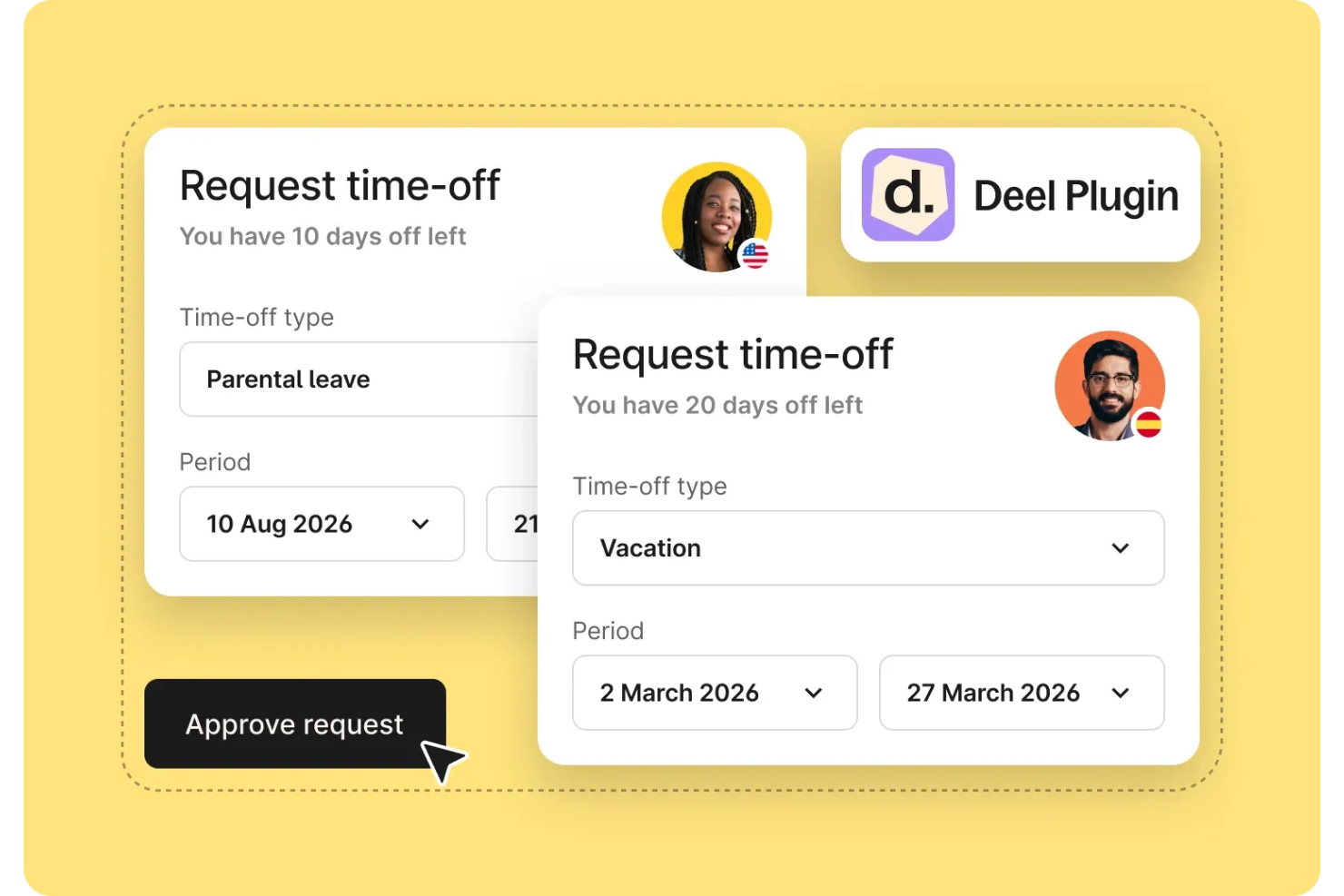
Deel HR is an absence management platform designed for global teams, offering centralized employee records, time off tracking, compliance management, and integrated payroll features.
Who Is Deel HR Best For?
Global HR teams and operations managers in multinational companies who need to manage employee records, time off, and compliance across multiple countries.
Why I Picked Deel HR
I picked Deel HR as one of the best because I can keep all global workforce records in one place, no matter how many countries my team operates in. I like that I can track employee details, contracts, and absence data from a single dashboard. My team uses Deel HR to manage compliance documentation and time off requests for employees and contractors worldwide.
Deel HR Key Features
- Time off management: Track, approve, and report on employee leave and absences in one system.
- Custom leave policies: Set up country-specific or company-wide leave rules for different employee groups.
- Automated holiday calendars: Apply local public holidays automatically to employee schedules.
- Audit trails: Access detailed logs of all changes and approvals related to absence records.
Deel HR Integrations
Native integrations are not clearly documented. Deel HR offers an API for custom integrations.
Pros and Cons
Pros:
- Bulk approval workflows for time off requests
- Customizable leave types for different regions
- Real-time updates to payroll with absences
Cons:
- Reporting features can lack advanced filters
- Limited native integrations with HR platforms
New Product Updates from Deel HR

Deel Expands Stablecoin Wallet to 80+ Countries
Deel expands its Stablecoin Wallet to 80+ countries with dollar-backed balances and optional rewards. This gives eligible contractors more ways to hold and manage earnings inside Deel. For more information, visit Deel’s official site.
 .
.
Best as AI for business
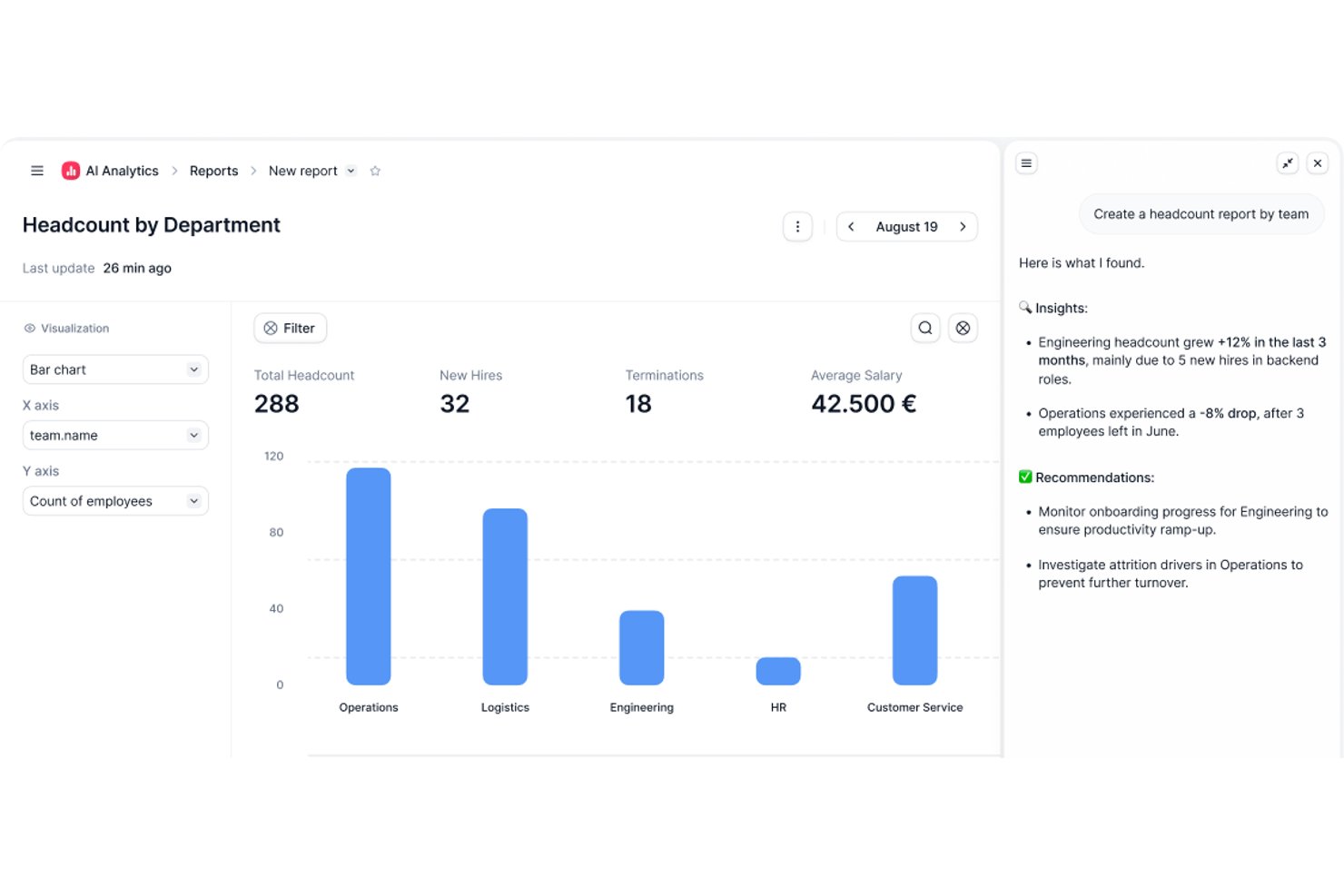
Factorial is an AI-driven HR platform that handles absence management alongside time tracking, shift scheduling, and leave policy configuration across web and mobile.
Who Is Factorial Best For?
Factorial suits HR teams that want AI-assisted day-to-day operations—from absence approvals and timetable planning to answering employee policy questions—all within a single platform.
Why I Picked Factorial
I've included Factorial in my top picks because its AI for business positioning goes beyond a catchy label—the platform actively assists with day-to-day absence management tasks like planning timetables, generating reports, and answering employee questions about leave policies. I especially like how employees can submit requests and check balances from a mobile device, while managers get a shared calendar view to spot overlaps and plan coverage before gaps become problems. Custom absence policies with accrual rules, carryover limits, and blackout dates can be configured by location or contract type, which keeps things organized without a lot of manual admin work.
Factorial Key Features
- Mobile time-off requests: Employees can submit leave requests, attach files, and view remaining balances directly from the Factorial iOS or Android app.
- Configurable approval workflows: Administrators can assign specific approvers for each team and set up customized approval systems for time-off requests.
- Multi-allowance policy support: A single time-off policy can include multiple allowances—such as a standard holiday allowance alongside an overtime-accrued leave allowance.
- Time-off report export: Managers can export time-off reports filtered by team or legal entity, showing both taken and outstanding leave.
Factorial Integrations
Marketplace integrations include a3innuva Nómina, DATEV LODAS, Sage 200, Silae, Microsoft Power BI, Slack, and Zapier. Factorial also offers a REST API, webhooks, and SDKs for custom integrations.
Pros and Cons
Pros:
- Shared absence calendar helps plan coverage
- Mobile requests and visible leave balances
- AI assists with policies, reports, and timetables
Cons:
- Limited absence analytics and report customization
- No documented statutory leave tracking or alerts

Workday
Best with enterprise HR system integration

Workday’s absence management module is designed for large organizations that need to connect time off tracking with broader HR and payroll processes. It’s a strong fit for enterprises looking to manage complex leave policies, compliance, and reporting within a single HR system. The platform helps HR teams automate absence workflows and maintain visibility across global workforces.
Why I Picked Workday
When you need absence management that fitsseamlessly into a larger HR ecosystem, Workday is a clear choice. Its absence module connects directly with payroll, benefits, and time tracking, so you can manage leave policies and compliance without juggling multiple systems. I like that you can automate complex approval workflows and set up region-specific rules for global teams. Workday’s reporting tools also help HR teams monitor trends and ensure policy alignment across the organization.
Workday Key Features
Some other features in Workday help organizations manage absence more efficiently:
- Mobile Self-Service: Employees and managers can request and approve leave directly from the Workday mobile app.
- Calendar Integration: Sync absence data with shared calendars to keep teams informed about who is out.
- Delegation Management: Assign backup approvers or delegates for absence requests during manager absences.
- Audit Trail: Maintain a detailed record of all absence transactions for compliance and review purposes.
Workday Integrations
Integrations include Slack, Microsoft Teams, Salesforce, ServiceNow, ADP, SAP, Oracle, Okta, and Cornerstone OnDemand.
Pros and Cons
Pros:
- Allows delegation of approval authority easily
- Supports global compliance for leave policies
- Syncs absence data with payroll automatically
Cons:
- Custom report building is time-consuming
- Requires IT support for initial configuration

Best for small business PTO tracking
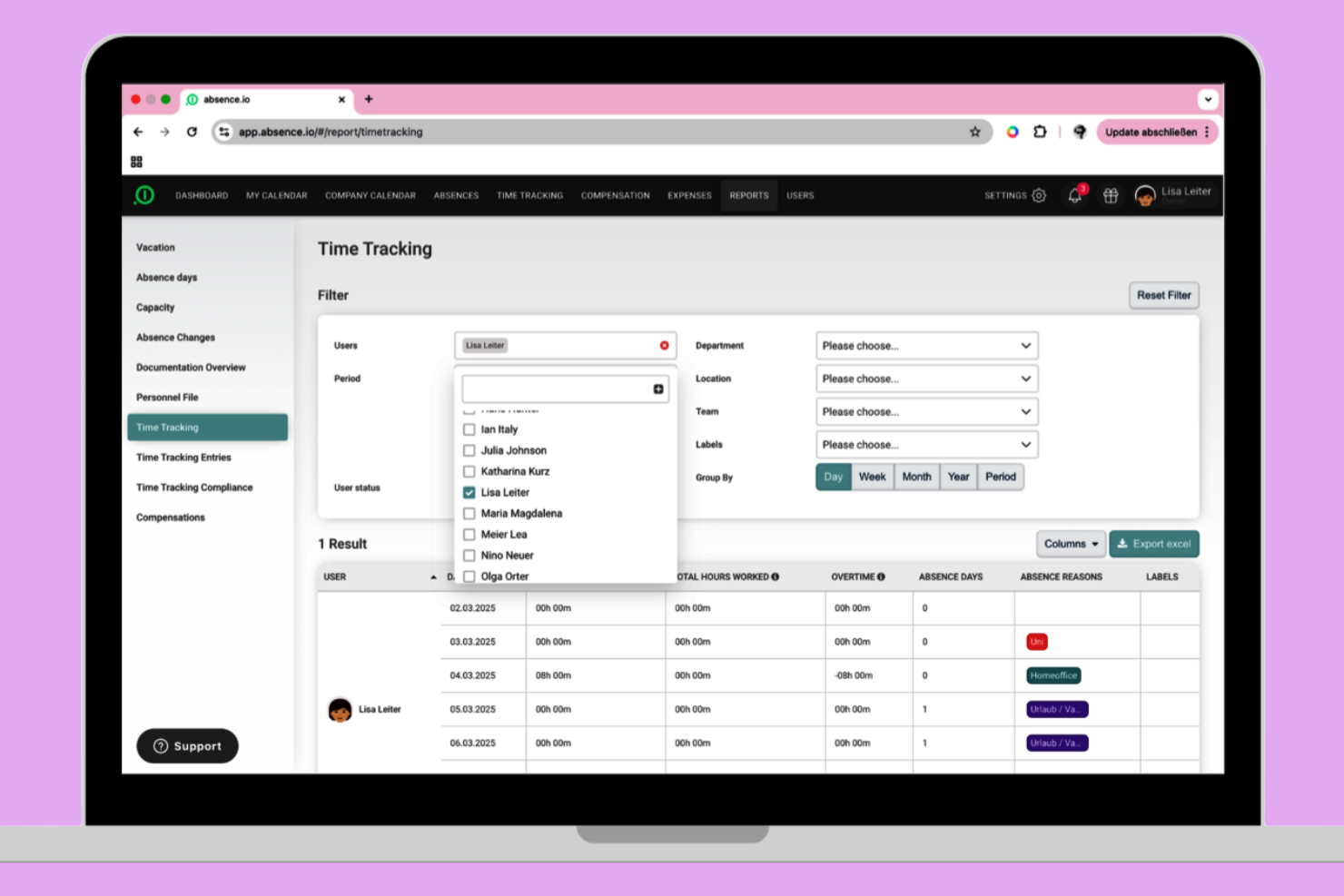
absence.io offers a straightforward PTO tracking solution built with small businesses in mind. It’s especially useful for teams that want to automate leave requests, approvals, and balances without extra complexity. The platform helps you reduce manual tracking and gives employees a clear view of their time off.
Why I Picked absence.io
For small businesses that need a simple way to track PTO, absence.io stands out for its focused approach. The platform lets you automate leave requests and approvals, so you don’t have to rely on spreadsheets or manual processes. I appreciate how employees can view their balances and submit requests directly from the system, which cuts down on back-and-forth emails. Its calendar view also helps managers quickly see who’s out and plan coverage.
absence.io Key Features
Some other features in absence.io help small businesses manage time off more easily:
- Custom Leave Types: Create and manage different categories of leave, such as sick days, parental leave, or unpaid time off.
- Document Uploads: Employees can attach medical certificates or other documents directly to their leave requests.
- Team Calendar Sharing: Share team calendars so everyone can see planned absences and avoid scheduling conflicts.
- HR Dashboard: Access a centralized dashboard for tracking leave statistics and monitoring overall absence trends.
absence.io Integrations
Integrations include Google Workspace, Microsoft Excel, Microsoft Azure, Outlook, and Slack. An open API is also available for custom integrations.
Pros and Cons
Pros:
- Includes document upload for leave requests
- Supports multiple custom leave types
- Offers automated PTO accrual calculations
Cons:
- Approval workflows have limited conditional logic
- Lacks built-in payroll processing features
Best for simple team calendar views
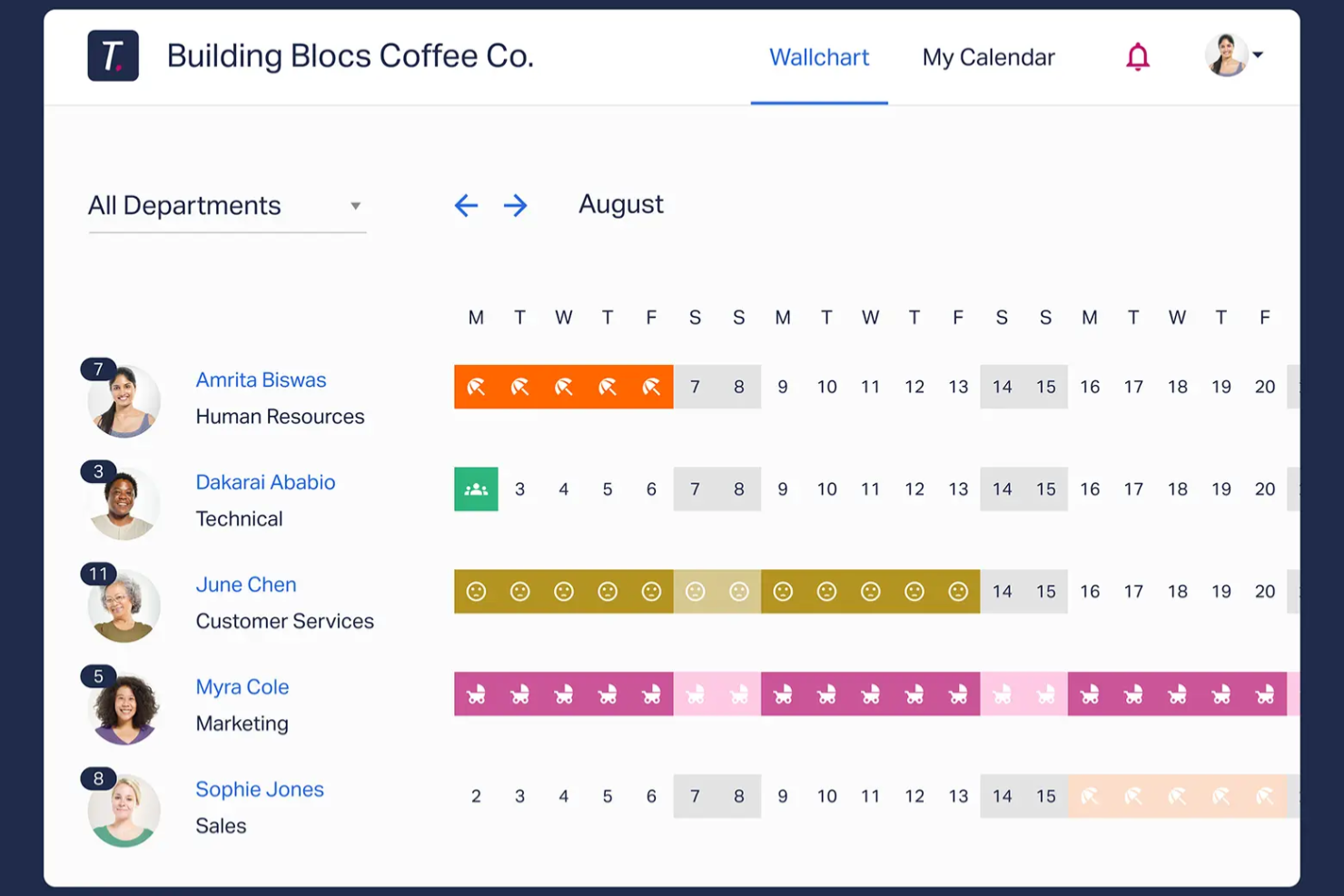
If your team needs a clear, visual way to manage time off, Timetastic offers a straightforward solution. It’s a good fit for small businesses and managers who want a simple shared calendar to track absences without extra complexity. The platform helps you avoid scheduling conflicts and keeps everyone’s leave status visible at a glance.
Why I Picked Timetastic
For teams that want a clear overview of everyone’s time off, Timetastic delivers a simple, visual calendar that’s easy to share. The color-coded team calendar lets you instantly see who’s off and when, which helps prevent overlapping absences. I like that you can filter views by department or location, making it practical for managers with distributed teams. If your main goal is to keep absence tracking transparent and accessible, Timetastic’s calendar-focused approach is a strong fit.
Timetastic Key Features
Some other features that make Timetastic practical for absence management include:
- Mobile App: Submit and approve leave requests directly from your phone.
- Custom Leave Types: Set up different categories for holidays, sick days, and other absences.
- Automated Allowance Tracking: The system automatically updates and tracks each employee’s remaining leave balance.
- Calendar Integrations: Sync Timetastic with Google Calendar, Outlook, or iCal for unified scheduling.
Timetastic Integrations
Integrations include Outlook Calendar, Apple Calendar, Slack, and Google Workspace.
Pros and Cons
Pros:
- Slack integration for instant absence notifications
- Automated leave balance calculations for staff
- Color-coded calendar for quick absence visibility
Cons:
- Cannot attach documents to leave requests
- Lacks support for FMLA or ADA compliance

Dayforce
Best with real-time payroll synchronization
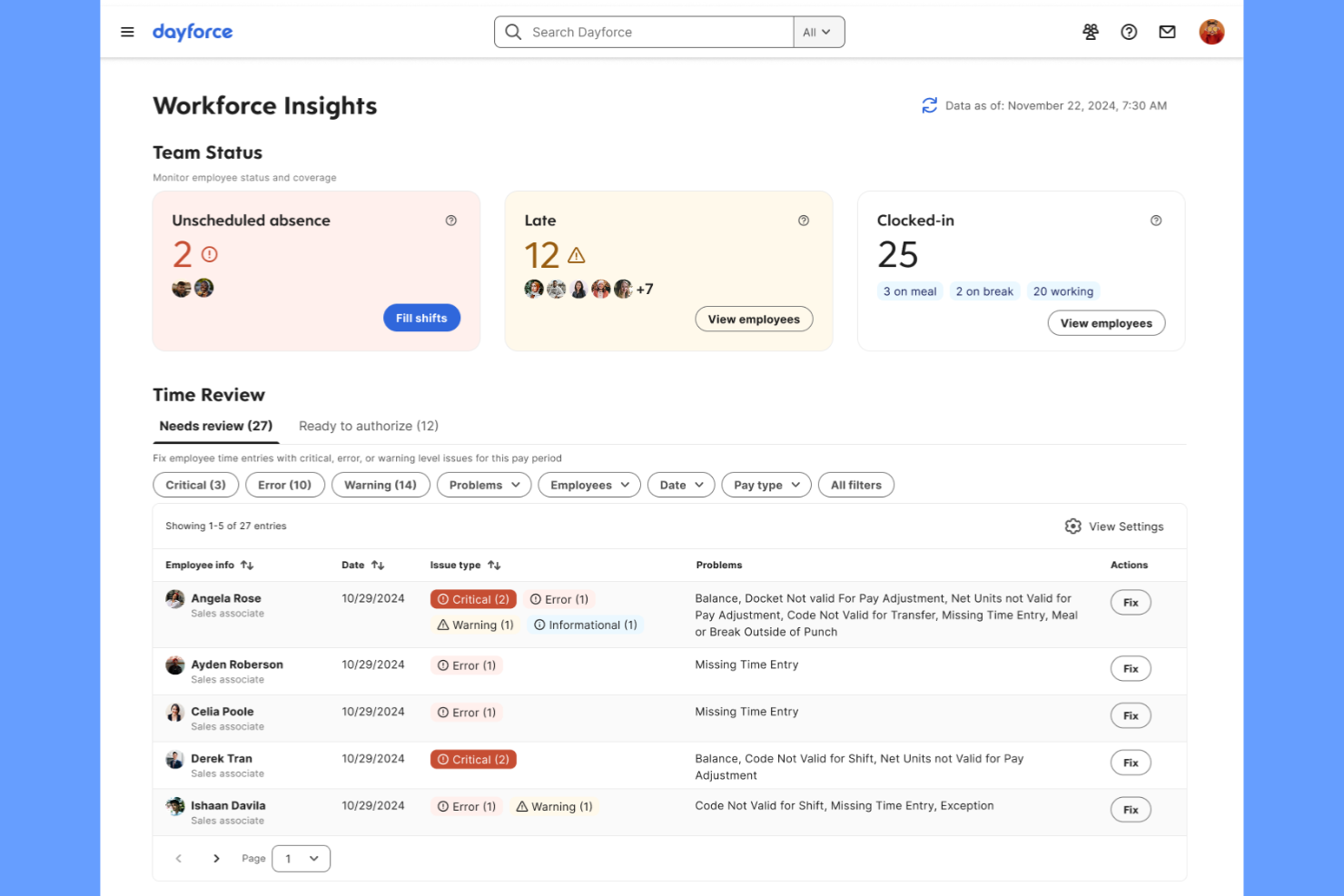
Dayforce is designed for organizations that need absence management tightly connected to payroll and time tracking. It’s especially useful for HR and payroll teams in industries where real-time pay calculations and compliance are critical. The platform helps reduce payroll errors by instantly syncing leave data with payroll processing.
Why I Picked Dayforce
What sets Dayforce apart for absence management is its real-time payroll synchronization, which is essential for organizations where leave directly impacts pay. The platform automatically updates payroll calculations as soon as absences are recorded, reducing the risk of errors and compliance issues. I appreciate how Dayforce connects time off requests, accruals, and pay in a single system, so HR and payroll teams always have up-to-date information. This makes it a strong choice for businesses that need accurate, immediate payroll adjustments tied to employee leave.
Dayforce Key Features
Some other features that make Dayforce useful for absence management include:
- Mobile App Access: Employees and managers can request and approve absences from their mobile devices.
- Automated Accrual Calculations: The system tracks and updates leave balances based on company policies.
- Compliance Rule Engine: Built-in rules help ensure leave policies align with local, state, and federal regulations.
- Customizable Absence Types: HR teams can define and manage multiple leave categories to fit organizational needs.
Dayforce Integrations
Native integrations are not currently listed.
Pros and Cons
Pros:
- Custom absence types for different policies
- Built-in compliance rules for multiple regions
- Automated accruals update after each request
Cons:
- Pricing is not transparent online
- Reporting tools require advanced setup

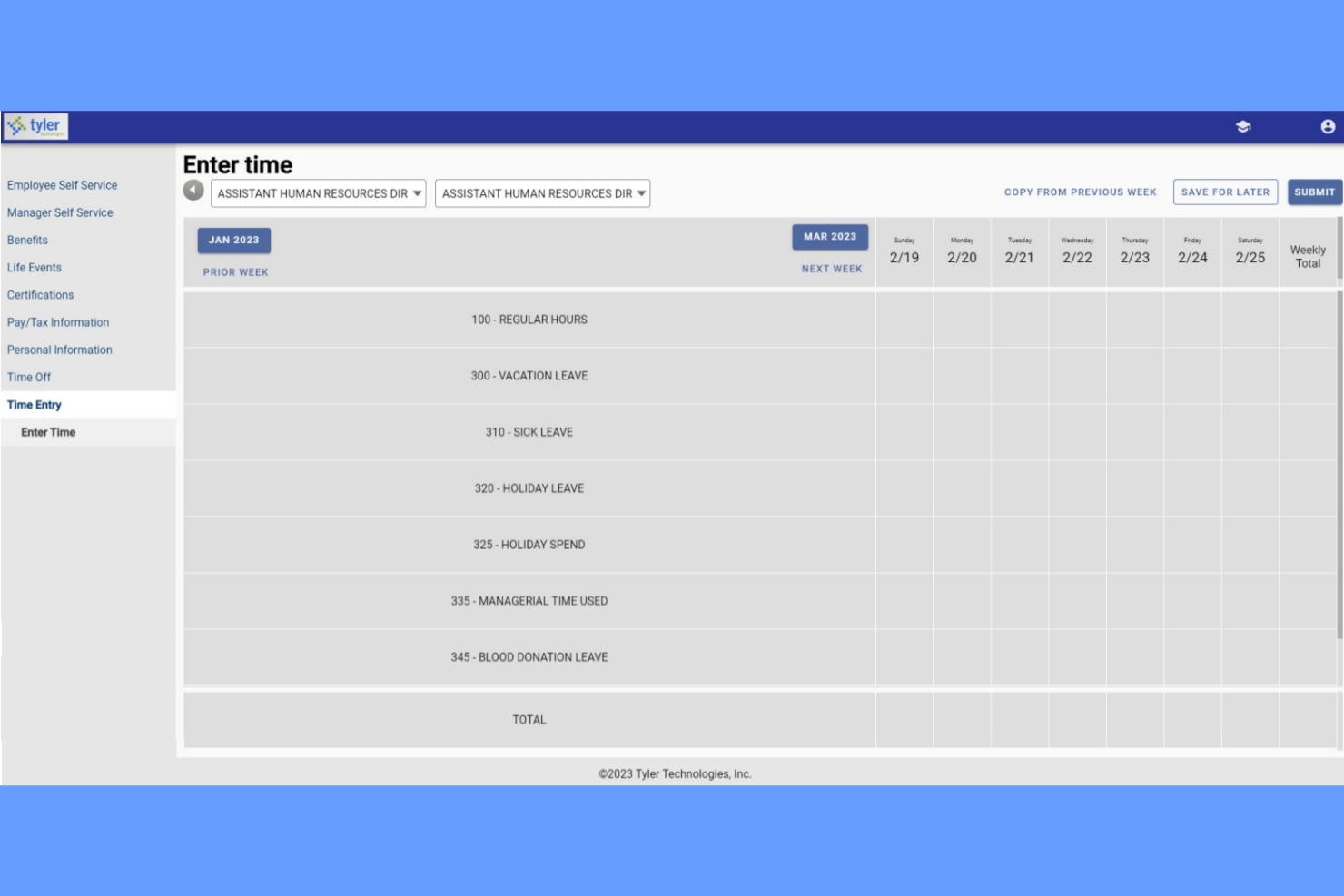
Tyler Technologies offers a specialized absence and substitute management solution built for K-12 school districts. It’s designed for administrators who need to coordinate teacher absences and quickly find qualified substitutes. The platform helps schools automate absence requests, match substitutes based on credentials, and keep classrooms covered without manual calls or spreadsheets.
Why I Picked Tyler Technologies
For K-12 schools that need to manage both teacher absences and substitute assignments, Tyler Technologies offers a focused solution. The platform lets administrators automate absence requests and instantly notify qualified substitutes, which is essential for keeping classrooms staffed. I appreciate how it matches substitutes based on credentials and availability, reducing the risk of last-minute gaps. Tyler Technologies also tracks absence trends, helping school leaders plan for recurring coverage needs.
Tyler Technologies Key Features
Some other features in Tyler Technologies help schools manage absences more smoothly:
- Automated Call-Outs: The system can automatically call substitutes to fill open positions.
- Real-Time Absence Dashboard: Administrators can view current and upcoming absences at a glance.
- Customizable Absence Codes: Schools can set up specific codes for different types of absences.
- Integration With Payroll Systems: Absence data can be sent directly to payroll for accurate compensation.
Tyler Technologies Integrations
Integrations include Tyler Time and Attendance and Tyler School ERP.
Pros and Cons
Pros:
- Tracks substitute credentials for compliance checks
- Custom absence codes fit school district policies
- Shows real-time daily absence coverage
Cons:
- Mobile access features are not fully developed
- Limited reporting options for absence analytics

Best for hourly workforce scheduling

Teambridge stands out for businesses managing large hourly or shift-based teams. It’s built for operations managers and HR teams who need to coordinate time off, PTO, and scheduling in one place. The platform helps reduce absenteeism, shift gaps, and last-minute scheduling issues by connecting absence management directly to workforce scheduling tools.
Why I Picked Teambridge
For organizations with hourly workers, Teambridge offers solution that’s tightly connected to workforce management and schedule. The platform lets managers see time-off requests alongside shift assignments, making it easier to fill gaps and avoid understaffing. I like that Teambridge automatically updates schedules when PTO is approved, so you can quickly identify coverage issues. This approach is especially useful for retail, hospitality, and other industries where shift coverage is critical.
Teambridge Key Features
Some other features that make Teambridge useful for absence management include:
- Self-Service Employee Portal: Staff can submit PTO requests and view balances directly from their own accounts.
- Automated PTO Accruals: The system calculates and updates time-off balances based on company policies.
- Manager Notifications: Managers receive instant alerts for new time-off requests and approvals.
- Customizable Leave Types: Human resources teams can define different categories of leave to match organizational policies.
Teambridge Integrations
Integrations include ADP, Paychex, Rippling, Greenshades, QuickBooks, Bullhorn, SmartRecruiters, Job Robotix, and Salesforce.
Pros and Cons
Pros:
- Manager alerts for pending time-off requests
- Employee portal shows real-time PTO balances
- Automatic shift scheduling updates with PTOs
Cons:
- No built-in compliance tracking for all regions
- Limited analytics for absence trends
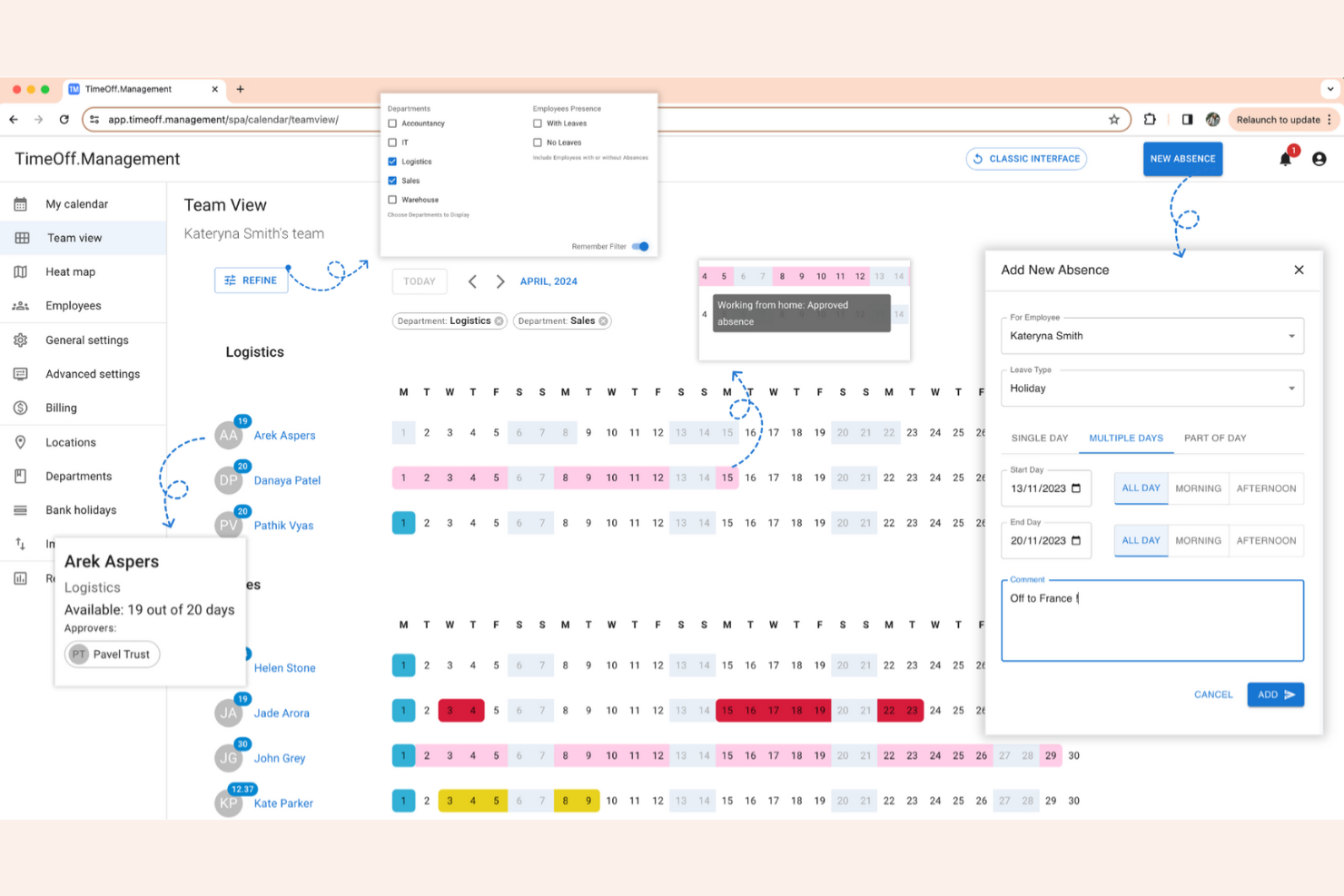
TimeOff stands out for teams that want full control over their absence management system. As an open-source platform, it’s especially appealing to IT teams, startups, and organizations with unique policies or integration needs. You can customize workflows, leave types, and even the interface to fit your exact requirements.
Why I Picked TimeOff
If you want a solution you can truly make your own, TimeOff gives you that flexibility through open-source customization. You can modify the codebase to match your company’s unique leave policies, approval workflows, or even branding. I appreciate that you can add custom leave types and automate rules that fit your organization’s specific needs. For teams with technical resources, this level of control is hard to find in most absence management software.
TimeOff Key Features
Some other features that make TimeOff useful for absence tracking include:
- Multi-Language Support: Users can switch the interface to several different languages.
- Email Notifications: The system sends automated emails for leave requests and approvals.
- Calendar Export: Export leave data to external calendars for broader visibility.
- Role-Based Access: Assign different permissions to managers, employees, and administrators.
TimeOff Integrations
Integrations include Slack, Google Workspace, Microsoft Outlook, Google Calendar, and a REST API for custom integrations.
Pros and Cons
Pros:
- Multi-language interface for global teams
- Self-hosting option for data privacy control
- Open-source code allows full system modification
Cons:
- Manual updates required for self-hosted version
- Lacks built-in payroll system connections
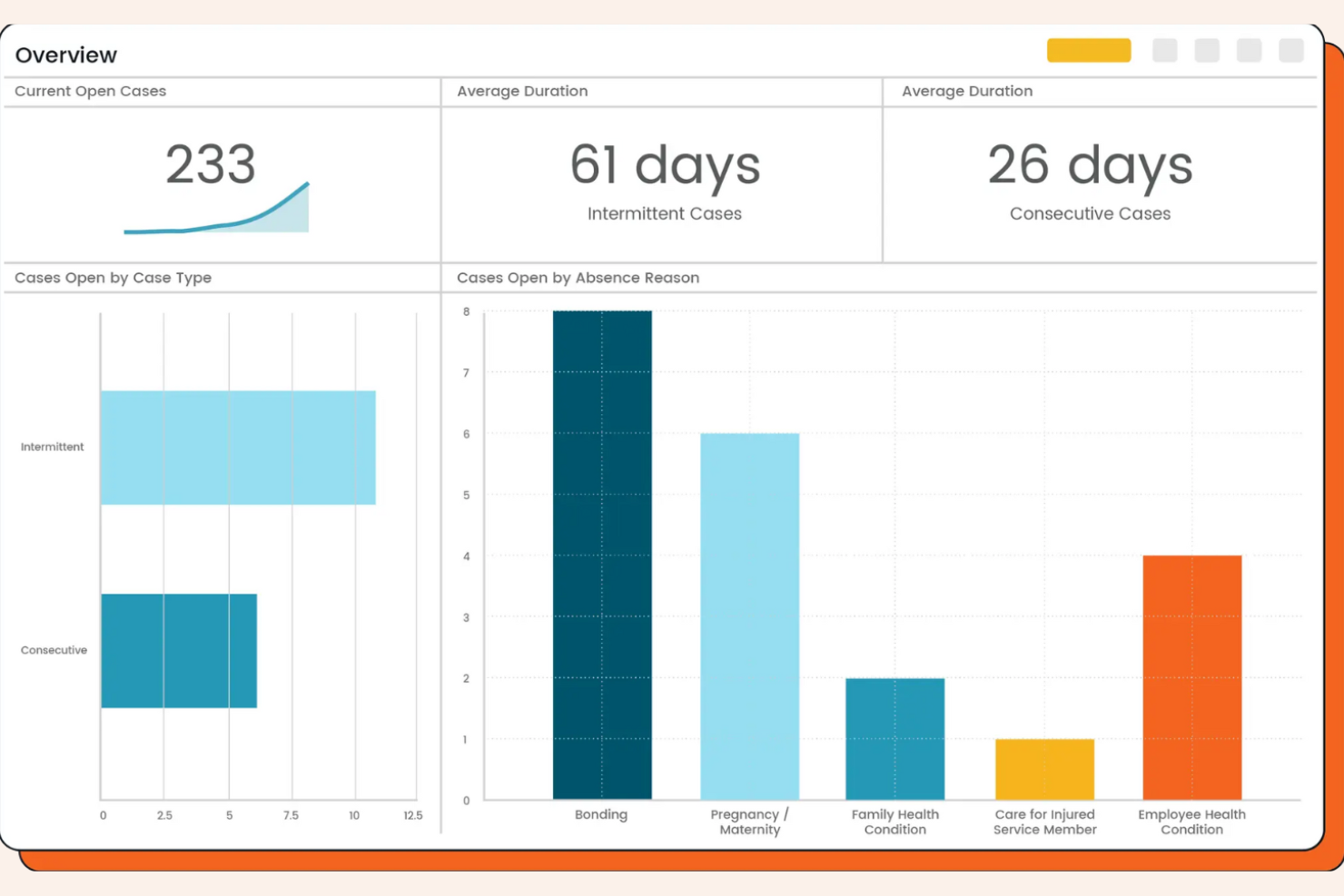
AbsenceSoft is designed for HR teams that need to manage complex leave policies and compliance requirements. It’s a strong fit for organizations with intricate FMLA, ADA, or state-specific leave needs. The platform helps you automate leave tracking, documentation, and communication, reducing manual work and risk.
Why I Picked AbsenceSoft
I chose AbsenceSoft because it addresses the challenges of managing complex leave policies that many HR teams face. The platform offers configurable rules engines, allowing you to automate eligibility and accrual calculations for FMLA, ADA, and other overlapping leave types. I like that it centralizes documentation and communication, making it easier to stay compliant with changing regulations. Its built-in workflows also help ensure every step of the leave process is tracked and auditable.
AbsenceSoft Key Features
Some other features in AbsenceSoft help HR teams manage leave more efficiently:
- Self-Service Employee Portal: Employees can submit leave requests, upload documentation, and check leave balances directly.
- Automated Notifications: The system sends alerts to managers and employees about leave status changes and required actions.
- Customizable Reporting: Generate detailed reports on leave trends, usage, and compliance for audits or leadership reviews.
- Mobile Access: Users can access leave management tools and information from any device with the mobile-friendly interface.
AbsenceSoft Integrations
Integrations include Workday, UKG, ADP, SAP SuccessFactors, Oracle, Paycom, Ceridian Dayforce, Paylocity, BambooHR, and Okta.
Pros and Cons
Pros:
- Centralizes leave documentation and audit trails
- Offers configurable workflows for complex cases
- Handles FMLA, ADA, and state leave rules
Cons:
- No built-in time tracking for hourly staff
- Limited self-service options for smaller teams
Other Absence Management Software
Here are some additional absence management software options that didn’t make it onto my shortlist, but are still worth checking out:
- FINEOS Absence
For insurance and claims compliance
- J. J. Keller Leave Manager
For FMLA and ADA regulatory tracking
- Stiira
For multi-location staff coordination
- TalentHR
With intuitive AI-powered HR automation
- GoCo
For integrated onboarding workflows
- Connecteam
For deskless workforce tracking
- actiPLANS
For visual leave planning
- BambooHR
With mobile PTO approvals
- Replicon
For global policy configuration


How I Evaluate Absence Management Software
My evaluation runs in two layers: the non-negotiables—like digital leave requests, accrual tracking, and team absence calendars—and the differentiators that separate one tool from another.
Core Functionality (Table Stakes For This List)
When I'm selecting tools for my list, I rank each one on a scale from 0 (does not offer the functionality) to 5 (excels in this area) for each core functionality listed below. Then, I calculate the tool's total score into a percentage. Each tool needs to achieve a minimum total score of 65% to be considered for inclusion.
- Leave Request Workflows: I check whether employees can submit requests digitally and whether approvals route through configurable chains—like a regional manager approving first, then HR reviewing.
- PTO Accrual Tracking: Each tool should handle automatic accruals across multiple leave types, including vacation, sick, and parental leave, with support for rules like tenure-based tiers and carryover caps.
- Absence Calendar & Visibility: I look for shared team calendars that surface who's out and when, so managers can spot overlapping absences before approving a request that leaves a shift uncovered.
- Policy & Compliance Configuration: The platform should let you build region-specific leave policies—like FMLA rules or statutory annual leave minimums—without needing workarounds or manual overrides.
- Reporting & Analytics: I evaluate whether the tool goes beyond basic balance exports to offer trend reports and absence pattern metrics that help HR flag recurring short-term absences early.
- HRIS & Payroll Integrations: Approved leave data should sync to your payroll and HRIS systems so you're not manually reconciling hours at the end of each pay cycle.
Once I have a list of tools that meet the criteria, I consider what sets each platform apart.
Differentiating Factors (What Sets Vendors Apart)
Here's how I compare and contrast different vendors:
Standout Features
Multi-country leave templates matter for distributed teams. I look for prebuilt statutory rules that save you from manually researching leave entitlements in each new country. Bradford Factor scoring is another differentiator—it helps HR spot patterns in frequent short-term absences before they become a bigger issue. I also evaluate Slack or Teams integration, since in-chat requests and daily "who's out" digests keep leave management where your team already communicates.
Beyond Features
Pricing transparency matters—I check whether vendors publish clear per-employee rates and offer a free trial so you can evaluate the tool before committing. Implementation speed is another factor I weigh, since a platform that takes months to configure leave policies delays the value your team gets from it. I also consider how each vendor handles data security, especially role-based access to sensitive leave records like medical or parental documentation.
How to Choose Absence Management Software
It’s easy to get bogged down in long feature lists and complex pricing structures. To help you stay focused as you work through your unique software selection process, here’s a checklist of factors to keep in mind:
| Factor | What to Consider |
|---|---|
| Scalability | Will the software handle your current and future headcount, locations, and organizational changes? |
| Integrations | Does it connect natively to your payroll, HRIS, HCM, or scheduling systems, or will you need workarounds? |
| Customizability | Can you tailor leave types, approval workflows, and policies to match your organization’s needs? |
| Ease of use | Will managers and employees adopt it quickly, or will you need to invest heavily in training? |
| Implementation and onboarding | How long will it take to get up and running, and what resources or support will you need during rollout? |
| Cost | Are all fees clear up front, and does the pricing model fit your usage patterns and budget cycles? |
| Security safeguards | Does the vendor offer data encryption, access controls, and compliance with relevant privacy laws? |
| Support availability | Can you reach support when you need it, and are there SLAs or dedicated contacts for urgent issues? |
What Is Absence Management Software?
Absence management software is a digital tool that helps organizations track, manage, and report on employee absences, such as sick leave, vacation, and other time off. It centralizes leave requests, automates approval workflows, and maintains accurate records for compliance and planning. HR teams use it to ensure coverage, enforce policies, and gain visibility into workforce attendance trends.
Features of Absence Management Software
When selecting absence management software, keep an eye out for the following key features:
- Leave request portal: Allows employees to submit time-off requests online, making the process faster and more transparent for both staff and managers.
- Automated approval workflows: Routes leave requests to the appropriate approvers and notifies all parties of status changes, reducing manual follow-up.
- Custom leave types: Lets you define and manage different categories of leave, such as sick days, vacation, parental leave, or unpaid time off.
- Absence tracking calendar: Provides a visual calendar view of all scheduled and taken absences, helping teams plan coverage and avoid conflicts.
- Real-time balance calculations: Automatically updates and displays each employee’s available leave balance based on accruals and usage.
- Reporting and analytics: Generates detailed reports on absence trends, usage patterns, and policy compliance to support data-driven HR decisions.
- Policy enforcement tools: Applies company-specific rules for eligibility, carryover, blackout dates, and documentation requirements to ensure consistency.
- Notifications and reminders: Sends automated alerts to employees and managers about upcoming absences, pending approvals, or required actions.
- Audit trail: Maintains a secure, time-stamped record of all leave-related actions for compliance and dispute resolution.
- Mobile access: Enables employees and managers to request, approve, or review absences from smartphones or tablets, supporting flexible work environments.
Benefits of Absence Management Software
Implementing absence management software provides several benefits for your team and your business. Here are a few you can look forward to:
- Improved compliance: Automated policy enforcement and audit trails help your organization stay aligned with labor laws and internal rules.
- Greater visibility: Real-time calendars and reporting tools give HR and managers a clear view of absences and coverage gaps.
- Faster approvals: Automated workflows and notifications speed up the leave request and approval process for everyone involved.
- Accurate leave balances: Real-time calculations ensure employees and managers always see up-to-date leave entitlements.
- Reduced manual work: Centralized digital records and self-service portals minimize paperwork and repetitive data entry.
- Better planning: Visual scheduling tools and analytics support proactive workforce planning and reduce last-minute disruptions.
- Enhanced employee experience: Easy access to leave information and mobile-friendly tools optimize employee exeprience to manage and request time off confidently.
Costs and Pricing of Absence Management Software
Selecting absence management software requires an understanding of the various pricing models and plans available. Costs vary based on features, team size, add-ons, and more. The table below summarizes common plans, their average prices, and typical features included in absence management software solutions:
Plan Comparison Table for Absence Management Software
| Plan Type | Average Price | Common Features |
|---|---|---|
| Free Plan | $0 | Basic leave tracking, limited user seats, simple reporting, and email notifications. |
| Personal Plan | $5–$10/user/month | Leave requests, approval workflows, calendar views, timesheet tracking, and basic policy customization. |
| Business Plan | $10–$25/user/month | Advanced reporting, integrations with HRIS or payroll, custom leave types, and mobile access. |
| Enterprise Plan | $25–$50/user/month | Multi-location support, audit trails, advanced compliance tools, dedicated support, and custom onboarding. |
Absence Management Software FAQs
Here are some answers to common questions about absence management software:
How does absence management software help with compliance?
Absence management software helps with compliance by enforcing company leave policies, tracking documentation, and maintaining audit trails. It also supports adherence to labor laws by automating accruals, carryovers, and eligibility rules, reducing the risk of manual errors or missed regulatory requirements.
Can absence management software integrate with payroll and HR systems?
Yes, most absence management software can integrate with payroll and HR systems. These integrations allow for automatic updates of leave balances, accurate payroll calculations, and simplify data sharing between platforms, which reduces manual entry and the risk of discrepancies.
What should I consider when migrating from manual tracking to software?
When migrating from manual attendance tracking, consider data accuracy, historical record import, user training, and policy setup. Plan for a transition period where both systems may run in parallel, and ensure your team understands new workflows and where to find support resources.
Is absence management software suitable for remote or distributed teams?
Yes, absence management software is well-suited for remote or distributed teams. Cloud-based access, mobile apps, and automated notifications make it easy for employees and managers in different locations to request, approve, and track absences in real time.
How secure is employee data in absence management software?
Employee data in absence management software is typically protected with encryption, access controls, and compliance with privacy regulations. Always review a vendor’s security certifications and data handling practices to ensure they meet your organization’s standards.