

10 Best Career Management Software for Remote Teams in 2026

Best Career Management Software for Remote Teams Shortlist


Career management software for remote teams gives you digital tools to guide career growth, track skills, set goals, and match people with new opportunities—all in a distributed work environment. If you’re looking to keep talent engaged and progressing from anywhere, the right platforms make it easy to support development, streamline career planning, connect remote workers with relevant learning, feedback, and internal roles, and keep them informed through automated notifications. Many solutions also include time tracking features in an all-in-one platform. This guide shares the best options you can use to help your team thrive, covering the must-have features, standout integrations, and what to expect from each provider.
Why Trust Our Software Reviews
We’ve been testing and reviewing HR software systems since 2019. As HR experts ourselves, we know how critical and difficult it is to make the right decision when selecting software.
We invest in deep research to help our audience make better software purchasing decisions. We’ve tested more than 2,000 tools for different HR management use cases and written over 1,000 comprehensive software reviews. Learn how we stay transparent & our software review methodology.
Best Career Management Software for Remote Teams Summary
This comparison chart summarizes pricing details for my top career management software for remote teams selections to help you find the best one for your budget and business needs.
| Tool | Best For | Trial Info | Price | ||
|---|---|---|---|---|---|
| 1 | Best for global-first HR compliance tools | Free demo available | From $5/employee/month | Website | |
| 2 | Best for supporting growth conversations at scale | Free demo available | From $4/user/month (billed annually) | Website | |
| 3 | Best for internal career opportunities | Free demo available | Pricing upon request | Website | |
| 4 | Best for agile skill gap analysis | Free demo available | Pricing upon request | Website | |
| 5 | Best for AI-powered mobility mapping | Free demo available | Pricing upon request | Website | |
| 6 | Best for personalized skill development pathways | Free demo available | Pricing upon request | Website | |
| 7 | Best for unified talent data insights | Free demo available | Pricing upon request | Website | |
| 8 | Best for AI-driven career exploration | Free demo available | Pricing upon request | Website | |
| 9 | Best for individualized learning recommendations | Free demo available | Pricing upon request | Website | |
| 10 | Best for creating internal talent marketplaces | Free demo available | Pricing upon request | Website |
Best Career Management Software for Remote Teams Reviews
Below are my detailed summaries of the best career management software for remote teams that made it onto my shortlist. My reviews offer a detailed look at the features, integrations, and best use cases of each platform to help you find the best one for you.

Deel HR
Best for global-first HR compliance tools
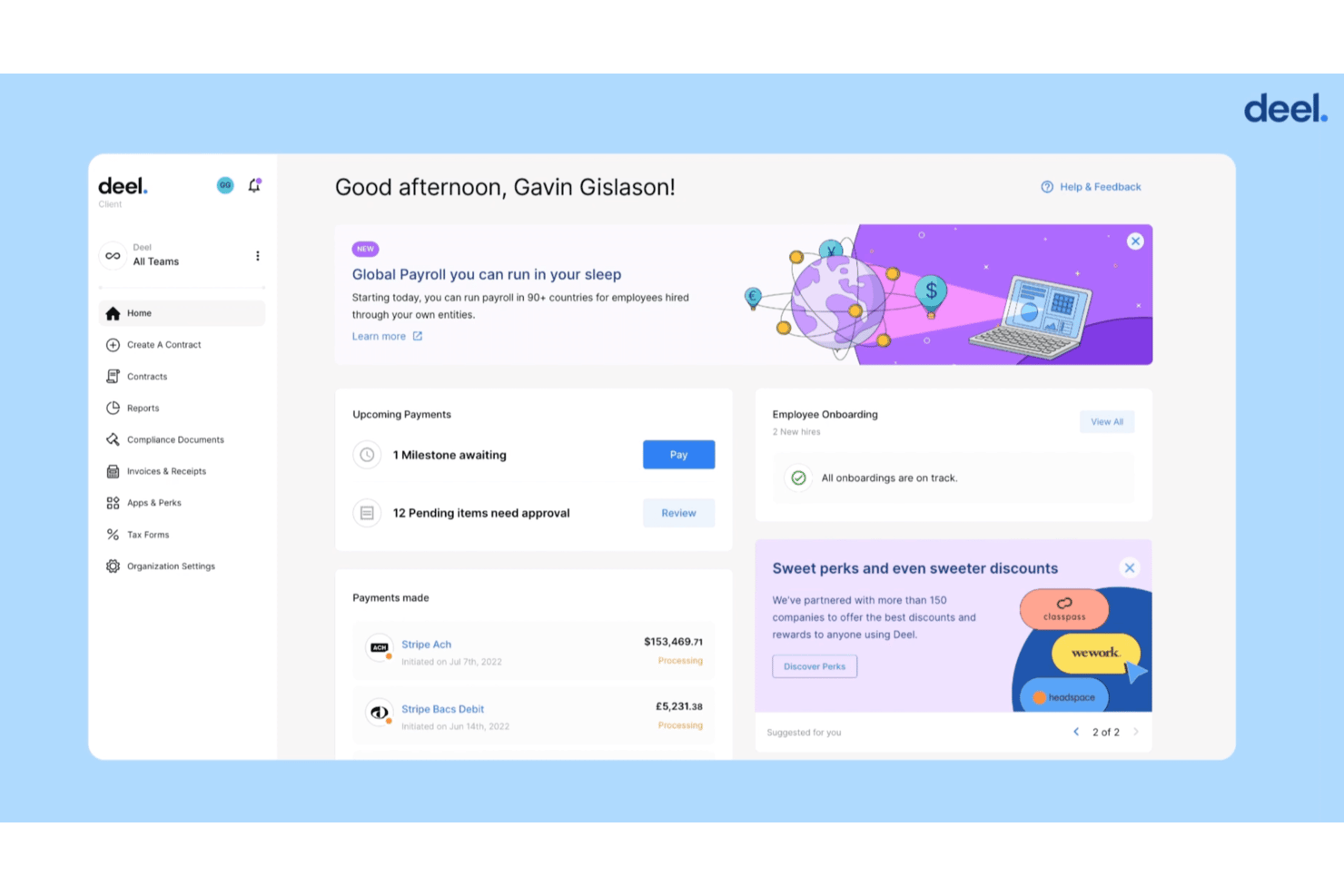
Deel HR is a global HR and talent management platform that combines career frameworks, performance reviews, development planning, learning management, and compliance tools for distributed teams across 150+ countries.
Who Is Deel HR Best For?
Deel HR is a strong fit for people operations teams managing career development across multiple countries and worker types.
Why I Picked Deel HR
I picked Deel HR as one of the best because no other career management tool pairs development planning with built-in, country-specific compliance across 150+ countries. When my team drafts career frameworks or IDPs in Deel Engage, that data lives alongside payroll, contracts, and local labor rules, not in a separate system. I especially like the AI-drafted career paths, which map competencies to role progressions without starting from scratch.
Deel HR Key Features
- 360° performance reviews: Collect feedback from managers, peers, and direct reports with customizable template cycles.
- Learning management system integration: Assign, track, and report on learning activities aligned to career frameworks and skill needs.
- Asynchronous check-ins: Schedule and document manager-employee career conversations across time zones directly in the platform.
- Org chart management: Visualize team structure, reporting lines, and role histories for all direct hires, contractors, and EOR workers.
Deel HR Integrations
Deel offers integrations with QuickBooks, Xero, BambooHR, Expensify, NetSuite, Sage Intacct, Greenhouse, Workday, SAP, and ADP, among others available through its app store. It also connects with Zapier and provides an API for custom integrations.
Pros and Cons
Pros:
- Covers EOR workers, contractors, and direct hires
- AI-generated career paths reduce manual setup
- Built-in compliance across 150+ countries
Cons:
- Skills tracking less advanced than dedicated platforms
- Career features require a separate Engage subscription
New Product Updates from Deel HR

Deel Expands Stablecoin Wallet to 80+ Countries
Deel expands its Stablecoin Wallet to 80+ countries with dollar-backed balances and optional rewards. This gives eligible contractors more ways to hold and manage earnings inside Deel. For more information, visit Deel’s official site.
 .
.
Lattice
Best for supporting growth conversations at scale
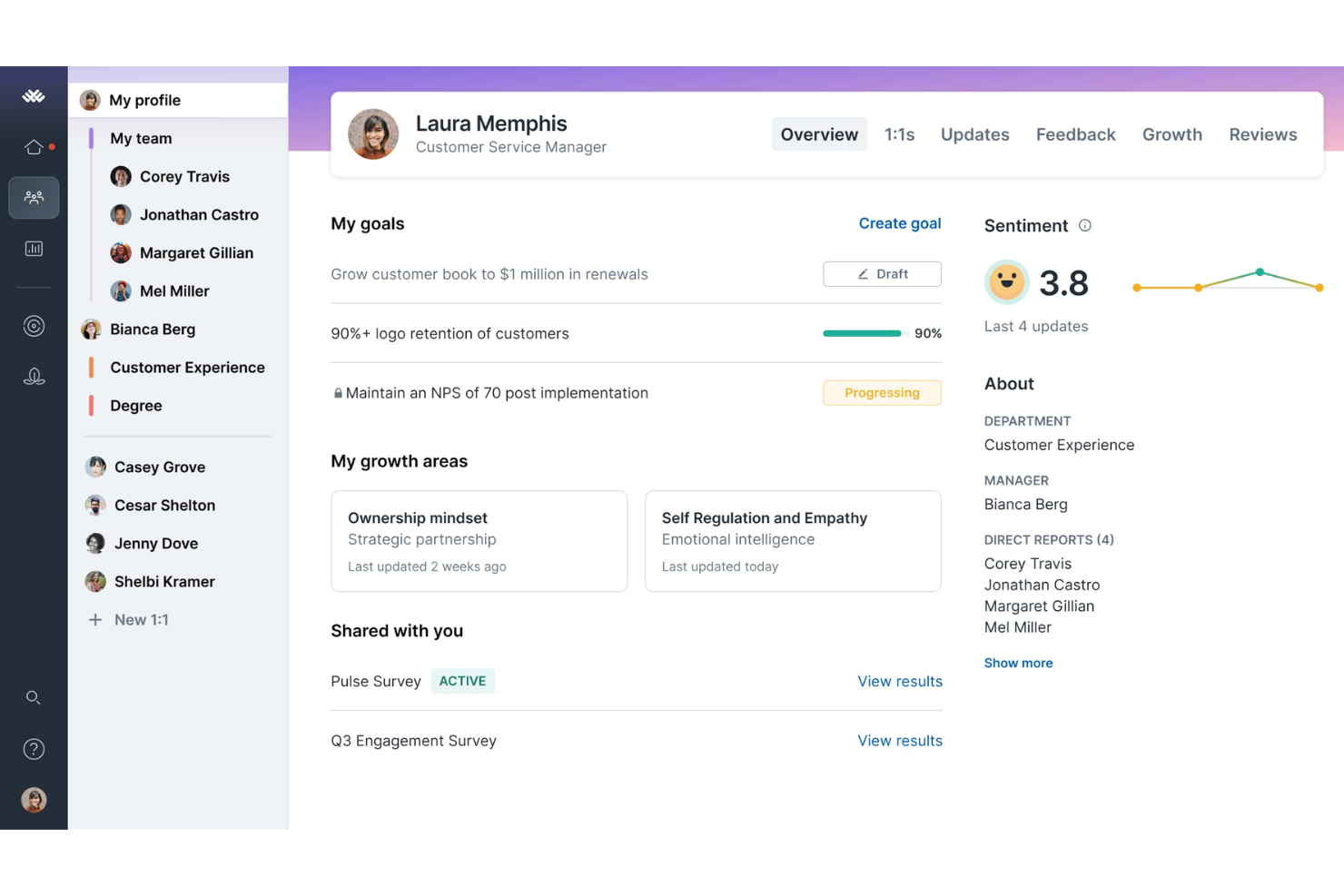
Lattice Grow is a career development module within the Lattice people management platform, offering competency matrices, individual development plans, career tracks, and AI-powered growth areas tied directly to performance and manager 1:1 workflows.
Who Is Lattice Best For?
Lattice Grow is a strong fit for mid-sized organizations with dedicated People Ops or HR teams that need structured career development built into their existing performance management workflows.
Why I Picked Lattice
Lattice earns its spot on my shortlist because of how it weaves growth conversations into the workflows managers already run. Development plans live inside the same 1:1 cadence your team uses weekly, so career conversations happen naturally rather than as a separate annual event. I also like that AI-powered growth areas pull from existing performance and feedback data, giving distributed managers real context to coach from.
Lattice Key Features
- Competency matrices: Define role-based skills and expectations for every position on the team.
- Career tracks: Map employee progression with clear visual pathways across multiple functions and levels.
- Integration with Slack and Teams: Enable direct access to feedback, goals, and updates within everyday communication apps.
- Performance and engagement analytics: Track progression, development activity, and participation using built-in dashboards for remote workforce visibility.
Lattice Integrations
Lattice offers native integrations with Slack, Microsoft Teams, BambooHR, Rippling, ADP, Google Workspace, Okta, Workday, Jira, and Salesforce. An API is available for custom integrations.
Pros and Cons
Pros:
- Async features support distributed remote teams
- IDPs connect to performance data for context
- Career tracks and competencies are easily customizable
Cons:
- Mobile experience is limited compared to desktop
- No internal job marketplace or gig board
New Product Updates from Lattice

Lattice Introduces MCP Connector for AI Chat Tools
Lattice introduced Lattice MCP, a new connector that brings talent data into Claude, ChatGPT, and other LLM tools. The connector helps teams access performance context from reviews, 1:1 notes, feedback, goals, and updates within AI chat workflows. For more information, visit Lattice’s official site.
 .
.
Phenom
Best for internal career opportunities
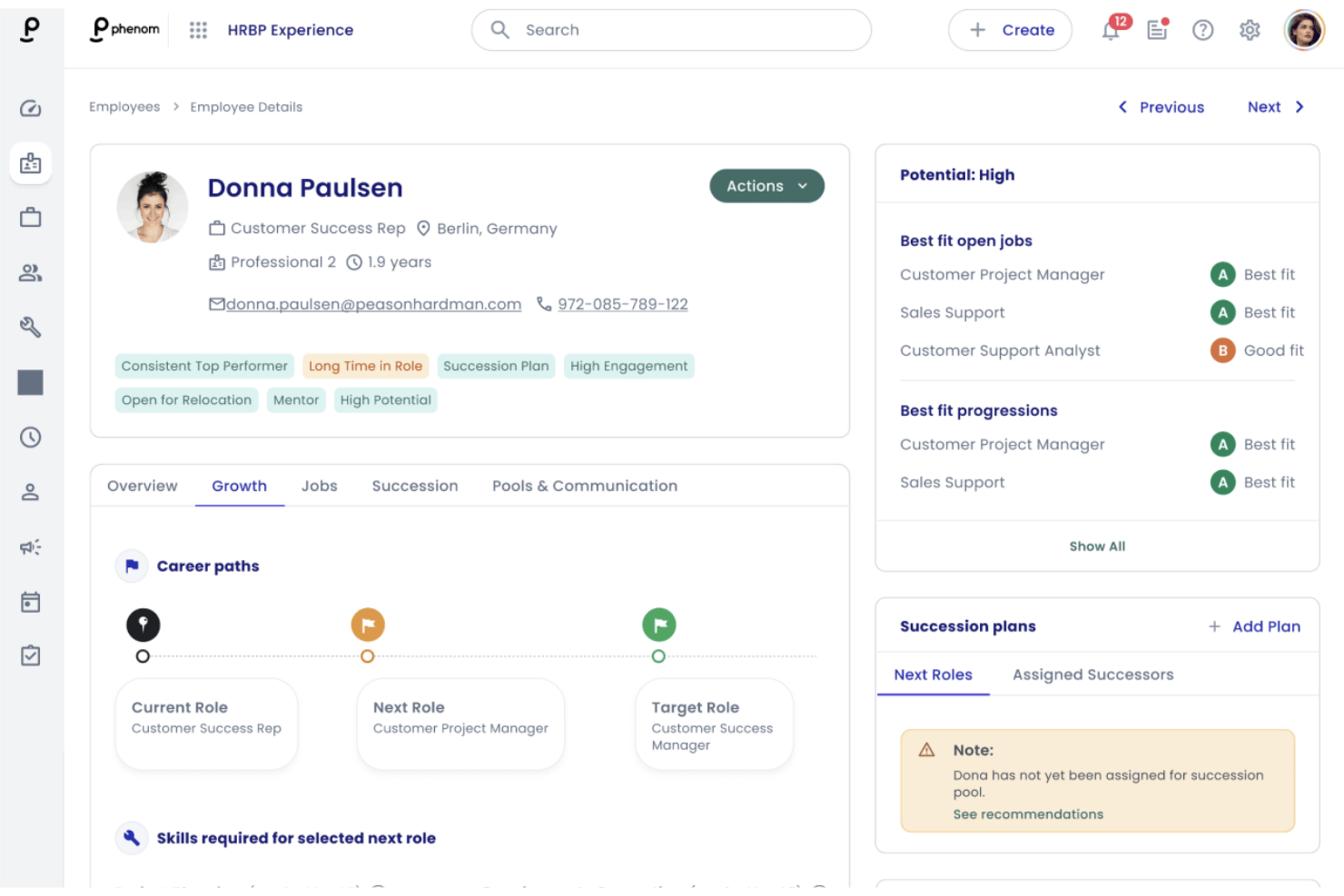
Phenom is an AI-driven talent management platform that combines career pathing, internal mobility, skills gap analysis, mentoring connections, and workforce intelligence into a single system for HR teams and employees.
Who Is Phenom Best For?
Phenom is a strong fit for large enterprises with dedicated HR tech teams that need to manage internal mobility and career development at scale.
Why I Picked Phenom
I picked Phenom as one of the best because its Talent Marketplace gives remote employees a self-service view of internal opportunities, gigs, and mentors they'd otherwise never discover without office proximity. I particularly like the Internal Gigs feature, which lets employees join short-term cross-functional projects and stay visible to leadership across time zones. Career Coach Agents then personalize development recommendations based on each person's skills gaps and aspirations.
Phenom Key Features
- People manager dashboard: Centralizes team skills, aspirations, and development progress for easy manager oversight.
- Succession planning: Maps out successor candidates for key roles using real-time skills and readiness data.
- Employee resource groups: Supports virtual communities to connect remote employees with shared backgrounds or interests.
- Workforce intelligence analytics: Delivers predictive insights into retention risks, skill gaps, and internal mobility trends.
Phenom Integrations
Phenom offers 45+ marketplace integrations, including SAP SuccessFactors, ServiceNow, UKG, Checkr, ADP, Cornerstone OnDemand, and more. An API is available for custom integrations.
Pros and Cons
Pros:
- Succession planning dashboard for HR leaders
- Career pathing with personalized AI recommendations
- Internal gigs for skill-building across departments
Cons:
- Platform configuration can be complex
- Limited async-first collaboration features

Fuel50
Best for agile skill gap analysis
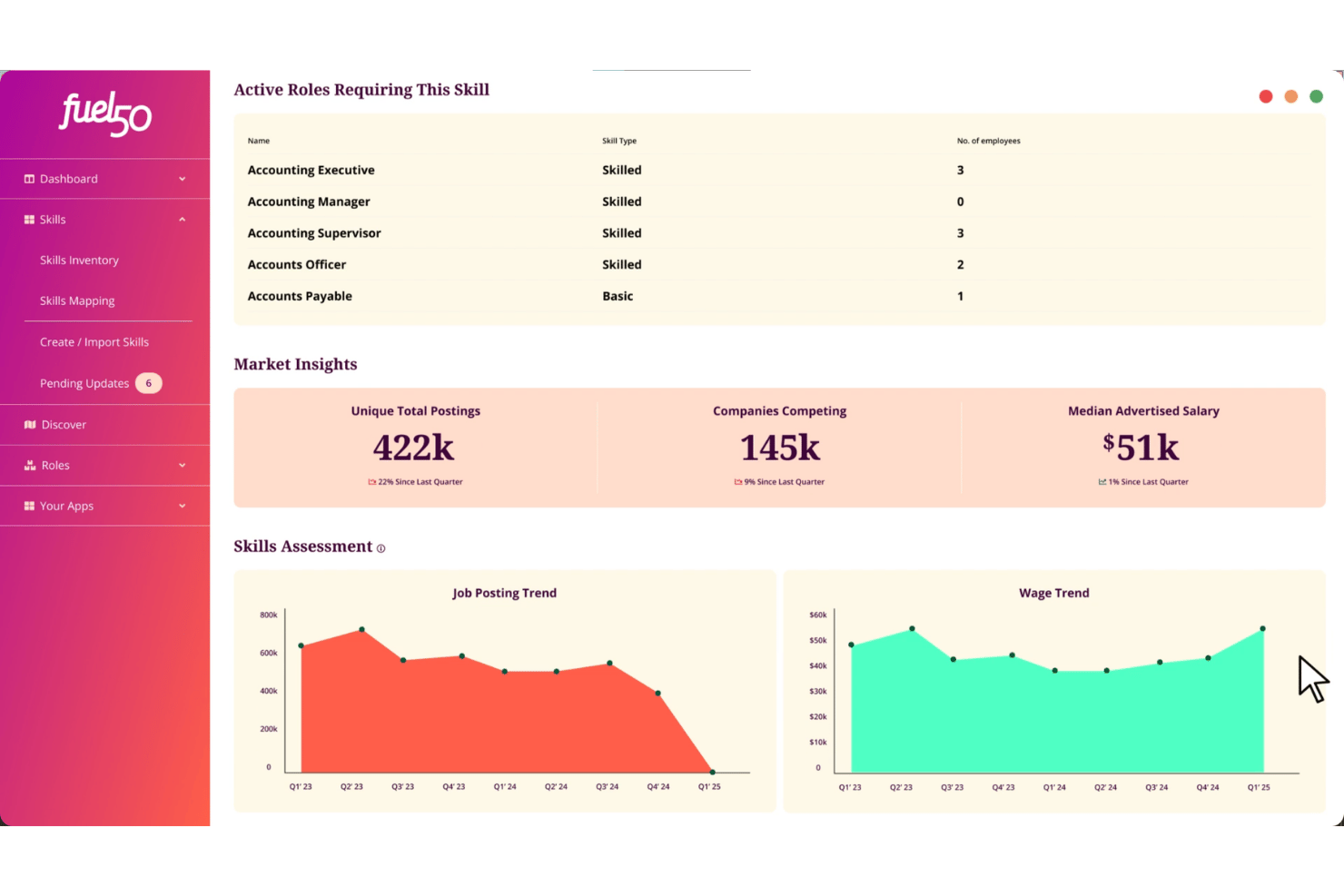
Fuel50 is a talent intelligence platform that combines AI-driven career pathing, skills gap analysis, internal mobility, and development planning to give distributed teams visibility into workforce capabilities and growth opportunities.
Who Is Fuel50 Best For?
Fuel50 fits mid-to-large enterprises with established job architecture and HR or talent teams actively building a skills-based organization at scale.
Why I Picked Fuel50
I picked Fuel50 as one of the best because its skills ontology continuously maps employee skills to role requirements and surfaces readiness scores in real time, not just at annual reviews. For remote teams, a people ops manager can pull a current-state view of capability gaps across a distributed workforce without manual data collection. The Gigs feature then translates that gap data into action, matching employees to stretch assignments targeting the exact skills identified as missing.
Fuel50 Key Features
- Career journeys: Visualize multi-directional career paths and role progressions across the organization.
- Mentor matching: Connect employees to suitable mentors using AI-driven recommendations.
- Organizational goals alignment: Link development plans to company-wide goals and objectives for remote visibility.
- Succession pipelines: Build roles-based and skills-based pipelines for future leadership and specialist needs.
Fuel50 Integrations
Fuel50 offers native integrations with Workday, SAP SuccessFactors, and Oracle HCM, and more, and provides an API for custom integrations.
Pros and Cons
Pros:
- Marketplace supports gigs and mentorship
- AI-driven career pathing for remote employees
- Skills gap analysis updates in real time
Cons:
- Limited social or chat features for teams
- Manager dashboards lack real-time collaboration
Best for AI-powered mobility mapping
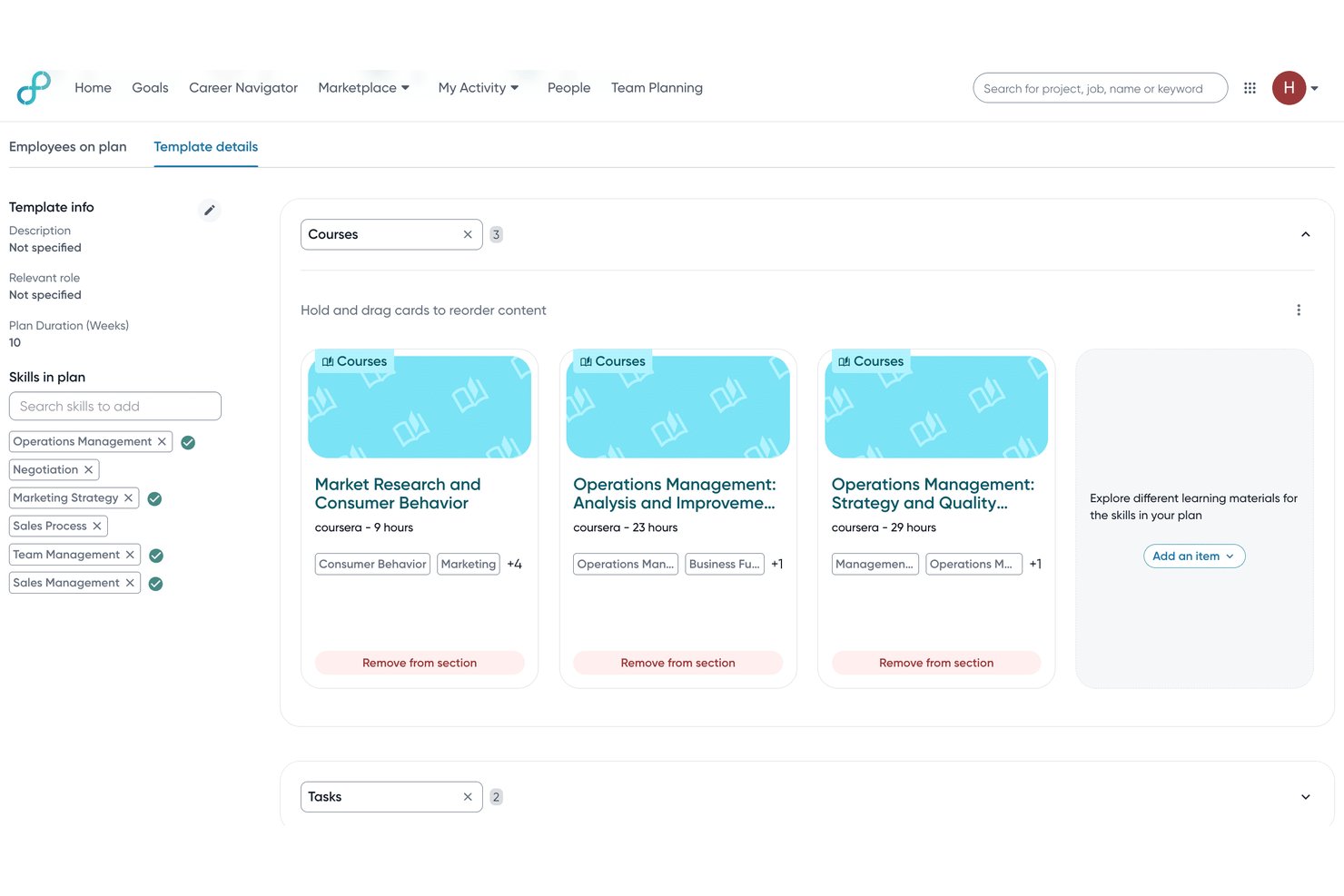
Eightfold AI is an enterprise talent management platform that uses AI to power career pathing, skills mapping, internal mobility, and workforce planning across distributed organizations.
Who Is Eightfold AI Best For?
Eightfold AI is built for large enterprises with at least 10,000 employees that need AI-driven talent mobility and skills intelligence at scale.
Why I Picked Eightfold AI
I picked Eightfold AI as one of the best because its internal mobility mapping goes well beyond a job board. The Talent Marketplace surfaces matched roles, gigs, and stretch assignments based on skills adjacency, so a remote employee in Singapore can be matched to a project led by a team in Amsterdam. I also like the Digital Twin feature, which reads live signals from emails and work apps to build a real-time skills picture rather than relying on a static employee profile.
Eightfold AI Key Features
- Career hub and agentic career coach: Employees get tailored career guidance and resources directly within their workspace.
- Succession planning module: HR teams can visualize talent pools and future leadership pipelines for critical roles.
- Workforce readiness analytics: CHROs track AI adoption metrics and identify gaps in skills or transformation by location or function.
- Integration hub: Pre-built connectors enable seamless data sync with major HRIS, ATS, and learning systems.
Eightfold AI Integrations
Eightfold AI offers native integrations with Workday, SAP SuccessFactors, Oracle HCM Cloud, Greenhouse, iCIMS, Lever, ADP, SmartRecruiters, Taleo, and more. An API is also available for custom integrations.
Pros and Cons
Pros:
- Succession planning aligns with large enterprise needs
- AI career coach supports asynchronous career planning
- Global skills ontology covers 155+ countries
Cons:
- Slower implementation compared to similar tools
- No mobile app for employee access
Best for personalized skill development pathways
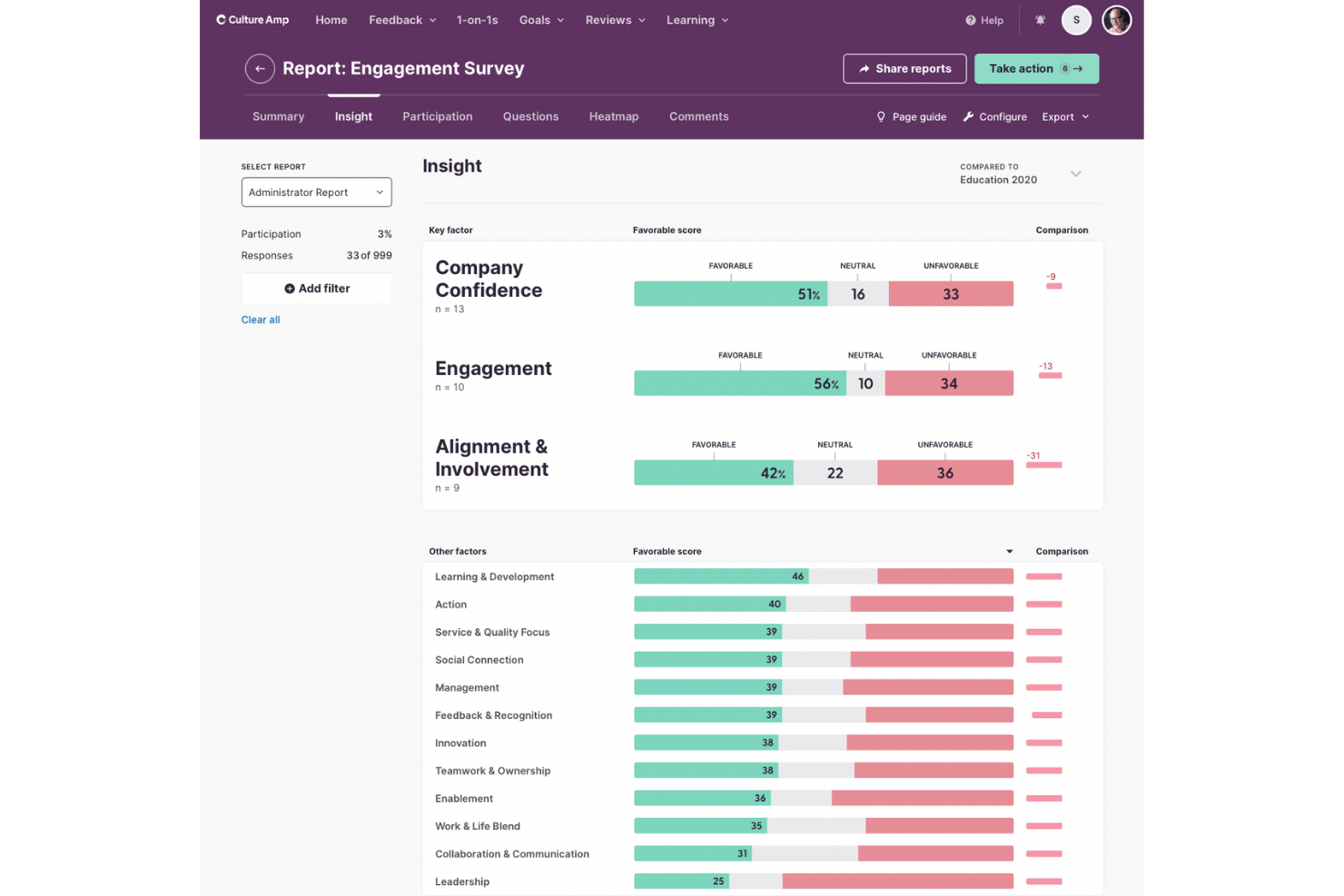
Culture Amp Develop is a career management platform that combines competency-based development planning, career pathing, skills tracking, and manager coaching tools for distributed teams.
Who Is Culture Amp Best For?
Culture Amp Develop is a strong fit for mid-size to enterprise L&D and people operations teams managing structured career growth across distributed, multilingual workforces.
Why I Picked Culture Amp
Culture Amp Develop earns its spot on my shortlist because of how tightly it connects competency frameworks to individual development plans. I love that you can map specific proficiency levels to each role and build personalized growth plans directly from those gaps. The daily Skills Coach micro-learning feature means employees aren't waiting for quarterly check-ins to make progress. In practice, that keeps development active for remote employees who miss the informal coaching moments of an in-office environment.
Culture Amp Key Features
- Role tracks and descriptions: Maintain detailed role breakdowns so remote employees understand expectations and opportunities.
- Manager upskilling workflows: Guide managers with built-in templates for effective career conversations, regardless of location.
- Slack and MS Teams integration: Connects directly for updates, check-ins, and feedback in your team's normal communication channels.
- Multilingual platform support: Allows distributed teams to use the platform in over 25 languages for global accessibility.
Culture Amp Integrations
Culture Amp offers native integrations with Workday, BambooHR, HiBob, SAP SuccessFactors, Paylocity, Dayforce, Namely, ELMO, Gusto, and more. It also integrates natively with Slack and Microsoft Teams, and provides an API for custom integrations.
Pros and Cons
Pros:
- Role templates for consistent career development
- Real-time feedback supports remote coaching
- Personalized skills pathways for each employee
Cons:
- Limited self-service reporting customization
- No gig or project marketplace option

Workday
Best for unified talent data insights
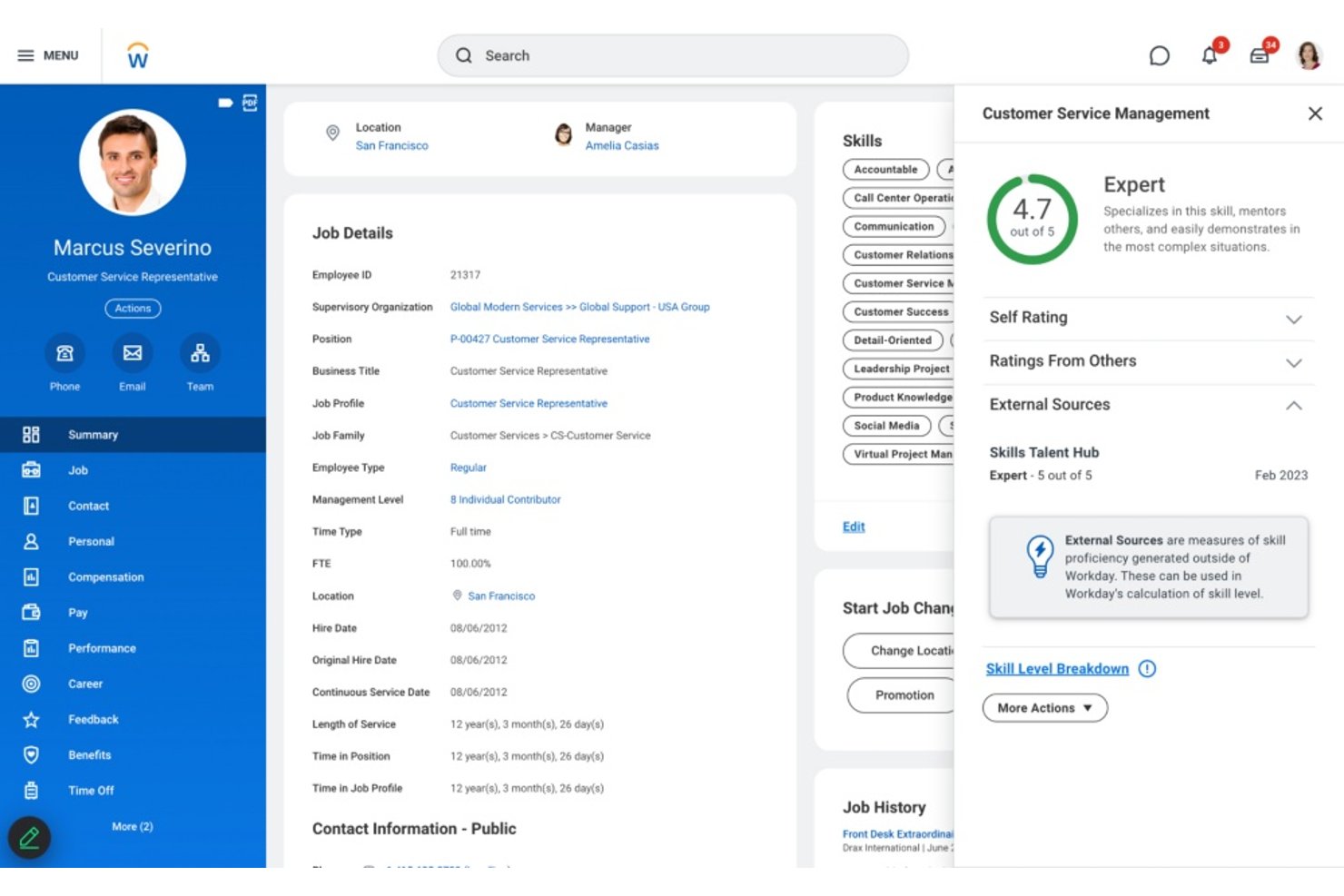
Workday Talent Management is an enterprise talent suite that combines AI-driven career pathing, skills management, internal mobility, development planning, and workforce analytics in a single platform.
Who Is Workday Best For?
Workday Talent Management is a strong fit for mid-market and enterprise HR teams managing large, distributed workforces across multiple regions or business units.
Why I Picked Workday
I picked Workday as one of the best because no other platform I've used brings skills data, career progression, and workforce analytics together in one native system. The Skills Cloud builds a live picture of what each employee knows and where gaps exist, without relying on manual tagging. Paired with the Manager Insights Hub, my team can act on automated career development signals across time zones without waiting for quarterly reviews.
Workday Key Features
- Talent Marketplace: Matches employees to internal projects, gigs, and open roles based on skills and interests.
- Workday Learning: Delivers hyper-personalized learning paths and manages compliance training requirements in one place.
- Succession planning: Lets you identify critical roles and map out talent pools for leadership continuity.
- Collaboration integrations: Natively syncs with platforms like Microsoft Teams and Slack for manager feedback and workflow updates.
Workday Integrations
Workday Talent Management offers native integrations with Microsoft Teams, Slack, Outlook, and supports additional connections through the Workday Marketplace and Innovation Partner ecosystem. An API is available for custom integrations.
Pros and Cons
Pros:
- Scalable for complex global organizations
- Unified analytics across distributed teams
- AI-driven skills and talent marketplace
Cons:
- Custom configuration requires specialized support
- Onboarding process can be lengthy
Dayforce
Best for AI-driven career exploration
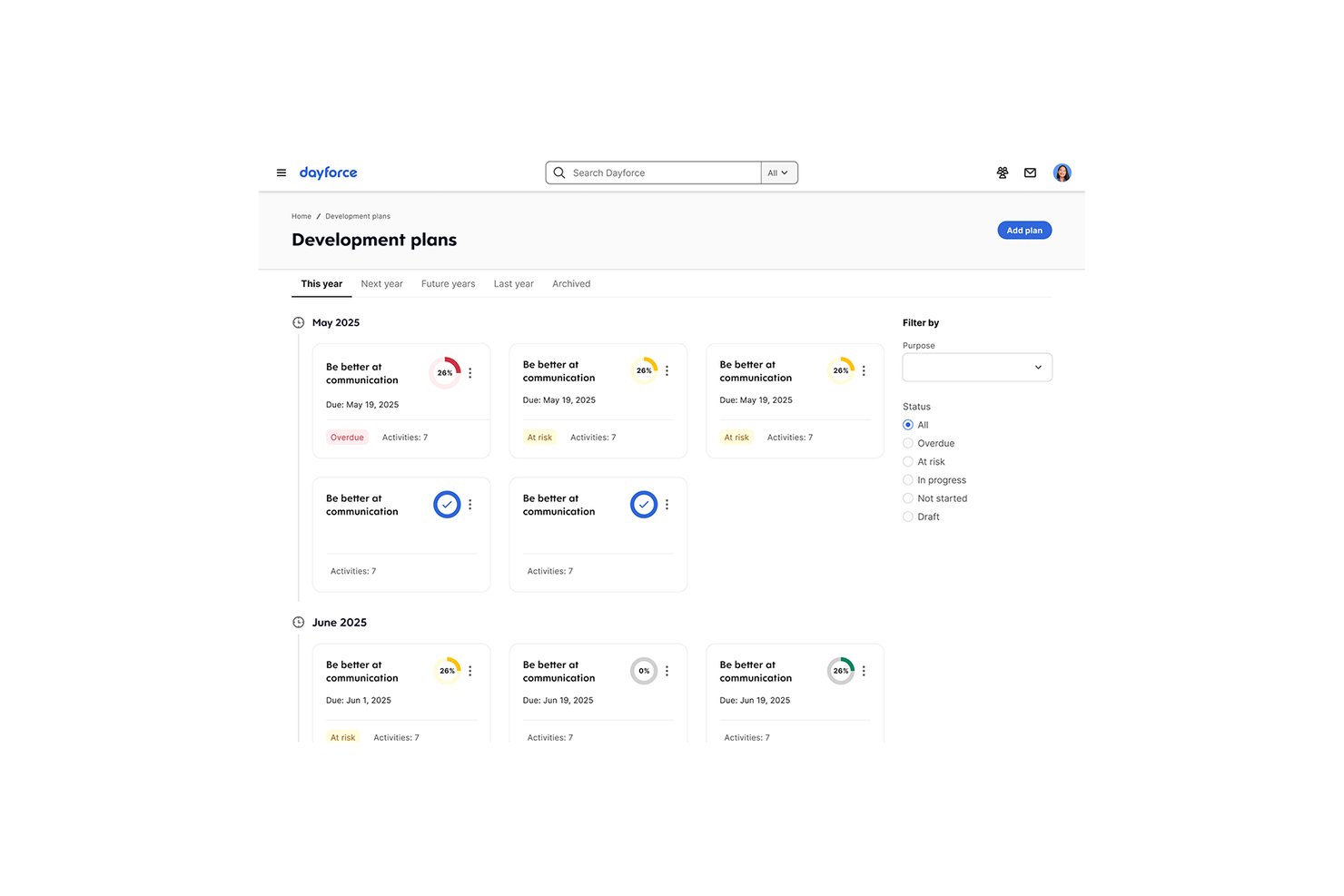
Dayforce is an AI-powered career management module within the Dayforce HCM platform that combines skills-based career pathing, internal mobility matching, mentorship pairing, and development planning for distributed workforces.
Who Is Dayforce Best For?
Dayforce is well suited to mid-to-large enterprises with global, distributed workforces where talent and HR teams need AI-driven internal mobility at scale.
Why I Picked Dayforce
I picked Dayforce as one of the best because its AI-powered Skills Engine doesn't just list jobs: it actively infers skills from employee profiles and matches people to roles, projects, and mentors they'd never surface on their own. For remote employees who lack in-person visibility, that kind of proactive discovery changes how internal mobility actually works in practice. I also like that manager skill endorsements feed directly back into the matching engine, making recommendations sharper the more your team uses it.
Dayforce Key Features
- Mentorship matching: Employee profiles get paired with mentors based on key skill areas and interests.
- Structured development plans: Teams can create and manage step-by-step IDPs aligned with specific goals.
- Mobile-first access: Employees and managers can explore roles, updates, and track development through native mobile apps.
- Manager skill endorsements: Managers directly validate and endorse skill growth inside the platform.
Dayforce Integrations
Dayforce offers 40+ native integrations with tools like DocuSign, HireRight, Sterling, iCIMS Hire, Okta, Workday HCM, SAP SuccessFactors, and Beekeeper. Integration Studio and APIs are available for custom integrations.
Pros and Cons
Pros:
- Mentorship pairing for distributed teams
- Skills inventory auto-updates from activities
- AI-driven career pathing suggestions
Cons:
- Limited group goal tracking options
- Dashboards can require manual updates
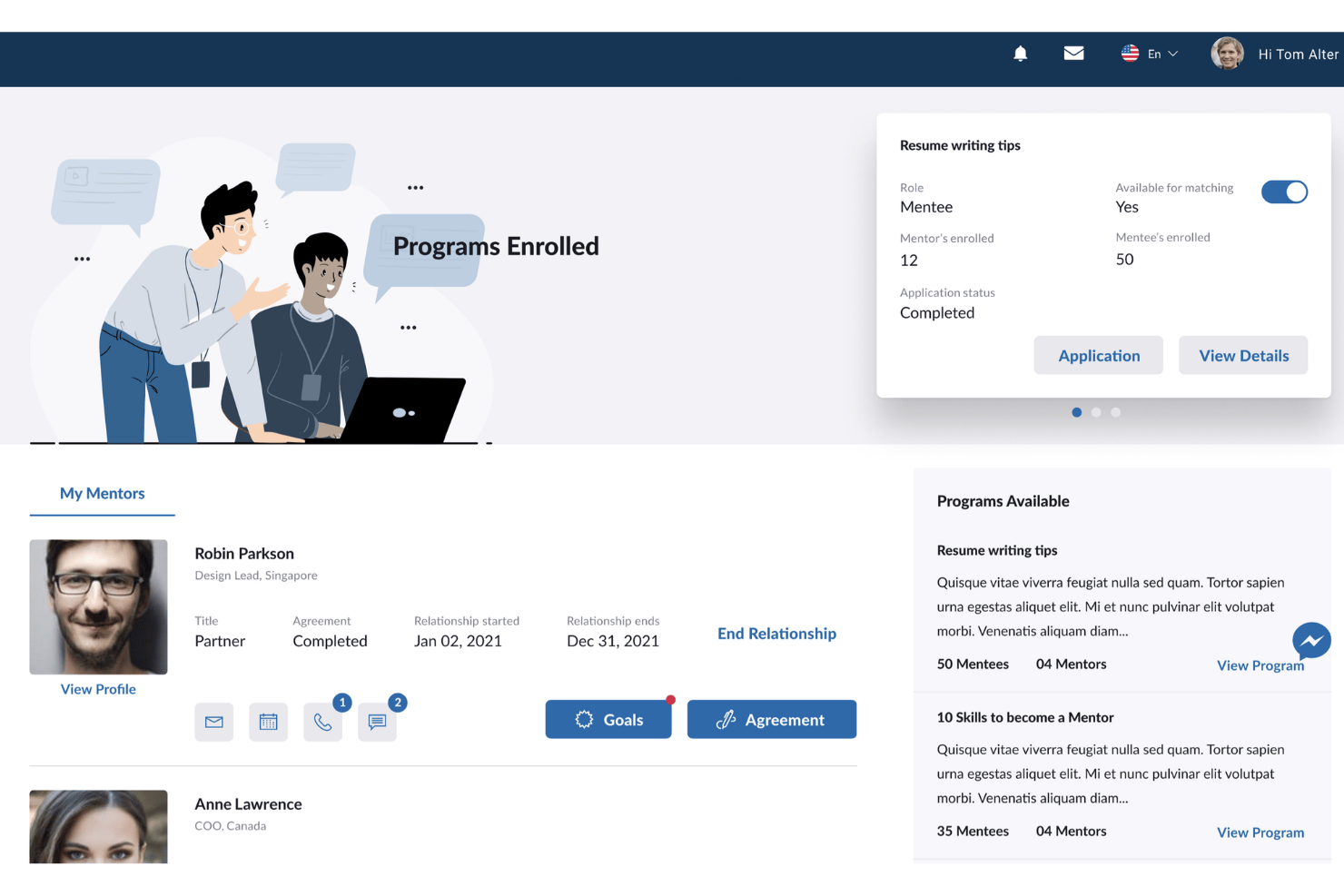
People360 is a career management platform that combines AI-driven career pathing, competency-based development planning, skills gap analysis, and internal talent mobility tools for distributed workforces.
Who Is People360 Best For?
People360 is a strong fit for L&D and talent management teams at mid-market to enterprise organizations that need structured, configurable career development programs at scale.
Why I Picked People360
I picked People360 as one of the best because of how it connects personality assessments to competency gaps and then surfaces targeted learning recommendations for each employee. In practice, my team can build career plans with specific actions and deadlines tied directly to those competencies, so remote employees always know what to develop next. I especially like that the recommendations are based on each employee's stated career goals, not just their current role.
People360 Key Features
- Virtual mentoring modules: Connects remote employees with mentors for ongoing career development conversations.
- LMS integration: Links existing learning management systems to employee development plans and activities.
- Customizable competency framework: Lets teams align career progression with unique organizational roles and structures.
- Configurable analytics dashboard: Provides detailed visibility into employee growth, skill development, and internal mobility trends.
People360 Integrations
People360 offers native integrations with HRIS systems and leading learning management systems.
Pros and Cons
Pros:
- Built-in virtual mentoring for distributed employees
- Dynamic competency management framework for teams
- AI-driven learning recommendations for remote workers
Cons:
- Limited third-party marketplace ecosystem
- No mobile app for on-the-go access
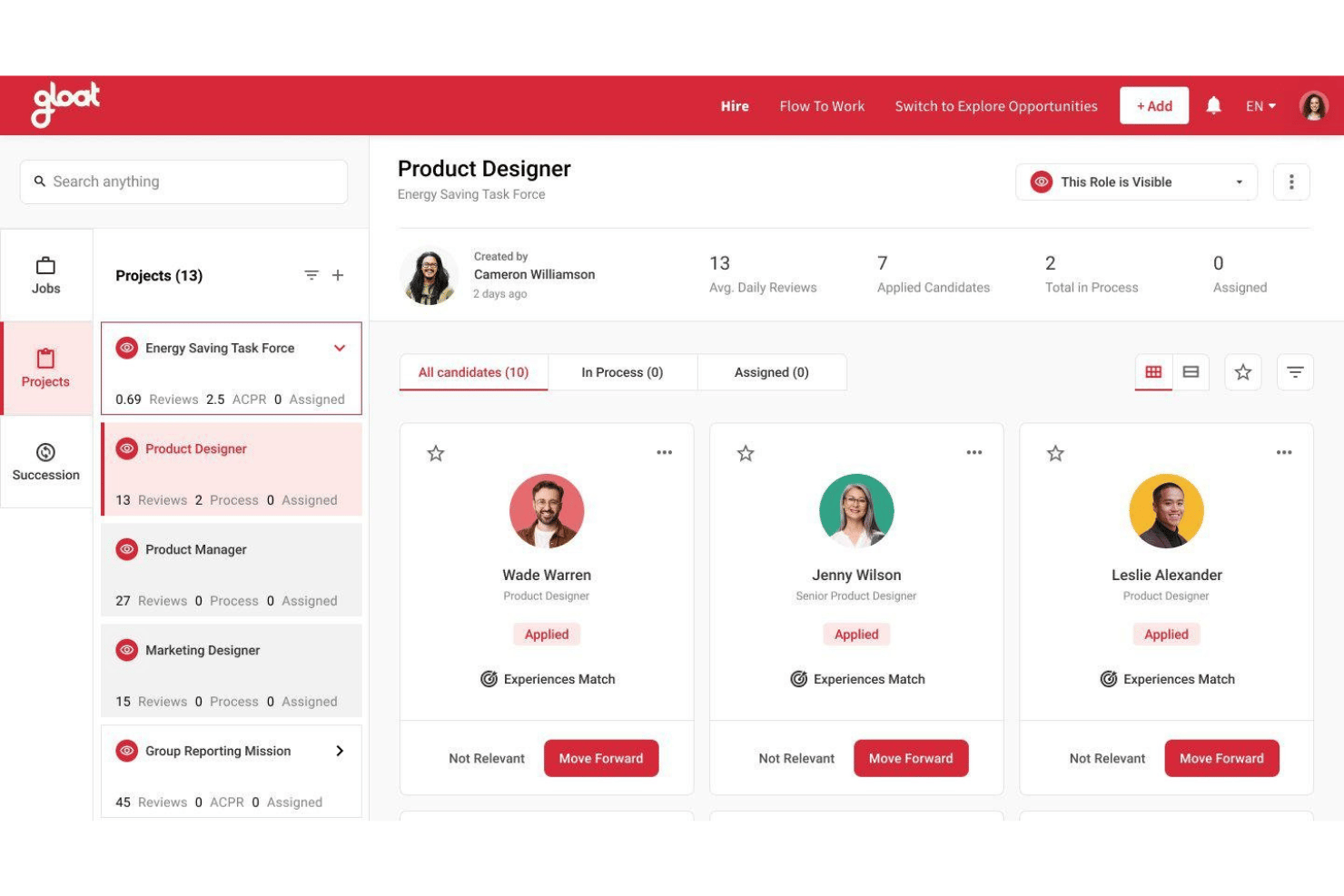
Gloat is an AI-powered talent marketplace platform that matches distributed employees to internal roles, projects, mentors, and learning opportunities based on skills, aspirations, and career readiness.
Who Is Gloat Best For?
Gloat is built for large enterprises with globally distributed workforces where talent management specialists and HR directors need to scale internal mobility across thousands of employees.
Why I Picked Gloat
Gloat earns its spot as one of the best on my shortlist because its AI-powered Talent Marketplace goes far beyond a static internal job board. I love how it surfaces relevant roles, gigs, mentors, and stretch assignments to remote employees based on their live skills profile and career aspirations. The Career Readiness agent evaluates each employee's readiness for their next role across skills gaps and experience patterns, so distributed managers don't have to guess who's ready to move.
Gloat Key Features
- Mentor matching: AI pairs employees with mentors based on skills, goals, and availability across time zones.
- Skill gap resolver: Identifies missing skills for targeted roles and recommends training or projects to close gaps.
- Workforce graph analytics: Visualizes skills relationships across the company to map development and succession.
- Slack and Teams integration: Agents deploy directly into messaging platforms for async, in-context collaboration.
Gloat Integrations
Gloat offers native integrations with SAP SuccessFactors, Workday HCM, Oracle HCM Cloud, Microsoft Teams, Slack, Google Chat, and Microsoft Copilot. An API is available for custom integrations.
Pros and Cons
Pros:
- Career pathing uses AI-driven insights
- Mentor matching adapts to distributed teams
- Opportunity marketplace surfaces global projects and gigs
Cons:
- Setup and workforce data mapping can be complex
- Focuses on large enterprise organizations only
Other Career Management Software for Remote Teams
Here are some additional career management software for remote teams options that didn’t make it onto my shortlist, but are still worth checking out:
- 365Talents
For dynamic skill mapping and discovery
- Leapsome
For competency framework customization
- Cornerstone OnDemand
For learning and internal mobility
- Engagedly
For feedback-driven growth
- SAP SuccessFactors
For global talent compliance
- PageUp
For aligning development with business goals
- TalentGuard
For building multi-directional career paths
- Neobrain
For leveraging AI to identify emerging skills


How I Evaluate Career Management Software for Remote Teams
I split my evaluation into two layers: the baseline capabilities a tool must meet—like async check-ins and skills gap analysis—and the differentiators that set platforms apart for distributed teams.
Core Functionality (Table Stakes For This List)
When I'm selecting tools for my list, I rank each one on a scale from 0 (does not offer the functionality) to 5 (excels in this area) for each core functionality listed below. Then, I calculate the tool's total score into a percentage. Each tool needs to achieve a minimum total score of 65% to be considered for inclusion.
- Career Pathing: I look for visual career maps that show lateral and vertical moves, not just linear ladders with a single track to the top.
- Skills Management: A strong skills inventory with gap analysis helps HR spot who's ready for a new role and who needs development first.
- Development Planning: I check whether employees and managers can build structured IDPs tied to specific career goals and learning resources.
- Internal Mobility: The best tools surface matched gigs, projects, or open roles based on an employee's skills and stated career aspirations.
- Remote Collaboration Features: Async check-ins and Slack or Teams integrations matter here—remote teams can't rely on hallway career conversations.
- Growth Analytics: I evaluate whether dashboards track skill progression and mobility metrics, giving HR leaders real visibility into workforce development.
Once I have a list of tools that meet the criteria, I consider what sets each platform apart.
Differentiating Factors (What Sets Vendors Apart)
Here's how I compare and contrast different vendors:
Standout Features
An internal talent marketplace is a big differentiator—it lets remote employees discover stretch assignments and open roles across the organization without waiting for a manager to flag them. I also look for async development conversation tools, like structured check-in templates, that replace live meetings for teams spread across time zones. Manager enablement nudges round this out by prompting remote managers with coaching scripts and timely reminders so career conversations don't fall through the cracks.
Beyond Features
HR tech stack integration matters a lot for remote teams—I check whether a platform connects natively with your HRIS and communication tools like Slack or Microsoft Teams so career workflows live where your people already work. Data security and global compliance are equally important when employees are spread across regions. I look for certifications like SOC 2 Type II and regional data residency options. Implementation support also stands out, especially change management resources designed for remote rollouts where you can't lean on in-person training.
How to Choose Career Management Software for Remote Teams
It’s easy to get bogged down in long feature lists and complex pricing structures. To help you stay focused as you work through your unique software selection process, here’s a checklist of factors to keep in mind:
| Factor | What to Consider |
|---|---|
| Scalability | Can the platform support your team as you grow, including adding remote offices or contract staff across multiple locations? |
| Integrations | Does the software connect natively to your HRIS, payroll, and communication tools so data isn’t siloed? Check compatibility with systems you rely on today. |
| Customizability | Can you adapt career pathways, skill taxonomies, and workflows to fit your org’s structure and evolving remote policies? |
| Ease of use | Are the interfaces and dashboards intuitive enough for remote managers and employees to use without extra training or confusion? |
| Implementation and onboarding | What level of vendor support do you get through rollout? Consider timelines, dedicated resources, and change management help, especially for global teams. |
| Cost | Is pricing aligned with your remote headcount and budget cycles? Watch for hidden fees with add-ons, tier upgrades, or international user surcharges. |
| Security safeguards | How are employee data and career records protected—both in transit and at rest? Confirm certifications, access controls, and data residency as needed. |
| International capabilities | Does the solution handle compliance, language, and local frameworks for all regions you operate in, not just headquarters? |
What Are Career Management Software for Remote Teams?
Career management software for remote teams are digital software solutions that help distributed employees explore career paths, track skills, and set development goals from anywhere. These systems give human resources teams the right tools to support employees throughout their career lifecycle, improve team communication, and maintain engagement with talent through remote access.
Many platforms include a user-friendly interface, support video conferencing, screen sharing, and whiteboard collaboration, and integrate with other remote work tools. They also help managers track project progress, improve team productivity while balancing employee workload, and keep everyone aligned across time zones and remote work settings.
Features of Career Management Software for Remote Teams
When selecting career management software for remote teams, keep an eye out for the following key features:
- Career path visualization: Shows employees clear maps of potential roles, lateral moves, and upward opportunities to help guide career growth.
- Skills inventory and gap analysis: Aggregates employee skills, benchmarks them against job requirements, and highlights gaps for targeted development.
- Individual development planning: Lets employees and managers build and track actionable development plans linked to long-term career goals.
- Internal mobility tools: Surfaces remote-friendly job openings, gigs, or projects to support advancement and encourage internal movement.
- Asynchronous collaboration support: Enables career conversations, feedback, and file sharing without needing everyone online at the same time.
- Growth and progress analytics: Delivers dashboards and reports on employee development, readiness for roles, and internal mobility patterns.
- Integration with HR tech stack: Seamlessly connects to HRIS, performance, learning, and communication platforms so data stays current and workflows align.
- Manager enablement resources: Provides prompts, templates, and analytics to help managers support distributed team members’ career conversations.
- Security and compliance controls: Protects sensitive employee data and supports compliance with data privacy regulations across regions.
- Mobile accessibility: Ensures employees and managers can access this cloud-based platform and its career tools from any device, wherever they’re working.
Benefits of Career Management Software for Remote Teams
Implementing career management software for remote teams provides several benefits for your team and your business. Here are a few you can look forward to:
- Increased employee engagement: Clear progression paths and development plans encourage remote employees to stay invested in their careers.
- Greater internal mobility: Skills matching and internal marketplaces connect people to new roles, projects, or assignments—without the need for in-person networking.
- Better skills development: Gap analysis and tailored learning resources help managers and employees target efforts where they're needed most.
- Consistent growth conversations: Async collaboration tools enable team collaboration, allowing managers and employees to check in on goals and career plans, no matter the time zone.
- Data-driven talent decisions: Growth analytics and reporting help HR teams make informed decisions about promotions, training, and talent planning.
- Enhanced manager support: Built-in prompts and enablement resources help managers optimize career conversations and support distributed team members’ growth.
- Improved compliance and data security: Integrated security controls protect sensitive information and support compliance with international data regulations.
- Improved productivity: Built-in task management tools help employees stay organized, make easy access to career resources possible, and support development without disrupting normal work hours.
Costs and Pricing of Career Management Software for Remote Teams
Selecting career management software for remote teams requires an understanding of the various pricing models and plans available. Costs vary based on features, team size, add-ons, and more. The table below summarizes common plans, their average prices, and typical features included in career management software for remote teams solutions:
Plan Comparison Table for Career Management Software for Remote Teams
| Plan Type | Average Price | Common Features |
|---|---|---|
| Free Plan | $0 | Basic career path maps, limited skills tracking, and simple development plans. |
| Personal Plan | $5-$15/user/month | Individual skills inventory, IDP templates, limited analytics, and basic internal job listings. |
| Business Plan | $15-$40/user/month | Visual career mapping, skills gap analysis, async collaboration tools, reporting, and HRIS integrations. |
| Enterprise Plan | $40-$80/user/month | Advanced analytics, AI-driven career pathing, internal talent marketplaces, robust security options, and enterprise onboarding support. |
Career Management Software for Remote Teams FAQs
Here are some answers to common questions about career management software for remote teams:
How does career management software support remote employees?
Career management software supports remote employees by providing digital tools for career mapping, skill tracking, and asynchronous development conversations. This ensures everyone—regardless of location—can access growth opportunities, connect with managers, and participate in internal mobility programs.
Can career management software integrate with our existing HR systems?
Yes, most career management software options offer integrations with popular HRIS, payroll, and communication platforms. This makes it easier for you to sync employee data, avoid manual updates, and keep career growth workflows part of your existing tech stack.
What security considerations should I keep in mind?
Security is crucial when people access career development data remotely. Look for SOC 2 Type II, ISO certifications, GDPR compliance, and regional data residency to help protect sensitive employee information and stay compliant with privacy regulations.
Is it hard to roll out career management software to a fully remote team?
No, but successful remote rollout requires robust onboarding and change management support. Choose tools that offer step-by-step implementation guidance, clear training resources, and support for asynchronous adoption to help distributed teams adjust easily.
How do internal talent marketplaces work in remote settings?
Internal talent marketplaces surface jobs, stretch projects, and gigs that are accessible to employees anywhere. They match skills and interests with opportunities and support distributed teams by providing equal career advancement visibility across all locations.