

10 Best Employee Survey Tools of 2026 for Staff Feedback

10 Best Employee Survey Tools Shortlist


The best employee survey tools help you gather real-time feedback, measure engagement, and act on insights—so you can build a stronger, more connected workplace.
With remote work, hybrid teams, and shifting employee expectations, it’s easy for morale issues and process gaps to fly under the radar. A well-designed survey platform bridges that visibility gap with continuous pulse checks, sentiment analysis, and thoughtful question templates—all in one place.
From anonymous feedback and real-time dashboards to benchmarking and follow-up workflows, the right tool empowers leaders to listen, understand trends, and take timely action.
After evaluating 30+ platforms and hands‑on testing features like multilingual support and AI-powered analysis, I’ve curated the top solutions that are intuitive, evidence‑based, and built to scale as your team evolves.
Why Trust Our Software Reviews
Our team has been testing and reviewing software since 2012. As HR experts ourselves, we know how difficult—and important—it is to choose the right software.
For this guide, we evaluated tools using hands-on testing and independent research, scoring tools using our selection criteria. We also draw on insights from industry thought leaders and practicing HR experts.
Our reviews reflect our human editorial judgment, not a sales pitch.
Expert reviewers:
Best Employee Survey Tools: Pricing Comparison Chart
This comparison chart summarizes pricing details for my top employee survey tool selections to help you find the best software for your budget and business needs.
| Tool | Best For | Trial Info | Price | ||
|---|---|---|---|---|---|
| 1 | Best tool for global, multilingual surveys | Free demo available | From $5/employee/month | Website | |
| 2 | Best for employee feedback analysis | Free demo available | Pricing upon request | Website | |
| 3 | Best for tracking team feedback on boards | Free plan available | From $9/user/month (billed annually) | Website | |
| 4 | Best for identifying survey themes | Free demo available | Pricing upon request | Website | |
| 5 | Best for performance and talent development | Free demo available | Pricing upon request | Website | |
| 6 | Best for real-time actionable feedback insights | 14-day free trial + free demo available | From $2/user/month | Website | |
| 7 | Best for predictive workforce insights | Free demo available | Pricing upon request | Website | |
| 8 | Best for continuous pulse feedback | 30-day free trial + free demo available | From $3/user/month (billed annually) | Website | |
| 9 | Best for turning survey insights into action | 21-day free trial available | From $6/user/month (billed annually) | Website | |
| 10 | Best for reports that drive action | Free forever plan (up to 1 user) | Pricing upon request | Website |


Best Employee Survey Tool Reviews
Here’s a brief description of each employee survey platform to showcase each tool’s best use case, some noteworthy features, and screenshots to give a snapshot of the user interface.

Deel HR
Best tool for global, multilingual surveys
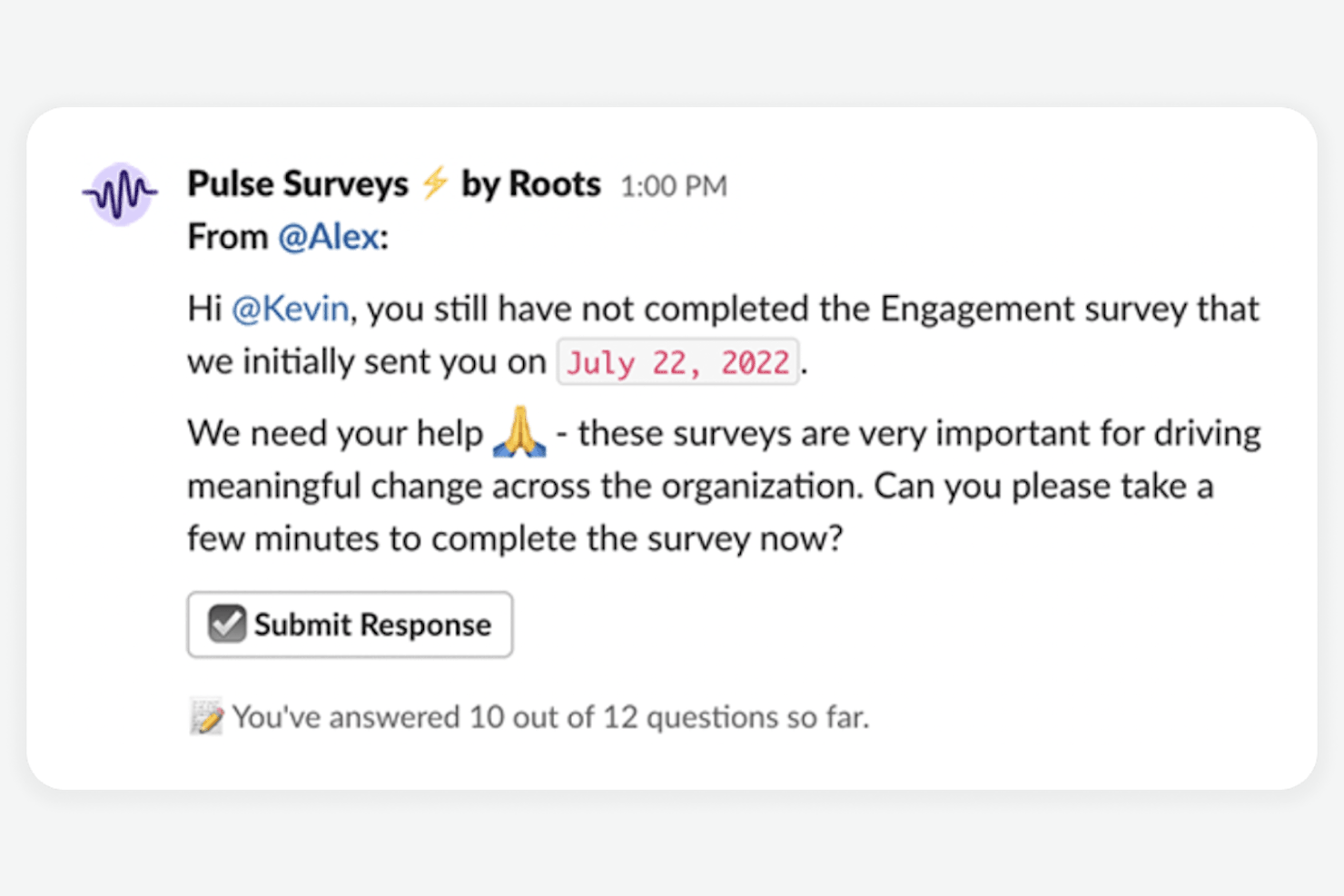
Deel HR helps global organizations gather employee feedback across borders, making it easier for HR teams to manage surveys, track engagement, and support diverse workforces in multiple countries.
Who Is Deel HR Best For?
Deel HR is a strong fit for HR teams at mid-size to enterprise companies managing employees and contractors across multiple countries and time zones.
Why I Picked Deel HR
Deel HR earns its spot as one of the best on my shortlist because its survey tools are built from the ground up for global teams. I like that surveys in Deel Engage support multilingual delivery, so employees across different countries can respond in their own language—something that genuinely changes response quality and participation rates. I also find the anonymous feedback controls useful, since they let HR teams adjust anonymity settings per survey, which matters when you're navigating different cultural norms around candor. The centralized analytics dashboard surfaces eNPS scores and engagement drivers across regions, allowing me to compare sentiment in a team in Brazil with one in Germany without stitching together separate reports.
Deel HR Key Features
- Pulse surveys: Send short, recurring surveys to track employee sentiment over time without survey fatigue.
- Custom survey templates: Build surveys from pre-made templates tailored to common HR use cases like onboarding and performance.
- 1:1 meeting tools: Schedule and structure manager-employee check-ins directly within the platform.
- Performance review cycles: Set up and automate review cycles with configurable timelines and participant groups.
Deel HR Integrations
Integrations include FaceUp, Snowflake, DefensX, Microsoft Finance, Kintsugi, ReFresh OS, Revo.ai, Keeper, Human Interest, and Everyminute.
New Product Updates from Deel HR

Deel Expands Stablecoin Wallet to 80+ Countries
Deel expands its Stablecoin Wallet to 80+ countries with dollar-backed balances and optional rewards. This gives eligible contractors more ways to hold and manage earnings inside Deel. For more information, visit Deel’s official site.
 .
.
Best for employee feedback analysis

Sogolytics helps HR teams and organizations design, distribute, and analyze employee surveys to uncover actionable insights and improve workplace engagement.
Who Is Sogolytics Best For?
Sogolytics is a good fit for mid-size to large organizations with HR teams that need detailed survey analytics to drive data-informed employee experience decisions.
Why I Picked Sogolytics
Sogolytics earns its spot on my shortlist because of how far it goes with employee feedback analysis. I particularly like the sentiment analysis feature, which automatically categorizes open-ended responses so my team doesn't have to manually sift through hundreds of comments. The real-time dashboards let us slice data by department, tenure, or role, making it easy to spot patterns that would otherwise get buried in a spreadsheet. I also rely on the automated trend reports to track how employee sentiment shifts over time across survey cycles.
Sogolytics Key Features
- Customizable survey templates: Choose from pre-built employee survey templates that you can tailor to match your organization's specific feedback goals.
- Automated survey distribution: Schedule and send surveys via email or SMS with automated reminders to boost response rates.
- Anonymous feedback collection: Configure surveys to collect responses anonymously, encouraging more honest employee input.
- Multi-language support: Deploy surveys in multiple languages to gather feedback from employees across different regions.
Sogolytics Integrations
Integrations include Salesforce, Microsoft Teams, Google Sheets, Slack, HubSpot, Zapier, Mailchimp, Tableau, Google Analytics, and Oracle Eloqua.
Pros and Cons
Pros:
- Templates and multilingual support reduce setup time for global teams
- Trend-analytics let you track feedback over time, not just one survey
- Advanced logic helps tailor surveys to each respondent
Cons:
- Setting up reports or dashboards may need extra training
- Learning curve for customizing complex logic
New Product Updates from Sogolytics
Sogolytics Adds Teams and Slack Surveys and Custom Automations
Sogolytics adds native Microsoft Teams and Slack survey distribution, a Custom Automations Builder, Derived Fields, PointClickCare integration, and authenticator-based MFA. These updates expand survey distribution and workflow automation while adding new data management and security capabilities. For more information, visit Sogolytics’ official site.
 .
.
Best for tracking team feedback on boards
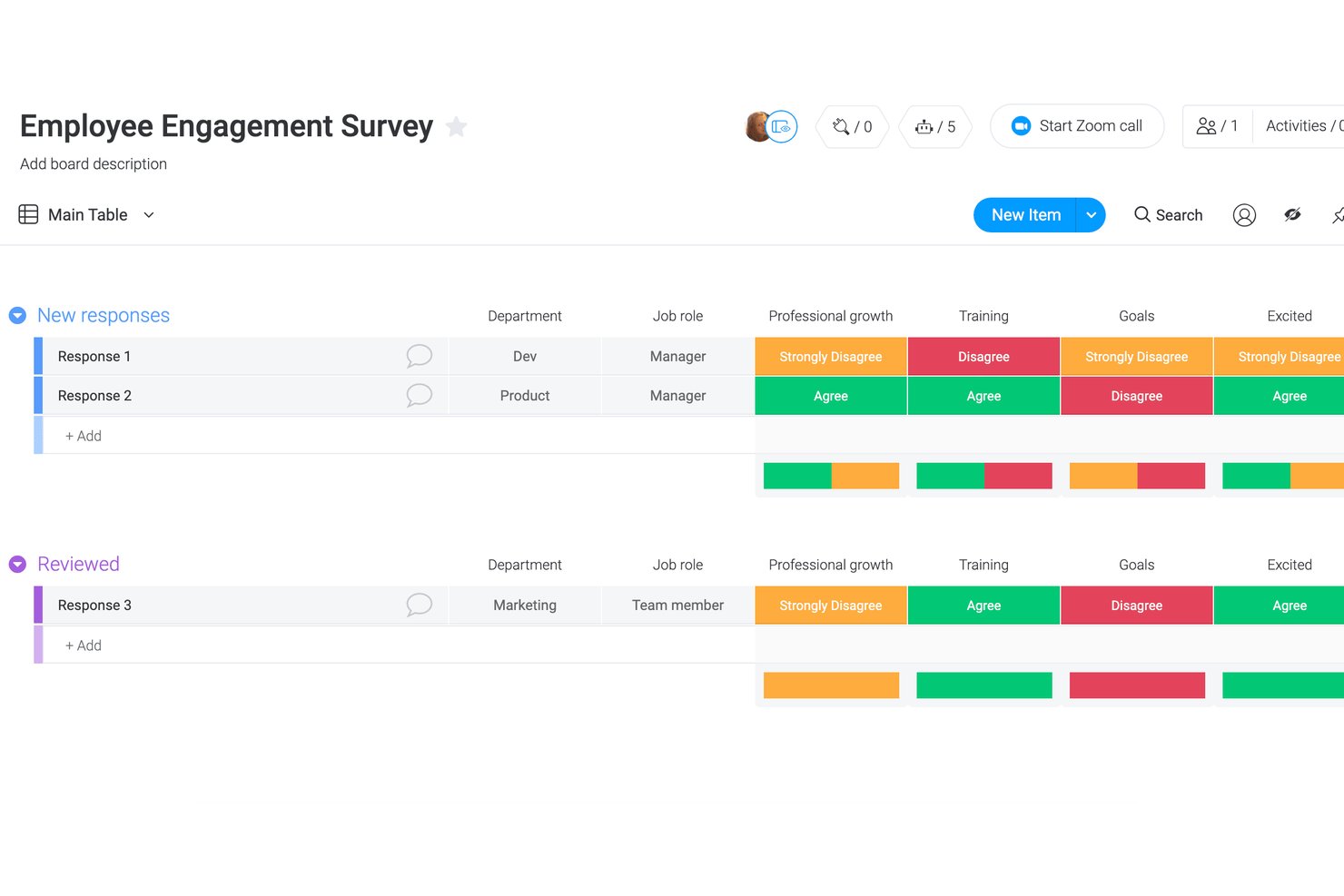
monday AI Workspace is a work management platform that lets teams build custom feedback forms, collect survey responses directly onto visual boards, and route results through automated workflows and dashboards.
Who Is monday AI Workspace Best For?
It's a strong fit for small to mid-sized teams that already run their operations on monday.com and want feedback collection to live alongside their existing project workflows.
Why I Picked monday AI Workspace
I picked monday AI Workspace because of how it turns survey responses into live, actionable board items. When someone submits a WorkForms survey, each answer lands as a row on a board — my team can filter by sentiment, assign follow-up tasks, and set automations to trigger when a low score comes in. I like that feedback never sits in a separate inbox; it's already part of the workflow the moment it's submitted.
monday AI Workspace Key Features
- WorkForms survey builder: Lets you create and customize surveys for engagement, onboarding, or team sentiment directly from a monday.com board.
- Native integration with SurveyMonkey and Typeform: Syncs external survey responses automatically onto boards for consolidated feedback management.
- Customizable dashboards: Visualizes team feedback trends, response rates, and survey data in real time with drag-and-drop widgets.
- Automated follow-up actions: Triggers notifications or assigns tasks when specific feedback conditions or satisfaction scores are received.
monday AI Workspace Integrations
monday AI Workspace offers native integrations with Slack, SurveyMonkey, Typeform, Google Workspace, Microsoft Teams, Salesforce, Dropbox, Jira, HubSpot, and Outlook. It also connects with Zapier and provides an API for custom integrations.
Pros and Cons
Pros:
- Visualizes response trends with custom dashboards
- Automates follow-up tasks from survey responses
- Lets you collect feedback directly onto boards
Cons:
- Lacks anonymity safeguards and HR benchmarks
- No research-backed employee survey templates
New Product Updates from monday AI Workspace
monday AI Workspace Adds Human Approval Routing
monday AI Workspace adds a human-in-the-loop approval block to AI Workflows, sending approval requests and routing workflow paths based on responses. For more information, visit monday AI Workspace's official site.
Best for identifying survey themes

WorkTango helps HR teams and business leaders gather actionable employee feedback through customizable surveys and analytics, helping them understand workforce sentiment and drive engagement across organizations of all sizes.
Who Is WorkTango Best For?
WorkTango suits mid-size to enterprise HR teams that need a structured way to collect, analyze, and act on employee feedback at scale.
Why I Picked WorkTango
WorkTango earns its spot on my shortlist because of how well it handles the hardest part of employee surveys: making sense of open-text responses at scale. I particularly like the AI Comment Themes feature, which automatically surfaces recurring topics from open-ended survey responses when a survey closes. Instead of spending hours reading through hundreds of comments, my team immediately sees recurring topics. WorkTango Coach takes this further by letting you ask plain-language questions about your survey data and get instant answers that connect qualitative feedback to quantitative scores.
WorkTango Key Features
- Pulse surveys: Send short, frequent surveys to track employee sentiment in real time between larger engagement cycles.
- Benchmarking: Compare your survey results against industry and company-size benchmarks to contextualize your scores.
- Anonymous feedback: Employees can submit responses anonymously, with configurable confidentiality thresholds to protect identity.
- Action planning: Managers can build structured action plans directly from survey results to address identified issues.
WorkTango Integrations
Integrations include UKG, Microsoft Teams, Outlook, ADP, BambooHR, Confetti, HireRoad, Merge, and Slack.

Best for performance and talent development
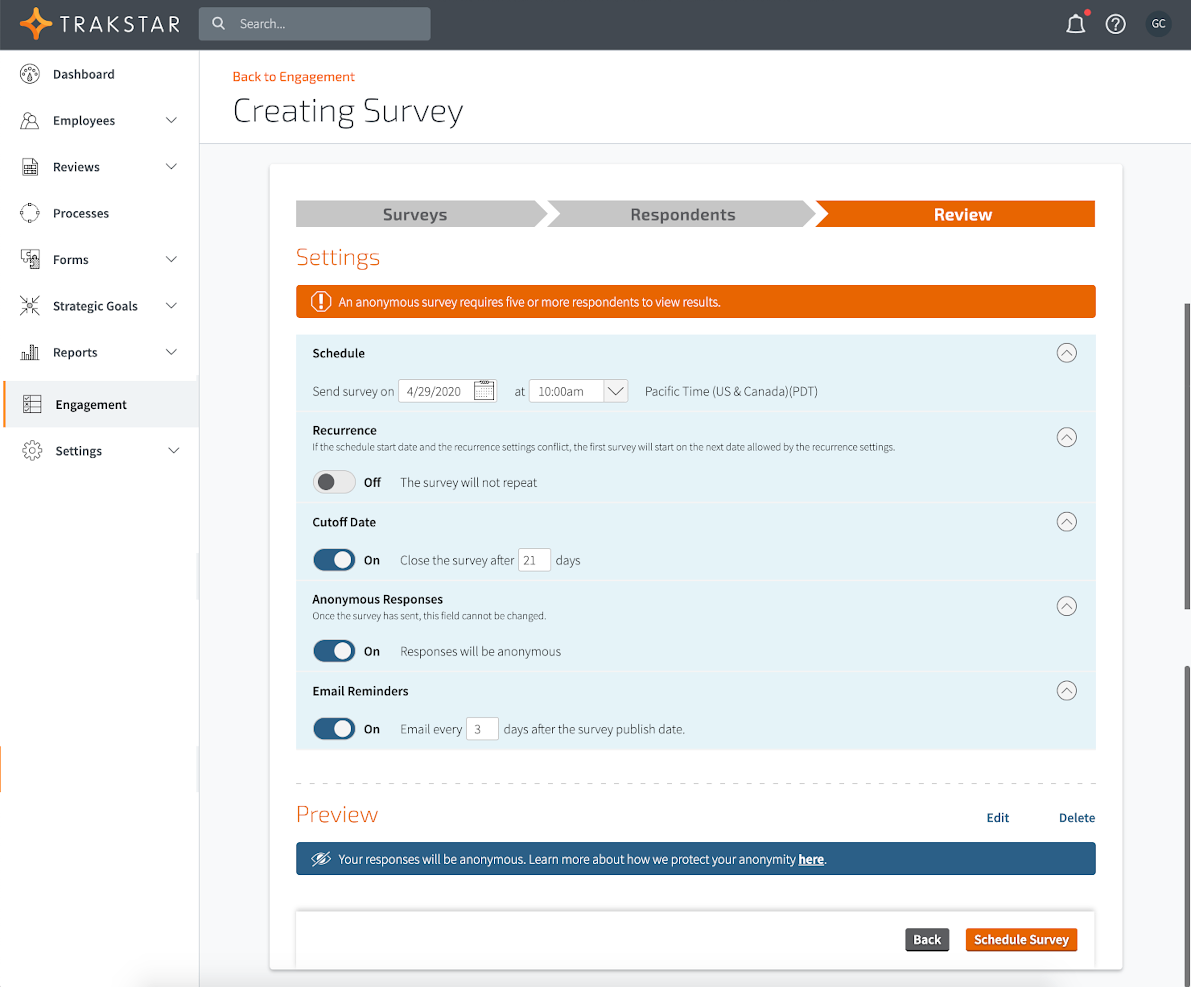
Mitratech Perform helps HR teams and managers in growing organizations gather employee feedback, run surveys, and connect insights directly to performance and development processes.
Who Is Mitratech Perform Best For?
Mitratech Perform is a strong fit for mid-sized to enterprise organizations that want to tie employee feedback directly to performance reviews and talent development workflows.
Why I Picked Mitratech Perform
I picked Mitratech Perform as one of the best because of how tightly it connects employee survey feedback to performance and talent development workflows. The engagement surveys in Trakstar Perform let you break down results by department, question, or time period—so when survey data shows a dip in a specific team, I can trace it back to performance trends and act on it directly. I also like the 360-degree review feature, which collects feedback from peers, managers, and even external contacts, with configurable anonymity settings that make responses more honest. Pair that with SMART goal tracking and continuous check-ins, and survey insights don't just sit in a dashboard—they feed directly into development plans and coaching conversations.
Mitratech Perform Key Features
- Pulse surveys: Send short, targeted surveys directly to employees' inboxes and view results in real time as responses come in.
- Survey result segmentation: Filter survey data by group, department, or time period to pinpoint where engagement is high or low.
- Manager check-ins and polls: Run quick polls and structured check-ins between formal review cycles to keep a continuous read on team sentiment.
- Competency assessment: Evaluate employees against defined competencies as part of the review process to identify skill gaps and development needs.
Mitratech Perform Integrations
Integrations include ADP Workforce Now, Paylocity, BambooHR, UKG Pro, Azure, Okta, Google Workspace, Slack, SFTP, and Salesforce.
Pros and Cons
Pros:
- Analytics help identify engagement or performance trends
- Feedback and performance data in one platform
- Scheduled surveys and check-ins that keep engagement ongoing
Cons:
- Custom configuration may be required to map data precisely
- Some features may need setup or HR admin work
Best for real-time actionable feedback insights
ThriveSparrow helps HR teams and business leaders gather employee feedback, track engagement trends, and uncover actionable insights to improve workplace culture and performance.
Who Is ThriveSparrow Best For?
ThriveSparrow is a strong fit for mid-sized companies with dedicated HR teams looking to build a continuous employee feedback culture.
Why I Picked ThriveSparrow
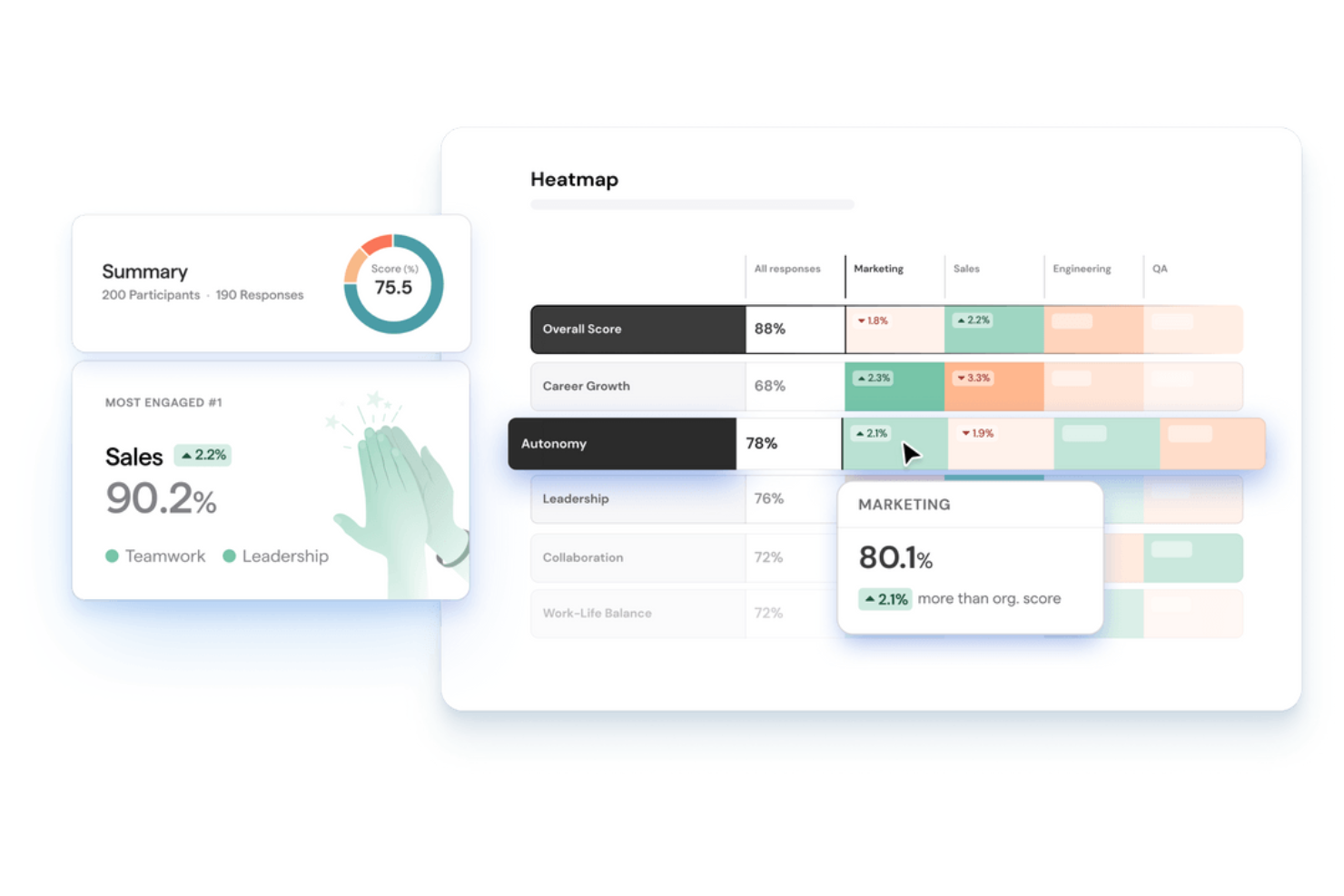
I picked ThriveSparrow as one of the best because of how it closes the gap between collecting feedback and actually doing something with it. What I find most useful is the AI sentiment analysis, which reads through open-text responses and surfaces what employees are really feeling—so I'm not manually combing through hundreds of comments to spot a trend. Pair that with the engagement heatmaps, and I can see where morale is shifting across teams or departments in real time. From there, ThriveSparrow generates action plans directly tied to those insights, so the next step is never a guessing game.
ThriveSparrow Key Features
- Pulse surveys: Send automated, recurring short surveys to capture employee sentiment on a regular cadence across teams.
- Employee NPS surveys: Measure employee loyalty and advocacy with eNPS surveys and track shifts over time using heatmaps.
- QR code survey sharing: Distribute surveys via QR codes to reach deskless or field-based employees without email access.
- Multilingual survey support: Deploy surveys in 100+ languages and translate responses to capture feedback from global teams.
ThriveSparrow Integrations
Integrations include BambooHR, ADP, Google, Microsoft Teams, and Bob.
Pros and Cons
Pros:
- Heatmaps and visual analytics help you spot issues by team or department
- Continuous feedback loop via recurring surveys keeps your finger on morale
- Quick survey launch using pre-built templates and question banks
Cons:
- Interface is less customizable than some advanced competitors
- Fewer native integrations vs larger enterprise platforms

Best for predictive workforce insights

LutherOne helps HR teams and business leaders gather actionable employee feedback, combining customizable surveys and real-time analytics to address engagement, performance, and retention challenges across organizations of all sizes.
Who Is LutherOne Best For?
LutherOne is a strong fit for mid-size to large organizations where HR teams need to move beyond basic survey data and connect employee feedback to broader workforce strategy.
Why I Picked LutherOne
I picked LutherOne as one of the best because I love how its predictive engine goes beyond reporting what's already happened. The platform's continuous driver analysis runs in the background, surfacing attrition risk, burnout signals, and performance shifts before they become visible problems — and LutherOne claims its algorithms can predict turnover over a year in advance. I also like that managers don't just get a risk score; they get personalized, people-science-backed recommendations on exactly what to do next. This combination of predictive modeling and prescriptive guidance goes beyond tools that stop at dashboards.
LutherOne Key Features
- Smart question rotation: LutherOne's proprietary algorithm rotates questions across survey cycles, so employees answer only a few questions at a time while the platform captures 100+ insights per year.
- Ad-hoc survey launcher: Beyond continuous surveys, you can deploy pulse surveys, stay/exit interviews, and 360 feedback with custom audiences and anonymity settings.
- Action planning hub: Assign owners, set deadlines, and track progress on survey-driven action plans using list, Kanban, or timeline views — all in one place.
- eNPS tracking: Monitor employee Net Promoter Score alongside engagement data in real-time, interactive dashboards with advanced filtering by team, role, or region.
LutherOne Integrations
Integrations include Slack, Microsoft Teams, Jira, Workday, BambooHR, SAP SuccessFactors, Microsoft Azure Active Directory, Google Workspace, Salesforce, and Okta.

Best for continuous pulse feedback
Small Improvements gives HR teams and managers in growing organizations a way to gather actionable employee feedback, run surveys, and support ongoing engagement with tools designed to fit modern performance management and feedback processes.
Who Is Small Improvements Best For?
Small Improvements is a good fit for mid-sized companies that want to combine employee feedback with performance management in a single, lightweight platform.
Why I Picked Small Improvements
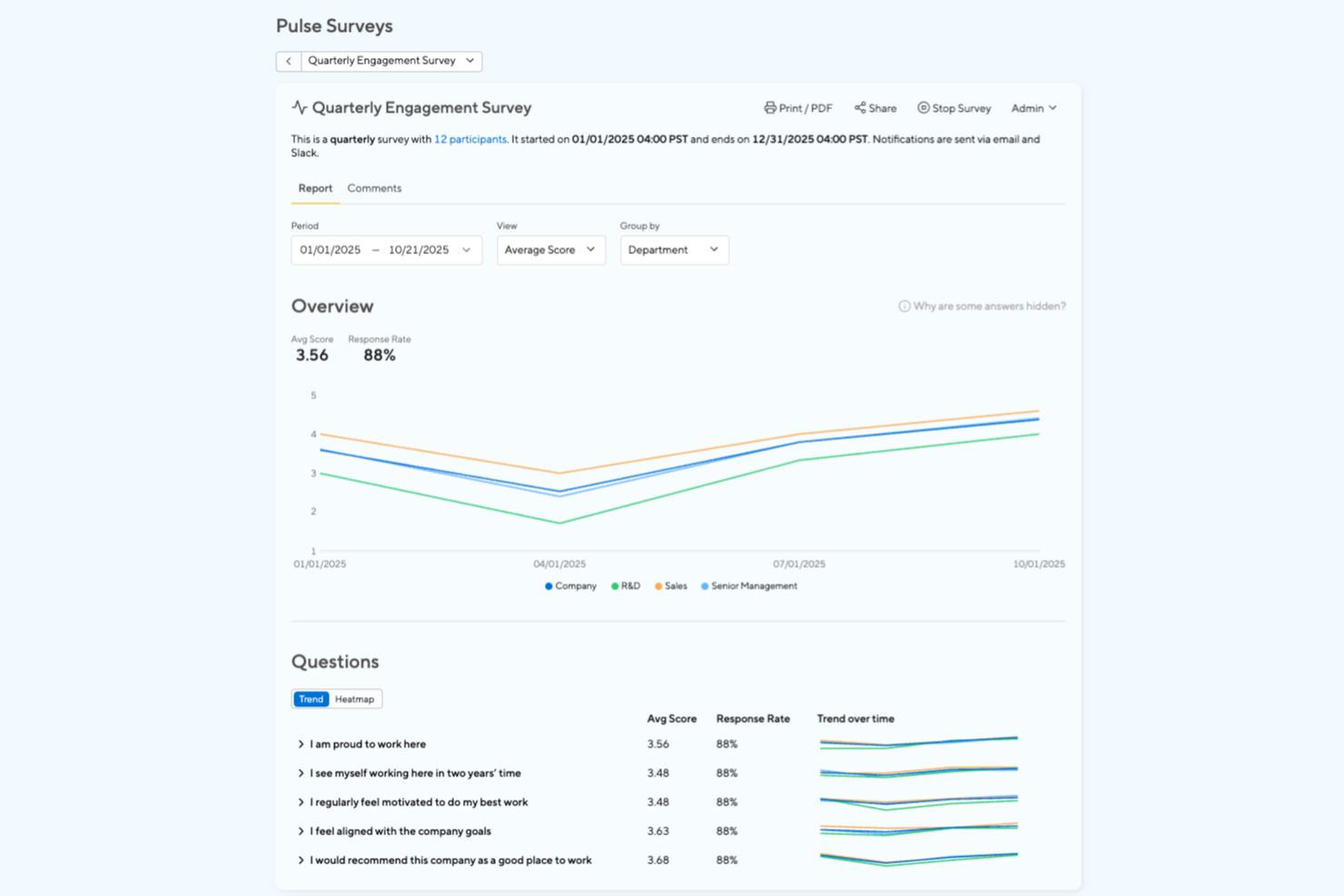
Small Improvements earns its spot on my shortlist because of how well it handles continuous pulse feedback without making it feel like a chore for employees or managers. I like that you can send short, recurring pulse surveys on a set cadence, so you're always working with fresh sentiment data rather than relying on a single annual survey. The platform also lets you customize question sets and target specific teams or groups, which means I can track engagement trends at a department level rather than just across the whole organization. The feedback timeline feature ties pulse results to ongoing conversations, so nothing gets collected and forgotten.
Small Improvements Key Features
- 360-degree feedback: Collect structured feedback from peers, direct reports, and managers to give employees a full picture of their performance.
- Performance reviews: Run customizable review cycles with flexible question sets, participant controls, and parallel timelines for different departments.
- Praise tool: Let employees recognize colleagues at any time, with visibility settings that can extend the recognition beyond just the recipient.
- Retention analytics: Use predictive analytics to identify employees who may be at risk of leaving before they hand in their notice.
Small Improvements Integrations
Integrations include Slack, Google Workspace, BambooHR, Okta, OneLogin, Microsoft Teams, Personio, Rippling, Workday, and Namely.

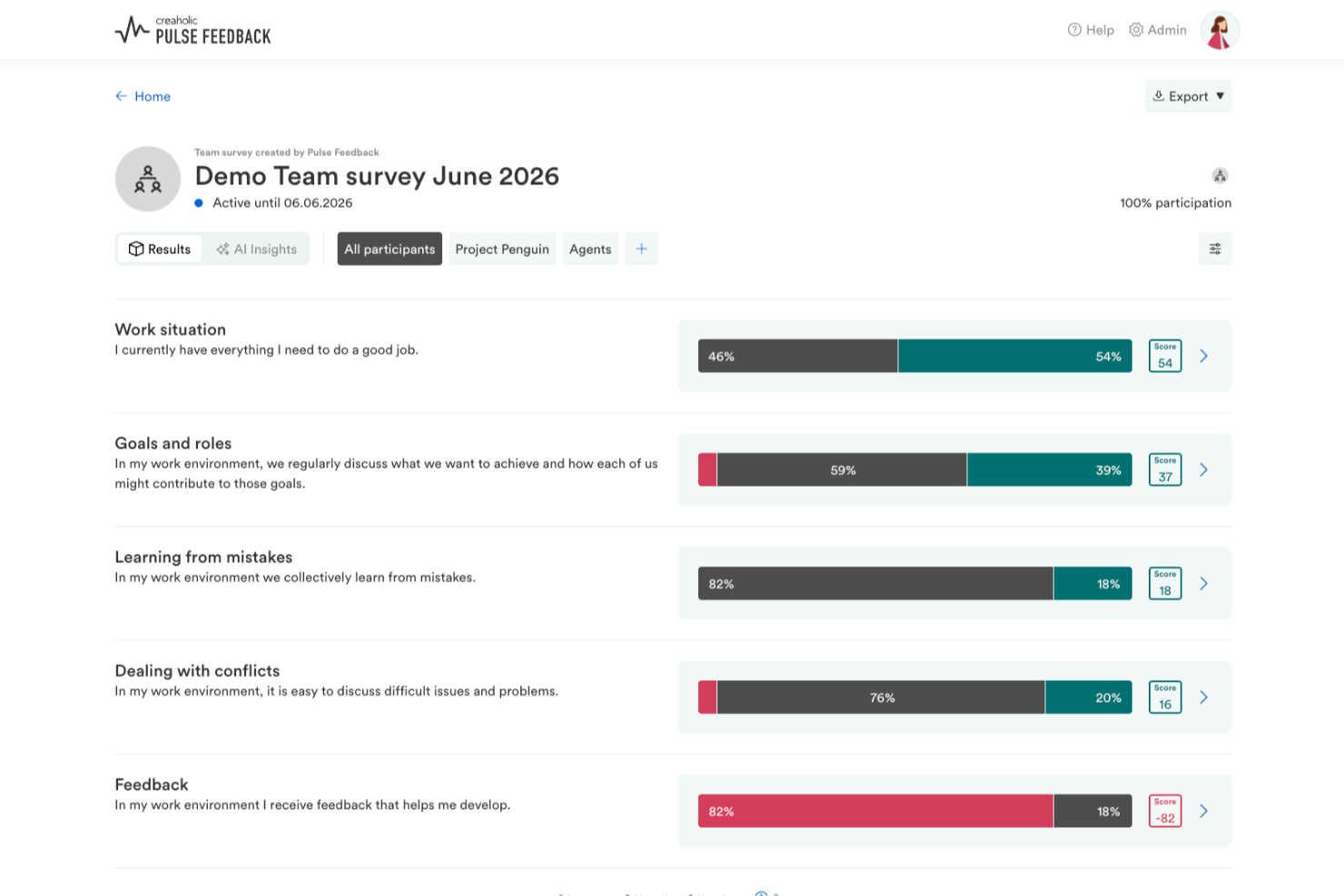
Pulse Feedback is a survey platform designed for employee engagement, offering pulse surveys, a scientifically validated question library, and AI-driven results analysis.
Who Is Pulse Feedback Best For?
Pulse Feedback is a good fit for mid-sized to large organizations in Europe that need structured, recurring employee feedback with compliance built in. As a Swiss provider, it also offers hands-on consulting support alongside the software—ranging from questionnaire design through to results workshops.
Why I Picked Pulse Feedback
I picked Pulse Feedback because it helps organizations move from collecting employee feedback to acting on it. The platform combines real-time survey results with guided discussion tools that help managers facilitate team conversations and identify improvements. Its AI-powered analysis also surfaces key themes from employee comments, making it easier to understand priorities and take meaningful action. Benchmarking tools are available, but I found the platform's focus on turning insights into follow-up actions to be its strongest differentiator.
Pulse Feedback Key Features
- Scientifically validated question library: Access 120+ pre-built survey questions developed using established engagement research.
- Guided results discussion: Use structured facilitation guides to help managers lead team-level conversations about survey results.
- 360-degree feedback module: Collect multi-source feedback from peers, direct reports, and managers within the same platform.
- AI Chat: Query your survey data conversationally to surface patterns, trends, and specific insights on demand.
Pulse Feedback Integrations
Native integrations are not clearly documented for Pulse Feedback.
Pros and Cons
Pros:
- Supports four languages for multilingual teams
- Bottom-up surveys empower individual employees
- Built-in AI insights summarize survey results
Cons:
- Limited third-party integration options available
- Survey creation process can feel complex

Best for reports that drive action
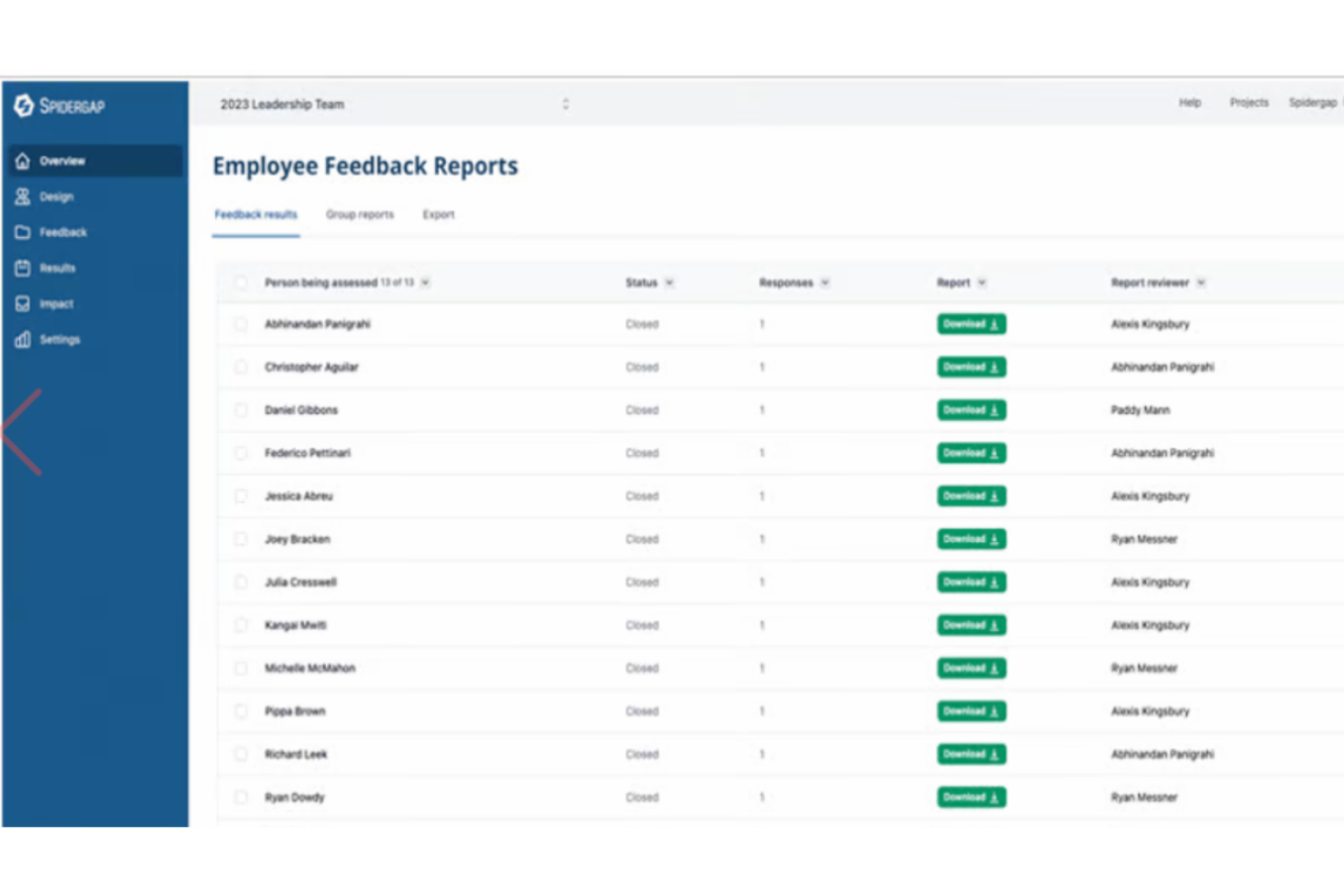
Spidergap 360˚ Feedback helps HR teams and managers in organizations of all sizes collect structured employee feedback, making it easier to identify strengths, development needs, and actionable next steps for professional growth.
Who Is Spidergap 360˚ Feedback Best For?
Spidergap 360˚ Feedback is a good fit for HR teams and people managers who want a dedicated 360-degree feedback tool focused on employee development rather than performance ratings.
Why I Picked Spidergap 360˚ Feedback
Spidergap 360˚ Feedback earns its spot on my shortlist because the reports are built around driving action, not just presenting data. Where most 360-degree tools dump scores and graphs on employees and leave them to figure out what to do next, Spidergap's reports are designed with HR directors and employees in mind—surfacing the areas that need the most attention. I also like the built-in impact survey, which lets you follow up after a feedback cycle to measure whether participants acted on their development priorities. Closed-loop tracking like that is rare in dedicated 360-degree feedback tools.
Spidergap 360˚ Feedback Key Features
- Customizable questionnaires: Build surveys from best practice templates or design your own questions, rating scales, and competency frameworks from scratch.
- Anonymity controls: Set and manage anonymity thresholds so respondents can give honest feedback without being identified.
- Automated reminders: Schedule and send automated follow-up reminders to participants who haven't completed their feedback yet.
- Progress monitoring: Track completion rates across all participants in real time to make sure each person receives enough responses before the cycle closes.
Spidergap 360˚ Feedback Integrations
Integrations include Slack, Microsoft Teams, Okta, Microsoft Azure Active Directory, Google Workspace, BambooHR, HiBob, Workday, and Stripe.
Other Employee Survey Tools
Here are a few more worthwhile options to help you collect employee feedback that didn’t make the list of the best employee survey tools list:
- SurveyLegend
For real-time employee surveys
- Lattice
For science-backed survey templates
- Vantage Circle
For customizable pulse surveys
- SurveyMonkey
For prebuilt forms and automated deployment
- IntelliHR
For pulse checks and sentiment analysis
- Culture Amp
With a template library
- Xoxoday
For eNPS surveys
- SurveyLab
Drag-and-drop survey builder
- TINYpulse Engage
With meeting agendas and recognition
- Workleap
For manager-focused engagement insights
- Sideways 6
Idea-gathering for business change
- ChartHop
For contextual survey answers
- Qualtrics XM
For analyzing large amounts of survey data
- Zoho Survey
For real-time insights and analytics
- Teamspective
For integration with Slack or Teams
- Startquestion
Easy-to-use survey tool
- Beams
For providing recommendations to employees
- Huckleberry
For voice-based feedback collection
- Guusto
For targeting specific employee sub-groups
- Jotform
For enterprise surveys
- Leapsome
For connecting feedback with development
- PerformYard
For integrated performance and engagement
- Motivosity
For modular add-ons
- Connecteam
For survey notifications and reminders
- ClearCo
For uncovering employee sentiment
- Sloneek
For AI-driven employee surveys
- Eletive
For real-time pulse surveys
- SurveySparrow
For engaging mobile-first survey designs
- Primalogik
For holistic employee feedback
- Paycor
Survey tool within an HCM system


Related HR Software Reviews
If you still haven't found what you're looking for here, check out these other related tools that we've tested and evaluated:
- HR Software
- Payroll Software
- Recruiting Software
- Employer of Record Services
- Applicant Tracking Systems
- Workforce Management Software
How I Evaluate Employee Survey Tools
I split my evaluation into two layers: baseline requirements—like running anonymous pulse surveys and surfacing team-level trends—and the factors that actually differentiate tools for HR teams.
Core Functionality (Table Stakes For This List)
When I'm selecting tools for my list, I rank each one on a scale from 0 (does not offer the functionality) to 5 (excels in this area) for each core functionality listed below. Then, I calculate the tool's total score as a percentage. Each tool needs to achieve a minimum total score of 65% to be considered for inclusion.
- Survey Templates & Builder: I check whether the platform ships with validated engagement, eNPS, onboarding, and exit templates—and whether you can edit questions, add logic, or build from scratch.
- Anonymity & Confidentiality Controls: Protecting respondent identity matters, so I look for configurable minimum response thresholds that prevent small-team results from exposing individuals.
- Pulse & Recurring Surveys: Tools should support flexible scheduling—weekly check-ins, monthly pulses, quarterly deep-dives—so you can track sentiment trends rather than relying on a single annual survey.
- Analytics & Reporting Dashboards: I evaluate how well each tool segments results by team, department, tenure, or custom demographics and whether it surfaces drivers behind engagement scores.
- Benchmarking Data: Comparing your scores against similar organizations adds essential context, so I look for industry, company-size, and regional benchmarks that update regularly.
- Action Planning Workflows: The gap between insight and action is where most survey programs stall. I check whether managers can create follow-up plans, assign owners, and track progress from within the platform.
Once I have a list of tools that meet the criteria, I consider what sets each platform apart.
Differentiating Factors (What Sets Vendors Apart)
Here's how I compare and contrast different vendors:
Standout Features
AI-powered text analytics is a major differentiator—I look for tools that parse thousands of open-ended responses and surface recurring themes without manual coding. Lifecycle survey automation also matters. The strongest platforms trigger surveys at key milestones like onboarding or exit based on HRIS data. Manager enablement tools round out my evaluation. When frontline managers get team-level dashboards and guided conversation prompts, survey results actually translate into change.
Beyond Features
I evaluate HRIS integrations closely—syncing with platforms like Workday, BambooHR, or SAP SuccessFactors keeps employee rosters current and removes manual list management. Data security is equally important, especially since survey data is sensitive. I check for SOC 2 Type II certification, GDPR compliance, and role-based access controls. Scalability also shapes my assessment. Tools that support multi-language surveys and reach deskless workers through SMS or kiosk modes serve distributed teams far better than browser-only platforms.
How to Choose Employee Survey Tools
As covered, the right employee survey tool can help you collect valuable insights to improve the employee experience.
To help you figure out which tool best fits your specific needs, keep the following points in mind:
| Factor | What to Consider |
|---|---|
| Ease of Use | Look for a tool with an intuitive interface for both admins and employees. |
| Customization | Check if you can tailor surveys to your organization’s culture, branding, and needs. |
| Question Types | Ensure it supports varied formats (e.g., multiple choice, open-ended, scales). |
| Analytics & Reporting | Look for robust data visualization, trend analysis, and actionable insights. |
| Integration | Confirm it integrates with your existing HRIS, Slack, Teams, or email platforms. |
| Anonymity Options | Ensure the tool allows anonymous responses to encourage honest feedback. |
| Scalability | Choose a tool that can grow with your organization as employee numbers increase. |
| Mobile Accessibility | Verify that surveys are mobile-friendly for remote or on-the-go employees. |
| Cost & Pricing Model | Compare pricing plans—per user, per survey, or flat fee—to match your budget. |
| Support & Training | Check for onboarding help, documentation, and responsive customer support. |
| Benchmarking | Some tools offer industry benchmarks—decide if this is valuable for your organization. |
Trends in Employee Survey Tools
As more organizations recognize the importance of employee feedback for fostering engagement, satisfaction, and productivity, the demand for sophisticated survey tools has surged.
This demand, in turn, drives innovation, leading to the development of features that are more intuitive, comprehensive, and aligned with the needs of modern workplaces.
Here are several trends that are impacting employee survey tools currently:
- Integration with Collaboration Platforms: There's a clear trend towards integrating employee survey tools with popular collaboration platforms like Slack to run quick polls. This integration facilitates real-time feedback and makes it easier for employees to participate in surveys without disrupting their workflow.
- Advanced Sentiment Analysis: The ability to analyze open-ended responses through natural language processing (NLP) and machine learning (ML) technologies is rapidly evolving. Many tools now offer sophisticated sentiment analysis features that can accurately gauge the mood and emotions behind employee feedback, providing deeper insights into employee satisfaction and engagement levels. This advancement indicates a move towards more qualitative analysis, allowing HR professionals to understand not just what their employees are saying, but how they feel.
- Customizable and Adaptive Surveys: Flexibility in survey design is becoming increasingly important. Tools that offer customizable and adaptive surveys—where questions can change based on previous answers—are gaining popularity. This allows for more personalized survey experiences, which can improve response rates and the quality of feedback collected.
- Actionable Insights and Recommendations: Beyond collecting and analyzing feedback, many employee engagement survey tools now provide actionable insights and recommendations to tackle issues identified and inform strategies and future decision-making.
- Employee Well-being Focus: Another new functionality that's gaining traction is an increased emphasis on employee well-being. Some tools have introduced features specifically designed to assess and support mental health, work-life balance, and overall well-being. This includes well-being surveys, mood trackers, and resources for mental health support. The rise of this feature reflects a broader recognition of the importance of employee health in the workplace.
Overall, these trends highlight a broader evolution towards more integrated, intelligent, and employee-centric survey tools.
As organizations continue to tackle the challenges of modern workplace dynamics, the demand for tools that can provide deep, actionable insights into employee sentiment will only grow.
What are employee survey tools?
Employee survey tools are digital platforms that help collect and analyze surveys to gather feedback on elements such as employee engagement, satisfaction, and performance. They help organizations understand employee sentiment, identify challenges, and make data-driven improvements. Common features include customizable surveys, real-time analytics, AI-driven insights, and benchmarking capabilities.
Benefits of Employee Survey Tools
Employee survey tools will help you collect valuable employee feedback to help you improve the workplace for current and future workers. Key benefits include:
- Identify and Solve Organizational Challenges: Helps pinpoint issues in leadership, workload, work-life balance, and career development.
- Improve Employee Engagement and Retention: Helps identify what motivates employees and what drives dissatisfaction.
Enhance Workplace Culture: Measures alignment with company values and mission and encourages open communication and transparency. - Supports Data-Driven Decision Making: Provides real-time insights into employee sentiment and, in some cases, uses AI and analytics to predict trends and suggest improvements.
- Helps foster a Culture of Continuous Feedback: Pulse surveys and real-time feedback promote ongoing dialogue and an open culture of feedback.
Key Features of Employee Survey Tools
When choosing employee survey tools, it’s important to look for features that make collecting and acting on feedback easy, secure, and insightful. Here are the key features I recommend keeping in mind:
- Progress tracking: Monitor real-time response rates and quickly identify which teams or departments still need to participate. This helps ensure everyone’s voice is heard and no feedback slips through the cracks.
- Survey customization: Personalize surveys by editing questions, choosing different response types, and adding your company’s branding. This allows you to focus on the topics that matter most to your team.
- Anonymous response options: Let employees share their thoughts honestly by guaranteeing anonymity. In my experience, this leads to more genuine and actionable feedback.
- Automated distribution and scheduling: Set up surveys to be sent automatically and schedule reminders, so you don’t have to manage every step manually. This keeps participation rates high with minimal effort.
- Real-time analytics and reporting: Access dashboards and reports that update instantly as responses come in. You can quickly spot trends and act on feedback without delay.
- Benchmarking tools: Compare your results to industry standards or previous surveys. This helps you measure progress and identify areas for improvement.
- Multi-language support: Reach your entire workforce by offering surveys in multiple languages, making it easy for everyone to participate no matter where they are.
- Mobile accessibility: Enable employees to complete surveys on their phones or tablets, so they can provide feedback whenever it’s convenient for them.
- Integration with HR systems: Sync survey data with your existing HR software to track engagement over time and streamline follow-up actions.
- Role-based access controls: Protect privacy by ensuring only authorized individuals can view or manage sensitive survey data.
AI Features in Employee Survey Tools
Modern employee survey tools are increasingly leveraging artificial intelligence to deliver deeper insights and streamline the feedback process. Here are some standout AI-powered features to look for:
- AI-driven sentiment analysis: Instantly analyze open-ended responses to detect employee sentiment, uncovering hidden patterns and emotions in feedback that might otherwise go unnoticed.
- Automated theme and trend detection: AI can group similar responses together, highlight recurring topics, and flag urgent issues, saving you hours of manual review.
- Predictive analytics: Some tools use AI to forecast trends in employee engagement, helping you anticipate potential challenges and proactively address them.
- Smart survey suggestions: AI can recommend the most relevant questions or optimal survey timing based on past engagement data, making your surveys more effective and timely.
- Actionable insights and recommendations: Receive AI-generated suggestions for follow-up actions, so you can move from feedback to meaningful improvements faster.
By incorporating these AI features, employee survey tools not only make it easier to collect feedback, but also empower you to understand and act on it with greater confidence and speed.
Costs & Pricing for Employee Survey Tools
Employee survey tools pricing covers various plans and pricing options, each designed to meet different organizational needs, from small startups to large enterprises.
Understanding the specifics of each plan will help you select the most suitable option for your organization, ensuring you get the functionality you need at a price that fits your budget.
Plan Comparison Table for Employee Survey Tools
| Plan Type | Average Price | Price Per User | Common Features |
|---|---|---|---|
| Free | $0 | $0 | Basic survey functionalities, limited questions and responses, and basic analytics |
| Basic | $5 - $40 per month | $2 - $5 per user/month | Enhanced survey capabilities, unlimited questions, advanced analytics, and email support |
| Professional | $50 - $150 per month | $5 - $10 per user/month | All Basic features, plus integration capabilities, custom branding, advanced analytics, and priority support |
| Enterprise | Custom pricing | Quote based | All Professional features, plus advanced security features, dedicated support, and custom integrations |
When selecting a plan, consider both your immediate needs and potential future requirements. Starting with a basic plan and scaling up as your organization grows and your needs become more complex is a practical approach. Remember, the right employee engagement survey tool can significantly impact your ability to gather valuable feedback and improve employee satisfaction and engagement.
Employee Survey Tools: FAQs
Do you still have some questions about what employee survey tools have to offer? These answers to frequently asked questions should get you sorted out:
What is the best employee survey tool?
The best employee survey tool depends on your specific needs. No two tools are the same, each will have its pros and cons, the trick is putting in the research and using resources such as this one to find the best solution for you.
What are the legalities of employee survey tools?
The legalities surrounding employee survey tools can vary depending on the jurisdiction and the specific practices of your organization. However, there are some general legal considerations that apply in many cases. Here are some key legal aspects to keep in mind when using employee survey tools:
- Privacy laws: When you’re collecting personal information from employees or storing employee data, you need to be sure it’s in compliance with relevant privacy laws. Look for GDPR, HIPAA, SOC 2, and other compliance certifications.
- Protecting employee anonymity: For anonymous surveys, make sure specific safeguards are in place to protect employee anonymity. For example, some tools may not display anonymous feedback unless a certain number of responses are collected.
- Ensuring informed consent: Employees should be informed about the purpose of the survey, how the data will be used, and who will have access to the results. Obtaining clear and informed consent from participants is essential.
- Anti-discrimination laws: Make sure your survey questions don’t solicit information that could lead to discrimination based on race, gender, age, disability, religion, or other protected characteristics.
- Retaliation and whistleblower protection: Employees must protected from retaliation for their responses. Your staff needs to feel safe to express their opinions without fear of reprisal.
- Handling survey results with care: Set up appropriate user access permissions and establish protocols for how survey results may be used at your company. Don’t share individual responses without consent, and aggregate data to maintain anonymity.
What types of surveys can be conducted with employee survey tools?
You can use employee survey tools to create:
- Employee engagement surveys
-
Pulse surveys (short, frequent check-ins)
-
Onboarding and exit surveys
-
360-degree feedback surveys
-
Diversity, equity, and inclusion (DEI) surveys
-
Training feedback surveys
How can I integrate employee survey tools with my existing HR software?
Integration capabilities vary widely among employee survey tools. Many are able to integrate with popular HR software platforms through APIs or pre-built connectors. When selecting a survey tool, look for ones that can connect to your existing HR software, either through a native integration or by using a flexible API to set up a custom integration.
Integrations between survey tools and employee management systems are important because they make it much quicker and faster to administer surveys. For example, by integrating both systems, you can quickly select the employees you want to survey, whether that’s a specific department, a distinct office, or your entire organization. This integration prevents the need for you to import recipient information into the system, saving a lot of time.
Can I customize surveys to match my company's branding?
Yes, many employee survey tools offer extensive customization options that allow companies to tailor surveys to match their branding, including logos, colors, and fonts. This helps to create a more engaging and familiar experience for employees, potentially improving response rates and the quality of feedback.
Branding elements are also important in cases where you want to survey participants who are external to your organization, such as your customers or potential candidates. By preparing your survey in line with your corporate identity, you’ll reinforce a positive perception of your employer brand.