

A US employer of record is a third party that legally employs workers and handles payroll, tax withholding, and employment administration. This model lets businesses hire without first establishing a US entity, though state requirements, benefits, and employee transitions still require careful consideration.
This comparison evaluates providers based on US compliance, payroll and benefits administration, support, pricing, and options for transitioning to a PEO or your own entity.
Why Trust Our Software Recommendations
6,700+
Reviews
20
Industry experts
16+
Evaluation factors
14
Years
Our team has been testing and reviewing software since 2012. As HR experts ourselves, we know how difficult—and important—it is to choose the right software.
For this guide, we evaluated tools using hands-on testing and independent research, scoring tools using our selection criteria. We also draw on insights from industry thought leaders and practicing HR experts.
Our reviews reflect our human editorial judgment, not a sales pitch.
Expert reviewers:
- Phil GrayCOO
 Kim BehnkeHR Tech Editor & Analyst
 Josh BarkerPeople Ops Manager

Comparison Table: Employers of Record in the USA
Compare pricing and specs side by side for the employers of record in the USA that made it onto my shortlist.
| Tool | Best For | Trial Info | Price | ||
|---|---|---|---|---|---|
| 1 | Best for hiring without payroll pre-funding | Free demo available | From $579/employee/month | Website | |
| 2 | Best for no-minimum, flat-fee global hiring | Free demo available | From $199/employee/month | Website | |
| 3 | Best for a same-platform move to PEO | Free demo available | From $699/employee/month | Website | |
| 4 | Best for contractor-to-employee-to-entity moves | Not available | From $599/employee/month | Website | |
| 5 | Best for contractor-to-employee transitions | Free demo available | From $399/employee/month | Website | |
| 6 | Best for tying hiring to app and device access | Free demo available | Pricing upon request | Website | |
| 7 | Best for moving from no US entity to PEO | Free demo available | From $599/employee/month | Website | |
| 8 | Best for US hiring via its own legal entity | Free demo available | From $549/employee/month | Website | |
| 9 | Best for 50-state compliance intelligence | Free demo available | From $599/employee/month | Website | |
| 10 | Best for termination liability coverage | Free demo available | From $499/employee/month | Website |


Employers of Record USA Reviews
Below are my detailed summaries of the best employers of record in the USA that made it onto my shortlist. My reviews cover each EOR service’s pricing, US compliance support, and employee-transition options to help you find the right fit.
 Best for hiring without payroll pre-funding
- Free demo available
- From $579/employee/month
Visit WebsiteCustomer Rating:4.9/5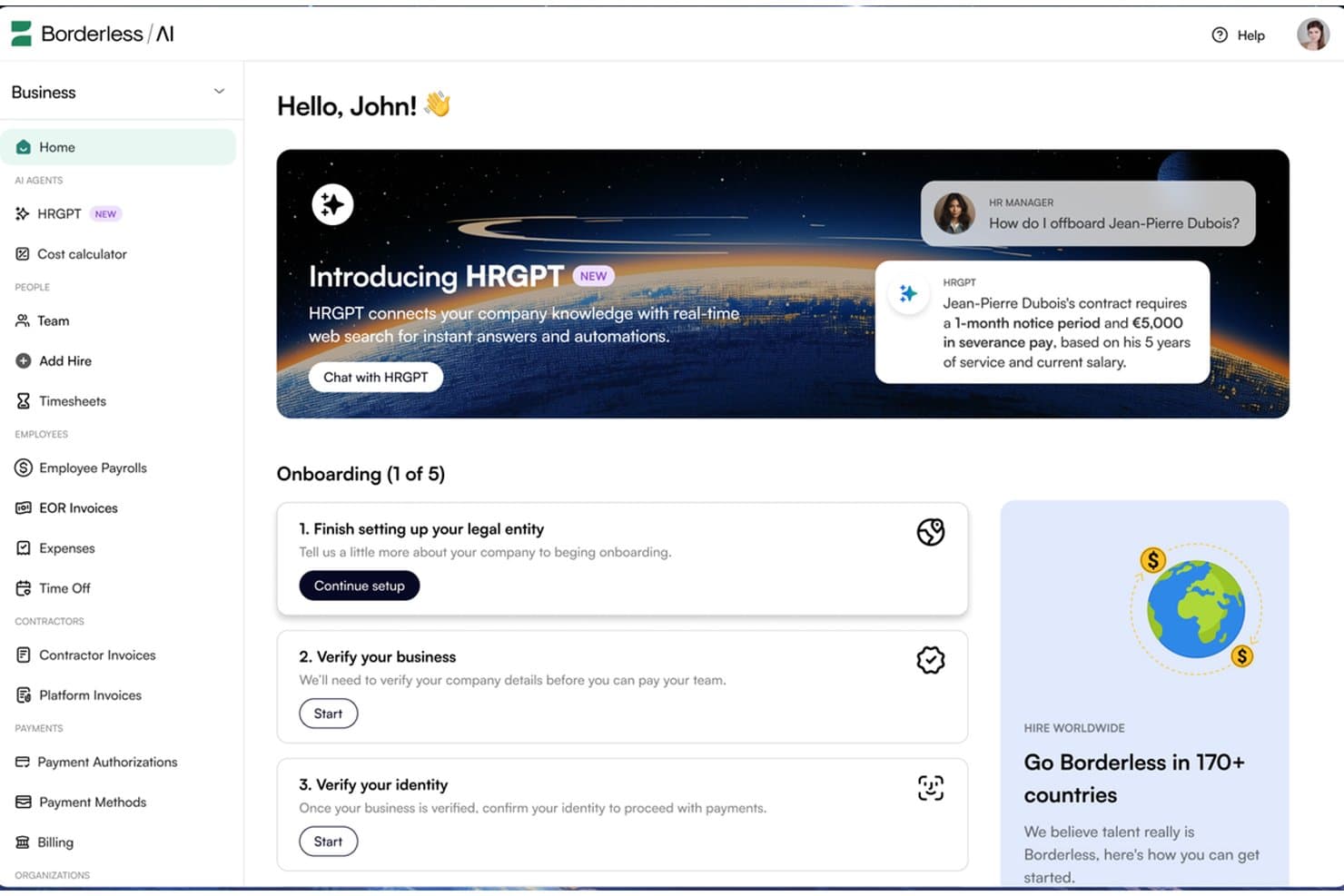
Borderless AI's HRGPT agent automates HR tasks like offboarding in real time. Borderless AI is an employer of record platform that uses AI-driven contract generation, multi-state payroll processing, and compliance monitoring to support hiring across more than 170 countries. It offers US employment services through owned entities and does not require payroll pre-funding.
Who Is Borderless AI Best For?
Borderless AI is a strong fit for startups and lean HR teams that need to hire US-based employees quickly without providing payroll funding far in advance.
Why I Picked Borderless AI
I included Borderless AI for its payroll funding arrangement, which allows businesses to run US payroll without pre-funding it 30 days in advance. This can help startups manage cash flow while expanding their teams. Its AI-generated, state-specific at-will contracts support onboarding in as little as 24 hours. The platform also handles federal and state tax withholding, filings, and state leave programs such as California's SDI and Colorado's FAMLI without requiring businesses to establish their own entities.
Borderless AI Key Features
- AI contract generator: Produces state-specific at-will employment agreements in minutes, with IP assignment and confidentiality clauses included.
- Contractor and EOR dashboard: Manage contractors and full-time employees through a single platform, with guidance for contractor-to-employee conversions.
- AI HR agents: HRGPT answers HR and labor law questions, while Alberni handles entity, legal, and contract operations. Both are included at no additional cost across all plans.
- SOC 2 Type II compliance: The platform uses AES-256 encryption at rest, TLS 1.3 in transit, role-based access controls, and audit trails for AI agent actions.
Borderless AI Integrations
Borderless AI offers a native ADP Workforce Now integration and a marketplace integration through Paychex Marketplace. It also lists integrations with Workday, BambooHR, and Greenhouse, alongside an API for custom connections.
Pros and Cons
Pros:
- Reviewers praise responsive support and timely payments
- Onboarding can begin within 24 hours
- Does not require payroll pre-funding
Cons:
- Contractor administration uses a separate management product
- AI-generated contracts still require legal review
Learn more about Borderless AI: Best for no-minimum, flat-fee global hiring
- Free demo available
- From $199/employee/month
Visit WebsiteCustomer Rating:4.9/5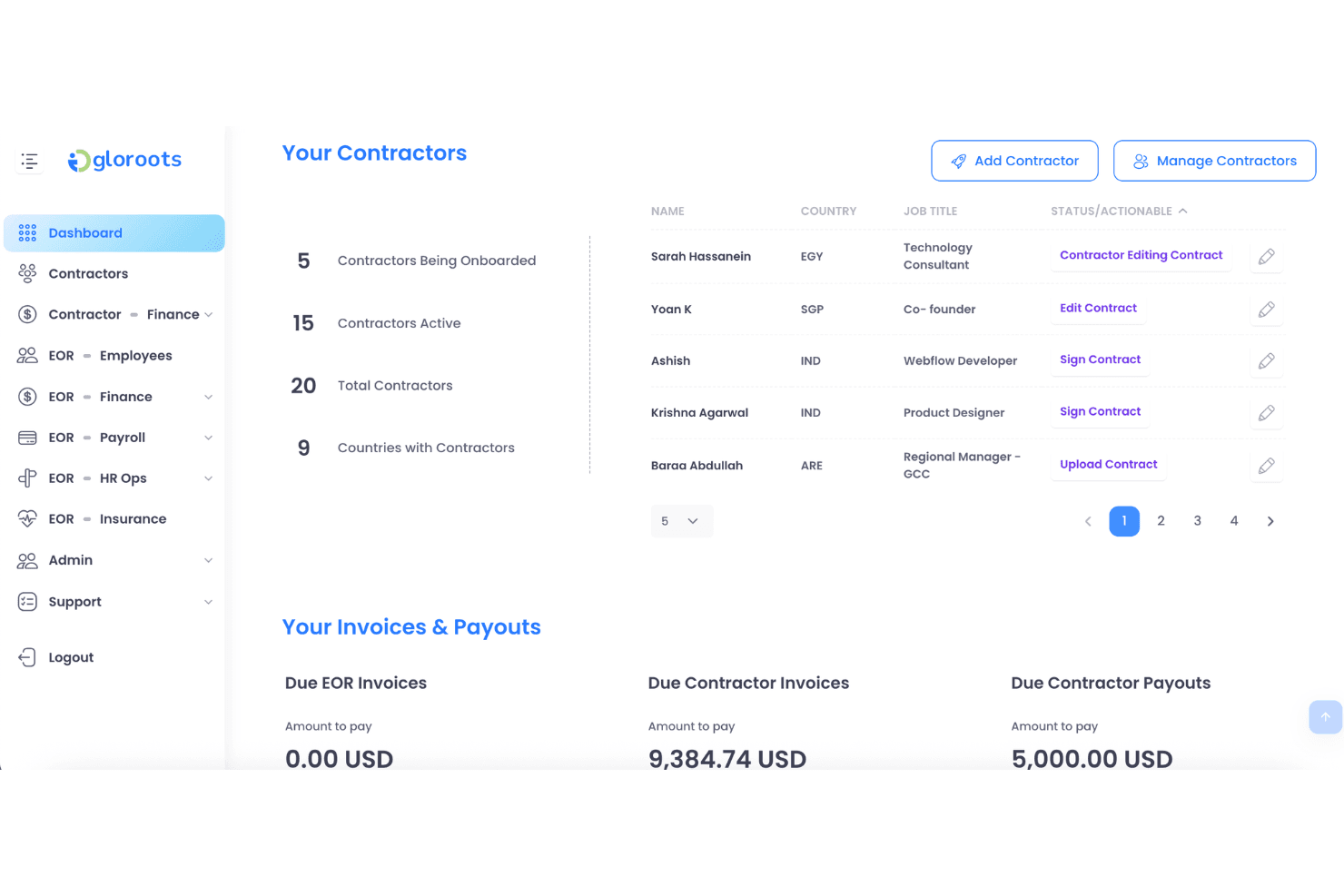
Gloroots lets users manage contractors and track invoices in one dashboard. Gloroots is a global employer of record platform that handles US payroll, benefits administration, contract generation, and multi-state compliance across all 50 states without requiring businesses to establish a local entity.
Who Is Gloroots Best For?
Gloroots is a strong fit for startups and small teams hiring their first international employees without minimum headcount requirements or long-term contracts.
Why I Picked Gloroots
I picked Gloroots for its published starting price of $199 per employee per month, with no minimum headcount requirement or long-term contract. I particularly like that it issues W-2s under its own EIN, handles FICA, FUTA, and SUI remittances, and supports state-specific final-pay deadlines, including California's same-day requirement. For businesses hiring their first US employees, Gloroots also offers ACA-compliant benefits and 401(k) administration, helping smaller teams manage employment requirements without moving to a higher service tier.
Gloroots Key Features
- State-tailored employment agreements: Generates employment contracts tailored to state requirements, including California AB5 provisions and New York wage notice rules, with IP assignment clauses included.
- Contractor of Record product: Allows businesses to engage contractors through Gloroots as the legal contracting entity, with misclassification liability protection at $99 per contractor per month.
- Equity vesting tax tracking: Tracks employee vesting schedules to support the calculation and withholding of applicable taxes when equity vests.
- Misclassification risk checker: A built-in eight-question tool that assesses worker classification risks before hiring decisions are made.
Gloroots Integrations
Native integrations are not clearly documented. Gloroots offers an API for custom integrations, while its USA EOR page states that it connects with major HRIS and payroll systems without naming specific platforms.
Pros and Cons
Pros:
- State-specific contracts address local requirements
- Payroll includes W-2s and tax remittances
- Reviewers praise responsive onboarding support
Cons:
- EOR service does not establish a client-owned US entity
- Contractor classification protection requires Contractor of Record
Learn more about Gloroots:
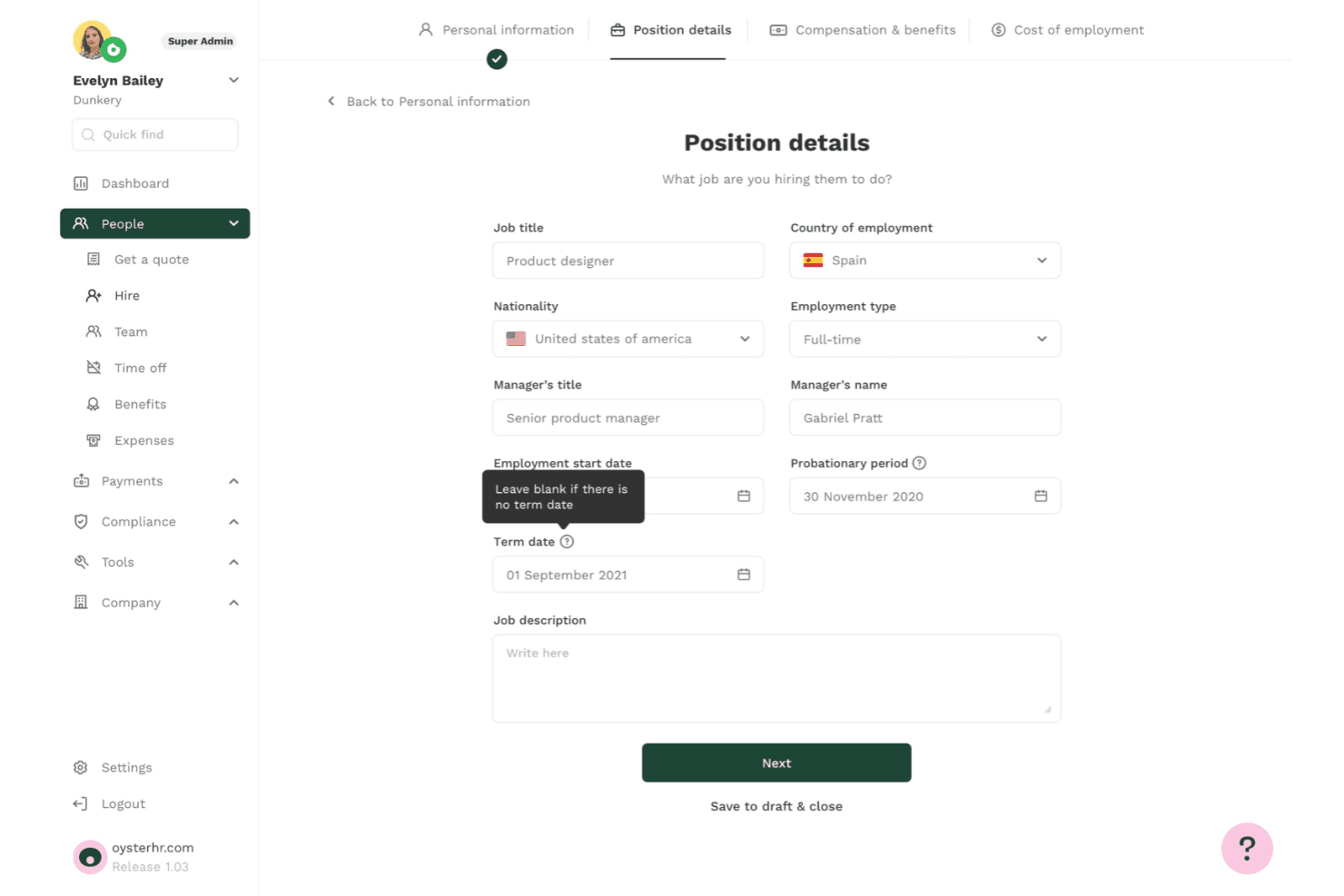
Oyster lets users define job titles, employment type, and term dates when hiring. Oyster is an employer of record platform covering all 50 US states. It handles compliant hiring, automated payroll, benefits administration, contract generation, and contractor conversions without requiring businesses to establish a local entity.
Who Is Oyster Best For?
Oyster is a strong fit for companies considering a US PEO that want to begin with EOR services and transition to co-employment on the same platform as they grow.
Why I Picked Oyster
I included Oyster for its combination of US EOR and PEO services, allowing businesses to start hiring across all 50 states without a legal entity and later transition to co-employment on the same platform. Its contract generation process includes state-specific at-will clauses and IP agreements, helping businesses prepare employment documentation more efficiently. Oyster also offers a 401(k) arrangement with a stated 3% employer contribution for US hires, providing an additional retirement benefit.
Oyster Key Features
- Four-tier health plan selection: Choose from Essential, Competitive I, Competitive II, or Best-In-Class ACA-compliant health plans, with options covering dental, vision, mental health, and maternity care.
- Contractor misclassification risk tool: Oyster Shell assesses contractor misclassification risks and includes up to $500,000 in aggregate protection coverage.
- State-specific payroll compliance: Payroll applies federal and state withholding, FICA, wage and hour rules, and final-pay requirements across all 50 states, including states with stricter regulations, such as California and New York.
- Equity management with Carta integration: Manage equity through the platform with built-in tax guidance and synchronize equity data through its Carta integration.
Oyster Integrations
Oyster offers integrations with Xero, QuickBooks, BambooHR, HiBob, Greenhouse, Ashby, Slack, Carta, Concur, and Zapier. It also provides an API for custom payroll, time-off, and expense data connections.
Pros and Cons
Pros:
- State-specific contracts support hiring across all 50 states
- Offers a stated 3% employer 401(k) contribution
- Reviewers praise clear onboarding timelines
Cons:
- Timesheets do not automatically sync with payroll
- Platform lacks native applicant tracking
Learn more about Oyster: Best for contractor-to-employee-to-entity moves
- Not available
- From $599/employee/month
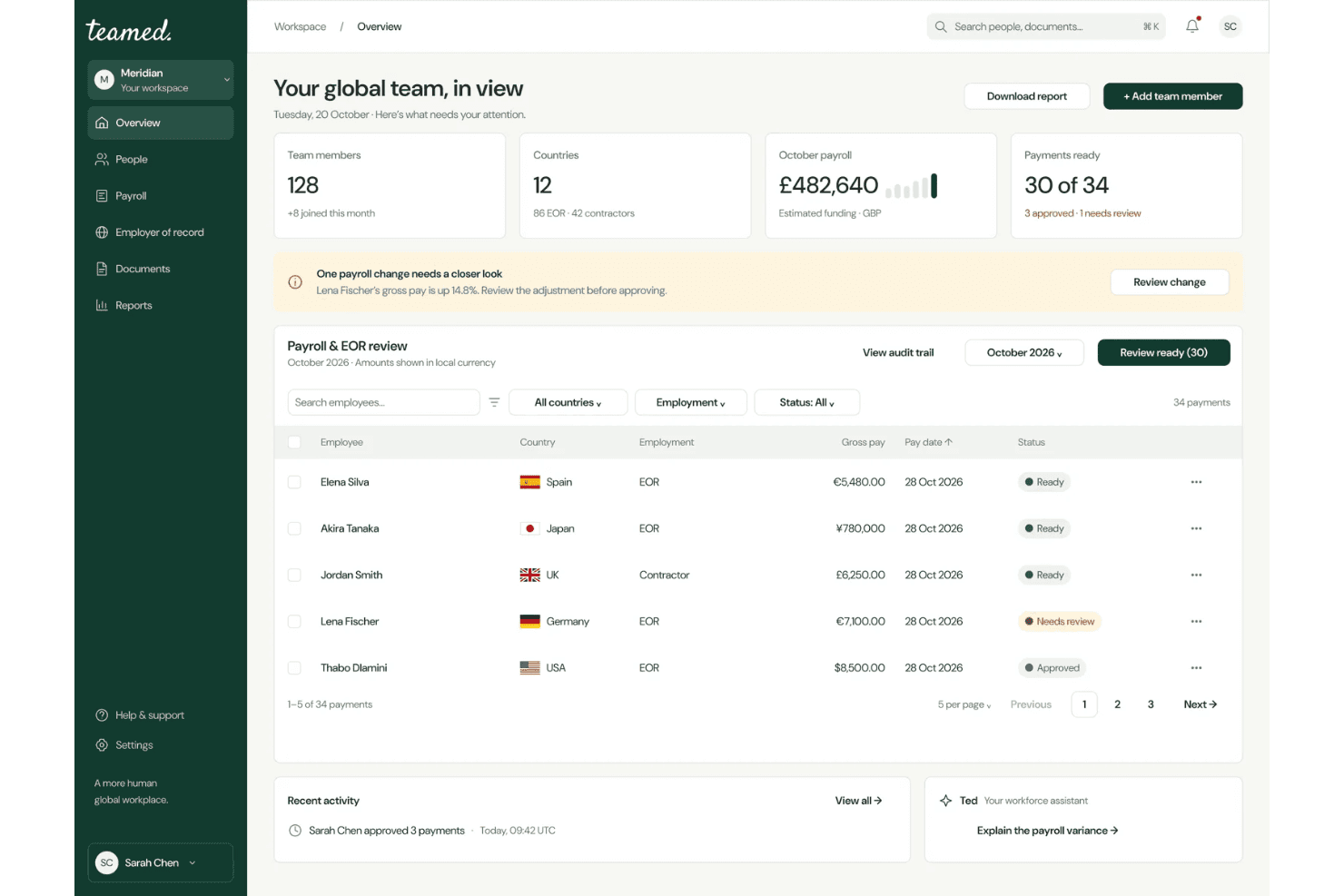
Teamed centralizes global payroll and EOR management in one dashboard. Teamed is an employer of record platform that supports US hiring across all 50 states through its own legal entity. It handles payroll, tax filings, benefits administration, and contractor-to-employee conversions through a centralized dashboard.
Who Is Teamed Best For?
Teamed is a strong fit for companies that need to move workers through the full employment lifecycle, from contractor to EOR employee and eventually to employment under their own US entity, without switching platforms.
Why I Picked Teamed
I picked Teamed for its support for moving workers through different employment arrangements, from contractor to EOR employee and eventually to employment under a company's own US entity. Contractor-to-employee conversions are managed through a single dashboard. When you're ready to establish a local entity, Teamed's GEMO service supports the setup of a US C-Corp or LLC and the migration of employees. Its built-in crossover calculator also helps businesses estimate when establishing an entity may become more cost-effective than continuing with EOR services.
Teamed Key Features
- 50-state hiring guides: State-specific compliance guides cover taxes, worker classification, paid leave, termination rules, and wage requirements across all 50 states.
- Payroll variance alerts: Automated alerts identify payroll discrepancies before processing closes, giving teams an opportunity to address errors.
- Contractor misclassification protection: Guard and Protect add-ons provide misclassification liability coverage, with Guard offering up to $10,000 per case at $130 per contractor per month.
- Named country specialist support: Every account receives a dedicated specialist, with a claimed 15-minute initial response time and 24/5 availability without ticket queues.
Teamed Integrations
Teamed lists 19 integrations, including Personio, BambooHR, HiBob, Workday, Greenhouse, Okta, Xero, QuickBooks, and Zapier. Only Personio has publicly available synchronization documentation. Teamed does not provide a public API, and its integration team configures other connections during onboarding.
Pros and Cons
Pros:
- Named specialists provide direct support
- Contractor-to-entity transitions can avoid repeated onboarding
- Owned US entity supports hiring across all 50 states
Cons:
- EOR service does not establish a client-owned entity
- Entity migration requires a separate GEMO engagement
Learn more about Teamed: Best for contractor-to-employee transitions
- Free demo available
- From $399/employee/month
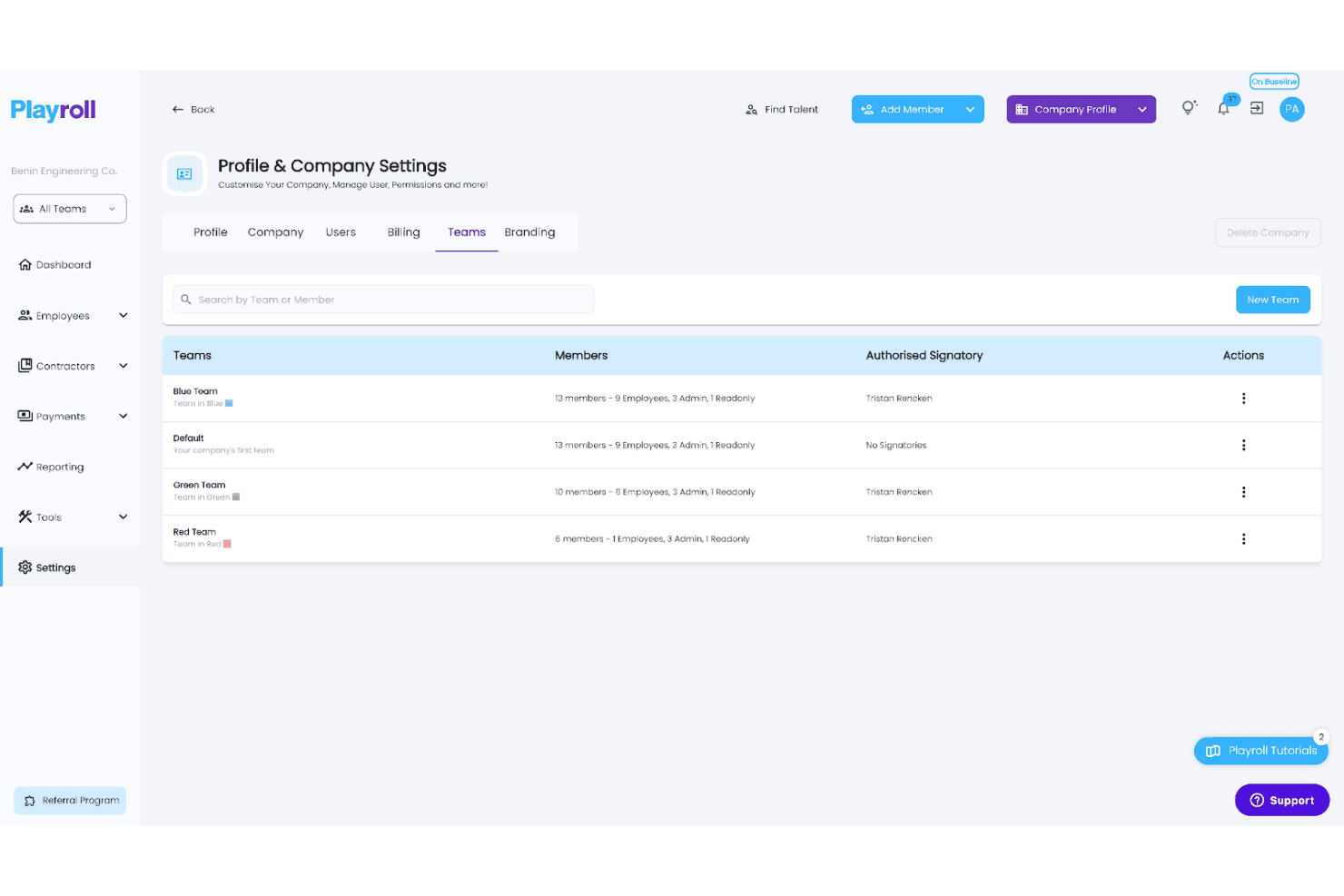
Playroll lets users organize employees into color-coded teams with assigned signatories. Playroll is a global employer of record platform that supports US and international hiring without requiring businesses to establish local entities. Its services include automated payroll, tax filings, benefits administration, and contractor-to-employee conversions across more than 180 countries.
Who Is Playroll Best For?
Playroll is a strong fit for companies looking to convert existing contractors into full-time employees, particularly those hiring across multiple countries.
Why I Picked Playroll
I picked Playroll for its structured contractor-to-employee conversion service. When you're ready to transition a contractor to full-time employment, Playroll guides you through a four-step process that includes a free misclassification audit, a documented transition plan, and onboarding through its EOR service. This process covers at-will employment agreements with FLSA classification requirements included. I also like that each converted employee receives a dedicated Employee Success Manager at no additional cost.
Playroll Key Features
- Automated biweekly payroll: Playroll processes US payroll biweekly, handling federal, state, and local tax withholding, FUTA and SUTA payments, and W-2 issuance across all 50 states.
- At-will contract generation: Generate US employment agreements in approximately five minutes, with FLSA classification, EEOC language, and optional arbitration clauses included.
- Multi-state compliance monitoring: Playroll tracks changes to federal and state employment laws, including minimum wage updates and paid leave requirements, and applies relevant changes to payroll.
- Dedicated Employee Success Manager: Every employee hired through Playroll receives an assigned Employee Success Manager at no additional cost.
Playroll Integrations
Playroll offers three documented integrations: BambooHR, HiBob, and Expensify. It also supports custom integrations through its API.
Pros and Cons
Pros:
- State-specific hiring guides cover all 50 states
- Offers free contractor misclassification audits
- Provides dedicated Employee Success Managers
Cons:
- Employee hiring depends on country-specific onboarding requirements
- EOR service does not include candidate recruitment
Learn more about Playroll: Best for tying hiring to app and device access
- Free demo available
- Pricing upon request
Visit WebsiteCustomer Rating:4.9/5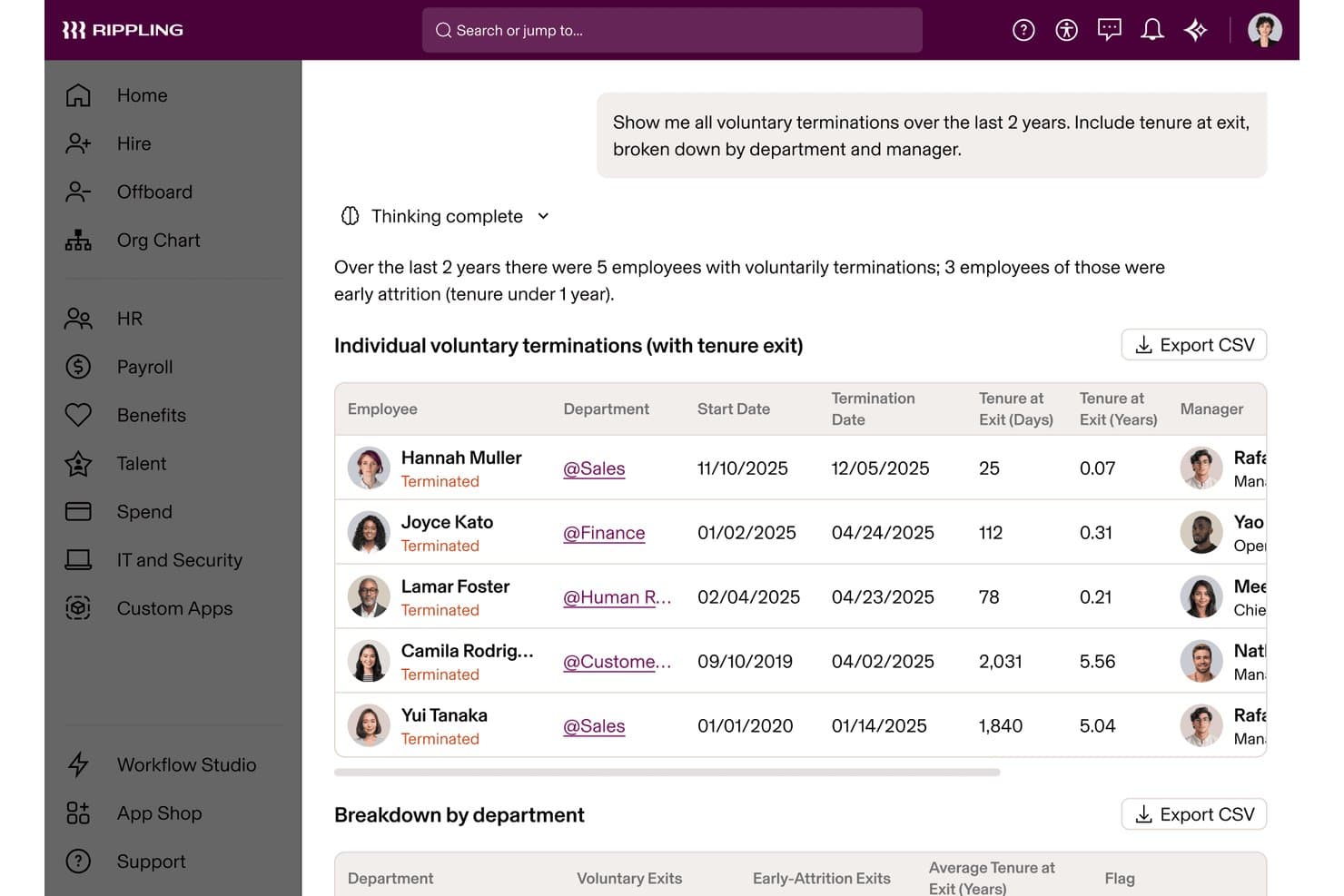
Rippling's AI surfaces voluntary termination trends by tenure and department. Rippling is an employer of record platform registered in all 50 US states. It handles payroll processing, tax filing, benefits administration, compliance monitoring, and employee onboarding alongside native IT provisioning for app and device access.
Who Is Rippling Best For?
Rippling is a strong fit for tech-forward companies that need to connect employee onboarding directly with app permissions and device provisioning from day one.
Why I Picked Rippling
I picked Rippling for its ability to connect employee onboarding directly with IT provisioning. When you hire someone through Rippling's EOR service, you can manage app access and device enrollment through the same workflow. This helps new hires in states where you have no legal entity receive configured laptops and access to Slack, Zoom, and Google Workspace on their first day. I also like its Misclassification Risk Analyzer, which flags potentially problematic contractor arrangements before they become legal issues.
Rippling Key Features
- Compliance 360 alerting: Real-time alerts flag minimum wage changes, overtime rules, sick leave updates, and pay schedule requirements across all 50 states.
- Multi-entity flexibility: Move workers between contractor, EOR, PEO, and own-entity arrangements without repeating onboarding or duplicating employee records.
- Automated payroll tax filing: Rippling calculates and remits federal, state, and local payroll taxes, including FICA, state unemployment taxes, and local withholding.
- Contractor-to-employee conversion: A dedicated workflow helps businesses move contractors to full-time employee status, with a Misclassification Risk Analyzer included in the process.
Rippling Integrations
Rippling offers more than 600 ready-made integrations, including Greenhouse, Slack, Microsoft 365, Salesforce, Zoom, NetSuite, QuickBooks Online, Fidelity, and Vanguard. Its developer platform and API also support custom integrations.
Pros and Cons
Pros:
- More than 600 ready-made software integrations
- Compliance 360 flags state wage and leave changes
- IT provisioning is built into employee onboarding
Cons:
- Employee IT provisioning requires Rippling's IT tools
- Some international EOR hires use partner entities
 Best for moving from no US entity to PEO
- Free demo available
- From $599/employee/month
Visit WebsiteCustomer Rating:4.9/5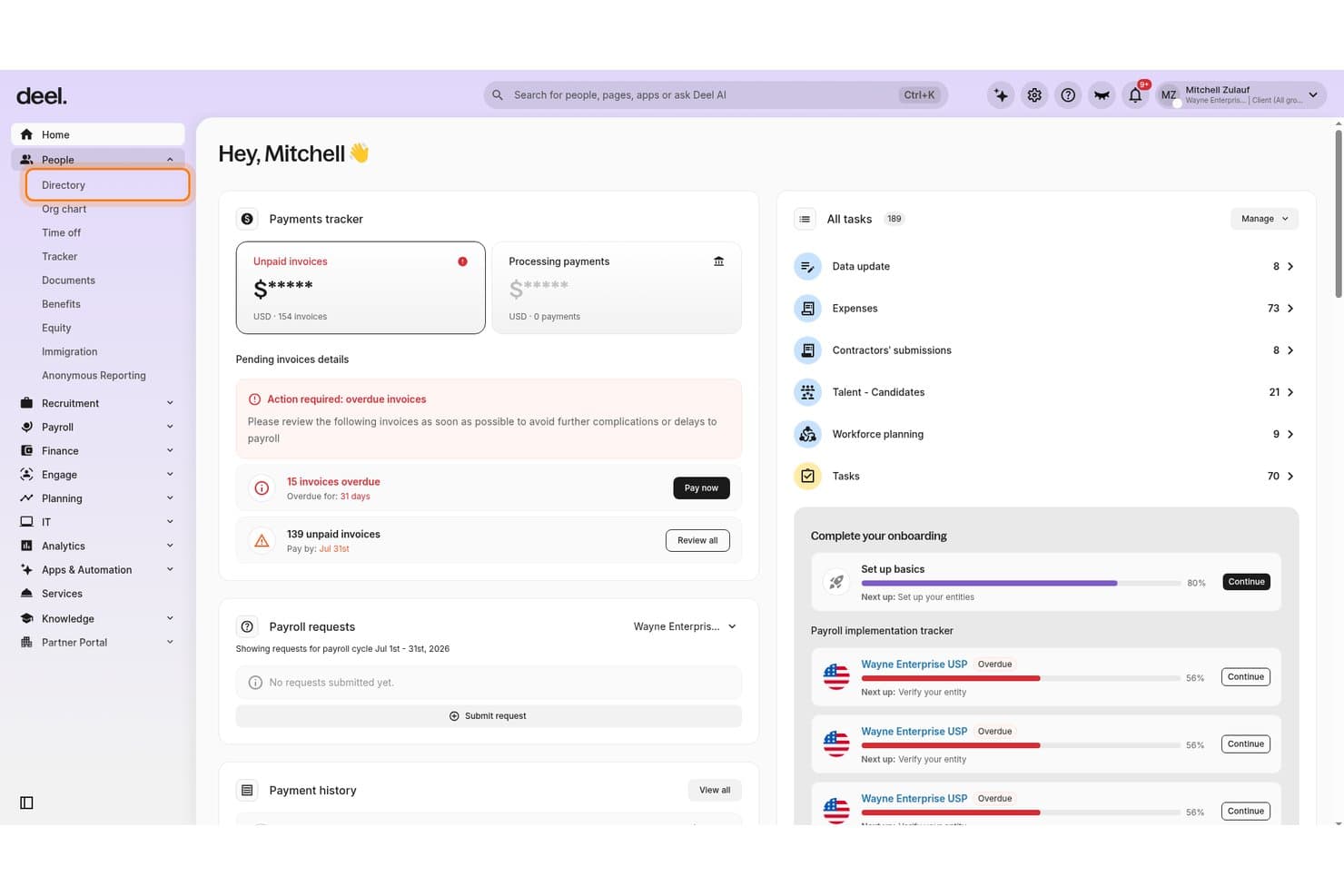
Deel Hire centralizes payments, tasks, and onboarding in one dashboard. Deel Hire is a US employer of record solution that manages employment contracts, multi-state payroll, tax filings, benefits administration, and compliance monitoring across all 50 states without requiring businesses to establish their own US legal entity.
Who Is Deel Hire Best For?
Deel Hire is a strong fit for companies without a US legal entity that want a clear path from EOR employment to co-employment through a PEO once they establish their own entity.
Why I Picked Deel Hire
I picked Deel Hire for its built-in path to PEO co-employment once a company establishes its own entity. Its "Change Worker Type" workflow allows businesses to convert contractors to EOR employees in as little as 24 hours, with pre-filled contract data carried over automatically. When you're ready to transition to a PEO, Deel's help center provides a structured migration guide covering employment continuity, PTO handling, and benefits re-enrollment under your own entity.
Deel Hire Key Features
- Continuous compliance monitoring: Deel's Compliance Monitor tracks wage rules and tax law changes across all 50 states and sends alerts before those changes affect payroll.
- AI Worker Classifier: An AI-powered tool that reviews worker classifications and flags potential misclassification risks before they become legal issues.
- Automated multi-state tax filing: Deel handles federal, state, and local tax withholding and files Form 941 and applicable state returns on your behalf.
- Offboarding Assistant: A structured termination workflow that identifies legal obligations, calculates offboarding costs, and drafts required documentation for review by Deel's legal team.
Deel Hire Integrations
Deel Hire offers integrations with Greenhouse, Ashby, BambooHR, HiBob, Personio, QuickBooks, Xero, NetSuite, and Employee Navigator. Its API supports custom connections for hiring, payroll, HRIS, accounting, employee lifecycle changes, and device management.
Pros and Cons
Pros:
- PEO migration guide covers employment continuity
- Offboarding Assistant estimates termination costs
- Change Worker Type reuses contractor contract data
Cons:
- Benefits re-enrollment is required during migration
- PEO transition requires a US legal entity
Learn more about Deel Hire: Best for US hiring via its own legal entity
- Free demo available
- From $549/employee/month
Visit WebsiteCustomer Rating:4.8/5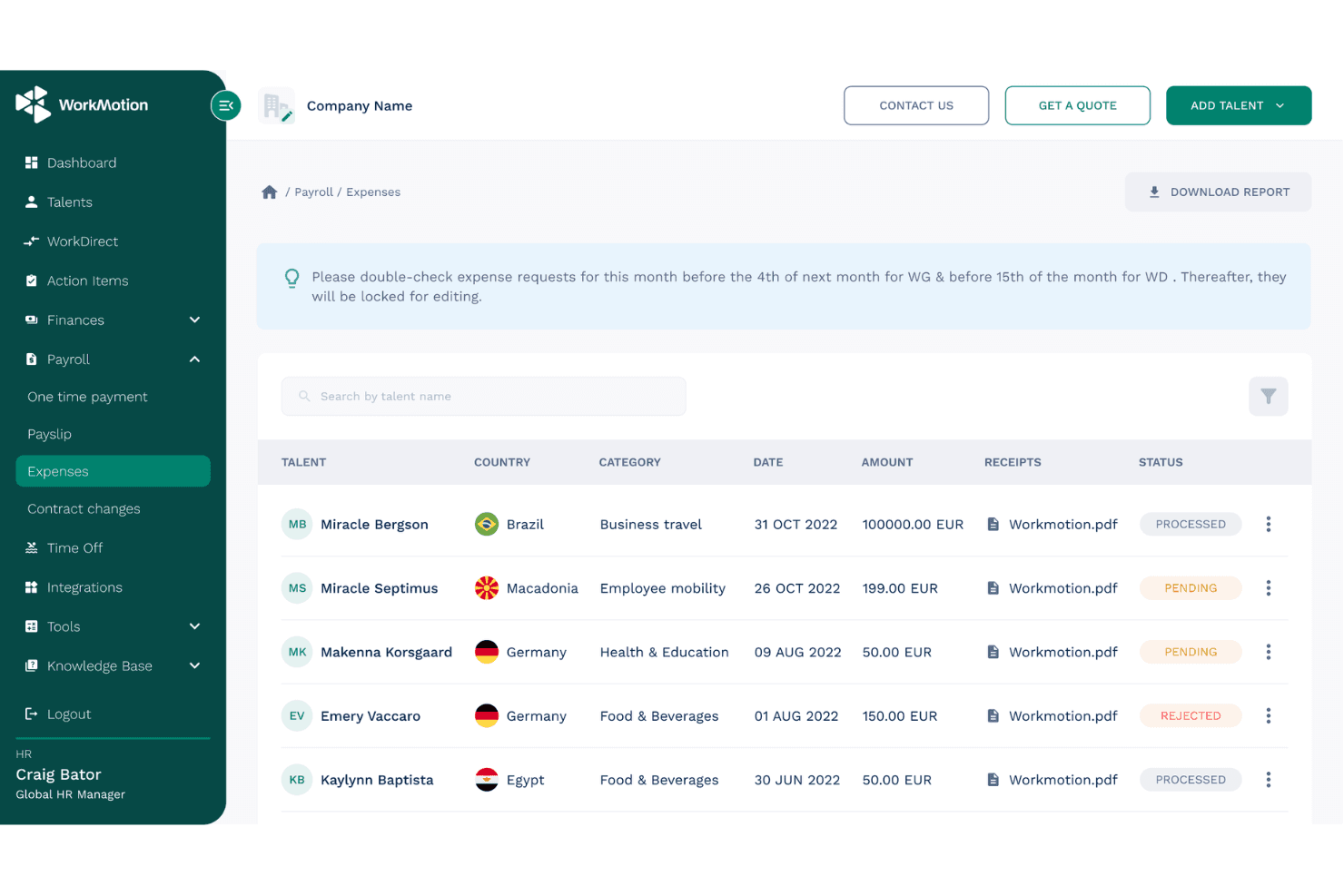
WorkMotion lets users track and manage employee expense requests globally. WorkMotion is a global employer of record platform that enables companies to hire and manage employees across more than 160 countries. It handles payroll, multi-state compliance, benefits administration, and contract generation without requiring businesses to establish local legal entities.
Who Is WorkMotion Best For?
WorkMotion is a strong fit for globally distributed companies that want to hire US employees without establishing their own US legal entity.
Why I Picked WorkMotion
I picked WorkMotion for its use of its own US legal entity rather than relying on third-party partners, providing a more direct employment arrangement. Its services cover multi-state payroll tax remittance, including federal income tax, Social Security, Medicare, FUTA, and state unemployment taxes. WorkMotion also updates state-specific employment contracts to reflect changes in local regulations, helping businesses manage hiring requirements across all 50 states through one platform.
WorkMotion Key Features
- Wanda AI assistant: Ask country-specific labor law and HR questions through the platform or Slack, with responses based on WorkMotion's internal HR data.
- Employment cost calculator: Estimate per-employee hiring costs by country using salary and bonus inputs, with a breakdown of salary, allowances, and social contributions.
- Expense management: Employees submit expenses through the platform, which applies country-specific tax rules and flags taxable amounts for HR review and approval.
- HR system integrations: Connect WorkMotion with BambooHR, Workday, HiBob, Personio, and ADP Workforce Now to automate data exchange with your existing HR systems.
WorkMotion Integrations
WorkMotion integrates with BambooHR, Workday, HiBob, Personio, ADP Workforce Now, and UKG Pro for HR data exchange. An API is also available for custom integrations.
Pros and Cons
Pros:
- Reviewers praise payroll timeliness and support
- Multi-state contracts are updated to reflect changing laws
- Own US entity supports direct employment accountability
Cons:
- EOR does not transfer legal employment to the client
- Candidate sourcing requires its Direct Hiring service
Learn more about WorkMotion: 9Best for 50-state compliance intelligence
G-P
- Free demo available
- From $599/employee/month
Visit WebsiteCustomer Rating:4.5/5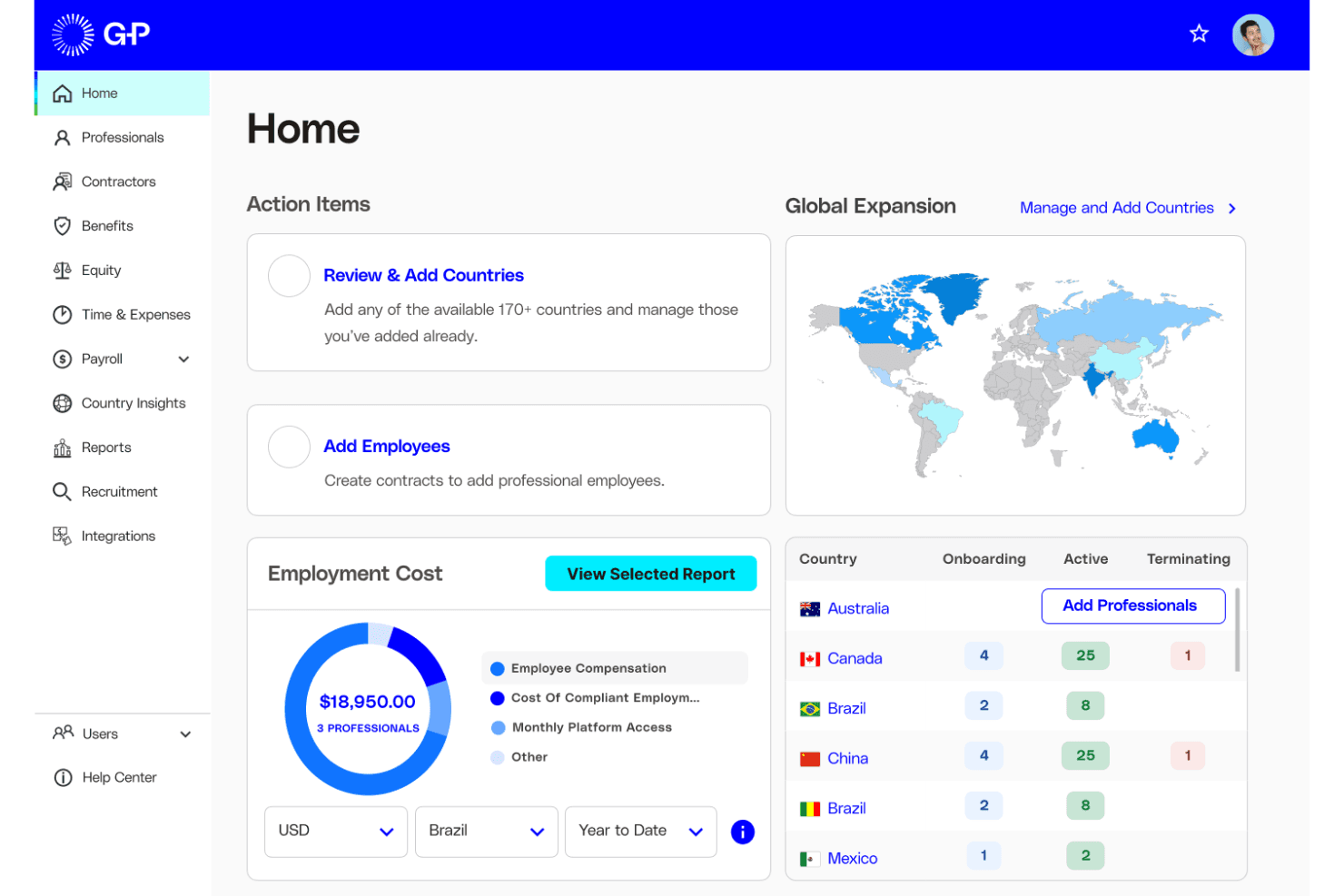
G-P helps users manage global hiring costs and workforce across countries. G-P is an employer of record platform with a wholly owned US legal entity that handles multi-state payroll, tax filings, benefits administration, and AI-powered compliance monitoring across all 50 states.
Who Is G-P Best For?
G-P is a strong fit for mid-market and enterprise HR teams managing multi-state hiring across the US without establishing a local entity.
Why I Picked G-P
I picked G-P for its approach to 50-state compliance tracking through its AI assistant, Gia. Gia draws on more than 100,000 vetted articles and 1,500 government sources to help identify regulatory changes across all 50 states. I also like its Classification Engine, which assesses whether workers should be classified as employees or contractors. This is particularly useful for companies hiring across multiple states with different classification requirements.
G-P Key Features
- Multi-currency payroll processing: G-P processes payroll in more than 150 currencies, handling federal, state, and local tax withholding, FUTA, SUTA, and applicable state filings.
- ACA-compliant benefits administration: Manage medical, dental, vision, 401(k), FMLA, and state paid leave enrollment through a single dashboard, with COBRA support during offboarding.
- Automated termination and offboarding: G-P manages final pay according to state deadlines, ADEA-reviewed severance agreements, and COBRA continuation notices.
- HRIS integrations: Native connections with Workday, SAP SuccessFactors, BambooHR, UKG Pro, HiBob, and Personio help synchronize employee data across existing HR systems.
G-P Integrations
G-P integrates with Workday, SAP SuccessFactors, BambooHR, UKG Pro, UKG Ready, HiBob, Personio, ADP Workforce Now, Paylocity, and Microsoft Entra ID. Its API also supports custom integrations.
Pros and Cons
Pros:
- Benefits administration includes 401(k) and COBRA support
- Owned US entity supports nationwide hiring
- Gia helps identify compliance requirements across all 50 states
Cons:
- Background screening is not included in standard EOR
- Visa assistance is not part of core EOR services
Learn more about G-P: Best for termination liability coverage
- Free demo available
- From $499/employee/month
Visit WebsiteCustomer Rating:4.4/5
Papaya Global tracks employer costs by country, category, and cost center. Papaya Global is an employer of record platform that offers EOR, PEO, ASO, and payroll-only services across more than 180 countries. Its US-specific services cover all 50 states and include automated tax filings, benefits administration, and contractual termination liability coverage.
Who Is Papaya Global Best For?
Papaya Global is a strong fit for midsize and enterprise companies managing multi-state or global workforces that need contractual termination liability coverage alongside payroll and benefits administration.
Why I Picked Papaya Global
I included Papaya Global for its contractual termination liability guarantee, which distinguishes its offering from many other EOR providers. When a termination becomes complicated, Papaya provides contractual protections intended to limit certain legal defense costs and financial exposure, subject to its terms. It also supports upfront severance calculations to help businesses plan termination expenses and avoid payment delays. I like that the platform combines all-50-state coverage with compliance monitoring across more than 10,000 federal, state, and local tax jurisdictions, which is particularly useful for businesses operating across states with different final-pay requirements.
Papaya Global Key Features
- Multi-model US employment support: Choose from EOR, PEO, ASO, or payroll-only service models to match your business structure across all 50 states.
- Automated tax filings: Papaya automates tax filings across more than 10,000 federal, state, and local jurisdictions, with a claimed 99.9% filing accuracy rate.
- Benefits enrollment and administration: Enroll US employees in healthcare, dental, life insurance, and 401(k) plans through partner providers, with compliance support throughout the process.
- Global equity management: A dedicated equity team administers equity plans for EOR workers, applying relevant local tax requirements across supported countries.
Papaya Global Integrations
Papaya Global offers documented integrations with Workday, HiBob, BambooHR, SAP SuccessFactors, Eqip, and OneData. It also provides API access for custom data flows and supports importing pre-payroll data from HRIS, ERP, and Excel files.
Pros and Cons
Pros:
- Reviewers praise responsive account managers
- Automates tax filings across more than 10,000 jurisdictions
- Offers contractual termination liability coverage
Cons:
- Termination liability coverage has contractual exclusions
- Some employment services depend on local partners
Learn more about Papaya Global:
Other Employers of Record in the USA
Here are a few additional options that didn’t make my shortlist but are still worth checking out:
- 11Payoneer Workforce ManagementBest for $199-per-employee starting pricing
- 12RemoteBest for EOR-to-US PEO without switching
- 13TriNetBest for US firms with an entity seeking PEO
- 14RivermateBest for 24/7 help and a named manager
- 15MultiplierBest for hiring one with no minimum headcount
- 16Safeguard GlobalBest for US hiring and global expansion
- 17InsperityBest for mid-size teams wanting Workday PEO
- 18Remote PeopleBest for moving hiring in-house as you grow
- 19CompunnelBest for linking recruiting with employment
Related Reviews
How I Evaluate Employers of Record in the USA
I split my evaluation into three parts. First, core functionality—which carries the most weight—means the provider must own US legal entities and run compliant payroll across states. Then I look for standout features like contractor-to-EOR conversion workflows. Finally, I consider support quality and pricing transparency.
Core Functionality (Table Stakes for This List)
When I'm selecting tools for my list, I score each one on a scale from 0 (does not offer the functionality) to 5 (excels in this area) for each core functionality listed below. I then convert the total into a percentage to help assess each tool's overall fit, with extra weight on any functionalities I've deemed essential.
- Legal Entity & Compliance (Essential): I check whether the provider owns US entities across states or relies on third parties, and how it tracks evolving federal and state labor laws.
- Payroll Processing (Essential): I evaluate how the platform handles multi-state tax withholding, filings, and remittances, especially for employees working across state lines.
- Benefits Administration: I look for access to health insurance, retirement plans, and statutory leave options that are competitive enough to attract US-based talent.
- Contract Generation & Management: State-specific employment agreements matter here, so I check whether contracts auto-adjust for jurisdiction and manage onboarding documents.
- Multi-State Employment Support: I evaluate how well the provider handles compliance differences between states with distinct wage, leave, and reporting requirements.
- Termination & Offboarding Support: Final pay timing varies by state, so I look at how the provider manages compliant terminations, last-check calculations, and required documentation.
Once I have a list of tools that meet the criteria, I consider what sets each platform apart.
Differentiating Factors (What Sets Vendors Apart)
Here's how I compare and contrast different vendors:
Standout Features
I look for contractor-to-EOR conversion workflows that let you move a 1099 worker to W-2 status without gaps in pay or coverage—essential when reclassification risk is on the line. PEO/EOR hybrid flexibility matters just as much, because a team that outgrows EOR needs a clean path to direct employment. I also evaluate real-time compliance alerts, since state wage and leave laws shift often and late updates can mean penalties.
Beyond Features
I check whether pricing is a flat per-employee fee or a percentage of payroll, since percentage models make costs hard to predict as salaries rise. Customer support structure matters just as much—during a time-sensitive termination in a state with same-day final-pay rules, having a dedicated US employment law advisor beats waiting on a generic support ticket. I also evaluate native integrations with common HRIS and ATS platforms, because re-keying employee data between systems during onboarding creates errors and slows down hiring.
How to Choose an Employer of Record in the USA
Choose an employer of record in the USA by confirming its state coverage, payroll responsibilities, and process for offboarding or transition.
| If your priority is… | Look for… |
|---|---|
| If your priority is…State-by-state compliance | Look for…A written list of states where the provider’s entity employs workers |
| If your priority is…Accurate payroll and final pay | Look for…A clear allocation of withholding, filings, and final-pay responsibilities |
| If your priority is…Predictable costs | Look for…An itemized schedule covering service, benefits, setup, and termination charges |
| If your priority is…A future move to direct employment | Look for…Written transfer steps, employee requirements, and fees for moving to a PEO or your entity |
How to Vet Your Shortlist
- Confirm employing entities: Request a document listing the legal entity that would employ your worker in each planned state.
- Map payroll duties: Ask for a sample payroll calendar and responsibility matrix covering withholding, tax filings, and remittances.
- Review the full cost: Request an itemized fee schedule that separates service fees, benefits costs, setup charges, and termination fees.
- Test offboarding support: Submit a ticket with a hypothetical termination date and state, then request written guidance on final pay and required documents.
- Choose your operating model: Compare a provider-owned EOR arrangement with a planned move to a PEO or your own entity; use the written transfer clause to decide which path fits your hiring plans.
What Are Employers of Record in the USA?
An employer of record in the USA is a third party that legally employs a worker and manages payroll, tax withholding, and employment administration. This arrangement lets your organization hire workers without first establishing a US entity. The provider handles employment responsibilities, while your organization directs the worker’s day-to-day tasks. State rules, benefits, and plans to move workers to your own entity still need careful attention.
Features
Here are the main features I look for in an employer of record in the USA:
- Legal employment and compliance: The provider employs workers through an established legal employment arrangement and manages applicable federal, state, and local requirements. This allows businesses to hire without first establishing their own US entity.
- Payroll and tax administration: The provider calculates wages, withholds payroll taxes, files required returns, and remits taxes to the relevant authorities. Check how it handles payroll schedules, corrections, and employees working across state lines.
- Benefits administration: The provider manages eligible benefits, such as health insurance and retirement plans, and explains available options and costs. This helps businesses understand employee eligibility and employer contributions.
- Employment contracts and onboarding: The provider prepares state-appropriate employment agreements and collects required forms and employee information. A structured onboarding workflow helps employees complete documentation before their start dates.
- Multi-state support: The provider applies employment rules based on where employees perform their work, including state-specific wage and leave requirements. This is particularly important for remote employees working across different states or relocating.
- Time-off and leave management: The provider tracks eligible leave and paid time off according to applicable policies and regulations. Confirm how requests, balances, and payroll adjustments are managed.
- Termination and offboarding: The provider coordinates termination documentation, final wage calculations, and required notices based on the employee's location. Confirm who determines final-pay deadlines and communicates with departing employees.
- Payroll and employment records: The platform stores pay statements, tax forms, employment agreements, and related records for authorized users. These records help HR teams respond to employee inquiries and prepare for audits.
Benefits
In my experience, EOR services in the USA offer several practical benefits, including:
- Entity-free hiring: An EOR's US employment arrangement allows businesses to hire employees without first establishing their own US legal entity.
- Payroll administration: Provider-managed wage calculations, tax withholding, filings, and remittances reduce the administrative workload for internal payroll teams.
- State-level compliance: Multi-state support helps businesses apply location-specific wage, leave, and reporting requirements as their workforce expands.
- Benefits access: Benefits administration gives eligible employees access to options such as health insurance and retirement plans.
- Structured onboarding: State-appropriate employment agreements and document collection help employees complete required paperwork before their start dates.
- Supported offboarding: Termination coordination, final-pay calculations, and required notices help businesses follow applicable state-specific procedures.
Pricing
EOR pricing varies by provider, service level, and employee location. Most providers charge a monthly fee per employee, with wages, benefits, employment taxes, and other costs billed separately. While free EOR plans are uncommon, many providers offer demos or consultations. The table below compares typical starting price ranges and the services you can expect at each level.
Plan Comparison Table for Employers of Record in the USA
| Plan Type | Indicative Price | Common Features |
|---|---|---|
| Plan TypeFree Trials and Demos | Indicative PriceFree | Common FeaturesProduct demonstrations, initial consultations, platform walkthroughs, and hiring cost estimates |
| Plan TypeLower-Cost EOR Services | Indicative Price$199–$399 per employee/month | Common FeaturesEmployment contracts, payroll processing, tax withholding, basic compliance support, and employee onboarding |
| Plan TypeMid-Range EOR Services | Indicative Price$400–$699 per employee/month | Common FeaturesMulti-state payroll, benefits administration, compliance monitoring, employee onboarding, and offboarding support |
| Plan TypeHigher-Cost/Custom EOR Services | Indicative Price$700+ per employee/month or custom pricing | Common FeaturesCustomized employment arrangements, dedicated account management, advanced compliance support, and tailored workforce solutions |
FAQs
Here are answers to common questions about employers of record in the USA:
Can a US EOR hire employees in every state?
Not necessarily. An EOR’s coverage depends on the states where it can legally employ workers and administer payroll. Coverage may also vary based on the employee’s location, role, and the provider’s entity or licensing arrangements. Before signing an agreement, request written confirmation of coverage for every state where employees will work, including any planned relocations. Ask which legal entity will appear on employment agreements and wage statements. Reconfirm coverage before an employee relocates, since a move can affect tax withholding, registrations, benefits, and applicable employment laws
Who is responsible if an EOR makes a payroll or compliance error?
Responsibility depends on the contract, the nature of the error, and applicable law. An EOR arrangement does not eliminate all client obligations. The provider typically handles agreed payroll filings and employment administration, while your organization continues to direct day-to-day work and provide accurate employee and compensation information. Your contract should specify who corrects filings, funds missed wages or taxes, notifies employees, and pays applicable penalties or interest. Request clear escalation timelines and evidence of tax remittances. For significant issues, consult your legal or tax adviser promptly rather than assuming the EOR service fee covers all resulting losses.
Can you switch from one EOR provider to another without ending employment?
Yes, businesses can generally change EOR providers, but the transition requires a documented employment and payroll plan. Depending on the contractual arrangements and applicable requirements, the existing provider may need to terminate employment before the new provider issues an employment agreement. Before selecting a transfer date, coordinate final wages, benefits end and start dates, tax records, accrued leave, and employee communications. Confirm whether the transition will affect service dates, benefits eligibility, equity arrangements, or immigration sponsorship. Ask both providers to document their responsibilities and applicable fees, and notify employees clearly about any changes.