

22 Best Remote Workforce Management Software in 2026

Best Remote Workforce Management Software Shortlist


Why Trust Our Software Recommendations
Our team has been testing and reviewing software since 2012. As HR experts ourselves, we know how difficult—and important—it is to choose the right software.
For this guide, we evaluated tools using hands-on testing and independent research, scoring tools using our selection criteria. We also draw on insights from industry thought leaders and practicing HR experts.
Our reviews reflect our human editorial judgment, not a sales pitch.
Expert reviewers:
Remote Workforce Management Software Comparison Table
This comparison table summarizes pricing details for my top remote workforce management software selections.
| Tool | Best For | Trial Info | Price | ||
|---|---|---|---|---|---|
| 1 | Best as an AI for business | Free demo available | From $8/user/month | Website | |
| 2 | Best for automated global compliance insights | Free demo available | From $5/employee/month | Website | |
| 3 | Best for burnout tracking in distributed teams | 14-day free trial + free demo available | From $3.99/user/month (billed annually) | Website | |
| 4 | Best for flexible scheduling tools | 30-day free trial | From $50/month | Website | |
| 5 | Best for compliance-backed activity monitoring | 14-day free trial | From $5/user/month | Website | |
| 6 | Best for detailed time tracking reports | 14-day free trial | Pricing upon request | Website | |
| 7 | Best for enterprise workforce management | 30-day free trial + demo available | Pricing upon request | Website | |
| 8 | Best for integrated payroll and HR | Free demo available | Pricing upon request | Website | |
| 9 | Best for automated activity tracking | Free trial available | From $10/user/month | Website | |
| 10 | Best for simple time tracking | Free plan available; 30-day free trial; Free demo available | From $9/user/month | Website |

Remote Workforce Management Software Reviews
Below are my detailed summaries of the remote workforce management software that made it onto my shortlist. My reviews offer a detailed look at the features, integrations, and pricing of each software to help you find the best one for you.

Best as an AI for business
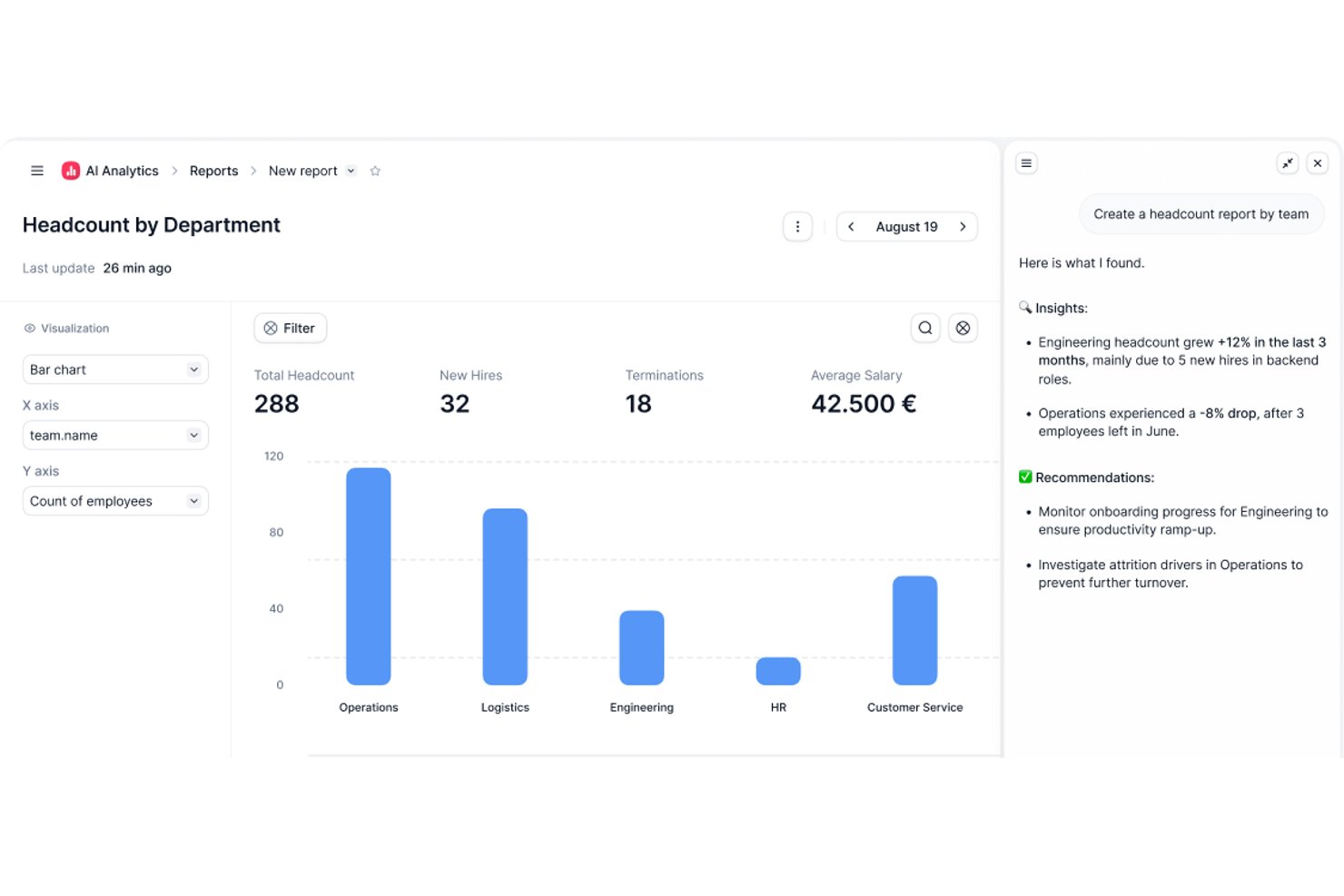
Factorial is an AI-powered HR and workforce management platform that covers time tracking, shift scheduling, onboarding, performance management, and employee engagement across distributed teams.
Who Is Factorial Best For?
Factorial is a strong fit for mid-market companies in Europe that want AI to handle everyday HR operations—from scheduling and reporting to answering employee policy questions.
Why I Picked Factorial
I picked Factorial as one of the best because its AI-for-business positioning goes well beyond a chatbot add-on. Factorial One handles real operational work: building timetables, generating cost and performance reports from a natural language prompt, and answering employee policy questions on the spot. I especially like that the AI agent is embedded directly in Microsoft Teams, so remote employees get HR answers without ever leaving the tools they're already in.
Factorial Key Features
- Multi-method time tracking: Employees can clock in and out via mobile app, QR code, facial recognition, or GPS geolocation, with offline sync for areas with poor connectivity.
- Geofencing: Managers can set location boundaries that validate or restrict clock-ins based on where an employee physically is when they start their shift.
- eNPS and pulse surveys: Built-in employee sentiment tools let you run Net Promoter Score surveys, team pulse checks, and climate surveys across distributed teams.
- Automated onboarding workflows: Digital task checklists, legally recognized e-signatures, and self-service document access guide new remote hires through onboarding without manual hand-holding.
Factorial Integrations
Factorial's documented integrations include Slack, Microsoft Teams, Google Workspace, Microsoft Outlook, Okta, DATEV, Sage, Silae, and a3innuva. It also offers an open API and Zapier.
Pros and Cons
Pros:
- Offline clock-ins preserve attendance data remotely
- Multi-method tracking suits distributed and deskless teams
- AI handles timetable planning and reports
Cons:
- No native global payroll or EOR support
- No time zone-aware scheduling automation

Deel HR
Best for automated global compliance insights
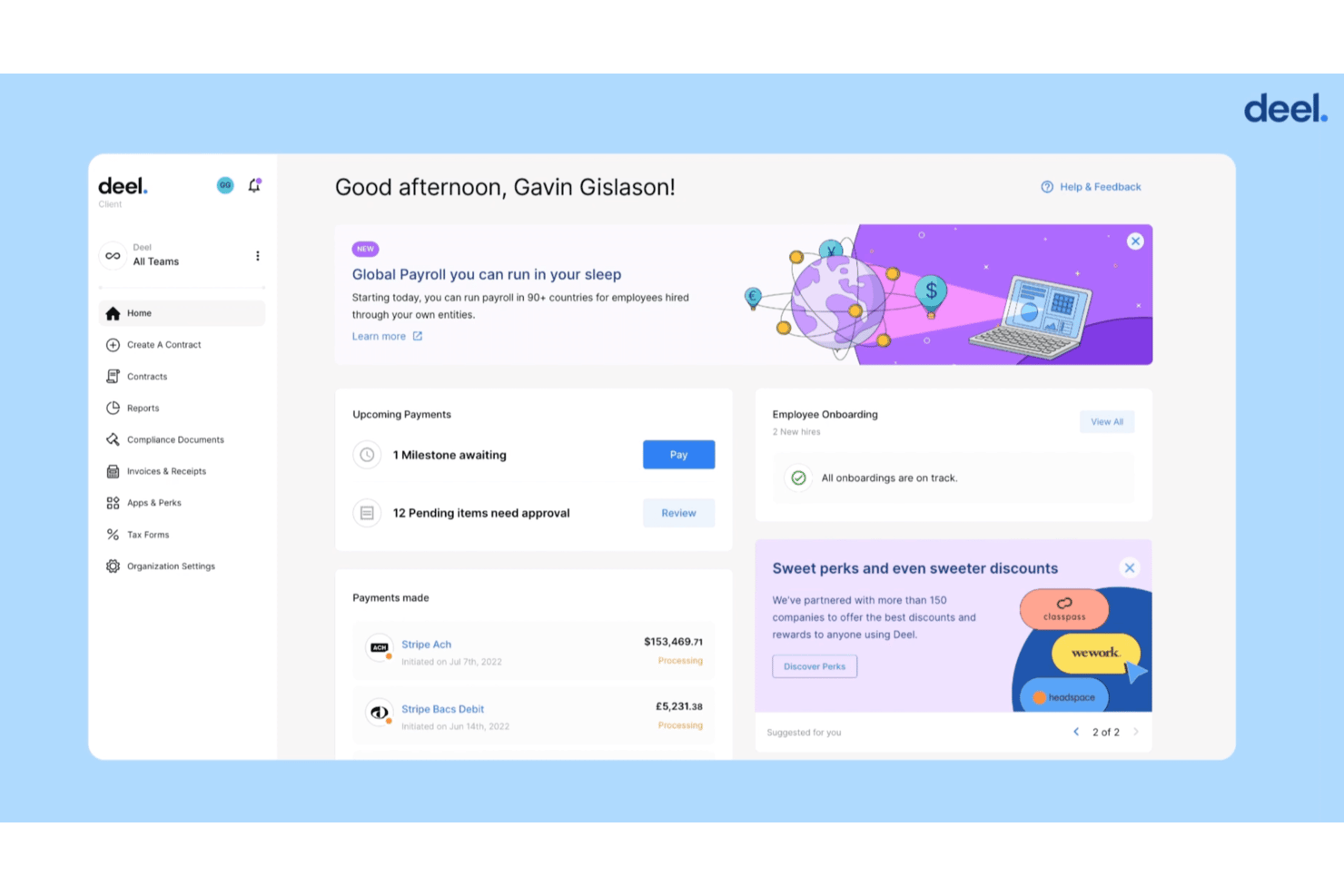
Deel HR is a global HR platform that combines EOR, contractor management, payroll, compliance, onboarding, and people analytics for distributed teams across 150+ countries.
Who Is Deel HR Best For?
Deel HR is a strong fit for global HR and compliance managers at mid-size to enterprise companies building or scaling remote teams across multiple countries.
Why I Picked Deel HR
I picked Deel HR because no other tool I've used handles cross-border compliance with this level of automation. When my team adds a new hire in a country like Brazil or Germany, Deel automatically applies the correct labor law templates, tax rules, and statutory benefits without requiring manual research. The built-in compliance insights dashboard flags regulatory changes in real time, so I'm not scrambling to catch up when local laws shift.
Deel HR Key Features
- Global payroll engine: Run payroll for employees and contractors in 150+ countries with automated currency conversion and local tax calculations.
- HR document management: Store, manage, and control access to contracts, onboarding packets, and compliance documents in a centralized dashboard.
- Slack and Teams integrations: Push HR notifications, contract workflows, and payment updates directly into your team’s main communication channels.
- People analytics and dashboards: Access dashboards that visualize headcount, leave, demographics, and remote workforce trends for distributed teams.
Deel HR Integrations
Deel HR offers integrations with QuickBooks, Xero, BambooHR, Expensify, NetSuite, Sage Intacct, Greenhouse, Workday, SAP, and ADP, among others available through its app store. It also connects with Zapier and provides an API for custom integrations.
Pros and Cons
Pros:
- End-to-end EOR and contractor management in one place
- Real-time regulatory change alerts for HR teams
- Automated country-specific compliance across 150+ countries
Cons:
- Reporting customization options can feel restrictive
- Time tracking features are limited compared to competitors
New Product Updates from Deel HR

Deel Expands Stablecoin Wallet to 80+ Countries
Deel expands its Stablecoin Wallet to 80+ countries with dollar-backed balances and optional rewards. This gives eligible contractors more ways to hold and manage earnings inside Deel. For more information, visit Deel’s official site.
 .
.
Best for burnout tracking in distributed teams
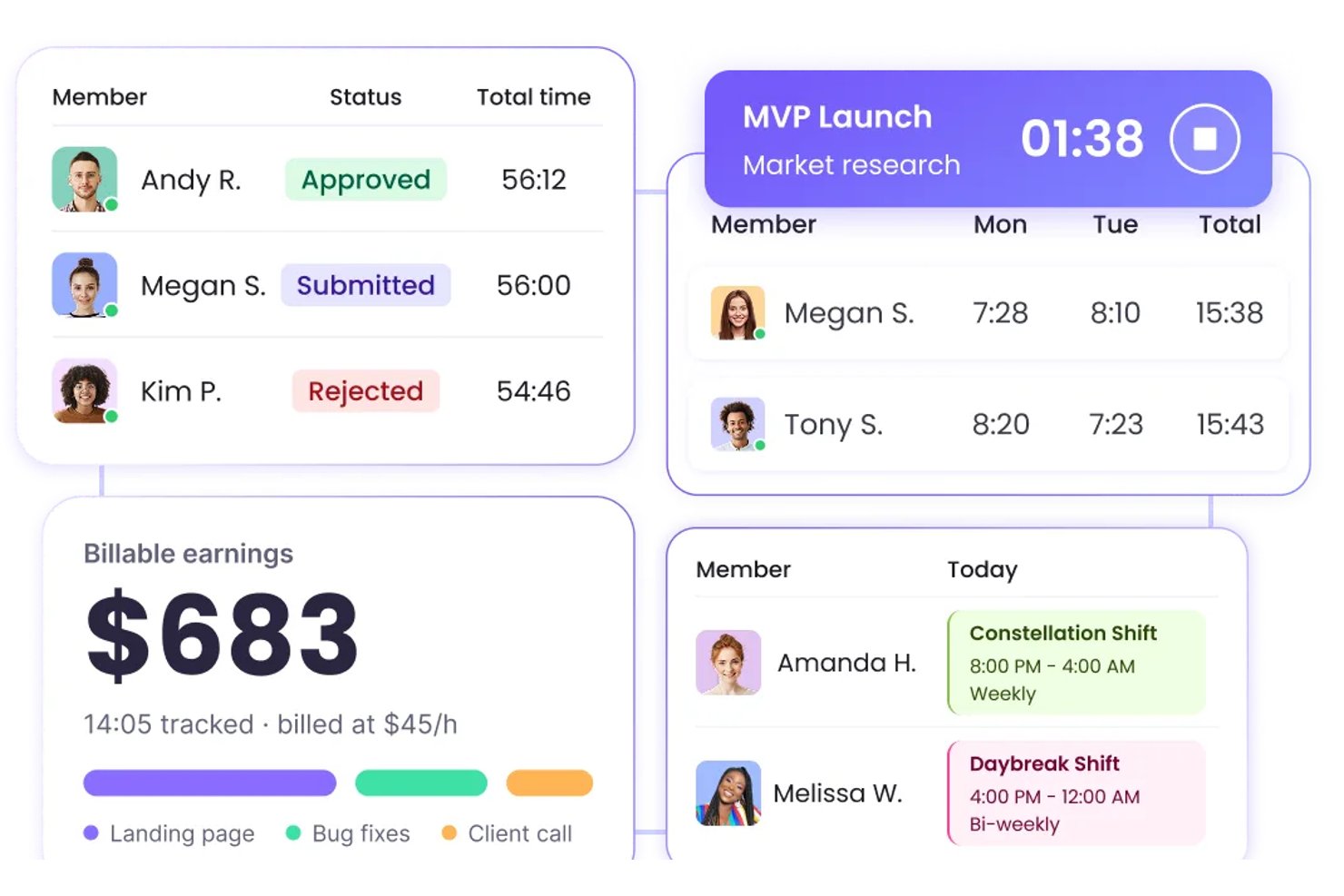
WebWork Time Tracker is a time tracking and productivity monitoring tool that covers attendance, activity levels, GPS tracking, shift scheduling, and built-in team communication for distributed and remote workforces.
Who Is WebWork Time Tracker Best For?
WebWork Time Tracker is a strong fit for remote work program leads and managers overseeing distributed or freelance teams who need detailed time, activity, and wellness visibility.
Why I Picked WebWork Time Tracker
WebWork Time Tracker earns its spot on my shortlist because of how seriously it takes burnout visibility for distributed teams. I love that it surfaces burnout risk metrics, like overwork patterns, missed breaks, and irregular hours, alongside an AI assistant that sends automated burnout alerts to managers before the situation escalates. It also lets me set healthy work-hour limits by team or job title, so I'm not just tracking time but actively protecting capacity across time zones.
WebWork Time Tracker Key Features
- GPS tracking and geofencing: Mobile apps automatically clock field and remote workers in and out when they enter or leave a defined job-site radius.
- Kiosk mode: Teams share a single device for clock-ins and clock-outs, with each worker using a personal PIN to log their own time.
- Shift scheduling: Managers build and assign shifts across time zones, ensuring coverage for distributed teams without manual coordination.
- Built-in team chat and video meetings: Workers and managers communicate directly inside WebWork via channel-based chat and video calls, without switching to a separate tool.
WebWork Time Tracker Integrations
WebWork Time Tracker offers native integrations with Slack, Asana, Jira, ClickUp, Deel, Gusto, Google Calendar, and Outlook Calendar. It provides a public API for custom integrations, plus Zapier.
Pros and Cons
Pros:
- Activity dashboards reveal remote work patterns
- GPS supports distributed field teams
- Burnout alerts flag overwork risks
Cons:
- No HRIS or labor-law compliance tools
- Screenshots can feel intrusive

TimeTrex
Best for flexible scheduling tools
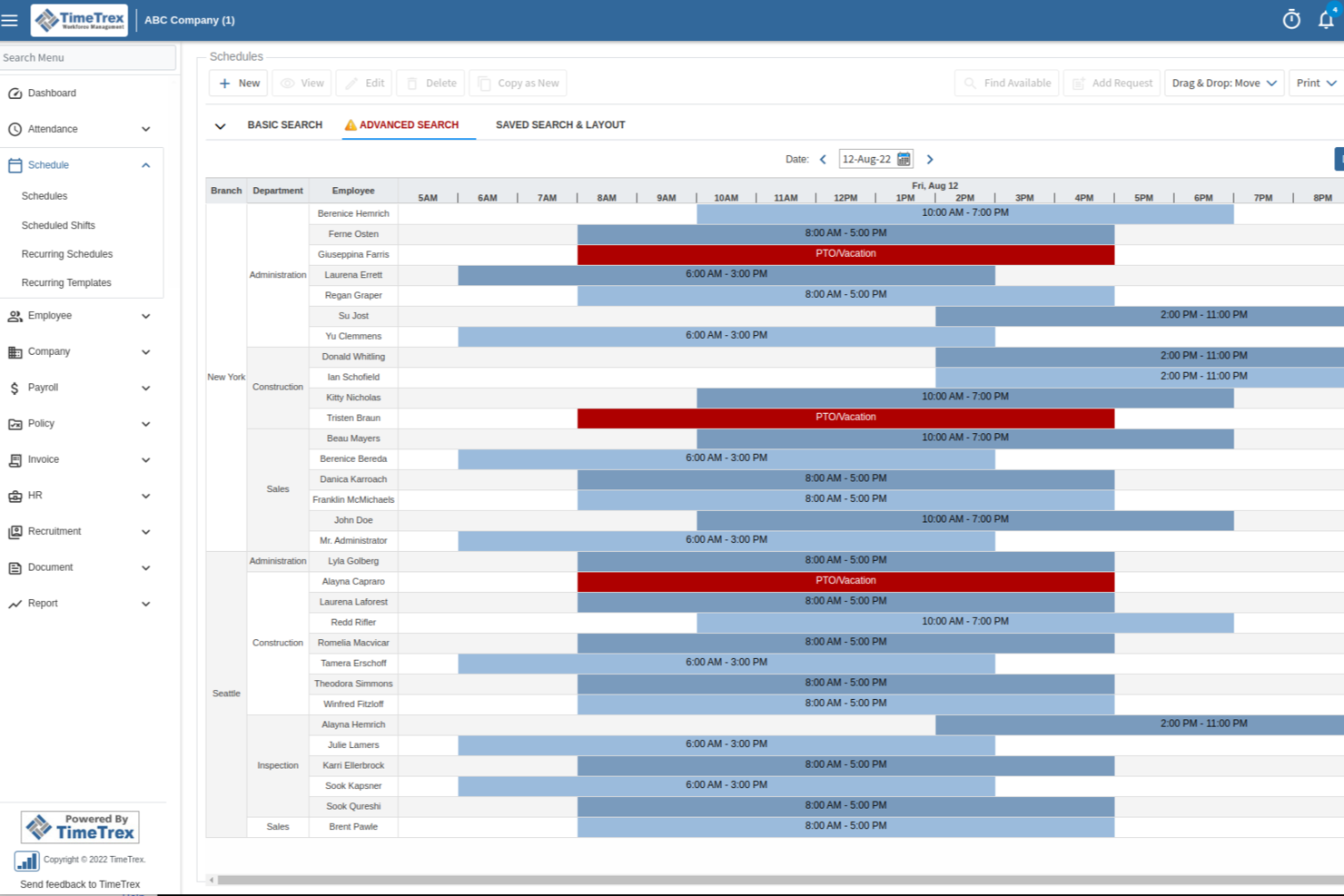
TimeTrex is a workforce management platform with time & attendance tracking, employee scheduling, payroll processing, geofencing-based clock-ins, and HR management built into a single cloud-accessible system.
Who Is TimeTrex Best For?
TimeTrex suits mid-sized businesses with hourly or shift-based workforces that need integrated time tracking, scheduling, and payroll in one platform.
Why I Picked TimeTrex
TimeTrex is one of my top picks because I love how its scheduling tools handle both simple and complex scenarios without requiring a rebuild from scratch each time. The drag-and-drop interface, paired with reusable shift templates, makes it easy to set up multi-week rotating schedules. I also find the bottom-up availability system useful: employees submit their own time-off requests, which then move through multi-level approvals, keeping managers from chasing confirmations manually.
TimeTrex Key Features
- GPS-based time clock: Employees clock in and out from their mobile device with GPS location capture, giving managers a verified record of where remote workers are when they punch in.
- Overtime and absence tracking: TimeTrex automatically flags overtime thresholds and logs all absence types, keeping records current without manual entry.
- Employee self-service portal: Workers can view their schedules, pay stubs, and HR documents through a self-service portal, reducing back-and-forth with managers.
- Customizable pay rules: Set up location-specific, role-specific, or contract-specific pay rules that calculate automatically at payroll run.
TimeTrex Integrations
TimeTrex offers integrations with payroll and accounting platforms, including ADP, QuickBooks, Sage, Paychex, and Surepay, as well as Ceridian, CompuPay, Tyler Technologies, and Vensure Employer Services. It also provides an API for custom integrations.
Pros and Cons
Pros:
- GPS and geofencing verify remote punches
- Free open-source edition available for self-hosting
- Built-in payroll with automated tax calculations
Cons:
- Manual tax filing is required
- Some modules look dated and cluttered
New Product Updates from TimeTrex
TimeTrex Redesigns Workforce Management With New Payroll, Scheduling, and AI Tools
TimeTrex redesigns its workforce management experience with new dashboards, scheduling and timesheet tools, a rebuilt payroll workflow, and expanded AI assistance. These updates give teams more flexible ways to manage schedules, payroll, reporting, and employee data. For more information, visit TimeTrex’s official site.
 .
.
Modge
Best for compliance-backed activity monitoring
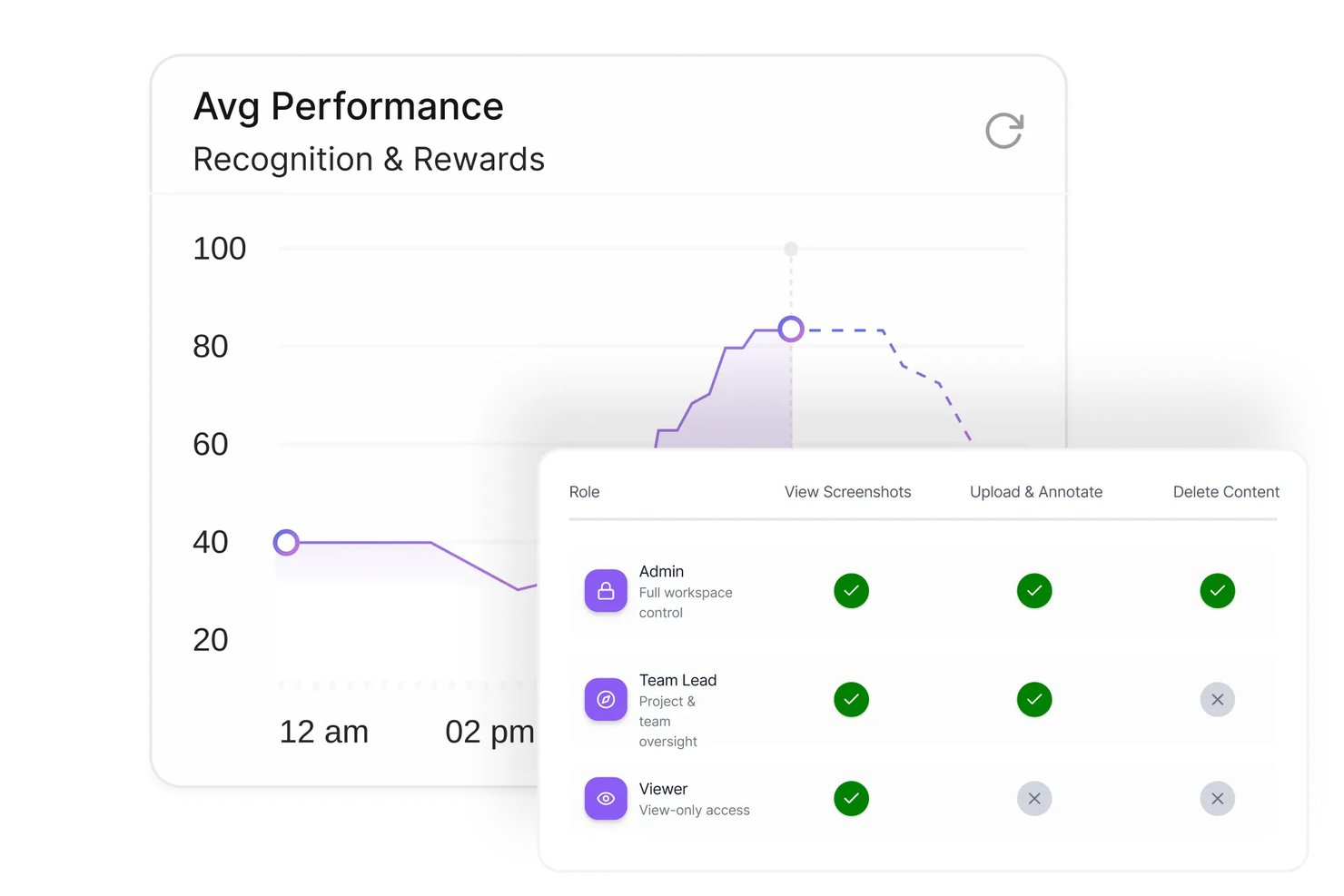
Modge is a remote workforce management platform that combines automatic time tracking, activity and productivity monitoring, shift scheduling, attendance, and compliance-backed timesheets and payroll exports.
Who Is Modge Best For?
Modge is a strong fit for managers and HR operations teams overseeing distributed or remote employees who need audit-ready activity monitoring alongside scheduling and timesheet workflows.
Why I Picked Modge
Modge earns its spot on my shortlist because of how seriously it treats the compliance side of employee monitoring. I've included it here specifically for teams that need audit-ready records: timesheets lock after approval, manual edits land in an audit trail, and the DPA commits to breach notification within 72 hours. On top of that, the Premium tier's suspicious-activity detection flags mouse-jigglers and scripted inputs, giving managers a defensible record rather than just a hunch.
Modge Key Features
- Automatic time tracking: The desktop agent records session start and end times and active apps, then sends sessions directly to timesheets.
- Shift scheduling with time zones: Build one-time, weekly, or biweekly shifts and assign them to individuals or teams across different time zones.
- Leave management with approvals: Employees submit time-off requests, managers approve or deny with comments, and approved hours are added to the matching timesheet.
- Payroll-ready exports: Export timesheet data as a generic CSV, Wise, PayPal, or PDF format for processing.
Modge Integrations
Modge’s documented native integration is Stripe for client invoice payments. It also offers Wise- and PayPal-formatted payroll CSV exports and a public API for custom integrations.
Pros and Cons
Pros:
- Audit trails support defensible timesheet approvals
- Dashboards surface activity and productivity trends
- Automated time capture cuts payroll follow-ups
Cons:
- No built-in messaging or team check-ins
- Project tracking lacks task-status workflows
Best for detailed time tracking reports
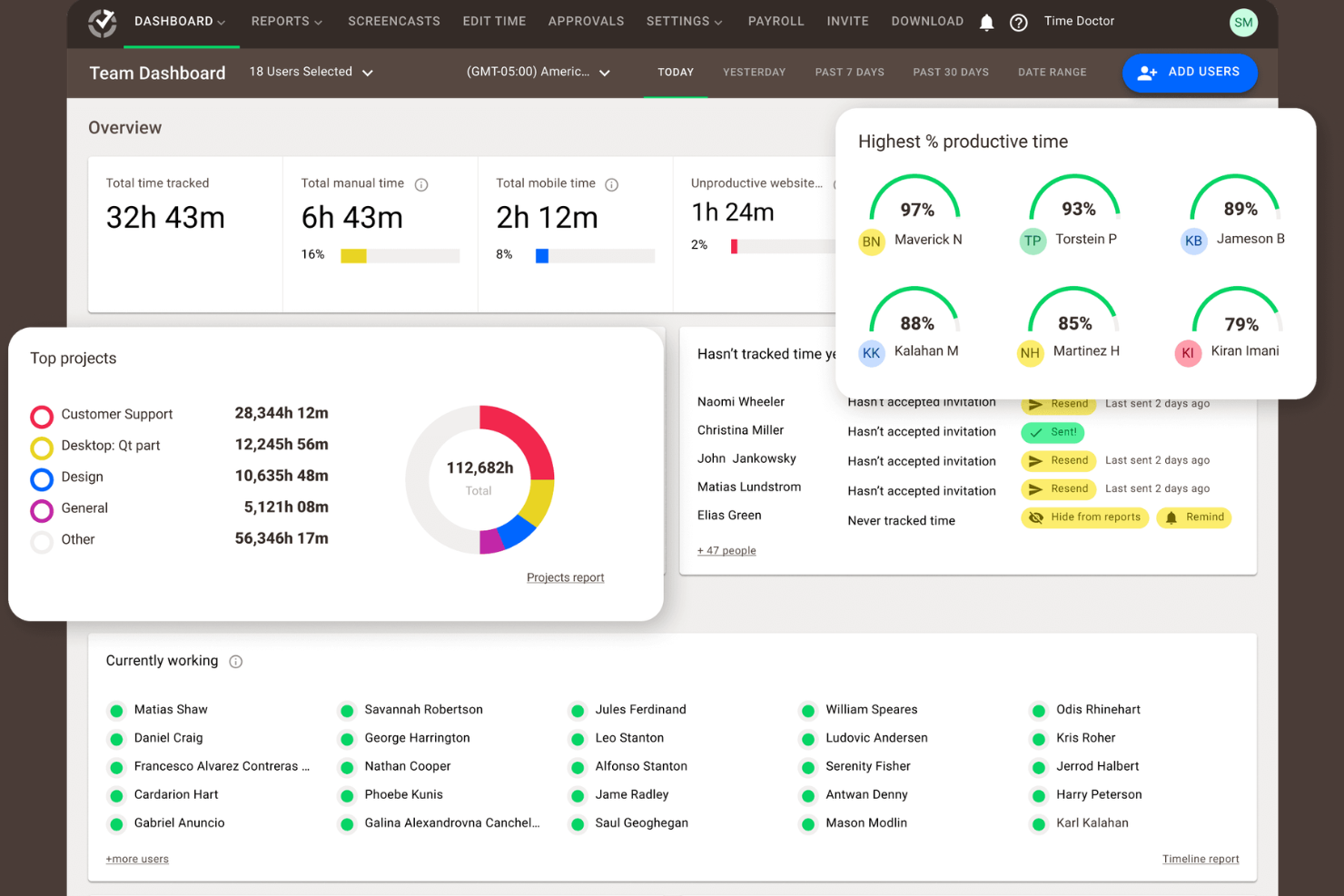
Time Doctor is a workforce analytics and time tracking platform that monitors work hours, web and app usage, attendance, and productivity across remote and hybrid teams.
Who Is Time Doctor Best For?
Time Doctor is a natural fit for SMBs and mid-sized companies managing distributed teams, freelancers, or offshore contractors who bill clients by the hour.
Why I Picked Time Doctor
I've included Time Doctor in my top picks because its time tracking goes deeper than most tools in this space, particularly for teams managing freelancers and offshore contractors. I like that it captures billable hours at the project and task level, so invoicing clients is backed by precise data rather than estimates.
The client login access feature is something I haven't seen many competitors offer—it lets you give clients direct visibility into logged hours without sharing your full account. On top of that, the work-life balance analytics flag overwork patterns across remote employees, which I find genuinely useful for spotting burnout risk before it affects output.
Time Doctor Key Features
- Schedule and attendance tracking: Log employee schedules, track attendance, and monitor leave and break time across your remote workforce.
- Productivity ratings: Categorize websites and apps as productive or unproductive to generate per-user productivity scores.
- Screenshot capture: Take automated screenshots at set intervals to provide visual records of active work sessions.
- Web and app usage reporting: See a full breakdown of which websites and applications each employee spends time on during work hours.
Time Doctor Integrations
Time Doctor offers 60+ integrations spanning project management, payroll, help desk, CRM, and HRIS categories, including Asana, Jira, Trello, Slack, Salesforce, HubSpot, BambooHR, Gusto, ADP Workforce Now, and Zendesk. An API is also available for custom integrations.
Pros and Cons
Pros:
- Video screen recording on Premium plan
- Task-level rates improve client invoicing
- Offline tracking syncs when reconnected
Cons:
- No GPS tracking for field teams
- Screenshot monitoring can hurt morale

Workday
Best for enterprise workforce management
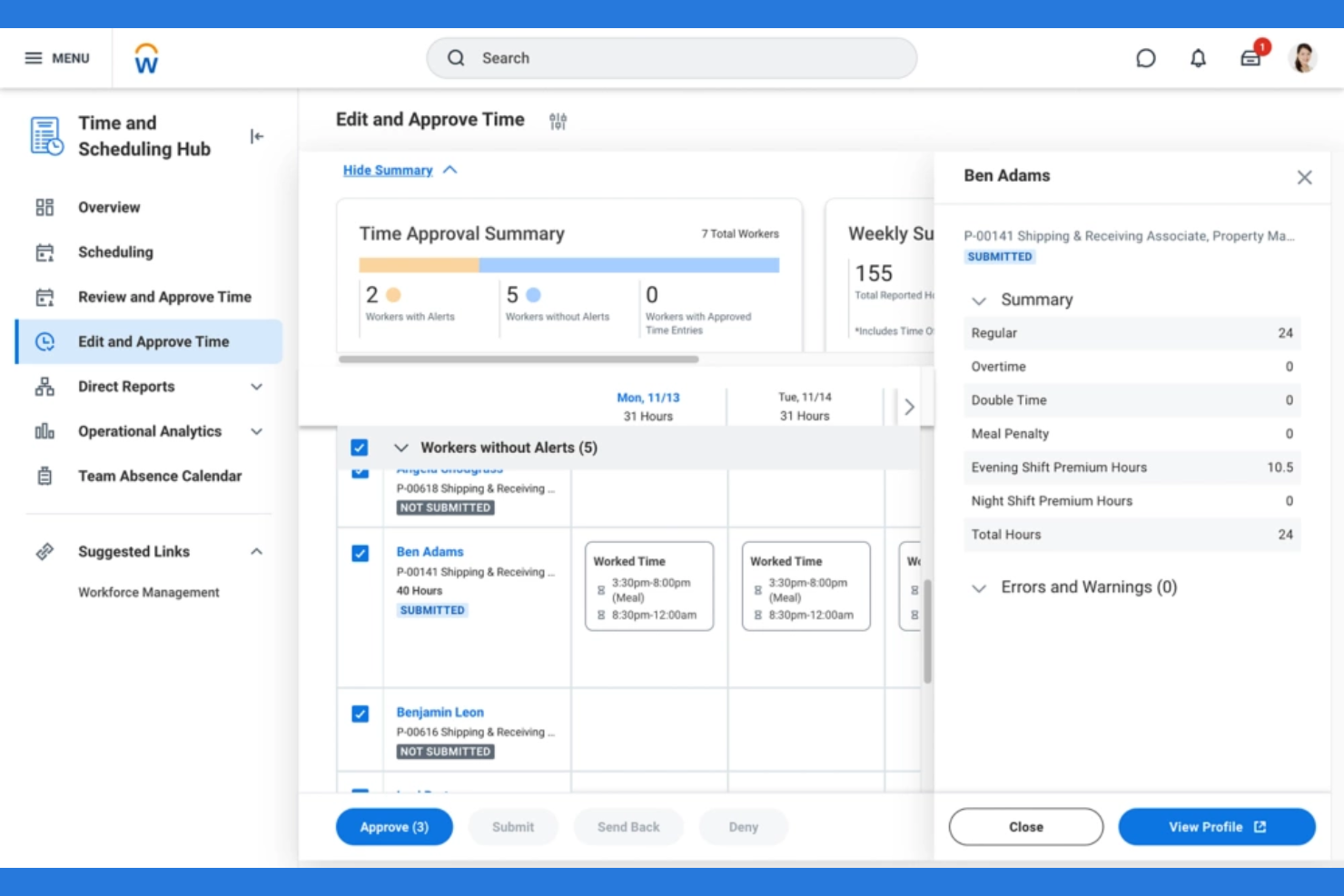
Workday is an enterprise workforce management platform covering scheduling, time tracking, absence management, labor optimization, and demand forecasting across global and frontline workforces.
Who Is Workday Best For?
Workday is built for large enterprises and multinational organizations that need to manage complex, distributed workforces across multiple regions and regulatory environments.
Why I Picked Workday
I've included Workday in my top picks because it's the only tool on this shortlist where scheduling automation and workforce analytics aren't bolted-on features—they're baked into the core platform.
I like that Workday's AI assistant, Sana, actively automates manager tasks like approvals and schedule adjustments, which means my team isn't stuck in manual workflows when demand shifts. The labor optimization engine uses demand forecasting to match staffing levels against operational needs in real time, so scheduling decisions are driven by data rather than guesswork.
The Time and Scheduling Hub consolidates time tracking, scheduling, and absence management in a single view, which cuts down the context-switching that slows managers down across large, distributed teams.
Workday Key Features
- Frontline worker self-service: Lets frontline employees clock in, view their schedules, and add or drop shifts directly from a mobile device.
- Global labor cost visibility: Surfaces labor cost dashboards that visualize spending trends and headcount data across regions in a single view.
- Compliance-aware time tracking: Captures time data in a format that forwards directly to HR and payroll systems while supporting local legislative requirements.
- Operational analytics: Identifies workforce cost trends and optimization opportunities using built-in reporting across the full employee lifecycle.
Workday Integrations
Workday offers integrations through its Integration Cloud and Workday Marketplace, connecting to partners like Salesforce, ADP, Slack, and Google Cloud. Workday Orchestrate provides a low-code visual builder and a library of connectors for real-time and batch integrations with third-party systems.
Pros and Cons
Pros:
- Regular product updates without manual upgrades
- Unified dashboard for time and absence data
- AI automates scheduling and approvals
Cons:
- Pricing increases significantly over time
- Implementation costs are high for mid-market teams
Dayforce
Best for integrated payroll and HR
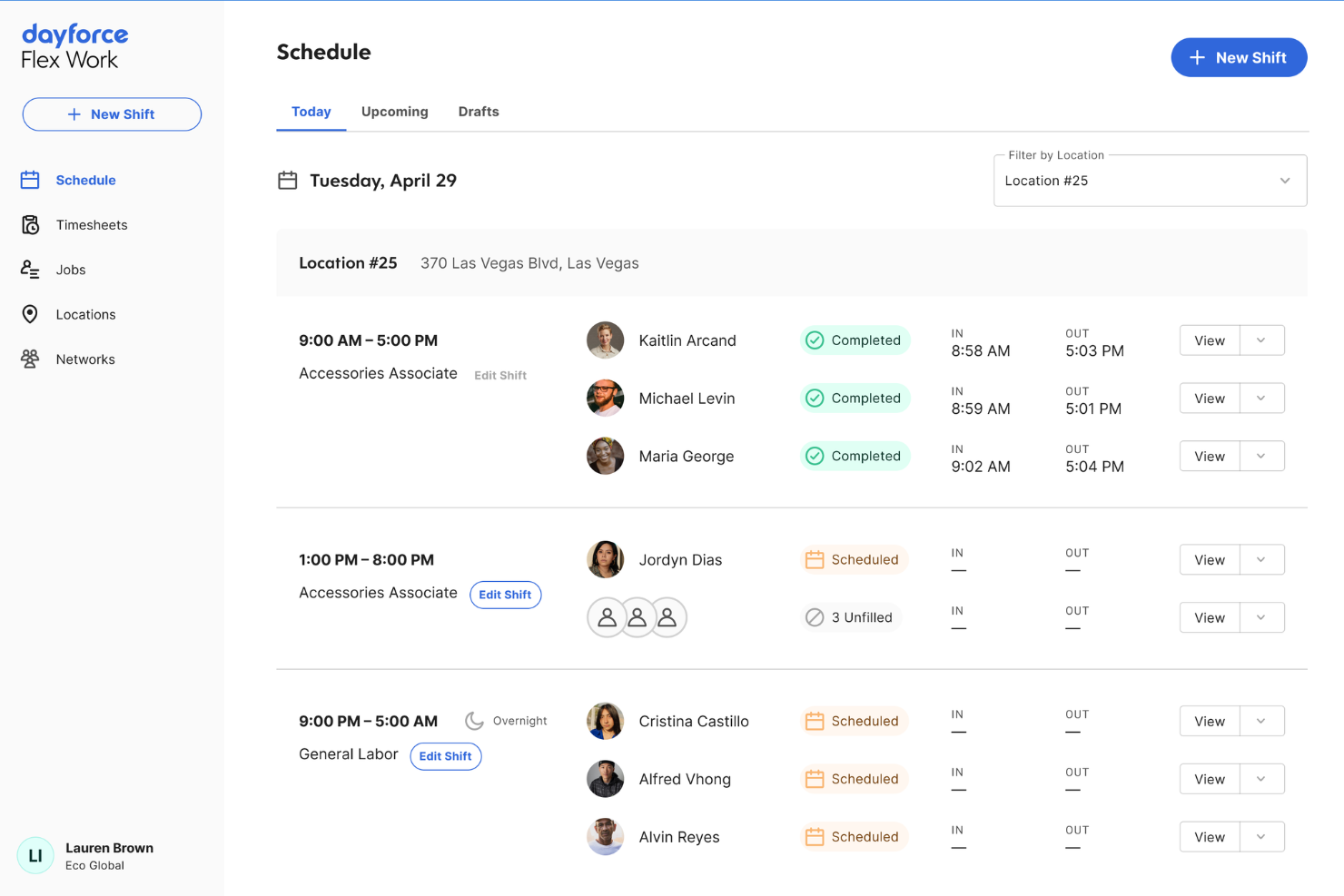
Dayforce is an AI-powered HCM platform covering HR, payroll, time tracking, workforce scheduling, talent management, and analytics in a single unified system.
Who Is Dayforce Best For?
Dayforce is a strong fit for mid-to-large enterprises in industries like retail, healthcare, and manufacturing with complex scheduling and compliance needs across multiple locations.
Why I Picked Dayforce
Dayforce earns its spot as one of the best on my shortlist because its single-data-model architecture means payroll, scheduling, and analytics aren't just connected—they're running off the same record in real time. What I find genuinely useful is the continuous payroll calculation engine: rather than batching pay runs at the end of a cycle, Dayforce calculates earnings, deductions, and taxes as time data comes in.
That means when a remote manager adjusts a shift mid-week, the labor cost impact is already visible in the analytics dashboard before payroll closes. The AI-driven scheduling engine also uses historical trends and seasonal data to auto-generate shift coverage, factoring in pay rates, staff preferences, and demand—which is a real advantage when you're managing distributed teams across multiple locations.
Dayforce Key Features
- Mobile employee self-service: Lets employees view schedules, submit time-off requests, and swap shifts directly from a mobile device.
- Absence and leave management: Tracks leave balances, accruals, and requests across multiple leave policies in a single system.
- Multi-jurisdiction compliance management: Applies location-specific labor rules automatically to time and pay records across regions.
- Configurable workforce reporting: Lets managers build and schedule custom reports across HR, time, and payroll data without IT support.
Dayforce Integrations
Dayforce offers marketplace integrations through the Dayforce Exchange, where partner solutions like LinkedIn Learning, DocuSign, Boomi, and Microsoft Dynamics 365 connect to the platform. Its built-in Integration Studio lets you build and manage integrations in a low-code environment, and an API is available for custom integrations.
Pros and Cons
Pros:
- Quarterly releases add features automatically
- GPS clock-ins support distributed teams
- Single database avoids duplicate data
Cons:
- Global settings conflict across entities
- Custom report requests can take months

Best for automated activity tracking
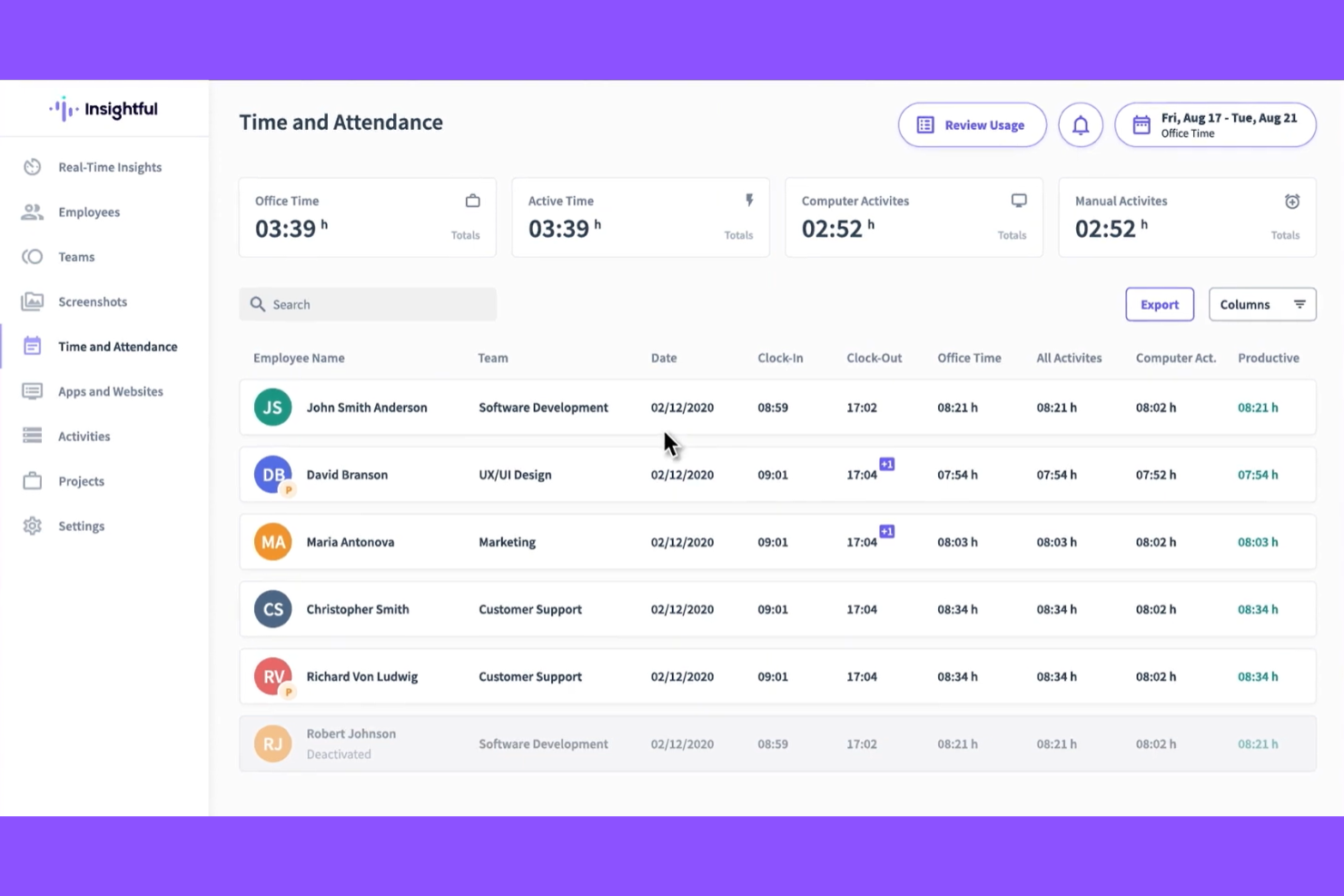
Insightful is a workforce analytics and remote employee monitoring platform that tracks time and attendance, app and website usage, productivity trends, and screen activity across remote, hybrid, and in-office teams.
Who Is Insightful Best For?
Insightful is a strong fit for companies in BPO, tech, and professional services that manage large distributed teams and need employee-level productivity visibility.
Why I Picked Insightful
I've included Insightful in my top picks because its flexible monitoring approach is genuinely well-suited for distributed teams that need visibility without top-down surveillance. What I find particularly useful is the stealth mode versus transparent mode toggle, which lets you choose whether tracking agents are visible to employees—a meaningful distinction when rolling out monitoring across teams with different expectations.
The client login feature is also a real differentiator: it gives external clients gated access to project progress and time logs, which is something most remote monitoring tools just don't offer. I also like that on-premise deployment is an option, making Insightful one of the few tools in this space that can meet the stricter data sovereignty requirements common in healthcare and finance.
Insightful Key Features
- Automatic time mapping: Passively logs time to tasks and projects in the background without requiring employees to start or stop timers manually.
- Security and attendance alerts: Sends real-time notifications when employees are late, absent, or when files and data are mishandled.
- Screenshot monitoring: Captures intermittent screen images during work hours on a policy-based schedule to provide proof of work for clients or QA.
- Capacity planning reports: Surfaces individual workload data across the team to help managers identify who's overloaded or underutilized.
Insightful Integrations
Insightful offers 50+ native integrations spanning project management tools like Jira, Asana, Trello, ClickUp, and Wrike, HRIS and payroll platforms like Workday, BambooHR, ADP Workforce Now, UKG Pro, and Deel, and identity management tools like Okta, Microsoft Entra ID, and JumpCloud. It also connects to BigQuery for data warehouse analytics with BI tools like Power BI, Tableau, and Looker Studio, and provides a public API for custom integrations.
Pros and Cons
Pros:
- Supports GDPR, HIPAA, and SOC 2 compliance
- Client login offers real-time project visibility
- InsightsAI gives plain-language recommendations
Cons:
- Attendance refresh can lag during shifts
- No mobile app for managers
New Product Updates from Insightful
Insightful Expands MCP and HRIS Integrations
Insightful adds OAuth connections for ChatGPT and Microsoft Copilot Studio through its MCP Server, while HRIS integrations gain manager scope syncing in Beta. These updates expand AI access and automate permission management. For more information, visit Insightful’s official site.
 .
.
Toggl
Best for simple time tracking
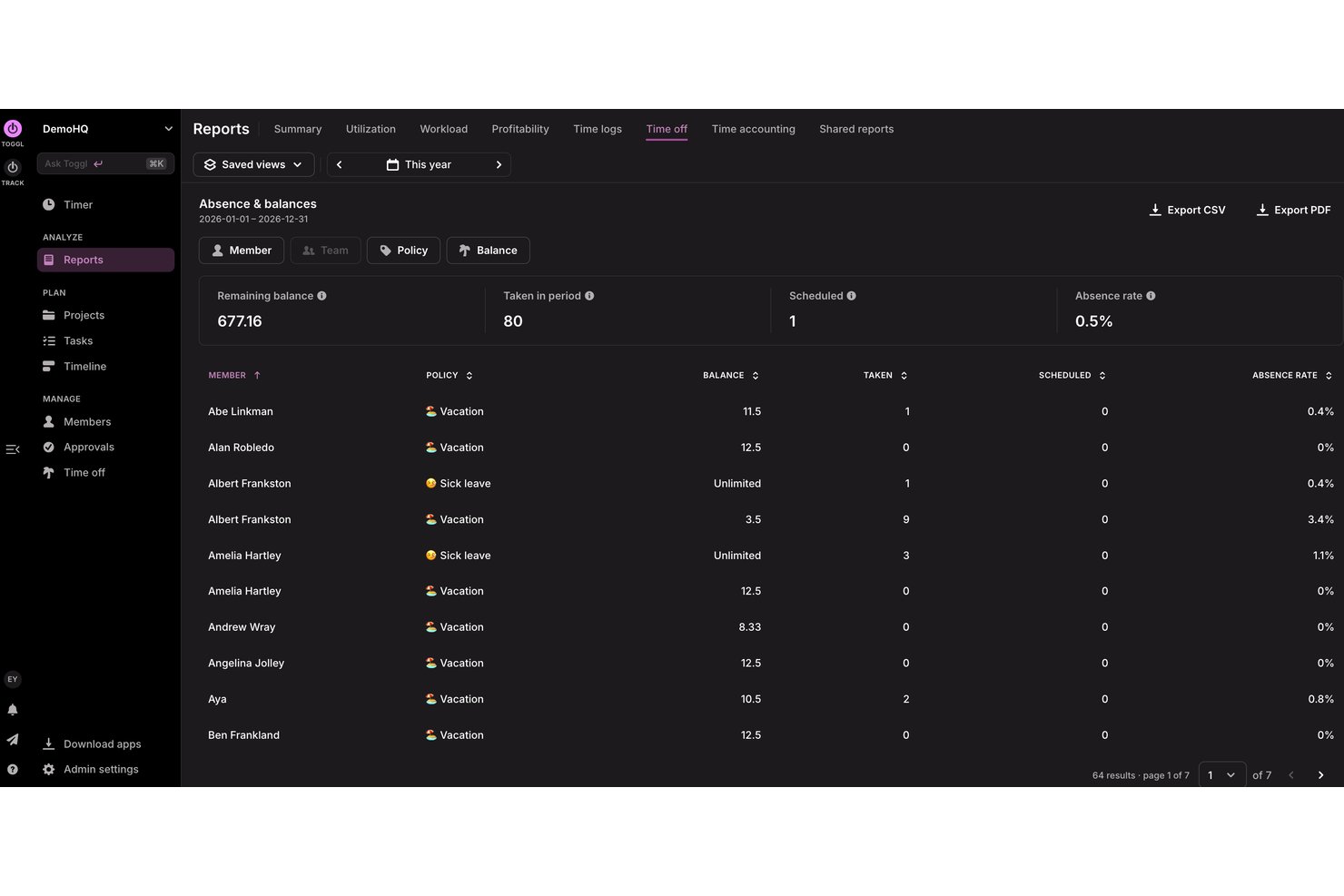
Toggl is a time tracking and reporting tool designed for distributed teams, with features covering time entries, project tracking, billable hours, and workforce reporting across multiple time zones.
Who Is Toggl Best For?
Toggl is a natural fit for freelancers, agencies, and remote-first teams that need to track billable hours and project time across distributed workforces.
Why I Picked Toggl
Toggl is one of my top picks because I love how it handles time reporting for distributed teams without any surveillance. The automated time tracking feature runs in the background, converting app and website activity into time entries that team members can review and approve before they appear in any reports, keeping data accurate without feeling intrusive.
I also use the custom profitability and workload reports to see exactly where distributed team time goes across projects and clients. The calendar view makes it easy to pull in existing calendar events and convert them into tracked time entries, which is a real advantage when managing teams across multiple time zones.
Toggl Key Features
- Project and client tracking: Organize time entries by project, client, and task with billable and non-billable designations.
- Billable rates: Set custom billable rates at the workspace, project, or individual team member level.
- Team activity dashboard: View real-time tracking status across all team members from a single dashboard.
- Time entry locking: Lock historical time periods to prevent edits after reporting or invoicing deadlines.
Toggl Integrations
Toggl offers 100+ integrations across native integrations, browser extensions, and automation apps. Native integrations include Asana, Google Calendar, Jira, Outlook, QuickBooks Online, Salesforce, Slack, and Toggl Plan. It also connects with Zapier, Make, and Integrately, and provides an API for custom integrations.
Pros and Cons
Pros:
- Profitability reports customizable by client and project
- Background tracking auto-creates time entries
- Anti-surveillance policy avoids invasive tracking
Cons:
- No scheduling or shift planning tools
- No built-in invoicing or expense tracking
Other Remote Workforce Management Software
Here are some additional remote workforce management software options that didn’t make it onto my shortlist, but are still worth checking out:
- Monitask
For time tracking with screenshots
- Remote
For global payroll and HR support
- TalentHR
With customizable AI HR workflow tools
- ActivTrak
For employee productivity analytics
- Teramind
For workforce monitoring and analytics
- Hubstaff
For time tracking with GPS
- DeskTime
For automatic productivity tracking
- monday AI Workspace
For visual remote team workflows
- Connecteam
For deskless team management
- ADP
For workforce time and attendance
- Rippling
For automated HR and payroll
- UKG
For scheduling and compliance
- ClickUp
For all-in-one task management
- BambooHR
For core HR workforce management
- Veriato
For insider threat monitoring
- Prodoscore
For remote productivity analytics


How I Evaluate Remote Workforce Management Software
I evaluate remote workforce tools in two layers—baseline capabilities like time tracking and compliance, and differentiators like async workflows and global payroll that set the best options apart.
Core Functionality (Table Stakes For This List)
When I'm selecting tools for my list, I rank each one on a scale from 0 (does not offer the functionality) to 5 (excels in this area) for each core functionality listed below. Then, I calculate the tool's total score into a percentage. Each tool needs to achieve a minimum total score of 65% to be considered for inclusion.
- Time & Attendance Tracking: I check whether clock-in/out, overtime rules, and reporting adapt to employees spread across multiple time zones without manual workarounds.
- Remote Employee Scheduling: Shift planning should account for time zone differences automatically, so a manager in London can schedule a team member in Manila with ease.
- Productivity & Activity Monitoring: I evaluate how each tool surfaces task progress and work output for distributed teams while still offering privacy controls employees trust.
- Onboarding & Employee Records: Digital onboarding workflows, e-signatures, and centralized profiles matter here—especially for remote hires who never visit a physical office.
- Communication & Collaboration Tools: Whether built-in or through integrations with Slack or Microsoft Teams, I look for ways remote teams can stay connected beyond email.
- Compliance & Multi-Region Support: I look at how well the platform handles labor law and tax requirements across different jurisdictions where remote workers are based.
Once I have a list of tools that meet the criteria, I consider what sets each platform apart.
Differentiating Factors (What Sets Vendors Apart)
Here's how I compare and contrast different vendors:
Standout Features
Global payroll and EOR capabilities matter when your team spans multiple countries—I look for platforms that let you hire and pay without setting up local entities. Async workflow automation is another differentiator I evaluate, since approval chains and PTO requests shouldn't require real-time coordination across time zones. I also check for wellness and burnout monitoring features that flag overtime patterns before they become retention problems.
Beyond Features
Integration depth matters a lot here. I check whether platforms connect natively with tools like BambooHR, Slack, and Google Workspace, plus whether they offer open API access for custom builds. Data security is equally important—I look for SOC 2 Type II certification and data residency options, since employee records cross borders regularly. Scalability and pricing also shape my evaluation, particularly whether a platform supports mixed workforces of full-time employees, contractors, and freelancers under one pricing model.
How to Choose Remote Workforce Management Software
It’s easy to get bogged down in long feature lists and complex pricing structures. To help you stay focused as you work through your unique software selection process, here’s a checklist of factors to keep in mind:
| Factor | What to Consider |
|---|---|
| Scalability | Can the platform support future growth, new teams, or changes in your remote work policy without disruption? |
| Integrations | Will it connect with the payroll, HRIS, communication, and reporting tools your team already uses? |
| Customizability | Can you tailor workflows, analytics, alerts, or access roles to match your unique policies and structures? |
| Ease of use | How quickly can staff adapt to daily use, and is the interface intuitive for less tech-savvy team members? |
| Implementation and onboarding | What resources, training, and support does the vendor provide to ensure a smooth and quick transition? |
| Cost | Are you clear on total costs—including setup, monthly fees, and any charges for extra integrations or support? |
| Security safeguards | Does the software offer encryption, access controls, and audit capabilities to keep employee data safe? |
| Support availability | Will you have responsive support during your business’s working hours, especially if your team’s spread globally? |
What Is Remote Workforce Management Software?
Remote workforce management software is a cloud-based platform that helps organizations coordinate and support distributed teams, including remote workers and hybrid employees. These tools assist with time management, scheduling, and performance management, giving teams visibility into daily operations and productivity.
They often include advanced features like detailed reporting, analytics, and access to real-time data, helping managers make better decision-making and more accurate data-driven decisions. HR and operations teams also use them to improve employee performance, support human resources processes, and increase overall operational efficiency.
Features
When selecting remote workforce management software, keep an eye out for the following key features:
- Time and attendance tracking: Monitors when employees start, end, and take breaks during their workday, giving you reliable records for payroll and compliance.
- Activity monitoring: Tracks which apps and websites employees use, providing insight into daily workflows and productivity levels.
- Task and project management: Allows teams to assign, update, and monitor progress on projects and tasks, bringing greater clarity and coordination to distributed work.
- Employee scheduling: Builds and manages work schedules, tracks absences, and automates shift assignments to maintain coverage and reduce conflicts.
- Document sharing and storage: Centralizes files, resources, and policies so your remote team can securely access up-to-date information from anywhere.
- Role-based access controls: Restricts access to sensitive data and critical features based on employee roles, supporting data security and compliance.
- Reporting and analytics: Generates actionable reports on attendance, productivity, and compliance, helping you spot trends, address challenges, and plan proactively.
- Communication tools: Provides channels for real-time messaging, announcements, or updates, enhancing collaboration and alignment among remote staff.
- Integration capabilities: Connects with payroll, HR, and business platforms to reduce manual entry and ensure information flows smoothly across systems.
Common Remote Workforce Management Software AI Features
Beyond the standard remote workforce management software features listed above, many of these solutions are incorporating AI with features like:
- Automated productivity insights: Uses AI algorithms to analyze user activity and quickly identify work patterns, outliers, or risks, giving managers actionable data without manual review.
- Anomaly detection for time entries: Monitors employee time and attendance inputs, automatically flags inconsistencies or suspicious behavior, and helps prevent time fraud.
- Smart scheduling recommendations: Leverages AI to suggest optimal shift patterns, balance workloads, and accommodate employee preferences based on historical data.
- Predictive employee engagement alerts: Analyzes communication and workflow trends to detect early signs of disengagement, enabling proactive support and reducing turnover risk.
- Sentiment analysis of team communication: Uses natural language processing to assess the tone of messages, feedback, and surveys, helping leaders identify morale issues before they escalate.
Benefits
Implementing remote workforce management software provides several benefits for your team and your business. Here are a few you can look forward to:
- Greater visibility: Get real-time insights into remote work patterns, attendance, and productivity through centralized dashboards and automated reporting.
- Simplified compliance: Rely on automated time tracking, audit trails, and policy management tools to help meet labor law and regulatory requirements.
- Simplified scheduling: Use built-in scheduling and shift management features to reduce manual errors and balance workloads more effectively.
- Improved data security: Protect employee information with access controls, encryption, and privacy tools specifically designed for distributed workforces.
- Centralized document management: Keep important files, policies, and resources easily accessible to everyone regardless of location.
- Seamless integration: Connect remote workforce management software with your existing HR, payroll, and communication platforms to streamline data flows and minimize duplication.
- Faster onboarding: Support new hires with friendly user interfaces, training resources, and guided workflows that help remote teams ramp up quickly.
Costs and Pricing
Selecting remote workforce management software requires an understanding of the various pricing models and plans available. While there are free tools for employee monitoring and other work management features, most advanced features will require paid plans. Costs vary based on features, team size, add-ons, and more. The table below summarizes common plans, their average prices, and typical features included in remote workforce management software solutions:
Plan Comparison Table for Remote Workforce Management Software
| Plan Type | Average Price | Common Features |
|---|---|---|
| Free Plan | $0 | Basic time tracking, limited user access, standard reports, and email support. |
| Personal Plan | $5–$10/user/month | Time and attendance logging, limited integrations, activity summaries, and basic task management. |
| Business Plan | $12–$25/user/month | Project management, advanced scheduling, productivity analytics, integrations, and priority support. |
| Enterprise Plan | $30–$50/user/month | Custom workflows, API access, enhanced compliance, advanced security, and dedicated account management. |
Remote Workforce Management Software FAQs
Here are some answers to common questions about remote workforce management software:
How does remote workforce management software help managers oversee distributed teams?
Remote workforce management software gives managers visibility into attendance, task progress, and employee activity, so they can support productivity and balance workloads without needing in-person check-ins.
Can remote workforce management software support international teams?
Yes, many platforms offer features like time zone support, multi-language interfaces, and regional compliance tools to help you manage teams across different countries and regions.
Is it hard to implement remote workforce management software for a large organization?
No, most solutions offer onboarding assistance, integrations with HR and payroll tools, and user training resources, so implementation is typically manageable—even for larger businesses with complex structures.
How secure is employee data in remote workforce management software?
Most modern solutions use features like data encryption, granular access controls, and regular security audits to help protect sensitive workforce information from unauthorized access.
What should I look for when choosing a remote workforce management tool?
Focus on features that match your team’s needs—like flexible scheduling, time tracking, compliance support, reporting, and integration options—plus ease of use and scalability as your organization grows.