

10 Best Resource Management Software in 2026

Best Resource Management Software Shortlist


Resource management software helps you assign, track, and optimize how your team uses time, skills, and tools across projects. If you’re struggling with overload, conflicting schedules, or underutilized talent, finding the right solution is key to getting projects delivered and teams happy. In this guide, you’ll get a concise comparison of the best resource management tools, what makes each one unique, and how they can fit into your real-world workflow. By the end, you’ll know exactly which products are worth your shortlist and why.
Why Trust Our Software Recommendations
Our team has been testing and reviewing software since 2012. As HR experts ourselves, we know how difficult—and important—it is to choose the right software.
For this guide, we evaluated tools using hands-on testing and independent research, scoring tools using our selection criteria. We also draw on insights from industry thought leaders and practicing HR experts.
Our reviews reflect our human editorial judgment, not a sales pitch.
Expert reviewers:
Resource Management Software Comparison Table
This comparison table summarizes pricing details for my top resource management software selections.
| Tool | Best For | Trial Info | Price | ||
|---|---|---|---|---|---|
| 1 | Best for agency resource and financial planning | Free demo available | Pricing upon request | Website | |
| 2 | Best for fast team scheduling at scale | Free trial available | From $5/user/month (billed annually) | Website | |
| 3 | Best for linking budgets with staff allocation | 14-day free trial + free demo available | From $10/user/month (billed annually) | Website | |
| 4 | Best for combining project tracking with billing | 14-day free trial + free demo available | From $17/user/month | Website | |
| 5 | Best for optimizing multi-project environments | 30-day free trial + free demo available | From €22.5/month (billed annually) | Website | |
| 6 | Best for live project timeline visualization | 30-day free trial | From $7/user/month | Website | |
| 7 | Best for visual planning across global teams | 14-day free trial | From $5.27/resource/year (billed annually) | Website | |
| 8 | Best for aligning resources to revenue goals | Free demo available | Pricing upon request | Website | |
| 9 | Best for real-time scenario planning | 30-day free trial | From $7/user/month | Website | |
| 10 | Best for AI-driven workload balancing | Free demo | Pricing upon request | Website |


Best Resource Management Software Reviews
Below are my detailed summaries of the best resource management software that made it onto my shortlist. My reviews offer a detailed look at the features, integrations, and best use cases of each platform to help you find the best one for you.

Best for agency resource and financial planning
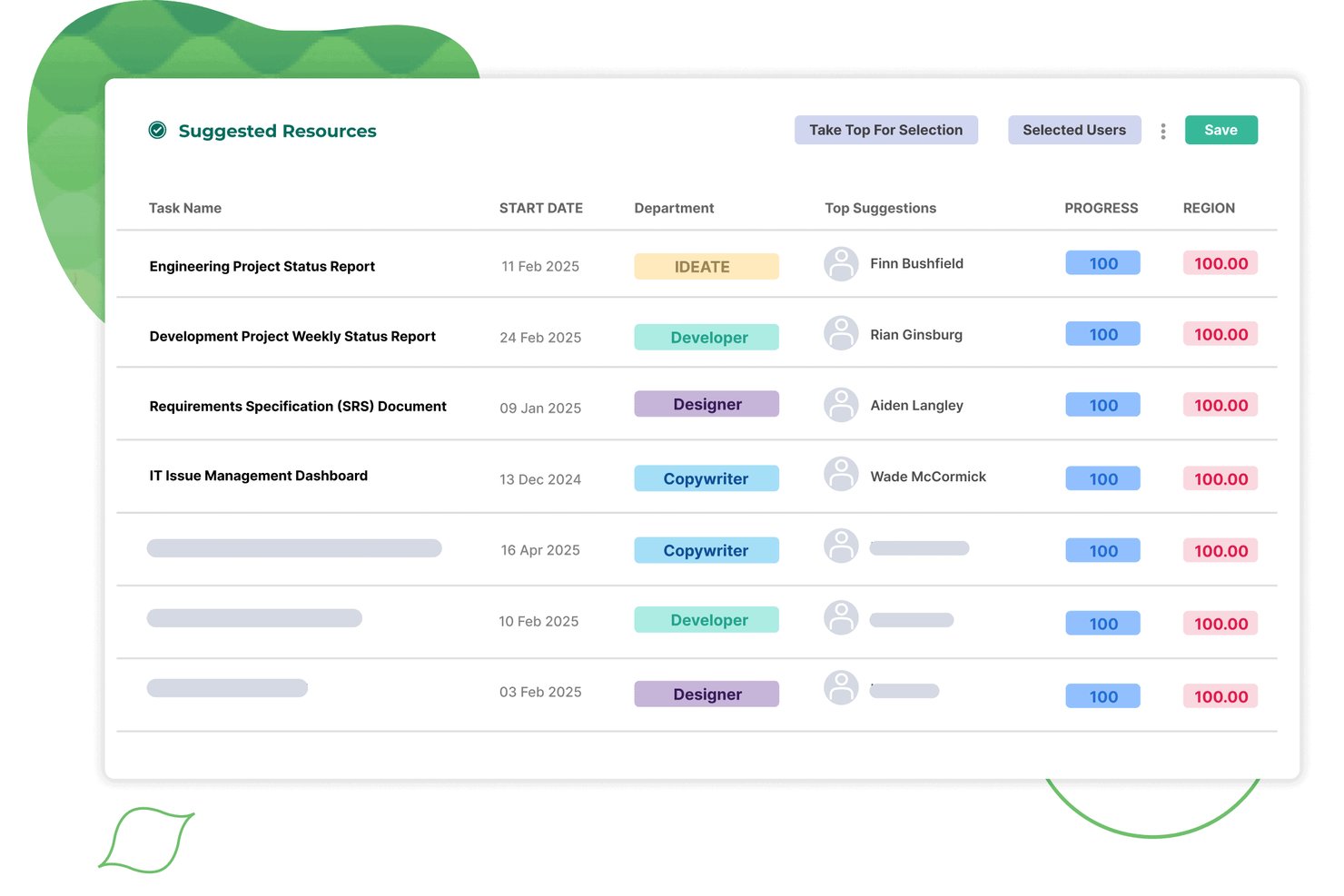
Screendragon is a resource management platform built for agency and client-services teams, combining capacity planning, resource allocation, utilization reporting, integrated timesheets, and demand forecasting in a single system.
Who Is Screendragon Best For?
Screendragon is a strong fit for mid-to-large agency and client-services teams that need resource planning, utilization tracking, and financial forecasting in one connected platform.
Why I Picked Screendragon
Screendragon earns its spot on my shortlist because it connects resource planning directly to financial outcomes, which most resource management tools don't do. I like how one-click planning converts a project plan into a full resource plan, with auto-assignment by skillset and live utilization reporting tied to revenue forecasting. In practice, that means agency teams can spot a capacity gap and model its financial impact without switching tools.
Screendragon Key Features
- Integrated timesheets: Timesheets link directly to live project plans and resource bookings, capturing both billable and non-project time like leave and training.
- AI-assisted resourcing: Embedded AI agents automate task assignment, optimize resource decisions, and log every action in a full audit trail.
- Pipeline-connected capacity forecasting: Future capacity views pull in pipeline data to surface demand gaps before projects are confirmed.
- Customizable KPI dashboards: Planners can build personalized dashboards that auto-aggregate portfolio data and schedule reports directly to stakeholders.
Screendragon Integrations
Screendragon offers native integrations with Microsoft Power BI, Jira Software, Slack, Microsoft Teams, NetSuite, SAP, Salesforce, Microsoft Dynamics 365, and PeopleSoft. Its Universal API Connector and developer portal support custom integrations.
Pros and Cons
Pros:
- Custom KPI dashboards for resource planners
- Utilization and revenue forecasting in one view
- One-click skill-based resource assignment
Cons:
- Lacks headcount scenario and hiring planning
- Designed for 30-plus user organizations
New Product Updates from Screendragon
Screendragon Unveils New AI Hub
Screendragon introduced AI Hub, a new capability that lets teams build and manage AI agents directly within workflows. The update helps marketing teams automate tasks, maintain governance controls, and scale AI-driven operations more efficiently. For more information, visit Screendragon's official site.

Best for fast team scheduling at scale
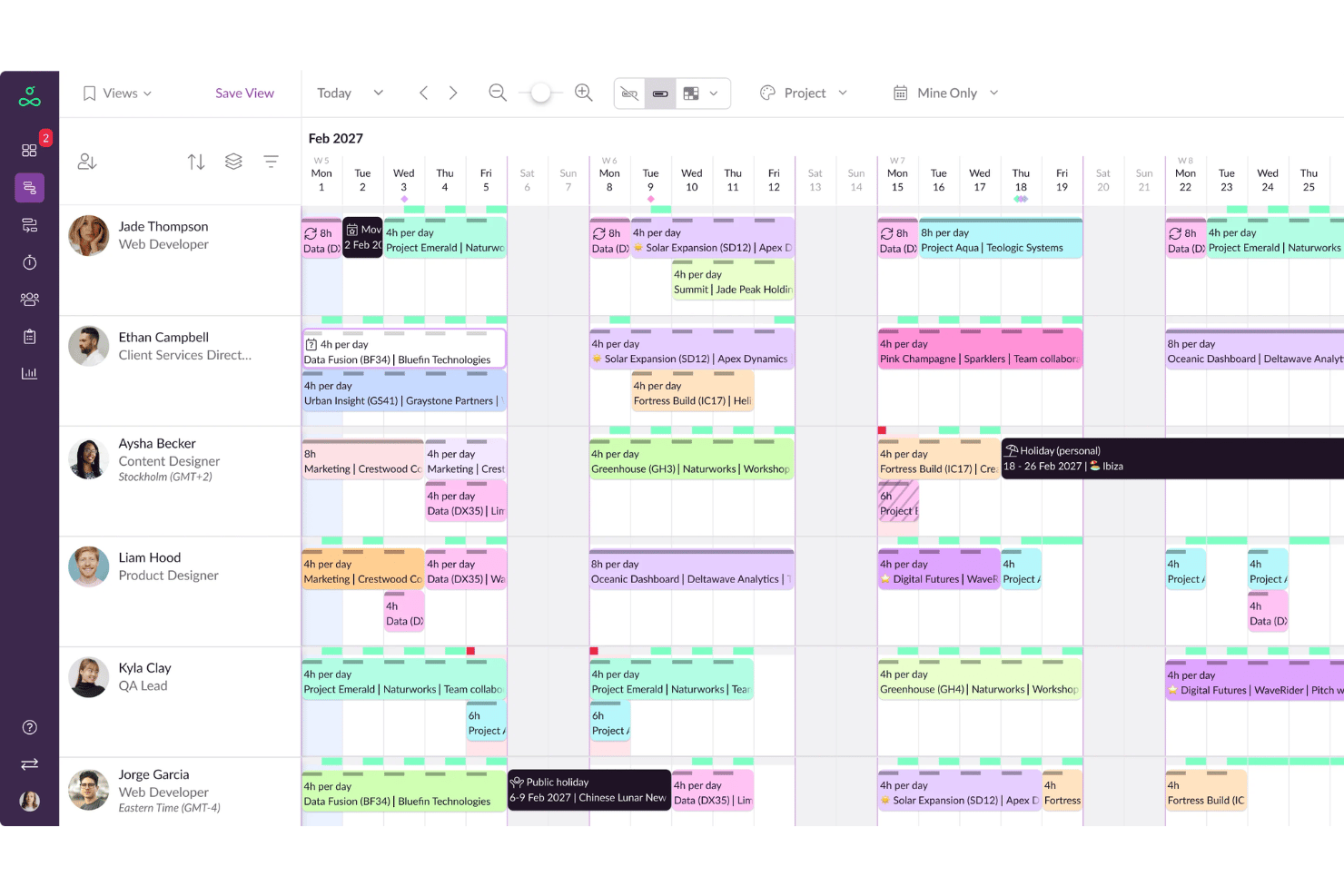
Resource Guru is a dedicated resource scheduling and capacity planning platform with drag-and-drop scheduling, availability tracking, leave management, utilization reporting, and timesheets.
Who Is Resource Guru Best For?
It's a strong fit for agencies, consultancies, and IT services teams that need clear visibility into who's available and when across multiple concurrent projects.
Why I Picked Resource Guru
Resource Guru earns its spot on my shortlist because of how fast scheduling moves across large teams. I like the real-time clash management, which flags overbooking the moment you make an assignment rather than after the fact. The waiting list feature is what sets it apart: when a resource hits full capacity, incoming bookings queue automatically instead of creating silent scheduling conflicts.
Resource Guru Key Features
- Project-level Gantt charts: Visualize project timelines and dependencies for easy tracking.
- Custom availability fields: Define unique working patterns or roles for people and resources.
- Integrated timesheets: Log and review hours worked directly within the scheduling interface.
- Leave management module: Track PTO, holidays, and sick days for accurate capacity planning.
Resource Guru Integrations
Resource Guru offers native integrations with Google Calendar, Outlook Calendar, Slack, Microsoft Teams, and Trello. It connects with Salesforce, Workday, Basecamp, QuickBooks, Google Sheets, and Zapier. An API is available for custom integrations.
Pros and Cons
Pros:
- Flexible resource types including equipment and rooms
- Instant conflict alerts for double-bookings
- Great for tracking availability across departments
Cons:
- Reporting is basic compared to enterprise tools
- Limited native skills or competency tracking
New Product Updates from Resource Guru

Resource Guru Adds More Control Over Calendar Sync
Resource Guru adds more control over Google and Outlook Calendar sync, including source calendar selection and destination calendar options. These updates help users manage external events and Resource Guru bookings with less clutter. For more information, visit Resource Guru’s official site.
 .
.
Best for linking budgets with staff allocation
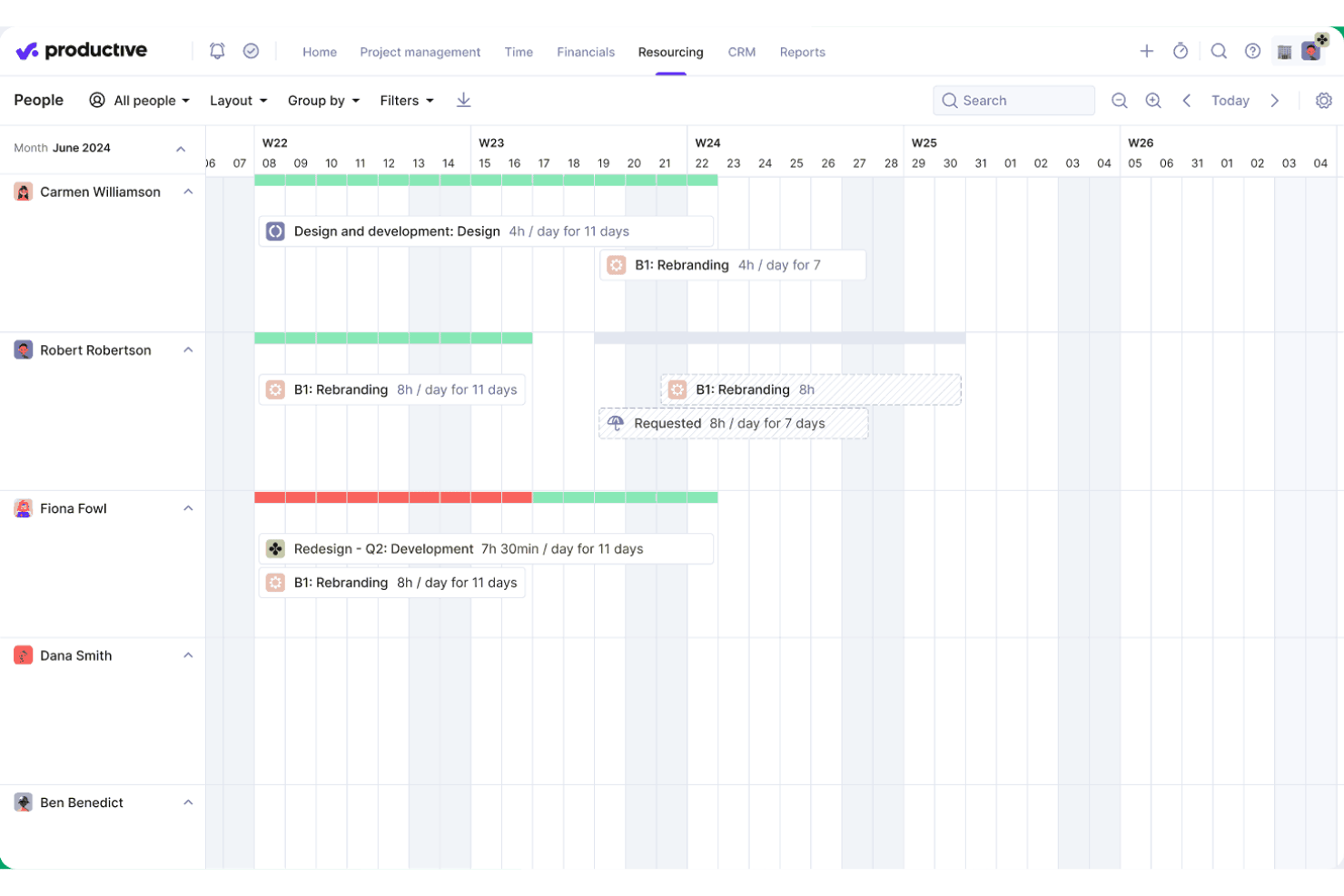
Productive is an agency-focused platform that brings resource planning, project management, time tracking, budgeting, and utilization reporting together in one system.
Who Is Productive Best For?
Productive is a strong fit for agencies and professional services firms that need to manage billable staff across multiple client projects at once.
Why I Picked Productive
I've included Productive in my top picks because no other tool I've used ties scheduled staff hours directly to live budget and profitability data the way it does. When my team books someone onto a project in the Resource Planner, that allocation immediately updates our cost forecasts and margin projections. The Scenario Builder then lets us model different staffing configurations before committing, so we can see the budget impact of each option side by side.
Productive Key Features
- AI-driven resource requests: Automatically suggests the best available team members for upcoming projects based on skill and availability.
- Skills database: Lets you maintain a structured inventory of staff skills, certifications, and proficiencies.
- Integrated time off tracking: Approved PTO and holiday requests immediately sync to resource planning views.
- Advanced reporting intelligence: Delivers detailed, customizable analytics on team utilization, capacity, and project metrics.
Productive Integrations
Productive offers native integrations with Jira, HubSpot, Xero, QuickBooks, Sage, BambooHR, hiBob, Personio, Slack, and Google Calendar. It also supports Zapier and provides an API for custom integrations.
Pros and Cons
Pros:
- Skills matrix for talent deployment
- Scenario modeling for staffing allocation
- Real-time project budget impact tracking
Cons:
- Limited workforce planning outside billable projects
- Designed primarily for agency workflows
New Product Updates from Productive
Productive Adds Voice Dictation, Slack Connector, Proposals, and Overtime
Productive adds voice dictation, a Slack Connector, proposal controls, and overtime tracking. These updates support faster AI interactions, client proposals, and time management. For more information, visit Productive’s official site.

Scoro
Best for combining project tracking with billing
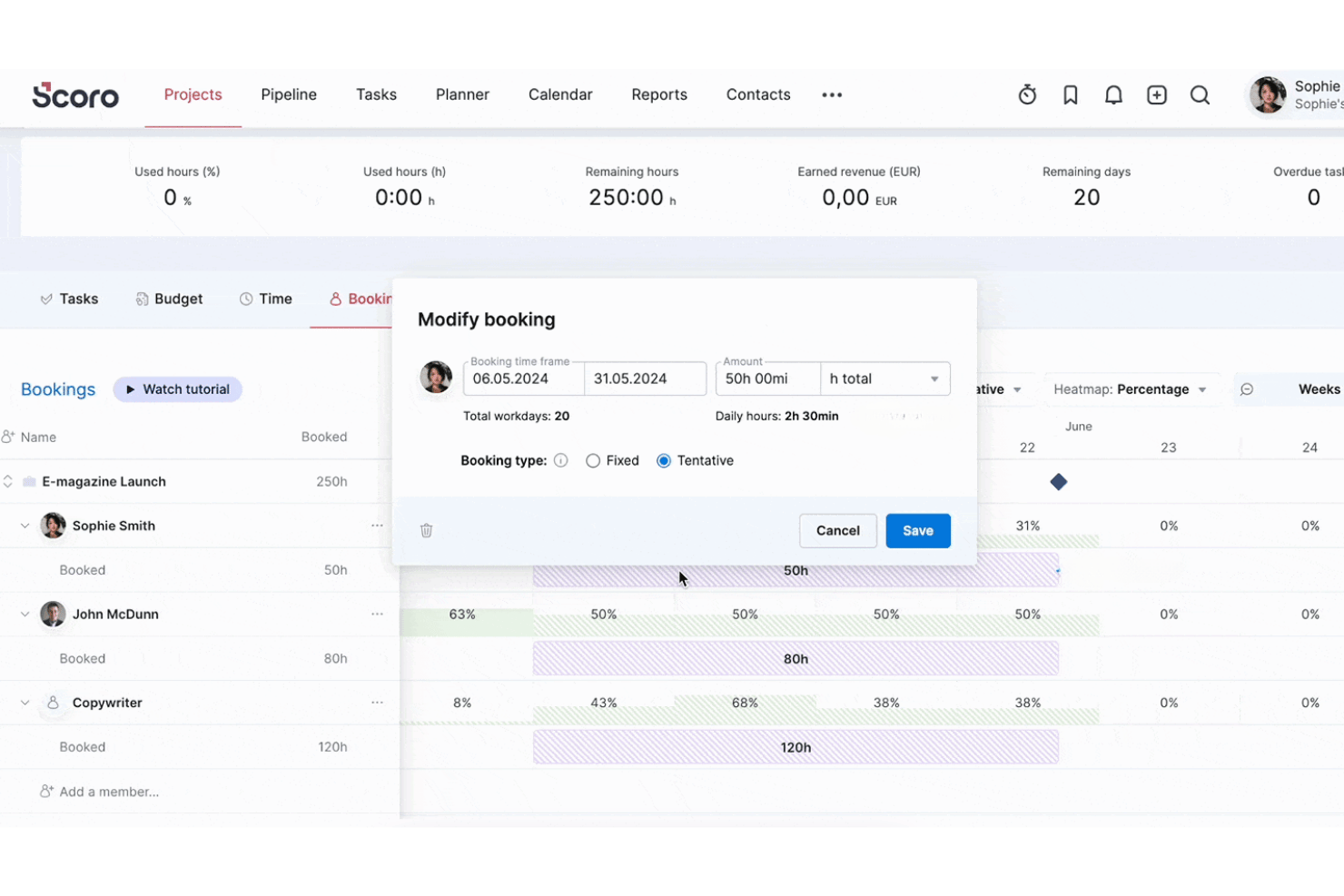
Scoro is a professional services automation platform that brings together resource planning, capacity forecasting, time tracking, project management, and invoicing in a single connected system.
Who Is Scoro Best For?
Scoro is a strong fit for agencies, consultancies, and other project-based services firms that need to manage resourcing and project finances in one place.
Why I Picked Scoro
I've included Scoro in my top picks because it's one of the few resource management tools that directly connects resourcing to billing. When I schedule a team member in the Planner, that time feeds straight into invoicing, whether the project runs on a fixed fee, time-and-materials, or retainer basis. I also like that cost and profit forecasts update in real time as bookings change, so I can see margin impact before I commit a resource to a project.
Scoro Key Features
- Role-based resource planning: Assign team members to roles and track their availability and workload across multiple projects.
- Utilization reporting dashboard: Monitor billable and non-billable hours, with built-in filters for teams, roles, and periods.
- Time off and holiday management: Track staff absences and holidays to keep scheduling accurate.
- Integrated project Gantt charts: Visualize all tasks and dependencies in a timeline view for better project coordination.
Scoro Integrations
Scoro offers native integrations with Google Calendar, Apple Calendar, MS Exchange, Google Drive, Dropbox, HubSpot, Salesforce, QuickBooks, Xero, Exact Online, Expensify, and Stripe. It also connects with Zapier and provides an API for custom integrations.
Pros and Cons
Pros:
- Built-in utilization and workload heatmaps
- Real-time margin and profit forecasting tools
- Links resource planning directly to project billing
Cons:
- Lacks HRIS or workforce analytics features
- No structured skills or competency matrix
New Product Updates from Scoro

Scoro Adds Time Mobile App and ELI Improvements
Scoro adds the Scoro Time mobile app for iOS/Android to track time anywhere and expands ELI with attachments, smarter filtering, and trigger-based actions. For more information, visit Scoro's official site.
Epicflow
Best for optimizing multi-project environments
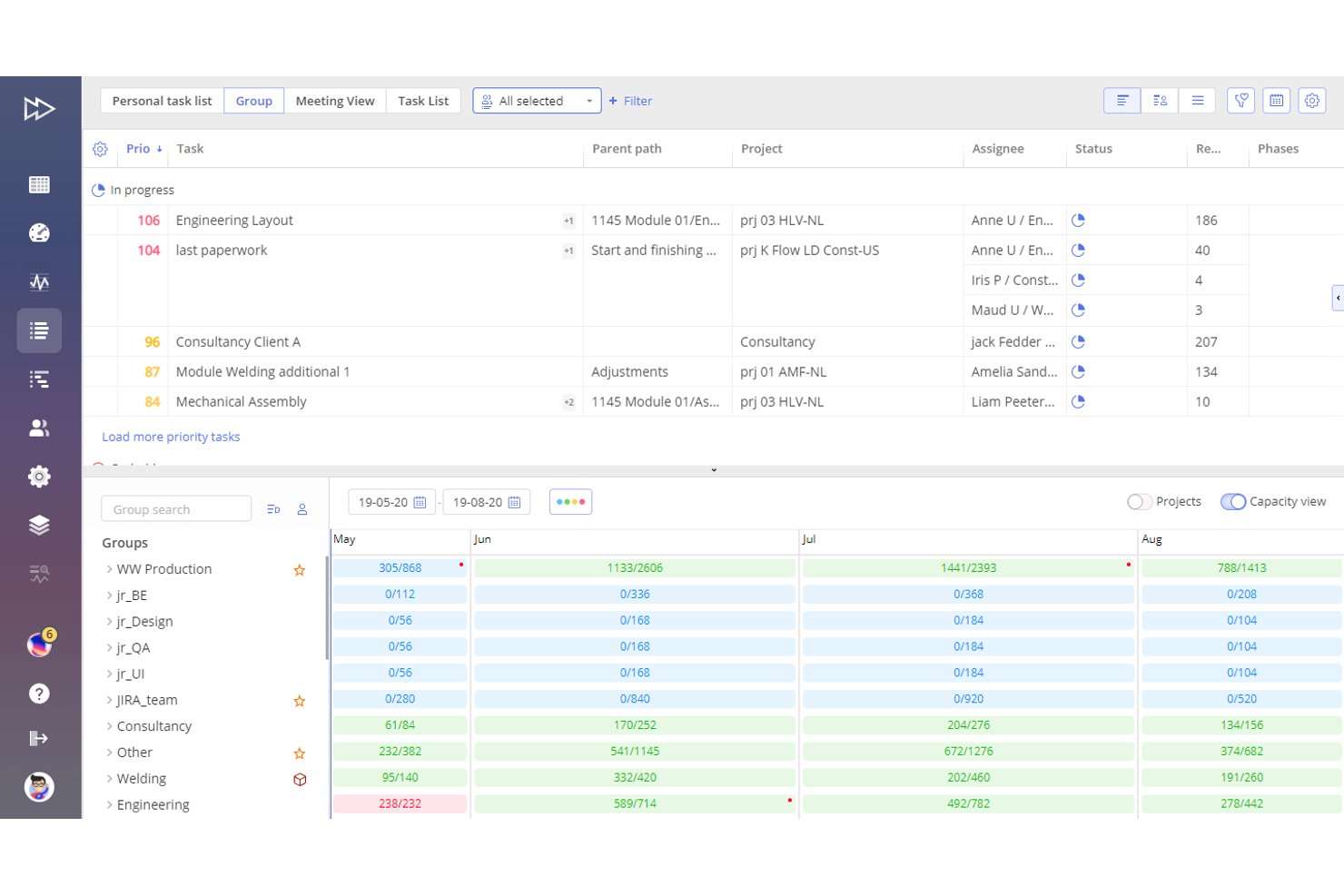
Epicflow is an AI-powered resource management and portfolio optimization platform built on the Theory of Constraints that combines multi-project scheduling, workload balancing, capacity planning, and skills-based resource allocation.
Who Is Epicflow Best For?
Epicflow is a strong fit for portfolio managers and PMO leaders in engineering, defence, and manufacturing organizations running large volumes of interconnected projects with shared specialist resources.
Why I Picked Epicflow
I picked Epicflow as one of the best because no other tool handles overlapping projects across a shared resource pool quite like it. The What-If Analysis lets me simulate the downstream impact of shifting one project's priority before committing to the change, which matters when a key engineer is already spread across four active workstreams. The Future Load Graph then surfaces capacity bottlenecks weeks in advance, so I can rebalance assignments before they become delivery risks.
Epicflow Key Features
- Epica AI Assistant: An integrated AI tool that provides insights, warnings, notifications, and step-by-step process guidance.
- Task list with auto-prioritization: Automatically creates and adjusts a prioritized task list based on real-time project data and resource constraints.
- Competence and attribute management: Allows you to match tasks to resources using a structured database of skills, competencies, and attributes.
- Integration with PM and ERP tools: Connects with Jira, SAP, MS Project, Oracle Primavera, and other platforms through APIs and CSV import/export.
Epicflow Integrations
Epicflow offers native integrations with Jira, Microsoft Project, SAP, Oracle Primavera, and Workfront, and provides an API for custom integrations. CSV import and export are also supported.
Pros and Cons
Pros:
- Auto-prioritizes tasks by portfolio demand
- Advanced workload forecasting and bottleneck prediction
- Handles overlapping projects with shared resources
Cons:
- Limited HR or payroll system connectivity
- No built-in PTO or leave tracking

Float
Best for live project timeline visualization
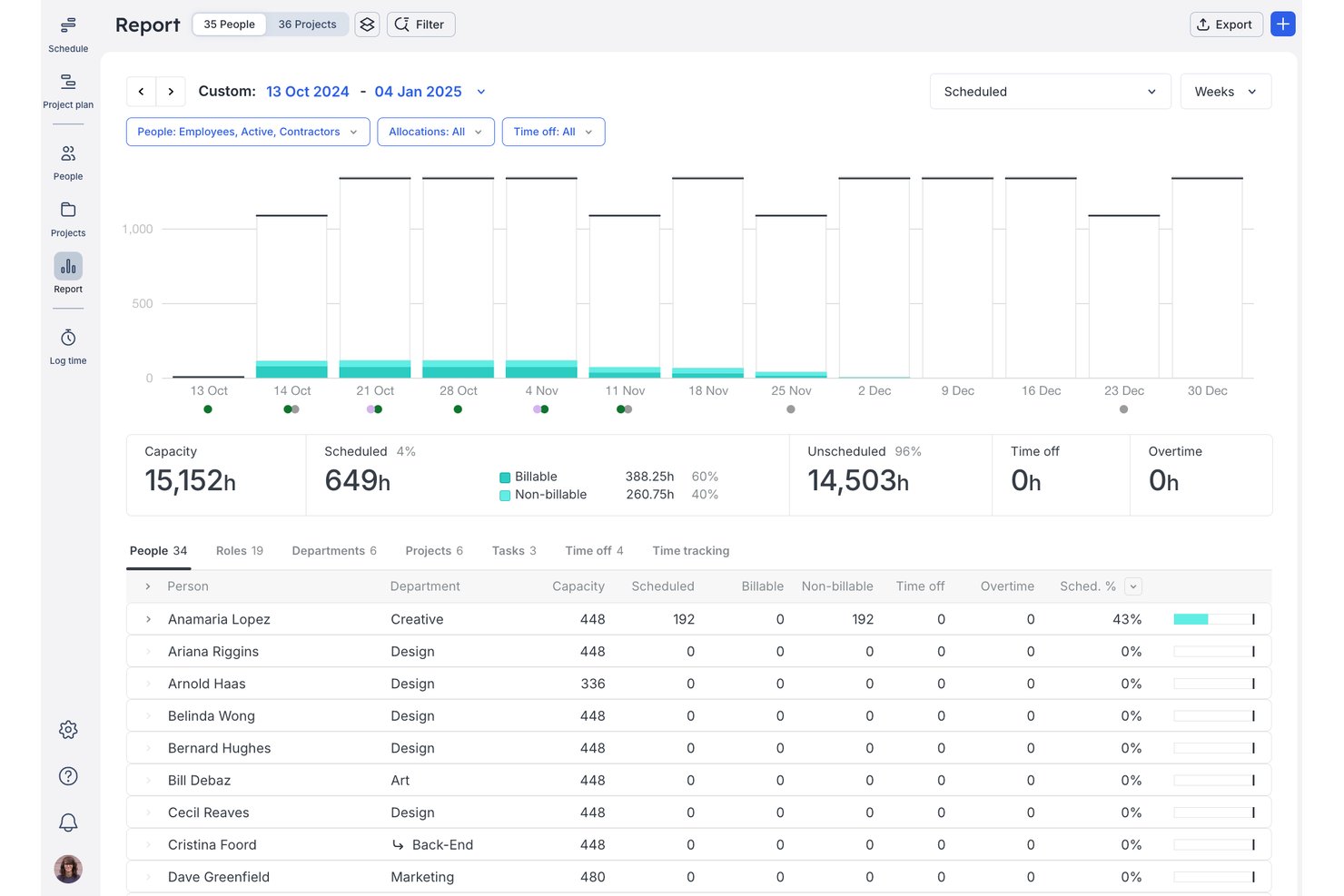
Float is a resource management platform for professional services teams that combines visual scheduling, capacity planning, time tracking, and utilization reporting.
Who Is Float Best For?
Float suits small-to-mid-size agencies and consulting firms where operations leads need a clear, real-time view of who's working on what across multiple client projects.
Why I Picked Float
I picked Float as one of the best because its live drag-and-drop timeline gives you an always-current view of every person, project, and allocation in one place. Colour-coded capacity bars flag over-allocated team members the moment you adjust a booking. Smart Assign then surfaces who's actually available based on skills, role, and remaining capacity, so you're not guessing when staffing a new project.
Float Key Features
- Multi-currency project support: Assign budgets and rates in up to five currencies for global projects.
- Prefilled and auto-logged timesheets: Capture actual hours worked and compare them to planned allocations.
- Role-based permission settings: Control access to project information and schedule management by user role.
- iOS and Android apps: Manage schedules, make updates, and view team allocations from mobile devices.
Float Integrations
Float offers native integrations with Asana, Jira, Trello, Google Calendar, Outlook Calendar, Slack, ClickUp, Teamwork, Basecamp, and Linear, and it connects with Zapier and has an API for custom integrations.
Pros and Cons
Pros:
- Smart Assign automates project staffing suggestions
- Colour-coded team capacity and availability views
- Real-time drag-and-drop scheduling board
Cons:
- Lacks skill proficiency and certification tracking
- No built-in HR or employee records

Ganttic
Best for visual planning across global teams
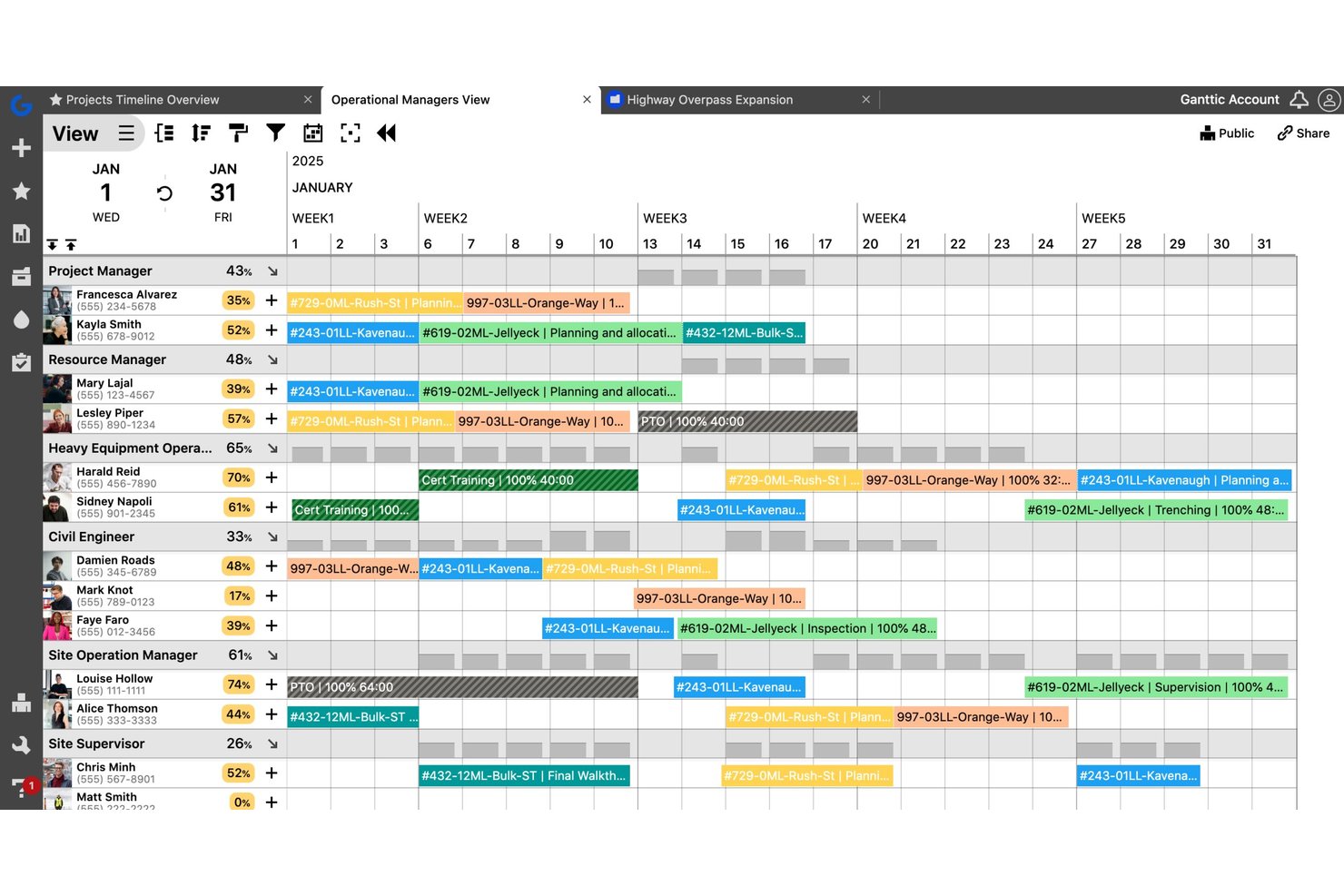
Ganttic is a visual resource planning tool that lets teams schedule people, equipment, and facilities across projects using drag-and-drop Gantt charts, capacity tracking, and utilization reporting.
Who Is Ganttic Best For?
Ganttic suits project managers and operations teams in industries like engineering, construction, and media who coordinate multiple concurrent projects across shared resources.
Why I Picked Ganttic
I picked Ganttic as one of the best because of how its dual-perspective Gantt view works in practice. I can flip between a resource-centric view and a project-centric view in the same interface, which is genuinely useful when coordinating teams across time zones. The ability to filter and group resources by custom fields, like region or department, keeps global planning organized without creating separate plans for each location.
Ganttic Key Features
- Automated utilization tracking: Track resource workload and utilization levels automatically across all projects and teams.
- Multi-resource and concurrent task scheduling: Assign multiple people or equipment to a single task while avoiding double-booking.
- Custom data fields for resources: Add unique fields to resources, projects, and tasks to support specific workflow requirements.
- API and integration options: Connect with Google Calendar, Outlook, Slack, and more using built-in connectors or the public API.
Ganttic Integrations
Ganttic offers native integrations with Google Calendar, Microsoft Outlook, and OneLogin. It connects with Zapier and provides an API for custom integrations.
Pros and Cons
Pros:
- Handles people and equipment scheduling together
- Flexible custom data fields for resources
- Visual Gantt-style resource planning interface
Cons:
- Limited approval and request workflows
- No native skills or competency tracking
Parallax
Best for aligning resources to revenue goals
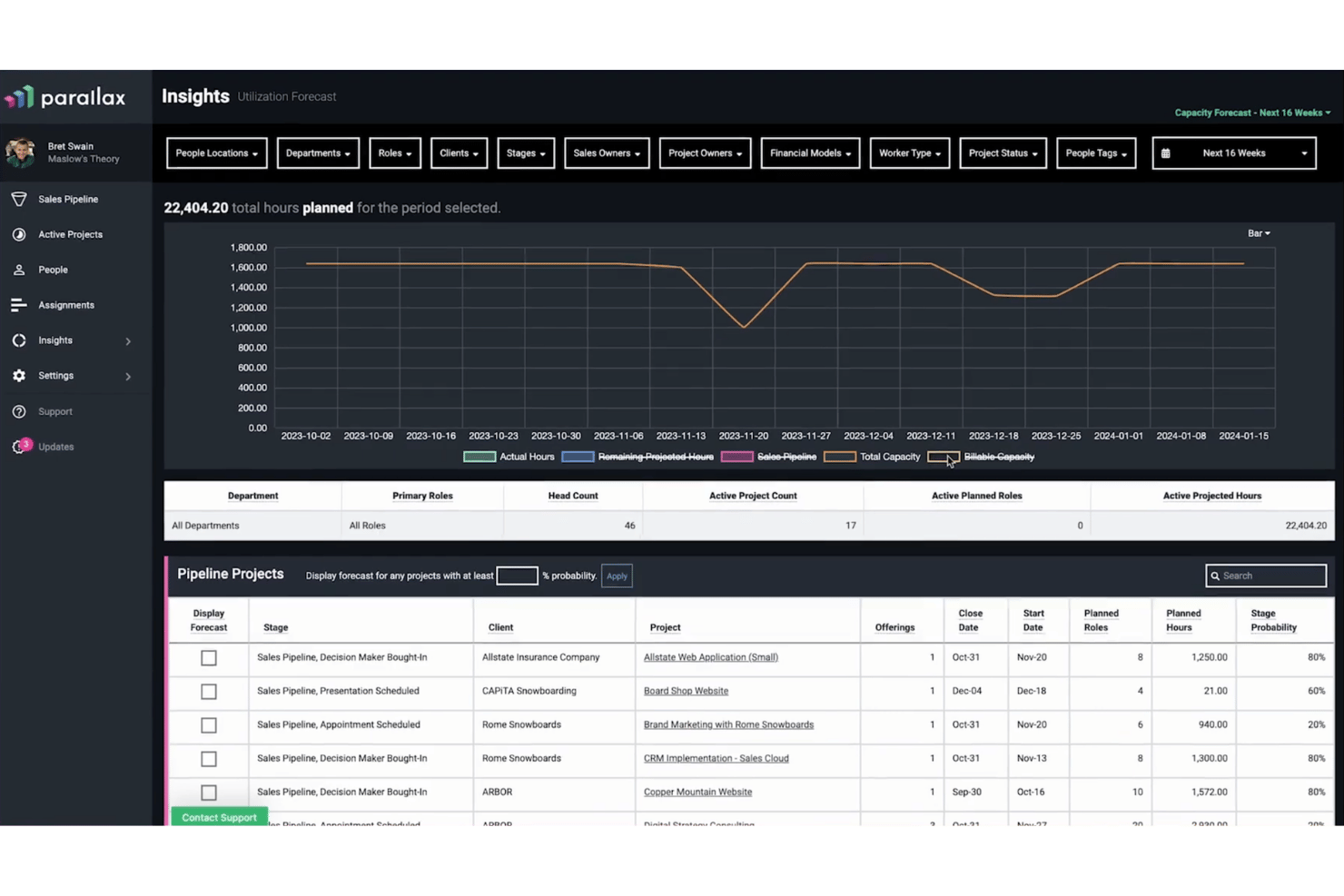
Parallax is a resource management and forecasting platform built for professional services firms, combining capacity planning, utilization tracking, staffing foresight, and project financial visibility in one place.
Who Is Parallax Best For?
Parallax is a strong fit for digital agencies and software consultancies that need to connect staffing decisions directly to project margins and revenue targets.
Why I Picked Parallax
I've included Parallax in my top picks because it's one of the few resource management tools that ties staffing decisions directly to revenue outcomes. I particularly like the Margin Control feature, which monitors project margins in real time and flags issues before they compound. Combine that with Staffing Foresight, which uses CRM pipeline data alongside active project load to give my team a forward-looking view of capacity and revenue in one place.
Parallax Key Features
- Visual workforce planner: See team capacity and workloads across multiple time horizons using colour-coded visualizations.
- Role and skill filtering: Filter workforce views by project role, skill set, or team for detailed resource matching.
- Integrated timesheets: Log actual hours worked directly within Parallax or through integrations like Harvest or Jira.
- Pipeline forecasting: Merge CRM pipeline data with active projects to forecast demand, capacity, and revenue.
Parallax Integrations
Parallax offers native integrations with Harvest, HubSpot, Asana, Jira, Microsoft Teams, Slack, NetSuite, and Salesforce Platform. An API is available for custom integrations.
Pros and Cons
Pros:
- Visualizes team bandwidth months in advance
- Connects forecasted demand to staffing plans
- Tracks utilization and capacity in real time
Cons:
- Custom report exports are not supported
- Limited depth for skill matrix tracking

Runn
Best for real-time scenario planning
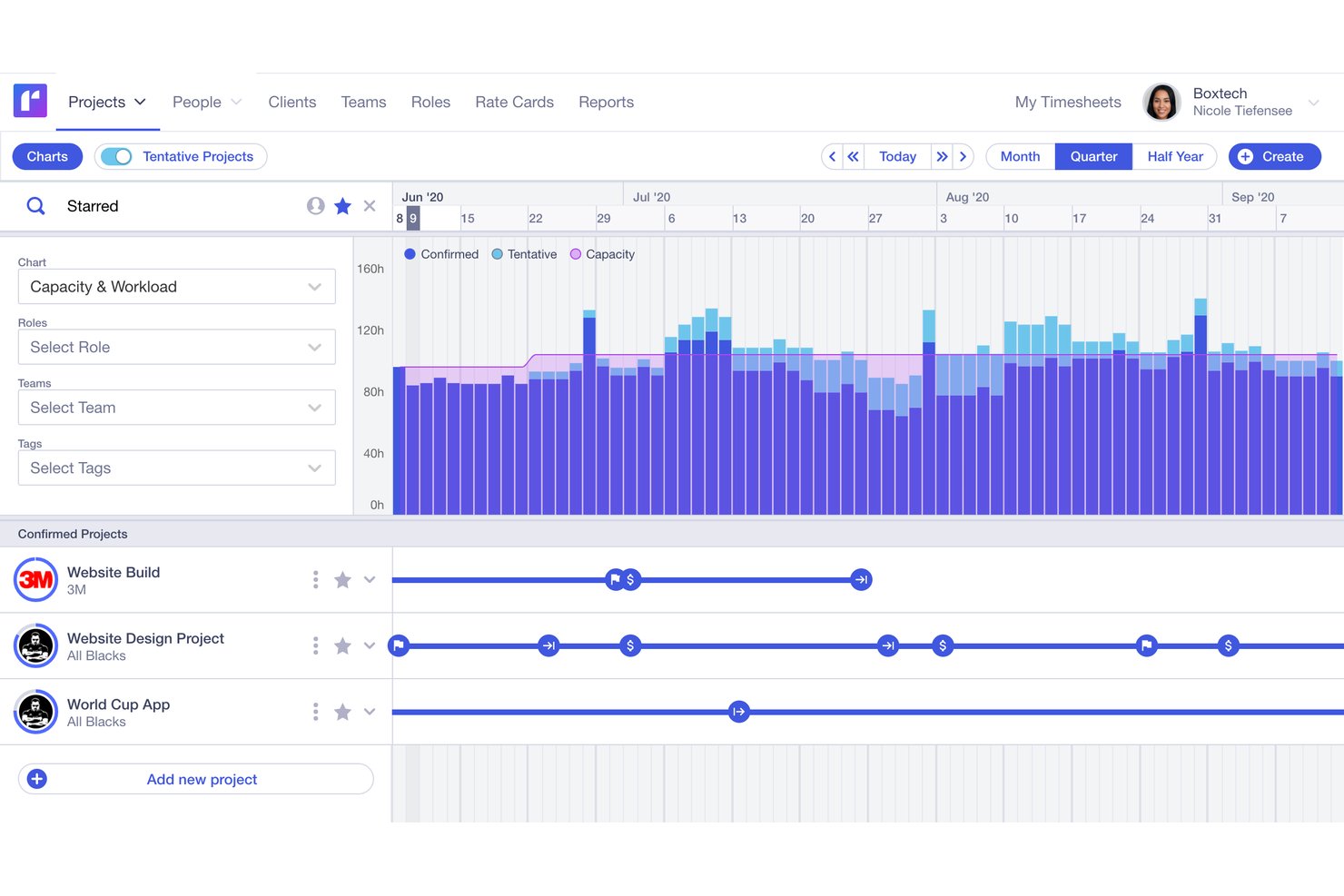
Runn is a resource management platform that integrates visual scheduling, capacity forecasting, utilization reporting, timesheet tracking, and project financials into one planning tool.
Who Is Runn Best For?
Runn is a strong fit for professional services firms, consulting agencies, and IT teams that need to manage project-based workforces across multiple concurrent engagements.
Why I Picked Runn
Runn earns its spot on my shortlist because of how it handles real-time what-if planning. I can build multiple saved scenarios side by side, swapping resources between tentative projects to see how capacity shifts before committing to any plan. The combination of placeholder resources and live capacity charts means my team can model a new client engagement against current workloads without touching the live schedule.
Runn Key Features
- Multi-view scheduling: Switch between monthly, quarterly, or half-yearly layouts to plan across different time horizons.
- Integration marketplace: Connect to HR systems like BambooHR and time trackers like Harvest through built-in integrations.
- Custom reporting dashboards: Build private dashboards with advanced filtering and export project data for further analysis.
- Project financials tracking: Manage budgets, rate cards, and compare planned versus actuals directly within the tool.
Runn Integrations
Runn offers native integrations with BambooHR, HiBob, Humaans, ADP Workforce Now, Workday, Jira, Harvest, and Clockify, and connects with Zapier. An API is available for custom integrations.
Pros and Cons
Pros:
- Placeholder resources for pipeline and hiring planning
- Visual scheduling across multiple time horizons
- Real-time scenario planning for project resources
Cons:
- No dedicated mobile app available
- Custom reports are difficult to configure

Mosaic
Best for AI-driven workload balancing
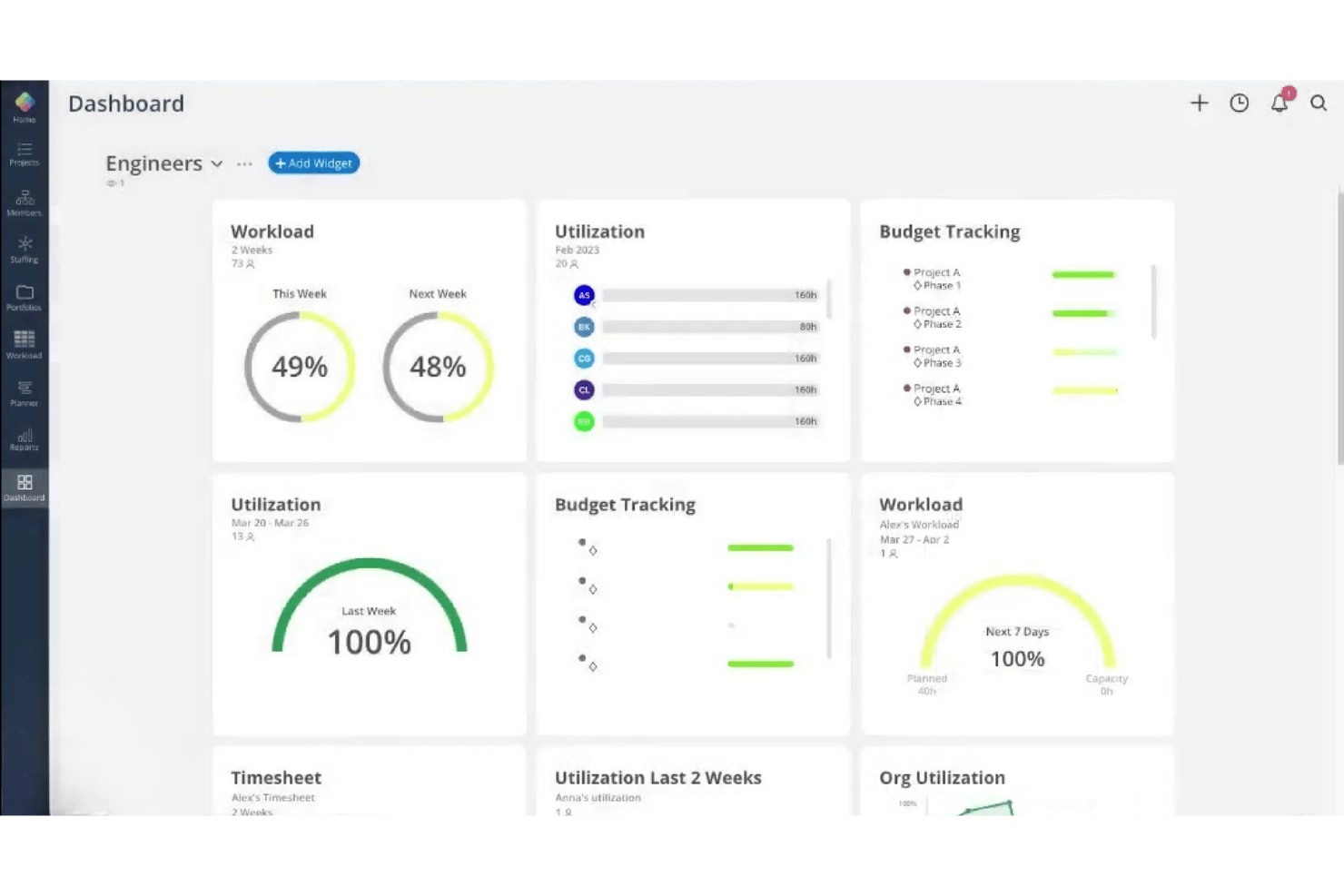
Mosaic is an AI-powered resource management platform built for project-based teams, combining resource allocation, capacity planning, workload forecasting, utilization reporting, and time tracking in one place.
Who Is Mosaic Best For?
Mosaic is a strong fit for small to midsize project-based firms in architecture, engineering, and creative services that need to manage team capacity across multiple concurrent projects.
Why I Picked Mosaic
I picked Mosaic as one of the best because its AI assistant, Chello, actively monitors project workloads and surfaces risks before they become problems. I like that it automatically flags deadline drift and chases missing updates, so I'm not manually checking every project thread. The automated rescheduling feature adjusts work plans in real time when priorities shift, keeping the whole team's workload in balance.
Mosaic Key Features
- Role-based project assignment: Assign team members to specific roles on projects according to skills and capacity.
- Gantt and Kanban view: Choose between multiple visual project views to manage timelines and task progress.
- Utilization and profit reporting: Monitor employee utilization rates alongside project profitability metrics in dashboard reports.
- Integrated time tracking: Log hours and manage timesheets within the same platform as resource scheduling and project planning.
Mosaic Integrations
Mosaic offers native integrations with Asana, Jira, Slack, Microsoft 365, Microsoft Outlook, Dropbox Business, Gmail, QuickBooks, Deltek Vision, Deltek Ajera, and Deltek Vantagepoint. An API is available for custom integrations.
Pros and Cons
Pros:
- Visual dashboards for utilization and forecasting
- Automated rescheduling when project priorities shift
- AI assistant proactively manages team workloads
Cons:
- Not tailored for HR-focused workforce planning
- Limited skills matrix for talent allocation
Other Resource Management Software
Here are some additional resource management software options that didn’t make it onto my shortlist, but are still worth checking out:
- Kantata
For managing complex client deliverables
- Saviom
For advanced enterprise-level customization
- Hub Planner by Milient
For timesheets and approval workflows
- Wrike
For customizable workload views
- Celoxis
For integrated capacity planning and tracking
- Teamwork.com
For agency collaboration with clients
- Accelo
For unified client work management
- ClickTime
For tracking billable resource hours
- Birdview PSA
For project portfolio resource insights
- Resource Management by Smartsheet
For pre-built schedule templates


How I Evaluate Resource Management Software
I split my evaluation into core functionality every tool must nail—like capacity planning and utilization reporting—and the differentiators that make one platform worth choosing over another.
Core Functionality (Table Stakes For This List)
When I'm selecting tools for my list, I rank each one on a scale from 0 (does not offer the functionality) to 5 (excels in this area) for each core functionality listed below. Then, I calculate the tool's total score as a percentage. Each tool needs to achieve a minimum total score of 65% to be considered for inclusion.
- Resource Allocation & Scheduling: I look for drag-and-drop visual schedulers that flag conflicts when two projects compete for the same person during the same sprint.
- Capacity Planning: Each tool should show real-time capacity against upcoming demand so you can spot a bench surplus or staffing gap weeks ahead.
- Skills & Competency Tracking: I check whether you can search by certification, proficiency level, or role type to match the right person to incoming project needs.
- Utilization Reporting: Dashboards should break down billable vs. non-billable hours by team or individual so managers can act on utilization trends, not just view them.
- Time & Availability Tracking: I evaluate whether timesheets integrate PTO, holidays, and calendar sync to reflect true availability rather than just scheduled hours.
- Demand Forecasting: The platform should let you model future project pipelines with tentative allocations so hiring decisions stay ahead of actual demand.
Once I have a list of tools that meet the criteria, I consider what sets each platform apart.
Differentiating Factors (What Sets Vendors Apart)
Here's how I compare and contrast different vendors:
Standout Features
Capacity heatmaps matter because they let you spot overloaded or idle team members at a glance, which is far faster than scanning rows of data. I also look for scenario planning sandboxes where you can model a potential deal's staffing impact without touching live schedules. Financial forecasting rounds this out by tying staffing decisions directly to revenue and margin projections, so you can see whether pulling a developer off one project to cover another actually makes financial sense.
Beyond Features
Tech stack integrations are a big one—I check whether the platform syncs two-way with tools like Asana, Jira, or monday.com, plus accounting systems like QuickBooks or Xero. Pricing structure matters too, especially whether non-billable stakeholders like executives count as paid seats, which can inflate costs quickly as your team grows. I also evaluate reporting and executive visibility, since pre-built utilization and profitability reports save you from building dashboards from scratch every time leadership asks for an update.
How to Choose Resource Management Software
It’s easy to get bogged down in long feature lists and complex pricing structures. To help you stay focused as you work through your unique software selection process, here’s a checklist of factors to keep in mind:
| Factor | What to Consider |
|---|---|
| Scalability | Will the software still work for you as your workforce, project load, or regions expand over time? |
| Integrations | Does the solution sync smoothly with your project management, finance, HRIS, and calendar platforms? |
| Customizability | Can you adapt workflows, roles, or views to fit your organization’s structure—not just the defaults? |
| Ease of use | Will team leads and non-technical users immediately understand how to build schedules and run reports? |
| Implementation and onboarding | How long—from signing up to scheduling your first shift—does it take, and what training is provided? |
| Cost | Are there hidden fees for add-ons, or will pricing scale up sharply if you add new departments? |
| Security safeguards | Will it support your industry’s data privacy needs and offer control over who can access sensitive info? |
| Internal resourcing needs | Do you have the internal IT or admin capacity to manage setup, user permissions, and ongoing support? |
What Is Resource Management Software?
Resource management software is a digital platform that helps organizations allocate people to projects, track availability, and balance workloads based on skills and demand. These tools give HR and operations teams real-time visibility into capacity, utilization rates, and scheduling conflicts, so they can plan ahead and avoid overloading or underutilizing staff.
Features of Resource Management Software
When selecting resource management software, keep an eye out for the following key features:
- Resource scheduling: Assign people to projects, tasks, or shifts using visual tools like calendars or drag-and-drop interfaces, so you can quickly adjust plans as needs change.
- Capacity planning: Track team and individual capacity versus project demands to prevent over-allocation and identify where additional help or hiring may be needed.
- Skills tracking: Maintain searchable profiles with each person’s skills, certifications, and experience, making it easy to find the best fit for any assignment.
- Utilization reporting: Monitor billable and non-billable hours, spot underused team members, and analyze workload balance with dashboards and detailed reports.
- Time and availability tracking: Capture working hours, vacations, holidays, and other leave types for a true view of when employees are available for assignments.
- Demand forecasting: Model upcoming project pipelines or business needs to ensure you have the right staffing and skill mix ready before work arrives.
- Conflict detection: Get automatic alerts when two projects compete for the same resource, so you can resolve booking conflicts proactively.
- Customizable permissions: Set access levels and visibility by role or department to protect sensitive information and support different approval workflows.
- Reporting and analytics: Export or visualize key insights on resource trends, helping HR and operations leaders make informed decisions and communicate clearly with stakeholders.
Common Resource Management Software AI Features
Beyond the standard resource management software features listed above, many of these solutions are incorporating AI with features like:
- Automated resource allocation: AI analyzes project requirements, skills, and availability to suggest the best-fit team members for each assignment, reducing manual scheduling effort.
- Predictive capacity forecasting: Machine learning models anticipate future workload spikes or shortages by analyzing historical data, helping you plan hiring or reassignments in advance.
- Intelligent conflict resolution: AI detects potential scheduling conflicts and recommends optimal adjustments, so you can resolve issues before they impact project timelines.
- Skills gap analysis: AI reviews current and upcoming project needs against your workforce’s skills inventory, highlighting gaps and suggesting targeted training or hiring.
- Utilization trend prediction: Algorithms forecast utilization rates based on past patterns, enabling proactive workload balancing and reducing the risk of burnout or bench time.
Benefits of Resource Management Software
Implementing resource management software provides several benefits for your team and your business. Here are a few you can look forward to:
- Improved project allocation: Assign employees to the right projects based on skills, availability, and business need, reducing mismatches and idle time.
- Better workload balance: Visual scheduling and real-time conflict alerts help prevent overallocation, burnout, and excessive bench time across your workforce.
- Accurate capacity forecasting: Use capacity planning and demand modelling tools to align staffing levels with incoming project pipelines.
- Increased visibility for HR and leaders: Dashboards and utilization reports give HR, managers, and executives fast access to data for smarter decision-making.
- Simplified compliance and approvals: Built-in permissions, time tracking, and audit trails simplify compliance, approvals, and leave management.
- Data-driven decisions: Analytics and custom reporting highlight trends and gaps, supporting agile adjustments to your resourcing strategies.
- Faster onboarding and implementation: Integration capabilities and flexible workflows help teams move from spreadsheets to fully tracked, digital resource management quickly.
Costs and Pricing of Resource Management Software
Selecting resource management software requires an understanding of the various pricing models and plans available. Costs vary based on features, team size, add-ons, and more. The table below summarizes common plans, their average prices, and typical features included in resource management software solutions:
Plan Comparison Table for Resource Management Software
| Plan Type | Average Price | Common Features |
|---|---|---|
| Free Plan | $0 | Basic scheduling, limited user seats, simple utilization views, and standard support. |
| Personal Plan | $5-$20/user/month | Individual work tracking, basic resource allocation, single-user dashboard, and basic reporting tools. |
| Business Plan | $15-$40/user/month | Team scheduling, capacity planning tools, skills tracking, integrations, and advanced reporting features. |
| Enterprise Plan | $40-$80/user/month | Custom permissions, advanced analytics, priority support, API access, and enterprise-grade security options. |


Resource Management Software FAQs
Here are some answers to common questions about resource management software:
How does resource management software differ from project management software?
Resource management software focuses on assigning people, tracking availability, and workload management, while project management software covers broader project planning, task management, and timelines. Dedicated resource scheduling software also aids portfolio management, preventing resource conflicts. Many organizations use both together for complete visibility across their operations.
Can resource management software help reduce employee burnout?
Yes, dedicated resource scheduling software provides visibility into workloads through a clear workload view, highlights overallocation, and enables proactive capacity management. Using a dedicated scheduling tool helps your team maintain balanced workloads, improving resource utilization while reducing burnout and turnover risks.
What types of teams benefit most from resource management software?
Project-based teams, creative agencies, consultancies, and IT departments juggling multiple projects, timelines, and project budgets see immense value. These teams rely on a resource planner to optimize assignments, improve billable utilization, and handle resource forecasting alongside broader capacity needs.
How hard is it to implement resource management software?
Implementation usually depends on your current processes and the size of your team. Many vendors offer migration support, training, and integrations that can help support the transition from spreadsheets or legacy tools while ensuring scalability as your business grows.
Does resource management software integrate with HR or payroll systems?
Yes, many solutions integrate with HRIS, payroll, and time tracking tools. This makes it easy to import employee data, sync leave balances, and keep resource planning accurate and up to date.
Can I customize permissions for different user roles?
Yes, most resource management platforms let you control who can view, edit, or manage data by department, job function, or seniority. This safeguards sensitive business information and matches real-world approval workflows.