

10 Best Top Echelon Alternatives in 2026

Best Top Echelon Alternatives Shortlist


The best Top Echelon alternatives are applicant tracking systems that let you manage candidates, boost recruiter collaboration, and handle agency workflows on your terms. If you’re searching for Top Echelon alternatives, you need a reliable way to compare tools built for staffing, recruiting, and agency teams—especially if you’re outgrowing your current ATS. In this list, you’ll find options for a range of priorities, from powerful automation to specialized search features, so you can pick the solution that actually fits your hiring process.
What Is Top Echelon?
Top Echelon is an applicant tracking system designed for recruiting agencies and staffing firms. It helps recruiters manage candidates, organize job orders, and collaborate with team members or external partners. With features for job posting, candidate sourcing, and workflow tracking, Top Echelon aims to simplify the hiring process. Recruiters use it to save time, improve placement rates, and centralize communications with clients and candidates.
Top Echelon Alternatives Comparison Table
This comparison table summarizes pricing details for my Top Echelon alternative selections:
| Tool | Best For | Trial Info | Price | ||
|---|---|---|---|---|---|
| 1 | Best for intuitive resume parsing interface | Free trial available | From $15/user/month (billed annually) | Website | |
| 2 | Best for integrated recruitment marketing tools | Free demo available | Pricing upon request | Website | |
| 3 | Best for tech-powered candidate matching | Free demo available | Pricing upon request | Website | |
| 4 | Best for staffing and executive search firms | Free demo available | Pricing upon request | Website | |
| 5 | Best for all-in-one ATS and CRM platform | Free trial available | From $95/user/month | Website | |
| 6 | Best for split placement collaboration | Free trial + free demo available | From $85/user/month (billed annually) | Website | |
| 7 | Best for AI-powered candidate sourcing | Free demo + 7-day free trial available | From $149/user/month (billed annually) | Website | |
| 8 | Best for multi-board job posting | Free demo available | Pricing upon request | Website | |
| 9 | Best for large-scale agency workflows | Free demo available | From $99/user/month | Website | |
| 10 | Best for advanced recruitment analytics | Free demo available | £69 per user/month | Website |
Why Trust Our Software Recommendations
Our team has been testing and reviewing software since 2012. As HR experts ourselves, we know how difficult—and important—it is to choose the right software.
For this guide, we evaluated tools using hands-on testing and independent research, scoring tools using our selection criteria. We also draw on insights from industry thought leaders and practicing HR experts.
Our reviews reflect our human editorial judgment, not a sales pitch.
Expert reviewers:
Best Top Echelon Alternatives Reviews
Below are my detailed summaries of the best Top Echelon alternatives that made it onto my shortlist. My reviews offer a detailed look at the features, integrations, and best use cases of each platform to help you find the best one for you.

Manatal
Best for intuitive resume parsing interface
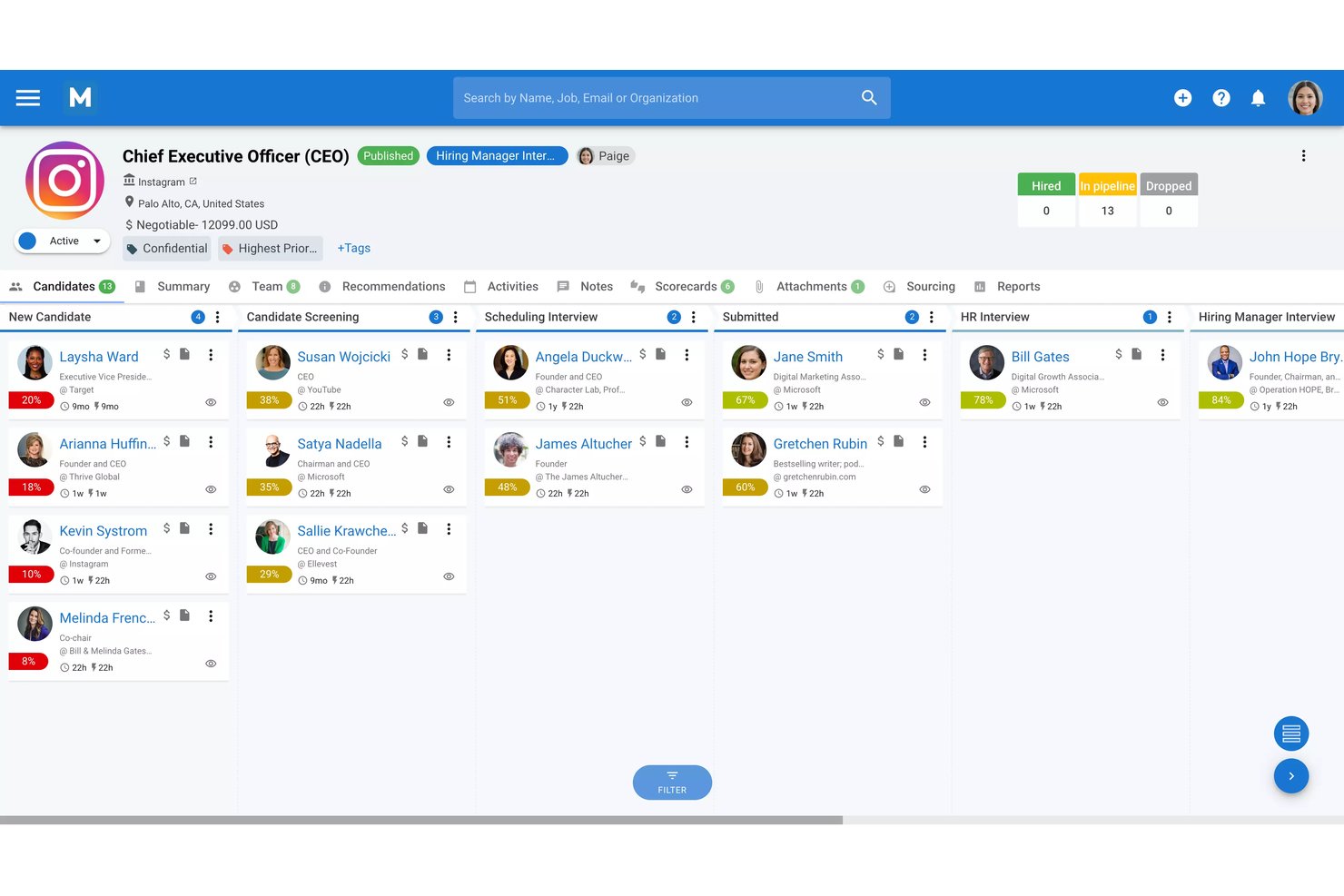
Manatal is an AI-native ATS and recruitment CRM built for agencies, executive search firms, and in-house talent teams that need smarter candidate sourcing, automated resume parsing, and client pipeline management in one platform.
Who Is Manatal Best For?
Manatal is a strong fit for small to mid-sized recruitment agencies and boutique staffing firms that want an affordable, AI-powered platform without enterprise-level complexity.
Why Manatal Is a Good Top Echelon Alternative
I've included Manatal in my top picks because I love how its AI resume parsing goes beyond pulling names and emails. It automatically enriches each candidate profile with data from LinkedIn and other public sources, so you get a fuller picture without manual data entry. I also appreciate the Conversational AI Search, which lets me query the entire candidate database in plain language to surface profiles that match a specific role, rather than relying on rigid keyword filters.
Manatal Key Features
- Customizable pipeline workflows: Build multi-stage hiring pipelines with drag-and-drop job order management and stage automation.
- Branded career page builder: Create a fully branded, multilingual career site with no-code editing and custom application forms.
- Workflow automations: Set trigger-based automations for candidate communications, interview scheduling, or status updates to reduce manual admin.
- Collaboration portal for hiring managers: Invite unlimited hiring managers to review candidates, give feedback, and approve moves in real time.
Manatal Integrations
Manatal offers native integrations with LinkedIn, Gmail, Outlook, Mailchimp, and more. It also provides an API for custom integrations.
Pros and Cons
Pros:
- Candidate-job matching scores surface from your database
- Multilingual platform suits globally distributed recruiting teams
- AI enriches candidate profiles from social data
Cons:
- Custom reporting options are noticeably limited
- No native split placement fee tracking
New Product Updates from Manatal

Manatal Adds Candidate Login and Employee Portal to Career Pages
Manatal has added Candidate Login, Internal Employee Portal, and internal job visibility controls for Career Pages. These features help teams simplify applications, support employee mobility, and manage internal hiring workflows. For more information, visit Manatal’s official site.
 .
.
Ceipal
Best for integrated recruitment marketing tools
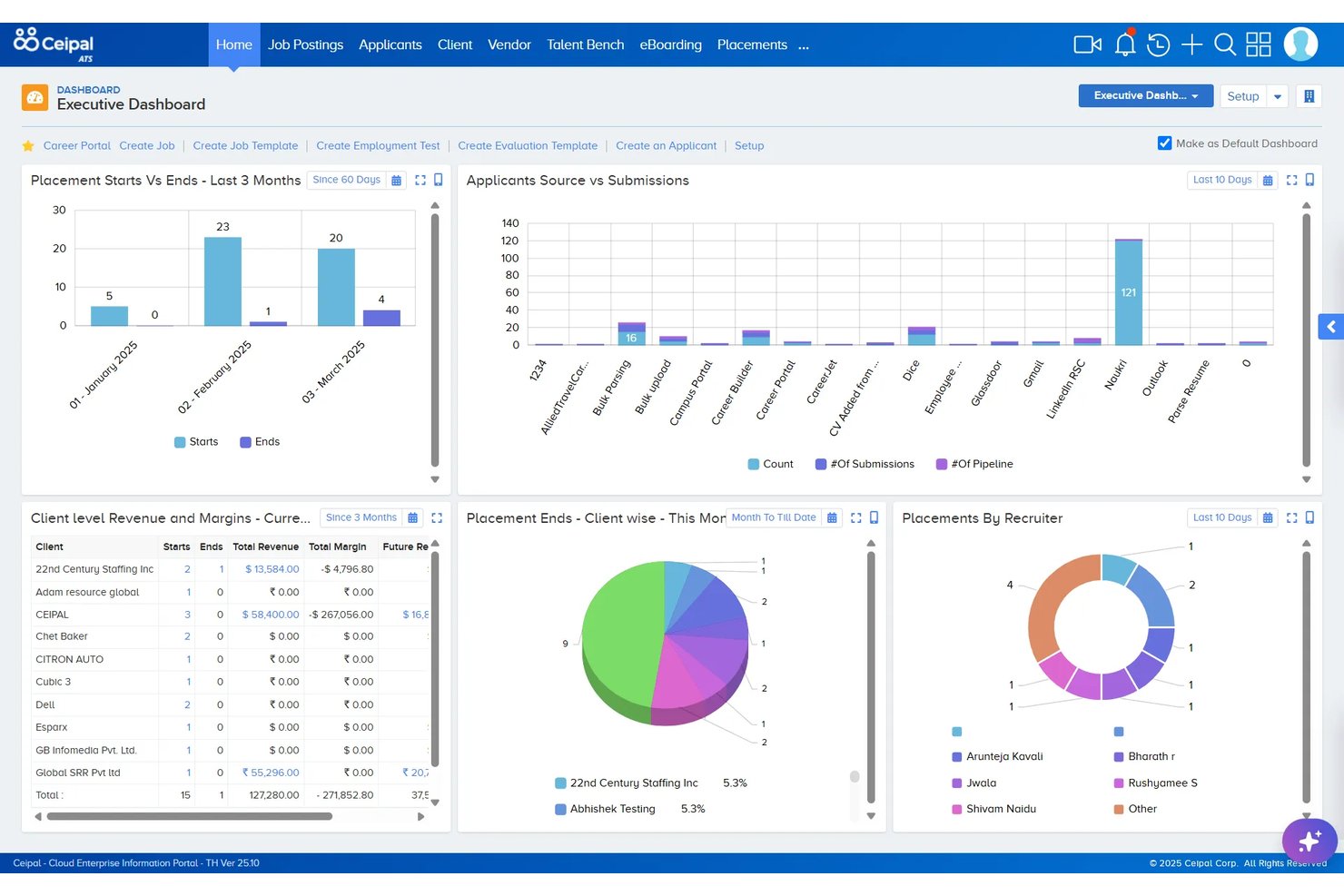
Ceipal is an AI-powered staffing platform built for staffing agencies and corporate TA teams who need to manage sourcing, candidate tracking, job posting, and workforce operations in one place.
Who Is Ceipal Best For?
Ceipal suits mid-to-large staffing firms in IT and healthcare that run high-volume recruiting across multiple job boards and need AI-assisted candidate matching.
Why Ceipal Is a Good Top Echelon Alternative
I picked Ceipal as one of the best Top Echelon alternatives because of how it handles recruitment marketing as a built-in function, not an afterthought. From a single workflow, I can push job postings to LinkedIn, Dice, Monster, Indeed, and ZipRecruiter simultaneously, then let Ceipal AI score and rank inbound candidates by fit. That AI fit-scoring means I'm reviewing a shortlist of ranked profiles rather than sifting through every applicant manually.
Ceipal Key Features
- Multi-stage applicant pipelines: Configure, visualize, and manage candidate progress through each stage of the recruitment workflow.
- Recruiting CRM module: Track companies, contacts, job orders, and communication history within an integrated client management system.
- Workforce management tools: Handle onboarding, credential management, time tracking, and invoicing from one platform.
- Client-facing hiring portals: Give hiring managers secure access to review candidate submissions and provide structured feedback directly online.
Ceipal Integrations
Ceipal offers native integrations with LinkedIn, Indeed, ZipRecruiter, Monster, CareerBuilder, Gmail, Outlook, QuickBooks, ADP, and DocuSign. An API is available for custom integrations.
Pros and Cons
Pros:
- Covers temp staffing, onboarding, and invoicing natively
- Multi-board job posting from a single workflow
- AI ranks candidates against new job requisitions
Cons:
- Historical reporting often requires switching to CEIPAL BI
- Candidate searches can surface off-target profiles
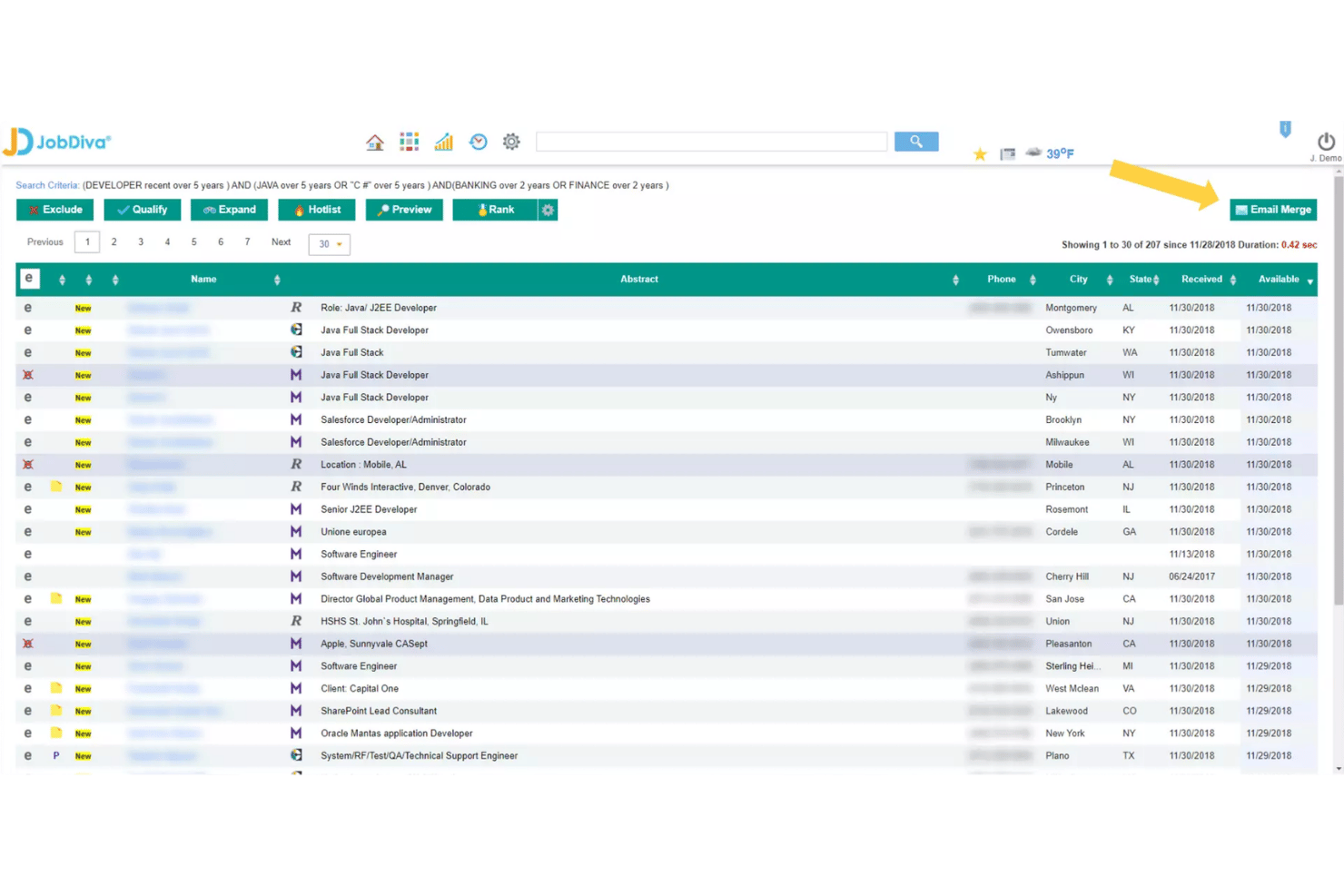
JobDiva is an AI-powered ATS and recruiting CRM built for staffing agencies and talent acquisition teams that need fast candidate matching, automated sourcing, and full placement lifecycle tracking in one platform.
Who Is JobDiva Best For?
JobDiva is a strong fit for mid-market and enterprise staffing agencies that run high-volume recruiting operations across contract, temp, and direct-hire placements.
Why JobDiva Is a Good Top Echelon Alternative
I picked JobDiva as one of the best Top Echelon alternatives because of how its AI-powered candidate matching actually works in practice. Unlike basic keyword searches, JobDiva lets me search resumes by specific skills tied to years of experience, so I'm surfacing candidates who genuinely qualify rather than just match a term. The resume harvester pulls in profiles continuously, which means I'm spending less time on manual sourcing and more time moving qualified candidates through the pipeline.
JobDiva Key Features
- Hotlists for candidate pipeline management: Build and manage custom groups of qualified candidates for open and future roles.
- VMS synchronization: Connect directly with vendor management systems to pull jobs and manage submissions in one place.
- DivaFinancials back-office suite: Track placements, commissions, invoices, and revenue with staffing-specific financial tools.
- Mobile recruiter and candidate apps: Access job orders, candidates, and pipeline activities on the go with dedicated mobile apps for recruiters and talent.
JobDiva Integrations
JobDiva offers native integrations with job boards like Dice, Monster, CareerBuilder, and LinkedIn, plus VMS platforms such as Fieldglass and Beeline. An API is available for custom integrations.
Pros and Cons
Pros:
- Back-office financials built into the platform
- VMS sync supports contract staffing workflows
- AI matching ranks candidates by experience years
Cons:
- Onboarding takes significant time and setup
- Dated interface compared to modern ATS tools
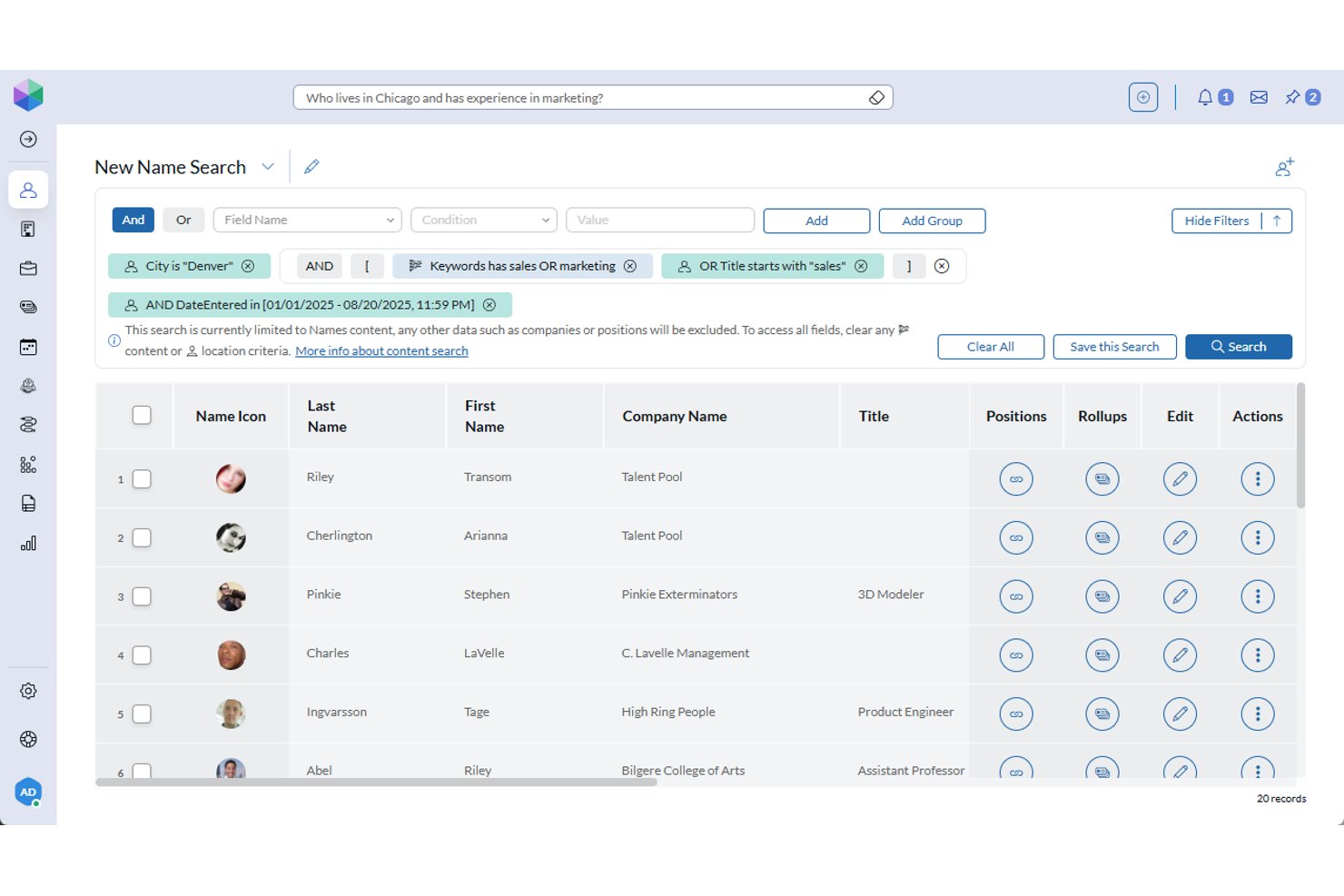
PCRecruiter (PCRM) is a unified ATS and recruiting CRM built for staffing agencies and executive search firms that need deep pipeline configurability, private data hosting, and AI-enabled candidate sourcing in one platform.
Who Is PCRM Best For?
PCRM is a strong fit for boutique-to-mid-market recruiting agencies and executive search firms that need a highly configurable platform and prioritize candidate data privacy.
Why PCRM Is a Good Top Echelon Alternative
PCRM earns its spot on my shortlist because of how deeply configurable its pipeline workflows are. I can set up to 18 custom stages per job order, which maps directly to how executive search firms actually run placements. I also appreciate the company-centric data model, where the same record can function as a candidate or a client, removing the duplicate-record headaches that come up in most ATS tools.
PCRM Key Features
- AI-generated candidate summaries: Automatically creates candidate overviews from resumes and work history for quick review.
- PCR Capture browser plug-in: Lets you import candidate details directly from LinkedIn and other sourcing sites.
- Outlook and RingCentral integration: Syncs email and call communication history with candidate and client records.
- Custom WordPress job board plugin: Publishes open jobs from PCRM to your branded careers site with Google Jobs structured data.
PCRM Integrations
PCRM offers native integrations with Outlook, RingCentral, Indeed, ZipRecruiter, CareerBuilder, and Dice, and provides an API for custom integrations.
Pros and Cons
Pros:
- Records double as candidate and client profiles
- AI ranks candidates against new job orders
- Up to 18 custom pipeline stages
Cons:
- Setup and configuration requires significant time investment
- UI feels dated compared to newer platforms

Best for all-in-one ATS and CRM platform
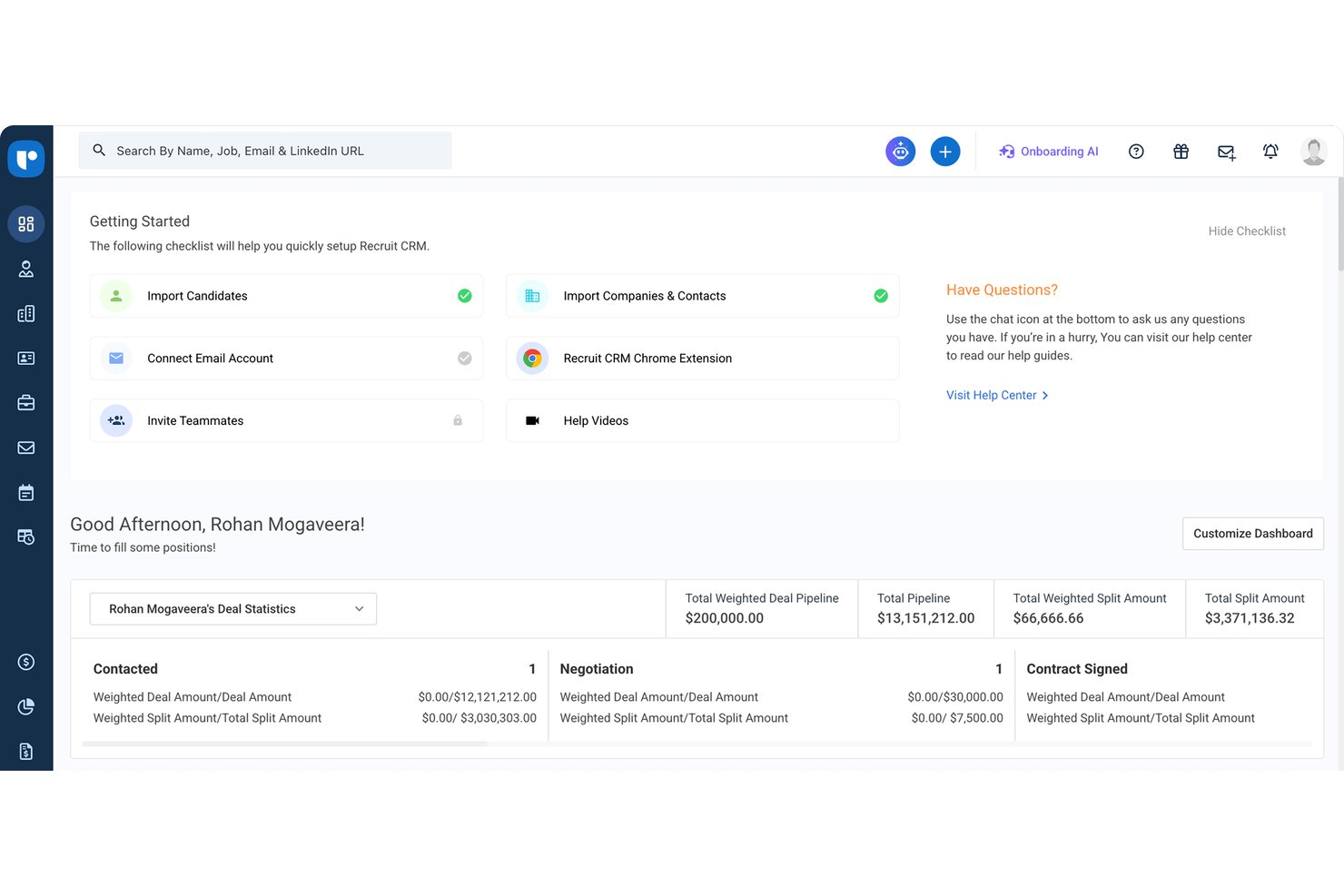
Recruit CRM is an ATS and CRM platform built for recruitment agencies and executive search firms that need to manage candidates, clients, job orders, and business development pipelines in one place.
Who Is Recruit CRM Best For?
It's a strong fit for small to mid-sized recruitment agencies and boutique executive search firms that need a single platform to run both their recruiting and client-facing operations.
Why Recruit CRM Is a Good Top Echelon Alternative
I picked Recruit CRM as one of the best because it genuinely combines ATS and CRM in a way most tools only claim to. I use the deal pipelines to track business development alongside hiring pipelines without switching platforms. The AI resume parser pulls candidate data directly from incoming emails, and GPT-4 integration is available on every plan for drafting job descriptions, candidate summaries, and call transcripts.
Recruit CRM Key Features
- Chrome sourcing extension: Capture candidate profiles directly from LinkedIn and job boards into your database.
- Bill & Pay module: Track timesheets, send invoices, and handle contractor payments within the platform.
- Workflow automation: Automate repetitive tasks like email sequences and status updates to maintain candidate momentum.
- Advanced analytics dashboard: Create custom reports to monitor KPIs and recruiter performance in real time.
Recruit CRM Integrations
Recruit CRM offers native integrations with LinkedIn, Gmail, Outlook, Office 365, Google Calendar, Microsoft 365, LogicMelon, and more. An API is available for custom integrations.
Pros and Cons
Pros:
- Built-in split placement network for agencies
- AI candidate matching against open job orders
- Unified candidate and client records database
Cons:
- Interviewing tools are relatively lightweight
- Pro limits automated outreach sequences

Crelate
Best for split placement collaboration
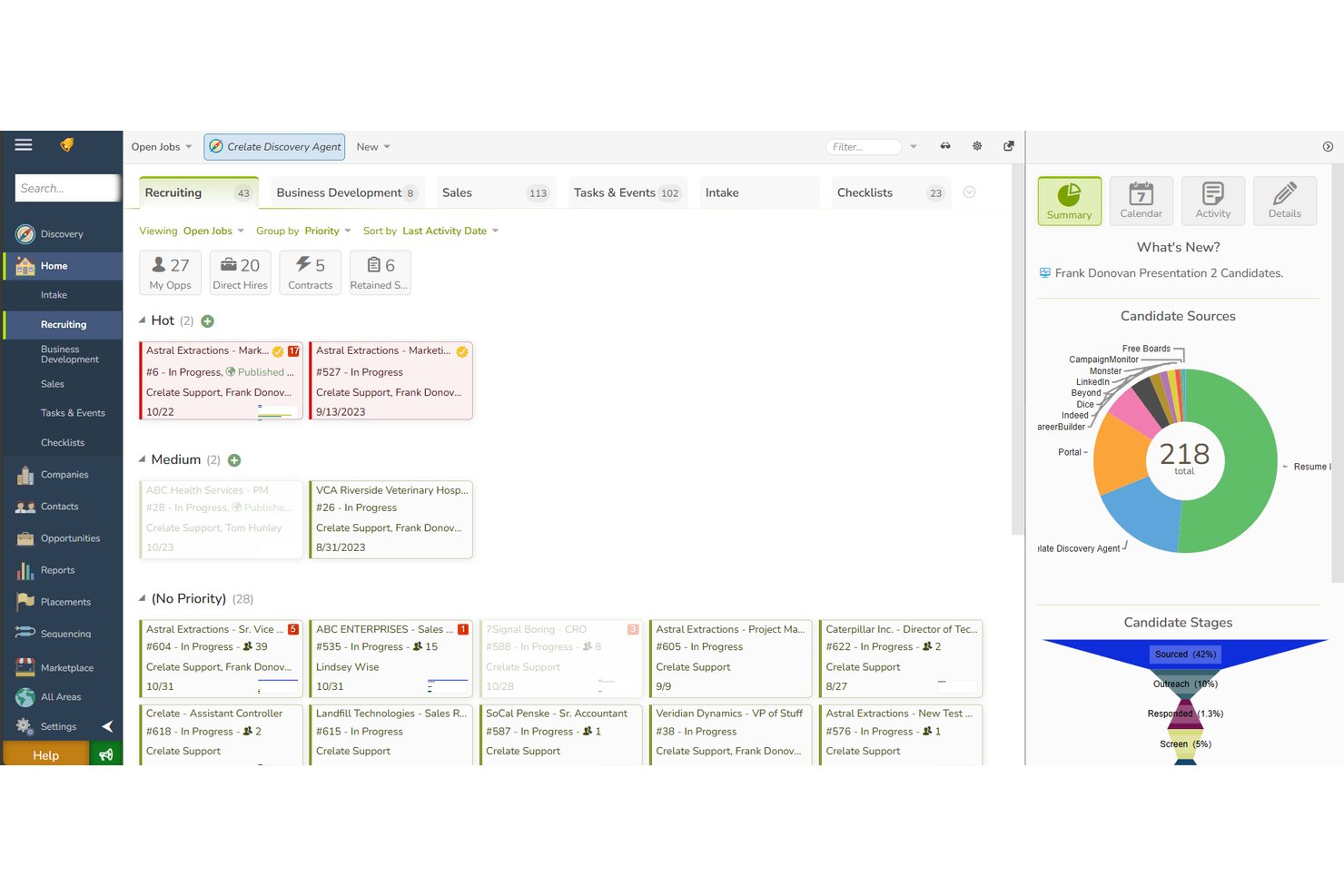
Crelate is an AI-powered ATS and recruiting CRM built for staffing agencies and search firms that need customizable pipelines, client relationship tracking, and automated sourcing in one platform.
Who Is Crelate Best For?
Crelate suits small to mid-sized recruiting and staffing agencies that want a flexible, all-in-one platform without the complexity or cost of enterprise-grade systems.
Why Crelate Is a Good Top Echelon Alternative
I've included Crelate in my top picks because its client and team portals make sharing job orders and candidate profiles with external recruiting partners genuinely practical. I particularly like how the Co-Pilot AI surfaces contextual candidate data within each record, so collaborating recruiters always have the full picture when working a shared search. Crelate's configurable pipeline stages and bulk activity tools keep split placements moving without version-control headaches.
Crelate Key Features
- Custom workflow automation: Set up drag-and-drop recruiting pipelines with automated tasks and reminders.
- AI-powered candidate discovery: Source and enrich candidate profiles from a database of up to 1 billion people and 20 million companies.
- Resume parsing toolbox: Quickly convert resume files and emails into searchable candidate profiles with structured data fields.
- Integrated back-office tools: Access pay and bill, timekeeping, and invoice features through third-party payroll and accounting integrations.
Crelate Integrations
Crelate offers native integrations with Outlook, Microsoft 365, RingCentral, Indeed, ZipRecruiter, Xero, HubSpot, and more. An API is available for custom integrations.
Pros and Cons
Pros:
- Configurable pipelines per job order
- AI candidate matching from large talent database
- Native split placement network built in
Cons:
- Reporting customization requires higher-tier plans
- Mobile app has limited functionality

Loxo
Best for AI-powered candidate sourcing
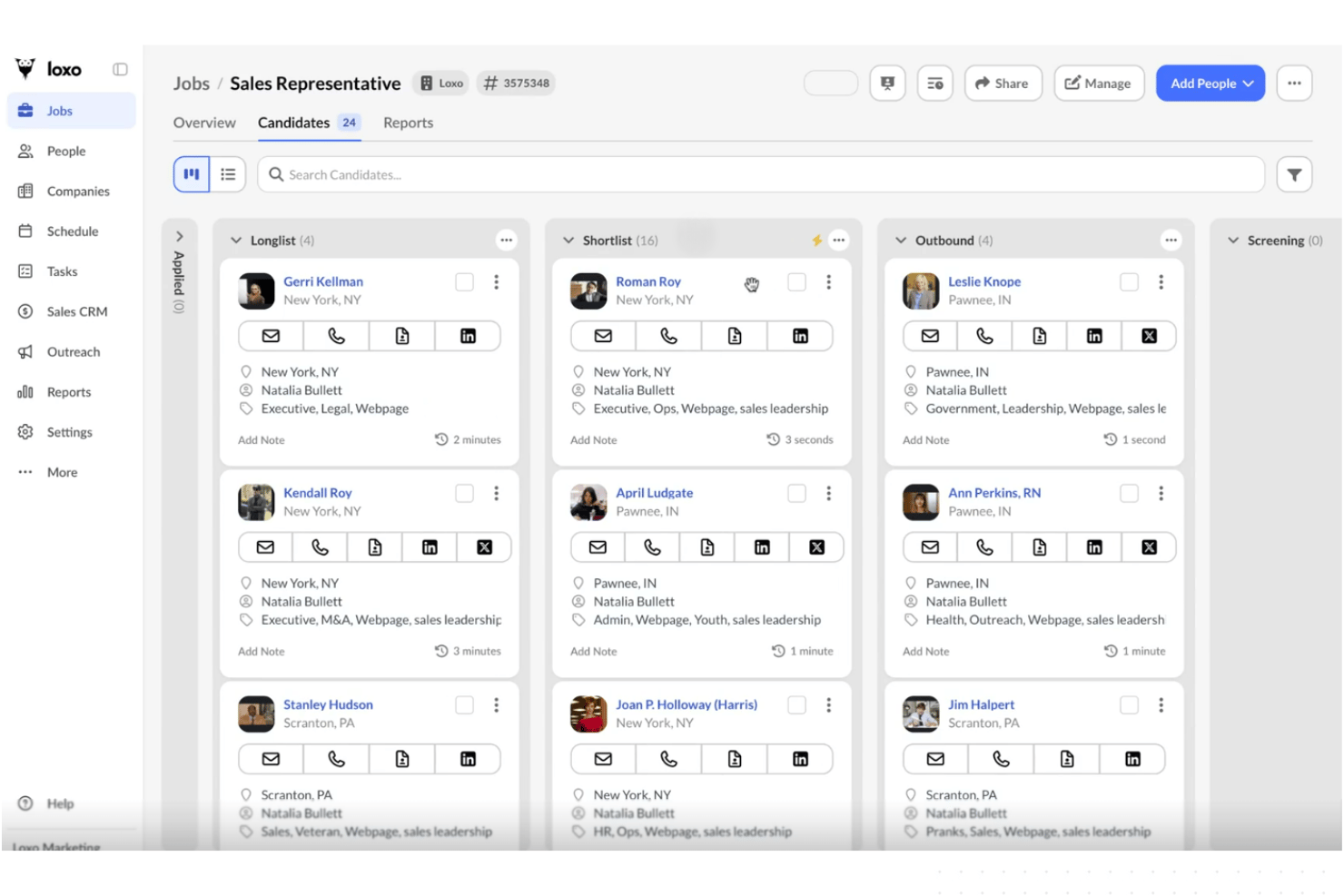
Loxo is an AI-native recruiting platform that unifies an ATS, recruiting CRM, and built-in talent sourcing into one system — making it a strong fit for boutique agencies and staffing firms that want to replace legacy tools with a single, modern platform.
Who Is Loxo Best For?
Loxo is a strong fit for small recruiting teams and independent headhunters who manage the full placement cycle without dedicated sourcing or CRM tools.
Why Loxo Is a Good Top Echelon Alternative
I've included Loxo in my top picks because its built-in talent graph gives recruiters direct access to over 850 million candidate profiles without needing a separate sourcing tool. I particularly like the Sourcing Agents, which automatically generate longlists and shortlists based on your job criteria. Loxo's natural language search also lets you find candidates the way you'd actually describe them, skipping the Boolean query syntax that slows most teams down.
Loxo Key Features
- Applicant tracking workflows: Create and manage customizable pipelines for every job requisition, with tracking across all hiring stages.
- Full recruiting CRM: Manage contacts, companies, and job order history alongside candidate records in a unified system.
- Job posting distribution: Post open roles to major job boards and a branded careers page directly from the platform.
- Integrated communications: Log, send, and track email, SMS, and call communication with candidates and clients inside Loxo.
Loxo Integrations
Loxo offers native integrations with Gmail, Outlook, LinkedIn, ZipRecruiter, Indeed, Monster, and CareerBuilder, and connects with Zapier. An API is available for custom integrations.
Pros and Cons
Pros:
- AI sourcing agents automate candidate discovery
- ATS and CRM combined in one platform
- Built-in talent graph with 850M+ profiles
Cons:
- Calling and SMS come as optional paid add-ons
- Free migration excludes data cleanup and customization

JobAdder
Best for multi-board job posting
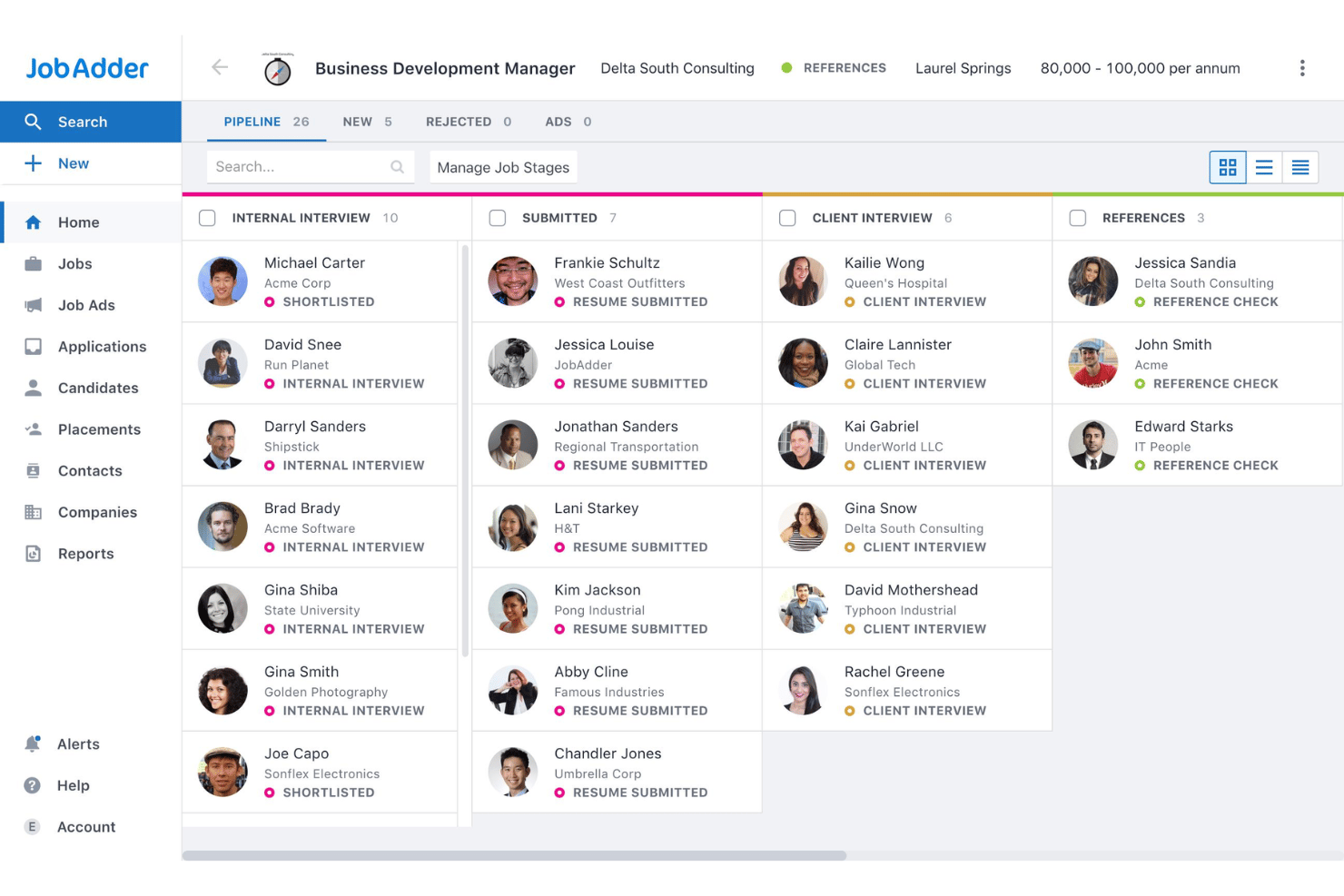
JobAdder is a recruitment ATS and CRM built for agencies and in-house talent teams that need to manage perm, temp, and contract hiring across a unified candidate pipeline, client database, and multi-board job distribution workflow.
Who Is JobAdder Best For?
JobAdder is a strong fit for boutique to mid-sized recruitment agencies running dual perm and temp desks who need structured workflows without enterprise-level complexity.
Why JobAdder Is a Good Top Echelon Alternative
JobAdder earns its spot on my shortlist because of how it handles job distribution at scale. I love that you can push a single role to 200+ job boards directly from the platform, and the Broadbean add-on extends that reach further with programmatic multi-posting across hundreds of additional channels. The Adder Intelligence layer also includes Smart Job Descriptions, which helps you produce board-ready role content before you post, cutting a real step out of the distribution workflow.
JobAdder Key Features
- Adder Intelligence AI tools: AI-powered Smart Summaries surface relevant candidate information for fast decision-making in each profile.
- Recruitment CRM pipeline: Manage client relationships, contacts, and business development activity alongside candidate pipelines in one database.
- Workflow automation: Automate candidate care, database hygiene, and marketing tasks with built-in Roi-AI automation rules.
- Mobile app for recruiters: Access candidate records, create tasks, and capture interview feedback from the JobAdder mobile app on the go.
JobAdder Integrations
JobAdder offers native integrations with LinkedIn, Broadbean, SEEK, Outlook, Gmail, Xero, and DocuSign, with an API available for custom integrations.
Pros and Cons
Pros:
- Built-in CRM alongside the candidate pipeline
- Supports both perm and temp hiring
- Multi-board posting to 200+ job boards
Cons:
- Custom reporting requires additional configuration
- No native split placement network

Bullhorn
Best for large-scale agency workflows
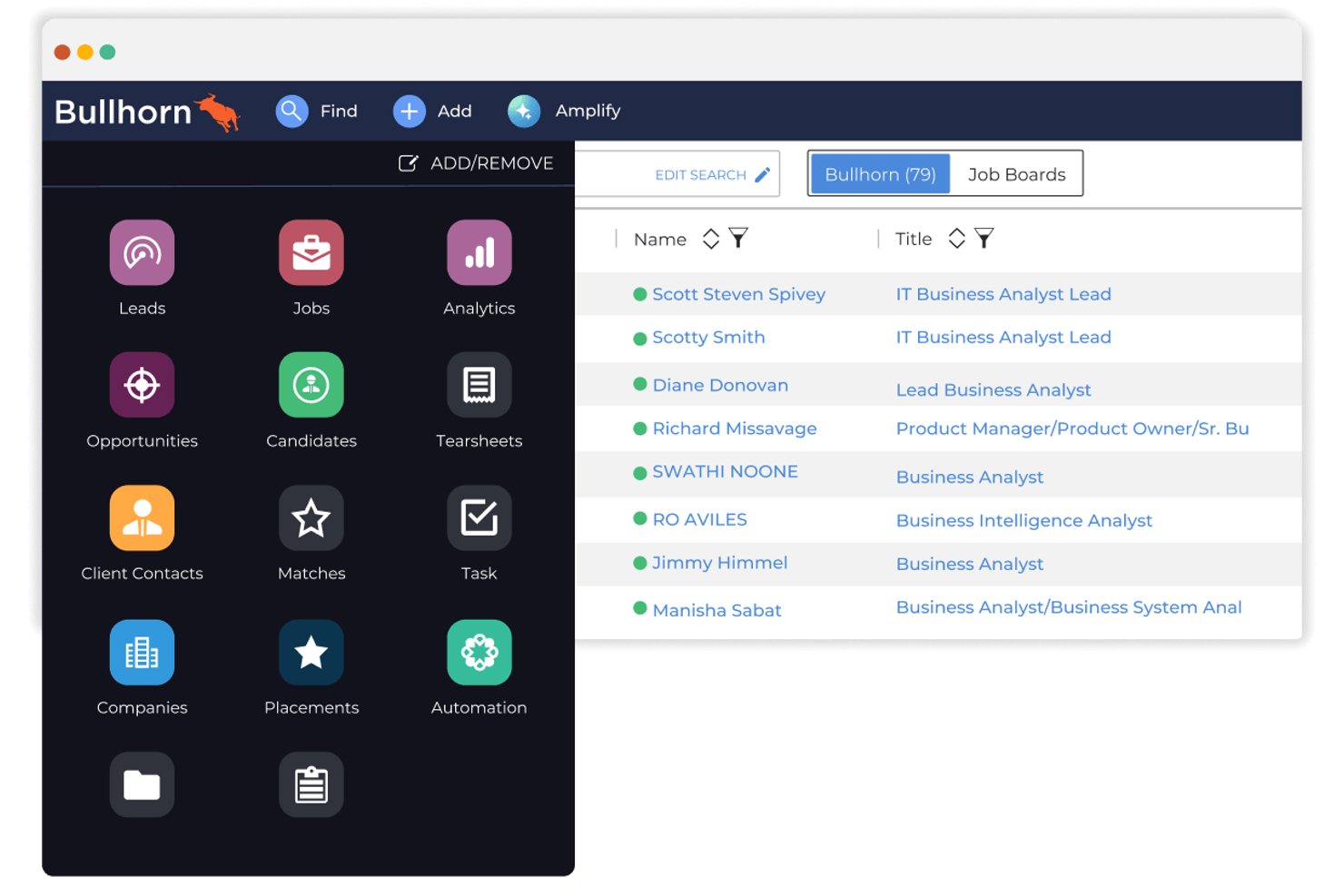
Bullhorn is an AI-first ATS and recruiting CRM built for staffing agencies that need to manage high-volume candidate pipelines, client relationships, job orders, and placement tracking in one platform.
Who Is Bullhorn Best For?
Bullhorn is a strong fit for mid-to-large staffing and recruiting agencies that run complex, high-volume operations across multiple recruiters, clients, and job orders simultaneously.
Why Bullhorn Is a Good Top Echelon Alternative
Bullhorn earns its spot on my shortlist because of how well it handles the operational complexity that staffing agencies outgrow Top Echelon trying to manage. I especially like the Amplify Digital Workers layer, which runs agentic sourcing, screening, and multi-step outreach autonomously across open job orders. Bullhorn's Recruitment CRM also keeps client BD pipelines, submittal history, and placement revenue linked in one view.
Bullhorn Key Features
- Multi-job board posting: Post jobs directly to multiple job boards and your branded careers page from within Bullhorn.
- Email sidebar integration: Access candidate and client records, parse resumes, and log communications right from Outlook or Gmail.
- Marketplace integrations: Connect with 300+ partner apps spanning background checks, assessments, messaging, and more via the Bullhorn Marketplace.
- Customizable pipeline workflows: Configure recruiting pipelines per job order with drag-and-drop stages and tailored activity tracking.
Bullhorn Integrations
Bullhorn offers hundreds of native and marketplace integrations, including LinkedIn, Gmail, Outlook, Indeed, Microsoft 365, Broadbean, DocuSign, ADP, QuickBooks, and Zapier. An API is available for custom integrations.
Pros and Cons
Pros:
- Native split placement tracking built in
- Scales across multi-desk agency operations
- AI-powered candidate matching across large databases
Cons:
- Advanced analytics are reserved for higher editions
- Starter tier limits teams to three active automations
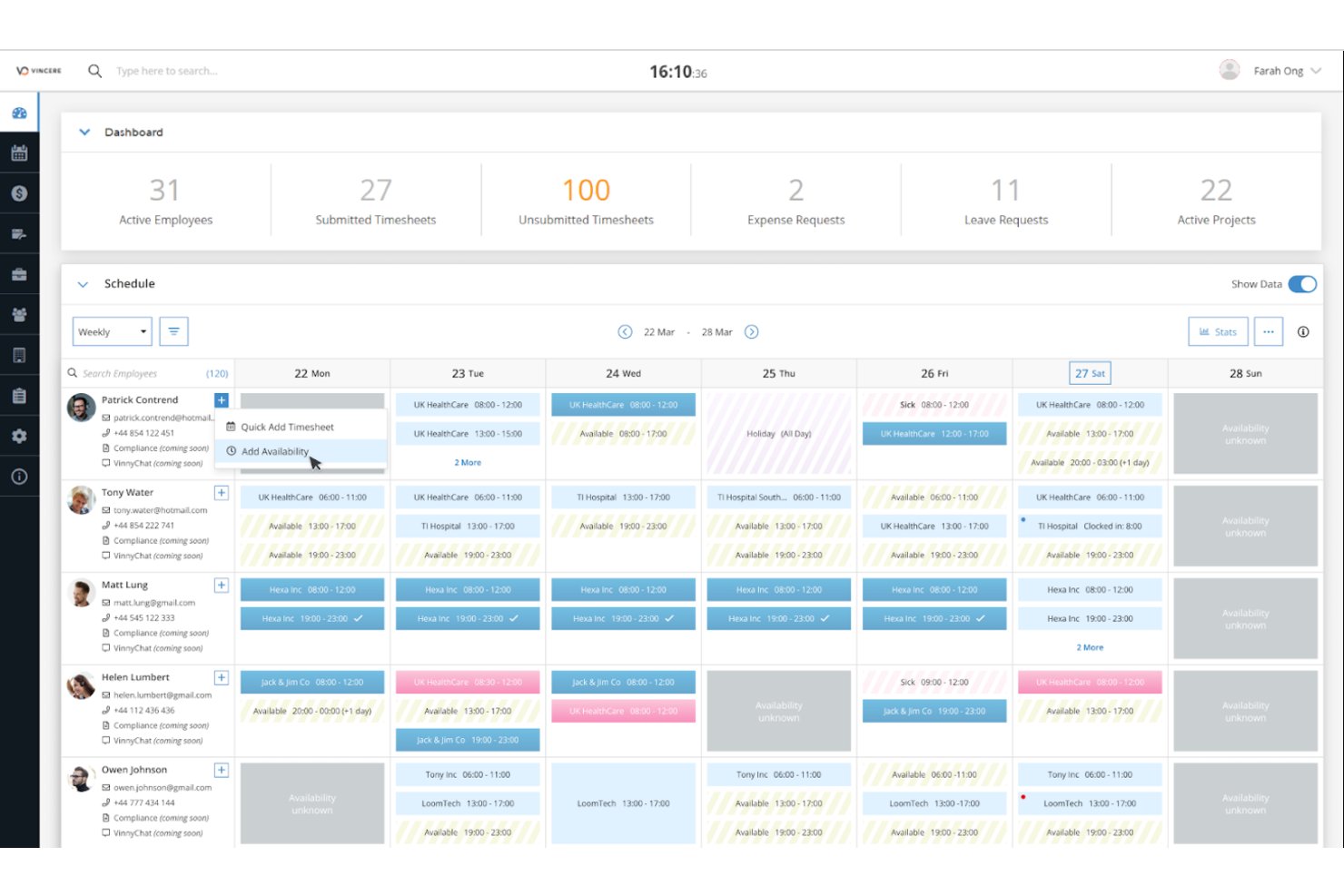
Access Vincere Evo is a unified CRM and ATS platform built for recruitment agencies that need AI-powered automation, deep performance analytics, and end-to-end placement management in a single system.
Who Is Access Vincere Evo Best For?
It's a strong fit for growing recruitment agencies and staffing firms that have outgrown basic ATS tools and need a more scalable, data-driven platform.
Why Access Vincere Evo Is a Good Top Echelon Alternative
I picked Access Vincere Evo as one of the best because its analytics capabilities go well beyond what Top Echelon offers. Base Analytics gives my team ready-made real-time dashboards for KPI and pipeline tracking, while the Custom Analytics add-on lets us build bespoke reporting around specific revenue and performance metrics. The Copilot AI layer surfaces candidate scoring data directly within the pipeline, so my team isn't just tracking activity but acting on it.
Access Vincere Evo Key Features
- TimeTemp module: Tracks timesheets, expenses, leave, and billing for contract and temp placements.
- Comms Hub: Centralizes omni-channel recruiter and client communications within the ATS/CRM.
- No-code candidate and client portals: Lets agencies create branded self-service interfaces for hiring managers and talent.
- Vinneo video interviewing: Built-in video interviews with AI scoring for streamlined candidate assessments.
Access Vincere Evo Integrations
Access Vincere Evo offers native integrations with Broadbean, Daxtra, Microsoft 365, Gmail, CloudCall, and LinkedIn, and provides an API for custom integrations.
Pros and Cons
Pros:
- Handles temp, contract, and perm workflows
- AI candidate scoring surfaces best-fit profiles
- Real-time revenue and KPI dashboards included
Cons:
- Mobile app has limited recruiter functionality
- Initial data migration support is inconsistent
Other Top Echelon Alternatives
Here are some additional Top Echelon alternatives options that didn’t make it onto my shortlist, but are still worth checking out:
- Recruiterflow
For customizable pipeline automation
- Zoho Recruit
For built-in global compliance features
- iSmartRecruit
For multilingual and global recruitment
- Tracker
For agencies pairing sales CRM with hiring
- Avionté
For staffing agencies with payrolling needs
- Clockwork
For executive search project collaboration
- Ezekia
For GDPR-compliant candidate workflows
- Invenias by Bullhorn
For executive search relationship management
- Thrive
For client reporting and analytics


How I Evaluate Top Echelon Alternatives
I evaluate Top Echelon alternatives against the same core features Top Echelon offers—ATS pipelines, recruiting CRM, and job posting. Then I look for differentiators like AI sourcing or split placement networks.
Core Functionality (Table Stakes for This List)
When I'm selecting tools for my list, I rank each one on a scale from 0 (does not offer the functionality) to 5 (excels in this area) for each core functionality listed below. Then, I calculate the tool's total score into a percentage. Each tool needs to achieve a minimum total score of 65% to be considered for inclusion.
- Applicant Tracking: I look for configurable pipelines that let recruiters move candidates through sourcing, submittal, interview, and placement stages per job order.
- Recruiting CRM: Each tool should link client companies, contacts, and job order history in one view so recruiters can track BD activity alongside placements.
- Resume Parsing & Database: I evaluate how well the parser handles different file formats and whether candidates become searchable profiles with structured, keyword-rich fields.
- Job Posting Distribution: Recruiters juggle multiple boards daily, so I check whether a tool can push roles to major job boards and a branded careers page in one step.
- Split Placement Network: I look for built-in ways to share job orders and candidates with external recruiters, since agencies like boutique firms often rely on splits to fill niche roles.
- Placement & Fee Tracking: I check whether the platform records placements, calculates fees and splits, and generates commission or revenue reports for agency owners.
Once I have a list of tools that meet the criteria, I consider what sets each platform apart.
Differentiating Factors (What Sets Vendors Apart)
Here's how I compare and contrast different vendors:
Standout Features
AI-powered candidate matching makes a real difference in daily recruiting. When a new job order comes in, some platforms automatically rank and surface candidates already in your database against that requisition. I also check for built-in sourcing extensions that let recruiters capture profiles from LinkedIn or job boards directly into the ATS without duplicate data entry. Client-facing portals are worth evaluating too. They give hiring managers a branded space to review submittals and leave feedback, which keeps placement cycles moving.
Beyond Features
Pricing model matters a lot when you're comparing these platforms. I check whether a vendor charges per user or offers flat-rate tiers, since that changes the math fast as your team grows. Data migration support is another big factor—moving years of candidate records out of Top Echelon means you need reliable import tools and field mapping assistance. I also consider agency size fit, because a solo recruiter needs a very different setup than a multi-desk staffing firm with manager reporting.
Why Look For A Top Echelon Alternative?
While Top Echelon is a good choice of applicant tracking systems, there are a number of reasons why some users seek out alternative solutions. You might be looking for a Top Echelon alternative because…
- Seeking more advanced reporting capabilities
- Requiring deeper customization of pipelines
- Outgrowing Top Echelon as your agency scales
- Seeking stronger integrations with other HR tools
- Looking for better support during data migration
If any of these sound like you, you’ve come to the right place. My list contains several applicant tracking systems options that are better suited for teams facing these challenges with Top Echelon and looking for alternative solutions.
Top Echelon Key Features
Here are some of the key features of Top Echelon, to help you contrast and compare what alternative solutions offer:
- Applicant tracking: Support candidate management through all hiring stages in configurable pipelines that make it easy to see progress and upcoming tasks across open job orders.
- Recruiting CRM: Manage customer relationship management, client companies, contacts, and lead management alongside candidate records in one central database with full text search.
- Resume parsing: Automatically convert resumes from uploads, emails, or job boards into structured, searchable candidate profiles with tagged data fields.
- Job posting distribution: Support job management by posting open positions to multiple job boards and your branded careers page directly through the platform.
- Split placement network: Use built-in collaboration tools to share job orders, candidates, and split fees with other recruiters or agencies.
- Placement and fee tracking: Track submitted candidates, record placements, calculate placement fees, and manage commission splits within the system for clearer financial reporting.
- Email and calendar integration: Sync conversations and calendars from Outlook or Gmail and use email templates to streamline recruiter and candidate communications.
- Custom workflow automation: Set up triggers and notifications for candidate stage movement, follow-ups, or client communications to reduce repetitive manual work.
- Client portal: Give hiring managers a login to review candidate submittals, leave feedback, and check placement progress all in one branded portal.