

En iyi bulut tabanlı HRIS platformları, tüm İK süreçlerinizi güvenli ve erişilebilir tek bir sistemde bir araya getirir; böylece bordroyu, yan hakları ve çalışan verilerini her yerden yönetebilirsiniz.
Birden fazla araç ve manuel iş akışıyla uğraşırken İK görevleri kısa sürede zaman alıcı ve hataya açık hâle gelebilir. Bulut tabanlı bir HRIS bu süreçleri otomatikleştirerek size gerçek zamanlı görünürlük, daha yüksek doğruluk ve hem ofiste çalışan hem de uzaktan çalışan ekipleri destekleme esnekliği sağlar.
Önde gelen sistemleri test edip incelememin ardından sezgisel, ölçeklenebilir ve büyüyen kuruluşlar için tasarlanmış en iyi bulut tabanlı HRIS çözümlerini belirledim. Bu rehberde İK yönetimini kolaylaştıran, uyumluluğu güçlendiren ve nerede çalışırlarsa çalışsınlar çalışanlarınızı desteklemenizi kolaylaştıran platformları bulacaksınız.
Why Trust Our Software Recommendations
6,700+
Reviews
20
Industry experts
16+
Evaluation factors
14
Years
Our team has been testing and reviewing software since 2012. As HR experts ourselves, we know how difficult—and important—it is to choose the right software.
For this guide, we evaluated tools using hands-on testing and independent research, scoring tools using our selection criteria. We also draw on insights from industry thought leaders and practicing HR experts.
Our reviews reflect our human editorial judgment, not a sales pitch.
Expert reviewers:
- Phil GrayCOO
 Kim BehnkeHR Tech Editor & Analyst
 Josh BarkerPeople Ops Manager

Bulut Tabanlı HRIS Karşılaştırma Tablosu
Aşağıdaki tabloda, en iyi bulut tabanlı HRIS seçimlerimin fiyatlandırma ayrıntıları karşılaştırılmaktadır.
Sorted by: Default
| Tool | Starting Price | Website | |
|---|---|---|---|
Best cloud HRIS with built-in global payroll | 4.8 out of 5 | $5/user/month Free demo available | Website |
Best for compliance assistance | 4.6 out of 5 | $79/user/month Free demo available | Book Demo |
Best with collaborative workforce planning tools | 4.5 out of 5 | Pricing upon request Free demo available | Website |
Best for aligned HRIS-employee development flow | 4.8 out of 5 | €4/user/month 14-day free trial + demo available | Website |
Best with optional AI tools for HR automation | 4.8 out of 5 | $2/user/month Free plan + free demo available | Website |
Best for simplified HR administration | 4.3 out of 5 | Pricing upon request Free demo available | Website |
Best for payroll integration | 4.6 out of 5 | $49/month Free trial + free demo available | Book Demo |
Best for integrated performance evaluation | 4.7 out of 5 | Pricing upon request 14-day free trial + free demo available | Website |
Best for geolocated employee time tracking | 4.8 out of 5 | $3.50/user/month 21-day free trial + free demo available | Website |
Best as AI for business | 4.4 out of 5 | $8/user/month Free trial + Free demo available | Website |


En İyi Bulut Tabanlı HRIS İncelemesi
Aşağıda, kısa listeme giren en iyi bulut tabanlı HRIS çözümlerine ilişkin ayrıntılı özetlerimi bulabilirsiniz. İncelemelerim, sizin için en uygun seçeneği bulmanıza yardımcı olmak amacıyla her aracın temel özelliklerini, artılarını & eksilerini, entegrasyonlarını ve ideal kullanım alanlarını ayrıntılı şekilde ele alıyor.
 Best cloud HRIS with built-in global payroll
- Free demo available
- From $5/user/month
Visit WebsiteCustomer Rating:4.8/5
Deel handles global hiring, payroll, and compliance for international teams. Deel is built for companies hiring and paying people across multiple countries. It helps your team manage international payroll, handle local compliance, and pay workers in different currencies through one platform. If you employ distributed talent or want a single system to run global HR operations, Deel is designed for you.
Why I Picked Deel
I picked Deel because it gives your team a reliable way to hire and pay international employees without needing in-country entities. You can generate compliant contracts, manage worker classifications, and run payroll in 100+ countries using one dashboard.
I like that Deel automates local tax calculations and ensures payments meet each country’s legal requirements, which helps reduce admin risk for global teams. Its built-in document collection and compliance alerts make cross-border onboarding much easier, and the ability to pay teams in multiple currencies from a centralized system also makes it a strong fit for businesses scaling internationally.
Deel Key Features
Here are some key features worth highlighting:
- Global Payroll Engine: Processes multi-country payroll with automated tax calculations and local compliance checks.
- Multi-Currency Payments: Sends payments to employees or contractors worldwide in their preferred currency.
- Localized Contract Templates: Provides country-specific agreements that match local employment and contractor laws.
- Compliance Alerts: Flags expiring documents, classification risks, or changing legal requirements across markets.
Deel Integrations
Integrations include QuickBooks, Xero, BambooHR, Rippling, Greenhouse, Lever, Workable, Gusto, Slack, and Zapier.
Pros and Cons
Pros:
- Provides multi-currency payment options through one system
- Offers localized contract templates for global teams
- Automates multi-country payroll tax calculations accurately
Cons:
- Time-tracking tools are somewhat basic
- Reporting customization narrower than some HRIS platforms
 Best for compliance assistance
- Free demo available
- From $79/user/month
Visit WebsiteCustomer Rating:4.6/5
Justworks offers a cloud-based paystub dashboard where employees can view pay details. Justworks is a cloud-based HR platform that combines payroll, benefits administration, compliance support, and employee management tools in a single system built around a professional employer organization (PEO) model.
Who Is Justworks Best For?
Justworks is a strong fit for small to mid-sized businesses that need PEO-backed HR, payroll, and benefits support without a large in-house HR team.
Why I Picked Justworks
Justworks earns its spot on my shortlist because it handles multi-state payroll tax filings, W-2s, 1099s, and ACA filings (1094-C and 1095-C) automatically, which removes a real burden from my team. I also appreciate that the platform includes built-in DEIB and sexual harassment prevention training with employee progress tracking, so I can meet state and city training mandates without sourcing a separate tool. When new regulations come up, Justworks members also get access to HR compliance consultants directly.
Justworks Key Features
- Automated payroll processing: Run payroll for full-time employees, contractors, and part-time staff, with automatic tax filings across multiple states.
- Employee onboarding: New hires complete paperwork, benefits enrollment, and direct deposit setup through a self-service online portal.
- PTO management: Set custom PTO policies, let employees submit requests, and give managers a dashboard to approve or track time off.
- Workforce reporting: Pull pre-built and custom reports on headcount, payroll spend, and employee data across your organization.
Justworks Integrations
Justworks offers native integrations with QuickBooks, Xero, NetSuite, Sage Intacct, Greenhouse Recruiting, JazzHR, Lever, 15Five, Culture Amp, Leapsome, Carta, Brex, Ramp, Trainual, Vanta, Electric AI, and allwhere.
Pros and Cons
Pros:
- Single-dashboard contractor payment processing
- Upfront public subscription tier pricing
- Access to large-group health insurance plans
Cons:
- Lacks performance management module
- No built-in shift scheduling tools
Learn more about Justworks: Best with collaborative workforce planning tools
- Free demo available
- Pricing upon request
Visit WebsiteCustomer Rating:4.5/5
HiBob offers an AI-powered job catalog generator that suggests job profiles, roles, families, and levels based on existing titles and departments. HiBob is a cloud-based HRIS built for mid-market and global teams, combining core HR, talent management, payroll, workforce planning, and people analytics in a single configurable platform.
Who Is HiBob Best For?
HiBob suits HR and people ops teams at scaling mid-size companies who need more structure and automation than a basic HRIS but aren't ready for a full enterprise HCM suite.
Why I Picked HiBob
HiBob earns its spot on my shortlist because of how genuinely collaborative its workforce planning tools are. In Bob's planning module, I can model headcount scenarios, adjust reporting structures, and share those drafts with Finance and business leaders before a single hire is approved. The Sandbox environment lets my team test configuration changes and planning scenarios without touching live data, which removes a lot of the risk from making structural decisions at speed.
HiBob Key Features
- AI-powered people analytics: Surfaces workforce trends, attrition risk, and predictive insights directly from your HRIS data.
- Customizable workflow automation: Lets HR admins design and launch hiring, onboarding, and PTO approval flows without IT support.
- Embedded DEI dashboards: Tracks diversity, equity, and inclusion metrics including representation, pay equity, and hiring rates.
- Global HR compliance tools: Supports local rules, data residency, and audit trails across multiple countries and regions.
HiBob Integrations
HiBob offers 100+ native integrations, including ADP Workforce Now, Gusto, Paylocity, Xero, Slack, Microsoft 365, Google Workspace, DocuSign, Greenhouse, and Namely. An open API is available for custom integrations.
Pros and Cons
Pros:
- Mobile app supports full employee self-service
- Visual org charts update in real time
- Performance reviews and goal-setting built in
Cons:
- Advanced reporting requires significant setup time
- No native payroll module for most regions
 Best for aligned HRIS-employee development flow
- 14-day free trial + demo available
- From €4/user/month
Visit WebsiteCustomer Rating:4.8/5
Leapsome’s employee profile view shows centralized records, updates, and change logs in one organized workspace. Leapsome is built for organizations that want a connected HRIS that also supports performance, engagement, and employee development in one system. It centralizes your people data and daily HR workflows so your team can manage operations while keeping growth and culture in focus.
Why I Picked Leapsome
I picked Leapsome because it links core HR data with goal-setting, performance reviews, and development workflows, giving you a single source of truth for the employee lifecycle.
Its unified employee profile helps your team keep records, updates, and development history aligned across tools. I also like how its AI assistant, Leapy, can draft policies, surface insights, and suggest actions based on your HR data.
These features make it a strong fit if you want an HRIS that handles operations while supporting continuous people development. Plus, automated checks during payroll syncs reduce manual errors, which is especially helpful for growing teams.
Leapsome Key Features
Here are some key features worth highlighting:
- Time tracking & absence management: Built-in tools to track work hours, leave requests, and attendance without spreadsheets.
- Secure document storage: Centralized, permission-controlled storage for employee files, signatures, and key records.
- Onboarding & pre-boarding workflows: Automated task sequences that help new hires start with consistency and clarity.
- Automated payroll validations: Flags missing or inconsistent data before payroll runs to help reduce correction work.
Leapsome Integrations
Integrations include Slack, Microsoft Teams, Personio, BambooHR, Google Workspace, Azure Active Directory, Okta, Workday, Asana, and Jira.
Pros and Cons
Pros:
- Engagement surveys include benchmarks and actionable recommended next steps
- Automates onboarding, time tracking, and payroll syncs to reduce manual tasks
- Connects HRIS data directly with goals, reviews, and development workflows
Cons:
- Limited customization for niche business requirements
- Mobile experience is less polished than the desktop environment
 Best with optional AI tools for HR automation
- Free plan + free demo available
- From $2/user/month (billed annually)
Visit WebsiteCustomer Rating:4.8/5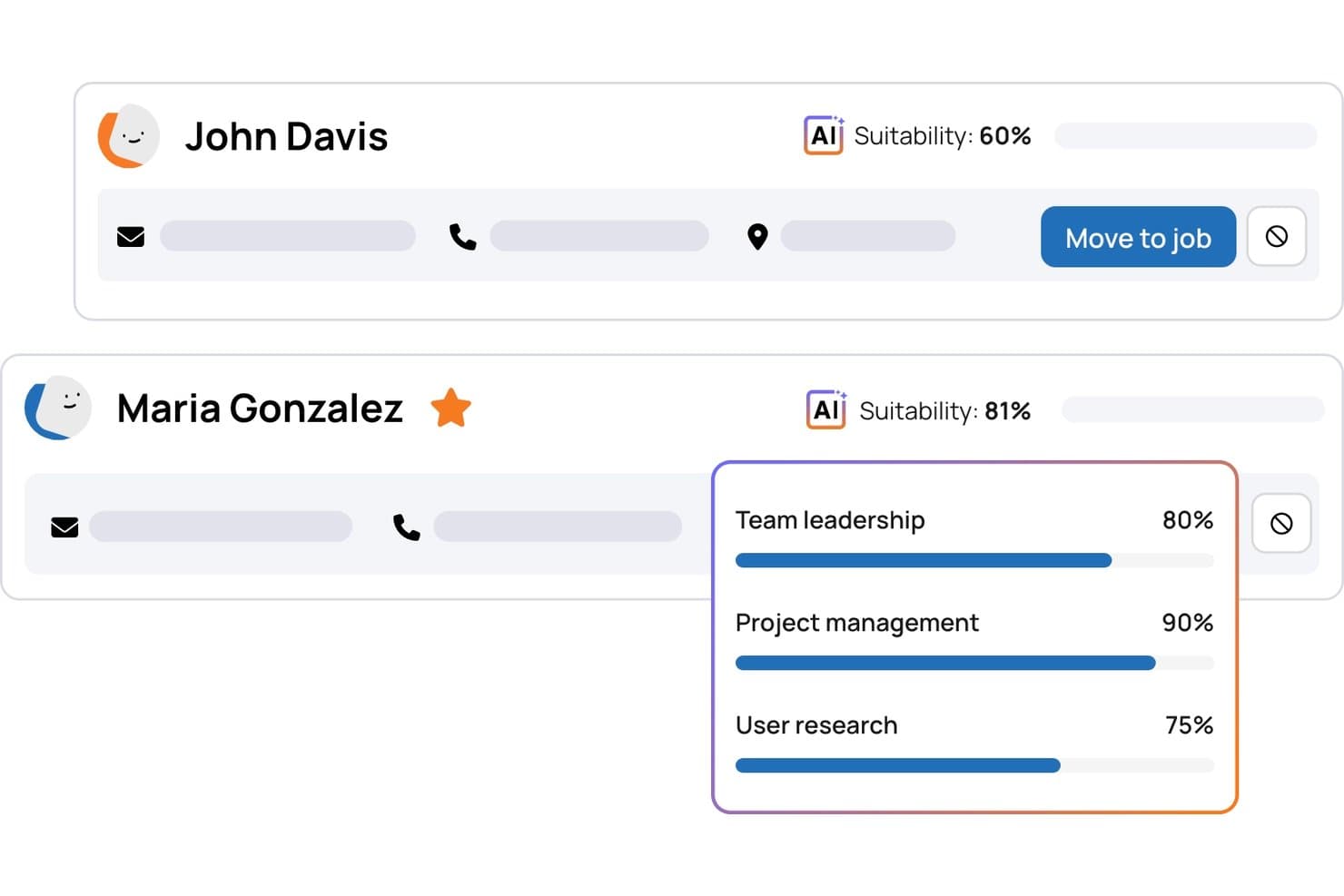
TalentHR offers AI-powered candidate suitability scoring with skill breakdowns to help educators and hiring teams quickly evaluate applicants. TalentHR is a cloud-based HRIS platform designed for teams seeking centralized employee records, automated onboarding, simple time-off tracking, and configurable workflows in one system.
Who Is TalentHR Best For?
TalentHR suits growing small and midsize businesses that need intuitive HR management without heavy IT resources or enterprise complexity.
Why I Picked TalentHR
I picked TalentHR as one of the best because the platform lets me layer in optional AI tools to automate HR admin without disrupting existing processes. I quickly generate onboarding documents and automate recurring HR tasks while keeping core employee data and workflows connected in the same cloud system.
TalentHR Key Features
- Self-service employee portal: Employees can update personal info, request leave, and access HR documents online.
- Org chart builder: Visualize team structure with automated organization charts.
- Asset tracking: Assign and monitor company equipment or devices to specific team members.
- Document e-signature: Collect digital signatures for contracts and policy acknowledgments directly within the platform.
TalentHR Integrations
TalentHR offers native integrations with Google Calendar, Slack, and Microsoft 365. An API is available for custom integrations.
Pros and Cons
Pros:
- Responsive customer support with fast turnaround
- Customizable onboarding workflows and document templates
- Optional AI tools automate repetitive HR tasks
Cons:
- Limited advanced workflow branching options
- No native payroll processing module
Learn more about TalentHR: Best for simplified HR administration
- Free demo available
- Pricing upon request
Visit WebsiteCustomer Rating:4.3/5
Paylocity's self-service portal lets employees manage their personal data, view pay stubs, and request time off. Paylocity is cloud-based HR software designed to simplify core HR, payroll, and workforce management processes for businesses of all sizes. With its intuitive interface and mobile accessibility, it helps teams manage day-to-day operations while enhancing the employee experience.
Why I picked Paylocity: I chose Paylocity for its self-service capabilities that give employees direct access to their payroll, benefits, and time-off data. This not only empowers your workforce but also reduces administrative overhead. Additionally, its real-time analytics and AI-powered dashboards provide actionable insights into metrics like turnover risk and compensation trends, helping you make smarter workforce decisions.
Standout features & integrations:
Features include payroll automation, compliance tracking, and tools to manage the full talent lifecycle—from recruiting and onboarding to performance reviews and learning. Its mobile app supports HR functions on the go, and the platform integrates seamlessly with existing systems through its open API and 350+ marketplace connections.
Integrations include Criteria Corp, eSkill, HighMatch, PARiM, Plum, The Predictive Index, Sage Intacct, NetSuite, Microsoft Teams, Salesforce, Greenhouse, and BambooHR.
Pros and Cons
Pros:
- Tailored workflows and reports
- On demand payment options
- Includes tax compliance services
Cons:
- Limited customization options in certain modules
- Setup can be time consuming
 Best for payroll integration
- Free trial + free demo available
- From $49/month
Visit WebsiteCustomer Rating:4.6/5
Gusto supports SMBs with HR, payroll, and employee management. Gusto is a cloud-based HRIS platform for small and midsize businesses' payroll, benefits, and HR management. It supports day-to-day HR tasks, from hiring and onboarding to compliance and employee recordkeeping.
Why I picked Gusto: Gusto excels in payroll integration, making it ideal for businesses needing reliable payroll solutions. Its automatic payroll tax filing saves time and reduces errors. Employee benefits management also makes it easy to offer competitive packages. Gusto's compliance support helps your team stay up-to-date with the latest regulations.
Standout features & integrations:
Features include employee self-service, time tracking, and document management. Employee self-service empowers your team to manage their own information. Time tracking helps you monitor hours worked accurately. Document management ensures you can effortlessly store and organize important files.
Integrations include QuickBooks, Xero, TSheets, Clover, FreshBooks, Expensify, Deputy, When I Work, Trainual, and Zapier.
Pros and Cons
Pros:
- Customizable payroll settings
- Strong compliance support
- User-friendly interface
- Simple benefits administration
- Automatic tax filing feature
Cons:
- No mobile app for employees
- Limited international payroll options
- Occasional customer support delays
- Basic reporting tools
- Limited advanced HR features
 Best for integrated performance evaluation
- 14-day free trial + free demo available
- Pricing upon request
Visit WebsiteCustomer Rating:4.7/5
Sloneek provides an overview of HR and payroll management for hybrid workforces. Sloneek is built for HR teams that want a single place to manage time tracking, performance evaluations, and core HR operations. It’s especially useful for organizations with hybrid or distributed teams that need clear visibility into attendance, productivity, and employee development.
Why I Picked Sloneek
I picked Sloneek because it gives you clear oversight of your team’s time, attendance, and availability through its combined time tracking and absence-management tools.
You can monitor attendance, approve leave, and review productivity without switching between systems, and I also like how its performance management tools let you run 360° reviews, track KPIs, and create structured evaluations.
These tools pair well with its employee-engagement surveys, which surface sentiment data so you can act on feedback earlier. For organizations juggling both HR operations and performance oversight, Sloneek keeps everything connected in one platform.
Sloneek Key Features
Here are some key features worth highlighting:
- Electronic document management: Store contracts and HR files in one place with secure e-signatures.
- Whistleblowing tool: Provide employees a confidential channel to report concerns safely.
- Competency evaluation: Map skills and track employee growth across defined competency frameworks.
- HR automation: Build automated workflows for onboarding, offboarding, and internal processes.
Sloneek Integrations
Integrations include Google Calendar, Google Workspace, Microsoft Active Directory, Jira, Outlook, Azure AD, Slack, Zapier, Okta, and MS Teams.
Pros and Cons
Pros:
- Built-in document management and secure electronic signatures
- Performance management with 360 degree feedback & KPI/OKR tracking
- Robust time management with tracking, absence, and attendance tools
Cons:
- Advanced analytics may require additional configuration for full use
- Payroll functionality is limited compared to dedicated payroll platforms
Learn more about Sloneek: Best for geolocated employee time tracking
- 21-day free trial + free demo available
- From $3.50/user/month
Visit WebsiteCustomer Rating:4.8/5
Agendrix displays a color-coded weekly schedule with shift details, open slots, and time-off visibility, helping managers assign roles and avoid conflicts. Agendrix is a cloud-based HRIS built for shift-based teams that need accurate time tracking and clear scheduling. It's especially useful for small and mid-sized businesses in fields like retail, hospitality, and healthcare that rely on geolocated clock-ins and mobile-first workforce coordination.
Why I Picked Agendrix
I picked Agendrix because it helps you manage hourly teams more reliably with tools that prevent attendance errors and scheduling conflicts. You can assign shifts, approve time-off requests, and publish schedules from a single dashboard, giving your team real-time clarity on where they need to be.
Its geolocated and biometric clock-in options help ensure accurate attendance records, reducing payroll discrepancies. I also like that it auto-generates timesheets you can export directly to payroll. For teams in Canada, the bilingual interface and strong local payroll connections offer an added advantage.
Agendrix Key Features
Here are some key features worth highlighting:
- Geolocated Clock-Ins: Ensures employees clock in from approved locations for accurate attendance.
- Automated Timesheets: Converts time entries into payroll-ready exports with minimal admin effort.
- Shift Request Management: Lets employees request swaps or time off and gives managers instant approval tools.
- Document Storage: Keeps onboarding forms, policies, and employee files organized in one place.
Agendrix Integrations
Integrations include EmployerD, Nethris, Sage 50, Acomba, QuickBooks, Ceridian Powerpay, ADP Workforce Now, Payworks, Lightspeed, Azur, Easypay, BeLocum, Hopem, and Folks HR.
Pros and Cons
Pros:
- Bilingual interface supports English and French teams
- Mobile app supports quick schedule updates for hourly workers
- Geofenced clock-ins reduce inaccurate or off-site punches
Cons:
- Limited customization options for reports and analytics
- Certain integrations may require manual setup
Learn more about Agendrix: Best as AI for business
- Free trial + Free demo available
- From $8/user/month
Visit WebsiteCustomer Rating:4.4/5
Factorial's AI Analytics generates headcount reports with insights and recommendations. Factorial is a cloud-based HRIS that combines employee data management, time tracking, onboarding workflows, performance reviews, and AI-assisted operations across scheduling, reporting, and policy Q&A.
Who Is Factorial Best For?
Factorial suits small and mid-sized businesses that want AI-assisted HR operations—from scheduling and reporting to answering employee policy questions—without managing multiple separate tools.
Why I Picked Factorial
I've included Factorial in my top picks because its AI-for-business positioning goes well beyond a chatbot—it actively helps with day-to-day operations like building shift schedules, generating reports, and answering employee questions about company policies on the spot. I particularly like One, Factorial's AI agent, which delivers instant insights and summaries so HR teams aren't stuck pulling data manually. The AI-assisted scheduling and policy Q&A make Factorial a genuinely practical cloud-based HRIS for small and mid-sized teams managing high volumes of routine requests.
Factorial Key Features
- Employee self-service portal: Employees can view and update personal information, check time-off balances, submit requests, and access payslips and documents directly from the platform.
- 360-degree performance reviews: Managers and peers can evaluate employee performance, provide structured feedback, and set goals through Factorial's built-in review workflows.
- Shift scheduling and time tracking: Teams can plan rotating or automated shifts in bulk and track employee hours, including mobile clock-in with geolocation via the app.
- Org chart visualization: Factorial auto-generates an organizational chart showing reporting lines, team structure, and vacant roles, updated in real time as changes occur.
Factorial Integrations
Factorial lists marketplace integrations including Silae, DATEV LODAS, Sage, Google Workspace, Slack, Okta, and Microsoft Power BI. It also offers a public API, webhooks, SDKs, API keys, OAuth 2.0, and Zapier.
Pros and Cons
Pros:
- Self-service cuts routine leave and document requests
- Centralized employee records reduce spreadsheet dependence
- AI assists scheduling, reports, and policy answers
Cons:
- Complex workflows can resist specific configurations
- Advanced reporting often requires workarounds
Diğer Bulut Tabanlı HRIS Çözümleri
Kısa listeme giremeyen ancak yine de göz atmaya değer bazı ek bulut tabanlı HRIS seçenekleri şunlardır:
- 11HR CloudBest for employee engagement
- 12GoCoBest for customizable workflows
- 13OracleBest for global operations
- 14ChartHopBest for customizable people data views
- 15WorkdayBest for large enterprises
- 16PersonioBest for small to mid-sized companies
- 17UKG ProBest for workforce analytics
- 18SAP SuccessFactorsBest for talent management
- 19FrappeBest for open-source flexibility
- 20RipplingBest for IT and HR integration
- 21BambooHRBest for small businesses
- 22CezanneBest for multi-country operations
- 23PaycorBest for payroll features
- 24KissflowBest for customizable workflows
How I Evaluate Cloud-Based HRIS
I evaluate cloud-based HRIS in two layers—core functionality any tool must have (think: employee records, self-service, and compliance reporting) and differentiators that set the right fit apart.
Core Functionality (Table Stakes For This List)
When I'm selecting tools for my list, I rank each one on a scale from 0 (does not offer the functionality) to 5 (excels in this area) for each core functionality listed below. Then, I calculate the tool's total score into a percentage. Each tool needs to achieve a minimum total score of 75% to be considered for inclusion.
- Employee Database Management: I look for a centralized system of record where HR teams can store job histories, compensation data, and org structures without toggling between spreadsheets.
- Self-Service Portals: Employees and managers should be able to update addresses, submit PTO requests, and approve workflows from both desktop and mobile browsers.
- Onboarding & Lifecycle Management: I evaluate whether a platform handles the full hire-to-exit journey, including offer letter e-signatures, task assignments, and IT provisioning triggers.
- Benefits & Time-Off Administration: This covers PTO accrual policies, leave request approvals, and benefits enrollment—I check whether the tool connects to carriers or requires manual entry.
- Compliance & Reporting: I look for custom report builders that let HR teams pull EEO, headcount, or turnover reports on demand rather than relying on IT or pre-built templates alone.
- Integrations & API Access: A cloud HRIS needs to fit into your existing stack, so I check for native connectors to major payroll and ATS platforms plus a documented API for custom builds.
Once I have a list of tools that meet this criteria, I consider what sets each platform apart.
Differentiating Factors (What Sets Vendors Apart)
Here's how I compare and contrast different vendors:
Standout Features
Global payroll support matters when your workforce spans multiple countries—I check whether a platform handles localized tax rules natively or through certified partners. Configurable workflows are another differentiator I evaluate closely, since no-code approval chains save HR teams real time during open enrollment or org restructures. I also look for built-in performance and engagement tools like review cycles and pulse surveys that tie directly to the employee record rather than requiring a separate platform.
Beyond Features
Scalability is a big factor—I check whether a platform fits your current headcount and can grow with you as you add entities or expand into new regions. Compliance and data security also carry real weight here, since your HRIS holds sensitive employee data. Certifications like SOC 2 Type II and role-based access controls help me gauge how seriously a vendor treats data protection. Total cost of ownership rounds out my evaluation, because implementation fees and add-on module pricing can shift the value equation quickly.
Bulut Tabanlı HRIS Nasıl Seçilir?
Uzun özellik listeleri ve karmaşık fiyatlandırma yapıları içinde kaybolmak kolaydır. Kendinize özgü yazılım seçimi sürecinizde ilerlerken odağınızı korumanıza yardımcı olmak için göz önünde bulundurmanız gereken faktörleri aşağıda bir kontrol listesi hâlinde bulabilirsiniz:
| Faktör | Dikkat Edilmesi Gerekenler |
|---|---|
| FaktörÖlçeklenebilirlik | Dikkat Edilmesi GerekenlerSistemin ekibinizle birlikte büyüyebildiğinden emin olun. Performans sorunları yaşamadan artan veri ve kullanıcı sayılarını yönetebilecek bir çözüme ihtiyacınız olacaktır. |
| FaktörEntegrasyonlar | Dikkat Edilmesi GerekenlerMevcut araçlarınızla uyumluluğu kontrol edin. Sistemler arasındaki sorunsuz veri akışı zamandan tasarruf sağlayabilir ve hataları azaltabilir. |
| FaktörÖzelleştirilebilirlik | Dikkat Edilmesi GerekenlerSistemi özel ihtiyaçlarınıza göre uyarlamanıza olanak tanıyan özellikleri arayın. Özel iş akışları ve alanlar, yazılımın süreçlerinize daha iyi uyum sağlamasına yardımcı olabilir. |
| FaktörKullanım Kolaylığı | Dikkat Edilmesi GerekenlerEkibiniz için öğrenme sürecini göz önünde bulundurun. Sezgisel bir arayüz eğitim süresini kısaltabilir ve benimseme oranlarını artırabilir. |
| FaktörBütçe | Dikkat Edilmesi GerekenlerYazılım maliyetini mali planınızla uyumlu hâle getirin. Gizli ücretler içermeden bütçenize uyan bir fiyatlandırma modeli arayın. |
| FaktörGüvenlik Önlemleri | Dikkat Edilmesi GerekenlerGüçlü güvenlik önlemleriyle veri korumasına öncelik verin. Sağlayıcının şifreleme, düzenli yedekleme ve veri düzenlemelerine uyumluluk sunduğundan emin olun. |
| FaktörDestek | Dikkat Edilmesi GerekenlerMüşteri desteğinin kalitesini ve erişilebilirliğini değerlendirin. Sorunlar ortaya çıktığında hızlı ve etkili yardım kritik önem taşıyabilir. |
| FaktörMobil Erişim | Dikkat Edilmesi GerekenlerYazılımın mobil uygulama veya duyarlı tasarım sunup sunmadığını belirleyin. Ekibinizin hareket hâlindeyken sisteme erişmesi gerekebilir. |
Bulut Tabanlı HRIS Trendleri
Araştırmam sırasında farklı bulut tabanlı HRIS sağlayıcılarından sayısız ürün güncellemesi, basın bülteni ve sürüm günlüğü derledim. Takip ettiğim yeni trendlerden bazıları şunlar:
- Yapay zekâ odaklı analizler: Yapay zekâ, iş gücü verileri hakkında daha derin içgörüler sunmak için kullanılıyor ve bilinçli kararları daha hızlı almanıza yardımcı oluyor. Workday gibi yapay zekâ HRIS sağlayıcıları, çalışan devir hızını tahmin etmek ve iş gücü planlamasını optimize etmek için yapay zekâdan yararlanıyor.
- Çalışan sağlığı programları: Daha fazla HRIS sistemi, çalışan sağlığını desteklemek için sağlık özelliklerini entegre ediyor. Bunlar arasında ruh sağlığı kaynakları ve fitness takibi yer alıyor. Örneğin SAP SuccessFactors, çalışanların refahını artırmaya yönelik araçlar sunuyor.
- Uzaktan çalışma desteği: Uzaktan çalışma standart hâline geldikçe HRIS araçları, dağınık ekipleri yönetmeye yönelik özelliklerini geliştiriyor. Buna sanal işe alıştırma ve uzaktan performans takibi de dâhil. Bir küresel HRIS sağlayıcısı olan Deel, özellikle uluslararası uzaktan çalışan ekipler için tasarlanmış çözümler sunuyor.
- Yetenek geliştirme platformları: HRIS sağlayıcıları, sürekli öğrenmeyi teşvik etmek için yetenek geliştirme araçlarını bünyelerine katıyor. Bu platformlar, çalışanların yetkinliklerini geliştirmelerine ve rekabetçi kalmalarına yardımcı oluyor. TalentHR, çalışanların sürekli gelişimini desteklemek için öğrenme yönetimini entegre ediyor.
- Kişiselleştirilmiş çalışan deneyimleri: HRIS özelleştirmesi, bireysel çalışan ihtiyaçlarına ve tercihlerine uyum sağlamak üzere yaygınlaşıyor. Bu trend, kişiye özel kullanıcı deneyimleri sunarak bağlılığı artırıyor. Oracle HCM Cloud, gösterge panellerinin ve iş akışlarının kişiselleştirilmesine olanak tanıyor.
Bulut Tabanlı HRIS Nedir?
Bulut tabanlı HRIS, çeşitli İK görevlerini ve verilerini çevrim içi bir platform üzerinden yönetmeye yardımcı olan bir yazılım çözümüdür. İK profesyonelleri, yöneticiler ve işletme sahipleri bu araçları genellikle çalışan kayıtlarının yanı sıra bordro, yan haklar ve diğer süreçleri yönetmek için kullanır.
Yapay zekâ odaklı analizler, çalışan sağlığı programları ve uzaktan çalışma desteği gibi özellikler karar alma, çalışan sağlığı ve dağınık ekiplerin yönetimi konularında yardımcı olur. Genel olarak bu araçlar, İK süreçlerinin verimli şekilde yönetilmesini sağlar ve iş gücü verimliliğini artırır.
Özellikler
Bulut tabanlı HRIS seçerken aşağıdaki temel özelliklere dikkat edin:
- Yapay zekâ odaklı analizler: Bilinçli karar alma için iş gücü verilerine ilişkin içgörüler sunar.
- Çalışan sağlığı programları: Ruh sağlığı kaynakları ve fitness takibiyle çalışan sağlığını destekler.
- Uzaktan çalışma desteği: Sanal işe alıştırma ve performans takibiyle dağınık ekiplerin yönetilmesini kolaylaştırır.
- Yetenek geliştirme platformları: Sürekli öğrenme araçlarıyla çalışanların yetkinliklerini geliştirmelerine ve rekabetçi kalmalarına yardımcı olur.
- Kişiselleştirilmiş çalışan deneyimleri: Kişiye özel kullanıcı deneyimleri sunarak bağlılığı artırır.
- İzin takibi: İzin taleplerini otomatikleştirir ve programları verimli şekilde günceller.
- Performans yönetimi: Düzenli geri bildirim ve çalışan değerlendirmelerini kolaylaştırır.
- Özelleştirilebilir iş akışları: Süreçleri özel işletme ihtiyaçlarınıza uyacak şekilde uyarlamanıza olanak tanır.
- Uyumluluk yönetimi: Farklı bölgelerdeki yerel yasalara ve düzenlemelere uyulmasını sağlar.
- Mobil erişim: Hareket hâlindeyken İK araçlarına erişim sağlayarak uzaktan çalışma ortamlarını destekler.
Faydalar
Bulut tabanlı HRIS uygulamak, ekibiniz ve işletmeniz için çeşitli faydalar sağlar. Yararlanabileceğiniz birkaç fayda şunlardır:
- Geliştirilmiş karar alma: Yapay zekâ odaklı analizler, bilinçli seçimler yapmanıza yardımcı olacak içgörüler sunar.
- Artırılmış çalışan bağlılığı: Kişiselleştirilmiş deneyimler ve sağlık programları morali ve verimliliği yükseltir.
- Verimli uzaktan yönetim: Uzaktan çalışma desteği özellikleri, dağınık ekiplerin yönetimini kolaylaştırır.
- Kolaylaştırılmış uyumluluk: Uyumluluk yönetimi, yerel ve uluslararası düzenlemelere uymanızı sağlar.
- Sürekli öğrenme: Yetenek geliştirme platformları ekibinizin rekabetçi ve motive kalmasını sağlar.
- Zaman tasarrufu: İzin takibi ve bordro gibi otomatikleştirilmiş süreçler idari görevleri azaltır.
- Esneklik ve ölçeklenebilirlik: Özelleştirilebilir iş akışları ve ölçeklenebilir çözümler, işletmenizin ihtiyaçlarıyla birlikte büyür ( SaaS yönetim araçları da bu konuda yardımcı olabilir)
Maliyetler ve Fiyatlandırma
Bulut tabanlı HRIS seçimi, mevcut çeşitli fiyatlandırma modellerinin ve planların anlaşılmasını gerektirir. Maliyetler özelliklere, ekip büyüklüğüne, eklentilere ve daha fazlasına göre değişir. Aşağıdaki tablo, bulut tabanlı HRIS çözümlerinde yaygın planları, ortalama fiyatlarını ve genellikle sunulan özellikleri özetlemektedir:
Bulut Tabanlı HRIS için Plan Karşılaştırma Tablosu
| Plan Türü | Ortalama Fiyat | Yaygın Özellikler |
|---|---|---|
| Plan TürüÜcretsiz Plan | Ortalama Fiyat$0 | Yaygın ÖzelliklerTemel çalışan kayıtları, basit zaman takibi ve sınırlı raporlama. |
| Plan TürüBireysel Plan | Ortalama Fiyat$5-$25/kullanıcı/ay | Yaygın ÖzelliklerÇalışanların kendi işlemlerini yapabilmesi, temel bordro işlemleri ve standart uyumluluk araçları. |
| Plan Türüİşletme Planı | Ortalama Fiyat$30-$60/kullanıcı/ay | Yaygın ÖzelliklerGelişmiş analizler, performans yönetimi ve özelleştirilebilir iş akışları. |
| Plan TürüKurumsal Plan | Ortalama Fiyat$70-$120/kullanıcı/ay | Yaygın ÖzelliklerKüresel bordro desteği, kişiselleştirilmiş çalışan deneyimleri ve yapay zekâ destekli içgörüler. |
Bulut Tabanlı HRIS SSS
Bulut tabanlı HRIS hakkında sık sorulan bazı soruların yanıtları:
HRIS sisteminin sınırlamaları nelerdir?
HRIS sistemlerinin uygulanması pahalı olabilir; başlangıç yatırımı ve bakım maliyetleri yüksek olabilir. Yazılım lisansları ve eğitim giderleri için bütçe ayırmanız gerekebilir. Bu sistemlerin kurulumu ve özelleştirilmesi de önemli miktarda zaman ve kaynak gerektirebilir. Ayrıca bazı kullanıcılar belirli özelliklerin sınırlı olduğunu veya istedikleri kadar esnek olmadığını düşünür.
HRIS'in üç türü nelerdir?
Üç ana HRIS sistemi türü vardır: operasyonel, taktik ve stratejik. Operasyonel HRIS, bordro ve çalışan kayıtları gibi günlük İK faaliyetlerine odaklanır. Taktik HRIS, işe alım ve eğitim gibi orta vadeli İK görevlerini destekler. Stratejik HRIS ise uzun vadeli planlama ve karar alma süreçlerine yardımcı olur ve İK hedeflerini işletme amaçlarıyla uyumlu hâle getirir.
Bulut tabanlı bir HRIS veri güvenliğini nasıl geliştirir?
Bulut tabanlı HRIS sistemleri, veri şifreleme ve düzenli yedekleme gibi özellikler sunarak veri güvenliğini artırır. Bu önlemler, hassas çalışan bilgilerinin yetkisiz erişime karşı korunmasını sağlar. Bulut sağlayıcıları genellikle sektör standartlarına ve düzenlemelere uyar; böylece verilerinizin güvende olmasını ve yasal gereklilikleri karşılamasını sağlar.
Bulut tabanlı HRIS uzaktan çalışmayı destekleyebilir mi?
Evet, bulut tabanlı HRIS sistemleri uzaktan çalışma ortamları için oldukça uygundur. İnternet bağlantısı olan her yerden İK araçlarına ve verilerine erişim sağlar. Bu esneklik, ekibinizin farklı konumlardan çalışırken bile zaman takibi ve performans değerlendirmeleri gibi İK görevlerini yönetmesine yardımcı olur.
Bulut tabanlı bir HRIS'e geçiş yaparken nelere dikkat etmeliyim?
Bulut tabanlı bir HRIS’e geçiş yaparken sistemin mevcut araçlarınızla uyumluluğunu değerlendirin. Ekibinizin sorunsuz bir geçiş yapmasına yardımcı olacak eğitim kaynaklarını inceleyin. Ortaya çıkabilecek teknik sorunları çözmek için geçiş sürecinde destek sunan bir sağlayıcı arayın.
Bulut tabanlı bir HRIS sistem güncellemelerini nasıl yönetir?
Bulut tabanlı HRIS platformlarının çoğu güncellemeleri arka planda otomatik olarak gerçekleştirir. Herhangi bir şey yüklemeniz veya kesinti zamanı planlamanız gerekmez. Güncellemeler genellikle güvenlik yamalarını, yeni özellikleri veya performans iyileştirmelerini içerir. Ekibiniz yalnızca oturum açarak kesinti yaşamadan çalışmaya devam eder.