

10 Best SaaS Management Platforms To Organize Apps

10 Best SaaS Management Platform List


The best SaaS management platforms help you track app usage, control subscription costs, and maintain security—so you can get the most value from your software stack.
Without a centralized system, it’s easy for shadow IT, duplicate subscriptions, and unused licenses to drain budgets and create compliance risks. The right platform gives you full visibility into your SaaS ecosystem, automates license management, and helps you make data-driven decisions about your tech investments.
Drawing on my experience evaluating digital workplace tools, I’ve shortlisted the top SaaS management solutions that are intuitive, scalable, and built to improve operational efficiency.
In this guide, you’ll find platforms that simplify oversight, optimize spending, and ensure your apps are working as hard as you do.
Why Trust Our Software Recommendations
Our team has been testing and reviewing software since 2012. As HR experts ourselves, we know how difficult—and important—it is to choose the right software.
For this guide, we evaluated tools using hands-on testing and independent research, scoring tools using our selection criteria. We also draw on insights from industry thought leaders and practicing HR experts.
Our reviews reflect our human editorial judgment, not a sales pitch.
Expert reviewers:
SaaS Management Platforms Comparison Table
This comparison table summarizes basic details about each of my top SaaS management platform selections.
| Tool | Best For | Trial Info | Price | ||
|---|---|---|---|---|---|
| 1 | Best for managing employee access | 14-day free trial | From $8/user/month (billed annually) | Website | |
| 2 | Best for reducing SaaS wastage | Free demo available | Pricing upon request | Website | |
| 3 | Best for optimizing SaaS spend with AI | Free demo available | Pricing upon request | Website | |
| 4 | Best for automating SaaS provisioning tasks | Free demo available | Pricing upon request | Website | |
| 5 | Best for managing shadow applications | 30-day free trial | From $3/user/month (billed annually) | Website | |
| 6 | Best for identity security in the cloud | Free demo available | Pricing upon request | Website | |
| 7 | Best for intuitive data security | Free demo available | Pricing upon request | Website | |
| 8 | Best for saving money on Saas | Free demo available | From $250/month | Website | |
| 9 | Best for advanced analytics and workflows | Free demo available | Pricing upon request | Website | |
| 10 | Best for understanding app engagement | Free demo available | Pricing upon request | Website |
Overviews of the 10 Best SaaS Management Platforms
Here’s a brief description of each of the SaaS management platform vendors that showcases what each SaaS product does best. I’ve also included a screenshot of each to show you their user interface too.

Best for managing employee access
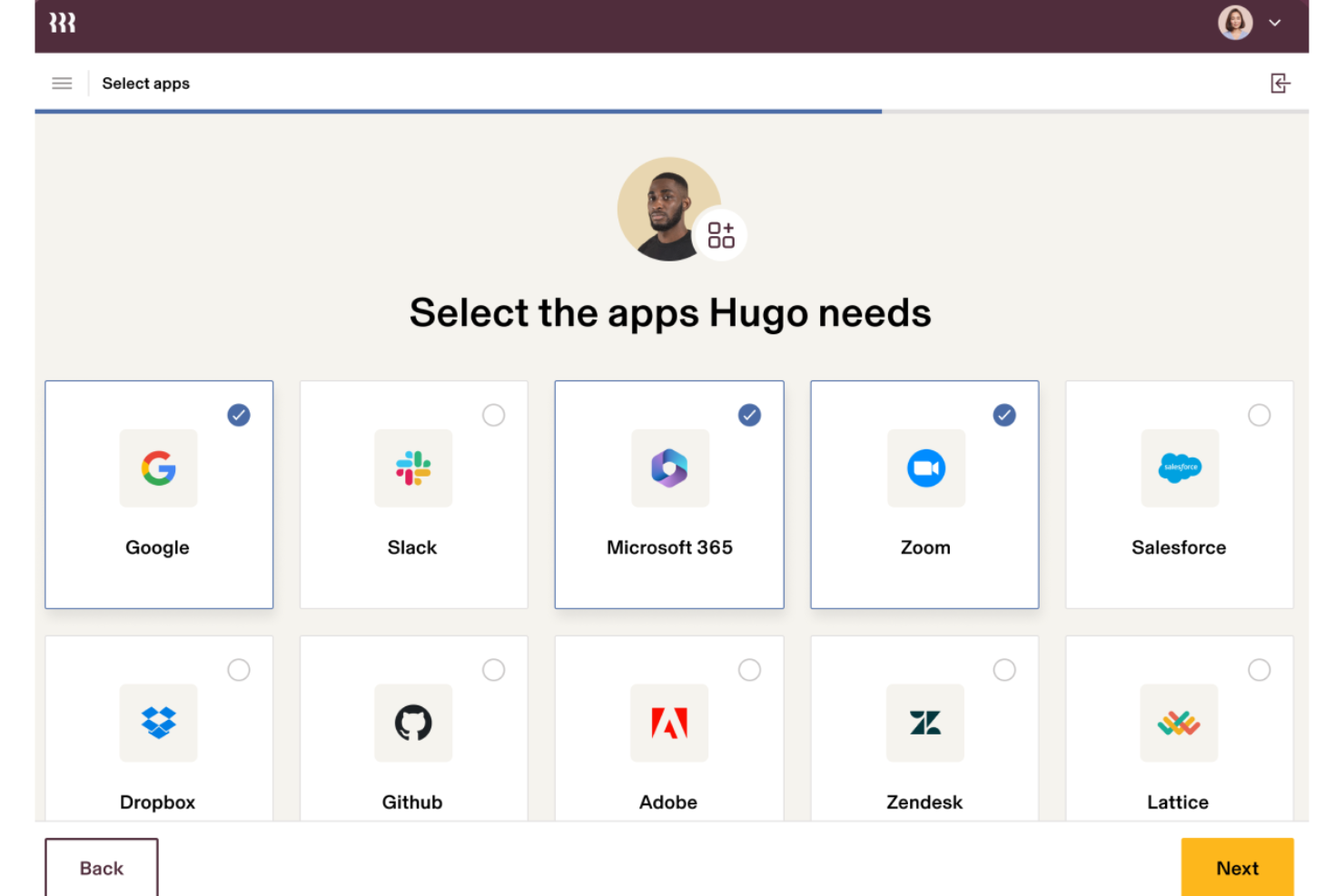
Rippling is a comprehensive HR, finance, and IT management platform known for its seamless integration and automation capabilities. It serves businesses of all sizes, providing a unified solution for managing employee data, payroll, benefits, SaaS applications, and more.
The platform offers automated provisioning and de-provisioning of applications, ensuring that employees have the right access levels based on their roles. This not only enhances security but also reduces the administrative burden on IT departments. Additionally, Rippling provides real-time visibility into application usage, allowing companies to monitor and optimize their software expenditures.
Rippling’s detailed audit trails and compliance enforcement features ensure that all access changes are documented and meet regulatory requirements. The platform also supports single sign-on (SSO) capabilities, simplifying the login process for employees while maintaining high-security standards.
Key integrations include Slack, Google Workspace, Microsoft Office 365, Zoom, Dropbox, Salesforce, GitHub, Jira, and many others.
New Product Updates from Rippling IT

Rippling IT Launches Helpdesk for Agentic Support
Rippling IT launches Helpdesk with automated ticket resolution, contextual troubleshooting, approvals, escalations, and activity logging. These features help IT teams resolve routine employee requests with less manual work. For more information, visit Rippling’s official site.
 .
.
Zluri
Best for reducing SaaS wastage

Zluri is a data-driven SaaS management platform focused on app discovery, management, optimization and compliance. It helps you optimize spend by removing duplicate apps, highlighting underused tools and consolidating apps with overlapping functions.
Many IT tasks such as procurement, onboarding and renewals can be automated with Zluri. Security is enhanced through the removal of unsecured apps and the management of compliance risks.
Pricing is not publicly disclosed, but a free trial is available for organizations with fewer than 25 employees.
Spendflo
Best for optimizing SaaS spend with AI
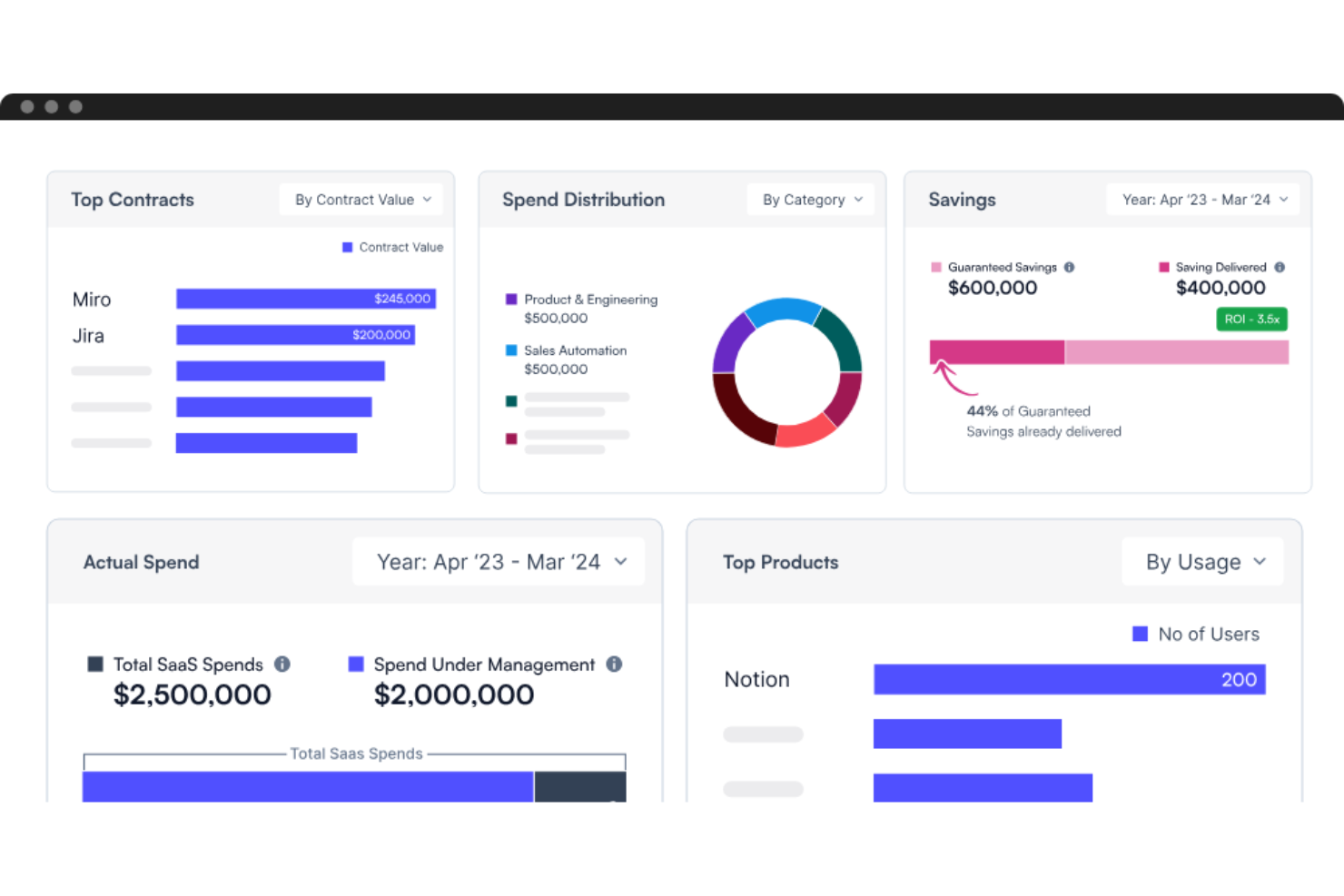
Spendflo is a SaaS spend management platform that combines AI-powered software with expert procurement services to help businesses manage and optimize their software subscriptions. The platform provides tailored solutions for finance, procurement, and IT & security teams, aiming to reduce costs and improve efficiency.
The platform offers real-time visibility into all SaaS contracts, expenditures, and usage, allowing companies to monitor and manage their software assets. Automated procurement processes, including approval workflows and renewal management, also ensure that businesses can maintain up-to-date and cost-effective software stacks without the administrative burden.
Additionally, Spendflo's data-backed negotiations and contract management capabilities ensure that companies secure the best possible pricing and terms for their software purchases. Real-time analytics and dashboards also provide actionable insights into spending patterns and potential savings.

Josys
Best for automating SaaS provisioning tasks
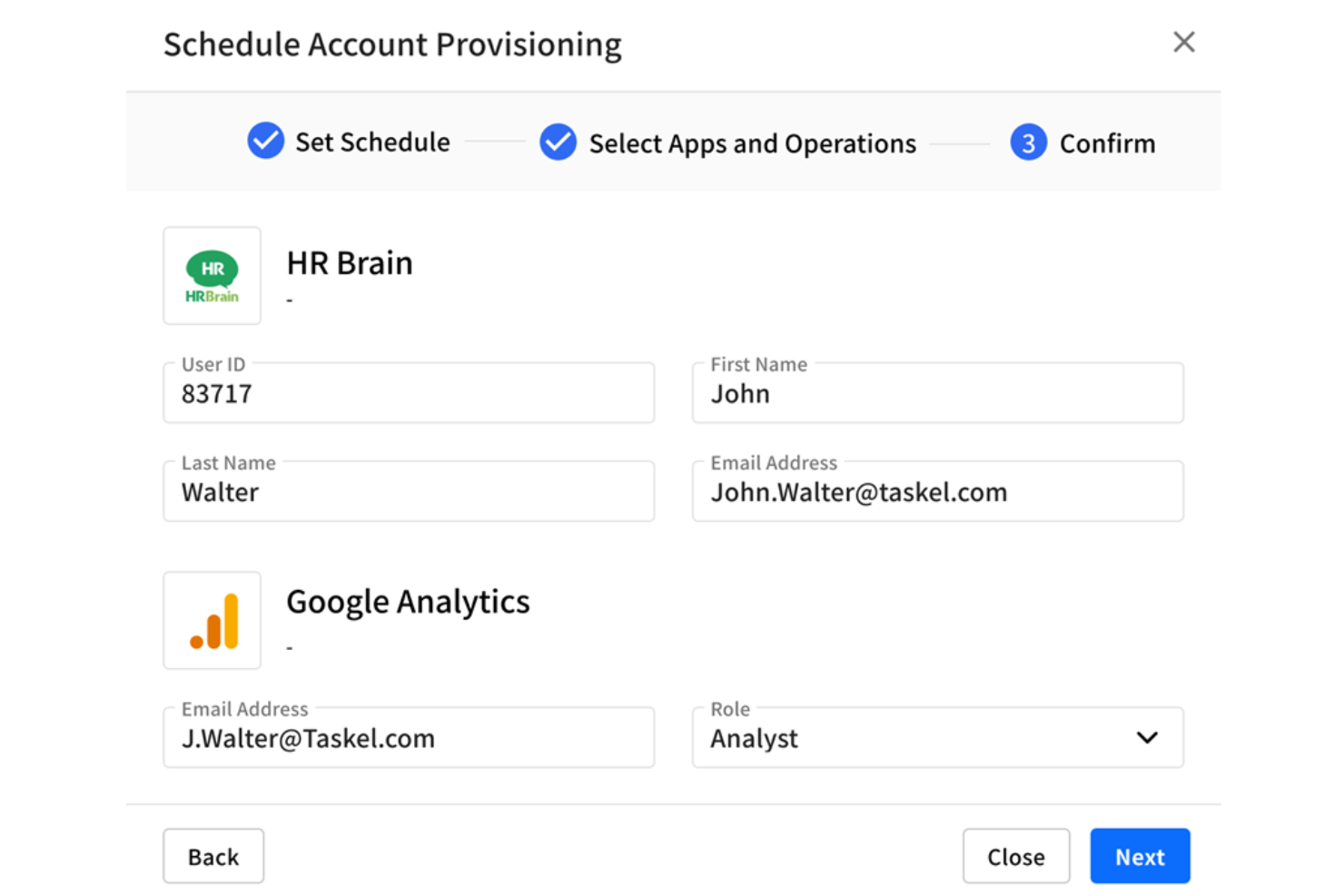
Josys is a SaaS management platform designed to simplify IT operations for businesses of all sizes. It provides a 360° view of all SaaS applications and devices within an organization, enabling efficient management and control over IT assets. Josys focuses on reducing costs, mitigating risks, and ensuring compliance.
The platform offers comprehensive visibility into all SaaS applications, allowing organizations to easily track usage, identify shadow IT, and manage licenses effectively. Josys's workflow automation capabilities also help provisioning and de-provisioning processes, ensuring that employees have the necessary access from day one and that access is promptly revoked when employees leave the company.
Furthermore, the platform helps organizations control costs by providing detailed insights into license utilization and enabling quick identification of underused or redundant applications.
Josys integrates with a wide range of applications and services, including Microsoft Azure, Google Workspace, Salesforce, ServiceNow, Slack, Okta, Dropbox, Box, and Zoom.

Zygon
Best for managing shadow applications
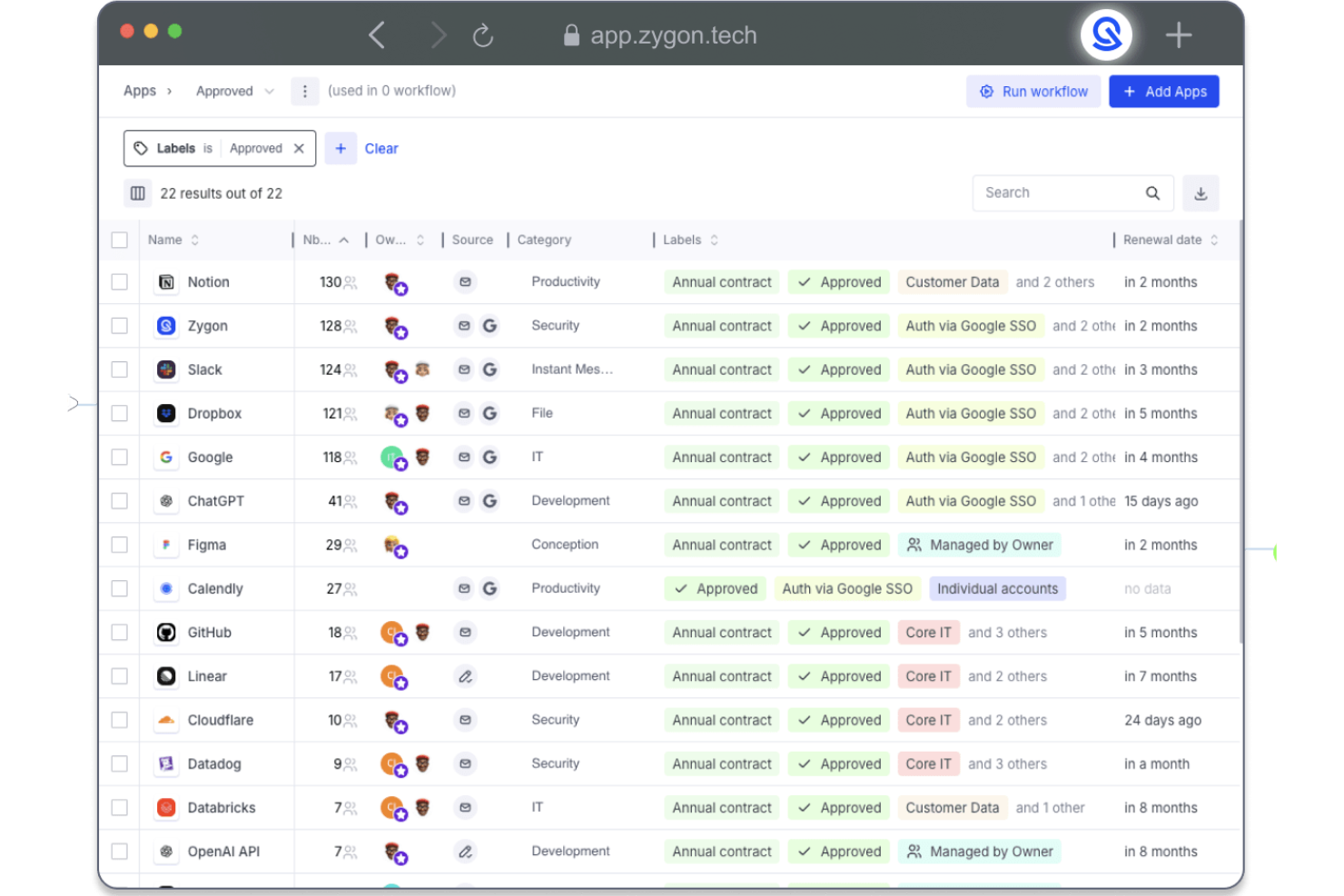
Zygon is a SaaS management platform designed to help IT and security teams manage user identities and application access across their organization. It offers tools to automate account provisioning, monitor access, and ensure compliance with security standards.
I like Zygon's workflow automation capabilities. It allows teams to set up custom workflows for tasks like access reviews and provisioning, reducing the need for manual intervention. This automation supports compliance efforts and ensures that access controls are consistently applied across all applications.
Additionally, the platform provides the ability to detect and manage shadow SaaS applications. It identifies unmanaged identities and unauthorized app usage, providing visibility into potential security risks. This feature helps organizations address access sprawl and maintain control over their SaaS environment.
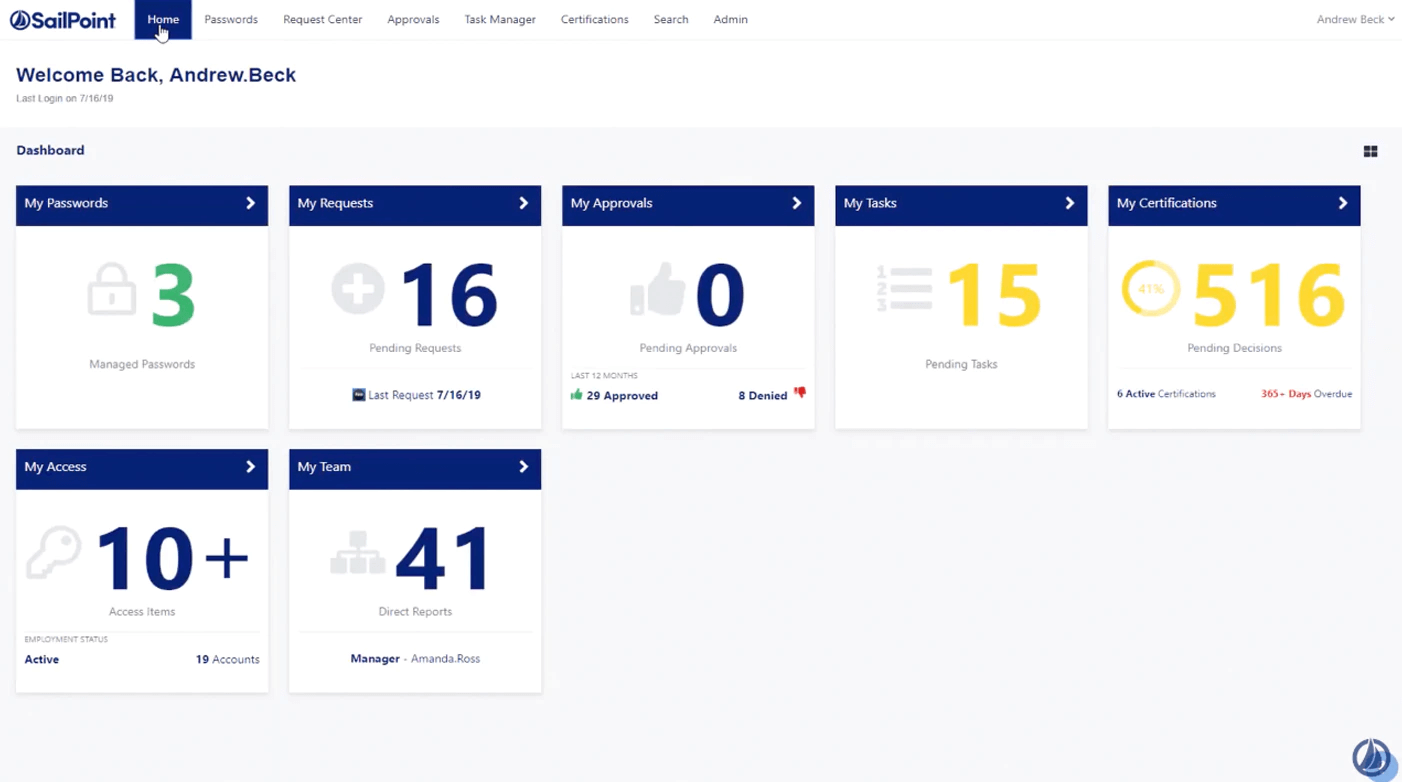
SailPoint is an identity governance platform designed for the cloud. The platform solves SaaS-related challenges such as compliance, password management and analytics.
With SailPoint, it's easy to see who has access to specific tools and how they are being used. Users can manage their digital identities with confidence.
Pricing is not publicly available. There is no free trial.

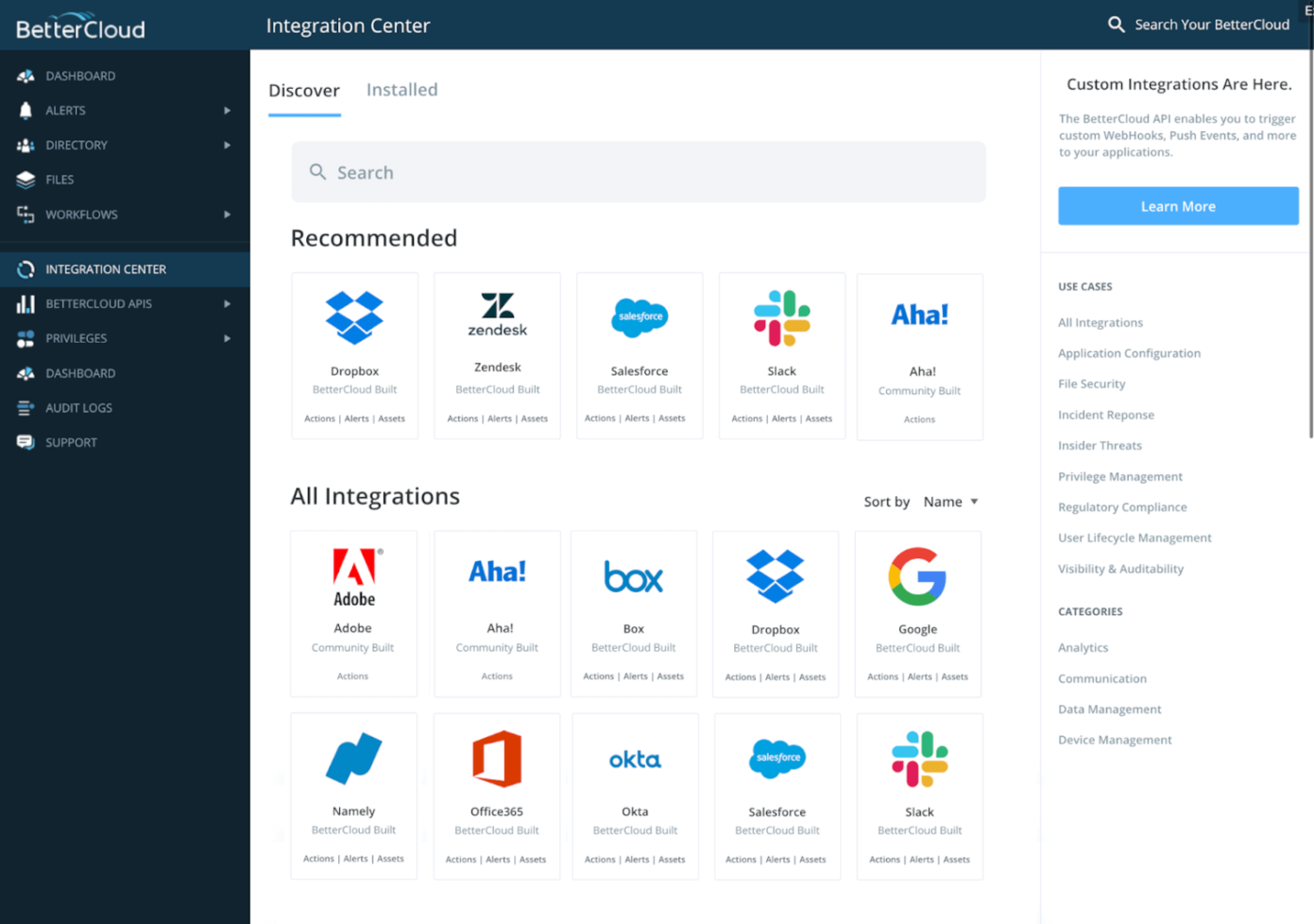
BetterCloud is a SaaS management platform that offers automated management, critical insights, and intuitive data security. The software allows you to monitor SaaS subscriptions and stay on top of key usage data across your organization.
With the help of BetterCloud, you can get alerts when issues arise, enforce password management and manage user profiles. You can also create customizable reports, using over 100 different attributes.
BetterCloud costs from $3/user/month. There is no free trial.
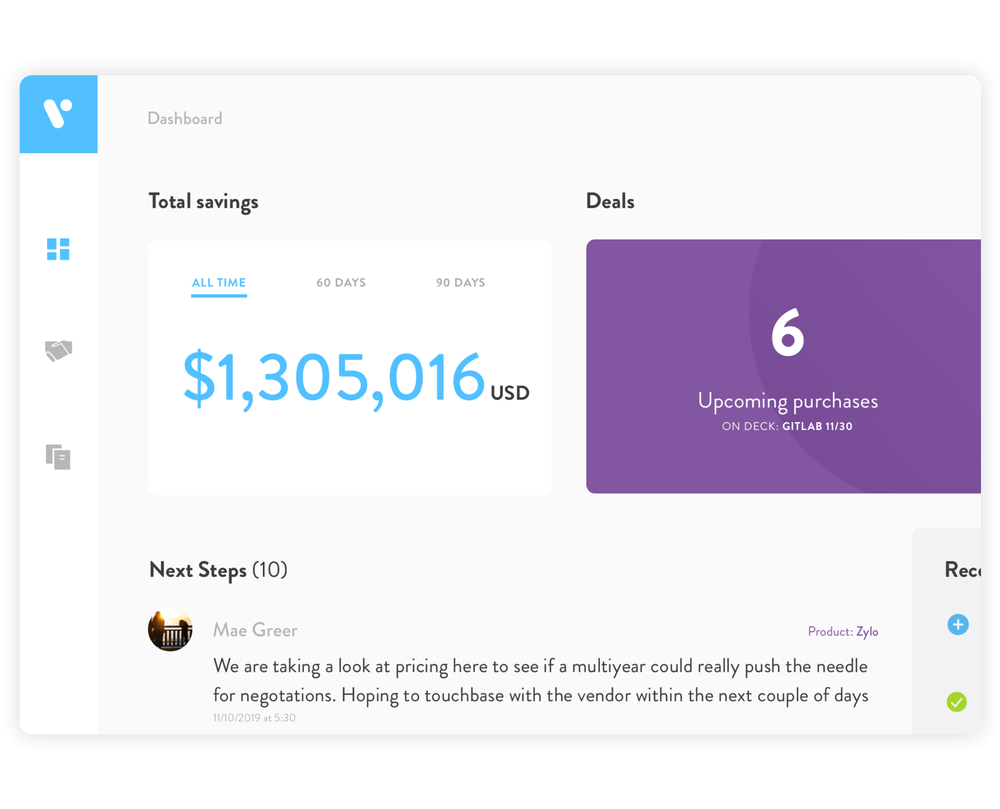
Vendr aims to reduce the SaaS spend of IT departments by up to 30%. Licenses are organized into aggregate contracts, allowing you to negotiate bulk discounts.
The company analyzes your SaaS stack and calculates possible savings. Vendr guarantees that your savings will exceed the cost of using the service.
Pricing starts from $3000/user/month and there is no free trial.
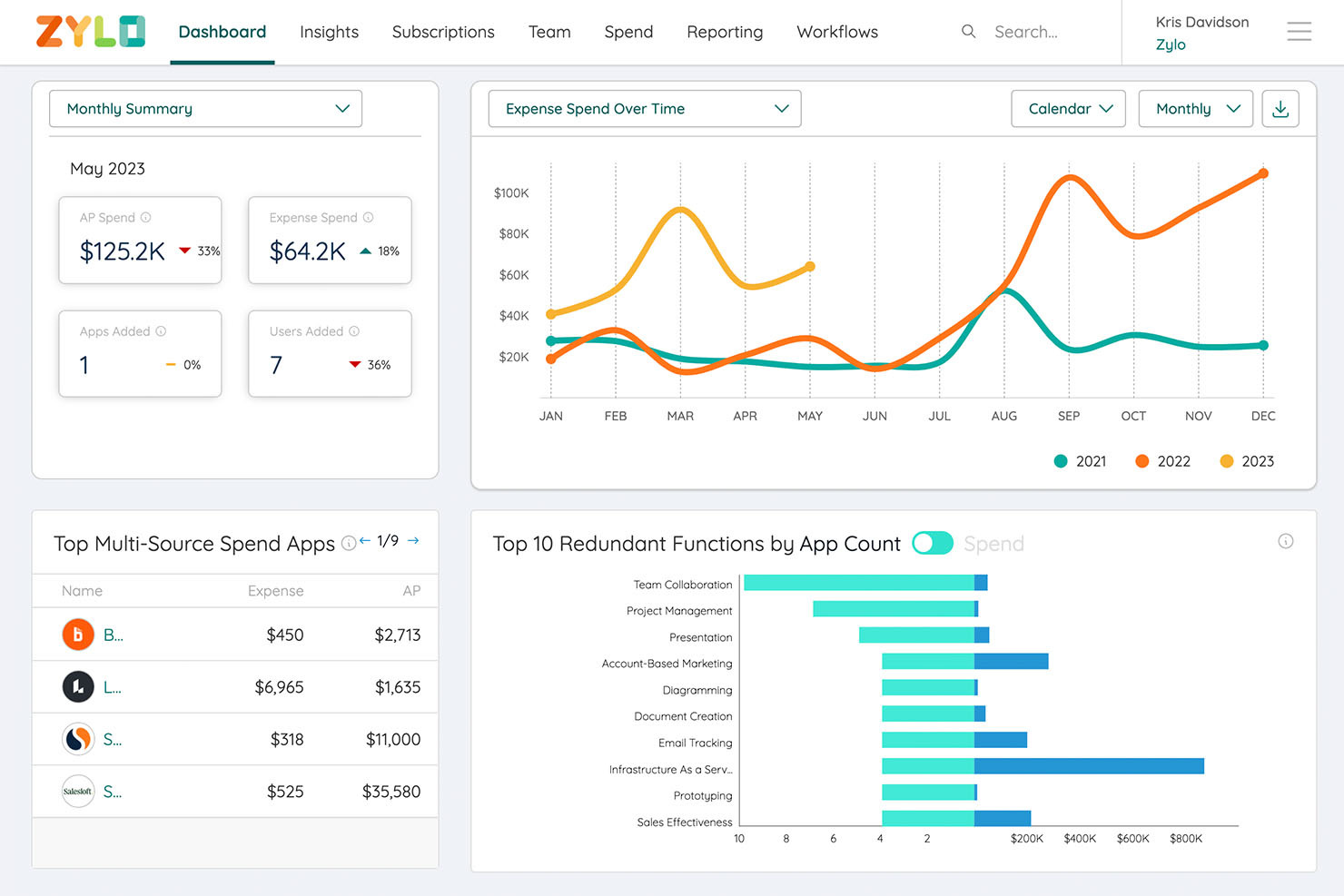
Zylo is a SaaS management platform with an AI-powered engine that maintains a continuously updated database of your SaaS applications, so you know which ones are updated and which ones you need to renew. This also allows you to spot unused licenses so you can cancel or reassign them to save money. You can use Zylo to analyze how your SaaS portfolio performs compared to industry benchmarks ensuring you have the best SaaS applications and allowing you to replace underperforming ones.
Understanding how your workforce functions is one of the best ways to conceptualize and implement productivity improvement plans, and Zylo can be helpful in this area with its advanced analytics feature. You can use Zylo to gain insights on optimizing your SaaS portfolio so you can get rid of unproductive ones and replace them with ones that meet your business demands. Zylo can help forecast and anticipate future SaaS needs ensuring that employees have the proper licenses so employees can perform their duties.
Zylo provides customized pricing upon request.
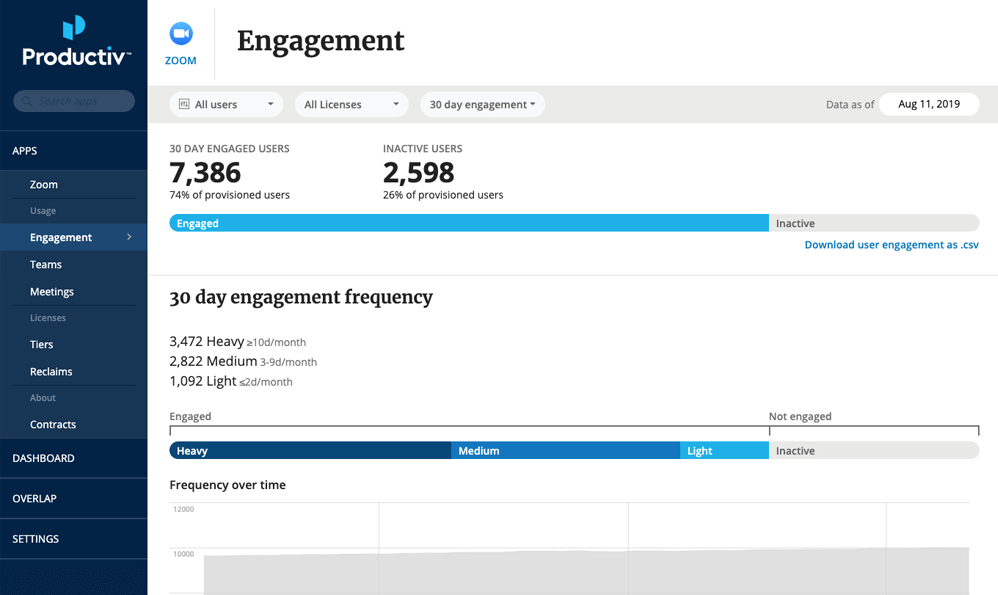
Productiv is a SaaS management platform powered by application engagement analytics. This tool allows you to visualize your SaaS portfolio and evaluate the cost and effectiveness of particular apps.
The software collects and analyzes engagement insights to help you understand what SaaS applications are used for. Productiv also makes it easy to understand trends in usage.
Pricing is not disclosed publicly, but a 90-day free trial is available.
Other SaaS Management Platforms
Here are a few more worthwhile options that didn’t make my best SaaS management systems shortlist, but are still worth checking out:
- Torii
An extensive range of integrations
- Snow
For comprehensive license management
- LicenceOne
For monitoring subscriptions and spending
- Augmentt Engage
For managed service providers (MSPs)
- Auvik
For identifying shadow IT
- ActivTrak
For improving worker productivity
- SaaSOptics
For SaaS companies
- USU Software Asset Management
For detail software insights
- Binadox
For managing SaaS spending
- Certero for Cloud
For app discovery


How I Evaluate SaaS Management Platforms
I split every evaluation into two layers: what a platform must do—like HRIS-synced provisioning and SaaS discovery—and the differentiators that separate strong options from the rest.
Core Functionality (Table Stakes For This List)
When I'm selecting tools for my list, I rank each one on a scale from 0 (does not offer the functionality) to 5 (excels in this area) for each core functionality listed below. Then, I calculate the tool's total score into a percentage. Each tool needs to achieve a minimum total score of 65% to be considered for inclusion.
- SaaS Application Discovery: I check whether a platform can automatically surface apps across multiple sources—SSO logs, finance systems, browser agents—rather than relying on manual inventory alone.
- License Tracking & Utilization: Each tool should show me who holds a license, how often they're using it, and flag dormant seats that your team could reclaim before the next renewal cycle.
- User Lifecycle Automation: I evaluate how well a platform syncs with your HRIS to trigger provisioning when someone joins and revoke access the moment an employee exits.
- Spend & Renewal Management: A good SaaS management platform surfaces upcoming renewals, tracks vendor costs over time, and gives you the data you need heading into contract negotiations.
- Access & Compliance Governance: I look for audit-ready access reviews, permission visibility across connected apps, and reporting that maps to frameworks like SOC 2 or GDPR.
- Integration Breadth: The platform's connector library matters—I evaluate whether it supports the HR, identity, finance, and productivity tools your stack likely depends on.
Once I have a list of tools that meet this criteria, I consider what sets each platform apart.
Differentiating Factors (What Sets Vendors Apart)
Here's how I compare and contrast different vendors:
Standout Features
Shadow IT detection is a big differentiator. Some platforms use browser extensions or expense data to surface unsanctioned apps employees are already using—something manual audits consistently miss. I also evaluate no-code workflow builders that let People Ops teams design custom provisioning and approval flows without engineering help. Vendor risk scoring matters too. Platforms that automatically flag a SaaS vendor's SOC 2 status or breach history save your team hours of due diligence during renewals.
Beyond Features
HRIS and identity provider integration depth is one of the first things I check. A platform that syncs bi-directionally with tools like Workday, BambooHR, or Okta can trigger provisioning from real HR events—new hires, role changes, terminations—without manual handoffs. Time-to-value also matters. I look at how quickly a platform completes its first discovery scan and delivers actionable data. Cross-functional collaboration rounds out my evaluation. HR, IT, and finance all touch SaaS decisions, so role-based dashboards and in-context approvals through Slack or Teams make a real difference.
How to Choose SAAS Management Platform
It’s easy to get bogged down in long feature lists and complex pricing structures. To help you stay focused as you work through your unique software selection process, here’s a checklist of factors to keep in mind:
| Factor | What to Consider |
|---|---|
| Scalability | Will the platform grow with your company? Check if it supports your current and future user count and data volume. |
| Integrations | Does it connect with your existing tools? Verify compatibility with your current software stack to ensure smooth operations. |
| Customizability | Can you tailor the platform to fit your workflows? Look for options to adjust dashboards and reports according to your needs. |
| Ease of use | Is the interface intuitive? Ensure that your team can navigate the platform without extensive training or support. |
| Implementation and onboarding | How long will it take to get started? Consider the time and resources needed for setup, including any support or training provided by the vendor. |
| Cost | Does the pricing fit your budget? Compare the total cost of ownership, including hidden fees or additional charges for extra features or support. |
| Security safeguards | Are data protection measures in place? Look for encryption, access controls, and compliance with industry standards like GDPR. |
| Support availability | Is help readily accessible when needed? Evaluate the vendor’s support channels, response times, and availability to ensure you get assistance when required. |
What is a SaaS platform?
A SaaS platform is a type of software delivered over the Internet as ‘Software as a Service.’ Instead of residing on the user’s computer, the software is hosted in the cloud, where it can be accessed as required.
SaaS-based platforms are available for a wide range of applications, ranging from marketing to business management. Rather than purchase the application outright, users typically access the software through a pay-as-you-go model.
SaaS management is the increasingly important task of managing all the ‘Software as a Service’ applications used by an organization. This task involves ensuring that all cloud software being used is appropriately licensed, secure, and used to the best advantage.
Key Features
When selecting a SaaS management platform, keep an eye out for the following key features:
- Automated workflows: Streamline repetitive tasks, saving time and reducing manual errors.
- Spend tracking: Monitors software expenses to help optimize budget allocation.
- Compliance monitoring: Ensures software use aligns with industry regulations, reducing legal risks.
- Usage analytics: Provides insights into how software is used, aiding in decision-making and optimization.
- Vendor management: Simplifies interactions with software vendors, helping secure favorable terms.
- Customizable dashboards: Allow you to tailor data views to meet specific needs and preferences.
- Integration capabilities: Connects with existing tools to create a cohesive software environment.
- Security safeguards: Protects sensitive data with encryption and access controls.
- Reporting tools: Generate detailed reports for better visibility and informed decision-making.
- Subscription tracking: Keeps tabs on software subscriptions to avoid waste and optimize renewals.
Benefits
Implementing a SaaS management platform provides several benefits for your team and your business. Here are a few you can look forward to:
- Cost savings: By tracking software spending and optimizing usage, you can reduce unnecessary expenses.
- Improved efficiency: Automated workflows and reporting tools save time and reduce manual efforts for your team.
- Enhanced compliance: Compliance monitoring helps ensure your software use meets industry regulations, minimizing legal risks.
- Better decision-making: Usage analytics and reporting provide insights that support informed software investment decisions.
- Streamlined vendor interactions: Vendor management features simplify negotiations and contract management, securing better terms.
- Increased security: Security safeguards protect sensitive information, ensuring data integrity and privacy.
- Optimized software use: Subscription tracking and usage analytics help you make the most of your software investments.
Costs and Pricing of SaaS Management Platform
Selecting a SaaS management platform requires an understanding of the various pricing models and plans available. Costs vary based on features, team size, add-ons, and more. The table below summarizes common plans, their average prices, and typical features included in SaaS management platform solutions:
Plan Comparison Table for SaaS Management Platform
| Plan Type | Average Price | Common Features |
|---|---|---|
| Free Plan | $0 | Basic usage tracking, limited integrations, and community support. |
| Personal Plan | $5-$25/user/month | Usage analytics, basic reporting, and email support. |
| Business Plan | $25-$50/user/month | Advanced reporting, automated workflows, and priority support. |
| Enterprise Plan | $50-$100/user/month | Custom integrations, a dedicated account manager, and compliance monitoring. |
SaaS Management Platform FAQs
Here are some answers to common questions about the SaaS management platform:
How do SaaS management platforms help with cost savings?
SaaS management platforms help you track software usage and identify unused licenses, reducing wastage. They provide insights into spending patterns, allowing you to optimize your software investments. By automating renewals and managing subscriptions, these tools ensure you only pay for what you need.
What should I look for in SaaS management platform vendors?
When evaluating vendors, consider their integration capabilities with your existing tools. Check for features like automated workflows and compliance monitoring. Assess their customer support options and ensure they offer scalability to grow with your organization. Vendor transparency and pricing are also important factors.
How can SaaS management platforms help with compliance?
These platforms monitor software usage and ensure it aligns with industry regulations, reducing legal risks. They offer compliance tracking features that help you maintain necessary standards. By providing detailed reports, these tools keep your team informed about compliance status and potential issues.
What are the risks of shadow IT, and how do these platforms address them?
Shadow IT involves unauthorized software use, which can lead to security vulnerabilities. SaaS management platforms identify and track all software applications in use, reducing the risk of shadow IT. They provide visibility into software usage, helping your team enforce policies and maintain control.
How do SaaS management platforms support vendor management?
These platforms simplify vendor interactions by automating contract renewals and providing negotiation support. They track vendor performance and terms, ensuring you get the best deals. By centralizing vendor information, they help your team manage relationships effectively and optimize costs.
What role do analytics play in SaaS management platforms?
Analytics provide insights into software usage patterns, helping you make informed decisions about software investments. They identify trends and usage spikes, allowing you to adjust your licensing accordingly. By offering detailed reports, analytics support strategic planning and cost optimization efforts.