

20 Best Integrated Risk Management Software of 2026

10 Best Integrated Risk Management (IRM) Software Shortlist


There are so many different integrated risk management software, so making a shortlist of the best can be tricky. You want to provide a comprehensive view of potential threats from financial, operational, and cybersecurity risks—and now need the right tool for your company and team. In this post, I share my insights on different IRM platforms and recommend my picks of the best integrated risk management software overall, based on my experience as an HR specialist.
Why Trust Our Software Reviews
Our team has been testing and reviewing software since 2012. As HR experts ourselves, we know how difficult—and important—it is to choose the right software.
For this guide, we evaluated tools using hands-on testing and independent research, scoring tools using our selection criteria. We also draw on insights from industry thought leaders and and practicing HR experts.
Our reviews reflect our human editorial judgment, not a sales pitch.
Best Integrated Risk Management Software Summary
This comparison chart summarizes pricing details for my top integrated risk management software selections to help you find the best one for your budget and business needs.
| Tool | Best For | Trial Info | Price | ||
|---|---|---|---|---|---|
| 1 | Best for providing real-time risk assessments and mitigation | Free demo available | Pricing upon request | Website | |
| 2 | Best integrated risk management software for enterprise | Free demo available | Pricing upon request | Website | |
| 3 | Best for comprehensive log management | 30-day free trial + free demo | Pricing upon request | Website | |
| 4 | Best for viewing your organization’s risk profile | Free demo available | Pricing upon request | Website | |
| 5 | Best for compliance, risk, vendor, and audit management in one | Free demo available | Pricing upon request | Website | |
| 6 | Best security and IT risk management software for detecting data breaches | 20-day free trial | Pricing upon request | Website | |
| 7 | Best for tying risk to specific incidents | Free demo available | Pricing upon request | Website | |
| 8 | Best IRM software with situational monitoring and risk analysis reporting | Free demo available | Pricing upon request | Website | |
| 9 | Best for intelligently identifying issues | Free demo available | Pricing upon request | Website | |
| 10 | Best for loss event management | Free demo available | Pricing upon request | Website |
Best Integrated Risk Management Software Review
Below are my detailed summaries of the best integrated risk management software that made it onto my shortlist. My reviews offer a detailed look at the key features, pros & cons, integrations, and ideal use cases of each tool to help you find the best one for you.
Best for providing real-time risk assessments and mitigation

Alyne is a full-suite GRC platform for governance, risk, compliance, and ESG designed to deliver data-driven insights, powered by AI technology, to organizations.
Alyne helps teams understand laws and intuitively identify risks in real time, increase transparency and compliance efficiency, and collaborate more effectively across their enterprise and third parties. The tool lets you manage risk and reduce risk exposure. It also helps you understand and confidently implement compliance requirements, thoroughly assess risk, obtain detailed risk analytics and reporting, and make risk-aware decisions for your organization.
Additionally, you can leverage ready-to-go controls and assessment templates, automatic risk identification and qualification, and meaningful risk quantification methods to save on costs and increase time to value.
It is suitable to be used for environmental, social and governance (ESG) management, enterprise risk management, and internal controls and compliance.
Alyne's integrations include key enterprise platforms such as SAP, Salesforce, and Oracle, ensuring that data flows are coherent and uninterrupted.

Best integrated risk management software for enterprise

Corporater is an enterprise-scale software that can support your governance, performance, risk, and compliance (GPRC) operations. Its risk management capabilities are expansive, covering IT and web risk management, third-party risk management, project and portfolio risk management, operational risk management, and more. It's suitable to be used across an organization to detect, manage, and mitigate risks in all departments and teams.
The software can be used to digitize risk management at your organization and automate your various risk management processes. You can establish risk mitigation workflows in the platform to create consistent, standardized procedures for how to navigate different types of risks. Qualitative and quantitative risk assessments can be performed, helping teams make informed decisions on how to move forward when risks are detected.
Reporting can also be done with the software, and users can create visual dashboards to understand the risks detected, managed, and addressed at their organization.
Best for comprehensive log management

ManageEngine EventLog Analyzer is a comprehensive log management and IT compliance tool designed to monitor, collect, and analyze log data from various sources. By offering centralized log management, it helps organizations maintain network security and adhere to compliance requirements.
As an integrated risk management software, ManageEngine EventLog Analyzer excels in real-time event correlation and security incident detection. By continuously monitoring logs from servers, applications, and network devices, it identifies potential threats and policy violations promptly. This proactive approach to security helps organizations address risks before they escalate.
The software's advanced threat intelligence and correlation capabilities also provide a deeper understanding of security events, enabling more effective incident response and risk mitigation strategies. Additionally, EventLog Analyzer's automated incident management and detailed reporting capabilities are crucial for maintaining compliance and performing forensic analysis. The software generates customizable reports that meet various regulatory requirements, such as HIPAA, GDPR, PCI-DSS, and SOX.
Pricing is available upon request.
Best for viewing your organization’s risk profile

Diligent's integrated risk management toolkit helps organizations identify, assess, and manage risk using a unified methodology. This can help your business make better risk-related decisions.
The tool has integrations that allow you to analyze multiple sources, including internal and external tools. You get a complete view of how the current risk environment affects your business.
Meanwhile, the tool’s dashboard and reporting features ensure you can view this information in a way that makes sense. It shows your organization’s current risk profile, including an overall risk score and how different risk factors contribute to its risk.
It’s easy to export these reports to provide relevant stakeholders with the data they need to make informed decisions to ensure business continuity.

Best for compliance, risk, vendor, and audit management in one

Hyperproof is a comprehensive compliance operations platform designed to manage compliance, risk, vendor, and audit processes within a single system. It caters to organizations of all sizes that need to navigate complex regulatory environments.
I chose Hyperproof because of its all-in-one approach to compliance, risk, vendor, and audit management. Its ability to automate evidence collection, task management, and real-time compliance visibility ensures that organizations can handle multiple regulatory requirements seamlessly. The platform's centralized data and workflows also reduce the complexity of managing various compliance frameworks.
Hyperproof offers detailed compliance and audit reports, making it easier for organizations to prepare for audits and maintain regulatory standards. Additionally, the platform’s centralized risk tracking system identifies, assesses, and mitigates risks proactively, ensuring a secure and compliant operational environment.
Integrations include Jira, Slack, Google Drive, AWS, Azure, GitHub, GitLab, Microsoft Teams, Okta, OneDrive, Confluence, ServiceNow, Microsoft 365, Zoom, Box, Dropbox, Asana, Trello, Salesforce, and Smartsheet.
Pros and Cons
Pros:
- The tool automates evidence collection
- Pre-built frameworks for compliance management
- Intuitive design for ease of use
Cons:
- Vendor management module could be more comprehensive
- Limits to customizations within the platform

Best security and IT risk management software for detecting data breaches

Netwrix Auditor’s advanced IT security software helps organizations detect security threats quickly and efficiently. Their software can analyze user permissions for company data, including digital files and folders, at scale, with the ability to analyze files in batches by file type, user name, or access date. You can also set up automated alerts so your IT team is notified immediately of any suspicious activity.
Netwrix Auditor includes advanced audit management reports that will improve your organization’s security by pointing out weak spots in your IT infrastructure that need optimization. They have helped over 7,000 organizations secure their sensitive data and successfully pass compliance audits.
Integrations are available with Active Directory, Microsoft 365, SharePoint, Oracle Database, Windows File Servers, NetApp, and numerous other IT systems.

Resolver
Best for tying risk to specific incidents

Resolver is a user-friendly risk management tool used by over 1000 businesses, including Starbucks and Nestle. It has solutions for corporate security, compliance, and information security teams.
The risk management solution has everything teams need to discover, assess, and minimize risk. The software’s highlight is the risk assessment features that tie issues to specific incidents and actions, ensuring they relate to actual business events. Highlighting these risk indicators helps you spot gaps in your risk management strategy while showing the impact of your strategies.
Resolver has plenty of other valuable features. For example, the drag-and-drop builder makes it easy to create processes suited to your business. The tool doesn’t require any programming knowledge, which brings the ability to create and customize workflows to anyone in your organization.

Best IRM software with situational monitoring and risk analysis reporting

Fusion Framework System is a risk and continuity management solution developed for businesses looking to not just minimize risk, but also to simplify complex processes and operations through enhanced visibility. The solution provides insights into the operations of businesses and organizations.
The cloud-based risk and resilience platform helps users understand how their business works, provide insights into where it is exposed to risk, and then help understand how to put it back together again. The integrated risk management software helps business leaders and other stakeholders to visualize their entire operation, their products, and/or services from the customer’s perspective.
The solution provides two key features through its integrated risk management software, one is operational risk management and the other is enterprise risk management. The former helps drive consistency by enabling standard risk approaches down a company’s operational pipeline. The latter, enterprise risk management, helps users leverage dynamic data to identify and monitor potential risks.
Users can easily align their key strategic targets with their risk management approach to establish a truly integrated foundation of meaningful insights that extend across the entire enterprise.
Best for intelligently identifying issues

MetricStream is Enterprise Risk Management (ERM) software with modules that help you understand and react to risk across your organization.
The tool has features for identifying and defining risk. Use them to document all the risks your business faces. Once set up, you can view key issues in the dashboard.
The product stands out because it lets you assess risk using internal audits that consider how they relate to your organization, objectives, products, and processes. The idea is that this will improve the efficiency of audits, helping you complete them faster.
MetricStream's intelligent issue and remediation feature is also useful. It uses AI and machine learning to identify issues and make recommendations. You can then review each issue, create a plan, and assign it to a team member to minimize the risk.
Archer
Best for loss event management
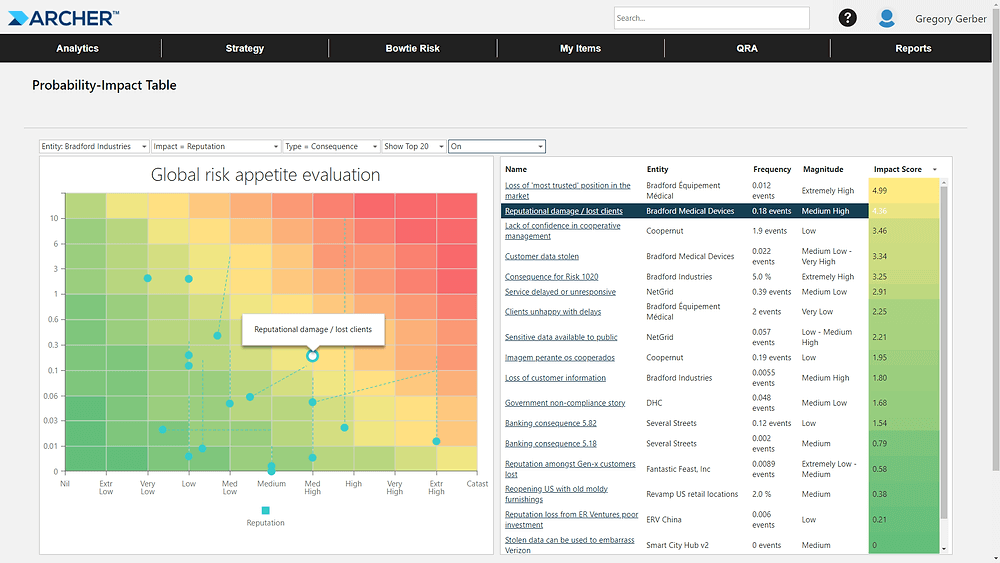
Archer is a leading integrated risk management platform. It helps organizations standardize risk management processes which, it says, can enable more informed decision making.
The risk catalog is central to the tool. It enables organizations to record risk factors consistently and gather all this data in a central location. Being consistent with risk assessments provides a more accurate view of how each issue relates to others.
Another helpful feature is loss event management. This catalogs both losses and near misses and helps you assess these events to establish how they occurred and where accountability lies. It creates an automated workflow for these events to ensure you perform them consistently every time.
Other Integrated Risk Management Software
Here are some additional integrated risk management software options that didn’t make it onto my shortlist, but are still worth checking out:
- Ventiv IRM
For managing asset risk
- IBM Financial Crimes Insight
Risk management software for financial institutions
- AuditBoard
For creating risk mitigation workflows
- VelocityEHS Risk Management
Platform for tracking and reducing environment, health, and safety-related risks
- TradeTapp
Cloud-based platform for profiling subcontractors
- Onspring
For viewing the monetary value of risk
- LogicManager
For customer support
- SoftComply Risk Manager Plus
For customizable risk management in Jira
- RAIDLOG.com
For managing risks within projects
- A1 Tracker
Risk management platform for data integrations


How I Evaluate Integrated Risk Management Software
When HR teams map labor law to internal controls or assess payroll vendor risk, I look for two things: the baseline a tool must meet and the differentiators that separate the best options.
Core Functionality (Table Stakes For This List)
When I'm selecting tools for my list, I rank each one on a scale from 0 (does not offer the functionality) to 5 (excels in this area) for each core functionality listed below. Then, I calculate the tool's total score into a percentage. Each tool needs to achieve a minimum total score of 65% to be considered for inclusion.
- Risk Assessment & Register: I look for a centralized register where HR teams can log risks like high attrition in key departments, score them by likelihood and impact, and track ownership.
- Regulatory Compliance Management: Each tool should map internal controls to relevant labor and employment regulations and keep its regulatory library current as rules change.
- Policy & Control Management: I evaluate how the platform handles the full policy lifecycle, from drafting workplace safety policies to distributing them and collecting employee attestations.
- Incident & Case Management: Structured intake forms, investigation workflows, and case tracking matter here, especially for managing harassment complaints or workplace safety events.
- Third-Party/Vendor Risk: I check whether the tool lets you assess and monitor risk from HR vendors like payroll processors, staffing agencies, and benefits administrators.
- Reporting & Risk Analytics: Dashboards should offer role-based views so a CHRO sees board-ready summaries while an HR compliance manager drills into control-level detail and audit trails.
Once I have a list of tools that meet this criteria, I consider what sets each platform apart.
Differentiating Factors (What Sets Vendors Apart)
Here's how I compare and contrast different vendors:
Standout Features
I look for AI-driven risk intelligence that can flag emerging workforce risks, like unusual turnover spikes in a department, before they become full-blown problems. HRIS-native integrations also matter. A platform that syncs bidirectionally with tools like Workday or BambooHR keeps employee data flowing into risk workflows without manual imports. Embedded anonymous reporting channels are another differentiator, since a built-in whistleblower hotline removes friction when employees need to report misconduct directly into the case management system.
Beyond Features
Compliance and security posture is high on my list. Platforms handling sensitive employee data should hold SOC 2 Type II or ISO 27001 certifications and offer data residency options for multi-jurisdictional teams. I also evaluate industry fit, since an HR team in healthcare faces very different regulatory pressures than one in tech. Implementation speed matters too. I check whether a vendor provides HR-specific risk templates and onboarding accelerators so your team isn't building frameworks from scratch during a months-long deployment.
How to Choose Integrated Risk Management Software
It’s easy to get bogged down in long feature lists and complex pricing structures. To help you stay focused as you work through your unique software selection process, here’s a checklist of factors to keep in mind:
| Factor | What to Consider |
|---|---|
| Scalability | Can the software grow with your organization? Consider if it handles increased data volume and user numbers without performance issues. |
| Integrations | Does it connect with your existing systems? Check compatibility with your CRM, ERP, or other essential tools to avoid data silos. |
| Customizability | Can you tailor the software to fit your workflows? Look for options to adjust dashboards, reports, and user permissions to match your processes. |
| Ease of use | Is the interface intuitive for your team? Ensure minimal training time is required, avoiding tools that require extensive learning curves. |
| Implementation and onboarding | What support does the vendor offer during setup? Consider availability of training resources, onboarding sessions, and whether you'll need external IT support. |
| Cost | How does the pricing fit your budget? Compare subscription models, hidden costs, and long-term contract discounts to ensure value. |
| Security safeguards | Are data protection measures in place? Check for encryption, compliance with data regulations, and regular security updates to protect sensitive information. |
| Compliance requirements | Does it meet industry standards? Ensure the tool supports necessary compliance frameworks and reporting needs specific to your industry. |
What Is Integrated Risk Management Software?
Integrated risk management software is a tool that helps organizations manage risks by providing a centralized platform for assessment, tracking, and compliance. These tools are generally used by risk managers, compliance officers, and IT professionals to enhance decision-making and ensure regulatory compliance. Features like risk assessment, compliance management, and incident tracking support efficient risk oversight and regulatory adherence. Overall, these tools help organizations proactively manage risks and maintain compliance in an ever-changing environment.
Features
When selecting integrated risk management software, keep an eye out for the following key features:
- Risk assessment: Provides tools to identify and evaluate potential risks, helping organizations prepare and mitigate effectively.
- Compliance management: Ensures adherence to regulations and standards, reducing the risk of non-compliance penalties.
- Incident tracking: Logs and monitors incidents to analyze trends and prevent future occurrences.
- Policy management: Centralizes policy creation and updates, ensuring all team members follow current guidelines.
- Audit management: Facilitates internal and external audits by organizing and tracking audit activities.
- Customizable dashboards: Allows users to tailor their view to see the most relevant data for their role.
- Automated reporting: Generates reports automatically to save time and improve accuracy in data presentation.
- Data integration: Connects with existing systems to provide a holistic view of risk across the organization.
- Real-time monitoring: Keeps track of ongoing activities and alerts users to any immediate issues or risks.
- Training and support: Offers resources and assistance to ensure users can effectively use the software and maximize its benefits.
Benefits
Implementing integrated risk management software provides several benefits for your team and your business. Here are a few you can look forward to:
- Improved decision-making: Access to real-time data and analytics helps your team make informed decisions quickly.
- Enhanced compliance: Automated compliance tracking ensures your organization meets regulatory requirements, reducing the risk of fines.
- Efficient incident response: Incident tracking and management tools allow your team to react swiftly to issues, minimizing impact.
- Centralized data access: Integrated systems provide a single source of truth for risk-related information, improving collaboration.
- Time savings: Automated reporting and monitoring reduce manual tasks, freeing up your team to focus on strategic activities.
- Risk visibility: Customizable dashboards offer clear insights into potential risks, enabling proactive risk management.
- Resource optimization: Streamlined processes and data integration help allocate resources effectively, maximizing productivity.
Costs & Pricing
Selecting integrated risk management software requires an understanding of the various pricing models and plans available. Costs vary based on features, team size, add-ons, and more. The table below summarizes common plans, their average prices, and typical features included in integrated risk management software solutions:
Plan Comparison Table for Integrated Risk Management Software
| Plan Type | Average Price | Common Features |
|---|---|---|
| Free Plan | $0 | Basic risk assessment, limited compliance management, and basic reporting. |
| Personal Plan | $10-$30/user/month | Risk assessment, compliance tracking, incident management, and customizable dashboards. |
| Business Plan | $50-$100/user/month | Advanced compliance management, automated reporting, data integration, and audit management. |
| Enterprise Plan | $150-$300/user/month | Full compliance management, real-time monitoring, policy management, and advanced analytics. |
Integrated Risk Management Software FAQs
Here are some answers to common questions about integrated risk management software:
How does integrated risk management software handle data security?
Integrated risk management software typically includes data encryption, access controls, and regular security updates. These measures help protect sensitive information from unauthorized access. When evaluating options, ensure the software complies with your industry’s data protection standards and ask vendors about their security protocols.
Is technical support available for integrated risk management software?
Yes, most vendors offer technical support to assist with software issues. Support options often include 24/7 availability, live chat, email, and phone support. Some vendors also provide dedicated account managers to help with ongoing needs. Check each vendor’s support offerings to ensure they meet your team’s requirements.
How do I evaluate vendor risk modules within integrated risk management software?
When reviewing the vendor-risk capability of an integrated risk management tool, you should examine how well your team can onboard, assess, and monitor third-party suppliers and partners. Make sure the system supports automation of questionnaires, links vendor risks into your enterprise risk portfolio, and provides real-time tracking of vendor issues and remediation. Also check how easily your team can extract reports showing vendor risk exposure in relation to business operations.
How do I ensure the software aligns with my organisational risk framework and appetite?
Make sure the software allows you to configure risk taxonomies, risk scoring models, and reporting dashboards in line with your risk appetite and business objectives. You should be able to map your existing risk registers, set thresholds, link metrics (e.g., KRIs) and reflect how your board or executive defines risk. If the tool locks you into pre-set models you can’t change, your team may end up working around it.

What’s Next:
If you're in the process of researching integrated risk management software, connect with a SoftwareSelect advisor for free recommendations.
You fill out a form and have a quick chat where they get into the specifics of your needs. Then you'll get a shortlist of software to review. They'll even support you through the entire buying process, including price negotiations.