

Üretim için en iyi bordro yazılımı, karmaşık ücret kurallarını yönetmenize, iş gücü düzenlemelerine uymanıza ve vardiyalar, konumlar ile iş türleri genelinde doğru bordro hesaplamaları yapmanıza yardımcı olur.
Üretim bordrosu; fazla mesai hesaplamaları, vardiya farkları, sendika kuralları ve genel bordro araçlarının çoğunun yönetmekte zorlandığı uyumluluk gereklilikleri gibi kendine özgü zorluklar barındırır. Doğru yazılım; hesaplamaları otomatikleştirerek, zaman ve devam verilerini entegre ederek ve maliyetli bordro hatalarını azaltarak bu karmaşıklıkları kolaylaştırır.
İK ve bordro sistemlerini kullanma ve değerlendirme konusundaki yıllara dayanan deneyimimden yararlanarak, üretim ortamları için geliştirilmiş en iyi bordro çözümlerinin bir listesini hazırladım. Bu rehberde bordro işlemlerini kolaylaştıran, mevcut sistemlerle sorunsuz şekilde entegre olan ve çalışanlarınıza doğru zamanda doğru ücretleri ödemenize yardımcı olan araçları bulacaksınız.
Why Trust Our Software Recommendations
6,700+
Reviews
20
Industry experts
16+
Evaluation factors
14
Years
Our team has been testing and reviewing software since 2012. As HR experts ourselves, we know how difficult—and important—it is to choose the right software.
For this guide, we evaluated tools using hands-on testing and independent research, scoring tools using our selection criteria. We also draw on insights from industry thought leaders and practicing HR experts.
Our reviews reflect our human editorial judgment, not a sales pitch.
Expert reviewers:
- Phil GrayCOO
 Kim BehnkeHR Tech Editor & Analyst
 Josh BarkerPeople Ops Manager

Üretim İçin Bordro Yazılımları Karşılaştırma Tablosu
Score legend (out of 5)
- Excellent4.5–5
- Good4–4.4
- Average3–3.9
- Below average2–2.9
- Poor1–1.9
Sorted by: Default
| Tool | Starting Price | Website | |||||||
|---|---|---|---|---|---|---|---|---|---|
Best for real-time data analytics tools | Not rated | 3 | 3 | 4 | 3 | Not rated | 4 | Pricing upon request Free demo available | Book Demo |
Best for integrated time tracking tools | Not rated | 2 | 3 | 2 | 3 | Not rated | 3 | $79/user/month Free demo available | Book Demo |
Best for small-and-medium manufacturers | Not rated | 3 | 3 | 3 | 3 | Not rated | 3 | $49/month Free trial + free demo available | Book Demo |
Best for recruiting, managing shifts, and training | Not rated | 2 | 2 | 3 | 3 | Not rated | 4 | Pricing upon request Free demo available | Website |
Best for payroll without manual intervention | 3.3 out of 5 | 3 | 3 | 4 | 4 | 2 | 4 | $99/month Free demo available | Website |
Best for built-in compliance support | Not rated | 2 | 3 | 2 | 4 | Not rated | 4 | Pricing upon request Free demo available | Website |
Best for handling complex pay structures | 2.8 out of 5 | 2 | 3 | 4 | 2 | 2 | 4 | $50/user/month 30-day free trial + free demo available | Website |
Best for managing multiple union contracts | 3.3 out of 5 | 2 | 4 | 4 | 3 | 4 | 3 | Pricing upon request Free demo available | Website |
Best for U.S. tax filing and garnishments | 3.3 out of 5 | 3 | 3 | 3 | 4 | 3 | 4 | Pricing upon request Not available | Website |
Best for on-demand pay at no employer cost | 3.2 out of 5 | 2 | 4 | 3 | 4 | 2 | 4 | Pricing upon request Free demo available | Website |


Üretim İçin En İyi Bordro Yazılımları İncelemeleri
Bu kapsamlı analiz, üretim sektörüne özel olarak uyarlanmış her bir bordro yazılımına genel bir bakış sunar. Her aracın artılarını ve eksilerini, özelliklerini ve en uygun kullanım alanlarını ele alacağım.
 Best for real-time data analytics tools
- Free demo available
- Pricing upon request
Visit WebsiteCustomer Rating:4.3/5
Paycom offers a centralized payroll dashboard with real-time updates on approvals, warnings, and earnings statements, supporting payroll management for construction teams. For manufacturing teams, Paycom is an HR and payroll platform that covers the full employee lifecycle—from applicant tracking and pre-day-one onboarding to time and labor management, OSHA safety training, certification tracking, and automated payroll processing.
Who Is Paycom Best For?
Paycom is a strong fit for mid-size to large manufacturing companies managing large hourly workforces across multiple shifts, cost centers, or plant locations.
Why I Picked Paycom
Paycom earns its spot as one of the best on my shortlist because of how deeply real-time data is woven into the platform. I love that the IWant AI engine lets me query employee data instantly, pulling live labor costs, overtime breakdowns, or headcount figures by typing a plain-language question. The Direct Data Exchange dashboard goes further, showing the real-time ROI of every self-service action employees take, quantified in dollars using Ernst & Young research.
Paycom Key Features
- Beti payroll: Automatically builds each pay run and prompts employees to review and correct their hours, deductions, and expenses before submission.
- GL Concierge: Generates general ledger reports mapped to your chart of accounts for direct import into your accounting software.
- GONE: Automatically approves or denies time-off requests based on rules you set, without manager intervention.
- Proximity-based time tracking: Restricts clock-ins to approved physical locations using geofencing on the mobile app.
Paycom Integrations
Integrations are primarily delivered through Paycom's native HR and payroll suite, which includes built-in tools for talent management, time tracking, benefits administration, and employee self-service within a single database.
Pros and Cons
Pros:
- Single database enables cross-module real-time reporting
- Employees review and correct pay before submission
- Mobile clock-in supports shift and hourly workers
Cons:
- Limited integrations
- Custom reporting often requires extra Excel work
 Best for integrated time tracking tools
- Free demo available
- From $79/user/month
Visit WebsiteCustomer Rating:4.6/5
Payroll processing overview showing processing dates, pay types, pay periods, status, and total debit amounts for completed payroll runs. Justworks is a payroll and HR platform designed for manufacturing businesses that need payroll processing, time tracking, compliance management, and benefits administration in one system.
Who Is Justworks Best For?
Justworks is a good fit for manufacturing companies that need a unified payroll and HR platform to manage hourly and shift-based teams.
Why I Picked Justworks
I picked Justworks as one of the best because its integrated time tracking tools let my team capture hours worked directly within the payroll system. I can manage shift schedules, approve timesheets, and ensure accurate payroll for hourly manufacturing staff without juggling separate apps. This setup helps me keep everything in sync for compliance and payroll accuracy.
Justworks Key Services
- Automated payroll processing: Run payroll for hourly and salaried employees with automatic tax calculations and filings.
- Benefits administration: Offer and manage health, dental, vision, and other employee benefits from one platform.
- Compliance support: Access built-in tools and resources to help meet federal, state, and local employment regulations.
- Document management: Store and organize onboarding forms, tax documents, and employee records securely online.
Justworks Integrations
Native integrations are not clearly documented. The tool supports integrations via API for custom connections.
Pros and Cons
Pros:
- Digital onboarding workflows for manufacturing hires
- Automated multi-state payroll tax calculations
- Built-in time tracking for hourly workers
Cons:
- Custom reporting options are somewhat limited
- Benefits administration may not fit unionized shops
Learn more about Justworks: Best for small-and-medium manufacturers
- Free trial + free demo available
- From $49/month
Visit WebsiteCustomer Rating:4.6/5
Gusto simplifies payroll with intuitive HR tools, ideal for small to medium-sized manufacturing companies. Gusto is best suited for small and mid-sized manufacturing businesses that want reliable payroll without adding HR complexity.
Why I Picked Gusto
I picked Gusto because it helps you run payroll accurately for hourly manufacturing teams without manual work. You can automate payroll runs, tax filings, and year-end forms, which reduces errors and keeps you compliant across states.
I like that Gusto includes built-in time tracking that feeds directly into payroll, so your team’s hours flow straight from the shop floor to paychecks, and they also handle employee benefits enrollment in the same system, making it easier to offer health insurance and stay competitive when hiring skilled labor. For small manufacturers, this balance of payroll automation and HR essentials makes day-to-day operations much easier to manage.
Gusto Key Features
Here are some key features worth highlighting:
- Automated Tax Filings: Calculates, files, and pays federal, state, and local payroll taxes automatically.
- Hourly Time Tracking: Tracks employee hours and syncs them directly into payroll runs.
- Employee Self-Service: Employees can access pay stubs, tax forms, and benefits online.
- Hiring & Onboarding Tools: New hires complete forms digitally, including I-9s and W-4s.
Gusto Integrations
Integrations include QuickBooks, Xero, FreshBooks, When I Work, Deputy, TSheets (QuickBooks Time), Expensify, Trainual, and Clover.
Pros and Cons
Pros:
- Automatic tax filings and direct deposit simplify payroll compliance
- Payroll, benefits, and HR in one unified platform
- Time tracking flows directly into payroll calculations
Cons:
- International payroll requires third-party solutions
- Limited support for complex union or multi-rate pay rules
 Best for recruiting, managing shifts, and training
- Free demo available
- Pricing upon request
Visit WebsiteCustomer Rating:4.3/5
Paylocity provides flexible payroll and HR solutions, enhancing efficiency for manufacturing workflows. Paylocity is a strong fit for manufacturing businesses that want payroll tied closely to recruiting, scheduling, and workforce development. It combines payroll with tools for shift-based work, hourly labor tracking, and employee training, making it especially useful for plants with multiple roles, locations, or skill requirements.
Why I Picked Paylocity
I picked Paylocity because it supports the full employee lifecycle in manufacturing, not just payroll. You can manage complex shift schedules by role or skill using its workforce scheduling tools, which helps reduce coverage gaps on the floor.
Its recruiting module supports high-volume hiring with built-in job postings, applicant tracking, and candidate communication, which is useful when turnover is high.
For training, Paylocity includes a learning management system where you can assign safety or compliance courses and track completion from the same platform you run payroll. I also like that real-time labor cost visibility helps you understand how scheduling decisions affect payroll spend.
Paylocity Key Features
Here are some key features worth highlighting:
- Real-Time Labor Cost Tracking: Monitor labor expenses as schedules and hours change.
- Mobile Time Tracking with Geofencing: Ensure accurate clock-ins tied to approved job sites.
- Employee Self-Service Portal: Let employees manage pay details, availability, and documents.
- Compliance Reporting Tools: Support wage, hour, and labor regulation reporting needs.
Paylocity Integrations
Integrations include QuickBooks, Microsoft 365, ADP, Gusto, APS, Deel, Rippling, Dayforce, FreshBooks, and QuickBooks Payroll.
Pros and Cons
Pros:
- Customizable learning modules
- Mobile punch and geofencing
- Advanced analytics
Cons:
- Requires setup fee
- Limited to paid plans
- Minimum seat requirement
 Best for payroll without manual intervention
- Free demo available
- From $99/month
Visit WebsiteCustomer Rating:4.3/5
Paycor is a human capital management platform that integrates payroll, HR, and employee management tools for streamlined workforce management. Paycor is a payroll and HR platform built for mid-sized manufacturing companies that want payroll to run reliably without constant hands-on management. It’s especially well-suited for teams juggling multiple shifts, pay rates, and compliance requirements across locations.
Why I Picked Paycor
I picked Paycor because it lets your team run payroll with minimal manual intervention, which is critical in manufacturing environments with complex schedules and pay rules. Its AutoRun feature automatically processes payroll on a set schedule, reducing the risk of missed deadlines or human error.
I also like that Paycor handles real-time payroll calculations, so overtime, shift differentials, and pay changes are applied accurately without manual adjustments, and built-in compliance tools help ensure your payroll stays aligned with federal, state, and local labor laws, which is especially helpful if you operate across multiple states. Overall, Paycor works well if you want payroll to stay accurate and compliant without constant oversight from your HR team.
Paycor Key Features
Here are some key features worth highlighting:
- Earned Wage Access: Let employees access a portion of earned pay before payday, reducing payroll-related requests.
- Labor Cost Reporting: Track labor spend by role, shift, or department to support production planning decisions.
- Time and Attendance Controls: Capture hours accurately with rules for overtime, breaks, and shift differentials.
- Employee Self-Service: Reduce admin work by letting employees update personal and tax information themselves.
Paycor Integrations
Integrations include QuickBooks, Xero, SAP Concur, Indeed, LinkedIn, Glassdoor, Microsoft Teams, Slack, and DocuSign.
Pros and Cons
Pros:
- Strong compliance support for multi-state manufacturing operations
- Handles complex manufacturing pay rules and shift-based calculations
- AutoRun payroll reduces manual processing
Cons:
- May require additional support for full customization
- UX can feel a bit clunky at times
 Best for built-in compliance support
- Free demo available
- Pricing upon request
Visit WebsiteCustomer Rating:4.1/5
RUN by ADP has an intuitive dashboard where users can quickly navigate to payroll information and priority tasks. RUN Powered by ADP® is a payroll solution designed for small manufacturing businesses that need compliance handled correctly from day one. It’s best suited for teams with hourly workers, overtime rules, and multi-state tax requirements who want payroll backed by built-in regulatory support rather than manual oversight.
Why I Picked RUN Powered by ADP®
I picked RUN Powered by ADP because it embeds compliance directly into payroll instead of treating it as an add-on. Payroll runs automatically with federal, state, and local tax calculations handled for you, reducing filing errors, and tax payments and filings are submitted on your behalf—especially useful if your team works across shifts or locations.
I also like that the platform surfaces compliance alerts, so you’re notified when payroll-related regulations change. For manufacturing businesses that want payroll done right without constant checking, this approach makes a real difference.
RUN Powered by ADP® Key Features
Here are some key features worth highlighting:
- Automated Payroll Processing: Calculates wages, overtime, and deductions accurately for hourly teams.
- Payroll Compliance Alerts: Notifies you of tax and labor regulation changes affecting payroll.
- Payroll & Labor Reports: Generates standard reports for audits, budgeting, and compliance tracking.
- Employee Self-Service Portal: Lets employees access pay stubs, W-2s, and personal details online.
RUN Powered by ADP® Integrations
Integrations include QuickBooks, QuickBooks Time, ZipRecruiter, retirement providers, benefits carriers, and workforce management tools available through ADP’s native partner ecosystem.
Pros and Cons
Pros:
- Self-service reduces payroll admin questions
- Compliance alerts help prevent missed regulatory changes
- Built-in tax filing reduces payroll compliance risk
Cons:
- Many HR features are limited to higher-tier plans
- Initial setup can be complex
Learn more about RUN Powered by ADP®: Best for handling complex pay structures
- 30-day free trial + free demo available
- From $50/user/month
Visit WebsiteCustomer Rating:4.5/5
TimeTrex's detailed timesheet captures accurate employee work hours, breaks, and overtime to ensure smoother payroll processing. TimeTrex is a comprehensive workforce management software designed to streamline payroll, time and attendance tracking, and HR processes. It offers a flexible and scalable solution that caters to businesses of various sizes, particularly those in industries with complex workforce needs, like manufacturing.
Why I picked TimeTrex:
TimeTrex stands out with its ability to handle complex pay structures, including piece-rate pay, shift differentials, and overtime calculations, which are common in the manufacturing sector. Additionally, TimeTrex's ability to integrate with time and attendance tracking systems ensures that all employee hours are correctly accounted for.
Standout features & integrations:
TimeTrex's features include advanced scheduling, self-service portals, customizable reporting, automated tax calculations, accrual tracking, and multi-currency support. It also offers job costing, allowing manufacturers to track labor costs associated with specific projects or jobs, providing valuable insights into productivity and profitability.
Integrations include QuickBooks, ADP, Sage, Xero, PayPal, and FreshBooks.
Pros and Cons
Pros:
- Automated payroll and tax calculations
- Integrated payroll and HR management
- Robust time tracking features
Cons:
- Can be difficult to locate specific features
- Platform design is outdated
Learn more about TimeTrex: Best for managing multiple union contracts
- Free demo available
- Pricing upon request
Visit WebsiteCustomer Rating:4.5/5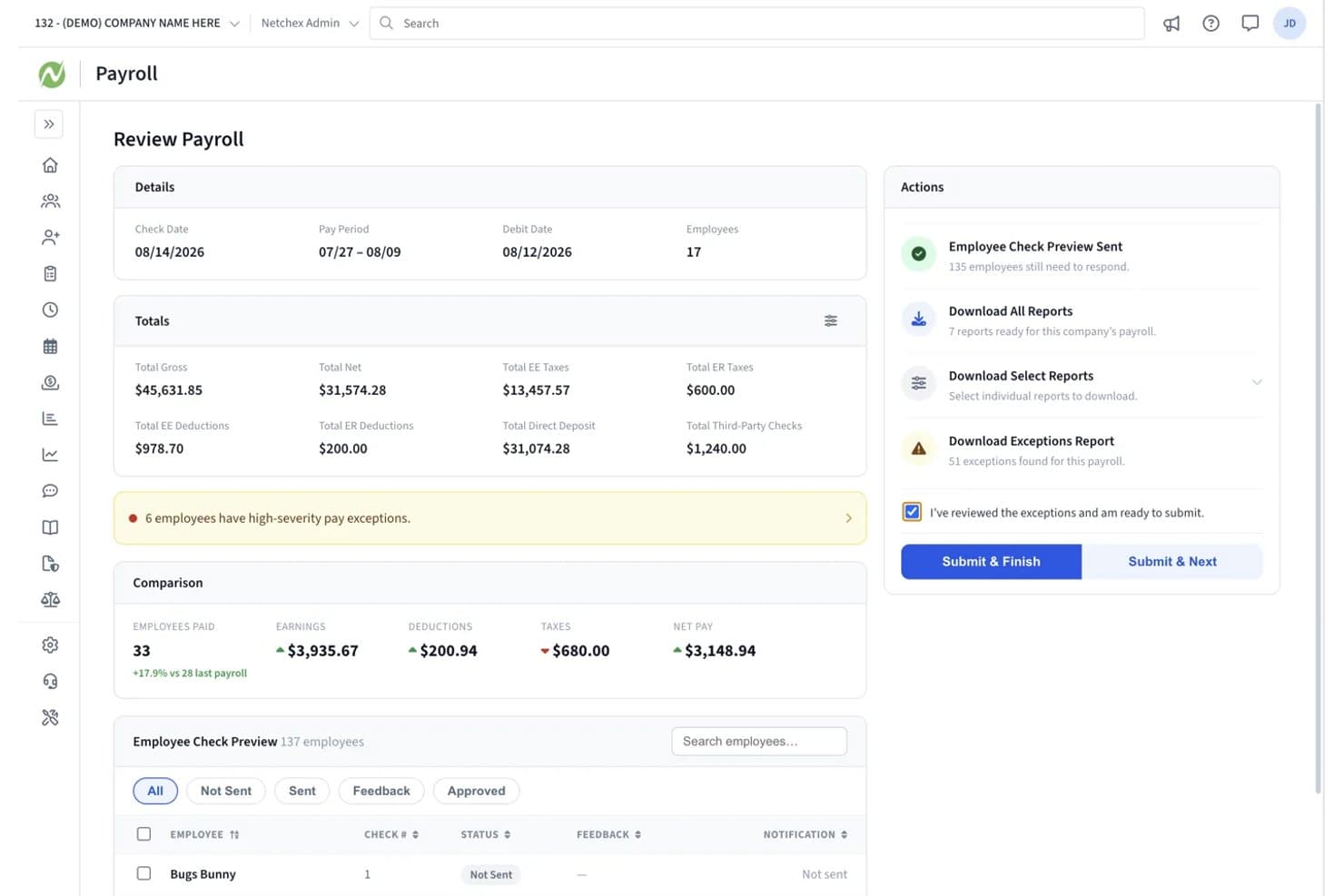
Netchex lets users review payroll totals and exceptions before submitting. Netchex is a payroll and HR platform that handles multi-rate wage calculations, shift differentials, union contract configuration, time tracking, and tax filing for manufacturing workforces.
Who Is Netchex Best For?
Netchex works well for mid-sized manufacturers with 50 or more employees running multiple union contracts across different shifts, pay rates, and plant locations.
Why I Picked Netchex
Netchex earns its spot on my shortlist because of how well it handles the complexity of running payroll across multiple union contracts at once. I like that you can configure separate CBA rules for each contract, covering seniority-based classifications, dues deductions, steward release time, and shift or skill differentials, without collapsing them into a single generic pay structure. The platform also supports mixed union and non-union payroll in the same run, which is exactly what mid-sized manufacturers with 50 or more employees across different plant locations tend to need.
Netchex Key Features
- Garnishment management: Handles garnishment calculations, deductions, remittance, and reporting directly within payroll processing.
- Mobile clock-in with geofencing: Employees punch in from mobile devices, with geofencing to verify punches come from approved locations.
- Seasonal rehire onboarding: Carries forward existing employee information when rehiring returning seasonal workers, reducing re-entry work.
- SOC 1 Type II and SOC 2 Type I certification: Provides audited security controls and compliance documentation available to customers on request.
Netchex Integrations
Documented integrations include QuickBooks Online, Employee Navigator, and Indeed. Netchex also provides an API and webhooks for custom integrations.
Pros and Cons
Pros:
- Payroll tax reporting reduces manual work
- Timekeeping connects hours directly to payroll
- Configurable CBA rules across union contracts
Cons:
- Limited production-line labor cost reporting
- Reports of delayed tax corrections
Learn more about Netchex: Best for U.S. tax filing and garnishments
- Not available
- Pricing upon request
Visit WebsiteCustomer Rating:4.3/5
UKG Pro centralizes payroll processing across multiple pay groups and countries. UKG Pro is a human capital management suite that combines payroll processing, tax filing, time and attendance, scheduling, and HR tools with specific support for shift differentials, union pay groups, and garnishment management.
Who Is UKG Pro Best For?
UKG Pro is a strong fit for HR and payroll teams at mid-to-large U.S. manufacturers that need automated tax filing, garnishment administration, and union pay group management in one platform.
Why I Picked UKG Pro
I've included UKG Pro in my top picks because its U.S. tax filing coverage is genuinely hard to beat: it deposits and files federal, state, and local tax liabilities across more than 8,000 tax codes, balances quarter-to-date and year-to-date liabilities, and handles amended returns when corrections are needed. I also like that garnishment administration is built directly into the payroll workflow, with earnings and exemption calculations, payments to issuing authorities, and wage-attachment reports all handled in one place.
UKG Pro Key Features
- Union pay group configuration: Supports setup for up to five collective bargaining agreements with pay rules covering overtime groupings, shift premiums, and holiday zones.
- Real-time gross-to-net payroll calculation: Reflects changes from timesheets, HR adjustments, and pay changes instantly without waiting for a batch run.
- Mobile and badge-based time capture: Employees can punch in and out via the UKG InTouch DX clock using card, badge, or contactless smart-card technologies, or via mobile with GPS and Wi-Fi geofencing.
- General ledger export: Pushes payroll cost data to your financial systems, with reports breakable by job, location, shift, and pay code.
UKG Pro Integrations
Marketplace integrations include UKG Wallet for UKG Pro and Connect to AD for Active Directory or Entra ID. UKG Pro also provides APIs and webhooks for custom integrations.
Pros and Cons
Pros:
- Phone clock-ins help track shift hours
- Handles multiple union paygroups and varied accruals
- Files U.S. taxes across 8,000+ tax codes
Cons:
- No clear production-line payroll cost reporting
- Custom reports can take time to build
Learn more about UKG Pro: 10Best for on-demand pay at no employer cost
Dayforce
- Free demo available
- Pricing upon request
Visit WebsiteCustomer Rating:4.2/5
Dayforce combines real-time payroll processing with comprehensive workforce management for the manufacturing industry. Dayforce is a comprehensive payroll and HR software solution designed for manufacturing companies. It helps optimize labor costs, boost productivity, and ensure compliance with industry regulations.
Why I picked Dayforce:
I chose Dayforce for its robust workforce management capabilities tailored specifically for the manufacturing sector. The platform stands out for its ability to streamline operations, manage compliance, and provide real-time visibility into workforce performance.
Standout features & integrations:
Dayforce offers several standout features, including advanced scheduling, real-time labor cost management, and compliance automation. The platform also provides tools for employee training and development, ensuring a skilled and compliant workforce.
Integrations include popular tools such as ADP, SAP, Oracle, Workday, Microsoft Dynamics, Salesforce, QuickBooks, NetSuite, Kronos, and BambooHR.
Pros and Cons
Pros:
- Compliance automation
- Advanced scheduling tools
- Real-time labor cost management
Cons:
- May be cost prohibitive for small businesses
- Limited customization options
- Complex initial setup
Learn more about Dayforce:
Değerlendirilebilecek Diğer Üretim Bordro Yazılımları
Aşağıda, kısa listemize aldığımız ancak en iyi listeye giremeyen ek üretim bordro yazılımlarının bir listesi yer alıyor. Bunları mutlaka incelemeye değer.
- 11RipplingBest for Davis-Bacon reporting
- 12ADP Workforce NowBest for certified payroll project reporting
- 13Paychex FlexGood for scalable payroll solutions
- 14APSBest for certified payroll reporting
- 15OnPayGood for small businesses needing comprehensive payrol
- 16isolvedBest for multi-state payroll tax filing
- 17Workday PayrollBest for payroll-to-ledger alignment
İlgili İK Yazılımı İncelemeleri
Burada aradığınızı hâlâ bulamadıysanız, test edip değerlendirdiğimiz diğer ilgili araçlara göz atın:
- İK Yazılımı
- Bordro Yazılımı
- İşe Alım Yazılımı
- Kayıtlı İşveren Hizmetleri
- Aday Takip Sistemleri
- İşgücü Yönetimi Yazılımı
How I Evaluate Payroll Software for Manufacturing
I split my evaluation into three parts, with the most weight on core needs: calculate overtime, shift premiums, and job rates, then sync clocked hours to payroll. Next, I look for differentiators such as certified payroll reports. Finally, I consider manufacturing-aware onboarding, multi-site scalability, and predictable pricing.
Core Functionality (Table Stakes For This List)
When I'm selecting tools for my list, I score each one on a scale from 0 (does not offer the functionality) to 5 (excels in this area) for each core functionality listed below. I then convert the total into a percentage to help assess each tool's overall fit, with extra weight on any functionalities I’ve deemed essential.
- Multi-Rate Pay (Essential): I look for rules that calculate overtime, shift premiums, and job-based rates when employees move between roles or shifts.
- Time & Attendance (Essential): I check how clock, badge, or shop-floor time data flows into payroll, including how teams review edits before a pay run.
- Multi-Site Compliance: I assess support for tax withholding and labor rules across plant locations and jurisdictions, including how updates are handled.
- Union Rules: I look for configurable support for collective agreements, such as dues deductions, seniority-based rates, and other negotiated pay rules.
- Tax Filing And Payment: I check whether the platform calculates, files, and remits payroll taxes, and which responsibilities remain with HR.
- Labor Cost Reporting: I evaluate whether reports break down labor costs by shift, department, or production line for workforce planning.
Once I have a list of tools that meet the criteria, I consider what sets each platform apart.
Differentiating Factors (What Sets Vendors Apart)
Here's how I compare and contrast different vendors:
Standout Features
I look for certified payroll reporting that auto-generates forms like the WH-347, since manufacturers on prevailing-wage contracts need accurate reports without manual assembly. Garnishment management matters just as much—I check whether a platform calculates, deducts, and remits garnishments across jurisdictions, which is common in large hourly workforces. I also evaluate mobile clock-in options with geofencing or badge support, because shop-floor time capture across multiple plant floors has to feed cleanly into payroll.
Beyond Features
I evaluate whether a vendor can onboard new plant locations without rebuilding pay rules from scratch, since manufacturers often add sites or absorb seasonal headcount fast. Audit trails matter just as much—I check that the platform logs every pay-rule change so your team can produce documentation during union grievances or prevailing-wage audits. I also look at vendor industry expertise, because a provider with an established manufacturing client base is more likely to anticipate piece-rate or CBA complexities than a generalist payroll vendor.
Üretim İçin Bordro Yazılımı Nasıl Seçilir?
Uzun özellik listeleri ve karmaşık fiyatlandırma yapıları arasında kaybolmak kolaydır. Kendinize özgü bordro yazılımı seçim süreciniz üzerinde çalışırken odaklanmanızı korumanıza yardımcı olmak için göz önünde bulundurmanız gereken faktörleri içeren bir kontrol listesi hazırladık:
| Faktör | Dikkate Alınması Gerekenler |
|---|---|
| FaktörÖlçeklenebilirlik | Dikkate Alınması GerekenlerYazılım işletmenizle birlikte büyüyebilir mi? Üretim operasyonunuz genişledikçe artan çalışan sayılarını ve karmaşık bordro ihtiyaçlarını destekleyip desteklemediğini değerlendirin. |
| FaktörEntegrasyonlar | Dikkate Alınması GerekenlerMevcut sistemlerinizle iyi bir şekilde bağlantı kurabiliyor mu? İş akışı verimliliğini korumak için ERP'niz ve diğer araçlarınızla entegre olup olmadığını kontrol edin. |
| FaktörÖzelleştirilebilirlik | Dikkate Alınması GerekenlerYazılımı süreçlerinize göre uyarlayabilir misiniz? Özel üretim gereksinimlerinize uyacak şekilde raporları ve bordro ayarlarını özelleştirme seçeneklerini arayın. |
| FaktörKullanım kolaylığı | Dikkate Alınması GerekenlerArayüz ekibiniz için kullanıcı dostu mu? İşe alıştırma süresini ve hataları azaltmak için sezgisel olduğundan ve minimum eğitim gerektirdiğinden emin olun. |
| FaktörUygulama ve işe alıştırma | Dikkate Alınması GerekenlerKurulum ne kadar sürecek? Veri aktarımı ve ilk kullanıcı eğitimi de dahil olmak üzere başlama sürecinin karmaşıklığını değerlendirin. |
| FaktörMaliyet | Dikkate Alınması GerekenlerGizli ücretler var mı? Şeffaflığı sağlamak için fiyatlandırma modellerini karşılaştırın. Kurulum ve bakım dahil toplam maliyetleri bütçenizle karşılaştırarak değerlendirin. |
| FaktörGüvenlik önlemleri | Dikkate Alınması GerekenlerHassas verileri nasıl koruyor? Çalışan bilgilerini güvence altına almak için şifreleme standartlarını ve veri koruma düzenlemelerine uygunluğu doğrulayın. |
| FaktörUyumluluk gereksinimleri | Dikkate Alınması GerekenlerSektör düzenlemelerini karşılıyor mu? Bölgenize özgü üretim iş yasalarına ve vergi gereksinimlerine uyumu desteklediğinden emin olun. |
Üretim İçin Bordro Yazılımında Trendler
Üretim bordrosu yazılımları hızla gelişiyor. İşte takip edilmesi gereken bazı önemli trendler.
- Yapay Zeka Destekli Bordro İşleme: Yapay zeka, bordro görevlerini otomatikleştirerek hataları azaltıyor ve zamandan tasarruf sağlıyor. Bu teknoloji, karmaşık hesaplamaları ve uyumluluk sorunlarını ele alabiliyor. Bordro yönetiminde verimliliği artırmak için büyük önem taşıyor.
- Bordro Güvenliği İçin Blok Zinciri: Blok zinciri teknolojisi bordro verilerini güvence altına almak için kullanılıyor. Şeffaflık sağlıyor ve veri üzerinde oynama yapılmasını önlüyor. Bu trend, hassas çalışan bilgilerini korumak açısından önemli.
- Mobil Bordro Çözümleri: Mobil uygulamalar, hareket hâlindeyken bordro yönetimine olanak tanıyor. Çalışanlar ücret bilgilerine istedikleri zaman ve istedikleri yerden erişebiliyor. Bu trend, erişilebilirliği ve kolaylığı artırmak açısından önemli.
- Bulut Tabanlı Bordro Sistemleri: Bulut tabanlı sistemler bordro yönetiminde standart hâline geliyor. Ölçeklenebilirlik ve uzaktan erişim sunuyorlar. Bu trend, esnek çalışma ortamlarına uyum sağlamak isteyen işletmeler için hayati önem taşıyor.
- İK ve ERP Sistemleriyle Entegrasyon: Bordro yazılımları giderek daha fazla İK ve ERP sistemleriyle entegre oluyor. Bu entegrasyon veri akışını kolaylaştırıyor ve doğruluğu artırıyor. Birleşik bir işletme yönetim sistemi oluşturmak için gerekli.
Bu trendlerin gösterdiği üzere, üretim sektöründeki bordro yazılımları; yapay zeka, Bulut ve Mobil teknolojilere ve diğer popüler işletme araçlarıyla entegrasyona güçlü bir şekilde odaklanarak daha gelişmiş hâle geliyor. Üretimde bordro yazılımının geleceğini şekillendiren bu trendleri takip edin.
Üretim İçin Bordro Yazılımı Nedir?
Üretim için bordro yazılımı, üretim şirketlerinin bordro sürecini yönetmek ve otomatikleştirmek üzere tasarlanmış bir araçtır. Çalışanlara ücretlerin doğru ve zamanında ödenmesini sağlamak için İK departmanları, bordro yöneticileri ve finans ekipleri tarafından kullanılır. Bu yazılım, kullanıcıların üretim sektörüne özgü karmaşık bordro hesaplamalarını, vergi uyumluluğunu ve yan hak yönetimini ele almasına yardımcı olur.
Üretim için bordro yazılımının bileşenleri genellikle zaman ve devam takibi, ücret hesaplama, vergi bildirimi ve yan hak yönetimini içerir. Ayrıca veri akışını kolaylaştırmak ve manuel veri girişi hatalarını azaltmak için diğer üretim İK sistemleriyle entegre olur. Bu, bordro süreçlerinin verimli olmasını ve sektör düzenlemelerine uygun şekilde yürütülmesini sağlar.
Temel Özellikler
Üretim işletmeniz için bir platform seçerken şu temel bordro yazılımı özelliklerine dikkat edin:
- Çalışma süresi takibi entegrasyonu: Üretim bordro yazılımı, vardiyalar, fazla mesai ve iş kodları genelinde çalışılan saatleri kaydetmek için zaman saatleri ve üretim sahası sistemleriyle sorunsuz şekilde senkronize olmalıdır. Bu, manuel veri girişini azaltır ve doğru ücret hesaplamaları yapılmasını sağlar.
- Doğrudan ödeme: Doğrudan ödeme, çalışanların kağıt çek kullanmadan ücretlerini zamanında almalarını sağlar; idari işleri azaltır ve özellikle saatlik ücretle çalışan büyük iş gücü için çalışan memnuniyetini artırır.
- Vardiya farkları ve karmaşık ücret kuralları: Üretim ortamlarında gece vardiyaları, hafta sonu çalışmaları, tehlikeli görevler veya sendika sözleşmeleri için sıklıkla farklı ücretlendirmeler gerekir. Bordro yazılımı, bu karmaşık ücret yapılarını otomatik olarak desteklemelidir.
- Gider yönetimi: Otomatik gider raporlama ve geri ödeme araçları; seyahat, konaklama, araç-gereç veya güvenlik ekipmanı giderlerinin yönetilmesine yardımcı olarak zamanında ve doğru ödemeler yapılmasını sağlar.
- Ücretlendirme yönetimi: Bordro platformları; temel ücret, primler, teşvikler ve başarı artışlarının yönetilmesine yardımcı olurken işletme hedefleriyle uyumlu, adil ve rekabetçi ücretlendirme stratejilerini desteklemelidir.
- Çalışanların kendi işlemlerini yapabilmesi: Çalışanlar, İK'ya bağlı kalmadan ücret bordrolarına, vergi formlarına, yan hak bilgilerine ve kişisel bilgilerine erişebilir; bu da idari iş yükünü azaltır ve şeffaflığı artırır.
- Bordro raporları ve analizleri: Özelleştirilebilir raporlar; iş gücü maliyetleri, fazla mesai kullanımı, departman harcamaları ve uyumluluk ölçütleri hakkında bilgi sağlayarak bilinçli karar alma süreçlerini destekler.
- Bordro denetimi ve hata raporlama: Yerleşik denetim araçları, bordro kesinleştirilmeden önce tutarsızlıkları, eksik verileri veya hesaplama sorunlarını işaretleyerek maliyetli hataların önlenmesine yardımcı olur.
- Vergi beyannamesi ve uyumluluk: Otomatik vergi hesaplama, kesinti ve beyan işlemleri; federal, eyalet ve yerel düzenlemelere uyumu sağlayarak cezaları ve denetim riskini azaltır.
- Entegre bordro sistemleri: İK bilgi sistemleri, kurumsal kaynak planlaması, muhasebe ve üretim sistemleriyle sorunsuz entegrasyon, veri tutarlılığını sağlar ve yinelenen veri girişini ortadan kaldırır.
- Genel muhasebe defteri eşlemesi: Bordro giderleri otomatik olarak genel muhasebe defterine eşlenerek doğru finansal raporlamayı ve daha kolay mutabakatı destekler.
- Ücret haczi yönetimi: Bordro yazılımı, yasal gerekliliklere uygun olarak haciz kesintilerini ve ödemelerini otomatikleştirerek idari karmaşıklığı azaltır.
- Küresel bordro desteği: Uluslararası faaliyetleri bulunan üreticiler için bordro yazılımı birden fazla para birimini, saat dilimini ve yerel uyumluluk kuralını destekler.
- Talep üzerine ödeme: Bazı platformlar, çalışanların kazandıkları ücretlere ödeme gününden önce erişmesine olanak tanıyarak finansal stresi azaltmaya ve çalışan devir hızının yüksek olduğu görevlerde çalışanları elde tutmayı iyileştirmeye yardımcı olur.
Üretim İçin Yaygın Bordro Yazılımı Yapay Zekâ Özellikleri
Modern üretim bordro platformları; doğruluğu, uyumluluğu ve iş gücü planlamasını geliştirmek için giderek daha fazla yapay zekâ kullanıyor. Örneğin:
- Yapay zekâ destekli bordro hata tespiti: Yapay zekâ, bordro işleme alınmadan önce yanlış fazla mesai hesaplamaları, atlanan vardiya farkları, yinelenen çalışma saatleri veya olağandışı ücret modelleri gibi anormallikleri belirlemek için bordro işlemlerini tarar.
- Tahmine dayalı iş gücü maliyeti öngörüsü: Yapay zekâ; iş gücü maliyetlerini daha doğru şekilde öngörmek için üretim programlarını, geçmiş iş gücü verilerini, mevsimselliği ve fazla mesai eğilimlerini analiz eder.
- Akıllı uyumluluk izleme: Yapay zekâ; iş kanunlarındaki, sendika sözleşmelerindeki, fazla mesai kurallarındaki ve vergi düzenlemelerindeki değişiklikleri takip ederek bordro ekiplerini uyumluluk riskleri konusunda otomatik olarak uyarır.
- Otomatik puantaj doğrulama: Yapay zekâ; eksik giriş-çıkış kayıtlarını, başkasının yerine kart basma durumlarını veya belirli makineler ya da üretim hatlarıyla ilişkili tutarsızlıkları tespit etmek için işe giriş-çıkış verilerini inceler.
- Yapay zekâ destekli vardiya planlama içgörüleri: Yapay zekâ, üretim talebini ve iş gücü uygunluğunu analiz ederek fazla mesaiyi en aza indirirken üretim hedeflerini koruyan personel seviyelerinin önerilmesine yardımcı olur.
- Çalışan devir hızı ve devamsızlık risk analizi: Yapay zekâ; aşırı fazla mesai veya düzensiz programlar gibi çalışan tükenmişliği, devamsızlık veya işten ayrılmayla ilişkili örüntüleri belirleyerek proaktif iş gücü müdahalelerini destekler.
- Akıllı ücret haczi işlemleri: Yapay zekâ, yargı bölgeleri arasındaki ücret haczi kurallarının doğrulanmasına yardımcı olur ve hatalı kesinti tutarlarını veya öncelik çakışmalarını işaretler.
- Yapay zekâ destekli çalışan desteği: Sohbet robotları; ücret, fazla mesai, kesintiler, programlar ve vergi formları hakkındaki yaygın soruları yanıtlayarak İK ve bordro ekiplerinin bölünmesini azaltır.
- Gelişmiş analizler ve içgörüler: Yapay zekâ; iş gücü verimliliği, fazla mesaiye bağımlılık, bordro farklılıkları ve uyumluluk riskleri genelindeki eğilimleri ortaya çıkararak bordro verilerini uygulanabilir operasyonel içgörülere dönüştürür.
Faydalar
Üretim sektöründe bordro yazılımı uygulamak verimliliği, doğruluğu ve uyumluluğu önemli ölçüde geliştirebilir. Potansiyel alıcıların değerlendirmesi gereken beş temel fayda şunlardır:
- Artırılmış Doğruluk: Bordro yazılımı, hesaplamaları ve veri girişini otomatikleştirerek insan hatalarını en aza indirir; çalışanların doğru ve zamanında ücret almasını sağlar.
- Zaman Tasarrufu: Bordro süreçlerinin otomatikleştirilmesi, manuel görevlere harcanan zamanı azaltarak İK personelinin daha stratejik faaliyetlere odaklanmasını sağlar.
- Yasal Uyumluluk: Yazılım, en güncel yasal gereklilikleri yansıtacak şekilde otomatik olarak güncellenerek iş kanunlarına ve vergi düzenlemelerine uyulmasına yardımcı olur.
- Maliyet Verimliliği: Manuel iş gücü ihtiyacını azaltıp hataları en aza indirerek bordro yazılımı işletme maliyetlerini düşürebilir ve kârlılığı artırabilir.
- Veri Güvenliği: Bordro yazılımı, hassas çalışan bilgilerinin yetkisiz erişimden ve veri ihlallerinden korunması için güçlü güvenlik özellikleri sunar.
Bordro yazılımına yatırım yapmak, operasyonel verimlilik ve doğrulukta önemli iyileşmeler sağlayarak onu her üretim kuruluşu için değerli bir araç hâline getirebilir.
Maliyetler ve Fiyatlandırma
Üretim sektöründe bordro yönetimi söz konusu olduğunda, doğru yazılımı seçmek operasyonları önemli ölçüde kolaylaştırabilir, uyumluluğu sağlayabilir ve zaman kazandırabilir.
Aşağıda, doğru seçeneği bulmanıza yardımcı olmak için üretim sektörüne yönelik bordro yazılımlarında bulunan yaygın fiyatlandırma seçenekleri ve özellikler hakkında genel bir bakış sundum.
Üretim Sektörüne Yönelik Bordro Yazılımı İçin Plan Karşılaştırma Tablosu
| Plan Türü | Ortalama Fiyat | Yaygın Özellikler |
| Ücretsiz Plan | $0 | Temel bordro işlemleri, çalışanların kendi işlemlerini yapabilmesi, sınırlı destek |
| Temel Plan | $17/month + $4/employee | Bordro işlemleri, doğrudan para yatırma, yazdırılabilir W-2 formları, kurulum ve uzman desteği |
| Standart Plan | $40/month + $6/employee | Tam hizmet bordrosu, vergi beyannamesi işlemleri, çalışanların kendi işlemlerini yapabilmesi, temel İK araçları |
| Gelişmiş Plan | $80/month + $12/employee | Birden fazla eyalete yönelik bordro, ertesi gün doğrudan para yatırma, gelişmiş İK araçları, PTO yönetimi |
| Premium Planı | $125/month + $10/employee | Vergi cezalarına karşı koruma, mobil zaman takibi, atanmış İK danışmanı, uyumluluk |
Üreticiler tarafından kullanılan bordro yazılımları için plan türlerinin, maliyetlerin ve özelliklerin dökümü.
Üretim sektörüne yönelik bordro yazılımı seçerken işletmenizin büyüklüğünü, bordro ihtiyaçlarınızın karmaşıklığını ve gereken destek düzeyini göz önünde bulundurun. Her plan farklı özellikler ve fiyatlandırma sunar; bu nedenle ihtiyaçlarınıza göre işletme hedefleriniz ve bütçenizle uyumlu olanı seçebilirsiniz.
İmalat Sektörü için Bordro Yazılımı Hakkında SSS
İmalat sektörü için bordro yazılımı hakkında sık sorulan soruların bazı yanıtlarını burada bulabilirsiniz:
Bordro yazılımı imalat sektöründeki uyumluluğu nasıl yönetir?
İmalat sektörü için bordro yazılımı, vergi oranlarını ve iş kanunlarını otomatik olarak güncelleyerek sektör düzenlemelerine uyumlu kalmanıza yardımcı olur. Doğru hesaplamalar ve zamanında bildirimler sağlayarak ceza riskini azaltır. Yazılımın bölgenizin özel uyumluluk gereksinimlerini destekleyip desteklemediğini kontrol etmelisiniz.
Bordro yazılımı mevcut sistemlerle entegre olabilir mi?
Evet, birçok bordro yazılımı çözümü mevcut ERP ve İK sistemleriyle entegrasyon özellikleri sunar. Bu, sorunsuz bir iş akışının sürdürülmesine yardımcı olur ve manuel veri girişini azaltır. Verimliliği en üst düzeye çıkarmak için seçtiğiniz yazılımın mevcut araçlarınıza bağlanabildiğinden emin olun.
Bordro yazılımı kullanıcıları için ne tür destek sunulur?
Çoğu bordro yazılımı sağlayıcısı telefon, e-posta ve sohbet gibi çeşitli kanallar aracılığıyla müşteri desteği sunar. Bazıları ayrıca kişiselleştirilmiş yardım için özel müşteri yöneticileri sağlar. Özellikle uygulama ve işe alıştırma süreçlerinde sunulan destek düzeyini değerlendirmek önemlidir.
Bordro yazılımı çok vardiyalı planlamayı nasıl yönetir?
İmalat sektörü için bordro yazılımı genellikle karmaşık vardiya programlarını yönetmeye yönelik özellikler içerir. Farklı ücret oranları belirlemenize ve fazla mesaileri verimli bir şekilde yönetmenize olanak tanır. Bu özellik, vardiyalı çalışmanın yaygın olduğu imalat sektöründe özellikle kullanışlıdır ve doğru bordro işlemlerinin yapılmasını sağlar.
Bordro yazılımı büyüyen imalat işletmeleri için ölçeklenebilir mi?
Evet, birçok bordro yazılımı çözümü işletmenizle birlikte ölçeklenebilecek şekilde tasarlanmıştır. Şirketiniz büyüdükçe artan çalışan sayılarına ve daha karmaşık bordro gereksinimlerine uyum sağlar. Yazılımın büyümenize uygun esnek fiyatlandırma planları sunup sunmadığını kontrol edin.
Bordro verilerini korumak için hangi güvenlik önlemleri alınır?
Bordro yazılımı, hassas bilgileri korumak için genellikle veri şifreleme ve veri koruma düzenlemelerine uyumluluk özelliklerini içerir. Verilerinizin yetkisiz erişime ve ihlallere karşı korunduğundan emin olmak için yazılımın güvenlik özelliklerini doğrulamanız çok önemlidir.