

10 piattaforme LMS per l’impresa estesa nel 2026

Elenco dei migliori LMS per aziende estese


Orientarsi tra le complessità delle risorse umane e della formazione può essere scoraggiante. Il tuo team ha bisogno di soluzioni che rendano l'apprendimento accessibile ed efficace. Le piattaforme LMS per aziende estese offrono un modo per formare in modo efficiente dipendenti, partner e clienti.
Nella mia esperienza di test e valutazione dei software, ho scoperto che l'LMS giusto può alleviare molte delle tue difficoltà. Può semplificare l'inserimento dei nuovi dipendenti, garantire la conformità e migliorare lo sviluppo delle competenze in gruppi diversi.
In questo articolo condividerò le mie recensioni imparziali e approfondite delle migliori opzioni di LMS per aziende estese disponibili. Otterrai informazioni sulle loro funzionalità, sui vantaggi e sul modo in cui possono supportare le tue esigenze specifiche. Troviamo la soluzione più adatta alla tua organizzazione.
Perché fidarsi delle nostre recensioni sui software
Il nostro team testa e recensisce software dal 2012. In quanto esperti HR noi stessi, sappiamo quanto sia difficile — e importante — scegliere il software giusto.
Per questa guida, abbiamo valutato gli strumenti attraverso test pratici e ricerche indipendenti, assegnando un punteggio agli strumenti in base ai nostri criteri di selezione. Ci basiamo inoltre sulle competenze di leader di pensiero del settore e di professionisti HR attivi.
Le nostre recensioni riflettono il nostro giudizio editoriale umano, non un discorso di vendita.
Revisori esperti:
Riepilogo dei migliori LMS per aziende estese
Questa tabella comparativa riassume i dettagli dei prezzi delle mie migliori selezioni di LMS per aziende estese, per aiutarti a trovare la soluzione migliore per il tuo budget e le esigenze della tua azienda.
| Tool | Best For | Trial Info | Price | ||
|---|---|---|---|---|---|
| 1 | Ideale per centralizzare la formazione interna ed esterna | Demo gratuita disponibile | Prezzo su richiesta | Website | |
| 2 | Ideale per la compatibilità con i contenuti SCORM | Prova gratuita di 30 giorni + demo gratuita disponibile | Da $3.97/utente/mese | Website | |
| 3 | Ideale per la gestione scalabile degli utenti | Piano gratuito + demo gratuita disponibile | Da $119/mese (fatturazione annuale) | Website | |
| 4 | Ideale per monitoraggio delle certificazioni personalizzabile | Demo gratuita disponibile | Prezzo su richiesta | Website | |
| 5 | Ideale per la gestione di più portali di apprendimento | Demo gratuita + prova gratuita disponibile | Prezzo su richiesta | Website | |
| 6 | Ideale per accademie clienti white-label | Prova gratuita disponibile | A partire da $239/mese (80 utenti) | Website | |
| 7 | Ideale per la creazione collaborativa di corsi | Prova gratuita di 30 giorni + demo gratuita disponibile | Da $8/utente/mese | Website | |
| 8 | Ideale per l'automazione della formazione dei partner | Demo gratuita disponibile | Prezzo su richiesta | Website | |
| 9 | Ideale per raccomandazioni di contenuti tramite IA | Demo gratuita disponibile | Prezzo su richiesta | Website | |
| 10 | Ideale per l'erogazione di corsi multilingue | Demo gratuita disponibile | Prezzo su richiesta | Website |


Recensioni degli LMS per aziende estese
Di seguito trovi i miei riepiloghi dettagliati delle piattaforme LMS per aziende estese incluse nel mio elenco. Le mie recensioni offrono un’analisi approfondita delle funzionalità, dei migliori casi d’uso e delle integrazioni di ciascuna piattaforma, per aiutarti a trovare quella più adatta alla tua organizzazione.

Continu
Ideale per centralizzare la formazione interna ed esterna
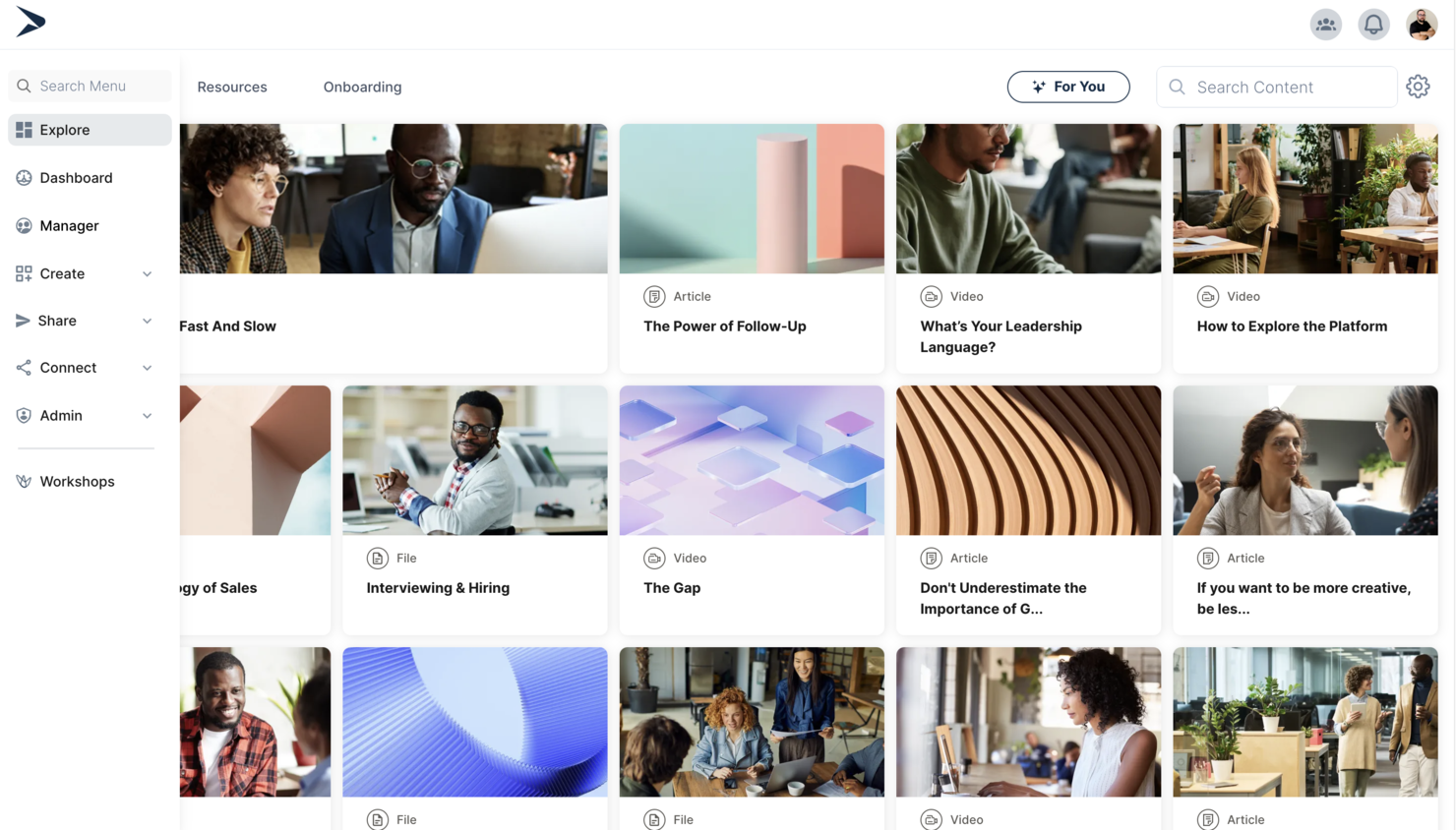
Continu è una piattaforma di apprendimento per organizzazioni che gestiscono la formazione di diversi pubblici, inclusi dipendenti, partner e clienti. Supporta portali personalizzati per gli utenti, segmentazione degli utenti, percorsi di apprendimento, analisi e integrazioni con sistemi HRIS e strumenti per il luogo di lavoro.
Per chi è consigliato Continu?
Continu è adatto a organizzazioni di medie e grandi dimensioni che necessitano di collegare la gestione dell'apprendimento con le piattaforme HRIS per unificare i dati dei dipendenti e i flussi di lavoro formativi.
Perché ho scelto Continu
Ciò che mi ha colpito di Continu come LMS esteso per l'impresa è la sua forte attenzione all'integrazione dell'apprendimento con le piattaforme HRIS. Questa integrazione consente alle organizzazioni di sincronizzare i dati degli utenti, automatizzare le iscrizioni e monitorare i progressi formativi insieme agli altri processi HR. La considero particolarmente preziosa per le aziende che gestiscono pubblici o filiali diverse, dove dati e flussi di lavoro unificati sono essenziali. Continu supporta anche l'accesso basato sui ruoli e la segmentazione dell'utenza, che aiuta a fornire formazione mirata tra varie unità aziendali o partner esterni.
Caratteristiche principali di Continu
Altre funzionalità che rendono Continu utile per le esigenze LMS per l'impresa estesa includono:
- Strumenti di creazione contenuti: Crea corsi interattivi e percorsi di apprendimento direttamente sulla piattaforma.
- Supporto per SCORM e xAPI: Importa, distribuisci e monitora contenuti e-learning secondo gli standard del settore.
- Branding personalizzato: Applica il logo, i colori e il marchio della tua organizzazione ai portali degli utenti.
- Analisi avanzate: Accedi a report dettagliati su coinvolgimento degli utenti, completamento dei corsi e conformità.
Integrazioni di Continu
Le integrazioni includono Workday, BambooHR, Oracle, Salesforce, Slack, Zoom, Microsoft Teams, Google Calendar, LinkedIn Learning e altro.
Pros and Cons
Pros:
- Supporta la segmentazione del pubblico per i partner esterni
- Comprende strumenti integrati di creazione contenuti e valutazioni
- Offre analisi avanzate e monitoraggio della conformità
Cons:
- La configurazione multi-pubblico richiede un'attenta pianificazione della segmentazione
- La gestione di portali e flussi di lavoro personalizzati richiede un impegno amministrativo
New Product Updates from Continu
Continu Adds Smarter Content Management
Continu adds Intelligent Tagging and Descriptions and richer content details to improve how learning content is organized and maintained. These updates reduce manual work and give teams more consistent, detailed content records. For more information, visit Continu’s official site.
 .
.
Ideale per la compatibilità con i contenuti SCORM
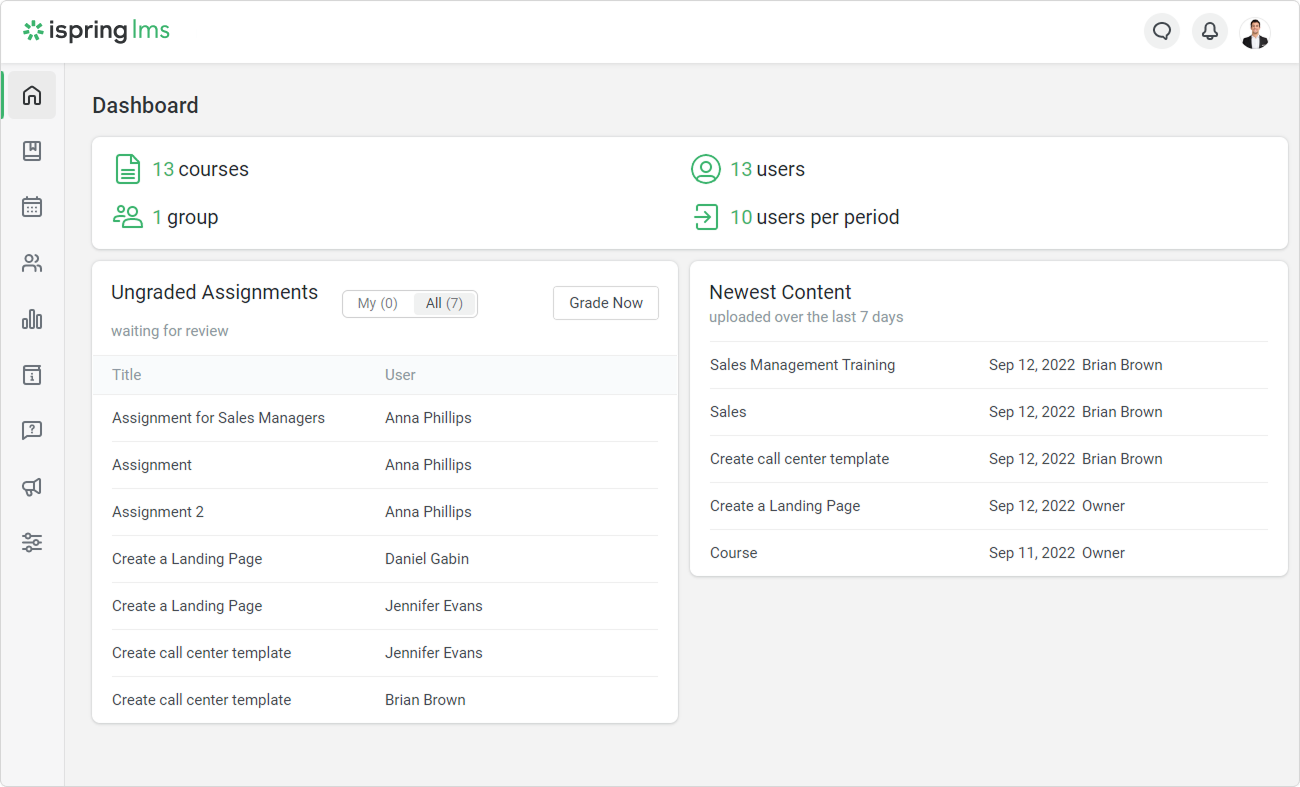
Se hai bisogno di un LMS per l’impresa estesa che gestisca i contenuti SCORM senza complicazioni, iSpring LMS merita attenzione. È progettato per le organizzazioni che fanno affidamento su moduli e-learning interattivi e hanno bisogno di una compatibilità affidabile con i formati standard del settore. iSpring LMS è ideale per team che devono gestire contenuti formativi diversificati e pubblici esterni che si aspettano un'erogazione fluida e coerente dei corsi.
Per chi è più indicato iSpring LMS?
iSpring LMS è adatto a organizzazioni e fornitori di formazione che necessitano di compatibilità affidabile per i contenuti SCORM nell’erogazione di e-learning interattivo a partner esterni o team distribuiti.
Perché ho scelto iSpring LMS
Ciò che mi ha portato a scegliere iSpring LMS come LMS per impresa estesa è la sua solida compatibilità con i contenuti SCORM, fondamentale per le organizzazioni che gestiscono una vasta gamma di moduli e-learning. La piattaforma importa, traccia e genera report sui corsi SCORM in modo affidabile, permettendo di offrire formazione interattiva a utenti esterni senza preoccuparsi di problemi di formato. Inoltre, apprezzo che iSpring LMS supporti l'iscrizione automatica e il monitoraggio dei progressi per diversi gruppi di utenti, semplificando la gestione della formazione a partner o clienti su larga scala. Queste funzionalità aiutano a garantire che i tuoi contenuti formativi funzionino come previsto, indipendentemente dalla loro complessità o interattività.
Funzionalità principali di iSpring LMS
Altre funzionalità che rendono iSpring LMS utile per la formazione in ambito enterprise esteso includono:
- Controlli di accesso basati sui ruoli: Assegna diversi permessi ad amministratori, istruttori e discenti per gestire l'accesso tra molteplici pubblici.
- Opzioni di white-labeling: Personalizza il branding della piattaforma per adeguarlo all'identità della tua organizzazione o dei tuoi clienti.
- App per l'apprendimento mobile: Consenti agli utenti esterni di accedere a corsi e materiali da dispositivi iOS e Android.
- Gestione dei certificati: Rilascia e monitora automaticamente i certificati per il completamento dei corsi o per gli obblighi di conformità.
Integrazioni di iSpring LMS
Le integrazioni includono Salesforce, BambooHR, OrangeHRM, Zoom, Microsoft Teams, Google Meet, Shopify e altro ancora.
Pros and Cons
Pros:
- Compatibilità con i contenuti SCORM, xAPI e AICC
- Gestione automatizzata dei certificati per discenti esterni
- Monitoraggio dettagliato dei progressi degli utenti esterni
Cons:
- Personalizzazione dei report alquanto limitata
- Nessuno strumento integrato per la creazione di simulazioni complesse
New Product Updates from iSpring LMS

iSpring LMS Adds Multiple Observations to OJT Sessions
iSpring LMS now lets managers log multiple observations within one OJT session, grouping visits and auto-generating summary stats like averages, criterion results, and comparisons. For more information, visit iSpring LMS's official site.

Ideale per la gestione scalabile degli utenti
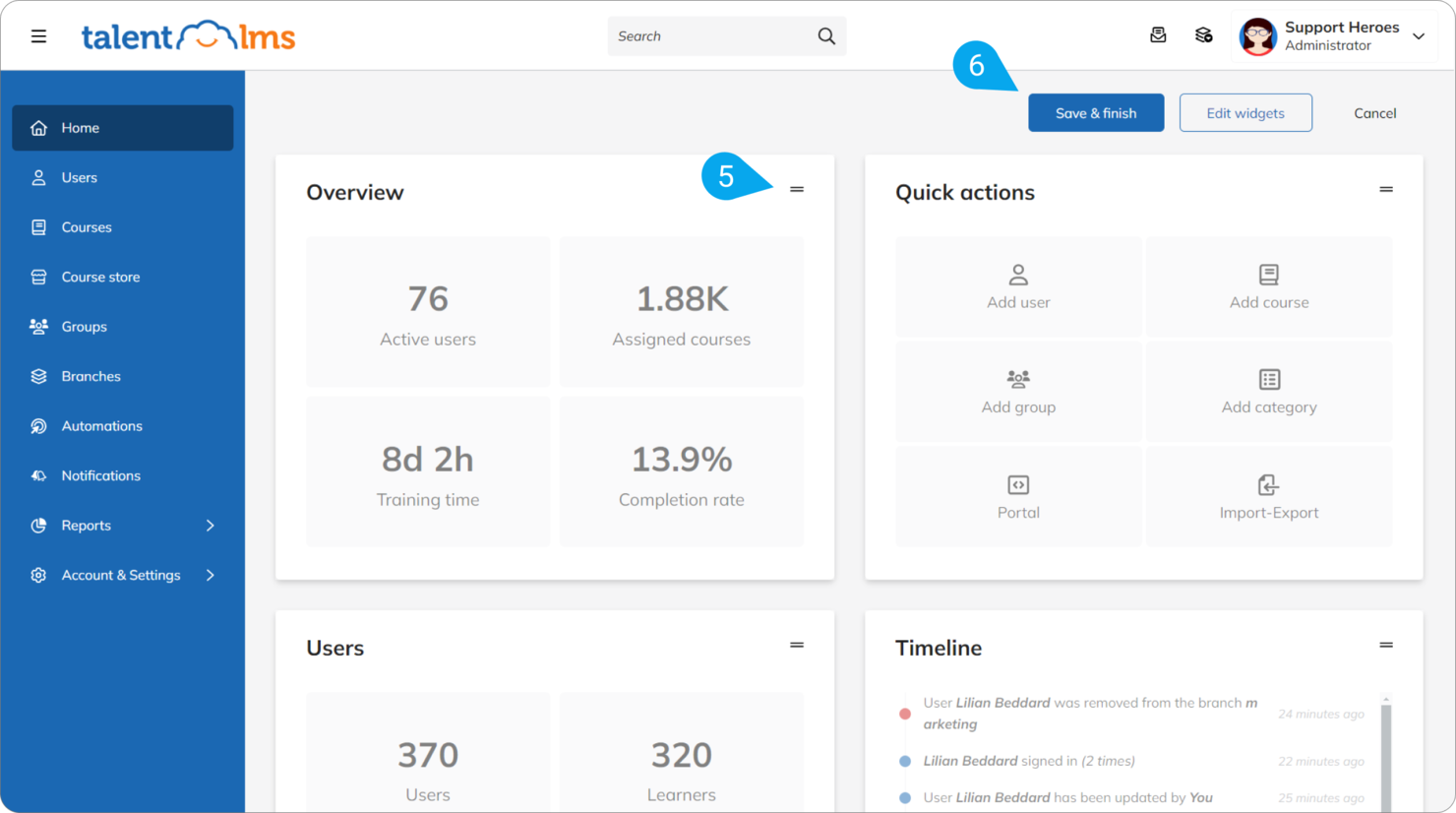
TalentLMS offre una piattaforma flessibile per le organizzazioni che devono gestire più audience o unità aziendali da un unico account. È particolarmente adatta alle aziende con gerarchie utente complesse o a chi eroga formazione sia ai team interni che a partner esterni. La piattaforma ti aiuta a organizzare, segmentare e scalare i programmi di apprendimento senza perdere il controllo o la visibilità.
Per chi è ideale TalentLMS?
TalentLMS è adatto a organizzazioni di medie e grandi dimensioni che devono gestire e segmentare gruppi di utenti o unità aziendali su larga scala.
Caratteristiche principali di TalentLMS
Altre funzionalità che rendono TalentLMS utile come LMS per aziende estese includono:
- Supporto multilingue: Offri contenuti formativi in diverse lingue per audience globali.
- Report personalizzati: Genera report dettagliati sui progressi degli utenti, sul completamento dei corsi e sul coinvolgimento.
- Strumenti per l'ecommerce: Vendi corsi direttamente tramite la piattaforma con pagamenti integrati.
- Conformità SCORM e xAPI: Importa e traccia contenuti formativi standard del settore per un'ampia gamma di esigenze formative.
Integrazioni TalentLMS
Le integrazioni includono BambooHR, Salesforce, TalentHR, Sage People, Intercom, ADP Workforce Now, Zendesk Chat, Zoom, Microsoft Teams e molte altre.
Pros and Cons
Pros:
- I rami consentono portali separati per ogni audience
- Supporto SCORM e xAPI per contenuti diversificati
- La gamification aumenta il coinvolgimento degli utenti esterni
Cons:
- Le analisi avanzate non sono sufficientemente approfondite per uso aziendale
- Gestire gruppi esterni di grandi dimensioni può risultare complesso
New Product Updates from TalentLMS
TalentLMS Adds Learning Paths, AI Video, and Learner Experience Updates
TalentLMS introduced updates across learning management, content creation, and learner experience, including Learning Paths for Groups, AI video generation in TalentCraft, video bookmarking, and expanded administration tools. For more information, visit TalentLMS’s official site.

SkyPrep
Ideale per monitoraggio delle certificazioni personalizzabile
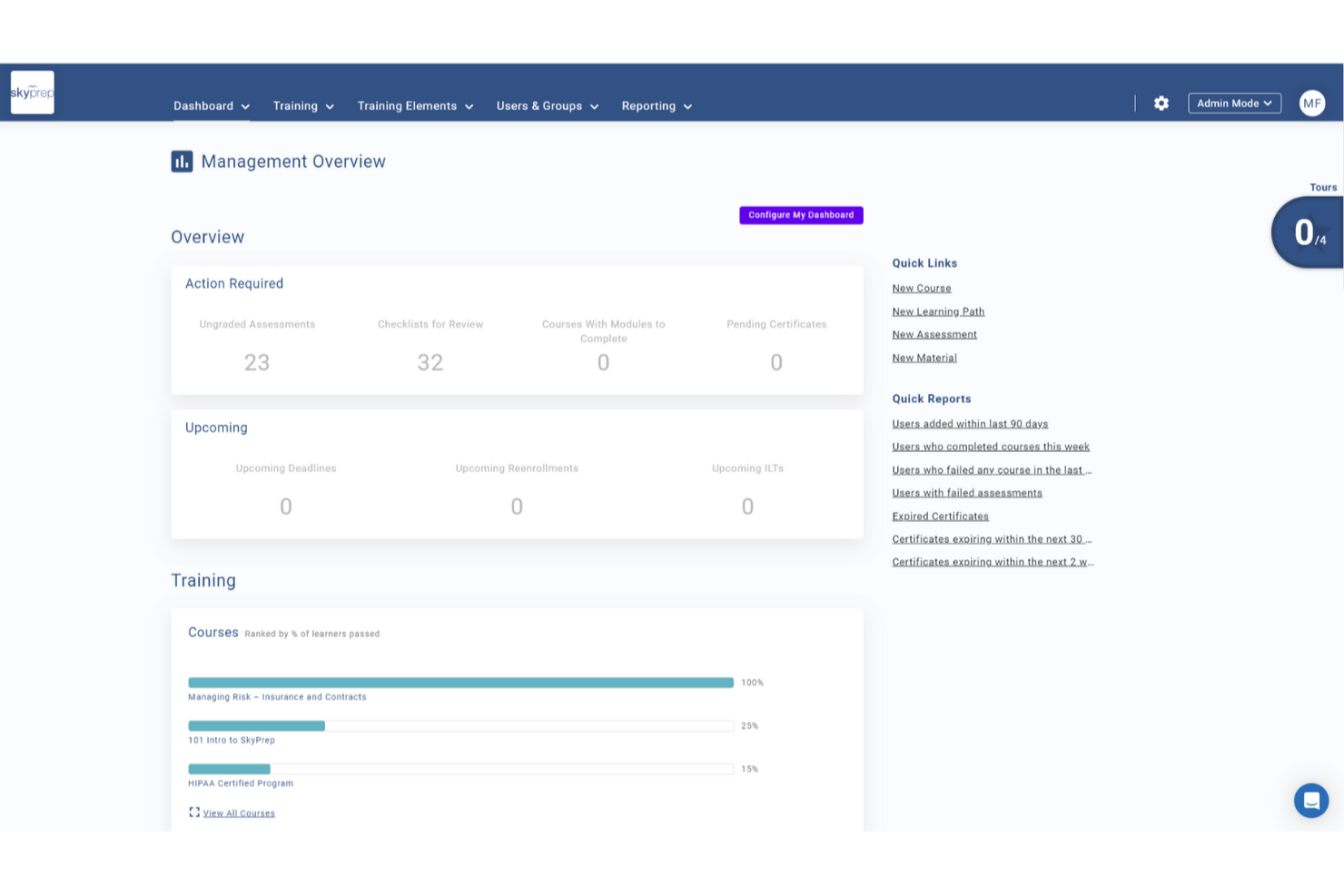
SkyPrep è un LMS (sistema di gestione dell'apprendimento) cloud-based per extended enterprise che permette di creare portali personalizzati con il tuo marchio, gestire diversi gruppi di utenti, erogare corsi online, automatizzare le certificazioni e monitorare i progressi degli utenti tra gruppi esterni.
Per chi è più indicato SkyPrep?
SkyPrep è ideale per aziende di medie e grandi dimensioni che hanno bisogno di formare utenti esterni come partner, franchisee, rivenditori o clienti, insieme ai team interni.
Perché ho scelto SkyPrep
Il monitoraggio delle certificazioni è il vero punto di forza di SkyPrep, ed è uno dei motivi principali per cui lo consiglio per l'extended enterprise. Puoi creare certificati personalizzati con il tuo marchio, impostare date di scadenza e configurare la ri-iscrizione automatica quando una certificazione scade—un aspetto fondamentale per settori soggetti a normative come sanità o manifatturiero. Apprezzo anche che gli utenti possano scaricare direttamente i propri certificati, così partner e utenti esterni possono accedere in autonomia senza dover contattare un amministratore.
Funzionalità principali di SkyPrep
- Costruttore di corsi: Crea corsi con valutazioni, checklist e verifiche delle conoscenze integrate direttamente nella struttura del corso.
- Automazione dei flussi di lavoro: Imposta regole di auto-iscrizione, avvisi automatici e attivazioni di attività per ridurre il lavoro amministrativo manuale.
- Creazione di contenuti con IA: Utilizza strumenti di intelligenza artificiale integrati per velocizzare lo sviluppo dei corsi e supportare l'interazione degli utenti.
- Supporto e-commerce: Vendi corsi di formazione direttamente tramite la piattaforma grazie alle funzionalità e-commerce integrate.
Integrazioni SkyPrep
SkyPrep offre integrazioni native con Zoom, Microsoft Teams, HubSpot, Salesforce e PayPal. Fornisce anche un'API per integrazioni personalizzate.
Pros and Cons
Pros:
- Gestione dettagliata di ruoli e permessi
- Analitiche dettagliate sull’engagement degli utenti
- Supporta portali con marchio per diversi gruppi di utenti
Cons:
- Manca di opzioni avanzate per le versioni dei corsi
- Le funzionalità avanzate possono richiedere piani tariffari più elevati

Absorb
Ideale per la gestione di più portali di apprendimento
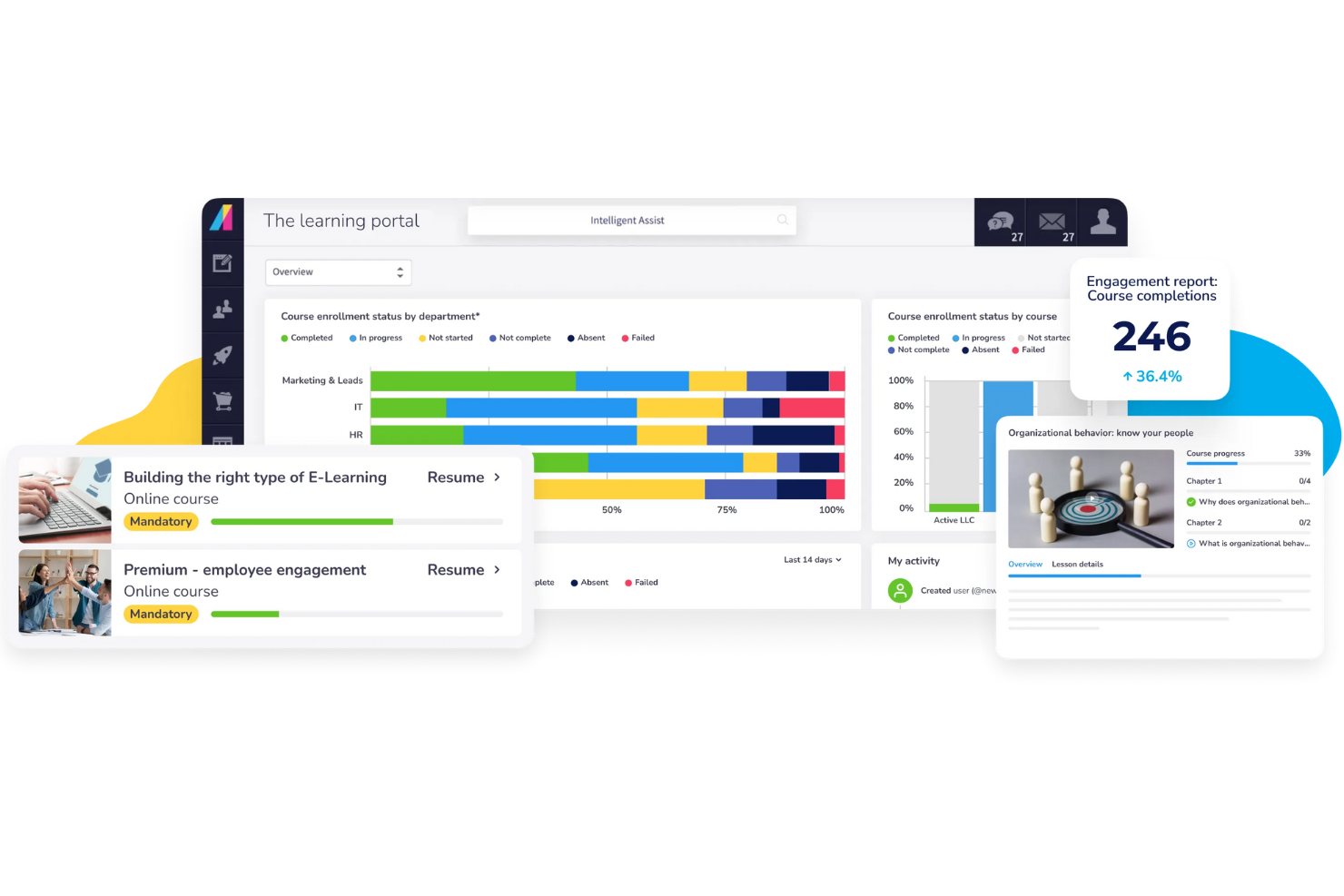
Absorb offre alle organizzazioni un modo per gestire più gruppi di utenti esterni da un'unica piattaforma. Se hai bisogno di fornire formazione personalizzata a partner, clienti o affiliati, la configurazione multi-portale di Absorb ti aiuta a mantenere l'esperienza di ogni pubblico distinta e sicura. Questa piattaforma è adatta alle aziende che desiderano centralizzare l'amministrazione offrendo al tempo stesso ambienti di apprendimento personalizzati e con marchio per diversi pubblici esterni.
Per chi è più adatto Absorb?
Absorb è una scelta valida per le organizzazioni che devono gestire portali formativi separati per più pubblici esterni, come franchisee, partner di canale o gruppi di clienti.
Perché ho scelto Absorb
Ho scelto Absorb perché la sua gestione multi-portale si distingue per le organizzazioni che devono formare diversi pubblici esterni. La piattaforma consente di creare e personalizzare portali separati, ciascuno con il proprio marchio, contenuto e permessi utente, così da offrire esperienze di apprendimento mirate senza sovrapposizioni. Apprezzo come gli amministratori possano gestire tutti i portali da un'unica dashboard, semplificando così controllo e reportistica. Questa configurazione è particolarmente utile per le aziende che hanno bisogno di mantenere distinta e sicura la formazione per partner, clienti o affiliati.
Funzionalità principali di Absorb
Altre funzionalità che rendono Absorb utile per la formazione extended enterprise includono:
- Regole di iscrizione automatica: Imposta regole per assegnare automaticamente i corsi agli utenti in base a gruppo, ruolo o portale.
- Funzionalità e-commerce: Vendi i corsi direttamente dalla piattaforma con sistemi di pagamento integrati e gestione del catalogo.
- App mobile per l'apprendimento: Consenti agli utenti di accedere ai contenuti formativi su dispositivi iOS e Android per una formazione flessibile e ovunque.
- Strumenti di reportistica personalizzati: Crea e pianifica report dettagliati per monitorare i progressi degli utenti, il completamento dei corsi e l'attività nei portali.
Integrazioni di Absorb
Le integrazioni includono Salesforce, ADP, BambooHR, Workday, SAP SuccessFactors, UKG Pro, Dayforce, HubSpot, Zoom e altre ancora.
Pros and Cons
Pros:
- Supporta portali personalizzati e illimitati per diversi pubblici
- Offre un ottimo e-commerce per la vendita dei corsi
- Include regole automatiche di iscrizione e assegnazione
Cons:
- La configurazione iniziale dei portali può richiedere tempo
- Funzionalità di social learning e community limitate
New Product Updates from Absorb
Absorb Aura Adds Claude and ChatGPT Connections
Absorb Aura now connects to Claude or ChatGPT via MCP, enabling users to ask questions about their learning and the LMS directly inside the AI tool after a simple setup. For more information, visit Absorb's official site.
 .
.

EducateMe LMS è un sistema di gestione dell'apprendimento basato su cloud che supporta accademie white-label, formazione basata su coorti e programmi strutturati per pubblici esterni. Consente alle organizzazioni di offrire esperienze di apprendimento personalizzate a clienti, partner e gruppi di discenti distribuiti all'interno di una piattaforma SaaS.
Per chi è ideale EducateMe LMS?
EducateMe LMS è ideale per i team di formazione B2B, i responsabili L&D e i manager della formazione clienti che devono formare pubblici esterni come clienti, partner o rivenditori utilizzando portali di apprendimento brandizzati.
Perché ho scelto EducateMe LMS
Ho scelto EducateMe LMS per le sue funzionalità white-label e la struttura basata su coorti. Puoi creare portali di apprendimento brandizzati con domini personalizzati e librerie di corsi su misura, rendendolo adatto a programmi di formazione per pubblici esterni. La piattaforma supporta anche percorsi di apprendimento strutturati e il monitoraggio dei progressi, utili per gestire iniziative di onboarding e abilitazione dei partner.
Funzionalità chiave di EducateMe LMS
- Accademie white-label: Crea portali di apprendimento brandizzati con domini personalizzati e controllo dell'identità visiva.
- Percorsi di apprendimento: Crea sequenze strutturate di corsi che guidano i discenti esterni attraverso passaggi di progressione definiti.
- Permessi basati su gruppi: Assegna i discenti a gruppi e gestisci l'accesso tra diversi gruppi di formazione.
- Analisi dei progressi: Monitora l'engagement degli utenti e le metriche di completamento nei vari programmi.
- Strumenti di automazione: Imposta iscrizioni automatiche e promemoria sui corsi per ridurre il lavoro amministrativo manuale.
Integrazioni EducateMe LMS
Le integrazioni includono Zoom, Google Calendar, Outlook Calendar, Slack, Telegram, Stripe, Zapier, Google Forms, Google Docs, Google Sheets, Google Slides, Notion, Figma e fornitori SSO come Okta e Auth0. È disponibile un'API per integrazioni personalizzate.
Pros and Cons
Pros:
- Forte personalizzazione del portale white-label
- Percorsi di apprendimento strutturati per pubblici esterni
- La formazione basata su coorti supporta l'abilitazione dei partner
Cons:
- Dettagli limitati sull'architettura enterprise documentata pubblicamente
- Meno funzioni di automazione avanzata rispetto alle piattaforme LMS enterprise

Ideale per la creazione collaborativa di corsi
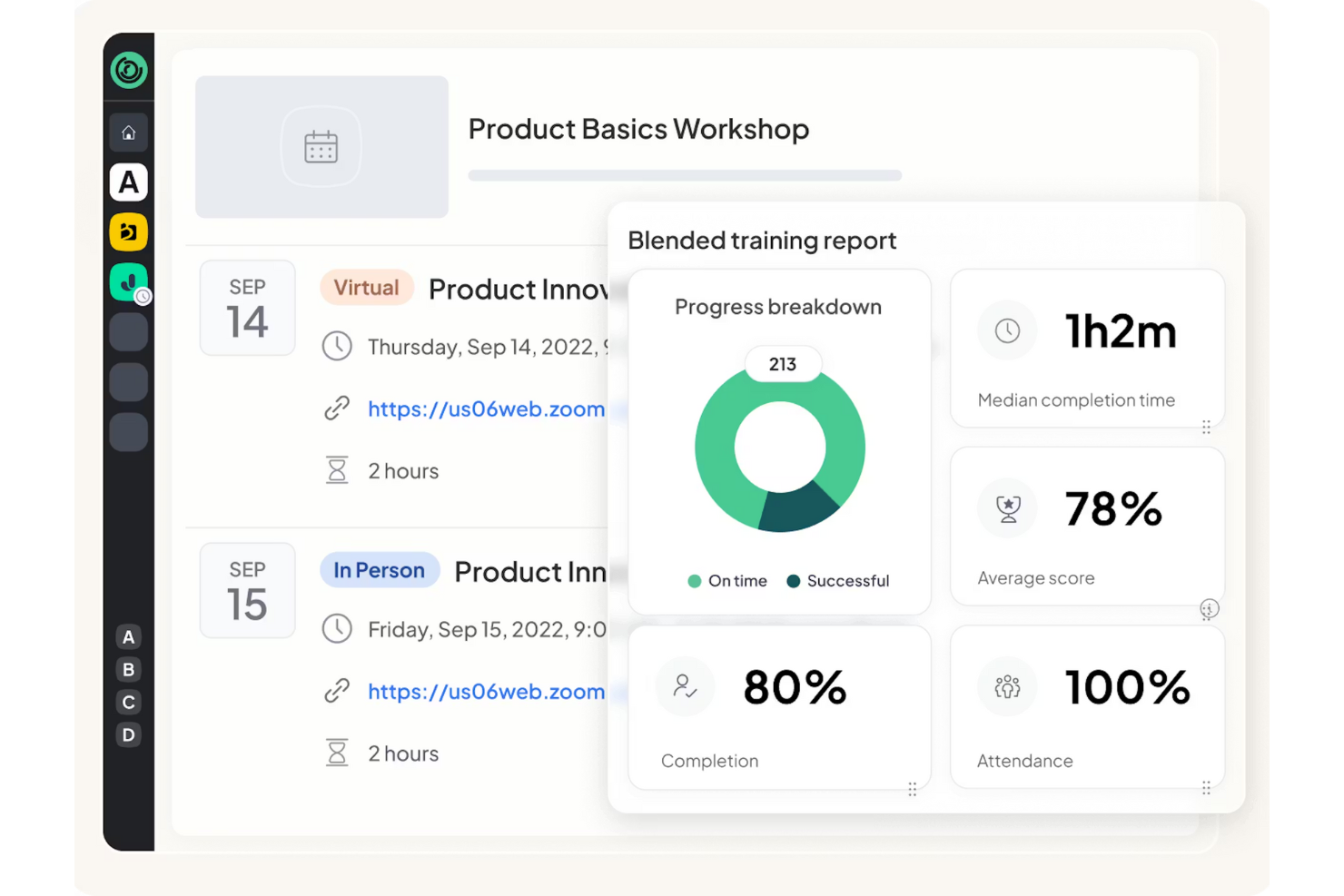
360Learning è una piattaforma di apprendimento creata per le organizzazioni che desiderano creare e aggiornare la formazione in modo collaborativo tra team o unità aziendali. È particolarmente adatta alle aziende che hanno bisogno che esperti interni e stakeholder co-autorizzino corsi per partner, clienti o una forza lavoro distribuita. La piattaforma ti aiuta ad accelerare la creazione dei corsi e a mantenere i contenuti rilevanti, rendendo la collaborazione centrale nel processo.
Per chi è 360Learning?
360Learning è ideale per organizzazioni di medie e grandi dimensioni che necessitano della collaborazione tra più team o esperti interni per la creazione di corsi destinati a un pubblico esterno.
Perché ho scelto 360Learning
Ho scelto 360Learning perché è progettato attorno alla creazione collaborativa dei corsi, fondamentale per la formazione estesa dell'impresa dove i contenuti devono riflettere la competenza reale proveniente da tutta la tua organizzazione. La piattaforma consente a più collaboratori di co-autorizzare, revisionare e aggiornare i corsi in tempo reale, così puoi mantenere i materiali di formazione accurati e rilevanti per partner, clienti o team distribuiti. Mi piace anche il fatto che puoi assegnare ruoli e permessi per gestire chi può modificare o approvare i contenuti, il che aiuta a mantenere il controllo qualità man mano che la tua libreria di corsi cresce. Questo approccio collaborativo rende molto più semplice scalare i programmi di apprendimento e adattarsi rapidamente ai cambiamenti del business.
Caratteristiche principali di 360Learning
Altre funzionalità che rendono 360Learning utile come LMS per l’impresa estesa includono:
- Supporto multilingue: Fornisci contenuti formativi in più lingue per un pubblico globale.
- Branding personalizzato: Applica loghi, colori e temi della tua organizzazione ai portali di apprendimento.
- Dashboard di analisi: Monitora i progressi dei partecipanti, il coinvolgimento e il completamento dei corsi attraverso report visivi.
- Valutazioni integrate: Crea quiz e verifiche delle conoscenze direttamente nei corsi per un feedback immediato.
Integrazioni di 360Learning
Le integrazioni includono Workday, SAP SuccessFactors, Salesforce, Microsoft Teams, Zoom, Slack, Udemy, Coursera, BambooHR, Google Drive e altri.
Pros and Cons
Pros:
- Co-creazione collaborativa per esperti distribuiti
- Strumenti integrati per feedback tra colleghi e Q&A
- La condivisione tra pari mantiene i contenuti aggiornati
Cons:
- La strutturazione dei corsi è meno flessibile per programmi complessi
- I controlli di amministrazione sono limitati per configurazioni multi-tenant
Ideale per l'automazione della formazione dei partner
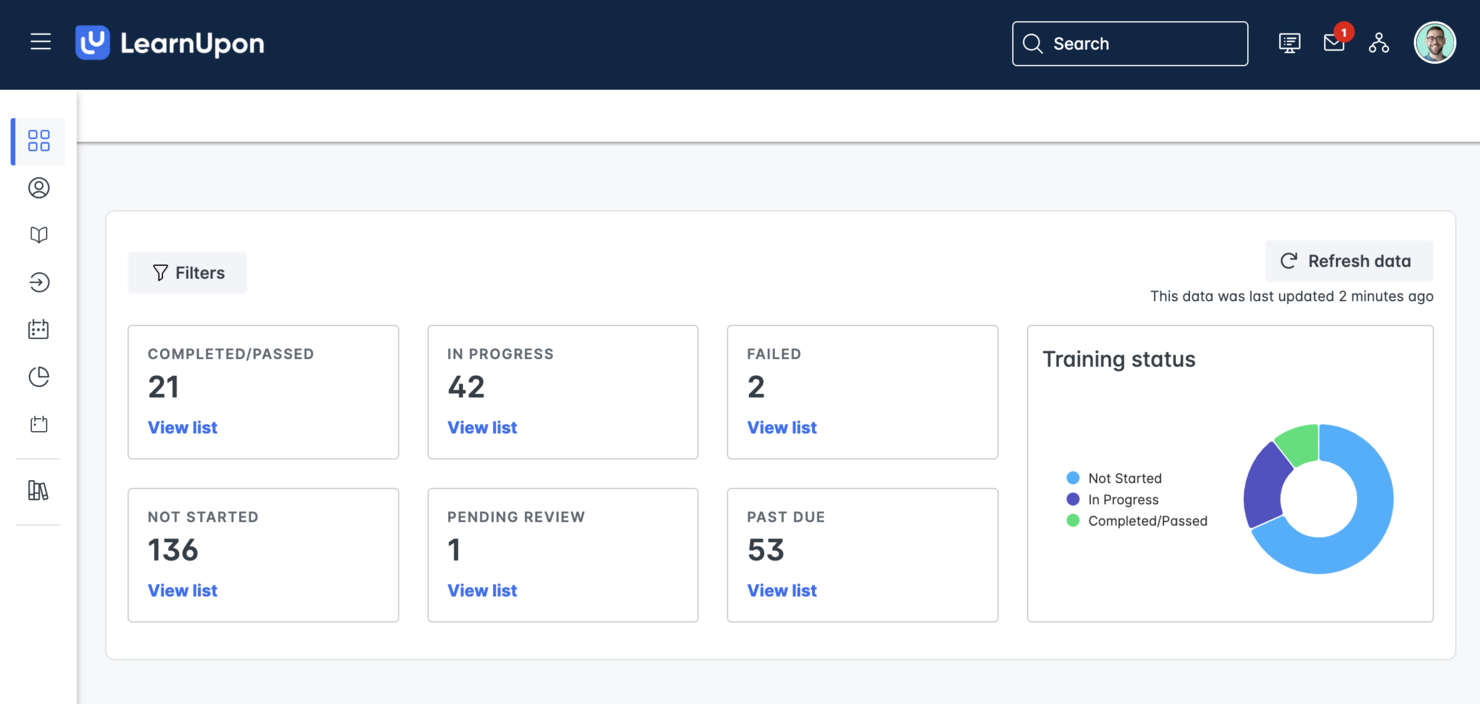
Se hai bisogno di automatizzare e scalare la formazione dei partner, LearnUpon offre una soluzione mirata per le esigenze di un LMS per l'impresa estesa. Questa piattaforma è adatta alle organizzazioni che desiderano offrire esperienze di apprendimento coerenti e tracciabili a partner esterni, rivenditori o distributori. Le sue funzionalità di automazione aiutano a ridurre il lavoro amministrativo manuale e mantengono i programmi di abilitazione dei partner attivi senza intoppi.
Per chi è ideale LearnUpon?
LearnUpon è particolarmente indicato per organizzazioni di medie e grandi dimensioni che hanno bisogno di automatizzare e gestire la formazione per partner esterni, rivenditori o distributori.
Perché ho scelto LearnUpon
Ho scelto LearnUpon perché i suoi strumenti di automazione sono progettati appositamente per la formazione dei partner su ampia scala. La piattaforma ti permette di impostare iscrizioni automatiche, promemoria e rinnovi delle certificazioni, il che aiuta a mantenere i programmi formativi dei partner in linea con il minimo sforzo manuale. Apprezzo anche la possibilità di creare portali separati per diversi gruppi di partner, così ogni pubblico riceve un'esperienza personalizzata. Queste caratteristiche rendono LearnUpon una scelta pratica per le organizzazioni che desiderano offrire una formazione coerente e misurabile a una vasta rete di partner esterni.
Funzionalità principali di LearnUpon
Altre funzionalità che rendono LearnUpon utile per le esigenze LMS dell'impresa estesa includono:
- Gestione multi-portale: Crea e gestisci più portali con marchio dedicati a diversi pubblici o unità aziendali da una singola dashboard di amministrazione.
- Supporto SCORM e xAPI: Offri e monitora una vasta gamma di formati di contenuti e-learning per la conformità e l'abilitazione dei partner.
- Reportistica personalizzata: Crea e pianifica report dettagliati per monitorare il coinvolgimento dei partner, il completamento dei corsi e lo stato delle certificazioni.
- Single sign-on (SSO): Permetti ai partner di accedere alla formazione in modo sicuro utilizzando le proprie credenziali tramite integrazioni SSO.
Integrazioni di LearnUpon
Le integrazioni includono Salesforce, HubSpot, BambooHR, ADP Workforce Now, Zoom, Microsoft Teams, LinkedIn Learning, Go1, Shopify e altre ancora.
Pros and Cons
Pros:
- Offre permessi granulari per utenti e gruppi
- L'app mobile consente l'accesso offline alla formazione per i partner
- La reportistica integrata monitora i progressi degli utenti
Cons:
- Alcune integrazioni richiedono ulteriori passaggi di configurazione
- Gli strumenti di creazione dei corsi sono meno flessibili per contenuti complessi
Docebo
Ideale per raccomandazioni di contenuti tramite IA
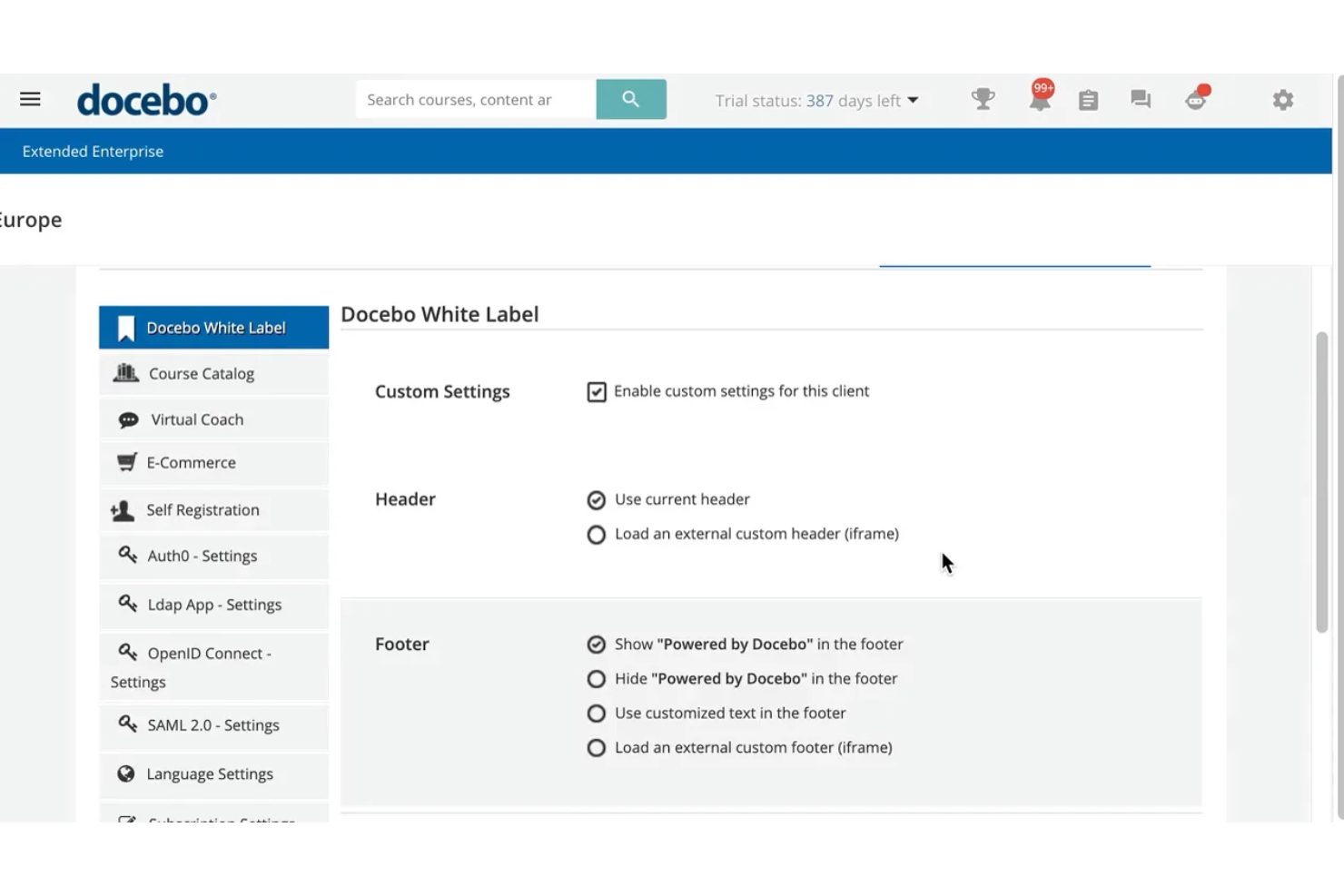
Se desideri un LMS enterprise esteso che personalizzi l'apprendimento per ogni utente, Docebo merita attenzione. Le sue raccomandazioni di contenuti basate sull'IA aiutano le grandi organizzazioni a fornire formazione pertinente a partner, clienti e pubblici esterni. Questo approccio può ridurre il lavoro amministrativo manuale e mantenere gli utenti coinvolti con risorse mirate e aggiornate.
A chi è più adatto Docebo?
Docebo è adatto a grandi organizzazioni che desiderano automatizzare e personalizzare la formazione per partner o clienti tramite raccomandazioni di contenuti guidate dall’IA.
Perché ho scelto Docebo
Ho scelto Docebo perché le sue raccomandazioni di contenuti alimentate dall’IA affrontano direttamente la sfida di mantenere coinvolti gli utenti esterni attraverso materiali pertinenti. La piattaforma impiega l'apprendimento automatico per suggerire corsi e risorse in base all’attività e al profilo di ogni utente, aiutando partner e clienti a trovare ciò di cui hanno bisogno senza dover selezionare manualmente i contenuti. Apprezzo anche il fatto che Docebo supporti la formazione su larga scala e per pubblici diversi, grazie a funzionalità come la segmentazione degli utenti e i percorsi di apprendimento automatizzati. Queste capacità lo rendono particolarmente adatto per le organizzazioni che desiderano offrire formazione mirata e scalabile in tutto il loro ecosistema esteso.
Funzionalità chiave di Docebo
Altre funzionalità che rendono Docebo utile per i bisogni di un LMS enterprise esteso includono:
- Gestione multi-dominio: crea e gestisci più portali personalizzati per diversi pubblici da un’unica piattaforma.
- Gestione delle certificazioni: monitora, emetti e rinnova certificazioni per partner e utenti esterni.
- Modulo e-commerce: vendi corsi e gestisci transazioni direttamente all’interno della piattaforma.
- White labeling: personalizza l’aspetto di ogni portale per adattarlo al branding della tua organizzazione o dei partner.
Integrazioni di Docebo
Le integrazioni includono Salesforce, Microsoft Teams, HubSpot, ADP Workforce Now, BambooHR, Dropbox, Accredible, Okta, Zoom, Amazon S3 e altre ancora.
Pros and Cons
Pros:
- L’IA suggerisce contenuti in base al comportamento dell’utente
- Scala facilmente su reti di partner globali
- Tiene traccia dei progressi e delle certificazioni degli utenti esterni
Cons:
- I report su più portali risultano frammentati
- La gestione degli utenti diventa complessa con grandi gruppi esterni
Ideale per l'erogazione di corsi multilingue
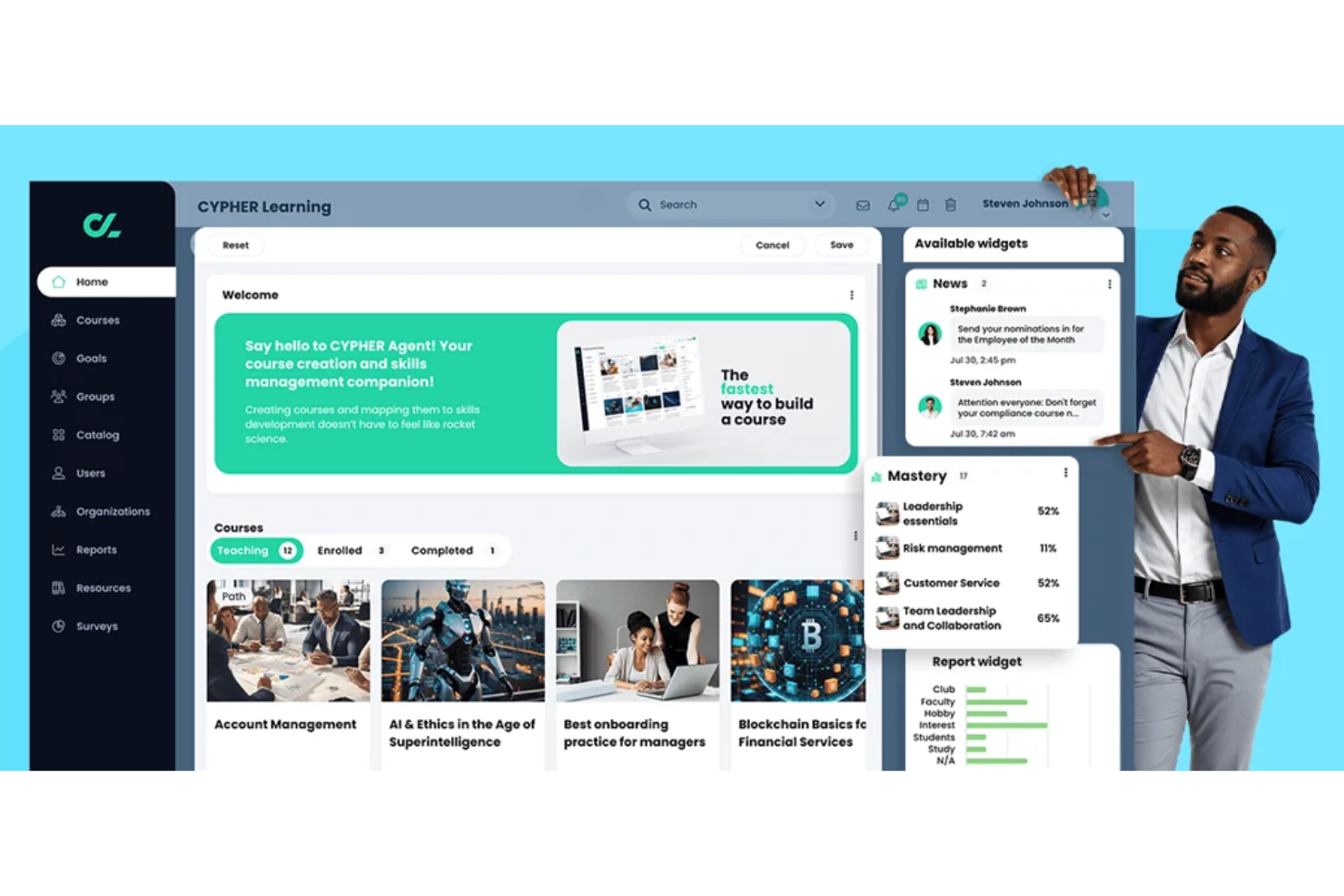
CYPHER Learning è progettato per le organizzazioni che devono offrire formazione in più lingue a team globali o reti di partner. Si rivolge a aziende e fornitori di istruzione che desiderano gestire contenuti multilingue ed esperienze utente da un'unica piattaforma. Se hai bisogno di supportare diversi pubblici con apprendimento localizzato, CYPHER Learning affronta direttamente queste sfide.
Per chi è più indicato CYPHER Learning?
CYPHER Learning si adatta a organizzazioni e fornitori di formazione che devono erogare e gestire corsi in più lingue per un pubblico globale o multilingue.
Perché ho scelto CYPHER Learning
Ciò che mi colpisce di CYPHER Learning è la sua profonda attenzione alla distribuzione di corsi multilingue, fondamentale per scenari di LMS estesi a livello globale. La piattaforma consente di creare, gestire ed erogare corsi in decine di lingue, con strumenti di localizzazione integrati per adattare contenuti e navigazione a ciascun pubblico. Apprezzo anche il fatto che CYPHER Learning supporti il rilevamento automatico della lingua e la traduzione dell'interfaccia utente, permettendo ai discenti di accedere alla formazione nella lingua preferita senza configurazioni manuali. Queste funzionalità facilitano la fornitura di esperienze di apprendimento coerenti e accessibili tra regioni e culture.
Funzionalità principali di CYPHER Learning
Altre funzionalità che rendono CYPHER Learning utile per esigenze LMS aziendali estese comprendono:
- Percorsi di apprendimento personalizzabili: Costruisci percorsi formativi strutturati per diversi gruppi di utenti o organizzazioni partner.
- Funzionalità di e-commerce: Vendi corsi direttamente a pubblici esterni con sistemi di pagamento integrati.
- Strumenti avanzati di reportistica: Monitora i progressi, il coinvolgimento e la conformità degli utenti in vari pubblici.
- Gestione delle certificazioni: Emissione, monitoraggio e gestione dei certificati per il completamento dei corsi o il rispetto dei requisiti normativi.
Integrazioni CYPHER Learning
Le integrazioni includono Google Drive, Microsoft 365, OneDrive, Microsoft Teams, Salesforce, Workday, BambooHR, GoTo Meeting, PayPal, LinkedIn Learning e altre ancora.
Pros and Cons
Pros:
- Automatizza l'iscrizione e il ciclo di vita degli utenti esterni
- La personalizzazione basata su AI migliora i percorsi di apprendimento
- Si adatta facilmente a pubblici esterni globali
Cons:
- Gli strumenti di creazione dei corsi sono meno avanzati
- Le prestazioni dell'app mobile possono essere lente
Altri LMS per aziende estese
Ecco alcune ulteriori opzioni di LMS per aziende estese che non sono state incluse nel mio elenco, ma che vale comunque la pena valutare:
- Cornerstone
Ideale per la gestione della conformità globale
- WorkRamp
Ideale per programmi di abilitazione dei clienti
- Litmos
Ideale per flussi di onboarding rapido
- Open LMS WORK
Ideale per la personalizzazione open-source


Come Valuto gli LMS per l'Impresa Estesa
Analizzo questi strumenti da due prospettive: le funzionalità indispensabili per la formazione multi-portale di partner e clienti, e i fattori di differenziazione che contano quando si scala fino a migliaia di utenti esterni.
Funzionalità Principali (Prerequisiti per Questa Lista)
Quando seleziono gli strumenti per la mia lista, attribuisco a ciascuno un punteggio da 0 (non offre la funzionalità) a 5 (eccelle in quest’area) per ogni funzionalità principale elencata di seguito. Calcolo poi il punteggio totale dello strumento trasformandolo in percentuale. Ogni piattaforma deve raggiungere un punteggio minimo totale del 65% per poter essere inclusa.
- Supporto Portale Multi-Tenant: Valuto se ogni piattaforma può creare portali separati per diversi pubblici, ad esempio uno per i partner rivenditori e un altro per i clienti finali, con controlli amministrativi indipendenti.
- Gestione Utenti Esterni: Gestire migliaia di utenti non dipendenti è una sfida diversa rispetto alla formazione interna, quindi verifico la segmentazione del pubblico, l’iscrizione massiva e le opzioni di SSO esterno.
- Branding White-Label: Ogni portale deve apparire come se appartenesse al partner o al cliente che serve, quindi cerco domini personalizzati, editor di temi e login personalizzati a livello di portale.
- Capacità di E-Commerce: Per i team che vendono corsi ai clienti o programmi di certificazione ai partner di canale, valuto carrelli integrati, supporto ai gateway di pagamento e gestione del catalogo.
- Tracciamento della Conformità e Certificazione: Analizzo quanto bene la piattaforma automatizza il rilascio dei certificati, monitora le date di scadenza e attiva flussi di rinnovo tra ampie popolazioni di studenti esterni distribuiti.
- Reportistica e Analisi: I vari stakeholder, sia partner che clienti, necessitano di viste diverse sui progressi degli studenti, quindi verifico dashboard segmentati, report per portale e dati esportabili.
Una volta ottenuta la lista degli strumenti che soddisfano i criteri, considero cosa distingue ciascuna piattaforma.
Fattori di Differenziazione (Cosa Distingue i Fornitori)
Ecco come confronto e metto a confronto i diversi fornitori:
Caratteristiche Distintive
Gli studenti esterni non sono un pubblico "catturato", quindi funzionalità di gamification come badge, punti e classifiche possono davvero fare la differenza nei tassi di completamento dei corsi tra i network di partner. Considero anche il supporto all'apprendimento mobile e offline, poiché i partner sul campo e i franchisee spesso devono completare la formazione senza una connessione internet affidabile. Sono importanti anche gli strumenti di authoring integrati—i team che possono aggiornare rapidamente la formazione sui prodotti o creare corsi di certificazione senza uno strumento separato risparmiano tempo prezioso nella gestione di più portali.
Oltre le Caratteristiche
L’integrazione con sistemi CRM e PRM è molto importante qui—quando i dati formativi dei partner fluiscono automaticamente in Salesforce o HubSpot, i team di enablement ottengono visibilità senza esportazioni manuali. Anche la flessibilità dei prezzi è un fattore chiave che valuto, poiché i volumi degli utenti esterni fluttuano molto più delle risorse interne. I modelli per utente attivo funzionano meglio per i network stagionali di partner rispetto a prezzi fissi per posto. Verifico anche il supporto multilingue e multi-valuta, che diventa essenziale quando si forma la rete di partner o i clienti in diverse regioni.
Come scegliere una piattaforma LMS per aziende estese
È facile perdersi in lunghi elenchi di funzionalità e strutture tariffarie complesse. Per aiutarti a rimanere concentrato mentre affronti il tuo processo di selezione del software, ecco una lista di fattori da tenere a mente:
| Fattore | Elementi da considerare |
|---|---|
| Scalabilità | Il LMS è in grado di gestire la crescita degli utenti esterni, dei contenuti e dei portali senza problemi di prestazioni o aumenti significativi dei costi? |
| Integrazioni | Il LMS si collega nativamente al vostro HRIS, CRM, alle librerie di contenuti o agli strumenti di comunicazione? Verificate la presenza delle integrazioni necessarie prima di restringere la scelta. |
| Personalizzazione | Potete adattare il branding, i ruoli degli utenti e i flussi di lavoro a diversi pubblici o unità aziendali? Valutate se avete bisogno di portali separati o domini personalizzati. |
| Facilità d'uso | Sia gli amministratori sia gli utenti esterni troveranno l'interfaccia intuitiva? Testate la navigazione e l'accesso ai corsi da entrambe le prospettive. |
| Implementazione e onboarding | Quanto tempo richiederà la configurazione e quali risorse saranno necessarie? Informatevi sul supporto alla migrazione, sulla formazione e sui servizi di onboarding disponibili. |
| Costo | I livelli di prezzo sono trasparenti e allineati al volume degli utenti e alle funzionalità necessarie? Prestate attenzione ai costi aggiuntivi per integrazioni, assistenza o portali supplementari. |
| Misure di sicurezza | Il LMS offre la crittografia dei dati, controlli di accesso degli utenti e conformità agli standard pertinenti (come il GDPR)? Valutate i rischi se gestite dati sensibili di partner o clienti. |
| Disponibilità dell'assistenza | Quali canali di assistenza e tempi di risposta sono offerti? Valutate se avete bisogno di assistenza 24 ore su 24, 7 giorni su 7, o di un account manager dedicato per i vostri programmi di formazione esterna. |
Che cos'è un LMS per l'impresa estesa?
Un LMS per l'impresa estesa, o sistema di gestione dell'apprendimento per l'impresa estesa, è una soluzione formativa progettata per erogare formazione online a pubblici esterni come partner, clienti e franchisee. Aiuta le organizzazioni a gestire la formazione dei clienti, l'abilitazione dei partner e altre iniziative formative al di là dei team interni. Queste piattaforme supportano più pubblici e portali personalizzati con il vostro brand in tutto l'ecosistema, semplificando la scalabilità della formazione e migliorando la fidelizzazione. Le aziende li utilizzano per sviluppare le competenze degli utenti, misurare l'impatto sul business e offrire esperienze formative coerenti all'interno della propria rete estesa.
Funzionalità
Quando selezionate un LMS per l'impresa estesa, prestate attenzione alle seguenti funzionalità chiave:
- Gestione di più portali: Create e gestite ambienti di apprendimento separati per diversi pubblici esterni, ciascuno con il proprio branding e i propri contenuti.
- Branding personalizzato: Applicate loghi, combinazioni di colori e nomi di dominio distintivi per adattarli all'identità di ciascun partner, cliente o gruppo di franchisee.
- Controlli degli accessi basati sui ruoli: Assegnate autorizzazioni e livelli di accesso a diversi tipi di utenti, come discenti, docenti e amministratori, per proteggere le informazioni sensibili.
- Supporto multilingue: Erogate contenuti formativi in più lingue per raggiungere pubblici globali e garantire l'accessibilità.
- Reporting e analisi avanzati: Monitorate i progressi dei discenti, il completamento dei corsi e il coinvolgimento di tutti i gruppi esterni tramite dashboard personalizzabili e report esportabili.
- Valutazioni integrate: Create quiz, test e verifiche delle conoscenze direttamente nei corsi per misurare i risultati dell'apprendimento e certificare il completamento.
- Funzionalità di e-commerce: Vendete corsi o percorsi di apprendimento direttamente agli utenti esterni, con supporto per l'elaborazione dei pagamenti e la gestione delle iscrizioni.
- Integrazione con le librerie di contenuti: Collegatevi a fornitori di contenuti esterni o importate pacchetti SCORM/xAPI per ampliare la vostra offerta formativa.
- Notifiche automatizzate: Configurate avvisi via e-mail o nell'app per ricordare agli utenti le scadenze, i nuovi corsi o le azioni richieste.
- Accesso API: Abilitate integrazioni personalizzate con altri sistemi aziendali, come HRIS, CRM o piattaforme di analisi, per semplificare il flusso dei dati e la gestione degli utenti.
Funzionalità comuni dell'IA negli LMS per l'impresa estesa
Oltre alle funzionalità standard degli LMS per l'impresa estesa elencate sopra, molte di queste soluzioni stanno integrando l'IA con funzionalità come:
- Percorsi di apprendimento personalizzati: L'IA analizza il comportamento e le prestazioni degli utenti per consigliare corsi e risorse su misura per le esigenze e gli obiettivi di ciascun discente.
- Selezione automatizzata dei contenuti: L'IA analizza le fonti di contenuti interne ed esterne per suggerire materiali pertinenti a specifici pubblici o obiettivi formativi.
- Analisi intelligente delle lacune nelle competenze: L'IA identifica le lacune nelle conoscenze confrontando i dati dei discenti con le competenze richieste, aiutando le organizzazioni a indirizzare la formazione dove è maggiormente necessaria.
- Analisi predittiva: L'IA prevede il coinvolgimento dei discenti, i tassi di completamento dei corsi e i potenziali punti di abbandono, consentendo agli amministratori di intervenire in modo proattivo.
- Chatbot in linguaggio naturale: I chatbot basati sull'IA rispondono alle domande dei discenti, guidano gli utenti nella piattaforma e forniscono assistenza immediata senza l'intervento umano.
Vantaggi
L'implementazione di un LMS per l'impresa estesa offre diversi vantaggi al tuo team e alla tua azienda. Eccone alcuni che puoi aspettarti:
- Formazione coerente: Standardizza le esperienze di apprendimento e i messaggi rivolti a tutti i destinatari esterni utilizzando la gestione di più portali e l'identità del marchio personalizzata.
- Formazione esterna scalabile: Supporta un numero crescente di partner, clienti o affiliati con amministrazione centralizzata e gestione automatizzata degli utenti.
- Miglioramento del monitoraggio del coinvolgimento: Monitora i progressi e i risultati degli studenti tra gruppi diversi con funzionalità avanzate di reportistica e analisi.
- Opportunità di generazione di ricavi: Vendi corsi o certificazioni direttamente agli utenti esterni tramite funzionalità di commercio elettronico integrate.
- Migliore presenza del marchio: Estendi l'identità della tua organizzazione a ogni portale di formazione con opzioni personalizzabili per il marchio e il dominio.
- Portata globale: Offri formazione in più lingue e formati per soddisfare le esigenze dei destinatari internazionali.
- Processo decisionale basato sui dati: Utilizza analisi e dati strategici basati sull'IA per identificare le lacune nell'apprendimento e ottimizzare le strategie formative, ottenendo risultati aziendali migliori.
Costi e prezzi
La scelta di un LMS per l'impresa estesa richiede la comprensione dei diversi modelli e piani tariffari disponibili. I costi variano in base alle funzionalità, alle dimensioni del team, ai componenti aggiuntivi e ad altri fattori. La tabella seguente riassume i piani più comuni, i relativi prezzi medi e le funzionalità generalmente incluse nelle soluzioni LMS per l'impresa estesa:
Tabella di confronto dei piani per LMS per l'impresa estesa
| Tipo di piano | Prezzo medio | Funzionalità comuni |
|---|---|---|
| Piano gratuito | $0 | Erogazione di corsi di base, numero limitato di utenti, reportistica semplice e supporto della comunità. |
| Piano personale | $5–$15/utente/mese | Portale singolo, identità del marchio personalizzata, valutazioni di base, notifiche e-mail e analisi standard. |
| Piano aziendale | $15–$40/utente/mese | Più portali, reportistica avanzata, integrazioni, supporto multilingue e accesso basato sui ruoli. |
| Piano per grandi imprese | $40–$80/utente/mese | Portali illimitati, SLA personalizzati, accesso API, sicurezza avanzata, supporto dedicato e commercio elettronico. |
Domande frequenti sull'LMS per l'impresa estesa
Ecco alcune risposte alle domande frequenti sugli LMS per l’impresa estesa:
In che modo un LMS per l'impresa estesa differisce da un LMS tradizionale?
Un LMS per l’impresa estesa è progettato per formare utenti esterni alla tua organizzazione, come partner o clienti, mentre un LMS tradizionale si concentra sulla formazione dei dipendenti interni. Le piattaforme per l’impresa estesa offrono funzionalità come la gestione di più portali, il branding personalizzato e la gestione degli utenti esterni.
Posso utilizzare un LMS per l'impresa estesa per formare più gruppi di destinatari contemporaneamente?
Sì, la maggior parte delle soluzioni LMS per l’impresa estesa supporta più gruppi di destinatari attraverso portali o gruppi di utenti separati. Questo consente di offrire contenuti, branding e report personalizzati per ciascun gruppo esterno, come distributori, affiliati o clienti.
Quali aspetti di sicurezza devo considerare quando utilizzo un LMS per l'impresa estesa?
Dovresti cercare funzionalità come i controlli di accesso degli utenti, la crittografia dei dati e la conformità a standard come il GDPR. Poiché stai formando utenti esterni, è importante proteggere le informazioni aziendali sensibili e assicurarti che solo gli utenti autorizzati possano accedere ai tuoi contenuti.
Quanto tempo occorre per implementare un LMS per l'impresa estesa?
I tempi di implementazione variano, ma la maggior parte delle piattaforme offre supporto per l’avvio, strumenti di migrazione e risorse formative per accelerare il processo. Per configurazioni complesse con più portali o integrazioni, prevedi da alcune settimane a qualche mese per il completamento dell’implementazione.
Posso monetizzare i contenuti formativi con un LMS per l'impresa estesa?
Sì, molte piattaforme LMS per l’impresa estesa includono funzionalità di commercio elettronico che consentono di vendere corsi, certificazioni o percorsi formativi direttamente agli utenti esterni. Se la monetizzazione è una priorità, cerca strumenti integrati per l’elaborazione dei pagamenti e la gestione delle iscrizioni.