

I 10 migliori software per agenzie di reclutamento del 2026

10 Elenco dei migliori software per agenzie di selezione del personale


Il miglior software per agenzie di selezione del personale aiuta i selezionatori professionisti a gestire più clienti, i flussi di candidati e le attività amministrative, tutto da un'unica piattaforma centralizzata.
I selezionatori sono sottoposti a una pressione costante per ottenere risultati rapidamente, mantenendo al contempo un'esperienza eccellente sia per i clienti sia per i candidati. Il software giusto semplifica questo processo automatizzando le attività amministrative ripetitive, organizzando i bacini di talenti e ottimizzando la comunicazione durante i collocamenti.
Basandomi sulla mia esperienza nella valutazione di strumenti per le risorse umane e la selezione del personale, ho selezionato un elenco dei migliori software per agenzie di selezione del personale, progettati per aumentare produttività, precisione e soddisfazione dei clienti. In questa guida troverai piattaforme che aiutano le agenzie a lavorare in modo più efficiente, rafforzare le relazioni e ottenere risultati migliori nelle assunzioni su larga scala.
Perché fidarsi delle nostre recensioni sui software
Il nostro team testa e recensisce software dal 2012. In quanto esperti HR noi stessi, sappiamo quanto sia difficile — e importante — scegliere il software giusto.
Per questa guida, abbiamo valutato gli strumenti attraverso test pratici e ricerche indipendenti, assegnando un punteggio agli strumenti in base ai nostri criteri di selezione. Ci basiamo inoltre sulle competenze di leader di pensiero del settore e di professionisti HR attivi.
Le nostre recensioni riflettono il nostro giudizio editoriale umano, non un discorso di vendita.
Revisori esperti:
Il miglior software per agenzie di selezione del personale: tabella comparativa dei prezzi
Questa tabella comparativa riassume i dettagli sui prezzi delle mie migliori selezioni di software per agenzie di selezione del personale, per aiutarti a trovare il software più adatto al tuo budget e alle esigenze della tua attività.
| Tool | Best For | Trial Info | Price | ||
|---|---|---|---|---|---|
| 1 | Miglior ATS con CRM | Demo gratuita disponibile | I prezzi partono da $95/utente/mese | Website | |
| 2 | Ideale per l'automazione del reclutamento integrata | Prova gratuita illimitata | Da $49/utente/mese (fatturazione annuale) | Website | |
| 3 | Ideale per il reclutamento tramite social media | Prova gratuita di 14 giorni | Da $15/utente/mese | Website | |
| 4 | Ideale per specialisti del reclutamento alle prime armi | Demo gratuita disponibile | A partire da $99/utente/mese (fatturazione annuale) | Website | |
| 5 | Ideale per il tracciamento delle attività di recruiting | Demo gratuita disponibile | Prezzo su richiesta | Website | |
| 6 | Ideale per il recruiting basato su referenze | Demo gratuita disponibile | Prezzi su richiesta | Website | |
| 7 | Miglior sourcing per posizioni orarie | Demo gratuita disponibile | Prezzo su richiesta | Website | |
| 8 | Ideale per database ordinati di candidati | Demo gratuita disponibile | Da $99/utente/mese | Website | |
| 9 | Ideale per pagine carriere personalizzate con il tuo brand | Demo gratuita disponibile | Da $175/utente/mese | Website | |
| 10 | Ideale per la valutazione dei candidati in blocco | Prova gratuita disponibile | A partire da $4.99/mese (con fatturazione annuale) | Website |

Recensioni dei migliori software per agenzie di selezione del personale
Ecco i miei riepiloghi dettagliati dei migliori software per agenzie di selezione del personale inclusi nella mia top 10, con note sui motivi per cui li ho scelti. Ogni recensione offre un’analisi dettagliata delle funzionalità principali, dei pro e dei contro, delle integrations, e dei casi d’uso ideali di ciascun sistema, per aiutarti a trovare lo strumento più adatto a te.
Tracker
Miglior ATS con CRM
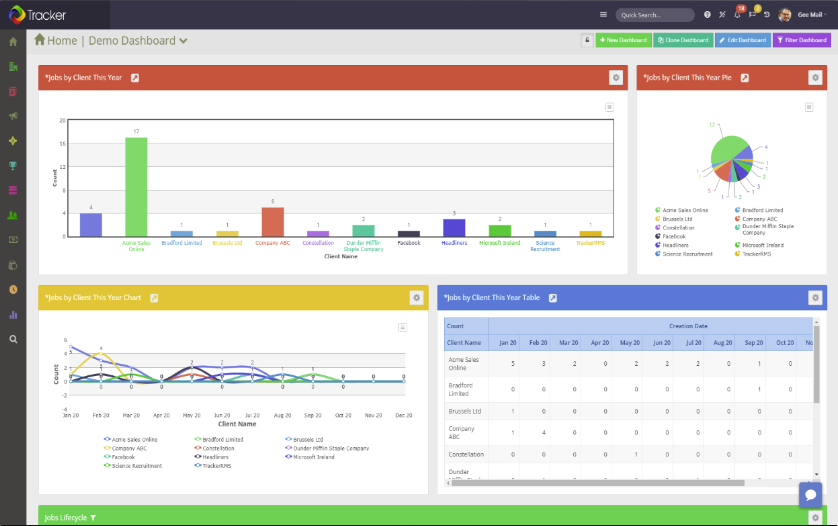
Tracker è un ATS e CRM in un'unica soluzione, che offre alle agenzie di selezione e reclutamento uno strumento completo per gestire un elevato volume di candidati, clienti e attività sotto un solo tetto.
Perché ho scelto Tracker: Ho deciso di aggiungere questo software al mio elenco per la sua funzionalità solida e il suo ricco set di caratteristiche. La tua agenzia di selezione può mantenere tutte le schede dei candidati nello stesso luogo in cui tiene traccia dei processi di reclutamento, ed è persino possibile creare report tramite la suite di analisi. Invece di gestire diversi sistemi separati, avrai una soluzione tutto-in-uno.
Tra gli strumenti utili inclusi nell'ATS figurano i flussi di lavoro personalizzati per il reclutamento e le funzionalità di parsing dei curriculum. Per il modulo CRM, puoi facilmente inviare email e SMS in massa per tenere i candidati aggiornati sui progressi. Le funzionalità orientate ai clienti ti aiutano a gestire non solo il personale, ma anche i tuoi clienti.
Funzionalità principali & integrazioni di Tracker
Le funzionalità principali di questa piattaforma includono le capacità di intelligenza artificiale, che possono analizzare automaticamente i curriculum e classificare i candidati per ruoli specifici. Offre inoltre numerose automazioni, incluse sequenze illimitate e abbinamento dei candidati ai ruoli. I moduli web e i sondaggi rendono anche la raccolta dati semplice e diretta.
Le integrazioni includono QuickBooks, Sage, Xero, Outlook, Gmail, LinkedIn e Office365. È disponibile un'API per costruire integrazioni personalizzate, e un account Zapier a pagamento sblocca ulteriori integrazioni.
Pros and Cons
Pros:
- Interfaccia intuitiva e facile da usare
- Progettato specificamente per le agenzie di selezione
- Team di assistenza clienti competente e disponibile
Cons:
- Prezzi non trasparenti
- Opzioni di personalizzazione limitate

Ideale per l'automazione del reclutamento integrata
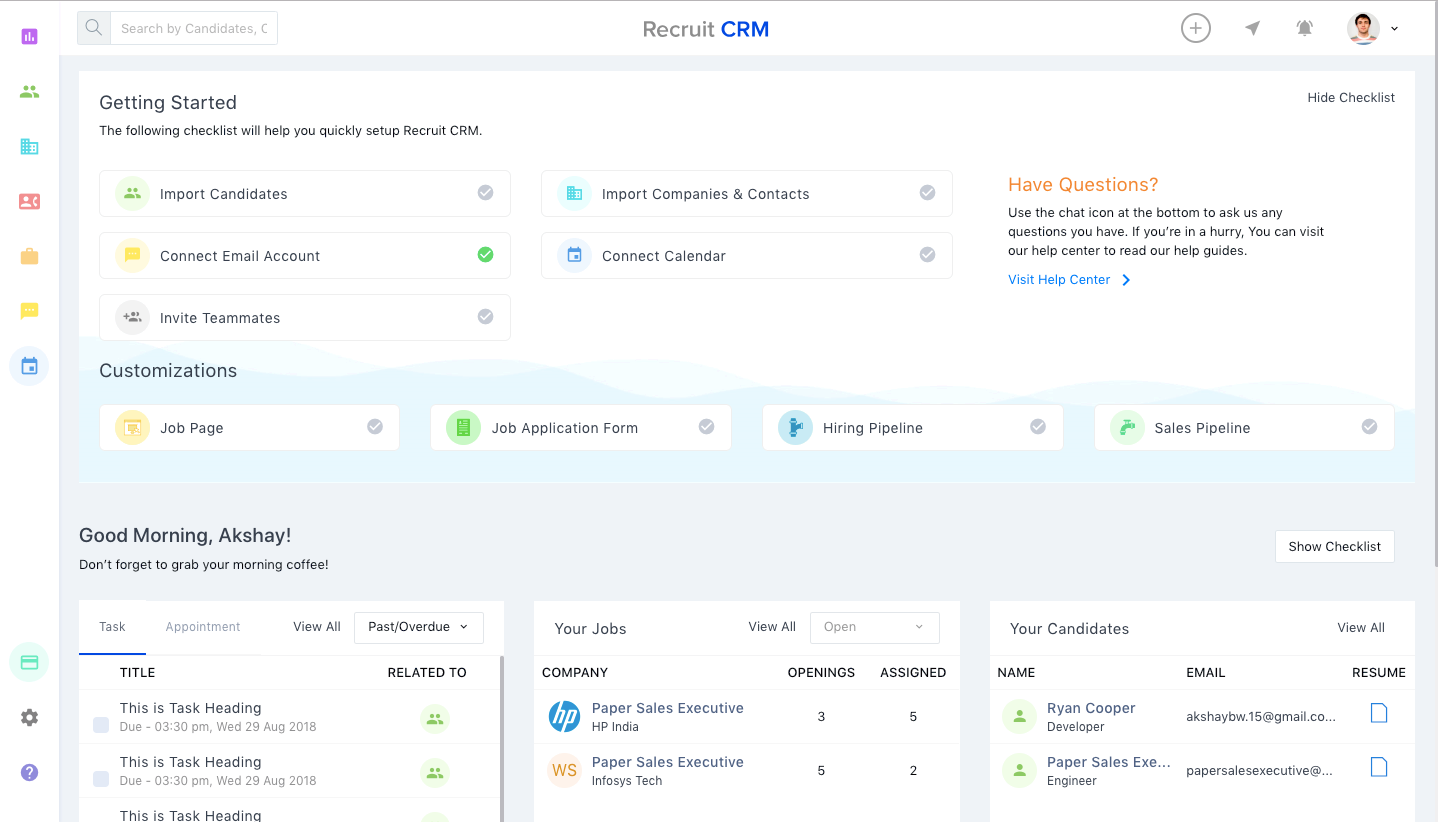
Recruit CRM combina le funzionalità di un CRM con quelle di un ATS, rendendolo una scelta eccellente per i recruiter ad alto volume o per le agenzie di selezione.
Perché ho scelto Recruit CRM: L'interfaccia utente è intuitiva e include una vista in stile Kanban che organizza visivamente tutti i candidati potenziali nella pipeline di selezione, con colonne separate per ogni fase del processo. Spostare i candidati nella pipeline è altrettanto semplice, basta un clic.
Per aumentare la produttività, puoi impostare dei trigger che attivano email automatiche e altre attività ogni volta che muovi un candidato da una fase all'altra.
Caratteristiche distintive e integrazioni di Recruit CRM:
Le funzionalità includono un'estensione per il browser Chrome che semplifica la ricerca di candidati tramite LinkedIn. Puoi utilizzarla per taggare i candidati promettenti e aggiungerli al tuo database generale o a una delle tue hot list attive, che funzionano come gruppi di talenti specifici per ciascuna posizione. Una volta contrassegnato, Recruit CRM analizza automaticamente i dettagli del profilo del candidato e trasferisce i loro dati personali nel sistema per usi futuri.
La suite di report integrati è ciò che distingue Recruit CRM come risorsa per i team di selezione o le società di staffing.
Puoi generare report personalizzati su tutti i principali indicatori di selezione, oppure utilizzare uno dei report già presenti, come il Recruiter KPI Report, il Candidate Lifecycle Report, il Job Statistics Report o il Client Performance Report.
All'interno di ogni report, i dati sono visualizzati sia graficamente sia in formato tabellare, che può essere esportato come file CSV. I manager possono anche confrontare i risultati dei recruiter fianco a fianco o cliccare sui singoli punti del grafico per approfondire ulteriori dettagli.
Le integrazioni per questo software sono basate interamente sulle offerte di Zapier. RecruitCRM ha un connettore Zapier che permette di integrare il software con migliaia di app come Gmail, Slack, HubSpot e Typeform. Ricorda che sarà necessario possedere un account a pagamento con Zapier per poter collegare applicazioni esterne.
Pros and Cons
Pros:
- Include potenti funzionalità di IA come l'analisi dei CV, la sequenza di email e la corrispondenza dei candidati
- Enorme elenco di integrazioni con app di terze parti (oltre 5.000 tramite Zapier)
- Include ricerche booleane e per raggio per trovare più candidati
Cons:
- Personalizzazione del marchio disponibile solo nel piano più costoso
- Nessun piano gratuito

Manatal
Ideale per il reclutamento tramite social media
Manatal è una soluzione per il reclutamento pluripremiata, adatta sia ai team di selezione interni che alle agenzie di reclutamento e agli headhunter.
Perché ho scelto Manatal: Offre una serie di funzionalità che aiutano a trovare i migliori talenti per ruoli diversi grazie a capacità avanzate di sourcing e raccomandazioni di candidati guidate dall'intelligenza artificiale.
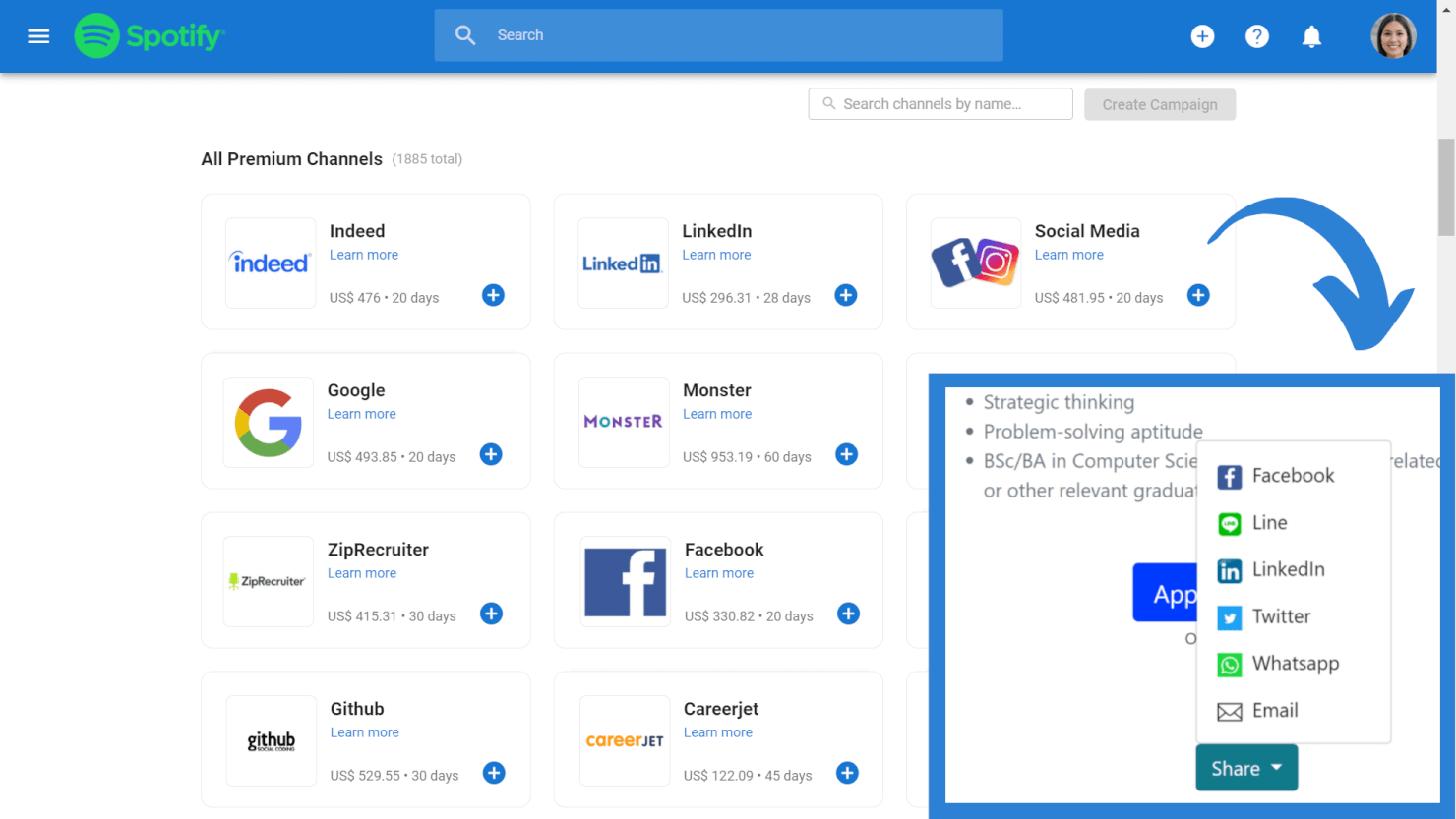
Include la possibilità di condividere posizioni su oltre 2.500 canali gratuiti e premium, importare profili direttamente da LinkedIn e LinkedIn Recruiter e accedere a un database esterno di oltre 600 milioni di professionisti.
Funzionalità distintive e integrazioni di Manatal:
Le funzionalità distintive di Manatal includono l'approvvigionamento intelligente dei candidati e le raccomandazioni guidate dall'IA. Queste funzionalità lavorano insieme per aiutarti a filtrare grandi quantità di dati sui candidati, con il sistema che seleziona automaticamente quelli che soddisfano più requisiti.
È inoltre possibile recuperare indirizzi email e numeri di telefono verificati direttamente dai profili dei candidati e il loro sistema di gestione dei fornitori (Vendor Management System, VM) permette ai team di selezione e alle agenzie di lavorare insieme in modo più efficiente.
Le integrazioni sono disponibili con Facebook, Gmail, G Suite, Line, LinkedIn, Microsoft Outlook, Office 365, Wechat e WhatsApp. L'integrazione con Zapier e l'accesso API sono disponibili con i piani personalizzati.
Pros and Cons
Pros:
- È possibile creare landing page carriera personalizzabili con moduli di candidatura integrati
- Include strumenti per il monitoraggio delle attività e la collaborazione del team
- Lo strumento di sourcing dei candidati attinge da oltre 2.500 piattaforme di lavoro
Cons:
- Fatturazione solo annuale
- Le funzionalità di reclutamento tramite SMS sono disponibili solo nel piano più avanzato
New Product Updates from Manatal

Manatal Adds Candidate Login and Employee Portal to Career Pages
Manatal has added Candidate Login, Internal Employee Portal, and internal job visibility controls for Career Pages. These features help teams simplify applications, support employee mobility, and manage internal hiring workflows. For more information, visit Manatal’s official site.
 .
.
Crelate
Ideale per specialisti del reclutamento alle prime armi
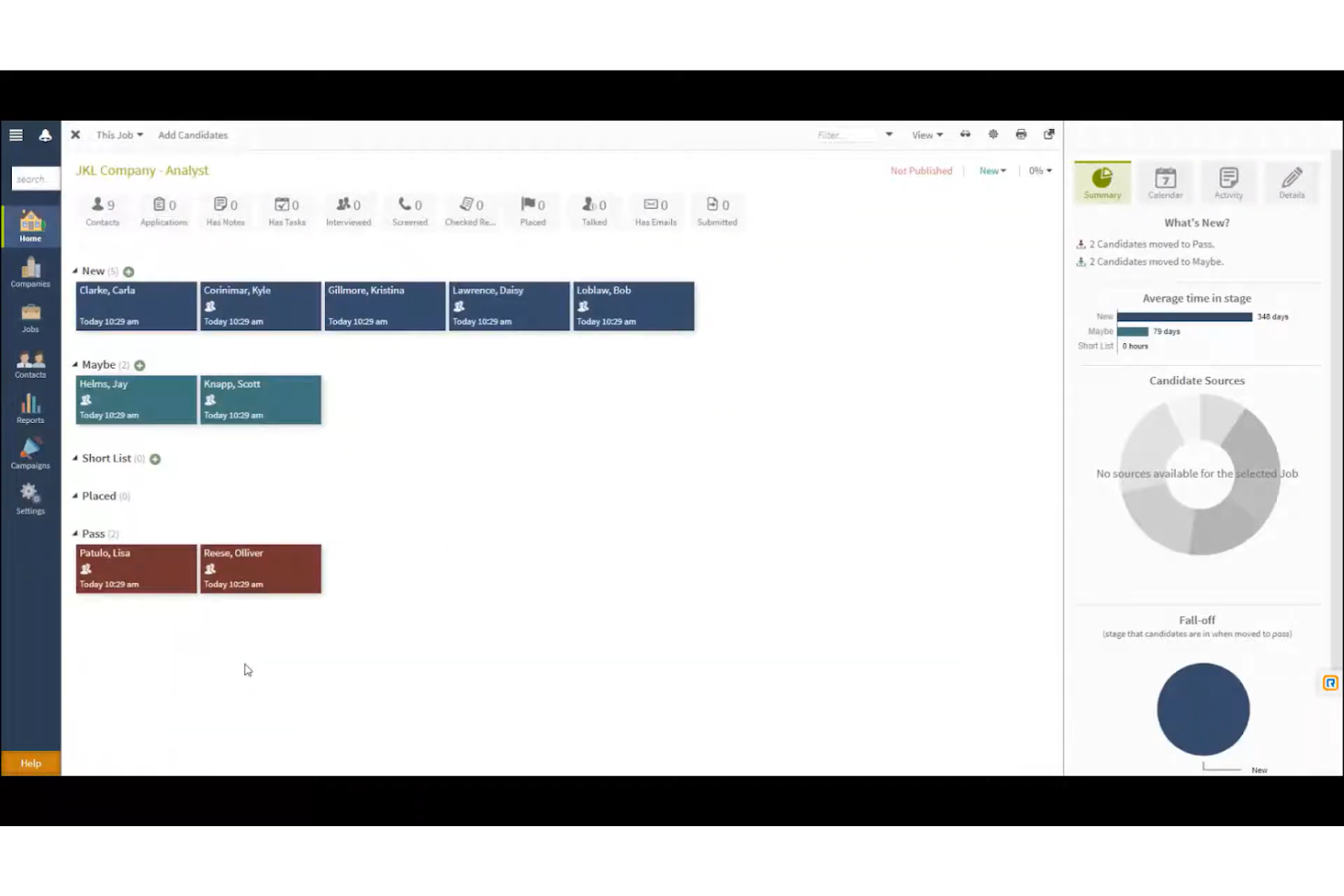
Crelate è uno strumento per agenzie di reclutamento realizzato da reclutatori e dotato di numerose funzionalità utili di ATS e CRM.
Perché ho scelto Crelate: Ho scelto Crelate per la facilità d'uso, la personalizzazione e l'ampia gamma di funzionalità offerte dallo strumento.
Ad esempio, puoi facilmente trascinare e rilasciare i record dei candidati man mano che avanzano nel processo di selezione.
Puoi anche etichettare i candidati in base a competenze, esperienza, fonte o qualsiasi altra informazione che può essere utilizzata nelle ricerche.
Lo stesso vale per il CRM, completamente personalizzabile per adattarsi al tuo flusso di lavoro di vendita. Il filtro di personalizzazione permette di cercare offerte lavorative in base a inserimenti, aziende, opportunità.
Funzionalità distintive e integrazioni di Crelate:
Funzionalità distintive includono il parsing dei curriculum e la creazione automatica dei profili dei candidati. Crelate estrae le informazioni dai CV dei candidati e le utilizza per creare profili dettagliati, completi delle informazioni social di ciascun candidato.
È utile anche il portale clienti che permette ai recruiter di comunicare con i clienti tramite avvisi automatici in tempo reale e di registrare tutte le interazioni e feedback con i clienti riguardo ai candidati in un'unica posizione centralizzata e facilmente accessibile.
Integrazioni includono strumenti di comunicazione e analisi, e soluzioni ATS come ZoomInfo, hireEZ, CareerBuilder, Seekout, Glassdoor, Monster, JobInventory, Dice, CareerJet, Google Workspace e Microsoft Outlook.
Pros and Cons
Pros:
- Editor visuale drag-and-drop
- Le funzionalità di automazione aiutano a catturare i dati dei candidati
- Ottimo supporto clienti
Cons:
- Non è possibile personalizzare i campi obbligatori delle candidature
- Numero limitato di template email

JobAdder
Ideale per il tracciamento delle attività di recruiting
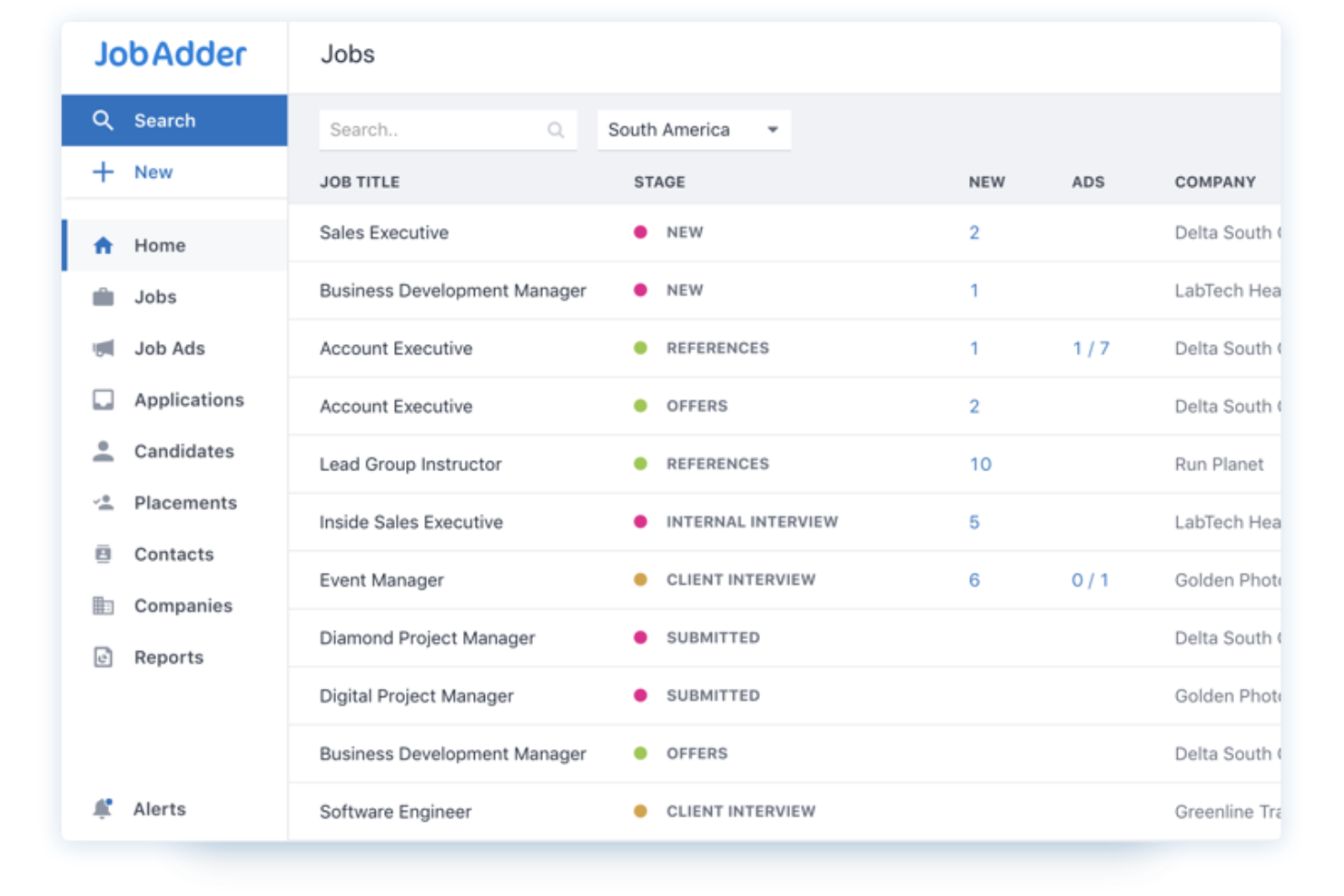
JobAdder è una piattaforma per agenzie di ricerca e selezione che ti consente di tracciare i candidati lungo i tuoi funnel di reclutamento. La soluzione offre una panoramica dei tuoi sforzi di recruiting, permettendoti di individuare potenziali colli di bottiglia nei tuoi flussi di lavoro.
Perché ho scelto JobAdder: Ho inserito JobAdder nella mia lista grazie alle sue funzionalità di tracciamento dei candidati. La piattaforma mostra ai responsabili delle assunzioni lo stato di ogni candidato in tempo reale, consentendo loro di capire come sta andando il processo di selezione a colpo d'occhio. I membri del team possono valutare i candidati e lasciare commenti gli uni per gli altri nei profili dei candidati, assicurandosi che solo i migliori avanzino nel funnel.
La dashboard di colloqui e attività di JobAdder ti permette di mantenere il tuo team sulla buona strada. La dashboard consente di visualizzare le attività in programma così da ottimizzare il calendario e il carico di lavoro del gruppo.
Caratteristiche e integrazioni principali di JobAdder:
Funzionalità principali includono anagrafiche dei candidati, automazione ricerca e abbinamento, arricchimento dei profili e talent pool. Insieme, queste funzionalità permettono di reperire candidati in breve tempo effettuando ricerche per profili simili tramite filtri avanzati.
Integrazioni includono soluzioni di comunicazione, CRM, payroll e ATS, come BambooHR, Calendly, Checkmate, Applyflow, Seek, Aircall, Deputy, Deel, QuickBooks e HubSpot.
Pros and Cons
Pros:
- Buone opzioni di personalizzazione
- Schede di valutazione per i colloqui
- Ottima app mobile
Cons:
- Potrebbe essere lento durante il salvataggio simultaneo di più profili candidati
- Alcune funzionalità possono risultare complesse per gli utenti principianti

Boon
Ideale per il recruiting basato su referenze
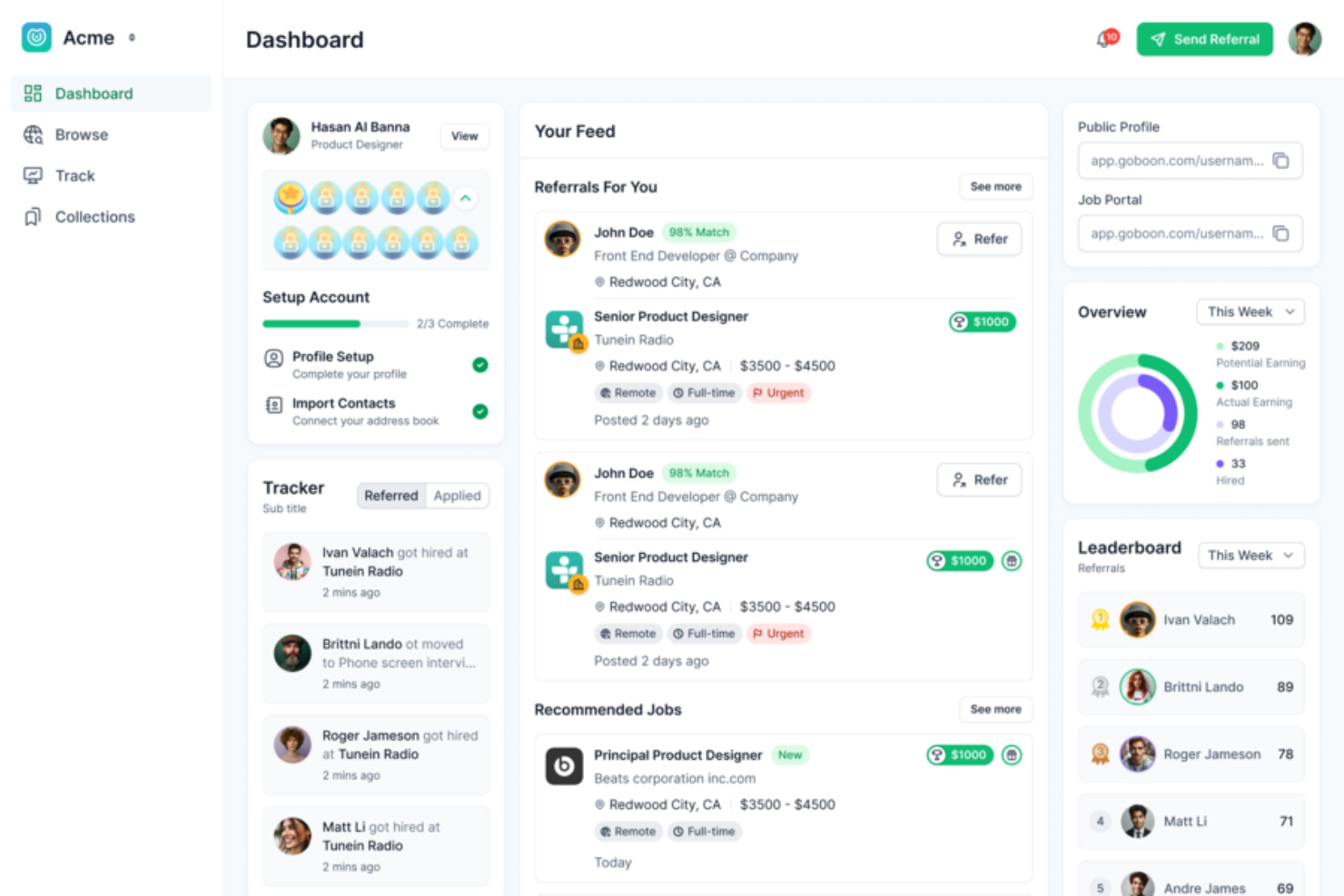
Boon è una piattaforma di automazione del recruiting creata per aiutare recruiter e aziende ad assumere più rapidamente attraverso la ricerca di candidati tramite referenze. Collega i datori di lavoro a potenziali candidati trasformando le reti esistenti in un motore dinamico di reclutamento.
Perché ho scelto Boon: Ho scelto Boon perché si concentra sull’automatizzare e incentivare le segnalazioni di candidati. Permette di raccogliere referenze da dipendenti, alumni e dalla rete più ampia, coinvolgendo automaticamente questi contatti con campagne preimpostate. Questo lo rende particolarmente efficace per i team che desiderano sfruttare le relazioni già attive invece di rivolgersi solo a candidati esterni. Puoi impostare ricompense per ogni posizione aperta, dando un motivo in più alle persone per raccomandare candidati e ampliando così la tua rete senza il bisogno di un team tradizionale di recruiter.
Caratteristiche e integrazioni di spicco di Boon
Caratteristiche includono una classifica delle referenze che trasforma la partecipazione in un gioco, mostrando chi porta il maggior numero di candidati e aiutando a incrementare il coinvolgimento. Il pannello di controllo consente di monitorare quante referenze stanno arrivando, a che fase sono e chi le ha effettuate, così il tuo team può misurare impatto e responsabilità.
Integrazioni includono NetSuite, Lever, Workday, Greenhouse, Google Workspace, Okta, Slack, Microsoft Teams, Facebook, LinkedIn, QuickBooks, Xero e SmartRecruiters.
Pros and Cons
Pros:
- L'automazione AI aiuta i recruiter a individuare candidati migliori più rapidamente
- Le funzionalità di gamification aumentano il coinvolgimento dei dipendenti
- Il tracciamento delle referenze è efficiente e di facile gestione
Cons:
- Il tracciamento degli incentivi manca di opzioni di personalizzazione avanzata
- Caricare i dati manualmente può essere difficile o richiedere tempo

Miglior sourcing per posizioni orarie
La piattaforma di recruiting e assunzione basata su cloud di TalentReef è progettata appositamente per il reclutamento ad alto volume e su base localizzata.
Perché ho scelto TalentReef: Ho incluso TalentReef in questo elenco per il loro focus unico sull'acquisizione di candidati per coprire posizioni orarie. Questo rende il loro software particolarmente adatto per la ricerca di talenti per aziende nel settore dei servizi, come ristoranti, negozi al dettaglio e altri datori di lavoro che assumono frequentemente nuovo personale in grandi quantità.
Funzionalità distintive e integrazioni di TalentReef
Le funzionalità distintive includono il chatbot conversazionale AI, la funzione per candidarsi via SMS, la possibilità di inviare messaggi bidirezionali e strumenti di recruiting tramite social. I recruiter possono anche risparmiare molto tempo utilizzando le funzionalità di comunicazione tramite campagne per creare comunicazioni email e SMS preimpostate per interagire con i candidati, consentendo loro di mantenere il contatto con grandi volumi di persone su larga scala.
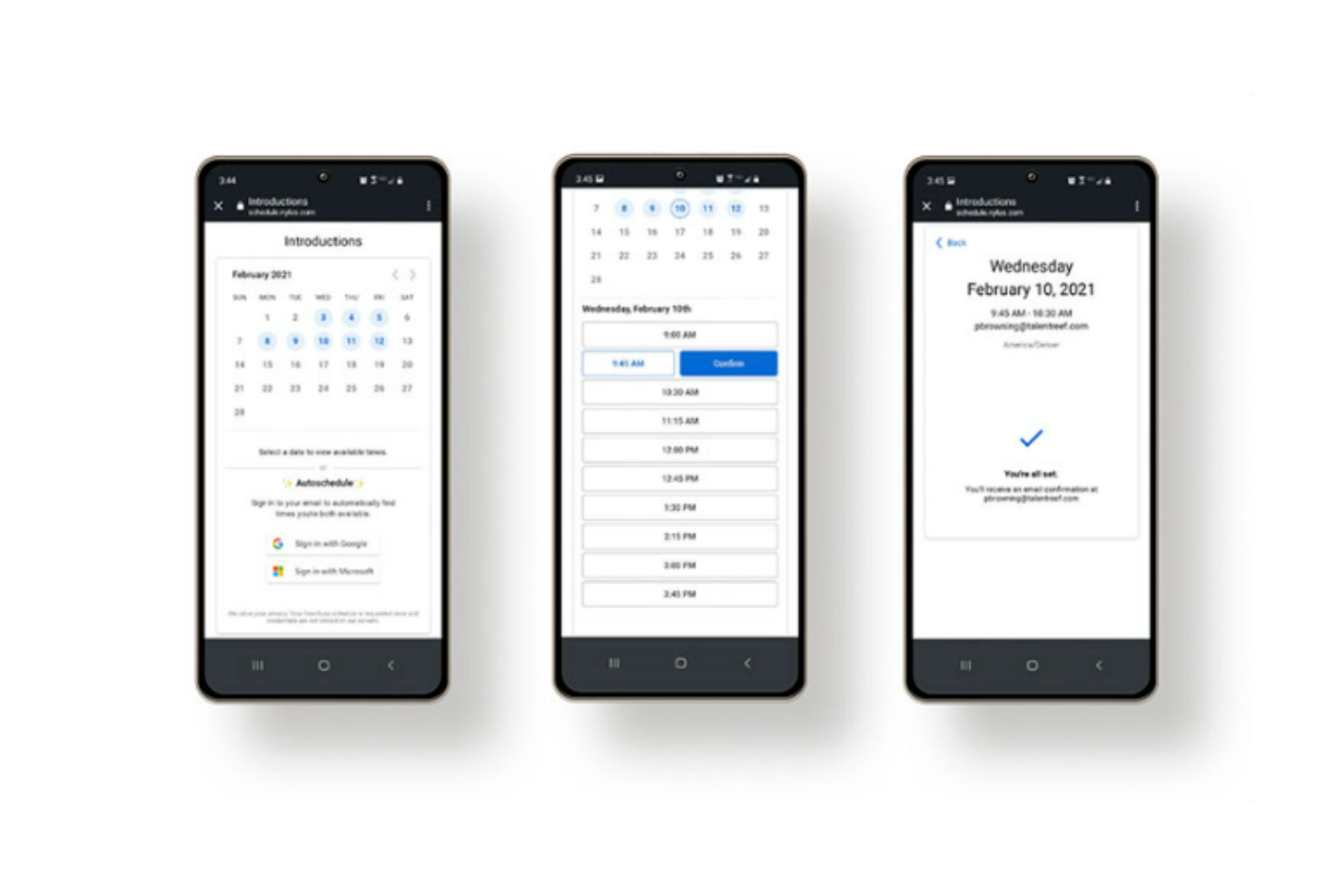
Un altro vantaggio degno di nota è l'automazione della pianificazione dei colloqui. Consentendo ai candidati di scegliere un orario che sia comodo per loro, si riduce la probabilità di assenze o cancellazioni dell'ultimo minuto ed elimina la necessità di continui scambi telefonici per trovare un orario compatibile.
Le integrazioni sono disponibili con sistemi di payroll, strumenti di valutazione dei candidati, fornitori di controlli sui precedenti e sistemi di gestione dell'apprendimento, anche se le singole piattaforme non sono specificate.
Pros and Cons
Pros:
- Include funzionalità ottimizzate per dispositivi mobili
- Offre comunicazioni email personalizzate
- Ideale per coprire posizioni orarie in grandi volumi
Cons:
- I dettagli sui prezzi non sono trasparenti
- Nessuna prova gratuita disponibile
Bullhorn
Ideale per database ordinati di candidati

Bullhorn mira a offrire un'unica fonte di verità per le agenzie di collocamento impegnate e agisce anche come hub centrale per l'intero stack tecnologico.
Perché ho scelto Bullhorn: Bullhorn comprende quanto siano impegnati i team di reclutamento, ma anche la necessità di bilanciare l'efficienza (leggi: automazione) con il tocco umano. Pertanto, sono attenti a implementare l'automazione con cautela e la utilizzano per migliorare l'esperienza sia dei team che dei candidati.
Sono anche generosi nella condivisione delle conoscenze, fornendo playbook per aiutare le organizzazioni a coinvolgere i candidati e differenziare la propria offerta.
Caratteristiche distintive e integrazioni di Bullhorn
Le caratteristiche distintive includono il loro strumento di intelligenza artificiale, costruito su un vasto archivio di dati di reclutamento, per aiutare nella ricerca e selezione dei candidati e nella creazione di comunicazioni pertinenti, così come funzionalità avanzate di analisi come dashboard in tempo reale e report personalizzati.
Inoltre, la piattaforma ti consente di creare flussi di reclutamento personalizzati usando la comunicazione omnicanale. Ciò ti permette di attrarre i candidati sui social media, coinvolgerli via SMS e alimentarli tramite email personalizzate.
Le integrazioni includono sistemi di gestione delle candidature (ATS), strumenti di comunicazione, soluzioni per le verifiche dei precedenti e strumenti di gestione delle relazioni con i clienti (CRM), come Accurate Background, ADP, Checkr, First Advantage, hireEZ, Indeed, Arya, SkillCheck, LinkedIn e Sterling.
Pros and Cons
Pros:
- Consente di costruire flussi personalizzati a più step
- Ottimo per la comunicazione omnicanale
- Capacità avanzate di reportistica e analisi
Cons:
- L'interfaccia utente può sembrare macchinosa nelle ricerche estese
- Il gran numero di funzionalità può risultare opprimente

Ideale per pagine carriere personalizzate con il tuo brand

TargetRecruit è un software per agenzie di recruiting rivolto ai settori commerciale, sanitario e professionale.
Perché ho scelto TargetRecruit: La piattaforma aiuta a reperire rapidamente i candidati attraverso una ricerca accurata nella propria banca dati, fonti esterne, job board oppure pubblicando sulle proprie pagine carriere.
Per quanto riguarda queste ultime, il software offre una varietà di modelli da cui partire, ma è anche possibile creare pagine carriere personalizzate da zero. Queste permettono ai candidati di cercare tra le posizioni aperte per titolo, competenze o posizione geografica.
I candidati possono inoltre creare e aggiornare i propri profili, caricare il curriculum, attivare notifiche per ricevere avvisi quando viene aperta una posizione in linea con il loro profilo, e completare i documenti di onboarding e conformità.
Dal punto di vista commerciale, il CRM offre una visione a 360 gradi delle relazioni con clienti e candidati e può anche convertire automaticamente nuove opportunità in ordini di lavoro per garantire inserimenti il più rapidi possibile.
Caratteristiche distintive e integrazioni di TargetRecruit:
Funzionalità distintive includono ricerca booleana, valutazione automatica dei lead e instradamento per un contatto più veloce, e un portale per i timesheet che facilita la registrazione delle ore lavorate e delle spese da parte dei collaboratori e consente ai responsabili delle assunzioni dei clienti di accettare e pagare o rifiutare le richieste secondo necessità.
Apprezzo anche le funzionalità di reporting di TargetRecruit. La piattaforma consente a tutti gli utenti di creare report e dashboard personalizzati utilizzando solo i dati accessibili in base ai loro livelli di autorizzazione, con la possibilità di esportare i report ai clienti tramite email.
Le integrazioni includono CRM, strumenti di contabilità e fatturazione e soluzioni per la pubblicazione di offerte di lavoro, come QuickBooks, PayChex, ADP, ZoomInfo, Quip, DocuSign, Salesforce, CloudCall, Relias e DataTrim.
Pros and Cons
Pros:
- Diversi componenti aggiuntivi disponibili
- Soluzione flessibile e personalizzabile
- Ottime funzionalità di reportistica
Cons:
- Le funzionalità avanzate possono risultare complesse
- Potrebbe essere meno efficace al di fuori del Nord America

Unnanu Hire
Ideale per la valutazione dei candidati in blocco
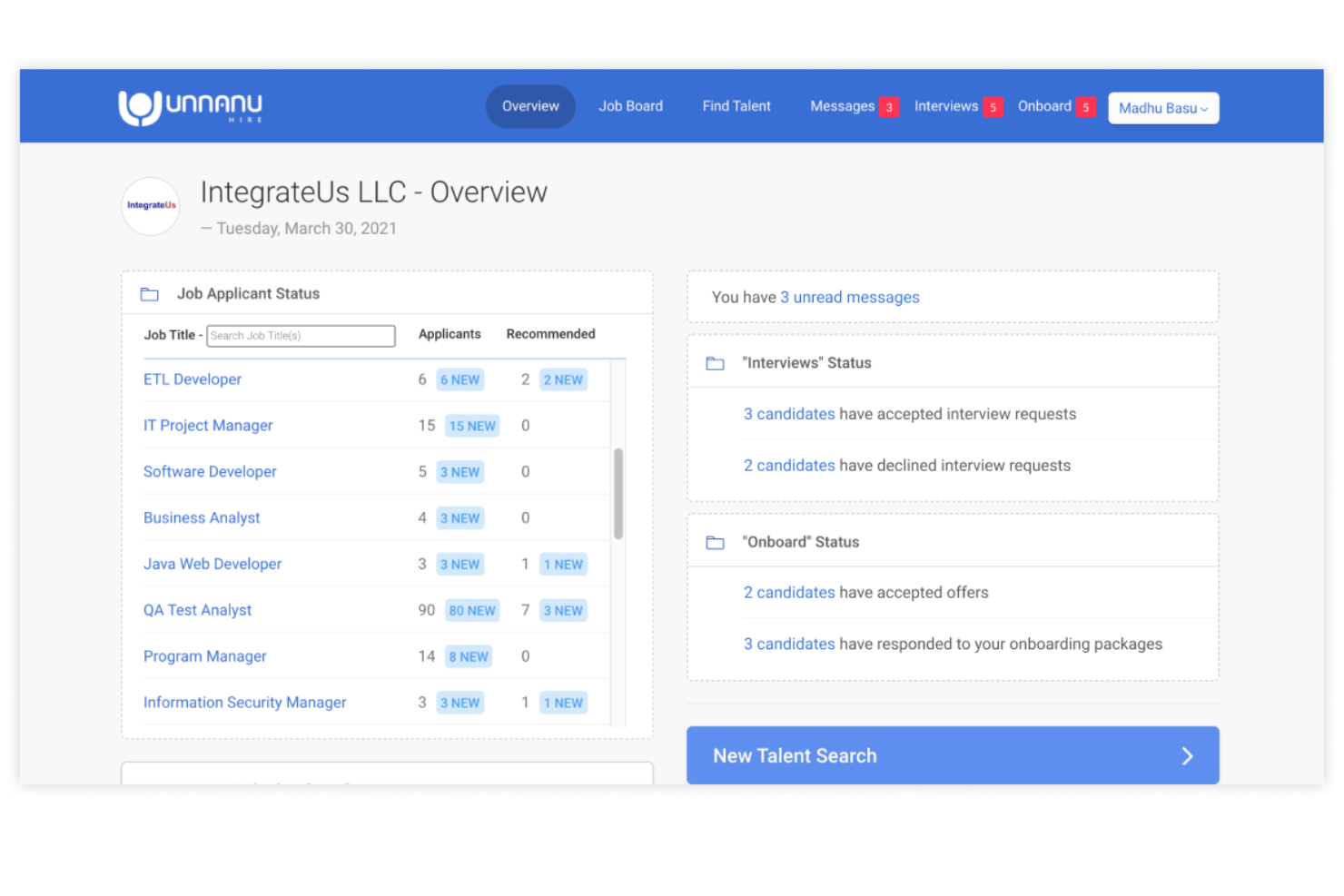
Unnanu Hire è una piattaforma avanzata per le assunzioni che utilizza l'intelligenza artificiale e l'automazione per ottimizzare il processo di reclutamento. Grazie alla sua capacità di gestire grandi volumi di dati sui candidati e di classificare rapidamente le candidature in blocco, è uno strumento eccellente per le agenzie di reclutamento che gestiscono assunzioni ad alto volume. Utilizzando Unnanu Hire, puoi gestire gli annunci di lavoro, monitorare i candidati e persino condurre colloqui video.
Perché ho scelto Unnanu Hire: Ho incluso Unnanu Hire in questo elenco perché apprezzo molto le sue funzionalità di abbinamento dei candidati basate sull'intelligenza artificiale. Sfruttando algoritmi di intelligenza artificiale, Unnanu Hire analizza accuratamente i requisiti del lavoro e i profili dei candidati per trovare la corrispondenza migliore per ogni posizione. Unnanu Hire dispone inoltre di un database di talenti precompilato, alimentato da dati raccolti sul web, che ti offre un accesso rapido e semplice a centinaia di candidati verificati (incluso nei piani Pro e superiori).
Funzionalità distintive e integrazioni di Unnanu Hire:
Una delle funzionalità distintive di Unnanu Hire è la possibilità di condurre colloqui video. Invece di dover programmare e svolgere i colloqui di persona o tramite uno strumento separato per le videoconferenze, puoi fare tutto all'interno di Unnanu Hire. Questo rende l'intero processo più efficiente e offre anche una migliore esperienza ai candidati.
Un'altra funzionalità che apprezzo molto è il sistema di monitoraggio dei candidati. È estremamente facile vedere a che punto si trova ogni candidato nel processo di assunzione e puoi persino configurare e-mail automatiche per tenere aggiornati i candidati. È un ottimo modo per mantenere tutto organizzato e assicurarti che nessuno venga trascurato.
Le integrazioni attualmente non sono elencate sul loro sito.
Pros and Cons
Pros:
- Include un database di talenti precompilato
- Supporta le e-mail di massa e altre azioni in blocco
- Il piano gratuito include annunci di lavoro illimitati
Cons:
- Assistenza clienti limitata nei piani inferiori
- Le valutazioni tramite intelligenza artificiale hanno un costo aggiuntivo
Altri software per agenzie di selezione del personale
Di seguito trovi un elenco di ulteriori software per agenzie di selezione del personale che non sono entrati nella mia top 10, ma che vale comunque la pena prendere in considerazione:
- Gem
Ideale per l’engagement dei talenti
- Top Echelon
Ideale per la gestione della pipeline
- Vincere
Ideale per il matching candidati con intelligenza artificiale
- Arya
Ideale per la selezione orientata alla diversità
- Mindscope
Ideale per esperienze candidate mobile-first
- Recruiterflow
Ideale per pipeline di assunzione personalizzate
- hireEZ
Ideale per la ricerca di candidati con l’IA
- Juicebox
La soluzione migliore per il contatto e la ricerca di candidati basati sull'intelligenza artificiale
- TE Recruit
Ideale per l'accesso a una rete di split placement
- Greenhouse
Ideale per flussi di lavoro scalabili
- Zoho Recruit
Ideale per la ricerca di candidati


Recensioni correlate di software per le risorse umane
Se non hai ancora trovato quello che cerchi, dai un'occhiata a questi altri strumenti per le risorse umane che abbiamo testato e valutato:
- Software per le risorse umane
- Software per la gestione delle paghe
- Software per la selezione del personale
- Sistemi di tracciamento dei candidati
- Servizi di datore di lavoro registrato
- Software per la gestione della forza lavoro
Come Valuto il Software per Agenzie di Reclutamento
Valuto gli strumenti per agenzie di reclutamento su due livelli: le funzionalità indispensabili—pipeline dei candidati, CRM per i clienti, pubblicazione su job board—che qualificano una piattaforma, e i fattori differenzianti che distinguono le migliori opzioni.
Funzionalità di Base (Requisiti Minimi per Questa Lista)
Quando seleziono gli strumenti per la mia lista, valuto ciascuno su una scala da 0 (non offre la funzionalità) a 5 (eccelle in quest'area) per ogni funzionalità di base elencata di seguito. Poi, calcolo il punteggio totale dello strumento in percentuale. Ogni tool deve raggiungere un punteggio minimo totale del 65% per essere preso in considerazione.
- Applicant Tracking & Pipeline: Cerco pipeline di reclutamento personalizzabili che consentano di costruire workflow unici per ogni ordine di lavoro—ad esempio separare le posizioni IT a contratto dalle ricerche esecutive permanenti con fasi e automazioni distinte.
- CRM & Database Candidati: Qui contano il parsing dei CV, la ricerca Boolean e l’etichettatura. Un buon database candidati permette ai recruiter di riscoprire vecchi candidati quando dopo mesi si apre una posizione adatta.
- CRM Clienti & Contatti: Valuto se la piattaforma traccia le aziende clienti, i responsabili delle assunzioni e gli ordini di lavoro separatamente dai candidati—le agenzie devono registrare le attività di sviluppo commerciale insieme a quelle di reclutamento.
- Workflow Multi-Posizione/Multi-Cliente: Le agenzie gestiscono decine di posizioni aperte per più clienti contemporaneamente. Verifico che ogni ordine di lavoro mantenga la propria pipeline, proprietà e tracciamento delle presentazioni senza contaminazioni incrociate.
- Sourcing & Distribuzione Annunci: Valuto su quanti job board il tool pubblica nativamente e se si collega a canali di sourcing come LinkedIn Recruiter o aggregatori di CV per ampliare il bacino di candidati.
- Tracciamento delle Assunzioni & Fatturazione: Le società di staffing vivono sulle fee di inserimento. Valuto se lo strumento monitora inserimenti permanenti, margini su contratti e la divisione delle commissioni—e se si collega a strumenti di contabilità per la fatturazione.
Una volta che ho una lista di strumenti che soddisfano questi criteri, considero ciò che distingue ciascuna piattaforma.
Fattori Differenzianti (Cosa Distingue i Fornitori)
Ecco come confronto i diversi fornitori:
Funzionalità di Spicco
L’abbinamento candidati tramite AI è un importante fattore distintivo—verifico se la piattaforma è in grado di classificare automaticamente i candidati del database rispetto ai nuovi ordini di lavoro, risparmiando ore di lavoro nelle realtà ad alto volume. Anche gli strumenti back-office per contrattisti sono importanti per le agenzie di somministrazione che gestiscono timesheet, tracciamento delle spese e onboarding integrati nel workflow di reclutamento. Cerco anche portali cliente personalizzati. Offrire ai responsabili delle assunzioni uno spazio dove visionare le presentazioni e lasciare feedback direttamente elimina la classica trafila di email che rallenta le assunzioni.
Oltre le Funzionalità
Il modello di prezzo è fondamentale qui—alcune piattaforme fanno pagare per singolo recruiter mentre altre seguono un tariffario per volume di posizioni, e la struttura sbagliata può erodere silenziosamente i margini via via che l’agenzia cresce. Valuto anche l’ecosistema di integrazioni, specialmente i collegamenti con i principali job board e strumenti di contabilità come QuickBooks o Xero, poiché la fatturazione degli inserimenti coinvolge sia i flussi di lavoro di reclutamento che quelli finanziari. Anche implementazione e migrazione dei dati meritano attenzione: le agenzie che migrano da sistemi storici come Bullhorn o persino dai fogli di calcolo devono avere un percorso chiaro per trasferire dati candidati e clienti senza perdere la storicità.
Come scegliere il software per agenzie di selezione del personale
Mentre affronti il tuo personale processo di selezione degli strumenti, tieni a mente i seguenti aspetti:
- Quale problema stai cercando di risolvere - Inizia identificando le sfide che stai cercando di superare. Questo ti aiuterà a chiarire le caratteristiche e le funzionalità che il tuo nuovo software deve offrire.
- Chi dovrà utilizzarlo - Per valutare costi e requisiti, considera chi utilizzerà lo strumento e quante licenze ti serviranno. Una volta chiarito questo aspetto, è inoltre utile classificare le esigenze dei diversi utenti per individuare le priorità principali per gli utenti esperti, i responsabili e i dipendenti, assicurandoti che siano tutte soddisfatte.
- Con quali altri strumenti dovrà funzionare - Chiarisci quali strumenti stai sostituendo, quali rimarranno in uso e con quali strumenti dovrai effettuare l'integrazione, come il software di contabilità e fatturazione, il software per la valutazione delle competenze o altri sistemi fondamentali. Dovrai decidere se gli strumenti debbano integrarsi tra loro oppure, in alternativa, se sia possibile sostituire più strumenti con una piattaforma completa per agenzie di recruiting.
- Quali risultati sono importanti - Esamina le funzionalità che desideri ottenere o migliorare e il modo in cui misurerai il successo. Ad esempio, potresti voler utilizzare strumenti basati sull'IA per confrontare più rapidamente i candidati con le descrizioni delle posizioni, oppure strumenti migliori per gestire contemporaneamente più clienti. Tuttavia, potresti sprecare molto tempo prezioso se non definisci in anticipo gli obiettivi relativi ai risultati.
- Come funzionerebbe all'interno della tua organizzazione - Considera la scelta dello strumento insieme ai flussi di lavoro e ai sistemi già esistenti. Valuta ciò che funziona bene e gli eventuali problemi che devono essere affrontati.
Ricorda che ogni azienda è diversa: non dare per scontato che un sistema per agenzie di recruiting funzionerà per la tua organizzazione solo perché è popolare.
Che cos'è il software per agenzie di recruiting?
Il software per agenzie di recruiting viene utilizzato dai recruiter professionisti per organizzare le campagne di recruiting e i relativi bacini di talenti per diversi clienti. Supporta un modello di assunzione basato sul lavoro di squadra e include strumenti di comunicazione e collaborazione interna, oltre ad altre funzioni di back office come contabilità, fatturazione e rilevazione delle ore, nonché portali rivolti ai clienti. Questi strumenti sono progettati per semplificare il recruiting per più clienti contemporaneamente, aiutando i team a coprire rapidamente numerose posizioni e offrendo al contempo un'esperienza eccellente a clienti e candidati.
In definitiva, il software per agenzie di recruiting favorisce assunzioni più rapide e migliori grazie all'automazione, a una gestione più efficace dei dati dei candidati e a strumenti trasparenti di comunicazione e collaborazione basati sul lavoro di squadra. Puoi utilizzare queste soluzioni per automatizzare tutti gli aspetti del processo di recruiting, dalla pubblicazione degli annunci all'analisi dei curriculum, ai controlli dei precedenti, al monitoraggio dei candidati, alla programmazione dei colloqui, al mantenimento dei rapporti con i candidati e alla reportistica.
Caratteristiche del software per agenzie di recruiting
Sebbene le piattaforme per agenzie di recruiting offrano diverse funzionalità, le seguenti sono essenziali:
- Monitoraggio dei candidati: Dovresti poter monitorare i progressi di ogni candidato che presenti ai tuoi clienti, in modo da poter calcolare i tuoi indicatori relativi al tempo necessario per coprire una posizione e ricevere il compenso per le tue prestazioni.
- Gestione delle relazioni con i clienti (CRM): Una funzionalità CRM ti consente di gestire e coltivare i rapporti con i clienti, assicurandoti di comprenderne le esigenze e di fornire il miglior servizio possibile.
- Automazione: Lo strumento dovrebbe consentirti di automatizzare alcuni, se non tutti, i passaggi del processo di recruiting, così da poter coprire un gran numero di posizioni in poco tempo.
- Pubblicazione degli annunci: La soluzione dovrebbe consentirti di pubblicare gli annunci in più luoghi, aumentando le possibilità di raggiungere il tuo pubblico di riferimento.
- Ricerca dei candidati: Lo strumento dovrebbe aiutarti ad attirare candidati da più fonti, come social media, bacheche di annunci di lavoro, siti dedicati alle carriere e così via.
- Filtri di ricerca avanzati: Le soluzioni per il personale che offrono filtri di ricerca avanzati o funzionalità di ricerca di dirigenti ti aiuteranno a individuare rapidamente i candidati giusti, senza perdere tempo. Questo è particolarmente importante per chi assume personale per ruoli difficili da coprire in settori ad alta domanda.
- Strumenti di comunicazione: Poter gestire le comunicazioni da una posizione centralizzata ti consente di dare seguito alle conversazioni e di mantenere facilmente i rapporti con i candidati.
- Accesso da dispositivi mobili: App mobili dedicate o funzionalità ottimizzate per i dispositivi mobili che ti consentono di gestire le attività di recruiting ovunque ti trovi, aiutandoti a rispondere rapidamente alle esigenze di clienti e candidati.
- Reportistica e analisi: Report e analisi dettagliati forniscono informazioni sui processi di recruiting, aiutandoti a individuare le aree da migliorare e a dimostrare il tuo valore ai clienti.
- Integrazioni software: Le integrazioni fondamentali con sistemi di monitoraggio dei candidati, strumenti di comunicazione, CRM e soluzioni per la verifica dei precedenti possono aiutare il tuo team a lavorare in modo più efficiente.
- Funzioni amministrative: Il miglior software per agenzie di recruiting dovrebbe includere anche funzioni amministrative per aiutarti a gestire la tua piccola impresa, tra cui strumenti di contabilità e strumenti integrati per fatturazione e gestione delle paghe per gestire il flusso di cassa.
Costi e prezzi dei software per agenzie di reclutamento
I software per agenzie di reclutamento sono disponibili in una vasta gamma di piani progettati per soddisfare le esigenze di aziende di tutte le dimensioni, dalle piccole imprese e startup fino alle grandi aziende. Ogni piano varia in termini di funzionalità, limiti di utenti e prezzi, consentendoti di selezionare quello più adatto ai requisiti e al budget della tua organizzazione.
Tabella di confronto dei piani per i software per agenzie di reclutamento
| Piano | Prezzo | Funzionalità |
|---|---|---|
| Gratuito | $0 | Monitoraggio di base dei candidati, annunci di lavoro limitati, database dei candidati e assistenza via e-mail |
| Base | $49 al mese | Tutte le funzionalità del piano Gratuito, annunci di lavoro aggiuntivi, analisi dei CV, reportistica di base e assistenza telefonica |
| Professionale | $149 al mese | Tutte le funzionalità del piano Base, reportistica avanzata, integrazione CRM, ricerca dei candidati e assistenza prioritaria |
| Aziendale | Prezzo personalizzato | Tutte le funzionalità del piano Professionale, utenti illimitati, integrazioni personalizzate e un responsabile clienti dedicato |
Quando valuti questi piani, considera le esigenze specifiche della tua agenzia, il numero di utenti che avresti e il livello di assistenza di cui hai bisogno. Questo ti aiuterà a selezionare il piano più adatto al tuo budget e alle tue esigenze specifiche.
Domande frequenti sui software per agenzie di reclutamento
Vuoi saperne di più sui software per agenzie di reclutamento? Ecco alcune risposte alle domande più comuni su questo argomento:
Quali sono i vantaggi dell'utilizzo di un'agenzia di reclutamento?
Avvalersi di un’agenzia di reclutamento offre molteplici vantaggi, tra cui:
- Competenza: le agenzie di reclutamento selezionano candidati per diversi clienti, quindi sanno come ampliare la propria portata e presentare la tua offerta al pubblico target. (Ad esempio, alcune agenzie sono specializzate nel reclutamento in ambito finanziario, mentre altre possono eccellere nel reclutamento di talenti in ambito ingegneristico, ecc.)
- Riduzione dei tempi di assunzione: le agenzie per il personale dispongono generalmente di ampi database di candidati, quindi hanno maggiori probabilità di trovare un candidato idoneo in poco tempo e di ottenere metriche di reclutamento migliori rispetto ai dipartimenti HR interni.
In che modo i software per agenzie di reclutamento aiutano a gestire i rapporti con più clienti?
Un buon software consente di segmentare i profili dei clienti, monitorare le comunicazioni e gestire separatamente gli ordini di lavoro per ciascun cliente. Puoi impostare promemoria automatici, archiviare le note delle riunioni e generare report specifici per ogni cliente. Tutto questo ti aiuta a offrire un’esperienza personalizzata gestendo al contempo le esigenze di più clienti.
Quali sono le difficoltà più comuni quando si cambia software per il reclutamento e come possono affrontarle le agenzie?
Le difficoltà più comuni includono la migrazione dei dati, la formazione del personale e l’adattamento dei flussi di lavoro. Per superarle, è necessario pianificare una transizione graduale, fornire una formazione pratica e scegliere un software con un solido supporto all’avviamento. Eseguire una copia di sicurezza dei dati esistenti e iniziare con un gruppo di prova può aiutare a ridurre al minimo le interruzioni.
Altre recensioni di software per selezionisti professionisti
Se ti interessa migliorare le tue attività di reclutamento, potresti dare un'occhiata a queste altre recensioni degli esperti di People Managing People:
- Migliori software per il personale e il reclutamento
- Migliori software per il reclutamento della diversità per assunzioni DEI
- Migliori software di reclutamento con IA per la ricerca di candidati su larga scala
- Migliori software per le paghe per agenzie di reclutamento
- Migliori software per colloqui video per colloqui virtuali
- Migliori software per test pre-assunzione per valutare il potenziale del personale
Qual è il prossimo passo?
Se stai valutando un software per agenzie di recruiting, contatta gratuitamente un consulente di SoftwareSelect per ricevere consigli.
Compili un modulo e fai una breve conversazione durante la quale vengono analizzate in dettaglio le tue esigenze. Dopodiché riceverai una selezione ristretta di software da esaminare. Ti supporteranno anche durante l'intero processo di acquisto, comprese le negoziazioni sul prezzo.