

10 migliori software per database HR del 2026: recensiti e confrontati

10 Elenco dei migliori software per database HR


Con innumerevoli opzioni di software per database HR disponibili, trovare quella giusta per la propria organizzazione può essere complicato. Serve una soluzione che semplifichi il modo in cui si archiviano, accedono e gestiscono i dati HR, ottimizzando le operazioni e supportando decisioni più consapevoli. Tuttavia, individuare la soluzione più adatta alle proprie esigenze specifiche non è sempre semplice.
In qualità di specialista esperto in risorse umane e reclutamento, con una lunga esperienza nell'utilizzo di un'ampia gamma di strumenti per database HR, so cosa rende davvero efficace una piattaforma. In questa guida ho selezionato con cura i migliori software per database HR per aiutarti a ottimizzare la gestione dei dati e migliorare l'efficienza di tutte le attività HR.
Perché fidarsi delle nostre recensioni sui software
Il nostro team testa e recensisce software dal 2012. In quanto esperti HR noi stessi, sappiamo quanto sia difficile — e importante — scegliere il software giusto.
Per questa guida, abbiamo valutato gli strumenti attraverso test pratici e ricerche indipendenti, assegnando un punteggio agli strumenti in base ai nostri criteri di selezione. Ci basiamo inoltre sulle competenze di leader di pensiero del settore e di professionisti HR attivi.
Le nostre recensioni riflettono il nostro giudizio editoriale umano, non un discorso di vendita.
Revisori esperti:
I 10 migliori software per database HR: tabella comparativa dei prezzi
Questa tabella comparativa riassume i dettagli dei prezzi delle mie migliori selezioni di software per database HR, per aiutarti a trovare il software più adatto al tuo budget e alle esigenze della tua azienda.
| Tool | Best For | Trial Info | Price | ||
|---|---|---|---|---|---|
| 1 | Ideale per la rilevazione integrata delle presenze | Demo gratuita disponibile | Da $599/dipendente/mese | Website | |
| 2 | Il migliore per la gestione di una forza lavoro globale | Demo gratuita disponibile | Da $5/dipendente/mese | Website | |
| 3 | Ideale per le funzionalità AI integrate che automatizzano le attività amministrative | Piano gratuito + prova gratuita disponibili | A partire da $2/utente/mese (fatturato annualmente) | Website | |
| 4 | Ideale per la gestione digitale dei documenti | Prova gratuita di 14 giorni | Prezzo su richiesta | Website | |
| 5 | Ideale per l'assegnazione automatica dei turni | Prova gratuita di 21 giorni + demo gratuita disponibile | A partire da $2.93/utente/mese (fatturazione annuale) | Website | |
| 6 | Ideale per la gestione del ciclo di vita del dipendente | Prova gratuita di 7 giorni + demo gratuita | A partire da $4.95/utente/mese | Website | |
| 7 | Ideale per la conservazione dei dati storici | Demo gratuita disponibile | Prezzi su richiesta | Website | |
| 8 | Ideale per monitorare lo sviluppo di carriera | Demo gratuita disponibile | Da $4/utente/mese | Website | |
| 9 | Ideale per workflow personalizzabili | Demo gratuita disponibile | Da $4,92/utente/mese | Website | |
| 10 | Ideale per valutare il sentiment dei dipendenti tramite IA | Demo gratuita disponibile | Prezzo su richiesta | Website |

Recensioni dei migliori software per database HR
Ecco i miei riepiloghi dettagliati dei migliori software per database HR inclusi nella mia top 10, con note sul motivo per cui li ho scelti. Ogni recensione offre una panoramica dettagliata delle funzionalità principali, delle integrazionie degli scenari di utilizzo ideali di ciascun sistema, per aiutarti a trovare lo strumento più adatto alle tue esigenze.

Ideale per la rilevazione integrata delle presenze

Justworks è una piattaforma software per la gestione delle risorse umane che centralizza i registri dei dipendenti, le buste paga, l'amministrazione dei benefit, la gestione della conformità, l'onboarding e la rilevazione delle presenze in un unico sistema.
Per chi è Justworks?
Justworks è adatto a piccole e medie imprese che desiderano una piattaforma unificata per gestire HR, paghe e conformità.
Perché ho scelto Justworks
Ho scelto Justworks tra i migliori perché posso gestire i registri dei dipendenti e le buste paga monitorando le ore di lavoro sulla stessa piattaforma. La rilevazione integrata delle presenze consente al mio team di registrare le ore lavorate, sincronizzarle direttamente con le buste paga e rispettare le normative sul lavoro. Apprezzo la possibilità di rivedere i fogli ore e approvare le ore senza dover cambiare sistema.
Servizi principali di Justworks
- Onboarding dei dipendenti: Raccogli in digitale i documenti e configura i nuovi assunti in un unico flusso di lavoro.
- Gestione dei benefit: Gestisci assicurazione sanitaria, 401(k) e altri benefit per i dipendenti da un'unica dashboard.
- Archiviazione dei documenti: Conserva e organizza i documenti HR in modo sicuro per facilitarne l'accesso e la conformità.
- Reportistica personalizzata: Genera report sui dati dei dipendenti, paghe e benefit per audit o revisioni interne.
Integrazioni con Justworks
Le integrazioni native non sono chiaramente documentate. Justworks offre un'API per integrazioni personalizzate.
Pros and Cons
Pros:
- Rilevazione presenze integrata per i dipendenti orari
- Gestione automatizzata delle tasse e dei report sulle buste paga
- Archiviazione documenti HR e onboarding digitale
Cons:
- Nessuno strumento di gestione delle performance integrato
- Opzioni di reportistica personalizzata limitate

Deel HR
Il migliore per la gestione di una forza lavoro globale

Deel è un potente software database HR per aziende di tutte le dimensioni. Aiuta a conservare, gestire e analizzare i dati dei dipendenti con facilità. Con Deel, le aziende ottengono un'unica fonte di verità per i dati della forza lavoro, consentendo loro di visualizzare tutti i dipendenti e collaboratori in un unico posto, ovunque essi si trovino.
Perché ho scelto Deel: La loro piattaforma offre funzionalità e strumenti potenti che aiutano le aziende a gestire i dati dei dipendenti in modo più efficace. Include funzioni complete di reportistica e analisi che consentono ai datori di lavoro di prendere decisioni informate sulla forza lavoro in modo rapido e accurato. La sua interfaccia utente intuitiva rende facile per le aziende organizzare e rivedere i dati dei dipendenti, mentre il monitoraggio automatico della conformità assicura che documentazione e certificazioni siano sempre accessibili.
Funzionalità e integrazioni distintive di Deel:
Funzionalità includono paghe globali, automazioni, pagamenti ai collaboratori, generazione di fatture, cedolini, tasse, integrazione con software di contabilità e gestione dei benefit.
Integrazioni includono Ashby, BambooHR, Expensify, Greenhouse, Hibob, Netsuite, Okta, OneLogin, Quickbooks, SCIM, Xero, Workday e Workable. Dispongono inoltre di un'API che consente di collegare Deel ad altri strumenti oltre alle integrazioni predefinite, o automatizzare e sincronizzare i dati tra le soluzioni HR utilizzate.
New Product Updates from Deel HR

Deel Expands Stablecoin Wallet to 80+ Countries
Deel expands its Stablecoin Wallet to 80+ countries with dollar-backed balances and optional rewards. This gives eligible contractors more ways to hold and manage earnings inside Deel. For more information, visit Deel’s official site.
 .
.
TalentHR
Ideale per le funzionalità AI integrate che automatizzano le attività amministrative
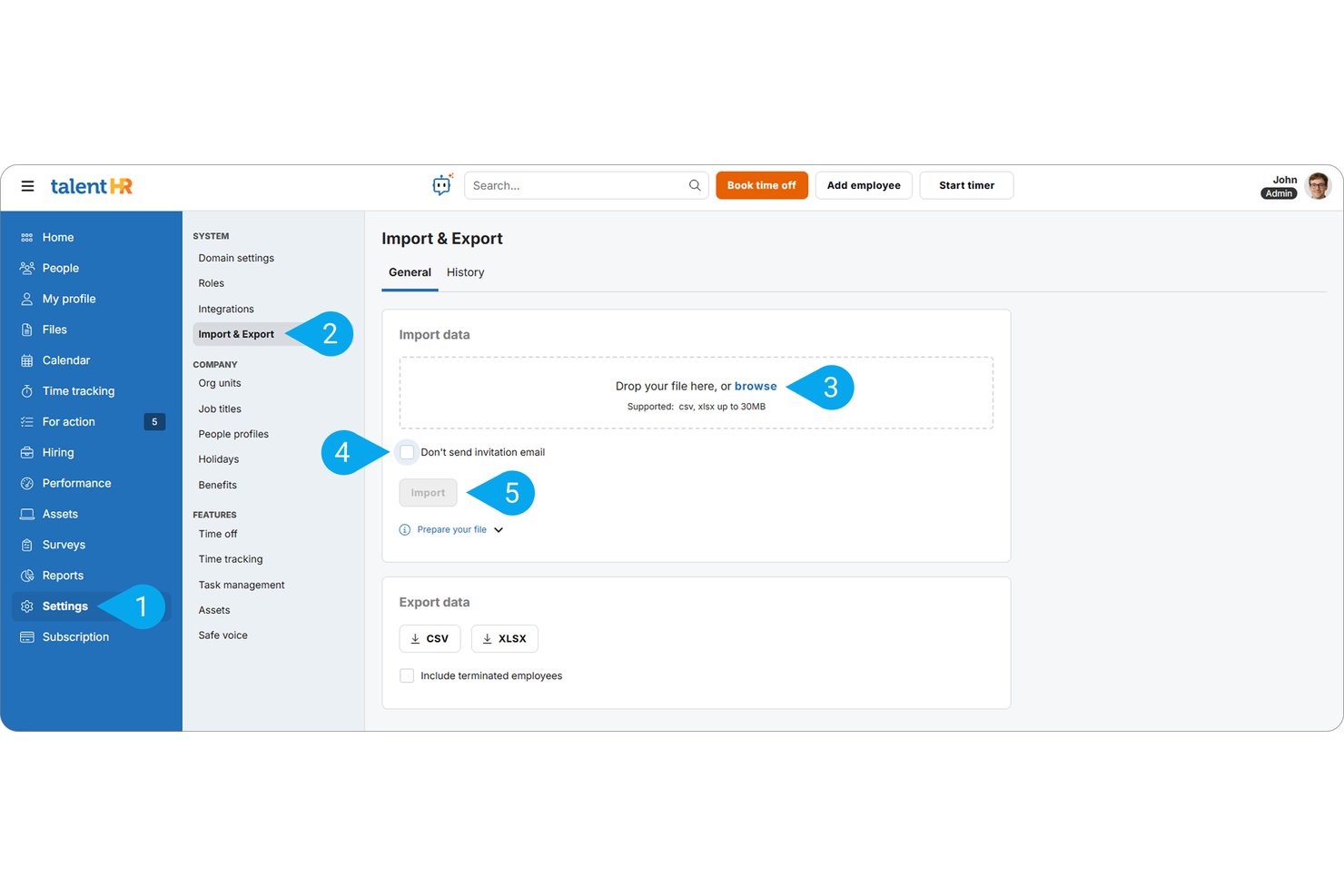
TalentHR è un HRIS tutto-in-uno per le PMI che centralizza i dossier dei dipendenti, l'archiviazione dei documenti, la gestione delle assenze, i flussi di lavoro di onboarding e l'analisi dei dati del personale su un'unica piattaforma.
Per chi è meglio TalentHR?
TalentHR è particolarmente adatto a responsabili delle risorse umane e fondatori di piccole e medie imprese che necessitano di un sistema HR semplice e centralizzato, senza la complessità tipica delle soluzioni enterprise.
Perché ho scelto TalentHR
Ho scelto TalentHR come uno dei migliori perché i suoi strumenti di intelligenza artificiale sono realmente integrati nei flussi di lavoro di gestione dei dati, non aggiunti come componente secondaria. Apprezzo in particolare la valutazione automatica dell'idoneità dei candidati tramite IA, che riassume automaticamente i CV rispetto ai ruoli aperti, risparmiando al mio team l'incrocio manuale tra candidature e criteri delle posizioni. Lo strumento integrato di sintesi dei documenti permette inoltre di estrarre in pochi secondi i dettagli chiave dai file del personale archiviati, risparmiando tempo reale durante la revisione dei dati nell'intero database dei dipendenti.
Funzionalità principali di TalentHR
- Database dei dipendenti: Archivia e gestisci dettagli personali, informazioni sul ruolo, contratti e file HR di supporto in un unico sistema ricercabile.
- Gestione assenze e presenze: Automatizza ferie, approvazione delle richieste di assenza e sincronizzazione dei calendari tra team e reparti.
- Campi personalizzati: Aggiungi campi specifici dell'organizzazione alle schede dipendenti senza necessità di sviluppatori.
- Segnalazioni sicure (whistleblowing): Raccogli segnalazioni confidenziali e archiviali in sicurezza per esigenze di conformità.
Integrazioni di TalentHR
TalentHR offre integrazioni native con Google Calendar, Slack, Outlook e WordPress, si collega con Zapier e mette a disposizione una API per integrazioni personalizzate.
Pros and Cons
Pros:
- L'IA automatizza gli aggiornamenti ripetitivi dei dati dei dipendenti
- Archiviazione documenti integrata con supporto per firma elettronica
- L'organigramma viene creato automaticamente dai dati dei dipendenti archiviati
Cons:
- La profondità dei report è limitata rispetto agli HRIS enterprise
- Nessun supporto multi-entità per strutture organizzative complesse

Sloneek
Ideale per la gestione digitale dei documenti

Sloneek è un versatile software database HR progettato per semplificare l'intero percorso dei dipendenti, dal reclutamento all'uscita dall'azienda. Consolida le attività HR in un unico sistema, così puoi concentrarti maggiormente sul supporto alle persone invece che sulla gestione della burocrazia. Grazie alle sue solide capacità di gestione dei documenti e degli archivi, Sloneek è particolarmente adatto ai team HR che desiderano mantenere tutto digitale, organizzato e accessibile.
Perché ho scelto Sloneek: Ho scelto Sloneek perché combina una robusta gestione degli archivi dei dipendenti con la gestione digitale dei documenti, compresa la firma elettronica, permettendo di gestire contratti, policy e moduli HR senza accumulo di carta. I suoi strumenti per la gestione del tempo, come il monitoraggio delle presenze e la gestione delle assenze, facilitano ulteriormente il controllo degli orari dei dipendenti. Inoltre, Sloneek include funzionalità di gestione delle performance come il feedback a 360 gradi e il monitoraggio degli obiettivi, offrendo visibilità sia sulla conformità che sullo sviluppo dei dipendenti.
Funzionalità e integrazioni distintive di Sloneek:
Le funzionalità includono la gestione degli archivi dei dipendenti, la gestione digitale dei documenti con firme elettroniche, la gestione delle performance con feedback a 360 gradi, sondaggi sul coinvolgimento guidati da AI e la creazione dell'organigramma. L'automazione HR aiuta a ridurre le attività amministrative ripetitive, mentre gli strumenti di whistleblowing e people analytics supportano la conformità e le decisioni aziendali.
Le integrazioni includono Jira, Google Calendar, Google Workspace, Microsoft 365, MS Active Directory, Looker Studio, ICE Warp, OKTA e connessioni API per una maggiore flessibilità.

Agendrix
Ideale per l'assegnazione automatica dei turni

Agendrix è un software per la programmazione dei turni dei dipendenti progettato per piccole imprese e attività che prevedono il lavoro a turni. Offre strumenti per la gestione dei programmi dei collaboratori, il rilevamento delle presenze e le esigenze di gestione delle risorse umane, rendendolo una risorsa preziosa per le aziende che desiderano gestire le attività della forza lavoro.
Ho scelto Agendrix per i suoi strumenti HR e di pianificazione tutto-in-uno, che includono la gestione dei turni, il monitoraggio delle ferie (PTO), l'onboarding e la gestione dei documenti. Supporta inoltre il coinvolgimento del team tramite funzionalità di riconoscimento e sondaggi, con app mobili che offrono l'accesso sia ai manager che ai dipendenti in movimento.
Le funzionalità includono il monitoraggio di tempi e presenze, che aiuta a mantenere registrazioni accurate delle ore lavorate dai dipendenti. Un'altra funzione è il monitoraggio delle attività collegate ai turni, che consente ai manager di assegnare e monitorare i compiti in modo efficiente. Il software offre anche l'assegnazione automatica dei turni basata sulla disponibilità dei dipendenti, riducendo così il carico amministrativo. Offrono inoltre supporto bilingue e interfaccia utente in inglese e francese.
Le integrazioni includono EmployerD, Nethris, Sage 50, Acomba, QuickBooks, Ceridian Powerpay, ADP Workforce Now, Payworks, Lightspeed, Azur, Easypay, BeLocum, Hopem e Folks HR.

Ideale per la gestione del ciclo di vita del dipendente

BambooHR offre un sistema informativo per le risorse umane rivolto a piccole e medie aziende in crescita. Le funzionalità includono un sistema di monitoraggio dei candidati (ATS), elaborazione delle buste paga, rilevazione delle presenze e strumenti per il coinvolgimento dei dipendenti.
I responsabili delle risorse umane dispongono anche di analisi dei dati della forza lavoro per gestire ogni aspetto del ciclo di vita del dipendente, dal colloquio iniziale fino all'uscita dall'azienda. Ottengono informazioni utili per migliorare il processo di assunzione, oltre a strumenti per integrare i nuovi assunti, gestire la retribuzione e mantenere aggiornati i dati dei dipendenti.
Le funzionalità aggiuntive includono servizi di personalizzazione, supporto agli utenti, ruoli amministrativi e gestione dei dipendenti inattivi. I manager possono inoltre valutare le prestazioni dei dipendenti e misurare la soddisfazione complessiva.
Questo strumento si integra con sistemi HR come BreezyHR, Greenhouse, Hireology e Jobvite.
New Product Updates from BambooHR®

BambooHR Adds Employee Navigator Integration
BambooHR adds an Employee Navigator integration that syncs employee demographic data and sends benefit deductions into BambooHR Payroll runs to cut duplicate entry and keep records aligned. For more information, visit BambooHR's official site.
 .
.
Ideale per la conservazione dei dati storici
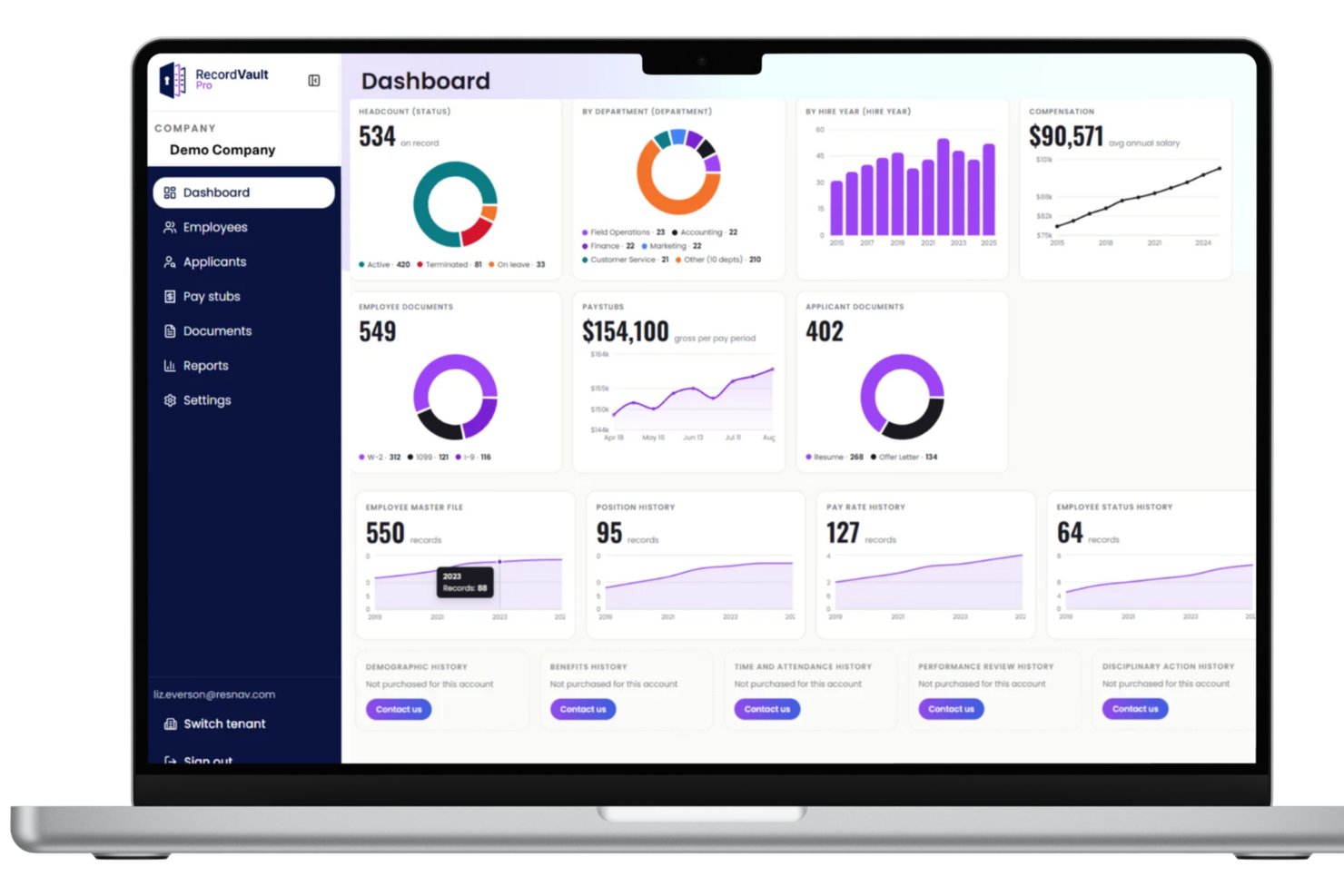
Per le organizzazioni che necessitano di un accesso a lungo termine ai dati storici delle risorse umane e delle buste paga, History Link di ResNav offre una soluzione di database sicura e incentrata sulla conformità. La piattaforma è progettata per conservare i dati dei dipendenti, la cronologia delle buste paga e i documenti di supporto, soprattutto durante le transizioni del sistema paghe o i cambiamenti di sistema. In quanto strumento di database per le risorse umane, consente di mantenere l'accesso ai dati storici, supportando al contempo la preparazione agli audit e i requisiti normativi.
Perché ho scelto ResNav - History Link
Ho scelto ResNav - History Link perché si concentra in modo specifico sulla conservazione sicura dei dati storici, un aspetto spesso trascurato nei software di database per le risorse umane. Se stai cambiando fornitore del servizio paghe o sostituendo il tuo HRIS, puoi comunque mantenere l'accesso consultabile ai dati dei dipendenti precedenti, alle informazioni sulle retribuzioni e alla documentazione. Apprezzo anche il fatto che si integri con i fornitori di servizi paghe e HRIS, consentendo di collegare i dati archiviati ai sistemi attuali per le esigenze di reporting e conformità.
Caratteristiche principali di ResNav - History Link
Oltre alle funzionalità di conformità e conservazione dei dati, ResNav - History Link offre diverse altre caratteristiche che ne migliorano l'utilità come soluzione di database per le risorse umane.
- Accesso sicuro: Fornisce un punto di accesso sicuro alla piattaforma, garantendo la protezione dei dati sensibili delle risorse umane dagli accessi non autorizzati.
- Analisi delle prestazioni: Offre informazioni sull'utilizzo dei dati e sulle prestazioni del sistema, aiutando gli utenti a ottimizzare i processi di gestione del database delle risorse umane.
- Archiviazione basata sul cloud: Garantisce che i dati delle risorse umane siano conservati in modo sicuro e facilmente accessibili, offrendo flessibilità e scalabilità alle aziende in crescita.
- Integrazione con i fornitori di servizi paghe e HRIS: Facilita il trasferimento e la reportistica efficienti dei dati, in linea con diversi standard e pratiche di settore.
Integrazioni di ResNav - History Link
Le integrazioni includono ADP, Paychex, Workday e vari altri fornitori di servizi paghe e HRIS.
Pros and Cons
Pros:
- Solida conformità nella conservazione dei documenti
- Supporta la pianificazione del controllo delle posizioni
- Archiviazione sicura dei documenti basata sul cloud
Cons:
- Incentrato principalmente sull'utilizzo come archivio
- Potrebbe richiedere assistenza per la configurazione delle integrazioni
Lattice
Ideale per monitorare lo sviluppo di carriera
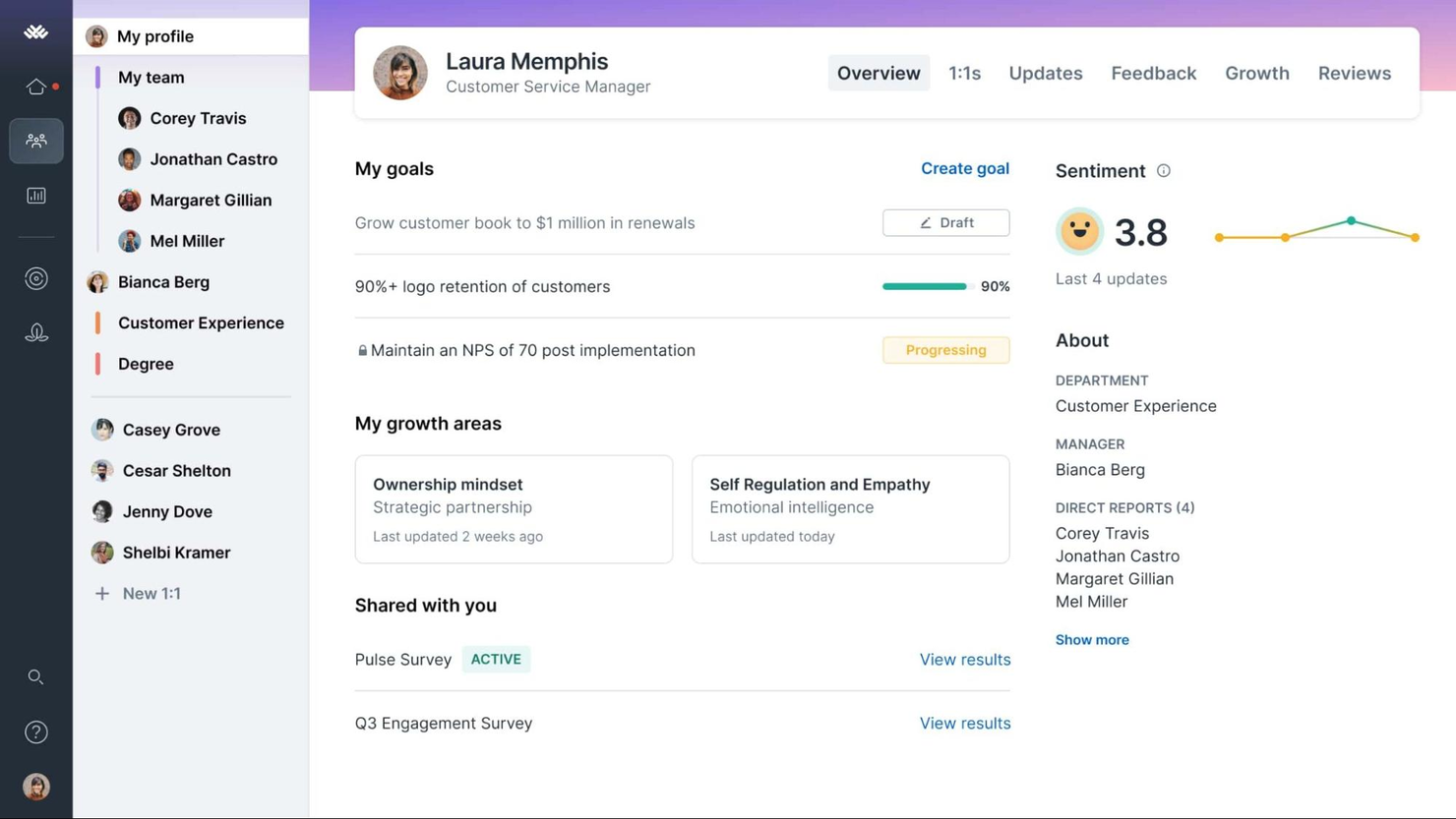
Lattice è una piattaforma HR versatile che collega la gestione delle performance, lo sviluppo di carriera, la gestione della retribuzione e il coinvolgimento dei dipendenti. Il sistema rende le opportunità di avanzamento di carriera estremamente chiare, incoraggiando i dipendenti a raggiungere un maggiore successo.
Perché ho scelto Lattice: Ho inserito Lattice in questo elenco perché combina in modo efficace gestione delle performance, coinvolgimento e gestione della retribuzione in un'unica soluzione. Il suo approccio di gestione continua delle performance permette feedback costanti e discussioni di sviluppo tra responsabili e dipendenti. La presenza della gestione della retribuzione nello stesso sistema delle valutazioni delle performance e del monitoraggio degli obiettivi consente decisioni retributive basate sui dati. Nel frattempo, i sondaggi di coinvolgimento aiutano i team HR a comprendere e migliorare il sentiment dei dipendenti.
Funzionalità e integrazioni principali di Lattice:
Le funzionalità includono un HRIS, strumenti per la gestione delle performance inclusi obiettivi e OKR, strumenti di gestione della retribuzione e analisi HR. Il pannello di amministrazione consente ai team HR di creare domande personalizzate per le valutazioni delle performance o personalizzare le recensioni per valutare obiettivi specifici. Gli utenti possono anche impostare campi personalizzati per l’analisi delle performance e consultare lo stato generale delle valutazioni delle performance dei dipendenti a livello aziendale. Tutti i report vengono archiviati per future consultazioni e confronti.
Le integrazioni includono ADP, BambooHR, Google Workspace, Humaans, Jira, Microsoft Suite, Okta, Rippling, Salesforce, Slack, UKG, Workday e altri.
New Product Updates from Lattice

Lattice Introduces MCP Connector for AI Chat Tools
Lattice introduced Lattice MCP, a new connector that brings talent data into Claude, ChatGPT, and other LLM tools. The connector helps teams access performance context from reviews, 1:1 notes, feedback, goals, and updates within AI chat workflows. For more information, visit Lattice’s official site.
 .
.
Ideale per workflow personalizzabili
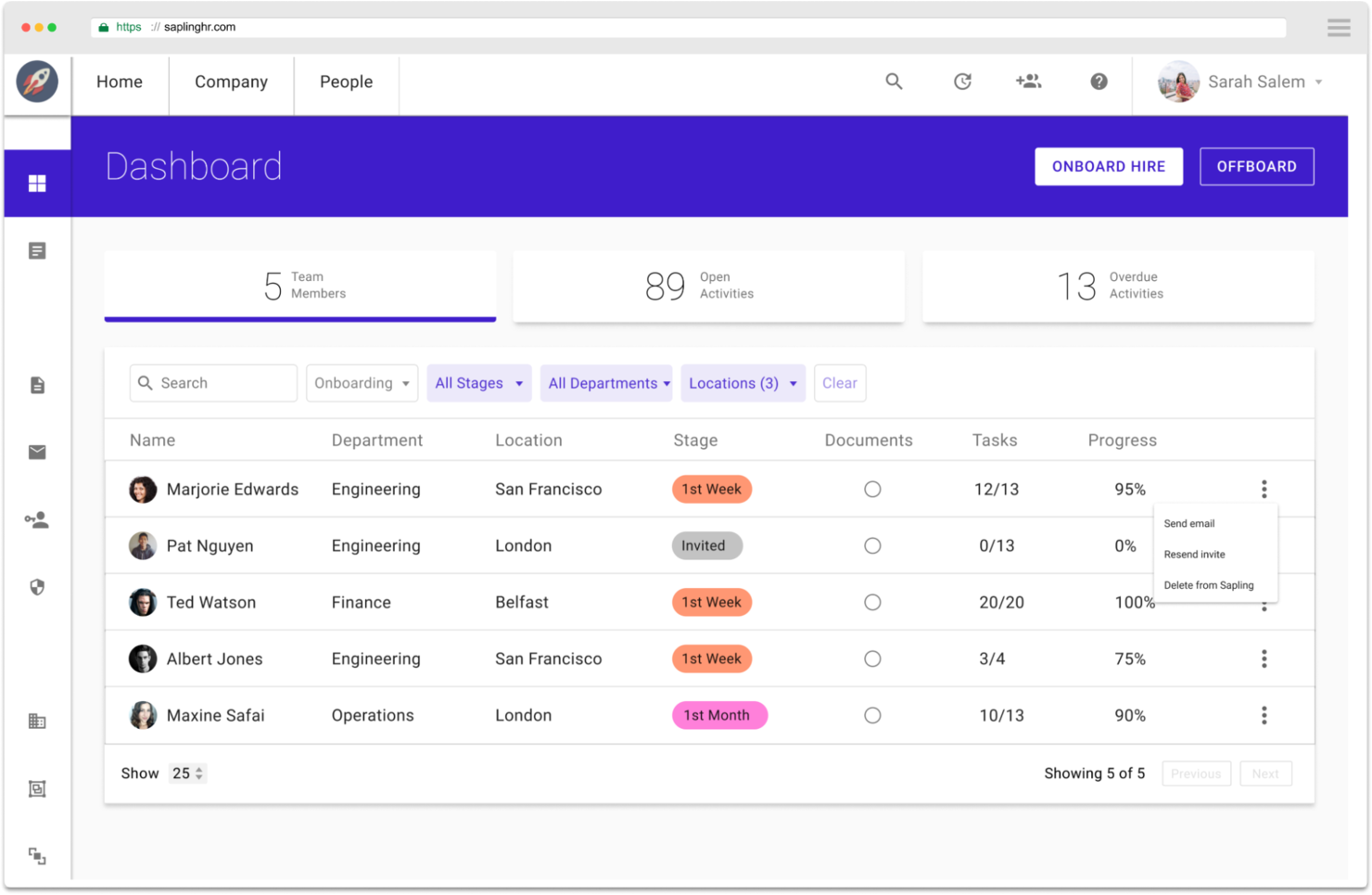
Kallidus Sapling è una soluzione HCM software-as-a-service (SaaS) progettata per facilitare l'onboarding dei dipendenti e la gestione delle operazioni HR.
Perché ho scelto Kallidus Sapling: I loro strumenti HR semplificano le attività attraverso workflow assegnati automaticamente, pianificazione delle email e avvisi che possono essere personalizzati per diverse sedi, dipartimenti o tipologie di dipendenti al fine di standardizzare i processi. Questa è una funzione utile per le aziende con team distribuiti, poiché aiuta i responsabili HR a regolare i processi in tutte le sedi e i reparti. Il sistema offre inoltre report preconfigurati per analizzare qualsiasi tipo di dato archiviato nel sistema.
Caratteristiche e integrazioni principali di Kallidus Sapling:
Le funzionalità includono un portale self-service per i dipendenti, una dashboard delle attività e report personalizzabili. I dipendenti possono completare attività di onboarding come compilare, caricare e firmare documenti online. I membri del team HR possono poi sfruttare questi dati per sincronizzare le informazioni dei dipendenti con paghe e contabilità.
Progettato per essere flessibile, Sapling aiuta i manager a creare workflow personalizzati e automatizzati per ridurre l'amministrazione manuale. Possono inoltre creare modelli di email personalizzati per comunicare con individui o gruppi. È inoltre facile tracciare dati relativi al lavoro come promozioni, adeguamenti salariali, trasferimenti e altri cambiamenti storici.
Le integrazioni comprendono oltre 50 tra i principali sistemi HR, IT e di produttività come JazzHR, Lever, Workday, ADP, Paylocity, 15Five, Lattice, OneLogin, Greenhouse, Okta, Zapier, Google Suite, Slack, Lessonly, ChartHop, Jira, LinkedIn e molte altre piattaforme.
UKG Pro
Ideale per valutare il sentiment dei dipendenti tramite IA
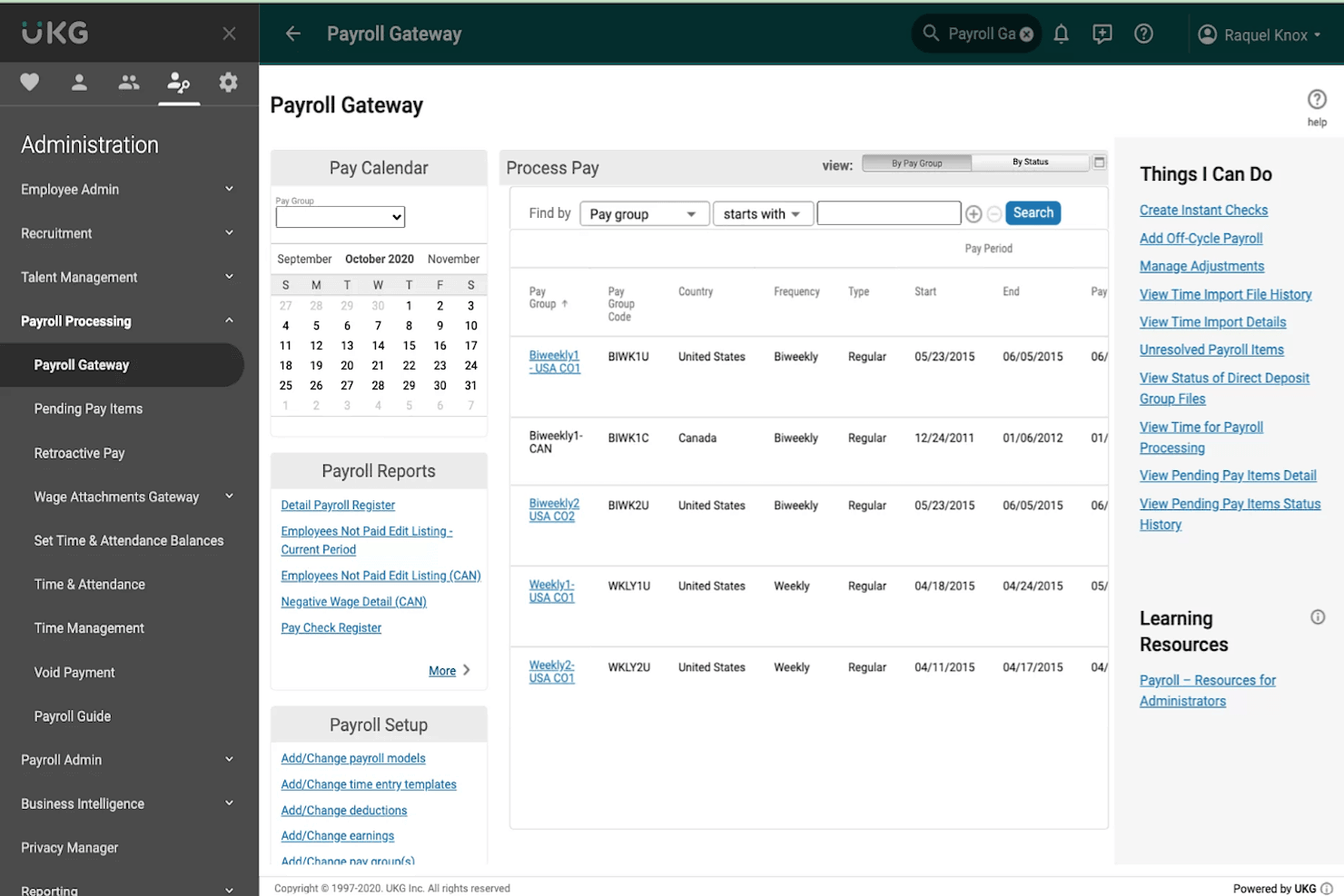
UKG Pro è un software completo per la gestione delle risorse umane che copre processi HR come gestione delle buste paga, benefit, compensi, acquisizione di talenti e valutazione delle prestazioni.
Perché ho scelto UKG Pro: Mi piace la sua funzione di sondaggi alimentata dall’IA che raccoglie regolarmente il feedback dei dipendenti per misurare i livelli di coinvolgimento e fornire approfondimenti sulla cultura aziendale. In base ai risultati, offre raccomandazioni su come migliorare aspetti specifici dell’esperienza dei dipendenti e facilitare un migliore equilibrio tra vita lavorativa e privata.
Funzionalità e integrazioni principali di UKG Pro:
Le funzionalità includono la gestione dei dati dei dipendenti, come informazioni personali, benefit e valutazioni delle prestazioni, e un portale self-service dove il personale può accedere e modificare i propri dati di contatto, inviare richieste di permessi e visualizzare le proprie buste paga.
La piattaforma archivia i dati delle valutazioni delle prestazioni di ogni dipendente e facilita l’assunzione e la gestione dei talenti. Gli amministratori possono visualizzare una panoramica generale della forza lavoro dell’azienda, inclusi dati demografici e diversi report dettagliati. Il software fornisce inoltre aggiornamenti tempestivi per soddisfare i requisiti di conformità normativa negli Stati Uniti e in Canada.
Le integrazioni includono siti di annunci di lavoro, sistemi di tracciamento delle candidature e soluzioni per la gestione del personale, come Bonusly, LinkedIn, Okta, Greenhouse, iCIMS Talent Cloud, Yammer, Bucketlist, Jobvite, GoodHire, Assembly e OneLogin. UKG Pro offre anche un'API RESTful.
Altre opzioni
Ecco alcune altre opzioni che non sono state incluse nell’elenco dei migliori software per database HR:
- Sage HR
Ideale per la gestione della retribuzione dei dipendenti
- Insperity
Ideale per ottenere servizi aggiuntivi di supporto HR
- SAP HCM
Ideale per organizzazioni di livello enterprise
- Rippling
Ideale per il monitoraggio della conformità
- Connecteam
Ideale per una piattaforma HR mobile-first
- Factorial
Migliore con portale dipendenti
- Paycor
Ideale per organizzare i dati dei dipendenti
- Rise
Ideale per una gestione intuitiva delle risorse umane


Recensioni correlate di software HR
Se non hai ancora trovato quello che cerchi, dai un'occhiata a questi altri strumenti correlati che abbiamo testato e valutato:
- Software HR
- Software per le buste paga
- Software per il reclutamento
- Servizi di datore di lavoro registrato
- Sistemi di gestione dei candidati
- Software per la gestione della forza lavoro
Come valuto i software di database HR
Divido la mia valutazione in due livelli: ciò che ogni database HR deve gestire—come i registri dei dipendenti, il monitoraggio del ciclo di vita e i controlli di accesso—e gli elementi distintivi che separano i migliori strumenti.
Funzionalità principali (requisiti minimi per questa lista)
Quando seleziono gli strumenti per la mia lista, valuto ciascuno su una scala da 0 (non offre la funzionalità) a 5 (eccelle in quest'area) per ogni funzionalità principale elencata di seguito. Poi, calcolo il punteggio totale dello strumento in percentuale. Ogni strumento deve raggiungere un punteggio totale minimo del 65% per essere preso in considerazione.
- Registri centralizzati dei dipendenti: Verifico se una piattaforma memorizza i dati personali, dati sul lavoro, compensi e documenti in un unico profilo ricercabile invece di disperderli tra schede o moduli.
- Campi personalizzati & struttura dei dati: Ogni organizzazione struttura i dati dei dipendenti in modo diverso, quindi cerco campi configurabili, categorie di dipendenti e gerarchie organizzative che si adattino alla tua struttura.
- Accesso basato sui ruoli & sicurezza: Valuto quanto è granulare il modello dei permessi—ad esempio, se si può limitare la visualizzazione di un manager regionale solo ai dati retributivi dei suoi diretti riporti.
- Reportistica & analisi: La possibilità di creare report personalizzati su trend dell'organico, tassi di turnover o distribuzione demografica per me conta più che una libreria di template predefiniti che non userai mai.
- Monitoraggio del ciclo di vita del dipendente: Valuto come uno strumento registra l'intera cronologia delle assunzioni, promozioni, spostamenti laterali e cessazioni con data di efficacia, così puoi verificare le modifiche nel tempo.
- Integrazioni & accesso API: Collegare il tuo database HR a buste paga, ATS e piattaforme benefit mantiene i dati coerenti, quindi valuto sia le integrazioni native che la disponibilità di API aperte e webhook.
Una volta che ho una lista di strumenti che soddisfano i criteri, considero ciò che distingue ogni piattaforma.
Fattori differenzianti (cosa distingue i fornitori)
Ecco come paragono e confronto tra diversi fornitori:
Funzionalità distintive
I portali self-service fanno davvero la differenza—cerco strumenti in cui i dipendenti aggiornano da soli indirizzi, dati bancari o contatti di emergenza senza dover aprire un ticket all’HR. L’automazione dei workflow è un altro elemento distintivo. Le migliori piattaforme attivano automaticamente checklist di onboarding o catene di approvazione quando lo stato di un record dipendente cambia. Per i team distribuiti, valuto anche la localizzazione globale dei dati, includendo supporto per campi multi-paese, valute locali e strutture di conformità specifiche per regione.
Oltre le funzionalità
La conformità è importante oltre il puro formalismo. Cerco certificazioni come SOC 2 Type II e politiche di conservazione dati configurabili, soprattutto quando l’azienda opera in regioni con diverse normative sulla privacy. Anche il supporto all’implementazione è fondamentale—migrare anni di registri dipendenti da fogli di calcolo o da un vecchio HRIS può andare storto rapidamente senza strumenti di import guidati o specialisti onboarding dedicati. Valuto inoltre quanto bene una piattaforma si adatta alla crescita, verificando se supporta strutture multi-entità per organizzazioni che gestiscono divisioni o società controllate separate.
Come scegliere un database HR
Il software per database HR può risolvere numerose problematiche e migliorare molti flussi di lavoro diversi. Per individuare il miglior software per database HR in base alle tue esigenze, devi innanzitutto identificare gli utenti principali e documentare le loro problematiche specifiche.
Mentre affronti il tuo processo di selezione del software HR, unico per le tue esigenze, tieni presenti i seguenti punti:
- Quale problema stai cercando di risolvere - Inizia identificando le difficoltà che stai cercando di superare. Questo ti aiuterà a chiarire le caratteristiche e le funzionalità che il software per database HR deve offrire.
- Chi dovrà utilizzarlo - Per valutare costi e requisiti, considera chi utilizzerà il software e di quante licenze avrai bisogno. A seconda della piattaforma, probabilmente vorrai fornire l'accesso a livello di dipendente a tutta la tua forza lavoro, con accessi speciali per gli amministratori HR e i responsabili. Una volta chiarito questo aspetto, è inoltre utile classificare le esigenze dei diversi utenti per individuare le priorità principali per gli utenti avanzati, i responsabili e i dipendenti del tuo software HR, assicurandoti che siano tutte soddisfatte.
- Con quali altri strumenti deve funzionare - Chiarisci quali strumenti stai sostituendo, quali rimarranno e con quali strumenti dovrai integrarlo, ad esempio software di contabilità, rilevazione delle ore o gestione delle buste paga. Dovrai decidere se gli strumenti devono integrarsi tra loro oppure, in alternativa, se puoi sostituire più strumenti con una piattaforma HR tutto-in-uno.
- Quali risultati sono importanti - Esamina le funzionalità che vuoi ottenere o migliorare e come misurerai il successo. Ad esempio, potresti voler offrire un'esperienza dei dipendenti più completa aumentando le possibilità di self-service, oppure evitare di importare manualmente i dati da un sistema all'altro. Potresti confrontare le funzionalità dei database HR fino allo sfinimento, ma se non stai pensando ai risultati che vuoi raggiungere, potresti sprecare molto tempo prezioso.
- Come funzionerebbe all'interno della tua organizzazione - Valuta la scelta del software insieme ai flussi di lavoro e ai sistemi esistenti. Analizza cosa funziona bene e le eventuali aree problematiche che devono essere affrontate.
Ricorda che ogni azienda è diversa: non dare per scontato che un database HR funzionerà per la tua organizzazione solo perché è popolare.
Che cos'è il software per database HR?
Il software per database HR è uno strumento digitale per archiviare, organizzare e gestire le informazioni sui dipendenti, favorendo un'amministrazione efficiente delle risorse umane e l'accessibilità ai dati. Le funzionalità principali del software per database HR includono l'archiviazione centralizzata dei dati dei dipendenti, il recupero e l'aggiornamento semplificati dei dati, controlli di accesso sicuri e il monitoraggio della conformità.
Lo scopo del software per database dei dipendenti è archiviare, gestire e recuperare in modo efficiente le informazioni sui dipendenti, supportando una gestione efficace delle risorse umane e il processo decisionale.
Funzionalità dei database HR
Oltre alle funzionalità di base descritte sopra, ho valutato anche queste ulteriori funzionalità HR fondamentali per ogni sistema presente in questo elenco:
- Conservazione dei dati: il sistema di gestione delle risorse umane (HRMS) deve essere in grado di conservare tutti i dati necessari per soddisfare i requisiti operativi e normativi.
- Software per le buste paga: la possibilità integrata di calcolare e pagare gli stipendi, trattenere le imposte e organizzare le buste paga. Non tutti i database HR includono questa funzionalità, ma è sicuramente un vantaggio quando è presente.
- Flussi di lavoro: strumenti per automatizzare le attività ripetitive, come le approvazioni, che in genere riducono l'efficienza della gestione HR.
- Notifiche: avvisi automatici che informano i professionisti HR quando i dipendenti hanno aggiornato i propri dati personali o in caso di altre modifiche rilevanti.
- Funzionalità di pianificazione dei turni e gestione delle ferie: strumenti per organizzare i turni di lavoro, monitorare le ore lavorate dai dipendenti e gestire le richieste di ferie.
- Amministrazione dei benefit per i dipendenti: la possibilità per i team HR di gestire le prestazioni sanitarie, le pensioni e altri benefit dei dipendenti.
- Gestione delle prestazioni: strumenti integrati per valutare le prestazioni dei dipendenti, gestire le promozioni e monitorare i progressi professionali.
- Report e analisi: la possibilità di eseguire report a livello di sistema sui dati dei dipendenti, per supportare i responsabili nel prendere decisioni migliori basate sui dati.
- App mobili: la possibilità di aggiornare in tempo reale i dati dei dipendenti utilizzando app mobili per dispositivi Android o iOS.
Scegliere un database HR che offra queste funzionalità garantirà la gestione di tutte le esigenze fondamentali, preparandoti al successo a lungo termine.
Vantaggi del software per database HR
Il software per database HR offre una serie di vantaggi che semplificano le operazioni, proteggono i dati e migliorano l'efficienza complessiva dell'organizzazione. Per i potenziali acquirenti che stanno valutando un software per database HR, comprendere questi vantaggi può influenzare significativamente il processo decisionale. Ecco alcuni dei principali vantaggi offerti da questi sistemi:
- Dati centralizzati per una maggiore efficienza: Centralizzare le informazioni sui dipendenti in un unico database semplifica la gestione dei dati e riduce gli oneri amministrativi, minimizzando gli errori e rendendo più rapide le modifiche. Riducendo il tempo che il personale HR dedica all'inserimento manuale dei dati e alla gestione delle pratiche cartacee, il software per database HR consente di concentrarsi sulle attività strategiche che apportano benefici più diretti all'azienda.
- Miglioramento della reportistica, della pianificazione e del processo decisionale basato sui dati: Grazie a potenti strumenti di analisi, il software per database HR aiuta le aziende a pianificare meglio le strategie relative alla forza lavoro e a prevedere le future esigenze HR sulla base di informazioni basate sui dati. L'accesso a dati aggiornati e accurati consente alla direzione di prendere rapidamente decisioni informate, migliorando la capacità di risposta operativa.
- Maggiore sicurezza dei dati: Il software per database HR include spesso protocolli di sicurezza avanzati che aiutano a prevenire gli accessi non autorizzati e le violazioni dei dati, garantendo la conformità alle normative sulla privacy.
- Miglioramento dell'autogestione dei dipendenti: I database HR consentono ai dipendenti di gestire le proprie informazioni personali e le proprie richieste, riducendo drasticamente il numero di richieste che il team HR deve gestire. Queste funzionalità di autogestione migliorano inoltre la soddisfazione dei dipendenti, offrendo loro un maggiore controllo sui propri dati e sulle proprie richieste.
Questi vantaggi non solo migliorano le operazioni quotidiane del dipartimento HR, ma consentono anche alla struttura organizzativa più ampia di funzionare in modo più efficace. Adottando un sistema di questo tipo, le aziende possono gestire la propria forza lavoro in modo più efficiente, allineando al contempo le pratiche HR ai propri obiettivi strategici.
Costi e prezzi dei database HR
Scegliere il piano di database HR giusto è essenziale per ottimizzare la gestione delle risorse umane nella propria organizzazione, soprattutto se si è alle prime armi con questo tipo di tecnologia. Sono disponibili diverse opzioni di piano, pensate per aziende con esigenze e dimensioni dei team differenti. Comprendere queste opzioni ti aiuterà a selezionare un piano adatto al tuo budget e in grado di soddisfare i tuoi requisiti specifici. Per aiutarti a individuare la scelta migliore, ho suddiviso le opzioni di piano più comuni per il software per database HR, i relativi prezzi medi e le funzionalità generalmente incluse.
Tabella comparativa dei piani per il software per database HR
| Tipo di piano | Prezzo medio | Funzionalità comunemente incluse |
|---|---|---|
| Gratuito | $0 | Monitoraggio di base dei dipendenti, reportistica limitata e controlli degli accessi |
| Base | $50-100 per utente/mese | Monitoraggio avanzato dei dipendenti, integrazione con le buste paga, analisi di base e assistenza clienti |
| Professionale | $100-200 per utente/mese | Suite HR completa, analisi avanzate, maggiore sicurezza dei dati, accesso API e assistenza 24/7 |
| Aziendale | Prezzo personalizzato | Integrazioni personalizzate, assistenza dedicata, formazione, gestione della conformità e scalabilità illimitata |
Per prendere la decisione finale, considera il numero di dipendenti, le funzionalità necessarie e il livello di assistenza di cui prevedi di aver bisogno. Quando selezioni il piano giusto, è inoltre importante assicurarti di non pagare per funzionalità superflue che non ti servono. Se il costo è il fattore più importante per te, questo articolo analizza i costi del software HR e spiega come decidere quale sia la soluzione migliore per la tua azienda.
Software per database HR: domande frequenti
Hai domande generali sul software per database HR e sul suo funzionamento? Queste risposte alle domande frequenti sono un buon punto di partenza:
Cos'è un database HR?
Un database HR è un tipo di software HR che organizza tutti gli aspetti dei dati dei dipendenti, dall’inserimento dei nuovi dipendenti alla loro uscita dall’azienda. È una parte essenziale delle attività quotidiane di ogni team HR, indipendentemente dalle dimensioni dell’azienda. Piccole imprese, aziende di medie dimensioni e organizzazioni aziendali gestiscono tutte le proprie funzioni HR tramite una qualche forma di database HR.
Altri termini comuni per questo tipo di software includono sistemi informativi delle risorse umane (HRIS), sistemi di gestione del capitale umano (HCM) o sistemi di gestione delle risorse umane (HRMS). Indipendentemente dal nome utilizzato dai fornitori di software, tutti questi strumenti aiutano a semplificare e digitalizzare le attività HR fondamentali. Ti aiutano a liberarti da fogli di calcolo e schedari per entrare nell’era moderna delle risorse umane digitali.
Come posso capire quale database HR è adatto alla mia azienda?
Ecco un semplice processo in cinque fasi che consiglio di seguire quando cerchi di decidere quale database HR sia più adatto a te:
- Individua le tue esigenze. Crea un elenco di tutte le difficoltà che stai affrontando attualmente e delle funzionalità desiderate che vorresti ottenere investendo in un nuovo sistema software.
- Fai una ricerca sui fornitori. È proprio per questo che è stata creata la nostra community online, quindi vai al nostro campo di ricerca per vedere quali altri elenchi possono aiutarti. Durante la ricerca, annota i nomi dei fornitori che ti sembrano più interessanti. Questo diventerà il tuo elenco ristretto.
- Esamina il tuo elenco ristretto con il tuo team. Non dovresti scegliere un nuovo software in modo isolato. È importante coinvolgere i principali responsabili di ogni reparto interessato che utilizzerà il nuovo software. In questo modo puoi assicurarti che il nuovo sistema soddisfi le esigenze di tutti gli utenti interni, non solo le tue esigenze individuali.
- Iscriviti a una prova gratuita o richiedi una demo personalizzata. Questo è un passaggio fondamentale, perché ti permetterà di fare esperienza diretta dell’utilizzo del sistema. Se possibile, richiedi una prova gratuita o una demo per le tue tre scelte principali. In questo modo potrai confrontare meglio l’esperienza utente, i vantaggi e gli svantaggi di ciascun sistema.
- Scegli e implementa. Prendete la decisione finale come team. Vuoi assicurarti che il software scelto soddisfi tutte le esigenze aziendali e risolva i problemi attuali. Dovresti inoltre dare grande importanza alla tua esperienza durante la prova gratuita.
In che modo i database HR gestiscono la sicurezza dei dati?
I database HR offrono diverse misure di sicurezza per garantire la privacy e la protezione dei dati, tra cui la crittografia dei dati sia durante il trasferimento sia quando sono inattivi, verifiche di sicurezza regolari e conformità alle normative globali sulla protezione dei dati, come il GDPR. Vengono inoltre forniti aggiornamenti e patch regolari per proteggere da potenziali vulnerabilità di sicurezza.
I fornitori di software offrono spesso controlli di accesso personalizzabili, consentendo alle organizzazioni di definire chi può visualizzare o modificare dati HR specifici, migliorando così la sicurezza. È importante che le aziende esaminino le credenziali di sicurezza e le certificazioni di conformità di ciascun fornitore prima di scegliere una soluzione. Questo articolo offre maggiori dettagli sulle migliori pratiche di gestione dei dati se desideri saperne di più.
Quale formazione è necessaria per utilizzare efficacemente il software per database HR?
L’utilizzo efficace del software per database HR richiede generalmente una formazione che copra sia le funzionalità di base sia quelle avanzate del software. Questa formazione può includere la navigazione nell’interfaccia utente, la gestione dei dati dei dipendenti, la generazione di report e la comprensione delle funzionalità di conformità.
Molti fornitori di software offrono tutorial online, webinar dal vivo e sessioni di formazione in presenza. Inoltre, alcune piattaforme possono disporre di una guida integrata o di altri strumenti di assistenza clienti per aiutare gli utenti a comprendere le varie funzionalità durante l’utilizzo del software.
Per continuare ad apprendere e adattarsi alle nuove funzionalità o alle normative aggiornate, è consigliabile una formazione continua. È inoltre utile che gli utenti partecipino ai forum o ai gruppi di utenti messi a disposizione dalle aziende software o da esperti di terze parti.
Quanto costano i database HR?
Il costo di un database HR dipenderà dal tipo di database scelto e dalla varietà di strumenti di gestione inclusi. Per i sistemi di gestione HR semplici (solitamente un database HR o un HRIS), puoi aspettarti di pagare da $1 a $15 per dipendente al mese con un accordo software come servizio (SaaS). In alcuni casi, potresti dover pagare anche un costo mensile di base.
Per i sistemi più avanzati puoi aspettarti di pagare un costo mensile più elevato. Data la natura specializzata di questi sistemi, la maggior parte dei fornitori comunica i dettagli dei prezzi solo su richiesta. Questo perché puoi scegliere i moduli da utilizzare per personalizzare il software in base alle esigenze della tua azienda.
Quali sono i costi associati alla migrazione a un nuovo sistema di database HR?
I costi della migrazione a un nuovo sistema di database HR possono variare notevolmente in base a diversi fattori, tra cui la portata dell’operazione, la complessità dei sistemi esistenti e le funzionalità specifiche richieste nel nuovo sistema. I costi iniziali includono generalmente il prezzo di acquisto o i canoni di abbonamento del nuovo software, la formazione del personale HR e degli altri utenti e le eventuali commissioni per i servizi di migrazione dei dati. Potrebbero inoltre esserci costi continuativi relativi alla manutenzione del software, agli aggiornamenti e alla formazione aggiuntiva.
È importante che le organizzazioni conducano un’analisi approfondita costi-benefici prima di decidere di migrare, considerando non solo i costi immediati, ma anche l’efficienza a lungo termine e i potenziali miglioramenti nella conformità e nella gestione dei dati.
Altre recensioni di software HR
Cerchi qualcosa di più di un semplice database HR? Ecco alcuni link alle mie altre recensioni di software che potrebbero adattarsi meglio alle tue esigenze:
- Sistemi di gestione dei dipendenti
- Software per la pianificazione dei turni dei dipendenti
- Software per database di reclutamento
- Sistemi di gestione dell'apprendimento (LMS)
Cosa ne pensi di questo elenco?
Se stai valutando un software per database HR, contatta gratuitamente un consulente di SoftwareSelect per ricevere consigli.
Compili un modulo e fai una breve conversazione durante la quale analizzeranno nel dettaglio le tue esigenze. Dopodiché riceverai una lista ristretta di software da valutare. Ti accompagneranno anche durante l'intero processo di acquisto, comprese le trattative sul prezzo.