

I 10 migliori software fiscali aziendali per semplificare la dichiarazione nel 2026

Elenco dei migliori software fiscali per aziende


Gestire le imposte aziendali può diventare facilmente opprimente. Con così tante normative, scadenze e potenziali detrazioni, è facile sentirsi smarriti, soprattutto quando i calcoli manuali espongono al rischio di errori, sanzioni o opportunità mancate di risparmiare. Sai di aver bisogno di un software fiscale per aziende che automatizzi i calcoli, garantisca la conformità e massimizzi le detrazioni, ma con così tante opzioni disponibili, come puoi trovare quella giusta?
Fortunatamente, ho analizzato numerosi strumenti fiscali per aziende per aiutare le imprese a semplificare l'elaborazione delle buste paga, la conformità fiscale e la reportistica. In questa guida, semplificherò il processo di ricerca, mettendo in evidenza i migliori software fiscali per aziende che ti faranno risparmiare tempo, ridurranno gli errori e manterranno la tua azienda pronta a gestire gli adempimenti fiscali tutto l'anno.
Perché fidarsi delle nostre recensioni sui software
Il nostro team testa e recensisce software dal 2012. In quanto esperti HR noi stessi, sappiamo quanto sia difficile — e importante — scegliere il software giusto.
Per questa guida, abbiamo valutato gli strumenti attraverso test pratici e ricerche indipendenti, assegnando un punteggio agli strumenti in base ai nostri criteri di selezione. Ci basiamo inoltre sulle competenze di leader di pensiero del settore e di professionisti HR attivi.
Le nostre recensioni riflettono il nostro giudizio editoriale umano, non un discorso di vendita.
Revisori esperti:
Che cos'è un software fiscale per aziende?
Un software fiscale per aziende è una soluzione digitale progettata per aiutare le imprese a gestire e presentare le proprie dichiarazioni fiscali. Automatizza i calcoli fiscali, garantisce la conformità alle leggi tributarie e aiuta a individuare detrazioni e crediti d'imposta.
Lo scopo è semplificare il complesso processo di preparazione delle dichiarazioni fiscali, ridurre il rischio di errori e risparmiare tempo. Fornisce informazioni aggiornate sulle normative fiscali, rendendo più semplice per le aziende rimanere conformi. Utilizzando un software fiscale per aziende, le imprese possono gestire in modo efficiente i propri obblighi fiscali, ottenendo una reportistica finanziaria più accurata e una migliore gestione finanziaria.
Riepilogo dei migliori software fiscali per aziende
Questa tabella comparativa riassume i dettagli di base di ciascuna delle mie migliori selezioni di software fiscali per aziende. Confronta fianco a fianco i dettagli sui prezzi e la disponibilità di prove gratuite o demo per trovare il software migliore per il tuo budget e le esigenze della tua azienda.
| Tool | Best For | Trial Info | Price | ||
|---|---|---|---|---|---|
| 1 | Ideale per assistenza contestuale | Piano gratuito disponibile | Da $29.99/dichiarazione | Website | |
| 2 | Ideale per i piccoli imprenditori canadesi | Piano gratuito disponibile | A partire da $29.99/dichiarazione | Website | |
| 3 | Ideale per aziende di medie dimensioni | Demo gratuita disponibile | Prezzo su richiesta | Website | |
| 4 | Ideale per le aziende di e-commerce | Demo gratuita disponibile | Prezzo su richiesta | Website | |
| 5 | Ideale per lavoratori autonomi | Piano gratuito disponibile | A partire da $22.99/dichiarazione | Website | |
| 6 | Ideale per la conformità fiscale delle vendite ecommerce | Prova gratuita di 30 giorni | A partire da $19/mese | Website | |
| 7 | Ideale per l’esperienza utente | Versione gratuita disponibile | A partire da $99/pratica | Website | |
| 8 | Ideale per i report integrati | Demo gratuita disponibile | Da $10/mese | Website | |
| 9 | Ideale per l'automazione | Demo gratuita disponibile | Prezzo su richiesta | Website | |
| 10 | Ideale per funzionalità che fanno risparmiare tempo | Prova gratuita disponibile | Da $449/anno | Website |
Recensioni dei migliori software fiscali per aziende
Ecco una breve descrizione di ciascun software fiscale per aziende incluso nella mia lista dei 10 migliori, con uno screenshot, le funzionalità più importanti, vantaggi e svantaggi e dettagli sui prezzi. Continua a leggere per scoprire altre soluzioni bonus in fondo alla lista.

TaxAct
Ideale per assistenza contestuale
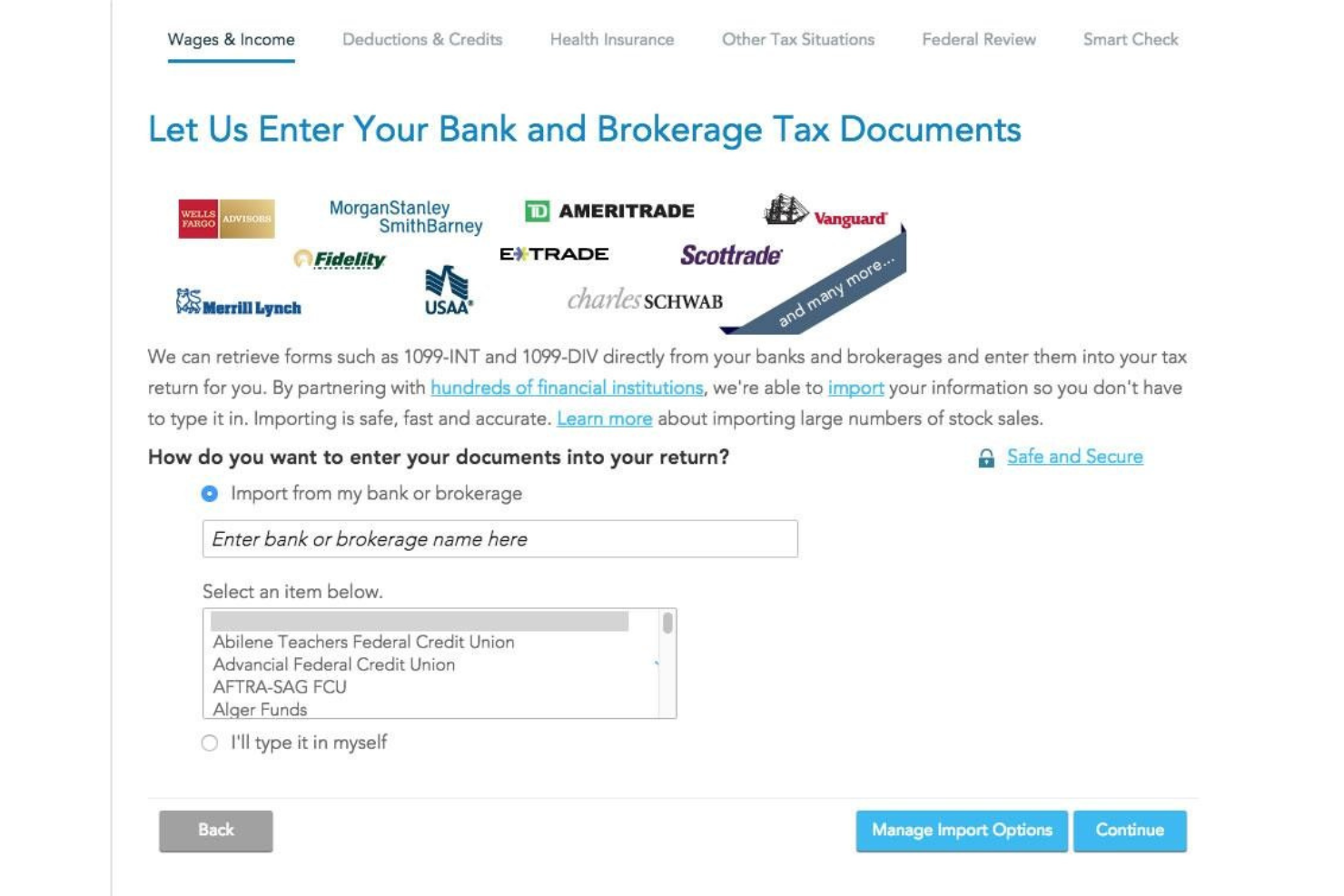
TaxAct è un software fiscale aziendale che ti consente di presentare autonomamente le tue dichiarazioni, offrendo assistenza contestuale per ogni fase del processo.
Perché ho scelto TaxAct: Ho selezionato TaxAct per la mia top 10 perché fornisce suggerimenti utili su come calcolare e presentare correttamente le tasse all'IRS. Il software offre un'ottima esperienza utente e include persino un'app mobile, che permette di completare la dichiarazione dei redditi direttamente dal proprio dispositivo mobile.
Caratteristiche e integrazioni distintive di TaxAct:
Caratteristiche distintive includono invio elettronico, calcolo di detrazioni e crediti fiscali, supporto illimitato e gratuito da parte di esperti fiscali, importazione di documenti e app mobile. Mi piace l'app mobile di TaxAct perché permette di caricare i documenti scattando foto con la fotocamera dello smartphone.
Integrazioni includono diverse soluzioni per la gestione paghe, come QuickBooks, Sage Online, Xero, TaxDome e Wave.
Pros and Cons
Pros:
- Permette di importare i documenti fiscali da altri provider per ridurre al minimo gli errori di compilazione
- Procedura semplice di caricamento dei documenti
- Supporto illimitato
Cons:
- Non è possibile passare a un piano più economico una volta avviata la compilazione della dichiarazione
- La funzione di ricerca nella knowledge base potrebbe essere più accurata

Ideale per i piccoli imprenditori canadesi
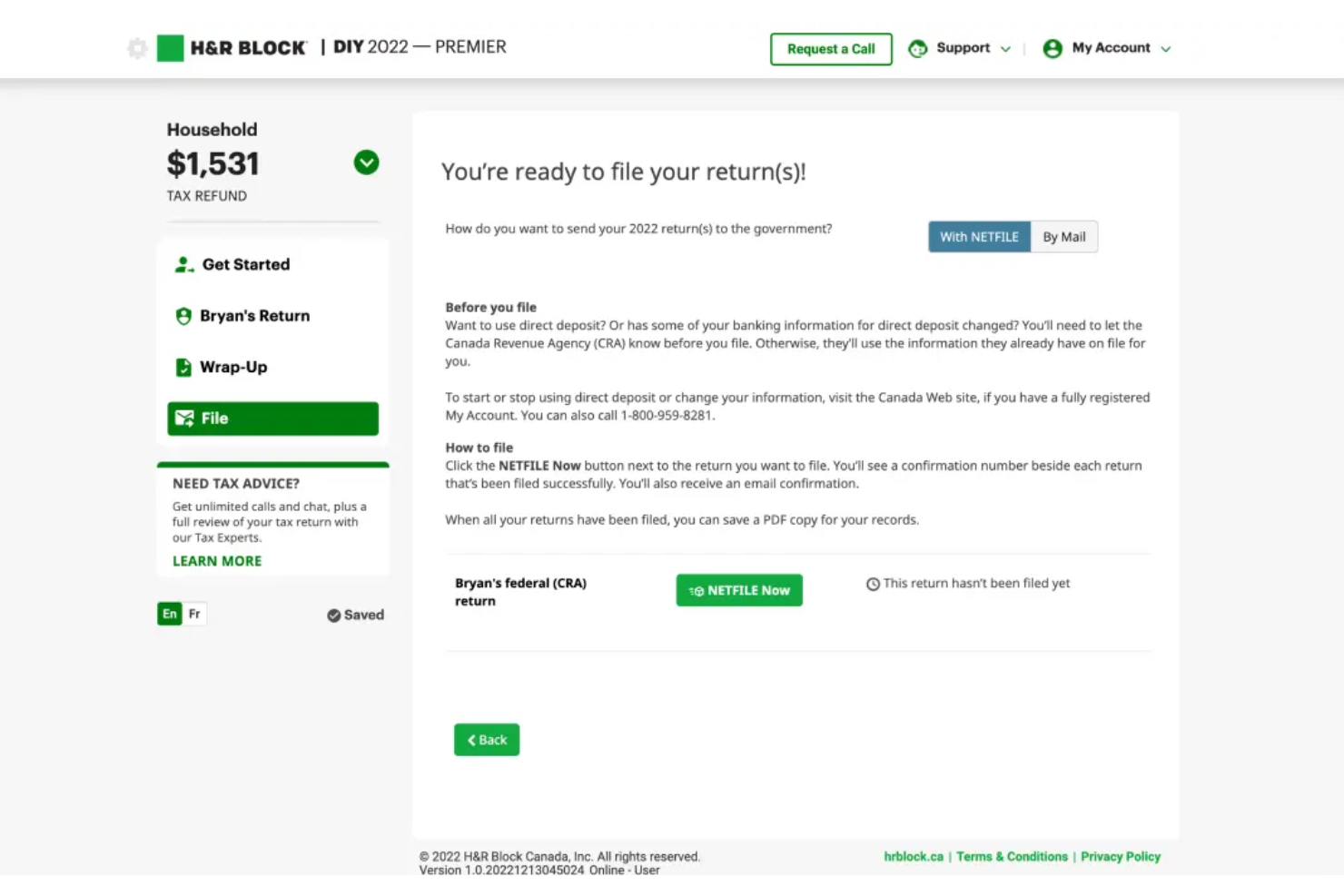
H&R Block è un fornitore di software per soluzioni fiscali aziendali che aiuta i piccoli imprenditori canadesi a presentare le dichiarazioni dei redditi, sia che gestiscano ditte individuali o piccole società.
Perché ho scelto H&R Block: Ho scelto H&R Block perché il suo processo di dichiarazione è fluido e rende facile per i titolari di piccole imprese ricordare potenziali detrazioni o agevolazioni fiscali federali. I nuovi utenti vengono guidati attraverso una serie di domande per determinare la loro situazione fiscale, mentre per chi ritorna le informazioni sono già pre-compilate dalle dichiarazioni dell’anno fiscale precedente.
Caratteristiche principali e integrazioni di H&R Block:
Caratteristiche principali includono il supporto per le criptovalute, calcolatori per le donazioni, supporto in caso di verifica, dichiarazione con servizio completo, importazione automatica dei documenti e assistenza in tempo reale. Mi piace la funzione di assistenza in tempo reale di H&R Block perché offre sessioni illimitate di chat o condivisione schermo con commercialisti certificati (CPA), così puoi ottenere consigli fiscali su come massimizzare le detrazioni o i crediti d’imposta pertinenti al tuo settore.
H&R Block si integra con CoinTracker, un fornitore di software per la fiscalità sulle criptovalute.
Pros and Cons
Pros:
- Offre una buona selezione di moduli tra cui scegliere
- Versione gratuita robusta per dichiarazioni semplici
- Garanzia di accuratezza
Cons:
- Il controllo errori potrebbe segnalare come non risolti problemi già corretti
- Alcuni errori di verifica non forniscono spiegazioni dettagliate

Ideale per aziende di medie dimensioni

InsightSoftware è una soluzione di gestione fiscale aziendale che consente alle imprese di medie dimensioni di affrontare normative fiscali complesse e semplificare il processo di dichiarazione attraverso l'automazione.
Perché ho scelto InsightSoftware: Ho selezionato InsightSoftware perché aiuta le aziende di medie dimensioni che hanno esigenze fiscali complesse ad automatizzare i propri processi fiscali, riducendo al contempo il rischio di una verifica. La piattaforma raccoglie dati da app di terze parti e li aggrega per aiutarti a scoprire informazioni utili e prendere decisioni strategiche riguardo alla tua situazione finanziaria.
Funzionalità principali e integrazioni di InsightSoftware:
Caratteristiche principali, includono calcolo delle imposte, reportistica, supporto agli audit, repository fiscale, workflow automatizzati e un portale self-service. Mi piace la funzione di calcolo delle imposte della piattaforma perché è veloce e consente di ottenere calcoli accurati correnti e differiti su base statale.
Integrazioni, includono decine di strumenti aziendali, tra cui Oracle ERP Cloud, Oracle PeopleSoft, Microsoft 365 Business Central, SAP Business One, NetSuite, Deltek Vision Cloud, Epicor CMS, Infor CloudSuite Financials, Sage e QuickBooks Online.
Pros and Cons
Pros:
- Consolida tutte le tue informazioni fiscali, semplificando la reportistica finanziaria
- Soluzione flessibile e personalizzabile
- Consente di creare modelli di report personalizzati
Cons:
- Automatismi limitati per il calcolo del credito d’imposta sul reddito e delle perdite operative nette
- La piattaforma può rallentare durante l'importazione di grandi quantità di dati

Avalara
Ideale per le aziende di e-commerce
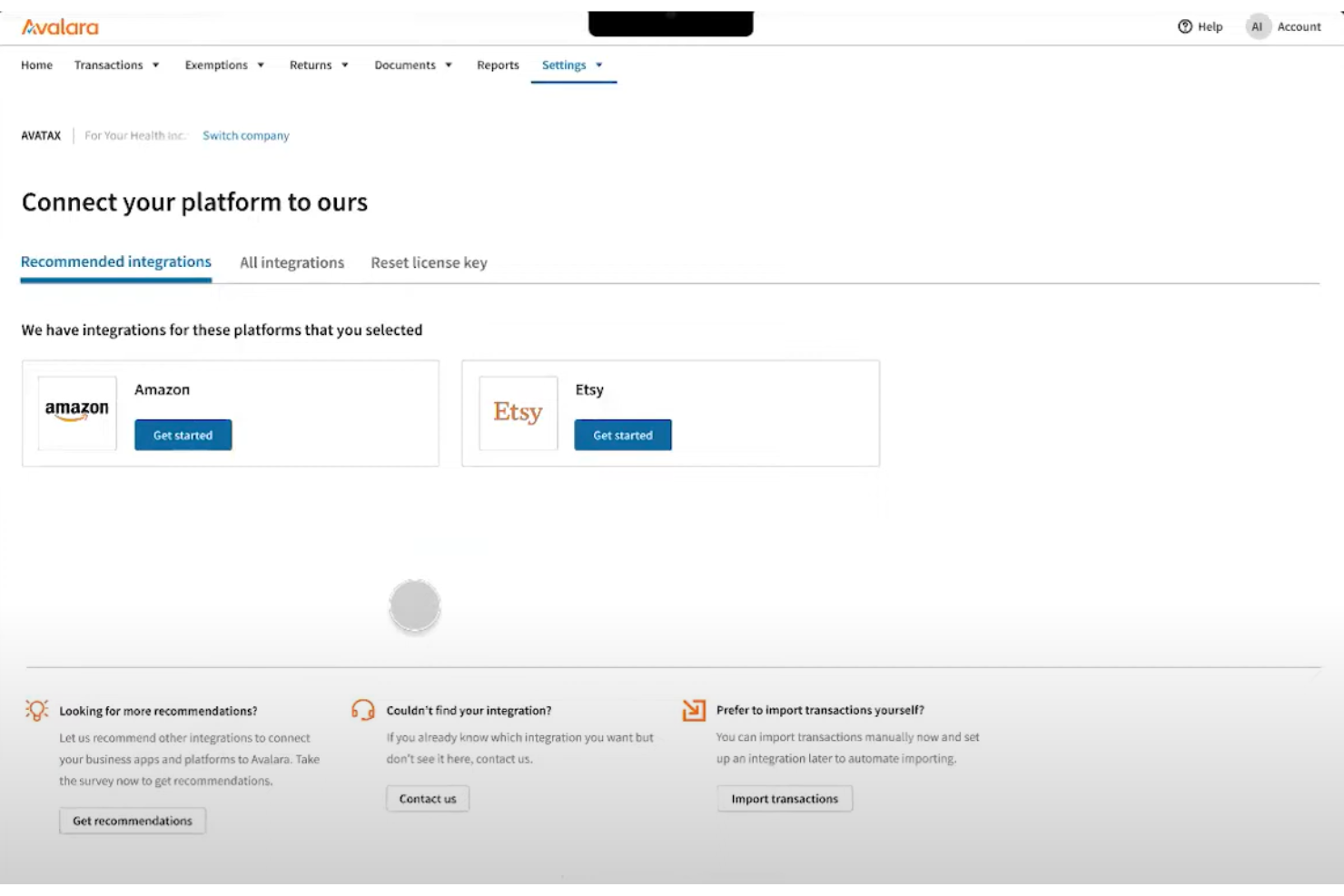
Avalara è una piattaforma fiscale aziendale che aiuta le imprese di e-commerce nordamericane a dichiarare il proprio inventario e presentare le tasse.
Perché ho scelto Avalara: Avalara è entrata nella mia lista grazie alle sue integrazioni native con piattaforme e marketplace di e-commerce. Il software preleva i dati direttamente dallo strumento di e-commerce e li utilizza per compilare i moduli fiscali, rendendo semplice il calcolo delle aliquote fiscali in base alla propria giurisdizione locale.
Funzionalità e integrazioni di spicco di Avalara:
Funzionalità principali includono fatturazione elettronica, profili aziendali, report consolidati, gestione documentale, presentazione dichiarazioni fiscali, base di conoscenza e avvisi personalizzati. Apprezzo molto la funzione di avvisi personalizzati di Avalara perché ti avvisa quando è necessario intraprendere azioni in differenti giurisdizioni fiscali, rendendolo uno dei migliori software fiscali per aziende che operano in più stati o province.
Integrazioni includono oltre 1.200 partnership di integrazione con piattaforme di e-commerce, soluzioni per il payroll, strumenti di pagamento e CRM, come Sage, Magento, NetSuite, Microsoft Dynamics, Shopify Plus, Stripe Invoicing, Zuora, QuickBooks, WooCommerce, Amazon Seller e Salesforce.
Pros and Cons
Pros:
- La funzione di ricerca ti permette di trovare rapidamente le informazioni nelle FAQ della piattaforma
- Ti aiuta a presentare dichiarazioni fiscali statali e federali accurate
- Ampia selezione di tutorial e materiali formativi per aziende di e-commerce
Cons:
- Gli utenti alle prime armi possono trovare la piattaforma complessa
- Può essere più costoso rispetto ad altri software fiscali per piccole imprese

Ideale per lavoratori autonomi
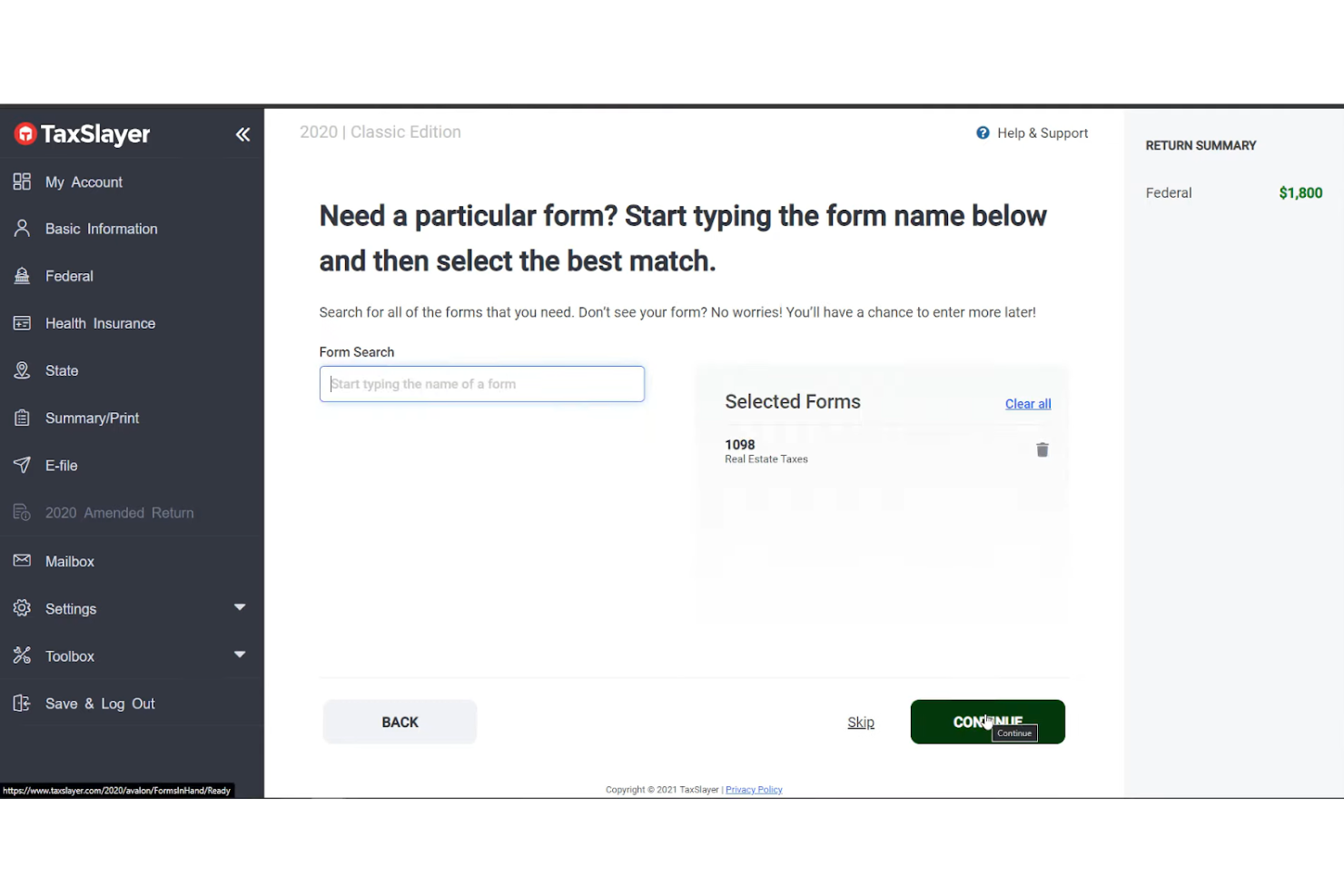
TaxSlayer è un software fiscale per aziende che consente ai lavoratori autonomi di individuare le detrazioni e i crediti d’imposta a cui hanno diritto, garantendo la corretta presentazione della dichiarazione dei redditi.
Perché ho scelto TaxSlayer: TaxSlayer fa parte della mia selezione grazie alla sua soluzione solida per i liberi professionisti. La piattaforma ti guida nell’inserimento dei redditi e delle spese aziendali, così puoi ottenere più detrazioni. E se la procedura ti sembra complicata, il software offre assistenza illimitata via email, chat e telefono.
Funzionalità principali e integrazioni di TaxSlayer:
Funzionalità principali sono la difesa in caso di verifica fiscale, l’invio telematico, la gestione di W-2, 1099, una base di conoscenza, la possibilità di importare precedenti dichiarazioni statali e servizi di consulenza fiscale per lavoratori autonomi. Apprezzo i promemoria automatici di TaxSlayer perché ti aiutano a tenere traccia dei pagamenti fiscali ed evitare sanzioni.
Integrazioni includono varie soluzioni payroll e CRM, come QuickBooks Online, TaxDome, Xero, TaxJar e Zendesk.
Pros and Cons
Pros:
- App mobile per compilare la dichiarazione da ovunque
- Tracciamento del rimborso fiscale per sapere quando aspettarlo
- Garanzia di rimborso massimo
Cons:
- Manca un calcolatore per le donazioni
- Utilizzare il portale clienti al massimo delle potenzialità può essere complicato

TaxCloud
Ideale per la conformità fiscale delle vendite ecommerce
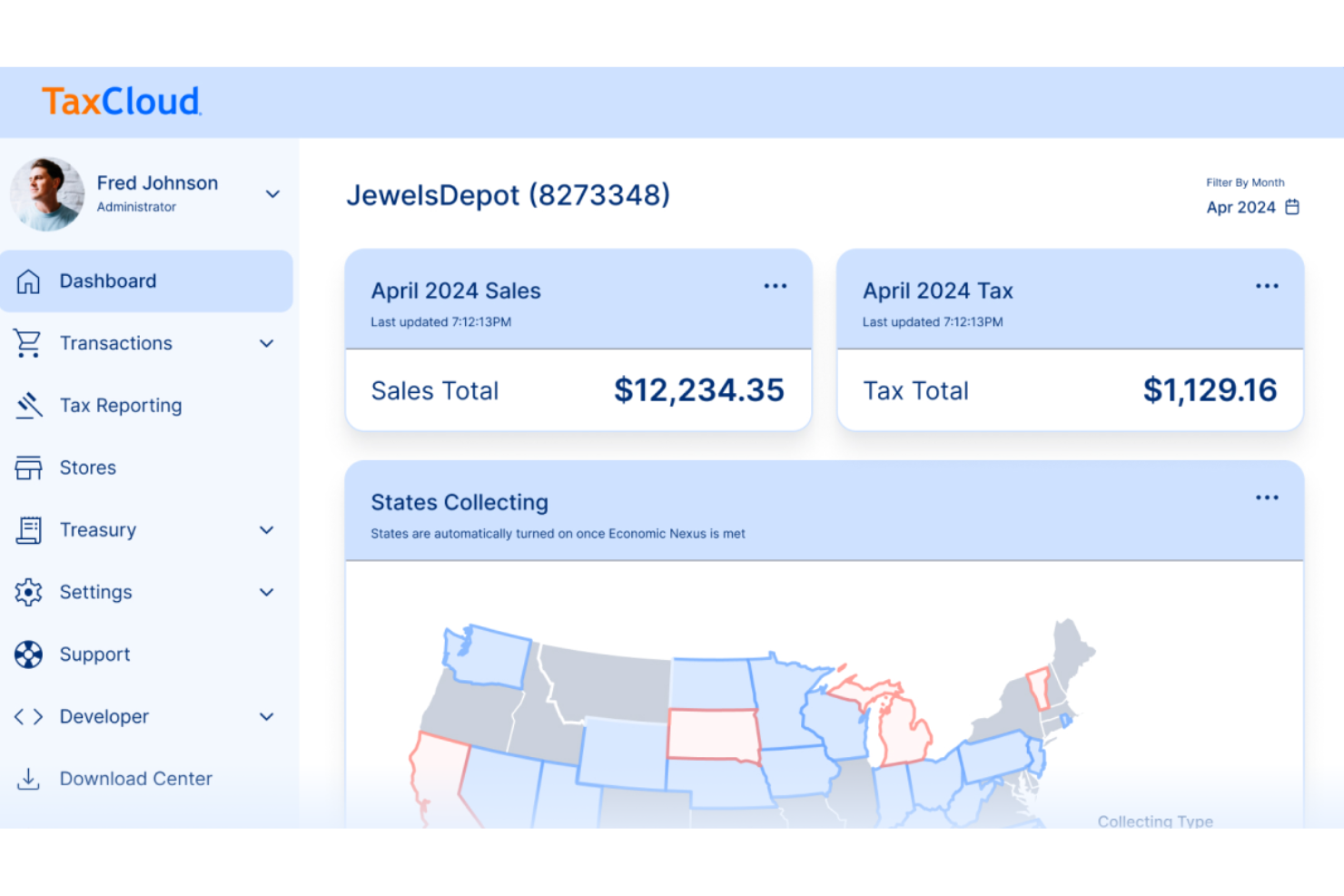
TaxCloud è un servizio di gestione delle tasse di vendita pensato per le aziende di ecommerce, che offre il calcolo in tempo reale delle aliquote fiscali in oltre 13.000 giurisdizioni negli Stati Uniti. Automatizza il processo di riscossione delle tasse al momento della transazione, la dichiarazione e il versamento, garantendo una precisione del 100%, posizionandosi come una delle soluzioni leader per la conformità fiscale delle vendite online.
Perché ho scelto TaxCloud: Ho scelto TaxCloud come software fiscale aziendale dopo aver valutato le sue complete capacità di conformità. Ciò che rende TaxCloud distintivo è la combinazione di una piattaforma self-service supportata da un team di TaxGeeks esperti, che fornisce sia autonomia che assistenza specialistica alle aziende. Ritengo che TaxCloud sia il migliore per la conformità fiscale delle vendite ecommerce grazie alla sua comprovata precisione e all'eccellente servizio clienti.
Caratteristiche principali e integrazioni di TaxCloud
Le caratteristiche principali includono la dichiarazione e il versamento delle tasse di vendita per le aziende. Questa funzione unica riduce ulteriormente l'onere della conformità automatizzando il processo spesso complesso e dispendioso in termini di tempo di presentazione delle dichiarazioni fiscali e pagamento delle tasse alle autorità statali. TaxCloud si occupa dell'intero processo di dichiarazione, dalla preparazione alla presentazione ai vari enti fiscali competenti, potenzialmente facendo risparmiare tempo e risorse significative alle aziende.
Le integrazioni includono Ability Commerce, BigCommerce, QuickBooks, Square, Stripe, Shopify, WooCommerce, Odoo, Volusion, Cart.com, Oracle NetSuite, Acumatica, Sage e Magento.
Pros and Cons
Pros:
- Database aggiornato delle aliquote e normative fiscali
- Integrazioni con diversi strumenti ecommerce
- Riscossione automatica delle tasse di vendita
Cons:
- Potrebbe risultare troppo basico per grandi aziende
- Limiti al volume delle transazioni nei piani base


Intuit TurboTax è un popolare software per la preparazione delle dichiarazioni fiscali aziendali che ti consente di presentare le tasse autonomamente o con l’aiuto di un esperto.
Perché ho scelto Intuit TurboTax: Intuit TurboTax è entrato nella mia top 10 grazie all’esperienza utente che offre. Presentare la dichiarazione dei redditi con TurboTax è come fare un’intervista approfondita con uno specialista fiscale. Il software crea un percorso guidato passo dopo passo che ti permette di caricare documenti, così da poter segnalare i redditi aziendali, calcolare le tasse, detrarre le spese aziendali e archiviare le dichiarazioni fiscali federali o statali.
Funzionalità e integrazioni principali di Intuit TurboTax:
Funzionalità di rilievo includono l’importazione automatica dei documenti, il supporto per le criptovalute, un calcolatore per le donazioni, il calcolo delle imposte sulle proprietà in affitto, la condivisione dello schermo su richiesta e il supporto tramite chat o telefono. Apprezzo la funzione di assistente in tempo reale della piattaforma perché consente di collegarsi con un esperto e determinare a quali detrazioni e crediti la tua impresa può accedere.
Intuit TurboTax si integra con decine di soluzioni software per le paghe e le risorse umane, tra cui ADP, Ceridian Dayforce, Paycom, Gatekeeper, PayrollMaxx, Gusto, QuickBooks, Paycor, Paylocity e UKG Pro.
Pros and Cons
Pros:
- Molto facile da usare
- Interfaccia pulita e intuitiva
- Ottimo supporto clienti
Cons:
- La versione freemium è disponibile solo per dichiarazioni fiscali semplici
- La versione gratuita non gestisce le detrazioni dettagliate
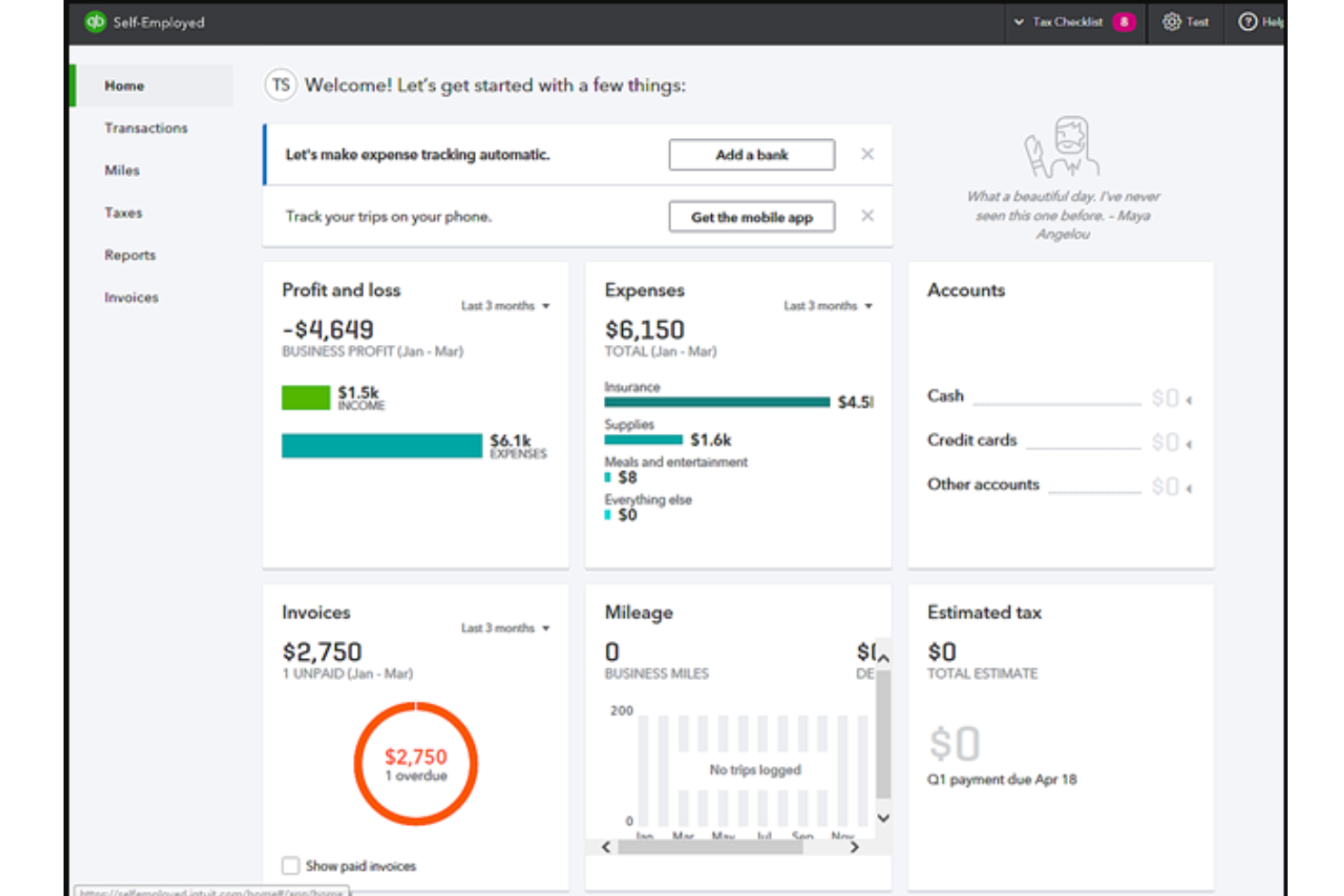
QuickBooks Self-Employed è un software per la preparazione delle tasse aziendali che aiuta liberi professionisti e collaboratori a stimare e presentare le proprie tasse.
Perché ho scelto QuickBooks Self-Employed: QuickBooks Self-Employed è entrato nella mia top 10 grazie ai suoi report integrati. Questi report aiutano chi si affida a lavori occasionali a vedere come sta andando la propria attività durante ogni trimestre fiscale, così da poter sfruttare opportunità come detrazioni fiscali o crediti d’imposta. La piattaforma rende inoltre facile organizzare le ricevute, così le SRL unipersonali possono monitorare le spese e preparare i moduli Schedule C.
Funzionalità distintive e integrazioni di QuickBooks Self-Employed:
Funzionalità distintive includono monitoraggio delle spese, monitoraggio dei chilometri, stime fiscali, dichiarazioni fiscali statali e federali, e report integrati. Mi piace il monitoraggio dei chilometri della piattaforma perché permette di categorizzare i viaggi di lavoro utilizzando il GPS del telefono.
Integrazioni includono oltre 700 soluzioni, tra cui Etsy, PayPal, Square, Amazon Business, eBay, Amazon Seller, Shopify, Gusto, Float e Expensify.
Pros and Cons
Pros:
- Semplifica il monitoraggio delle spese
- Permette di automatizzare parte della dichiarazione dei redditi
- Rende facile organizzare e archiviare le tue ricevute
Cons:
- Il processo di onboarding potrebbe essere migliorato
- Trovare una determinata ricevuta tra tutti i file salvati può richiedere tempo

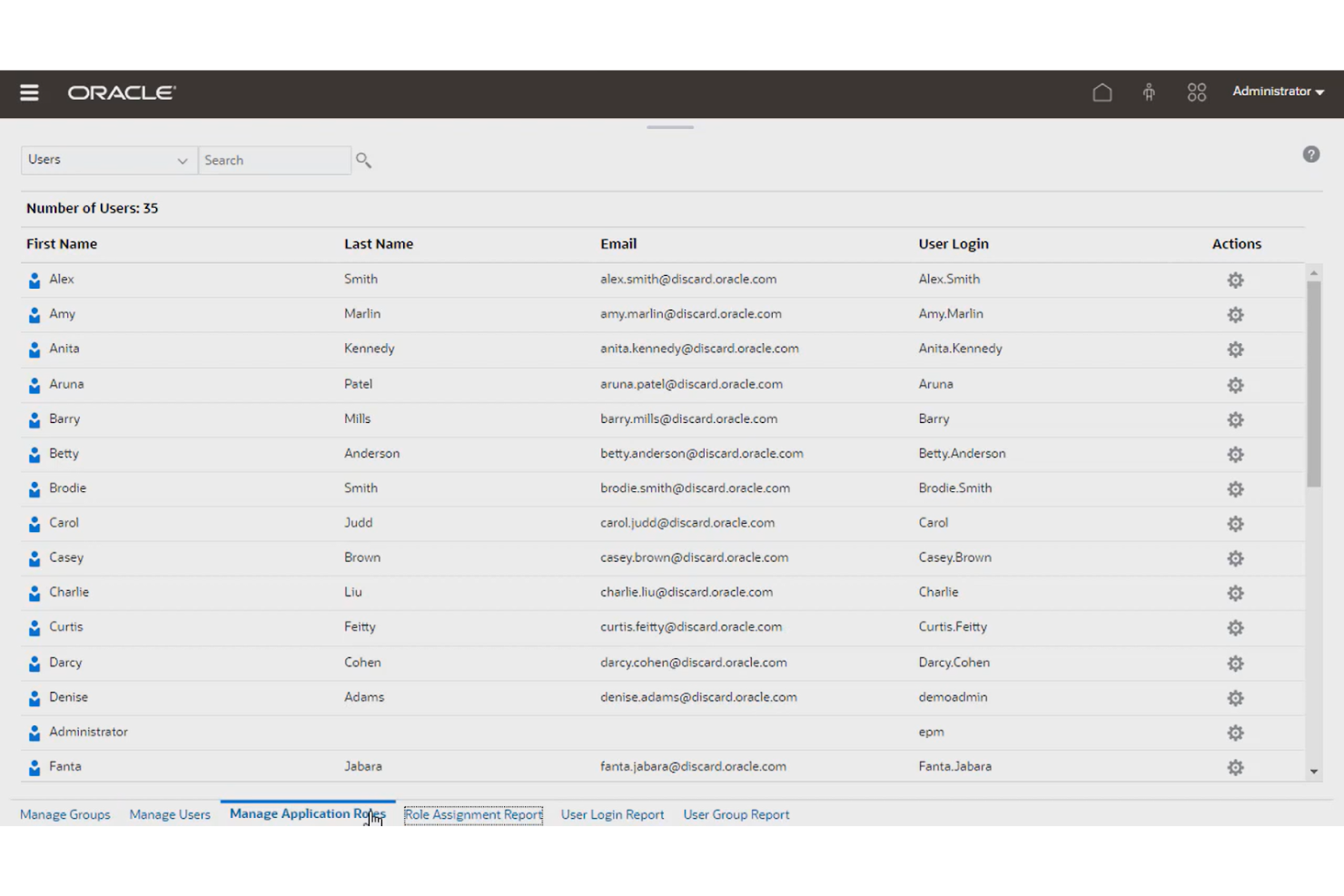
Oracle Cloud EPM Tax Reporting è una soluzione per la preparazione fiscale che ti consente di automatizzare e velocizzare il processo di reportistica aziendale.
Perché ho scelto Oracle Cloud EPM Tax Reporting: Ho scelto Oracle Cloud EPM Tax Reporting perché può aiutarti ad automatizzare diverse attività legate alla dichiarazione dei redditi, come l’estrazione dei dati, il calcolo delle imposte e la preparazione fiscale. La soluzione legge i dati della tua dichiarazione, compila automaticamente i moduli e calcola le imposte dovute. La piattaforma si basa su un’ampia libreria di regole di calcolo fiscale per garantire la precisione in ogni giurisdizione fiscale, così puoi evitare multe o sanzioni.
Caratteristiche e integrazioni distintive di Oracle Cloud EPM Tax Reporting:
Caratteristiche distintive includono la reportistica paese per paese, il calcolo delle imposte, importazioni automatizzate, il calcolo dei crediti per ricerca e sviluppo (R&S) e il monitoraggio delle attività. Apprezzo particolarmente la funzione di monitoraggio delle attività di Oracle Cloud EPM Tax Reporting perché ti permette di assegnare responsabili, date di scadenza e stati per ogni procedura, facilitando la coordinazione del team.
Integrazioni includono altre app aziendali Oracle, come Oracle Cloud Financials, Oracle Cloud Planning, Oracle Cloud Tax Engine, Oracle Cloud Data Integrator, e applicazioni di terze parti come SAP BusinessObjects, Microsoft Power BI, Qlik Sense e TIBCO Spotfire
Pros and Cons
Pros:
- Facile da integrare con software di compliance fiscale
- Importa automaticamente le informazioni della tua dichiarazione fiscale per una maggiore precisione
- Esporta le disposizioni fiscali e i saldi di verifica sul tuo software di compliance fiscale
Cons:
- È necessaria formazione per l'utilizzo
- Nessuna opzione per creare regole personalizzate di calcolo

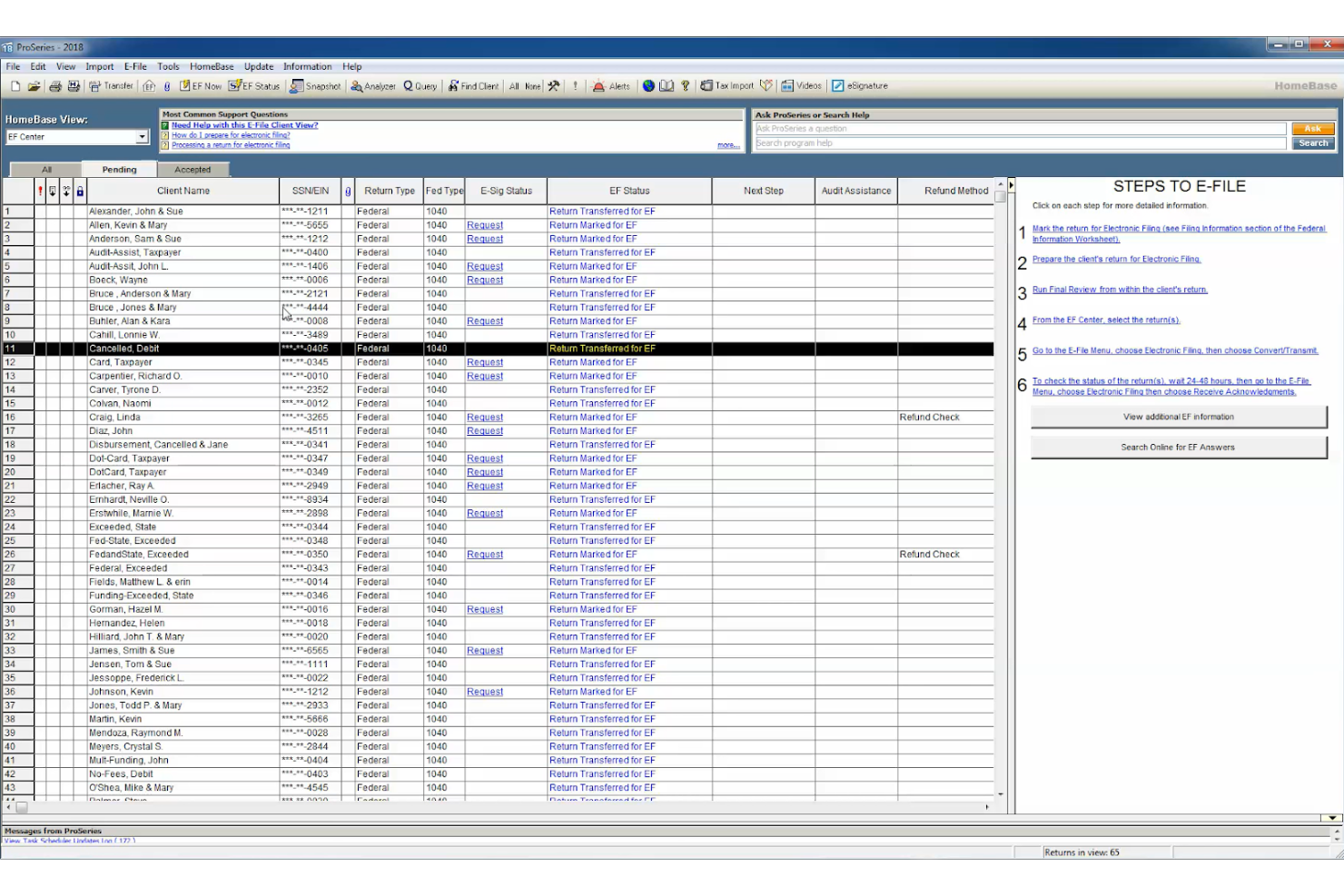
ProSeries Tax è un software fiscale aziendale che aiuta i titolari di aziende nordamericane a risparmiare tempo nella compilazione delle tasse grazie a funzionalità dedicate.
Perché ho scelto ProSeries Tax: ProSeries Tax è entrato nella mia top 10 grazie alle sue funzionalità che fanno risparmiare tempo, come i fogli di inserimento rapido, la ricerca basata su parole chiave, l'importazione automatizzata dei dati e la guida all'inserimento della dichiarazione dei redditi. La soluzione è adatta ai principianti e offre un flusso di lavoro guidato su cui puoi fare affidamento per presentare le dichiarazioni fiscali federali e statali.
Caratteristiche principali e integrazioni di ProSeries Tax:
Caratteristiche principali includono un portale di formazione personalizzato, dichiarazione elettronica, importazioni automatiche, webinar sul software, onboarding guidato, una base di conoscenza e consigli della community. Apprezzo il portale di formazione personalizzato della piattaforma perché permette di accedere a tutorial e video su misura per le proprie esigenze e livello di competenza.
Le integrazioni includono software di firma elettronica e soluzioni per le buste paga, come DocuSign, QuickBooks Online Payroll, ADP Workforce Now, Gusto, SurePayroll e Paychex Flex.
Pros and Cons
Pros:
- Strumenti diagnostici completi e di controllo errori
- L'interfaccia è facile da usare e da navigare
- Strumento utile per i professionisti fiscali che gestiscono più clienti
Cons:
- Opzioni di personalizzazione limitate per i report
- A volte l'interfaccia può risultare lenta
Altri software fiscali per aziende
Ecco alcune altre eccellenti soluzioni fiscali per aziende che ho trovato durante la mia ricerca. Non avevo spazio per una recensione completa di ciascuna di queste, ma sono comunque meritevoli di considerazione:
- UltraTax CS
Ideale per scenari fiscali complessi
- Intuit ProFile Tax
Ideale per il supporto della community
- Vertex
Ideale per la gestione fiscale dei leasing
- Deel HR
Ideale per pagare team globali


Recensioni di altri software finanziari
Ti interessa gestire le finanze della tua organizzazione? Ecco alcune altre risorse utili di People Managing People che potrebbero interessarti:
- Software per la gestione delle buste paga
- Aziende per la gestione del processo di elaborazione delle buste paga
- Software per la gestione delle buste paga per piccole imprese
- Servizi per la gestione delle buste paga per piccole imprese
- Software gratuiti per la gestione delle buste paga per budget limitati
Come Valuto il Software per le Tasse Aziendali
Scompongo la mia valutazione del software per le tasse aziendali in due livelli: la base—presentazione multi-giurisdizionale, generazione W-2/1099—e i fattori differenzianti che distinguono una piattaforma dall’altra.
Funzionalità di Base (Requisiti Minimi per Questa Lista)
Quando seleziono gli strumenti per la mia lista, valuto ognuno su una scala da 0 (non offre la funzionalità) a 5 (eccelle in quest’area) per ciascuna delle funzionalità di base elencate di seguito. Poi, calcolo il punteggio totale dello strumento in percentuale. Ogni strumento deve raggiungere un punteggio minimo totale del 65% per essere preso in considerazione.
- Calcolo delle Imposte sui Salari: Verifico se lo strumento calcola automaticamente le imposte a carico di datore di lavoro e dipendenti su tutti i tipi di salario, scelte di trattenuta e detrazioni pre-imposta.
- Generazione ed Invio Telematico delle Dichiarazioni Fiscali: Ogni strumento dovrebbe generare e inviare telematicamente i moduli chiave come W-2, 1099, 940 e 941 direttamente alle autorità federali e statali.
- Conformità Fiscale Multi-Giurisdizionale: Valuto quanto efficacemente una piattaforma gestisce le normative fiscali di più stati e locali, soprattutto per team distribuiti in diverse giurisdizioni.
- Integrazione HRIS e Payroll: Lo strumento dovrebbe sincronizzare i dati dei dipendenti, le registrazioni salariali e le detrazioni con piattaforme come Workday, BambooHR, ADP o Gusto.
- Rendicontazione Fiscale di Fine Anno: Cerco flussi di lavoro per la riconciliazione, gestione delle correzioni W-2c e accesso self-service dei dipendenti ai documenti di fine anno.
- Gestione dei Depositi e dei Versamenti: Valuto in modo particolare la pianificazione e il monitoraggio automatizzati dei versamenti fiscali verso agenzie federali, statali e locali.
Una volta individuati gli strumenti che soddisfano questi criteri, prendo in considerazione ciò che distingue ogni piattaforma.
Fattori Differenzianti (Cosa Distingue i Fornitori)
Ecco come confronto e metto a confronto i vari fornitori:
Funzionalità Salienti
Una garanzia contro le sanzioni fiscali trasferisce il rischio finanziario dal vostro team nei casi di errori di dichiarazione, aspetto fondamentale soprattutto nei periodi di fine anno con grandi volumi. Cerco anche portali self-service per i dipendenti, dove il personale può scaricare in autonomia i propri W-2 e aggiornare le preferenze W-4 senza interventi HR. Un altro elemento differenziante che valuto sono gli avvisi di conformità in tempo reale—notifiche proattive su variazioni di aliquota o scadenze imminenti aiutano i team HR a restare sempre aggiornati invece che correre ai ripari.
Oltre le Funzionalità
Valuto quanto bene una piattaforma sia scalabile rispetto alla composizione della forza lavoro—supportare dipendenti W-2, collaboratori 1099 e configurazioni multi-entità in un unico sistema è fondamentale quando la struttura aziendale si evolve. La preparazione agli audit è un altro elemento che considero attentamente, in particolare se lo strumento mantiene registrazioni immutabili delle dichiarazioni e supporta i flussi di risposta alle comunicazioni delle agenzie. Considero anche il supporto nell’implementazione, dato che una migrazione a metà anno comporta la riconciliazione dei dati dei trimestri precedenti, e avere uno specialista fiscale dedicato durante l’onboarding può prevenire costose lacune nelle dichiarazioni.
Costi e prezzi degli strumenti fiscali per aziende
È importante selezionare un software fiscale per aziende adatto alle dimensioni della propria attività, alla complessità fiscale e al budget disponibile. Di seguito è riportata una panoramica delle opzioni di prezzo più comuni per i software fiscali per aziende, inclusa un'opzione gratuita per esigenze fiscali semplici e piani premium per le aziende che richiedono funzionalità avanzate.
Tabella di confronto dei piani per i software fiscali per aziende
| Nome del piano | Fascia di prezzo | Ideale per | Funzionalità comuni |
|---|---|---|---|
| Piano gratuito | $0 | Imprenditori individuali con dichiarazioni semplici | Presentazione della dichiarazione fiscale federale di base, monitoraggio di entrate e spese, detrazioni limitate, assistenza online |
| Piano base | $20 - $50 all'anno | Lavoratori autonomi e piccole aziende | Presentazione delle dichiarazioni fiscali federali e statali, ottimizzazione delle detrazioni, monitoraggio delle spese, assistenza clienti |
| Piano standard | $100 - $200 all'anno | Piccole aziende in crescita con numerose detrazioni | Detrazioni avanzate, presentazione in più stati, assistenza in caso di verifica fiscale, integrazione con software di contabilità |
| Piano premium | $250 - $400 all'anno | Aziende di medie e grandi dimensioni che necessitano di una consulenza esperta | Preparazione fiscale completa, assistenza da parte di un CPA, integrazione delle imposte sui salari, difesa in caso di verifica, presentazione illimitata delle dichiarazioni statali |
| Piano aziendale | $500+ all'anno | Società e aziende con strutture fiscali complesse | Report personalizzati, supporto per più entità, professionisti fiscali dedicati, strumenti avanzati per la conformità |
A seconda delle proprie esigenze, si potrebbe iniziare con un piano gratuito o base. Tuttavia, se la situazione fiscale è complessa o richiede assistenza specialistica, consiglio di scegliere un'opzione premium o aziendale.
Domande frequenti
Vuoi saperne di più sui software fiscali per aziende? Ecco alcune risposte alle domande più comuni che i lettori pongono su questo argomento.
Quali sono i vantaggi dell'utilizzo di un software fiscale per aziende?
Il software fiscale per aziende ti offre tranquillità quando presenti la dichiarazione dei redditi, riducendo al minimo gli errori di compilazione. Queste soluzioni ti fanno inoltre risparmiare tempo nel calcolo delle spese aziendali e possono aiutarti a monitorare i costi del personale e a ridurre le imposte.
Qual è il miglior software fiscale per una piccola azienda?
La scelta del miglior software fiscale per piccole aziende dipende dalle tue esigenze e preferenze specifiche. Ecco alcuni fattori da prendere in considerazione:
- Costo annuale: Assicurati che il costo del software rientri nel tuo budget. Ricorda di aggiungere anche le tasse statali di presentazione al costo complessivo.
- Caratteristiche e funzionalità: Non tutti i software aziendali sono uguali. Cerca soluzioni che soddisfino le tue preferenze, ad esempio quelle che offrono supporto per diverse strutture aziendali, moduli, prospetti, gestione delle paghe per piccole aziende e scenari fiscali.
- Semplicità d’uso: L’interfaccia utente del software, compresi navigazione, design e opzioni di assistenza, può avere un impatto significativo sulla facilità d’uso.
- Assistenza clienti: Assicurati che il fornitore offra un buon servizio clienti e supporto tecnico, ad esempio tramite telefono, chat, e-mail o assistenza di persona.
- Integrazioni del software: Gli strumenti che offrono integrazioni native con altre soluzioni che utilizzi frequentemente, come il tuo strumento per la gestione delle paghe, il tuo software di pianificazione delle risorse aziendali (ERP) e così via, possono aiutarti a risparmiare tempo nel calcolo delle imposte.
Quali tipi di spese aziendali dovrei monitorare come ditta individuale?
In qualità di titolare di una ditta individuale, puoi dedurre molte spese ordinarie e necessarie sostenute per la gestione della tua attività. Ecco alcuni tipi comuni di spese aziendali che dovresti monitorare:
- Spese d’ufficio: Come affitto, utenze, forniture, spese postali, mobili, attrezzature e manutenzione
- Spese di viaggio: Possono includere biglietti aerei, alloggio, pasti, noleggio auto, chilometraggio, pedaggi e parcheggio
- Spese di intrattenimento: Possono includere pasti e biglietti per eventi destinati ai clienti
- Spese pubblicitarie e di marketing: Come siti web, social media e pubblicità online oppure pubblicità offline
- Spese per servizi e compensi professionali: Ogni volta che paghi compensi per servizi contabili, legali, di consulenza e di outsourcing
- Spese assicurative: I costi assicurativi tipici includono i premi per assicurazioni di responsabilità civile, sulla proprietà, sanitarie e contro l’invalidità
- Spese fiscali e per licenze: Possono includere imposta sul reddito, imposta sul lavoro autonomo, imposta sulle vendite, imposta sulla proprietà e licenze commerciali
- Spese per la formazione: Come tasse universitarie, libri, commissioni, forniture e corsi o seminari che migliorano le tue competenze o conoscenze nel tuo settore
Qual è il prossimo passo?
Se stai cercando un software fiscale per aziende, contatta gratuitamente un consulente SoftwareSelect per ricevere consigli personalizzati.
Compili un modulo e fai una breve conversazione durante la quale il consulente approfondirà le tue esigenze specifiche. Poi riceverai una selezione di software da esaminare. Ti assisterà persino durante l'intero processo di acquisto, comprese le negoziazioni sui prezzi.