

I 10 migliori software per la gestione delle paghe nel settore manifatturiero nel 2026

I migliori software paghe per il settore manifatturiero: selezione


I migliori software paghe per il settore manifatturiero aiutano a gestire regole retributive complesse, a rispettare le normative sul lavoro e a garantire un’elaborazione accurata delle paghe tra turni, sedi e tipologie di mansioni.
L’elaborazione delle paghe nel settore manifatturiero presenta sfide specifiche: calcolo degli straordinari, maggiorazioni per i turni, regole sindacali e requisiti di conformità che spesso gli strumenti generici per le paghe faticano a gestire. Il software giusto semplifica queste complessità automatizzando i calcoli, integrando i dati di rilevazione delle presenze e riducendo gli errori di elaborazione delle paghe, spesso molto costosi.
Basandomi sui miei anni di esperienza nell’utilizzo e nella valutazione di sistemi HR e per l’elaborazione delle paghe, ho selezionato le migliori soluzioni per le paghe progettate per gli ambienti manifatturieri. In questa guida troverai strumenti che semplificano l’elaborazione delle paghe, si integrano perfettamente con i sistemi esistenti e aiutano a pagare il personale in modo accurato e puntuale.
Perché fidarsi delle nostre recensioni sui software
Il nostro team testa e recensisce software dal 2012. In quanto esperti HR noi stessi, sappiamo quanto sia difficile — e importante — scegliere il software giusto.
Per questa guida, abbiamo valutato gli strumenti attraverso test pratici e ricerche indipendenti, assegnando un punteggio agli strumenti in base ai nostri criteri di selezione. Ci basiamo inoltre sulle competenze di leader di pensiero del settore e di professionisti HR attivi.
Le nostre recensioni riflettono il nostro giudizio editoriale umano, non un discorso di vendita.
Riepilogo dei migliori software paghe per il settore manifatturiero
| Tool | Best For | Trial Info | Price | ||
|---|---|---|---|---|---|
| 1 | Ideale per strumenti di analisi dati in tempo reale | Prezzi su richiesta | Website | ||
| 2 | Ideale per strumenti integrati di rilevazione presenze | Demo gratuita disponibile | Da $8/dipendente/mese + $50/mese di canone base | Website | |
| 3 | Ideale per recruiting, gestione dei turni e formazione | Demo gratuita disponibile | Prezzo su richiesta | Website | |
| 4 | Ideale per aziende manifatturiere piccole e medie | Demo gratuita disponibile | Da $49/mese + $6/mese per persona | Website | |
| 5 | Ideale per la gestione delle paghe senza intervento manuale | Demo gratuita disponibile | Prezzo su richiesta | Website | |
| 6 | Ideale per supporto di conformità integrato | Demo gratuita disponibile | Prezzo su richiesta | Website | |
| 7 | Ideale per la gestione di strutture retributive complesse | Prova gratuita di 30 giorni + demo gratuita disponibile | Da $50/mese | Website | |
| 8 | Ideale per pianificazione flessibile dei turni e gestione della forza lavoro nel settore manifatturiero | Not available | Prezzo su richiesta | Website | |
| 9 | Ideale per la gestione della forza lavoro e la conformità nel settore manifatturiero | Demo gratuita disponibile | Prezzo su richiesta | Website | |
| 10 | Ideale per soluzioni complete di paghe e risorse umane su misura per la manifattura | Demo gratuita disponibile | Prezzo su richiesta | Website |


Recensioni dei migliori software paghe per il settore manifatturiero
Questa analisi approfondita offre una panoramica di ciascun software paghe pensato per il settore manifatturiero. Esaminerò i pro e i contro di ogni strumento, le relative funzionalità e i casi d’uso più adatti.

Paycom
Ideale per strumenti di analisi dati in tempo reale
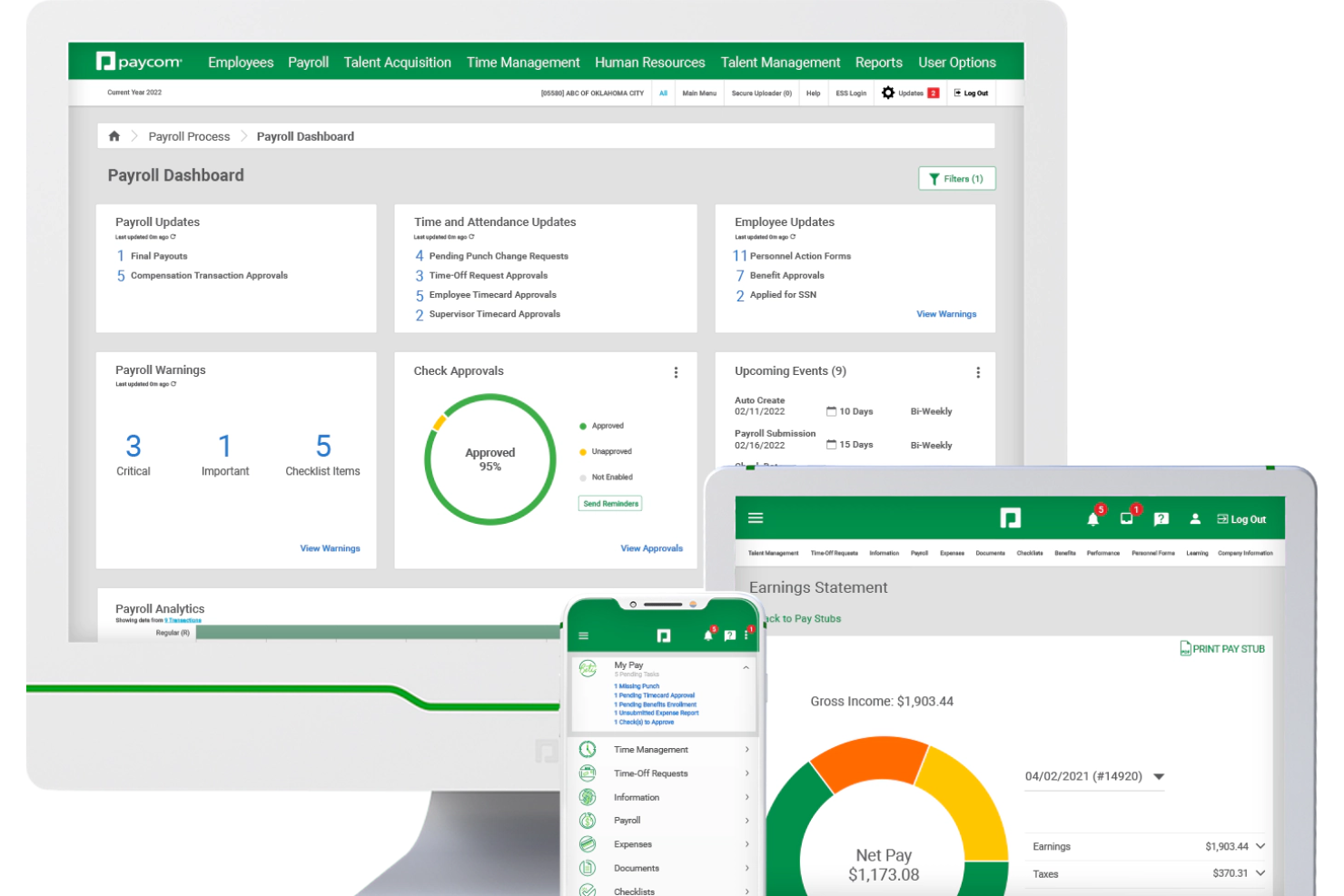
Per le squadre di produzione, Paycom è una piattaforma HR e di gestione delle paghe che copre l'intero ciclo di vita del dipendente: dalla selezione dei candidati e onboarding pre-assunzione alla gestione di tempi e presenze, formazione sulla sicurezza OSHA, monitoraggio delle certificazioni e elaborazione automatizzata delle paghe.
Per chi è Paycom?
Paycom è particolarmente adatto per aziende manifatturiere di medie e grandi dimensioni che gestiscono un ampio personale orario su più turni, centri di costo o sedi produttive.
Perché ho scelto Paycom
Paycom si guadagna il suo posto tra le migliori soluzioni della mia lista grazie alla profonda integrazione dei dati in tempo reale nella piattaforma. Apprezzo molto che il motore IWant AI permetta di interrogare istantaneamente i dati dei dipendenti, recuperando costi del lavoro aggiornati, dettagli sugli straordinari o conteggi del personale semplicemente digitando una domanda in linguaggio naturale. La dashboard Direct Data Exchange va oltre, mostrando il ROI in tempo reale di ogni azione self-service svolta dai dipendenti, quantificato in dollari secondo la ricerca di Ernst & Young.
Funzionalità principali di Paycom
- Paghe Beti: Crea automaticamente ogni ciclo di paga e invita i dipendenti a revisionare e correggere ore, detrazioni e spese prima dell'invio.
- GL Concierge: Genera report del libro mastro generale mappati al tuo piano dei conti per l'importazione diretta nel software di contabilità.
- GONE: Approva o rifiuta automaticamente le richieste di ferie in base alle regole impostate, senza intervento del responsabile.
- Rilevamento presenze basato sulla posizione: Limita le timbrature ai luoghi fisici approvati tramite geofencing sull'app mobile.
Integrazioni di Paycom
Le integrazioni sono principalmente fornite tramite la suite HR e paghe nativa di Paycom, che include strumenti integrati per la gestione dei talenti, il rilevamento delle presenze, l'amministrazione dei benefit e il self-service dei dipendenti all'interno di un unico database.
Pros and Cons
Pros:
- Timbratura mobile a supporto di lavoratori su turni e orari
- I dipendenti revisionano e correggono la paga prima dell'invio
- Un unico database consente reportistica in tempo reale tra i moduli
Cons:
- I report personalizzati richiedono spesso lavoro aggiuntivo su Excel
- Integrazioni limitate

Ideale per strumenti integrati di rilevazione presenze

Justworks è una piattaforma per la gestione delle paghe e delle risorse umane progettata per le aziende manifatturiere che necessitano di elaborazione paghe, rilevamento delle presenze, gestione della conformità e amministrazione dei benefit, tutto in un unico sistema.
Per chi è Justworks?
Justworks è adatto alle aziende manifatturiere che cercano una piattaforma unificata per la gestione di paghe e risorse umane, ideale per team orari e su turni.
Perché ho scelto Justworks
Ho scelto Justworks come uno dei migliori perché i suoi strumenti integrati di rilevazione presenze permettono al mio team di registrare le ore lavorate direttamente all'interno del sistema paghe. Posso gestire i turni, approvare i timesheet e garantire un’elaborazione paga accurata per il personale orario senza dover usare app separate. Questa configurazione mi aiuta a mantenere tutto sincronizzato per assicurare conformità e precisione nelle paghe.
Servizi chiave di Justworks
- Elaborazione paghe automatizzata: Gestione paghe per dipendenti orari e a stipendio con calcolo e invio automatici delle tasse.
- Gestione dei benefit: Offerta e gestione di benefit sanitari, dentistici, oculistici e altri benefit per i dipendenti da un’unica piattaforma.
- Supporto alla conformità: Accesso a strumenti integrati e risorse per rispettare le normative lavorative federali, statali e locali.
- Gestione documentale: Archivia e organizza online in modo sicuro i moduli di inserimento, i documenti fiscali e i dati dei dipendenti.
Integrazioni di Justworks
Le integrazioni native non sono chiaramente documentate. Lo strumento supporta integrazioni tramite API per connessioni personalizzate.
Pros and Cons
Pros:
- Rilevazione presenze integrata per i lavoratori orari
- Calcolo automatico delle imposte sulle paghe multi-statali
- Flussi di onboarding digitale per assunzioni nel settore manifatturiero
Cons:
- La gestione dei benefit potrebbe non essere adatta per aziende sindacalizzate
- Le opzioni di reportistica personalizzata sono piuttosto limitate

Ideale per recruiting, gestione dei turni e formazione
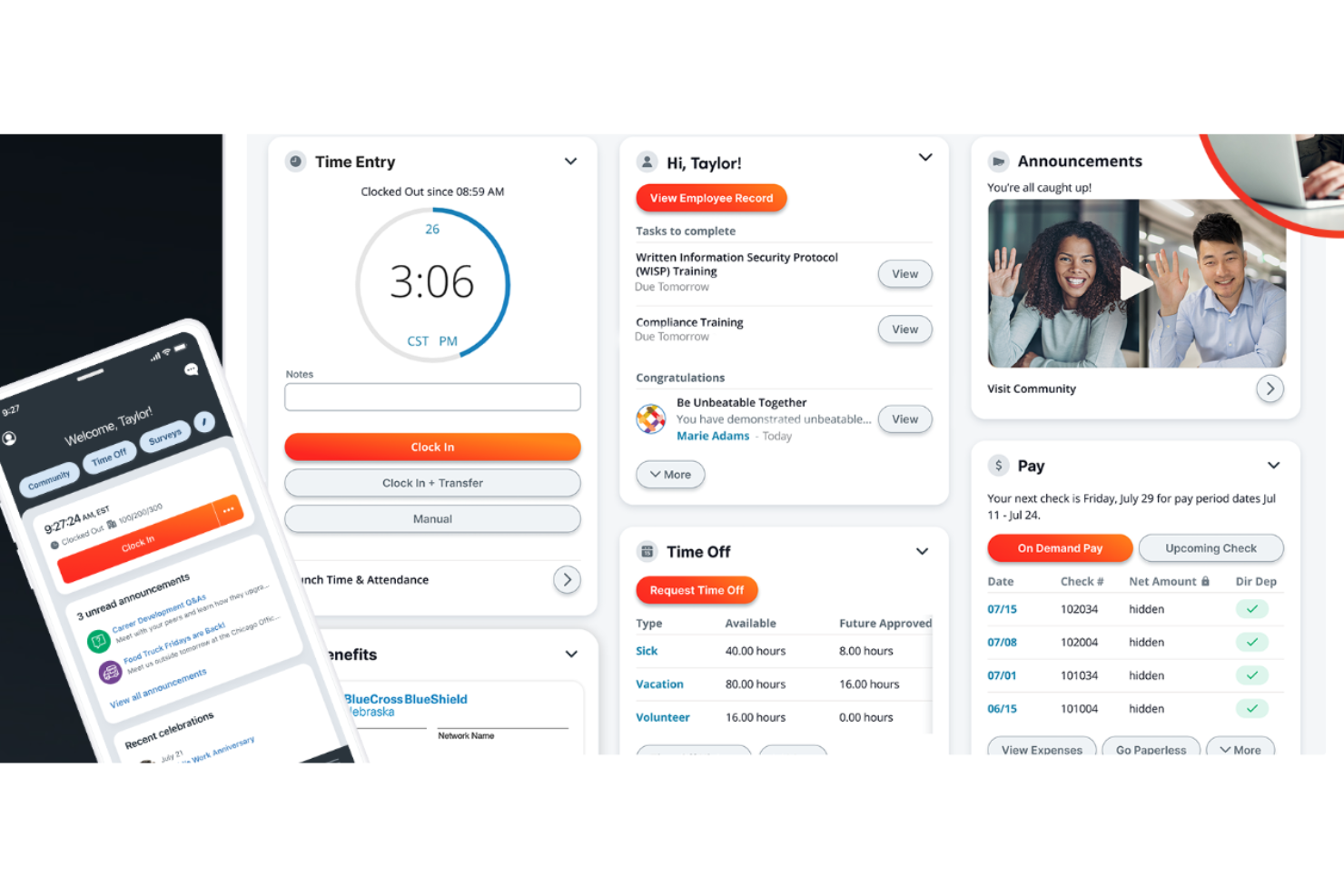
Paylocity è una scelta ideale per le aziende manifatturiere che desiderano integrare la gestione delle buste paga con le attività di recruiting, la programmazione dei turni e lo sviluppo della forza lavoro. Combina la gestione delle buste paga con strumenti per il lavoro a turni, il monitoraggio delle ore lavorate e la formazione dei dipendenti, rendendolo particolarmente utile per stabilimenti con molteplici ruoli, sedi o requisiti di competenze.
Perché ho scelto Paylocity
Ho scelto Paylocity perché supporta l'intero ciclo di vita del dipendente nel settore manifatturiero, non solo la gestione delle buste paga. Puoi gestire orari di lavoro complessi per ruolo o competenza grazie ai suoi strumenti di pianificazione del personale, aiutando così a ridurre le carenze di copertura sul posto di lavoro.
Il suo modulo di recruiting gestisce efficacemente le assunzioni di grandi volumi con annunci di lavoro integrati, tracciamento dei candidati e comunicazione con essi, molto utile quando il turnover è elevato.
Per la formazione, Paylocity include un sistema di gestione dell'apprendimento che consente di assegnare corsi di sicurezza o conformità e monitorarne il completamento dalla stessa piattaforma usata per le buste paga. Inoltre, apprezzo la visibilità in tempo reale sui costi del lavoro, che permette di comprendere come le decisioni sulla pianificazione influiscano sulle spese per le buste paga.
Funzionalità principali di Paylocity
Ecco alcune funzionalità da evidenziare:
- Tracciamento in tempo reale dei costi del lavoro: Monitora le spese del personale mentre cambiano turni e ore lavorate.
- Rilevazione delle presenze mobile con geofencing: Garantisce timbrature accurate collegate ai siti di lavoro approvati.
- Portale self-service per i dipendenti: Permette ai dipendenti di gestire dettagli sulla retribuzione, disponibilità e documenti.
- Strumenti di reportistica per la conformità: Supporta le esigenze di segnalazione su salari, orari e normative sul lavoro.
Integrazioni Paylocity
Le integrazioni includono QuickBooks, Microsoft 365, ADP, Gusto, APS, Deel, Rippling, Dayforce, FreshBooks e QuickBooks Payroll.
Pros and Cons
Pros:
- Analisi avanzata
- Timbratura mobile e geofencing
- Moduli di apprendimento personalizzabili
Cons:
- Numero minimo di utenti richiesto
- Limitato ai piani a pagamento
- Richiede una quota di attivazione
New Product Updates from Paylocity

Paylocity Expands Expense and Purchase Request Tools
Paylocity adds connected personal cards, smarter expense categorization, and a streamlined purchase request experience. This reduces manual entry and helps finance teams manage expenses and approvals more efficiently. For more information, visit Paylocity’s official site.
 .
.
Gusto
Ideale per aziende manifatturiere piccole e medie
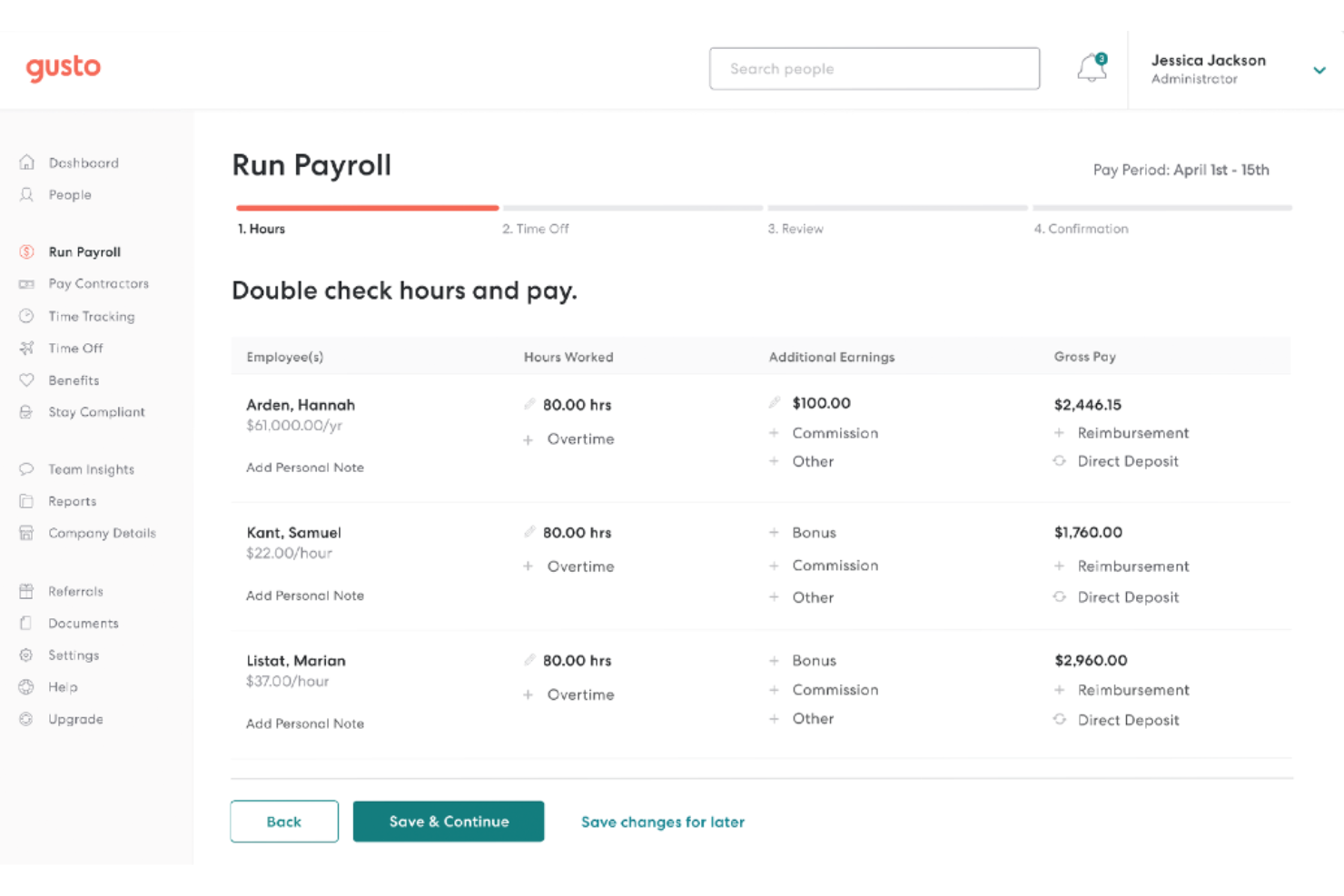
Gusto è ideale per piccole e medie aziende manifatturiere che desiderano una gestione affidabile delle paghe senza aggiungere complessità alle risorse umane.
Perché ho scelto Gusto
Ho scelto Gusto perché aiuta a gestire in modo accurato le paghe dei team orari nel settore manifatturiero senza lavoro manuale. Puoi automatizzare l’elaborazione delle buste paga, la compilazione delle dichiarazioni fiscali e i moduli di fine anno, riducendo gli errori e mantenendo la conformità tra vari stati.
Mi piace che Gusto includa una funzione integrata di rilevamento delle ore lavorate che confluisce direttamente nelle paghe, così le ore del team passano senza intermediari dall’officina agli stipendi; inoltre gestisce anche l’iscrizione ai benefit nello stesso sistema, rendendo più semplice offrire un’assicurazione sanitaria e restare competitivi nell’assunzione di personale qualificato. Per le piccole realtà manifatturiere, questo equilibrio tra automazione delle paghe ed elementi essenziali HR semplifica notevolmente la gestione quotidiana.
Funzionalità chiave di Gusto
Ecco alcune funzionalità principali da evidenziare:
- Invio automatizzato delle dichiarazioni fiscali: Calcola, invia e paga automaticamente le tasse salariali federali, statali e locali.
- Rilevamento orario: Traccia le ore di lavoro dei dipendenti e le sincronizza direttamente con le paghe.
- Self-service per dipendenti: I dipendenti possono accedere online a buste paga, moduli fiscali e benefit.
- Strumenti per assunzione e onboarding: I nuovi assunti completano digitalmente i moduli, inclusi I-9 e W-4.
Integrazioni Gusto
Le integrazioni includono QuickBooks, Xero, FreshBooks, When I Work, Deputy, TSheets (QuickBooks Time), Expensify, Trainual e Clover.
Pros and Cons
Pros:
- Il rilevamento delle ore confluisce direttamente nei calcoli della busta paga
- Paghe, benefit e HR integrati in un’unica piattaforma
- Invio automatico delle dichiarazioni fiscali e bonifici rendono semplice la conformità salariale
Cons:
- Supporto limitato per regole salariali sindacali complesse o con più tariffe
- Paghe internazionali richiedono soluzioni di terze parti
New Product Updates from Gusto
Gusto Adds Solo Advisory Tools and Mobile Money Features
Gusto adds Solo S-Corp Advisory Tools and Gusto Money on Mobile for tax guidance, invoicing, and bill payments. These updates help accountants advise solopreneurs and let users manage business finances from their phones. For more information, visit Gusto’s official site.

Paycor
Ideale per la gestione delle paghe senza intervento manuale
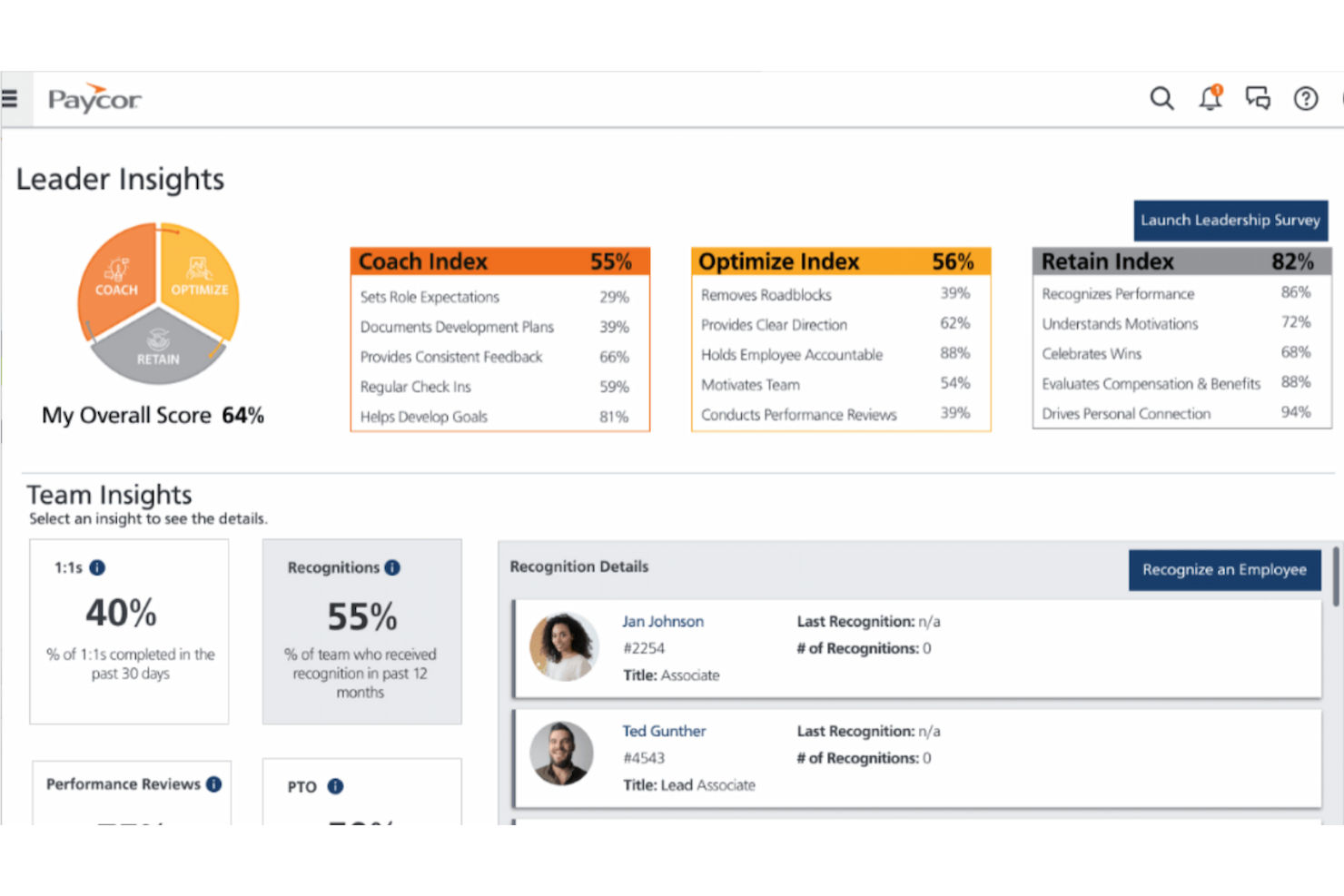
Paycor è una piattaforma per la gestione delle paghe e delle risorse umane progettata per aziende manifatturiere di medie dimensioni che desiderano una gestione delle paghe affidabile senza una supervisione costante. È particolarmente adatta a team che devono gestire più turni, diversi livelli retributivi e requisiti di conformità in varie sedi.
Perché ho scelto Paycor
Ho scelto Paycor perché consente al tuo team di gestire le paghe con un intervento manuale minimo, fondamentale in ambienti manifatturieri con orari e regole salariali complesse. La funzione AutoRun elabora automaticamente le paghe secondo un calendario prestabilito, riducendo il rischio di scadenze mancate o errori umani.
Apprezzo anche il fatto che Paycor gestisca i calcoli delle paghe in tempo reale: straordinari, maggiorazioni di turno e variazioni salariali vengono applicati correttamente senza regolazioni manuali. Gli strumenti di conformità integrati aiutano a garantire che le paghe restino in linea con le leggi sul lavoro federali, statali e locali, il che è particolarmente utile se operi in più stati. In generale, Paycor è ideale se vuoi che le paghe restino accurate e conformi senza la supervisione costante del team HR.
Caratteristiche principali di Paycor
Ecco alcune funzionalità chiave da evidenziare:
- Accesso anticipato al salario: Consente ai dipendenti di accedere a una parte dello stipendio maturato prima del giorno di paga, riducendo le richieste legate alle paghe.
- Report sui costi del lavoro: Monitora la spesa del lavoro per ruolo, turno o reparto per supportare le decisioni di pianificazione produttiva.
- Controlli di presenza e orari: Rileva con precisione le ore lavorate con regole su straordinari, pause e maggiorazioni di turno.
- Self-service dipendenti: Riduce il lavoro amministrativo consentendo ai dipendenti di aggiornare autonomamente i dati personali e fiscali.
Integrazioni Paycor
Le integrazioni includono QuickBooks, Xero, SAP Concur, Indeed, LinkedIn, Glassdoor, Microsoft Teams, Slack e DocuSign.
Pros and Cons
Pros:
- La funzione AutoRun riduce l'elaborazione manuale delle paghe
- Gestisce regole retributive complesse e calcoli basati sui turni
- Forte supporto alla conformità per operazioni manifatturiere multistato
Cons:
- L'esperienza utente può risultare talvolta poco intuitiva
- Può richiedere supporto aggiuntivo per la personalizzazione completa
Ideale per supporto di conformità integrato

RUN Powered by ADP® è una soluzione per le paghe progettata per le piccole aziende manifatturiere che necessitano di una gestione della conformità corretta fin dal primo giorno. È particolarmente adatta a team con lavoratori orari, regole sugli straordinari e requisiti fiscali multi-statali che desiderano una gestione delle paghe supportata da un sistema normativo integrato invece che dalla supervisione manuale.
Perché ho scelto RUN Powered by ADP®
Ho scelto RUN Powered by ADP perché integra la conformità direttamente nel processo delle paghe invece di considerarla un componente aggiuntivo. Le paghe vengono elaborate automaticamente con tutti i calcoli fiscali federali, statali e locali gestiti per tuo conto, riducendo gli errori di dichiarazione; inoltre, i pagamenti e le dichiarazioni fiscali vengono presentati per te, particolarmente utile se il tuo team lavora su turni o in diverse sedi.
Apprezzo anche che la piattaforma segnali avvisi di conformità, così ricevi notifiche quando cambiano le normative relative alle paghe. Per le aziende manifatturiere che vogliono una gestione delle paghe senza continue verifiche, questo approccio fa davvero la differenza.
Funzionalità principali di RUN Powered by ADP®
Ecco alcune funzionalità chiave da evidenziare:
- Elaborazione automatizzata delle buste paga: Calcola salari, straordinari e detrazioni con precisione per i team orari.
- Avvisi di conformità sulle paghe: Ti informa sui cambiamenti nella normativa fiscale e sul lavoro che influiscono sulle paghe.
- Report paghe e lavoro: Genera report standard per audit, budgeting e monitoraggio della conformità.
- Portale self-service per dipendenti: Permette ai dipendenti di accedere online a cedolini, W-2 e dati personali.
Integrazioni di RUN Powered by ADP®
Le integrazioni includono QuickBooks, QuickBooks Time, ZipRecruiter, fornitori di piani pensionistici, fornitori di benefit e strumenti di gestione del personale disponibili tramite l’ecosistema di partner nativi di ADP.
Pros and Cons
Pros:
- La dichiarazione fiscale integrata riduce il rischio di non conformità
- Gli avvisi di conformità aiutano a evitare cambiamenti normativi mancati
- Il self-service riduce le domande sull’amministrazione delle buste paga
Cons:
- La configurazione iniziale può essere complessa
- Molte funzionalità HR sono limitate ai piani di livello superiore

TimeTrex
Ideale per la gestione di strutture retributive complesse
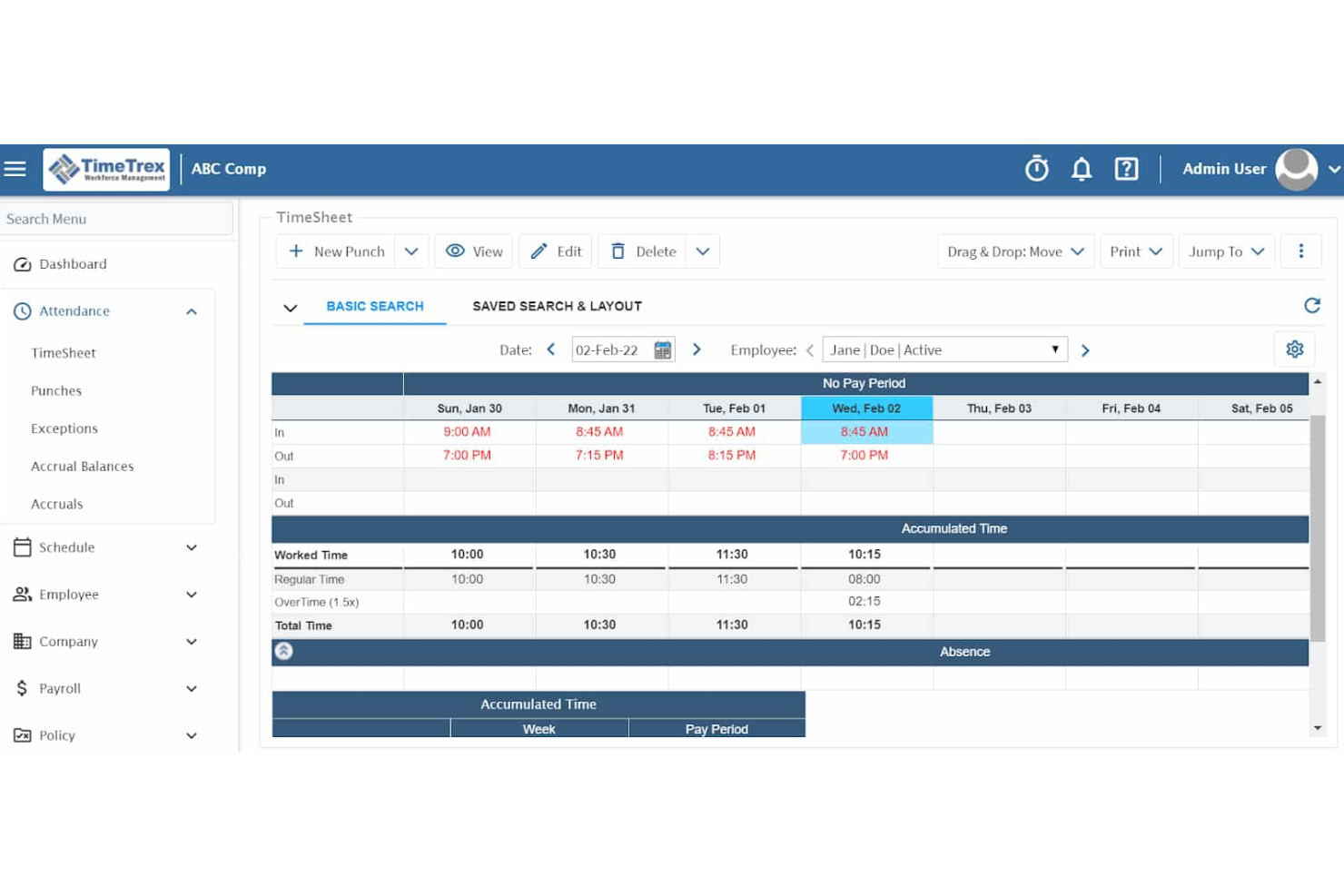
TimeTrex è un software completo per la gestione della forza lavoro progettato per semplificare la gestione dei salari, il monitoraggio delle presenze e i processi HR. Offre una soluzione flessibile e scalabile adattabile ad aziende di diverse dimensioni, in particolare quelle di settori con esigenze complesse di gestione del personale, come la manifattura.
Perché ho scelto TimeTrex:
TimeTrex si distingue per la sua capacità di gestire strutture retributive complesse, inclusi pagamenti a cottimo, differenziali di turno e calcoli di straordinari, particolarmente frequenti nel settore manifatturiero. Inoltre, la sua capacità di integrarsi con i sistemi di rilevazione delle presenze garantisce che tutte le ore dei dipendenti vengano correttamente registrate.
Funzionalità principali e integrazioni:
Le funzionalità di TimeTrex includono pianificazione avanzata, portali self-service, reportistica personalizzabile, calcoli fiscali automatizzati, monitoraggio degli accumuli e supporto multi-valuta. Offre anche la rilevazione dei costi per commessa, permettendo ai produttori di tracciare i costi del lavoro associati a specifici progetti o lavori, fornendo utili informazioni su produttività e redditività.
Le integrazioni includono QuickBooks, ADP, Sage, Xero, PayPal e FreshBooks.
Pros and Cons
Pros:
- Funzionalità robuste di rilevamento presenze
- Gestione integrata di buste paga e risorse umane
- Gestione automatizzata di paghe e calcoli fiscali
Cons:
- Il design della piattaforma è datato
- Può essere difficile trovare alcune funzionalità specifiche
New Product Updates from TimeTrex
TimeTrex Adds Quick Punch App With Offline and QR Support
TimeTrex adds a new Quick Punch app, offline punching, QR code scanning, punch images, configurable messages, and punch warnings or lockouts to improve employee clock-ins across browsers and local computers. For more information, visit TimeTrex’s official site.
 .
.
APS
Ideale per pianificazione flessibile dei turni e gestione della forza lavoro nel settore manifatturiero

APS Payroll offre una soluzione completa di software per la gestione delle retribuzioni e delle risorse umane per le aziende manifatturiere, fornendo una gamma di servizi che includono gestione delle paghe senza carta, HR di base, amministrazione dei benefit, gestione delle prestazioni, presenze, pianificazione turni, reportistica per l'Affordable Care Act e molto altro. APS è progettato per soddisfare le esigenze specifiche delle aziende del settore manifatturiero nella gestione della sicurezza e della produttività dei dipendenti, oltre che nell'automatizzazione dei processi principali.
Perché ho scelto APS:
Ho scelto APS per le sue funzionalità robuste pensate appositamente per l'industria manifatturiera. APS si distingue per la sua capacità di gestire esigenze complesse di pianificazione e gestione del lavoro, aspetti fondamentali negli ambienti produttivi. La flessibilità del software nella gestione di varie classificazioni di dipendenti e di molteplici sedi lo rende una scelta ideale per le aziende del settore manifatturiero.
Funzionalità principali e integrazioni:
Le funzionalità principali includono pianificazione flessibile dei turni, gestione della forza lavoro, reportistica intuitiva, tracciamento dei beni e gestione tramite dispositivi mobili.
APS si integra nativamente con popolari software di rilevazione presenze e sistemi di gestione della produzione, tra cui Sage Intacct, QuickBooks, NetSuite, ADP, Paychex, Kronos, Acumatica, AMGTime, Ascensus, Acuity Scheduling e altri ancora.
Pros and Cons
Pros:
- Pianificazione flessibile dei turni
- Gestione completa della forza lavoro
- Reportistica intuitiva
Cons:
- Personalizzazione limitata di report e interfaccia
- Curva di apprendimento per i nuovi utenti

Dayforce
Ideale per la gestione della forza lavoro e la conformità nel settore manifatturiero
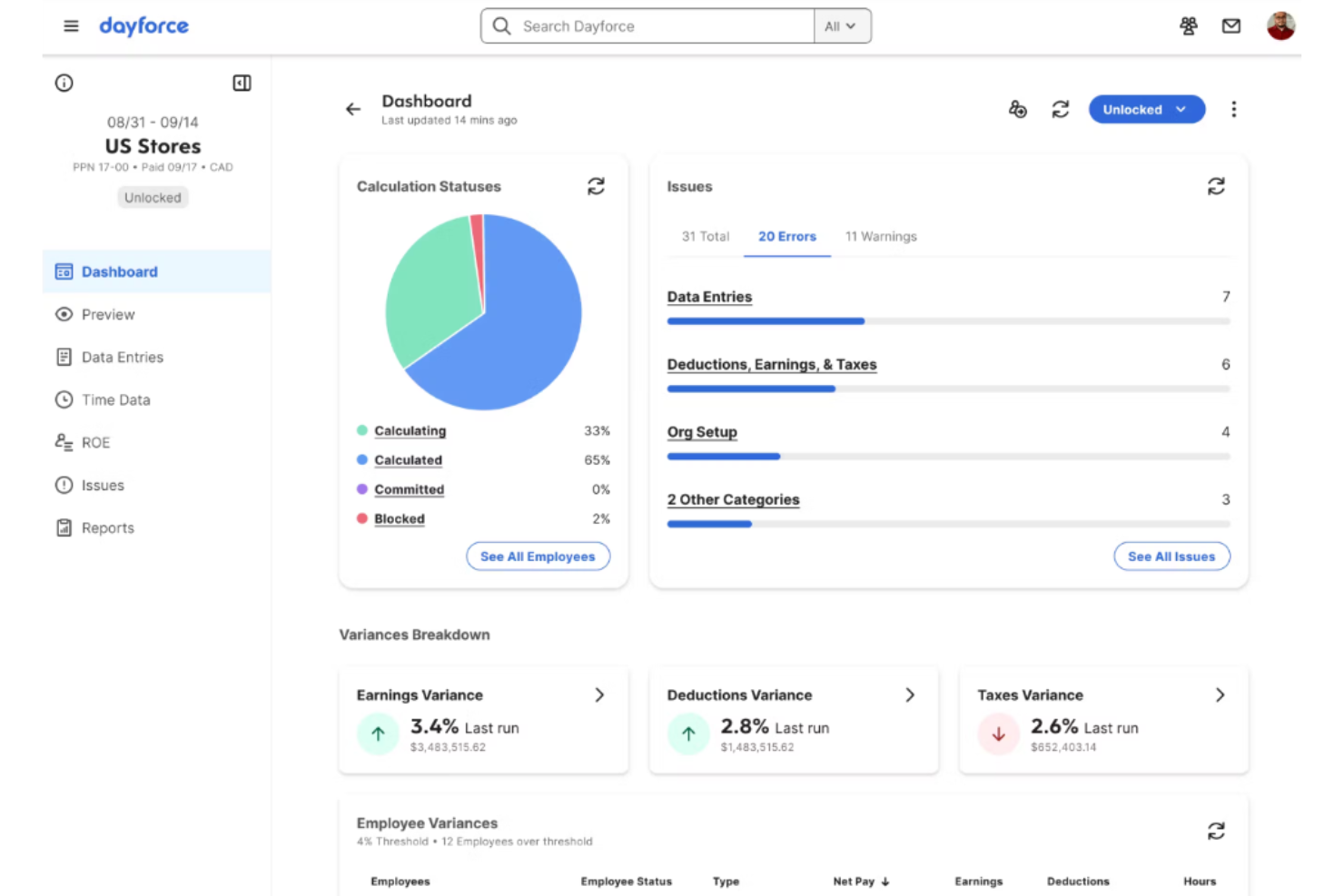
Dayforce è una soluzione completa di software per paghe e risorse umane progettata per le aziende manifatturiere. Aiuta a ottimizzare i costi del lavoro, aumentare la produttività e garantire la conformità alle normative del settore.
Perché ho scelto Dayforce:
Ho scelto Dayforce per le sue solide funzionalità di gestione della forza lavoro, specificamente adattate al settore manifatturiero. La piattaforma si distingue per la capacità di semplificare le operazioni, gestire la conformità e offrire una visibilità in tempo reale sulle prestazioni della forza lavoro.
Funzionalità principali e integrazioni:
Dayforce offre diverse funzionalità di spicco, tra cui pianificazione avanzata, gestione in tempo reale dei costi del lavoro e automazione della conformità. La piattaforma propone anche strumenti per la formazione e lo sviluppo dei dipendenti, garantendo una forza lavoro competente e conforme.
Le integrazioni includono strumenti popolari come ADP, SAP, Oracle, Workday, Microsoft Dynamics, Salesforce, QuickBooks, NetSuite, Kronos e BambooHR.
Pros and Cons
Pros:
- Gestione in tempo reale dei costi del lavoro
- Strumenti avanzati di pianificazione
- Automazione della conformità
Cons:
- Configurazione iniziale complessa
- Opzioni di personalizzazione limitate
- Può essere troppo costoso per le piccole imprese

ADP
Ideale per soluzioni complete di paghe e risorse umane su misura per la manifattura

ADP offre una suite completa di soluzioni per le paghe e le risorse umane, progettata specificamente per l'industria manifatturiera. Si distingue perché combina l'esperienza settoriale con il contributo dei clienti per creare soluzioni che rispondono alle esigenze uniche delle aziende manifatturiere.
Perché ho scelto ADP:
Ho scelto ADP per la sua ampia gamma di servizi di paghe e risorse umane specificamente adattati al settore manifatturiero. ADP si distingue per la sua capacità di gestire esigenze retributive complesse, come diversi livelli salariali e il monitoraggio dei turni, particolarmente diffusi nei contesti manifatturieri. Ritengo che ADP sia la scelta migliore per soluzioni complete di paghe e risorse umane perché integra paghe, rilevazione delle presenze e servizi HR in un'unica piattaforma, rendendo più semplice per le aziende manifatturiere gestire il personale in modo efficiente.
Funzionalità e integrazioni principali:
Le funzionalità di spicco di ADP includono l'elaborazione rapida e precisa delle paghe, il monitoraggio di presenze e orari, e servizi HR completi. La piattaforma offre anche strumenti di analisi dei dati per aiutare le aziende a prendere decisioni strategiche.
Le integrazioni includono QuickBooks, Xero, Microsoft Dynamics, Oracle, SAP, Workday, Salesforce, BambooHR, Slack e Google Workspace.
Pros and Cons
Pros:
- In grado di svolgere compiti HR complessi
- Elaborazione paghe accurata
- Strumenti di analisi dei dati
Cons:
- Potrebbe richiedere supporto per la configurazione
- Opzioni di personalizzazione limitate
Altri software paghe per il settore manifatturiero da prendere in considerazione
Di seguito è riportato un elenco di ulteriori software paghe per il settore manifatturiero che abbiamo selezionato, ma che non sono entrati nella lista principale. Vale sicuramente la pena consultarli.
- Remofirst
Ideale per la gestione del payroll globale e della conformità locale
- Rippling
Ideale per la gestione unificata delle paghe e dell'IT con funzionalità globali
- Deel Payroll
Ideale per la gestione globale di salari e conformità
- Keka HR
Ideale con implementazione e formazione dedicate
- QuickBooks Payroll
Ideale per paghe automatizzate e conformità fiscale con supporto HR
- Paycor
Ideale per soluzioni HR e payroll su misura con funzionalità specifiche per il settore


Recensioni correlate dei software HR
Se non hai ancora trovato quello che cerchi, dai un’occhiata a questi altri strumenti correlati che abbiamo testato e valutato:
- Software HR
- Software paghe
- Software per la selezione del personale
- Servizi di datore di lavoro registrato
- Sistemi di tracciamento dei candidati
- Software per la gestione della forza lavoro
Come Valuto i Software Payroll per il Settore Manifatturiero
Quando uno stabilimento gestisce tre turni con lavoratori sindacalizzati e retribuzione a cottimo, non tutti gli strumenti payroll sono all’altezza—suddivido la mia valutazione in criteri di base e fattori differenzianti che separano le soluzioni migliori.
Funzionalità di Base (Requisiti Indispensabili per Questa Lista)
Quando seleziono gli strumenti per la mia lista, valuto ciascuno su una scala da 0 (non offre la funzionalità) a 5 (eccelle in questo ambito) per ciascuna delle funzionalità di base indicate sotto. Poi, converto il punteggio totale dello strumento in una percentuale. Ogni software deve raggiungere un punteggio minimo totale del 65% per essere preso in considerazione.
- Integrazione Presenze & Orari: Verifico che la piattaforma si colleghi a terminali di rilevazione presenze e sistemi biometrici, così che le timbrature orarie dal reparto produzione confluiscano direttamente nel payroll senza reinserimenti manuali.
- Motore di Regole Retributive Complesse: Differenziali di turno, pagamento a cottimo, livelli di straordinari e salario prevalente sono frequenti nel manifatturiero. Valuto quanto facilmente uno strumento gestisce questi calcoli.
- Gestione Fiscale Multi-Stato & Conformità: Per gli stabilimenti presenti in più stati, cerco la dichiarazione fiscale automatica e il supporto per report di payroll certificati come WH-347 e il monitoraggio Davis-Bacon.
- Supporto a Sindacati & CCNL: Analizzo come la piattaforma gestisce più contratti collettivi, contributi sindacali, benefit accessori e reportistica per invio dati a più sindacati.
- Payroll Multi-Sede & Centri di Costo: Spesso nel settore, i costi devono essere suddivisi tra stabilimenti, reparti e commesse. Cerco funzionalità di mappatura contabile e report specifici per sede.
- Integrazione con ERP & Sistemi HR: Molti produttori utilizzano un ERP come SAP, Oracle o Epicor. Verifico la presenza di connettori già pronti e accesso API aperto per sincronizzare dati tra payroll e produzione.
Dopo aver selezionato gli strumenti che rispondono a questi criteri, valuto cosa distingue ciascuna piattaforma.
Fattori Differenzianti (Cosa Distingue i Fornitori)
Ecco come confronto e metto in risalto i diversi fornitori:
Caratteristiche Distintive
Un'app mobile self-service è importante qui, poiché molti operai in reparto non hanno postazioni alla scrivania. Valuto app che permettono ai dipendenti di visualizzare i propri cedolini, aggiornare le detrazioni e richiedere ferie dal cellulare. Anche le analisi dei costi in tempo reale spiccano: dashboard che monitorano i costi per commessa, stabilimento o linea produttiva forniscono una visibilità utile al management. In realtà con grandi gruppi di dipendenti orari, l'automazione delle pignoramenti fa risparmiare tempo amministrativo gestendo i versamenti verso gli enti in automatico. Valuto inoltre integrazioni per l’assicurazione lavoratori, soprattutto soluzioni pay-as-you-go collegate a reportistica OSHA.
Oltre le Caratteristiche
Il supporto in fase di implementazione è un grande fattore di differenziazione. Migrare da sistemi legacy mentre si gestiscono tre turni richiede run di payroll in parallelo e un team che conosca le regole retributive del settore. Esamino anche come ciascuna piattaforma si adatti alla crescita: uno strumento adatto a uno stabilimento di 50 persone dovrebbe funzionare anche aggiungendo stagionali o aprendo una nuova sede. È rilevante anche la profondità dell’integrazione nello stack produttivo: cerco connettori preimpostati con ERP come SAP, Epicor e Infor, oltre ad accesso API per integrazioni personalizzate nel reparto.
Come scegliere un software paghe per il settore manifatturiero
È facile perdersi in lunghi elenchi di funzionalità e strutture tariffarie complesse. Per aiutarti a rimanere concentrato mentre affronti il tuo particolare processo di selezione del software paghe, ecco una lista di fattori da tenere a mente:
| Fattore | Elementi da considerare |
|---|---|
| Scalabilità | Il software può crescere insieme alla tua azienda? Considera se supporta un aumento del numero di dipendenti e requisiti di gestione paghe complessi con l'espansione della tua attività manifatturiera. |
| Integrazioni | Si connette bene ai tuoi sistemi esistenti? Verifica se si integra con il tuo ERP e altri strumenti per mantenere l'efficienza dei flussi di lavoro. |
| Personalizzazione | Puoi adattare il software ai tuoi processi? Cerca opzioni per personalizzare report e impostazioni delle paghe in base ai requisiti specifici della tua attività manifatturiera. |
| Semplicità d'uso | L'interfaccia è intuitiva per il tuo team? Assicurati che sia facile da usare e richieda una formazione minima per ridurre i tempi e gli errori di inserimento. |
| Implementazione e inserimento | Quanto tempo occorrerà per configurarlo? Valuta la complessità dell'avvio, inclusi la migrazione dei dati e la formazione iniziale degli utenti. |
| Costo | Ci sono costi nascosti? Confronta i modelli di prezzo per garantire la trasparenza. Considera i costi totali, inclusi configurazione e manutenzione, in relazione al tuo budget. |
| Misure di sicurezza | In che modo protegge i dati sensibili? Verifica gli standard di crittografia e la conformità alle normative sulla protezione dei dati per salvaguardare le informazioni dei dipendenti. |
| Requisiti di conformità | Rispetta le normative del settore? Assicurati che supporti la conformità alle leggi sul lavoro e ai requisiti fiscali del settore manifatturiero specifici della tua regione. |
Tendenze dei software per la gestione delle paghe nel settore manifatturiero
I software per la gestione delle paghe nel settore manifatturiero stanno evolvendo rapidamente. Ecco alcune tendenze chiave da tenere d'occhio.
- Elaborazione delle paghe basata sull'IA: L'IA sta automatizzando le attività relative alle paghe, riducendo gli errori e risparmiando tempo. Questa tecnologia è in grado di gestire calcoli complessi e problemi di conformità. È fondamentale per migliorare l'efficienza nella gestione delle paghe.
- Blockchain per la sicurezza delle paghe: La tecnologia blockchain viene utilizzata per proteggere i dati relativi alle paghe. Garantisce la trasparenza e impedisce le manomissioni. Questa tendenza è importante per proteggere le informazioni sensibili dei dipendenti.
- Soluzioni mobili per la gestione delle paghe: Le app mobili consentono di gestire le paghe ovunque ci si trovi. I dipendenti possono accedere alle proprie informazioni retributive in qualsiasi momento e da qualsiasi luogo. Questa tendenza è significativa per aumentare l'accessibilità e la comodità.
- Sistemi per la gestione delle paghe basati sul cloud: I sistemi basati sul cloud stanno diventando la norma per la gestione delle paghe. Offrono scalabilità e accesso da remoto. Questa tendenza è fondamentale per le aziende che desiderano adattarsi ad ambienti di lavoro flessibili.
- Integrazione con i sistemi HR ed ERP: I software per la gestione delle paghe si integrano sempre più con i sistemi HR ed ERP. Questa integrazione semplifica il flusso dei dati e migliora la precisione. È essenziale per creare un sistema unificato di gestione aziendale.
Come illustrano queste tendenze, i software per la gestione delle paghe nel settore manifatturiero stanno diventando più sofisticati, con una forte attenzione alle tecnologie di IA, cloud e mobili e all'integrazione con altri strumenti aziendali diffusi. Tieni d'occhio queste tendenze, che stanno plasmando il futuro dei software per la gestione delle paghe nel settore manifatturiero.
Che cos'è un software per la gestione delle paghe nel settore manifatturiero?
Un software per la gestione delle paghe nel settore manifatturiero è uno strumento progettato per gestire e automatizzare il processo di elaborazione delle paghe per le aziende manifatturiere. Viene utilizzato dai dipartimenti HR, dai responsabili delle paghe e dai team finanziari per garantire il pagamento accurato e puntuale degli stipendi ai dipendenti. Questo software aiuta gli utenti a gestire calcoli complessi delle paghe, la conformità fiscale e l'amministrazione dei benefit specifici del settore manifatturiero.
I componenti dei software per la gestione delle paghe nel settore manifatturiero includono generalmente il monitoraggio di orari e presenze, il calcolo degli stipendi, la presentazione delle dichiarazioni fiscali e la gestione dei benefit. Inoltre, si integrano con altri sistemi HR per il settore manifatturiero per semplificare il flusso dei dati e ridurre gli errori di inserimento manuale. Questo garantisce che i processi di gestione delle paghe siano efficienti e conformi alle normative del settore.
Funzionalità principali
Quando selezioni una piattaforma per la tua azienda manifatturiera, presta attenzione a queste funzionalità chiave dei software per la gestione delle paghe:
- Integrazione del rilevamento delle ore: Il software per la gestione delle buste paga nel settore manifatturiero dovrebbe sincronizzarsi perfettamente con gli orologi marcatempo e i sistemi di fabbrica per acquisire le ore lavorate nei diversi turni, gli straordinari e i codici delle commesse. Ciò riduce l'inserimento manuale dei dati e garantisce calcoli accurati delle retribuzioni.
- Accredito diretto: L'accredito diretto garantisce che i dipendenti ricevano lo stipendio puntualmente senza assegni cartacei, riducendo il lavoro amministrativo e migliorando la soddisfazione dei dipendenti, soprattutto nelle aziende con un'ampia forza lavoro retribuita a ore.
- Differenziali di turno e regole retributive complesse: Gli ambienti manifatturieri richiedono spesso variazioni retributive per i turni notturni, il lavoro nel fine settimana, le mansioni rischiose o gli accordi sindacali. Il software per la gestione delle buste paga dovrebbe supportare automaticamente queste strutture retributive complesse.
- Gestione delle spese: Gli strumenti automatizzati per la rendicontazione e il rimborso delle spese aiutano a gestire i costi di viaggio, alloggio, attrezzature o dispositivi di sicurezza, garantendo pagamenti puntuali e accurati.
- Gestione delle retribuzioni: Le piattaforme per la gestione delle buste paga dovrebbero aiutare a gestire la retribuzione base, i bonus, gli incentivi e gli aumenti per merito, supportando al contempo strategie retributive eque e competitive, in linea con gli obiettivi aziendali.
- Servizi autonomi per i dipendenti: I dipendenti possono accedere ai cedolini, ai moduli fiscali, ai dettagli sui benefit e alle informazioni personali senza dover ricorrere alle risorse umane, riducendo il carico amministrativo e migliorando la trasparenza.
- Report e analisi delle buste paga: I report personalizzabili forniscono informazioni sui costi del lavoro, sull'utilizzo degli straordinari, sulla spesa dei reparti e sugli indicatori di conformità, supportando decisioni informate.
- Audit delle buste paga e segnalazione degli errori: Gli strumenti di audit integrati segnalano incongruenze, dati mancanti o problemi di calcolo prima della finalizzazione delle buste paga, contribuendo a prevenire errori costosi.
- Presentazione delle dichiarazioni fiscali e conformità: Il calcolo, la ritenuta e la presentazione automatizzati delle imposte garantiscono la conformità alle normative federali, statali e locali, riducendo il rischio di sanzioni e verifiche.
- Sistemi integrati per la gestione delle buste paga: L'integrazione perfetta con i sistemi HRIS, ERP, contabili e manifatturieri garantisce la coerenza dei dati ed elimina l'inserimento duplicato.
- Mappatura al libro mastro: Le spese per il personale vengono automaticamente mappate nel libro mastro, supportando una rendicontazione finanziaria accurata e una riconciliazione più semplice.
- Gestione dei pignoramenti dello stipendio: Il software per la gestione delle buste paga automatizza le trattenute e i versamenti relativi ai pignoramenti in conformità ai requisiti legali, riducendo la complessità amministrativa.
- Supporto per le buste paga internazionali: Per i produttori con attività internazionali, il software per la gestione delle buste paga supporta più valute, fusi orari e normative locali in materia di conformità.
- Pagamento su richiesta: Alcune piattaforme consentono ai dipendenti di accedere alle retribuzioni maturate prima del giorno di paga, contribuendo a ridurre lo stress finanziario e a migliorare la fidelizzazione nei ruoli con elevato ricambio del personale.
Funzionalità comuni dell'IA nei software per la gestione delle buste paga nel settore manifatturiero
Le moderne piattaforme per la gestione delle buste paga nel settore manifatturiero utilizzano sempre più l'IA per migliorare l'accuratezza, la conformità e la pianificazione della forza lavoro, ad esempio:
- Rilevamento degli errori nelle buste paga basato sull'IA: L'IA analizza i cicli di elaborazione delle buste paga per identificare anomalie come calcoli errati degli straordinari, differenziali di turno mancanti, ore duplicate o modelli retributivi insoliti prima dell'elaborazione delle buste paga.
- Previsione dei costi del lavoro: L'IA analizza i programmi di produzione, i dati storici sul lavoro, la stagionalità e le tendenze degli straordinari per prevedere con maggiore accuratezza i costi del lavoro.
- Monitoraggio intelligente della conformità: L'IA monitora i cambiamenti nelle leggi sul lavoro, negli accordi sindacali, nelle regole sugli straordinari e nelle normative fiscali, segnalando automaticamente ai team che gestiscono le buste paga i rischi di non conformità.
- Convalida automatizzata dei cartellini: L'IA esamina i dati di entrata e uscita per rilevare timbrature mancanti, timbrature effettuate da colleghi o incongruenze associate a macchinari o linee di produzione specifici.
- Indicazioni sulla pianificazione basate sull'IA: Analizzando la domanda produttiva e la disponibilità della forza lavoro, l'IA aiuta a consigliare livelli di personale che riducono al minimo gli straordinari mantenendo gli obiettivi di produzione.
- Analisi del rischio di ricambio e assenteismo: L'IA identifica modelli associati al burnout, all'assenteismo o all'abbandono dei dipendenti, come gli straordinari eccessivi o gli orari irregolari, supportando interventi proattivi sulla forza lavoro.
- Elaborazione intelligente dei pignoramenti: L'IA aiuta a convalidare le regole sui pignoramenti nelle diverse giurisdizioni e segnala importi di trattenuta errati o conflitti di priorità.
- Supporto ai dipendenti basato sull'IA: I chatbot rispondono alle domande comuni su retribuzioni, straordinari, trattenute, orari e moduli fiscali, riducendo le interruzioni per i team delle risorse umane e delle buste paga.
- Analisi e indicazioni avanzate: L'IA mette in evidenza le tendenze relative all'efficienza del lavoro, alla dipendenza dagli straordinari, alle variazioni delle buste paga e ai rischi di non conformità, trasformando i dati sulle buste paga in indicazioni operative concrete.
Vantaggi
L'implementazione di un software per la gestione delle buste paga nel settore manifatturiero può migliorare significativamente l'efficienza, l'accuratezza e la conformità. Ecco cinque vantaggi principali che i potenziali acquirenti dovrebbero considerare:
- Maggiore accuratezza: Il software per la gestione delle buste paga riduce al minimo gli errori umani automatizzando i calcoli e l'inserimento dei dati, garantendo che i dipendenti siano pagati correttamente e puntualmente.
- Risparmio di tempo: L'automazione dei processi di gestione delle buste paga riduce il tempo dedicato alle attività manuali, consentendo al personale delle risorse umane di concentrarsi su attività più strategiche.
- Conformità normativa: Il software contribuisce a garantire la conformità alle leggi sul lavoro e alle normative fiscali aggiornandosi automaticamente per riflettere gli ultimi requisiti legali.
- Efficienza dei costi: Riducendo la necessità di lavoro manuale e minimizzando gli errori, il software per la gestione delle buste paga può ridurre i costi operativi e migliorare i risultati economici.
- Sicurezza dei dati: Il software per la gestione delle buste paga offre solide funzionalità di sicurezza per proteggere le informazioni sensibili dei dipendenti da accessi non autorizzati e violazioni dei dati.
Investire in un software per la gestione delle buste paga può portare a significativi miglioramenti nell'efficienza operativa e nell'accuratezza, rendendolo uno strumento prezioso per qualsiasi organizzazione manifatturiera.
Costi e prezzi
Quando si tratta di gestire le buste paga nel settore manifatturiero, scegliere il software giusto può semplificare notevolmente le operazioni, garantire la conformità e far risparmiare tempo.
Di seguito ho fornito una panoramica delle opzioni di prezzo e delle funzionalità più comuni disponibili nei software per la gestione delle buste paga per il settore manifatturiero, per aiutarti a trovare la soluzione più adatta.
Tabella di confronto dei piani per i software di gestione delle buste paga per il settore manifatturiero
| Tipo di piano | Prezzo medio | Funzionalità comuni |
| Piano gratuito | $0 | Elaborazione di base delle buste paga, autogestione per i dipendenti, assistenza limitata |
| Piano base | $17/mese + $4/dipendente | Elaborazione delle buste paga, deposito diretto, moduli W-2 stampabili, configurazione e assistenza di esperti |
| Piano standard | $40/mese + $6/dipendente | Gestione completa delle buste paga, presentazione delle dichiarazioni fiscali, autogestione per i dipendenti, strumenti HR di base |
| Piano avanzato | $80/mese + $12/dipendente | Gestione delle buste paga in più stati, deposito diretto il giorno successivo, strumenti HR avanzati, gestione dei permessi retribuiti |
| Piano premium | $125/mese + $10/dipendente | Protezione dalle sanzioni fiscali, rilevazione mobile delle ore lavorate, consulente HR dedicato, conformità |
Quando scegli un software per la gestione delle buste paga per il settore manifatturiero, considera le dimensioni della tua azienda, la complessità delle tue esigenze relative alle buste paga e il livello di assistenza necessario. Ogni piano offre funzionalità e prezzi diversi, quindi puoi scegliere quello più in linea con gli obiettivi e il budget della tua azienda in base alle tue esigenze.
Domande frequenti sul software per paghe nel settore manifatturiero
Ecco alcune risposte alle domande comuni sul software per paghe nel settore manifatturiero:
In che modo il software per paghe gestisce la conformità nel settore manifatturiero?
Il software per paghe per il settore manifatturiero ti aiuta a rispettare le normative del settore aggiornando automaticamente le aliquote fiscali e le leggi sul lavoro. Garantisce calcoli accurati e invii puntuali, riducendo il rischio di sanzioni. Dovresti verificare che il software supporti le specifiche esigenze di conformità della tua regione.
Il software per paghe può integrarsi con i sistemi esistenti?
Sì, molte soluzioni software per paghe offrono funzionalità di integrazione con i sistemi ERP e HR esistenti. Questo aiuta a mantenere un flusso di lavoro fluido e riduce l’inserimento manuale dei dati. Assicurati che il software scelto possa connettersi agli strumenti attuali per massimizzare l’efficienza.
Quale tipo di assistenza è disponibile per gli utenti del software per paghe?
La maggior parte dei fornitori di software per paghe offre assistenza clienti attraverso diversi canali, come telefono, e-mail e chat. Alcuni forniscono anche account manager dedicati per un’assistenza personalizzata. È importante valutare il livello di assistenza offerto, soprattutto durante l’implementazione e l’inserimento dei nuovi utenti.
In che modo il software per paghe gestisce la pianificazione dei turni multipli?
Il software per paghe per il settore manifatturiero spesso include funzionalità per gestire orari di lavoro a turni complessi. Consente di impostare tariffe di retribuzione diverse e di gestire gli straordinari in modo efficiente. Ciò è particolarmente utile nel settore manifatturiero, dove il lavoro a turni è comune, garantendo un’elaborazione accurata delle paghe.
Il software per paghe è scalabile per le aziende manifatturiere in crescita?
Sì, molte soluzioni software per paghe sono progettate per crescere insieme alla tua azienda. Gestiscono un numero maggiore di dipendenti e esigenze retributive più complesse con la crescita dell’azienda. Verifica che il software offra piani tariffari flessibili adatti alla tua espansione.
Quali misure di sicurezza sono adottate per proteggere i dati delle paghe?
Il software per paghe generalmente include la crittografia dei dati e la conformità alle normative sulla protezione dei dati per salvaguardare le informazioni sensibili. È fondamentale verificare le funzionalità di sicurezza del software per assicurarsi che i dati siano protetti da accessi non autorizzati e violazioni.
E adesso?
Per rimanere aggiornato su tutte le ultime novità nella gestione delle persone, iscriviti alla nostra newsletter per leader e manager. Riceverai direttamente nella tua casella di posta approfondimenti e offerte pensati per leader e professionisti delle risorse umane.