

I 10 migliori strumenti di gestione del rischio dell’IA recensiti nel 2026

10 Elenco dei migliori strumenti di gestione del rischio basati sull'IA


La gestione del rischio nelle risorse umane non consiste soltanto nell'evitare gli errori; significa proteggere le persone, i dati e la fiducia. Dalle inadempienze in materia di conformità alle violazioni dei dati e alle condotte scorrette sul luogo di lavoro, la posta in gioco è alta e lo scenario è in costante evoluzione. Non c'è da stupirsi che gestire tutto questo possa sembrare opprimente.
È qui che gli strumenti di gestione del rischio basati sull'IA possono fare davvero la differenza. Queste piattaforme aiutano a individuare i potenziali problemi prima che si aggravino, analizzando grandi quantità di dati, segnalando le anomalie e mettendo in evidenza informazioni utili per mantenere la tua organizzazione conforme e sicura. Invece di reagire alle crisi, hai gli strumenti per prevenirle.
Ho testato e recensito personalmente i principali strumenti di gestione del rischio basati sull'IA disponibili oggi, per aiutarti a trovare quello più adatto al tuo team. Che il tuo obiettivo sia la privacy dei dati, la conformità normativa o la prevenzione delle frodi, qui troverai opzioni in linea con le tue priorità e capaci di crescere insieme alle tue esigenze. Esploriamo gli strumenti che possono aiutarti a gestire il rischio con maggiore sicurezza e chiarezza.
Perché fidarsi delle nostre recensioni sui software
Il nostro team testa e recensisce software dal 2012. In quanto esperti HR noi stessi, sappiamo quanto sia difficile — e importante — scegliere il software giusto.
Per questa guida, abbiamo valutato gli strumenti attraverso test pratici e ricerche indipendenti, assegnando un punteggio agli strumenti in base ai nostri criteri di selezione. Ci basiamo inoltre sulle competenze di leader di pensiero del settore e di professionisti HR attivi.
Le nostre recensioni riflettono il nostro giudizio editoriale umano, non un discorso di vendita.
Revisori esperti:
Tabella comparativa degli strumenti di gestione del rischio basati sull'IA
Questa tabella comparativa riassume i dettagli dei prezzi delle mie migliori selezioni di strumenti di gestione del rischio basati sull’IA:
| Tool | Best For | Trial Info | Price | ||
|---|---|---|---|---|---|
| 1 | Ideale per i rischi di conformità HR a livello globale | Demo gratuita disponibile | Da $5/dipendente/mese | Website | |
| 2 | Ideale per la personalizzazione no-code dei workflow | Demo gratuita disponibile | Prezzi su richiesta | Website | |
| 3 | Il migliore per il rilevamento dei rischi di progetto basato su intelligenza artificiale | Prova gratuita di 14 giorni | Da $31/utente/mese (fatturazione annuale) | Website | |
| 4 | Ideale per una visione unificata del rischio organizzativo | Demo gratuita disponibile | Prezzo su richiesta | Website | |
| 5 | Ideale per il monitoraggio automatizzato delle policy IA | Demo gratuita disponibile | Prezzi su richiesta | Website | |
| 6 | Ideale per la conformità alla privacy | Demo gratuita disponibile | Prezzo su richiesta | Website | |
| 7 | Ideale per data scientist | Piano gratuito disponibile | A partire da $9/mese | Website | |
| 8 | Ideale per la gestione degli incidenti | Demo gratuita disponibile | Prezzo su richiesta | Website | |
| 9 | Ideale per la governance dell'IA | Prova gratuita disponibile | Prezzo su richiesta | Website | |
| 10 | Ideale per l'IA etica | Demo gratuita disponibile | Prezzo su richiesta | Website |


Recensioni dei migliori strumenti di gestione del rischio basati sull'IA
Di seguito trovi i miei riepiloghi dettagliati dei migliori strumenti di gestione del rischio basati sull’IA inclusi nel mio elenco. Le mie recensioni offrono uno sguardo approfondito sulle funzionalità principali, sui pro e contro, sulle integrazioni e sui casi d’uso ideali di ciascuno strumento, per aiutarti a trovare quello migliore per te e il tuo team.

Deel HR
Ideale per i rischi di conformità HR a livello globale
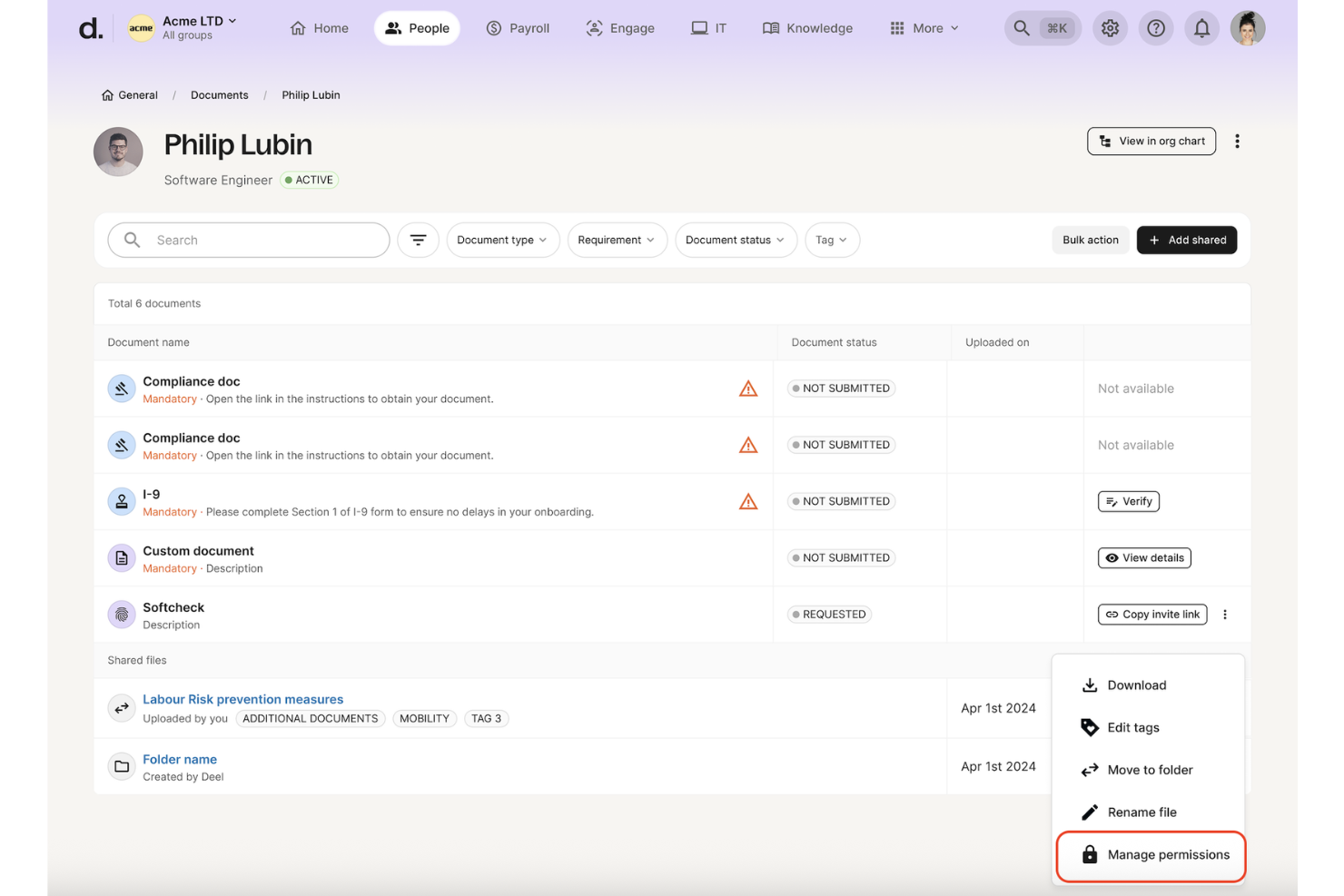
Deel HR si distingue quando la conformità HR globale inizia a diventare un problema, specialmente durante l’assunzione di personale in nuovi paesi. Ho lavorato con team che faticano a tenere traccia delle leggi sul lavoro in continua evoluzione, e il monitoraggio automatico della conformità di Deel, insieme ai modelli di contratto specifici per ogni paese, fanno risparmiare tantissimo tempo nella revisione manuale.
Quello che mi è piaciuto particolarmente durante i miei test è il sistema integrato di avvisi sui rischi e la documentazione pronta per l’audit. Questo permette di sapere esattamente dove si trovano i maggiori gap di conformità, anche quando il ritmo delle assunzioni aumenta.
Ideale per Deel HR
- Team HR che gestiscono la conformità internazionale in decine di paesi
- Aziende che necessitano di monitoraggio automatico dei rischi occupazionali e avvisi tempestivi
Non ideale per Deel HR
- Piccole organizzazioni senza presenza internazionale
- Team che necessitano di modelli di rischio personalizzati oltre la conformità occupazionale
Cosa distingue Deel HR
Deel HR è progettato per aziende che gestiscono assunzioni e conformità in più paesi. Invece di costringerti a cercare consigli locali o recuperare modelli di contratto da fonti sparse come spesso succede con strumenti HRIS di base, Deel ti permette di centralizzare tutto in un unico sistema. Si distingue da piattaforme più generiche come BambooHR, che tendono a concentrarsi sulla gestione HR interna. In pratica, ciò significa che puoi gestire cose come contratti localizzati, conformità e paghe in diversi paesi dallo stesso sistema, senza dover mettere insieme strumenti o consigli diversi.
Compromessi nell’uso di Deel HR
Deel HR è ottimizzato per la conformità globale e la gestione dei rischi, ma questo focus comporta una minore flessibilità quando si tratta di flussi di lavoro personalizzati o di dati sui rischi non collegati direttamente all’ambito HR o occupazionale.
Pros and Cons
Pros:
- L’IA monitora i cambiamenti normativi in oltre 150 paesi per rischi emergenti
- Workforce Insights segnala problemi di conformità su salari, benefit e visti
- Worker Classifier riduce il rischio di errata classificazione utilizzando dati legali
Cons:
- Decisioni legali di alto impatto possono comunque richiedere specialisti umani
- Casi limite specifici per giurisdizione possono richiedere verifiche manuali
New Product Updates from Deel HR

Deel Expands Stablecoin Wallet to 80+ Countries
Deel expands its Stablecoin Wallet to 80+ countries with dollar-backed balances and optional rewards. This gives eligible contractors more ways to hold and manage earnings inside Deel. For more information, visit Deel’s official site.
 .
.
Ideale per la personalizzazione no-code dei workflow
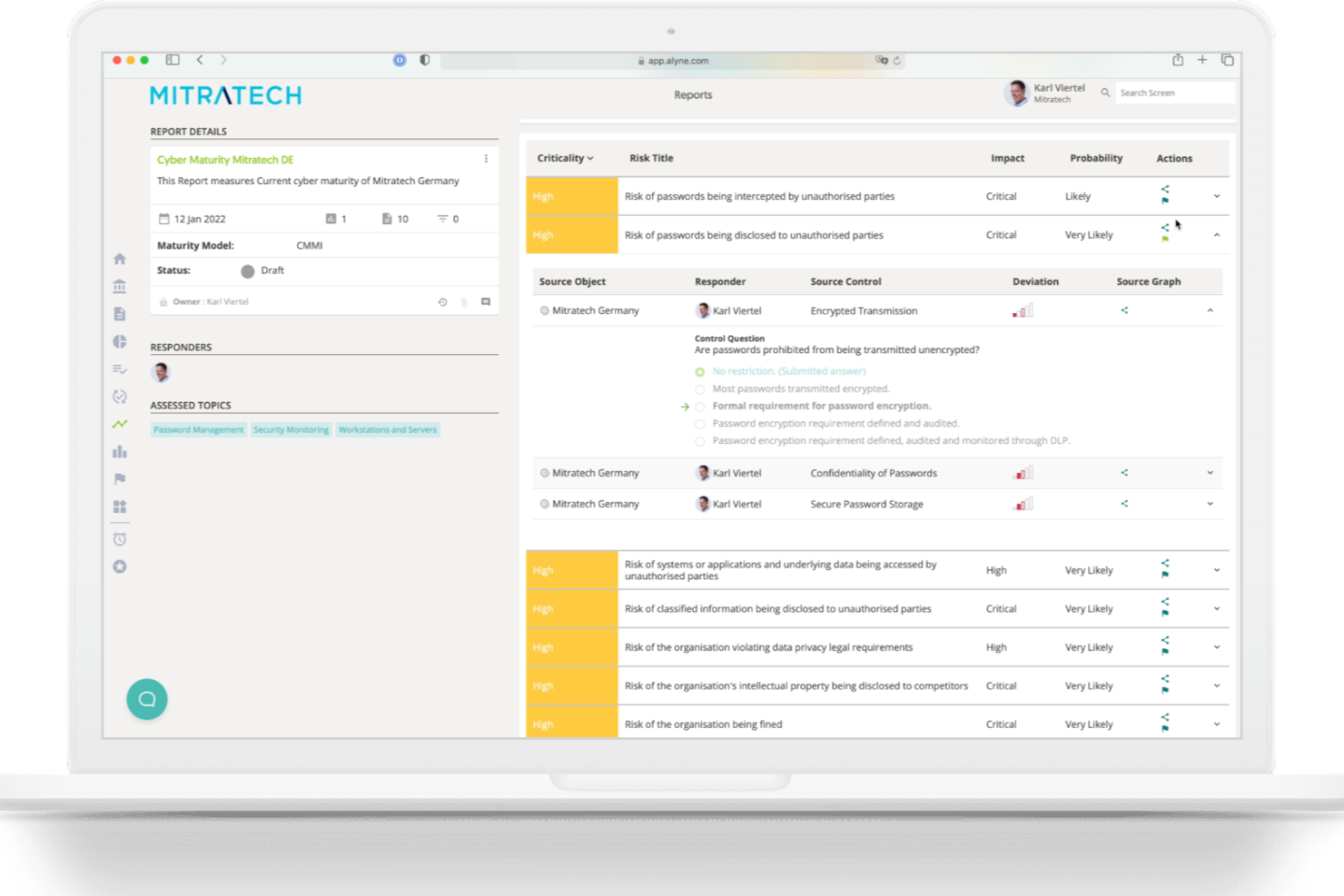
Mitratech Alyne entra nella mia lista per i team di gestione del rischio che devono adattarsi rapidamente senza dover attendere l’intervento dell’IT o degli sviluppatori. L’ho scelto perché offre un vero approccio no-code per costruire o modificare i flussi di lavoro di rischio in base all’evoluzione delle necessità, cosa rara a questo livello di profondità. Durante il test del designer di workflow, mi è piaciuto come sia possibile automatizzare l’escalation dei problemi e le valutazioni dei controlli passo dopo passo. È ideale per team in crescita che devono stare al passo con i requisiti normativi in evoluzione e desiderano una visibilità dettagliata nei processi di rischio.
A chi è consigliato Mitratech Alyne
- Team di gestione del rischio e conformità che necessitano di personalizzare i workflow
- Organizzazioni che aggiornano i framework di rischio per soddisfare nuove normative
A chi non è adatto Mitratech Alyne
- Piccole aziende con esigenze semplici e statiche nella gestione del rischio
- Team che cercano numerosi template predefiniti specifici per settore
Cosa distingue Mitratech Alyne
Mitratech Alyne mette la gestione del rischio al centro del design dei workflow no-code, quindi ci si aspetta che si personalizzino i processi di rischio sin dall’inizio per adattarli alla propria organizzazione. A differenza di soluzioni come LogicGate, che spesso richiedono l’intervento di team tecnici per implementare le modifiche, qui puoi aggiornare autonomamente i workflow e automatizzare le valutazioni. Questo è utile quando le richieste normative o le politiche interne cambiano rapidamente e hai bisogno di controllare come vengono gestiti i rischi.
Compromessi con Mitratech Alyne
Mitratech Alyne è ottimizzato per la personalizzazione dei workflow, ma tale flessibilità comporta la rinuncia a template specifici di settore e controlli preimpostati, il che comporta un setup iniziale più lungo e richiede maggiore competenza.
Pros and Cons
Pros:
- Personalizzazione no-code dei workflow di rischio
- Raccolta automatica di evidenze per audit
- Valutazione e reportistica dei rischi basate su IA
Cons:
- Le funzionalità avanzate possono richiedere supporto durante l’onboarding
- I dettagli sui prezzi non sono pubblicamente disponibili

Il migliore per il rilevamento dei rischi di progetto basato su intelligenza artificiale
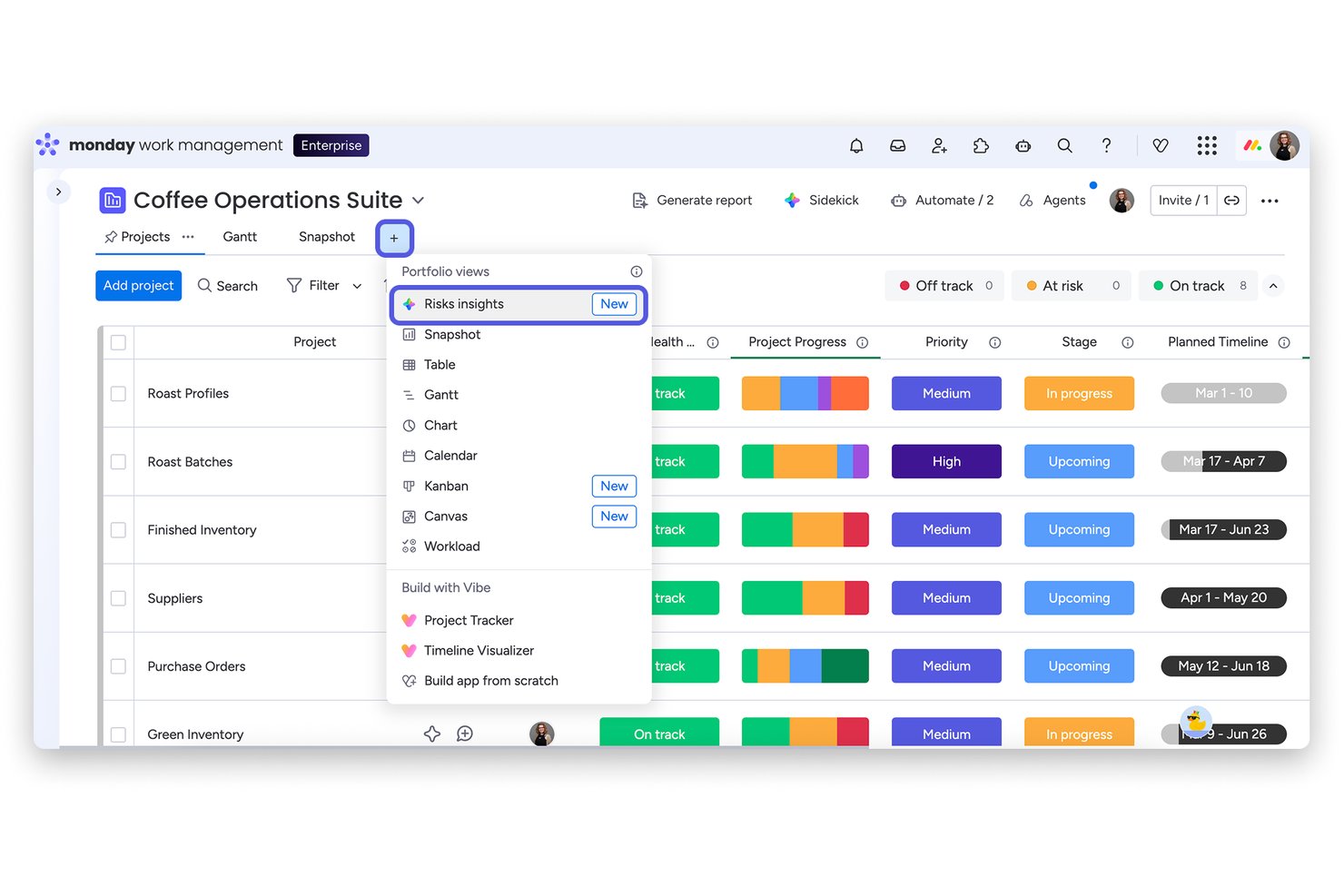
monday AI Workspace è una piattaforma di gestione del lavoro potenziata dall'intelligenza artificiale che analizza le bacheche di progetto per rilevare rischi di esecuzione—including sforamenti di budget, scadenze mancate e conflitti di risorse—in tutti i portafogli di progetto tramite un'analisi automatizzata quotidiana.
Per chi è ideale monday AI Workspace?
Responsabili di portafoglio e leader dei PMO in organizzazioni di medie e grandi dimensioni che necessitano di visibilità sui rischi di esecuzione attraverso più progetti contemporaneamente.
Perché ho scelto monday AI Workspace
Ho incluso monday AI Workspace tra le mie scelte principali perché Portfolio Risk Insights esamina quotidianamente l'intero portafoglio, non solo un singolo progetto. L'intelligenza artificiale analizza i dati delle bacheche, le discussioni sugli aggiornamenti e i registri delle attività per evidenziare rischi legati a sforamenti di budget, scadenze mancate e conflitti di risorse. Mi piace che i progetti ad alto rischio vengano segnalati direttamente nella dashboard del portafoglio, con azioni di mitigazione precompilate che il tuo team può adottare immediatamente.
Caratteristiche principali di monday AI Workspace
- Assistente AI: Fornisce assistenza tramite intelligenza artificiale per riassumere aggiornamenti e generare suggerimenti di attività all'interno delle bacheche.
- Costruttore di flussi di lavoro automatizzati: Permette agli utenti di progettare regole di automazione per gestire attività ripetitive di gestione progetti e rischio.
- Integrazioni personalizzate: Si collega nativamente a strumenti come Slack, Jira, Salesforce e Microsoft Teams per un'operatività di progetto unificata.
- Permessi avanzati: Supporta controlli di accesso granulari e basati sui ruoli per proteggere i dati sensibili di progetti e risorse.
Integrazioni di monday AI Workspace
monday AI Workspace offre integrazioni native con Slack, Salesforce, HubSpot, Google Workspace, Microsoft Teams, GitHub, Jira, Dropbox, Canva, Zendesk e Zoom. Si collega inoltre con Zapier e fornisce un'API per integrazioni personalizzate.
Pros and Cons
Pros:
- L'IA segnala automaticamente i rischi di delivery a livello di progetto
- L'analisi quotidiana del portafoglio evidenzia i progetti ad alto rischio
- Le funzionalità di automazione semplificano i flussi di lavoro relativi ai rischi
Cons:
- Nessuna funzione di audit su bias o equità HR
- Mancano strumenti di conformità alle normative sul lavoro
New Product Updates from monday AI Workspace
monday AI Workspace Adds Human Approval Routing
monday AI Workspace adds a human-in-the-loop approval block to AI Workflows, sending approval requests and routing workflow paths based on responses. For more information, visit monday AI Workspace's official site.

Ideale per una visione unificata del rischio organizzativo
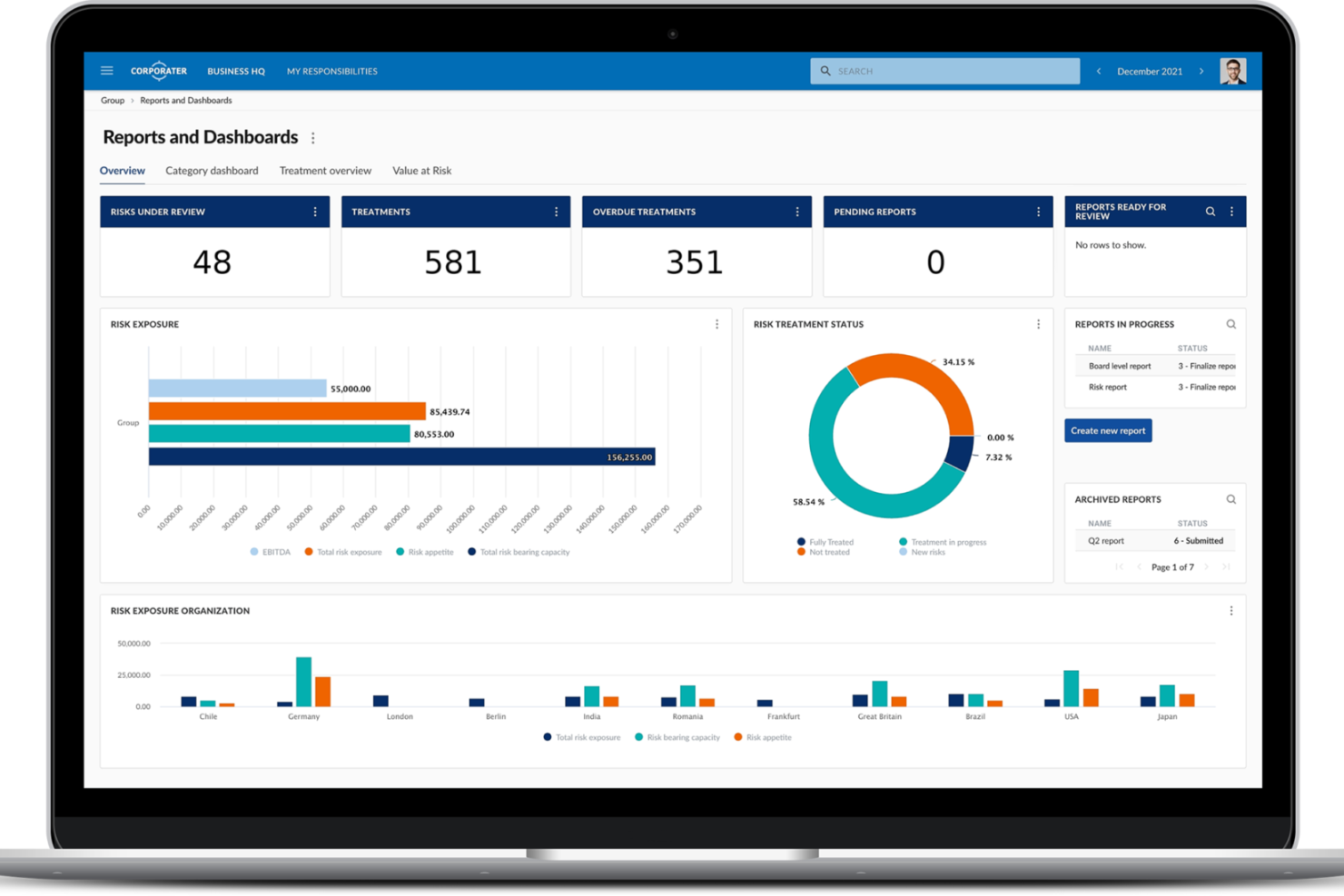
Corporater è una piattaforma di gestione del rischio basata su AI che centralizza i dati sui rischi, offre dashboard configurabili, integra il monitoraggio della conformità e supporta la governance a livello aziendale per team che gestiscono esigenze complesse di risk management.
Per chi è più indicato Corporater?
Corporater è particolarmente adatto a medie e grandi aziende che necessitano di gestire rischio, conformità e governance tra più unità aziendali da un'unica piattaforma.
Perché ho scelto Corporater
Ho incluso Corporater tra le mie scelte migliori perché la sua funzione di Gemello Digitale di un'Organizzazione è davvero unica rispetto ad altri strumenti di gestione del rischio che ho visto. Consente di modellare la reale struttura aziendale—unità, flussi di lavoro, livelli di governance—e mappare i dati sui rischi su tutta questa struttura. Insieme a un registro centralizzato dei rischi che aggrega dati da fonti interne ed esterne, il mio team può visualizzare l'esposizione al rischio a livello aziendale in un unico posto anziché rincorrere report dai vari dipartimenti.
Caratteristiche principali di Corporater
- Intelligenza dei rischi alimentata da AI: Corporater utilizza l'AI per analizzare dati in tempo reale e generare approfondimenti predittivi sui rischi in tutti i tuoi flussi di lavoro GRC.
- Flussi di lavoro automatizzati: Crea processi aziendali e flussi di lavoro automatici per assegnare compiti, monitorare i progressi e garantire l'adesione alle procedure nelle attività di gestione del rischio.
- Dashboard KPI e KRI: Crea dashboard basate sui ruoli che monitorano i principali indicatori di rischio insieme agli indicatori chiave di performance, collegati a unità aziendali, obiettivi e progetti.
- Avvisi e notifiche: Configura avvisi personalizzati per notificare agli stakeholder quando un indicatore di rischio supera una soglia definita o viene segnalato un nuovo problema.
Integrazioni di Corporater
Corporater integra in modo sicuro dati aggregati di RegTech e cybersecurity in un quadro centralizzato di governance e conformità.
Pros and Cons
Pros:
- Archivio centralizzato per i dati di rischio a livello aziendale
- Modellazione di scenari per simulazioni avanzate di rischio
- Flussi di lavoro personalizzati per cicli di approvazione e revisione
Cons:
- Pochi modelli preimpostati per rischi specifici legati all'AI
- Complessità nella personalizzazione dei report per i nuovi utenti
Ideale per il monitoraggio automatizzato delle policy IA
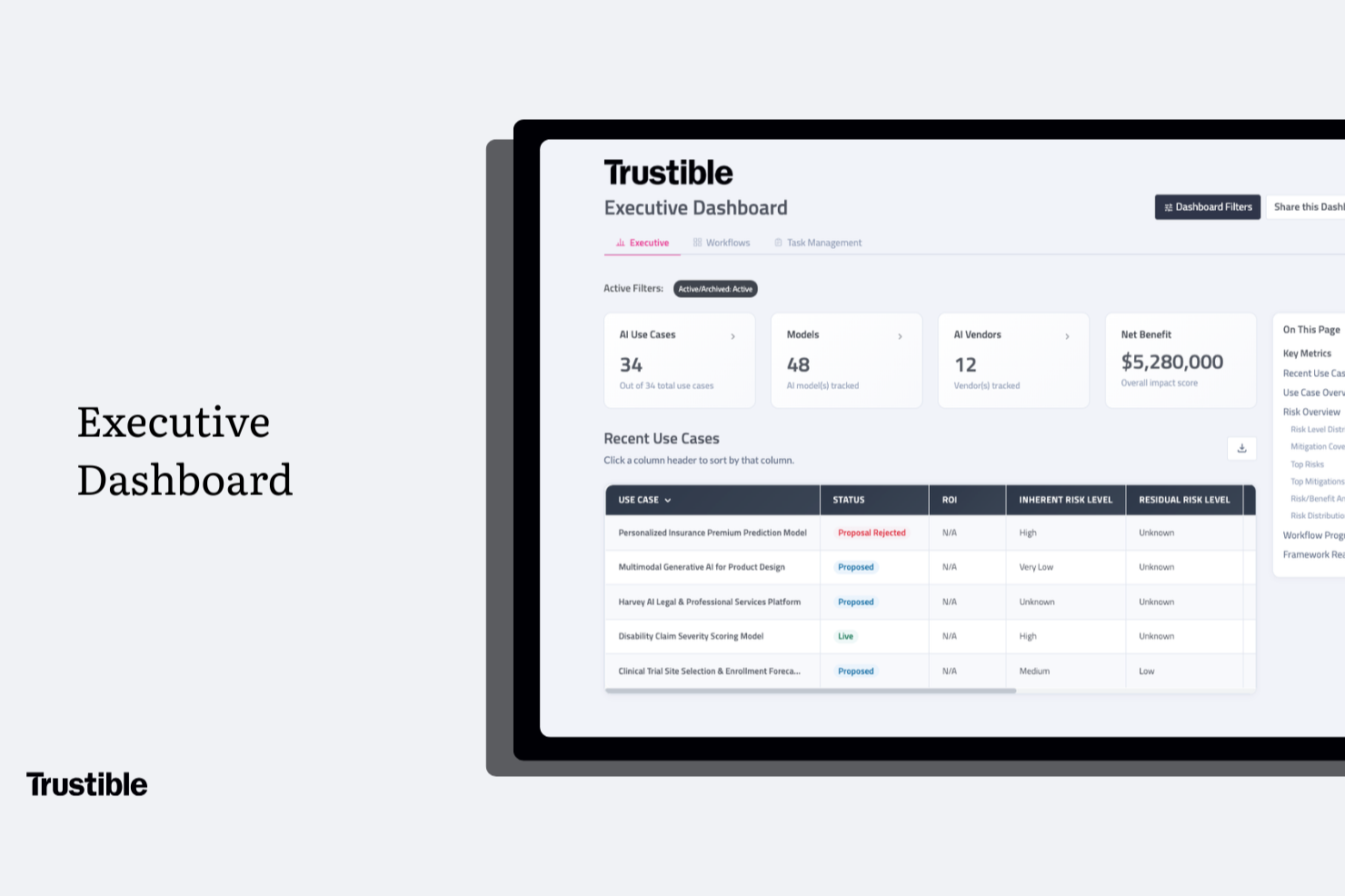
Trustible è una piattaforma di governance dell'IA progettata per uno scopo specifico, che combina la gestione dell'inventario dell'IA, l'identificazione e la classificazione dei rischi, la gestione delle policy, la mappatura della conformità normativa su più framework e la reportistica pronta per gli audit per le aziende.
Per chi è più adatto Trustible?
Trustible è particolarmente adatto ai team aziendali che si occupano di IA e conformità e che devono governare molteplici casi d'uso dell'IA in ambienti normativi complessi.
Perché ho scelto Trustible
Ho scelto Trustible come una delle soluzioni migliori per il modo in cui gestisce il monitoraggio delle policy senza richiedere attività manuali da parte del team. Il suo modulo centralizzato di gestione delle policy si collega direttamente all'inventario IA attivo, il che significa che le policy non sono conservate in un documento separato, ma sono associate a casi d'uso reali e aggiornate quando questi cambiano. Apprezzo anche il fatto che i flussi di lavoro automatizzati indirizzino i nuovi casi d'uso dell'IA lungo un percorso di governance coerente, segnalando le lacune nelle policy prima che le approvazioni procedano, non dopo.
Funzionalità principali di Trustible
- Inventario dei casi d'uso dell'IA: Cataloga ogni caso d'uso dell'IA, modello, agente e fornitore in un unico registro, con le relative classificazioni di rischio.
- Gestione dei casi in base al rischio: Indirizza automaticamente i casi d'uso dell'IA a basso rischio verso un'approvazione accelerata e segnala quelli ad alto rischio per una revisione più approfondita.
- Mappatura della conformità su più framework: Mappa un unico insieme di controlli di governance su oltre 10 framework, tra cui la legge sull'IA dell'UE, il NIST AI RMF e la ISO 42001.
- Reportistica pronta per gli audit: Genera report destinati al consiglio di amministrazione e alle autorità di regolamentazione, con lo stato in tempo reale di tutti i casi d'uso dell'IA attivi.
Integrazioni di Trustible
Le integrazioni native non sono documentate chiaramente. Trustible è progettata come piattaforma autonoma di governance dell'IA per i team che si occupano di rischio, conformità e aspetti legali, e le sue FAQ confermano che non richiede l'integrazione tecnica con le pipeline MLOps. In base alla documentazione attuale, il supporto per API e Zapier non è chiaramente disponibile.
Pros and Cons
Pros:
- Flussi di lavoro guidati per la gestione dei rischi destinati ai team non tecnici
- Aggiornamenti della mappatura su più framework al variare delle normative
- Analisi dei rischi della documentazione dei fornitori assistita dall'IA
Cons:
- Nessuna funzionalità di monitoraggio dei modelli in fase di esecuzione
- Opzioni limitate di integrazione con le fonti di evidenza dei sistemi ingegneristici
OneTrust
Ideale per la conformità alla privacy
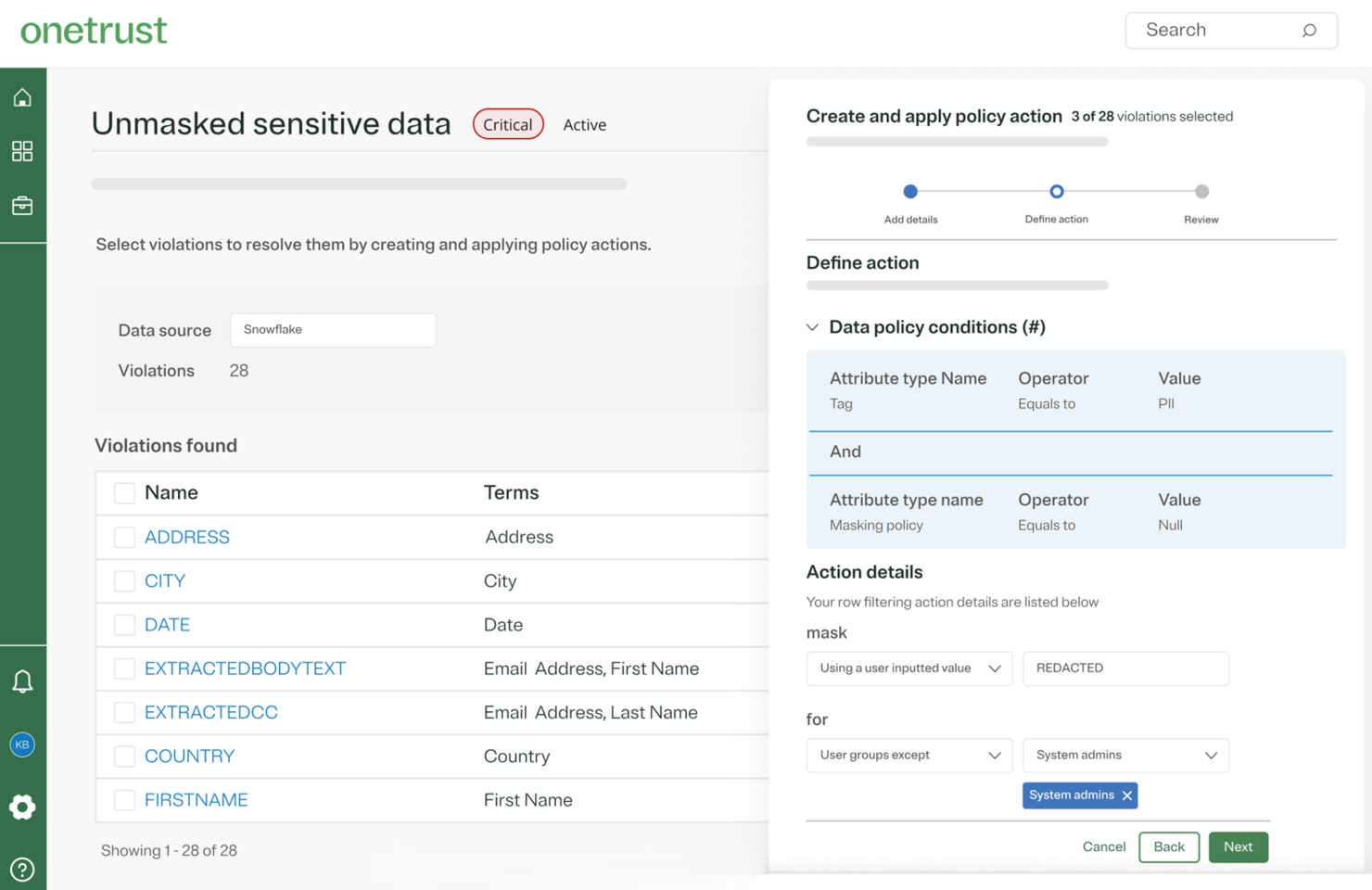
OneTrust si guadagna il suo posto qui perché pochi strumenti gestiscono la privacy, l'IA e il rischio normativo insieme in modo così approfondito. Quello che apprezzo è come le organizzazioni possano eseguire valutazioni di rischio IA dedicate che tengano conto dei flussi di dati, del rischio dei fornitori e dei requisiti normativi tutto in un unico posto.
Ho trovato la sua mappatura automatizzata dei dati particolarmente utile per i team preoccupati per l'evoluzione delle leggi sulla privacy nei casi d'uso dell'IA. Se hai bisogno di report dettagliati per dimostrare la conformità a quadri come il GDPR, OneTrust è spesso il sistema che vedo utilizzato nella pratica.
OneTrust è ideale per
- Organizzazioni con esigenze formali di conformità in materia di privacy e rischio IA
- Aziende che necessitano di tracce di audit automatizzate e reportistica pronta per le autorità di regolamentazione
OneTrust non è l'ideale per
- Piccoli team che necessitano di strumenti di rischio di base o leggeri
- Chiunque non monitori la privacy dei dati o il rischio normativo
Cosa distingue OneTrust
OneTrust affronta la gestione del rischio con una prospettiva incentrata sulla privacy, partendo dal presupposto che sia necessario un controllo dettagliato su come i dati fluiscono attraverso i sistemi di IA. A differenza degli strumenti che si concentrano sulla sicurezza o sulle operazioni di ML, OneTrust considera la privacy e la conformità normativa come il fulcro delle strategie di rischio IA. Questo può essere particolarmente vantaggioso per i team che devono bilanciare il rischio legale e la velocità operativa, piuttosto che solo costruire e distribuire modelli IA.
Compromessi con OneTrust
OneTrust è ottimizzato per la conformità e la tracciabilità degli audit, il che significa che i team agili o in rapido movimento possono trovare la sua profondità di processo e i requisiti di configurazione un fattore di rallentamento.
Pros and Cons
Pros:
- Valutazioni automatizzate del rischio dei fornitori, DSR e audit
- Oltre 50 normative e quadri globali coperti
- Include la gestione del consenso e delle preferenze
Cons:
- Processi manuali all'interno di strumenti automatizzati
- Tempi di sincronizzazione lenti per gli aggiornamenti di configurazione
Anaconda
Ideale per data scientist
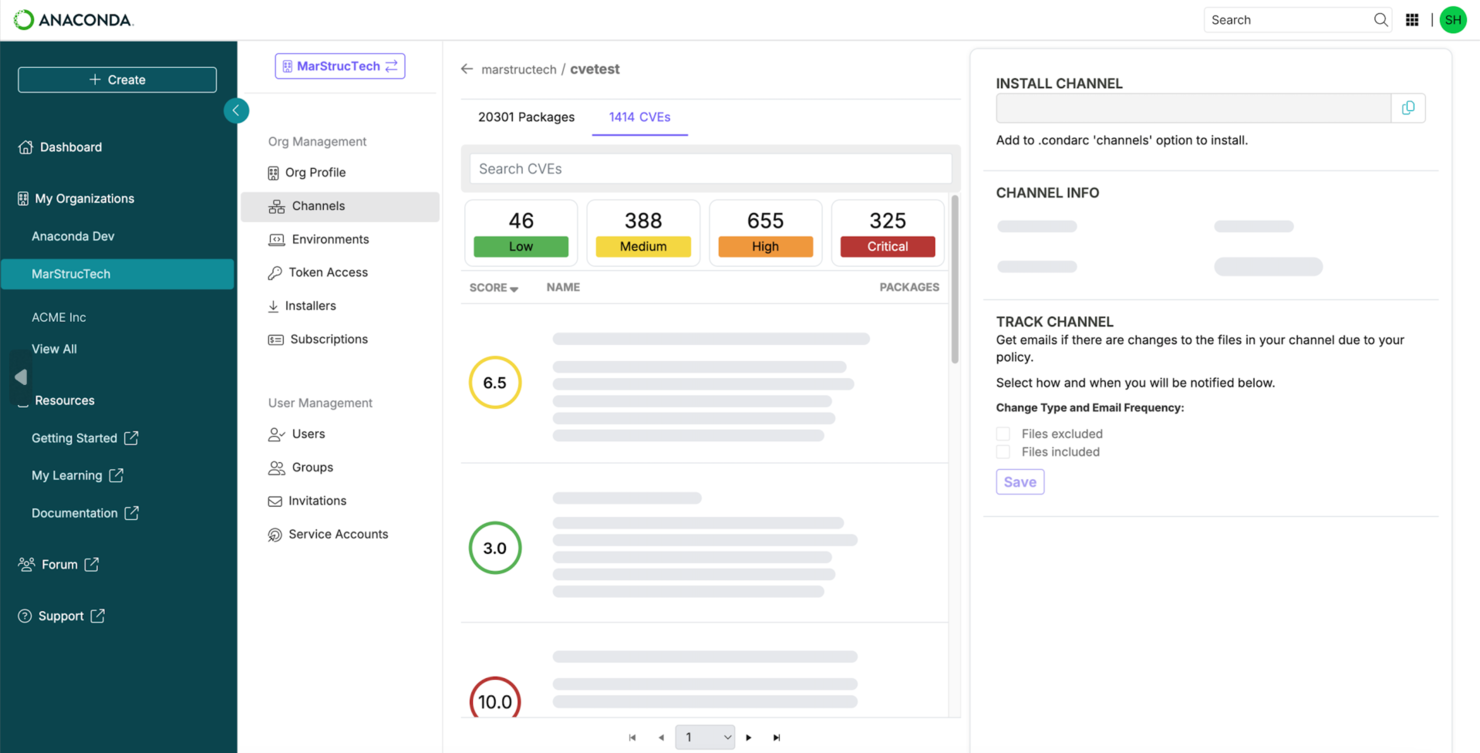
Anaconda è presente in questo elenco perché offre agli scienziati dei dati un ambiente completo per sviluppare, testare e monitorare modelli di IA. Mi piace la possibilità di gestire pacchetti e ambienti Python all'interno di un flusso di lavoro sicuro e riproducibile. Gli strumenti integrati per il tracciamento delle dipendenze e il controllo delle versioni rendono la gestione dei rischi più pratica, specialmente quando ci si concentra sulla governance dei modelli in settori regolamentati.
Quello che mi colpisce di più è il modo in cui i team di dati utilizzano Anaconda quando hanno bisogno di trasparenza e riproducibilità nei loro progetti di IA: è facile documentare esattamente cosa fosse in esecuzione durante una revisione critica o un audit.
Anaconda è ideale per
- Team di data science focalizzati su flussi di lavoro IA riproducibili
- Organizzazioni che necessitano di una gestione sicura degli ambienti Python
Anaconda non è consigliato per
- Utenti non tecnici che cercano strumenti di gestione del rischio IA semplici
- Team che necessitano di piattaforme di governance IA aziendale end-to-end
Cosa distingue Anaconda
Anaconda promuove un approccio modulare, basato su ambienti che privilegia riproducibilità e trasparenza. A differenza degli strumenti di workflow cloud o di piattaforme come DataRobot, Anaconda consente il controllo di ogni dipendenza e versione tramite pacchetti locali e isolati. Questo rende più facile verificare, condividere e ricreare modelli IA, soprattutto quando le norme richiedono la verifica esatta di quale codice fosse in esecuzione.
In pratica, i team utilizzano Anaconda quando serve coerenza in pipeline complesse, non una soluzione gestita end-to-end.
Compromessi con Anaconda
Anaconda punta al controllo e alla trasparenza dell'ambiente, ma si sacrifica la facilità d'uso per gli utenti meno tecnici. Questo rallenta l'adozione se la tua organizzazione privilegia la semplicità o richiede una piattaforma di governance del rischio IA centralizzata.
Pros and Cons
Pros:
- Oltre 8.000 pacchetti open-source per IA e ML
- Distribuzione tutto-in-uno per una facile configurazione
- Supporto professionale per progetti IA su larga scala
Cons:
- Consumo delle risorse di sistema
- Licenza business richiesta per grandi aziende

Resolver
Ideale per la gestione degli incidenti
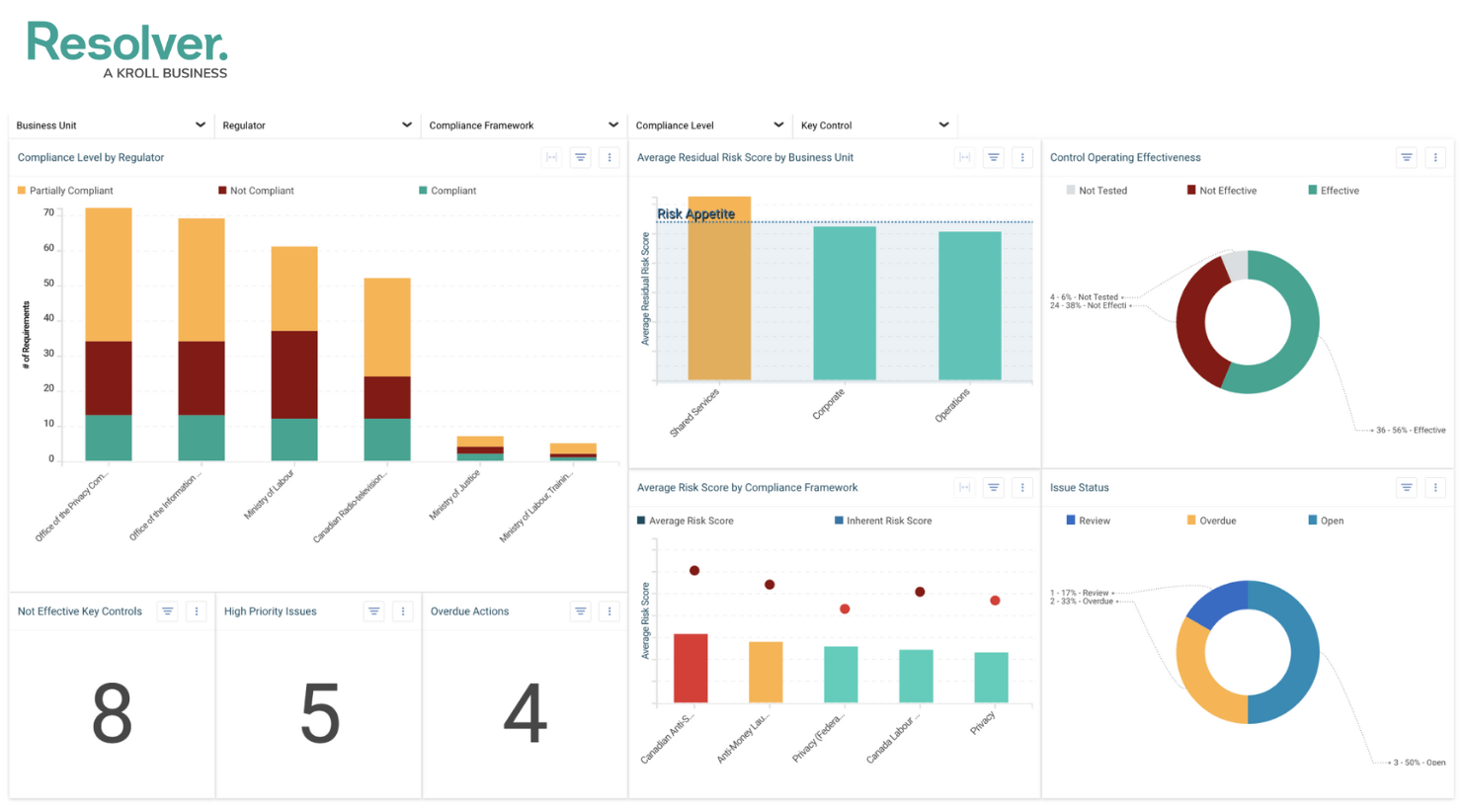
Resolver è nella mia lista per la gestione degli incidenti perché unisce dati su rischi, minacce e incidenti in un unico sistema che si adatta man mano che cambia il tuo profilo di rischio. Mi piace il modo in cui automatizza il triage degli incidenti e costruisce un'analisi dell'impatto con pochi clic, risparmiando tempo nei momenti di crisi.
Vedo i team usare Resolver quando le normative impongono di mostrare passo dopo passo risposta e mitigazione, collegando ogni azione a incidenti specifici. L'AI integrata aiuta a individuare precocemente i modelli, cosa che trovo preziosa per le organizzazioni che devono passare da una gestione reattiva a una proattiva dei rischi.
Resolver è ideale per
- Team di sicurezza, rischio e compliance che gestiscono la risposta agli incidenti
- Organizzazioni che hanno bisogno di audit trail e analisi automatizzata dei rischi
Resolver non è ideale per
- Piccoli team che necessitano solo di una semplice tracciatura di attività o rischi
- Aziende con necessità di gestione del rischio leggere o statiche
Cosa distingue Resolver
Resolver si distingue integrando gestione di incidenti, rischi e audit in un unico workflow. Invece di tracciare solo i problemi come fai in Jira o ServiceNow, Resolver ti porta a trattare i dati sugli incidenti come fondamentali per l’analisi dei rischi e la prontezza agli audit. Vedo che le organizzazioni che devono soddisfare requisiti regolatori o di reporting stringenti ottengono molto più valore da questo approccio all-in-one. Gestisci l’intero ciclo di rilevamento, risposta e apprendimento all’interno di un solo sistema.
Compromessi con Resolver
Resolver è ottimizzato per una supervisione strutturata di rischi e incidenti, ma questo framework rigido implica meno opzioni per personalizzare i workflow. Se vuoi qualcosa che puoi adattare rapidamente a processi nuovi o informali, potresti trovarti frustrato.
Pros and Cons
Pros:
- Raccolta e classificazione degli incidenti guidata dall’intelligenza artificiale
- Triage automatizzato e playbook di risposta dinamica
- Dati centralizzati per la visibilità e il reporting tra i team
Cons:
- Capacità offline limitate a causa dell'impostazione basata su browser
- Potrebbe richiedere personalizzazione per workflow complessi

Collibra
Ideale per la governance dell'IA
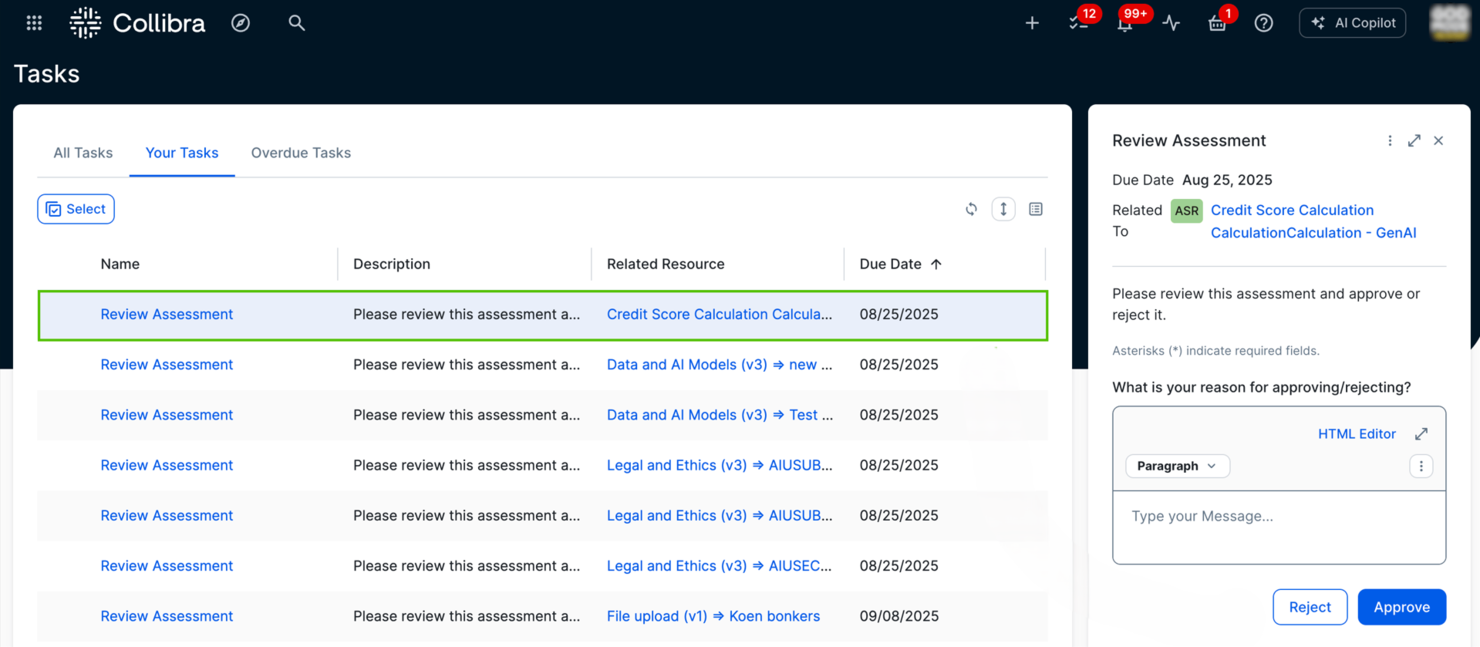
Collibra entra nella mia selezione perché pochi strumenti offrono controlli granulari, guidati da policy, pensati per la governance dell'IA su larga scala. Ho visto organizzazioni utilizzare Collibra per implementare la tracciabilità dei dati, la gestione delle policy e il monitoraggio dei rischi senza dover assemblare sistemi separati.
Quello che apprezzo particolarmente è come Collibra automatizzi la mappatura dei flussi di dati e dei fattori di rischio, aiutando i team a documentare, analizzare e controllare i rischi legati all'IA mentre le normative evolvono.
Ideale per
- Imprese che gestiscono governance dati complessa per i rischi dell'IA
- Organizzazioni che necessitano di controlli sulle policy e conformità normativa
Non indicato per
- Piccoli team che cercano strumenti leggeri o a rapida implementazione
- Utenti che non gestiscono dati IA sensibili o ad alto rischio
Cosa distingue Collibra
Collibra affronta la governance concentrando tutto su policy dei dati trasparenti e una tracciabilità dettagliata tra i sistemi. Invece di limitarsi a tracciare asset come un tradizionale catalogo dati, Collibra ti spinge a gestire governance e rischi come processi attivi e costanti. Questo funziona bene per le organizzazioni che desiderano una supervisione centralizzata e una documentazione chiara su modelli di IA e dati utilizzati.
A differenza di strumenti più flessibili come ClickUp, Collibra privilegia una struttura pronta per l'audit e il controllo normativo rispetto alla flessibilità.
Compromessi con Collibra
Collibra è ottimizzata per governance centralizzata e controlli rigorosi. Questo comporta tempi di configurazione e carichi amministrativi superiori, quindi non è adatta a team che cercano adozione rapida o massima flessibilità.
Pros and Cons
Pros:
- Tracciabilità dei modelli di IA incorporata in tutte le iniziative
- Automatizza la conformità alle normative globali
- Si integra con le principali piattaforme AI/ML
Cons:
- Navigazione utente meno intuitiva
- Richiede una partecipazione attiva alla governance dei dati da parte di più dipartimenti
Credo AI
Ideale per l'IA etica
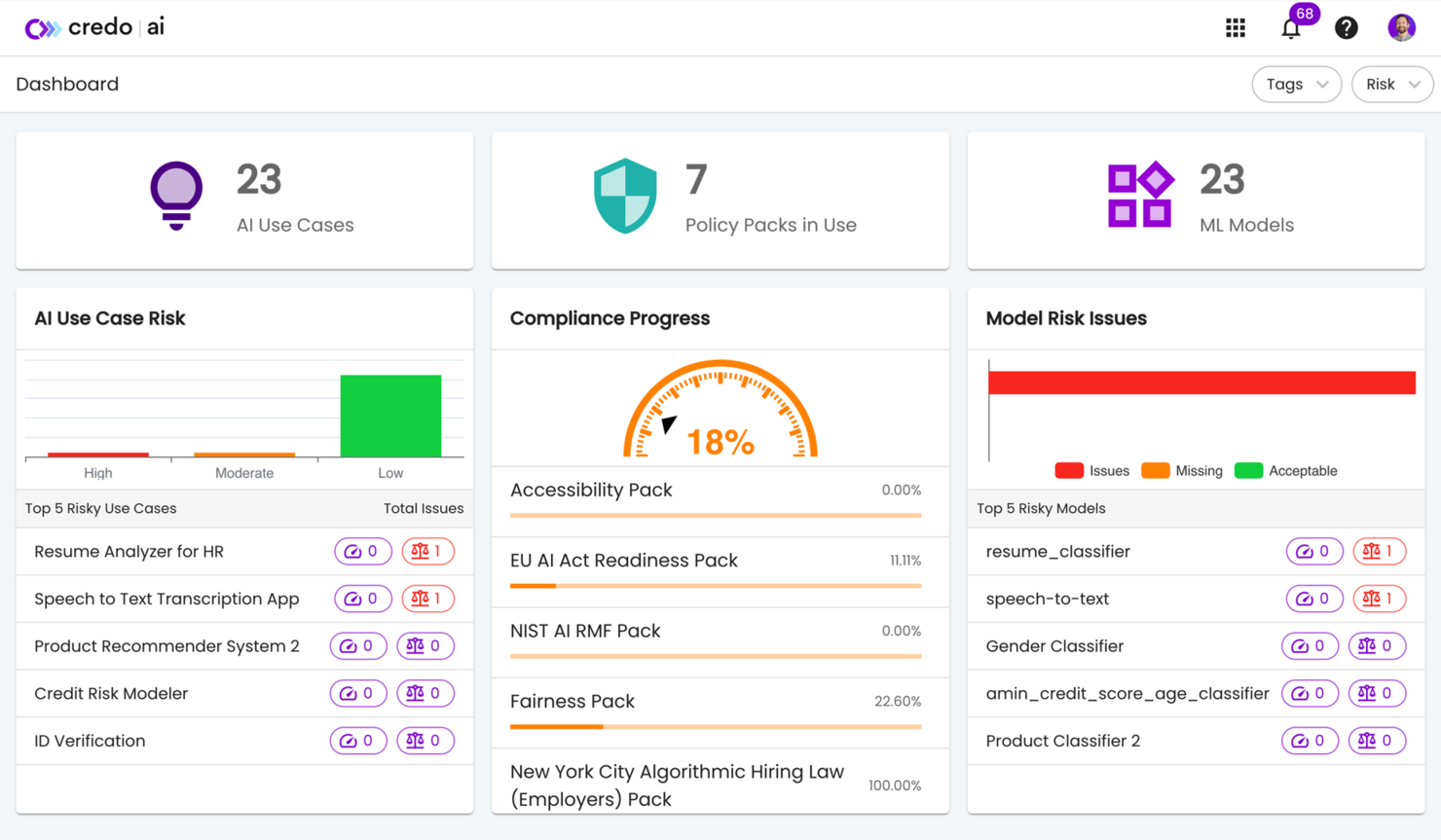
Credo AI si merita un posto qui per il modo in cui affronta direttamente la governance e il rischio nel ciclo di vita dell'IA. Quando recensisco strumenti che aiutano le organizzazioni a rendere operativa un'intelligenza artificiale responsabile, vedo che Credo AI si distingue nella gestione delle politiche, nelle valutazioni automatiche dell'IA e nella documentazione. Apprezzo il fatto che sia possibile collegare i propri modelli e flussi di lavoro a standard etici o legali personalizzati per l'IA, il che aiuta i team ad allinearsi rapidamente anche sotto pressione.
Credo AI è l'ideale per
- Organizzazioni che vogliono formalizzare programmi di gestione del rischio e della governance dell'IA
- Team che necessitano di una gestione del ciclo di vita dell'IA guidata da policy
Credo AI non è ideale per
- Piccoli team con esigenze di controllo dell'IA solo basilari
- Chi cerca funzioni tecniche di monitoraggio o ottimizzazione dei modelli
Cosa distingue Credo AI
Credo AI è progettato per rendere la governance dell'IA realmente applicabile da parte dei team di conformità e gestione dei rischi. A differenza delle librerie open source di auditing o degli strumenti integrati nelle piattaforme cloud, vedo che questo strumento richiede che le organizzazioni trattino la supervisione dell'IA come un processo gestito e non come un ripensamento. In pratica, è più utile per chi desidera che audit, valutazioni e documentazione siano strettamente collegati alle policy aziendali.
Compromessi di Credo AI
Credo AI dà priorità a una governance dell'IA guidata da policy, quindi si sacrifica la flessibilità e la semplicità di controllo a favore di processi più rigorosi e controlli dedicati. Se vuoi soltanto monitorare i modelli senza una documentazione approfondita, potrebbe sembrare troppo impegnativo.
Pros and Cons
Pros:
- Servizi di consulenza per la governance dell'IA
- Strumenti di rilevamento delle distorsioni e per l'equità
- Ecosistemi trasparenti che mitigano il rischio
Cons:
- Costo superiore rispetto ad alcuni concorrenti
- Possibili sfide di integrazione
Altri strumenti di gestione del rischio basati sull'IA
Ecco alcune ulteriori opzioni di strumenti di gestione del rischio basati sull’IA che non sono entrate nel mio elenco, ma che vale comunque la pena valutare:
- Vanta
Ideale per le startup
- Riskonnect
Ideale per la gestione del rischio aziendale
- Sardine
Ideale per la prevenzione delle frodi
- Document Crunch
Ideale per la gestione dei rischi nel settore edile
- Lumenova AI
Ideale per la diagnostica dei rischi AI


Come valuto gli strumenti di gestione del rischio AI
Ogni strumento qui deve dimostrare che la sua intelligenza artificiale svolge un vero lavoro, come individuare schemi di impatto disparato che i team HR non noterebbero manualmente, o segnalare lacune di conformità man mano che entrano in vigore nuove leggi sul lavoro legate all'AI. Suddivido la mia valutazione in funzionalità di base, che uno strumento deve possedere per entrare nella lista, e fattori differenzianti che distinguono un fornitore dall'altro.
Funzionalità di base (Requisiti Minimi per questa lista)
Quando seleziono gli strumenti per la mia lista, valuto ciascuno su una scala da 0 (non offre la funzionalità) a 5 (eccelle in quest'area) per ogni funzionalità di base elencata di seguito. Poi calcolo il punteggio totale dello strumento in percentuale. Ogni strumento deve ottenere un punteggio totale minimo del 55% per essere preso in considerazione per l'inclusione.
- Rilevamento Bias AI: Cerco controlli automatici di equità su classi protette, come la segnalazione di impatti disparati nei modelli di selezione dei CV o di valutazione delle promozioni.
- Mappatura della Conformità Normativa: Ogni strumento dovrebbe mappare i sistemi HR AI alle leggi rilevanti come NYC LL 144 o l'EU AI Act, con aggiornamenti al variare delle normative.
- Inventario e Valutazione dei Modelli AI: Verifico se la piattaforma cataloga tutti gli strumenti AI HR in uso—ATS, sistemi di performance, chatbot—e assegna a ciascuno un punteggio di rischio.
- Audit e Reportistica Automatica: La piattaforma dovrebbe generare audit di bias e valutazioni d'impatto pronte per regolatori o per il consiglio di amministrazione con pochi clic.
- Spiegabilità e Trasparenza: Valuto quanto chiaramente lo strumento espone il ragionamento in linguaggio semplice dietro le decisioni AI, come il motivo per cui un candidato è stato classificato o segnalato.
- Monitoraggio e Rilevamento Drift: Il monitoraggio in tempo reale dei modelli implementati è fondamentale, soprattutto con avvisi quando i parametri di equità o la qualità dei dati iniziano a degradarsi col tempo.
Una volta che ho una lista di strumenti che soddisfano questi criteri, considero ciò che distingue ciascuna piattaforma.
Fattori di differenziazione (Cosa distingue i fornitori)
Ecco come confronto e metto a contrasto i vari fornitori:
Caratteristiche distintive
Le valutazioni del rischio dei fornitori sono un grande fattore distintivo: cerco strumenti che possano valutare il rischio AI di tecnologie HR di terze parti come piattaforme ATS e software per colloqui video, non solo modelli sviluppati internamente. I sistemi di controllo per la Generative AI diventano ogni anno più rilevanti man mano che co-piloti per recruiter e chatbot diventano lo standard, perciò verifico la presenza di monitoraggio in tempo reale di fuga di PII e allucinazioni. Un'altra caratteristica che apprezzo è la generazione di avvisi per i candidati, soprattutto per team che assumono in diverse giurisdizioni con requisiti di trasparenza AI.
Oltre le funzionalità
L'integrazione con lo stack tecnologico HR è una delle prime cose che verifico—uno strumento che si collega nativamente al tuo HRIS, ATS e a piattaforme GRC come ServiceNow o OneTrust fa risparmiare mesi di lavoro manuale sui dati. Anche la frequenza degli aggiornamenti normativi è importante perché le leggi sull'AI nel mondo del lavoro evolvono rapidamente e cerco fornitori con team legali dedicati che aggiornano regolarmente le loro librerie di conformità. Valuto inoltre con attenzione la postura sulla sicurezza dei dati, in particolare le opzioni di residenza dei dati e la gestione delle PII, poiché questi strumenti trattano alcune delle informazioni sui dipendenti più sensibili in tuo possesso.
Come scegliere gli strumenti di gestione del rischio basati sull'IA
È facile perdersi in lunghi elenchi di funzionalità e strutture tariffarie complesse. Per aiutarti a rimanere concentrato mentre affronti il tuo processo di selezione del software, ecco una lista di fattori da tenere a mente:
| Fattore | Cosa considerare |
|---|---|
| Scalabilità | Lo strumento può crescere insieme alla tua azienda? Verifica se supporta l'aumento dei volumi di dati e del numero di utenti senza compromettere le prestazioni. |
| Integrazioni | Si collega ai tuoi sistemi attuali? Cerca integrazioni native con il software che già utilizzi, per evitare l'inserimento manuale dei dati e garantire un flusso di lavoro fluido. |
| Possibilità di personalizzazione | Puoi adattare lo strumento ai tuoi processi? Valuta se consente di modificare flussi di lavoro e report affinché siano in linea con le tue esigenze specifiche. |
| Facilità d'uso | L'interfaccia è intuitiva? Assicurati che il tuo team possa utilizzarla senza formazione continua. Una curva di apprendimento ripida può ritardare l'adozione e ridurre la produttività. |
| Implementazione e avvio | Quanto tempo occorre per iniziare? Valuta il tempo e le risorse necessari per la configurazione e la formazione. Cerca strumenti che offrano assistenza durante l'avvio. |
| Costo | Rientra nel tuo budget? Confronta i piani tariffari e fai attenzione ai costi nascosti. Verifica che il costo sia proporzionato al valore e alle funzionalità offerte. |
| Misure di sicurezza | Sono presenti solide misure di sicurezza? Verifica che lo strumento rispetti gli standard di settore per la protezione dei dati, come la crittografia e gli audit di sicurezza periodici. |
| Requisiti di conformità | Supporta le normative necessarie? Verifica che lo strumento soddisfi gli standard di conformità specifici del settore, come il GDPR o l'HIPAA, assicurando che le tue attività rimangano legali. |
Cosa sono gli strumenti di gestione del rischio basati sull'IA?
Gli strumenti di gestione dei rischi dell'IA sono soluzioni software che utilizzano l'intelligenza artificiale per identificare, valutare e mitigare i rischi potenziali all'interno di un'organizzazione. Questi strumenti sono generalmente utilizzati dai responsabili della gestione dei rischi, dai responsabili della conformità e dagli analisti dei dati per migliorare il processo decisionale e proteggere le risorse dell'organizzazione. Funzionalità come le valutazioni automatizzate dei rischi, il monitoraggio in tempo reale e l'analisi predittiva aiutano a identificare le vulnerabilità, garantire la conformità e ottimizzare gli algoritmi di gestione dei rischi. Nel complesso, questi strumenti forniscono agli utenti le informazioni necessarie per gestire i rischi e mantenere proattivamente l'integrità operativa.
Funzionalità
Quando selezioni gli strumenti di gestione dei rischi dell'IA, presta attenzione alle seguenti funzionalità chiave:
- Valutazioni automatizzate dei rischi: utilizza l'IA per valutare rapidamente i rischi potenziali, risparmiando tempo e riducendo gli errori umani.
- Monitoraggio in tempo reale: monitora continuamente dati e attività per rilevare e rispondere alle minacce nel momento in cui si verificano.
- Analisi predittiva: analizza i dati storici per prevedere i rischi futuri, consentendo di adottare misure proattive.
- Automazione della conformità: garantisce il rispetto delle normative di settore automatizzando i controlli e i report di conformità.
- Automazione della risposta agli incidenti: fornisce strumenti per rispondere automaticamente ai rischi identificati, riducendo al minimo i danni e i tempi di inattività.
- Cruscotti personalizzabili: offrono la possibilità di personalizzare la visualizzazione dei dati in base alle esigenze specifiche dell'organizzazione, migliorando chiarezza e concentrazione.
- Rilevamento dei pregiudizi: identifica e mitiga i pregiudizi nei modelli di IA, garantendo un processo decisionale equo ed etico.
- Analisi delle prestazioni: fornisce informazioni sull'efficienza e l'efficacia delle strategie di gestione dei rischi, favorendo il miglioramento continuo.
- Protezione dei dati: salvaguarda le informazioni sensibili tramite la crittografia e i controlli degli accessi, mantenendo l'integrità dei dati.
- Funzionalità di integrazione: si collegano agevolmente ai sistemi esistenti, facilitando il flusso dei dati e la collaborazione tra le piattaforme.
Vantaggi
L'implementazione di strumenti di gestione dei rischi dell'IA offre numerosi vantaggi al tuo team e alla tua azienda. Eccone alcuni:
- Miglioramento del processo decisionale: le informazioni e le analisi basate sull'IA aiutano il tuo team a prendere rapidamente decisioni informate sulla gestione dei rischi.
- Maggiore efficienza: i processi automatizzati riducono le attività manuali, consentendo al tuo team di concentrarsi sulle iniziative strategiche.
- Mitigazione proattiva dei rischi: l'analisi predittiva consente di anticipare e affrontare i rischi prima che diventino problemi.
- Conformità migliorata: i controlli automatizzati della conformità garantiscono che la tua organizzazione rispetti costantemente le normative di settore.
- Risparmio sui costi: pratiche efficienti di gestione dei rischi e una riduzione degli incidenti diminuiscono i costi operativi e le potenziali perdite finanziarie.
- Sicurezza dei dati: solide funzionalità di protezione dei dati salvaguardano i tuoi dati sensibili dalle violazioni e dagli accessi non autorizzati.
- Uso etico dell'IA: gli strumenti di rilevamento dei pregiudizi garantiscono che i tuoi modelli di IA operino in modo equo, preservando fiducia e integrità nel processo decisionale.
Costi e prezzi
La selezione degli strumenti di gestione dei rischi dell'IA richiede la conoscenza dei diversi modelli di prezzo e dei piani disponibili. I costi variano in base alle funzionalità, alle dimensioni del team, agli add-on e ad altri fattori. La tabella seguente riassume i piani più comuni, i relativi prezzi medi e le funzionalità tipicamente incluse nelle soluzioni di strumenti di gestione dei rischi dell'IA:
Tabella comparativa dei piani per gli strumenti di gestione dei rischi dell'IA
| Tipo di piano | Prezzo medio | Funzionalità comuni |
|---|---|---|
| Piano gratuito | $0 | Identificazione di base dei rischi, protezione dei dati limitata e report di base. |
| Piano base | $15-200/user/month | Valutazioni automatizzate dei rischi, monitoraggio in tempo reale e controlli di conformità di base. Limitazioni sul numero minimo o massimo di postazioni. |
| Piano aziendale | $5,000-$20,000/year | Analisi predittiva, cruscotti personalizzabili e automazione avanzata della risposta agli incidenti. |
| Piano aziendale avanzato | +$20,000/year | Informazioni avanzate basate sull'IA, automazione completa della conformità e ampie funzionalità di integrazione. |
Domande frequenti sugli strumenti di gestione del rischio dell'IA
Ecco alcune risposte alle domande comuni sugli strumenti di gestione del rischio dell’IA:
Come si integrano gli strumenti di gestione del rischio dell'IA con i sistemi esistenti?
Gli strumenti di gestione del rischio dell’IA offrono generalmente integrazioni con piattaforme diffuse come Salesforce, SAP e Microsoft Dynamics. È possibile collegare questi strumenti tramite API o integrazioni native, assicurando il flusso dei dati tra i sistemi. Prima dell’acquisto, verifica che lo strumento supporti i sistemi specifici utilizzati dalla tua organizzazione. Alcuni fornitori offrono anche servizi di integrazione personalizzati, se necessario.
Gli strumenti di gestione del rischio dell'IA possono aiutare a garantire la conformità normativa?
Sì, gli strumenti di gestione del rischio dell’IA possono aiutare a garantire la conformità normativa automatizzando i controlli di conformità e generando report. Questi strumenti spesso includono funzionalità associate a normative specifiche come il GDPR o l’HIPAA, aiutando il tuo team a rimanere conforme. Gli aggiornamenti regolari assicurano che lo strumento resti allineato alle normative in evoluzione, riducendo il rischio di non conformità.
In che modo gli strumenti di gestione del rischio dell'IA gestiscono la sicurezza dei dati?
Gli strumenti di gestione del rischio dell’IA gestiscono la sicurezza dei dati attraverso la crittografia, i controlli degli accessi, la convalida e regolari audit di sicurezza. Dovresti assicurarti che lo strumento sia conforme agli standard di settore per la protezione dei dati. Cerca tecnologie di IA con funzionalità come la crittografia end-to-end e l’autenticazione a più fattori per proteggere le informazioni sensibili. Gli aggiornamenti e gli audit regolari aiutano a mantenere l’integrità della sicurezza e a mitigare i nuovi rischi.
In che modo gli strumenti di gestione del rischio dell'IA possono migliorare il processo decisionale?
Gli strumenti di gestione del rischio dell’IA migliorano il processo decisionale fornendo analisi e informazioni basate sui dati generate dall’IA. Attraverso l’uso dell’IA, questi strumenti analizzano grandi quantità di dati per identificare schemi e prevedere potenziali rischi nel mondo reale. Le parti interessate possono utilizzare queste informazioni per prendere decisioni consapevoli, riducendo la probabilità di errori. Cerca strumenti di IA con analisi in tempo reale per ottenere informazioni il più possibile tempestive.