

10 beste KI-baserte HR-informasjonssystemer vurdert i 2026

10 Beste AI-HRIS-kortliste


De beste AI-drevne HRIS-plattformene kombinerer tradisjonelle HR-administrasjonsfunksjoner – som lønn, rekruttering og medarbeiderengasjement – med intelligent automatisering og prediktiv analyse. Det hjelper deg med å spare tid og ta smartere beslutninger.
Manuelle prosesser og fragmenterte systemer kan forsinke HR-team og føre til kostbare feil. Et AI-drevet HRIS effektiviserer disse oppgavene ved å automatisere arbeidsflyter, analysere arbeidsstyrketrender og til og med forutsi fremtidige behov – slik at du kan gå fra reaktiv administrasjon til en proaktiv strategi for medarbeiderne.
Med utgangspunkt i mange års testing og vurdering av HR-programvare har jeg satt sammen en liste over de beste AI-HRIS-løsningene. De er intuitive, skalerbare og utviklet for å forbedre både effektiviteten og medarbeideropplevelsen.
I denne veiledningen finner du plattformer som reduserer administrasjon, forbedrer beslutningstakingen og gir deg handlingsrettet innsikt i arbeidsstyrkens helse og resultater.
Why Trust Our Software Recommendations
Our team has been testing and reviewing software since 2012. As HR experts ourselves, we know how difficult—and important—it is to choose the right software.
For this guide, we evaluated tools using hands-on testing and independent research, scoring tools using our selection criteria. We also draw on insights from industry thought leaders and practicing HR experts.
Our reviews reflect our human editorial judgment, not a sales pitch.
Expert reviewers:
Sammenligningstabell for AI-HRIS
Denne sammenligningstabellen oppsummerer prisdetaljene for mine beste AI-HRIS-valg:
| Tool | Best For | Trial Info | Price | ||
|---|---|---|---|---|---|
| 1 | Best for integrated time tracking | Not available | From $599/employee/month | Website | |
| 2 | Best for customizable employee workflows | Free demo available | Pricing upon request | Website | |
| 3 | Best as AI for business | Free demo available | From $8/user/month | Website | |
| 4 | Best for performance reviews | Free demo available | Pricing upon request | Website | |
| 5 | Best for AI-powered HR automation | Free demo available | Pricing upon request | Website | |
| 6 | Best with AI-powered in-platform assistants | Free demo available | Pricing upon request | Website | |
| 7 | Best for AI-driven performance management | 14-day free trial | Pricing upon request | Website | |
| 8 | Best for AI-driven workforce planning | Free demo + free plan available | From $5/employee/month (billed annually) | Website | |
| 9 | Best for finance integration | Free demo available | Pricing upon request | Website | |
| 10 | Best for startups | Free demo available | Pricing upon request | Website |

Vurdering av de beste AI-HRIS
Nedenfor finner du mine detaljerte sammendrag av de beste AI-HRIS-systemene som kom med på kortlisten min. Vurderingene mine gir en grundig gjennomgang av de viktigste funksjonene, fordeler & ulemper, integrasjoner og ideelle bruksområder for hvert verktøy, slik at du kan finne det beste alternativet for deg.

Best for integrated time tracking
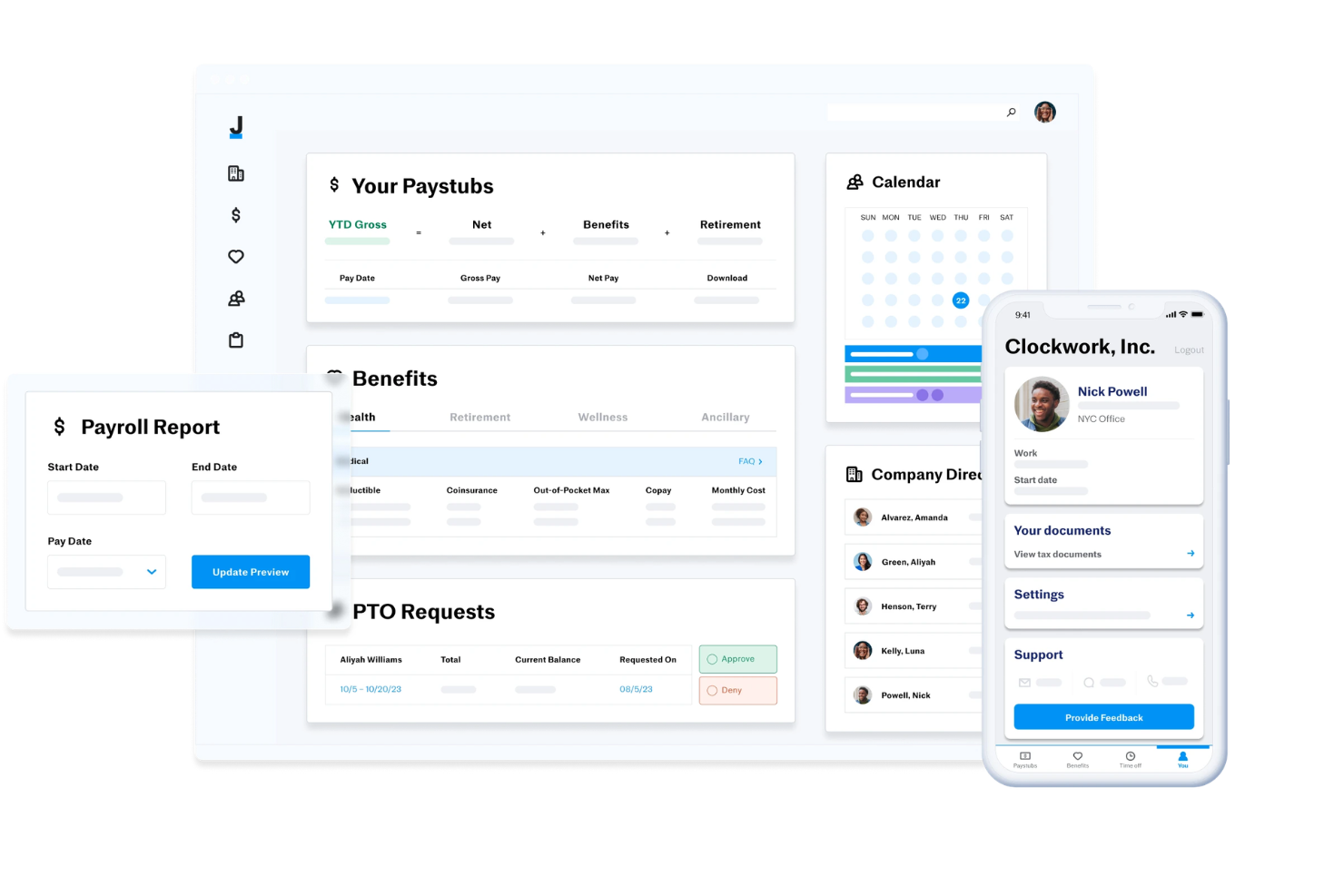
Justworks is an HRIS platform that combines payroll, benefits administration, compliance management, time tracking, and employee self-service tools for businesses managing HR processes in one system.
Who Is Justworks Best For?
Justworks is a good fit for small to midsize businesses that need a unified HRIS for payroll, benefits, and compliance across multiple states.
Why I Picked Justworks
I picked Justworks as one of the best because I can manage time tracking directly within the HRIS, which keeps payroll and attendance data in sync. My team uses the built-in time tracking to monitor hours, approve timesheets, and ensure accurate pay runs. I like that I don’t have to rely on third-party tools for tracking employee hours—everything is handled in one place.
Justworks Key Services
- Automated payroll processing: Run payroll for salaried and hourly employees with automated tax filings.
- Benefits administration: Manage health insurance, 401(k), and other employee benefits from one dashboard.
- Multi-state compliance tools: Access resources and support for handling HR compliance across different states.
- HR document management: Store, organize, and share HR documents securely within the platform.
Justworks Integrations
Native integrations are not clearly documented. Justworks offers an API for custom integrations.
Pros and Cons
Pros:
- Built-in HR document management and e-signatures
- Access to large-group health insurance plans
- Integrated time tracking for hourly employees
Cons:
- No built-in performance management features
- Benefits administration restricted to U.S. employees
Paycor
Best for customizable employee workflows
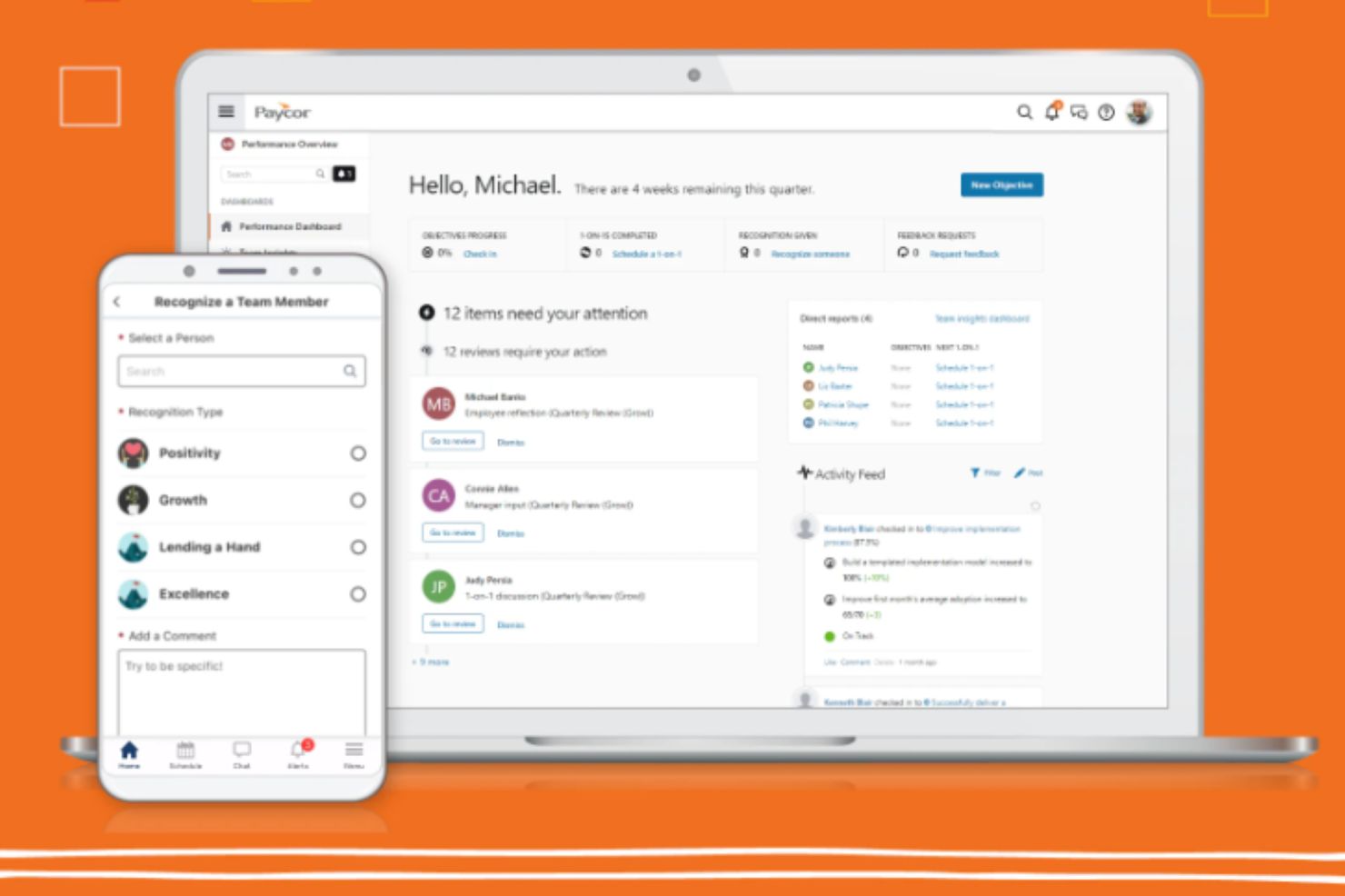
Paycor is an AI-driven HR and payroll platform that covers the full employee lifecycle, from recruiting and onboarding through performance management, scheduling, and people analytics.
Who Is Paycor Best For?
Paycor is a strong fit for midsize to enterprise HR teams that need a unified platform to manage payroll, compliance, and the full employee lifecycle without juggling multiple disconnected systems.
Why I Picked Paycor
I've included Paycor in my top picks because I love how far its configurable workflow tools go across the entire employee lifecycle. The system automation layer lets you set up automated workflows, reminders, and notifications for everyday HR tasks, so nothing falls through the cracks when a new hire joins or an employee changes roles. I also really like the Customer Sandbox, which lets you test workflow configurations and security setups without touching live data—that's a genuinely useful feature when you're rolling out process changes across a large team.
Paycor Key Features
- Paycor Assistant: An AI-powered tool that uses generative AI to summarize HR documents and surface admin insights directly within the platform.
- AI Smart Sourcing: Automatically identifies and surfaces active, passive, and diverse candidates using AI-driven candidate matching.
- Workforce analytics dashboards: Pre-built dashboards that track turnover, headcount, gender pay equity, and D&I metrics in real time.
- Performance review tools: Structured review cycles with AI-assisted sentiment analysis built into the feedback workflow.
Paycor Integrations
Paycor offers 320+ marketplace integrations through its Paycor Marketplace, including connectors to Microsoft Entra ID, Okta, Google Workspace, Greenhouse, iCIMS, Jira, ServiceNow, NetSuite, and Oracle. Zapier is not currently available as a native integration, but Paycor provides 140+ APIs through its Developer Tools for custom integrations.
Pros and Cons
Pros:
- Multi-state payroll tax auto-filing
- License and certification expiration tracking
- Recruiting through payroll in one platform
Cons:
- Modules feel disjointed across platform sections
- Reporting tools are limited and outdated

Best as AI for business
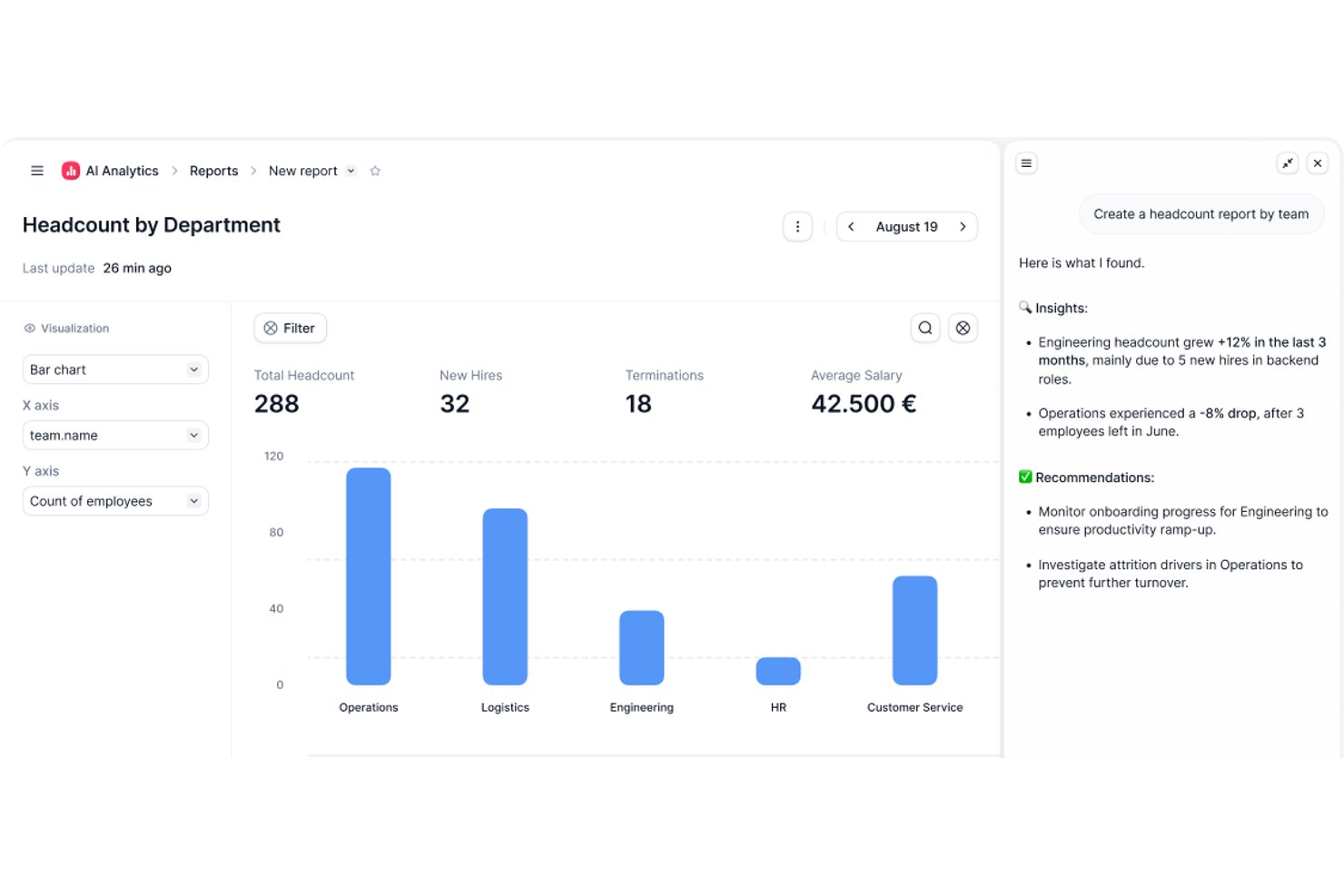
Factorial is an AI-powered HRIS that connects HR, finance, and IT operations, covering employee records, workflow automation, time tracking, recruitment, and performance management in one platform.
Who Is Factorial Best For?
Factorial suits growing SMBs and mid-market teams that want a single platform connecting HR, finance, and IT operations without managing multiple disconnected tools.
Why I Picked Factorial
I picked Factorial as one of the best because its AI for business positioning isn't just marketing language—One, its AI agent, actively works across HR, finance, and IT data to do things like answer employee questions about leave policies, flag payroll anomalies, and draft onboarding plans. I especially like that One respects each user's access permissions before responding or acting, so sensitive data stays appropriately gated. It's a genuinely cross-functional AI layer, not just a chatbot bolted onto an HR tool.
Factorial Key Features
- AI-assisted recruitment: Factorial uses AI to generate job descriptions, screen candidates, and summarize resumes within its built-in applicant tracking system.
- 360-degree performance reviews: The platform supports multi-rater feedback, review timelines, automatic participation reminders, and goal and competency tracking.
- Shift scheduling and time tracking: Factorial handles automated and rotating shift management alongside geolocation and QR-code-based time tracking.
- SaaS and IT inventory management: Factorial tracks your software licenses, flags unused ones, and manages device assignments and provisioning from a single dashboard.
Factorial Integrations
Factorial offers marketplace integrations with Microsoft Business Central, SAP Business One, Sage 100, Microsoft Power BI, Okta, Slack, LinkedIn, and Recruitee. It also supports an Open API and Zapier.
Pros and Cons
Pros:
- One answers policy questions with role-based access
- Automates leave, onboarding, and offboarding workflows
- Centralizes employee records and self-service documents
Cons:
- No documented predictive attrition-risk insights
- Workforce reporting offers limited customization
Leapsome
Best for performance reviews

Leapsome is a people enablement platform designed for organizations focused on enhancing employee performance and engagement. It delivers solutions for performance management, employee engagement, and learning, making it suitable for companies aiming to foster a culture of continuous improvement.
Why I picked Leapsome: Leapsome integrates AI across performance management, learning, and engagement to create a continuous cycle of improvement.
Its AI-powered feedback and review tools surface patterns in employee performance, helping leaders spot strengths and growth opportunities. With personalized learning paths and intelligent goal alignment, Leapsome ensures teams stay productive, engaged, and future-ready.
Standout features & integrations:
Features include AI-driven performance reviews with customizable cycles and 360-degree feedback, making evaluations more data-informed and fair. Its intelligent goal-setting and tracking tools align employee efforts with company objectives, while AI-powered engagement surveys reveal morale trends and recommend focus areas. The learning module uses AI to create personalized development plans, addressing skill gaps and fostering continuous growth.
Integrations include Slack, Microsoft Teams, Google Workspace, BambooHR, Personio, Okta, Workday, Greenhouse, LinkedIn, and Microsoft Outlook.
Pros and Cons
Pros:
- Flexible feedback options
- Effective goal tracking
- Customizable review cycles
Cons:
- Requires ongoing user training
- Initial setup complexity

Best for AI-powered HR automation

Paylocity is an AI-powered HRIS platform that brings together payroll, benefits administration, time tracking, talent management, and analytics in one system.
Who Is Paylocity Best For?
Paylocity is a strong fit for mid-sized to large organizations looking for a unified HR and payroll platform with built-in AI capabilities.
Why I Picked Paylocity
Paylocity earns its spot as one of the best on my shortlist because of how deeply AI is woven into the day-to-day HR workflow rather than bolted on as a separate module. I particularly like the AI-powered retention playbook, which surfaces at-risk employees, flags the top risk factors, and generates research-backed action plans—so my team isn't just looking at turnover data after the fact, we're acting on it proactively. I also find the AI Assistant genuinely useful: it handles context-aware, self-service queries from employees using company-specific data, which cuts down on the volume of repetitive HR tickets my team fields. The intelligent scheduling feature, which predicts staffing needs based on historical data and sales goals, is another area where Paylocity's AI does real work rather than just surfacing dashboards.
Paylocity Key Features
- Payroll readiness dashboard: Highlights critical tasks before processing and runs 40+ automated audits to flag potential errors like unexpected pay spikes before you submit payroll.
- Benefits decision support: Gives employees personalized plan recommendations based on their individual preferences and situation, reducing costly elections and open enrollment questions to HR.
- 360-degree performance reviews: Collects multi-source feedback from peers, managers, and direct reports, with built-in sentiment analysis and compensation benchmarks to support data-driven evaluations.
- Automated onboarding checklists: Assigns role-, team-, or location-specific onboarding tasks automatically, with real-time tracking and integrated data flow across recruiting, HR, and payroll.
Paylocity Integrations
Paylocity offers hundreds of native integrations, including Microsoft Entra, Google Workspace, Okta, Indeed, Checkr, Toast, Relias, Aeqium, Branch, Crunchtime, and Blissbook. An API is available for custom integrations.
Pros and Cons
Pros:
- Easy-to-use, mobile-friendly interface
- Delivers predictive analytics and insights
- Automates payroll and HR workflows
Cons:
- Pricing may stretch small budgets
- Advanced setup can take time
New Product Updates from Paylocity

Paylocity Expands Expense and Purchase Request Tools
Paylocity adds connected personal cards, smarter expense categorization, and a streamlined purchase request experience. This reduces manual entry and helps finance teams manage expenses and approvals more efficiently. For more information, visit Paylocity’s official site.
 .
.
HiBob
Best with AI-powered in-platform assistants
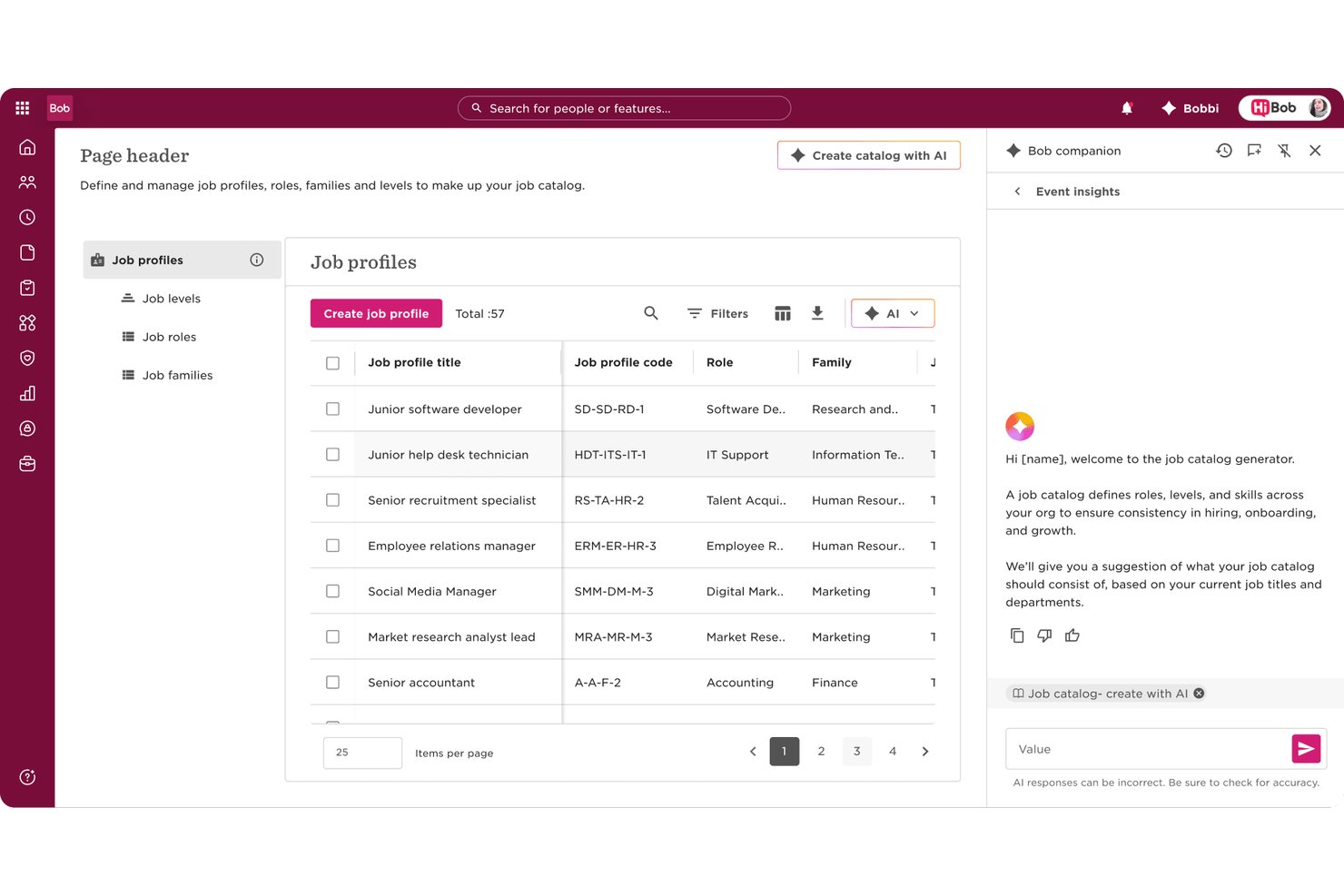
HiBob is an AI-native HRIS that brings together employee records, payroll, performance, compensation, and workforce planning in one platform, with embedded agentic AI and a conversational assistant built across every module.
Who Is HiBob Best For?
HiBob is a strong fit for mid-market companies scaling across multiple geographies who need a single people platform that connects HR, payroll, and workforce planning.
Why I Picked HiBob
HiBob earns its spot as one of the best on my shortlist because the AI isn't a single bolt-on feature. I love that Bob Companion runs as a central conversational interface across the entire platform, and behind it sits a network of 12 specialized agents. In practice, that means I can use the Compensation Agent to surface pay insights, the Performance Agent to draft review content, and the Payroll Agent to flag discrepancies, all without switching tools or screens.
HiBob Key Features
- Skills intelligence engine: AI auto-maps employee skills from resumes, projects, and reviews to support workforce planning.
- Sentiment and engagement analytics: Surveys and feedback are analyzed in real time to surface morale trends and turnover risk.
- Global compliance certifications: Holds ISO 27001, SOC 2, ISO 42001, and ensures GDPR/HIPAA alignment for secure, global HR data.
- Configurable sandbox environment: Lets admins test workflows, settings, and integrations before rolling changes out to employees.
HiBob Integrations
HiBob offers native integrations with Greenhouse, Okta, Slack, Microsoft 365, Google Workspace, BambooHR, ADP, and more. An API is available for custom integrations.
Pros and Cons
Pros:
- Sentiment AI surfaces flight risk in real time
- Skills intelligence auto-maps workforce capabilities from data
- Bob Companion spans every HR module natively
Cons:
- Payroll features vary significantly by region
- Reporting customization limited without admin configuration

Sloneek
Best for AI-driven performance management

Sloneek is an AI-powered HRIS platform that covers employee records, attendance tracking, document management, performance management, and workflow automation for HR teams looking for advanced digital tools.
Who Is Sloneek Best For?
Sloneek is a good fit for small to mid-sized companies that want a modern, AI-powered HRIS without the complexity of enterprise-grade systems.
Why I Picked Sloneek
I picked Sloneek as one of the best because I love how deeply AI is woven into its performance management tools. When a new role opens up, I can use the AI to generate skill sets, OKR sub-goals, and evaluation questionnaires for that position in seconds. The 360° feedback module also uses AI to generate questionnaires and automate evaluation recommendations, covering everything from soft skills to leadership across 90°, 180°, and full 360° configurations. I also rely on the competency evaluation dashboard to track how individual skill sets evolve over time, which makes development conversations much more grounded in actual data.
Sloneek Key Features
- People analytics dashboard: View pre-built charts covering headcount, turnover, absenteeism, and skills distribution across your organization.
- AI-powered ATS: Automatically import and parse CVs in bulk, rank candidates by fit, and generate job offers and interview questions using AI.
- Absence and attendance management: Configure working hours, absence types, approval workflows, and attendance terminals for each employee.
- Onboarding checklists: Build and assign customizable onboarding task lists to ensure every new hire completes the right steps in the right order.
Sloneek Integrations
Sloneek offers native integrations with Google Workspace, Microsoft 365, Slack, and Zapier. An API is available for custom integrations.
Pros and Cons
Pros:
- Strong employee engagement features
- AI-powered analytics and automation
- Comprehensive performance management tools
Cons:
- Limited public user review data
- Pricing available upon request
ChartHop
Best for AI-driven workforce planning
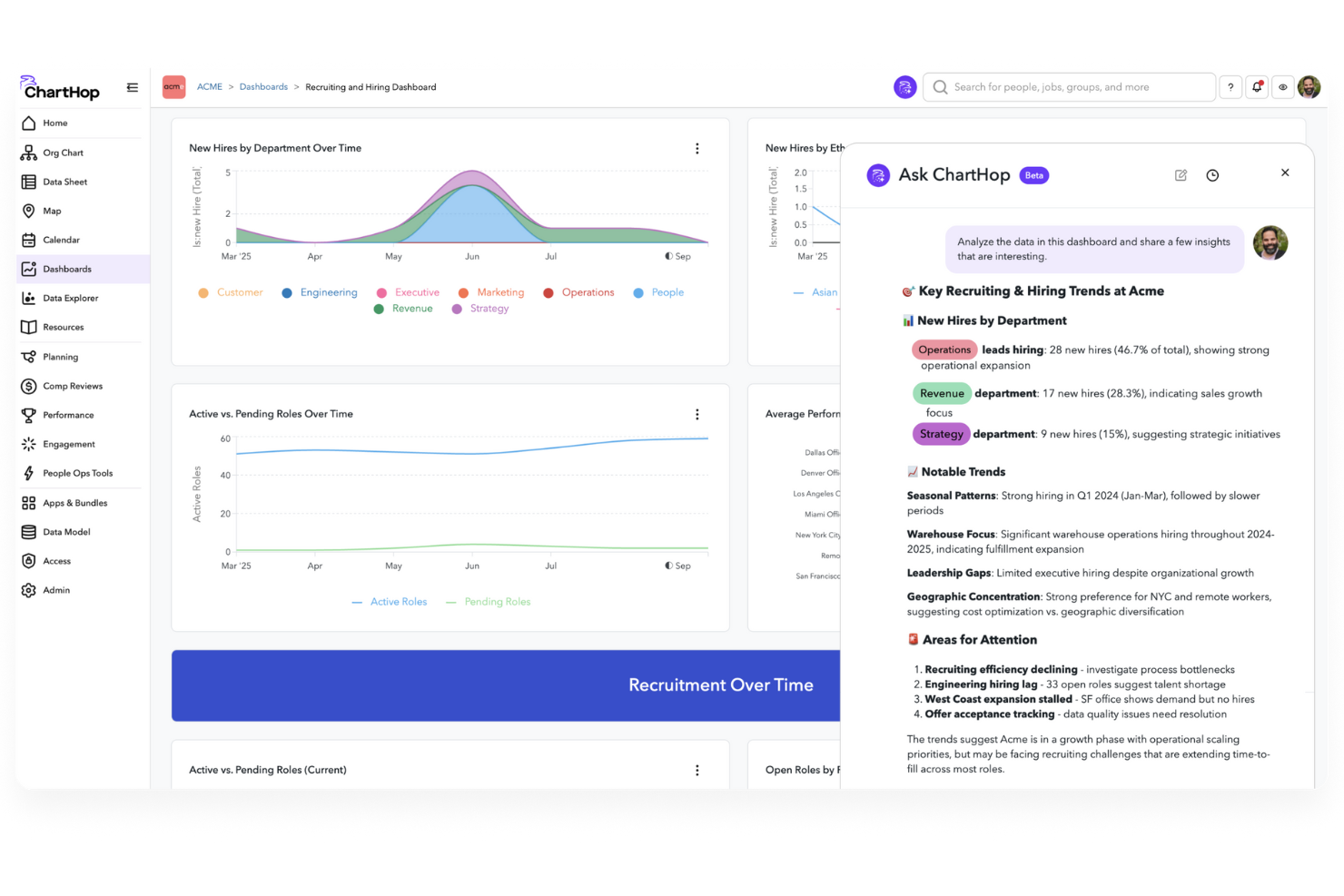
ChartHop is an AI-powered HRIS platform that brings together org charting, people analytics, workforce planning, and employee data management in one system.
Who Is ChartHop Best For?
ChartHop is a good fit for mid-size to enterprise HR teams that need a centralized platform for headcount planning, org design, and people analytics.
Why I Picked ChartHop
ChartHop earns its spot as one of the best on my shortlist because of how deeply AI is woven into its workforce planning workflows—not just as a reporting layer, but as an active part of how decisions get made. I particularly like the visual scenario modeling in the Headcount Planning module, where you can drag and drop roles on an org chart and get instant AI analysis of budget impact and team dynamics before a single hire is approved. The AI Pro module takes this further, letting my team describe a workforce action in plain language and have ChartHop execute it—building dashboards, sending notifications, or updating records—without any manual back-and-forth. What makes this genuinely useful is that the AI reasons across people data, compensation, performance, and even business data from tools like Salesforce, so headcount decisions aren't made in a vacuum.
ChartHop Key Features
- Time off management: Employees request time off directly in ChartHop, managers approve from ChartHop or Slack, and admins configure custom approval workflows for different policies.
- Onboarding and offboarding workflows: Build custom forms, tasks, emails, and automated survey triggers to manage the new hire and exit experience end-to-end.
- Compensation cycle configuration: Set up comp cycles with flexible budgets, compensation bands, approval workflows, and manager-facing dashboards that display real-time budget impact.
- 360-degree performance reviews: Configure review cycles with 15 question types, peer feedback, 1:1 notes, and goal tracking, with completion monitoring at the manager level.
ChartHop Integrations
ChartHop offers native integrations with ADP Workforce Now, BambooHR, Greenhouse, Gusto, Workday, SAP SuccessFactors, Paylocity, Lever, QuickBooks, and UKG. An API is available for custom integrations.
Pros and Cons
Pros:
- Strong integration capabilities with various HRIS systems.
- Advanced planning tools for headcount and restructuring flexibility.
- Dynamic org charting supports real-time structural visualization.
Cons:
- The breadth of configurable options can result in complexity and a steeper learning curve for admins.
- Lengthy implementation process requiring significant resources.
New Product Updates from ChartHop
ChartHop Adds Role and Filter Controls for Ask ChartHop
AI Pro customers can now set access controls for Ask ChartHop in AI settings, restricting who can use the assistant by role or filter criteria. For more information, visit ChartHop's official site.
 .
.
Workday
Best for finance integration

Workday is an AI-powered HRIS platform that brings together core HR, payroll, talent management, workforce analytics, and finance features in a single cloud-based system.
Who Is Workday Best For?
Workday is a strong fit for large enterprises that need HR and financial management running on a single, unified platform.
Why I Picked Workday
Workday earns its spot on my shortlist because it's one of the few HRIS platforms where HR and finance genuinely share the same data core—not just a connection between two separate systems. I like that workforce planning and financial planning run on the same unified platform, so when headcount changes, the financial impact updates in real time without any manual reconciliation. Workday's AI-powered anomaly detection in financial processes also means my team can catch discrepancies before they become audit issues.
Workday Key Features
- HiredScore AI for recruiting: AI-powered candidate screening and sourcing that surfaces relevant talent and pushes personalized internal mobility opportunities to existing employees.
- Workday Skills Cloud: An AI-driven skills intelligence foundation embedded across the HCM platform that maps workforce skills and identifies gaps across every stage of the talent lifecycle.
- AI-driven scheduling and demand forecasting: Automated workforce scheduling that matches employee preferences with business demand, including time tracking and absence management in a single hub.
- Workday Prism Analytics: A data hub that pulls in external transactional and high-volume data alongside HR data for self-service reporting, augmented analytics, and pay equity analysis.
Workday Integrations
Native integrations are not currently listed. The tool supports integrations via API for custom connections.
Pros and Cons
Pros:
- Industry-specific solutions
- Talent management capabilities
- Comprehensive workforce planning
Cons:
- Limited customization options
- Complex implementation process

Personio
Best for startups

Personio is an AI-powered HRIS platform that brings together core HR management, recruiting, onboarding, time tracking, and payroll integrations for small and midsize businesses.
Who Is Personio Best For?
Personio is a strong fit for startups and growing SMBs that need to build out their HR function from the ground up without a large dedicated HR team.
Why I Picked Personio
Personio earns its spot on my shortlist because it's purpose-built for companies that are building their HR function from scratch. I love that the workflow automation builder comes loaded with best-practice templates, so a lean HR team of one or two people can set up onboarding, offboarding, and approval flows without needing to design every process from the ground up. The Personio Assistant is also a genuine differentiator—you can type a natural-language question like "what's our turnover rate by department this quarter?" and get an AI-generated answer with a downloadable chart in seconds, which is exactly what a startup HR lead needs when reporting to leadership without a dedicated analyst.
Personio Key Features
- Job posting distribution: Post open roles across 800+ job channels directly from Personio to build your candidate pipeline.
- Absence management: Employees request time off and select substitutes in one click, with automatic holiday balance calculations updated in real time.
- People analytics dashboard: Build custom reports from templates or from scratch, with role-based access controls to share the right data with the right stakeholders.
- Employee self-service portal: Employees can access documents, check remaining leave, and update personal information without going through HR.
Personio Integrations
Personio offers native integrations with DATEV, Slack, Microsoft Teams, Google Workspace, Okta, Greenhouse, LinkedIn, DocuSign, and Workable. An API is available for custom integrations.
Pros and Cons
Pros:
- Supports document management
- Effective performance tracking
- Comprehensive HR functionalities
Cons:
- Setup can be time-consuming
- Limited advanced analytics
Andre AI-HRIS
Her er noen flere AI-HRIS-alternativer som ikke kom med på kortlisten min, men som likevel er verdt å se nærmere på:
- ADP
For payroll processing
- SAP SuccessFactors
For talent management
- UKG
For workforce management
- Oracle Cloud HCM
For global enterprises
- BambooHR
For user-friendly interface
- Gusto
For small businesses
- Lattice AI
For employee engagement
- Sense
For recruitment automation
- Deel HR
For complex, multi-country scenarios
- TalentHR
With custom people analytics dashboards
- Keka HR
For real-time AI-driven HR data sync
- Cezanne
For mid-sized businesses
- Humaans
For rapid HR setup


How I Evaluate AI HRIS Solutions
Every tool on this list needs to go beyond slapping an AI label on basic automation—I look for platforms where AI actually reduces admin load, surfaces actionable workforce insights, or handles employee queries without human intervention. I split my evaluation into core functionality every AI HRIS must cover and the differentiating factors that separate good options from great ones.
Core Functionality (Table Stakes For This List)
When I'm selecting tools for my list, I rank each one on a scale from 0 (does not offer the functionality) to 5 (excels in this area) for each core functionality listed below. Then, I calculate the tool's total score into a percentage. Each tool needs to achieve a minimum total score of 65% to be considered for inclusion.
- Centralized Employee Database: I check whether the platform serves as a true single source of truth—storing profiles, org charts, employment history, and documents with a full audit trail.
- AI-Powered Workflow Automation: The AI should handle tasks like auto-routing approval chains, generating onboarding checklists, or pre-filling forms—not just basic if/then triggers.
- Conversational AI Assistant: I evaluate whether employees can ask questions about PTO balances or benefits eligibility through a chatbot and get accurate, policy-grounded answers.
- Predictive People Analytics: Dashboards with AI-generated attrition forecasts or engagement trend alerts matter here, not just static headcount reports that any legacy HRIS offers.
- Core HR Module Coverage: A platform should cover onboarding, time-off, benefits, and payroll—whether natively or through tight integrations, like Rippling's unified approach or BambooHR's partner ecosystem.
- Compliance & Document Intelligence: I look for AI that can parse uploaded tax forms or contracts, flag missing fields, and alert admins to regulatory deadlines across different jurisdictions.
Once I have a list of tools that meet the criteria, I consider what sets each platform apart.
Differentiating Factors (What Sets Vendors Apart)
Here's how I compare and contrast different vendors:
Standout Features
A skills intelligence engine is a major differentiator—platforms that auto-tag and map employee competencies from performance data and project history make internal mobility and succession planning far easier to manage. I also evaluate anomaly and bias detection, where AI flags pay equity gaps or hiring pattern imbalances before they become real compliance risks. Generative HR content stands out too, especially when HR teams can draft role-specific job descriptions or personalized offer letters in seconds instead of hours.
Beyond Features
AI governance matters a lot in this space—I check whether vendors offer clear model explainability, human-in-the-loop controls, and data residency options, since HR data is some of the most sensitive in any organization. Integration depth is another big factor. A platform that connects natively with your ATS, payroll provider, and collaboration tools like Slack or Teams reduces manual data transfers that create errors. I also evaluate implementation timelines and whether vendors provide guided migration tooling, because a slow rollout can stall AI adoption across your HR team.
Slik velger du AI HRIS
Det er lett å gå seg vill i lange funksjonslister og kompliserte prismodeller. For å hjelpe deg med å holde fokus når du går gjennom din unike prosess for valg av programvare, får du her en sjekkliste over faktorer du bør ha i tankene:
| Faktor | Hva du bør vurdere |
|---|---|
| Skalerbarhet | Kan programvaren vokse sammen med virksomheten din? Vurder om den kan håndtere flere ansatte etter hvert som teamet ditt utvides. Se etter alternativer som støtter ulike virksomhetsstørrelser. |
| Integrasjoner | Fungerer den godt sammen med verktøyene du allerede bruker? Sjekk kompatibiliteten med viktig programvare, for eksempel lønns-, regnskaps- og kommunikasjonsplattformer. |
| Tilpasningsmuligheter | Kan du tilpasse den til prosessene dine? Undersøk om du kan justere arbeidsflyter og rapporter slik at de samsvarer med HR-behovene dine, uten unødvendig kompleksitet. |
| Brukervennlighet | Er den brukervennlig for teamet ditt? Sørg for at grensesnittet er intuitivt og krever minimalt med opplæring for å komme i gang. |
| Implementering og oppstart | Hvor raskt kan du komme i gang? Vurder tiden det tar å sette opp løsningen, hvilke opplæringsressurser som er tilgjengelige, og eventuell støtte under overgangen. |
| Kostnad | Er prisen tilpasset budsjettet ditt? Sammenlign kostnaden med funksjonene som tilbys, og se etter skjulte gebyrer eller langsiktige avtaler. |
| Sikkerhetstiltak | Beskytter den medarbeiderdata? Sørg for at den har kryptering og tilgangskontroller, og at den overholder personvernregler. |
| Tilgjengelig kundestøtte | Er det lett å få hjelp når det trengs? Se etter kundestøttealternativer som er tilgjengelige døgnet rundt, og vurder kvaliteten på kundeservicen som tilbys. |
Hva er AI HRIS?
AI HRIS er et digitalt verktøy som bruker kunstig intelligens til å administrere informasjonssystemer for personalforvaltning. HR-medarbeidere, ledere og rekrutterere bruker vanligvis disse verktøyene for å forbedre effektiviteten og beslutningstakingen.
Funksjoner for tidsregistrering, lønnsbehandling og medarbeiderengasjement gjør det enklere å administrere arbeidsstyrkedata og støtte HR-oppgaver. Alt i alt forenkler disse verktøyene HR-prosessene og øker produktiviteten.
Funksjoner i AI HRIS
Ved valg av AI HRIS bør du se etter følgende nøkkelfunksjoner:
- Tidsregistrering: Automatiserer registreringen av de ansattes arbeidstimer, noe som gjør lønnsbehandlingen mer nøyaktig og effektiv.
- Lønnsbehandling: Forenkler lønnsberegninger og innsending av skatteopplysninger, og sikrer punktlige og nøyaktige utbetalinger.
- Medarbeiderengasjement: Tilbyr verktøy for tilbakemeldinger og kommunikasjon som styrker trivsel og produktivitet.
- Rekrutteringsadministrasjon: Effektiviserer ansettelsesprosesser med kandidatsporing og automatisert kommunikasjon.
- Prestasjonsstyring: Sporer og vurderer de ansattes prestasjoner for å støtte utvikling og målsetting.
- Tilpassbare arbeidsflyter: Gjør det mulig å tilpasse HR-prosesser til virksomhetens spesifikke behov og preferanser.
- Avansert analyse: Gir innsikt i arbeidsstyrkedata som grunnlag for strategiske HR-beslutninger.
- Etterlevelsesstyring: Sikrer overholdelse av juridiske krav med innebygde verktøy for regelverksetterlevelse.
- Administrasjon av personalgoder: Håndterer ansattgoder og gjør registrering og oppfølging enkelt.
- Selvbetjening for ansatte: Gir de ansatte mulighet til å administrere egen informasjon og egne oppgaver, noe som reduserer arbeidsbelastningen i HR.
Fordeler med AI HRIS
Implementering av AI HRIS gir flere fordeler for teamet og virksomheten din. Her er noen av fordelene du kan se frem til:
- Økt effektivitet: Automatiserer repetitive oppgaver som lønnsbehandling og tidsregistrering, slik at teamet ditt får mer tid til strategiske aktiviteter.
- Bedre beslutningsgrunnlag: Avansert analyse gir innsikt i trender i arbeidsstyrken og hjelper deg med å ta informerte HR-beslutninger.
- Bedre etterlevelse: Innebygde verktøy for etterlevelse sikrer at virksomheten oppfyller juridiske krav og reduserer risikoen for sanksjoner.
- Økt medarbeiderengasjement: Funksjoner for tilbakemeldinger og kommunikasjon styrker trivsel og produktivitet i teamet.
- Effektivisert rekruttering: Verktøy for rekrutteringsadministrasjon forenkler ansettelsesprosessene og gjør det enklere å tiltrekke seg og beholde talenter.
- Kostnadsbesparelser: Reduserer behovet for manuelle prosesser og sparer tid og ressurser i HR-arbeidet.
- Fleksibilitet og skalerbarhet: Tilpassbare arbeidsflyter tilpasses virksomhetens behov og støtter vekst og endring.
Kostnader og priser
Ved valg av AI HRIS er det viktig å forstå de ulike prismodellene og abonnementene som er tilgjengelige. Kostnadene varierer basert på funksjoner, teamstørrelse, tilleggstjenester og mer. Tabellen nedenfor oppsummerer vanlige abonnementer, gjennomsnittsprisene deres og typiske funksjoner som er inkludert i AI HRIS-løsninger:
Sammenligning av abonnementer
| Abonnementstype | Gjennomsnittspris | Vanlige funksjoner |
|---|---|---|
| Gratisabonnement | $0 | Grunnleggende tidsregistrering, grunnleggende rapportering og begrenset brukerstøtte. |
| Personlig abonnement | $5-$25 per bruker per måned | Avansert tidsregistrering, lønnsbehandling og selvbetjening for ansatte. |
| Bedriftsabonnement | $30-$50 per bruker per måned | Rekrutteringsadministrasjon, prestasjonsstyring og administrasjon av personalgoder. |
| Virksomhetsabonnement | $55-$100 per bruker per måned | Tilpassbare arbeidsflyter, avansert analyse og verktøy for etterlevelsesstyring. |
Vanlige spørsmål om AI HRIS
Her er noen svar på vanlige spørsmål om AI HRIS:
Hvilken rolle spiller AI i HRIS?
AI i HRIS bidrar til å analysere store datamengder raskt og nøyaktig. Det gir HR-fagfolk innsikt fra ansattopplysninger, resultatmålinger og tilbakemeldingsundersøkelser. Denne funksjonen støtter informerte beslutninger og strategisk planlegging, noe som gjør HR-prosessene mer effektive.
Hvilke begrensninger har AI innen HR?
AI innen HR kan møte utfordringer som skjevheter i algoritmene, ettersom AI-verktøy lærer av historiske data som kan inneholde menneskelige skjevheter. Dette kan føre til skjeve resultater som påvirker ansettelser og evalueringer. Det er avgjørende å overvåke og justere AI-systemer for å redusere disse risikoene og sikre rettferdighet.
Hvordan kan AI HRIS forbedre rekrutteringsprosesser?
AI HRIS kan automatisere repetitive oppgaver i rekrutteringen, for eksempel gjennomgang av CV-er og planlegging av intervjuer. Det kan også tilby prediktiv analyse for å identifisere de beste kandidatene basert på tidligere ansettelsesdata. Dette fremskynder rekrutteringsprosessen og forbedrer kvaliteten på ansettelsene.
Hvordan forbedrer AI HRIS medarbeiderengasjementet?
AI HRIS bruker datadrevet innsikt til å tilpasse medarbeideropplevelser, og tilbyr målrettede utviklingsmuligheter og tilbakemeldinger. Det kan også automatisere rutineoppgaver, slik at HR får mer tid til å fokusere på tiltak for medarbeiderengasjement. Dette fører til en mer motivert og tilfreds arbeidsstyrke.
Kan AI HRIS bidra til samsvarsarbeid?
Ja, AI HRIS kan bidra til samsvar ved å automatisere oppgaver knyttet til overvåking og rapportering. Det sporer endringer i regelverket og sikrer at virksomheten overholder juridiske krav. Dette reduserer risikoen for sanksjoner ved manglende samsvar og sørger for at HR-praksisen holdes oppdatert.
Hva bør jeg vurdere når jeg implementerer AI HRIS?
Når du implementerer AI HRIS, bør du evaluere de nåværende HR-prosessene og identifisere områder som kan forbedres. Vurder løsningens skalerbarhet, integrasjonsmuligheter med eksisterende systemer og nivået på støtten som tilbys. Vurder også hvilken opplæring som kreves for å sikre en smidig overgang.